Home » 2012 (Page 2)
Yearly Archives: 2012
Kicking It Into Overdrive With NVelocity
A few weeks ago, I was tasked with improving one of our Healthcare Specific Website Modules, and felt compelled to share how I used NVelocity to replace tokens set in a Rich Text field — $name and $date are examples of Sitecore tokens. But, before I dive into some code, I will briefly touch upon what NVelocity is.
What exactly is NVelocity? NVelocity is a .NET template engine for replacing string tokens with code references. In other words, NVelocity is a framework that will replace tokens with values returned from code snippets given to the template engine.
There a many examples of using NVelocity in Sitecore across the web. Sitecore provides one such example in this article. This article — although a bit dated since it was written for Sitecore v5.1 — provides code examples that could still be used today.
Alistair Deneys also wrote a good article about NVelocity here. Deneys posits Sitecore no longer uses NVelocity for token replacement. However, three years after Deneys’ penned his article, code within Sitecore.Kernel still references it. Here is an example of it being used within Sitecore.Kernel (v6.5.0 rev. 111123):
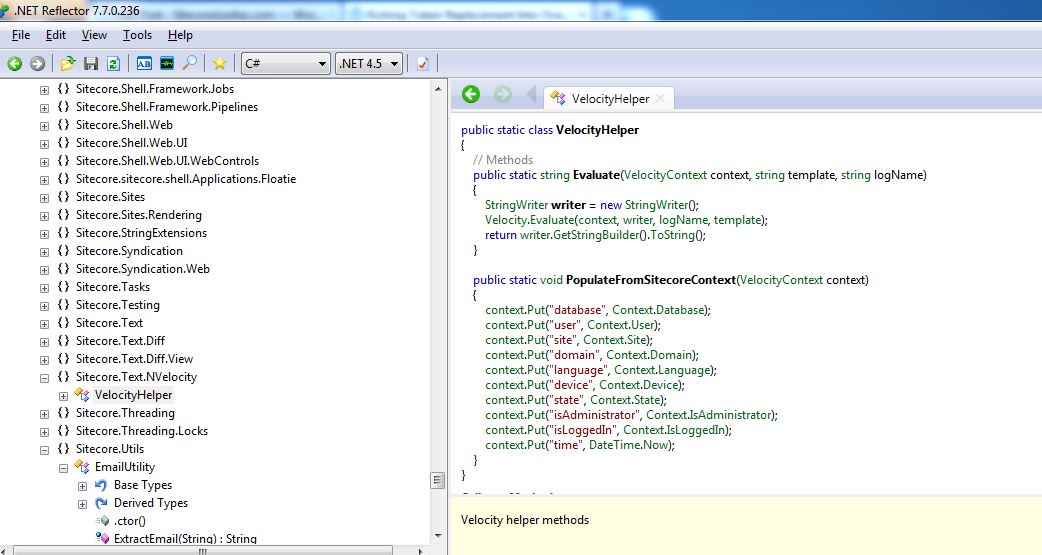
Sitecore has created its own API around NVelocity. Sitecore’s wrapper API is defined within Sitecore.NVelocity.dll. In order to use the following code, you must reference this assembly.
Now, let’s get our hands dirty with some code.
First, I created an adapter to encapsulate Sitecore’s static Velocity engine object for doing token replacements.
using System;
using System.Collections.Generic;
using System.IO;
using System.Linq;
using System.Text;

using NVelocity.Context;

namespace Sitecore.Sandbox.Utilities.StringUtilities.Base
{
    public interface ITokenContextEvaluator
    {
        bool Evaluate(IContext context, TextWriter writer, string logTag, Stream instream);

        bool Evaluate(IContext context, TextWriter out_Renamed, string logTag, string instring);

        bool Evaluate(IContext context, TextWriter writer, string logTag, TextReader reader);
    }
}
using System;
using System.Collections.Generic;
using System.IO;
using System.Linq;
using System.Text;

using NVelocity.App;
using NVelocity.Context;

using Sitecore.Sandbox.Utilities.StringUtilities.Base;

namespace Sitecore.Sandbox.Utilities.StringUtilities
{
    public class TokenContextEvaluator : ITokenContextEvaluator
    {
        private TokenContextEvaluator()
        {
            Initailize();
        }

        private void Initailize()
        {
            Velocity.Init();
        }

        public bool Evaluate(IContext context, TextWriter writer, string logTag, Stream instream)
        {
            return Velocity.Evaluate(context, writer, logTag, instream);
        }

        public bool Evaluate(IContext context, TextWriter out_Renamed, string logTag, string instring)
        {
            return Velocity.Evaluate(context, out_Renamed, logTag, instring);
        }

        public bool Evaluate(IContext context, TextWriter writer, string logTag, TextReader reader)
        {
            return Velocity.Evaluate(context, writer, logTag, reader);
        }

        public static ITokenContextEvaluator CreateNewTokenContextEvaluator()
        {
            return new TokenContextEvaluator();
        }
    }
}
Next, I created a class that defines an one-to-one mapping between a string token and an object reference — the value of the code given to the template engine.
using System;
using System.Collections.Generic;
using System.Linq;
using System.Text;

using Sitecore.Diagnostics;

namespace Sitecore.Sandbox.Utilities.StringUtilities.DTO
{
    public class TokenKeyValue
    {
        public string Key { get; private set; }
        public object Value { get; private set; }

        public TokenKeyValue(string key, object value)
        {
            SetKey(key);
            SetValue(value);
        }

        private void SetKey(string key)
        {
            Assert.ArgumentNotNullOrEmpty(key, "key");
            Key = key;
        }

        private void SetValue(object value)
        {
            Value = value;
        }
    }
}
Then I created a Data transfer object to pass an instance of the adapter defined above, a collection of token mappings and an instance of NVelocity’s IContext to the main Tokenator class below — all this being done this way to allow for dependency injection.
using System;
using System.Collections.Generic;
using System.Linq;
using System.Text;

using NVelocity.Context;

using Sitecore.Sandbox.Utilities.StringUtilities.Base;

namespace Sitecore.Sandbox.Utilities.StringUtilities.DTO
{
    public class TokenatorSettings
    {
        public ITokenContextEvaluator TokenContextEvaluator { get; set; }

        public IContext TokenContext { get; set; }

        public IEnumerable<TokenKeyValue> TokenKeyValues { get; set; }

        public TokenatorSettings()
        {
        }
    }
}
With all the pieces above floating around, it’s now time to glue them all together in the main Tokenator class:
using System;
using System.Collections.Generic;
using System.Linq;
using System.Text;

namespace Sitecore.Sandbox.Utilities.StringUtilities.Base
{
    public interface ITokenator
    {
        string ReplaceTokens(string value);
    }
}
using System;
using System.Collections.Generic;
using System.IO;
using System.Linq;
using System.Text;

using Sitecore.Diagnostics;
using Sitecore.Text.NVelocity;

using NVelocity;
using NVelocity.App;
using NVelocity.Context;

using Sitecore.Sandbox.Utilities.StringUtilities.Base;
using Sitecore.Sandbox.Utilities.StringUtilities.DTO;

namespace Sitecore.Sandbox.Utilities.StringUtilities
{
    public class Tokenator : ITokenator
    {
        private const string LogName = "Tokenator Replacement Action";

        private TokenatorSettings TokenatorSettings { get; set; }

        private Tokenator(IEnumerable<TokenKeyValue> tokenKeyValues)
            : this(CreateNewTokenatorSettingsWithDefaults(tokenKeyValues))
        {
        }

        private Tokenator(TokenatorSettings tokenatorSettings)
        {
            SetTokenatorSettings(tokenatorSettings);
            Initialize();
        }

        private void SetTokenatorSettings(TokenatorSettings tokenatorSettings)
        {
            AssertTokenatorSettings(tokenatorSettings);
            TokenatorSettings = tokenatorSettings;
        }

        private void AssertTokenatorSettings(TokenatorSettings tokenatorSettings)
        {
            Assert.ArgumentNotNull(tokenatorSettings, "tokenatorSettings");
            Assert.ArgumentNotNull(tokenatorSettings.TokenContextEvaluator, "tokenatorSettings.TokenContextEvaluator");
            Assert.ArgumentNotNull(tokenatorSettings.TokenContext, "tokenatorSettings.TokenContext");
            Assert.ArgumentNotNull(tokenatorSettings.TokenKeyValues, "tokenatorSettings.TokenKeyValues");
        }

        private void Initialize()
        {
            foreach (TokenKeyValue tokenKeyValue in TokenatorSettings.TokenKeyValues)
            {
                TokenatorSettings.TokenContext.Put(tokenKeyValue.Key, tokenKeyValue.Value);
            }
        }

        public string ReplaceTokens(string value)
        {
            string tokensReplaced = string.Empty;

            using (StringWriter stringWriter = new StringWriter())
            {
                TokenatorSettings.TokenContextEvaluator.Evaluate(TokenatorSettings.TokenContext, stringWriter, LogName, value);
                tokensReplaced = stringWriter.ToString();
            }

            return tokensReplaced;
        }

        private void LogError(Exception exception)
        {
            Log.Error(this.ToString(), exception, this);
        }

        private static TokenatorSettings CreateNewTokenatorSettingsWithDefaults(IEnumerable<TokenKeyValue> tokenKeyValues)
        {
            return new TokenatorSettings
            {
                TokenContextEvaluator = GetDefaultTokenContextEvaluator(),
                TokenContext = GetDefaultTokenContext(),
                TokenKeyValues = tokenKeyValues
            };
        }

        private static ITokenContextEvaluator GetDefaultTokenContextEvaluator()
        {
            return StringUtilities.TokenContextEvaluator.CreateNewTokenContextEvaluator();
        }

        private static IContext GetDefaultTokenContext()
        {
            return new VelocityContext();
        }

        public static ITokenator CreateNewTokenator(IEnumerable<TokenKeyValue> tokenKeyValues)
        {
            return new Tokenator(tokenKeyValues);
        }

        public static ITokenator CreateNewTokenator(TokenatorSettings tokenatorSettings)
        {
            return new Tokenator(tokenatorSettings);
        }
    }
}
The following sublayout code was used as a test harness for my Tokenator object, and to illustrate how client code would use it.
<%@ Control Language="C#" AutoEventWireup="true" CodeBehind="Tokenator Test.ascx.cs" Inherits="Sitecore650rev120706.layouts.sublayouts.Tokenator_Test" %>
<asp:Literal ID="litTokenatorTest" runat="server" />
using System;
using System.Collections.Generic;
using System.Linq;
using System.Web;
using System.Web.UI;
using System.Web.UI.WebControls;

using Sitecore.Sandbox.Utilities.StringUtilities;
using Sitecore.Sandbox.Utilities.StringUtilities.Base;
using Sitecore.Sandbox.Utilities.StringUtilities.DTO;

namespace Sitecore650rev120706.layouts.sublayouts
{
    public partial class Tokenator_Test : System.Web.UI.UserControl
    {
        protected void Page_Load(object sender, EventArgs e)
        {
            SetLiteralText();
        }

        private void SetLiteralText()
        {
            litTokenatorTest.Text = GetTokenReplacedContent();
        }

        private string GetTokenReplacedContent()
        {
            string content = Sitecore.Context.Item["Text"];
            return ReplaceTokens(content);
        }

        private string ReplaceTokens(string content)
        {
            IEnumerable<TokenKeyValue> tokenKeyValues = GetTokenKeyValues();
            ITokenator tokenator = Tokenator.CreateNewTokenator(tokenKeyValues);
            return tokenator.ReplaceTokens(content);
        }

        private IEnumerable<TokenKeyValue> GetTokenKeyValues()
        {
            IList<TokenKeyValue> tokenKeyValues = new List<TokenKeyValue>();
            tokenKeyValues.Add(new TokenKeyValue("localtime", DateTime.Now));
            tokenKeyValues.Add(new TokenKeyValue("developer", "@mike_i_reynolds"));
            tokenKeyValues.Add(new TokenKeyValue("random", new Random().Next(10000)));
            return tokenKeyValues;
        }
    }
}
Token content in a Rich Text field:

Test output:

NVelocity is definitely a great tool to tap into and harness — especially to make content more dynamic.
However, if there is one takeaway I would like for you the reader to part with, it would be this: stay relentlessly curious, and keep on digging through the treasure troves in Sitecore’s assemblies. This article would not have been possible if I did not have a copy of .NET Reflector, Sitecore.Kernel.dll, Sitecore.NVelocity.dll and an unquenchable thirst for learning.
Happy coding!
Yes — You, Too, Can Build a Custom Field Control!
Ever since I started building websites in Sitecore over five years ago, I had an itch to build a custom Sitecore Field Control. Sadly, I never put my nose to the grindstone in doing so until a few weeks ago. Armed with .NET Reflector and the Sitecore.Kernel.dll, I sat down and finally built one. This post highlights the fruits of my endeavor.
First, let me give you a quick description on what a Sitecore Field Control is. A Sitecore Field Control is an ASP.NET Web Control that presents data set in a Sitecore field according to logic defined by the control. Sitecore offers a few Field Controls out of the box — these include Image, Link, Text, Date — and all are defined within the namespace Sitecore.Web.UI.WebControls. How to use these Field Controls is illustrated during Sitecore Developer Training and certification.
In this example, I created a custom Field Control that takes a value set within a Single-Line Text, Multi-Line Text, Rich Text, or text field — a deprecated field type used before Sitecore v5.3.1. — and wraps the value around HTML specified by client code. This HTML tag is defined by the HtmlTag attribute of the HtmlTagFieldControl below.
First, I created a new Field Control:
using System;
using System.Collections.Generic;
using System.Linq;
using System.Text;
using System.Web.UI;

using Sitecore.Collections;
using Sitecore.Web.UI.WebControls;

namespace Sitecore.Sandbox.FieldControls
{
    public class HtmlTagFieldControl : FieldControl
    {
        public string HtmlTag { get; set; }

        protected override void PopulateParameters(SafeDictionary<string> parameters)
        {
            base.PopulateParameters(parameters);

            if (!string.IsNullOrEmpty(HtmlTag))
            {
                parameters.Add("htmlTagName", HtmlTag);
            }

            foreach (string attributeName in base.Attributes.Keys)
            {
                string attributeValue = base.Attributes[attributeName];
                parameters.Add(attributeName, attributeValue);
            }
        }
    }
}
Next, I built a renderer — including a Data transfer object for passing arguments to the renderer — for the field control defined above:
using System;
using System.Collections.Generic;
using System.Linq;
using System.Text;

using Sitecore.Xml.Xsl;

namespace Sitecore.Sandbox.Renderers.Base
{
    public interface IHtmlTagRenderer
    {
        RenderFieldResult Render();
    }
}
using System;
using System.Collections.Generic;
using System.Linq;
using System.Text;
using System.Web;

using Sitecore;
using Sitecore.Collections;
using Sitecore.Data.Fields;
using Sitecore.Data.Items;
using Sitecore.Diagnostics;
using Sitecore.Xml.Xsl;

using Sitecore.Sandbox.Renderers.Base;
using Sitecore.Sandbox.Renderers.DTO;

namespace Sitecore.Sandbox.Renderers
{
    public class HtmlTagRenderer : FieldRendererBase, IHtmlTagRenderer
    {
        private const string OpenHtmlTagFormat = "<{0}>";
        private const string CloseHtmlTagFormat = "</{0}>";

        private HtmlTagRendererArgs Arguments { get; set; }

        private HtmlTagRenderer(HtmlTagRendererArgs arguments)
            : base()
        {
            SetArguments(arguments);
        }

        private void SetArguments(HtmlTagRendererArgs arguments)
        {
            Assert.ArgumentNotNull(arguments, "arguments");
            Arguments = arguments;
        }

        public virtual RenderFieldResult Render()
        {
            string fieldHtml = CreateFieldHtml();
            return new RenderFieldResult(fieldHtml);
        }

        private string CreateFieldHtml()
        {
            string openHtmlTag = GetOpenHtmlTag();
            string closeHtmlTag = GetCloseHtmlTag();

            return string.Concat(openHtmlTag, Arguments.FieldValue, closeHtmlTag);
        }

        private string GetOpenHtmlTag()
        {
            return GetTagHtml(OpenHtmlTagFormat, Arguments.HtmlTagName);
        }

        private string GetCloseHtmlTag()
        {
            return GetTagHtml(CloseHtmlTagFormat, Arguments.HtmlTagName);
        }

        private static string GetTagHtml(string tagFormat, string tagName)
        {
            if (!string.IsNullOrEmpty(tagName))
            {
                return string.Format(tagFormat, tagName);
            }

            return string.Empty;
        }

        public static IHtmlTagRenderer Create(HtmlTagRendererArgs arguments)
        {
            return new HtmlTagRenderer(arguments);
        }
    }
}
using System;
using System.Collections.Generic;
using System.Linq;
using System.Text;

namespace Sitecore.Sandbox.Renderers.DTO
{
    public class HtmlTagRendererArgs
    {
        public string HtmlTagName { get; set; }
        public string FieldName { get; set; }
        public string FieldValue { get; set; }
    }
}
Last, but not least, I defined a Render Field pipeline to glue all the pieces together — including the pivotal piece of wrapping the field’s value around the wrapper HTML tag:
using System;
using System.Collections.Generic;
using System.Linq;
using System.Text;

using Sitecore.Data.Items;
using Sitecore.Diagnostics;
using Sitecore.Pipelines.RenderField;
using Sitecore.Xml.Xsl;

using Sitecore.Sandbox.Renderers;
using Sitecore.Sandbox.Renderers.Base;
using Sitecore.Sandbox.Renderers.DTO;

namespace Sitecore.Sandbox.Pipelines.RenderField
{
    public class GetHtmlTagFieldControlHtml
    {
        private static IEnumerable<string> supportedFieldTypes = new string[] { "text", "rich text", "single-line text", "multi-line text" };

        protected virtual IHtmlTagRenderer CreateRenderer(HtmlTagRendererArgs htmlTagRendererArgs)
        {
            return HtmlTagRenderer.Create(htmlTagRendererArgs);
        }

        public void Process(RenderFieldArgs renderFieldArgs)
        {
            if (CanFieldBeProcessed(renderFieldArgs))
            {
                SetRenderFieldArgsResults(renderFieldArgs);
            }
        }

        private bool CanFieldBeProcessed(RenderFieldArgs renderFieldArgs)
        {
            string fieldTypeKey = renderFieldArgs.FieldTypeKey.ToLower();
            return supportedFieldTypes.Contains(fieldTypeKey);
        }

        private void SetRenderFieldArgsResults(RenderFieldArgs renderFieldArgs)
        {
            RenderFieldResult renderFieldResult = GetRenderFieldResult(renderFieldArgs);
            SetRenderFieldArgsResultHtmlProperties(renderFieldResult, renderFieldArgs);
        }

        private RenderFieldResult GetRenderFieldResult(RenderFieldArgs renderFieldArgs)
        {
            HtmlTagRendererArgs htmlTagRendererArgs = CreateHtmlTagRendererArgs(renderFieldArgs);
            IHtmlTagRenderer htmlTagRenderer = CreateRenderer(htmlTagRendererArgs);
            return htmlTagRenderer.Render();
        }

        private HtmlTagRendererArgs CreateHtmlTagRendererArgs(RenderFieldArgs renderFieldArgs)
        {
            string htmlTagName = string.Empty;

            if (renderFieldArgs.Parameters.ContainsKey("htmlTagName"))
            {
                htmlTagName = renderFieldArgs.Parameters["htmlTagName"];
            }

            return new HtmlTagRendererArgs
            {
                HtmlTagName = htmlTagName,
                FieldName = renderFieldArgs.FieldName,
                FieldValue = renderFieldArgs.FieldValue
            };
        }

        private void SetRenderFieldArgsResultHtmlProperties(RenderFieldResult renderFieldResult, RenderFieldArgs renderFieldArgs)
        {
            renderFieldArgs.Result.FirstPart = renderFieldResult.FirstPart;
            renderFieldArgs.Result.LastPart = renderFieldResult.LastPart;
        }
    }
}
I added four fields to a data template — each being of a type supported by my custom Field Control:

I added some content:

I wrote some code for the test sublayout used in this example — notice how I’m having a little fun by using the marquee tag :):
<%@ Control Language="C#" AutoEventWireup="true" CodeBehind="My Little Sublayout.ascx.cs" Inherits="Sitecore650rev120706.layouts.sublayouts.MyLittleSublayout" %>
<div>
<strong>Field Name:</strong> title<br />
<strong>Field Type:</strong> text<br />
<strong>Html Tag:</strong> h1<br />
<strong>Field Control Html:</strong><br />
<sj:HtmlTagFieldControl ID="h1Title" HtmlTag="h1" Field="Title" runat="server" />
<hr />
</div>
<div>
<strong>Field Name:</strong> Subtitle<br />
<strong>Field Type:</strong> Single-Line Text<br />
<strong>Html Tag:</strong> h2<br />
<strong>Field Control Html:</strong><br />
<sj:HtmlTagFieldControl ID="h2Subtitle" HtmlTag="h2" Field="Subtitle" runat="server" />
<hr />
</div>
<div>
<strong>Field Name:</strong> Blurb<br />
<strong>Field Type:</strong> Multi-Line Text<br />
<strong>Html Tag:</strong> blockquote<br />
<strong>Field Control Html:</strong>
<sj:HtmlTagFieldControl ID="HtmlTagFieldControl1" HtmlTag="blockquote" Field="Blurb" runat="server" />
<hr />
</div>
<div>
<strong>Field Name:</strong> Text<br />
<strong>Field Type:</strong> Rich Text<br />
<strong>Html Tag:</strong> marquee<br />
<strong>Field Control Html:</strong>
<sj:HtmlTagFieldControl ID="marqueeText" HtmlTag="marquee" Field="Text" runat="server" />
</div>
Rendered HTML:
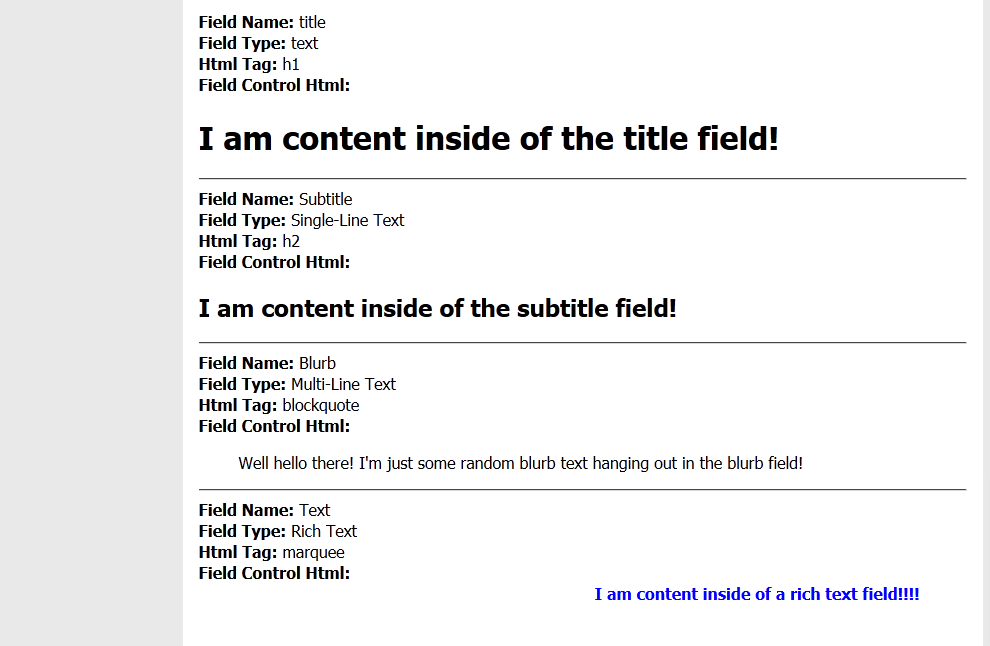
Sitecore offering the ability to create custom Field Controls is just another example of its extensibility. I don’t know of many developers that have taken advantage of creating their own custom Field Controls. However, I hope this post kindles the want for doing so, or adds some armament to your arsenal on how to present Sitecore data.
Addendum
Recently, the following query was asked on twitter:
Custom field controls – would you write your own from scratch, or inherit e.g. sc:text and add what you need (and why)?
The Text FieldControl doesn’t offer any logic over it’s FieldControl base — it inherits directly from the FieldControl class without any overrides. Inheriting from it will not add any extra benefit.
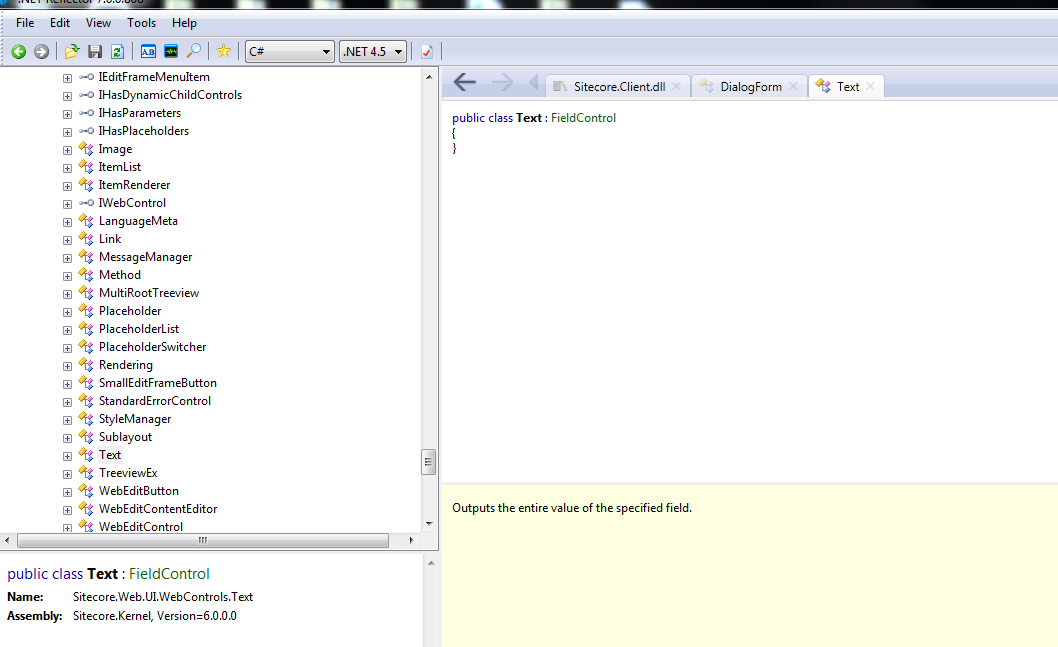
Further, the only method that might be of interest in overriding in a FieldControl base class — a class other than Text — would be the PopulateParameters method — albeit an argument could be made for overriding the DoRender method, but I will not discuss this method here. The PopulateParameters method sets parameters that are used by the RendererField pipeline for passing arguments to the Renderer object — the latter object creates the HTML for the control.
Plus, as a general best practice, I would caution against inheriting from classes unless absolutely necessary — more specific FieldControl classes within Sitecore.Web.UI.WebControls are no exceptions. You don’t want to introduce a steep class hierarchy, or cause class explosion — a situation where you create a new class just to add new functionality over a base class (Vlissides, Helm, Johnson, Gamma, 1995; Shalloway and Trott, 2004). Utilizing composition is recommended over inheritance — a model that faciliates in code maintenance, refactoring efforts, and adding new functionality (Vlissides, Helm, Johnson, & Gamma, 1995; Shalloway & Trott, 2004).
The real magic though occurs within the Renderer and RenderField pipeline classes, not the FieldControl classes, per se.
References
Gamma, E., Helm, R., Johnson, R., & Vlissides, J. (1995). Design patterns: Elements of reusable object-oriented software. Reading: Addison-Wesley.
Shalloway, A., Trott, J. A. (2004) Design Patterns Explained. A new Perspective on Object-Oriented Design (2nd edition). Reading: Addison-Wesley.
Labels and Literals and Field Controls, Oh My!
I wish I could tell you I’ve discovered the panacea to extirpate common issues inherent in many Sitecore development projects and this article would enumerate a recipe for curtailing these, or how I’ve discovered a hidden gem within Sitecore.Kernel.dll that your future projects cannot live without.
Sadly, this article will do none of these things — it will not knock your socks off, and may even leave you saying to yourself “come on Mike, tell me something I don’t already know”.
Yet, I feel adamantly compelled to pen this article given an egregious practice I’ve seen employed by numerous Sitecore developers at multiple Sitecore development shops over the span of five years.
What is this foul practice? It’s the act of building HTML in your C# code using content from Sitecore fields and displaying this HTML via ASP.NET Literal or Label Web Controls.
No doubt, you have seen some code like the following in a Sitecore solution, or have even written code like this yourself (please note these code examples haven’t been tested, aren’t robust, and are only given as pedagogical illustrations):
An ASP.NET User Control containing a Literal Web Control:

Code-behind for the User Control:

In the above code-behind, the author composed some link HTML using content within a Sitecore General Link field named ‘My Link’.
Compare that with the following:
An ASP.NET User Control containing Sitecore Link Field Control:

Code-behind for the User Control:
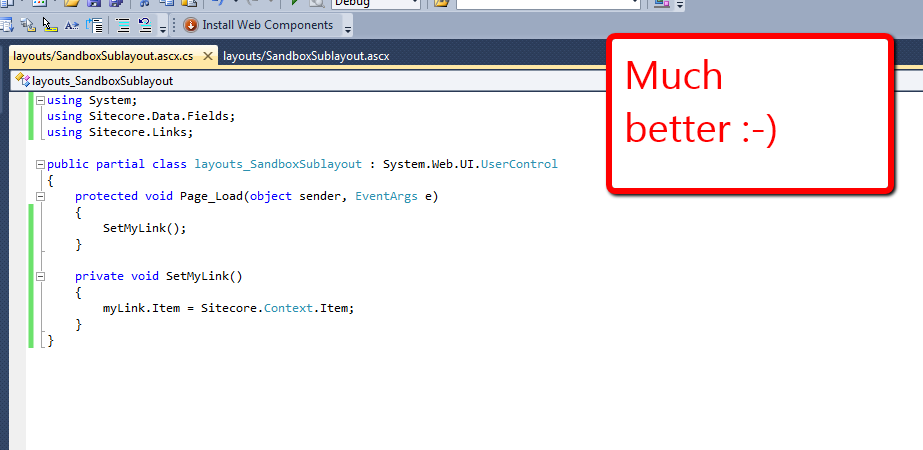
Notice how much less code was needed to wire-up the Link Field Control. The Link Field Control will render link HTML if the current Item has a link set on the ‘My Link’ General Link field — including the target attribute, if a target is set on the General Link field.
You might be saying “Mike, this is great, but we don’t want this working in the Page Editor — we want this field to be completely locked down since it’s in a global Item”. Well, you could use the following to disable your Field Control in the Page Editor, and have the ability to change it later without having to do a full code build (assuming you’re using the Web Application model in ASP.NET):

If you are uncertain about which Field Control to use, you could always poke around in Sitecore.Web.UI.WebControls using .NET Reflector, or could opt to use a FieldRenderer Web Control — all Sitecore Field Controls use an instance of a FieldRenderer to output their HTML:
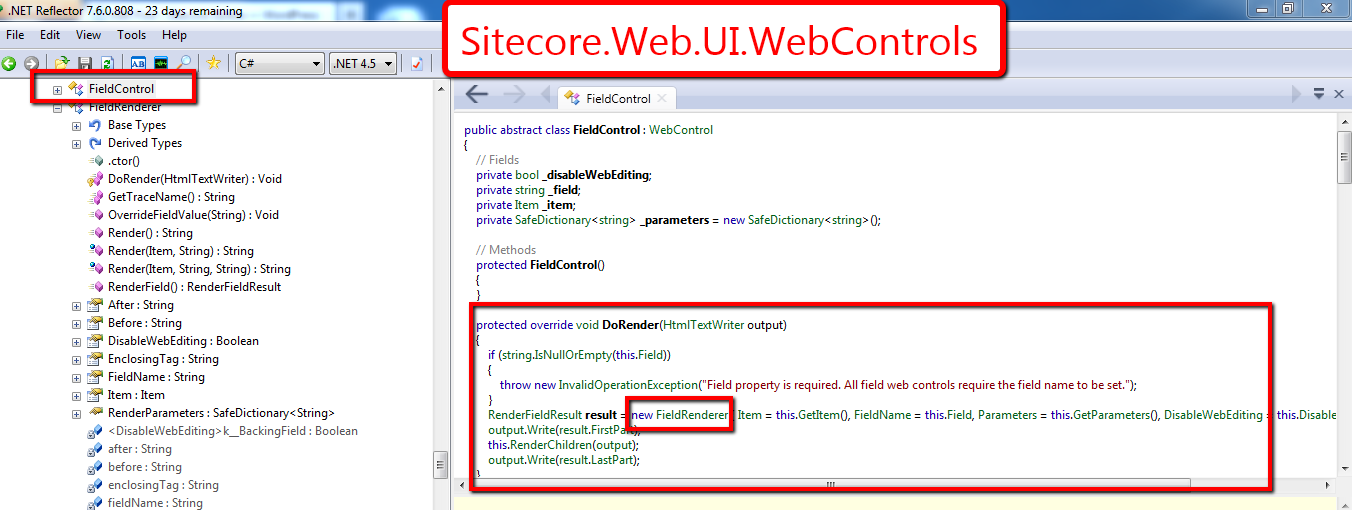
Using a FieldRenderer would also aid in allowing you to change a field’s type later without breaking its presentation in the UI — as long as the field type can be rendered by the FieldRenderer.
That’s it for now. Happy coding!
-Mike
Hello World!
It Works!
 SitecoreJunkie.com