Home » 2013 (Page 5)
Yearly Archives: 2013
Delete Sitecore Items Using a Deletion Basket
For the past week, I’ve been battling a nasty strain of the rhinovirus — don’t worry, that’s just the fancy medical term for what is known as the common cold — albeit there appears to be nothing common about this cold. I think I have a frankencold (I just made up this word, and might submit it to Merriam-Webster for inclusion in the English dictionary).
In my sickened state — perhaps it could be classified as a state of frenzy — I started pondering over strange feature ideas. The ‘Dislike’ button was one idea that came to mind. It would serve as the antithesis to the ‘Like’ button found on most social networking outlets. Such a feature would definitely be a whimsical thing to build, although might foment more trouble than it’s worth.
Another idea that came to mind was a deletion basket in the Sitecore client. It would be similar in theme to a shopping cart found on most e-commerce websites. Users would queue items in their deletion basket, and delete them after they are finished adding items — a checkout step for the lack of a better term.
The latter idea seemed useful — most importantly fun — so I decided to build it.
I first created a Deletion Basket class:
using System;
using System.Collections.Generic;
using System.Linq;
using System.Text;

using Sitecore.Data;
using Sitecore.Data.Items;

namespace Sitecore.Sandbox.Utilities.Items.Base
{
    public interface IDeletionBasket
    {
        int Count();

        bool IsEmpty();

        IEnumerable<Item> GetItemsToDelete();

        bool Contains(Item item);

        void Add(Item item);

        void Remove(Item item);

        void DeleteAll();

        void Clear();
    }
}
using System;
using System.Collections.Generic;
using System.Linq;
using System.Text;
using System.Web;

using Sitecore.Configuration;
using Sitecore.Data;
using Sitecore.Data.Items;
using Sitecore.Diagnostics;
using Sitecore.Web.UI.HtmlControls;
using Sitecore.Web.UI.Sheer;

using Sitecore.Sandbox.Utilities.Items.Base;

namespace Sitecore.Sandbox.Utilities.Items
{
    public class DeletionBasket : IDeletionBasket
    {
        private static volatile IDeletionBasket current;
        private static object lockObject = new Object();

        public static IDeletionBasket Current
        {
            get
            {
                if (current == null)
                {
                    lock (lockObject)
                    {
                        if (current == null)
                            current = new DeletionBasket();
                    }
                }

                return current;
            }
        }

        private IList<Item> _ItemsToDelete;
        private IList<Item> ItemsToDelete
        {
            get
            {
                if (_ItemsToDelete == null)
                {
                    _ItemsToDelete = new List<Item>();
                }

                return _ItemsToDelete;
            }
        }

        private DeletionBasket()
        {
        }

        public int Count()
        {
            return ItemsToDelete.Count();
        }

        public bool IsEmpty()
        {
            return !ItemsToDelete.Any();
        }

        public IEnumerable<Item> GetItemsToDelete()
        {
            return ItemsToDelete;
        }

        public bool Contains(Item item)
        {
            return FindItemInBasket(item) != null;
        }

        private Item FindItemInBasket(Item item)
        {
            Assert.ArgumentNotNull(item, "item");
            return FindItemInBasketByID(item.ID);
        }

        private Item FindItemInBasketByID(ID id)
        {
            AssertID(id);
            return FindItemsInBasketByID(id).FirstOrDefault();
        }

        private IEnumerable<Item> FindItemsInBasketByID(ID id)
        {
            AssertID(id);
            return ItemsToDelete.Where(i => i.ID == id);
        }

        private static void AssertID(ID id)
        {
            Assert.ArgumentCondition(!ID.IsNullOrEmpty(id), "id", "ID must be set!");
        }

        public void Add(Item item)
        {
            Item itemInBasket = FindItemInBasket(item);
            if (itemInBasket == null)
            {
                ItemsToDelete.Add(item);
                AddChildren(item);
            }
        }

        private void AddChildren(Item item)
        {
            if (!item.HasChildren)
            {
                return;
            }

            foreach (Item child in item.Children)
            {
                Add(child);
            }
        }

        public void Remove(Item item)
        {
            Item itemInBasket = FindItemInBasket(item);
            if (itemInBasket != null)
            {
                ItemsToDelete.Remove(itemInBasket);
            }
        }

        public void DeleteAll()
        {
            Sitecore.Context.ClientPage.Start(this, "ConfirmAndDeleteAll", new ClientPipelineArgs());
        }

        private void ConfirmAndDeleteAll(ClientPipelineArgs args)
        {
            ShowConfirmationDialogIfApplicable(args);
            DeleteAllIfApplicable(args);
        }

        private void ShowConfirmationDialogIfApplicable(ClientPipelineArgs args)
        {
            if (!args.IsPostBack)
            {
                Context.ClientPage.ClientResponse.YesNoCancel(string.Format("Are you sure you want to delete the {0} item(s) in your Deletion Basket?", Count()), "200", "200");
                args.WaitForPostBack();
            }
        }

        private void DeleteAllIfApplicable(ClientPipelineArgs args)
        {
            bool canDelete = args.IsPostBack && args.Result == "yes";
            if (canDelete)
            {
                foreach (Item itemToDelete in ItemsToDelete)
                {
                    DeleteItem(itemToDelete);
                }

                Clear();
            }
        }

        private static void DeleteItem(Item item)
        {
            Assert.ArgumentNotNull(item, "item");
            if (Settings.RecycleBinActive)
            {
                item.Recycle();
            }
            else
            {
                item.Delete();
            }
        }

        public void Clear()
        {
            ItemsToDelete.Clear();
        }
    }
}
The above class stores and deletes items from a list, and prompts users ascertaining if they truly want to delete items within the deletion basket.
Only one instance of the above class can exist — I employed the Singleton pattern for this purpose — to keep the code simple for this blog post, although it probably would make more sense to make baskets session aware — have different baskets for different sessions.
Next, I created a command to add or remove an item from the deletion basket — depending on whether the item is in the basket:
using System.Linq;

using Sitecore.Data.Items;
using Sitecore.Diagnostics;
using Sitecore.Globalization;
using Sitecore.Shell.Framework.Commands;

using Sitecore.Sandbox.Utilities.Items;
using Sitecore.Sandbox.Utilities.Items.Base;

namespace Sitecore.Sandbox.Commands
{
    class ToggleItemInDeletionBasket : Command
    {
        private static readonly Delete DeleteCommand = new Delete();

        public override void Execute(CommandContext commandContext)
        {
            Assert.ArgumentNotNull(commandContext, "commandContext");
            ToggleInDeletionBasketIfEnabled(commandContext);
        }

        private void ToggleInDeletionBasketIfEnabled(CommandContext commandContext)
        {
            Assert.ArgumentNotNull(commandContext, "commandContext");
            if (QueryState(commandContext) == CommandState.Enabled)
            {
                ToggleInDeletionBasketAndRefresh(GetItem(commandContext));
            }
        }

        public override CommandState QueryState(CommandContext commandContext)
        {
            Assert.ArgumentNotNull(commandContext, "commandContext");
            return DeleteCommand.QueryState(commandContext);
        }

        private static void ToggleInDeletionBasketAndRefresh(Item item)
        {
            ToggleInDeletionBasket(item);
            RefreshItem(item);
        }

        private static void ToggleInDeletionBasket(Item item)
        {
            Assert.ArgumentNotNull(item, "item");
            IDeletionBasket deletionBasket = DeletionBasket.Current;

            if(deletionBasket.Contains(item))
            {
                deletionBasket.Remove(item);
            }
            else
            {
                deletionBasket.Add(item);
            }
        }

        private static Item GetItem(CommandContext commandContext)
        {
            Assert.ArgumentNotNull(commandContext, "commandContext");
            Assert.ArgumentNotNull(commandContext.Items, "commandContext.Items");
            Assert.ArgumentCondition(commandContext.Items.Count() > 0, "commandContext.Items", "There must be at least one item in the array!");
            return commandContext.Items.FirstOrDefault();
        }

        public override string GetHeader(CommandContext commandContext, string header)
        {
            if (DeletionBasket.Current.Contains(GetItem(commandContext)))
            {
                return Translate.Text("Remove from Deletion Basket");
            }

            return Translate.Text("Add to Deletion Basket");
        }

        private static void RefreshItem(Item item)
        {
            Assert.ArgumentNotNull(item, "item");
            Context.ClientPage.ClientResponse.Timer(string.Format("item:load(id={0})", item.ID), 1);
        }
    }
}
The text of the command is different when the item is in the basket versus when it is not.
The command also reloads the item in the Sitecore client — this is done to update the state of the deletion basket buttons in the ribbon.
Now, we need a command to delete items queued in the deletion basket. The ‘Empty Deletion Basket’ command does just that:
using System.Linq;

using Sitecore.Data.Items;
using Sitecore.Diagnostics;
using Sitecore.Globalization;
using Sitecore.Shell.Framework.Commands;

using Sitecore.Sandbox.Utilities.Items;
using Sitecore.Sandbox.Utilities.Items.Base;

namespace Sitecore.Sandbox.Commands
{
    public class EmptyDeletionBasket : Command
    {
        public override void Execute(CommandContext commandContext)
        {
            Assert.ArgumentNotNull(commandContext, "commandContext");
            EmptyDeletionBasketIfEnabled(commandContext);
        }

        private void EmptyDeletionBasketIfEnabled(CommandContext commandContext)
        {
            if (QueryState(commandContext) == CommandState.Enabled)
            {
                DeleteAllItemsInDeletionBasketAndRefresh();
            }
        }

        public override CommandState QueryState(CommandContext commandContext)
        {
            Assert.ArgumentNotNull(commandContext, "commandContext");

            if (DeletionBasket.Current.IsEmpty())
            {
                return CommandState.Hidden;
            }

            return base.QueryState(commandContext);
        }

        private static void DeleteAllItemsInDeletionBasketAndRefresh()
        {
            Item firstItemParent = GetFirstItemParent();
            DeleteAllItemsInDeletionBasket();
            RefreshItem(firstItemParent);
        }

        private static void DeleteAllItemsInDeletionBasket()
        {
            DeletionBasket.Current.DeleteAll();
        }

        private static Item GetFirstItemParent()
        {
            Item itemForRefresh = DeletionBasket.Current.GetItemsToDelete().FirstOrDefault();
            if (itemForRefresh != null && itemForRefresh.Parent != null)
            {
                return itemForRefresh.Parent;
            }

            return null;
        }

        private static void RefreshItem(Item item)
        {
            Assert.ArgumentNotNull(item, "item");
            Context.ClientPage.ClientResponse.Timer(string.Format("item:load(id={0})", item.ID), 1);
        }

        public override string GetHeader(CommandContext commandContext, string header)
        {
            IDeletionBasket deletionBasket = DeletionBasket.Current;
            return Translate.Text(string.Format("Delete {0} Item(s)", deletionBasket.Count()));
        }
    }
}
This command also reloads the Sitecore client — using the the parent item of the first item flagged for deletion (you can’t reload an item that was already deleted). This is also done to refresh the state of the buttons in the ribbon.
Plus, the command is hidden when there are no items in the deletion basket.
We shouldn’t force users to only add and delete items in their basket. We should also allow them to clear out their baskets, in case they change their mind on what they want to delete. I created a ‘Clear Deletion Basket’ command for this very reason:
using System.Linq;

using Sitecore.Data;
using Sitecore.Data.Items;
using Sitecore.Diagnostics;
using Sitecore.Shell.Framework.Commands;
using Sitecore.Web.UI.Sheer;

using Sitecore.Sandbox.Utilities.Items;

namespace Sitecore.Sandbox.Commands
{
    public class ClearDeletionBasket : Command
    {
        public override void Execute(CommandContext commandContext)
        {
            Assert.ArgumentNotNull(commandContext, "commandContext");
            ClearDeletionBasketIfEnabled(commandContext);
        }

        private void ClearDeletionBasketIfEnabled(CommandContext commandContext)
        {
            if (QueryState(commandContext) == CommandState.Enabled)
            {
                ClearAllItemsInDeletionBasketAndRfresh();
            }
        }

        public override CommandState QueryState(CommandContext commandContext)
        {
            Assert.ArgumentNotNull(commandContext, "commandContext");

            if (DeletionBasket.Current.IsEmpty())
            {
                return CommandState.Disabled;
            }

            return base.QueryState(commandContext);
        }

        private static void ClearAllItemsInDeletionBasketAndRfresh()
        {
            Item lastItem = GetLastItem();
            ClearAllItemsInDeletionBasket();
            RefreshItem(lastItem);
        }

        private static void ClearAllItemsInDeletionBasket()
        {
            DeletionBasket.Current.Clear();
        }

        private static Item GetLastItem()
        {
            Item itemForRefresh = DeletionBasket.Current.GetItemsToDelete().LastOrDefault();
            if (itemForRefresh != null)
            {
                return itemForRefresh;
            }

            return null;
        }

        private static void RefreshItem(Item item)
        {
            Assert.ArgumentNotNull(item, "item");
            Context.ClientPage.ClientResponse.Timer(string.Format("item:load(id={0})", item.ID), 1);
        }
    }
}
In order to use our commands above, we have to define them in /App_Config/Commands.config:
<?xml version="1.0" encoding="utf-8" ?>
<configuration>

	<!-- There's a bunch of commands up here -->

	<command name="item:toggleitemindeletionbasket" type="Sitecore.Sandbox.Commands.ToggleItemInDeletionBasket,Sitecore.Sandbox"/>
	<command name="item:cleardeletionbasket" type="Sitecore.Sandbox.Commands.ClearDeletionBasket,Sitecore.Sandbox"/>
	<command name="item:emptydeletionbasket" type="Sitecore.Sandbox.Commands.EmptyDeletionBasket,Sitecore.Sandbox"/>
</configuration>
Now that our commands are defined in /App_Config/Commands.config, we can now wire them up in the Core database.
I’ve wired up the ‘Empty Deletion Basket’ button:

Followed by wiring up the ‘Clear Deletion Basket’ dropdown button:
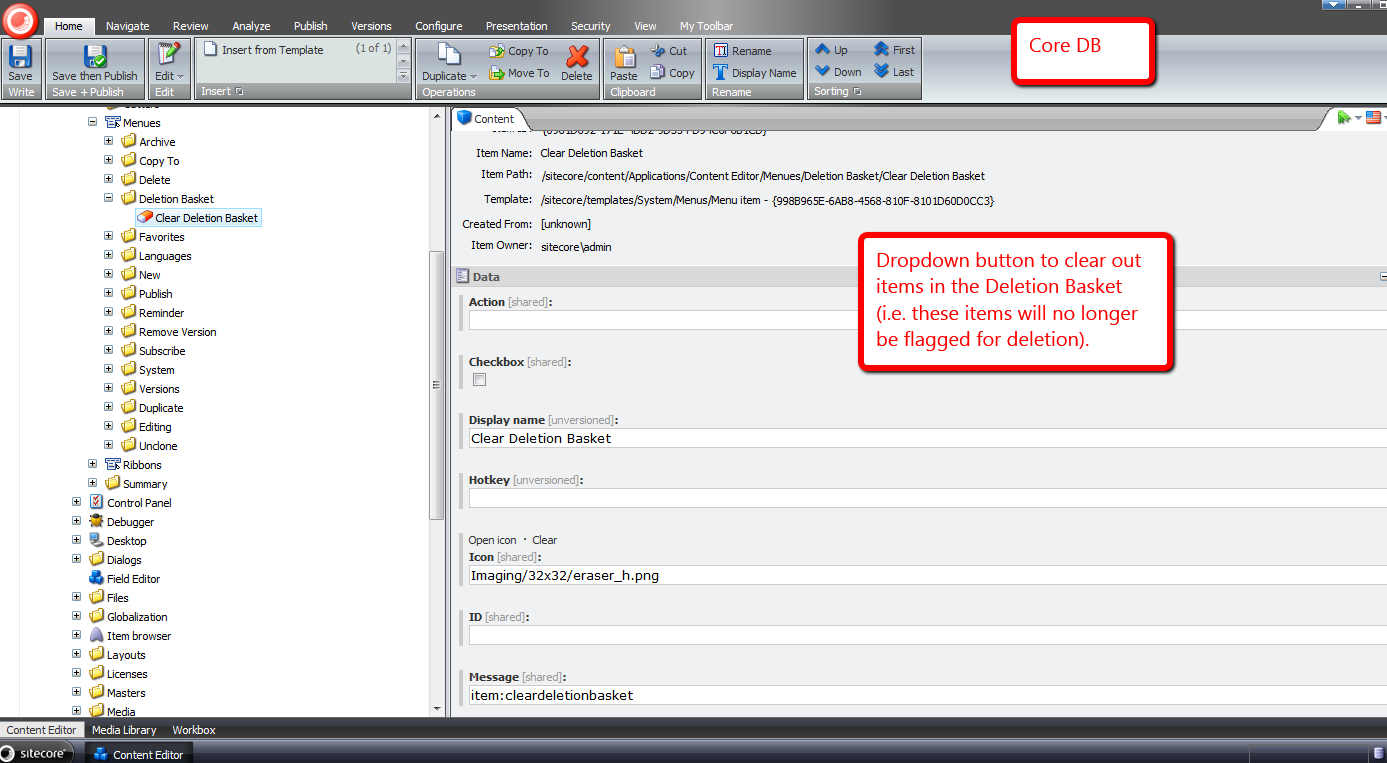
Next, I set up the ‘Toggle Item In Deletion Basket’ item context menu button:

Let’s see how we did.
I’ve switched back over to the master database, picked an item at random, and right-clicked. There’s our new ‘Toggle Item In Deletion Basket’ button:
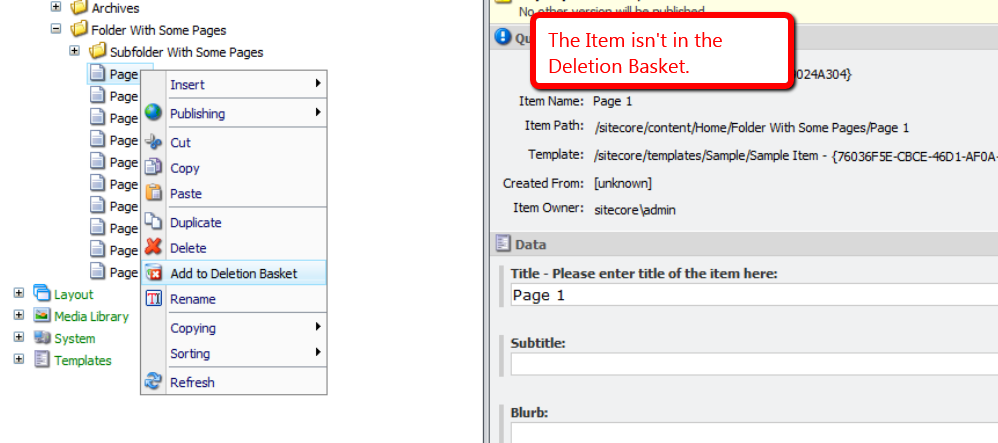
The appropriate wording is displayed since the item is not in the Deletion Basket.
I’ve clicked the ‘Toggle Item In Deletion Basket’ button in the item context menu, and then right-clicked on the item again to launch it again:

We see that button’s text has changed to convey that this item is in the deletion basket, and can be removed from the deletion basket by clicking the item context menu button again.
Plus, the deletion basket buttons in the ribbon have magically appeared.
I’ve clicked the dropdown on the deletion basket button in the ribbon, and we now see the ‘Clear Deletion Basket’ button:

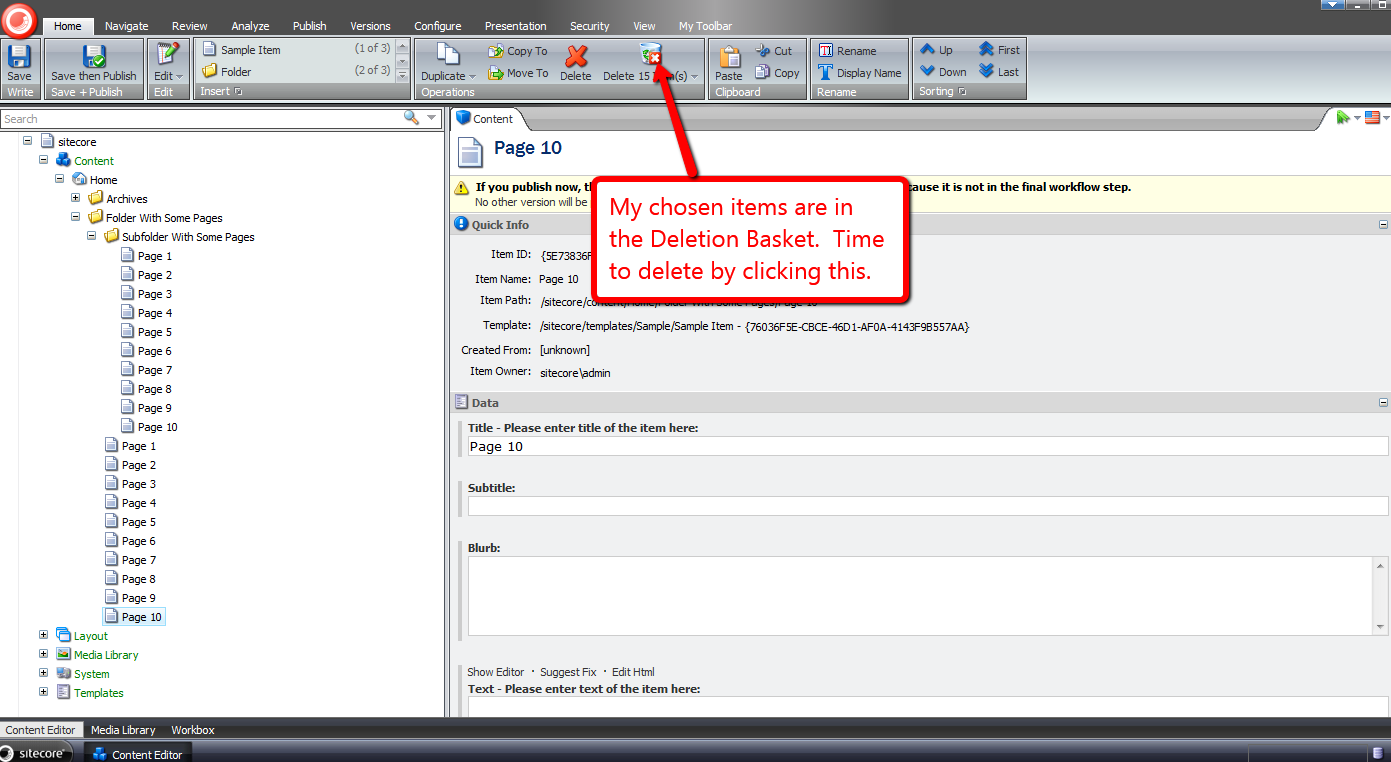
I’m going to add a bunch of items to our deletion basket:

They’ve all been added. Let’s get rid of them:
Doh — I’ve been blocked by an instrusive confirmation box:
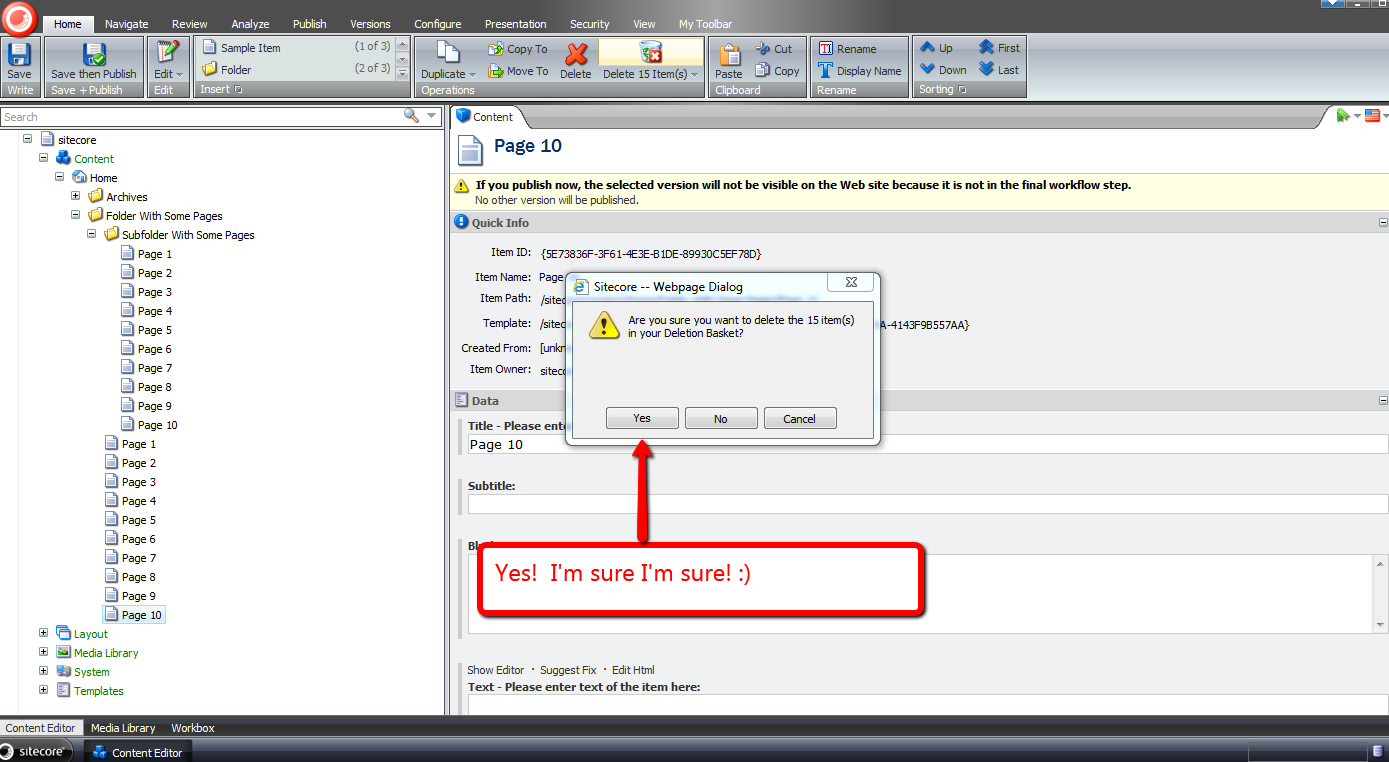
I’ve clicked ‘Yes’, and now the items are gone:
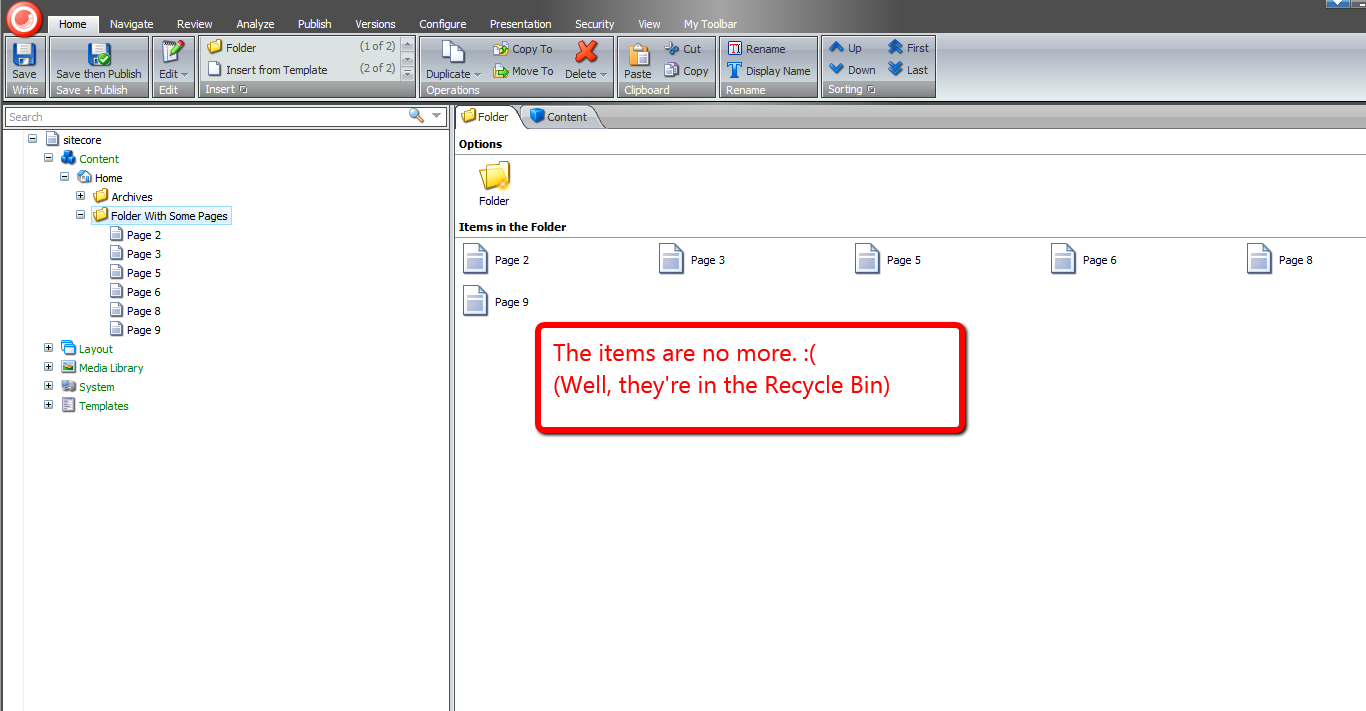
That was all in good fun.
Time to investigate adding a ‘Dislike’ button to the popular social media channels. 😉
Chain Together Sitecore Client Commands using a Composite Command
Today, I procrastinated on doing chores around the house by exploring whether one could chain together Sitecore client commands in order to reduce the number of clicks and/or keypresses required when invoking these commands separately — combining the click of the ‘Save’ button followed by one of the publishing buttons would be an example of this.
Immediately, the composite design pattern came to mind for a candidate solution — you can read more about this pattern in the the Gang of Four’s book on design patterns.
This high-level plan of attack lead to the following custom composite command.
using System;
using System.Collections.Generic;
using System.Linq;
using System.Text;
using System.Xml;

using Sitecore.Configuration;
using Sitecore.Diagnostics;
using Sitecore.Shell.Framework.Commands;
using Sitecore.Text;

namespace Sitecore.Sandbox.Commands
{
    public class CompositeCommand : Command
    {
        public override void Execute(CommandContext commandContext)
        {
            IEnumerable<Command> commands = GetCommands();

            foreach (Command command in commands)
            {
                command.Execute(commandContext);
            }
        }

        protected IEnumerable<Command> GetCommands()
        {
            ListString commandNames = GetCommandNames();
            IList<Command> commands = new List<Command>();

            foreach(string commandName in commandNames)
            {
                AddToListIfNotNull(commands, CommandManager.GetCommand(commandName));
            }

            return commands;
        }

        private ListString GetCommandNames()
        {
            return new ListString(GetCommandsFieldValue(), '|');
        }

        private string GetCommandsFieldValue()
        {
            XmlNode xmlNode = Factory.GetConfigNode(string.Format("commands/command[@name='{0}']", Name));
            bool canGetCommands = xmlNode != null && xmlNode.Attributes["commands"] != null;

            if (canGetCommands)
            {
                return xmlNode.Attributes["commands"].Value;
            }

            return string.Empty;
        }

        private static void AddToListIfNotNull<T>(IList<T> list, T objectToAdd) where T : class
        {
            Assert.ArgumentNotNull(list, "list");
            if (objectToAdd != null)
            {
                list.Add(objectToAdd);
            }
        }
    }
}
The above command — using the Sitecore.Configuration.Factory class — gets its XML configuration element; parses the list of commands it wraps from a new attribute I’ve added — I’ve named this attribute “commands”; gets instances of these commands via Sitecore.Shell.Framework.Commands.CommandManager (from Sitecore.Kernel.dll); and invokes all Command instances’ Execute() methods consecutively — ordered from left to right, separated by pipes, in the “commands” attribute on the command XML element in /App_Config/Commands.config.
To test this out, I thought I’d create a composite command combining the item save command with the publish command — the command that launches the Publish Item Wizard.
I first had to wire up my new command by adding a new command XML element to /App_Config/Commands.config:
<?xml version="1.0" encoding="utf-8" ?>
<configuration>
	<!-- bunch of commands up here -->
	<command name="composite:savethenpublish" commands="contenteditor:save|item:publish" type="Sitecore.Sandbox.Commands.CompositeCommand,Sitecore.Sandbox"/>
</configuration>
Next, in the core db, I had to create a reference under the home strip:

Followed by a chunk containing a button that holds the name of our new command:

Let’s see this new composite command in action. I did the following:

After the Sitecore save animation completed, the Publish Item Wizard popped up:

Now, it’s time for some fun. Let’s combine commands that make little sense in chaining together.
Let’s chain together:
- the command I built in my post on expanding Standard Values tokens
- the command to move an item before all its siblings in the content tree
- the command to move an item down in the content tree
Here’s what the command’s configuration looks like in /App_Config/Commands.config:
<?xml version="1.0" encoding="utf-8" ?>
<configuration>
	<!-- bunch of commands up here -->
	<command name="composite:chainsomeunrelatedcommands" commands="item:expandtokens|item:movefirst|item:movedown" type="Sitecore.Sandbox.Commands.CompositeCommand,Sitecore.Sandbox"/>
</configuration>
I decided to add this to the item context menu — for more information on adding to the context menu for items, please check out my post that shows you how to do this — so I created new menu option in the context menu for items in the core database:

I switched back to the master database; added some Standard Values tokens to some fields in the Page 4 item I created for testing; right-clicked on on it; and clicked my new context menu option:

After a second or two, I saw that the tokens were expanded, and the item was moved:

That’s all for now. It’s now time to go do some house chores. Otherwise, people might start thinking I’m truly addicted to building things in Sitecore. 🙂
Prevent Sitecore Users from Using Common Dictionary Words in Passwords
Lately, enhancing security measures in Sitecore have been on my mind. One idea that came to mind today was finding a way to prevent password cracking — a scenario where a script tries to ascertain a user’s password by guessing over and over again what a user’s password might be, by supplying common words from a data store, or dictionary in the password textbox on the Sitecore login page.
As a way to prevent users from using common words in their Sitecore passwords, I decided to build a custom System.Web.Security.MembershipProvider — the interface (not a .NET interface but an abstract class) used by Sitecore out of the box for user management. Before we dive into that code, we need a dictionary of some sort.
I decided to use a list of fruits — all for the purposes of keeping this post simple — that I found on a Wikipedia page. People aren’t kidding when they say you can virtually find everything on Wikipedia, and no doubt all content on Wikipedia is authoritative — just ask any university professor. 😉
I copied some of the fruits on that Wikipedia page into a patch include config file — albeit it would make more sense to put these into a database, or perhaps into Sitecore if doing such a thing in a real-world solution. I am not doing this here for the sake of brevity.
<?xml version="1.0" encoding="utf-8"?>
<configuration xmlns:patch="http://www.sitecore.net/xmlconfig/">
  <sitecore>
    <dictionaryWords>
      <word>Apple</word>
      <word>Apricot</word>
      <word>Avocado</word>
      <word>Banana</word>
      <word>Breadfruit</word>
      <word>Bilberry</word>
      <word>Blackberry</word>
      <word>Blackcurrant</word>
      <word>Blueberry</word>
      <word>Currant</word>
      <word>Cherry</word>
      <word>Cherimoya</word>
      <word>Clementine</word>
      <word>Cloudberry</word>
      <word>Coconut</word>
      <word>Date</word>
      <word>Damson</word>
      <word>Dragonfruit</word>
      <word>Durian</word>
      <word>Eggplant</word>
      <word>Elderberry</word>
      <word>Feijoa</word>
      <word>Fig</word>
      <word>Gooseberry</word>
      <word>Grape</word>
      <word>Grapefruit</word>
      <word>Guava</word>
      <word>Huckleberry</word>
      <word>Honeydew</word>
      <word>Jackfruit</word>
      <word>Jettamelon</word>
      <word>Jambul</word>
      <word>Jujube</word>
      <word>Kiwi fruit</word>
      <word>Kumquat</word>
      <word>Legume</word>
      <word>Lemon</word>
      <word>Lime</word>
      <word>Loquat</word>
      <word>Lychee</word>
      <word>Mandarine</word>
      <word>Mango</word>
      <word>Melon</word>
    </dictionaryWords>
  </sitecore>
</configuration>
I decided to reuse a utility class I built for my post on expanding Standard Values tokens.
using System;
using System.Collections.Generic;
using System.Linq;
using System.Text;

using Sitecore.Diagnostics;

using Sitecore.Sandbox.Utilities.StringUtilities.Base;
using Sitecore.Sandbox.Utilities.StringUtilities.DTO;

namespace Sitecore.Sandbox.Utilities.StringUtilities
{
    public class StringSubstringsChecker : SubstringsChecker<string>
    {
        private bool IgnoreCase { get; set; }

        private StringSubstringsChecker(IEnumerable<string> substrings)
            : this(null, substrings, false)
        {
        }

        private StringSubstringsChecker(IEnumerable<string> substrings, bool ignoreCase)
            : this(null, substrings, ignoreCase)
        {
        }

        private StringSubstringsChecker(string source, IEnumerable<string> substrings, bool ignoreCase)
            : base(source)
        {
            SetSubstrings(substrings);
            SetIgnoreCase(ignoreCase);
        }

        private void SetSubstrings(IEnumerable<string> substrings)
        {
            AssertSubstrings(substrings);
            Substrings = substrings;
        }

        private static void AssertSubstrings(IEnumerable<string> substrings)
        {
            Assert.ArgumentNotNull(substrings, "substrings");
            Assert.ArgumentCondition(substrings.Any(), "substrings", "substrings must contain as at least one string!");
        }

        private void SetIgnoreCase(bool ignoreCase)
        {
            IgnoreCase = ignoreCase;
        }

        protected override bool CanDoCheck()
        {
            return !string.IsNullOrEmpty(Source);
        }

        protected override bool DoCheck()
        {
            Assert.ArgumentNotNullOrEmpty(Source, "Source");

            foreach (string substring in Substrings)
            {
                if(DoesSourceContainSubstring(substring))
                {
                    return true;
                }
            }

            return false;
        }

        private bool DoesSourceContainSubstring(string substring)
        {
            if (IgnoreCase)
            {
                return !IsNotFoundIndex(Source.IndexOf(substring, StringComparison.CurrentCultureIgnoreCase));
            }

            return !IsNotFoundIndex(Source.IndexOf(substring));
        }

        private static bool IsNotFoundIndex(int index)
        {
            const int notFound = -1;
            return index == notFound;
        }

        public static ISubstringsChecker<string> CreateNewStringSubstringsContainer(IEnumerable<string> substrings)
        {
            return new StringSubstringsChecker(substrings);
        }

        public static ISubstringsChecker<string> CreateNewStringSubstringsContainer(IEnumerable<string> substrings, bool ignoreCase)
        {
            return new StringSubstringsChecker(substrings, ignoreCase);
        }

        public static ISubstringsChecker<string> CreateNewStringSubstringsContainer(string source, IEnumerable<string> substrings, bool ignoreCase)
        {
            return new StringSubstringsChecker(source, substrings, ignoreCase);
        }
    }
}
In the version of our “checker” class above, I added the option to have the “checker” ignore case comparisons for the source and substrings.
Next, I created a new System.Web.Security.MembershipProvider subclass where I am utilizing the decorator pattern to decorate methods around changing passwords and creating users.
By default, we are instantiating an instance of the System.Web.Security.SqlMembershipProvider — this is what my local Sitecore sandbox instance is using, in order to get at the ASP.NET Membership tables in the core database.
using System;
using System.Collections.Generic;
using System.Collections.Specialized;
using System.Linq;
using System.Text;
using System.Web.Security;

using Sitecore.Configuration;
using Sitecore.Diagnostics;
using Sitecore.Security;

using Sitecore.Sandbox.Utilities.StringUtilities;
using Sitecore.Sandbox.Utilities.StringUtilities.Base;

namespace Sitecore.Sandbox.Security.MembershipProviders
{
    public class PreventDictionaryWordPasswordsMembershipProvider : MembershipProvider
    {
        private static IEnumerable<string> _DictionaryWords;
        private static IEnumerable<string> DictionaryWords
        {
            get
            {
                if (_DictionaryWords == null)
                {
                    _DictionaryWords = GetDictionaryWords();
                }

                return _DictionaryWords;
            }
        }

        public override string Name
        {
            get
            {
                return InnerMembershipProvider.Name;
            }
        }

        public override string ApplicationName
        {
            get
            {
                return InnerMembershipProvider.ApplicationName;
            }
            set
            {
                InnerMembershipProvider.ApplicationName = value;
            }
        }

        public override bool EnablePasswordReset
        {
            get
            {
                return InnerMembershipProvider.EnablePasswordReset;
            }
        }

        public override bool EnablePasswordRetrieval
        {
            get
            {
                return InnerMembershipProvider.EnablePasswordRetrieval;
            }
        }

        public override int MaxInvalidPasswordAttempts
        {
            get
            {
                return InnerMembershipProvider.MaxInvalidPasswordAttempts;
            }
        }

        public override int MinRequiredNonAlphanumericCharacters
        {
            get
            {
                return InnerMembershipProvider.MinRequiredNonAlphanumericCharacters;
            }
        }

        public override int MinRequiredPasswordLength
        {
            get
            {
                return InnerMembershipProvider.MinRequiredPasswordLength;
            }
        }

        public override int PasswordAttemptWindow
        {
            get
            {
                return InnerMembershipProvider.PasswordAttemptWindow;
            }
        }

        public override MembershipPasswordFormat PasswordFormat
        {
            get
            {
                return InnerMembershipProvider.PasswordFormat;
            }
        }

        public override string PasswordStrengthRegularExpression
        {
            get
            {
                return InnerMembershipProvider.PasswordStrengthRegularExpression;
            }
        }

        public override bool RequiresQuestionAndAnswer
        {
            get
            {
                return InnerMembershipProvider.RequiresQuestionAndAnswer;
            }
        }

        public override bool RequiresUniqueEmail
        {
            get
            {
                return InnerMembershipProvider.RequiresUniqueEmail;
            }
        }

        private MembershipProvider InnerMembershipProvider { get; set; }
        private ISubstringsChecker<string> DictionaryWordsSubstringsChecker { get; set; }

        public PreventDictionaryWordPasswordsMembershipProvider()
            : this(CreateNewSqlMembershipProvider(), CreateNewDictionaryWordsSubstringsChecker())
        {
        }

        public PreventDictionaryWordPasswordsMembershipProvider(MembershipProvider innerMembershipProvider, ISubstringsChecker<string> dictionaryWordsSubstringsChecker)
        {
            SetInnerMembershipProvider(innerMembershipProvider);
            SetDictionaryWordsSubstringsChecker(dictionaryWordsSubstringsChecker);
        }

        private void SetInnerMembershipProvider(MembershipProvider innerMembershipProvider)
        {
            Assert.ArgumentNotNull(innerMembershipProvider, "innerMembershipProvider");
            InnerMembershipProvider = innerMembershipProvider;
        }

        private void SetDictionaryWordsSubstringsChecker(ISubstringsChecker<string> dictionaryWordsSubstringsChecker)
        {
            Assert.ArgumentNotNull(dictionaryWordsSubstringsChecker, "dictionaryWordsSubstringsChecker");
            DictionaryWordsSubstringsChecker = dictionaryWordsSubstringsChecker;
        }

        private static MembershipProvider CreateNewSqlMembershipProvider()
        {
            return new SqlMembershipProvider();
        }

        private static ISubstringsChecker<string> CreateNewDictionaryWordsSubstringsChecker()
        {
            return CreateNewStringSubstringsChecker(DictionaryWords);
        }

        private static ISubstringsChecker<string> CreateNewStringSubstringsChecker(IEnumerable<string> substrings)
        {
            Assert.ArgumentNotNull(substrings, "substrings");
            const bool ignoreCase = true;
            return StringSubstringsChecker.CreateNewStringSubstringsContainer(substrings, ignoreCase);
        }

        private static IEnumerable<string> GetDictionaryWords()
        {
            return Factory.GetStringSet("dictionaryWords/word");
        }

        public override bool ChangePassword(string username, string oldPassword, string newPassword)
        {
            if (DoesPasswordContainDictionaryWord(newPassword))
            {
                return false;
            }

            return InnerMembershipProvider.ChangePassword(username, oldPassword, newPassword);
        }

        private bool DoesPasswordContainDictionaryWord(string password)
        {
            Assert.ArgumentNotNullOrEmpty(password, "password");
            DictionaryWordsSubstringsChecker.Source = password;
            return DictionaryWordsSubstringsChecker.ContainsSubstrings();
        }

        public override bool ChangePasswordQuestionAndAnswer(string username, string password, string newPasswordQuestion, string newPasswordAnswer)
        {
            return InnerMembershipProvider.ChangePasswordQuestionAndAnswer(username, password, newPasswordQuestion, newPasswordAnswer);
        }

        public override MembershipUser CreateUser(string username, string password, string email, string passwordQuestion, string passwordAnswer, bool isApproved, object providerUserKey, out MembershipCreateStatus status)
        {
            if (DoesPasswordContainDictionaryWord(password))
            {
                status = MembershipCreateStatus.InvalidPassword;
                return null;
            }

            return InnerMembershipProvider.CreateUser(username, password, email, passwordQuestion, passwordAnswer, isApproved, providerUserKey, out status);
        }

        public override bool DeleteUser(string userName, bool deleteAllRelatedData)
        {
            return InnerMembershipProvider.DeleteUser(userName, deleteAllRelatedData);
        }

        public override MembershipUserCollection FindUsersByEmail(string emailToMatch, int pageIndex, int pageSize, out int totalRecords)
        {
            return InnerMembershipProvider.FindUsersByEmail(emailToMatch, pageIndex, pageSize, out totalRecords);
        }

        public override MembershipUserCollection FindUsersByName(string userNameToMatch, int pageIndex, int pageSize, out int totalRecords)
        {
            return InnerMembershipProvider.FindUsersByName(userNameToMatch, pageIndex, pageSize, out totalRecords);
        }

        public override MembershipUserCollection GetAllUsers(int pageIndex, int pageSize, out int totalRecords)
        {
            return InnerMembershipProvider.GetAllUsers(pageIndex, pageSize, out totalRecords);
        }

        public override int GetNumberOfUsersOnline()
        {
            return InnerMembershipProvider.GetNumberOfUsersOnline();
        }

        public override string GetPassword(string username, string answer)
        {
            return InnerMembershipProvider.GetPassword(username, answer);
        }

        public override MembershipUser GetUser(object providerUserKey, bool userIsOnline)
        {
            return InnerMembershipProvider.GetUser(providerUserKey, userIsOnline);
        }

        public override MembershipUser GetUser(string username, bool userIsOnline)
        {
            return InnerMembershipProvider.GetUser(username, userIsOnline);
        }

        public override string GetUserNameByEmail(string email)
        {
            return InnerMembershipProvider.GetUserNameByEmail(email);
        }

        public override void Initialize(string name, NameValueCollection config)
        {
            InnerMembershipProvider.Initialize(name, config);
        }

        public override string ResetPassword(string username, string answer)
        {
            return InnerMembershipProvider.ResetPassword(username, answer);
        }

        public override bool UnlockUser(string userName)
        {
            return InnerMembershipProvider.UnlockUser(userName);
        }

        public override void UpdateUser(MembershipUser user)
        {
            InnerMembershipProvider.UpdateUser(user);
        }

        public override bool ValidateUser(string username, string password)
        {
            return InnerMembershipProvider.ValidateUser(username, password);
        }
    }
}
In our MembershipProvider above, we have decorated the ChangePassword() and CreateUser() methods by employing a helper method to delegate to our DictionaryWordsSubstringsChecker instance — an instance of the StringSubstringsChecker class above — to see if the supplied password contains any of the fruits found in our collection, and prevent the workflow from moving forward in changing a user’s password, or creating a new user if one of the fruits is found in the provided password.
If we don’t find one of the fruits in the password, we then delegate to the inner MembershipProvider instance — this instance takes care of the rest around changing passwords, or creating new users.
I then had to register my MemberProvider in my Web.config — this cannot be placed in a patch include file since it lives outside of the <sitecore></sitecore> element.
<configuration>
	<membership defaultProvider="sitecore" hashAlgorithmType="SHA1">
		<providers>
			<clear/>
			<add name="sitecore" type="Sitecore.Security.SitecoreMembershipProvider, Sitecore.Kernel" realProviderName="sql" providerWildcard="%" raiseEvents="true"/>

			<!-- our new provider -->
			<add name="sql" type="Sitecore.Sandbox.Security.MembershipProviders.PreventDictionaryWordPasswordsMembershipProvider, Sitecore.Sandbox" connectionStringName="core" applicationName="sitecore" minRequiredPasswordLength="6" requiresQuestionAndAnswer="false" requiresUniqueEmail="false" maxInvalidPasswordAttempts="256"/>

			<add name="switcher" type="Sitecore.Security.SwitchingMembershipProvider, Sitecore.Kernel" applicationName="sitecore" mappings="switchingProviders/membership"/>
		</providers>
    </membership>
</configuration>
So, let’s see what the code above does.
I first tried to create a new user with a password containing a fruit.
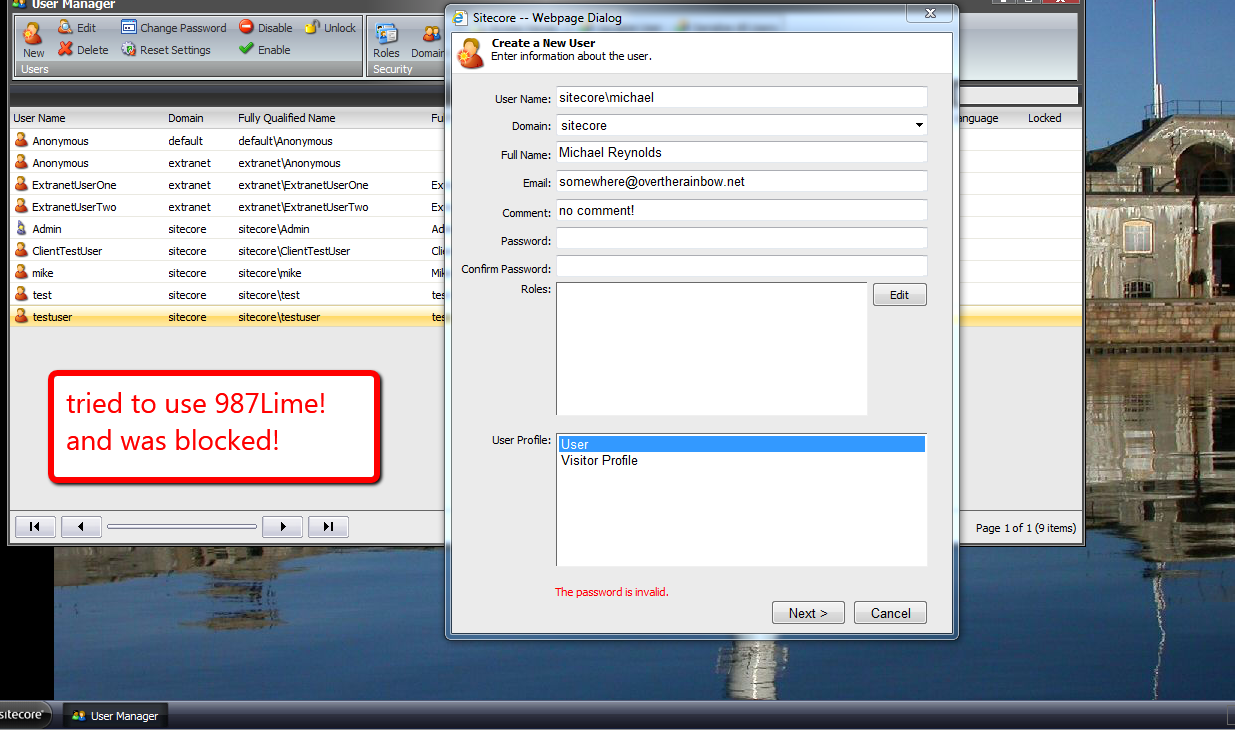
I then used a fruit that was not in the collection of fruits above, and successfully created my new user.
Next, I tried to change an existing user’s password to one that contains the word “apple”.

I successfully changed this same user’s password using the word orange — it does not live in our collection of fruits above.
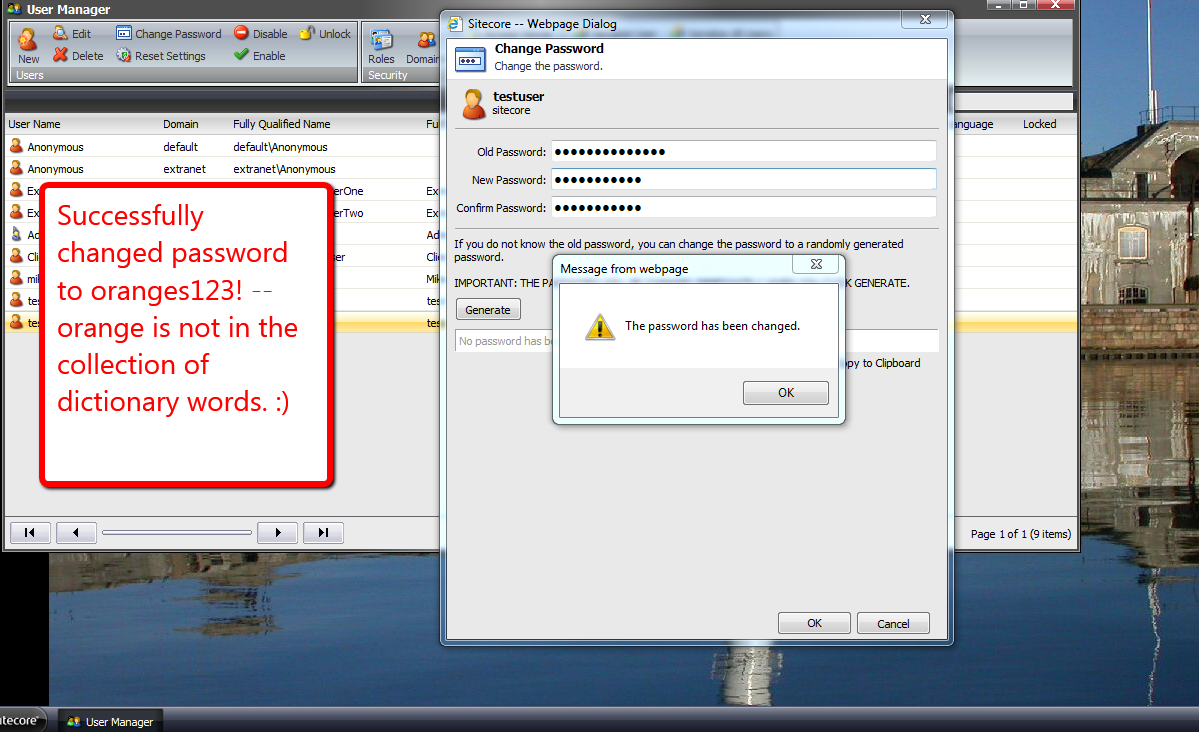
And that’s all there is to it. If you can think of alternative ways of doing this, or additional security features to implement, please drop a comment.
Until next time, have a Sitecoretastic day!
Add Content to All Sitecore Pages Using a Custom PageExtender
Out of the box, Sitecore creates and utilizes subclass instances of Sitecore.Layouts.PageExtenders.PageExtender — this class resides in Sitecore.Kernel.dll — to hook in functionality for Preview and Debugging features of the Page Editor — check out this post by John West where John discusses these — and all PageExtender instances are called upon to insert their controls onto pages via the PageExtenders pipeline processor in the renderLayout pipeline.
Last night, I hankered to explore the possibility of using a custom PageExtender outside of Sitecore’s Page Editor as an alternative route for placing content onto rendered pages in my local Sitecore sandbox instance.
I pretended I was meeting a business requirement for a fictitious company that has a website where important information is to be displayed in a big red box at the top of every page to its website visitors when applicable.
Before building my PageExtender, I defined a template for items that will contain these important messages. I named my template Alert — I probably could have chosen a better name but decided to continue this one:
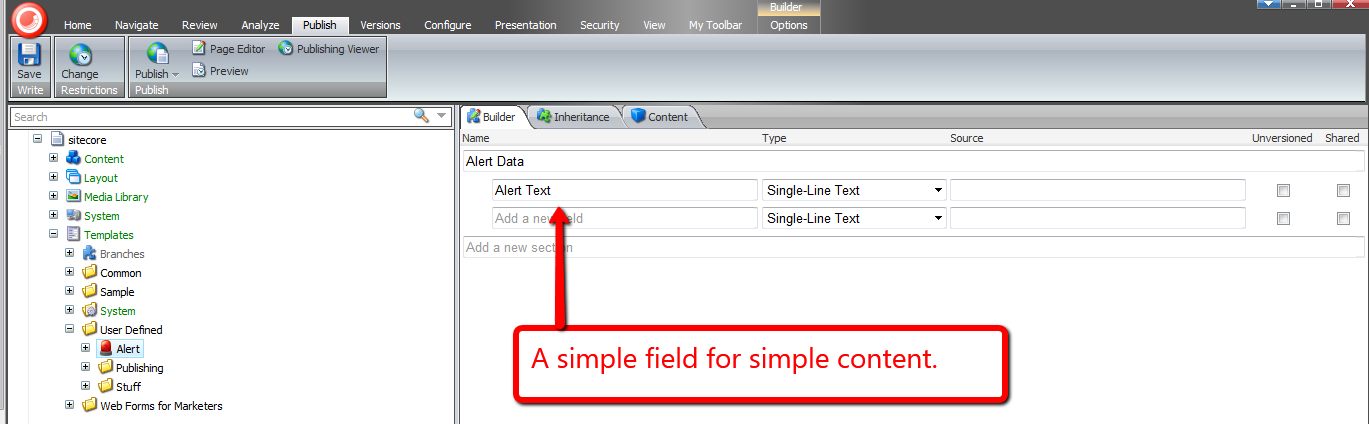
Alert items can contain alert copy in its Alert Text Single-Line Text field.
I then created an Alert item containing some important information for website visitors:
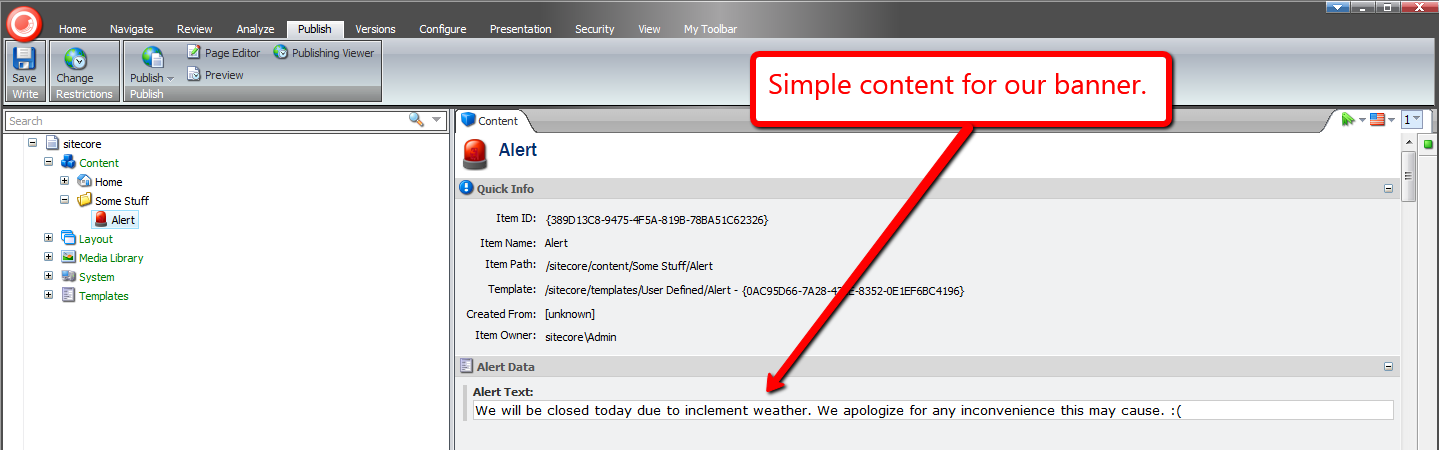
Now that we have content, it’s time to build our PageExtender to display this content:
using System;
using System.Web.UI;
using System.Web.UI.WebControls;

using Sitecore.Configuration;
using Sitecore.Data.Items;
using Sitecore.Diagnostics;
using Sitecore.Layouts;
using Sitecore.Layouts.PageExtenders;
using Sitecore.Sites;
using Sitecore.Web.UI.WebControls;

namespace Sitecore.Sandbox.Layouts.PageExtenders
{
    public class AlertBoxPageExtender : PageExtender
    {
        private static readonly string PlaceHolderKey = Settings.GetSetting("AlertBoxPageExtender.PlaceholderKey");
        private static readonly string AlertBoxID = Settings.GetSetting("AlertBoxPageExtender.AlertBoxID");
        private static readonly string AlertTextFieldName = Settings.GetSetting("AlertBoxPageExtender.AlertTextFieldName");

        private RenderingReference _AlertBoxRenderingReference;
        private RenderingReference AlertBoxRenderingReference
        {
            get
            {
                if (_AlertBoxRenderingReference == null)
                {
                    _AlertBoxRenderingReference = CreateNewAlertBoxRenderingReference();
                }

                return _AlertBoxRenderingReference;
            }
        }

        public override void Insert()
        {
            if (CanAddAlertBox())
            {
                Sitecore.Context.Page.AddRendering(AlertBoxRenderingReference);
            }
        }

        private bool CanAddAlertBox()
        {
            SiteContext site = Context.Site;
            return site != null
                    && site.EnablePreview
                    && site.DisplayMode == DisplayMode.Normal
                    && AlertBoxRenderingReference != null;
        }

        private RenderingReference CreateNewAlertBoxRenderingReference()
        {
            Control alertBoxControl = CreateAlertBoxControl();
            bool canCreateRenderingReference = alertBoxControl != null
                                                && !string.IsNullOrEmpty(PlaceHolderKey);

            if (canCreateRenderingReference)
            {
                return CreateNewRenderingReference(CreateAlertBoxControl(), PlaceHolderKey);
            }

            return null;
        }

        private Control CreateAlertBoxControl()
        {
            Control alertBoxInnerControl = CreateNewAlertBoxInnerControl();
            if (alertBoxInnerControl != null)
            {
                Panel alertBoxPanel = new Panel();
                alertBoxPanel.CssClass = "alert-box";
                alertBoxPanel.Controls.Add(alertBoxInnerControl);
                return alertBoxPanel;
            }

            return null;
        }

        private Control CreateNewAlertBoxInnerControl()
        {
            Item alertBoxItem = TryGetAlertBoxItem();
            bool canCreateInnerPanel = alertBoxItem != null
                                        && !string.IsNullOrEmpty(AlertTextFieldName)
                                        && !string.IsNullOrEmpty(alertBoxItem[AlertTextFieldName]);

            if (canCreateInnerPanel)
            {
                Panel alertBoxInnerPanel = new Panel();
                alertBoxInnerPanel.Controls.Add(CreateNewFieldRenderer(alertBoxItem, AlertTextFieldName));
                return alertBoxInnerPanel;
            }

            return null;
        }

        private static FieldRenderer CreateNewFieldRenderer(Item item, string fieldName)
        {
            Assert.ArgumentNotNull(item, "item");
            Assert.ArgumentNotNullOrEmpty(fieldName, "fieldName");
            return new FieldRenderer { Item = item, FieldName = fieldName };
        }

        private static RenderingReference CreateNewRenderingReference(Control control, string placeholderKey)
        {
            Assert.ArgumentNotNull(control, "control");
            Assert.ArgumentNotNullOrEmpty(placeholderKey, "placeholderKey");
            RenderingReference renderingReference = new RenderingReference(control);
            renderingReference.Placeholder = placeholderKey;
            return renderingReference;
        }

        private Item TryGetAlertBoxItem()
        {
            try
            {
                return Sitecore.Context.Database.Items[AlertBoxID];
            }
            catch (Exception ex)
            {
                Log.Error(this.ToString(), ex, this);
            }

            return null;
        }
    }
}
The above PageExtender inserts an instance of a FieldRenderer — that will render content from our Alert item’s Alert Text field above — into nested ASP.NET Panels. I give the outer Panel a CSS class to position these ASP.NET controls at the top of the page, and decorate it with a red background and large white text font — I’ve omitted this CSS from this post for the sake of brevity.
The combined ASP.NET controls are then placed into an instance of the Sitecore.Layouts.RenderingReference class — also in Sitecore.Kernel.dll. This RenderingReference is tagged for insertion into the Sitecore placeholder I have defined in a setting within my patch include configuration file below:
<?xml version="1.0" encoding="utf-8"?>
<configuration xmlns:patch="http://www.sitecore.net/xmlconfig/">
  <sitecore>
    <pageextenders>
      <pageextender type="Sitecore.Sandbox.Layouts.PageExtenders.AlertBoxPageExtender, Sitecore.Sandbox"/>
    </pageextenders>
    <settings>
      <setting name="AlertBoxPageExtender.PlaceholderKey" value="main" />
      <setting name="AlertBoxPageExtender.AlertBoxID" value="{389D13C8-9475-4F5A-819B-78BA51C62326}" />
      <setting name="AlertBoxPageExtender.AlertTextFieldName" value="Alert Text" />
    </settings>
  </sitecore>
</configuration>
Let’s take this for a spin.
I created some page items and published. I then navigation to the first page item I created:

As you can see, our red alert box displays at the top of the page.
I then navigated to the other page I created for testing:
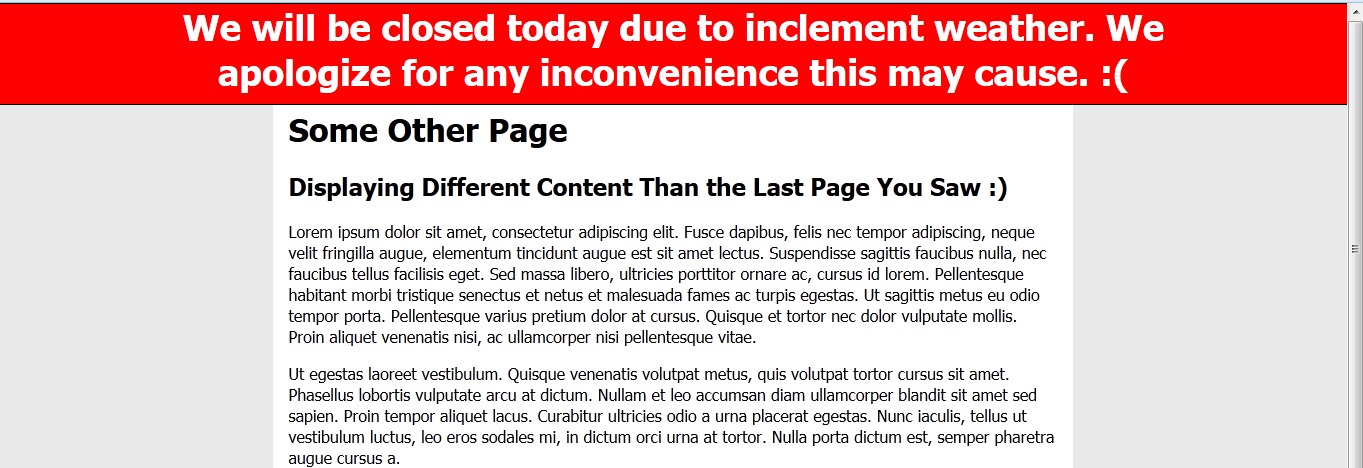
This page also contains our red alert box.
Now, lets remove the box. I deleted the copy from the Alert Text field in our Alert item in Sitecore, and published. I refreshed our second test webpage in my browser:
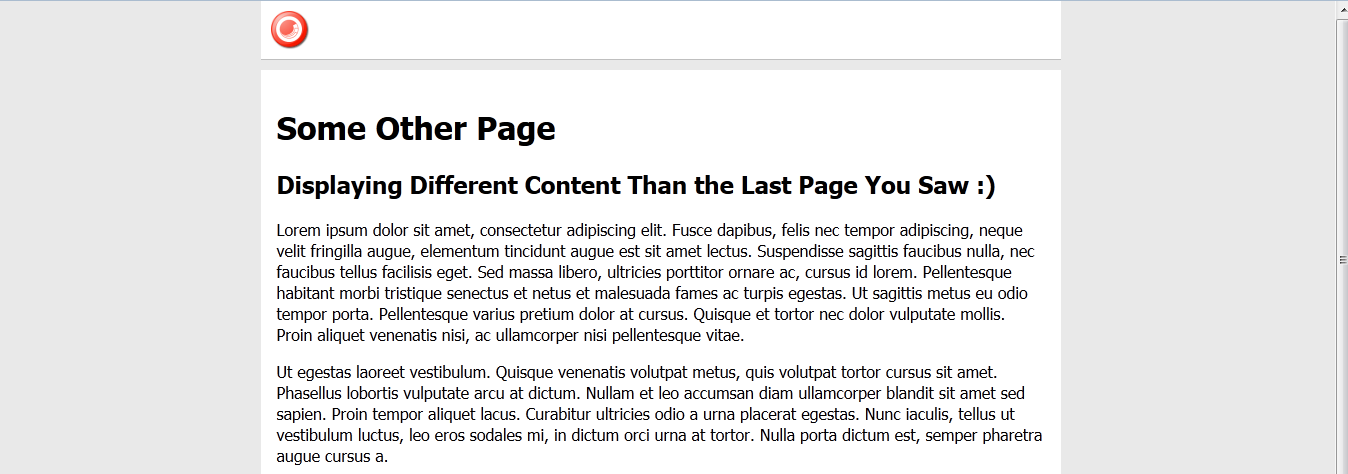
As you can see, our red alert box is now gone.
All of this is wonderful — inserting controls globally in this manner could potentially be a project saver when needing to add content to all pages in a pinch.
However, it’s also a double-edged sword. Such a solution might force the insertion of controls onto pages without the option of removing them using Sitecore’s presentation framework of adding/removing renderings.
Plus, developers who need to update this logic will have to fish around and find where this logic lives in your solution. Having to seek through the code-base to find where this logic lives could augment the time needed to complete the task of modifying this code — I’m not saying you don’t have excellent documentation articulating where this logic lives, although some people may not look at the documentation first, and will just start surfing through code to find it. I am guilty as charged for doing this myself. 🙂
Given these two salient factors, I would strongly recommend being conservative around using custom PageExtenders for displaying content on your Sitecore webpages.
You Can’t Move This! Experiments in Disabling Move Related Commands in the getQueryState Sitecore Pipeline
I was scavenging through my local sandbox instance’s Web.config the other day — yes I was looking for things to customize — and noticed the getQueryState pipeline — a pipeline that contains no “out of the box” pipeline processors:
<?xml version="1.0" encoding="utf-8"?>
<configuration>
	<!-- Some stuff here -->
	<sitecore>
		<!-- Some more stuff here -->
		<pipelines>
			<!-- Even more stuff here -->
		<!--  Allows developers to programmatically disable or hide any button or panel in the Content Editor ribbons
            without overriding the individual commands.
            Processors must accept a single argument of type GetQueryStateArgs (namespace: Sitecore.Pipelines.GetQueryState)  -->
			<getQueryState>
			</getQueryState>
			<!-- Yeup, more stuff here -->
		</pipelines>
		<!-- wow, lots of stuff here too -->
	</sitecore>
	<!-- lots of stuff down here -->
</configuration>
The above abridged version of my Web.config contains an XML comment underscoring what this pipeline should be used for: disabling and/or hiding buttons in the Sitecore client.
Although I am still unclear around the practicality of using this pipeline overall — if you have an idea, please leave a comment — I thought it would be fun building one regardless, just to see how it works. Besides, I like to tinker with things — many of my previous posts corroborate this sentiment.
What I came up with is a getQueryState pipeline processor that disables buttons containing move related commands on a selected item in the content tree with a particular template. Sorting commands also fall under the umbrella of move related commands, so these are included in our set of commands to disable.
Here’s the pipeline processor I built:
using System;
using System.Collections.Generic;
using System.Linq;
using System.Text;

using Sitecore.Configuration;
using Sitecore.Data;
using Sitecore.Data.Items;
using Sitecore.Diagnostics;
using Sitecore.Pipelines.GetQueryState;
using Sitecore.Shell.Framework.Commands;

namespace Sitecore.Sandbox.Pipelines.GetQueryState
{
    public class DisableMoveCommands
    {
        private static readonly IEnumerable<string> Commands = GetCommands();
        private static readonly IEnumerable<string> UnmovableTemplateIDs = GetUnmovableTemplateIDs();

        public void Process(GetQueryStateArgs args)
        {
            if (!CanProcessGetQueryStateArgs(args))
            {
                return;
            }

            bool shouldDisableCommand = IsUnmovableItem(GetCommandContextItem(args)) && IsMovableCommand(args.CommandName);
            if (shouldDisableCommand)
            {
                args.CommandState = CommandState.Disabled;
            }
        }

        private static bool CanProcessGetQueryStateArgs(GetQueryStateArgs args)
        {
            return args != null
                    && !string.IsNullOrEmpty(args.CommandName)
                    && args.CommandContext != null
                    && args.CommandContext.Items.Any();
        }

        private static Item GetCommandContextItem(GetQueryStateArgs args)
        {
            Assert.ArgumentNotNull(args, "args");
            Assert.ArgumentNotNull(args.CommandContext, "args.CommandContext");
            Assert.ArgumentNotNull(args.CommandContext.Items, "args.CommandContext.Items");
            return args.CommandContext.Items.FirstOrDefault();
        }

        private static bool IsUnmovableItem(Item item)
        {
            Assert.ArgumentNotNull(item, "item");
            return IsUnmovableTemplateID(item.TemplateID);
        }

        private static bool IsUnmovableTemplateID(ID templateID)
        {
            Assert.ArgumentCondition(!ID.IsNullOrEmpty(templateID), "templateID", "templateID must be set!");
            return UnmovableTemplateIDs.Contains(templateID.ToString());
        }

        private static bool IsMovableCommand(string command)
        {
            Assert.ArgumentNotNullOrEmpty(command, "command");
            return Commands.Contains(command);
        }

        private static IEnumerable<string> GetCommands()
        {
            return GetStringCollection("moveCommandsToPrevent/command");
        }

        private static IEnumerable<string> GetUnmovableTemplateIDs()
        {
            return GetStringCollection("unmovableTemplates/id");
        }

        private static IEnumerable<string> GetStringCollection(string path)
        {
            Assert.ArgumentNotNullOrEmpty(path, "path");
            return Factory.GetStringSet(path);
        }
    }
}
The above pipeline processor checks to see if the selected item in the content tree has the unmovable template I defined, coupled with whether the current command is within the set of commands we are to disable. If both are cases are met, the pipeline processor will disable the context command.
I defined my unmovable template and commands to disable in a patch include config file, along with the getQueryState pipeline processor:
<?xml version="1.0" encoding="utf-8" ?>
<configuration xmlns:patch="http://www.sitecore.net/xmlconfig/">
  <sitecore>
    <pipelines>
      <getQueryState>
        <processor type="Sitecore.Sandbox.Pipelines.GetQueryState.DisableMoveCommands, Sitecore.Sandbox" />
      </getQueryState>
    </pipelines>
    <unmovableTemplates>
      <id>{8ADD3F45-027C-49C5-A8FB-0406B8C8728D}</id>
    </unmovableTemplates>
    <moveCommandsToPrevent>
      <command>item:moveto</command>
      <command>item:cuttoclipboard</command>
      <command>item:moveup</command>
      <command>item:movedown</command>
      <command>item:movefirst</command>
      <command>item:movelast</command>
      <command>item:moveto</command>
    </moveCommandsToPrevent>
  </sitecore>
</configuration>
Looking at the context menu on my unmovable item — appropriately named “You Cant Move This” — you can see the move related buttons are disabled:
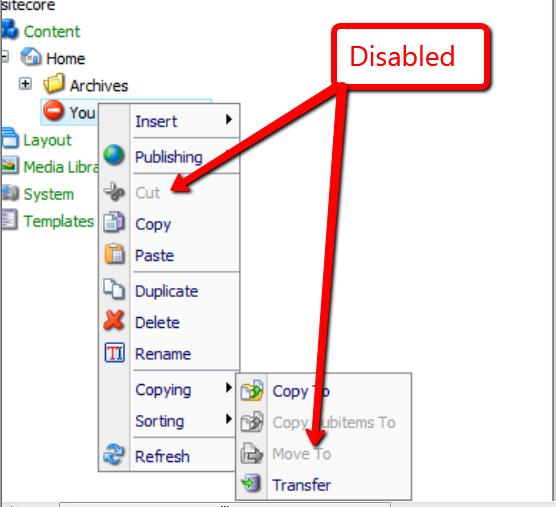
Plus, item level sorting commands are also disabled:

Move related buttons in the ribbon are also disabled:
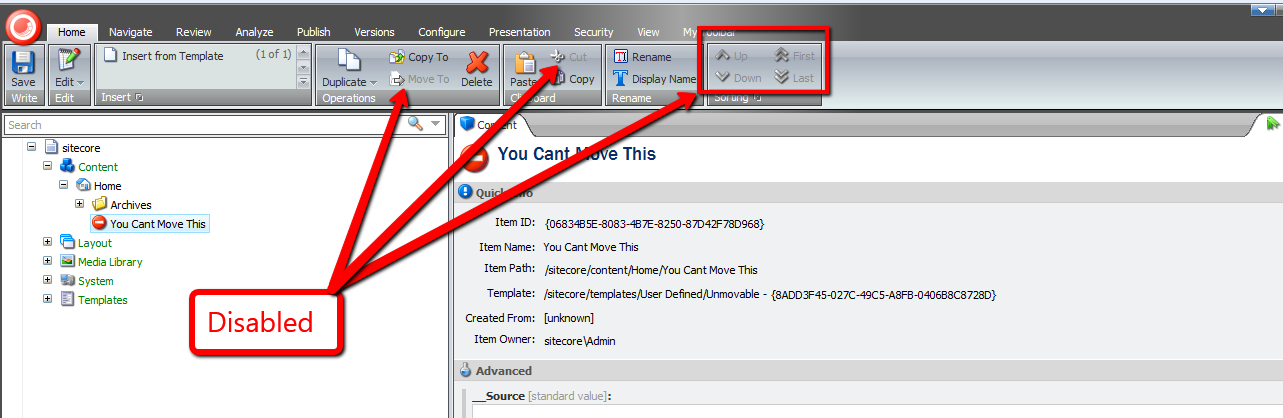
There really wasn’t much to building this pipeline processor, and this pipeline is at your disposal if you ever find yourself in a situation where you might have to disable buttons in the Sitecore client for whatever reason.
However, as I mentioned above, I still don’t understand why one would want to use this pipeline. If you have an idea why, please let me know.
Empower Your Content Authors to Expand Standard Values Tokens in the Sitecore Client
Have you ever seen a Standard Values token — $name is an example of a Standard Values token — in an item’s field, and ask yourself “how the world did that get there”, or alternatively, “what can be done to replace it with what should be there?”
This can occur when tokens are added to an item’s template’s Standard Values node after the item was created — tokens are expanded once an item is created, not after the fact.
John West wrote a blog article highlighting one solution for eradicating this issue by using the Sitecore Rules Engine.
In this post, I am proposing a completely different solution — one that empowers content authors to expand unexpanded tokens by clicking a link in a custom content editor warning box.
First, I created a series of utility objects that ascertain whether “Source” objects contain substrings that we are interested in. All implement the following interface:
using System;
using System.Collections.Generic;
using System.Linq;
using System.Text;

namespace Sitecore.Sandbox.Utilities.StringUtilities.Base
{
    public interface ISubstringsChecker<T>
    {
        T Source { get; set; }

        IEnumerable<string> Substrings { get; set; }

        bool ContainsSubstrings();
    }
}
All of our “checkers” will have a “Source” object, a collection of substrings to look for, and a method to convey to calling code whether a substring in the collection of substrings had been found in the “Source” object.
I decided to create a base abstract class with some abstract methods along with one method to serve as a hook for asserting the Source object — albeit I did not use this method anywhere in my solution (come on Mike, you’re forgetting YAGNI — let’s get with the program).
Utimately, I am employing the template method pattern — all subclasses of this abstract base class will just fill in the defined abstract stubs, and the parent class will take care of the rest:
using System;
using System.Collections.Generic;
using System.Linq;
using System.Text;

namespace Sitecore.Sandbox.Utilities.StringUtilities.Base
{
    public abstract class SubstringsChecker<T> : ISubstringsChecker<T>
    {
        public T Source { get; set; }

        public virtual IEnumerable<string> Substrings { get; set; }

        protected SubstringsChecker(T source)
        {
            SetSource(source);
        }

        private void SetSource(T source)
        {
            AssertSource(source);
            Source = source;
        }

        protected virtual void AssertSource(T source)
        {
            // a hook for subclasses to assert Source objects
        }

        public bool ContainsSubstrings()
        {
            if (CanDoCheck())
            {
                return DoCheck();
            }

            return false;
        }

        protected abstract bool CanDoCheck();
        protected abstract bool DoCheck();
    }
}
The first “checker” I created will find substrings in a string. It made sense for me to start here, especially when we are ultimately checking strings at the most atomic level in our series of “checker” utility objects.
using System;
using System.Collections.Generic;
using System.Linq;
using System.Text;

using Sitecore.Diagnostics;

using Sitecore.Sandbox.Utilities.StringUtilities.Base;
using Sitecore.Sandbox.Utilities.StringUtilities.DTO;

namespace Sitecore.Sandbox.Utilities.StringUtilities
{
    public class StringSubstringsChecker : SubstringsChecker<string>
    {
        private StringSubstringsChecker(IEnumerable<string> substrings)
            : this(null, substrings)
        {
        }

        private StringSubstringsChecker(string source, IEnumerable<string> substrings)
            : base(source)
        {
            SetSubstrings(substrings);
        }

        private void SetSubstrings(IEnumerable<string> substrings)
        {
            AssertSubstrings(substrings);
            Substrings = substrings;
        }

        private static void AssertSubstrings(IEnumerable<string> substrings)
        {
            Assert.ArgumentNotNull(substrings, "substrings");
            Assert.ArgumentCondition(substrings.Any(), "substrings", "substrings must contain as at least one string!");
        }

        protected override bool CanDoCheck()
        {
            return !string.IsNullOrEmpty(Source);
        }

        protected override bool DoCheck()
        {
            Assert.ArgumentNotNullOrEmpty(Source, "Source");

            foreach (string substring in Substrings)
            {
                if (Source.Contains(substring))
                {
                    return true;
                }
            }

            return false;
        }

        public static ISubstringsChecker<string> CreateNewStringSubstringsContainer(IEnumerable<string> substrings)
        {
            return new StringSubstringsChecker(substrings);
        }

        public static ISubstringsChecker<string> CreateNewStringSubstringsContainer(string source, IEnumerable<string> substrings)
        {
            return new StringSubstringsChecker(substrings);
        }
    }
}
The next level up from strings would naturally be Fields. I designed this “checker” to consume an instance of the string “checker” defined above — all for the purposes of reuse. The field “checker” delegates calls to its string “checker” instance.
using System;
using System.Collections.Generic;
using System.Linq;
using System.Text;

using Sitecore.Data.Fields;
using Sitecore.Diagnostics;

using Sitecore.Sandbox.Utilities.StringUtilities.Base;

namespace Sitecore.Sandbox.Utilities.StringUtilities
{
    public class FieldSubstringsChecker : SubstringsChecker<Field>
    {
        private ISubstringsChecker<string> StringSubstringsChecker { get; set; }

        public override IEnumerable<string> Substrings
        {
            get
            {
                return StringSubstringsChecker.Substrings;
            }
            set
            {
                StringSubstringsChecker.Substrings = value;
            }
        }

        private FieldSubstringsChecker(ISubstringsChecker<string> stringSubstringsChecker)
            : this(null, stringSubstringsChecker)
        {
        }

        private FieldSubstringsChecker(Field source, ISubstringsChecker<string> stringSubstringsChecker)
            : base(source)
        {
            SetStringSubstringsChecker(stringSubstringsChecker);
        }

        private void SetStringSubstringsChecker(ISubstringsChecker<string> stringSubstringsChecker)
        {
            Assert.ArgumentNotNull(stringSubstringsChecker, "stringSubstringsChecker");
            StringSubstringsChecker = stringSubstringsChecker;
        }

        protected override bool CanDoCheck()
        {
            return Source != null;
        }

        protected override bool DoCheck()
        {
            Assert.ArgumentNotNull(Source, "Source");
            StringSubstringsChecker.Source = Source.Value;
            return StringSubstringsChecker.ContainsSubstrings();
        }

        public static ISubstringsChecker<Field> CreateNewFieldSubstringsChecker(ISubstringsChecker<string> stringSubstringsChecker)
        {
            return new FieldSubstringsChecker(stringSubstringsChecker);
        }

        public static ISubstringsChecker<Field> CreateNewFieldSubstringsChecker(Field source, ISubstringsChecker<string> stringSubstringsChecker)
        {
            return new FieldSubstringsChecker(source, stringSubstringsChecker);
        }
    }
}
If I were to ask you what the next level up in our series of “checkers” would be, I hope your answer would be Items. Below is a “checker” that uses an Item as its “Source” object, and delegates calls to an instance of a field “checker”.
using System;
using System.Collections.Generic;
using System.Linq;
using System.Text;

using Sitecore.Data.Fields;
using Sitecore.Data.Items;
using Sitecore.Diagnostics;

using Sitecore.Sandbox.Utilities.StringUtilities.Base;

namespace Sitecore.Sandbox.Utilities.StringUtilities
{
    public class ItemSubstringsChecker : SubstringsChecker<Item>
    {
        private ISubstringsChecker<Field> FieldSubstringsChecker { get; set; }

        public override IEnumerable<string> Substrings
        {
            get
            {
                return FieldSubstringsChecker.Substrings;
            }
            set
            {
                FieldSubstringsChecker.Substrings = value;
            }
        }

        private ItemSubstringsChecker(ISubstringsChecker<Field> fieldSubstringsChecker)
            : this(null, fieldSubstringsChecker)
        {
        }

        private ItemSubstringsChecker(Item source, ISubstringsChecker<Field> fieldSubstringsChecker)
            : base(source)
        {
            SetFieldSubstringsChecker(fieldSubstringsChecker);
        }

        private void SetFieldSubstringsChecker(ISubstringsChecker<Field> fieldSubstringsChecker)
        {
            Assert.ArgumentNotNull(fieldSubstringsChecker, "fieldSubstringsChecker");
            FieldSubstringsChecker = fieldSubstringsChecker;
        }

        protected override bool CanDoCheck()
        {
            return Source != null && Source.Fields != null && Source.Fields.Any();
        }

        protected override bool DoCheck()
        {
            Assert.ArgumentNotNull(Source, "Source");
            bool containsSubstrings = false;

            for (int i = 0; !containsSubstrings && i < Source.Fields.Count; i++)
            {
                containsSubstrings = containsSubstrings || DoesFieldContainSubstrings(Source.Fields[i]);
            }

            return containsSubstrings;
        }

        private bool DoesFieldContainSubstrings(Field field)
        {
            FieldSubstringsChecker.Source = field;
            return FieldSubstringsChecker.ContainsSubstrings();
        }

        public static ISubstringsChecker<Item> CreateNewItemSubstringsChecker(ISubstringsChecker<Field> fieldSubstringsChecker)
        {
            return new ItemSubstringsChecker(fieldSubstringsChecker);
        }

        public static ISubstringsChecker<Item> CreateNewItemSubstringsChecker(Item source, ISubstringsChecker<Field> fieldSubstringsChecker)
        {
            return new ItemSubstringsChecker(source, fieldSubstringsChecker);
        }
    }
}
Next, I wrote code for a content editor warning box. I’m am completely indebted to .NET Reflector in helping out on this front — I looked at other content editor warning pipelines in Sitecore.Pipelines.GetContentEditorWarnings within Sitecore.Kernel to see how this is done:
using System;
using System.Collections.Generic;
using System.Linq;
using System.Text;

using Sitecore.Configuration;
using Sitecore.Data.Fields;
using Sitecore.Data.Items;
using Sitecore.Diagnostics;
using Sitecore.Globalization;
using Sitecore.Pipelines.GetContentEditorWarnings;

using Sitecore.Sandbox.Utilities.StringUtilities.Base;
using Sitecore.Sandbox.Utilities.StringUtilities;

namespace Sitecore.Sandbox.Pipelines.GetContentEditorWarnings
{
    public class HasUnexpandedTokens
    {
        private static readonly ISubstringsChecker<Item> SubstringsChecker = CreateNewItemSubstringsChecker();

        public void Process(GetContentEditorWarningsArgs args)
        {
            Assert.ArgumentNotNull(args, "args");
            if (CanExpandTokens(args.Item))
            {
                AddHasUnexpandedTokensWarning(args);
            }
        }

        private static bool CanExpandTokens(Item item)
        {
            Assert.ArgumentNotNull(item, "item");
            return !IsStandardValues(item) && DoesItemContainUnexpandedTokens(item);
        }

        private static bool DoesItemContainUnexpandedTokens(Item item)
        {
            Assert.ArgumentNotNull(item, "item");
            SubstringsChecker.Source = item;
            return SubstringsChecker.ContainsSubstrings();
        }

        private static bool IsStandardValues(Item item)
        {
            return item.Template.StandardValues.ID == item.ID;
        }

        private static void AddHasUnexpandedTokensWarning(GetContentEditorWarningsArgs args)
        {
            GetContentEditorWarningsArgs.ContentEditorWarning warning = args.Add();
            warning.Title = Translate.Text("Some fields contain unexpanded tokens.");
            warning.Text = Translate.Text("To expand tokens, click Expand Tokens.");
            warning.AddOption(Translate.Text("Expand Tokens"), "item:expandtokens");
        }

        private static ISubstringsChecker<Item> CreateNewItemSubstringsChecker()
        {
            return ItemSubstringsChecker.CreateNewItemSubstringsChecker(CreateNewFieldSubstringsChecker());
        }

        private static ISubstringsChecker<Field> CreateNewFieldSubstringsChecker()
        {
            return FieldSubstringsChecker.CreateNewFieldSubstringsChecker(CreateNewStringSubstringsChecker());
        }

        private static ISubstringsChecker<string> CreateNewStringSubstringsChecker()
        {
            return StringSubstringsChecker.CreateNewStringSubstringsContainer(GetTokens());
        }

        private static IEnumerable<string> GetTokens()
        {
            return Factory.GetStringSet("tokens/token");
        }
    }
}
In my pipeline above, I am pulling a collection of token names from Sitecore configuration — these are going to be defined in a patch include file below. I had to go down this road since these tokens are not publically exposed in the Sitecore API.
Plus, we should only allow for the expansion of tokens when not on the Standard values item — it wouldn’t make much sense to expand these tokens here.
Since I’m referencing a new command in the above pipeline — a command that I’ve named “item:expandtokens” — it’s now time to create that new command:
using System;
using System.Collections.Generic;
using System.Linq;
using System.Text;

using Sitecore.Configuration;
using Sitecore.Data;
using Sitecore.Data.Fields;
using Sitecore.Data.Items;
using Sitecore.Diagnostics;
using Sitecore.Shell.Framework.Commands;

using Sitecore.Sandbox.Utilities.StringUtilities;
using Sitecore.Sandbox.Utilities.StringUtilities.Base;
using Sitecore.Sandbox.Utilities.StringUtilities.DTO;

namespace Sitecore.Sandbox.Commands
{
    public class ExpandTokens : Command
    {
        public override void Execute(CommandContext commandContext)
        {
            if (!DoesCommandContextContainOneItem(commandContext))
            {
                return;
            }

            ExpandTokensInItem(GetCommandContextItem(commandContext));
        }

        private static void ExpandTokensInItem(Item item)
        {
            Assert.ArgumentNotNull(item, "item");
            item.Fields.ReadAll();
            item.Editing.BeginEdit();
            ExpandTokensViaMasterVariablesReplacer(item);
            item.Editing.EndEdit();
        }

        private static void ExpandTokensViaMasterVariablesReplacer(Item item)
        {
            MasterVariablesReplacer masterVariablesReplacer = Factory.GetMasterVariablesReplacer();
            masterVariablesReplacer.ReplaceItem(item);
        }

        public override CommandState QueryState(CommandContext commandContext)
        {
            if (ShouldHideCommand(commandContext))
            {
                return CommandState.Hidden;
            }

            if (ShouldDisableCommand(commandContext))
            {
                return CommandState.Disabled;
            }

            return base.QueryState(commandContext);
        }

        private bool ShouldHideCommand(CommandContext commandContext)
        {
            Assert.ArgumentNotNull(commandContext, "commandContext");
            return !DoesCommandContextContainOneItem(commandContext)
                    || !HasField(GetCommandContextItem(commandContext), FieldIDs.ReadOnly);
        }

        private static bool ShouldDisableCommand(CommandContext commandContext)
        {
            AssertCommandContextItems(commandContext);
            Item item = GetCommandContextItem(commandContext);

            return !item.Access.CanWrite()
                    || Command.IsLockedByOther(item)
                    || !Command.CanWriteField(item, FieldIDs.ReadOnly);
        }

        private static Item GetCommandContextItem(CommandContext commandContext)
        {
            Assert.ArgumentNotNull(commandContext, "commandContext");
            Assert.ArgumentNotNull(commandContext.Items, "commandContext.Items");
            return commandContext.Items.FirstOrDefault();
        }

        private static bool DoesCommandContextContainOneItem(CommandContext commandContext)
        {
            AssertCommandContextItems(commandContext);
            return commandContext.Items.Length == 1;
        }

        private static void AssertCommandContextItems(CommandContext commandContext)
        {
            Assert.ArgumentNotNull(commandContext, "commandContext");
            Assert.ArgumentNotNull(commandContext.Items, "commandContext.Items");
        }
    }
}
This new command just uses an instance of Sitecore.Data.MasterVariablesReplacer to expand Standard Values tokens on our item.
I had to register this command in the /App_Config/Commands.config file:
<?xml version="1.0" encoding="utf-8" ?>
<configuration>
	<! -- A bunch of commands defined here -->

	<command name="item:expandtokens" type="Sitecore.Sandbox.Commands.ExpandTokens,Sitecore.Sandbox" />

	<! -- A bunch more defined here too -->
</configuration>
I then put all the pieces together using a patch include config file:
<?xml version="1.0" encoding="utf-8"?>
<configuration xmlns:patch="http://www.sitecore.net/xmlconfig/">
  <sitecore>
    <pipelines>
      <getContentEditorWarnings>
        <processor type="Sitecore.Sandbox.Pipelines.GetContentEditorWarnings.HasUnexpandedTokens, Sitecore.Sandbox"/>
      </getContentEditorWarnings>
    </pipelines>
    <tokens>
      <token>$name</token>
      <token>$id</token>
      <token>$parentid</token>
      <token>$parentname</token>
      <token>$date</token>
      <token>$time</token>
      <token>$now</token>
    </tokens>
  </sitecore>
</configuration>
Let’s create an item for testing:

As you can see, the item’s Title field was populated automatically during item creation — the $name token lives on this item’s template’s Standard Values item in Sitecore and was expanded when we created our test item.
Let’s create the problem we are trying to solve by adding new tokens to our test item’s template’s Standard Values node:

As you can see, these new tokens appear in fields in our test item. However, don’t fret — we now have a way to fix this issue. 🙂

I clicked on the ‘Expand Tokens’ link, and saw the following:

Hopefully, this post has given you another weapon to add to your arsenal for solving the unexpanded tokens issue on existing items in Sitecore.
If you find another solution, please drop me a line — I would love to hear about it.
Dude, Where’s My Processor? Filling the Void in the SaveRichTextContent and LoadRichTextContent Sitecore Pipelines
Some of you might be aware that I frequently go through the Web.config of my local instance of Sitecore looking for opportunities to extend or customize class files referenced within it — I may have mentioned this in a previous post, and no doubt have told some Sitecore developers/enthusiasts in person I do this at least once per day. I must confess: I usually do this multiple times a day.
Last night, I was driven to explore something I have noticed in the Web.config of my v6.5 instance — my attention has been usurped many times by the saveRichTextContent and loadRichTextContent pipeline nodes being empty.
These two pipelines allow you to make changes to content within Rich Text fields before any save actions on your item in the Sitecore client.
I remembered that one of them did have a pipeline processor defined within it at one point. It was time to do some research.
After conducting some research — truth be told, I only googled a couple of times — I stumbled upon some release notes on SDN discussing the saveRichTextContent Web.config pipeline, and that this pipeline did contain a processor in it at one point — the Sitecore.Shell.Controls.RichTextEditor.Pipelines.SaveRichTextContent.EmbedInParagraph processor — although I don’t remember what this processor did, and don’t have an older version of Sitecore.Client.dll to investigate. I could download an older version of Sitecore from SDN, but decided to leave that exercise for another snowy weekend.
I decided to explore whether the option to add custom processors to these pipelines still existed. I came up with an idea straight out of the 1990’s — having marquee tags animate content across my pages.
As an aside, back in the 1990’s, almost every webpage — all webpages were called homepages then — had at least one marquee. Most had multiple — it was the cool thing to do back then, asymptotic only to having an ‘Under Construction’ image on your homepage. Employing this practice today would be considered anathema.
I decided to reuse my concept of manipulator from my Manipulate Field Values in a Custom Sitecore Web Forms for Marketers DataProvider article, and created a new manipulator to wrap specified tags in marquee tags:
using System;
using System.Collections.Generic;
using System.Linq;
using System.Text;

namespace Sitecore.Sandbox.Utilities.Manipulators.Base
{
    public interface IWrapHtmlTagsInTagManipulator : IManipulator<string>
    {
    }
}
I thought it would be a good idea to define a DTO for my manipulator to pass objects to it in a clean manner:
using System;
using System.Collections.Generic;
using System.Linq;
using System.Text;

namespace Sitecore.Sandbox.Utilities.Manipulators.DTO
{
    public class WrapHtmlTagsInTagManipulatorSettings
    {
        public string WrapperTag { get; set; }
        public IEnumerable<string> TagsToWrap { get; set; }
    }
}
Next, I built my manipulator:
using System;
using System.Collections.Generic;
using System.Linq;
using System.Text;

using Sitecore.Diagnostics;

using Sitecore.Sandbox.Utilities.Manipulators.Base;
using Sitecore.Sandbox.Utilities.Manipulators.DTO;

using HtmlAgilityPack;

namespace Sitecore.Sandbox.Utilities.Manipulators
{
    public class WrapHtmlTagsInTagManipulator : IWrapHtmlTagsInTagManipulator
    {
        private WrapHtmlTagsInTagManipulatorSettings Settings { get; set; }

        private WrapHtmlTagsInTagManipulator(WrapHtmlTagsInTagManipulatorSettings settings)
        {
            SetSettings(settings);
        }

        private void SetSettings(WrapHtmlTagsInTagManipulatorSettings settings)
        {
            AssertSettings(settings);
            Settings = settings;
        }

        private static void AssertSettings(WrapHtmlTagsInTagManipulatorSettings settings)
        {
            Assert.ArgumentNotNull(settings, "settings");
            Assert.ArgumentNotNullOrEmpty(settings.WrapperTag, "settings.WrapperTag");
            Assert.ArgumentNotNull(settings.TagsToWrap, "settings.TagsToWrap");
        }

        public string Manipulate(string html)
        {
            Assert.ArgumentNotNullOrEmpty(html, "html");
            HtmlNode documentNode = GetHtmlDocumentNode(html);

            foreach (string tagToWrap in Settings.TagsToWrap)
            {
                WrapTags(documentNode, tagToWrap);
            }

            return documentNode.InnerHtml;
        }

        private void WrapTags(HtmlNode documentNode, string tagToWrap)
        {
            HtmlNodeCollection htmlNodes = documentNode.SelectNodes(CreateNewDescendantsSelector(tagToWrap));

            foreach(HtmlNode htmlNode in htmlNodes)
            {
                WrapHtmlNodeIfApplicable(documentNode, htmlNode);
            }
        }

        private void WrapHtmlNodeIfApplicable(HtmlNode documentNode, HtmlNode htmlNode)
        {
            if (!AreEqualIgnoreCase(htmlNode.ParentNode.Name, Settings.WrapperTag))
            {
                WrapHtmlNode(documentNode, htmlNode, Settings.WrapperTag);
            }
        }

        private static void WrapHtmlNode(HtmlNode documentNode, HtmlNode htmlNode, string wrapperTag)
        {
            HtmlNode wrapperHtmlNode = documentNode.OwnerDocument.CreateElement(wrapperTag);
            AddNewParent(wrapperHtmlNode, htmlNode);
        }

        private static void AddNewParent(HtmlNode newParentHtmlNode, HtmlNode htmlNode)
        {
            Assert.ArgumentNotNull(newParentHtmlNode, "newParentHtmlNode");
            Assert.ArgumentNotNull(htmlNode, "htmlNode");
            htmlNode.ParentNode.ReplaceChild(newParentHtmlNode, htmlNode);
            newParentHtmlNode.AppendChild(htmlNode);
        }

        private static bool AreEqualIgnoreCase(string stringOne, string stringTwo)
        {
            return string.Equals(stringOne, stringTwo, StringComparison.InvariantCultureIgnoreCase);
        }

        private static string CreateNewDescendantsSelector(string tag)
        {
            Assert.ArgumentNotNullOrEmpty(tag, "tag");
            return string.Format("//{0}", tag);
        }

        private HtmlNode GetHtmlDocumentNode(string html)
        {
            HtmlDocument htmlDocument = CreateNewHtmlDocument(html);
            return htmlDocument.DocumentNode;
        }

        private HtmlDocument CreateNewHtmlDocument(string html)
        {
            HtmlDocument htmlDocument = new HtmlDocument();
            htmlDocument.LoadHtml(html);
            return htmlDocument;
        }

        public static IWrapHtmlTagsInTagManipulator CreateNewWrapHtmlTagsInTagManipulator(WrapHtmlTagsInTagManipulatorSettings settings)
        {
            return new WrapHtmlTagsInTagManipulator(settings);
        }
    }
}
My manipulator class above uses Html Agility Pack to find targeted html elements, and wrap them in newly created marquee tags — which are also created via Html Agility Pack.
I decided to create a base class to contain core logic that will be used across both of my pipeline processors:
using System;
using System.Collections.Generic;
using System.Linq;
using System.Text;

using Sitecore.Sandbox.Utilities.Manipulators;
using Sitecore.Sandbox.Utilities.Manipulators.Base;
using Sitecore.Sandbox.Utilities.Manipulators.DTO;

namespace Sitecore.Sandbox.Shell.Controls.RichTextEditor.Pipelines.Base
{
    public abstract class AddSomeMarqueesBase
    {
        private IWrapHtmlTagsInTagManipulator _HtmlManipulator;
        private IWrapHtmlTagsInTagManipulator HtmlManipulator
        {
            get
            {
                if(_HtmlManipulator == null)
                {
                    _HtmlManipulator = CreateNewWrapHtmlTagsInTagManipulator();
                }

                return _HtmlManipulator;
            }
        }

        private IWrapHtmlTagsInTagManipulator CreateNewWrapHtmlTagsInTagManipulator()
        {
            return WrapHtmlTagsInTagManipulator.CreateNewWrapHtmlTagsInTagManipulator(CreateNewWrapHtmlTagsInTagManipulatorSettings());
        }

        protected virtual WrapHtmlTagsInTagManipulatorSettings CreateNewWrapHtmlTagsInTagManipulatorSettings()
        {
            return new WrapHtmlTagsInTagManipulatorSettings
            {
                WrapperTag = "marquee",
                TagsToWrap = new string[] { "em", "img" }
            };
        }

        protected virtual string ManipulateHtml(string html)
        {
            if (!string.IsNullOrEmpty(html))
            {
                return HtmlManipulator.Manipulate(html);
            }

            return html;
        }
    }
}
This base class creates an instance of our manipulator class above, passing in the required DTO housing the wrapper tag and tags to wrap settings.
Honestly, while writing this article and looking at this code, I am not completely happy about how I implemented this base class. I should have added a constructor which takes in the manipulator instance — thus allowing subclasses to provide their own manipulators, especially if these subclasses need to use a different manipulator than the one used by default in the base class.
Further, it probably would have been prudent to put the html tags I defined in my DTO instance into a patch config file.
Next, I defined my loadRichTextContent pipeline processor:
using System;
using System.Collections.Generic;
using System.Linq;
using System.Text;

using Sitecore.Shell.Controls.RichTextEditor.Pipelines.LoadRichTextContent;

using Sitecore.Sandbox.Shell.Controls.RichTextEditor.Pipelines.Base;

namespace Sitecore.Sandbox.Shell.Controls.RichTextEditor.Pipelines.LoadRichTextContent
{
    public class AddSomeMarquees : AddSomeMarqueesBase
    {
        public void Process(LoadRichTextContentArgs args)
        {
            args.Content = ManipulateHtml(args.Content);
        }
    }
}
Followed by my saveRichTextContentpipeline processor:
using System;
using System.Collections.Generic;
using System.Linq;
using System.Text;

using Sitecore.Shell.Controls.RichTextEditor.Pipelines.SaveRichTextContent;

using Sitecore.Sandbox.Shell.Controls.RichTextEditor.Pipelines.Base;

namespace Sitecore.Sandbox.Shell.Controls.RichTextEditor.Pipelines.SaveRichTextContent
{
    public class AddSomeMarquees : AddSomeMarqueesBase
    {
        public void Process(SaveRichTextContentArgs args)
        {
            args.Content = ManipulateHtml(args.Content);
        }
    }
}
Thereafter, I glued everything together via a patch config file:
<?xml version="1.0" encoding="utf-8" ?>
<configuration xmlns:patch="http://www.sitecore.net/xmlconfig/">
  <sitecore>
    <pipelines>
      <loadRichTextContent>
        <processor type="Sitecore.Sandbox.Shell.Controls.RichTextEditor.Pipelines.LoadRichTextContent.AddSomeMarquees, Sitecore.Sandbox"/>
      </loadRichTextContent>
      <saveRichTextContent>
        <processor type="Sitecore.Sandbox.Shell.Controls.RichTextEditor.Pipelines.SaveRichTextContent.AddSomeMarquees, Sitecore.Sandbox"/>
      </saveRichTextContent>
    </pipelines>
  </sitecore>
</configuration>
Time to see the fruits of my labor above.
I’ve added some content in a Rich Text field:
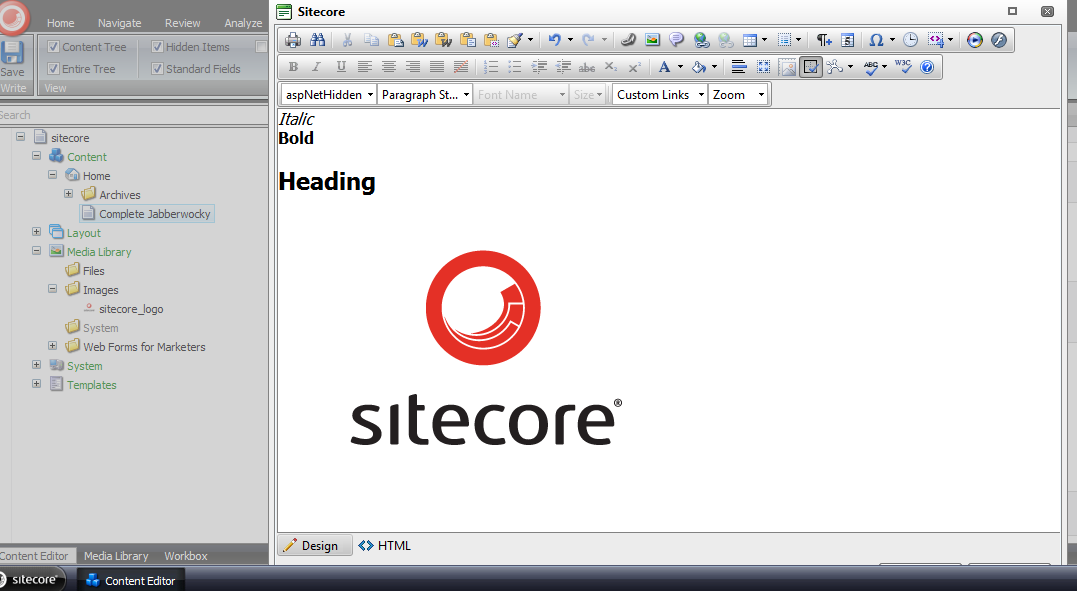
Here’s the html in the Rich Text field:

I clicked the ‘Accept’ button in the Rich Text dialog window, and then saw the targeted content come to life:
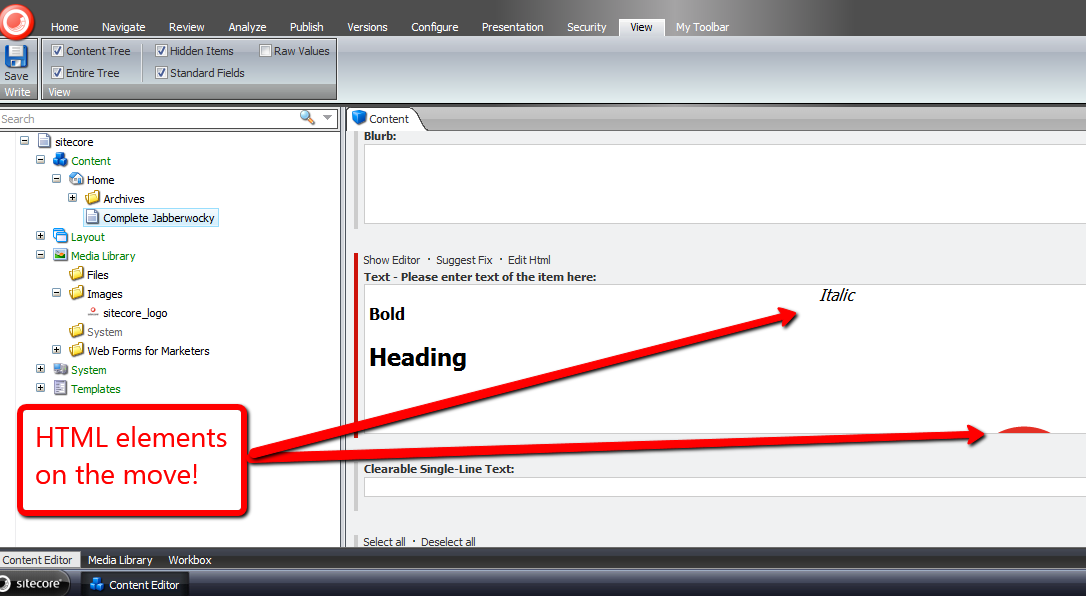
I launched the dialog window again to investigate what the html now looks like:
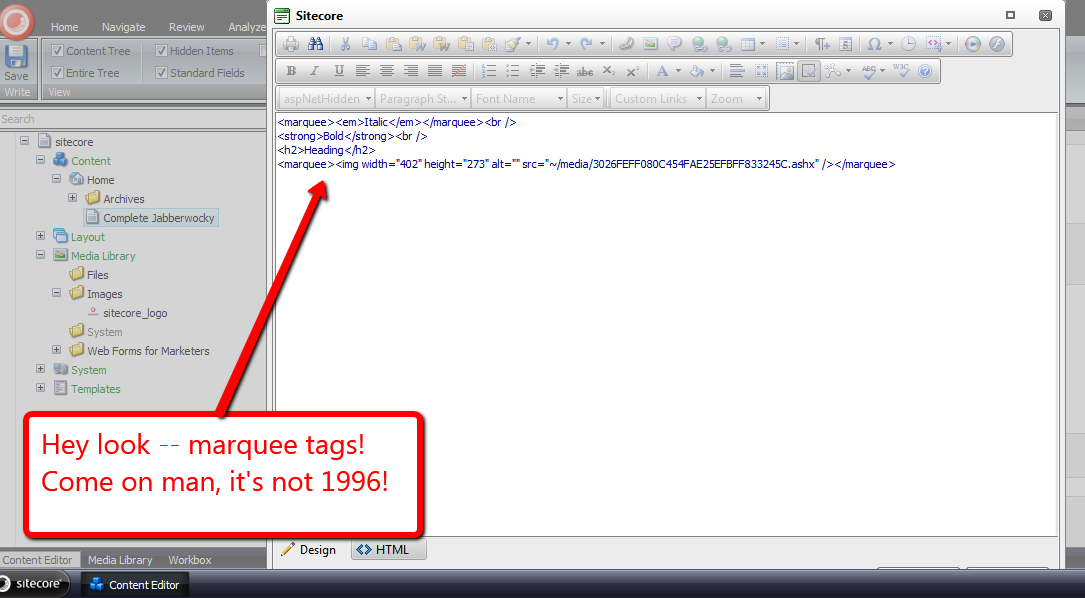
Mission accomplished — we now have marquees! 🙂
I do want to point out I could not get my loadRichTextContent pipeline processor to run. I thought it would run when opening the Rich Text dialog, although I was wrong — it did not. I also tried to get it to run via the ‘Edit Html’ button, but to no avail.
If I am looking in the wrong place, or this is a known issue in Sitecore, please drop a comment and let me know.
Shoehorn Sitecore Web Forms for Marketers Field Values During a Custom Save Action
In a previous article, I discussed how one could remove Web Forms for Marketers (WFFM) field values before saving form data into the WFFM database — which ultimately make their way into the Form Reports for your form.
When I penned that article, my intentions were not to write an another highlighting the polar opposite action of inserting field values — I figured one could easily ascertain how to do this from that article.
However, last night I started to feel some guilt for not sharing how one could do this — there is one step in this process that isn’t completely intuitive — so I worked late into the night developing a solution of how one would go about doing this, and this article is the fruit of that effort.
Besides, how often does one get the opportunity to use the word shoehorn? If you aren’t familiar with what a shoehorn is, check out this article. I am using the word as an action verb in this post — meaning to insert values for fields in the WFFM database. 🙂
I first defined a utility class and its interfaces for shoehorning field values into a AdaptedResultList collection — a collection of WFFM fields:
using System;
using System.Collections.Generic;
using System.Linq;
using System.Text;

namespace Sitecore.Sandbox.Utilities.Shoehorns.Base
{
    public interface IShoehorn<T, U>
    {
        U Shoehorn(T source);
    }
}
using System;
using System.Collections.Generic;
using System.Linq;
using System.Text;

using Sitecore.Form.Core.Client.Data.Submit;

using Sitecore.Sandbox.Utilities.Shoehorns.Base;

namespace Sitecore.Sandbox.Utilities.Shoehorns.Base
{
    public interface IWFFMFieldValuesShoehorn : IShoehorn<AdaptedResultList, AdaptedResultList>
    {
    }
}
using System;
using System.Collections.Generic;
using System.Linq;
using System.Text;

using Sitecore.Diagnostics;
using Sitecore.Form.Core.Client.Data.Submit;
using Sitecore.Form.Core.Controls.Data;

using Sitecore.Sandbox.Utilities.Shoehorns.Base;

namespace Sitecore.Sandbox.Utilities.Shoehorns
{
    public class WFFMFieldValuesShoehorn : IWFFMFieldValuesShoehorn
    {
        private IDictionary<string, string> _FieldsForShoehorning;
        private IDictionary<string, string> FieldsForShoehorning
        {
            get
            {
                if (_FieldsForShoehorning == null)
                {
                    _FieldsForShoehorning = new Dictionary<string, string>();
                }

                return _FieldsForShoehorning;
            }
        }

        private WFFMFieldValuesShoehorn(IEnumerable<KeyValuePair<string, string>> fieldsForShoehorning)
        {
            SetFieldsForShoehorning(fieldsForShoehorning);
        }

        private void SetFieldsForShoehorning(IEnumerable<KeyValuePair<string, string>> fieldsForShoehorning)
        {
            AssertFieldsForShoehorning(fieldsForShoehorning);

            foreach (var keyValuePair in fieldsForShoehorning)
            {
                AddToDictionaryIfPossible(keyValuePair);
            }
        }

        private void AddToDictionaryIfPossible(KeyValuePair<string, string> keyValuePair)
        {
            if (!FieldsForShoehorning.ContainsKey(keyValuePair.Key))
            {
                FieldsForShoehorning.Add(keyValuePair.Key, keyValuePair.Value);
            }
        }

        private static void AssertFieldsForShoehorning(IEnumerable<KeyValuePair<string, string>> fieldsForShoehorning)
        {
            Assert.ArgumentNotNull(fieldsForShoehorning, "fieldsForShoehorning");

            foreach (var keyValuePair in fieldsForShoehorning)
            {
                Assert.ArgumentNotNullOrEmpty(keyValuePair.Key, "keyValuePair.Key");
            }
        }

        public AdaptedResultList Shoehorn(AdaptedResultList fields)
        {
            if (!CanProcessFields(fields))
            {
                return fields;
            }

            List<AdaptedControlResult> adaptedControlResults = new List<AdaptedControlResult>();

            foreach(AdaptedControlResult field in fields)
            {
                adaptedControlResults.Add(GetShoehornedField(field));
            }

            return adaptedControlResults;
        }

        private static bool CanProcessFields(IEnumerable<ControlResult> fields)
        {
            return fields != null && fields.Any();
        }

        private AdaptedControlResult GetShoehornedField(AdaptedControlResult field)
        {
            string value = string.Empty;

            if (FieldsForShoehorning.TryGetValue(field.FieldName, out value))
            {
                return GetShoehornedField(field, value);
            }

            return field;
        }

        private static AdaptedControlResult GetShoehornedField(ControlResult field, string value)
        {
            return new AdaptedControlResult(CreateNewControlResultWithValue(field, value), true);
        }

        private static ControlResult CreateNewControlResultWithValue(ControlResult field, string value)
        {
            ControlResult controlResult = new ControlResult(field.FieldName, value, field.Parameters);
            controlResult.FieldID = field.FieldID;
            return controlResult;
        }

        public static IWFFMFieldValuesShoehorn CreateNewWFFMFieldValuesShoehorn(IEnumerable<KeyValuePair<string, string>> fieldsForShoehorning)
        {
            return new WFFMFieldValuesShoehorn(fieldsForShoehorning);
        }
    }
}
This class is similar to the utility class I’ve used in my article on ripping out field values, albeit we are inserting values that don’t necessarily have to be the empty string.
I then defined a new WFFM field type — an invisible field that serves as a placeholder in our Form Reports for a given form. This is the non-intuitive step I was referring to above:
using System;
using System.Collections.Generic;
using System.ComponentModel;
using System.Linq;
using System.Text;
using System.Web.UI;
using System.Web.UI.WebControls;

using Sitecore.Diagnostics;

using Sitecore.Form.Web.UI.Controls;

namespace Sitecore.Sandbox.WFFM.Controls
{
    public class InvisibleField : SingleLineText
    {
        public InvisibleField()
        {
        }

        public InvisibleField(HtmlTextWriterTag tag)
            : base(tag)
        {
        }

        protected override void OnInit(EventArgs e)
        {
            base.OnInit(e);
            HideControls(new Control[] { title, generalPanel });
        }

        private static void HideControls(IEnumerable<Control> controls)
        {
            Assert.ArgumentNotNull(controls, "controls");

            foreach (Control control in controls)
            {
                HideControl(control);
            }
        }

        private static void HideControl(Control control)
        {
            Assert.ArgumentNotNull(control, "control");
            control.Visible = false;
        }
    }
}
I had to register this new field in WFFM in the Sitecore Client under /sitecore/system/Modules/Web Forms for Marketers/Settings/Field Types/Custom:
Next, I created a custom field action that processes WFFM fields — and shoehorns values into fields where appropriate.
In my example, I will be capturing users’ browser user agent strings and their ASP.NET session identifiers — I strongly recommend defining your field names in a patch config file, although I did not do such a step for this post:
using System;
using System.Collections.Generic;
using System.Linq;
using System.Text;
using System.Web;

using Sitecore.Data;
using Sitecore.Form.Core.Client.Data.Submit;
using Sitecore.Form.Submit;

using Sitecore.Sandbox.Utilities.Shoehorns;
using Sitecore.Sandbox.Utilities.Shoehorns.Base;

namespace Sitecore.Sandbox.WFFM.Actions
{
    public class ShoehornFieldValuesThenSaveToDatabase : SaveToDatabase
    {
        public override void Execute(ID formId, AdaptedResultList fields, object[] data)
        {
            base.Execute(formId, ShoehornFields(fields), data);
        }

        private AdaptedResultList ShoehornFields(AdaptedResultList fields)
        {
            IWFFMFieldValuesShoehorn shoehorn = WFFMFieldValuesShoehorn.CreateNewWFFMFieldValuesShoehorn(CreateNewFieldsForShoehorning());
            return shoehorn.Shoehorn(fields);
        }

        private IEnumerable<KeyValuePair<string, string>> CreateNewFieldsForShoehorning()
        {
            return new KeyValuePair<string, string>[]
            {
                new KeyValuePair<string, string>("User Agent", HttpContext.Current.Request.UserAgent),
                new KeyValuePair<string, string>("Session ID", HttpContext.Current.Session.SessionID)
            };
        }
    }
}
I then registered my new Save to Database action in Sitecore under /sitecore/system/Modules/Web Forms for Marketers/Settings/Actions/Save Actions:

Let’s build a form. I created another random form. This one contains some invisible fields:
Next, I mapped my custom Save to Database action to my new form:

I also created a new page item to hold my WFFM form, and navigated to that page to fill in my form:

I clicked the submit button and got a pleasant confirmation message:

Thereafter, I pulled up the Form Reports for this form, and see that field values were shoehorned into it:

That’s all there is to it.
What is the utility in all of this? Well, you might want to use this approach when sending information off to a third-party via a web service where that third-party application returns some kind of transaction identifier. Having this identifier in your Form Reports could help in troubleshoot issues that had arisen during that transaction — third-party payment processors come to mind.
Kick-start Glass.Sitecore.Mapper in a Sitecore Initialize Pipeline
In my previous post, I used Glass.Sitecore.Mapper to grab content out of Sitecore for use in expanding tokens set in Standard Values fields.
While writing the code for that article, I recalled Alex Shyba asking whether it were possible to move Glass initialization code out of the Global.asax and into an initialize pipeline — Mike Edwards, the developer of Glass, illustrates how one initializes Glass in the Global.asax on github.
I do remember Mike saying it were possible, although I am uncertain whether anyone has done this.
As a follow up to Alex’s tweet, I’ve decided to do just that — create an initialize pipeline that will load up Glass models. I’ve also moved the model namespaces and assembly definitions into a patch config file along with defining the initialize pipeline.
Here is the pipeline I’ve written to do this:
using System.Collections.Generic;
using System.Linq;

using Sitecore.Configuration;
using Sitecore.Diagnostics;
using Sitecore.Pipelines;

using Glass.Sitecore.Mapper.Configuration.Attributes;

namespace Sitecore.Sandbox.Pipelines.Loader
{
    public class InitializeGlassMapper
    {
        public void Process(PipelineArgs args)
        {
            CreateContextIfApplicable(GetModelTypes());
        }

        private static void CreateContextIfApplicable(IEnumerable<string> modelTypes)
        {
            if (CanCreateContext(modelTypes))
            {
                CreateContext(CreateNewAttributeConfigurationLoader(modelTypes));
            }
        }

        private static bool CanCreateContext(IEnumerable<string> modelTypes)
        {
            return modelTypes != null && modelTypes.Count() > 0;
        }

        private static AttributeConfigurationLoader CreateNewAttributeConfigurationLoader(IEnumerable<string> modelTypes)
        {
            Assert.ArgumentNotNull(modelTypes, "modelTypes");
            Assert.ArgumentCondition(modelTypes.Count() > 0, "modelTypes", "modelTypes collection must contain at least one string!");
            return new AttributeConfigurationLoader(modelTypes.ToArray());
        }

        private static void CreateContext(AttributeConfigurationLoader loader)
        {
            Assert.ArgumentNotNull(loader, "loader");
            Glass.Sitecore.Mapper.Context context = new Glass.Sitecore.Mapper.Context(loader);
        }

        private static IEnumerable<string> GetModelTypes()
        {
            return Factory.GetStringSet("glassMapperModels/type");
        }
    }
}
I’ve defined my new initialize pipeline in a patch config, coupled with Glass model namespace/assembly pairs:
<?xml version="1.0" encoding="utf-8" ?>
<configuration xmlns:patch="http://www.sitecore.net/xmlconfig/">
  <sitecore>
    <pipelines>
      <initialize>
        <processor type="Sitecore.Sandbox.Pipelines.Loader.InitializeGlassMapper, Sitecore.Sandbox" />
      </initialize>
    </pipelines>
    <glassMapperModels>
      <type>Sitecore.Sandbox.Model, Sitecore.Sandbox</type>
    </glassMapperModels>
  </sitecore>
</configuration>
On the testing front, I validated what I developed for my previous post still works — it still works like a charm! 🙂
Content Manage Custom Standard Values Tokens in the Sitecore Client
A few days back, John West — Chief Technology Officer at Sitecore USA — blogged about adding custom tokens in a subclass of Sitecore.Data.MasterVariablesReplacer.
One thing that surprised me was how his solution did not use NVelocity, albeit I discovered why: the class Sitecore.Data.MasterVariablesReplacer does not use it, and as John states in this tweet, using NVelocity in his solution would have been overkill — only a finite number of tokens are defined, so why do this?
This kindled an idea — what if we could define such tokens in the Sitecore Client? How would one go about doing that?
This post shows how I did just that, and used NVelocity via a utility class I had built for my article discussing NVelocity
I first created two templates: one that defines the Standard Values variable token — I named this Variable — and the template for a parent Master Variables folder item — this has no fields on it, so I’ve omitted its screenshot:

I then defined some Glass.Sitecore.Mapper Models for my Variable and Master Variables templates — if you’re not familiar with Glass, or are but aren’t using it, I strongly recommend you go to http://www.glass.lu/ and check it out!
using System;
using System.Collections.Generic;
using System.Linq;
using System.Reflection;
using System.Text;

using Sitecore.Diagnostics;
using Sitecore.Reflection;

using Glass.Sitecore.Mapper.Configuration.Attributes;

namespace Sitecore.Sandbox.Model
{
    [SitecoreClass(TemplateId="{E14F91E4-7AF6-42EC-A9A8-E71E47598BA1}")]
    public class Variable
    {
        [SitecoreField(FieldId="{34DCAC45-E5B2-436A-8A09-89F1FB785F60}")]
        public virtual string Token { get; set; }

        [SitecoreField(FieldId = "{CD749583-B111-4E69-90F2-1772B5C96146}")]
        public virtual string Type { get; set; }

        [SitecoreField(FieldId = "{E3AB8CED-1602-4A7F-AC9B-B9031FCA2290}")]
        public virtual string PropertyName { get; set; }

        public object _TypeInstance;
        public object TypeInstance
        {
            get
            {
                bool shouldCreateNewInstance = !string.IsNullOrEmpty(Type)
                                                && !string.IsNullOrEmpty(PropertyName)
                                                && _TypeInstance == null;

                if (shouldCreateNewInstance)
                {
                    _TypeInstance = CreateObject(Type, PropertyName);
                }

                return _TypeInstance;
            }
        }

        private object CreateObject(string type, string propertyName)
        {
            try
            {
                return GetStaticPropertyValue(type, propertyName);
            }
            catch (Exception ex)
            {
                Log.Error(this.ToString(), ex, this);
            }

            return null;
        }

        private object GetStaticPropertyValue(string type, string propertyName)
        {
            PropertyInfo propertyInfo = GetPropertyInfo(type, propertyName);
            return GetStaticPropertyValue(propertyInfo);
        }

        private PropertyInfo GetPropertyInfo(string type, string propertyName)
        {
            return GetType(type).GetProperty(propertyName);
        }

        private object GetStaticPropertyValue(PropertyInfo propertyInfo)
        {
            Assert.ArgumentNotNull(propertyInfo, "propertyInfo");
            return propertyInfo.GetValue(null, null);
        }

        private Type GetType(string type)
        {
            return ReflectionUtil.GetTypeInfo(type);
        }
    }
}
In my Variable model class, I added some logic that employs reflection to convert the defined type into an object we can use. This logic at the moment will only work with static properties, although could be extended for instance properties, and even methods on classes.
Here is the model for the Master Variables folder:
using System;
using System.Collections.Generic;
using System.Linq;
using System.Text;

using Glass.Sitecore.Mapper.Configuration.Attributes;

namespace Sitecore.Sandbox.Model
{
    [SitecoreClass(TemplateId = "{855A1D19-5475-43CB-B3E8-A4960A81FEFF}")]
    public class MasterVariables
    {
        [SitecoreChildren(IsLazy=true)]
        public virtual IEnumerable<Variable> Variables { get; set; }
    }
}
I then hooked up my Glass models in my Global.asax:
<%@Application Language='C#' Inherits="Sitecore.Web.Application" %>
<%@ Import Namespace="Glass.Sitecore.Mapper.Configuration.Attributes" %>
<script runat="server">
    protected void Application_Start(object sender, EventArgs e)
    {
        AttributeConfigurationLoader loader = new AttributeConfigurationLoader
        (
            new string[] { "Sitecore.Sandbox.Model, Sitecore.Sandbox" }
        );

        Glass.Sitecore.Mapper.Context context = new Glass.Sitecore.Mapper.Context(loader);
    }

    public void Application_End()
    {
    }

    public void Application_Error(object sender, EventArgs args)
    {
    }
</script>
Since my solution only works with static properties, I defined a wrapper class that accesses properties from Sitecore.Context for illustration:
using System;
using System.Collections.Generic;
using System.Linq;
using System.Text;

namespace Sitecore.Sandbox.Data
{
    public class SitecoreContextProperties
    {
        public static string DomainName
        {
            get
            {
                return Sitecore.Context.Domain.Name;
            }
        }

        public static string Username
        {
            get
            {
                return Sitecore.Context.User.Name;
            }
        }

        public static string DatabaseName
        {
            get
            {
                return Sitecore.Context.Database.Name;
            }
        }

        public static string CultureName
        {
            get
            {
                return Sitecore.Context.Culture.Name;
            }
        }

        public static string LanguageName
        {
            get
            {
                return Sitecore.Context.Language.Name;
            }
        }
    }
}
I then defined my subclass of Sitecore.Data.MasterVariablesReplacer. I let the “out of the box” tokens be expanded by the Sitecore.Data.MasterVariablesReplacer base class, and expand those defined in the Sitecore Client by using my token replacement utility class and content acquired from the master database via my Glass models:
using System;
using System.Collections.Generic;
using System.Linq;
using System.Text;

using Sitecore.Collections;
using Sitecore.Data;
using Sitecore.Diagnostics;
using Sitecore.Data.Fields;
using Sitecore.Data.Items;
using Sitecore.Text;

using Glass.Sitecore.Mapper;

using Sitecore.Sandbox.Model;
using Sitecore.Sandbox.Utilities.StringUtilities.Base;
using Sitecore.Sandbox.Utilities.StringUtilities;
using Sitecore.Sandbox.Utilities.StringUtilities.DTO;

namespace Sitecore.Sandbox.Data
{
    public class ContentManagedMasterVariablesReplacer : MasterVariablesReplacer
    {
        private const string MasterVariablesDatabase = "master";

        public override string Replace(string text, Item targetItem)
        {
            return CreateNewTokenator().ReplaceTokens(base.Replace(text, targetItem));
        }

        public override void ReplaceField(Item item, Field field)
        {
            base.ReplaceField(item, field);
            field.Value = CreateNewTokenator().ReplaceTokens(field.Value);
        }

        private static ITokenator CreateNewTokenator()
        {
            return Utilities.StringUtilities.Tokenator.CreateNewTokenator(CreateTokenKeyValues());
        }

        private static IEnumerable<TokenKeyValue> CreateTokenKeyValues()
        {
            IEnumerable<Variable> variables = GetVariables();
            IList<TokenKeyValue> tokenKeyValues = new List<TokenKeyValue>();

            foreach (Variable variable in variables)
            {
                AddVariable(tokenKeyValues, variable);
            }

            return tokenKeyValues;
        }

        private static void AddVariable(IList<TokenKeyValue> tokenKeyValues, Variable variable)
        {
            Assert.ArgumentNotNull(variable, "variable");
            bool canAddVariable = !string.IsNullOrEmpty(variable.Token) && variable.TypeInstance != null;

            if (canAddVariable)
            {
                tokenKeyValues.Add(new TokenKeyValue(variable.Token, variable.TypeInstance));
            }
        }

        private static IEnumerable<Variable> GetVariables()
        {
            MasterVariables masterVariables = GetMasterVariables();

            if (masterVariables != null)
            {
                return masterVariables.Variables;
            }

            return new List<Variable>();
        }

        private static MasterVariables GetMasterVariables()
        {
            const string masterVariablesPath = "/sitecore/content/Settings/Master Variables"; // hardcoded here for illustration -- please don't hardcode paths!
            ISitecoreService sitecoreService = GetSitecoreService();
            return sitecoreService.GetItem<MasterVariables>(masterVariablesPath);
        }

        private static ISitecoreService GetSitecoreService()
        {
            return new SitecoreService(MasterVariablesDatabase);
        }
    }
}
At first, I tried to lazy instantiate my Tokenator instance in a property, but discovered that this class is only instantiated once — that would prevent newly added tokens from ever making their way into the ContentManagedMasterVariablesReplacer instance. This is why I call CreateNewTokenator() in each place where a Tokenator instance is needed.
I then wedged in my ContentManagedMasterVariablesReplacer class using a patch config file:
<?xml version="1.0" encoding="utf-8" ?>
<configuration xmlns:patch="http://www.sitecore.net/xmlconfig/">
  <sitecore>
    <settings>
      <setting name="MasterVariablesReplacer">
        <patch:attribute name="value">Sitecore.Sandbox.Data.ContentManagedMasterVariablesReplacer,Sitecore.Sandbox</patch:attribute>
      </setting>
    </settings>
  </sitecore>
</configuration>
Now, let’s see if this works.
We first need some variables:


Next, we’ll need an item for testing. Let’s create a template with fields that will be populated using my Sitecore.Sandbox.Data.ContentManagedMasterVariablesReplacer class:

Under /sitecore/content/Home, I created a new item based on this test template.
We can see that hardcoded tokens were populated from the base Sitecore.Data.MasterVariablesReplacer class:

The content managed tokens were populated from the Sitecore.Sandbox.Data.ContentManagedMasterVariablesReplacer class:
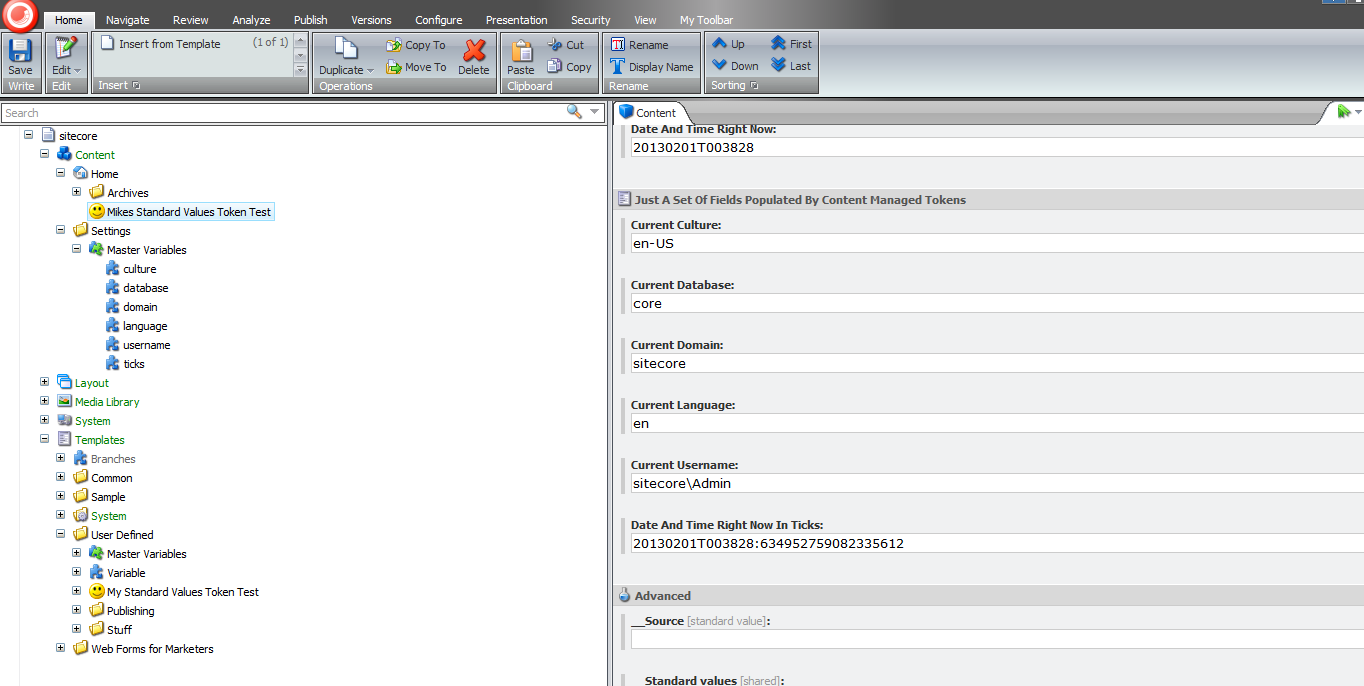
That’s all there is to it.
Please keep in mind there could be potential performance issues with the above, especially when there are lots of Variable items — the code always creates an instance of the Tokenator in the ContentManagedMasterVariablesReplacer instance, which is pulling content from Sitecore each time, and we’re using reflection for each Variable. It would probably be best to enhance the above by leveraging Lucene in some way to increase its performance.
Further, these items should only be created/edited by advanced users or developers familiar with ASP.NET code — how else would one be able to populate the Type and Property Name fields in a Variable item?
Despite these, just imagine the big smiley your boss will send your way when you say new Standard Values variables no longer require any code changes coupled with a deployment. I hope that smiley puts a big smile on your face! 🙂
 SitecoreJunkie.com