Home » Articles posted by Mike Reynolds (Page 15)
Author Archives: Mike Reynolds
Experiments with Field Data Encryption in Sitecore
Last week, I came up with a design employing the decorator pattern for encrypting and decrypting Web Forms for Marketers form data. My design encapsulates and decorates an instance of Sitecore.Forms.Data.DataProviders.WFMDataProvider — the main data provider that lives in the Sitecore.Forms.Core assembly and is used by the module for saving/retrieving form data from its database — by extending and implementing its base class and interface, respectively, and delegates requests to its public methods using the same method signatures. The “decoration” part occurs before before form data is inserted and updated in the database, and decrypted after being retrieved.
Once I completed this design, I began to ponder whether it would be possible to take this one step further and encrypt/decrypt all field data in Sitecore as a whole.
I knew I would eventually have to do some research to see if this were possible. However, I decided to begin my encryption ventures by building classes that encrypt/decrypt data.
I envisioned stockpiling an arsenal of encryption algorithms. I imagined all encryption algorithms having the same public methods to encrypt and decrypt strings of data, so I created the following interface:
using System;
using System.Collections.Generic;
using System.Linq;
using System.Text;

namespace Sitecore.Sandbox.Security.Encryption.Base
{
    public interface IEncryptor
    {
        string Encrypt(string input);

        string Decrypt(string input);
    }
}
Since I am lightyears away from being a cryptography expert — or even considering myself a novice — I had to go fishing on the internet to find an encryption utility class in .NET. I found the following algorithm at http://www.deltasblog.co.uk/code-snippets/basic-encryptiondecryption-c/, and put it within a class that adheres to my IEncryptor interface above:
using System;
using System.Collections.Generic;
using System.Linq;
using System.Security.Cryptography;
using System.Text;

using Sitecore.Diagnostics;

using Sitecore.Sandbox.Security.Encryption.Base;

namespace Sitecore.Sandbox.Security.Encryption
{
    // retrieved from http://www.deltasblog.co.uk/code-snippets/basic-encryptiondecryption-c/

    public class TripleDESEncryptor : IEncryptor
    {
        private string Key { get; set; }

        private TripleDESEncryptor(string key)
        {
            SetKey(key);
        }

        private void SetKey(string key)
        {
            Assert.ArgumentNotNullOrEmpty(key, "key");
            Key = key;
        }

        public string Encrypt(string input)
        {
            return Encrypt(input, Key);
        }

        public static string Encrypt(string input, string key)
        {
            byte[] inputArray = UTF8Encoding.UTF8.GetBytes(input);
            TripleDESCryptoServiceProvider tripleDES = new TripleDESCryptoServiceProvider();
            tripleDES.Key = UTF8Encoding.UTF8.GetBytes(key);
            tripleDES.Mode = CipherMode.ECB;
            tripleDES.Padding = PaddingMode.PKCS7;
            ICryptoTransform cTransform = tripleDES.CreateEncryptor();
            byte[] resultArray = cTransform.TransformFinalBlock(inputArray, 0, inputArray.Length);
            tripleDES.Clear();
            return System.Convert.ToBase64String(resultArray, 0, resultArray.Length);
        }

        public string Decrypt(string input)
        {
            return Decrypt(input, Key);
        }

        public static string Decrypt(string input, string key)
        {
            byte[] inputArray = System.Convert.FromBase64String(input);
            TripleDESCryptoServiceProvider tripleDES = new TripleDESCryptoServiceProvider();
            tripleDES.Key = UTF8Encoding.UTF8.GetBytes(key);
            tripleDES.Mode = CipherMode.ECB;
            tripleDES.Padding = PaddingMode.PKCS7;
            ICryptoTransform cTransform = tripleDES.CreateDecryptor();
            byte[] resultArray = cTransform.TransformFinalBlock(inputArray, 0, inputArray.Length);
            tripleDES.Clear();
            return UTF8Encoding.UTF8.GetString(resultArray);
        }

        public static IEncryptor CreateNewTripleDESEncryptor(string key)
        {
            return new TripleDESEncryptor(key);
        }
    }
}
I then started wondering how I could ascertain whether data needed to be encrypted or decrypted. In other words, how could I prevent encrypting data that is already encrypted and, conversely, not decrypting data that isn’t encrypted?
I came up with building a decorator class that looks for a string terminator — a substring at the end of a string — and only encrypts the passed string when this terminating substring is not present, or decrypts only when this substring is found at the end of the string.
I decided to use a data transfer object (DTO) for my encryptor decorator, just in case I ever decide to use this same decorator with any encryption class that implements my encryptor interface. I also send in the encryption key and string terminator via this DTO:
using System;
using System.Collections.Generic;
using System.Linq;
using System.Text;

using Sitecore.Sandbox.Security.Encryption.Base;

namespace Sitecore.Sandbox.Security.DTO
{
    public class DataNullTerminatorEncryptorSettings
    {
        public string EncryptionDataNullTerminator { get; set; }
        public string EncryptionKey { get; set; }
        public IEncryptor Encryptor { get; set; }
    }
}
using System;
using System.Collections.Generic;
using System.Linq;
using System.Text;

using Sitecore.Diagnostics;

using Sitecore.Sandbox.Security.DTO;
using Sitecore.Sandbox.Security.Encryption.Base;

namespace Sitecore.Sandbox.Security.Encryption
{
    public class DataNullTerminatorEncryptor : IEncryptor
    {
        private DataNullTerminatorEncryptorSettings DataNullTerminatorEncryptorSettings { get; set; }

        private DataNullTerminatorEncryptor(DataNullTerminatorEncryptorSettings dataNullTerminatorEncryptorSettings)
        {
            SetDataNullTerminatorEncryptorSettings(dataNullTerminatorEncryptorSettings);
        }

        private void SetDataNullTerminatorEncryptorSettings(DataNullTerminatorEncryptorSettings dataNullTerminatorEncryptorSettings)
        {
            Assert.ArgumentNotNull(dataNullTerminatorEncryptorSettings, "dataNullTerminatorEncryptorSettings");
            Assert.ArgumentNotNullOrEmpty(dataNullTerminatorEncryptorSettings.EncryptionDataNullTerminator, "dataNullTerminatorEncryptorSettings.EncryptionDataNullTerminator");
            Assert.ArgumentNotNullOrEmpty(dataNullTerminatorEncryptorSettings.EncryptionKey, "dataNullTerminatorEncryptorSettings.EncryptionKey");
            Assert.ArgumentNotNull(dataNullTerminatorEncryptorSettings.Encryptor, "dataNullTerminatorEncryptorSettings.Encryptor");
            DataNullTerminatorEncryptorSettings = dataNullTerminatorEncryptorSettings;
        }

        public string Encrypt(string input)
        {
            if (!IsEncrypted(input))
            {
                string encryptedInput = DataNullTerminatorEncryptorSettings.Encryptor.Encrypt(input);
                return string.Concat(encryptedInput, DataNullTerminatorEncryptorSettings.EncryptionDataNullTerminator);
            }

            return input;
        }

        public string Decrypt(string input)
        {
            if (IsEncrypted(input))
            {
                input = input.Replace(DataNullTerminatorEncryptorSettings.EncryptionDataNullTerminator, string.Empty);
                return DataNullTerminatorEncryptorSettings.Encryptor.Decrypt(input);
            }

            return input;
        }

        private bool IsEncrypted(string input)
        {
            if (!string.IsNullOrEmpty(input))
                return input.EndsWith(DataNullTerminatorEncryptorSettings.EncryptionDataNullTerminator);

            return false;
        }

        public static IEncryptor CreateNewDataNullTerminatorEncryptor(DataNullTerminatorEncryptorSettings dataNullTerminatorEncryptorSettings)
        {
            return new DataNullTerminatorEncryptor(dataNullTerminatorEncryptorSettings);
        }
    }
}
Now that I have two encryptors — the TripleDESEncryptor and DataNullTerminatorEncryptor classes — I thought it would be prudent to create a factory class:
using System;
using System.Collections.Generic;
using System.Linq;
using System.Text;

using Sitecore.Sandbox.Security.DTO;

namespace Sitecore.Sandbox.Security.Encryption.Base
{
    public interface IEncryptorFactory
    {
        IEncryptor CreateNewTripleDESEncryptor(string encryptionKey);

        IEncryptor CreateNewDataNullTerminatorEncryptor();

        IEncryptor CreateNewDataNullTerminatorEncryptor(string encryptionDataNullTerminator, string encryptionKey);

        IEncryptor CreateNewDataNullTerminatorEncryptor(DataNullTerminatorEncryptorSettings dataNullTerminatorEncryptorSettings);
    }
}
using System;
using System.Collections.Generic;
using System.Linq;
using System.Text;

using Sitecore.Configuration;

using Sitecore.Sandbox.Security.DTO;
using Sitecore.Sandbox.Security.Encryption.Base;

namespace Sitecore.Sandbox.Security.Encryption
{
    public class EncryptorFactory : IEncryptorFactory
    {
        private static volatile IEncryptorFactory _Current;
        private static object lockObject = new Object();

        public static IEncryptorFactory Current
        {
            get
            {
                if (_Current == null)
                {
                    lock (lockObject)
                    {
                        if (_Current == null)
                        {
                            _Current = new EncryptorFactory();
                        }
                    }
                }

                return _Current;
            }
        }

        private EncryptorFactory()
        {
        }

        public IEncryptor CreateNewTripleDESEncryptor(string encryptionKey)
        {
            return TripleDESEncryptor.CreateNewTripleDESEncryptor(encryptionKey);
        }

        public IEncryptor CreateNewDataNullTerminatorEncryptor()
        {
            string encryptionDataNullTerminator = Settings.GetSetting("Encryption.DataNullTerminator");
            string encryptionKey = Settings.GetSetting("Encryption.Key");
            return CreateNewDataNullTerminatorEncryptor(encryptionDataNullTerminator, encryptionKey);
        }

        public IEncryptor CreateNewDataNullTerminatorEncryptor(string encryptionDataNullTerminator, string encryptionKey)
        {
            DataNullTerminatorEncryptorSettings dataNullTerminatorEncryptorSettings = new DataNullTerminatorEncryptorSettings
            {
                EncryptionDataNullTerminator = encryptionDataNullTerminator,
                EncryptionKey = encryptionDataNullTerminator,
                // we're going to use the TripleDESEncryptor by default
                Encryptor = CreateNewTripleDESEncryptor(encryptionKey)
            };

            return CreateNewDataNullTerminatorEncryptor(dataNullTerminatorEncryptorSettings);
        }

        public IEncryptor CreateNewDataNullTerminatorEncryptor(DataNullTerminatorEncryptorSettings dataNullTerminatorEncryptorSettings)
        {
            return DataNullTerminatorEncryptor.CreateNewDataNullTerminatorEncryptor(dataNullTerminatorEncryptorSettings);
        }
    }
}
I decided to make my factory class be a singleton. I saw no need of having multiple instances of this factory object floating around in memory, and envisioned using this same factory object in a tool I wrote to encrypt all field data in all Sitecore databases. I will discuss this tool at the end of this article.
It’s now time to do some research to see whether I have the ability to hijack the main mechanism for saving/retrieving data from Sitecore.
While snooping around in my Web.config, I saw that the core, master and web databases use a data provider defined at configuration/sitecore/dataProviders/main:
<configuration>
	<sitecore database="SqlServer">

		<!-- More stuff here -->

		<dataProviders>
			<main type="Sitecore.Data.$(database).$(database)DataProvider, Sitecore.Kernel">
				<param connectionStringName="$(1)"/>
				<Name>$(1)</Name>
			</main>

			<!-- More stuff here -->

		<dataProviders>

			<!-- More stuff here -->

	</sitecore>
</configuration>
In my local instance, this points to the class Sitecore.Data.SqlServer.SqlServerDataProvider in Sitecore.Kernel.dll. I knew I had open up .NET Reflector and start investigating.
I discovered that there wasn’t much happening in this class at the field level. I also noticed this class used Sitecore.Data.DataProviders.Sql.SqlDataProvider as its base class, so I continued my research there.
I struck gold in the Sitecore.Data.DataProviders.Sql.SqlDataProvider class. Therein, I found methods that deal with saving/retrieving field data from an instance of the database utility class Sitecore.Data.DataProviders.Sql.SqlDataApi.
I knew this was the object I had to either decorate or override. Since most of the methods I needed to decorate with my encryption functionality were signed as protected, I had to subclass this class in order to get access to them. I then wrapped these methods with calls to my encryptor’s Encrypt(string input) and Decrypt(string input) methods:
using System;
using System.Collections;
using System.Collections.Generic;
using System.Linq;
using System.Security.Cryptography;
using System.Text;

using Sitecore.Collections;
using Sitecore.Configuration;
using Sitecore.Data;
using Sitecore.Data.DataProviders;
using Sitecore.Data.DataProviders.Sql;
using Sitecore.Data.Fields;
using Sitecore.Data.Items;

using Sitecore.Sandbox.Security.Encryption;
using Sitecore.Sandbox.Security.Encryption.Base;

namespace Sitecore.Sandbox.Data.DataProviders.Sql
{
    public class EncryptionSqlDataProvider : SqlDataProvider
    {
        private static readonly IEncryptorFactory EncryptorBegetter = EncryptorFactory.Current;
        private static readonly IEncryptor Encryptor = EncryptorBegetter.CreateNewDataNullTerminatorEncryptor();

        public EncryptionSqlDataProvider(SqlDataApi sqlDataApi)
            : base(sqlDataApi)
        {
        }

        public override FieldList GetItemFields(ItemDefinition itemDefinition, VersionUri versionUri, CallContext context)
        {
            FieldList fieldList = base.GetItemFields(itemDefinition, versionUri, context);

            if (fieldList == null)
                return null;

            FieldList fieldListDecrypted = new FieldList();
            foreach (KeyValuePair<ID, string> field in fieldList)
            {
                string decryptedValue = Decrypt(field.Value);
                fieldListDecrypted.Add(field.Key, decryptedValue);
            }

            return fieldListDecrypted;
        }

        protected override string GetFieldValue(string tableName, Guid entryId)
        {
            string value = base.GetFieldValue(tableName, entryId);
            return Decrypt(value);
        }

        protected override void SetFieldValue(string tableName, Guid entryId, string value)
        {
            string encryptedValue = Encrypt(value);
            base.SetFieldValue(tableName, entryId, encryptedValue);
        }

        protected override void WriteSharedField(ID itemId, FieldChange change, DateTime now, bool fieldsAreEmpty)
        {
            FieldChange unencryptedFieldChange = GetEncryptedFieldChange(itemId, change);
            base.WriteSharedField(itemId, unencryptedFieldChange, now, fieldsAreEmpty);
        }

        protected override void WriteUnversionedField(ID itemId, FieldChange change, DateTime now, bool fieldsAreEmpty)
        {
            FieldChange unencryptedFieldChange = GetEncryptedFieldChange(itemId, change);
            base.WriteUnversionedField(itemId, unencryptedFieldChange, now, fieldsAreEmpty);
        }

        protected override void WriteVersionedField(ID itemId, FieldChange change, DateTime now, bool fieldsAreEmpty)
        {
            FieldChange unencryptedFieldChange = GetEncryptedFieldChange(itemId, change);
            base.WriteVersionedField(itemId, unencryptedFieldChange, now, fieldsAreEmpty);
        }

        private FieldChange GetEncryptedFieldChange(ID itemId, FieldChange unencryptedFieldChange)
        {
            if (!string.IsNullOrEmpty(unencryptedFieldChange.Value))
            {
                Field field = GetField(itemId, unencryptedFieldChange.FieldID);
                string encryptedValue = Encrypt(unencryptedFieldChange.Value);
                return new FieldChange(field, encryptedValue);
            }

            return unencryptedFieldChange;
        }

        private Field GetField(ID itemId, ID fieldID)
        {
            Item item = GetItem(itemId);
            return GetField(item, fieldID);
        }

        private Item GetItem(ID itemId)
        {
            return base.Database.Items[itemId];
        }

        private static Field GetField(Item owner, ID fieldID)
        {
            return new Field(fieldID, owner);
        }

        private static string Encrypt(string value)
        {
            return Encryptor.Encrypt(value);
        }

        private static string Decrypt(string value)
        {
            return Encryptor.Decrypt(value);
        }
    }
}
After creating my new EncryptionSqlDataProvider above, I had to define my own SqlServerDataProvider that inherits from it:
using System;
using System.Collections.Generic;
using System.Linq;
using System.Text;

using Sitecore.Data.SqlServer;

using Sitecore.Sandbox.Data.DataProviders.Sql;

namespace Sitecore.Sandbox.Data.SqlServer
{
    public class EncryptionSqlServerDataProvider : EncryptionSqlDataProvider
    {
        public EncryptionSqlServerDataProvider(string connectionString)
             : base(new SqlServerDataApi(connectionString))
        {
        }
    }
}
I put in a patch reference to my new EncryptionSqlServerDataProvider in a new config file (/App_Config/Include/EncryptionDatabaseProvider.config), and defined the settings used by my encryptors:
<?xml version="1.0" encoding="utf-8"?>
<configuration xmlns:patch="http://www.sitecore.net/xmlconfig/">
	<sitecore>
		<dataProviders>
			<main type="Sitecore.Data.$(database).$(database)DataProvider, Sitecore.Kernel">
				<patch:attribute name="type">Sitecore.Sandbox.Data.$(database).Encryption$(database)DataProvider, Sitecore.Sandbox</patch:attribute>
		       </main>
		</dataProviders>
		<settings>
			<!-- must be 24 characters long -->
			<setting name="Encryption.Key" value="4rgjvqm234gswdfd045r3f4q" />

			<!-- this is added to the end of encrypted data in the database -->
			<setting name="Encryption.DataNullTerminator" value="%IS_ENCRYPTED%" />
		</settings>
	</sitecore>
</configuration>
Will the above work, or will I be retreating back to the whiteboard scratching my head while being in a state of bewilderment?. Let’s try out the above to see where my fate lies.
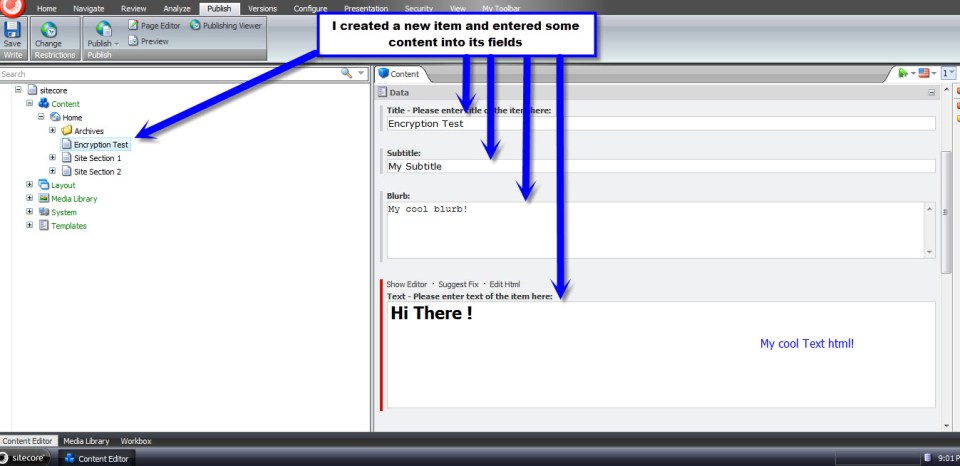
I inserted a new Sample Item under my Home node, entered some content into four fields, and then clicked the Save button:
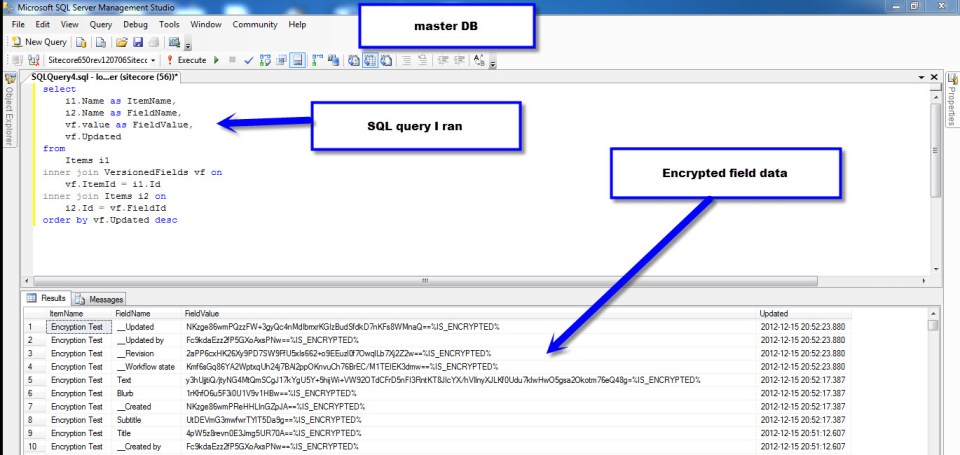
I opened up my Sitecore master database in Microsoft SQL Server Management Studio — I don’t recommend this being a standard Sitecore development practice, although I am doing this here to see if my encryption scheme worked — to see if my field data was encrypted. It was encrypted successfully:
I then published my item to the web database, and pulled up my new Sample Item page in a browser to make sure it works despite being encrypted in the database:

Hooray! It works!
You might be asking yourself: how would we go about encrypting “legacy” field data in all Sitecore databases? Well, I wrote tool — the reason for creating my EncryptorFactory above — yesterday to do this. It encrypted all field data in the core, master and web databases.
However, when I opened up the desktop view of the Sitecore client, many of my tray buttons disappeared. Seeing this has lead me to conclude it’s not a good idea to encrypt data in the core database.
Plus, after having rolled back my core database to its previous state — a state of being unencrypted — I tried to open up the Content Editor in the master database. I then received an exception stemming from the rules engine — apparently not all fields in both the master and web databases should be encrypted. There must be code outside of the main data provider accessing data in all three databases.
Future research is needed to discover which fields are good candidates for having their data encrypted, and which fields should be ignored.
Put Things Into Context: Augmenting the Item Context Menu – Part 2
In part 1 of this article, I helped out a friend by walking him through how I added new Publishing menu options — using existing commands in Sitecore — to my Item context menu.
In this final part of the article, I will show you how I created my own custom command and pipeline to copy subitems from one Item in the content tree to another, and wired them up to a new Item context menu option within the ‘Copying’ fly-out menu of the context menu.
Overriding two methods — CommandState QueryState(CommandContext context) and void Execute(CommandContext context) — is paramount when creating a custom Sitecore.Shell.Framework.Commands.Command.
The QueryState() method determines how we should treat the menu option given the current passed context. In other words, should the menu option be enabled, disabled, or hidden? This method serves as a hook — it’s declared virtual — and returns CommandState.Enabled by default. All menu options are enabled by default unless overridden to do otherwise.
The Execute method contains the true “meat and potatoes” of a command’s logic — this method is the place where we do “something” to items passed to it via the CommandContext object. This method is declared abstract in the Command class, ultimately forcing subclasses to define their own logic — there is no default logic for this method.
Here is my command to copy subitems from one location in the content tree to another:
using System;
using System.Collections.Generic;
using System.Collections.Specialized;
using System.Linq;
using System.Text;

using Sitecore.Data;
using Sitecore.Data.Items;
using Sitecore.Diagnostics;
using Sitecore.Shell.Framework;
using Sitecore.Shell.Framework.Commands;
using Sitecore.Shell.Framework.Pipelines;
using Sitecore.Text;
using Sitecore.Web.UI.Sheer;

using Sitecore.Sandbox.Pipelines.Base;
using Sitecore.Sandbox.Pipelines.Utilities;

namespace Sitecore.Sandbox.Commands
{
    public class CopySubitemsTo : Command
    {
        private const string CopySubitemsPipeline = "uiCopySubitems";

        public override void Execute(CommandContext commandContext)
        {
            Assert.ArgumentNotNull(commandContext, "commandContext");
            CopySubitems(commandContext);
        }

        private void CopySubitems(CommandContext commandContext)
        {
            Assert.ArgumentNotNull(commandContext, "commandContext");
            IEnumerable<Item> subitems = GetSubitems(commandContext);
            StartPipeline(subitems);
        }

        public static IEnumerable<Item> GetSubitems(CommandContext commandContext)
        {
            Assert.ArgumentNotNull(commandContext, "commandContext");
            return GetSubitems(commandContext.Items);
        }

        public static IEnumerable<Item> GetSubitems(IEnumerable<Item> items)
        {
            Assert.ArgumentNotNull(items, "items");
            List<Item> list = new List<Item>();

            foreach (Item item in items)
            {
                list.AddRange(item.Children.ToArray());
            }

            return list;
        }

        private void StartPipeline(IEnumerable<Item> subitems)
        {
            Assert.ArgumentNotNull(subitems, "subitems");
            Assert.ArgumentCondition(subitems.Count() > 0, "subitems", "There must be at least one subitem in the collection to copy!");

            IPipelineLauncher pipelineLauncher = CreateNewPipelineLauncher();
            pipelineLauncher.StartPipeline(CopySubitemsPipeline, new CopyItemsArgs(), subitems.First().Database, subitems);
        }

        private IPipelineLauncher CreateNewPipelineLauncher()
        {
            return PipelineLauncher.CreateNewPipelineLauncher(Context.ClientPage);
        }

        public override CommandState QueryState(CommandContext commandContext)
        {
            Assert.ArgumentNotNull(commandContext, "commandContext");
            int subitemsCount = CalculateSubitemsCount(commandContext);

            // if this item has no children, let's disable the menu option
            if (subitemsCount < 1)
            {
                return CommandState.Disabled;
            }

            return base.QueryState(commandContext);
        }

        private static int CalculateSubitemsCount(CommandContext commandContext)
        {
            int count = 0;

            foreach (Item item in commandContext.Items)
            {
                count += item.Children.Count;
            }

            return count;
        }
    }
}
My QueryState() method returns CommandState.Disabled if the current context item — although this does offer the ability to have multiple selected items — has no children. More complex logic could be written here, albeit I chose to keep it simple.
Many of the Commands within Sitecore.Shell.Framework.Commands that deal with Sitecore Items use the utility class Sitecore.Shell.Framework.Items. These commands delegate their core Execute() logic to static methods defined in this class.
Instead of creating my own Items utility class, I included my Comamnd’s logic in my Command class instead — I figure doing this makes it easier to illustrate it here (please Mike, stop writing so many classes :)). However, I would argue it should live in its own class.
The Sitecore.Shell.Framework.Commands.Item class also has a private Start() method that launches a pipeline and passes arguments to it. I decided to copy this code into a utility class that does just that, and used it above in my Command. Here is that class and its interface — the PipelineLauncher class:
using System;
using System.Collections.Generic;
using System.Linq;
using System.Text;

using Sitecore.Data;
using Sitecore.Data.Items;
using Sitecore.Web.UI.Sheer;

namespace Sitecore.Sandbox.Pipelines.Base
{
    public interface IPipelineLauncher
    {
        void StartPipeline(string pipelineName, ClientPipelineArgs args, Database database, IEnumerable<Item> items);
    }
}
using System;
using System.Collections.Generic;
using System.Collections.Specialized;
using System.Linq;
using System.Text;

using Sitecore.Data;
using Sitecore.Data.Items;
using Sitecore.Diagnostics;
using Sitecore.Text;
using Sitecore.Web.UI.Sheer;

using Sitecore.Sandbox.Pipelines.Base;

namespace Sitecore.Sandbox.Pipelines.Utilities
{
    public class PipelineLauncher : IPipelineLauncher
    {
        private const char PipeDelimiter = '|';

        private ClientPage ClientPage { get; set; }

        private PipelineLauncher(ClientPage clientPage)
        {
            SetClientPage(clientPage);
        }

        private void SetClientPage(ClientPage clientPage)
        {
            Assert.ArgumentNotNull(clientPage, "clientPage");
            ClientPage = clientPage;
        }

        public void StartPipeline(string pipelineName, ClientPipelineArgs args, Database database, IEnumerable<Item> items)
        {
            Assert.ArgumentNotNullOrEmpty(pipelineName, "pipelineName");
            Assert.ArgumentNotNull(args, "args");
            Assert.ArgumentNotNull(database, "database");
            Assert.ArgumentNotNull(items, "items");

            ListString listString = new ListString(PipeDelimiter);
            foreach (Item item in items)
            {
                listString.Add(item.ID.ToString());
            }

            NameValueCollection nameValueCollection = new NameValueCollection();
            nameValueCollection.Add("database", database.Name);
            nameValueCollection.Add("items", listString.ToString());

            args.Parameters = nameValueCollection;
            ClientPage.Start(pipelineName, args);
        }

        public static IPipelineLauncher CreateNewPipelineLauncher(ClientPage clientPage)
        {
            return new PipelineLauncher(clientPage);
        }
    }
}
Next, I created a pipeline that does virtually all of the heavy lifting of the command — it is truly the “man behind the curtain”.
Instead of writing all of copying logic to do this from scratch — not a difficult feat to accomplish — I decided to subclass the CopyTo pipeline used by the ‘Copy To’ command. This pipeline already copies multiples items from one location in the content tree to another. The only thing I needed to change was the url of my new dialog (I define a new dialog down below).
using System;
using System.Collections.Generic;
using System.Linq;
using System.Text;

using Sitecore.Configuration;
using Sitecore.Shell.Framework.Pipelines;

namespace Sitecore.Sandbox.Pipelines.UICopySubitems
{
    public class CopySubitems : CopyItems
    {
        private const string DialogUrlSettingName = "Pipelines.UICopySubitems.CopySubitems.DialogUrl";
        private static readonly string DialogUrl = Settings.GetSetting(DialogUrlSettingName);

        protected override string GetDialogUrl()
        {
            return DialogUrl;
        }
    }
}
This is the definition for my new dialog. This is really just a “copy and paste” job of /sitecore/shell/Applications/Dialogs/CopyTo/CopyTo.xml with some changed copy — I changed ‘Copy Item’ to ‘Copy Subitems’.
This dialog uses the same logic as the ‘Copy Item To’ dialog. I saved this xml into a file named /sitecore/shell/Applications/Dialogs/CopySubitemsTo/CopySubitemsTo.xml.
<?xml version="1.0" encoding="utf-8" ?>
<control xmlns:def="Definition" xmlns="http://schemas.sitecore.net/Visual-Studio-Intellisense">
  <CopyTo>
    <FormDialog Icon="Core3/24x24/Copy_To_Folder.png" Header="Copy Subitems To"
      Text="Select the location where you want to copy the subitems to." OKButton="Copy">

      <CodeBeside Type="Sitecore.Shell.Applications.Dialogs.CopyTo.CopyToForm,Sitecore.Client"/>

      <DataContext ID="DataContext" Root="/"/>

      <GridPanel Width="100%" Height="100%" Style="table-layout:fixed">
        <Scrollbox Height="100%" Class="scScrollbox scFixSize scFixSize4 scInsetBorder" Background="white" Padding="0px" GridPanel.Height="100%">
          <TreeviewEx ID="Treeview" DataContext="DataContext" Click="SelectTreeNode" ContextMenu='Treeview.GetContextMenu("contextmenu")' />
        </Scrollbox>

        <Border Padding="4px 0px 4px 0px">
          <GridPanel Width="100%" Columns="2">

            <Border Padding="0px 4px 0px 0px">
              <Literal Text="Name:"/>
            </Border>

            <Edit ID="Filename" Width="100%" GridPanel.Width="100%"/>
          </GridPanel>
        </Border>

      </GridPanel>

    </FormDialog>
  </CopyTo>
</control>
Now, we have to wedge in my new pipeline into the Web.config. I did this by defining my new pipeline in a file named /App_Config/Include/CopySubitems.config. I also added a setting for my dialog url — this is being acquired above in my pipeline class. I vehemently loathe hardcoding things :).
<?xml version="1.0" encoding="utf-8"?>
<configuration xmlns:patch="http://www.sitecore.net/xmlconfig/">
	<sitecore>
		<processors>
			<uiCopySubitems>
				<processor mode="on" type="Sitecore.Sandbox.Pipelines.UICopySubitems.CopySubitems,Sitecore.Sandbox" method="GetDestination"/>
				<processor mode="on" type="Sitecore.Sandbox.Pipelines.UICopySubitems.CopySubitems,Sitecore.Sandbox" method="CheckDestination"/>
				<processor mode="on" type="Sitecore.Sandbox.Pipelines.UICopySubitems.CopySubitems,Sitecore.Sandbox" method="CheckLanguage"/>
				<processor mode="on" type="Sitecore.Sandbox.Pipelines.UICopySubitems.CopySubitems,Sitecore.Sandbox" method="Execute"/>
			</uiCopySubitems>
		</processors>
		<settings>
			<setting name="Pipelines.UICopySubitems.CopySubitems.DialogUrl" value="/sitecore/shell/Applications/Dialogs/Copy Subitems to.aspx" />
		</settings>
	</sitecore>
</configuration>
Next, I had to define my new command in /App_Config/Commands.config:
<?xml version="1.0" encoding="utf-8" ?>
<configuration>

<!-- Some Stuff Defined Here -->

<command name="item:copysubitemsto" type="Sitecore.Sandbox.Commands.CopySubitemsTo, Sitecore.Sandbox" />

<!-- More Stuff Defined Here -->

</configuration>
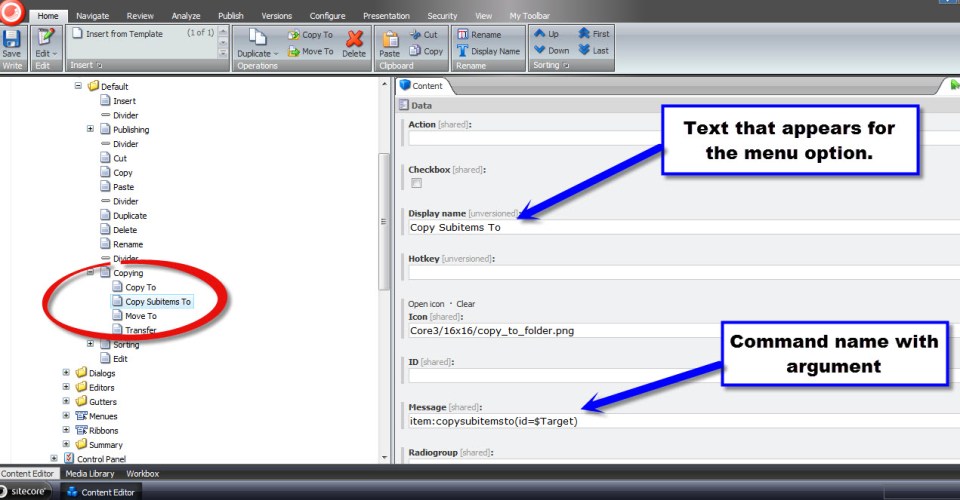
As I had done in part 1 of this article, I created a new menu item — using the /sitecore/templates/System/Menus/Menu item template. I created a new menu item named ‘Copy Subitems To’ underneath /sitecore/content/Applications/Content Editor/Context Menues/Default/Copying in my Item context menu in the core database:
Oh look, I found some subitems I would like to copy somewhere else:

After right-clicking on the parent of my subitems and hovering over ‘Copying’, my beautiful new menu item displays:

I then clicked ‘Copy Subitems To’, and this dialog window appeared. I then selected a destination for my copied subitems, and clicked the ‘Copy’ button:
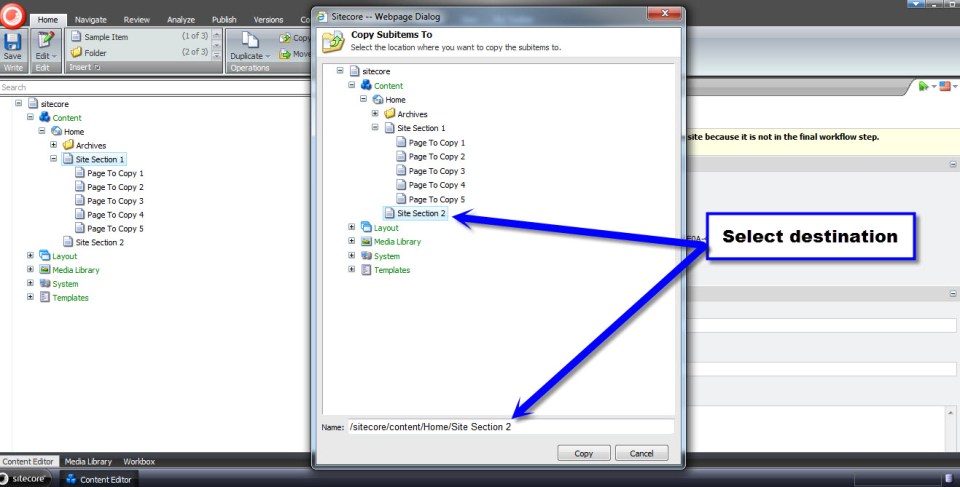
And — voilà! — my subitems were copied to my selected destination:

I had more fun with this later on by copying nested levels of subitems — it will copy all subitems beyond just one level below.
There are a few moving parts here, but nothing too overwhelming.
I hope you try out building your own custom Item context menu option. Trust me, you will have lots of fun building one. I know I did!
Until next time, happy coding!
Put Things Into Context: Augmenting the Item Context Menu – Part 1
Last week, I asked Lewis Goulden — a friend and former colleague — to name one thing in Sitecore he would like to learn or know more about. His answer was knowing how to add menu options to the Item context menu — particularly the ‘Publish Now’ and ‘Publish Item’ menu options found in the Publish ribbon.
I remembered reading a few blog articles in the past articulating how one would accomplish this. I needed to dig to find any of these articles.
After googling — yes googling is a verb in the English language — a few times, I found an article by John West discussing how to do this and another by Aboo Bolaky. I had also discovered this on pages 259-260 in John West’s book Professional Sitecore Development.
Instead of passing these on to Lewis and wishing him the best of luck in his endeavours augmenting his context menu — definitely not a cool thing to do to a friend — I decided to capture how this is done in this post, and share this with you as well.
Plus, this article sets the cornerstone for part two: augmenting the item context menu using a custom command and pipeline.
Here’s what the context menu looks like unadulterated:
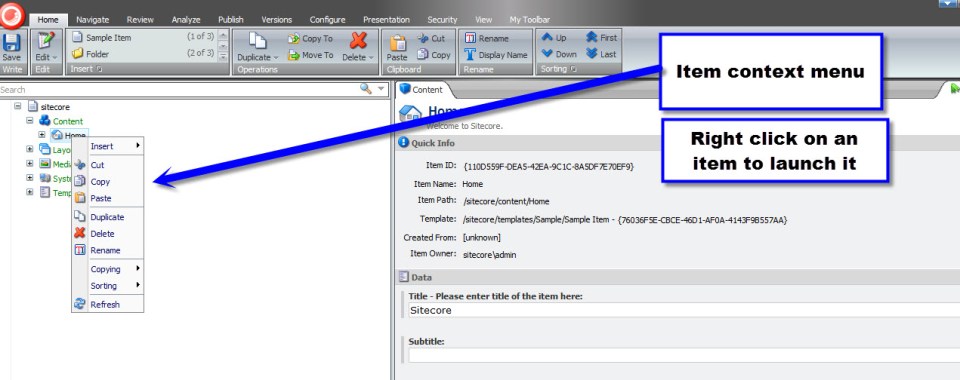
My basic goal is to add a new ‘Publishing’ fly-out menu item containing ‘Publish Now’ and ‘Publish Item’ submenu options betwixt the ‘Insert’ and ‘Cut’ menu options.
In other words, I need to go find the ‘Publish Now’ and ‘Publish Item’ menu items in the core database and add these to the Item context menu.

So, I had to switch over to the core database and fish around to find out the command names of the ‘Publish Now’ and ‘Publish Item’ menu items.
First, I looked at the Publish ribbon (/sitecore/content/Applications/Content Editor/Ribbons/Ribbons/Default/Publish):
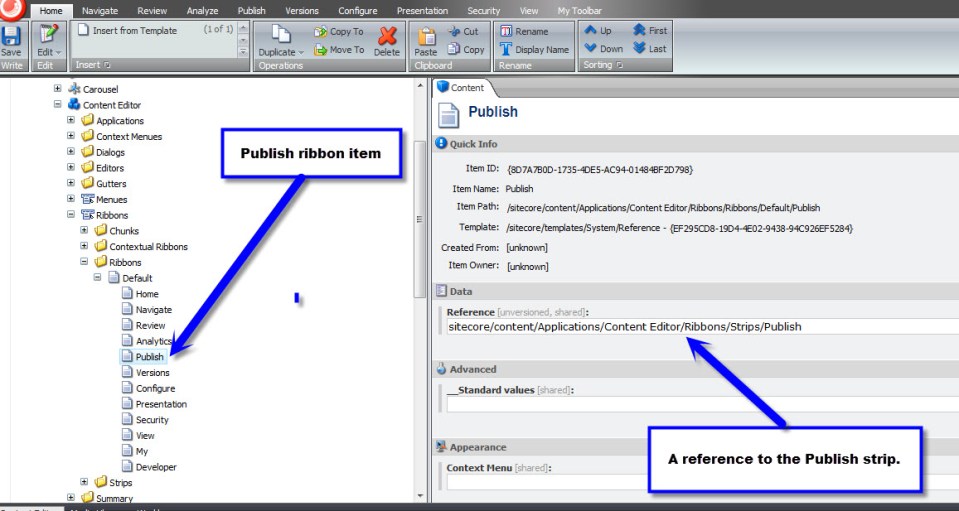
The Publish ribbon helped me hone in closer to where I should continue to look to find the publishing menu items.
Next, I went to the Publish strip:
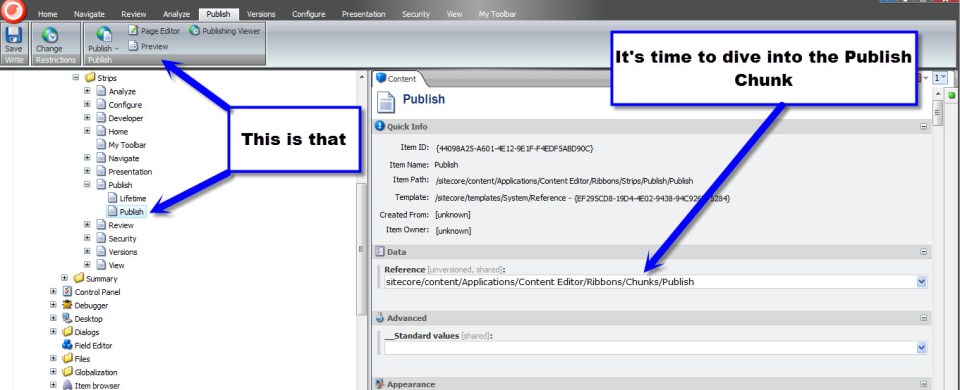
The Publish strip pretty much tells me I have to keep on digging. Now, I have to go take a look at the Publish chunk.
In the Publish chunk, I finally found the ‘Publish Now’ menu button:
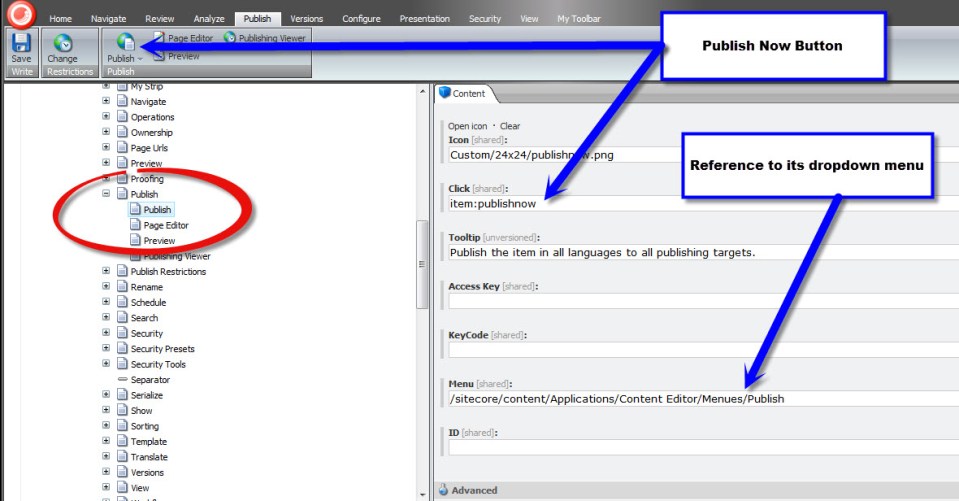
I made sure I copied its click field value — we’ll be needing it when we create our own ‘Publish Now’ menu item.
I then navigated to /sitecore/content/Applications/Content Editor/Menues/Publish to snag the command name of the ‘Publish Item’ menu option:

Now, I have all I need to create my own ‘Publishing’ fly-out menu item and its ‘Publish Now’ and ‘Publish Item’ submenu options.
I then went to /sitecore/content/Applications/Content Editor/Context Menues/Default and added a new Item named ‘Divider’ — using the /sitecore/templates/System/Menus/Menu divider template — after the Insert menu option, and created my ‘Publishing’ fly-out menu item using the /sitecore/templates/System/Menus/Menu item template.
Thereafter, I created my ‘Publish Item’ menu item using the same template as its parent ‘Publishing’. I then put the command name for the ‘Publish Item’ menu option found previously into my item’s Message field:

Next, I created my ‘Publish Now’ menu item using the same template as its parent and sibling. I put in the ‘Publish Now’ menu item’s Message field the command name for the ‘Publish Now’ menu option found during my expedition above:

Now, let’s take this for a test drive. I switched back to the master database and navigated to my Home node. I then right-clicked:
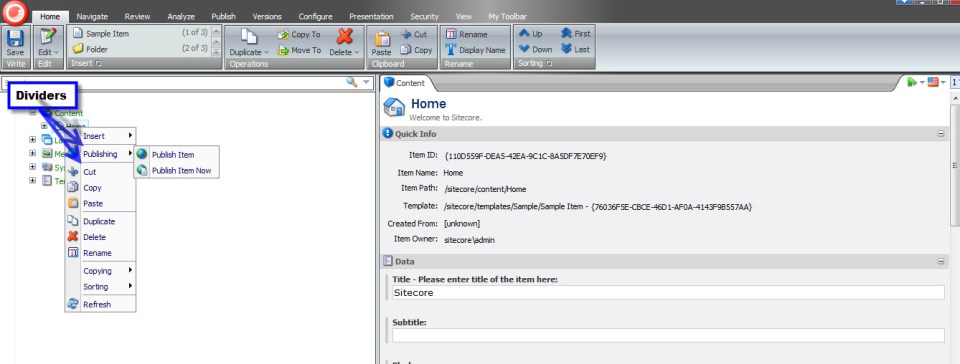
As you can see, the ‘Publishing’ fly-out menu appears with its publishing submenu options. Trust me, both menu items do work. 🙂
All of this without any code whatsoever!
In part 2 of this article, I will step through building a custom command coupled with a custom pipeline that compose the logic for a custom menu item for the Item context menu that copies all subitems of an ancestor item to a selected destination.
Happy coding and have a Sitecorelicious day! 🙂
Seek and Destroy: Root Out Newlines and Carriage Returns in Multi-Line Text Fields
A couple of days ago, Sitecore MVP Brian Pedersen wrote an article discussing how newlines and carriage returns in Multi-Line Text fields can intrusively launch Sitecore’s “Do you want to save the changes to the item?” dialog box when clicking away from an item — even when you’ve made no changes to the item. Brian then offered an extension method on the String class as a way to remedy this annoyance.
However, Brian’s extension method cannot serve a solution on its own. It has to be invoked from somewhere to stamp out the substring malefactors — newlines (“\n”), carriage returns (“\r”), tabs (“\t”), and non-breaking spaces (“\xA0”).
This article gives one possible solution for uprooting these from Multi-Line Text fields within the Sitecore client by removing them upon item save.
First, I created a utility class that removes specified substrings from a string passed to it.
using System;
using System.Collections.Generic;
using System.Linq;
using System.Text;

namespace Sitecore.Sandbox.Utilities.StringUtilities.Base
{
    public interface ISubstringAnnihilator
    {
        string AnnihilateSubstrings(string input);
    }
}
using System;
using System.Collections.Generic;
using System.Linq;
using System.Text;

using Sitecore.Sandbox.Utilities.StringUtilities.Base;

namespace Sitecore.Sandbox.Utilities.StringUtilities
{
    public class SubstringAnnihilator : ISubstringAnnihilator
    {
        private const string ReplacementString = " ";
        private static readonly IEnumerable<string> SubstringsToAnnihilate = new string[] { "\r\n", "\n", "\r", "\t", "\xA0"};

        private SubstringAnnihilator()
        {
        }

        public string AnnihilateSubstrings(string input)
        {
            foreach (string substringToAnnihilate in SubstringsToAnnihilate)
            {
                input = input.Replace(substringToAnnihilate, ReplacementString);
            }

            return input;
        }

        public static ISubstringAnnihilator CreateNewSubstringAnnihilator()
        {
            return new SubstringAnnihilator();
        }
    }
}
It would probably be ideal to move the target substrings defined within the SubstringsToAnnihilate string array into a configuration file or even into Sitecore itself. I decided not introduce that complexity here for the sake of brevity.
Next, I created a Save pipeline. I used .NET Reflector to see how other Save pipelines in /configuration/sitecore/processors/saveUI/ in the Web.config were built — I used these as a model for creating my own — and used my SubstringAnnihilator utility class to seek and destroy the target substrings (well, just replace them with a space :)).
using System;
using System.Collections.Generic;
using System.Linq;
using System.Text;

using Sitecore.Data;
using Sitecore.Data.Fields;
using Sitecore.Data.Items;
using Sitecore.Diagnostics;
using Sitecore.Pipelines.Save;

using Sitecore.Sandbox.Utilities.StringUtilities;
using Sitecore.Sandbox.Utilities.StringUtilities.Base;

namespace Sitecore.Sandbox.Pipelines.SaveUI
{
    public class FixMultiLineTextFields
    {
        private static readonly ISubstringAnnihilator Annihilator = SubstringAnnihilator.CreateNewSubstringAnnihilator();

        public void Process(SaveArgs saveArgs)
        {
            FixAllItemFieldsWhereApplicable(saveArgs);
        }

        private static void FixAllItemFieldsWhereApplicable(SaveArgs saveArgs)
        {
            AssertSaveArgs(saveArgs);
            foreach (SaveArgs.SaveItem saveItem in saveArgs.Items)
            {
                FixSaveItemFieldsWhereApplicable(saveItem);
            }
        }

        private static void AssertSaveArgs(SaveArgs saveArgs)
        {
            Assert.ArgumentNotNull(saveArgs, "saveArgs");
            Assert.IsNotNull(saveArgs.Items, "saveArgs.Items");
        }

        private static void FixSaveItemFieldsWhereApplicable(SaveArgs.SaveItem saveItem)
        {
            Item item = GetItem(saveItem);
            foreach (SaveArgs.SaveField saveField in saveItem.Fields)
            {
                FixSaveItemFieldIfApplicable(item, saveField);
            }
        }

        private static Item GetItem(SaveArgs.SaveItem saveItem)
        {
            if (saveItem != null)
            {
                return Client.ContentDatabase.Items[saveItem.ID, saveItem.Language, saveItem.Version];
            }

            return null;
        }

        private static void FixSaveItemFieldIfApplicable(Item item, SaveArgs.SaveField saveField)
        {
            if (ShouldEnsureFieldValue(item, saveField))
            {
                saveField.Value = Annihilator.AnnihilateSubstrings(saveField.Value);
            }
        }

        private static bool ShouldEnsureFieldValue(Item item, SaveArgs.SaveField saveField)
        {
            Field field = item.Fields[saveField.ID];
            return ShouldEnsureFieldValue(field);
        }

        private static bool ShouldEnsureFieldValue(Field field)
        {
            return field.TypeKey == "memo"
                    || field.TypeKey == "multi-line text";
        }
    }
}
Now, it’s time to insert my new Save pipeline within the SaveUI pipeline stack. I’ve done this with my /App_Config/Include/FixMultiLineTextFields.config file:
<?xml version="1.0" encoding="utf-8"?>
<configuration xmlns:patch="http://www.sitecore.net/xmlconfig/">
	<sitecore>
		<processors>
			<saveUI>
				<processor mode="on" type="Sitecore.Sandbox.Pipelines.SaveUI.FixMultiLineTextFields, Sitecore.Sandbox" patch:after="processor[@type='Sitecore.Pipelines.Save.TightenRelativeImageLinks, Sitecore.Kernel']" />
			</saveUI>
		</processors>
	</sitecore>
</configuration>
Let’s take the above for a spin. I’ve inserted a sentence with newlines after every word within it into my Blurb Multi-Line Text field:
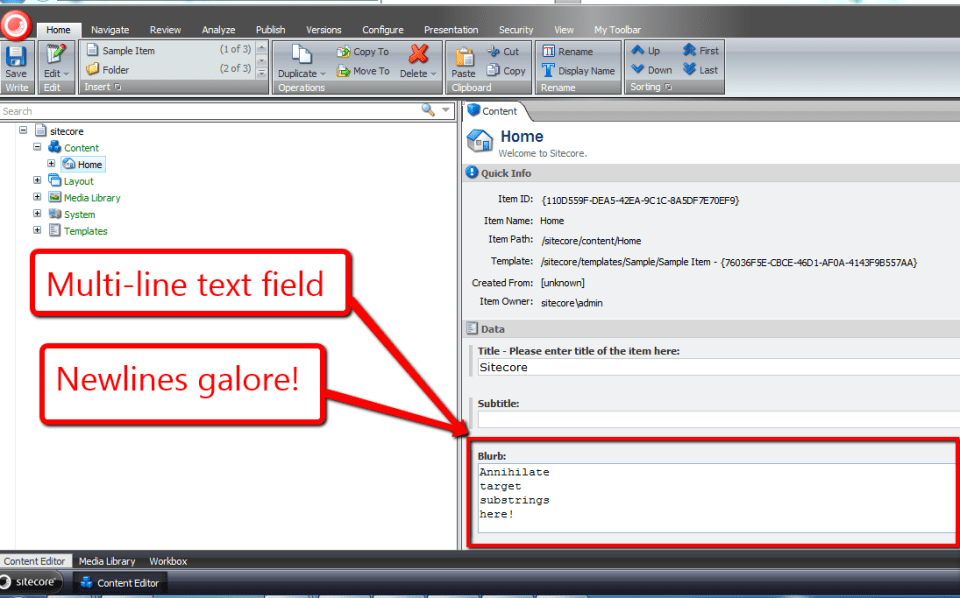
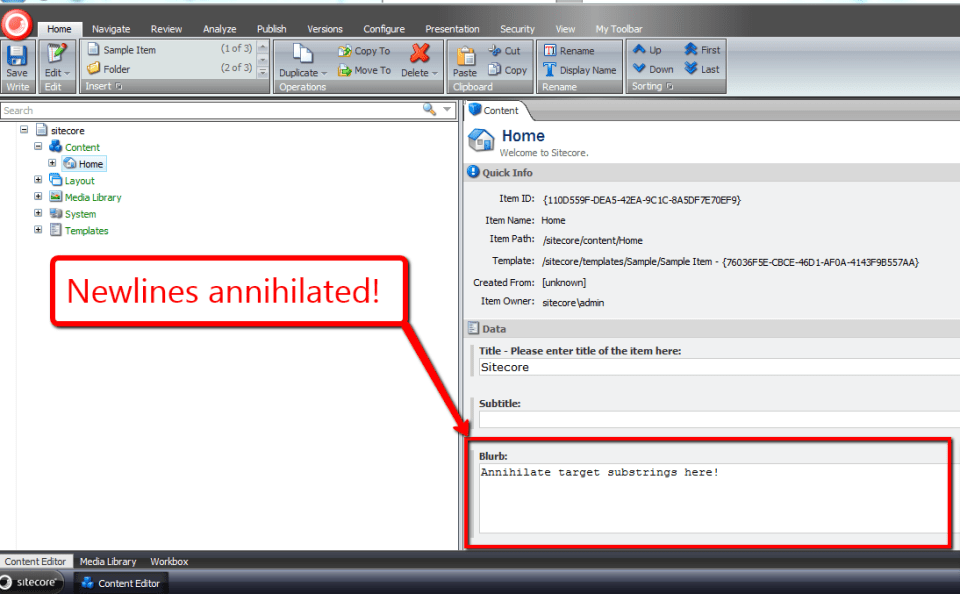
Now, I’ve clicked save, and all newlines within my Blurb Multi-Line Text field have been annihilated:
I would like to thank to Brian Pedersen for writing his article the other day — it served as the bedrock for this one, and kindled something in me to write the code above.
Keep smiling when coding!
Going Bananas Over Typed Custom Properties and JSON on a Sitecore User Profile

Did you know squirrels love eating bananas? Neither did I until yesterday when I was enlightened by this tweet. Immediately, I knew I had to carve out a corner in the banana-loving-rodent market.
What better way to acquire leads than by offering free stuff after signing up for an account? I just needed an unsquirrely way to save answers to questions on my signup form to help me better understand my prospective customers.
I decided to take advantage of Sitecore’s ability to save custom information on user profiles but wanted to avoid passing strings directly to my users’ Sitecore.Security.UserProfile objects — saving lots of information in a string can be cumbersome if not downright messy.
Under the same JSON theme of the Sitecore Item Web API, I decided to build a wrapper class around the UserProfile object that uses an utility object to serialize/deserialize objects to/from strings of JSON before saving/retrieving.
Knowing the Sitecore Item Web API converts objects into JSON, I poked around Sitecore.ItemWebApi.dll (v1.0.0 rev. 120828) using .NET Reflector in search of a serializer I could use in my solution. As I expected, I found a class that serializes objects into strings of JSON.
However, to my dismay, the same object does not deserialize strings back into objects:
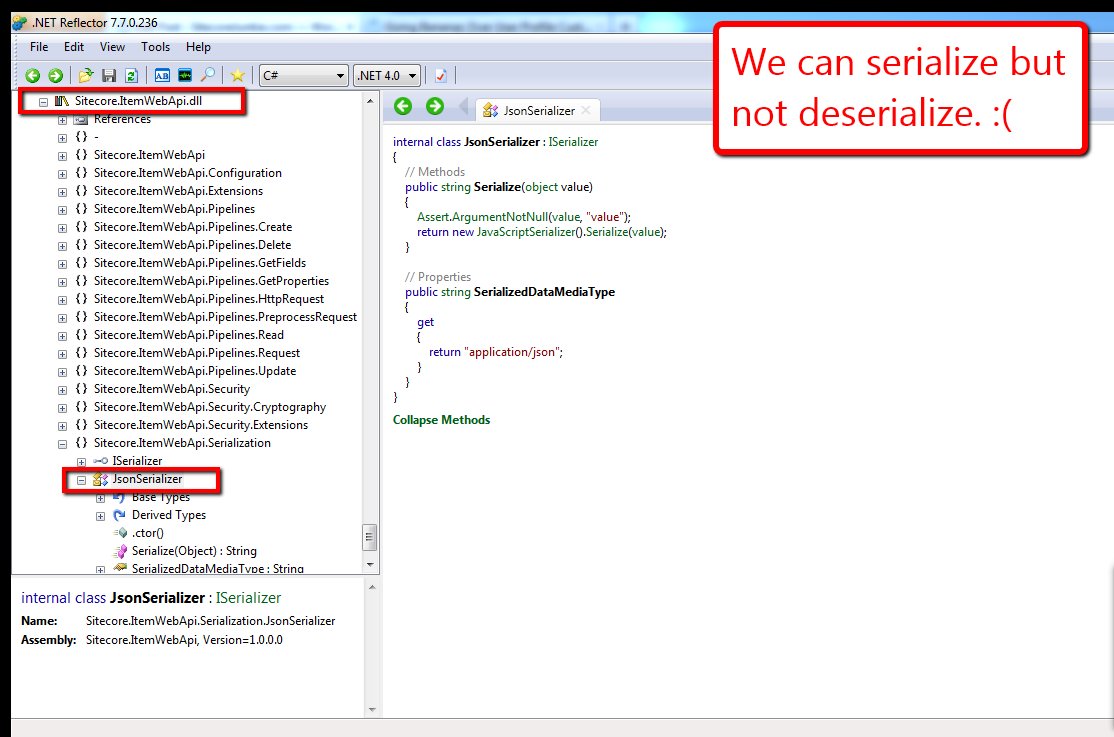
Further, I found no classes within Sitecore.ItemWebApi.dll that deserialize JSON strings. This pretty much meant I had to “roll my own”:
using System;
using System.Collections.Generic;
using System.Linq;
using System.Text;

namespace Sitecore.Sandbox.Utilities.Serialization.Base
{
    public interface ISerializer
    {
        string Serialize(object objectToSerialize);

        T Deserialize<T>(string objectAsString);

        object Deserialize(string objectAsString, Type objectType);
    }
}
using System;
using System.Collections.Generic;
using System.Linq;
using System.Text;
using System.Web.Script.Serialization;

using Sitecore.Sandbox.Utilities.Serialization.Base;

namespace Sitecore.Sandbox.Utilities.Serialization
{
    public class JsonSerializer : ISerializer
    {
        private static JavaScriptSerializer _javaScriptSerializer = new JavaScriptSerializer();

        private JsonSerializer()
        {
        }

        public string Serialize(object objectToSerialize)
        {
            return _javaScriptSerializer.Serialize(objectToSerialize);
        }

        public T Deserialize<T>(string objectAsString)
        {
            return _javaScriptSerializer.Deserialize<T>(objectAsString);
        }

        public object Deserialize(string objectAsString, Type objectType)
        {
            return _javaScriptSerializer.Deserialize(objectAsString, objectType);
        }

        public static ISerializer CreateNewJsonSerializer()
        {
            return new JsonSerializer();
        }
    }
}
The JsonSerializer class above not only gives client-code the ability to serialize objects into JSON strings, but also offers methods for deserialization.
Plus, unlike the JsonSerializer class in Sitecore.ItemWebApi.Serialization, this JsonSerializer class creates only one instance of a JavaScriptSerializer object across multiple instances of itself. There is no need to have multiple instances of this class floating around in memory since the underlying core logic for this class will not — and should not — change.
Next, I defined my UserProfile wrapper class:
using System;
using System.Collections.Generic;
using System.Linq;
using System.Text;

namespace Sitecore.Sandbox.Security.UserProfiles.Base
{
    public interface IUserProfileTypedProperties
    {
        string FullName { get; set; }

        T GetCustomProperty<T>(string propertyName);

        void SetCustomProperty(string propertyName, object propertyValue);

        void Save();
    }
}
using System;
using System.Collections.Generic;
using System.Linq;
using System.Text;

using Sitecore.Diagnostics;
using Sitecore.Security;

using Sitecore.Sandbox.Utilities.Serialization.Base;
using Sitecore.Sandbox.Utilities.Serialization;
using Sitecore.Sandbox.Security.UserProfiles.Base;

namespace Sitecore.Sandbox.Security.UserProfiles
{
    public class UserProfileTypedProperties : IUserProfileTypedProperties
    {
        private static ISerializer _defaultSerializer = GetNewDefaultSerializer();

        private UserProfile UserProfile { get; set; }
        private ISerializer Serializer { get; set; }

        public string FullName
        {
            get
            {
                return UserProfile.FullName;
            }
            set
            {
                UserProfile.FullName = value;
            }
        }

        private UserProfileTypedProperties(UserProfile userProfile)
            :this(userProfile, _defaultSerializer)
        {
        }

        private UserProfileTypedProperties(UserProfile userProfile, ISerializer serializer)
        {
            SetUserProfile(userProfile);
            SetSerializer(serializer);
        }

        private void SetSerializer(ISerializer serializer)
        {
            Assert.ArgumentNotNull(serializer, "serializer");
            Serializer = serializer;
        }

        private void SetUserProfile(UserProfile userProfile)
        {
            Assert.ArgumentNotNull(userProfile, "userProfile");
            UserProfile = userProfile;
        }

        public T GetCustomProperty<T>(string propertyName)
        {
            string propertyValue = UserProfile.GetCustomProperty(propertyName);
            return Deserialize<T>(propertyValue);
        }

        private T Deserialize<T>(string objectAsString)
        {
            return Serializer.Deserialize<T>(objectAsString);
        }

        public void SetCustomProperty(string propertyName, object propertyValue)
        {
            string objectAsString = Serialize(propertyValue);
            SetCustomProperty(propertyName, objectAsString);
        }

        private void SetCustomProperty(string propertyName, string objectAsString)
        {
            UserProfile.SetCustomProperty(propertyName, objectAsString);
        }

        private string GetCustomProperty(string propertyName)
        {
            return UserProfile.GetCustomProperty(propertyName);
        }

        private string Serialize(object objectToSerialize)
        {
            return Serializer.Serialize(objectToSerialize);
        }

        public void Save()
        {
            UserProfile.Save();
        }

        public static IUserProfileTypedProperties CreateNewUserProfileTypedProperties(UserProfile userProfile)
        {
            return new UserProfileTypedProperties(userProfile);
        }

        public static IUserProfileTypedProperties CreateNewUserProfileTypedProperties(UserProfile userProfile, ISerializer serializer)
        {
            return new UserProfileTypedProperties(userProfile, serializer);
        }

        private static ISerializer GetNewDefaultSerializer()
        {
            return JsonSerializer.CreateNewJsonSerializer();
        }
    }
}
The UserProfile wrapper above offers client-code the option of passing in their own serializers — as long as their serializers implement the ISerializer interface I defined above — or provides an instance of the JsonSerializer by default.
Now, let’s test all of this stuff above using a simple form in a sublayout for creating an account and saving/retrieving a typed object from a custom UserProfile property:
<%@ Control Language="C#" AutoEventWireup="true" CodeBehind="UserProfile Typed Property Test.ascx.cs" Inherits="Sitecore650rev120706.layouts.sublayouts.UserProfile_Typed_Property_Test" %>
<style type="text/css">
.form-container
{
margin-left: 20px;
}
h1
{
margin-top: 0;
}
.form
{
list-style: none;
margin: 0;
padding: 0;
}
.form li,
td,
.cover
{
zoom: 1;
text-align: left;
}
.form li:after,
td:after,
.cover:after
{
content: ".";
display: block;
clear: both;
visibility: hidden;
line-height: 0;
height: 0;
}
.form > li > div,
input[type="radio"],
input[type="radio"] + label,
.float-left
{
float: left;
}
.form > li > div + div
{
margin-left: 5px;
}
.red
{
color: red;
}
.signup,
.bold
{
font-weight: bold;
}
input[type="radio"] + label
{
display: block;
width: 130px;
}
.signup,
.float-right
{
float: right;
}
.signup
{
width: 100px;
height: 50px;
font-size: 20px;
}
</style>
<div class="cover">
<asp:Image
ID="imgSquirrel"
CssClass="float-left"
ImageUrl="/img/squirrel-banana.jpg"
runat="server" />
<asp:MultiView ID="mvUserProfileInformation" ActiveViewIndex="0" runat="server">
<asp:View ID="vSignupForm" runat="server">
<div class="float-left form-container">
<h1>
Hey Squirrels
</h1>
<h2 class="red">
Free Bananas When You Signup!
</h2>
<ul class="form">
<li>
<div>
<asp:Label ID="lblName" CssClass="bold" Text="Name:" AssociatedControlID="txtName" runat="server" />
<span class="red">*</span>
</div>
<div>
<asp:TextBox ID="txtName" runat="server" />
<asp:RequiredFieldValidator
ID="rfvName"
ControlToValidate="txtName"
ErrorMessage="<br />Please tell us your name!"
CssClass="red"
Display="Dynamic"
ValidationGroup="SquirrelForm"
runat="server" />
</div>
</li>
<li>
<div>
<asp:Label ID="lblUsername" CssClass="bold" Text="Username:" AssociatedControlID="txtName" runat="server" />
<span class="red">*</span>
</div>
<div>
<asp:TextBox ID="txtUsername" runat="server" />
<asp:RequiredFieldValidator
ID="rfvUsername"
ControlToValidate="txtUsername"
ErrorMessage="<br />Please enter a username!"
CssClass="red"
Display="Dynamic"
ValidationGroup="SquirrelForm"
runat="server" />
</div>
</li>
<li>
<div>
<asp:Label ID="lblPassword" CssClass="bold" Text="Password:" AssociatedControlID="txtPassword" runat="server" />
<span class="red">*</span>
</div>
<div>
<asp:TextBox ID="txtPassword" TextMode="Password" runat="server" />
<asp:RequiredFieldValidator
ID="rfvPassword"
ControlToValidate="txtPassword"
ErrorMessage="<br />Choose a password!"
CssClass="red"
Display="Dynamic"
ValidationGroup="SquirrelForm"
runat="server" />
</div>
</li>
<li>
<div>
<asp:Label ID="lblPasswordConfirm" CssClass="bold" Text="Confirm Password:" AssociatedControlID="txtPasswordConfirm" runat="server" />
<span class="red">*</span>
</div>
<div>
<asp:TextBox ID="txtPasswordConfirm" TextMode="Password" runat="server" />
<asp:RequiredFieldValidator
ID="rfvPasswordConfirm"
ControlToValidate="txtPasswordConfirm"
ErrorMessage="<br />Please confirm your password!"
CssClass="red"
Display="Dynamic"
ValidationGroup="SquirrelForm"
runat="server" />
<asp:CompareValidator
ID="cvPasswordConfirm"
ControlToValidate="txtPasswordConfirm"
ControlToCompare="txtPassword"
ErrorMessage="<br />Passwords don't match!"
CssClass="red"
Display="Dynamic"
ValidationGroup="SquirrelForm"
runat="server" />
</div>
</li>
<li>
<div>
<asp:Label ID="lblWhereLive" CssClass="bold" Text="You live (choose one):" AssociatedControlID="cblFoods" runat="server" />
<span class="red">*</span>
</div>
<div>
<asp:RadioButtonList ID="rblWhereLive" runat="server">
<asp:ListItem Text="Up a tree" Value="Up a tree" />
<asp:ListItem Text="In an attic" Value="In an attic" />
<asp:ListItem Text="In a broken-down car up on cinder blocks" Value="In a broken-down car up on cinder blocks" />
</asp:RadioButtonList>
<asp:RequiredFieldValidator
ID="rfvWhereLive"
ControlToValidate="rblWhereLive"
ErrorMessage="<br />Please choose one domicile!"
CssClass="red"
Display="Dynamic"
ValidationGroup="SquirrelForm"
runat="server" />
</div>
</li>
<li>
<div>
<asp:Label ID="lblYouThinkYouARodent" CssClass="bold" Text="Do you think you're a rodent?:" AssociatedControlID="rblYouARodent" runat="server" />
</div>
<div>
<asp:RadioButtonList ID="rblYouARodent" runat="server">
<asp:ListItem Text="Yes" Value="Yes" Selected="true" />
<asp:ListItem Text="No" Value="No" />
</asp:RadioButtonList>
</div>
</li>
<li>
<div>
<asp:Label ID="lblFoodPreference" CssClass="bold" Text="I like to eat (check all that apply):" AssociatedControlID="cblFoods" runat="server" />
</div>
<div>
<asp:CheckBoxList ID="cblFoods" runat="server">
<asp:ListItem Text="Acorns" Value="Acorns" />
<asp:ListItem Text="Walnuts" Value="Walnuts" />
<asp:ListItem Text="Chestnuts" Value="Chestnuts" />
<asp:ListItem Text="Bananas" Value="Bananas" />
</asp:CheckBoxList>
</div>
</li>
</ul>
<asp:Button
ID="btnSignup"
CssClass="signup"
OnClick="btnSignup_Click"
Text="Signup"
ValidationGroup="SquirrelForm"
runat="server" />
</div>
</asp:View>
<asp:View ID="vUserProfileSavedInformation" runat="server">
<div class="float-left form-container" style="width: 330px;">
<h1>
Your information:
</h1>
<div>
<asp:Label
ID="lblYourName"
CssClass="bold"
Text="Name:"
runat="server" />
<asp:Literal ID="litYourName" runat="server" />
</div>
<div>
<asp:Label
ID="lblYourUsername"
CssClass="bold"
Text="Username:"
runat="server" />
<asp:Literal ID="litYourUsername" runat="server" />
</div>
<div>
<asp:Label
ID="lblYouARodent"
CssClass="bold"
Text="Do you think you're a rodent?:"
runat="server" />
<asp:Literal ID="litYouARodent" runat="server" />
</div>
<div>
<asp:Label
ID="lblYourDomicile"
CssClass="bold"
Text="You live:"
runat="server" />
<asp:Literal ID="litWhereLive" runat="server" />
</div>
<div>
<asp:Label
ID="lblYouLikeToEat"
CssClass="bold"
Text="You like to eat:"
runat="server" />
<asp:Literal ID="litFoodPreference" runat="server" />
</div>
</div>
</asp:View>
</asp:MultiView>
</div>
using System;
using System.Collections.Generic;
using System.Linq;
using System.Web;
using System.Web.UI;
using System.Web.UI.WebControls;

using Sitecore.Security;
using Sitecore.Security.Accounts;
using Sitecore.Security.Authentication;

using Sitecore.Sandbox.Security.UserProfiles;
using Sitecore.Sandbox.Security.UserProfiles.Base;

namespace Sitecore650rev120706.layouts.sublayouts
{
    public partial class UserProfile_Typed_Property_Test : System.Web.UI.UserControl
    {
        private const string SquirrelInformationPropertyName = "Squirrel Information";

        protected void Page_Load(object sender, EventArgs e)
        {
        }

        protected void btnSignup_Click(object sender, EventArgs e)
        {
            if (Page.IsValid)
            {
                string username = GetUsername();
                User user = CreateUser(username, txtPassword.Text);

                if(Login(user, txtPassword.Text))
                {
                    SaveSquirrelInformation();
                    ShowSquirrelInformation();
                }
            }
        }

        private User CreateUser(string username, string password)
        {
            return User.Create(username, txtPassword.Text);
        }

        private string GetUsername()
        {
            const string domain = "extranet";

            if(!string.IsNullOrEmpty(txtUsername.Text))
                return string.Concat(domain, "\\", txtUsername.Text);

            return string.Empty;
        }

        private bool Login(User user, string password)
        {
            if(user != null && user.Profile != null)
                return AuthenticationManager.Login(user.Profile.UserName, password, false);

            return false;
        }

        private void SaveSquirrelInformation()
        {
            SquirrelInformation squirrelInformation = GetSquirrelInformationFromForm();
            IUserProfileTypedProperties userProfileTypedProperties = UserProfileTypedProperties.CreateNewUserProfileTypedProperties(Sitecore.Context.User.Profile);
            userProfileTypedProperties.FullName = txtName.Text;
            userProfileTypedProperties.SetCustomProperty(SquirrelInformationPropertyName, squirrelInformation);
            userProfileTypedProperties.Save();
        }

        private SquirrelInformation GetSquirrelInformationFromForm()
        {
            return new SquirrelInformation
            {
                Domicile = rblWhereLive.SelectedValue,
                YouARodent = rblYouARodent.Text,
                FoodPreferences = GetFoodPreferencesFromForm()
            };
        }

        private List<string> GetFoodPreferencesFromForm()
        {
            List<string> foodPreferences = new List<string>();

            foreach (ListItem listItem in cblFoods.Items)
            {
                if (listItem.Selected)
                    foodPreferences.Add(listItem.Value);
            }

            return foodPreferences;
        }

        private void ShowSquirrelInformation()
        {
            UserProfile userProfile = Sitecore.Context.User.Profile;
            litYourName.Text = userProfile.FullName;
            litYourUsername.Text = userProfile.UserName;

            SquirrelInformation squirrelInformation = GetSavedSquirrelInformation(userProfile);
            litWhereLive.Text = squirrelInformation.Domicile;
            litYouARodent.Text = squirrelInformation.YouARodent;
            litFoodPreference.Text = string.Join(", ", squirrelInformation.FoodPreferences);
            mvUserProfileInformation.SetActiveView(vUserProfileSavedInformation);
        }

        private static SquirrelInformation GetSavedSquirrelInformation(UserProfile userProfile)
        {
            IUserProfileTypedProperties userProfileTypedProperties = UserProfileTypedProperties.CreateNewUserProfileTypedProperties(userProfile);
            return userProfileTypedProperties.GetCustomProperty<SquirrelInformation>(SquirrelInformationPropertyName);
        }

        private class SquirrelInformation
        {
            public string Domicile { get; set; }
            public string YouARodent { get; set; }
            public List<string> FoodPreferences { get; set; }
        }
    }
}
The form:

After creating an account, I just show a subset of the information the squirrel provided on the form:

Just to let you know, the logic in sublayout’s code-behind is not very robust — it throws an exception when users refresh the “confirmation” page after creating an account (I’m not checking to see if the user had already created an account and is logged in).
Plus, it’s in need of refactoring — I should move the SquirrelInformation class into its own file.
I’m not even going to mention how bad the front-end code needs some attention — my front-end friends are probably ashamed they even know me and are no doubt thinking I’ve gone completely bananas. They may be right. 🙂
I promise I’ll go back and clean it up. I just needed to get it out the door. Winter is quickly approaching and I need to market my bananas as soon as possible. I need to reap in some dough to buy and bury more acorns.
That’s it for now. I have to go climb a tree. Talk to you later 🙂
Honey, I Shrunk the Content: Experiments with a Custom Sitecore Cache and Compression
A few days ago, I pondered whether there would be any utility in creating a custom Sitecore cache that compresses data before it’s stored and decompresses data upon retrieval. I wondered whether having such a cache would facilitate in conserving memory resources, thus curtailing the need to beef up servers from a memory perspective.
You’re probably thinking “Mike, who cares? Memory is cheaper today than ever before!” That thought is definitely valid.
However, I would argue we owe it to our clients and to ourselves as developers to push the envelope as much as possible by architecting our solutions to be as efficient and resource conscious as possible.
Plus, I was curious over how expensive compress/decompress operations would be for real-time requests.
The following code showcases my ventures into trying to answer these questions.
First, I defined an interface for compressors. Compressors must define methods to compress and decompress data (duh :)). I also added an additional Decompress method to cast the data object to a particular type — all for the purpose of saving client code the trouble of having to do their own type casting (yeah right, I really did it to be fancy).
using System;
using System.Collections.Generic;
using System.Linq;
using System.Text;

namespace Sitecore.Sandbox.Utilities.Compression.Compressors.Base
{
    public interface ICompressor
    {
        string Name { get; }

        byte[] Compress(object uncompressedData);

        T Decompress<T>(byte[] compressedData) where T : class;

        object Decompress(byte[] compressedData);

        long GetDataSize(object data);
    }
}
I decided to use two compression algorithms available in the System.IO.Compression namespace — Deflate and GZip. Since both algorithms within this namespace implement System.IO.Stream, I found an opportunity to use the Template method pattern.
In the spirit of this design pattern, I created an abstract class — see the CompressionStreamCompressor class below — which contains shared logic for compressing/decompressing data using methods defined by the Stream class. Subclasses only have to “fill in the blanks” by implementing the abstract method CreateNewCompressionStream — a method that returns a new instance of the compression stream represented by the subclass.
CompressionStreamCompressor:
using System;
using System.Collections.Generic;
using System.IO;
using System.IO.Compression;
using System.Linq;
using System.Runtime.Serialization;
using System.Runtime.Serialization.Formatters.Binary;
using System.Text;

using Sitecore.Diagnostics;

namespace Sitecore.Sandbox.Utilities.Compression.Compressors.Base
{
    public abstract class CompressionStreamCompressor : ICompressor
    {
        protected CompressionStreamCompressor()
        {
        }

        public virtual byte[] Compress(object uncompressedData)
        {
            Assert.ArgumentNotNull(uncompressedData, "uncompressedData");

            byte[] uncompressedBytes = ConvertObjectToBytes(uncompressedData);
            return Compress(uncompressedBytes);
        }

        private byte[] Compress(byte[] uncompressedData)
        {
            Assert.ArgumentNotNull(uncompressedData, "uncompressedData");

            using (MemoryStream memoryStream = new MemoryStream())
            {
                using (Stream compressionStream = CreateNewCompressionStream(memoryStream, CompressionMode.Compress))
                {
                    compressionStream.Write(uncompressedData, 0, uncompressedData.Length);
                }

                return memoryStream.ToArray();
            }
        }

        public virtual T Decompress<T>(byte[] compressedData) where T : class
        {
            object decompressedData = Decompress(compressedData);
            return decompressedData as T;
        }

        public virtual object Decompress(byte[] compressedBytes)
        {
            Assert.ArgumentNotNull(compressedBytes, "compressedBytes");

            using (MemoryStream inputMemoryStream = new MemoryStream(compressedBytes))
            {
                using (Stream compressionStream = CreateNewCompressionStream(inputMemoryStream, CompressionMode.Decompress))
                {
                    using (MemoryStream outputMemoryStream = new MemoryStream())
                    {
                        compressionStream.CopyTo(outputMemoryStream);
                        return ConvertBytesToObject(outputMemoryStream.ToArray());
                    }
                }
            }
        }

        protected abstract Stream CreateNewCompressionStream(Stream stream, CompressionMode compressionMode);

        public long GetDataSize(object data)
        {
            if (data == null)
                return 0;

            IFormatter formatter = new BinaryFormatter();
            long size = 0;

            using (MemoryStream memoryStream = new MemoryStream())
            {
                formatter.Serialize(memoryStream, data);
                size = memoryStream.Length;
            }

            return size;
        }

        protected static byte[] ConvertObjectToBytes(object data)
        {
            if (data == null)
                return null;

            byte[] bytes = null;
            IFormatter formatter = new BinaryFormatter();

            using (MemoryStream memoryStream = new MemoryStream())
            {
                formatter.Serialize(memoryStream, data);
                bytes = memoryStream.ToArray();
            }

            return bytes;
        }

        protected static object ConvertBytesToObject(byte[] bytes)
        {
            if (bytes == null)
                return null;

            object deserialized = null;

            using (MemoryStream memoryStream = new MemoryStream(bytes))
            {
                IFormatter formatter = new BinaryFormatter();
                memoryStream.Position = 0;
                deserialized = formatter.Deserialize(memoryStream);
            }

            return deserialized;
        }
    }
}
DeflateCompressor:
using System;
using System.Collections.Generic;
using System.IO;
using System.IO.Compression;
using System.Linq;
using System.Runtime.Serialization;
using System.Runtime.Serialization.Formatters.Binary;
using System.Text;

using Sitecore.Diagnostics;

using Sitecore.Sandbox.Utilities.Compression.Compressors.Base;

namespace Sitecore.Sandbox.Utilities.Compression
{
    public class DeflateCompressor : CompressionStreamCompressor
    {
        private DeflateCompressor()
        {
        }

        protected override Stream CreateNewCompressionStream(Stream stream, CompressionMode compressionMode)
        {
            return new DeflateStream(stream, compressionMode, false);
        }

        public static ICompressor CreateNewCompressor()
        {
            return new DeflateCompressor();
        }
    }
}
GZipCompressor:
using System;
using System.Collections.Generic;
using System.IO;
using System.IO.Compression;
using System.Linq;
using System.Runtime.Serialization;
using System.Runtime.Serialization.Formatters.Binary;
using System.Text;

using Sitecore.Diagnostics;

using Sitecore.Sandbox.Utilities.Compression.Compressors.Base;

namespace Sitecore.Sandbox.Utilities.Compression
{
    public class GZipCompressor : CompressionStreamCompressor
    {
        private GZipCompressor()
        {
        }

        protected override Stream CreateNewCompressionStream(Stream stream, CompressionMode compressionMode)
        {
            return new GZipStream(stream, compressionMode, false);
        }

        public static ICompressor CreateNewCompressor()
        {
            return new GZipCompressor();
        }
    }
}
If Microsoft ever decides to augment their arsenal of compression streams in System.IO.Compression, we could easily add new Compressor classes for these via the template method paradigm above — as long as these new compression streams implement System.IO.Stream.
After implementing the classes above, I decided I needed a “dummy” Compressor — a compressor that does not execute any compression algorithm but implements the ICompressor interface. My reasoning for doing so is to have a default Compressor be returned via a compressor factory (you will see that I created one further down), and also for ascertaining baseline benchmarks.
Plus, I figured it would be nice to have an object that closely follows the Null Object pattern — albeit in our case, we aren’t truly using this design pattern since our “Null” class is actually executing logic — so client code can avoid having null checks all over the place.
I had to go back and change my Compress and Decompress methods to be virtual in my abstract class so that I can override them within my “Null” Compressor class. The methods just take in the expected parameters and return expected types with no compression or decompression actions in the mix.
using System;
using System.Collections.Generic;
using System.IO;
using System.IO.Compression;
using System.Linq;
using System.Runtime.Serialization;
using System.Runtime.Serialization.Formatters.Binary;
using System.Text;

using Sitecore.Diagnostics;

using Sitecore.Sandbox.Utilities.Compression.Compressors.Base;

namespace Sitecore.Sandbox.Utilities.Compression.Compressors
{
    class NullCompressor : CompressionStreamCompressor
    {
        private NullCompressor()
        {
        }

        public override byte[] Compress(object uncompressedData)
        {
            Assert.ArgumentNotNull(uncompressedData, "uncompressedData");
            return ConvertObjectToBytes(uncompressedData);
        }

        public override object Decompress(byte[] compressedBytes)
        {
            Assert.ArgumentNotNull(compressedBytes, "compressedBytes");
            return ConvertBytesToObject(compressedBytes);
        }

        protected override Stream CreateNewCompressionStream(Stream stream, CompressionMode compressionMode)
        {
            return null;
        }

        public static ICompressor CreateNewCompressor()
        {
            return new NullCompressor();
        }
    }
}
Next, I defined my custom Sitecore cache with its interface and settings Data transfer object.
An extremely important thing to keep in mind when creating a custom Sitecore cache is knowing you must subclass CustomCache in Sitecore.Caching — most methods that add or get from cache are protected methods, and you won’t have access to these unless you subclass this abstract class (I wasn’t paying attention when I built my cache for the first time, and had to go back to the drawing board when i discovered my code would not compile due to restricted access rights).
using System;
using System.Collections.Generic;
using System.Linq;
using System.Text;

using Sitecore.Caching;

using Sitecore.Sandbox.Utilities.Compression.Compressors.Base;

namespace Sitecore.Sandbox.Utilities.Caching.DTO
{
    public class SquashedCacheSettings
    {
        public string Name { get; set; }
        public long MaxSize { get; set; }
        public ICompressor Compressor { get; set; }
        public bool CompressionEnabled { get; set; }
    }
}
using System;
using System.Collections.Generic;
using System.Linq;
using System.Text;

using Sitecore.Sandbox.Utilities.Compression.Compressors.Base;

namespace Sitecore.Sandbox.Utilities.Caching.Base
{
    public interface ISquashedCache
    {
        ICompressor Compressor { get; }

        void AddToCache(object key, object value);

        T GetFromCache<T>(object key) where T : class;

        object GetFromCache(object key);
    }
}
using System;
using System.Collections.Generic;
using System.Linq;
using System.Text;

using Sitecore.Caching;
using Sitecore.Data;
using Sitecore.Diagnostics;

using Sitecore.Sandbox.Utilities.Caching.Base;
using Sitecore.Sandbox.Utilities.Caching.DTO;
using Sitecore.Sandbox.Utilities.Compression.Compressors.Base;

namespace Sitecore.Sandbox.Utilities.Caching
{
    public class SquashedCache : CustomCache, ISquashedCache
    {
        private SquashedCacheSettings SquashedCacheSettings { get; set; }

        public ICompressor Compressor
        {
            get
            {
                return SquashedCacheSettings.Compressor;
            }
        }

        private SquashedCache(SquashedCacheSettings squashedCacheSettings)
            : base(squashedCacheSettings.Name, squashedCacheSettings.MaxSize)
        {
            SetSquashedCacheSettings(squashedCacheSettings);
        }

        private void SetSquashedCacheSettings(SquashedCacheSettings squashedCacheSettings)
        {
            SquashedCacheSettings = squashedCacheSettings;
        }

        public void AddToCache(object key, object value)
        {
            DataInformation dataInformation = GetCompressedDataInformation(value);
            SetObject(key, dataInformation.Data, dataInformation.Size);
        }

        private DataInformation GetCompressedDataInformation(object data)
        {
            long size = SquashedCacheSettings.Compressor.GetDataSize(data);
            return GetCompressedDataInformation(data, size);
        }

        private DataInformation GetCompressedDataInformation(object data, long size)
        {
            if (SquashedCacheSettings.CompressionEnabled)
            {
                data = SquashedCacheSettings.Compressor.Compress(data);
                size = SquashedCacheSettings.Compressor.GetDataSize(data);
            }

            return new DataInformation(data, size);
        }

        public T GetFromCache<T>(object key) where T : class
        {
            object value = GetFromCache(key);
            return value as T;
        }

        public object GetFromCache(object key)
        {
            byte[] value = (byte[])GetObject(key);
            return SquashedCacheSettings.Compressor.Decompress(value);
        }

        private T GetDecompressedData<T>(byte[] data) where T : class
        {
            if (SquashedCacheSettings.CompressionEnabled)
            {
                return SquashedCacheSettings.Compressor.Decompress<T>(data);
            }

            return data as T;
        }

        private object GetDecompressedData(byte[] data)
        {
            if (SquashedCacheSettings.CompressionEnabled)
            {
                return SquashedCacheSettings.Compressor.Decompress(data);
            }

            return data;
        }

        private struct DataInformation
        {
            public object Data;
            public long Size;

            public DataInformation(object data, long size)
            {
                Data = data;
                Size = size;
            }
        }

        public static ISquashedCache CreateNewSquashedCache(SquashedCacheSettings squashedCacheSettings)
        {
            AssertSquashedCacheSettings(squashedCacheSettings);
            return new SquashedCache(squashedCacheSettings);
        }

        private static void AssertSquashedCacheSettings(SquashedCacheSettings squashedCacheSettings)
        {
            Assert.ArgumentNotNull(squashedCacheSettings, "squashedCacheSettings");
            Assert.ArgumentNotNullOrEmpty(squashedCacheSettings.Name, "squashedCacheSettings.Name");
            Assert.ArgumentCondition(squashedCacheSettings.MaxSize > 0, "squashedCacheSettings.MaxSize", "MaxSize must be greater than zero.");
            Assert.ArgumentNotNull(squashedCacheSettings.Compressor, "squashedCacheSettings.Compressor");
        }
    }
}
You’re probably thinking “Mike, what’s up with the name SquashedCache”? Well, truth be told, I was thinking about Thanksgiving here in the United States — it’s just around the corner — and how squash is a usually found on the table for Thanksgiving dinner. The name SquashedCache just fit in perfectly in the spirit of our Thanksgiving holiday.
However, the following class names were considered.
public class SirSquishALot
{
}public class MiniMeCache
{
}// this became part of this post’s title instead 🙂
public class HoneyIShrunkTheContent
{
}
I figured having a Factory class for compressor objects would offer a clean and central place for creating them.
using System;
using System.Collections.Generic;
using System.Linq;
using System.Text;

namespace Sitecore.Sandbox.Utilities.Compression.Compressors.Enums
{
    public enum CompressorType
    {
        Deflate,
        GZip,
        Null
    }
}
using System;
using System.Collections.Generic;
using System.Linq;
using System.Text;

using Sitecore.Sandbox.Utilities.Compression.Compressors.Enums;

namespace Sitecore.Sandbox.Utilities.Compression.Compressors.Base
{
    public interface ICompressorFactory
    {
        ICompressor CreateNewCompressor(CompressorType compressorType);
    }
}
using System;
using System.Collections.Generic;
using System.Linq;
using System.Text;

using Sitecore.Sandbox.Utilities.Compression.Compressors.Base;
using Sitecore.Sandbox.Utilities.Compression.Compressors.Enums;

namespace Sitecore.Sandbox.Utilities.Compression.Compressors
{
    public class CompressorFactory : ICompressorFactory
    {
        private CompressorFactory()
        {
        }

        public ICompressor CreateNewCompressor(CompressorType compressorType)
        {
            if (compressorType == CompressorType.Deflate)
            {
                return DeflateCompressor.CreateNewCompressor();
            }
            else if (compressorType == CompressorType.GZip)
            {
                return GZipCompressor.CreateNewCompressor();
            }

            return NullCompressor.CreateNewCompressor();
        }

        public static ICompressorFactory CreateNewCompressorFactory()
        {
            return new CompressorFactory();
        }
    }
}
Now, it’s time to test everything above and look at some statistics. I basically created a sublayout containing some repeaters to highlight how each compressor performed against the others — including the “Null” compressor which serves as the baseline.
<%@ Control Language="C#" AutoEventWireup="true" CodeBehind="Squash Test.ascx.cs" Inherits="Sitecore650rev120706.layouts.sublayouts.Squash_Test" %>

<div>
    <h2><u>Compression Test</u></h2>
    Uncompressed Size: <asp:Literal ID="litUncompressedSize" runat="server" /> bytes
    <asp:Repeater ID="rptCompressionTest" runat="server">
        <HeaderTemplate>
            <br /><br />
        </HeaderTemplate>
        <ItemTemplate>
                <div>
                    Compressed Size using <%# Eval("TestName")%>: <%# Eval("CompressedSize")%> bytes <br />
                    Compression Ratio using <%# Eval("TestName")%>: <%# Eval("CompressionRatio","{0:p}") %> of original size
                </div>
        </ItemTemplate>
        <SeparatorTemplate>
            <br />
        </SeparatorTemplate>
    </asp:Repeater>
</div>

<asp:Repeater ID="rptAddToCacheTest" runat="server">
    <HeaderTemplate>
        <div>
            <h2><u>AddToCache() Test</u></h2>
    </HeaderTemplate>
    <ItemTemplate>
            <div>
                AddToCache() Elasped Time for <%# Eval("TestName")%>: <%# Eval("ElapsedMilliseconds")%> ms
            </div>
    </ItemTemplate>
    <FooterTemplate>
        </div>
    </FooterTemplate>
</asp:Repeater>

<asp:Repeater ID="rptGetFromCacheTest" runat="server">
    <HeaderTemplate>
        <div>
            <h2><u>GetFromCache() Test</u></h2>
    </HeaderTemplate>
    <ItemTemplate>
            <div>
                GetFromCache() Elasped Time for <%# Eval("TestName")%>: <%# Eval("ElapsedMilliseconds")%> ms
            </div>
    </ItemTemplate>
    <FooterTemplate>
        </div>
    </FooterTemplate>
</asp:Repeater>

<asp:Repeater ID="rptDataIntegrityTest" runat="server">
    <HeaderTemplate>
        <div>
            <h2><u>Data Integrity Test</u></h2>
    </HeaderTemplate>
    <ItemTemplate>
            <div>
                Data Retrieved From <%# Eval("TestName")%> Equals Original: <%# Eval("AreEqual")%>
            </div>
    </ItemTemplate>
    <FooterTemplate>
        </div>
    </FooterTemplate>
</asp:Repeater>
In my code-behind, I’m grabbing the full text of the book War and Peace by Leo Tolstoy for testing purposes. The full text of this copy of the book is over 3.25 MB.
using System;
using System.Collections.Generic;
using System.Diagnostics;
using System.IO;
using System.Net;
using System.Linq;
using System.Web;
using System.Web.UI;
using System.Web.UI.WebControls;

using Sitecore;

using Sitecore.Sandbox.Utilities.Caching;
using Sitecore.Sandbox.Utilities.Caching.Base;
using Sitecore.Sandbox.Utilities.Caching.DTO;

using Sitecore.Sandbox.Utilities.Compression.Compressors;
using Sitecore.Sandbox.Utilities.Compression.Compressors.Base;
using Sitecore.Sandbox.Utilities.Compression.Compressors.Enums;

namespace Sitecore650rev120706.layouts.sublayouts
{
    public partial class Squash_Test : System.Web.UI.UserControl
    {
        private const string CacheKey = "War and Peace";
        private const string WarAndPeaceUrl = "http://www.gutenberg.org/cache/epub/2600/pg2600.txt";
        private const string MaxSize = "50MB";

        private ICompressorFactory _Factory;
        private ICompressorFactory Factory
        {
            get
            {
                if(_Factory == null)
                    _Factory = CompressorFactory.CreateNewCompressorFactory();

                return _Factory;
            }
        }

        private IEnumerable<ISquashedCache> _SquashedCaches;
        private IEnumerable<ISquashedCache> SquashedCaches
        {
            get
            {
                if(_SquashedCaches == null)
                    _SquashedCaches = CreateAllSquashedCaches();

                return _SquashedCaches;
            }
        }

        private string _WarAndPeaceText;
        private string WarAndPeaceText
        {
            get
            {
                if (string.IsNullOrEmpty(_WarAndPeaceText))
                    _WarAndPeaceText = GetWarAndPeaceText();

                return _WarAndPeaceText;
            }
        }

        private long _UncompressedSize;
        private long UncompressedSize
        {
            get
            {
                if(_UncompressedSize == 0)
                    _UncompressedSize = GetUncompressedSize();

                return _UncompressedSize;
            }
        }


        private Stopwatch _Stopwatch;
        private Stopwatch Stopwatch
        {
            get
            {
                if (_Stopwatch == null)
                    _Stopwatch = Stopwatch.StartNew();

                return _Stopwatch;
            }
        }

        protected void Page_Load(object sender, EventArgs e)
        {
            SetUncomopressedSizeLiteral();
            BindAllRepeaters();
        }

        private void SetUncomopressedSizeLiteral()
        {
            litUncompressedSize.Text = UncompressedSize.ToString();
        }

        private void BindAllRepeaters()
        {
            BindCompressionTestRepeater();
            BindAddToCacheTestRepeater();
            BindGetFromCacheTestRepeater();
            BindDataIntegrityTestRepeater();
        }

        private void BindCompressionTestRepeater()
        {
            rptCompressionTest.DataSource = GetCompressionTestData();
            rptCompressionTest.DataBind();
        }

        private IEnumerable<CompressionRatioAtom> GetCompressionTestData()
        {
            IList<CompressionRatioAtom> compressionRatioAtoms = new List<CompressionRatioAtom>();

            foreach (ISquashedCache squashedCache in SquashedCaches)
            {
                byte[] compressed = squashedCache.Compressor.Compress(WarAndPeaceText);
                long compressedSize = squashedCache.Compressor.GetDataSize(compressed);

                CompressionRatioAtom compressionRatioAtom = new CompressionRatioAtom
                {
                    TestName = squashedCache.Name,
                    CompressedSize = compressedSize,
                    CompressionRatio = ((decimal)compressedSize / UncompressedSize)
                };

                compressionRatioAtoms.Add(compressionRatioAtom);
            }

            return compressionRatioAtoms;
        }

        private void BindAddToCacheTestRepeater()
        {
            rptAddToCacheTest.DataSource = GetAddToCacheTestData();
            rptAddToCacheTest.DataBind();
        }

        private IEnumerable<TimeTestAtom> GetAddToCacheTestData()
        {
            IList<TimeTestAtom> timeTestAtoms = new List<TimeTestAtom>();

            foreach (ISquashedCache squashedCache in SquashedCaches)
            {
                Stopwatch.Start();
                squashedCache.AddToCache(CacheKey, WarAndPeaceText);
                Stopwatch.Stop();

                TimeTestAtom timeTestAtom = new TimeTestAtom
                {
                    TestName = squashedCache.Name,
                    ElapsedMilliseconds = Stopwatch.Elapsed.TotalMilliseconds
                };

                timeTestAtoms.Add(timeTestAtom);
            }

            return timeTestAtoms;
        }

        private void BindGetFromCacheTestRepeater()
        {
            rptGetFromCacheTest.DataSource = GetGetFromCacheTestData();
            rptGetFromCacheTest.DataBind();
        }

        private IEnumerable<TimeTestAtom> GetGetFromCacheTestData()
        {
            IList<TimeTestAtom> timeTestAtoms = new List<TimeTestAtom>();

            foreach (ISquashedCache squashedCache in SquashedCaches)
            {
                Stopwatch.Start();
                squashedCache.GetFromCache<string>(CacheKey);
                Stopwatch.Stop();

                TimeTestAtom timeTestAtom = new TimeTestAtom
                {
                    TestName = squashedCache.Name,
                    ElapsedMilliseconds = Stopwatch.Elapsed.TotalMilliseconds
                };

                timeTestAtoms.Add(timeTestAtom);
            }

            return timeTestAtoms;
        }

        private void BindDataIntegrityTestRepeater()
        {
            rptDataIntegrityTest.DataSource = GetDataIntegrityTestData();
            rptDataIntegrityTest.DataBind();
        }

        private IEnumerable<DataIntegrityTestAtom> GetDataIntegrityTestData()
        {
            IList<DataIntegrityTestAtom> dataIntegrityTestAtoms = new List<DataIntegrityTestAtom>();

            foreach (ISquashedCache squashedCache in SquashedCaches)
            {
                string cachedContent = squashedCache.GetFromCache<string>(CacheKey);

                DataIntegrityTestAtom dataIntegrityTestAtom = new DataIntegrityTestAtom
                {
                    TestName = squashedCache.Name,
                    AreEqual = cachedContent == WarAndPeaceText
                };

                dataIntegrityTestAtoms.Add(dataIntegrityTestAtom);
            }

            return dataIntegrityTestAtoms;

        }

        private IEnumerable<ISquashedCache> CreateAllSquashedCaches()
        {
            IList<ISquashedCache> squashedCaches = new List<ISquashedCache>();
            squashedCaches.Add(CreateNewNullSquashedCache());
            squashedCaches.Add(CreateNewDeflateSquashedCache());
            squashedCaches.Add(CreateNewGZipSquashedCache());
            return squashedCaches;
        }

        private ISquashedCache CreateNewNullSquashedCache()
        {
            return CreateNewSquashedCache("Null Cache", MaxSize, CompressorType.Null);
        }

        private ISquashedCache CreateNewDeflateSquashedCache()
        {
            return CreateNewSquashedCache("Deflate Cache", MaxSize, CompressorType.Deflate);
        }

        private ISquashedCache CreateNewGZipSquashedCache()
        {
            return CreateNewSquashedCache("GZip Cache", MaxSize, CompressorType.GZip);
        }

        private ISquashedCache CreateNewSquashedCache(string cacheName, string maxSize, CompressorType compressorType)
        {
            SquashedCacheSettings squashedCacheSettings = CreateNewSquashedCacheSettings(cacheName, maxSize, compressorType);
            return SquashedCache.CreateNewSquashedCache(squashedCacheSettings);
        }

        private SquashedCacheSettings CreateNewSquashedCacheSettings(string cacheName, string maxSize, CompressorType compressorType)
        {
            return new SquashedCacheSettings
            {
                Name = cacheName,
                MaxSize = StringUtil.ParseSizeString(maxSize),
                Compressor = Factory.CreateNewCompressor(compressorType),
                CompressionEnabled = true
            };
        }

        private static string GetWarAndPeaceText()
        {
            WebRequest webRequest = (HttpWebRequest)WebRequest.Create(WarAndPeaceUrl);
            HttpWebResponse httpWebResponse = (HttpWebResponse)webRequest.GetResponse();

            string warAndPeaceText = string.Empty;

            using (StreamReader streamReader = new StreamReader(httpWebResponse.GetResponseStream()))
            {
                warAndPeaceText = streamReader.ReadToEnd();
            }

            return warAndPeaceText;
        }

        private long GetUncompressedSize()
        {
            return SquashedCaches.FirstOrDefault().Compressor.GetDataSize(WarAndPeaceText);
        }

        private class CompressionRatioAtom
        {
            public string TestName { get; set; }
            public long CompressedSize { get; set; }
            public decimal CompressionRatio { get; set; }
        }

        private class TimeTestAtom
        {
            public string TestName { get; set; }
            public double ElapsedMilliseconds { get; set; }
        }

        private class DataIntegrityTestAtom
        {
            public string TestName { get; set; }
            public bool AreEqual { get; set; }
        }
    }
}
From my screenshot below, we can see that both compression algorithms compress War and Peace down to virtually the same ratio of the original size.
Plus, the add operations are quite expensive for the true compressors over the “Null” compressor — GZip yielding the worst performance next to the others.
However, the get operations don’t appear to be that far off from each other — albeit I cannot truly conclude this I am only showing one test outcome here. It would be best to make such assertions after performing load testing to truly ascertain the performance of these algorithms. My ventures here were only to acquire a rough sense of how these algorithms perform.

In the future, I may want to explore how other compression algorithms stack up next to the two above. LZF — a real-time compression algorithm that promises good performance — is one algorithm I’m considering.
I will let you know my results if I take this algorithm for a dry run.
Gobble Gobble!
Get a Handle on UrlHandle
Over the past year or so, I’ve been having random blobs of information bubbling up into my consciousness and grabbing my attention — please don’t worry, these are pretty geeky things, mostly things I’ve encountered within Sitecore.Kernel.dll using .NET Reflector, or things I’ve discussed with other Sitecore developers. These random tidbits usually commandeer my attention during mundane events — examples include vegging out in front of TV, taking a shower, or during my long walks. I don’t mind when this happens since it has the benefit of keeping my mind engaged in something interesting, and perhaps constructive.
The UrlHandle class — a utility class found within the Sitecore.Web namespace in Sitecore.Kernel.dll — is probably the one thing that grabs my attention the most. This class usurps my attention at least once a day — more often multiple times a day — and does so usually in the context of a question that I will ask you at the end of this post. There is no doubt in my mind you’ll have a good answer to my question.
I remember hearing about the UrlHandle class for the first time at Dreamcore 2010 North America during a talk given by Lars Fløe Nielsen. Nielsen, co-founder and Senior VP of Technical Marketing at Sitecore, sold me on using this class around its core function of transferring a huge set of query string data between two pages without being confined to browser imposed limits.
The UrlHandle class is used within the content editor. An example of its usage can be seen within code for the TreelistEx field. The TreelistEx field passes information to its dialog window via the UrlHandle class.

Below, I created two sublayouts for the purpose of showing you how the UrlHandle class works, and how you may use it in your own solutions.
Sublayout on the originating page:
<%@ Control Language="C#" AutoEventWireup="true" CodeBehind="UrlHandle Origin.ascx.cs" Inherits="Sitecore650rev120706.layouts.sublayouts.UrlHandle_Origin" %>

<h2>Querystring:</h2>
<asp:Literal ID="litQueryStringForGettingAHandle" runat="server" /><br /><br />
<asp:Button ID="btnGotoDestinationPage" OnClick="btnGotoDestinationPage_Click" Text="Goto Destination Page" runat="server" />
using System;
using System.Collections.Generic;
using System.Linq;
using System.Text;
using System.Web;
using System.Web.UI;
using System.Web.UI.WebControls;

using Sitecore.Text;
using Sitecore.Web;

namespace Sitecore650rev120706.layouts.sublayouts
{
    public partial class UrlHandle_Origin : System.Web.UI.UserControl
    {
        protected void Page_Load(object sender, EventArgs e)
        {
            if (!IsPostBack)
            {
                SetQueryStringLiteral();
            }
        }

        protected void btnGotoDestinationPage_Click(object sender, EventArgs e)
        {
            AddToUrlHandleAndRedirect();
        }

        private string GetBigQueryString()
        {
            const char startLetter = 'a';
            const string queryStringParamFormat = "{0}={1}";
            Random random = new Random();

            IList<string> stringBuffer = new List<string>();

            for (int i = 0; i < 26; i++)
            {
                int ascii = i + (int)startLetter;
                char letter = (char)ascii;
                string queryStringParam = string.Format(queryStringParamFormat, letter.ToString(), random.Next(1000000000));
                stringBuffer.Add(queryStringParam);
            }

            string queryString = string.Join("&", stringBuffer);
            return string.Concat("?", queryString);
        }

        private void SetQueryStringLiteral()
        {
            litQueryStringForGettingAHandle.Text = GetBigQueryString();
        }

        private void AddToUrlHandleAndRedirect()
        {
            UrlHandle urlHandle = new UrlHandle();
            urlHandle["My Big Query String"] = litQueryStringForGettingAHandle.Text;

            UrlString urlString = new UrlString("/urlhandle-destination.aspx");
            urlHandle.Add(urlString);

            Response.Redirect(urlString.ToString());
        }
    }
}
The originating page’s sublayout above generates a querystring using all letters in the English alphabet coupled with random integers. These are placed within an instance of the UrlHandle class, with a key of the destination page’s url via the UrlString class.
If you are unfamiliar with the UrlString class, Jimmi Lyhne Andersen wrote a good blog post on using the UrlString class. I recommend that you check it out.
Output of the originating page:

Sublayout on the destination page:
<%@ Control Language="C#" AutoEventWireup="true" CodeBehind="UrlHandle Destination.ascx.cs" Inherits="Sitecore650rev120706.layouts.sublayouts.UrlHandle_Destination" %>

<h2>Querystring in UrlHandle:</h2>
<asp:Literal ID="litQueryStringFromHandle" runat="server" />
using System;
using System.Collections.Generic;
using System.Linq;
using System.Web;
using System.Web.UI;
using System.Web.UI.WebControls;

using Sitecore.Web;

namespace Sitecore650rev120706.layouts.sublayouts
{
    public partial class UrlHandle_Destination : System.Web.UI.UserControl
    {
        private UrlHandle _UrlHandle;
        private UrlHandle UrlHandle
        {
            get
            {
                if (_UrlHandle == null)
                    _UrlHandle = UrlHandle.Get();

                return _UrlHandle;
            }
        }

        protected void Page_Load(object sender, EventArgs e)
        {
            SetLiterals();
        }

        private void SetLiterals()
        {
            litQueryStringFromHandle.Text = UrlHandle["My Big Query String"];
        }
    }
}
In the code-behind of the destination page’s sublayout, we use the parameterless static Get() method on the UrlHandle class to get a UrlHandle instance associated with the current url, and it uses “hdl” as the default handle name. Please be aware that an exception will be thrown if a url passed to this method is not associated with a UrlHandle object — or the current url if we are using the parameterless method. The Get method has overloads for passing in different parameters — one being a UrlString instance, and another being the name of the handle key. You have the ability to override the default handle name of “hdl” if you desire.
The handle value itself is a ShortID as the following screenshot highlights. Basically, this ShortID conjoined with the url of the destination page serve a unique key into the UrlHandle object for retrieving saved information.
Output of the destination page:

Once you pull information out of the UrlHandle class, it is removed from the UrlHandle’s repository of saved information. There is a way to override this default behavior in the object’s Get method by passing a boolean parameter.
So, you may be asking yourself how this class works behind the scenes. Well, it’s quite simple, and even I was surprised to learn how it really worked once I took a peek:
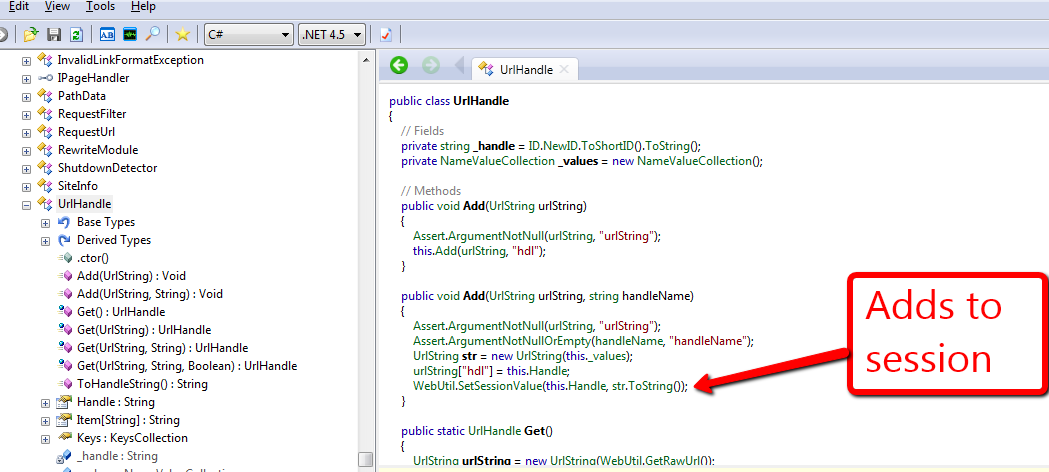

I thought there was some kind of magic happening under the hood but had a reality check after seeing how it really work — this ultimately reminded me of the KISS principle.
Everyday, I ponder and vacillate on whether it would be a good idea to create another class similar to the UrlHandle that would persist across sessions. At this point, I am convinced there is no utility in building such a class. What would be your argument for or against building such a class?
Kicking It Into Overdrive With NVelocity
A few weeks ago, I was tasked with improving one of our Healthcare Specific Website Modules, and felt compelled to share how I used NVelocity to replace tokens set in a Rich Text field — $name and $date are examples of Sitecore tokens. But, before I dive into some code, I will briefly touch upon what NVelocity is.
What exactly is NVelocity? NVelocity is a .NET template engine for replacing string tokens with code references. In other words, NVelocity is a framework that will replace tokens with values returned from code snippets given to the template engine.
There a many examples of using NVelocity in Sitecore across the web. Sitecore provides one such example in this article. This article — although a bit dated since it was written for Sitecore v5.1 — provides code examples that could still be used today.
Alistair Deneys also wrote a good article about NVelocity here. Deneys posits Sitecore no longer uses NVelocity for token replacement. However, three years after Deneys’ penned his article, code within Sitecore.Kernel still references it. Here is an example of it being used within Sitecore.Kernel (v6.5.0 rev. 111123):
Sitecore has created its own API around NVelocity. Sitecore’s wrapper API is defined within Sitecore.NVelocity.dll. In order to use the following code, you must reference this assembly.
Now, let’s get our hands dirty with some code.
First, I created an adapter to encapsulate Sitecore’s static Velocity engine object for doing token replacements.
using System;
using System.Collections.Generic;
using System.IO;
using System.Linq;
using System.Text;

using NVelocity.Context;

namespace Sitecore.Sandbox.Utilities.StringUtilities.Base
{
    public interface ITokenContextEvaluator
    {
        bool Evaluate(IContext context, TextWriter writer, string logTag, Stream instream);

        bool Evaluate(IContext context, TextWriter out_Renamed, string logTag, string instring);

        bool Evaluate(IContext context, TextWriter writer, string logTag, TextReader reader);
    }
}
using System;
using System.Collections.Generic;
using System.IO;
using System.Linq;
using System.Text;

using NVelocity.App;
using NVelocity.Context;

using Sitecore.Sandbox.Utilities.StringUtilities.Base;

namespace Sitecore.Sandbox.Utilities.StringUtilities
{
    public class TokenContextEvaluator : ITokenContextEvaluator
    {
        private TokenContextEvaluator()
        {
            Initailize();
        }

        private void Initailize()
        {
            Velocity.Init();
        }

        public bool Evaluate(IContext context, TextWriter writer, string logTag, Stream instream)
        {
            return Velocity.Evaluate(context, writer, logTag, instream);
        }

        public bool Evaluate(IContext context, TextWriter out_Renamed, string logTag, string instring)
        {
            return Velocity.Evaluate(context, out_Renamed, logTag, instring);
        }

        public bool Evaluate(IContext context, TextWriter writer, string logTag, TextReader reader)
        {
            return Velocity.Evaluate(context, writer, logTag, reader);
        }

        public static ITokenContextEvaluator CreateNewTokenContextEvaluator()
        {
            return new TokenContextEvaluator();
        }
    }
}
Next, I created a class that defines an one-to-one mapping between a string token and an object reference — the value of the code given to the template engine.
using System;
using System.Collections.Generic;
using System.Linq;
using System.Text;

using Sitecore.Diagnostics;

namespace Sitecore.Sandbox.Utilities.StringUtilities.DTO
{
    public class TokenKeyValue
    {
        public string Key { get; private set; }
        public object Value { get; private set; }

        public TokenKeyValue(string key, object value)
        {
            SetKey(key);
            SetValue(value);
        }

        private void SetKey(string key)
        {
            Assert.ArgumentNotNullOrEmpty(key, "key");
            Key = key;
        }

        private void SetValue(object value)
        {
            Value = value;
        }
    }
}
Then I created a Data transfer object to pass an instance of the adapter defined above, a collection of token mappings and an instance of NVelocity’s IContext to the main Tokenator class below — all this being done this way to allow for dependency injection.
using System;
using System.Collections.Generic;
using System.Linq;
using System.Text;

using NVelocity.Context;

using Sitecore.Sandbox.Utilities.StringUtilities.Base;

namespace Sitecore.Sandbox.Utilities.StringUtilities.DTO
{
    public class TokenatorSettings
    {
        public ITokenContextEvaluator TokenContextEvaluator { get; set; }

        public IContext TokenContext { get; set; }

        public IEnumerable<TokenKeyValue> TokenKeyValues { get; set; }

        public TokenatorSettings()
        {
        }
    }
}
With all the pieces above floating around, it’s now time to glue them all together in the main Tokenator class:
using System;
using System.Collections.Generic;
using System.Linq;
using System.Text;

namespace Sitecore.Sandbox.Utilities.StringUtilities.Base
{
    public interface ITokenator
    {
        string ReplaceTokens(string value);
    }
}
using System;
using System.Collections.Generic;
using System.IO;
using System.Linq;
using System.Text;

using Sitecore.Diagnostics;
using Sitecore.Text.NVelocity;

using NVelocity;
using NVelocity.App;
using NVelocity.Context;

using Sitecore.Sandbox.Utilities.StringUtilities.Base;
using Sitecore.Sandbox.Utilities.StringUtilities.DTO;

namespace Sitecore.Sandbox.Utilities.StringUtilities
{
    public class Tokenator : ITokenator
    {
        private const string LogName = "Tokenator Replacement Action";

        private TokenatorSettings TokenatorSettings { get; set; }

        private Tokenator(IEnumerable<TokenKeyValue> tokenKeyValues)
            : this(CreateNewTokenatorSettingsWithDefaults(tokenKeyValues))
        {
        }

        private Tokenator(TokenatorSettings tokenatorSettings)
        {
            SetTokenatorSettings(tokenatorSettings);
            Initialize();
        }

        private void SetTokenatorSettings(TokenatorSettings tokenatorSettings)
        {
            AssertTokenatorSettings(tokenatorSettings);
            TokenatorSettings = tokenatorSettings;
        }

        private void AssertTokenatorSettings(TokenatorSettings tokenatorSettings)
        {
            Assert.ArgumentNotNull(tokenatorSettings, "tokenatorSettings");
            Assert.ArgumentNotNull(tokenatorSettings.TokenContextEvaluator, "tokenatorSettings.TokenContextEvaluator");
            Assert.ArgumentNotNull(tokenatorSettings.TokenContext, "tokenatorSettings.TokenContext");
            Assert.ArgumentNotNull(tokenatorSettings.TokenKeyValues, "tokenatorSettings.TokenKeyValues");
        }

        private void Initialize()
        {
            foreach (TokenKeyValue tokenKeyValue in TokenatorSettings.TokenKeyValues)
            {
                TokenatorSettings.TokenContext.Put(tokenKeyValue.Key, tokenKeyValue.Value);
            }
        }

        public string ReplaceTokens(string value)
        {
            string tokensReplaced = string.Empty;

            using (StringWriter stringWriter = new StringWriter())
            {
                TokenatorSettings.TokenContextEvaluator.Evaluate(TokenatorSettings.TokenContext, stringWriter, LogName, value);
                tokensReplaced = stringWriter.ToString();
            }

            return tokensReplaced;
        }

        private void LogError(Exception exception)
        {
            Log.Error(this.ToString(), exception, this);
        }

        private static TokenatorSettings CreateNewTokenatorSettingsWithDefaults(IEnumerable<TokenKeyValue> tokenKeyValues)
        {
            return new TokenatorSettings
            {
                TokenContextEvaluator = GetDefaultTokenContextEvaluator(),
                TokenContext = GetDefaultTokenContext(),
                TokenKeyValues = tokenKeyValues
            };
        }

        private static ITokenContextEvaluator GetDefaultTokenContextEvaluator()
        {
            return StringUtilities.TokenContextEvaluator.CreateNewTokenContextEvaluator();
        }

        private static IContext GetDefaultTokenContext()
        {
            return new VelocityContext();
        }

        public static ITokenator CreateNewTokenator(IEnumerable<TokenKeyValue> tokenKeyValues)
        {
            return new Tokenator(tokenKeyValues);
        }

        public static ITokenator CreateNewTokenator(TokenatorSettings tokenatorSettings)
        {
            return new Tokenator(tokenatorSettings);
        }
    }
}
The following sublayout code was used as a test harness for my Tokenator object, and to illustrate how client code would use it.
<%@ Control Language="C#" AutoEventWireup="true" CodeBehind="Tokenator Test.ascx.cs" Inherits="Sitecore650rev120706.layouts.sublayouts.Tokenator_Test" %>
<asp:Literal ID="litTokenatorTest" runat="server" />
using System;
using System.Collections.Generic;
using System.Linq;
using System.Web;
using System.Web.UI;
using System.Web.UI.WebControls;

using Sitecore.Sandbox.Utilities.StringUtilities;
using Sitecore.Sandbox.Utilities.StringUtilities.Base;
using Sitecore.Sandbox.Utilities.StringUtilities.DTO;

namespace Sitecore650rev120706.layouts.sublayouts
{
    public partial class Tokenator_Test : System.Web.UI.UserControl
    {
        protected void Page_Load(object sender, EventArgs e)
        {
            SetLiteralText();
        }

        private void SetLiteralText()
        {
            litTokenatorTest.Text = GetTokenReplacedContent();
        }

        private string GetTokenReplacedContent()
        {
            string content = Sitecore.Context.Item["Text"];
            return ReplaceTokens(content);
        }

        private string ReplaceTokens(string content)
        {
            IEnumerable<TokenKeyValue> tokenKeyValues = GetTokenKeyValues();
            ITokenator tokenator = Tokenator.CreateNewTokenator(tokenKeyValues);
            return tokenator.ReplaceTokens(content);
        }

        private IEnumerable<TokenKeyValue> GetTokenKeyValues()
        {
            IList<TokenKeyValue> tokenKeyValues = new List<TokenKeyValue>();
            tokenKeyValues.Add(new TokenKeyValue("localtime", DateTime.Now));
            tokenKeyValues.Add(new TokenKeyValue("developer", "@mike_i_reynolds"));
            tokenKeyValues.Add(new TokenKeyValue("random", new Random().Next(10000)));
            return tokenKeyValues;
        }
    }
}
Token content in a Rich Text field:

Test output:

NVelocity is definitely a great tool to tap into and harness — especially to make content more dynamic.
However, if there is one takeaway I would like for you the reader to part with, it would be this: stay relentlessly curious, and keep on digging through the treasure troves in Sitecore’s assemblies. This article would not have been possible if I did not have a copy of .NET Reflector, Sitecore.Kernel.dll, Sitecore.NVelocity.dll and an unquenchable thirst for learning.
Happy coding!
Yes — You, Too, Can Build a Custom Field Control!
Ever since I started building websites in Sitecore over five years ago, I had an itch to build a custom Sitecore Field Control. Sadly, I never put my nose to the grindstone in doing so until a few weeks ago. Armed with .NET Reflector and the Sitecore.Kernel.dll, I sat down and finally built one. This post highlights the fruits of my endeavor.
First, let me give you a quick description on what a Sitecore Field Control is. A Sitecore Field Control is an ASP.NET Web Control that presents data set in a Sitecore field according to logic defined by the control. Sitecore offers a few Field Controls out of the box — these include Image, Link, Text, Date — and all are defined within the namespace Sitecore.Web.UI.WebControls. How to use these Field Controls is illustrated during Sitecore Developer Training and certification.
In this example, I created a custom Field Control that takes a value set within a Single-Line Text, Multi-Line Text, Rich Text, or text field — a deprecated field type used before Sitecore v5.3.1. — and wraps the value around HTML specified by client code. This HTML tag is defined by the HtmlTag attribute of the HtmlTagFieldControl below.
First, I created a new Field Control:
using System;
using System.Collections.Generic;
using System.Linq;
using System.Text;
using System.Web.UI;

using Sitecore.Collections;
using Sitecore.Web.UI.WebControls;

namespace Sitecore.Sandbox.FieldControls
{
    public class HtmlTagFieldControl : FieldControl
    {
        public string HtmlTag { get; set; }

        protected override void PopulateParameters(SafeDictionary<string> parameters)
        {
            base.PopulateParameters(parameters);

            if (!string.IsNullOrEmpty(HtmlTag))
            {
                parameters.Add("htmlTagName", HtmlTag);
            }

            foreach (string attributeName in base.Attributes.Keys)
            {
                string attributeValue = base.Attributes[attributeName];
                parameters.Add(attributeName, attributeValue);
            }
        }
    }
}
Next, I built a renderer — including a Data transfer object for passing arguments to the renderer — for the field control defined above:
using System;
using System.Collections.Generic;
using System.Linq;
using System.Text;

using Sitecore.Xml.Xsl;

namespace Sitecore.Sandbox.Renderers.Base
{
    public interface IHtmlTagRenderer
    {
        RenderFieldResult Render();
    }
}
using System;
using System.Collections.Generic;
using System.Linq;
using System.Text;
using System.Web;

using Sitecore;
using Sitecore.Collections;
using Sitecore.Data.Fields;
using Sitecore.Data.Items;
using Sitecore.Diagnostics;
using Sitecore.Xml.Xsl;

using Sitecore.Sandbox.Renderers.Base;
using Sitecore.Sandbox.Renderers.DTO;

namespace Sitecore.Sandbox.Renderers
{
    public class HtmlTagRenderer : FieldRendererBase, IHtmlTagRenderer
    {
        private const string OpenHtmlTagFormat = "<{0}>";
        private const string CloseHtmlTagFormat = "</{0}>";

        private HtmlTagRendererArgs Arguments { get; set; }

        private HtmlTagRenderer(HtmlTagRendererArgs arguments)
            : base()
        {
            SetArguments(arguments);
        }

        private void SetArguments(HtmlTagRendererArgs arguments)
        {
            Assert.ArgumentNotNull(arguments, "arguments");
            Arguments = arguments;
        }

        public virtual RenderFieldResult Render()
        {
            string fieldHtml = CreateFieldHtml();
            return new RenderFieldResult(fieldHtml);
        }

        private string CreateFieldHtml()
        {
            string openHtmlTag = GetOpenHtmlTag();
            string closeHtmlTag = GetCloseHtmlTag();

            return string.Concat(openHtmlTag, Arguments.FieldValue, closeHtmlTag);
        }

        private string GetOpenHtmlTag()
        {
            return GetTagHtml(OpenHtmlTagFormat, Arguments.HtmlTagName);
        }

        private string GetCloseHtmlTag()
        {
            return GetTagHtml(CloseHtmlTagFormat, Arguments.HtmlTagName);
        }

        private static string GetTagHtml(string tagFormat, string tagName)
        {
            if (!string.IsNullOrEmpty(tagName))
            {
                return string.Format(tagFormat, tagName);
            }

            return string.Empty;
        }

        public static IHtmlTagRenderer Create(HtmlTagRendererArgs arguments)
        {
            return new HtmlTagRenderer(arguments);
        }
    }
}
using System;
using System.Collections.Generic;
using System.Linq;
using System.Text;

namespace Sitecore.Sandbox.Renderers.DTO
{
    public class HtmlTagRendererArgs
    {
        public string HtmlTagName { get; set; }
        public string FieldName { get; set; }
        public string FieldValue { get; set; }
    }
}
Last, but not least, I defined a Render Field pipeline to glue all the pieces together — including the pivotal piece of wrapping the field’s value around the wrapper HTML tag:
using System;
using System.Collections.Generic;
using System.Linq;
using System.Text;

using Sitecore.Data.Items;
using Sitecore.Diagnostics;
using Sitecore.Pipelines.RenderField;
using Sitecore.Xml.Xsl;

using Sitecore.Sandbox.Renderers;
using Sitecore.Sandbox.Renderers.Base;
using Sitecore.Sandbox.Renderers.DTO;

namespace Sitecore.Sandbox.Pipelines.RenderField
{
    public class GetHtmlTagFieldControlHtml
    {
        private static IEnumerable<string> supportedFieldTypes = new string[] { "text", "rich text", "single-line text", "multi-line text" };

        protected virtual IHtmlTagRenderer CreateRenderer(HtmlTagRendererArgs htmlTagRendererArgs)
        {
            return HtmlTagRenderer.Create(htmlTagRendererArgs);
        }

        public void Process(RenderFieldArgs renderFieldArgs)
        {
            if (CanFieldBeProcessed(renderFieldArgs))
            {
                SetRenderFieldArgsResults(renderFieldArgs);
            }
        }

        private bool CanFieldBeProcessed(RenderFieldArgs renderFieldArgs)
        {
            string fieldTypeKey = renderFieldArgs.FieldTypeKey.ToLower();
            return supportedFieldTypes.Contains(fieldTypeKey);
        }

        private void SetRenderFieldArgsResults(RenderFieldArgs renderFieldArgs)
        {
            RenderFieldResult renderFieldResult = GetRenderFieldResult(renderFieldArgs);
            SetRenderFieldArgsResultHtmlProperties(renderFieldResult, renderFieldArgs);
        }

        private RenderFieldResult GetRenderFieldResult(RenderFieldArgs renderFieldArgs)
        {
            HtmlTagRendererArgs htmlTagRendererArgs = CreateHtmlTagRendererArgs(renderFieldArgs);
            IHtmlTagRenderer htmlTagRenderer = CreateRenderer(htmlTagRendererArgs);
            return htmlTagRenderer.Render();
        }

        private HtmlTagRendererArgs CreateHtmlTagRendererArgs(RenderFieldArgs renderFieldArgs)
        {
            string htmlTagName = string.Empty;

            if (renderFieldArgs.Parameters.ContainsKey("htmlTagName"))
            {
                htmlTagName = renderFieldArgs.Parameters["htmlTagName"];
            }

            return new HtmlTagRendererArgs
            {
                HtmlTagName = htmlTagName,
                FieldName = renderFieldArgs.FieldName,
                FieldValue = renderFieldArgs.FieldValue
            };
        }

        private void SetRenderFieldArgsResultHtmlProperties(RenderFieldResult renderFieldResult, RenderFieldArgs renderFieldArgs)
        {
            renderFieldArgs.Result.FirstPart = renderFieldResult.FirstPart;
            renderFieldArgs.Result.LastPart = renderFieldResult.LastPart;
        }
    }
}
I added four fields to a data template — each being of a type supported by my custom Field Control:

I added some content:

I wrote some code for the test sublayout used in this example — notice how I’m having a little fun by using the marquee tag :):
<%@ Control Language="C#" AutoEventWireup="true" CodeBehind="My Little Sublayout.ascx.cs" Inherits="Sitecore650rev120706.layouts.sublayouts.MyLittleSublayout" %>
<div>
<strong>Field Name:</strong> title<br />
<strong>Field Type:</strong> text<br />
<strong>Html Tag:</strong> h1<br />
<strong>Field Control Html:</strong><br />
<sj:HtmlTagFieldControl ID="h1Title" HtmlTag="h1" Field="Title" runat="server" />
<hr />
</div>
<div>
<strong>Field Name:</strong> Subtitle<br />
<strong>Field Type:</strong> Single-Line Text<br />
<strong>Html Tag:</strong> h2<br />
<strong>Field Control Html:</strong><br />
<sj:HtmlTagFieldControl ID="h2Subtitle" HtmlTag="h2" Field="Subtitle" runat="server" />
<hr />
</div>
<div>
<strong>Field Name:</strong> Blurb<br />
<strong>Field Type:</strong> Multi-Line Text<br />
<strong>Html Tag:</strong> blockquote<br />
<strong>Field Control Html:</strong>
<sj:HtmlTagFieldControl ID="HtmlTagFieldControl1" HtmlTag="blockquote" Field="Blurb" runat="server" />
<hr />
</div>
<div>
<strong>Field Name:</strong> Text<br />
<strong>Field Type:</strong> Rich Text<br />
<strong>Html Tag:</strong> marquee<br />
<strong>Field Control Html:</strong>
<sj:HtmlTagFieldControl ID="marqueeText" HtmlTag="marquee" Field="Text" runat="server" />
</div>
Rendered HTML:
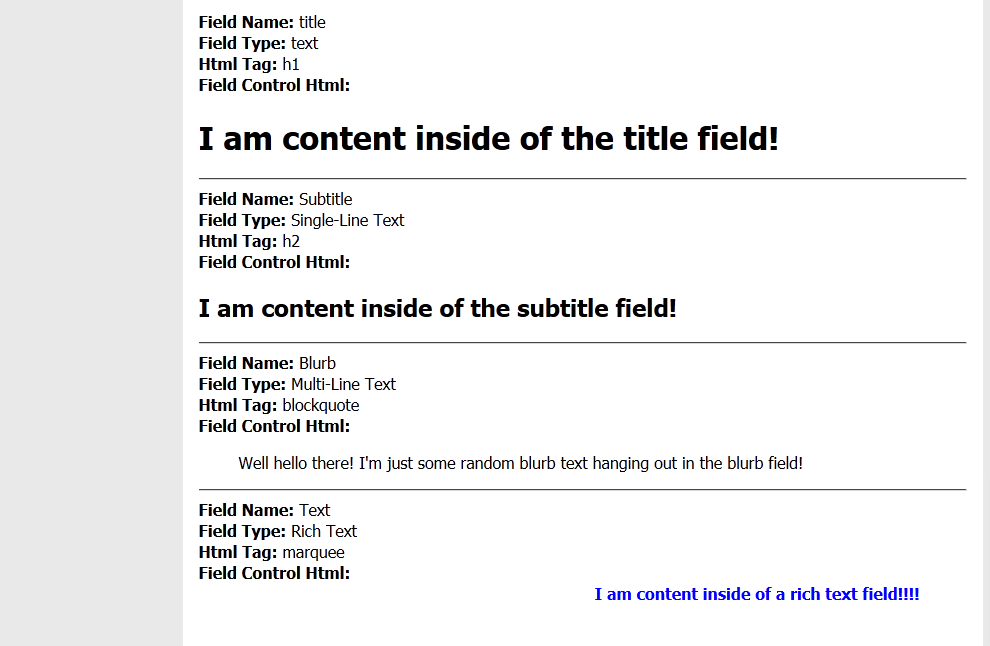
Sitecore offering the ability to create custom Field Controls is just another example of its extensibility. I don’t know of many developers that have taken advantage of creating their own custom Field Controls. However, I hope this post kindles the want for doing so, or adds some armament to your arsenal on how to present Sitecore data.
Addendum
Recently, the following query was asked on twitter:
Custom field controls – would you write your own from scratch, or inherit e.g. sc:text and add what you need (and why)?
The Text FieldControl doesn’t offer any logic over it’s FieldControl base — it inherits directly from the FieldControl class without any overrides. Inheriting from it will not add any extra benefit.
Further, the only method that might be of interest in overriding in a FieldControl base class — a class other than Text — would be the PopulateParameters method — albeit an argument could be made for overriding the DoRender method, but I will not discuss this method here. The PopulateParameters method sets parameters that are used by the RendererField pipeline for passing arguments to the Renderer object — the latter object creates the HTML for the control.
Plus, as a general best practice, I would caution against inheriting from classes unless absolutely necessary — more specific FieldControl classes within Sitecore.Web.UI.WebControls are no exceptions. You don’t want to introduce a steep class hierarchy, or cause class explosion — a situation where you create a new class just to add new functionality over a base class (Vlissides, Helm, Johnson, Gamma, 1995; Shalloway and Trott, 2004). Utilizing composition is recommended over inheritance — a model that faciliates in code maintenance, refactoring efforts, and adding new functionality (Vlissides, Helm, Johnson, & Gamma, 1995; Shalloway & Trott, 2004).
The real magic though occurs within the Renderer and RenderField pipeline classes, not the FieldControl classes, per se.
References
Gamma, E., Helm, R., Johnson, R., & Vlissides, J. (1995). Design patterns: Elements of reusable object-oriented software. Reading: Addison-Wesley.
Shalloway, A., Trott, J. A. (2004) Design Patterns Explained. A new Perspective on Object-Oriented Design (2nd edition). Reading: Addison-Wesley.
Labels and Literals and Field Controls, Oh My!
I wish I could tell you I’ve discovered the panacea to extirpate common issues inherent in many Sitecore development projects and this article would enumerate a recipe for curtailing these, or how I’ve discovered a hidden gem within Sitecore.Kernel.dll that your future projects cannot live without.
Sadly, this article will do none of these things — it will not knock your socks off, and may even leave you saying to yourself “come on Mike, tell me something I don’t already know”.
Yet, I feel adamantly compelled to pen this article given an egregious practice I’ve seen employed by numerous Sitecore developers at multiple Sitecore development shops over the span of five years.
What is this foul practice? It’s the act of building HTML in your C# code using content from Sitecore fields and displaying this HTML via ASP.NET Literal or Label Web Controls.
No doubt, you have seen some code like the following in a Sitecore solution, or have even written code like this yourself (please note these code examples haven’t been tested, aren’t robust, and are only given as pedagogical illustrations):
An ASP.NET User Control containing a Literal Web Control:

Code-behind for the User Control:

In the above code-behind, the author composed some link HTML using content within a Sitecore General Link field named ‘My Link’.
Compare that with the following:
An ASP.NET User Control containing Sitecore Link Field Control:

Code-behind for the User Control:
Notice how much less code was needed to wire-up the Link Field Control. The Link Field Control will render link HTML if the current Item has a link set on the ‘My Link’ General Link field — including the target attribute, if a target is set on the General Link field.
You might be saying “Mike, this is great, but we don’t want this working in the Page Editor — we want this field to be completely locked down since it’s in a global Item”. Well, you could use the following to disable your Field Control in the Page Editor, and have the ability to change it later without having to do a full code build (assuming you’re using the Web Application model in ASP.NET):

If you are uncertain about which Field Control to use, you could always poke around in Sitecore.Web.UI.WebControls using .NET Reflector, or could opt to use a FieldRenderer Web Control — all Sitecore Field Controls use an instance of a FieldRenderer to output their HTML:
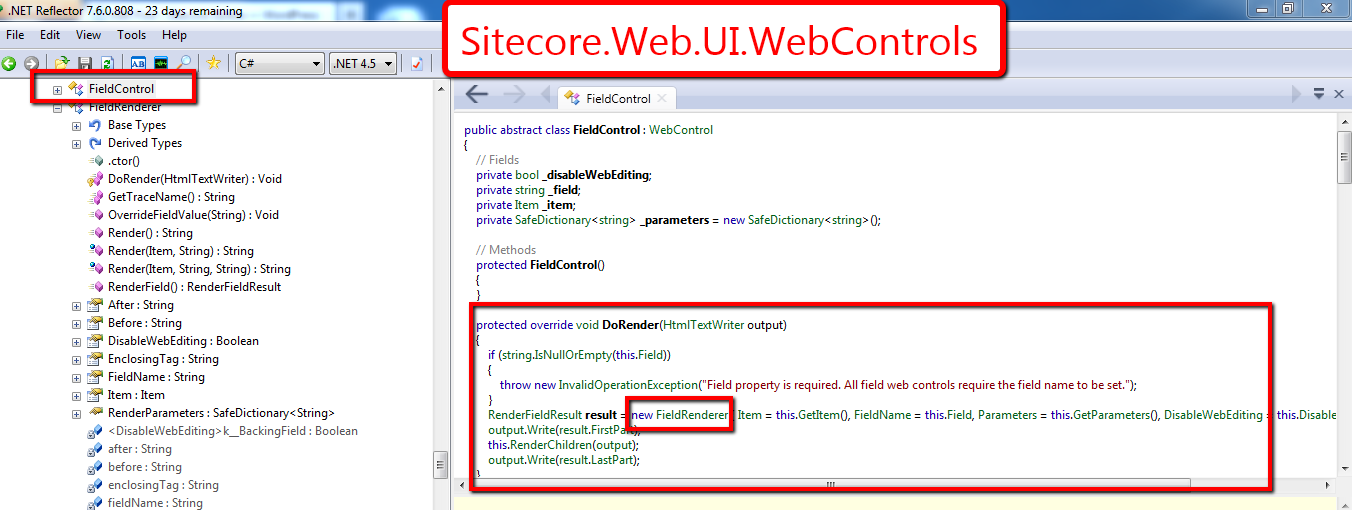
Using a FieldRenderer would also aid in allowing you to change a field’s type later without breaking its presentation in the UI — as long as the field type can be rendered by the FieldRenderer.
That’s it for now. Happy coding!
-Mike
 SitecoreJunkie.com