Home » Aliases
Category Archives: Aliases
Resolve Media Library Items Linked in Sitecore Aliases
Tonight I was doing research on extending the aliases feature in Sitecore, and discovered media library items linked in them are not served correctly “out of the box”:

As an enhancement, I wrote the following HttpRequestProcessor subclass to be used in the httpRequestBegin pipeline:
using Sitecore.Configuration;
using Sitecore.Data;
using Sitecore.Data.Items;
using Sitecore.Diagnostics;
using Sitecore.Pipelines.HttpRequest;
using Sitecore.Resources.Media;
using Sitecore.Web;

namespace Sitecore.Sandbox.Pipelines.HttpRequest
{
    public class MediaAliasResolver : HttpRequestProcessor
    {
        public override void Process(HttpRequestArgs args)
        {
            Assert.ArgumentNotNull(args, "args");
            if (!CanProcessAliases())
            {
                return;
            }

            string mediaUrl = GetMediaAliasTargetUrl(args);
            if (string.IsNullOrWhiteSpace(mediaUrl))
            {
                return;
            }

            Context.Page.FilePath = mediaUrl;
        }

        private static bool CanProcessAliases()
        {
            return Settings.AliasesActive && Context.Database != null;
        }

        private static string GetMediaAliasTargetUrl(HttpRequestArgs args)
        {
            Assert.ArgumentNotNull(args, "args");
            ID targetID = Context.Database.Aliases.GetTargetID(args.LocalPath);
            if (targetID.IsNull)
            {
                return string.Empty;
            }

            Item targetItem = args.GetItem(targetID);
            if (targetItem == null || !IsMediaItem(targetItem))
            {
                return string.Empty;
            }

            return GetAbsoluteMediaUrl(targetItem);
        }

        private static bool IsMediaItem(Item item)
        {
            Assert.ArgumentNotNull(item, "item");
            return item.Paths.IsMediaItem && item.TemplateID != TemplateIDs.MediaFolder;
        }

        private static string GetAbsoluteMediaUrl(MediaItem mediaItem)
        {
            string relativeUrl = MediaManager.GetMediaUrl(mediaItem);
            return WebUtil.GetFullUrl(relativeUrl);
        }
    }
}
The HttpRequestProcessor subclass above — after ascertaining the aliases feature is turned on, and the item linked in the requested alias is a media library item — gets the absolute URL for the media library item, and sets it on the FilePath property of the Sitecore.Context.Page instance — this is exactly how the “out of the box” Sitecore.Pipelines.HttpRequest.AliasResolver handles external URLs — and passes along the HttpRequestArgs instance.
I then wedged the HttpRequestProcessor subclass above into the httpRequestBegin pipeline directly before the Sitecore.Pipelines.HttpRequest.AliasResolver:
<?xml version="1.0" encoding="utf-8"?>
<configuration xmlns:patch="http://www.sitecore.net/xmlconfig/">
  <sitecore>
    <pipelines>
      <httpRequestBegin>
        <processor patch:before="processor[@type='Sitecore.Pipelines.HttpRequest.AliasResolver, Sitecore.Kernel']"
                   type="Sitecore.Sandbox.Pipelines.HttpRequest.MediaAliasResolver, Sitecore.Sandbox" />
      </httpRequestBegin>
    </pipelines>
  </sitecore>
</configuration>
Let’s take this for a spin.
I had already defined the following alias in Sitecore beforehand — the error page at the top of this post is evidence of that:
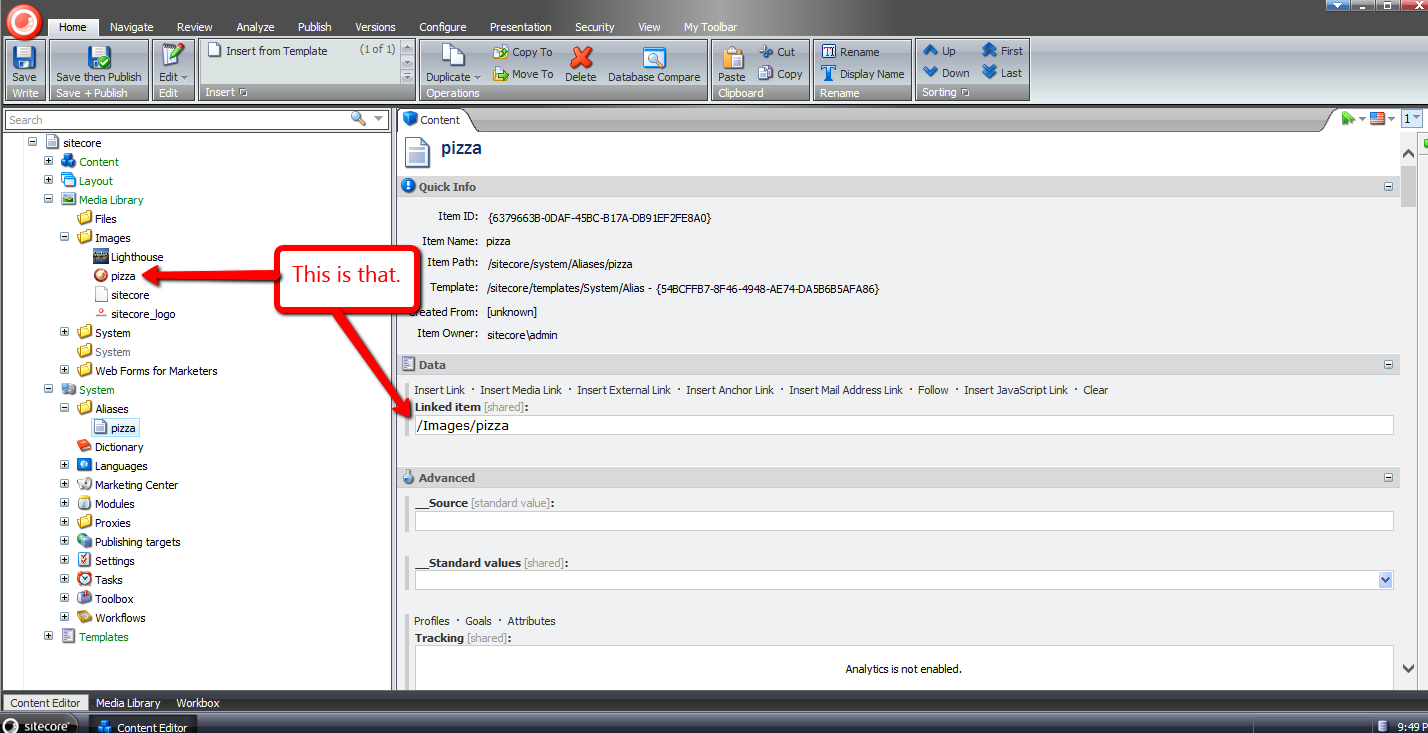
After navigating to http://sandbox/pizza — the URL to the pizza alias in my local Sitecore sandbox instance (don’t click on this link because it won’t go anywhere unless you have a website named sandbox running on your local machine) — I was brought to the media library image on the front-end:

If you have any recommendations on improving this, or further thoughts on using aliases in Sitecore, please share in a comment below.
Until next time, have a pizzalicious day!
 SitecoreJunkie.com