Home » Content Editor (Page 4)
Category Archives: Content Editor
Navigate to Base Templates of a Template using a Sitecore Command
Have you ever said to yourself when looking at base templates of a template in its Content tab “wouldn’t it be great if I could easily navigate to one of these?”
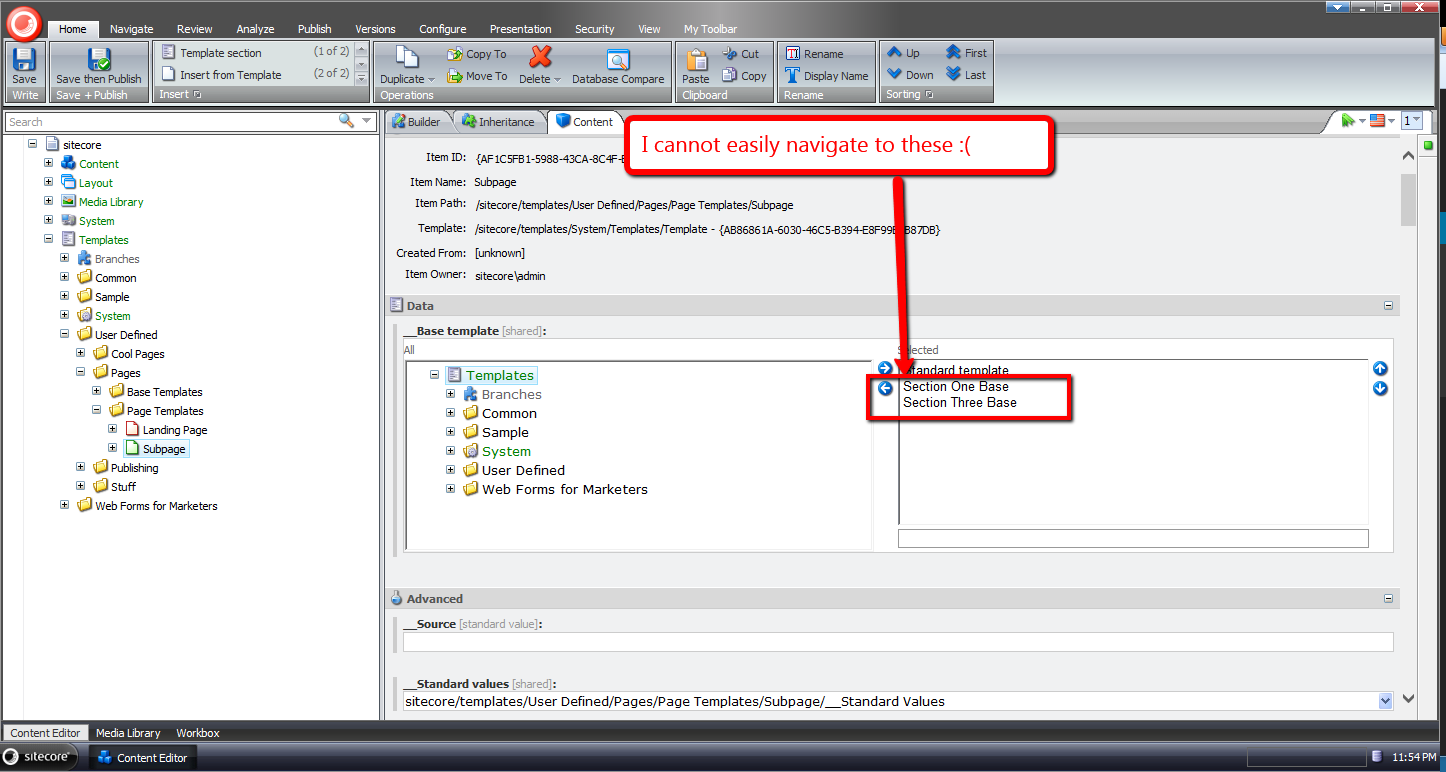
I have had this thought more than once despite having the ability to do this in a template’s Inheritance tab — you can do this by clicking one of the base template links listed:
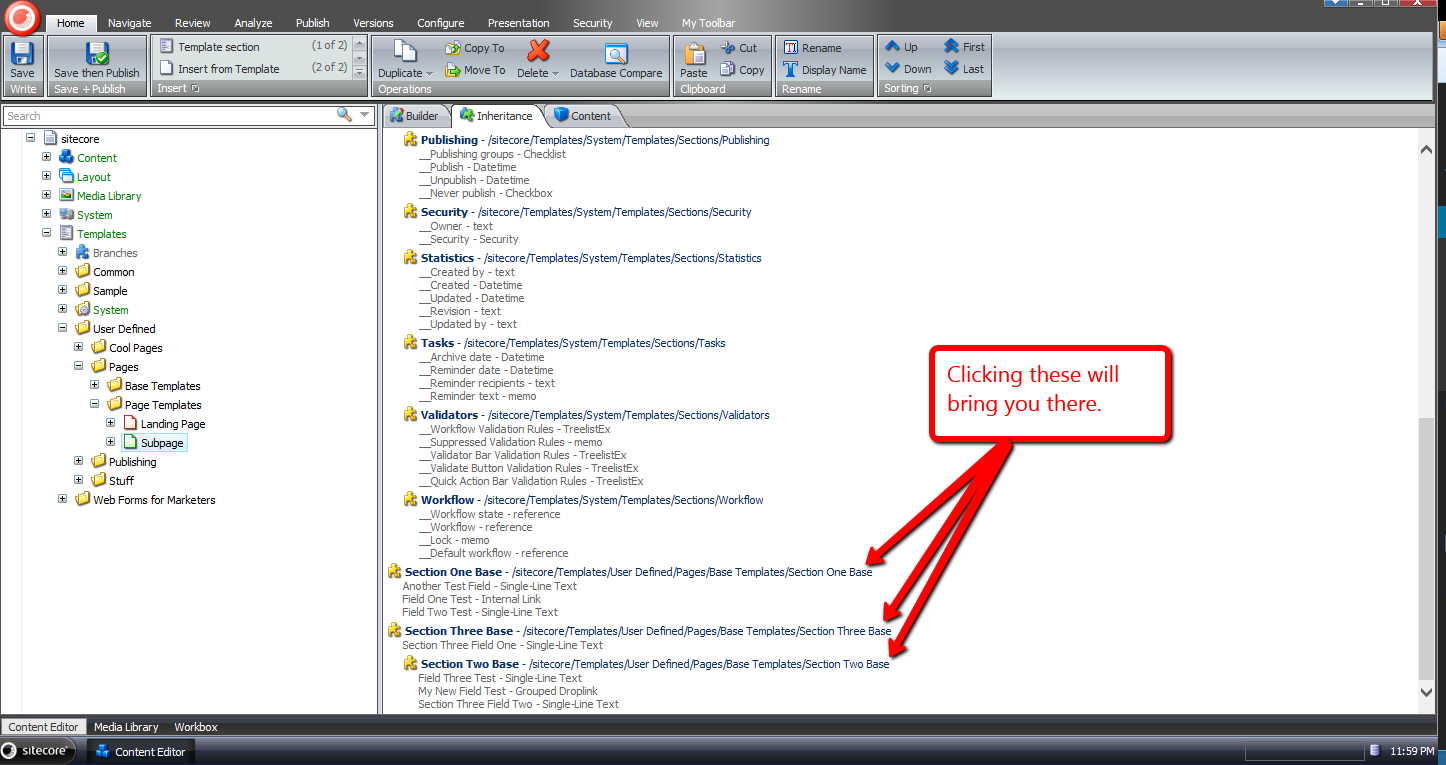
For some reason I sometimes forget you have the ability to get to a base template of a template in the Inheritance tab — why I forget is no doubt a larger issue I should try to tackle, albeit I’ll leave that for another day — and decided to build something that will be more difficult for me to forget: launching a dialog via a new item context menu option, and selecting one of the base templates of a template in that dialog.
I decided to atomize functionality in my solution by building custom pipelines/processors wherever I felt doing so made sense.
I started off by building a custom pipeline that gets base templates for a template, and defined a data transfer object (DTO) class for it:
using System.Collections.Generic;

using Sitecore.Data.Items;
using Sitecore.Pipelines;
using Sitecore.Web.UI.Sheer;

namespace Sitecore.Sandbox.Shell.Framework.Pipelines
{
    public class GetBaseTemplatesArgs : PipelineArgs
    {
        public TemplateItem TemplateItem { get; set; }

        public bool IncludeAncestorBaseTemplates { get; set; }

        private List<TemplateItem> _BaseTemplates;
        public List<TemplateItem> BaseTemplates
        {
            get
            {
                if (_BaseTemplates == null)
                {
                    _BaseTemplates = new List<TemplateItem>();
                }

                return _BaseTemplates;
            }
            set
            {
                _BaseTemplates = value;
            }
        }
    }
}
Client code must supply the template item that will be used as the starting point for gathering base templates, and can request all ancestor base templates — excluding the Standard Template as you will see below — by setting the IncludeAncestorBaseTemplates property to true.
I then created a class with a Process method that will serve as the only pipeline processor for my new pipeline:
using System;
using System.Collections.Generic;
using System.Linq;
using System.Text;

using Sitecore.Data.Items;
using Sitecore.Diagnostics;

namespace Sitecore.Sandbox.Shell.Framework.Pipelines
{
    public class GetBaseTemplates
    {
        public void Process(GetBaseTemplatesArgs args)
        {
            Assert.ArgumentNotNull(args, "args");
            Assert.ArgumentNotNull(args.TemplateItem, "args.TemplateItem");
            List<TemplateItem> baseTemplates = new List<TemplateItem>();
            GatherBaseTemplateItems(baseTemplates, args.TemplateItem, args.IncludeAncestorBaseTemplates);
            args.BaseTemplates = baseTemplates;
        }

        private static void GatherBaseTemplateItems(List<TemplateItem> baseTemplates, TemplateItem templateItem, bool includeAncestors)
        {
            if (includeAncestors)
            {
                foreach (TemplateItem baseTemplateItem in templateItem.BaseTemplates)
                {
                    GatherBaseTemplateItems(baseTemplates, baseTemplateItem, includeAncestors);
                }
            }

            if (!IsStandardTemplate(templateItem) && templateItem.BaseTemplates != null && templateItem.BaseTemplates.Any())
            {
                baseTemplates.AddRange(GetBaseTemplatesExcludeStandardTemplate(templateItem.BaseTemplates));
            }
        }

        private static IEnumerable<TemplateItem> GetBaseTemplatesExcludeStandardTemplate(TemplateItem templateItem)
        {
            if (templateItem == null)
            {
                return new List<TemplateItem>();
            }

            return GetBaseTemplatesExcludeStandardTemplate(templateItem.BaseTemplates);
        }

        private static IEnumerable<TemplateItem> GetBaseTemplatesExcludeStandardTemplate(IEnumerable<TemplateItem> baseTemplates)
        {
            if (baseTemplates != null && baseTemplates.Any())
            {
                return baseTemplates.Where(baseTemplate => !IsStandardTemplate(baseTemplate));
            }

            return baseTemplates;
        }

        private static bool IsStandardTemplate(TemplateItem templateItem)
        {
            return templateItem.ID == TemplateIDs.StandardTemplate;
        }
    }
}
Methods in the above class add base templates to a list when the templates are not the Standard Template — I thought it would be a rare occurrence for one to navigate to it, and decided not to include it in the collection.
Further, the method that gathers base templates is recursively executed when client code requests all ancestor base templates be include in the collection.
The next thing I built was functionality to prompt the user for a base template via a dialog, and track which base template was chosen. I decided to do this using a custom client processor, and built the following DTO for it:
using System;
using System.Collections.Generic;
using System.Linq;
using System.Text;
using Sitecore.Web.UI.Sheer;
using Sitecore.Data.Items;

namespace Sitecore.Sandbox.Shell.Framework.Pipelines
{
    public class GotoBaseTemplateArgs : ClientPipelineArgs
    {
        public TemplateItem TemplateItem { get; set; }

        public string SelectedBaseTemplateId { get; set; }
    }
}
Just like the other DTO defined above, client code must suppy a template item. The SelectedBaseTemplateId property is set after a user selects a base template in the modal launched by the following class:
using System.Collections.Generic;
using System.Linq;

using Sitecore.Data.Items;
using Sitecore.Data.Managers;
using Sitecore.Diagnostics;
using Sitecore.Pipelines;
using Sitecore.Shell.Applications.Dialogs.ItemLister;
using Sitecore.Web.UI.Sheer;

namespace Sitecore.Sandbox.Shell.Framework.Pipelines
{
    public class GotoBaseTemplate
    {
        public string SelectTemplateButtonText { get; set; }

        public string ModalIcon { get; set; }

        public string ModalTitle { get; set; }

        public string ModalInstructions { get; set; }

        public void SelectBaseTemplate(GotoBaseTemplateArgs args)
        {
            Assert.ArgumentNotNull(args, "args");
            Assert.ArgumentNotNull(args.TemplateItem, "args.TemplateItem");
            Assert.ArgumentNotNullOrEmpty(SelectTemplateButtonText, "SelectTemplateButtonText");
            Assert.ArgumentNotNullOrEmpty(ModalIcon, "ModalIcon");
            Assert.ArgumentNotNullOrEmpty(ModalTitle, "ModalTitle");
            Assert.ArgumentNotNullOrEmpty(ModalInstructions, "ModalInstructions");

            if (!args.IsPostBack)
            {
                ItemListerOptions itemListerOptions = new ItemListerOptions
                {
                    ButtonText = SelectTemplateButtonText,
                    Icon = ModalIcon,
                    Title = ModalTitle,
                    Text = ModalInstructions
                };

                itemListerOptions.Items = GetBaseTemplateItemsForSelection(args.TemplateItem).Select(template => template.InnerItem).ToList();
                itemListerOptions.AddTemplate(TemplateIDs.Template);
                SheerResponse.ShowModalDialog(itemListerOptions.ToUrlString().ToString(), true);
                args.WaitForPostBack();
            }
            else if (args.HasResult)
            {
                args.SelectedBaseTemplateId = args.Result;
                args.IsPostBack = false;
            }
            else
            {
                args.AbortPipeline();
            }
        }

        private IEnumerable<TemplateItem> GetBaseTemplateItemsForSelection(TemplateItem templateItem)
        {
            GetBaseTemplatesArgs args = new GetBaseTemplatesArgs
            {
                TemplateItem = templateItem,
                IncludeAncestorBaseTemplates = true,
            };
            CorePipeline.Run("getBaseTemplates", args);
            return args.BaseTemplates;
        }

        public void Execute(GotoBaseTemplateArgs args)
        {
            Assert.ArgumentNotNull(args, "args");
            Assert.ArgumentNotNullOrEmpty(args.SelectedBaseTemplateId, "args.SelectedBaseTemplateId");
            Context.ClientPage.ClientResponse.Timer(string.Format("item:load(id={0})", args.SelectedBaseTemplateId), 1);
        }
    }
}
The SelectBaseTemplate method above gives the user a list of base templates to choose from — this includes all ancestor base templates of a template minus the Standard Template.
The title, icon, helper text of the modal are supplied via the processor’s xml node in its configuration file — you’ll see this later on in this post.
Once a base template is chosen, its Id is then set in the SelectedBaseTemplateId property of the GotoBaseTemplateArgs instance.
The Execute method brings the user to the selected base template item in the Sitecore content tree.
Now we need a way to launch the code above.
I did this using a custom command that will be wired up to the item context menu:
using System.Collections.Generic;
using System.Linq;

using Sitecore.Data.Items;
using Sitecore.Data.Managers;
using Sitecore.Diagnostics;
using Sitecore.Shell.Framework.Commands;

using Sitecore.Sandbox.Shell.Framework.Pipelines;
using Sitecore.Web.UI.Sheer;
using Sitecore.Pipelines;

namespace Sitecore.Sandbox.Commands
{
    public class GotoBaseTemplateCommand : Command
    {
        public override void Execute(CommandContext context)
        {
            Context.ClientPage.Start("gotoBaseTemplate", new GotoBaseTemplateArgs { TemplateItem = GetItem(context) });
        }

        public override CommandState QueryState(CommandContext context)
        {
            if (ShouldEnable(GetItem(context)))
            {
                return CommandState.Enabled;
            }

            return CommandState.Hidden;
        }

        private static bool ShouldEnable(Item item)
        {
            return item != null
                    && IsTemplate(item)
                    && GetBaseTemplates(item).Any();
        }

        private static Item GetItem(CommandContext context)
        {
            Assert.ArgumentNotNull(context, "context");
            Assert.ArgumentNotNull(context.Items, "context.Items");
            return context.Items.FirstOrDefault();
        }

        private static bool IsTemplate(Item item)
        {
            Assert.ArgumentNotNull(item, "item");
            return TemplateManager.IsTemplate(item);
        }

        private static IEnumerable<TemplateItem> GetBaseTemplates(TemplateItem templateItem)
        {
            Assert.ArgumentNotNull(templateItem, "templateItem");
            GetBaseTemplatesArgs args = new GetBaseTemplatesArgs
            {
                TemplateItem = templateItem,
                IncludeAncestorBaseTemplates = false
            };

            CorePipeline.Run("getBaseTemplates", args);
            return args.BaseTemplates;
        }
    }
}
The command above is visible only when the item is a template, and has base templates on it — we invoke the custom pipeline built above to get base templates.
When the command is invoked, we call our custom client processor to prompt the user for a base template to go to.
I then glued everything together using the following configuration file:
<?xml version="1.0" encoding="utf-8" ?>
<configuration>
  <sitecore>
    <commands>
      <command name="item:GotoBaseTemplate" type="Sitecore.Sandbox.Commands.GotoBaseTemplateCommand, Sitecore.Sandbox"/>
    </commands>
    <pipelines>
      <getBaseTemplates>
        <processor type="Sitecore.Sandbox.Shell.Framework.Pipelines.GetBaseTemplates, Sitecore.Sandbox"/>
      </getBaseTemplates>
    </pipelines>
    <processors>
      <gotoBaseTemplate>
        <processor mode="on" type="Sitecore.Sandbox.Shell.Framework.Pipelines.GotoBaseTemplate, Sitecore.Sandbox" method="SelectBaseTemplate">
          <SelectTemplateButtonText>OK</SelectTemplateButtonText>
          <ModalIcon>Applications/32x32/nav_up_right_blue.png</ModalIcon>
          <ModalTitle>Select A Base Template</ModalTitle>
          <ModalInstructions>Select the base template you want to navigate to.</ModalInstructions>
        </processor>
        <processor mode="on" type="Sitecore.Sandbox.Shell.Framework.Pipelines.GotoBaseTemplate, Sitecore.Sandbox" method="Execute"/>
      </gotoBaseTemplate>
    </processors>
  </sitecore>
</configuration>
I’ve left out how I’ve added the command shown above to the item context menu in the core database. For more information on adding to the item context menu, please see part one and part two of my post showing how to do this.
Let’s see how we did.
I first created some templates for testing. The following template named ‘Meta’ uses two other test templates as base templates:

I also created a ‘Base Page’ template which uses the ‘Meta’ template above:

Next I created ‘The Coolest Page Template Ever’ template — this uses the ‘Base Page’ template as its base template:

I then right-clicked on ‘The Coolest Page Template Ever’ template to launch its context menu, and selected our new menu option:
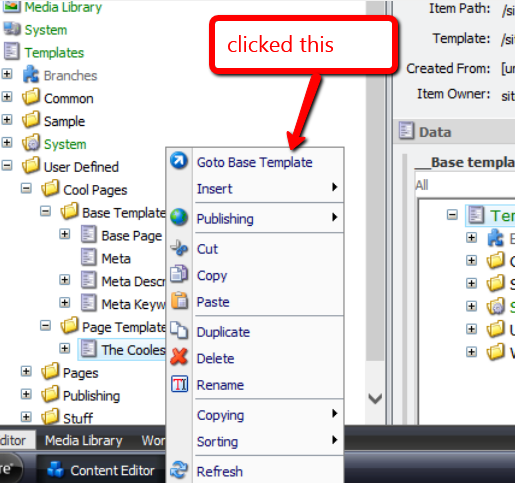
I was then presented with a dialog asking me to select the base template I want to navigate to:

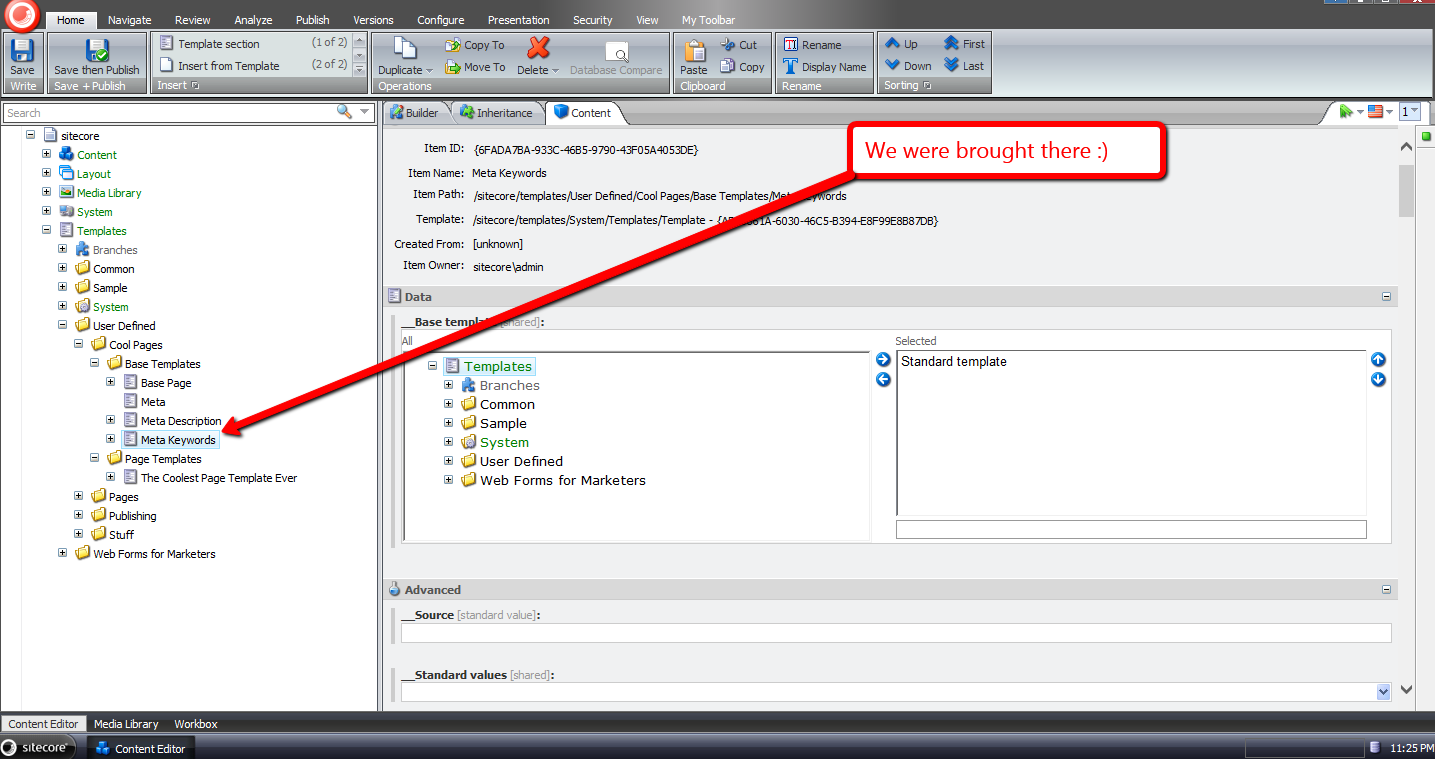
I chose one of the base templates, and clicked ‘OK’:

I was then brought to the base template I had chosen:
If you have any thoughts on this, please leave a comment.
Enforce Password Expiration in the Sitecore CMS
I recently worked on a project that called for a feature to expire Sitecore users’ passwords after an elapsed period of time since their passwords were last changed.
The idea behind this is to lessen the probability that an attacker will infiltrate a system — or multiple systems if users reuse their passwords across different applications (this is more common than you think) — within an organization by acquiring old database backups containing users’ passwords.
Since I can’t show you what I built for that project, I cooked up another solution — a custom loggingin processor that determines whether a user’s password has expired in Sitecore:
using System;
using System.Web.Security;

using Sitecore.Diagnostics;
using Sitecore.Pipelines.LoggingIn;
using Sitecore.Web;

namespace Sitecore.Sandbox.Pipelines.LoggingIn
{
    public class CheckPasswordExpiration
    {
        private TimeSpan TimeSpanToExpirePassword { get; set; }
        private string ChangePasswordPageUrl { get; set; }

        public void Process(LoggingInArgs args)
        {
            Assert.ArgumentNotNull(args, "args");
            if (!IsEnabled())
            {
                return;
            }

            MembershipUser user = GetMembershipUser(args);
            if (HasPasswordExpired(user))
            {
                WebUtil.Redirect(ChangePasswordPageUrl);
            }
        }

        private bool IsEnabled()
        {
            return IsTimeSpanToExpirePasswordSet() && IsChangePasswordPageUrlSet();
        }

        private bool IsTimeSpanToExpirePasswordSet()
        {
            return TimeSpanToExpirePassword > default(TimeSpan);
        }

        private bool IsChangePasswordPageUrlSet()
        {
            return !string.IsNullOrWhiteSpace(ChangePasswordPageUrl);
        }

        private static MembershipUser GetMembershipUser(LoggingInArgs args)
        {
            Assert.ArgumentNotNull(args, "args");
            Assert.ArgumentNotNullOrEmpty(args.Username, "args.Username");
            return Membership.GetUser(args.Username, false);
        }

        private bool HasPasswordExpired(MembershipUser user)
        {
            return user.LastPasswordChangedDate.Add(TimeSpanToExpirePassword) <= DateTime.Now;
        }
    }
}
The processor above ascertains whether a user’s password has expired by adding a configured timespan — see the configuration file below — to the last date and time the password was changed, and if that date and time summation is in the past — this means the password should have been changed already — then we redirect the user to a change password page (this is configured to be the Change Password page in Sitecore).
I wired up the custom loggingin processor, its timespan on expiring passwords — here I am using 1 minute since I can’t wait around all day 😉 — and set the change password page to be the url of Sitecore’s Change Password page:
<?xml version="1.0" encoding="utf-8"?>
<configuration xmlns:patch="http://www.sitecore.net/xmlconfig/">
  <sitecore>
    <processors>
      <loggingin>
        <processor mode="on" type="Sitecore.Sandbox.Pipelines.LoggingIn.CheckPasswordExpiration, Sitecore.Sandbox"
					patch:before="processor[@type='Sitecore.Pipelines.LoggingIn.CheckStartPage, Sitecore.Kernel']">
          <!-- Number of days, hours, minutes and seconds after the last password change date to expire passwords -->
          <TimeSpanToExpirePassword>00:00:01:00</TimeSpanToExpirePassword>
          <ChangePasswordPageUrl>/sitecore/login/changepassword.aspx</ChangePasswordPageUrl>
        </processor>
      </loggingin>
    </processors>
  </sitecore>
</configuration>
Let’s test this out.
I went to Sitecore’s login page, and entered my username and password on the login form:

I clicked the Login button, and was redirected to the Change Password page as expected:

If you can think of any other security measures that should be added to Sitecore, please share in a comment.
Replace Proxies With Clones in the Sitecore CMS
The other day I stumbled upon a thread in the Sitecore Developer Network (SDN) forums that briefly touched upon replacing proxies with clones, and I wondered whether anyone had built any sort of tool that creates clones for items being proxied — basically a tool that would automate creating clones from proxies — and removes the proxies once the clones are in place.
Since I am not aware of such a tool — not to mention that I’m hooked on programming and just love coding — I decided to create one.
The following command is my attempt at such a tool:
using System;
using System.Linq;

using Sitecore.Configuration;
using Sitecore.Data.Items;
using Sitecore.Data.Proxies;
using Sitecore.Diagnostics;
using Sitecore.Shell.Framework.Commands;

namespace Sitecore.Sandbox.Commands
{
    public class TransformProxyToClones : Command
    {
        public override void Execute(CommandContext context)
        {
            Assert.ArgumentNotNull(context, "context");
            TransformProxyItemToClones(GetContextItem(context));
        }

        private static void TransformProxyItemToClones(Item item)
        {
            Assert.ArgumentNotNull(item, "item");
            if(!CanTransform(item))
            {
                return;
            }

            string proxyType = GetProxyType(item);
            Item source = GetItem(GetSourceItemFieldValue(item));
            Item target = GetItem(GetTargetItemFieldValue(item));

            if (AreEqualIgnoreCase(proxyType, "Entire sub-tree"))
            {
                DeleteItem(item);
                CloneEntireSubtree(source, target);
            }
            else if (AreEqualIgnoreCase(proxyType, "Root item only"))
            {
                DeleteItem(item);
                CloneRootOnly(source, target);
            }
        }

        private static void CloneEntireSubtree(Item source, Item destination)
        {
            Clone(source, destination, true);
        }

        private static void CloneRootOnly(Item root, Item destination)
        {
            Clone(root, destination, false);
        }

        private static Item Clone(Item cloneSource, Item cloneDestination, bool deep)
        {
            Assert.ArgumentNotNull(cloneSource, "cloneSource");
            Assert.ArgumentNotNull(cloneDestination, "cloneDestination");
            return cloneSource.CloneTo(cloneDestination, deep);
        }

        private static void DeleteItem(Item item)
        {
            Assert.ArgumentNotNull(item, "item");
            if (Settings.RecycleBinActive)
            {
                item.Recycle();
            }
            else
            {
                item.Delete();
            }
        }

        public override CommandState QueryState(CommandContext context)
        {
            Assert.ArgumentNotNull(context, "context");
            if (CanTransform(GetContextItem(context)))
            {
                return CommandState.Enabled;
            }

            return CommandState.Hidden;
        }

        private static Item GetContextItem(CommandContext context)
        {
            Assert.ArgumentNotNull(context, "context");
            return context.Items.FirstOrDefault();
        }

        private static bool CanTransform(Item item)
        {
            Assert.ArgumentNotNull(item, "item");
            return IsProxy(item)
                    && IsSourceDatabaseFieldEmpty(item)
                    && !string.IsNullOrWhiteSpace(GetProxyType(item))
                    && !string.IsNullOrWhiteSpace(GetSourceItemFieldValue(item))
                    && !string.IsNullOrWhiteSpace(GetTargetItemFieldValue(item));
        }

        private static bool IsProxy(Item item)
        {
            Assert.ArgumentNotNull(item, "item");
            return ProxyManager.IsProxy(item);
        }

        private static string GetProxyType(Item item)
        {
            Assert.ArgumentNotNull(item, "item");
            return item["Proxy type"];
        }

        private static bool IsSourceDatabaseFieldEmpty(Item item)
        {
            Assert.ArgumentNotNull(item, "item");
            return string.IsNullOrWhiteSpace(item["Source database"]);
        }

        private static string GetSourceItemFieldValue(Item item)
        {
            Assert.ArgumentNotNull(item, "item");
            return item["Source item"];
        }

        private static string GetTargetItemFieldValue(Item item)
        {
            Assert.ArgumentNotNull(item, "item");
            return item["Target item"];
        }

        private static Item GetItem(string path)
        {
            Assert.ArgumentNotNullOrEmpty(path, "path");
            return Context.ContentDatabase.GetItem(path);
        }

        private static bool AreEqualIgnoreCase(string one, string two)
        {
            return string.Equals(one, two, StringComparison.CurrentCultureIgnoreCase);
        }
    }
}
The above command is only visible for proxy items having both source and target items set, and the proxy is for the context content database.
When the command is invoked, the source item — conjoined with its descendants if its sub-tree is also being proxied — is cloned to the target item, after the proxy definition item is deleted.
I registered the above command in Sitecore using an include configuration file:
<?xml version="1.0" encoding="utf-8" ?>
<configuration xmlns:patch="http://www.sitecore.net/xmlconfig/">
  <sitecore>
    <commands>
      <command name="item:transformproxytoclones" type="Sitecore.Sandbox.Commands.TransformProxyToClones, Sitecore.Sandbox"/>
    </commands>
  </sitecore>
</configuration>
I also wired this up in the core database for the item context menu (I’ve omitted a screenshot on how this is done; If you would like to see how this is done, please see part 1 and part 2 of my post showing how to add to the item context menu).
Let’s take this for a drive.
I created a bunch of items for testing:

I then created a proxy for these test items:

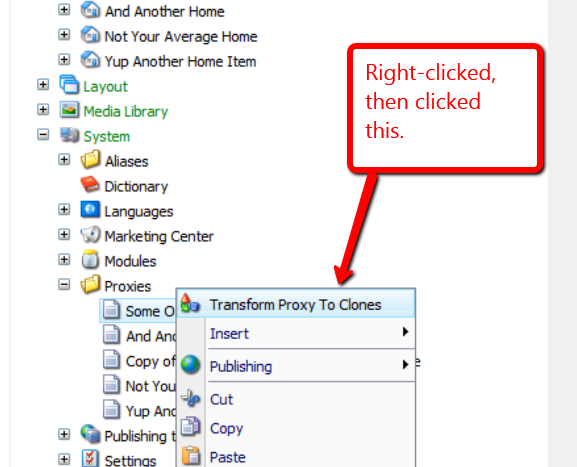
I then right-clicked on our test proxy item to launch its context menu, and then clicked on the “Transform Proxy To Clones” menu option:
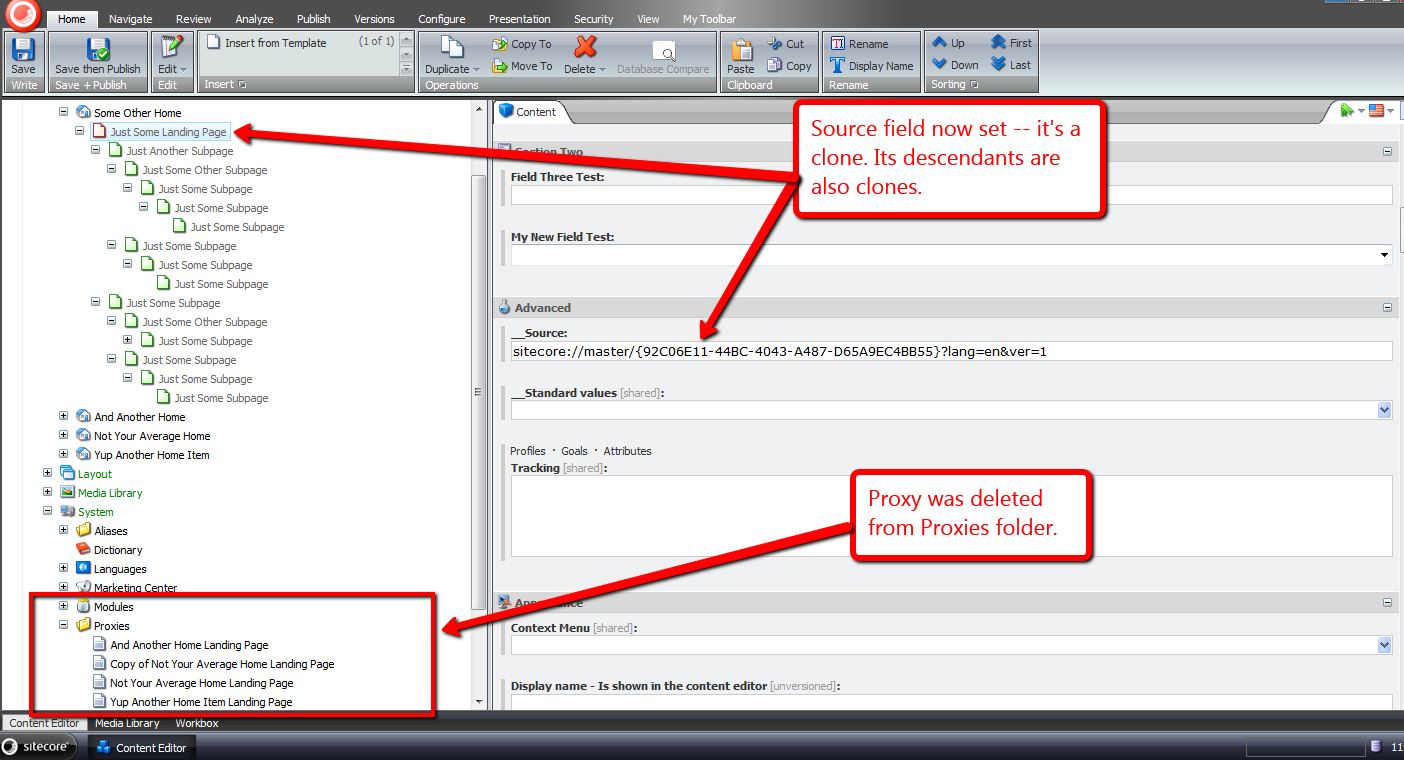
The proxy item was removed, and we now have clones:
If you can think of any other ideas around proxies or clones, or know of other tools that create clones from proxies, please leave a comment.
Show Clones of An Item In the Sitecore CMS
“Out of the box”, there is no specific way to see all clones for a given item — at least I haven’t found one yet.
One could see these by looking at referrers of an item:

Unfortunately, referrers in this dropdown aren’t just reserved for clones — all referrers of the item will display in this dropdown. An example would include an item referencing the item in a Droplink field.
In a previous post, I provided a solution for auto-cloning new subitems to clones of their parents. That solution leveraged an instance of the ItemClonesGatherer utility class I defined in that post to return a collection of clones for a given item.
Yesterday, I realized this class could be reused for a feature to show a listing of clones for an item in Sitecore, and this post showcases that solution.
I had to come up with a medium for displaying a list of clones of an item. I decided I would display these in a new content editor tab.
I recalled reading an article by Sitecore MVP Mark Stiles on adding new Editor tabs in Sitecore.
As Mark Stiles had done in his post, I created a stand-alone ASP.NET web form (/sitecore modules/Shell/ShowClones/default.aspx). This web form will display the content of our new “Show Clones” tab:
<%@ Page Language="C#" AutoEventWireup="true" CodeBehind="Default.aspx.cs" Inherits="Sitecore650rev120706.sitecore_modules.Shell.ShowClones.Default" %>

<!DOCTYPE html PUBLIC "-//W3C//DTD XHTML 1.0 Transitional//EN" "http://www.w3.org/TR/xhtml1/DTD/xhtml1-transitional.dtd">

<html xmlns="http://www.w3.org/1999/xhtml">
<head runat="server">
    <title>Show Clones</title>
    <style type="text/css">
        h1
        {
            color: #072d6b;
            font-size: 14pt;
            margin-bottom: 5px;
        }
        a
        {
            text-decoration: none;
            font-size: 8pt;
            font-family: Tahoma;
        }
        a:hover
        {
            text-decoration: underline;
        }
        #clones
        {
            margin: 10px;
        }
        #clone_listing
        {
            list-style-type: none;
            margin: 0 0 0 15px;
        }
        #clone_listing li
        {
            margin: 0;
        }
        #clone_listing li + li
        {
            margin-top: 5px;
        }
    </style>
</head>
<body>
    <form id="form1" runat="server">
        <div id="clones">
            <h1>Clones</h1>
            <asp:MultiView ID="mvClones" ActiveViewIndex="0" runat="server">
                <asp:View ID="vClones" runat="server">
                    <asp:Repeater ID="rptClones" runat="server">
                        <HeaderTemplate>
                            <ol id="clone_listing">
                        </HeaderTemplate>
                        <ItemTemplate>
                            <li>
                                <asp:HyperLink
                                    ID="hlClone"
                                    NavigateUrl="#"
                                    onclick='<%# string.Format("parent.scForm.invoke(\"item:load(id={0})\"); return false;", Eval("ID").ToString()) %>'
                                    Text='<%# Eval("Paths.FullPath") %>'
                                    runat="server" />
                            </li>
                        </ItemTemplate>
                        <FooterTemplate>
                            </ol>
                        </FooterTemplate>
                    </asp:Repeater>
                </asp:View>
                <asp:View ID="vNoClones" runat="server">
                    <script type="text/javascript">
                        parent.scContent.closeEditorTab('ShowClones');
                    </script>
                </asp:View>
            </asp:MultiView>
        </div>
    </form>
</body>
</html>
The web form’s code-behind:
using System;
using System.Collections.Generic;

using Sitecore.Data;
using Sitecore.Data.Items;
using Sitecore.Diagnostics;
using Sitecore.Globalization;
using Sitecore.Web;

using Sitecore.Sandbox.Utilities.Gatherers.Base;
using Sitecore.Sandbox.Utilities.Gatherers;

namespace Sitecore650rev120706.sitecore_modules.Shell.ShowClones
{
    public partial class Default : System.Web.UI.Page
    {
        private static readonly IItemsGatherer ClonesGatherer = ItemClonesGatherer.CreateNewItemClonesGatherer();

        protected void Page_Load(object sender, EventArgs e)
        {
            ShowClones();
        }

        private void ShowClones()
        {
            BindRepeater();
            ToggleViews();
        }

        private void BindRepeater()
        {
            rptClones.DataSource = GetClones();
            rptClones.DataBind();
        }

        private void ToggleViews()
        {
            if (rptClones.Items.Count > 0)
            {
                mvClones.SetActiveView(vClones);
            }
            else
            {
                mvClones.SetActiveView(vNoClones);
            }
        }

        private IEnumerable<Item> GetClones()
        {
            Item item = GetItem();
            if(item == null)
            {
                return new List<Item>();
            }

            ClonesGatherer.Source = item;
            return ClonesGatherer.Gather();
        }

        private Item GetItem()
        {
            Item item = null;

            try
            {
                item = Sitecore.Context.ContentDatabase.GetItem(GetID(), GetLanguage(), GetVersion());
            }
            catch(Exception ex)
            {
                Log.Error(this.ToString(), ex, this);
            }

            return item;
        }

        private ID GetID()
        {
            Sitecore.Data.ID id;
            if(Sitecore.Data.ID.TryParse(WebUtil.GetQueryString("id"), out id))
            {
                return id;
            }

            return Sitecore.Data.ID.Null;
        }

        private Language GetLanguage()
        {
            Language language;
            if(Language.TryParse(WebUtil.GetQueryString("la"), out language))
            {
                return language;
            }

            return Sitecore.Context.Language;
        }

        private Sitecore.Data.Version GetVersion()
        {
            Sitecore.Data.Version version;
            if (Sitecore.Data.Version.TryParse(WebUtil.GetQueryString("vs"), out version))
            {
                return version;
            }

            return Sitecore.Data.Version.Latest;
        }
    }
}
The code-behind above uses an instance of the ItemClonesGatherer class to get all clones for the passed item. If clones are found, these are bound to a repeater to display them as links.
If there are no clones, the Multiview in the web form is toggled to render JavaScript to close the tab — the tab should not be open if the item does not have any clones.
After revisiting Mark’s article, and realized I needed a different solution: one that will allow me to add a new tab on the fly.
Such a solution should only allow the tab to open when an item has clones, and it should not be be associated with any templates — it must be template oblivious.
I stumbled upon a command in one of the Sitecore DLLs — which one it was is evading me at the moment — and noticed it was using an instance of Sitecore.Web.UI.Framework.Scripts.ShowEditorTab. I decided to take a chance on using an instance of this object, hoping it might open up a new content editor tab on the fly.
Using that command as a model, I came up with the following command:
using System.Collections.Generic;
using System.Linq;

using Sitecore.Sandbox.Utilities.Gatherers.Base;
using Sitecore.Sandbox.Utilities.Gatherers;

using Sitecore.Data.Items;
using Sitecore.Diagnostics;
using Sitecore.Globalization;
using Sitecore.Resources;
using Sitecore.Shell.Framework.Commands;
using Sitecore.Text;
using Sitecore.Web;
using Sitecore.Web.UI.Framework.Scripts;
using Sitecore.Web.UI.Sheer;

namespace Sitecore.Sandbox.Commands
{
    public class ShowClones : Command
    {
        private static readonly IItemsGatherer ClonesGatherer = ItemClonesGatherer.CreateNewItemClonesGatherer();

        public override void Execute(CommandContext commandContext)
        {
            ShowClonesEditorTab(GetItem(commandContext));
        }

        private static void ShowClonesEditorTab(Item item)
        {
            Assert.ArgumentNotNull(item, "item");
            const string command = "contenteditor:pagedesigner";
            const string id = "ShowClones";

            bool shouldClickEditorTab = IsEditorTabOpen(command);

            if (IsEditorTabOpen(command))
            {
                ClickOpenEditorTab(id);
                return;
            }

            OpenEditorTab(CreateNewShowClonesEditorTab(item, command, id));
        }

        private static bool IsEditorTabOpen(string command)
        {
            Assert.ArgumentNotNullOrEmpty(command, "command");
            return WebUtil.GetFormValue("scEditorTabs").Contains(command);
        }

        private static void ClickOpenEditorTab(string id)
        {
            Assert.ArgumentNotNullOrEmpty(id, "id");
            SheerResponse.Eval(string.Format("scContent.onEditorTabClick(null, null, '{0}')", id));
        }

        private static void OpenEditorTab(ShowEditorTab tab)
        {
            Assert.ArgumentNotNull(tab, "tab");
            SheerResponse.Eval(tab.ToString());
        }

        private static ShowEditorTab CreateNewShowClonesEditorTab(Item item, string command, string id)
        {
            Assert.ArgumentNotNull(item, "item");
            Assert.ArgumentNotNullOrEmpty(command, "command");
            Assert.ArgumentNotNullOrEmpty(id, "id");

            UrlString urlString = new UrlString("/sitecore modules/shell/showclones/default.aspx");
            item.Uri.AddToUrlString(urlString);
            UIUtil.AddContentDatabaseParameter(urlString);
            return new ShowEditorTab
            {
                Command = command,
                Header = Translate.Text("Show Clones"),
                Icon = Images.GetThemedImageSource("Network/32x32/link_view.png"),
                Url = urlString.ToString(),
                Id = id,
                Closeable = true,
                Activate = true
            };
        }

        public override CommandState QueryState(CommandContext context)
        {
            if (!HasClones(GetItem(context)))
            {
                return CommandState.Hidden;
            }

            return CommandState.Enabled;
        }

        private static Item GetItem(CommandContext context)
        {
            Assert.ArgumentNotNull(context, "context");
            return context.Items.FirstOrDefault();
        }

        private static bool HasClones(Item item)
        {
            Assert.ArgumentNotNull(item, "item");
            return GetClones(item).Any();
        }

        private static IEnumerable<Item> GetClones(Item item)
        {
            Assert.ArgumentNotNull(item, "item");
            ClonesGatherer.Source = item;
            return ClonesGatherer.Gather();
        }
    }
}
The command above uses an instance of ItemClonesGatherer to get all clones for the item in the content tree, and ensures it is visible when the item has clones. The logic hides the command when the item does not have clones.
When the command is invoked, it will open a new “Show Clones” tab, or set focus on the “Show Clones” tab if it’s already present.
I then registered the command above in a patch include configuration file:
<?xml version="1.0"?>
<configuration xmlns:patch="http://www.sitecore.net/xmlconfig/">
  <sitecore>
    <commands>
      <command name="item:showclones" type="Sitecore.Sandbox.Commands.ShowClones,Sitecore.Sandbox"/>
    </commands>
  </sitecore>
</configuration>
Now, we need to lock and load this command in Sitecore. I switched over to the core database, and added a new item context menu option:

Let’s see this in action.
I first created a bunch of clones:

On my source item, I right-clicked, and was presented with a new context menu option to “Show Clones”:

After clicking the “Show Clones” context menu option, a new “Show Clones” tab appeared:

I then clicked on one of the links in the “Show Clones” tab, and was brought to its associated clone:

If you have other ideas around using clones in Sitecore, or if you know of another way of listing clones of an item, please leave a comment.
Where Is This Field Defined? Add ‘Goto Template’ Links for Fields in the Sitecore Content Editor
About a month ago, I read this answer on Stack Overflow by Sitecore MVP Dan Solovay, and thought to myself “what could I do with a custom EditorFormatter that might be useful?”
Today, I came up with an idea that might be useful, especially when working with many levels of nested base templates: having a ‘Goto Template’ link — or button depending on your naming preference, although I will refer to these as links throughout this post since they are hyperlinks — for each field that, when clicked, will bring you to the Sitecore template where the field is defined.
I first defined a class to manage the display state of our ‘Goto Template’ links in the Content Editor:
using System;
using System.Collections.Generic;
using System.Linq;
using System.Text;

using Sitecore.Web.UI.HtmlControls;

namespace Sitecore.Sandbox.Utilities.ClientSettings
{
    public class GotoTemplateLinksSettings
    {
        private const string RegistrySettingKey = "/Current_User/Content Editor/Goto Template Links";
        private const string RegistrySettingOnValue = "on";

        private static volatile GotoTemplateLinksSettings current;
        private static object lockObject = new Object();

        public static GotoTemplateLinksSettings Current
        {
            get
            {
                if (current == null)
                {
                    lock (lockObject)
                    {
                        if (current == null)
                            current = new GotoTemplateLinksSettings();
                    }
                }

                return current;
            }
        }

        private GotoTemplateLinksSettings()
        {
        }

        public bool IsOn()
        {
            return Registry.GetString(RegistrySettingKey) == RegistrySettingOnValue;
        }

        public void TurnOn()
        {
            Registry.SetString(RegistrySettingKey, RegistrySettingOnValue);
        }

        public void TurnOff()
        {
            Registry.SetString(RegistrySettingKey, string.Empty);
        }
    }
}
I decided to make the above class be a Singleton — there should only be one central place where the display state of our links is toggled.
I created a subclass of Sitecore.Shell.Applications.ContentEditor.EditorFormatter, and overrode the RenderField(Control, Editor.Field, bool) method to embed additional logic to render a ‘Goto Template’ link for each field in the Content Editor:
using System.Web.UI;

using Sitecore;
using Sitecore.Data.Fields;
using Sitecore.Data.Items;
using Sitecore.Diagnostics;

using Sitecore.Shell.Applications.ContentEditor;
using Sitecore.Shell.Applications.ContentManager;

using Sitecore.Sandbox.Utilities.ClientSettings;

namespace Sitecore.Sandbox.Shell.Applications.ContentEditor
{
    public class GotoTemplateEditorFormatter : EditorFormatter
    {
        public override void RenderField(Control parent, Editor.Field field, bool readOnly)
        {
            Assert.ArgumentNotNull(parent, "parent");
            Assert.ArgumentNotNull(field, "field");
            Field itemField = field.ItemField;
            Item fieldType = GetFieldType(itemField);

            if (fieldType != null)
            {
                if (!itemField.CanWrite)
                {
                    readOnly = true;
                }

                RenderMarkerBegin(parent, field.ControlID);
                RenderMenuButtons(parent, field, fieldType, readOnly);
                RenderLabel(parent, field, fieldType, readOnly);
                AddGotoTemplateLinkIfCanView(parent, field);
                RenderField(parent, field, fieldType, readOnly);
                RenderMarkerEnd(parent);
            }
        }

        public void AddGotoTemplateLinkIfCanView(Control parent, Editor.Field field)
        {
            if (CanViewGotoTemplateLink())
            {
                AddGotoTemplateLink(parent, field);
            }
        }

        private static bool CanViewGotoTemplateLink()
        {
            return IsGotoTemplateLinksOn();
        }

        private static bool IsGotoTemplateLinksOn()
        {
            return GotoTemplateLinksSettings.Current.IsOn();
        }

        public void AddGotoTemplateLink(Control parent, Editor.Field field)
        {
            Assert.ArgumentNotNull(parent, "parent");
            Assert.ArgumentNotNull(field, "field");
            AddLiteralControl(parent, CreateGotoTemplateLink(field));
        }

        private static string CreateGotoTemplateLink(Editor.Field field)
        {
            Assert.ArgumentNotNull(field, "field");
            return string.Format("<a title=\"Navigate to the template where this field is defined.\" style=\"float: right;position:absolute;margin-top:-20px;right:15px;\" href=\"#\" onclick=\"{0}\">{1}</a>", CreateGotoTemplateJavascript(field), CreateGotoTemplateLinkText());
        }

        private static string CreateGotoTemplateJavascript(Editor.Field field)
        {
            Assert.ArgumentNotNull(field, "field");
            return string.Format("javascript:scForm.postRequest('', '', '','item:load(id={0})');return false;", field.TemplateField.Template.ID);
        }

        private static string CreateGotoTemplateLinkText()
        {
            return "<img style=\"border: 0;\" src=\"/~/icon/Applications/16x16/information2.png\" width=\"16\" height=\"16\" />";
        }
    }
}
‘Goto Template’ links are only rendered to the Sitecore Client when the display state for showing them is turned on.
Plus, each ‘Goto Template’ link is locked and loaded to invoke the item load command to navigate to the template item where the field is defined.
As highlighted by Dan in his Stack Overflow answer above, I created a new Sitecore.Shell.Applications.ContentEditor.Pipelines.RenderContentEditor pipeline processor, and hooked in an instance of the GotoTemplateEditorFormatter class defined above:
using System;
using System.Collections.Generic;
using System.Linq;
using System.Text;

using Sitecore.Diagnostics;

using Sitecore.Shell.Applications.ContentEditor;
using Sitecore.Shell.Applications.ContentEditor.Pipelines.RenderContentEditor;

namespace Sitecore.Sandbox.Shell.Applications.ContentEditor.Pipelines.RenderContentEditor
{
    public class RenderStandardContentEditor
    {
        public void Process(RenderContentEditorArgs args)
        {
            Assert.ArgumentNotNull(args, "args");
            args.EditorFormatter = CreateNewGotoTemplateEditorFormatter(args);
            args.EditorFormatter.RenderSections(args.Parent, args.Sections, args.ReadOnly);
        }

        private static EditorFormatter CreateNewGotoTemplateEditorFormatter(RenderContentEditorArgs args)
        {
            Assert.ArgumentNotNull(args, "args");
            Assert.ArgumentNotNull(args.EditorFormatter, "args.EditorFormatter");
            return new GotoTemplateEditorFormatter
            {
                Arguments = args.EditorFormatter.Arguments,
                IsFieldEditor = args.EditorFormatter.IsFieldEditor
            };
        }
    }
}
Now we need a way to toggle the display state of our ‘Goto Template’ links. I decided to create a command to turn this state on and off:
using System;
using System.Collections.Generic;
using System.Linq;
using System.Text;

using Sitecore.Data.Items;
using Sitecore.Diagnostics;
using Sitecore.Shell;
using Sitecore.Shell.Framework.Commands;
using Sitecore.Web.UI.HtmlControls;

using Sitecore.Sandbox.Utilities.ClientSettings;

namespace Sitecore.Sandbox.Commands
{
    public class ToggleGotoTemplateLinks : Command
    {
        public override void Execute(CommandContext commandContext)
        {
            ToggleGotoTemplateLinksOn();
            Refresh(commandContext);
        }

        private static void ToggleGotoTemplateLinksOn()
        {
            GotoTemplateLinksSettings gotoTemplateLinksSettings = GotoTemplateLinksSettings.Current;

            if (!gotoTemplateLinksSettings.IsOn())
            {
                gotoTemplateLinksSettings.TurnOn();
            }
            else
            {
                gotoTemplateLinksSettings.TurnOff();
            }
        }

        private static void Refresh(CommandContext commandContext)
        {
            Refresh(GetItem(commandContext));
        }

        private static void Refresh(Item item)
        {
            Assert.ArgumentNotNull(item, "item");
            Context.ClientPage.ClientResponse.Timer(string.Format("item:load(id={0})", item.ID), 1);
        }

        private static Item GetItem(CommandContext commandContext)
        {
            Assert.ArgumentNotNull(commandContext, "commandContext");
            return commandContext.Items.FirstOrDefault();
        }

        public override CommandState QueryState(CommandContext context)
        {
            if (!GotoTemplateLinksSettings.Current.IsOn())
            {
                return CommandState.Enabled;
            }

            return CommandState.Down;
        }
    }
}
I registered the pipeline processor defined above coupled with the toggle command in a patch include configuration file:
<?xml version="1.0" encoding="utf-8"?>
<configuration xmlns:patch="http://www.sitecore.net/xmlconfig/">
  <sitecore>
    <commands>
      <command name="contenteditor:togglegototemplatelinks" type="Sitecore.Sandbox.Commands.ToggleGotoTemplateLinks, Sitecore.Sandbox"/>
    </commands>
    <pipelines>
      <renderContentEditor>
        <processor
            patch:instead="*[@type='Sitecore.Shell.Applications.ContentEditor.Pipelines.RenderContentEditor.RenderStandardContentEditor, Sitecore.Client']"
            type="Sitecore.Sandbox.Shell.Applications.ContentEditor.Pipelines.RenderContentEditor.RenderStandardContentEditor, Sitecore.Sandbox"/>
      </renderContentEditor>

    </pipelines>
  </sitecore>
</configuration>
I then added a toggle checkbox to the View ribbon, and wired up the ToggleGotoTemplateLinks command to it:
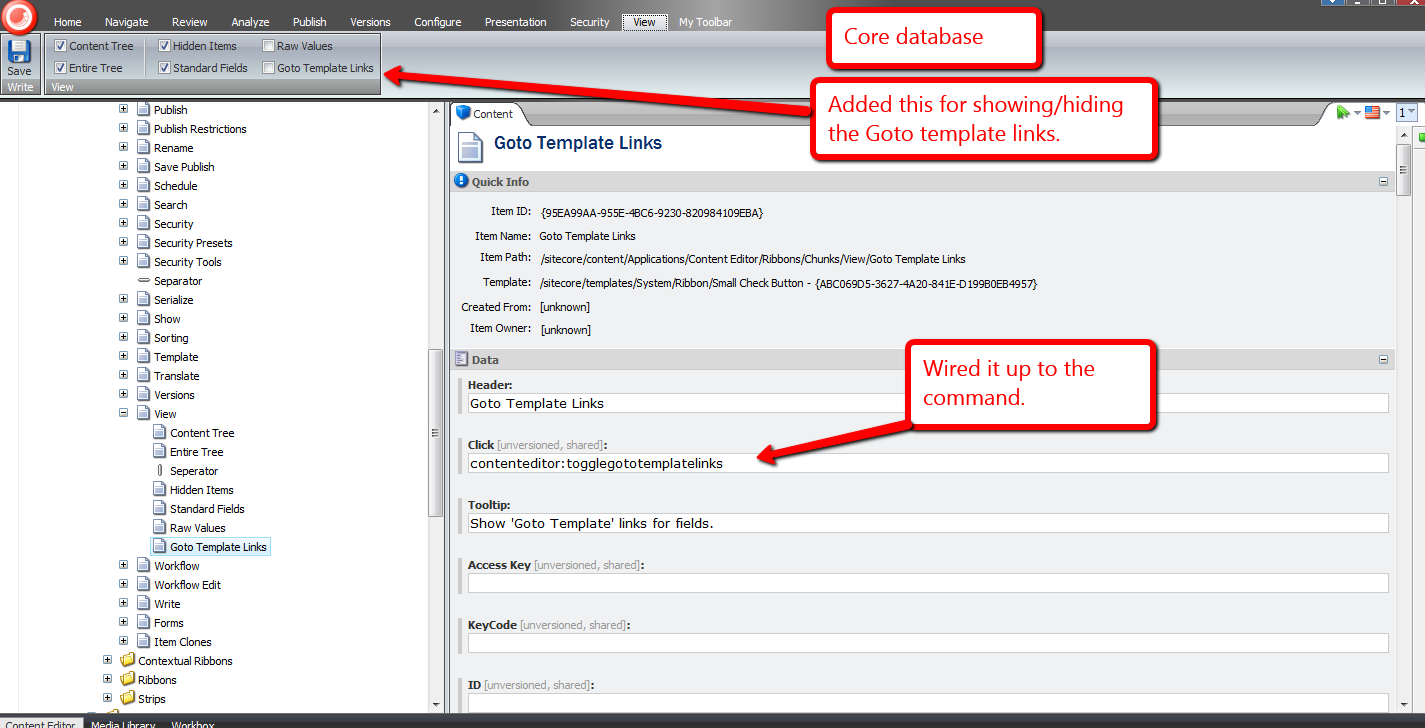
When the ‘Goto Template Links’ checkbox is checked, ‘Goto Template’ links are displayed for each field in the Content Editor:

When unchecked, the ‘Goto Template’ links are not rendered:

Let’s try it out.
Let’s click one of these ‘Goto Template’ links and see what it does, or where it takes us:

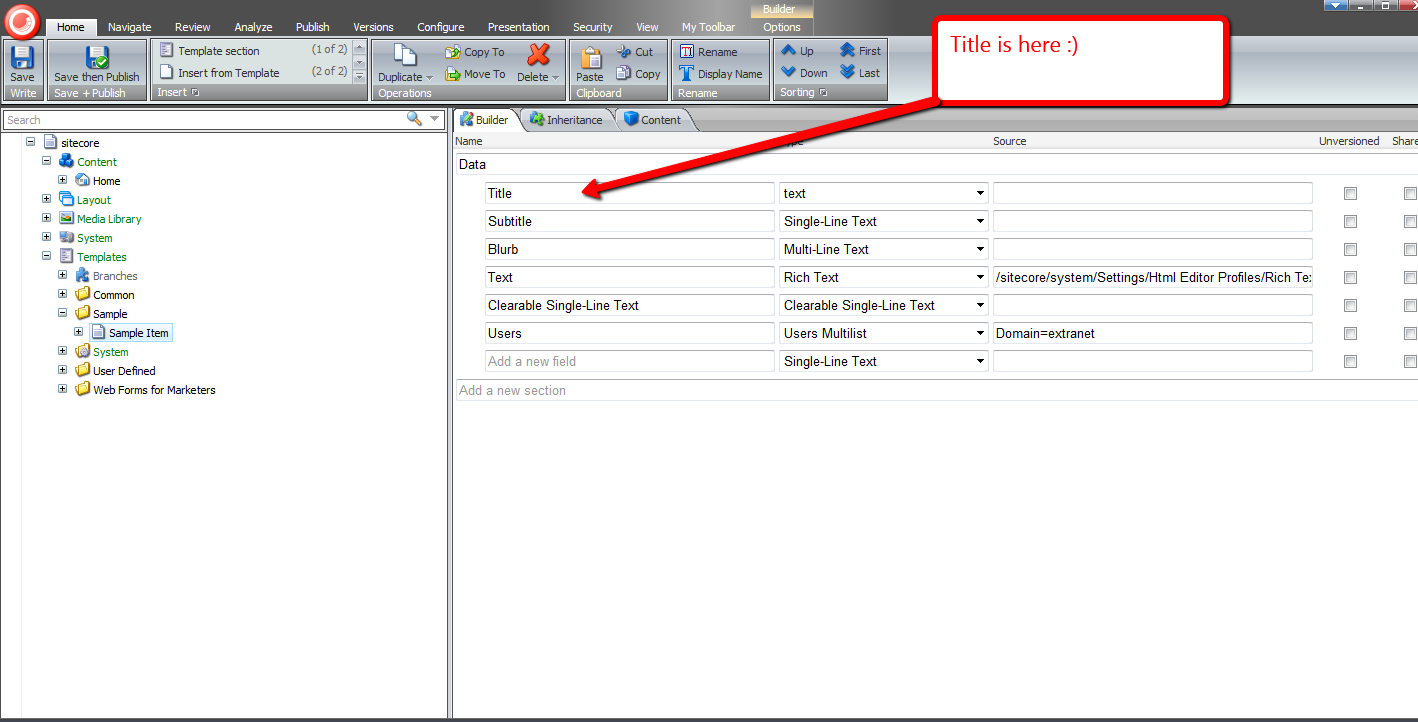
It brought us to the template where the Title field is defined:
Let’s try another. How about the ‘Created By’ field?

Its link brought us to its template:

Without a doubt, the functionality above would be useful to developers and advanced users.
I’ve been trying to figure out other potential uses for other subclasses of EditorFormatter. Can you think of other ways we could leverage a custom EditorFormatter, especially one for non-technical Sitecore users? If you have any ideas, please drop a comment. 🙂
 SitecoreJunkie.com