Home » Customization (Page 13)
Category Archives: Customization
Experiments with Field Data Encryption in Sitecore
Last week, I came up with a design employing the decorator pattern for encrypting and decrypting Web Forms for Marketers form data. My design encapsulates and decorates an instance of Sitecore.Forms.Data.DataProviders.WFMDataProvider — the main data provider that lives in the Sitecore.Forms.Core assembly and is used by the module for saving/retrieving form data from its database — by extending and implementing its base class and interface, respectively, and delegates requests to its public methods using the same method signatures. The “decoration” part occurs before before form data is inserted and updated in the database, and decrypted after being retrieved.
Once I completed this design, I began to ponder whether it would be possible to take this one step further and encrypt/decrypt all field data in Sitecore as a whole.
I knew I would eventually have to do some research to see if this were possible. However, I decided to begin my encryption ventures by building classes that encrypt/decrypt data.
I envisioned stockpiling an arsenal of encryption algorithms. I imagined all encryption algorithms having the same public methods to encrypt and decrypt strings of data, so I created the following interface:
using System;
using System.Collections.Generic;
using System.Linq;
using System.Text;

namespace Sitecore.Sandbox.Security.Encryption.Base
{
    public interface IEncryptor
    {
        string Encrypt(string input);

        string Decrypt(string input);
    }
}
Since I am lightyears away from being a cryptography expert — or even considering myself a novice — I had to go fishing on the internet to find an encryption utility class in .NET. I found the following algorithm at http://www.deltasblog.co.uk/code-snippets/basic-encryptiondecryption-c/, and put it within a class that adheres to my IEncryptor interface above:
using System;
using System.Collections.Generic;
using System.Linq;
using System.Security.Cryptography;
using System.Text;

using Sitecore.Diagnostics;

using Sitecore.Sandbox.Security.Encryption.Base;

namespace Sitecore.Sandbox.Security.Encryption
{
    // retrieved from http://www.deltasblog.co.uk/code-snippets/basic-encryptiondecryption-c/

    public class TripleDESEncryptor : IEncryptor
    {
        private string Key { get; set; }

        private TripleDESEncryptor(string key)
        {
            SetKey(key);
        }

        private void SetKey(string key)
        {
            Assert.ArgumentNotNullOrEmpty(key, "key");
            Key = key;
        }

        public string Encrypt(string input)
        {
            return Encrypt(input, Key);
        }

        public static string Encrypt(string input, string key)
        {
            byte[] inputArray = UTF8Encoding.UTF8.GetBytes(input);
            TripleDESCryptoServiceProvider tripleDES = new TripleDESCryptoServiceProvider();
            tripleDES.Key = UTF8Encoding.UTF8.GetBytes(key);
            tripleDES.Mode = CipherMode.ECB;
            tripleDES.Padding = PaddingMode.PKCS7;
            ICryptoTransform cTransform = tripleDES.CreateEncryptor();
            byte[] resultArray = cTransform.TransformFinalBlock(inputArray, 0, inputArray.Length);
            tripleDES.Clear();
            return System.Convert.ToBase64String(resultArray, 0, resultArray.Length);
        }

        public string Decrypt(string input)
        {
            return Decrypt(input, Key);
        }

        public static string Decrypt(string input, string key)
        {
            byte[] inputArray = System.Convert.FromBase64String(input);
            TripleDESCryptoServiceProvider tripleDES = new TripleDESCryptoServiceProvider();
            tripleDES.Key = UTF8Encoding.UTF8.GetBytes(key);
            tripleDES.Mode = CipherMode.ECB;
            tripleDES.Padding = PaddingMode.PKCS7;
            ICryptoTransform cTransform = tripleDES.CreateDecryptor();
            byte[] resultArray = cTransform.TransformFinalBlock(inputArray, 0, inputArray.Length);
            tripleDES.Clear();
            return UTF8Encoding.UTF8.GetString(resultArray);
        }

        public static IEncryptor CreateNewTripleDESEncryptor(string key)
        {
            return new TripleDESEncryptor(key);
        }
    }
}
I then started wondering how I could ascertain whether data needed to be encrypted or decrypted. In other words, how could I prevent encrypting data that is already encrypted and, conversely, not decrypting data that isn’t encrypted?
I came up with building a decorator class that looks for a string terminator — a substring at the end of a string — and only encrypts the passed string when this terminating substring is not present, or decrypts only when this substring is found at the end of the string.
I decided to use a data transfer object (DTO) for my encryptor decorator, just in case I ever decide to use this same decorator with any encryption class that implements my encryptor interface. I also send in the encryption key and string terminator via this DTO:
using System;
using System.Collections.Generic;
using System.Linq;
using System.Text;

using Sitecore.Sandbox.Security.Encryption.Base;

namespace Sitecore.Sandbox.Security.DTO
{
    public class DataNullTerminatorEncryptorSettings
    {
        public string EncryptionDataNullTerminator { get; set; }
        public string EncryptionKey { get; set; }
        public IEncryptor Encryptor { get; set; }
    }
}
using System;
using System.Collections.Generic;
using System.Linq;
using System.Text;

using Sitecore.Diagnostics;

using Sitecore.Sandbox.Security.DTO;
using Sitecore.Sandbox.Security.Encryption.Base;

namespace Sitecore.Sandbox.Security.Encryption
{
    public class DataNullTerminatorEncryptor : IEncryptor
    {
        private DataNullTerminatorEncryptorSettings DataNullTerminatorEncryptorSettings { get; set; }

        private DataNullTerminatorEncryptor(DataNullTerminatorEncryptorSettings dataNullTerminatorEncryptorSettings)
        {
            SetDataNullTerminatorEncryptorSettings(dataNullTerminatorEncryptorSettings);
        }

        private void SetDataNullTerminatorEncryptorSettings(DataNullTerminatorEncryptorSettings dataNullTerminatorEncryptorSettings)
        {
            Assert.ArgumentNotNull(dataNullTerminatorEncryptorSettings, "dataNullTerminatorEncryptorSettings");
            Assert.ArgumentNotNullOrEmpty(dataNullTerminatorEncryptorSettings.EncryptionDataNullTerminator, "dataNullTerminatorEncryptorSettings.EncryptionDataNullTerminator");
            Assert.ArgumentNotNullOrEmpty(dataNullTerminatorEncryptorSettings.EncryptionKey, "dataNullTerminatorEncryptorSettings.EncryptionKey");
            Assert.ArgumentNotNull(dataNullTerminatorEncryptorSettings.Encryptor, "dataNullTerminatorEncryptorSettings.Encryptor");
            DataNullTerminatorEncryptorSettings = dataNullTerminatorEncryptorSettings;
        }

        public string Encrypt(string input)
        {
            if (!IsEncrypted(input))
            {
                string encryptedInput = DataNullTerminatorEncryptorSettings.Encryptor.Encrypt(input);
                return string.Concat(encryptedInput, DataNullTerminatorEncryptorSettings.EncryptionDataNullTerminator);
            }

            return input;
        }

        public string Decrypt(string input)
        {
            if (IsEncrypted(input))
            {
                input = input.Replace(DataNullTerminatorEncryptorSettings.EncryptionDataNullTerminator, string.Empty);
                return DataNullTerminatorEncryptorSettings.Encryptor.Decrypt(input);
            }

            return input;
        }

        private bool IsEncrypted(string input)
        {
            if (!string.IsNullOrEmpty(input))
                return input.EndsWith(DataNullTerminatorEncryptorSettings.EncryptionDataNullTerminator);

            return false;
        }

        public static IEncryptor CreateNewDataNullTerminatorEncryptor(DataNullTerminatorEncryptorSettings dataNullTerminatorEncryptorSettings)
        {
            return new DataNullTerminatorEncryptor(dataNullTerminatorEncryptorSettings);
        }
    }
}
Now that I have two encryptors — the TripleDESEncryptor and DataNullTerminatorEncryptor classes — I thought it would be prudent to create a factory class:
using System;
using System.Collections.Generic;
using System.Linq;
using System.Text;

using Sitecore.Sandbox.Security.DTO;

namespace Sitecore.Sandbox.Security.Encryption.Base
{
    public interface IEncryptorFactory
    {
        IEncryptor CreateNewTripleDESEncryptor(string encryptionKey);

        IEncryptor CreateNewDataNullTerminatorEncryptor();

        IEncryptor CreateNewDataNullTerminatorEncryptor(string encryptionDataNullTerminator, string encryptionKey);

        IEncryptor CreateNewDataNullTerminatorEncryptor(DataNullTerminatorEncryptorSettings dataNullTerminatorEncryptorSettings);
    }
}
using System;
using System.Collections.Generic;
using System.Linq;
using System.Text;

using Sitecore.Configuration;

using Sitecore.Sandbox.Security.DTO;
using Sitecore.Sandbox.Security.Encryption.Base;

namespace Sitecore.Sandbox.Security.Encryption
{
    public class EncryptorFactory : IEncryptorFactory
    {
        private static volatile IEncryptorFactory _Current;
        private static object lockObject = new Object();

        public static IEncryptorFactory Current
        {
            get
            {
                if (_Current == null)
                {
                    lock (lockObject)
                    {
                        if (_Current == null)
                        {
                            _Current = new EncryptorFactory();
                        }
                    }
                }

                return _Current;
            }
        }

        private EncryptorFactory()
        {
        }

        public IEncryptor CreateNewTripleDESEncryptor(string encryptionKey)
        {
            return TripleDESEncryptor.CreateNewTripleDESEncryptor(encryptionKey);
        }

        public IEncryptor CreateNewDataNullTerminatorEncryptor()
        {
            string encryptionDataNullTerminator = Settings.GetSetting("Encryption.DataNullTerminator");
            string encryptionKey = Settings.GetSetting("Encryption.Key");
            return CreateNewDataNullTerminatorEncryptor(encryptionDataNullTerminator, encryptionKey);
        }

        public IEncryptor CreateNewDataNullTerminatorEncryptor(string encryptionDataNullTerminator, string encryptionKey)
        {
            DataNullTerminatorEncryptorSettings dataNullTerminatorEncryptorSettings = new DataNullTerminatorEncryptorSettings
            {
                EncryptionDataNullTerminator = encryptionDataNullTerminator,
                EncryptionKey = encryptionDataNullTerminator,
                // we're going to use the TripleDESEncryptor by default
                Encryptor = CreateNewTripleDESEncryptor(encryptionKey)
            };

            return CreateNewDataNullTerminatorEncryptor(dataNullTerminatorEncryptorSettings);
        }

        public IEncryptor CreateNewDataNullTerminatorEncryptor(DataNullTerminatorEncryptorSettings dataNullTerminatorEncryptorSettings)
        {
            return DataNullTerminatorEncryptor.CreateNewDataNullTerminatorEncryptor(dataNullTerminatorEncryptorSettings);
        }
    }
}
I decided to make my factory class be a singleton. I saw no need of having multiple instances of this factory object floating around in memory, and envisioned using this same factory object in a tool I wrote to encrypt all field data in all Sitecore databases. I will discuss this tool at the end of this article.
It’s now time to do some research to see whether I have the ability to hijack the main mechanism for saving/retrieving data from Sitecore.
While snooping around in my Web.config, I saw that the core, master and web databases use a data provider defined at configuration/sitecore/dataProviders/main:
<configuration>
	<sitecore database="SqlServer">

		<!-- More stuff here -->

		<dataProviders>
			<main type="Sitecore.Data.$(database).$(database)DataProvider, Sitecore.Kernel">
				<param connectionStringName="$(1)"/>
				<Name>$(1)</Name>
			</main>

			<!-- More stuff here -->

		<dataProviders>

			<!-- More stuff here -->

	</sitecore>
</configuration>
In my local instance, this points to the class Sitecore.Data.SqlServer.SqlServerDataProvider in Sitecore.Kernel.dll. I knew I had open up .NET Reflector and start investigating.
I discovered that there wasn’t much happening in this class at the field level. I also noticed this class used Sitecore.Data.DataProviders.Sql.SqlDataProvider as its base class, so I continued my research there.
I struck gold in the Sitecore.Data.DataProviders.Sql.SqlDataProvider class. Therein, I found methods that deal with saving/retrieving field data from an instance of the database utility class Sitecore.Data.DataProviders.Sql.SqlDataApi.
I knew this was the object I had to either decorate or override. Since most of the methods I needed to decorate with my encryption functionality were signed as protected, I had to subclass this class in order to get access to them. I then wrapped these methods with calls to my encryptor’s Encrypt(string input) and Decrypt(string input) methods:
using System;
using System.Collections;
using System.Collections.Generic;
using System.Linq;
using System.Security.Cryptography;
using System.Text;

using Sitecore.Collections;
using Sitecore.Configuration;
using Sitecore.Data;
using Sitecore.Data.DataProviders;
using Sitecore.Data.DataProviders.Sql;
using Sitecore.Data.Fields;
using Sitecore.Data.Items;

using Sitecore.Sandbox.Security.Encryption;
using Sitecore.Sandbox.Security.Encryption.Base;

namespace Sitecore.Sandbox.Data.DataProviders.Sql
{
    public class EncryptionSqlDataProvider : SqlDataProvider
    {
        private static readonly IEncryptorFactory EncryptorBegetter = EncryptorFactory.Current;
        private static readonly IEncryptor Encryptor = EncryptorBegetter.CreateNewDataNullTerminatorEncryptor();

        public EncryptionSqlDataProvider(SqlDataApi sqlDataApi)
            : base(sqlDataApi)
        {
        }

        public override FieldList GetItemFields(ItemDefinition itemDefinition, VersionUri versionUri, CallContext context)
        {
            FieldList fieldList = base.GetItemFields(itemDefinition, versionUri, context);

            if (fieldList == null)
                return null;

            FieldList fieldListDecrypted = new FieldList();
            foreach (KeyValuePair<ID, string> field in fieldList)
            {
                string decryptedValue = Decrypt(field.Value);
                fieldListDecrypted.Add(field.Key, decryptedValue);
            }

            return fieldListDecrypted;
        }

        protected override string GetFieldValue(string tableName, Guid entryId)
        {
            string value = base.GetFieldValue(tableName, entryId);
            return Decrypt(value);
        }

        protected override void SetFieldValue(string tableName, Guid entryId, string value)
        {
            string encryptedValue = Encrypt(value);
            base.SetFieldValue(tableName, entryId, encryptedValue);
        }

        protected override void WriteSharedField(ID itemId, FieldChange change, DateTime now, bool fieldsAreEmpty)
        {
            FieldChange unencryptedFieldChange = GetEncryptedFieldChange(itemId, change);
            base.WriteSharedField(itemId, unencryptedFieldChange, now, fieldsAreEmpty);
        }

        protected override void WriteUnversionedField(ID itemId, FieldChange change, DateTime now, bool fieldsAreEmpty)
        {
            FieldChange unencryptedFieldChange = GetEncryptedFieldChange(itemId, change);
            base.WriteUnversionedField(itemId, unencryptedFieldChange, now, fieldsAreEmpty);
        }

        protected override void WriteVersionedField(ID itemId, FieldChange change, DateTime now, bool fieldsAreEmpty)
        {
            FieldChange unencryptedFieldChange = GetEncryptedFieldChange(itemId, change);
            base.WriteVersionedField(itemId, unencryptedFieldChange, now, fieldsAreEmpty);
        }

        private FieldChange GetEncryptedFieldChange(ID itemId, FieldChange unencryptedFieldChange)
        {
            if (!string.IsNullOrEmpty(unencryptedFieldChange.Value))
            {
                Field field = GetField(itemId, unencryptedFieldChange.FieldID);
                string encryptedValue = Encrypt(unencryptedFieldChange.Value);
                return new FieldChange(field, encryptedValue);
            }

            return unencryptedFieldChange;
        }

        private Field GetField(ID itemId, ID fieldID)
        {
            Item item = GetItem(itemId);
            return GetField(item, fieldID);
        }

        private Item GetItem(ID itemId)
        {
            return base.Database.Items[itemId];
        }

        private static Field GetField(Item owner, ID fieldID)
        {
            return new Field(fieldID, owner);
        }

        private static string Encrypt(string value)
        {
            return Encryptor.Encrypt(value);
        }

        private static string Decrypt(string value)
        {
            return Encryptor.Decrypt(value);
        }
    }
}
After creating my new EncryptionSqlDataProvider above, I had to define my own SqlServerDataProvider that inherits from it:
using System;
using System.Collections.Generic;
using System.Linq;
using System.Text;

using Sitecore.Data.SqlServer;

using Sitecore.Sandbox.Data.DataProviders.Sql;

namespace Sitecore.Sandbox.Data.SqlServer
{
    public class EncryptionSqlServerDataProvider : EncryptionSqlDataProvider
    {
        public EncryptionSqlServerDataProvider(string connectionString)
             : base(new SqlServerDataApi(connectionString))
        {
        }
    }
}
I put in a patch reference to my new EncryptionSqlServerDataProvider in a new config file (/App_Config/Include/EncryptionDatabaseProvider.config), and defined the settings used by my encryptors:
<?xml version="1.0" encoding="utf-8"?>
<configuration xmlns:patch="http://www.sitecore.net/xmlconfig/">
	<sitecore>
		<dataProviders>
			<main type="Sitecore.Data.$(database).$(database)DataProvider, Sitecore.Kernel">
				<patch:attribute name="type">Sitecore.Sandbox.Data.$(database).Encryption$(database)DataProvider, Sitecore.Sandbox</patch:attribute>
		       </main>
		</dataProviders>
		<settings>
			<!-- must be 24 characters long -->
			<setting name="Encryption.Key" value="4rgjvqm234gswdfd045r3f4q" />

			<!-- this is added to the end of encrypted data in the database -->
			<setting name="Encryption.DataNullTerminator" value="%IS_ENCRYPTED%" />
		</settings>
	</sitecore>
</configuration>
Will the above work, or will I be retreating back to the whiteboard scratching my head while being in a state of bewilderment?. Let’s try out the above to see where my fate lies.
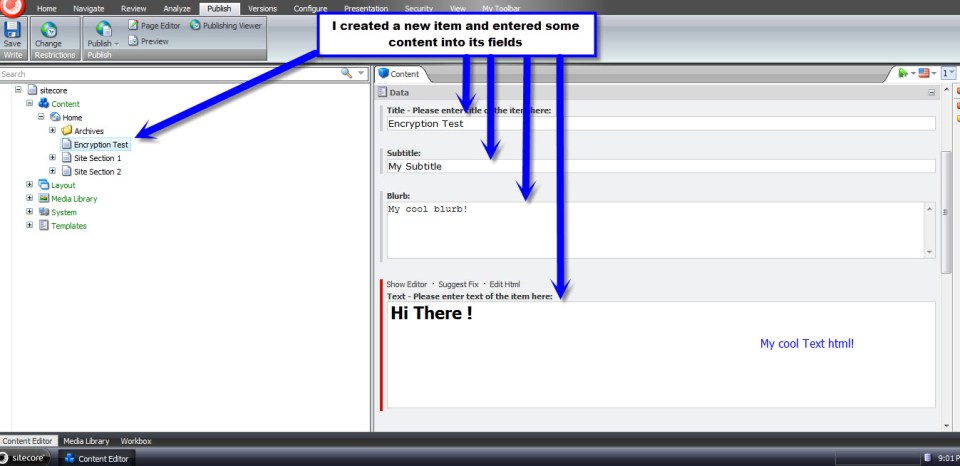
I inserted a new Sample Item under my Home node, entered some content into four fields, and then clicked the Save button:
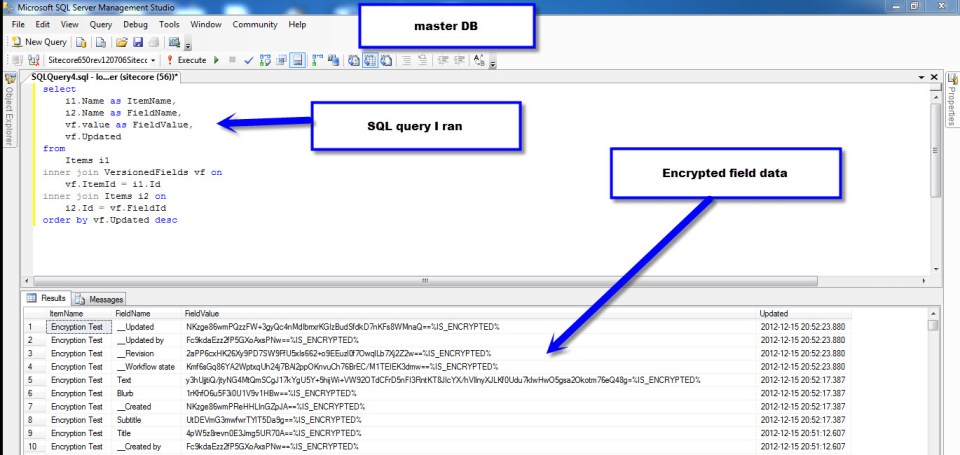
I opened up my Sitecore master database in Microsoft SQL Server Management Studio — I don’t recommend this being a standard Sitecore development practice, although I am doing this here to see if my encryption scheme worked — to see if my field data was encrypted. It was encrypted successfully:
I then published my item to the web database, and pulled up my new Sample Item page in a browser to make sure it works despite being encrypted in the database:

Hooray! It works!
You might be asking yourself: how would we go about encrypting “legacy” field data in all Sitecore databases? Well, I wrote tool — the reason for creating my EncryptorFactory above — yesterday to do this. It encrypted all field data in the core, master and web databases.
However, when I opened up the desktop view of the Sitecore client, many of my tray buttons disappeared. Seeing this has lead me to conclude it’s not a good idea to encrypt data in the core database.
Plus, after having rolled back my core database to its previous state — a state of being unencrypted — I tried to open up the Content Editor in the master database. I then received an exception stemming from the rules engine — apparently not all fields in both the master and web databases should be encrypted. There must be code outside of the main data provider accessing data in all three databases.
Future research is needed to discover which fields are good candidates for having their data encrypted, and which fields should be ignored.
Put Things Into Context: Augmenting the Item Context Menu – Part 2
In part 1 of this article, I helped out a friend by walking him through how I added new Publishing menu options — using existing commands in Sitecore — to my Item context menu.
In this final part of the article, I will show you how I created my own custom command and pipeline to copy subitems from one Item in the content tree to another, and wired them up to a new Item context menu option within the ‘Copying’ fly-out menu of the context menu.
Overriding two methods — CommandState QueryState(CommandContext context) and void Execute(CommandContext context) — is paramount when creating a custom Sitecore.Shell.Framework.Commands.Command.
The QueryState() method determines how we should treat the menu option given the current passed context. In other words, should the menu option be enabled, disabled, or hidden? This method serves as a hook — it’s declared virtual — and returns CommandState.Enabled by default. All menu options are enabled by default unless overridden to do otherwise.
The Execute method contains the true “meat and potatoes” of a command’s logic — this method is the place where we do “something” to items passed to it via the CommandContext object. This method is declared abstract in the Command class, ultimately forcing subclasses to define their own logic — there is no default logic for this method.
Here is my command to copy subitems from one location in the content tree to another:
using System;
using System.Collections.Generic;
using System.Collections.Specialized;
using System.Linq;
using System.Text;

using Sitecore.Data;
using Sitecore.Data.Items;
using Sitecore.Diagnostics;
using Sitecore.Shell.Framework;
using Sitecore.Shell.Framework.Commands;
using Sitecore.Shell.Framework.Pipelines;
using Sitecore.Text;
using Sitecore.Web.UI.Sheer;

using Sitecore.Sandbox.Pipelines.Base;
using Sitecore.Sandbox.Pipelines.Utilities;

namespace Sitecore.Sandbox.Commands
{
    public class CopySubitemsTo : Command
    {
        private const string CopySubitemsPipeline = "uiCopySubitems";

        public override void Execute(CommandContext commandContext)
        {
            Assert.ArgumentNotNull(commandContext, "commandContext");
            CopySubitems(commandContext);
        }

        private void CopySubitems(CommandContext commandContext)
        {
            Assert.ArgumentNotNull(commandContext, "commandContext");
            IEnumerable<Item> subitems = GetSubitems(commandContext);
            StartPipeline(subitems);
        }

        public static IEnumerable<Item> GetSubitems(CommandContext commandContext)
        {
            Assert.ArgumentNotNull(commandContext, "commandContext");
            return GetSubitems(commandContext.Items);
        }

        public static IEnumerable<Item> GetSubitems(IEnumerable<Item> items)
        {
            Assert.ArgumentNotNull(items, "items");
            List<Item> list = new List<Item>();

            foreach (Item item in items)
            {
                list.AddRange(item.Children.ToArray());
            }

            return list;
        }

        private void StartPipeline(IEnumerable<Item> subitems)
        {
            Assert.ArgumentNotNull(subitems, "subitems");
            Assert.ArgumentCondition(subitems.Count() > 0, "subitems", "There must be at least one subitem in the collection to copy!");

            IPipelineLauncher pipelineLauncher = CreateNewPipelineLauncher();
            pipelineLauncher.StartPipeline(CopySubitemsPipeline, new CopyItemsArgs(), subitems.First().Database, subitems);
        }

        private IPipelineLauncher CreateNewPipelineLauncher()
        {
            return PipelineLauncher.CreateNewPipelineLauncher(Context.ClientPage);
        }

        public override CommandState QueryState(CommandContext commandContext)
        {
            Assert.ArgumentNotNull(commandContext, "commandContext");
            int subitemsCount = CalculateSubitemsCount(commandContext);

            // if this item has no children, let's disable the menu option
            if (subitemsCount < 1)
            {
                return CommandState.Disabled;
            }

            return base.QueryState(commandContext);
        }

        private static int CalculateSubitemsCount(CommandContext commandContext)
        {
            int count = 0;

            foreach (Item item in commandContext.Items)
            {
                count += item.Children.Count;
            }

            return count;
        }
    }
}
My QueryState() method returns CommandState.Disabled if the current context item — although this does offer the ability to have multiple selected items — has no children. More complex logic could be written here, albeit I chose to keep it simple.
Many of the Commands within Sitecore.Shell.Framework.Commands that deal with Sitecore Items use the utility class Sitecore.Shell.Framework.Items. These commands delegate their core Execute() logic to static methods defined in this class.
Instead of creating my own Items utility class, I included my Comamnd’s logic in my Command class instead — I figure doing this makes it easier to illustrate it here (please Mike, stop writing so many classes :)). However, I would argue it should live in its own class.
The Sitecore.Shell.Framework.Commands.Item class also has a private Start() method that launches a pipeline and passes arguments to it. I decided to copy this code into a utility class that does just that, and used it above in my Command. Here is that class and its interface — the PipelineLauncher class:
using System;
using System.Collections.Generic;
using System.Linq;
using System.Text;

using Sitecore.Data;
using Sitecore.Data.Items;
using Sitecore.Web.UI.Sheer;

namespace Sitecore.Sandbox.Pipelines.Base
{
    public interface IPipelineLauncher
    {
        void StartPipeline(string pipelineName, ClientPipelineArgs args, Database database, IEnumerable<Item> items);
    }
}
using System;
using System.Collections.Generic;
using System.Collections.Specialized;
using System.Linq;
using System.Text;

using Sitecore.Data;
using Sitecore.Data.Items;
using Sitecore.Diagnostics;
using Sitecore.Text;
using Sitecore.Web.UI.Sheer;

using Sitecore.Sandbox.Pipelines.Base;

namespace Sitecore.Sandbox.Pipelines.Utilities
{
    public class PipelineLauncher : IPipelineLauncher
    {
        private const char PipeDelimiter = '|';

        private ClientPage ClientPage { get; set; }

        private PipelineLauncher(ClientPage clientPage)
        {
            SetClientPage(clientPage);
        }

        private void SetClientPage(ClientPage clientPage)
        {
            Assert.ArgumentNotNull(clientPage, "clientPage");
            ClientPage = clientPage;
        }

        public void StartPipeline(string pipelineName, ClientPipelineArgs args, Database database, IEnumerable<Item> items)
        {
            Assert.ArgumentNotNullOrEmpty(pipelineName, "pipelineName");
            Assert.ArgumentNotNull(args, "args");
            Assert.ArgumentNotNull(database, "database");
            Assert.ArgumentNotNull(items, "items");

            ListString listString = new ListString(PipeDelimiter);
            foreach (Item item in items)
            {
                listString.Add(item.ID.ToString());
            }

            NameValueCollection nameValueCollection = new NameValueCollection();
            nameValueCollection.Add("database", database.Name);
            nameValueCollection.Add("items", listString.ToString());

            args.Parameters = nameValueCollection;
            ClientPage.Start(pipelineName, args);
        }

        public static IPipelineLauncher CreateNewPipelineLauncher(ClientPage clientPage)
        {
            return new PipelineLauncher(clientPage);
        }
    }
}
Next, I created a pipeline that does virtually all of the heavy lifting of the command — it is truly the “man behind the curtain”.
Instead of writing all of copying logic to do this from scratch — not a difficult feat to accomplish — I decided to subclass the CopyTo pipeline used by the ‘Copy To’ command. This pipeline already copies multiples items from one location in the content tree to another. The only thing I needed to change was the url of my new dialog (I define a new dialog down below).
using System;
using System.Collections.Generic;
using System.Linq;
using System.Text;

using Sitecore.Configuration;
using Sitecore.Shell.Framework.Pipelines;

namespace Sitecore.Sandbox.Pipelines.UICopySubitems
{
    public class CopySubitems : CopyItems
    {
        private const string DialogUrlSettingName = "Pipelines.UICopySubitems.CopySubitems.DialogUrl";
        private static readonly string DialogUrl = Settings.GetSetting(DialogUrlSettingName);

        protected override string GetDialogUrl()
        {
            return DialogUrl;
        }
    }
}
This is the definition for my new dialog. This is really just a “copy and paste” job of /sitecore/shell/Applications/Dialogs/CopyTo/CopyTo.xml with some changed copy — I changed ‘Copy Item’ to ‘Copy Subitems’.
This dialog uses the same logic as the ‘Copy Item To’ dialog. I saved this xml into a file named /sitecore/shell/Applications/Dialogs/CopySubitemsTo/CopySubitemsTo.xml.
<?xml version="1.0" encoding="utf-8" ?>
<control xmlns:def="Definition" xmlns="http://schemas.sitecore.net/Visual-Studio-Intellisense">
  <CopyTo>
    <FormDialog Icon="Core3/24x24/Copy_To_Folder.png" Header="Copy Subitems To"
      Text="Select the location where you want to copy the subitems to." OKButton="Copy">

      <CodeBeside Type="Sitecore.Shell.Applications.Dialogs.CopyTo.CopyToForm,Sitecore.Client"/>

      <DataContext ID="DataContext" Root="/"/>

      <GridPanel Width="100%" Height="100%" Style="table-layout:fixed">
        <Scrollbox Height="100%" Class="scScrollbox scFixSize scFixSize4 scInsetBorder" Background="white" Padding="0px" GridPanel.Height="100%">
          <TreeviewEx ID="Treeview" DataContext="DataContext" Click="SelectTreeNode" ContextMenu='Treeview.GetContextMenu("contextmenu")' />
        </Scrollbox>

        <Border Padding="4px 0px 4px 0px">
          <GridPanel Width="100%" Columns="2">

            <Border Padding="0px 4px 0px 0px">
              <Literal Text="Name:"/>
            </Border>

            <Edit ID="Filename" Width="100%" GridPanel.Width="100%"/>
          </GridPanel>
        </Border>

      </GridPanel>

    </FormDialog>
  </CopyTo>
</control>
Now, we have to wedge in my new pipeline into the Web.config. I did this by defining my new pipeline in a file named /App_Config/Include/CopySubitems.config. I also added a setting for my dialog url — this is being acquired above in my pipeline class. I vehemently loathe hardcoding things :).
<?xml version="1.0" encoding="utf-8"?>
<configuration xmlns:patch="http://www.sitecore.net/xmlconfig/">
	<sitecore>
		<processors>
			<uiCopySubitems>
				<processor mode="on" type="Sitecore.Sandbox.Pipelines.UICopySubitems.CopySubitems,Sitecore.Sandbox" method="GetDestination"/>
				<processor mode="on" type="Sitecore.Sandbox.Pipelines.UICopySubitems.CopySubitems,Sitecore.Sandbox" method="CheckDestination"/>
				<processor mode="on" type="Sitecore.Sandbox.Pipelines.UICopySubitems.CopySubitems,Sitecore.Sandbox" method="CheckLanguage"/>
				<processor mode="on" type="Sitecore.Sandbox.Pipelines.UICopySubitems.CopySubitems,Sitecore.Sandbox" method="Execute"/>
			</uiCopySubitems>
		</processors>
		<settings>
			<setting name="Pipelines.UICopySubitems.CopySubitems.DialogUrl" value="/sitecore/shell/Applications/Dialogs/Copy Subitems to.aspx" />
		</settings>
	</sitecore>
</configuration>
Next, I had to define my new command in /App_Config/Commands.config:
<?xml version="1.0" encoding="utf-8" ?>
<configuration>

<!-- Some Stuff Defined Here -->

<command name="item:copysubitemsto" type="Sitecore.Sandbox.Commands.CopySubitemsTo, Sitecore.Sandbox" />

<!-- More Stuff Defined Here -->

</configuration>
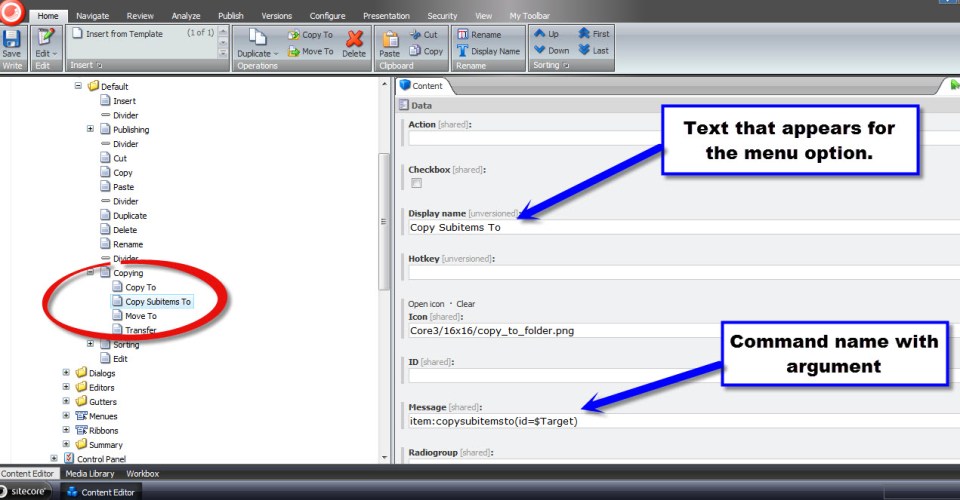
As I had done in part 1 of this article, I created a new menu item — using the /sitecore/templates/System/Menus/Menu item template. I created a new menu item named ‘Copy Subitems To’ underneath /sitecore/content/Applications/Content Editor/Context Menues/Default/Copying in my Item context menu in the core database:
Oh look, I found some subitems I would like to copy somewhere else:

After right-clicking on the parent of my subitems and hovering over ‘Copying’, my beautiful new menu item displays:

I then clicked ‘Copy Subitems To’, and this dialog window appeared. I then selected a destination for my copied subitems, and clicked the ‘Copy’ button:
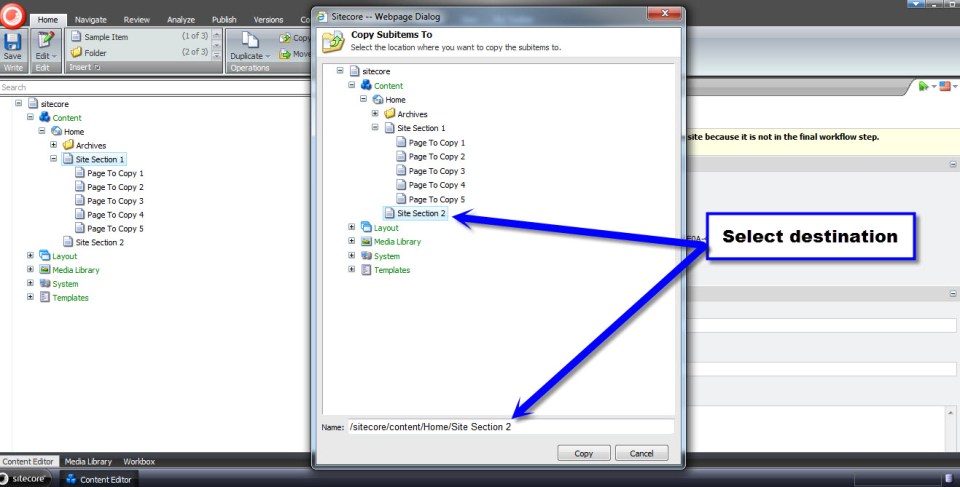
And — voilà! — my subitems were copied to my selected destination:

I had more fun with this later on by copying nested levels of subitems — it will copy all subitems beyond just one level below.
There are a few moving parts here, but nothing too overwhelming.
I hope you try out building your own custom Item context menu option. Trust me, you will have lots of fun building one. I know I did!
Until next time, happy coding!
Put Things Into Context: Augmenting the Item Context Menu – Part 1
Last week, I asked Lewis Goulden — a friend and former colleague — to name one thing in Sitecore he would like to learn or know more about. His answer was knowing how to add menu options to the Item context menu — particularly the ‘Publish Now’ and ‘Publish Item’ menu options found in the Publish ribbon.
I remembered reading a few blog articles in the past articulating how one would accomplish this. I needed to dig to find any of these articles.
After googling — yes googling is a verb in the English language — a few times, I found an article by John West discussing how to do this and another by Aboo Bolaky. I had also discovered this on pages 259-260 in John West’s book Professional Sitecore Development.
Instead of passing these on to Lewis and wishing him the best of luck in his endeavours augmenting his context menu — definitely not a cool thing to do to a friend — I decided to capture how this is done in this post, and share this with you as well.
Plus, this article sets the cornerstone for part two: augmenting the item context menu using a custom command and pipeline.
Here’s what the context menu looks like unadulterated:
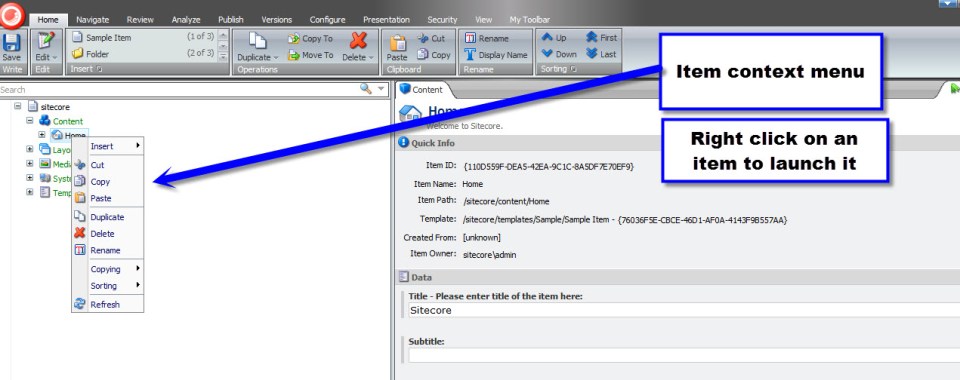
My basic goal is to add a new ‘Publishing’ fly-out menu item containing ‘Publish Now’ and ‘Publish Item’ submenu options betwixt the ‘Insert’ and ‘Cut’ menu options.
In other words, I need to go find the ‘Publish Now’ and ‘Publish Item’ menu items in the core database and add these to the Item context menu.

So, I had to switch over to the core database and fish around to find out the command names of the ‘Publish Now’ and ‘Publish Item’ menu items.
First, I looked at the Publish ribbon (/sitecore/content/Applications/Content Editor/Ribbons/Ribbons/Default/Publish):
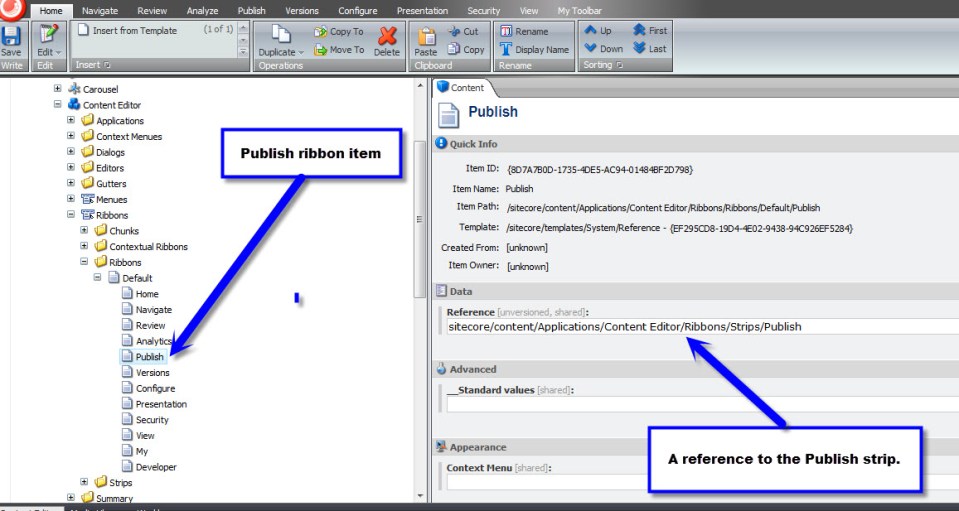
The Publish ribbon helped me hone in closer to where I should continue to look to find the publishing menu items.
Next, I went to the Publish strip:
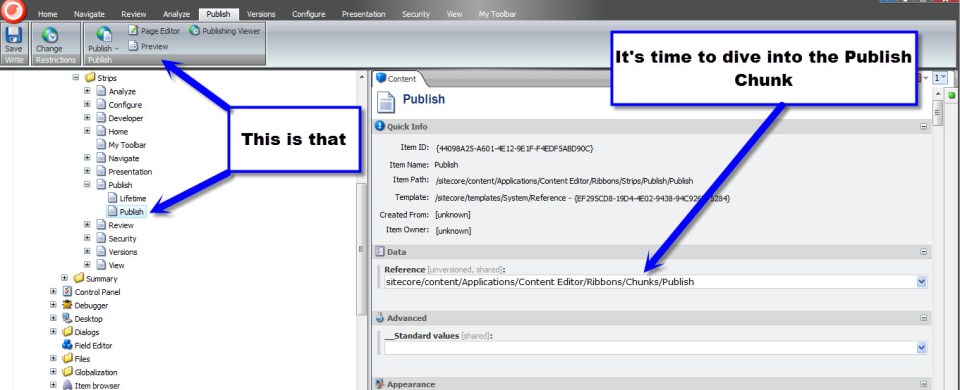
The Publish strip pretty much tells me I have to keep on digging. Now, I have to go take a look at the Publish chunk.
In the Publish chunk, I finally found the ‘Publish Now’ menu button:
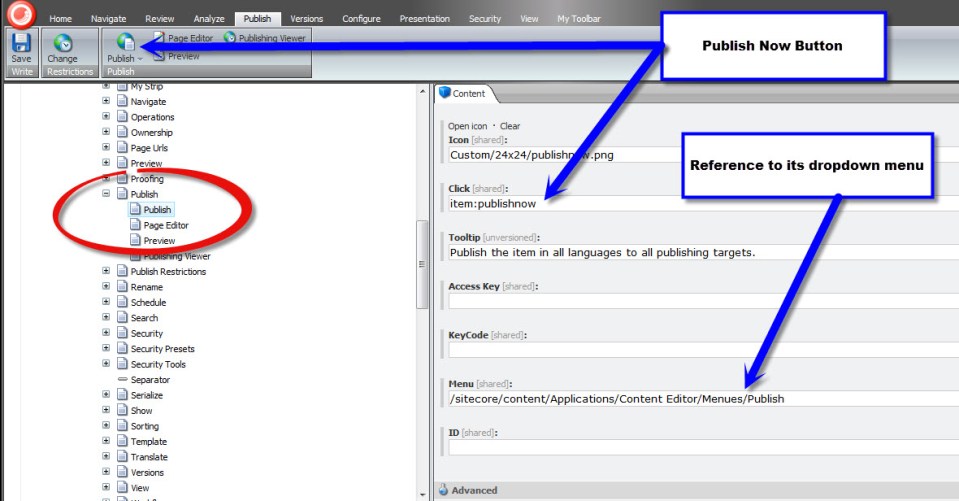
I made sure I copied its click field value — we’ll be needing it when we create our own ‘Publish Now’ menu item.
I then navigated to /sitecore/content/Applications/Content Editor/Menues/Publish to snag the command name of the ‘Publish Item’ menu option:

Now, I have all I need to create my own ‘Publishing’ fly-out menu item and its ‘Publish Now’ and ‘Publish Item’ submenu options.
I then went to /sitecore/content/Applications/Content Editor/Context Menues/Default and added a new Item named ‘Divider’ — using the /sitecore/templates/System/Menus/Menu divider template — after the Insert menu option, and created my ‘Publishing’ fly-out menu item using the /sitecore/templates/System/Menus/Menu item template.
Thereafter, I created my ‘Publish Item’ menu item using the same template as its parent ‘Publishing’. I then put the command name for the ‘Publish Item’ menu option found previously into my item’s Message field:

Next, I created my ‘Publish Now’ menu item using the same template as its parent and sibling. I put in the ‘Publish Now’ menu item’s Message field the command name for the ‘Publish Now’ menu option found during my expedition above:

Now, let’s take this for a test drive. I switched back to the master database and navigated to my Home node. I then right-clicked:
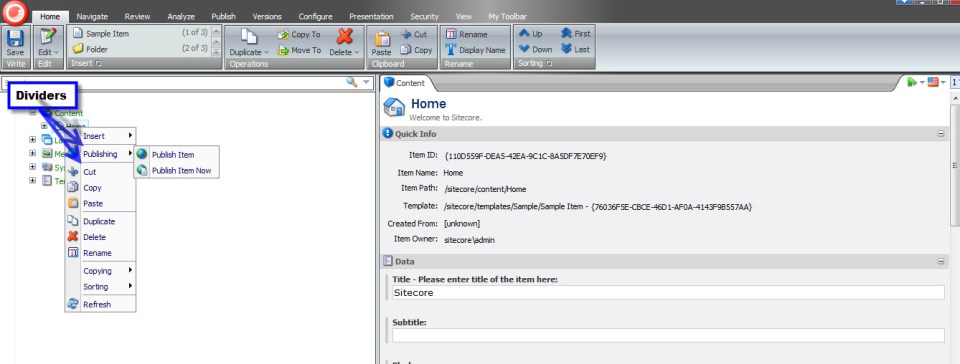
As you can see, the ‘Publishing’ fly-out menu appears with its publishing submenu options. Trust me, both menu items do work. 🙂
All of this without any code whatsoever!
In part 2 of this article, I will step through building a custom command coupled with a custom pipeline that compose the logic for a custom menu item for the Item context menu that copies all subitems of an ancestor item to a selected destination.
Happy coding and have a Sitecorelicious day! 🙂
 SitecoreJunkie.com