Home » Customization (Page 5)
Category Archives: Customization
Warn Content Authors of Linking to Items With No Presentation using Custom Field Validators in Sitecore
The other day John West, CTO of Sitecore USA, published his 500th blog post — quite an epic feat if you ask me — where he built a custom field validator that checks whether external links in the Rich Text field resolve:
This got me thinking: what other types of field validators might be useful?
I pondered over this for the past couple of days, and couldn’t think of anything useful but finally did come up with an idea this morning (out of the blue I might add): how about field validators that check to see whether Items linked in General and Internal Link fields have presentation?
After searching through the library of field validators available in Sitecore — I did this to make sure I wouldn’t be wasting my time given that Sitecore offers a lot of field validators “out of the box” (these live under /sitecore/system/Settings/Validation Rules/Field Rules in the master database), so I suggest having a look through these before building a custom one — I came up with the following solution that employs the Template method design pattern:
using System;
using System.Runtime.Serialization;

using Sitecore.Data.Fields;
using Sitecore.Data.Items;
using Sitecore.Data.Validators;
using Sitecore.Diagnostics;
using Sitecore.Pipelines.HasPresentation;

namespace Sitecore.Sandbox.Data.Validators.FieldValidators
{
    public abstract class ReferencedItemHasPresentationValidator : StandardValidator
    {
        public override string Name
        {
            get
            {
                return Parameters["Name"];
            }
        }

        public ReferencedItemHasPresentationValidator()
        {
        }

        public ReferencedItemHasPresentationValidator(SerializationInfo info, StreamingContext context)
            : base(info, context)
        {
        }

        protected override ValidatorResult Evaluate()
        {
            Item linkedItem = GetReferencedItem();
            if (linkedItem == null || HasPresentation(linkedItem))
            {
                return ValidatorResult.Valid;
            }

            Text = GetErrorMessage();
            return GetFailedResult(ValidatorResult.Error);
        }

        protected virtual bool HasPresentation(Item item)
        {
            Assert.ArgumentNotNull(item, "item");
            return HasPresentationPipeline.Run(item);
        }

        protected abstract Item GetReferencedItem();

        protected virtual string GetErrorMessage()
        {
            string message = Parameters["ErrorMessage"];
            if (string.IsNullOrWhiteSpace(message))
            {
                return string.Empty;
            }

            return GetText(ExpandTokens(message), new[] { GetFieldDisplayName() });
        }

        protected override ValidatorResult GetMaxValidatorResult()
        {
            return GetFailedResult(ValidatorResult.Error);
        }

        protected virtual string ExpandTokens(string value)
        {
            if(string.IsNullOrWhiteSpace(value))
            {
                return value;
            }

            string valueExpanded = value;
            Field field = GetField();
            if(field != null)
            {
                valueExpanded = valueExpanded.Replace("$fieldName", field.Name);
            }

            return valueExpanded;
        }
    }
}
The above abstract class inherits from Sitecore.Data.Validators.StandardValidator in Sitecore.Kernel.dll — this is the base class which most validators in Sitecore inherit from — and checks to see if the Item referenced in the field has presentation (this check is done in the HasPresentation() method which basically delegates to the Run() method on the Sitecore.Pipelines.HasPresentation.HasPresentationPipeline class).
The referenced Item is returned by the GetReferencedItem() method which must be defined by subclasses of the above class.
Further, I’m passing in the validator’s name and error message through parameters (the error message allows for $fieldName as a token, and the ExpandTokens() method replaces this token with the name of the field being validated).
I then created a subclass of the above to return the Item referenced in an Internal Link field:
using System;
using System.Runtime.Serialization;

using Sitecore.Data.Fields;
using Sitecore.Data.Items;

namespace Sitecore.Sandbox.Data.Validators.FieldValidators
{
    [Serializable]
    public class InternalLinkItemHasPresentationValidator : ReferencedItemHasPresentationValidator
    {
        public InternalLinkItemHasPresentationValidator()
        {
        }

        public InternalLinkItemHasPresentationValidator(SerializationInfo info, StreamingContext context)
            : base(info, context)
        {
        }

        protected override Item GetReferencedItem()
        {
            InternalLinkField internalLinkField = GetField();
            if (internalLinkField == null)
            {
                return null;
            }

            return internalLinkField.TargetItem;
        }
    }
}
Nothing magical is happening in the above class. The GetReferencedItem() method is casting the field to a Sitecore.Data.Fields.InternalLinkField instance, and returns the value of its TargetItem property.
Now that we have a class to handle Items referenced in Internal Link fields, we need another for General Link fields:
using System;
using System.Runtime.Serialization;

using Sitecore.Data.Fields;
using Sitecore.Data.Items;

namespace Sitecore.Sandbox.Data.Validators.FieldValidators
{
    [Serializable]
    public class GeneralLinkItemHasPresentationValidator : ReferencedItemHasPresentationValidator
    {
        public GeneralLinkItemHasPresentationValidator()
        {
        }

        public GeneralLinkItemHasPresentationValidator(SerializationInfo info, StreamingContext context)
            : base(info, context)
        {
        }

        protected override Item GetReferencedItem()
        {
            LinkField linkField = GetField();
            if (linkField == null)
            {
                return null;
            }

            return linkField.TargetItem;
        }
    }
}
The GetReferencedItem() method in the GeneralLinkItemHasPresentationValidator class above does virtually the same thing as the same method in the InternalLinkItemHasPresentationValidator class. The only difference is the GetReferencedItem() method in the class above is casting the field to a Sitecore.Data.Fields.LinkField instance, and returns the value of its TargetItem property.
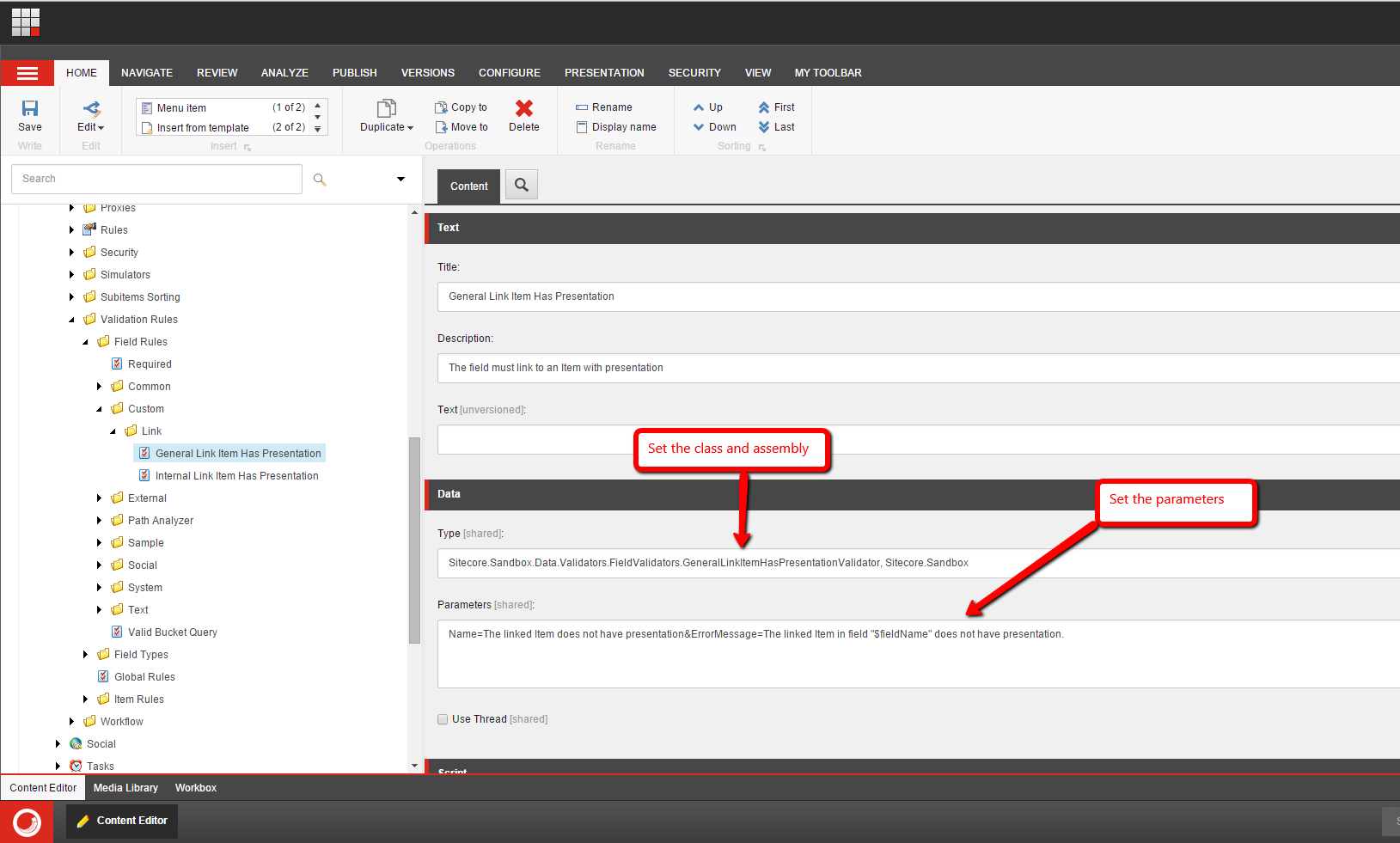
I then had to map the above field validator classes to Validation Rule Items — these have the /sitecore/templates/System/Validation/Validation Rule template — in Sitecore:
The Internal Link field validator:

The General Link field validator:
I then added two Internal Link fields on my Sample item template, and mapped the Internal Link field validator to them:

I also created two General Link fields on my Sample item template, and mapped the General Link field validator to them:

Once I had the validators mapped to their specific fields, I went ahead and removed presentation from one of my test items:

Before, the above item had these presentation components on it:
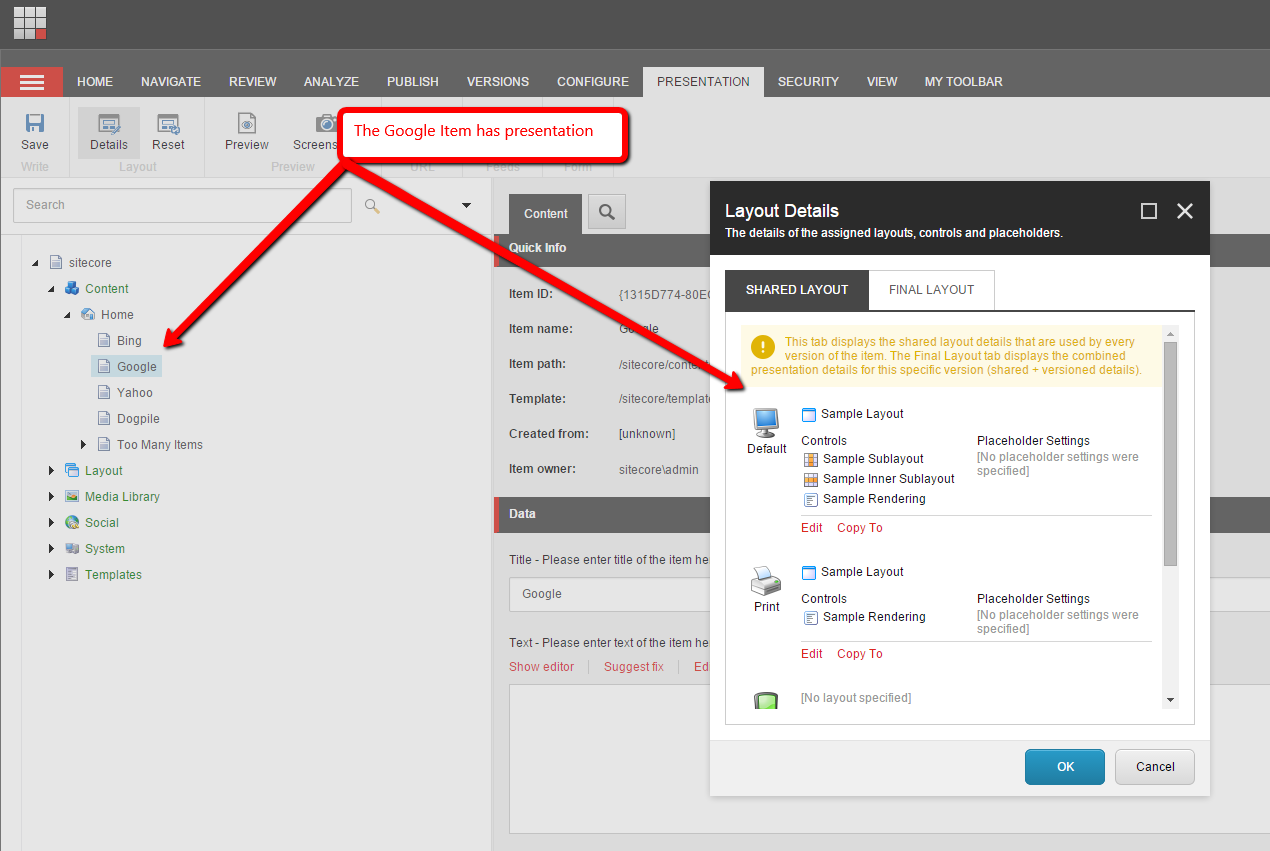
I then linked to my test items in my test fields. As you can see, there are errors on the “Bing” item which does not have presentation:

If you have any thoughts on this, or ideas for other field validators, please share in a comment.
Until next time, have a Sitecorelicious day! 😀
Augment Configuration-defined Sitecore Functionality using the Composite Design Pattern
In a couple of my past posts — Synchronize IDTable Entries Across Multiple Sitecore Databases Using a Composite IDTableProvider and
Chain Together Sitecore Client Commands using a Composite Command — I used the Composite design pattern to chain together functionality in two or more classes with the same interface — by interface here, I don’t strictly mean a C# interface but any class that servers as a base class for others where all instances share the same methods — and had a thought: how could I go about making a generic solution to chain together any class type defined in Sitecore configuration?
As a “proof of concept” I came up with the following solution while taking a break from my judgely duties reviewing 2015 Sitecore Hackathon modules.
I first defined an interface for classes that will construct objects using the Sitecore Configuration Factory:
using System.Collections.Generic;
using System.Xml;

namespace Sitecore.Sandbox.Shared
{
    public interface IConfigurationFactoryInstances<TInstance>
    {
        void AddInstance(XmlNode source);

        IEnumerable<TInstance> GetInstances();
    }
}
The following class implements the methods defined in the interface above:
using System.Collections.Generic;
using System.Xml;

using Sitecore.Configuration;

namespace Sitecore.Sandbox.Shared
{
    public class ConfigurationFactoryInstances<TInstance> : IConfigurationFactoryInstances<TInstance> where TInstance : class
    {
        private IList<TInstance> Instances { get; set; }

        public ConfigurationFactoryInstances()
        {
            Instances = new List<TInstance>();
        }

        public virtual IEnumerable<TInstance> GetInstances()
        {
            return Instances;
        }

        public void AddInstance(XmlNode configNode)
        {
            TInstance instance = CreateInstance(configNode);
            if (instance == null)
            {
                return;
            }

            Instances.Add(instance);
        }

        protected virtual TInstance CreateInstance(XmlNode configNode)
        {
            if (configNode == null)
            {
                return null;
            }

            TInstance instance = Factory.CreateObject(configNode, true) as TInstance;
            if (instance == null)
            {
                return null;
            }

            return instance;
        }
    }
}
The AddInstance() method in the class above — along with the help of the CreateInstance() method — takes in a System.Xml.XmlNode instance and attempts to create an instance of the type denoted by TInstance using the Sitecore Configuration Factory. If the instance was successfully created (i.e. it’s not null), it is added to a list.
The GetInstances() method in the class above just returns the list of the instances that were added by the AddInstance() method.
Since I’ve been posting a lot of meme images on Twitter lately — you can see the evidence here — I’ve decided to have a little fun tonight with this “proof of concept”, and created the following composite MediaProvider:
using System.Xml;

using Sitecore.Data.Items;
using Sitecore.Resources.Media;

using Sitecore.Sandbox.Shared;

namespace Sitecore.Sandbox.Resources.Media
{
    public class CompositeMediaProvider : MediaProvider
    {
        private static IConfigurationFactoryInstances<MediaProvider> Instances { get; set; }

        static CompositeMediaProvider()
        {
            Instances = new ConfigurationFactoryInstances<MediaProvider>();
        }

        public override string GetMediaUrl(MediaItem item, MediaUrlOptions options)
        {
            foreach (MediaProvider mediaProvider in Instances.GetInstances())
            {
                string url = mediaProvider.GetMediaUrl(item, options);
                if(!string.IsNullOrWhiteSpace(url))
                {
                    return url;
                }
            }

            return base.GetMediaUrl(item, options);
        }

        protected virtual void AddMediaProvider(XmlNode configNode)
        {
            Instances.AddInstance(configNode);
        }
    }
}
The AddMediaProvider() method in the class above adds new instances of Sitecore.Resources.Media.MediaProvider through delegation to an instance of the ConfigurationFactoryInstances class. The Sitecore Configuration Factory will call the AddMediaProvider() method since it’s defined in the patch include configuration file shown later in this post
The GetMediaUrl() method iterates over all instances of Sitecore.Resources.Media.MediaProvider that were created and stored by the ConfigurationFactoryInstances instance, and calls each of their GetMediaUrl() methods. The first non-null or empty URL from one of these “inner” instances is returned to the caller. If none of the instances return a URL, then the class above returns the value given by its base class’ GetMediaUrl() method.
I then spun up three MediaProvider classes to serve up specific image URLs of John West — I found these somewhere on the internet 😉 — when they encounter media Items with specific names (I am not advocating that anyone hard-codes anything like this — these classes are only here to serve as examples):
using System;

using Sitecore.Data.Items;
using Sitecore.Resources.Media;

namespace Sitecore.Sandbox.Resources.Media
{
    public class JohnWestOneMediaProvider : MediaProvider
    {
        public override string GetMediaUrl(MediaItem item, MediaUrlOptions options)
        {
            if(item.Name.Equals("john-west-1", StringComparison.CurrentCultureIgnoreCase))
            {
                return "http://cdn.meme.am/instances/500x/43030540.jpg";
            }

            return string.Empty;
        }
    }
}
using System;

using Sitecore.Data.Items;
using Sitecore.Resources.Media;

namespace Sitecore.Sandbox.Resources.Media
{
    public class JohnWestTwoMediaProvider : MediaProvider
    {
        public override string GetMediaUrl(MediaItem item, MediaUrlOptions options)
        {
            if (item.Name.Equals("john-west-2", StringComparison.CurrentCultureIgnoreCase))
            {
                return "http://cdn.meme.am/instances/500x/43044627.jpg";
            }

            return string.Empty;
        }
    }
}
using System;

using Sitecore.Data.Items;
using Sitecore.Resources.Media;

namespace Sitecore.Sandbox.Resources.Media
{
    public class JohnWestThreeMediaProvider : MediaProvider
    {
        public override string GetMediaUrl(MediaItem item, MediaUrlOptions options)
        {
            if (item.Name.Equals("john-west-3", StringComparison.CurrentCultureIgnoreCase))
            {
                return "http://cdn.meme.am/instances/500x/43030625.jpg";
            }

            return string.Empty;
        }
    }
}
I then registered all of the above in Sitecore using a patch configuration file:
<?xml version="1.0" encoding="utf-8" ?>
<configuration xmlns:patch="http://www.sitecore.net/xmlconfig/">
  <sitecore>
    <mediaLibrary>
      <mediaProvider>
        <patch:attribute name="type">Sitecore.Sandbox.Resources.Media.CompositeMediaProvider, Sitecore.Sandbox</patch:attribute>
        <mediaProviders hint="raw:AddMediaProvider">
          <mediaProvider type="Sitecore.Sandbox.Resources.Media.JohnWestOneMediaProvider, Sitecore.Sandbox" />
          <mediaProvider type="Sitecore.Sandbox.Resources.Media.JohnWestTwoMediaProvider, Sitecore.Sandbox" />
          <mediaProvider type="Sitecore.Sandbox.Resources.Media.JohnWestThreeMediaProvider, Sitecore.Sandbox" />
          <mediaProvider type="Sitecore.Resources.Media.MediaProvider, Sitecore.Kernel" />
        </mediaProviders>
      </mediaProvider>
    </mediaLibrary>
  </sitecore>
</configuration>
Let’s see this in action!
To test, I uploaded four identical photos of John West to the Media Library:

I then inserted these into a Rich Text field on my home Item:
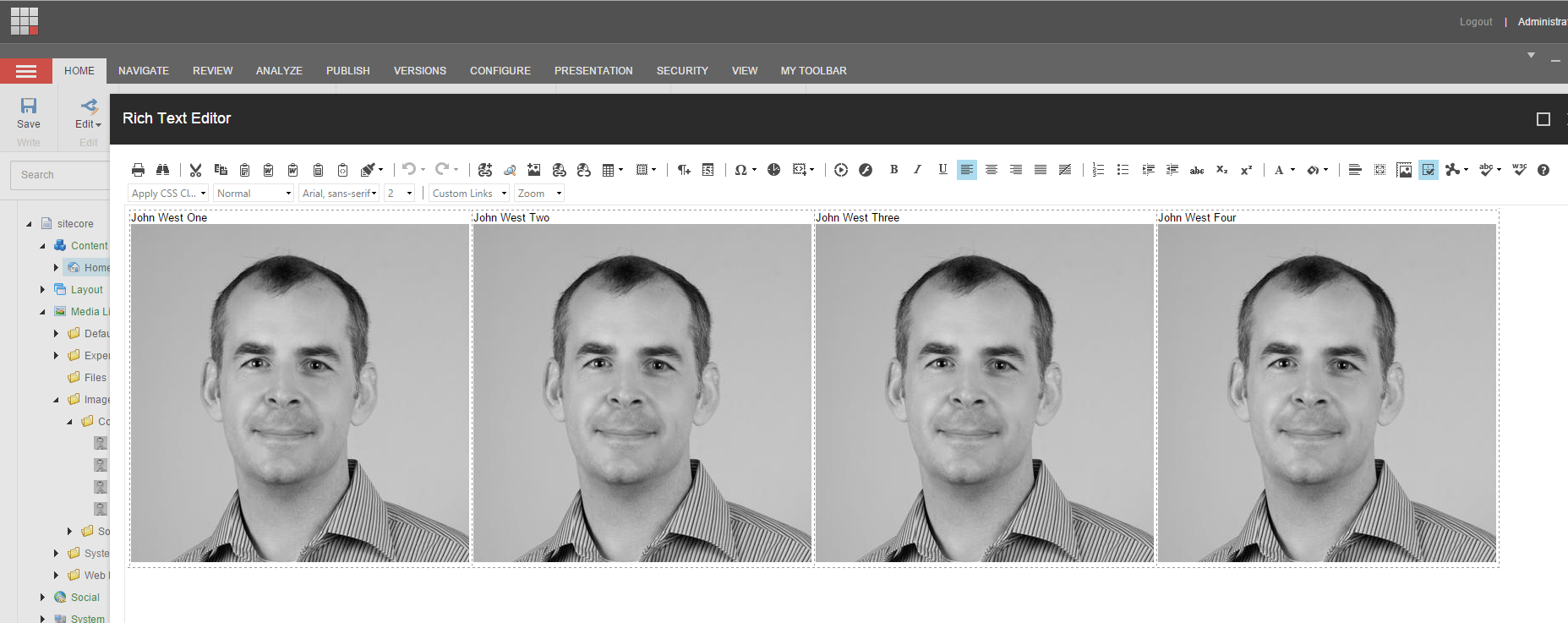
I saved my home Item and published everything. Once the publish was finished, I navigated to my home page and saw the following:

As you can see, the three custom John West MediaProvider class instances served up their URLs, and the “out of the box” Sitecore.Resources.Media.MediaProvider instance served up its URL on the last image.
If you have any thoughts on this, please share in a comment.
Until next time, have a Sitecoretastic day!
Add Additional Item Fields to RSS Feeds Generated by Sitecore
Earlier today a colleague had asked me how to add additional Item fields into RSS feeds generated by Sitecore.
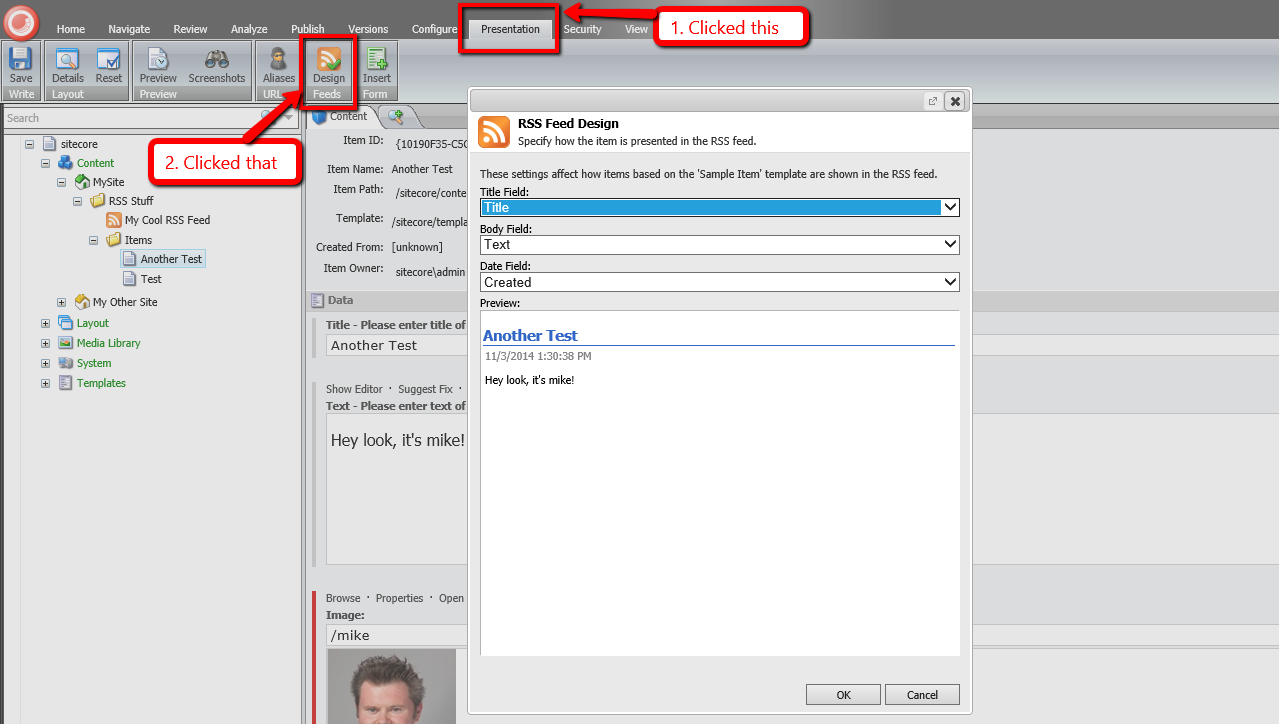
I could have sworn there was an easy way to do this, but when looking at the RSS Feed Design dialog in Sitecore, it appears you are limited to three fields on your Items “out of the box”:
After a lot of digging in Sitecore.Kernel.dll, I discovered that one can inject a subclass of Sitecore.Syndication.PublicFeed to override/augment RSS feed functionality:

As a proof-of-concept, I whipped up the following subclass of Sitecore.Syndication.PublicFeed:
using System.ServiceModel.Syndication; // Note: you must reference System.ServiceModel.dll to use this!

using Sitecore.Diagnostics;
using Sitecore.Configuration;
using Sitecore.Data.Items;
using Sitecore.Pipelines;
using Sitecore.Pipelines.RenderField;
using Sitecore.Syndication;

namespace Sitecore.Sandbox.Syndication
{
    public class ImageInContentPublicFeed : PublicFeed
    {
        private static string ImageFieldName { get; set; }

        private static string RenderFieldPipelineName { get; set; }

        static ImageInContentPublicFeed()
        {
            ImageFieldName = Settings.GetSetting("RSS.Fields.ImageFieldName");
            RenderFieldPipelineName = Settings.GetSetting("Pipelines.RenderField");
        }

        protected override SyndicationItem RenderItem(Item item)
        {
            SyndicationItem syndicationItem = base.RenderItem(item);
            AddImageHtmlToContent(syndicationItem, GetImageFieldHtml(item));
            return syndicationItem;
        }

        protected virtual string GetImageFieldHtml(Item item)
        {
            if (string.IsNullOrWhiteSpace(ImageFieldName))
            {
                return string.Empty;
            }

            return GetImageFieldHtml(item, ImageFieldName);
        }

        private static string GetImageFieldHtml(Item item, string imageFieldName)
        {
            Assert.ArgumentNotNull(item, "item");
            Assert.ArgumentNotNullOrEmpty(imageFieldName, "imageFieldName");
            Assert.ArgumentNotNullOrEmpty(RenderFieldPipelineName, "RenderFieldPipelineName");
            if (item == null || item.Fields[imageFieldName] == null)
            {
                return string.Empty;
            }

            RenderFieldArgs args = new RenderFieldArgs { Item = item, FieldName = imageFieldName };
            CorePipeline.Run(RenderFieldPipelineName, args);
            if (args.Result.IsEmpty)
            {
                return string.Empty;
            }

            return args.Result.ToString();
        }

        protected virtual void AddImageHtmlToContent(SyndicationItem syndicationItem, string imageHtml)
        {
            if (string.IsNullOrWhiteSpace(imageHtml) || !(syndicationItem.Content is TextSyndicationContent))
            {
                return;
            }

            TextSyndicationContent content = syndicationItem.Content as TextSyndicationContent;
            syndicationItem.Content = new TextSyndicationContent(string.Concat(imageHtml, content.Text), TextSyndicationContentKind.Html);
        }
    }
}
The class above ultimately overrides the RenderItem(Item item) method defined on Sitecore.Syndication.PublicFeed — it is declared virtual. The RenderItem(Item item) method above delegates to the RenderItem(Item item) method of Sitecore.Syndication.PublicFeed; grabs the System.ServiceModel.Syndication.SyndicationContent instance set in the Content property of the returned SyndicationItem object — this happens to be an instance of System.ServiceModel.Syndication.TextSyndicationContent; delegates to the <renderField> pipeline to generate HTML for the image set in the Image Field on the item; creates a new System.ServiceModel.Syndication.TextSyndicationContent instance with the HTML of the image combined with the HTML from the original TextSyndicationContent instance; sets the Content property with this new System.ServiceModel.Syndication.TextSyndicationContent instance; and returns the SyndicationItem instance to the caller.
Since I hate hard-coding things, I put the Image Field’s name and <renderField> pipeline’s name in a patch configuration file:
<configuration xmlns:patch="http://www.sitecore.net/xmlconfig/">
  <sitecore>
    <settings>
      <setting name="RSS.Fields.ImageFieldName" value="Image" />
      <setting name="Pipelines.RenderField" value="renderField" />
    </settings>
  </sitecore>
</configuration>
I then mapped the above subclass of Sitecore.Syndication.PublicFeed to the RSS Feed Item I created:

For testing, I added two Items — one with an image and another without an image:


After publishing everything, I loaded the RSS feed in my browser and saw the following:
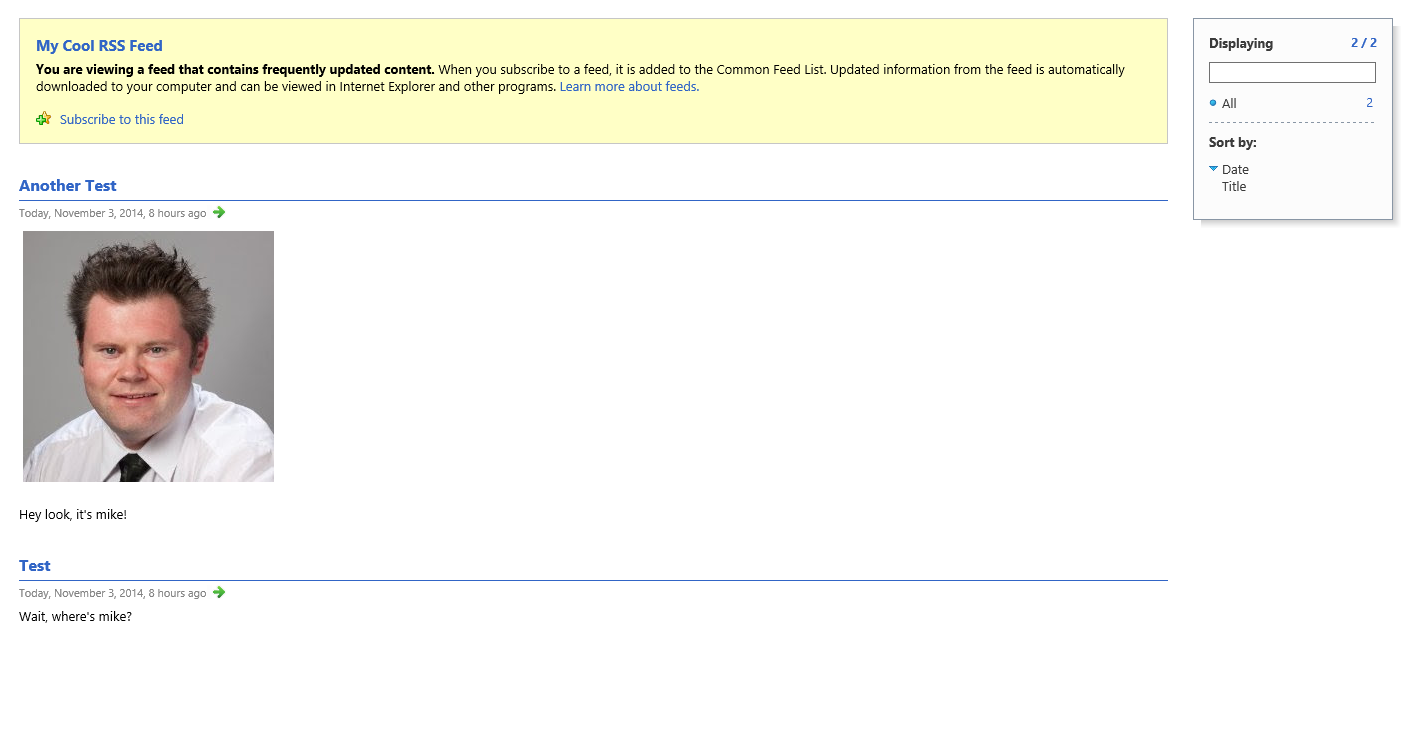
If you know of other ways to add additional Item fields into Sitecore RSS feeds, please share in a comment.
Bundle CSS and JavaScript Files in Sitecore MVC
The other day I was poking around Sitecore.Forms.Mvc.dll — this assembly ships with Web Forms for Marketers (WFFM), and is used when WFFM is running on Sitecore MVC — and noticed WFFM does some bundling of JavaScript and CSS files:

WFFM uses the above class as an <initialize> pipeline processor. You can see this defined in Sitecore.Forms.Mvc.config:

This got me thinking: why not build my own class to serve as an <initialize> pipeline processor to bundle my CSS and JavaScript files?
As an experiment I whipped up the following class to do just that:
using System.Collections.Generic;
using System.Linq;
using System.Web.Optimization;

using Sitecore.Pipelines;

namespace Sitecore.Sandbox.Forms.Mvc.Pipelines
{
    public class RegisterAdditionalFormBundles
    {
        public RegisterAdditionalFormBundles()
        {
            CssFiles = new List<string>();
            JavaScriptFiles = new List<string>();
        }

        public void Process(PipelineArgs args)
        {
            BundleCollection bundles = GetBundleCollection();
            if (bundles == null)
            {
                return;
            }

            AddBundle(bundles, CreateCssBundle());
            AddBundle(bundles, CreateJavaScriptBundle());
        }

        protected virtual BundleCollection GetBundleCollection()
        {
            return BundleTable.Bundles;
        }

        protected virtual Bundle CreateCssBundle()
        {
            if (!CanBundleAssets(CssVirtualPath, CssFiles))
            {
                return null;
            }

            return new StyleBundle(CssVirtualPath).Include(CssFiles.ToArray());
        }

        protected virtual Bundle CreateJavaScriptBundle()
        {
            if (!CanBundleAssets(JavaScriptVirtualPath, JavaScriptFiles))
            {
                return null;
            }

            return new ScriptBundle(JavaScriptVirtualPath).Include(JavaScriptFiles.ToArray());
        }

        protected virtual bool CanBundleAssets(string virtualPath, IEnumerable<string> filePaths)
        {
            return !string.IsNullOrWhiteSpace(virtualPath)
                    && filePaths != null
                    && filePaths.Any();
        }

        private static void AddBundle(BundleCollection bundles, Bundle bundle)
        {
            if(bundle == null)
            {
                return;
            }

            bundles.Add(bundle);
        }

        private string CssVirtualPath { get; set; }

        private List<string> CssFiles { get; set; }

        private string JavaScriptVirtualPath { get; set; }

        private List<string> JavaScriptFiles { get; set; }
    }
}
The class above basically takes in a collection of CSS and JavaScript file paths as well as their virtual bundled paths — these are magically populated by Sitecore’s Configuration Factory using values provided by the configuration file shown below — iterates over both collections, and adds them to the BundleTable — the BundleTable is defined in System.Web.Optimization.dll.
I then glued everything together using a patch configuration file:
<configuration xmlns:patch="http://www.sitecore.net/xmlconfig/">
  <sitecore>
    <pipelines>
      <initialize>
        <processor patch:after="processor[@type='Sitecore.Forms.Mvc.Pipelines.RegisterFormBundles, Sitecore.Forms.Mvc']"
          type="Sitecore.Sandbox.Forms.Mvc.Pipelines.RegisterAdditionalFormBundles, Sitecore.Sandbox">
          <CssVirtualPath>~/wffm-bundles/styles.css</CssVirtualPath>
          <CssFiles hint="list">
            <CssFile>~/css/uniform.aristo.css</CssFile>
          </CssFiles>
          <JavaScriptVirtualPath>~/wffm-bundles/scripts.js</JavaScriptVirtualPath>
          <JavaScriptFiles hint="list">
            <JavaScriptFile>~/js/jquery.min.js</JavaScriptFile>
            <JavaScriptFile>~/js/jquery.uniform.min.js</JavaScriptFile>
            <JavaScriptFile>~/js/bind.uniform.js</JavaScriptFile>
          </JavaScriptFiles>
        </processor>
      </initialize>
    </pipelines>
  </sitecore>
</configuration>
I’m adding the <initialize> pipeline processor shown above after WFFM’s though theoretically you could add it anywhere within the <initialize> pipeline.
The CSS and JavaScript files defined in the configuration file above are from the Uniform project — this project includes CSS, JavaScript and images to make forms look nice, though I am in no way endorsing this project. I only needed some CSS and JavaScript files to spin up something quickly for testing.
For testing, I built the following View — it uses some helpers to render the <link> and <script> tags for the bundles — and tied it to my Layout in Sitecore:
@using System.Web.Optimization
@using Sitecore.Mvc
@using Sitecore.Mvc.Presentation

<!DOCTYPE html>
<html>

<head>
    <title></title>

    @Styles.Render("~/wffm-bundles/styles.css")
    @Scripts.Render("~/wffm-bundles/scripts.js")

</head>
<body>


    @Html.Sitecore().Placeholder("page content")

</body>
</html>
I then built a “Feedback” form in WFFM; mapped it to the “page content” placeholder defined in the View above; published it; and pulled it up in my browser. As you can see the code from the Uniform project styled the form:

For comparison, this is what the form looks like without the <initialize> pipeline processor above:

If you have any thoughts on this, or have alternative ways of bundling CSS and JavaScript files in your Sitecore MVC solutions, please share in a comment.
Turn Off the Attaching of Files in Emails Sent by Web Forms for Marketers in Sitecore
The other day Michael West pinged me to see if I could help someone in one of the SDN forums via this tweet:
The poster had asked if there were an easy way to disable the attachment of files on emails sent by the Web Forms for Marketers (WFFM) module in Sitecore.
After quickly peeking in the WFFM assemblies, I gave a potential solution — check out the thread to see what it was — though it did not work.
Tonight I looked further into how to accomplish this, and came up with the following solution:
using System;
using System.Net;

using Sitecore.Data;
using Sitecore.Form.Core.Client.Data.Submit;
using Sitecore.Form.Core.Pipelines.ProcessMessage;
using Sitecore.Pipelines;

namespace Sitecore.Sandbox.Form.Submit
{
    public class SendMessage : Sitecore.Form.Submit.SendMessage
    {
        protected override void ExecuteMail(ID form, AdaptedResultList fields)
        {
            ProcessMessageArgs args = new ProcessMessageArgs(form, fields, this.MessageType);
            base.To = base.To.TrimEnd(new char[] { ',', ';' });
            base.LocalFrom = base.From.TrimEnd(new char[] { ',', ';' });
            args.To.Append(base.To.Replace(";", ","));
            args.From = base.From.Replace(";", ",");

            // magically populated by WFFM via XML
            args.IncludeAttachment = IncludeAttachments;

            args.Mail.Append(base.Mail);
            args.Subject.Append(base.Subject);
            args.Recipient = this.Recipient;
            args.RecipientGateway = this.RecipientGateway;
            args.Host = base.Host;
            args.Port = base.Port;
            args.IsBodyHtml = this.IsBodyHtml;
            args.EnableSsl = this.EnableSsl;
            args.Data.Add("FromPhone", this.FromPhone ?? string.Empty);
            string[] strArray = string.IsNullOrEmpty(base.Login) ? new string[] { string.Empty } : base.Login.Split(new char[] { '\\' });
            if ((strArray.Length > 0) && !string.IsNullOrEmpty(strArray[0]))
            {
                if ((strArray.Length == 2) && !string.IsNullOrEmpty(strArray[1]))
                {
                    args.Credentials = new NetworkCredential(strArray[1], base.Password, strArray[0]);
                }
                else
                {
                    args.Credentials = new NetworkCredential(strArray[0], base.Password);
                }
            }
            if (!string.IsNullOrEmpty(base.CC))
            {
                base.CC = base.CC.TrimEnd(new char[] { ',', ';' });
                args.CC.Append(base.CC.Replace(";", ","));
            }
            if (!string.IsNullOrEmpty(base.BCC))
            {
                base.BCC = base.BCC.TrimEnd(new char[] { ',', ';' });
                args.BCC.Append(base.BCC.Replace(";", ","));
            }
            CorePipeline.Run("processMessage", args);
        }

        // magically populated by WFFM via XML
        private bool IncludeAttachments { get; set; }
    }
}
The class above inherits from Sitecore.Form.Submit.SendMessage in Sitecore.Forms.Custom.dll, and overrides the ExecuteMail() method — this method is declared virtual in Sitecore.Form.Submit.SendMail which is the base class of Sitecore.Form.Submit.SendMessage.
Most of the code in ExecuteMail() above is from the ExecuteMail() method on Sitecore.Form.Submit.SendMessage, though with one minor difference: I have added a boolean property named “IncludeAttachments” which is magically populated by WFFM via an XML property declaration for this class:

I spun up a form quickly with some File Upload fields, and mapped the above Save Action to it:

I then navigated to my form, attached two images, and clicked the submit button:

As you can see, the images were not attached to the email:

I then went back to my Save Action; set the <IncludeAttachments> XML element’s value to be true; saved the form Item; published it; and resubmitted the form:

As you can see, the images were attached this time.
If you have any thoughts on this, please drop a comment.
A Fix for the Hard-coded Submit Button Text in Web Forms for Marketers on Sitecore MVC
No doubt you have heard the latest version of Web Forms for Marketers — better known as WFFM — now works on Sitecore MVC — don’t know about you but I am quite excited over this!
Plus, as an added bonus — and this made my day when I installed it 😀 — you can change most of the rendered markup for forms in Views that ship with the module (these are installed into ~\Views\Form\EditorTemplates\ of your Sitecore instance).
However, the other day, I discovered the submit button text is hard-coded in one of the module’s Views:

As you may know, the module does provide a field on Form Items to change the submit button text:

Unfortunately, the value of this field is not being put into the value attribute of the submit button in the View above.
I have alerted Sitecore support of this issue via a ticket though do recommend modifying ~\Views\Form\EditorTemplates\FormModel.cshtml to use the submit button text set on the Form Item if you are using WFFM on Sitecore MVC:

As you can see, the value of the submit button text field is set on a property of the model, and can be easily be put into the value attribute of the submit button.
If you have any thoughts on this, please share in a comment.
Add Scripts to the PowerShell Toolbox in Sitecore PowerShell Extensions
During our ‘Take charge of your Sitecore instance using Sitecore tools’ session at Sitecore Symposium 2014 Las Vegas, Sitecore MVP Sean Holmesby and I shared how easy it is to leverage/extend popular Sitecore development tools out there, and built up a fictitious Sitecore website where we pulled in #SitecoreSelfie Tweets.
The code that pulls in these Tweets is supposed to follow a naming convention where Tweet IDs are appended to Media Library Item names, as you can see here:

Sadly, right before our talk, I mistakenly 😉 made a code change which broke our naming convention for some images:

Upon further investigation, we had discovered our issue was much larger than anticipated: all Selfie Media Library Item names do not end with their Tweet IDs:

To fix this, I decided to create a PowerShell Toolbox script in Sitecore PowerShell Extensions using the following script:
<#
    .SYNOPSIS
        Rename selfie image items to include tweet ID where missing.

    .NOTES
        Mike Reynolds
#>
$items = Get-ChildItem -Path "master:\sitecore\content\Social-Media\Twitter\Tweets" -Recurse | Where-Object { $_.TemplateName -eq "Tweet" }

$changedItems = @()
foreach($item in $items) {
	$tweetID = $item["TweetID"]
	$selfieImageField = [Sitecore.Data.Fields.ImageField]$item.Fields["SelfieImage"]
	$selfieImage = $selfieImageField.MediaItem
	if($selfieImage -ne $null -and -not $selfieImage.Name.EndsWith($tweetID)) {
		$oldName = $selfieImage.Name
		$newName = $oldName + "_" + $tweetID
		$selfieImage.Editing.BeginEdit()
		$selfieImage.Name = $newName
		$selfieImage.Editing.EndEdit()

		$changedItem = New-Object PSObject -Property @{
		    Icon = $selfieImage.Appearance.Icon
			OldName = $oldName
			NewName = $newName
			Path = $selfieImage.Paths.Path
			Alt = $selfieImage["Alt"]
			Title = $selfieImage["Title"]
			Width = $selfieImage["Width"]
			Height = $selfieImage["Height"]
			MimeType = $selfieImage["Mime Type"]
			Size = $selfieImage["Size"]
		}

		$changedItems += $changedItem
	}
}

if($changedItems.Count -gt 0) {
    $changedItems |
        Show-ListView -Property @{Label="Icon"; Expression={$_.Icon} },
            @{Label="Old Name"; Expression={$_.OldName} },
    		@{Label="New Name"; Expression={$_.NewName} },
    		@{Label="Path"; Expression={$_.Path} },
            @{Label="Alt"; Expression={$_.Alt} },
    		@{Label="Title"; Expression={$_.Title} },
            @{Label="Width"; Expression={$_.Width} },
            @{Label="Height"; Expression={$_.Height} },
            @{Label="Mime Type"; Expression={$_.MimeType} },
    		@{Label="Size"; Expression={$_.Size} }
} else {
    Show-Alert "There are no selfie image items missing tweet IDs in their name."
}
Close-Window
The above PowerShell script grabs all Tweet Items in Sitecore; ascertains whether referenced Selfie images in the Media Library — these are referenced in the “SelfieImage” field on the Tweet Items — end with the Tweet IDs of their referring Tweet Items (the Tweet ID is stored in a field on the Tweet Item); and renames the Selfie images to include their Tweet IDs if not. The script also launches a dialog showing the images that have changed.
To save the above script in the PowerShell Toolbox, I launched the PowerShell Integrated Scripting Environment (ISE) in Sitecore PowerShell Extensions:

I pasted in the above script, and saved it in the PowerShell Toolbox library:

As you can see, our new script is in the PowerShell Toolbox:

I then clicked the new PowerShell Toolbox option, and was presented with the following dialog:

The above dialog gives information about the images along with their old and new Item names.
I then navigated to where these images live in the Media Library, and see that they were all renamed to include Tweet IDs:

If you have any thoughts on this, or suggestions for other PowerShell Toolbox scripts, please share in a comment.
Until next time, have a #SitecoreSelfie type of day!
Restart the Sitecore Server Using a Custom FileWatcher
For a few months now, I’ve been contemplating potential uses for a custom Sitecore.IO.FileWatcher — this lives in Sitecore.Kernel.dll, and defines abstract methods to handle changes to files on the file system within your Sitecore web application — and finally came up with something: how about a FileWatcher that restarts the Sitecore server when a certain file is uploaded to a specific directory?
You might be thinking “why would I ever want use such a thing?” Well, suppose you need to restart the Sitecore server on one of your Content Delivery Servers immediately, but you do not have direct access to it, and the person who does has left for the week. What do you do?
The following FileWatcher might be one option for the scenario above (another option might be to make frantic phone calls to get the server restarted):
using System;

using Sitecore.Diagnostics;
using Sitecore.Install;
using Sitecore.IO;

namespace Sitecore.Sandbox.IO
{
    public class RestartServerWatcher : FileWatcher
    {
        public RestartServerWatcher()
            : base("watchers/restartServer")
        {
        }

        protected override void Created(string fullPath)
        {
            try
            {
                Log.Info(string.Format("Restart server file detected: {0}. Restarting the server.", fullPath), this);
                FileUtil.Delete(fullPath);
                Installer.RestartServer();
            }
            catch (Exception exception)
            {
                Log.Error("Error in RestartServerWatcher", exception, typeof(RestartServerWatcher));
            }
        }

        protected override void Deleted(string filePath)
        {
            return;
        }

        protected override void Renamed(string filePath, string oldFilePath)
        {
            return;
        }
    }
}
All of the magic occurs in the Created() method above — we do not care if the file is renamed or deleted. If the file is detected, the code in the Created() method logs information to the Sitecore log, deletes the file, and then initiates a Sitecore server restart.
I created the following patch configuration file for the RestartServerWatcher class above:
<?xml version="1.0" encoding="utf-8" ?>
<configuration xmlns:patch="http://www.sitecore.net/xmlconfig/">
  <sitecore>
    <watchers>
      <restartServer>
        <folder>/restart</folder>
        <filter>restart-server.txt</filter>
      </restartServer>
    </watchers>
  </sitecore>
</configuration>
Since FileWatchers are HttpModules, I had to register the RestartServerWatcher in the <system.webServer> section of my Web.config (this configuration element lives outside of the <sitecore> configuration element, and cannot be mapped via a Sitecore patch configuration file):
<?xml version="1.0" encoding="utf-8"?>
<configuration>
<!-- Lots of stuff up here -->
<system.webServer>
	<!-- Some stuff here -->
	<add type="Sitecore.Sandbox.IO.RestartServerWatcher, Sitecore.Sandbox" name="SitecoreRestartServerWatcher"/>
</system.webServer>
<!-- More stuff down here -->
</configuration>
For testing, I uploaded my target file into the target location via the Sitecore File Explorer to trigger a Sitecore server restart:

I then opened up my Sitecore log, and saw the following entries:

If you have any thoughts on this, or have other ideas for custom FileWatchers, please share in a comment.
Leverage the Sitecore Configuration Factory: Inject Value Types as Dependencies
In a previous post, I had mentioned primitive types cannot be injected into classes via Sitecore’s Configuration Factory, and further learned through exploring and experimentation that this applies to all value types in C#.
However, after some digging in Sitecore.Configuration.Factory — this lives in Sitecore.Kernel.dll — I discovered the CreateFromFactoryMethod() method which calls a static method — this method is defined in an XML attribute named “factoryMethod” — on a class defined in the “type” attribute on the XML configuration element being processed, and felt I could take advantage of this hidden gem for injecting value types into my configuration-defined classes.
Despite the fact the method defined in the “factoryMethod” attribute must be static, I decided to define an interface for classes that do value type conversions from strings, and created the following interface (don’t worry, I haven’t completely lost my mind — yes, I did say it requires a static method — but do bear with me until we get further down in this post 😉 ):
namespace Sitecore.Sandbox.Configuration
{
    public interface IValueTypesConverter
    {
        bool ConvertToBoolean(string argument);

        char ConvertToCharacter(string argument);

        decimal ConvertToDecimal(string argument);

        double ConvertToDouble(string argument);

        float ConvertToFloat(string argument);

        int ConvertToInteger(string argument);
    }
}
I then created the following class to implement the interface above:
using Sitecore.Diagnostics;

namespace Sitecore.Sandbox.Configuration
{
    public class ValueTypesConverter : IValueTypesConverter
    {
        public bool ConvertToBoolean(string argument)
        {
            bool value;
            Assert.ArgumentCondition(bool.TryParse(argument, out value), "argument", "argument is not a boolean!");
            return value;
        }

        public char ConvertToCharacter(string argument)
        {
            char value;
            Assert.ArgumentCondition(char.TryParse(argument, out value), "argument", "argument is not a character!");
            return value;
        }

        public decimal ConvertToDecimal(string argument)
        {
            decimal value;
            Assert.ArgumentCondition(decimal.TryParse(argument, out value), "argument", "argument is not a decimal!");
            return value;
        }

        public double ConvertToDouble(string argument)
        {
            double value;
            Assert.ArgumentCondition(double.TryParse(argument, out value), "argument", "argument is not a double!");
            return value;
        }

        public float ConvertToFloat(string argument)
        {
            float value;
            Assert.ArgumentCondition(float.TryParse(argument, out value), "argument", "argument is not a float!");
            return value;
        }

        public int ConvertToInteger(string argument)
        {
            int value;
            Assert.ArgumentCondition(int.TryParse(argument, out value), "argument", "argument is not an integer!");
            return value;
        }
    }
}
Each method in the class above calls its specific value type’s TryParse() method to convert the passed string to the value type. We ensure the argument was in the correct format: an assertion is done to check if the argument was of the type the method was expecting.
I then created the following adapter which wraps an instance of a class that implements the interface defined above:
using Sitecore.Configuration;

namespace Sitecore.Sandbox.Configuration
{
    public class TypesConverter
    {
        static TypesConverter()
        {
            ValueTypesConverter = Factory.CreateObject("valueTypesConverter", true) as IValueTypesConverter;
        }

        public static bool ConvertToBoolean(string argument)
        {
            return ValueTypesConverter.ConvertToBoolean(argument);
        }

        public static char ConvertToCharacter(string argument)
        {
            return ValueTypesConverter.ConvertToCharacter(argument);
        }

        public static decimal ConvertToDecimal(string argument)
        {
            return ValueTypesConverter.ConvertToDecimal(argument);
        }

        public static double ConvertToDouble(string argument)
        {
            return ValueTypesConverter.ConvertToDouble(argument);
        }

        public static float ConvertToFloat(string argument)
        {
            return ValueTypesConverter.ConvertToFloat(argument);
        }

        public static int ConvertToInteger(string argument)
        {
            return ValueTypesConverter.ConvertToInteger(argument);
        }

        private static IValueTypesConverter ValueTypesConverter { get; set; }
    }
}
The class above creates an instance of the ValueTypesConverter class via the Sitecore.Configuration.Factory.CreateObject() method. I felt defining the class that implements the IValueTypesConverter interface in Sitecore configuration would allow for customization if one would ever need to do so.
Further, all methods in the class above just delegate calls to the ValueTypesConverter instance.
For testing, I created the following class to serve as a <renderField> pipeline processor:
using System.Text;

using Sitecore.Diagnostics;
using Sitecore.Pipelines.RenderField;

namespace Sitecore.Sandbox.Pipelines.RenderField
{
    public class ValueTypesTest
    {
        public void Process(RenderFieldArgs args)
        {
            Assert.ArgumentNotNull(args, "args");
            StringBuilder htmlBuilder = new StringBuilder();
            htmlBuilder.AppendFormat("SomeBoolean ==> {0} <br />", SomeBoolean);
            htmlBuilder.AppendFormat("SomeCharacter ==> {0} <br />", SomeCharacter);
            htmlBuilder.AppendFormat("SomeDecimal ==> {0} <br />", SomeDecimal);
            htmlBuilder.AppendFormat("SomeDouble ==> {0} <br />", SomeDouble);
            htmlBuilder.AppendFormat("SomeFloat ==> {0} <br />", SomeFloat);
            htmlBuilder.AppendFormat("SomeInteger ==> {0}", SomeInteger);
            args.Result.FirstPart = htmlBuilder.ToString();
        }

        private bool SomeBoolean { get; set; }

        private char SomeCharacter { get; set; }

        private decimal SomeDecimal { get; set; }

        private double SomeDouble { get; set; }

        private float SomeFloat { get; set; }

        private int SomeInteger { get; set; }
    }
}
The class above defines properties that will be populated magically by Sitecore’s Configuration Factory, and builds a string of HTML to be rendered on the front-end.
I wired everything together in the following Sitecore configuration file:
<?xml version="1.0" encoding="utf-8" ?>
<configuration xmlns:patch="http://www.sitecore.net/xmlconfig/">
  <sitecore>
    <pipelines>
      <renderField>
        <processor type="Sitecore.Sandbox.Pipelines.RenderField.ValueTypesTest, Sitecore.Sandbox">
          <SomeBoolean type="Sitecore.Sandbox.Configuration.TypesConverter, Sitecore.Sandbox" factoryMethod="ConvertToBoolean" arg0="true" />
          <SomeCharacter type="Sitecore.Sandbox.Configuration.TypesConverter, Sitecore.Sandbox" factoryMethod="ConvertToCharacter" arg0="b" />
          <SomeDecimal type="Sitecore.Sandbox.Configuration.TypesConverter, Sitecore.Sandbox" factoryMethod="ConvertToDecimal" arg0="0.1" />
          <SomeDouble type="Sitecore.Sandbox.Configuration.TypesConverter, Sitecore.Sandbox" factoryMethod="ConvertToDouble" arg0="1234.5678" />
          <SomeFloat type="Sitecore.Sandbox.Configuration.TypesConverter, Sitecore.Sandbox" factoryMethod="ConvertToFloat" arg0=".98765" />
          <SomeInteger type="Sitecore.Sandbox.Configuration.TypesConverter, Sitecore.Sandbox" factoryMethod="ConvertToInteger" arg0="2" />
        </processor>
      </renderField>
    </pipelines>
    <valueTypesConverter type="Sitecore.Sandbox.Configuration.ValueTypesConverter, Sitecore.Sandbox" />
  </sitecore>
</configuration>
When I loaded my home page, I saw that all value types defined in configuration were accounted for:

If you have any thoughts on this, or ideas around implementing this in a different way, please share in a comment.
Leverage the Sitecore Configuration Factory: Inject Dependencies Through Class Constructors
In my previous post, I showed how you can leverage Sitecore’s Configuration Factory to inject dependencies into properties of class instances — this is known as Setter injection in the Dependency injection world — and thought I would share another way you can inject dependencies into instances of classes defined in configuration: through class constructors (this is known as Constructor injection).
Suppose we have the following interface for objects that perform some kind of operation on parameters passed to their DoSomeOtherStuff() method:
namespace Sitecore.Sandbox.Pipelines.SomePipeline
{
    public interface ISomeOtherThing
    {
        void DoSomeOtherStuff(SomeProcessorArgs args, string someString);
    }
}
The following dummy class implements the interface above — sadly, it does not do anything:
namespace Sitecore.Sandbox.Pipelines.SomePipeline
{
    public class SomeOtherThing : ISomeOtherThing
    {
        public void DoSomeOtherStuff(SomeProcessorArgs args, string someString)
        {
            // TODO: add code to do some other stuff
        }
    }
}
In my previous post, I defined the following interface for objects that “do stuff”, and will reuse it here:
namespace Sitecore.Sandbox.Pipelines.SomePipeline
{
    public interface ISomeThing
    {
        void DoStuff(SomeProcessorArgs args);
    }
}
I have modified the SomeThing class from my previous post to consume an instance of a class that implements the ISomeOtherThing interface above along with a string instance:
using Sitecore.Diagnostics;

namespace Sitecore.Sandbox.Pipelines.SomePipeline
{
    public class SomeThing : ISomeThing
    {
        public SomeThing(ISomeOtherThing someOtherThing, string someString)
        {
            Assert.ArgumentNotNull(someOtherThing, "someOtherThing");
            Assert.ArgumentNotNullOrEmpty(someString, "someString");
            SomeOtherThing = someOtherThing;
            SomeString = someString;
        }

        public void DoStuff(SomeProcessorArgs args)
        {
            SomeOtherThing.DoSomeOtherStuff(args, SomeString);
        }

        private ISomeOtherThing SomeOtherThing { get; set; }

        private string SomeString { get; set; }
    }
}
The Sitecore Configuration Factory will magically create instances of the types passed to the constructor of the SomeThing class defined above, and you can then assign these instances to members defined in your class.
As far as I know — I did a lot of digging in Sitecore.Kernel.dll for answers, and some code experimentation — the Sitecore Configuration Factory will only magically inject instances of class types and strings: it will not inject .NET primitive types (if I am incorrect on this, please share in a comment).
I have reused the SomeProcessor class from my previous post — I did not change any code in it:
using Sitecore.Diagnostics;

namespace Sitecore.Sandbox.Pipelines.SomePipeline
{
    public class SomeProcessor
    {
        public void Process(SomeProcessorArgs args)
        {
            DoSomethingWithArgs(args);
        }

        private void DoSomethingWithArgs(SomeProcessorArgs args)
        {
            Assert.ArgumentNotNull(SomeThing, "SomeThing");
            SomeThing.DoStuff(args);
        }

        private ISomeThing SomeThing { get; set; } // is populated magically via Setter injection!
    }
}
We can then piece everything together using a Sitecore patch configuration file:
<?xml version="1.0" encoding="utf-8" ?>
<configuration xmlns:patch="http://www.sitecore.net/xmlconfig/">
  <sitecore>
    <pipelines>
      <somePipeline>
        <processor type="Sitecore.Sandbox.Pipelines.SomePipeline.SomeProcessor, Sitecore.Sandbox">
          <SomeThing type="Sitecore.Sandbox.Pipelines.SomePipeline.SomeThing, Sitecore.Sandbox">
            <param hint="1" type="Sitecore.Sandbox.Pipelines.SomePipeline.SomeOtherThing, Sitecore.Sandbox" />
            <param hint="2">just some string</param>
          </SomeThing>
        </processor>
      </somePipeline>
    </pipelines>
  </sitecore>
</configuration>
You must define <param> elements in order to pass arguments to constructors. The “hint” attribute determines the order of the parameters passed to the class constructor, though I believe using this attribute is optional (if I am wrong on this assumption, please share in a comment below).
If you have any thoughts on this, please drop a comment.
 SitecoreJunkie.com