Home » Data (Page 6)
Category Archives: Data
Publish Items With the Sitecore Item Web API Using a Custom ResolveAction itemWebApiRequest Pipeline Processor
At the end of last week, when many people were probably thinking about what to do over the weekend, or were making plans with family and/or friends, I started thinking about what I might need to do next on the project I’m working on.
I realized I might need a way to publish Sitecore items I’ve touched via the Sitecore Item Web API — a feature that appears to be missing, or I just cannot figure out how to use from its documentation (if there is a way to do this “out of the box”, please share in a comment below).
After some digging around in Sitecore.ItemWebApi.dll and \App_Config\Include\Sitecore.ItemWebApi.config, I thought it would be a good idea to define a new action that employs a request method other than get, post, put, delete — these request methods are used by a vanilla install of the Sitecore Item Web API.
Where would one find a list of “standard” request methods? Of course Google knows all — I learned about the patch request method, and decided to use it.
According to Wikipedia — see this entry subsection discussing request methods — the patch request method is “used to apply partial modifications to a resource”, and one could argue that a publishing an item in Sitecore is a partial modification to that item — it’s being pushed to another database which is really an update on that item in the target database.
Now that our research is behind us — and we’ve learned about the patch request method — let’s get our hands dirty with some code.
Following the pipeline processor convention set forth in code for the Sitecore Item Web API for other request methods, I decide to box our new patch requests into a new pipeline, and doing this called for creating a new data transfer object for the new pipeline processor we will define below:
using Sitecore.Data.Items;

using Sitecore.ItemWebApi.Pipelines;

namespace Sitecore.Sandbox.ItemWebApi.Pipelines.Patch.DTO
{
    public class PatchArgs : OperationArgs
    {
        public PatchArgs(Item[] scope)
            : base(scope)
        {
        }
    }
}
Next, I created a base class for our new patch processor:
using Sitecore.ItemWebApi.Pipelines;

using Sitecore.Sandbox.ItemWebApi.Pipelines.Patch.DTO;

namespace Sitecore.Sandbox.ItemWebApi.Pipelines.Patch
{
    public abstract class PatchProcessor : OperationProcessor<PatchArgs>
    {
        protected PatchProcessor()
        {
        }
    }
}
I then created a new pipeline processor that will publish items passed to it:
using System;
using System.Collections.Generic;
using System.Linq;

using Sitecore.Configuration;
using Sitecore.Data;
using Sitecore.Data.Items;
using Sitecore.Diagnostics;
using Sitecore.ItemWebApi;
using Sitecore.Publishing;
using Sitecore.Web;

using Sitecore.Sandbox.ItemWebApi.Pipelines.Patch.DTO;

namespace Sitecore.Sandbox.ItemWebApi.Pipelines.Patch
{
    public class PublishScope : PatchProcessor
    {
        private string DefaultTargetDatabase { get; set; }

        public override void Process(PatchArgs arguments)
        {
            Assert.ArgumentNotNull(arguments, "arguments");
            Assert.IsNotNull(arguments.Scope, "The scope is null!");
            PublishItems(arguments.Scope, GetTargetDatabase());
            arguments.Result = GetResult(arguments.Scope);
        }

        private Database GetTargetDatabase()
        {
            return Factory.GetDatabase(GetTargetDatabaseName());
        }

        private string GetTargetDatabaseName()
        {
            string databaseName = WebUtil.GetQueryString("sc_target_database");
            if(!string.IsNullOrWhiteSpace(databaseName))
            {
                return databaseName;
            }

            Assert.IsNotNullOrEmpty(DefaultTargetDatabase, "DefaultTargetDatabase must be set!");
            return DefaultTargetDatabase;
        }

        private static void PublishItems(IEnumerable<Item> items, Database database)
        {
            foreach(Item item in items)
            {
                PublishItem(item, database);
            }
        }

        private static void PublishItem(Item item, Database database)
        {
           PublishOptions publishOptions = new PublishOptions
           (
               item.Database,
               database,
               Sitecore.Publishing.PublishMode.SingleItem,
               item.Language,
               DateTime.Now
           );

            Publisher publisher = new Publisher(publishOptions);
            publisher.Options.RootItem = item;
            publisher.Publish();
        }

        private static Dynamic GetResult(IEnumerable<Item> scope)
        {
            Assert.ArgumentNotNull(scope, "scope");
            Dynamic dynamic = new Dynamic();
            dynamic["statusCode"] = 200;
            dynamic["result"] = GetInnerResult(scope);
            return dynamic;
        }

        private static Dynamic GetInnerResult(IEnumerable<Item> scope)
        {
            Assert.ArgumentNotNull(scope, "scope");
            Dynamic dynamic = new Dynamic();
            dynamic["count"] = scope.Count();
            dynamic["itemIds"] = scope.Select(item => item.ID.ToString());
            return dynamic;
        }
    }
}
The above pipeline processor class serially publishes each item passed to it, and returns a Sitecore.ItemWebApi.Dynamic instance containing information on how many items were published; a collection of IDs of the items that were published; and an OK status code.
If the calling code does not supply a publishing target database via the sc_target_database query string parameter, the processor will use the value defined in DefaultTargetDatabase — this value is set in \App_Config\Include\Sitecore.ItemWebApi.config, which you will see later when I show changes I made to this file.
It had been awhile since I’ve had to publish items in code, so I searched for a refresher on how to do this.
In my quest for some Sitecore API code, I rediscovered this article by Sitecore MVP
Brian Pedersen showing how one can publish Sitecore items programmatically — many thanks to Brian for this article!
If you haven’t read Brian’s article, you should go check it out now. Don’t worry, I’ll wait. 🙂
I then created a new ResolveAction itemWebApiRequest pipeline processor:
using System;

using Sitecore.Diagnostics;
using Sitecore.Exceptions;
using Sitecore.ItemWebApi.Pipelines.Request;
using Sitecore.ItemWebApi.Security;
using Sitecore.Pipelines;

using Sitecore.Sandbox.ItemWebApi.Pipelines.Patch.DTO;

namespace Sitecore.Sandbox.ItemWebApi.Pipelines.Request
{
    public class ResolveAction : Sitecore.ItemWebApi.Pipelines.Request.ResolveAction
    {
        public override void Process(RequestArgs requestArgs)
        {
            Assert.ArgumentNotNull(requestArgs, "requestArgs");
            string method = GetMethod(requestArgs.Context);
            AssertOperation(requestArgs, method);

            if(IsCreateRequest(method))
            {
	            ExecuteCreateRequest(requestArgs);
	            return;
            }

            if(IsReadRequest(method))
            {
	            ExecuteReadRequest(requestArgs);
	            return;
            }

            if(IsUpdateRequest(method))
            {
               ExecuteUpdateRequest(requestArgs);
               return;
            }

            if(IsDeleteRequest(method))
            {
	            ExecuteDeleteRequest(requestArgs);
	            return;
            }

            if (IsPatchRequest(method))
            {
	            ExecutePatchRequest(requestArgs);
	            return;
            }
        }

        private static void AssertOperation(RequestArgs requestArgs, string method)
        {
            Assert.ArgumentNotNull(requestArgs, "requestArgs");
            if (requestArgs.Context.Settings.Access == AccessType.ReadOnly && !AreEqual(method, "get"))
            {
                throw new AccessDeniedException("The operation is not allowed.");
            }
        }

        private static bool IsCreateRequest(string method)
        {
            return AreEqual(method, "post");
        }

        private static bool IsReadRequest(string method)
        {
            return AreEqual(method, "get");
        }

        private static bool IsUpdateRequest(string method)
        {
            return AreEqual(method, "put");
        }

        private static bool IsDeleteRequest(string method)
        {
            return AreEqual(method, "delete");
        }

        private static bool IsPatchRequest(string method)
        {
            return AreEqual(method, "patch");
        }

        private static bool AreEqual(string one, string two)
        {
            return string.Equals(one, two, StringComparison.InvariantCultureIgnoreCase);
        }

        protected virtual void ExecutePatchRequest(RequestArgs requestArgs)
        {
            Assert.ArgumentNotNull(requestArgs, "requestArgs");
            PatchArgs patchArgsArgs = new PatchArgs(requestArgs.Scope);
            CorePipeline.Run("itemWebApiPatch", patchArgsArgs);
            requestArgs.Result = patchArgsArgs.Result;
        }

        private string GetMethod(Sitecore.ItemWebApi.Context context)
        {
            Assert.ArgumentNotNull(context, "context");
            return context.HttpContext.Request.HttpMethod.ToLower();
        }
    }
}
The class above contains the same logic as Sitecore.ItemWebApi.Pipelines.Request.ResolveAction, though I refactored it a bit — the nested conditional statements in the Process method were driving me bonkers, and I atomized logic by placing into new methods.
Plus, I added an additional check to see if the request we are to execute is a patch request — this is true when HttpContext.Request.HttpMethod.ToLower() in our Sitecore.ItemWebApi.Context instance is equal to “patch” — and call our new patch pipeline if this is the case.
I then added the new itemWebApiPatch pipeline with its new PublishScope processor, and replaced /configuration/sitecore/pipelines/itemWebApiRequest/processor[@type=”Sitecore.ItemWebApi.Pipelines.Request.ResolveAction, Sitecore.ItemWebApi”] with /configuration/sitecore/pipelines/itemWebApiRequest/processor[@type=”Sitecore.Sandbox.ItemWebApi.Pipelines.Request.ResolveAction, Sitecore.Sandbox”] in \App_Config\Include\Sitecore.ItemWebApi.config:
<?xml version="1.0" encoding="utf-8"?>
	<configuration xmlns:patch="http://www.sitecore.net/xmlconfig/">
		<sitecore>
			<pipelines>
				<itemWebApiRequest>
					<!-- stuff is defined up here -->
					<processor type="Sitecore.Sandbox.ItemWebApi.Pipelines.Request.ResolveAction, Sitecore.Sandbox" />
					<!-- stuff is defined right here -->
				</itemWebApiRequest>
				<!-- more stuff is defined here -->
				<itemWebApiPatch>
					<processor type="Sitecore.Sandbox.ItemWebApi.Pipelines.Patch.PublishScope, Sitecore.Sandbox">
						<DefaultTargetDatabase>web</DefaultTargetDatabase>
					</processor>
				</itemWebApiPatch>
			</pipelines>
			<!-- there's even more stuff defined down here -->
		</sitecore>
	</configuration>
Let’s test this out, and see how we did.
We’ll be publishing these items:

As you can see, they aren’t in the web database right now:

I had to modify code in my copy of the console application written by Kern Herskind Nightingale, Director of Technical Services at Sitecore UK, to use the patch request method for the ancestor home item shown above, and set a scope of self and recursive (scope=s|r) — checkout out this post where I added the recursive axe to the Sitecore Item Web API. I am excluding the console application code modification for the sake of brevity.
I then ran the console application above, and saw this:

All of these items now live in the web database:

If you have any thoughts on this, or ideas on other useful actions for the Sitecore Item Web API, please drop a comment.
Expand Your Scope: Add Additional Axes Via a Custom Sitecore Item Web API itemWebApiRequest Pipeline Processor
The Sitecore Item Web API offers client code the choice of retrieving an Item’s parent, the Item itself, all of its children, or any combination of these by simply setting the scope query string parameter in the request.
For example, if you want an Item’s children, you would only set the scope query string parameter to be the axe “c” — this would be scope=c — or if you wanted all data for the Item and its children, you would just set the scope query string parameter to be the self and children axes separated by a pipe — e.g. scope=s|c. Multiple axes must be separated by a pipe.
The other day, however, for my current project, I realized I needed a way to retrieve all data for an Item and all of its descendants via the Sitecore Item Web API.
The three options that ship with the Sitecore Item Web API cannot help me here, unless I want to make multiple requests to get data for an Item and all of it’s children, and then loop over all children and get their children, ad infinitum (well, hopefully it does stop somewhere).
Such a solution would require more development time — I would have to write additional code to do all of the looping — and this would — without a doubt — yield poorer performance versus getting all data upfront in a single request.
Through my excavating efforts in \App_Config\Include\Sitecore.ItemWebApi.config and Sitecore.ItemWebApi.dll, I discovered we can replace this “out of the box” functionality — this lives in /configuration/sitecore/pipelines/itemWebApiRequest/processor[@type=”Sitecore.ItemWebApi.Pipelines.Request.ResolveScope, Sitecore.ItemWebApi”] in the Sitecore.ItemWebApi.config — via a custom itemWebApiRequest pipeline processor.
I thought it would be a good idea to define each of our scope operations in its own pipeline processor, albeit have all of these pipeline processors be nested within our itemWebApiRequest pipeline processor.
For the lack of a better term, I’m calling each of these a scope sub-pipeline processor (if you can think of a better name, or have seen this approach done before, please drop a comment).
The first thing I did was create a custom processor class to house two additional properties for our sub-pipeline processor:
using System.Xml;

using Sitecore.Pipelines;
using Sitecore.Diagnostics;

namespace Sitecore.Sandbox.ItemWebApi.Pipelines.Request
{
    public class ScopeProcessor : Processor
    {
        public string Suppresses { get; private set; }
        public string QueryString { get; private set; }

        public ScopeProcessor(XmlNode configNode)
            : base(GetAttributeValue(configNode, "name"), GetAttributeValue(configNode, "type"), GetAttributeValue(configNode, "methodName"))
        {
            Suppresses = GetAttributeValue(configNode, "suppresses");
            QueryString = GetAttributeValue(configNode, "queryString");
        }
        public ScopeProcessor(string name, string type, string methodName, string suppresses, string queryString)
            : base(name, type, methodName)
        {
            Suppresses = suppresses;
            QueryString = queryString;
        }

        private static string GetAttributeValue(XmlNode configNode, string attributeName)
        {
            Assert.ArgumentNotNull(configNode, "configNode");
            Assert.ArgumentNotNullOrEmpty(attributeName, "attributeName");
            XmlAttribute attribute = configNode.Attributes[attributeName];

            if (attribute != null)
            {
                return attribute.Value;
            }

            return string.Empty;
        }
    }
}
The QueryString property will contain the axe for the given scope, and Suppresses property maps to another scope sub-pipeline processor query string value that will be ignored when both are present.
I then created a new PipelineArgs class for the scope sub-pipeline processors:
using System.Collections.Generic;

using Sitecore.Data.Items;
using Sitecore.Pipelines;

namespace Sitecore.Sandbox.ItemWebApi.Pipelines.Request.DTO
{
    public class ScopeProcessorRequestArgs : PipelineArgs
    {
        private List<Item> _Items;
        public List<Item> Items
        {
            get
            {
                if (_Items == null)
                {
                    _Items = new List<Item>();
                }

                return _Items;
            }
            set
            {
                _Items = value;
            }
        }


        private List<Item> _Scope;
        public List<Item> Scope
        {
            get
            {
                if (_Scope == null)
                {
                    _Scope = new List<Item>();
                }

                return _Scope;
            }
            set
            {
                _Scope = value;
            }
        }

        public ScopeProcessorRequestArgs()
        {
        }
    }
}
Basically, the above class just holds Items that will be processed, and keeps track of Items in scope — these Items are added via the scope sub-pipeline processors for the supplied axes.
Now it’s time for our itemWebApiRequest pipeline processor:
using System.Collections.Generic;
using System.Linq;
using System.Xml;

using Sitecore.Data.Items;
using Sitecore.Diagnostics;
using Sitecore.ItemWebApi;
using Sitecore.ItemWebApi.Pipelines.Request;
using Sitecore.Web;

using Sitecore.Sandbox.ItemWebApi.Pipelines.Request.DTO;

namespace Sitecore.Sandbox.ItemWebApi.Pipelines.Request
{
    public class ResolveScope : RequestProcessor
    {
        private IDictionary<string, ScopeProcessor> _ScopeProcessors;
        private IDictionary<string, ScopeProcessor> ScopeProcessors
        {
            get
            {
                if(_ScopeProcessors == null)
                {
                    _ScopeProcessors = new Dictionary<string, ScopeProcessor>();
                }

                return _ScopeProcessors;
            }
        }

        public override void Process(RequestArgs arguments)
        {
            if(!HasItemsInSet(arguments))
            {
                return;
            }

            arguments.Scope = GetItemsInScope(arguments).ToArray();
        }

        private static bool HasItemsInSet(RequestArgs arguments)
        {
            Assert.ArgumentNotNull(arguments, "arguments");
            Assert.ArgumentNotNull(arguments.Items, "arguments.Items");
            if (arguments.Items.Length < 1)
            {
                Logger.Warn("Cannot resolve the scope because the item set is empty.");
                arguments.Scope = new Item[0];
                return false;
            }

            return true;
        }

        private IEnumerable<Item> GetItemsInScope(RequestArgs arguments)
        {
            List<Item> itemsInScope = new List<Item>();
            foreach (Item item in arguments.Items)
            {
                ScopeProcessorRequestArgs args = new ScopeProcessorRequestArgs();
                args.Items.Add(item);
                GetItemsInScope(args);
                itemsInScope.AddRange(args.Scope);
            }

            return itemsInScope;
        }

        private void GetItemsInScope(ScopeProcessorRequestArgs arguments)
        {
            IEnumerable<ScopeProcessor> scopeProcessors = GetScopeProcessorsForRequest();
            foreach (ScopeProcessor scopeProcessor in scopeProcessors)
            {
                scopeProcessor.Invoke(arguments);
            }
        }

        private IEnumerable<ScopeProcessor> GetScopeProcessorsForRequest()
        {
            List<ScopeProcessor> scopeProcessors = GetScopeProcessorsForAxes();
            List<ScopeProcessor> scopeProcessorsForRequest = new List<ScopeProcessor>();
            foreach(ScopeProcessor scopeProcessor in scopeProcessors)
            {
                bool canAddProcessor = !scopeProcessors.Exists(processor => processor.Suppresses.Equals(scopeProcessor.QueryString));
                if (canAddProcessor)
                {
                    scopeProcessorsForRequest.Add(scopeProcessor);
                }
            }

            return scopeProcessorsForRequest;
        }

        private List<ScopeProcessor> GetScopeProcessorsForAxes()
        {
            List<ScopeProcessor> scopeProcessors = new List<ScopeProcessor>();
            foreach (string axe in GetAxes())
            {
                ScopeProcessor scopeProcessor;
                ScopeProcessors.TryGetValue(axe, out scopeProcessor);
                if(scopeProcessor != null && !scopeProcessors.Contains(scopeProcessor))
                {
                    scopeProcessors.Add(scopeProcessor);
                }
            }

            return scopeProcessors;
        }

        private IEnumerable<string> GetAxes()
        {
            string queryString = WebUtil.GetQueryString("scope", null);
            if (string.IsNullOrWhiteSpace(queryString))
            {
                return new string[] { "s" };
            }

            return queryString.Split(new char[] { '|' }).Distinct();
        }

        private IEnumerable<string> GetScopeProcessorQueryStringValues()
        {
            return ScopeProcessors.Values.Select(scopeProcessors => scopeProcessors.QueryString).ToList();
        }

        public virtual void AddScopeProcessor(XmlNode configNode)
        {
            ScopeProcessor scopeProcessor = new ScopeProcessor(configNode);
            bool canAdd = !string.IsNullOrEmpty(scopeProcessor.QueryString)
                            && !ScopeProcessors.ContainsKey(scopeProcessor.QueryString);

            if (canAdd)
            {
                ScopeProcessors.Add(scopeProcessor.QueryString, scopeProcessor);
            }
        }

        public virtual void AddItemSelf(ScopeProcessorRequestArgs arguments)
        {
            foreach (Item item in arguments.Items)
            {
                arguments.Scope.AddRange(GetCanBeReadItems(new Item[] { item }));
            }
        }

        public virtual void AddItemParent(ScopeProcessorRequestArgs arguments)
        {
            foreach (Item item in arguments.Items)
            {
                arguments.Scope.AddRange(GetCanBeReadItems(new Item[] { item.Parent }));
            }
        }

        public virtual void AddItemDescendants(ScopeProcessorRequestArgs arguments)
        {
            foreach (Item item in arguments.Items)
            {
                arguments.Scope.AddRange(GetCanBeReadItems(item.Axes.GetDescendants()));
            }
        }

        public virtual void AddItemChildren(ScopeProcessorRequestArgs arguments)
        {
            foreach(Item item in arguments.Items)
            {
                arguments.Scope.AddRange(GetCanBeReadItems(item.GetChildren()));
            }
        }

        private static IEnumerable<Item> GetCanBeReadItems(IEnumerable<Item> list)
        {
            if (list == null)
            {
                return new List<Item>();
            }

            return list.Where(item => CanReadItem(item));
        }

        private static bool CanReadItem(Item item)
        {
            return Context.Site.Name != "shell"
                    && item.Access.CanRead()
                    && item.Access.CanReadLanguage();
        }
    }
}
When this class is instantiated, each scope sub-pipeline processor is added to a dictionary, keyed by its query string axe value.
When this processor is invoked, it performs some validation — similarly to what is being done in the “out of the box” Sitecore.ItemWebApi.Pipelines.Request.ResolveScope class — and determines which scope processors are applicable for the given request. Only those that found in the dictionary via the supplied axes are used, minus those that are suppressed.
Once the collection of scope sub-pipeline processors is in place, each are invoked with a ScopeProcessorRequestArgs instance containing an Item to be processed.
When a scope sub-pipeline processor is done executing, Items that were retrieved from it are added into master list of scope Items to be returned to the caller.
I then glued all of this together — including the scope sub-pipeline processors — in \App_Config\Include\Sitecore.ItemWebApi.config:
<?xml version="1.0" encoding="utf-8"?>
<configuration xmlns:patch="http://www.sitecore.net/xmlconfig/">
  <sitecore>
    <pipelines>
      <!-- stuff is defined up here too -->
      <itemWebApiRequest>
		<!-- stuff is defined up here -->
		<processor type="Sitecore.Sandbox.ItemWebApi.Pipelines.Request.ResolveScope, Sitecore.Sandbox">
		  <scopeProcessors hint="raw:AddScopeProcessor">
			<scopeProcessor type="Sitecore.Sandbox.ItemWebApi.Pipelines.Request.ResolveScope, Sitecore.Sandbox" methodName="AddItemSelf" name="self" queryString="s" />
			<scopeProcessor type="Sitecore.Sandbox.ItemWebApi.Pipelines.Request.ResolveScope, Sitecore.Sandbox" methodName="AddItemParent" name="parent" queryString="p" />
			<scopeProcessor type="Sitecore.Sandbox.ItemWebApi.Pipelines.Request.ResolveScope, Sitecore.Sandbox" methodName="AddItemDescendants" name="recursive" queryString="r" suppresses="c" />
			<scopeProcessor type="Sitecore.Sandbox.ItemWebApi.Pipelines.Request.ResolveScope, Sitecore.Sandbox" methodName="AddItemChildren" name="children" queryString="c" />
		  </scopeProcessors>
		</processor>
		<!-- some stuff is defined down here -->
		</itemWebApiRequest>
    </pipelines>
      <!-- there's more stuff defined down here -->
  </sitecore>
</configuration>
Let’s take the above for a spin.
First we need some items for testing. Lucky for me, I hadn’t cleaned up after myself when creating a previous blog post — yes, now I have a legitimate excuse for not picking up after myself — so let’s use these for testing:

After modifying some code in my copy of the console application written by Kern Herskind Nightingale, Director of Technical Services at Sitecore UK — I updated which item we are requesting conjoined for our scope query string parameter (scope=r) — I launched it to retrieve our test items:

If you have any thoughts on this, or ideas on improving the above, please leave a comment.
Go Green: Put Items in the Recycle Bin When Deleting Via the Sitecore Item Web API
This morning I discovered that items are permanently deleted by the Sitecore Item Web API during a delete action. This is probably called out somewhere in its developer’s guide but I don’t recall having read this.
Regardless of whether it’s highlighted somewhere in documentation, I decided to investigate why this happens.
After combing through Sitecore Item Web API pipelines defined in \App_Config\Include\Sitecore.ItemWebApi.config and code in Sitecore.ItemWebApi.dll, I honed in on the following:
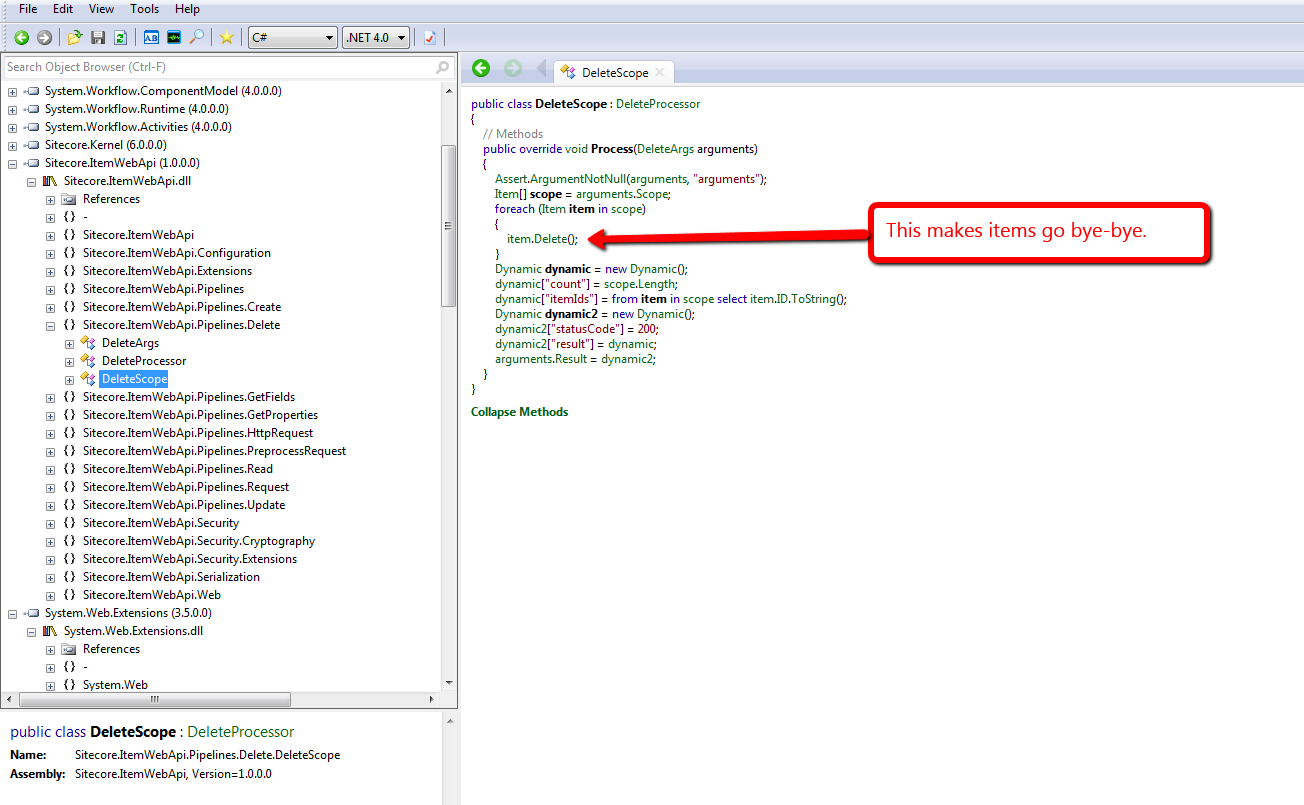
This above code lives in the only itemWebApiDelete pipeline processor that comes with the Sitecore Item Web API, and this processor can be found at /configuration/sitecore/pipelines/itemWebApiDelete/processor[@type=”Sitecore.ItemWebApi.Pipelines.Delete.DeleteScope, Sitecore.ItemWebApi”] in the \App_Config\Include\Sitecore.ItemWebApi.config file.
I don’t know about you, but I’m not always comfortable with deleting items permanently in Sitecore. I heavily rely on Sitecore’s Recycle Bin — yes, I have deleted items erroneously in the past, but recovered quickly by restoring them from the Recycle Bin (I hope I’m not the only one who has done this. :-/)
Unearthing the above prompted me to write a new itemWebApiDelete pipeline processor that puts items in the Recycle Bin when the Recycle Bin setting — see /configuration/sitecore/settings/setting[@name=”RecycleBinActive”] in the Web.config — is enabled:
using System.Collections.Generic;
using System.Linq;

using Sitecore.Configuration;
using Sitecore.Data;
using Sitecore.Data.Items;
using Sitecore.Diagnostics;
using Sitecore.ItemWebApi;
using Sitecore.ItemWebApi.Pipelines.Delete;

namespace Sitecore.Sandbox.ItemWebApi.Pipelines.Delete
{
    public class RecycleScope : DeleteProcessor
    {
        private const int OKStatusCode = 200;

        public override void Process(DeleteArgs arguments)
        {
            Assert.ArgumentNotNull(arguments, "arguments");
            IEnumerable<Item> itemsToDelete = arguments.Scope;
            DeleteItems(itemsToDelete);
            arguments.Result = GetStatusInformation(OKStatusCode, GetDeletionInformation(itemsToDelete));
        }

        private static void DeleteItems(IEnumerable<Item> itemsToDelete)
        {
            foreach (Item itemToDelete in itemsToDelete)
            {
                DeleteItem(itemToDelete);
            }
        }

        private static void DeleteItem(Item itemToDelete)
        {
            Assert.ArgumentNotNull(itemToDelete, "itemToDelete");

            // put items in the recycle bin if it's turned on
            if (Settings.RecycleBinActive)
            {
                itemToDelete.Recycle();
            }
            else
            {
                itemToDelete.Delete();
            }
        }

        private static Dynamic GetDeletionInformation(IEnumerable<Item> itemsToDelete)
        {
            return GetDeletionInformation(itemsToDelete.Count(), GetItemIds(itemsToDelete));
        }

        private static Dynamic GetDeletionInformation(int count, IEnumerable<ID> itemIds)
        {
            Dynamic deletionInformation = new Dynamic();
            deletionInformation["count"] = count;
            deletionInformation["itemIds"] = itemIds.Select(id => id.ToString());
            return deletionInformation;
        }

        private static IEnumerable<ID> GetItemIds(IEnumerable<Item> items)
        {
            Assert.ArgumentNotNull(items, "items");
            return items.Select(item => item.ID);
        }

        private static Dynamic GetStatusInformation(int statusCode, Dynamic result)
        {
            Assert.ArgumentNotNull(result, "result");
            Dynamic status = new Dynamic();
            status["statusCode"] = statusCode;
            status["result"] = result;
            return status;
        }
    }
}
There really isn’t anything magical about the code above. It utilizes most of the same logic that comes with the itemWebApiDelete pipeline processor that ships with the Sitecore Item Web API, although I did move code around into new methods.
The only major difference is the invocation of the Recycle method on item instances when the Recycle Bin is enabled in Sitecore. If the Recycle Bin is not enabled, we call the Delete method instead — as does the “out of the box” pipeline processor.
I then replaced the existing itemWebApiDelete pipeline processor in \App_Config\Include\Sitecore.ItemWebApi.config with our new one defined above:
<?xml version="1.0" encoding="utf-8"?>
<configuration xmlns:patch="http://www.sitecore.net/xmlconfig/">
  <sitecore>
    <pipelines>
      <!-- stuff is defined up here -->
      <itemWebApiDelete>
        <processor type="Sitecore.Sandbox.ItemWebApi.Pipelines.Delete.RecycleScope, Sitecore.Sandbox" />
	  </itemWebApiDelete>
      <!-- there's more stuff defined down here -->
  </sitecore>
</configuration>
Let’s see this in action.
We first need a test item. Let’s create one together:

I then tweaked the delete method in my copy of the console application written by Kern Herskind Nightingale, Director of Technical Services at Sitecore UK, to point to our test item in the master database — I have omitted this code for the sake of brevity — and then ran the console application calling the delete method only:

As you can see, our test item is now in the Recycle Bin:

If you have any thoughts on this, please leave a comment.
Add Additional Item Properties in Sitecore Item Web API Responses
The other day I was exploring pipelines of the Sitecore Item Web API, and took note of the itemWebApiGetProperties pipeline. This pipeline adds information about an item in the response returned by the Sitecore Item Web API. You can find this pipeline at /configuration/sitecore/pipelines/itemWebApiGetProperties in \App_Config\Include\Sitecore.ItemWebApi.config.
The following properties are set for an item in the response via the lonely pipeline processor — /configuration/sitecore/pipelines/itemWebApiGetProperties/processor[@type=”Sitecore.ItemWebApi.Pipelines.GetProperties.GetProperties, Sitecore.ItemWebApi”] — that ships with the Sitecore Item Web API:

Here’s an example of what the properties set by the above pipeline processor look like in the response — I invoked a read request to the Sitecore Item Web API via a copy of the console application written by Kern Herskind Nightingale, Director of Technical Services at Sitecore UK:

You might be asking “how difficult would it be to add in my own properties?” It’s not difficult at all!
I whipped up the following itemWebApiGetProperties pipeline processor to show how one can add more properties for an item:
using Sitecore.Data.Items;
using Sitecore.Diagnostics;
using Sitecore.ItemWebApi;
using Sitecore.ItemWebApi.Pipelines.GetProperties;

namespace Sitecore.Sandbox.ItemWebApi.Pipelines.GetProperties
{
    public class GetEvenMoreProperties : GetPropertiesProcessor
    {
        public override void Process(GetPropertiesArgs arguments)
        {
            Assert.ArgumentNotNull(arguments, "arguments");
            arguments.Properties.Add("ParentID", arguments.Item.ParentID.ToString());
            arguments.Properties.Add("ChildrenCount", arguments.Item.Children.Count);
            arguments.Properties.Add("Level", arguments.Item.Axes.Level);
            arguments.Properties.Add("IsItemClone", arguments.Item.IsItemClone);
            arguments.Properties.Add("CreatedBy", arguments.Item["__Created by"]);
            arguments.Properties.Add("UpdatedBy", GetItemUpdatedBy(arguments.Item));
        }

        private static Dynamic GetItemUpdatedBy(Item item)
        {
            Assert.ArgumentNotNull(item, "item");
            string[] usernamePieces = item["__Updated by"].Split('\\');

            Dynamic username = new Dynamic();
            if (usernamePieces.Length > 1)
            {
                username["Domain"] = usernamePieces[0];
                username["Username"] = usernamePieces[1];
            }
            else if (usernamePieces.Length > 0)
            {
                username["Username"] = usernamePieces[0];
            }

            return username;
        }
    }
}
The ParentID, ChildrenCount, Level and IsItemClone properties are simply added to the properties SortedDictionary within the GetPropertiesArgs instance, and will be serialized as is.
For the UpdatedBy property, I decided to leverage the Sitecore.ItemWebApi.Dynamic class in order to have the username set in the “__Updated by” field be represented by a JSON object. This JSON object sets the domain and username — without the domain — into different JSON properties.
As a side note — when writing your own service code for the Sitecore Item Web API — I strongly recommend using instances of the Sitecore.ItemWebApi.Dynamic class — or something similar — for complex objects. Developers writing code to consume your JSON will thank you many times for it. 🙂
I registered my new processor to the itemWebApiGetProperties pipeline in my Sitecore instance’s \App_Config\Include\Sitecore.ItemWebApi.config:
<?xml version="1.0" encoding="utf-8"?>
<configuration xmlns:patch="http://www.sitecore.net/xmlconfig/">
  <sitecore>
    <pipelines>
      <!-- there's stuff here -->
      <itemWebApiGetProperties>
        <processor type="Sitecore.ItemWebApi.Pipelines.GetProperties.GetProperties, Sitecore.ItemWebApi" />
        <processor type="Sitecore.Sandbox.ItemWebApi.Pipelines.GetProperties.GetEvenMoreProperties, Sitecore.Sandbox" />
      </itemWebApiGetProperties>
      <!-- there's stuff here as well -->
  </sitecore>
</configuration>
Let’s take this for a spin.
I ran the console application again to see what the response now looks like:

As you can see, our additional properties are now included in the response.
If you can think of other item properties that would be useful for Sitecore Item Web API client applications, please share in a comment.
Until next time, have a Sitecorelicious day!
Tailor Sitecore Item Web API Field Values On Read
Last week Sitecore MVP Kamruz Jaman asked me in this tweet if I could answer this question on Stack Overflow.
The person asking the question wanted to know why alt text for images aren’t returned in responses from the Sitecore Item Web API, and was curious if it were possible to include these.
After digging around the Sitecore.ItemWebApi.dll and my local copy of /App_Config/Include/Sitecore.ItemWebApi.config — this config file defines a bunch of pipelines and their processors that can be augmented or overridden — I learned field values are returned via logic in the Sitecore.ItemWebApi.Pipelines.Read.GetResult class, which is exposed in /configuration/sitecore/pipelines/itemWebApiRead/processor[@type=”Sitecore.ItemWebApi.Pipelines.Read.GetResult, Sitecore.ItemWebApi”] in /App_Config/Include/Sitecore.ItemWebApi.config:

This is an example of a raw value for an image field — it does not include the alt text for the image:
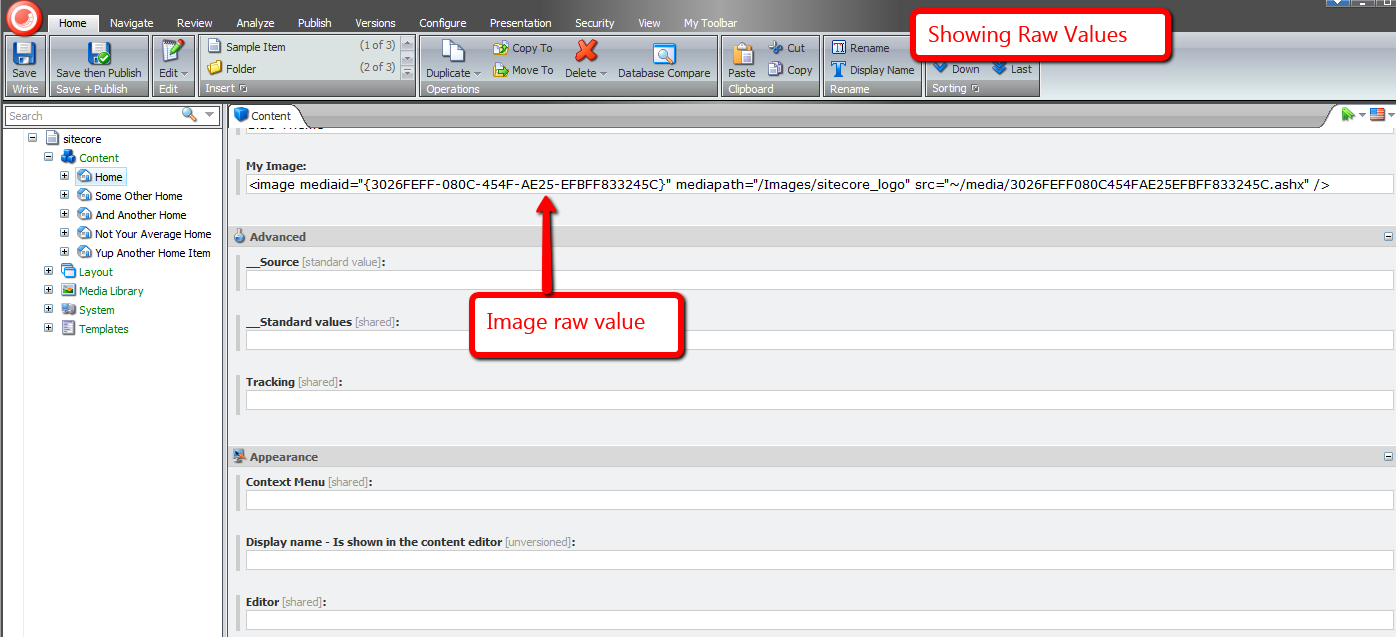
I spun up a copy of the console application written by Kern Herskind Nightingale — Director of Technical Services at Sitecore UK — to show the value returned by the above pipeline processor for an image field:

The Sitecore.ItemWebApi.Pipelines.Read.GetResult class exposes a virtual method hook — the protected method GetFieldInfo() — that allows custom code to change a field’s value before it is returned.
I wrote the following class as an example for changing an image field’s value:
using System;
using System.IO;
using System.Web;
using System.Web.UI;

using Sitecore.Data.Fields;
using Sitecore.Data.Items;
using Sitecore.Diagnostics;
using Sitecore.ItemWebApi;
using Sitecore.ItemWebApi.Pipelines.Read;
using Sitecore.Web.UI.WebControls;

using HtmlAgilityPack;

namespace Sitecore.Sandbox.ItemWebApi.Pipelines.Read
{
    public class EnsureImageFieldAltText : GetResult
    {
        protected override Dynamic GetFieldInfo(Field field)
        {
            Assert.ArgumentNotNull(field, "field");
            Dynamic dynamic = base.GetFieldInfo(field);
            AddAltTextForImageField(dynamic, field);
            return dynamic;
        }

        private static void AddAltTextForImageField(Dynamic dynamic, Field field)
        {
            Assert.ArgumentNotNull(dynamic, "dynamic");
            Assert.ArgumentNotNull(field, "field");

            if(IsImageField(field))
            {
                dynamic["Value"] = AddAltTextToImages(field.Value, GetAltText(field));
            }
        }

        private static string AddAltTextToImages(string imagesXml, string altText)
        {
            if (string.IsNullOrWhiteSpace(imagesXml) || string.IsNullOrWhiteSpace(altText))
            {
                return imagesXml;
            }

            HtmlDocument htmlDocument = new HtmlDocument();
            htmlDocument.LoadHtml(imagesXml);
            HtmlNodeCollection images = htmlDocument.DocumentNode.SelectNodes("//image");
            foreach (HtmlNode image in images)
            {
                if (image.Attributes["src"] != null)
                {
                    image.SetAttributeValue("src", GetAbsoluteUrl(image.GetAttributeValue("src", string.Empty)));
                }

                image.SetAttributeValue("alt", altText);
            }

            return htmlDocument.DocumentNode.InnerHtml;
        }

        private static string GetAbsoluteUrl(string url)
        {
            Assert.ArgumentNotNullOrEmpty(url, "url");
            Uri uri = HttpContext.Current.Request.Url;

            if (url.StartsWith(uri.Scheme))
            {
                return url;
            }

            string port = string.Empty;

            if (uri.Port != 80)
            {
                port = string.Concat(":", uri.Port);
            }

            return string.Format("{0}://{1}{2}/~{3}", uri.Scheme, uri.Host, port, VirtualPathUtility.ToAbsolute(url));
        }

        private static string GetAltText(Field field)
        {
            Assert.ArgumentNotNull(field, "field");
            if (IsImageField(field))
            {
                ImageField imageField = field;
                if (imageField != null)
                {
                    return imageField.Alt;
                }
            }

            return string.Empty;
        }

        private static bool IsImageField(Field field)
        {
            Assert.ArgumentNotNull(field, "field");
            return field.Type == "Image";
        }
    }
}
The class above — with the help of the Sitecore.Data.Fields.ImageField class — gets the alt text for the image, and adds a new alt XML attribute to the XML before it is returned.
The class also changes the relative url defined in the src attribute in to be an absolute url.
I then swapped out /configuration/sitecore/pipelines/itemWebApiRead/processor[@type=”Sitecore.ItemWebApi.Pipelines.Read.GetResult, Sitecore.ItemWebApi”] with the class above in /App_Config/Include/Sitecore.ItemWebApi.config:
<?xml version="1.0" encoding="utf-8"?>
<configuration xmlns:patch="http://www.sitecore.net/xmlconfig/">
  <sitecore>
    <pipelines>
      <!-- Lots of stuff here -->
      <!-- Handles the item read operation. -->
		<itemWebApiRead>
			<processor type="Sitecore.Sandbox.ItemWebApi.Pipelines.Read.EnsureImageFieldAltText, Sitecore.Sandbox" />
		</itemWebApiRead>
		  <!--Lots of stuff here too -->

    </pipelines>
	<!-- Even more stuff here -->
  </sitecore>
</configuration>
I then reran the console application to see what the XML now looks like, and as you can see the new alt attribute was added:

You might be thinking “Mike, image field XML values are great in Sitecore’s Content Editor, but client code consuming this data might have trouble with it. Is there anyway to have HTML be returned instead of XML?
You bet!
The following subclass of Sitecore.ItemWebApi.Pipelines.Read.GetResult returns HTML, not XML:
using System;
using System.IO;
using System.Web;
using System.Web.UI;

using Sitecore.Data.Fields;
using Sitecore.Data.Items;
using Sitecore.Diagnostics;
using Sitecore.ItemWebApi;
using Sitecore.ItemWebApi.Pipelines.Read;
using Sitecore.Web.UI.WebControls;

using HtmlAgilityPack;

namespace Sitecore.Sandbox.ItemWebApi.Pipelines.Read
{
    public class TailorFieldValue : GetResult
    {
        protected override Dynamic GetFieldInfo(Field field)
        {
            Assert.ArgumentNotNull(field, "field");
            Dynamic dynamic = base.GetFieldInfo(field);
            TailorValueForImageField(dynamic, field);
            return dynamic;
        }

        private static void TailorValueForImageField(Dynamic dynamic, Field field)
        {
            Assert.ArgumentNotNull(dynamic, "dynamic");
            Assert.ArgumentNotNull(field, "field");

            if (field.Type == "Image")
            {
                dynamic["Value"] = SetAbsoluteUrlsOnImages(GetImageHtml(field));
            }
        }

        private static string SetAbsoluteUrlsOnImages(string html)
        {
            if (string.IsNullOrWhiteSpace(html))
            {
                return html;
            }

            HtmlDocument htmlDocument = new HtmlDocument();
            htmlDocument.LoadHtml(html);
            HtmlNodeCollection images = htmlDocument.DocumentNode.SelectNodes("//img");
            foreach (HtmlNode image in images)
            {
                if (image.Attributes["src"] != null)
                {
                    image.SetAttributeValue("src", GetAbsoluteUrl(image.GetAttributeValue("src", string.Empty)));
                }
            }

            return htmlDocument.DocumentNode.InnerHtml;
        }

        private static string GetAbsoluteUrl(string url)
        {
            Assert.ArgumentNotNullOrEmpty(url, "url");
            Uri uri = HttpContext.Current.Request.Url;

            if (url.StartsWith(uri.Scheme))
            {
                return url;
            }

            string port = string.Empty;

            if (uri.Port != 80)
            {
                port = string.Concat(":", uri.Port);
            }

            return string.Format("{0}://{1}{2}{3}", uri.Scheme, uri.Host, port, VirtualPathUtility.ToAbsolute(url));
        }

        private static string GetImageHtml(Field field)
        {
            return GetImageHtml(field.Item, field.Name);
        }

        private static string GetImageHtml(Item item, string fieldName)
        {
            Assert.ArgumentNotNull(item, "item");
            Assert.ArgumentNotNullOrEmpty(fieldName, "fieldName");
            return RenderImageControlHtml(new Image { Item = item, Field = fieldName });
        }

        private static string RenderImageControlHtml(Image image)
        {
            Assert.ArgumentNotNull(image, "image");
            string html = string.Empty;

            using (TextWriter textWriter = new StringWriter())
            {
                using (HtmlTextWriter htmlTextWriter = new HtmlTextWriter(textWriter))
                {
                    image.RenderControl(htmlTextWriter);
                }

                html = textWriter.ToString();
            }

            return html;
        }
    }
}
The class above uses an instance of the Image field control (Sitecore.Web.UI.WebControls.Image) to do all the work for us around building the HTML for the image, and we also make sure the url within it is absolute — just as we had done above.
I then wired this up to my local Sitecore instance in /App_Config/Include/Sitecore.ItemWebApi.config:
<?xml version="1.0" encoding="utf-8"?>
<configuration xmlns:patch="http://www.sitecore.net/xmlconfig/">
  <sitecore>
    <pipelines>
      <!-- Lots of stuff here -->
      <!-- Handles the item read operation. -->
		<itemWebApiRead>
			<processor type="Sitecore.Sandbox.ItemWebApi.Pipelines.Read.TailorFieldValue, Sitecore.Sandbox" />
		</itemWebApiRead>
		  <!--Lots of stuff here too -->

    </pipelines>
	<!-- Even more stuff here -->
  </sitecore>
</configuration>
I then executed the console application, and was given back HTML for the image:

If you can think of other reasons for manipulating field values in subclasses of Sitecore.ItemWebApi.Pipelines.Read.GetResult, please drop a comment.
Addendum
Kieran Marron — a Lead Developer at Sitecore — wrote another Sitecore.ItemWebApi.Pipelines.Read.GetResult subclass example that returns an image’s alt text in the Sitecore Item Web API response via a new JSON property. Check it out!
Replace Proxies With Clones in the Sitecore CMS
The other day I stumbled upon a thread in the Sitecore Developer Network (SDN) forums that briefly touched upon replacing proxies with clones, and I wondered whether anyone had built any sort of tool that creates clones for items being proxied — basically a tool that would automate creating clones from proxies — and removes the proxies once the clones are in place.
Since I am not aware of such a tool — not to mention that I’m hooked on programming and just love coding — I decided to create one.
The following command is my attempt at such a tool:
using System;
using System.Linq;

using Sitecore.Configuration;
using Sitecore.Data.Items;
using Sitecore.Data.Proxies;
using Sitecore.Diagnostics;
using Sitecore.Shell.Framework.Commands;

namespace Sitecore.Sandbox.Commands
{
    public class TransformProxyToClones : Command
    {
        public override void Execute(CommandContext context)
        {
            Assert.ArgumentNotNull(context, "context");
            TransformProxyItemToClones(GetContextItem(context));
        }

        private static void TransformProxyItemToClones(Item item)
        {
            Assert.ArgumentNotNull(item, "item");
            if(!CanTransform(item))
            {
                return;
            }

            string proxyType = GetProxyType(item);
            Item source = GetItem(GetSourceItemFieldValue(item));
            Item target = GetItem(GetTargetItemFieldValue(item));

            if (AreEqualIgnoreCase(proxyType, "Entire sub-tree"))
            {
                DeleteItem(item);
                CloneEntireSubtree(source, target);
            }
            else if (AreEqualIgnoreCase(proxyType, "Root item only"))
            {
                DeleteItem(item);
                CloneRootOnly(source, target);
            }
        }

        private static void CloneEntireSubtree(Item source, Item destination)
        {
            Clone(source, destination, true);
        }

        private static void CloneRootOnly(Item root, Item destination)
        {
            Clone(root, destination, false);
        }

        private static Item Clone(Item cloneSource, Item cloneDestination, bool deep)
        {
            Assert.ArgumentNotNull(cloneSource, "cloneSource");
            Assert.ArgumentNotNull(cloneDestination, "cloneDestination");
            return cloneSource.CloneTo(cloneDestination, deep);
        }

        private static void DeleteItem(Item item)
        {
            Assert.ArgumentNotNull(item, "item");
            if (Settings.RecycleBinActive)
            {
                item.Recycle();
            }
            else
            {
                item.Delete();
            }
        }

        public override CommandState QueryState(CommandContext context)
        {
            Assert.ArgumentNotNull(context, "context");
            if (CanTransform(GetContextItem(context)))
            {
                return CommandState.Enabled;
            }

            return CommandState.Hidden;
        }

        private static Item GetContextItem(CommandContext context)
        {
            Assert.ArgumentNotNull(context, "context");
            return context.Items.FirstOrDefault();
        }

        private static bool CanTransform(Item item)
        {
            Assert.ArgumentNotNull(item, "item");
            return IsProxy(item)
                    && IsSourceDatabaseFieldEmpty(item)
                    && !string.IsNullOrWhiteSpace(GetProxyType(item))
                    && !string.IsNullOrWhiteSpace(GetSourceItemFieldValue(item))
                    && !string.IsNullOrWhiteSpace(GetTargetItemFieldValue(item));
        }

        private static bool IsProxy(Item item)
        {
            Assert.ArgumentNotNull(item, "item");
            return ProxyManager.IsProxy(item);
        }

        private static string GetProxyType(Item item)
        {
            Assert.ArgumentNotNull(item, "item");
            return item["Proxy type"];
        }

        private static bool IsSourceDatabaseFieldEmpty(Item item)
        {
            Assert.ArgumentNotNull(item, "item");
            return string.IsNullOrWhiteSpace(item["Source database"]);
        }

        private static string GetSourceItemFieldValue(Item item)
        {
            Assert.ArgumentNotNull(item, "item");
            return item["Source item"];
        }

        private static string GetTargetItemFieldValue(Item item)
        {
            Assert.ArgumentNotNull(item, "item");
            return item["Target item"];
        }

        private static Item GetItem(string path)
        {
            Assert.ArgumentNotNullOrEmpty(path, "path");
            return Context.ContentDatabase.GetItem(path);
        }

        private static bool AreEqualIgnoreCase(string one, string two)
        {
            return string.Equals(one, two, StringComparison.CurrentCultureIgnoreCase);
        }
    }
}
The above command is only visible for proxy items having both source and target items set, and the proxy is for the context content database.
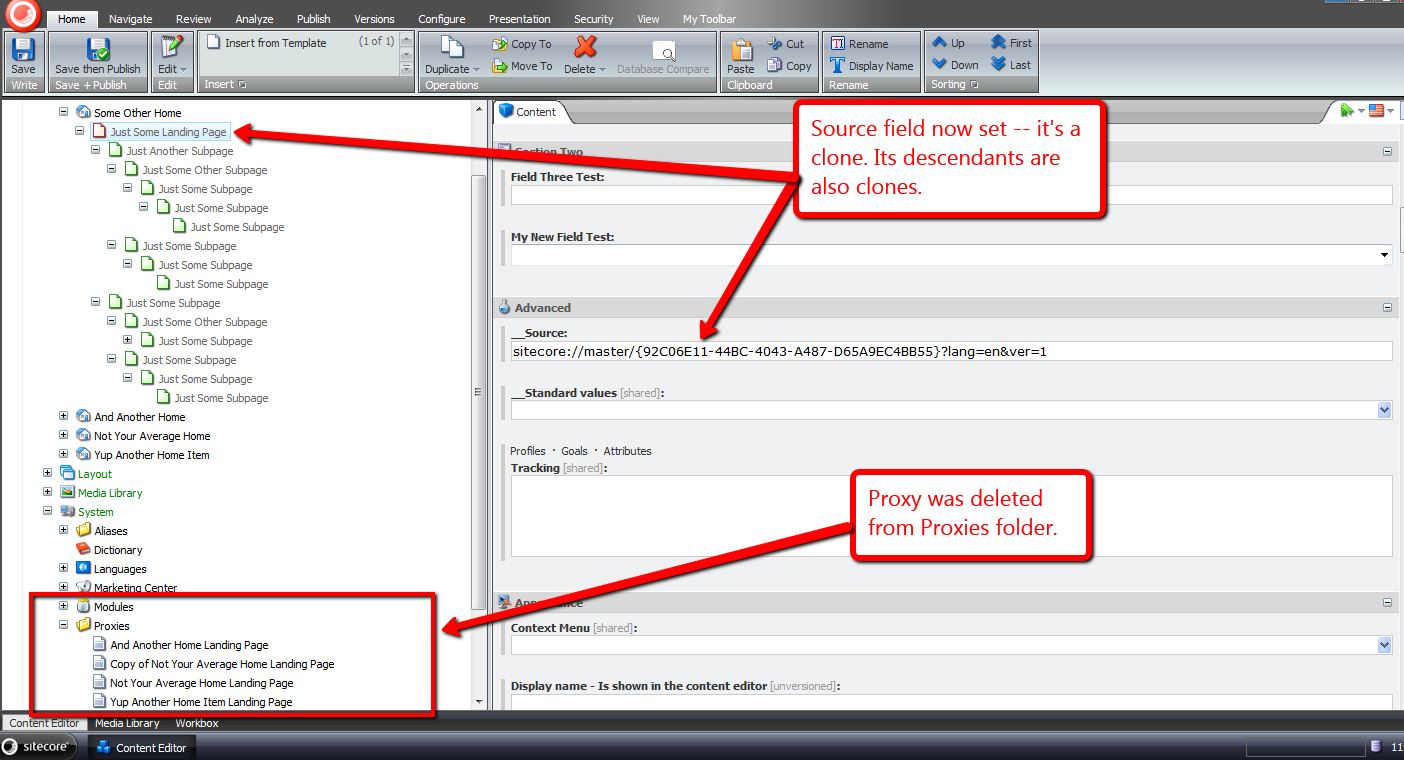
When the command is invoked, the source item — conjoined with its descendants if its sub-tree is also being proxied — is cloned to the target item, after the proxy definition item is deleted.
I registered the above command in Sitecore using an include configuration file:
<?xml version="1.0" encoding="utf-8" ?>
<configuration xmlns:patch="http://www.sitecore.net/xmlconfig/">
  <sitecore>
    <commands>
      <command name="item:transformproxytoclones" type="Sitecore.Sandbox.Commands.TransformProxyToClones, Sitecore.Sandbox"/>
    </commands>
  </sitecore>
</configuration>
I also wired this up in the core database for the item context menu (I’ve omitted a screenshot on how this is done; If you would like to see how this is done, please see part 1 and part 2 of my post showing how to add to the item context menu).
Let’s take this for a drive.
I created a bunch of items for testing:

I then created a proxy for these test items:

I then right-clicked on our test proxy item to launch its context menu, and then clicked on the “Transform Proxy To Clones” menu option:
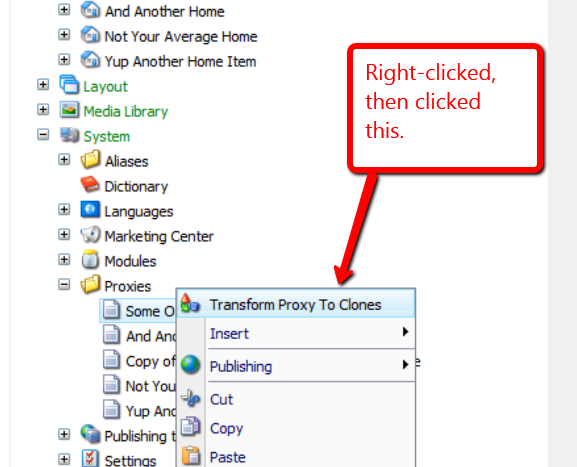
The proxy item was removed, and we now have clones:
If you can think of any other ideas around proxies or clones, or know of other tools that create clones from proxies, please leave a comment.
Display Content Management Server Information in the Sitecore CMS
The other day I cogitated over potential uses for the getAboutInformation pipeline. Found at /configuration/sitecore/pipelines/getAboutInformation in the Web.config, it can be leveraged to display information on the Sitecore login page, and inside of the About dialog — a dialog that can be launched from the Content Editor.
One thing that came to mind was displaying some information for the Content Management (CM) server where the Sitecore instance lives. Having this information readily available might aid in troubleshooting issues that arise, or seeing the name of the server might stop you from making content changes on the wrong CM server (I am guilty as charged for committing such a blunder in the past).
This post shows how I translated that idea into code.
The first thing we need is a way to get server information. I defined the following interface to describe information we might be interested in for a server:
namespace Sitecore.Sandbox.Utilities.Server.Base
{
    public interface IServer
    {
        string Name { get; }

        string Cpu { get; }

        string OperatingSystem { get; }
    }
}
We now need a class to implement the above interface. I stumbled upon a page whose author shared how one can acquire server information using classes defined in the System.Management namespace in .NET.
Using information from that page coupled with some experimentation, I came up with the following class:
using System.Collections.Generic;
using System.Linq;
using System.Management;

using Sitecore.Diagnostics;

using Sitecore.Sandbox.Utilities.Server.Base;

namespace Sitecore.Sandbox.Utilities.Server
{
    public class Server : IServer
    {
        private string _Name;
        public string Name
        {
            get
            {
                if (string.IsNullOrEmpty(_Name))
                {
                    _Name = GetServerName();
                }

                return _Name;
            }
        }

        private string _Cpu;
        public string Cpu
        {
            get
            {
                if (string.IsNullOrEmpty(_Cpu))
                {
                    _Cpu = GetCpuInformation();
                }

                return _Cpu;
            }
        }

        private string _OperatingSystem;
        public string OperatingSystem
        {
            get
            {
                if (string.IsNullOrEmpty(_OperatingSystem))
                {
                    _OperatingSystem = GetOperatingSystemName();
                }

                return _OperatingSystem;
            }
        }

        private Server()
        {
        }

        private static string GetServerName()
        {
            return GetFirstManagementBaseObjectPropertyFirstInnerProperty("Win32_ComputerSystem", "name");
        }

        private static string GetCpuInformation()
        {
            return GetFirstManagementBaseObjectPropertyFirstInnerProperty("Win32_Processor", "name");
        }

        private static string GetOperatingSystemName()
        {
            return GetFirstManagementBaseObjectPropertyFirstInnerProperty("Win32_OperatingSystem", "name");
        }

        private static string GetFirstManagementBaseObjectPropertyFirstInnerProperty(string key, string propertyName)
        {
            return GetFirstManagementBaseObjectPropertyInnerProperties(key, propertyName).FirstOrDefault();
        }

        private static IEnumerable<string> GetFirstManagementBaseObjectPropertyInnerProperties(string key, string propertyName)
        {
            return GetFirstManagementBaseObjectProperty(key, propertyName).Split('|');
        }

        private static string GetFirstManagementBaseObjectProperty(string key, string propertyName)
        {
            return GetFirstManagementBaseObject(key)[propertyName].ToString();
        }

        private static ManagementBaseObject GetFirstManagementBaseObject(string key)
        {
            Assert.ArgumentNotNullOrEmpty(key, "key");
            WqlObjectQuery query = new WqlObjectQuery(string.Format("select * from {0}", key));
            ManagementObjectSearcher searcher = new ManagementObjectSearcher(query);
            return searcher.Get().Cast<ManagementBaseObject>().FirstOrDefault();
        }

        public static IServer CreateNewServer()
        {
            return new Server();
        }
    }
}
The class above grabs server information via three separate ManagementObjectSearcher queries, one for each property defined in our IServer interface.
In order to use classes defined in the System.Management namespace, I had to reference System.Management in my project in Visual Studio:

Next, I created a class that contains methods that will serve as our getAboutInformation pipeline processors:
using System.Collections.Generic;

using Sitecore.Diagnostics;
using Sitecore.Pipelines.GetAboutInformation;

using Sitecore.Sandbox.Utilities.Server.Base;
using Sitecore.Sandbox.Utilities.Server;

namespace Sitecore.Sandbox.Pipelines.GetAboutInformation
{
    public class GetContentManagementServerInformation
    {
        private static readonly string CurrentServerInformationHtml = GetCurrentServerInformationHtml();

        public void SetLoginPageText(GetAboutInformationArgs args)
        {
            args.LoginPageText = CurrentServerInformationHtml;
        }

        public void SetAboutText(GetAboutInformationArgs args)
        {
            args.AboutText = CurrentServerInformationHtml;
        }

        private static string GetCurrentServerInformationHtml()
        {
            return GetServerInformationHtml(Server.CreateNewServer());
        }

        private static string GetServerInformationHtml(IServer server)
        {
            Assert.ArgumentNotNull(server, "server");
            IList<string> information = new List<string>();

            if (!string.IsNullOrEmpty(server.Name))
            {
                information.Add(string.Format("<strong>Server Name</strong>: {0}", server.Name));
            }

            if (!string.IsNullOrEmpty(server.Cpu))
            {
                information.Add(string.Format("<strong>CPU</strong>: {0}", server.Cpu));
            }

            if (!string.IsNullOrEmpty(server.OperatingSystem))
            {
                information.Add(string.Format("<strong>OS</strong>: {0}", server.OperatingSystem));
            }

            return string.Join("<br />", information);
        }
    }
}
Both methods set properties on the GetAboutInformationArgs instance using the same HTML generated by the GetServerInformationHtml method. This method is given an instance of the Server class defined above by the GetCurrentServerInformationHtml method.
I then connected all of the above into Sitecore via a configuration include file:
<?xml version="1.0" encoding="utf-8"?>
<configuration xmlns:patch="http://www.sitecore.net/xmlconfig/">
  <sitecore>
    <pipelines>
      <getAboutInformation>
        <processor type="Sitecore.Sandbox.Pipelines.GetAboutInformation.GetContentManagementServerInformation, Sitecore.Sandbox" method="SetLoginPageText" />
        <processor type="Sitecore.Sandbox.Pipelines.GetAboutInformation.GetContentManagementServerInformation, Sitecore.Sandbox" method="SetAboutText" />
      </getAboutInformation>
    </pipelines>
  </sitecore>
</configuration>
Let’s see this in action.
When hitting the Sitecore login page in my browser, I saw server information in the right sidebar, under the Sitecore version and revision numbers:

Next, I logged into Sitecore, opened the Content Editor, and launched the About dialog:

As you can see, my CM server information is also displayed here.
You might be questioning why I didn’t include more server information on both the login page and About dialog. One reason why I omitted displaying other properties is due to discovering that the login page area for showing the LoginPageText string does not grow vertically — I saw this when I did include a few more properties in addition to the three shown above.
Sadly, I did not see what would happen when including these additional properties in the the About dialog. Ascertaining whether it is possible to include more information in the About dialog is warranted, though I will leave that exercise for another day.
If you have any other thoughts or ideas for utilizing getAboutInformation pipeline processors, or other areas in Sitecore where server information might be useful, please drop a comment.
Automagically Clone New Child Items to Clones of Parent Items In the Sitecore CMS
“Out of the box”, content authors are prompted via a content editor warning to take action on clones of a source item when a new subitem is added under the source item:

Content authors have a choice to either clone or not clone the new subitem, and such an action must be repeated on all clones of the source item — such might be a daunting task, especially when there are multiple clones for a given source item.
In a recent project, I had a requirement to automatically clone newly added subitems under clones of their parents, and remove any content editor warnings by programmatically accepting the Sitecore notifications driving these warnings.
Although I cannot show you that solution, I did wake up from a sound sleep early this morning with another solution to this problem — it was quite a dream — and this post captures that idea.
In a previous post, I built a utility object that gathers things, and decided to reuse this basic concept. Here, I define a contract for what constitutes a general gatherer:
using System.Collections.Generic;

namespace Sitecore.Sandbox.Utilities.Gatherers.Base
{
    public interface IGatherer<T, U>
    {
        T Source { get; set; }

        IEnumerable<U> Gather();
    }
}
In this post, we will be gathering clones — these are Sitecore items:
using Sitecore.Data.Items;

namespace Sitecore.Sandbox.Utilities.Gatherers.Base
{
    public interface IItemsGatherer : IGatherer<Item, Item>
    {
    }
}
The following gatherer grabs all clones for a given item as they are cataloged in an instance of the LinkDatabase — in this solution we are using Globals.LinkDatabase as the default instance:
using System.Collections.Generic;
using System.Linq;

using Sitecore.Data.Items;
using Sitecore.Diagnostics;
using Sitecore.Links;

using Sitecore.Sandbox.Utilities.Gatherers.Base;

namespace Sitecore.Sandbox.Utilities.Gatherers
{
    public class ItemClonesGatherer : IItemsGatherer
    {
        private LinkDatabase LinkDatabase { get; set; }

        private Item _Source;
        public Item Source
        {
            get
            {
                return _Source;
            }
            set
            {
                Assert.ArgumentNotNull(value, "Source");
                _Source = value;
            }
        }

        private ItemClonesGatherer()
            : this(GetDefaultLinkDatabase())
        {
        }

        private ItemClonesGatherer(LinkDatabase linkDatabase)
        {
            SetLinkDatabase(linkDatabase);
        }

        private ItemClonesGatherer(LinkDatabase linkDatabase, Item source)
        {
            SetLinkDatabase(linkDatabase);
            SetSource(source);
        }

        private void SetLinkDatabase(LinkDatabase linkDatabase)
        {
            Assert.ArgumentNotNull(linkDatabase, "linkDatabase");
            LinkDatabase = linkDatabase;
        }

        private void SetSource(Item source)
        {
            Source = source;
        }

        public IEnumerable<Item> Gather()
        {
            return (from itemLink in GetReferrers()
                    where IsClonedItem(itemLink)
                    select itemLink.GetSourceItem()).ToList();
        }

        private IEnumerable<ItemLink> GetReferrers()
        {
            Assert.ArgumentNotNull(Source, "Source");
            return LinkDatabase.GetReferrers(Source);
        }

        private static bool IsClonedItem(ItemLink itemLink)
        {
            return IsSourceField(itemLink)
                    && !IsSourceItemNull(itemLink);
        }

        private static bool IsSourceField(ItemLink itemLink)
        {
            Assert.ArgumentNotNull(itemLink, "itemLink");
            return itemLink.SourceFieldID == FieldIDs.Source;
        }

        private static bool IsSourceItemNull(ItemLink itemLink)
        {
            Assert.ArgumentNotNull(itemLink, "itemLink");
            return itemLink.GetSourceItem() == null;
        }

        private static LinkDatabase GetDefaultLinkDatabase()
        {
            return Globals.LinkDatabase;
        }

        public static IItemsGatherer CreateNewItemClonesGatherer()
        {
            return new ItemClonesGatherer();
        }

        public static IItemsGatherer CreateNewItemClonesGatherer(LinkDatabase linkDatabase)
        {
            return new ItemClonesGatherer(linkDatabase);
        }

        public static IItemsGatherer CreateNewItemClonesGatherer(LinkDatabase linkDatabase, Item source)
        {
            return new ItemClonesGatherer(linkDatabase, source);
        }
    }
}
Next, we need a way to remove the content editor warning I alluded to above. The way to do this is to accept the notification that is triggered on the source item’s clones.
I decided to use the decorator pattern to accomplish this:
using Sitecore.Data.Clones;
using Sitecore.Data.Items;
using Sitecore.Diagnostics;

namespace Sitecore.Sandbox.Data.Clones
{
    public class AcceptAsIsNotification : Notification
    {
        private Notification InnerNotification { get; set; }

        private AcceptAsIsNotification(Notification innerNotification)
        {
            SetInnerNotification(innerNotification);
            SetProperties();
        }

        private void SetInnerNotification(Notification innerNotification)
        {
            Assert.ArgumentNotNull(innerNotification, "innerNotification");
            InnerNotification = innerNotification;
        }

        private void SetProperties()
        {
            ID = InnerNotification.ID;
            Processed = InnerNotification.Processed;
            Uri = InnerNotification.Uri;
        }

        public override void Accept(Item item)
        {
            base.Accept(item);
        }

        public override Notification Clone()
        {
            return InnerNotification.Clone();
        }

        public static Notification CreateNewAcceptAsIsNotification(Notification innerNotification)
        {
            return new AcceptAsIsNotification(innerNotification);
        }
    }
}
An instance of the above AcceptAsIsNotification class would wrap an instance of a notification, and accept the wrapped notification without any other action.
Notifications we care about in this solution are instances of Sitecore.Data.Clones.ChildCreatedNotification — in Sitecore.Kernel — for a given clone parent, and this notification clones a subitem during acceptance, a behavior we do not want to leverage since we have already cloned the subitem.
I then added an item:added event handler to use an instance of our gatherer defined above to get all clones of the newly added subitem’s parent; clone the subitem under these clones; and accept all instances of Sitecore.Data.Clones.ChildCreatedNotification on the parent item’s clones:
using System;
using System.Collections.Generic;
using System.Linq;

using Sitecore.Data;
using Sitecore.Data.Clones;
using Sitecore.Data.Items;
using Sitecore.Diagnostics;
using Sitecore.Events;

using Sitecore.Sandbox.Data.Clones;
using Sitecore.Sandbox.Utilities.Gatherers;
using Sitecore.Sandbox.Utilities.Gatherers.Base;

namespace Sitecore.Sandbox.Events.Handlers
{
    public class AutomagicallyCloneChildItemEventHandler
    {
        private static readonly IItemsGatherer ClonesGatherer = ItemClonesGatherer.CreateNewItemClonesGatherer();

        public void OnItemAdded(object sender, EventArgs args)
        {
            CloneItemIfApplicable(GetItem(args));
        }

        private static void CloneItemIfApplicable(Item item)
        {
            if (item == null)
            {
                return;
            }

            ChildCreatedNotification childCreatedNotification = CreateNewChildCreatedNotification();
            childCreatedNotification.ChildId = item.ID;
            IEnumerable<Item> clones = GetClones(item.Parent);
            foreach (Item clone in clones)
            {
                Item clonedChild = item.CloneTo(clone);
                RemoveChildCreatedNotifications(Context.ContentDatabase, clone);
            }
        }

        private static void RemoveChildCreatedNotifications(Database database, Item clone)
        {
            Assert.ArgumentNotNull(database, "database");
            Assert.ArgumentNotNull(clone, "clone");
            foreach (Notification notification in GetChildCreatedNotifications(database, clone))
            {
                AcceptNotificationAsIs(notification, clone);
            }
        }

        private static void AcceptNotificationAsIs(Notification notification, Item item)
        {
            Assert.ArgumentNotNull(notification, "notification");
            Assert.ArgumentNotNull(item, "item");
            Notification acceptAsIsNotification = AcceptAsIsNotification.CreateNewAcceptAsIsNotification(notification);
            acceptAsIsNotification.Accept(item);
        }

        private static IEnumerable<Notification> GetChildCreatedNotifications(Database database, Item clone)
        {
            Assert.ArgumentNotNull(database, "database");
            Assert.ArgumentNotNull(clone, "clone");
            return GetNotifications(database, clone).Where(notification => notification.GetType() == typeof(ChildCreatedNotification)).ToList();
        }
        private static IEnumerable<Notification> GetNotifications(Database database, Item clone)
        {
            Assert.ArgumentNotNull(database, "database");
            Assert.ArgumentNotNull(clone, "clone");
            return database.NotificationProvider.GetNotifications(clone);
        }

        private static IEnumerable<Item> GetClones(Item item)
        {
            ClonesGatherer.Source = item;
            return ClonesGatherer.Gather();
        }

        private static Item GetItem(EventArgs args)
        {
            return Event.ExtractParameter(args, 0) as Item;
        }

        private static ChildCreatedNotification CreateNewChildCreatedNotification()
        {
            return new ChildCreatedNotification();
        }
    }
}
I then plugged in the above in a patch include configuration file:
<?xml version="1.0" encoding="utf-8" ?>
<configuration>
  <sitecore>
    <events>
      <event name="item:added">
        <handler type="Sitecore.Sandbox.Events.Handlers.AutomagicallyCloneChildItemEventHandler, Sitecore.Sandbox" method="OnItemAdded"/>
      </event>
    </events>
  </sitecore>
</configuration>
Let’s try this out, and see how we did.
I created a new child item under my source item:

As you can see, clones were added under all clones of the source item.
Plus, the notification about a new child item being added under the source item is not present:

This notification was automatically accepted in code via an instance of AcceptAsIsNotification within the item:added event handler defined above.
If you can think of any other interesting ways to leverage Sitecore’s item cloning capabilities, please leave a comment.
Reuse Sitecore Data Template Fields by Pulling Them Up Into a Base Template
How many times have you discovered that you need to reuse some fields defined in a data template, but don’t want to use that data template as a base template since it defines a bunch of fields that you don’t want to use?
What do you usually do in such a situation?
In the past, I would have created a new data template, moved the fields I would like to reuse underneath it, followed by setting that new template as a base template on the data template I moved the fields from.
I’ve spoken with other Sitecore developers on what they do in this situation, and one developer conveyed he duplicates the template, and delete fields that are not to be reused — thus creating a new base template. Though this might save time, I would advise against it — any code referencing fields by IDs will break using this paradigm for creating a new base template.
Martin Fowler — in his book
Refactoring: Improving the Design of Existing Code — defined the refactoring technique ‘Pull Up Field’ for moving fields from a class up into its base class — dubbed superclass for the Java inclined audience.
One should employ this refactoring technique when other subclasses of the base class are to reuse the fields being pulled up.
When I first encountered this refactoring technique in Fowler’s book, I pondered over how useful this would be in the Sitecore data template world, and decided to build two tools for pulling up fields into a base template. One tool will create a new base template, and the other will allow users to move fields to an existing base template.
The following class defines methods that will be used by two new client pipelines I will define below:
using System;
using System.Collections.Generic;
using System.Linq;
using System.Text;

using Sitecore.Configuration;
using Sitecore.Data;
using Sitecore.Data.Items;
using Sitecore.Data.Managers;
using Sitecore.Data.Templates;
using Sitecore.Diagnostics;
using Sitecore.Shell.Applications.Dialogs.ItemLister;
using Sitecore.Shell.Framework;
using Sitecore.Text;
using Sitecore.Web;
using Sitecore.Web.UI.Sheer;

namespace Sitecore.Sandbox.Shell.Framework.Pipelines
{
    public class PullUpFieldsIntoBaseTemplate
    {
        private const char IDDelimiter = '|';
        private const string BaseTemplateFieldName = "__Base template";

        public void EnsureTemplate(ClientPipelineArgs args)
        {
            Item item = GetItem(args);
            if (!IsTemplate(item))
            {
                CancelOperation(args, "The supplied item is not a template!");
            }
        }

        private static bool IsTemplate(Item item)
        {
            Assert.ArgumentNotNull(item, "item");
            return TemplateManager.IsTemplate(item);
        }

        public void SelectFields(ClientPipelineArgs args)
        {
            Assert.ArgumentNotNull(args, "args");
            if (!args.IsPostBack)
            {
                UrlString urlString = new UrlString(UIUtil.GetUri("control:TreeListExEditor"));
                UrlHandle urlHandle = new UrlHandle();
                urlHandle["title"] = "Select Fields";
                urlHandle["text"] = "Select the fields to pull up into a base template.";
                urlHandle["source"] = GetSelectFieldsDialogSource(args);
                urlHandle.Add(urlString);
                SheerResponse.ShowModalDialog(urlString.ToString(), "800px", "500px", string.Empty, true);
                args.WaitForPostBack();
            }
            else if (args.HasResult)
            {
                args.Parameters["fieldIds"] = args.Result;
                args.IsPostBack = false;
            }
            else
            {
                CancelOperation(args);
            }
        }

        private static string GetSelectFieldsDialogSource(ClientPipelineArgs args)
        {
            Assert.ArgumentNotNull(args, "args");
            Assert.ArgumentNotNullOrEmpty(args.Parameters["database"], "args.Parameters[\"database\"]");
            Assert.ArgumentNotNullOrEmpty(args.Parameters["templateId"], "args.Parameters[\"templateId\"]");
            return string.Format
            (
                "AllowMultipleSelection=true&DatabaseName={0}&DataSource={1}&IncludeTemplatesForSelection=Template field",
                args.Parameters["database"],
                args.Parameters["templateId"]
            );
        }

        public void ChooseBaseTemplateName(ClientPipelineArgs args)
        {
            if (!args.IsPostBack)
            {
                SheerResponse.Input("Enter the name of the base template", string.Concat("New Base Template 1"));
                args.WaitForPostBack();
            }
            else if (args.HasResult)
            {
                args.Parameters["baseTemplateName"] = args.Result;
                args.IsPostBack = false;
            }
            else
            {
                CancelOperation(args);
            }
        }

        public void ChooseBaseTemplateLocation(ClientPipelineArgs args)
        {
            if (!args.IsPostBack)
            {
                Dialogs.BrowseItem
                (
                    "Select Base Template Location",
                    "Select the parent item under which the new base template will be created.",
                    args.Parameters["icon"],
                    "OK",
                    "/sitecore/templates",
                    args.Parameters["templateId"]
                );

                args.WaitForPostBack();
            }
            else if (args.HasResult)
            {
                args.Parameters["baseTemplateParentId"] = args.Result;
                args.IsPostBack = false;
            }
            else
            {
                CancelOperation(args);
            }
        }

        public void CreateNewBaseTemplate(ClientPipelineArgs args)
        {
            Database database = GetDatabase(args.Parameters["database"]);
            Item baseTemplateParent = database.GetItem(args.Parameters["baseTemplateParentId"]);
            Item baseTemplate = baseTemplateParent.Add(args.Parameters["baseTemplateName"], new TemplateID(TemplateIDs.Template));
            SetBaseTemplateField(baseTemplate, TemplateIDs.StandardTemplate);
            args.Parameters["baseTemplateId"] = baseTemplate.ID.ToString();
        }

        public void ChooseExistingBaseTemplate(ClientPipelineArgs args)
        {
            if (!args.IsPostBack)
            {
                ItemListerOptions itemListerOptions = new ItemListerOptions
                {
                    ButtonText = "OK",
                    Icon = args.Parameters["icon"],
                    Title = "Select Base Template",
                    Text = "Select the base template for pulling up the fields."
                };

                TemplateItem templateItem = GetItem(args);
                itemListerOptions.Items = ExcludeStandardTemplate(templateItem.BaseTemplates).Select(baseTemplate => baseTemplate.InnerItem).ToList();
                itemListerOptions.AddTemplate(TemplateIDs.Template);
                SheerResponse.ShowModalDialog(itemListerOptions.ToUrlString().ToString(), true);
                args.WaitForPostBack();
            }
            else if (args.HasResult)
            {
                args.Parameters["baseTemplateId"] = args.Result;
                args.IsPostBack = false;
            }
            else
            {
                CancelOperation(args);
            }
        }

        private static IEnumerable<TemplateItem> ExcludeStandardTemplate(IEnumerable<TemplateItem> baseTemplates)
        {
            if (baseTemplates != null && baseTemplates.Any())
            {
                return baseTemplates.Where(baseTemplate => baseTemplate.ID != TemplateIDs.StandardTemplate);
            }

            return baseTemplates;
        }

        public void EnsureCanCreateAtBaseTemplateLocation(ClientPipelineArgs args)
        {
            Item baseTemplateParent = GetItem(args.Parameters["database"], args.Parameters["baseTemplateParentId"]);
            if (!baseTemplateParent.Access.CanCreate())
            {
                CancelOperation(args, "You cannot create an item at the selected location!");
            }
        }

        public void Execute(ClientPipelineArgs args)
        {
            Database database = GetDatabase(args.Parameters["database"]);
            Item baseTemplate = database.GetItem(args.Parameters["baseTemplateId"]);
            SetBaseTemplateField(baseTemplate, TemplateIDs.StandardTemplate);
            IDictionary<SectionInformation, IList<Item>> sectionsWithFields = GetSectionsWithFields(database, args.Parameters["fieldIds"]);

            foreach (SectionInformation sectionInformation in sectionsWithFields.Keys)
            {
                IEnumerable<Item> fields = sectionsWithFields[sectionInformation];
                MoveFieldsToAppropriateSection(baseTemplate, sectionInformation, fields);
            }

            Item templateItem = database.GetItem(args.Parameters["templateId"]);
            ListString baseTemplateIDs = new ListString(templateItem[BaseTemplateFieldName], IDDelimiter);
            baseTemplateIDs.Add(baseTemplate.ID.ToString());
            SetBaseTemplateField(templateItem, baseTemplateIDs);
            Refresh(templateItem);
        }

        private static void MoveFieldsToAppropriateSection(Item baseTemplate, SectionInformation sectionInformation, IEnumerable<Item> fields)
        {
            TemplateItem templateItem = baseTemplate;
            TemplateSectionItem templateSectionItem = templateItem.GetSection(sectionInformation.Section.Name);

            if (templateSectionItem != null)
            {
                MoveFields(templateSectionItem, fields);
            }
            else
            {
                Item sectionItemCopy = sectionInformation.Section.CopyTo(baseTemplate, sectionInformation.Section.Name, ID.NewID, false);
                MoveFields(sectionItemCopy, fields);
            }

            if (!sectionInformation.Section.GetChildren().Any())
            {
                sectionInformation.Section.Delete();
            }
        }

        private static void MoveFields(TemplateSectionItem templateSectionItem, IEnumerable<Item> fields)
        {
            Assert.ArgumentNotNull(templateSectionItem, "templateSectionItem");
            Assert.ArgumentNotNull(fields, "fields");
            foreach (Item field in fields)
            {
                field.MoveTo(templateSectionItem.InnerItem);
            }
        }

        private static void SetBaseTemplateField(Item templateItem, object baseTemplateIds)
        {
            Assert.ArgumentNotNull(templateItem, "templateItem");
            templateItem.Editing.BeginEdit();
            templateItem[BaseTemplateFieldName] = EnsureDistinct(baseTemplateIds.ToString(), IDDelimiter);
            templateItem.Editing.EndEdit();
        }

        private static string EnsureDistinct(string strings, char delimiter)
        {
            return string.Join(delimiter.ToString(), EnsureDistinct(strings.ToString().Split(new[] { delimiter })));
        }

        private static IEnumerable<string> EnsureDistinct(IEnumerable<string> strings)
        {
            return strings.Distinct();
        }

        private static IDictionary<SectionInformation, IList<Item>> GetSectionsWithFields(Database database, string fieldIds)
        {
            IDictionary<SectionInformation, IList<Item>> sectionsWithFields = new Dictionary<SectionInformation, IList<Item>>();

            foreach (TemplateFieldItem field in GetFields(database, fieldIds))
            {
                SectionInformation sectionInformation = new SectionInformation(field.Section.InnerItem);
                if (sectionsWithFields.ContainsKey(sectionInformation))
                {
                    sectionsWithFields[sectionInformation].Add(field.InnerItem);
                }
                else
                {
                    sectionsWithFields.Add(sectionInformation, new List<Item>(new[] { field.InnerItem }));
                }
            }

            return sectionsWithFields;
        }

        private static IEnumerable<TemplateFieldItem> GetFields(Database database, string fieldIds)
        {
            ListString fieldIdsListString = new ListString(fieldIds, IDDelimiter);
            IList<TemplateFieldItem> fields = new List<TemplateFieldItem>();

            foreach (string fieldId in fieldIdsListString)
            {
                fields.Add(database.GetItem(fieldId));
            }

            return fields;
        }

        private static Item GetItem(ClientPipelineArgs args)
        {
            Assert.ArgumentNotNull(args, "args");
            Item item = GetItem(args.Parameters["database"], args.Parameters["templateId"]);
            Assert.IsNotNull(item, "Item cannot be null!");
            return item;
        }

        private static Item GetItem(string databaseName, string itemId)
        {
            Assert.ArgumentNotNullOrEmpty(databaseName, "databaseName");
            Assert.ArgumentNotNullOrEmpty(itemId, "itemId");
            ID id = GetID(itemId);
            Assert.IsTrue(!ID.IsNullOrEmpty(id), "itemId is not valid!");
            Database database = GetDatabase(databaseName);
            Assert.IsNotNull(database, "Database is not valid!");
            return database.GetItem(id);
        }

        private static ID GetID(string itemId)
        {
            ID id;
            if (ID.TryParse(itemId, out id))
            {
                return id;
            }

            return ID.Null;
        }

        private static Database GetDatabase(string databaseName)
        {
            Assert.ArgumentNotNullOrEmpty(databaseName, "databaseName");
            return Factory.GetDatabase(databaseName);
        }

        private static void CancelOperation(ClientPipelineArgs args)
        {
            Assert.ArgumentNotNull(args, "args");
            CancelOperation(args, "Operation has been cancelled!");
        }

        private static void CancelOperation(ClientPipelineArgs args, string alertMessage)
        {
            Assert.ArgumentNotNull(args, "args");

            if (!string.IsNullOrEmpty(alertMessage))
            {
                SheerResponse.Alert(alertMessage);
            }

            args.AbortPipeline();
        }

        private static void Refresh(Item item)
        {
            Assert.ArgumentNotNull(item, "item");
            Context.ClientPage.ClientResponse.Timer(string.Format("item:load(id={0})", item.ID), 1);
        }

        public class SectionInformation : IEquatable<SectionInformation>
        {
            public Item Section { get; set; }

            public SectionInformation(Item section)
            {
                Assert.ArgumentNotNull(section, "section");
                Section = section;
            }

            public override int GetHashCode()
            {
                return Section.ID.Guid.GetHashCode();
            }

            public override bool Equals(object other)
            {
                return Equals(other as SectionInformation);
            }

            public bool Equals(SectionInformation other)
            {
                return other != null
                        && Section.ID.Guid == Section.ID.Guid;
            }
        }
    }
}
This above class defines methods that will be used as pipeline processor steps to prompt users for input — via dialogs — needed for pulling up fields to a new or existing base template.
I then defined commands to launch the pipelines I will define later on. I employed the Template method pattern here — each subclass must define its icon path, and the client pipeline it depends on after being clicked:
using System.Collections.Specialized;
using System.Linq;

using Sitecore.Data.Items;
using Sitecore.Data.Managers;
using Sitecore.Diagnostics;
using Sitecore.Shell.Framework.Commands;

namespace Sitecore.Sandbox.Commands.Base
{
    public abstract class PullUpFieldsCommand : Command
    {
        public override void Execute(CommandContext context)
        {
            Assert.ArgumentNotNull(context, "context");
            Context.ClientPage.Start(GetPullUpFieldsClientPipelineName(), CreateNewParameters(GetItem(context)));
        }

        protected abstract string GetPullUpFieldsClientPipelineName();

        private NameValueCollection CreateNewParameters(Item templateItem)
        {
            return new NameValueCollection
            {
                {"icon", GetIcon()},
                {"database", templateItem.Database.Name},
                {"templateId", templateItem.ID.ToString()}
            };
        }

        protected abstract string GetIcon();

        public override CommandState QueryState(CommandContext context)
        {
            Assert.ArgumentNotNull(context, "context");
            if (ShouldEnable(GetItem(context)))
            {
                return CommandState.Enabled;
            }

            return CommandState.Hidden;
        }

        protected static Item GetItem(CommandContext context)
        {
            Assert.ArgumentNotNull(context, "context");
            Assert.ArgumentNotNull(context.Items, "context.Items");
            Assert.ArgumentCondition(context.Items.Any(), "context.Items", "At least one item must be present!");
            return context.Items.FirstOrDefault();
        }

        private static bool ShouldEnable(Item item)
        {
            return item != null && IsTemplate(item);
        }

        private static bool IsTemplate(Item item)
        {
            Assert.ArgumentNotNull(item, "item");
            return TemplateManager.IsTemplate(item);
        }
    }
}
The command for pulling up fields into a new base template:
using Sitecore.Sandbox.Commands.Base;

namespace Sitecore.Sandbox.Commands
{
    public class PullUpFieldsIntoNewBaseTemplate : PullUpFieldsCommand
    {
        protected override string GetIcon()
        {
            return "Business/32x32/up_plus.png";
        }

        protected override string GetPullUpFieldsClientPipelineName()
        {
            return "uiPullUpFieldsIntoNewBaseTemplate";
        }
    }
}
The command for pulling up fields into an existing base template — it will be visible only when the template has base templates, not including the Standard Template:
using System.Linq;

using Sitecore.Sandbox.Commands.Base;
using Sitecore.Data.Items;
using Sitecore.Diagnostics;

using Sitecore.Shell.Framework.Commands;

namespace Sitecore.Sandbox.Commands
{
    public class PullUpFieldsIntoExistingBaseTemplate : PullUpFieldsCommand
    {
        public override CommandState QueryState(CommandContext context)
        {
            Assert.ArgumentNotNull(context, "context");
            bool shouldEnabled = base.QueryState(context) == CommandState.Enabled
                                    && DoesTemplateHaveBaseTemplates(context);
            if (shouldEnabled)
            {
                return CommandState.Enabled;
            }

            return CommandState.Hidden;
        }

        private static bool DoesTemplateHaveBaseTemplates(CommandContext context)
        {
            Assert.ArgumentNotNull(context, "context");
            TemplateItem templateItem = GetItem(context);
            return templateItem.BaseTemplates.Count() > 1
                    || (templateItem.BaseTemplates.Any()
                            && templateItem.BaseTemplates.FirstOrDefault().ID != TemplateIDs.StandardTemplate);
        }

        protected override string GetIcon()
        {
            return "Business/32x32/up_minus.png";
        }

        protected override string GetPullUpFieldsClientPipelineName()
        {
            return "uiPullUpFieldsIntoExistingBaseTemplate";
        }
    }
}
I’ve omitted how I mapped these to context menu buttons in the core database. If you are unfamiliar with how this is done, please take a look at my first and second posts on augmenting the item context menu to see how this is done.
I registered my commands, and glued methods in the PullUpFieldsIntoBaseTemplate class together into two client pipelines in a configuration include file:
<?xml version="1.0"?>
<configuration xmlns:patch="http://www.sitecore.net/xmlconfig/">
  <sitecore>
    <commands>
      <command name="item:pullupfieldsintonewbasetemplate" type="Sitecore.Sandbox.Commands.PullUpFieldsIntoNewBaseTemplate,Sitecore.Sandbox"/>
      <command name="item:pullupfieldsintoexistingbasetemplate" type="Sitecore.Sandbox.Commands.PullUpFieldsIntoExistingBaseTemplate,Sitecore.Sandbox"/>
    </commands>
    <processors>
      <uiPullUpFieldsIntoNewBaseTemplate>
        <processor mode="on" type="Sitecore.Sandbox.Shell.Framework.Pipelines.PullUpFieldsIntoBaseTemplate,Sitecore.Sandbox" method="EnsureTemplate"/>
        <processor mode="on" type="Sitecore.Sandbox.Shell.Framework.Pipelines.PullUpFieldsIntoBaseTemplate,Sitecore.Sandbox" method="SelectFields"/>
        <processor mode="on" type="Sitecore.Sandbox.Shell.Framework.Pipelines.PullUpFieldsIntoBaseTemplate,Sitecore.Sandbox" method="ChooseBaseTemplateName"/>
        <processor mode="on" type="Sitecore.Sandbox.Shell.Framework.Pipelines.PullUpFieldsIntoBaseTemplate,Sitecore.Sandbox" method="ChooseBaseTemplateLocation"/>
        <processor mode="on" type="Sitecore.Sandbox.Shell.Framework.Pipelines.PullUpFieldsIntoBaseTemplate,Sitecore.Sandbox" method="EnsureCanCreateAtBaseTemplateLocation"/>
        <processor mode="on" type="Sitecore.Sandbox.Shell.Framework.Pipelines.PullUpFieldsIntoBaseTemplate,Sitecore.Sandbox" method="CreateNewBaseTemplate"/>
        <processor mode="on" type="Sitecore.Sandbox.Shell.Framework.Pipelines.PullUpFieldsIntoBaseTemplate,Sitecore.Sandbox" method="Execute"/>
      </uiPullUpFieldsIntoNewBaseTemplate>
      <uiPullUpFieldsIntoExistingBaseTemplate>
        <processor mode="on" type="Sitecore.Sandbox.Shell.Framework.Pipelines.PullUpFieldsIntoBaseTemplate,Sitecore.Sandbox" method="EnsureTemplate"/>
        <processor mode="on" type="Sitecore.Sandbox.Shell.Framework.Pipelines.PullUpFieldsIntoBaseTemplate,Sitecore.Sandbox" method="SelectFields"/>
        <processor mode="on" type="Sitecore.Sandbox.Shell.Framework.Pipelines.PullUpFieldsIntoBaseTemplate,Sitecore.Sandbox" method="ChooseExistingBaseTemplate"/>
        <processor mode="on" type="Sitecore.Sandbox.Shell.Framework.Pipelines.PullUpFieldsIntoBaseTemplate,Sitecore.Sandbox" method="Execute"/>
      </uiPullUpFieldsIntoExistingBaseTemplate>
    </processors>
  </sitecore>
</configuration>
The uiPullUpFieldsIntoNewBaseTemplate client pipeline contains processor steps to present the user with dialogs for pulling up fields into a new base template that is created during one of those steps.
The uiPullUpFieldsIntoExistingBaseTemplate pipeline prompts users to select a base template from the list of base templates set on the template.
Let’s see this in action.
I created a template with some fields for testing:

I right-clicked the on my Landing Page template to launch its context menu, and clicked on the ‘Pull Up Fields Into New Base Template’ context menu option:
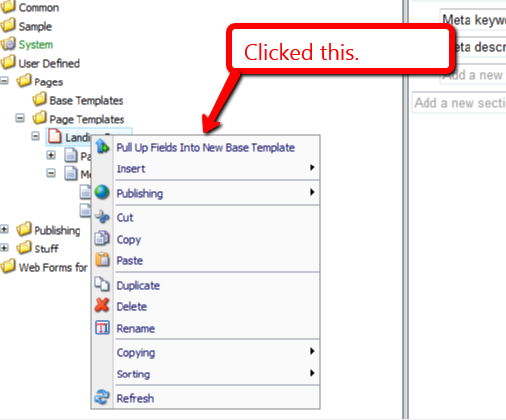
The following dialog was presented to me for selecting fields to pull up:

I clicked the ‘OK’ button, and was prompted to input a name for a new base template. I entered ‘Page Base’:

After clicking ‘OK’, I was asked to select the location where I want to store my new base template:
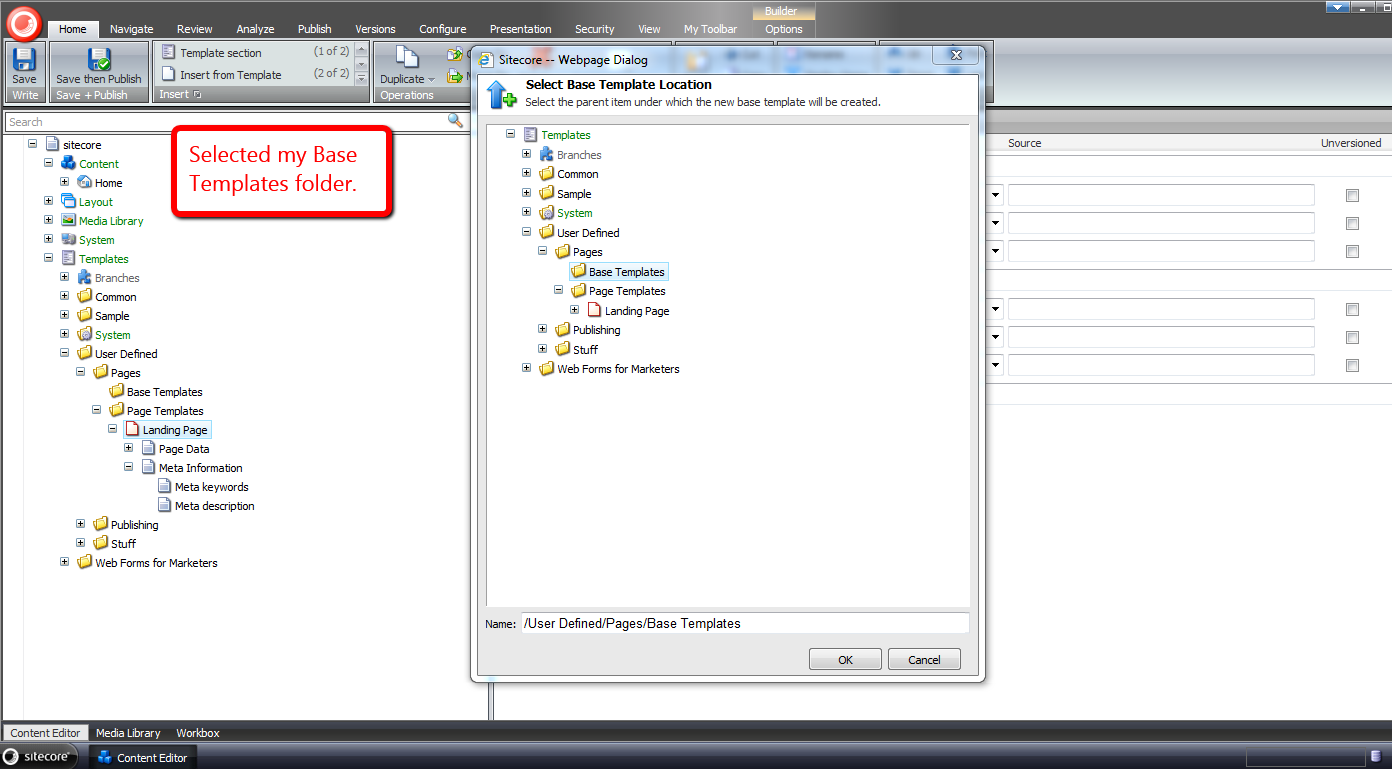
Not too long after clicking ‘OK’ again, I see that my new base template was created, and the Title field was moved into it:

Further, I see that my Landing Page template now has Page Base as one of its base templates:

I right-clicked again, and was presented with an additional context menu option to move fields into an existing base template — I clicked on this option:
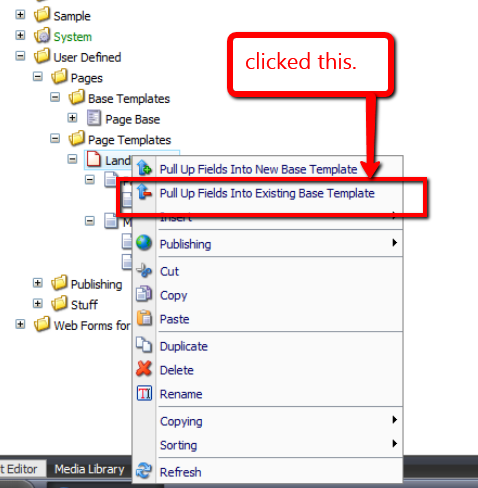
I then selected the remaining field under the Page Data section:

After clicking ‘OK’, a dialog presented me with a list of base templates to choose from — in this case there was only one base template to choose:
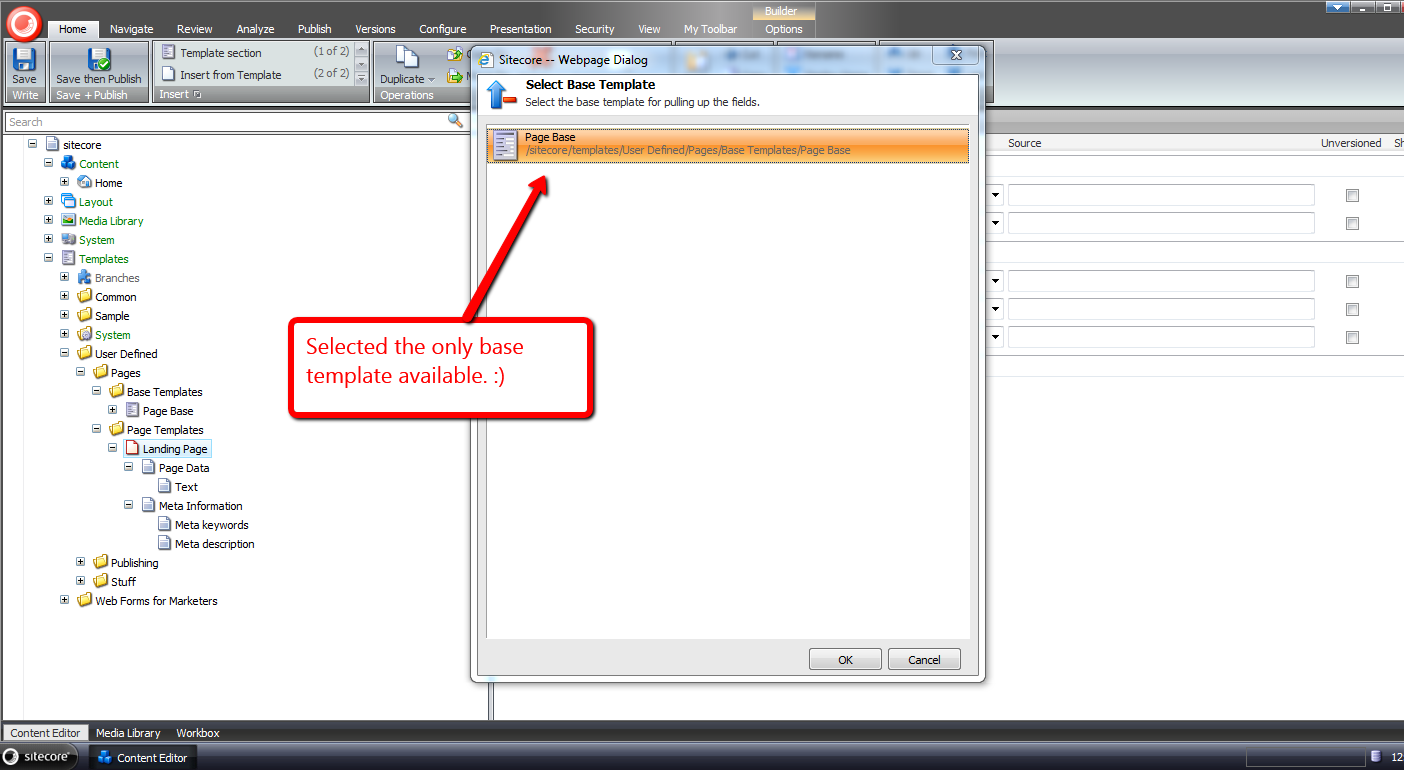
After clicking ‘OK’, I see that the Text field was moved into the Page Base template, and the Page Data section under my Landing Page template was removed:

I hope the above tools will save you time in pulling up fields into base templates.
If you can think of other development tools that would be useful in the Sitecore client, please drop a comment.
Addendum
I have put a polished version of the above onto the Sitecore Marketplace.
Copy Sitecore Item Field Values To Your Clipboard as JSON
With all the exciting things happening around json recently — the Sitecore Item Web API (check out this awesome presentation on the Sitecore Item Web API) and pasting JSON As classes in ASP.NET and Web Tools 2012.2 RC — I’ve been plagued by json on the brain.
For the past few weeks, I’ve been thinking about building a Sitecore client command that copies fields values from a Sitecore item into a string of json via the clipboard, though have been struggling with whether such a command has any utility.
Tonight, I decided to build such a command. Here is what I came up with.
using System;
using System.Collections.Generic;
using System.Linq;
using System.Text;

using Sitecore.Configuration;
using Sitecore.Data.Fields;
using Sitecore.Data.Items;
using Sitecore.Data.Managers;
using Sitecore.Data.Templates;
using Sitecore.Diagnostics;
using Sitecore.Shell.Framework.Commands;
using Sitecore.Web.UI.Sheer;

using Sitecore.Sandbox.Utilities.Serialization.Base;
using Sitecore.Sandbox.Utilities.Serialization;

namespace Sitecore.Sandbox.Commands
{
    public class CopyItemAsJsonToClipboard : ClipboardCommand
    {
        private const bool AlertIfClipboardCopyNotSupported = true;
        private static readonly CopyToClipboard CopyToClipboard = new CopyToClipboard();

        private Template _StandardTemplate;
        private Template StandardTemplate
        {
            get
            {
                if(_StandardTemplate == null)
                {
                    _StandardTemplate = GetStandardTemplate();
                }

                return _StandardTemplate;
            }
        }

        private static Template GetStandardTemplate()
        {
            return TemplateManager.GetTemplate(Settings.DefaultBaseTemplate, Context.ContentDatabase);
        }

        public override void Execute(CommandContext commandContext)
        {
            Assert.ArgumentNotNull(commandContext, "commandContext");

            if (IsSupported(AlertIfClipboardCopyNotSupported))
            {
                IEnumerable<Field> fields = GetNonStandardTemplateFields(commandContext);
                CopyToClipBoard(GetFieldsAsJson(fields));
            }
        }

        private static string GetFieldsAsJson(IEnumerable<Field> fields)
        {
            Assert.ArgumentNotNull(fields, "fields");
            IList<string> list = new List<string>();
            foreach(Field field in fields)
            {
                list.Add(string.Format("\"{0}\":\"{1}\"", field.Name, EscapeNewlines(field.Value)));
            }

            return string.Concat("{", string.Join(",", list), "}");
        }

        private static string EscapeNewlines(string value)
        {
            Assert.ArgumentNotNull(value, "value");
            return ReplaceSubstrings
            (
                value,
                new KeyValuePair<string, string>[]
                {
                    new KeyValuePair<string, string>("\n", "\\n"),
                    new KeyValuePair<string, string>("\r", "\\r")
                }
            );
        }

        private static string ReplaceSubstrings(string source, IEnumerable<KeyValuePair<string, string>> oldNewValues)
        {
            Assert.ArgumentNotNull(source, "source");
            Assert.ArgumentNotNull(oldNewValues, "oldNewValues");
            foreach (KeyValuePair<string, string> oldNewValue in oldNewValues)
            {
                source = source.Replace(oldNewValue.Key, oldNewValue.Value);
            }

            return source;
        }

        private IEnumerable<Field> GetNonStandardTemplateFields(CommandContext commandContext)
        {
            return GetNonStandardTemplateFields(GetItemWithAllFields(commandContext));
        }

        private IEnumerable<Field> GetNonStandardTemplateFields(Item item)
        {
            Assert.ArgumentNotNull(item, "item");
            return GetNonStandardTemplateFields(item.Fields);
        }

        private IEnumerable<Field> GetNonStandardTemplateFields(IEnumerable<Field> fields)
        {
            Assert.ArgumentNotNull(fields, "fields");
            return fields.Where(field => !IsStandardTemplateField(field));
        }

        private static void CopyToClipBoard(string json)
        {
            if(!string.IsNullOrEmpty(json))
            {
                SheerResponse.Eval(GetCopyToClipBoardJavascript(json));
            }
        }

        private static string GetCopyToClipBoardJavascript(string json)
        {
            Assert.ArgumentNotNullOrEmpty(json, "json");
            return string.Format("window.clipboardData.setData('Text', '{0}')", json);
        }

        public override CommandState QueryState(CommandContext commandContext)
        {
            Assert.ArgumentNotNull(commandContext, "commandContext");
            Item item = GetItemWithAllFields(commandContext);
            bool makeEnabled = CopyToClipboard.QueryState(commandContext) == CommandState.Enabled && HasFields(item);

            if (makeEnabled)
            {
                return CommandState.Enabled;
            }

            return CommandState.Disabled;
        }

        private static bool HasFields(Item item)
        {
            Assert.ArgumentNotNull(item, "item");
            return item.Fields.Any();
        }

        private static Item GetItemWithAllFields(CommandContext commandContext)
        {
            Assert.ArgumentNotNull(commandContext, "commandContext");
            Item item = GetItem(commandContext);

            if (item != null)
            {
                item.Fields.ReadAll();
            }

            return item;
        }

        public bool IsStandardTemplateField(Field field)
        {
            Assert.ArgumentNotNull(StandardTemplate, "StandardTemplate");
            return StandardTemplate.ContainsField(field.ID);
        }

        private static Item GetItem(CommandContext commandContext)
        {
            Assert.ArgumentNotNull(commandContext, "commandContext");
            Assert.ArgumentNotNull(commandContext.Items, "commandContext.Items");
            Assert.ArgumentCondition(commandContext.Items.Any(), "commandContext.Items", "There must be at least one item in the array!");
            return commandContext.Items.FirstOrDefault();
        }
    }
}
The command above iterates over all fields on the selected item — not including those that are defined in the Standard Template — and builds a string of json containing field names accompanied by their values.
I found this article by John West to be extremely helpful in writing the code above to determine if a field belongs to the Standard Template — this is used when leaving out these fields in our resulting json string.
Further, the command is only enabled when the selected item has fields coupled with the CommandState returned by a call to the QueryState() method on an instance of Sitecore.Shell.Framework.Commands.CopyToClipboard — this object’s QueryState() method checks things we care about, and I wanted to leverage its logic.
I then mapped the command above in a patch include file:
<?xml version="1.0" encoding="utf-8" ?>
<configuration>
  <sitecore>
    <commands>
      <command name="item:copyitemasjsontoclipboard" type="Sitecore.Sandbox.Commands.CopyItemAsJsonToClipboard,Sitecore.Sandbox"/>
    </commands>
  </sitecore>
</configuration>
Now that we have our command, let’s create an item context menu option for it:

Let’s see this thing in action.
I created an item for testing:

I right-clicked on our new item to launch its context menu, and then clicked on the ‘Copy As Json’ menu option:

I pasted the following from my clipboard into Notepad++:
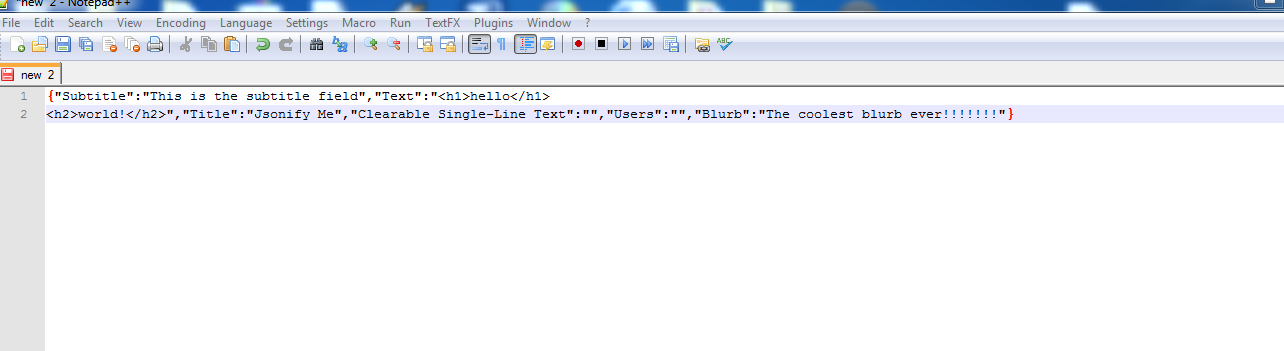
If you can think how this, or something similar could be useful, please drop a comment.
 SitecoreJunkie.com