Home » Directories
Category Archives: Directories
Abstract Out Sitecore FileWatcher Logic Which Monitors Rendering Files on the File System
While digging through code of Sitecore.IO.FileWatcher subclasses this weekend, I noticed a lot of code similarities between the LayoutWatcher and XslWatcher classes, and thought it might be a good idea to abstract this logic out into a new base abstract class so that future FileWatchers which monitor other renderings on the file system can easily be added without having to write much logic.
Before I move forward on how I did this, let me explain what the LayoutWatcher FileWatcher does. The LayoutWatcher FileWatcher clears the html cache of all websites defined in Sitecore when it determines that a layout file (a.k.a .aspx) or sublayout file (a.k.a .ascx) has been changed, deleted, renamed or added.
Likewise, the XslWatcher FileWatcher does the same thing for XSLT renderings but also clears the XSL cache along with the html cache.
Ok, now back to the abstraction. I came up with the following class to serve as the base class for any FileWatcher that will monitor renderings that live on the file system:
using System;
using System.Collections.Generic;
using System.Linq;

using Sitecore.Configuration;
using Sitecore.Diagnostics;
using Sitecore.IO;
using Sitecore.Web;

namespace Sitecore.Sandbox.IO.Watchers
{
    public abstract class RenderingFileWatcher : FileWatcher
    {
        private string RenderingFileModifiedMessage { get; set; }

        private string RenderingFileDeletedMessage { get; set; }

        private string RenderingFileRenamedMessage { get; set; }

        private string FileWatcherErrorMessage { get; set; }

        private object Owner { get; set; }

        public RenderingFileWatcher(string configPath)
            : base(configPath)
        {
            SetMessages();
        }

        private void SetMessages()
        {
            string modifiedMessage = GetRenderingFileModifiedMessage();
            AssertNotNullOrWhiteSpace(modifiedMessage, "modifiedMessage", "GetRenderingFileModifiedMessage() cannot return null, empty or whitespace!");
            RenderingFileModifiedMessage = modifiedMessage;

            string deletedMessage = GetRenderingFileDeletedMessage();
            AssertNotNullOrWhiteSpace(deletedMessage, "deletedMessage", "GetRenderingFileDeletedMessage() cannot return null, empty or whitespace!");
            RenderingFileDeletedMessage = deletedMessage;

            string renamedMessage = GetRenderingFileRenamedMessage();
            AssertNotNullOrWhiteSpace(renamedMessage, "renamedMessage", "GetRenderingFileRenamedMessage() cannot return null, empty or whitespace!");
            RenderingFileRenamedMessage = renamedMessage;

            string errorMessage = GetFileWatcherErrorMessage();
            AssertNotNullOrWhiteSpace(errorMessage, "errorMessage", "GetFileWatcherErrorMessage() cannot return null, empty or whitespace!");
            FileWatcherErrorMessage = errorMessage;

            object owner = GetOwner();
            Assert.IsNotNull(owner, "GetOwner() cannot return null!");
            Owner = owner;
        }

        protected abstract string GetRenderingFileModifiedMessage();

        protected abstract string GetRenderingFileDeletedMessage();

        protected abstract string GetRenderingFileRenamedMessage();

        protected abstract string GetFileWatcherErrorMessage();

        protected abstract object GetOwner();

        private void AssertNotNullOrWhiteSpace(string argument, string argumentName, string errorMessage)
        {
            Assert.ArgumentCondition(!string.IsNullOrWhiteSpace(argument), argumentName, errorMessage);
        }

        protected override void Created(string fullPath)
        {
            try
            {
                Log.Info(string.Format("{0}: {1}", RenderingFileModifiedMessage, fullPath), Owner);
                ClearCaches();
            }
            catch (Exception ex)
            {
                Log.Error(FileWatcherErrorMessage, ex, Owner);
            }
        }

        protected override void Deleted(string filePath)
        {
            try
            {
                Log.Info(string.Format("{0}: {1}", RenderingFileDeletedMessage, filePath), Owner);
                ClearCaches();
            }
            catch (Exception ex)
            {
                Log.Error(FileWatcherErrorMessage, ex, Owner);
            }
        }

        protected override void Renamed(string filePath, string oldFilePath)
        {
            try
            {
                Log.Info(string.Format("{0}: {1}. Old path: {2}", RenderingFileRenamedMessage, filePath, oldFilePath), Owner);
                ClearCaches();
            }
            catch (Exception ex)
            {
                Log.Error(FileWatcherErrorMessage, ex, this);
            }
        }

        protected virtual void ClearCaches()
        {
            ClearHtmlCaches();
        }

        protected virtual void ClearHtmlCaches()
        {
            IEnumerable<SiteInfo> siteInfos = GetSiteInfos();
            if (IsNullOrEmpty(siteInfos))
            {
                return;
            }

            foreach(SiteInfo siteInfo in siteInfos)
            {
                if (siteInfo.HtmlCache != null)
                {
                    Log.Info(string.Format("Clearing Html Cache for site: {0}", siteInfo.Name), Owner);
                    siteInfo.HtmlCache.Clear();
                }
            }
        }

        protected virtual IEnumerable<SiteInfo> GetSiteInfos()
        {
            IEnumerable<string> siteNames = GetSiteNames();
            if (IsNullOrEmpty(siteNames))
            {
                return Enumerable.Empty<SiteInfo>();
            }

            IList<SiteInfo> siteInfos = new List<SiteInfo>();
            foreach(string siteName in siteNames)
            {
                SiteInfo siteInfo = Factory.GetSiteInfo(siteName);
                if(siteInfo != null)
                {
                    siteInfos.Add(siteInfo);
                }
            }

            return siteInfos;
        }

        protected virtual IEnumerable<string> GetSiteNames()
        {
            IEnumerable<string> siteNames = Factory.GetSiteNames();
            if(IsNullOrEmpty(siteNames))
            {
                return Enumerable.Empty<string>();
            }

            return siteNames;
        }

        protected virtual bool IsNullOrEmpty<T>(IEnumerable<T> collection)
        {
            if (collection == null || !collection.Any())
            {
                return true;
            }

            return false;
        }
    }
}
The above class defines five abstract methods which subclasses must implement. Data returned by these methods are used when logging information or errors in the Sitecore log. The SetMessages() method vets whether subclass returned these objects correctly, and sets them in private properties which are used in the Created(), Deleted() and Renamed() methods.
The Created(), Deleted() and Renamed() methods aren’t really doing anything different from each other — they are all clearing the html cache for each Sitecore.Web.SiteInfo instance returned by the GetSiteInfos() method, though I do want to point out that each of these methods are defined on the Sitecore.IO.FileWatcher base class and serve as event handlers for file system file actions:
- Created() is invoked when a new file is dropped in a directory or subdirectory being monitored, or when a targeted file is changed.
- Deleted() is invoked when a targeted file is deleted.
- Renamed() is invoked when a targeted file is renamed.
In order to ascertain whether the code above works, I need a subclass whose instance will serve as the actual FileWatcher. I decided to build the following subclass which will monitor Razor files under the /Views directory of my Sitecore website root:
namespace Sitecore.Sandbox.IO.Watchers
{
    public class RazorViewFileWatcher : RenderingFileWatcher
    {
        public RazorViewFileWatcher()
            : base("watchers/view")
        {
        }

        protected override string GetRenderingFileModifiedMessage()
        {
            return "Razor View modified";
        }

        protected override string GetRenderingFileDeletedMessage()
        {
            return "Razor View deleted";
        }

        protected override string GetRenderingFileRenamedMessage()
        {
            return "Razor View renamed";
        }

        protected override string GetFileWatcherErrorMessage()
        {
            return "Error in RazorViewFileWatcher";
        }

        protected override object GetOwner()
        {
            return this;
        }
    }
}
I’m sure Sitecore has another way of clearing/replenishing the html cache for Sitecore MVC View and Controller renderings — if you know how this works in Sitecore, please share in a comment, or better yet: please share in a blog post — but I went with this just for testing.
There’s not much going on in the above class. It’s just defining the needed methods for its base class to work its magic.
I then had to add the configuration needed by the RazorViewFileWatcher above in the following patch include configuration file:
<configuration xmlns:patch="http://www.sitecore.net/xmlconfig/">
  <sitecore>
    <settings>
      <setting name="ViewsFolder" value="/Views" />
    </settings>
    <watchers>
      <view>
        <folder ref="settings/setting[@name='ViewsFolder']/@value"/>
        <filter>*.cshtml</filter>
      </view>
    </watchers>
  </sitecore>
</configuration>
As I’ve discussed in this post, FileWatchers in Sitecore are Http Modules — these must be registered under <modules> of <system.webServer> of your Web.config:
<!-- lots of stuff up here -->

<system.webServer>
    <modules runAllManagedModulesForAllRequests="true">

		<!-- stuff here -->

		<add type="Sitecore.Sandbox.IO.Watchers.RazorViewFileWatcher, Sitecore.Sandbox" name="SitecoreRazorViewFileWatcher" />

		<!-- stuff here as well -->

	</modules>

	<!-- more stuff down here -->

</system.webServer>

<!-- even more stuff down here -->
Let’s see if this works.
I decided to choose the following Razor file which comes with Web Forms For Marketers 8.1 Update-2:
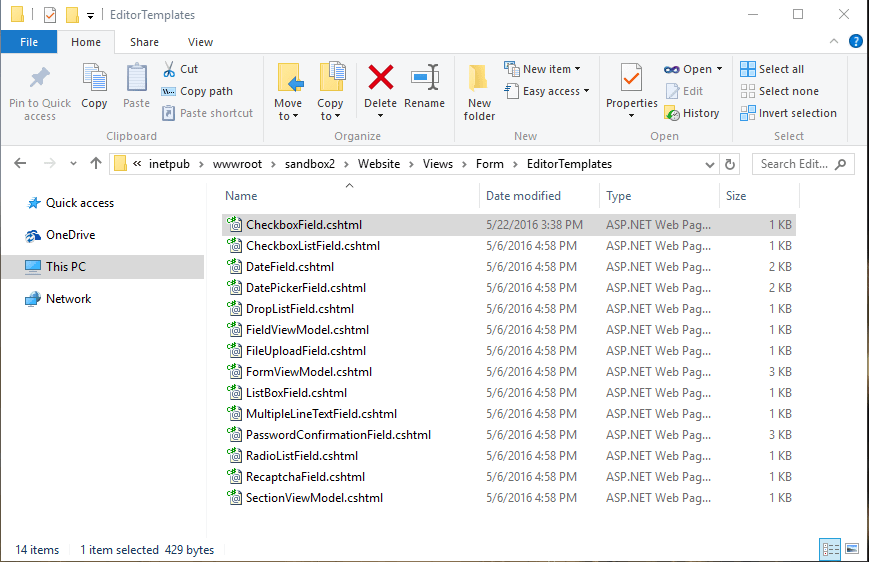
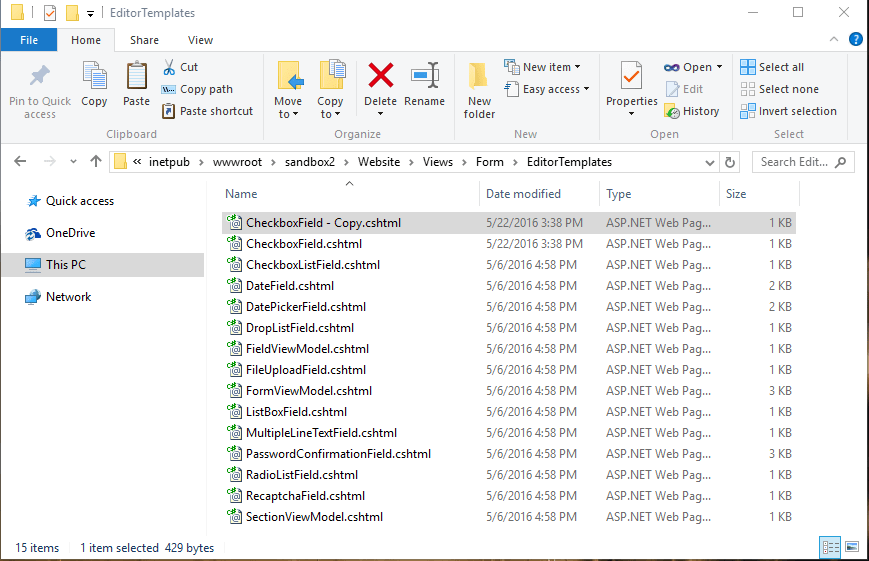
I first performed a copy and paste of the Razor file into a new file:
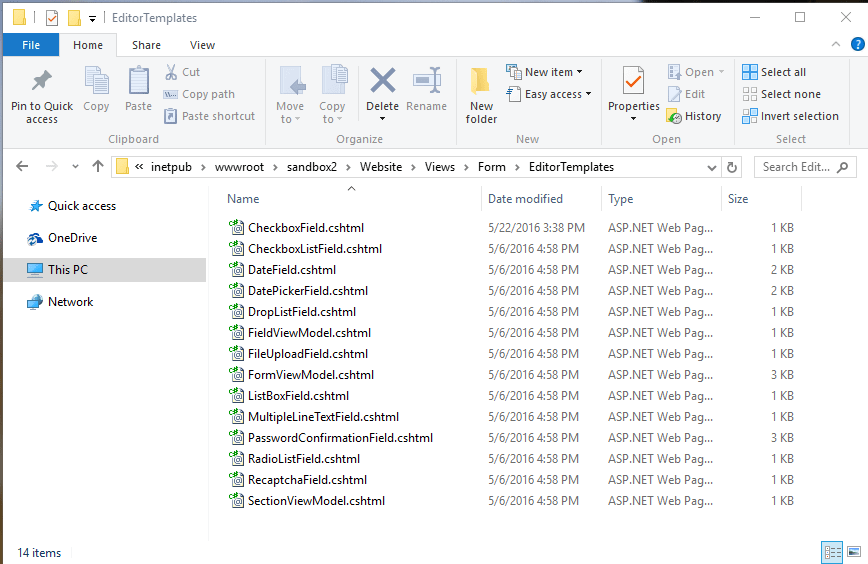
I then deleted the new Razor file:
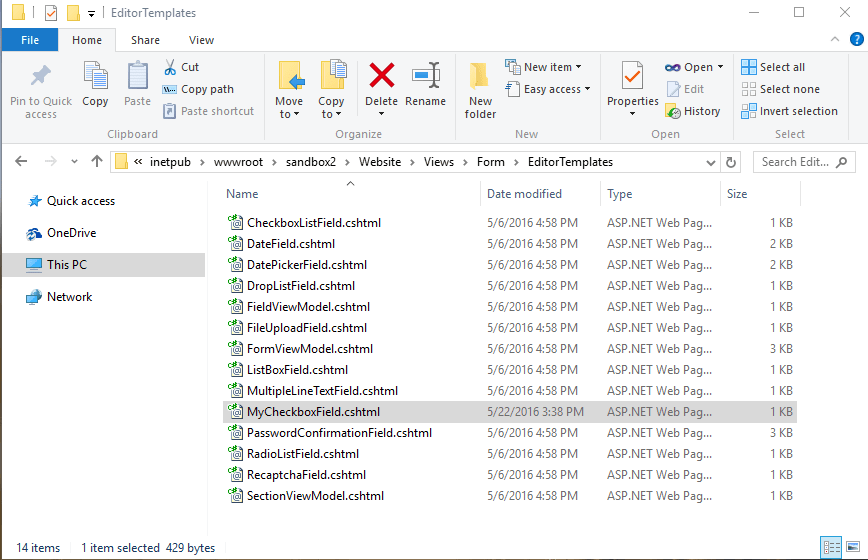
Next, I renamed the Razor file:
When I looked in my Sitecore log file, I saw that all operations were executed:

If you have any thoughts on this, please drop a comment.
Restrict IP Access of Directories and Files in Your Sitecore Web Application Using a httpRequestBegin Pipeline Processor
Last week my friend and colleague Greg Coffman had asked me if I knew of a way to restrict IP access to directories within the Sitecore web application, and I recalled reading a post by Alex Shyba quite some time ago.
Although Alex’s solution is probably good enough in most circumstances, I decided to explore other solutions, and came up with the following <httpRequestBegin> pipeline processor as another way to accomplish this:
using System;
using System.Collections.Generic;
using System.Linq;
using System.Web.Hosting;

using Sitecore.Configuration;
using Sitecore.Diagnostics;
using Sitecore.Pipelines.HttpRequest;
using Sitecore.Web;

namespace Sitecore.Sandbox.Pipelines.HttpRequest
{
    public class FilePathRestrictor : HttpRequestProcessor
    {
        public override void Process(HttpRequestArgs args)
        {
            Assert.ArgumentNotNull(args, "args");
            if (!ShouldRedirect(args))
            {
                return;
            }

            RedirectToNoAccessUrl();
        }

        private bool ShouldRedirect(HttpRequestArgs args)
        {
            return CanProcess(args, GetFilePath(args))
                    && !CanAccess(args.Context.Request.UserHostAddress);
        }

        protected virtual string GetFilePath(HttpRequestArgs args)
        {
            if (string.IsNullOrWhiteSpace(Context.Page.FilePath))
            {
                return args.Url.FilePath;
            }

            return Context.Page.FilePath;
        }

        protected virtual bool CanProcess(HttpRequestArgs args, string filePath)
        {
            return !string.IsNullOrWhiteSpace(filePath)
                    && !string.IsNullOrWhiteSpace(RootFilePath)
                    && AllowedIPs != null
                    && AllowedIPs.Any()
                    && (HostingEnvironment.VirtualPathProvider.DirectoryExists(filePath)
                        || HostingEnvironment.VirtualPathProvider.FileExists(filePath))
                    && args.Url.FilePath.StartsWith(RootFilePath, StringComparison.CurrentCultureIgnoreCase)
                    && !string.IsNullOrWhiteSpace(args.Context.Request.UserHostAddress)
                    && !string.Equals(filePath, Settings.NoAccessUrl, StringComparison.CurrentCultureIgnoreCase);
        }

        protected virtual bool CanAccess(string ip)
        {
            Assert.ArgumentNotNullOrEmpty(ip, "ip");
            return AllowedIPs.Contains(ip);
        }

        protected virtual void RedirectToNoAccessUrl()
        {
            WebUtil.Redirect(Settings.NoAccessUrl);
        }

        protected virtual void AddAllowedIP(string ip)
        {
            if (string.IsNullOrWhiteSpace(ip) || AllowedIPs.Contains(ip))
            {
                return;
            }

            AllowedIPs.Add(ip);
        }

        private string RootFilePath { get; set; }

        private IList<string> _AllowedIPs;
        private IList<string> AllowedIPs
        {
            get
            {
                if (_AllowedIPs == null)
                {
                    _AllowedIPs = new List<string>();
                }

                return _AllowedIPs;
            }
        }
    }
}
The pipeline processor above determines whether the IP making the request has access to the directory or file on the file system — a list of IP addresses that should have access are passed to the pipeline processor via a configuration file, and the code does check to see if the requested URL is a directory or a file on the file system — by matching the beginning of the URL with a configuration defined root path.
If the user does not have access to the requested path, s/he is redirected to the “No Access Url” which is specified in the Sitecore instance’s configuration.
The list of IP addresses that should have access to the directory — including everything within it — and the root path are handed to the pipeline processor via the following patch configuration file:
<?xml version="1.0" encoding="utf-8" ?>
<configuration xmlns:patch="http://www.sitecore.net/xmlconfig/">
  <sitecore>
    <pipelines>
      <httpRequestBegin>
        <processor patch:before=" processor[@type='Sitecore.Pipelines.HttpRequest.FileResolver, Sitecore.Kernel']"
                   type="Sitecore.Sandbox.Pipelines.HttpRequest.FilePathRestrictor, Sitecore.Sandbox">
          <RootFilePath>/sitecore</RootFilePath>
          <AllowedIPs hint="list:AddAllowedIP">
            <IP>127.0.0.2</IP>
          </AllowedIPs>
        </processor>
      </httpRequestBegin>
    </pipelines>
  </sitecore>
</configuration>
Since my IP is 127.0.0.1, I decided to only allow 127.0.0.2 access to my Sitecore directory — this also includes everything within it — in the above configuration file for testing.
After navigating to /sitecore of my local sandbox instance, I was redirected to the “No Access Url” page defined in my Web.config:

If you have any thoughts on this, or know of other solutions, please share in a comment.
 SitecoreJunkie.com