Home » Fields (Page 3)
Category Archives: Fields
Choose Template Fields to Display in the Sitecore Content Editor
The other day I was going through search terms people had used to get to my blog, and discovered a few people made their way to my blog by searching for ‘sitecore hide sections in data template’.
I had built something like this in the past, but no longer remember how I had implemented that particular solution — not that I could show you that solution since it’s owned by a previous employer — and decided I would build another solution to accomplish this.
Before I move forward, I would like to point out that Sitecore MVP Andy Uzick wrote a blog post recently showing how to hide fields and sections in the content editor, though I did not have much luck with hiding sections in the way that he had done it — sections with no fields were still displaying for me in the content editor — and I decided to build a different solution altogether to make this work.
I thought it would be a good idea to let users turn this functionality on and off via a checkbox in the ribbon, and used some code from a previous post — in this post I had build an object to keep track of the state of a checkbox in the ribbon — as a model. In the spirit of that object, I defined the following interface:
namespace Sitecore.Sandbox.Utilities.ClientSettings
{
    public interface IRegistrySettingToggle
    {
        bool IsOn();

        void TurnOn();

        void TurnOff();
    }
}
I then created the following abstract class which implements the interface above, and stores the state of the setting defined by the given key — the key of the setting and the “on” value are passed to it via a subclass — in the Sitecore registry.
using Sitecore.Diagnostics;

using Sitecore.Web.UI.HtmlControls;

namespace Sitecore.Sandbox.Utilities.ClientSettings
{
    public abstract class RegistrySettingToggle : IRegistrySettingToggle
    {
        private string RegistrySettingKey { get; set; }

        private string RegistrySettingOnValue { get; set; }

        protected RegistrySettingToggle(string registrySettingKey, string registrySettingOnValue)
        {
            SetRegistrySettingKey(registrySettingKey);
            SetRegistrySettingOnValue(registrySettingOnValue);
        }

        private void SetRegistrySettingKey(string registrySettingKey)
        {
            Assert.ArgumentNotNullOrEmpty(registrySettingKey, "registrySettingKey");
            RegistrySettingKey = registrySettingKey;
        }

        private void SetRegistrySettingOnValue(string registrySettingOnValue)
        {
            Assert.ArgumentNotNullOrEmpty(registrySettingOnValue, "registrySettingOnValue");
            RegistrySettingOnValue = registrySettingOnValue;
        }

        public bool IsOn()
        {
            return Registry.GetString(RegistrySettingKey) == RegistrySettingOnValue;
        }

        public void TurnOn()
        {
            Registry.SetString(RegistrySettingKey, RegistrySettingOnValue);
        }

        public void TurnOff()
        {
            Registry.SetString(RegistrySettingKey, string.Empty);
        }
    }
}
I then built the following class to toggle the display settings for our displayable fields:
using System;

namespace Sitecore.Sandbox.Utilities.ClientSettings
{
    public class ShowDisplayableFieldsOnly : RegistrySettingToggle
    {
        private const string RegistrySettingKey = "/Current_User/Content Editor/Show Displayable Fields Only";
        private const string RegistrySettingOnValue = "on";

        private static volatile IRegistrySettingToggle current;
        private static object lockObject = new Object();

        public static IRegistrySettingToggle Current
        {
            get
            {
                if (current == null)
                {
                    lock (lockObject)
                    {
                        if (current == null)
                        {
                            current = new ShowDisplayableFieldsOnly();
                        }
                    }
                }

                return current;
            }
        }

        private ShowDisplayableFieldsOnly()
            : base(RegistrySettingKey, RegistrySettingOnValue)
        {
        }
    }
}
It passes its Sitecore registry key and “on” state value to the RegistrySettingToggle base class, and employs the Singleton pattern — I saw no reason for there to be multiple instances of this object floating around.
In order to use a checkbox in the ribbon, we have to create a new command for it:
using System.Linq;

using Sitecore.Data.Items;
using Sitecore.Diagnostics;
using Sitecore.Shell.Framework.Commands;

using Sitecore.Sandbox.Utilities.ClientSettings;

namespace Sitecore.Sandbox.Commands
{
    public class ToggleDisplayableFieldsVisibility : Command
    {
        public override void Execute(CommandContext context)
        {
            Assert.ArgumentNotNull(context, "context");
            ToggleDisplayableFields();
            Refresh(context);
        }

        private static void ToggleDisplayableFields()
        {
            IRegistrySettingToggle showDisplayableFieldsOnly = ShowDisplayableFieldsOnly.Current;
            if (!showDisplayableFieldsOnly.IsOn())
            {
                showDisplayableFieldsOnly.TurnOn();
            }
            else
            {
                showDisplayableFieldsOnly.TurnOff();
            }
        }

        public override CommandState QueryState(CommandContext context)
        {
            if (!ShowDisplayableFieldsOnly.Current.IsOn())
            {
                return CommandState.Enabled;
            }

            return CommandState.Down;
        }

        private static void Refresh(CommandContext context)
        {
            Refresh(GetItem(context));
        }

        private static void Refresh(Item item)
        {
            Assert.ArgumentNotNull(item, "item");
            Context.ClientPage.ClientResponse.Timer(string.Format("item:load(id={0})", item.ID), 1);
        }

        private static Item GetItem(CommandContext context)
        {
            Assert.ArgumentNotNull(context, "context");
            return context.Items.FirstOrDefault();
        }
    }
}
The command above leverages the instance of the ShowDisplayableFieldsOnly class defined above to turn the displayable fields feature on and off.
I followed the creation of the command above with the definition of the ribbon checkbox in the core database:

The command name above — which is set in the Click field — is defined in the patch configuration file towards the end of this post.
I then created the following data template with a TreelistEx field to store the displayable fields:

The TreelistEx field above will pull in all sections and their fields into the TreelistEx dialog, but only allow the selection of template fields, as is dictated by the following parameters that I have mapped in its Source field:
DataSource=/sitecore/templates/Sample/Sample Item&IncludeTemplatesForSelection=Template field&IncludeTemplatesForDisplay=Template section,Template field&AllowMultipleSelection=no
I then set this as a base template in my sandbox solution’s Sample Item template:
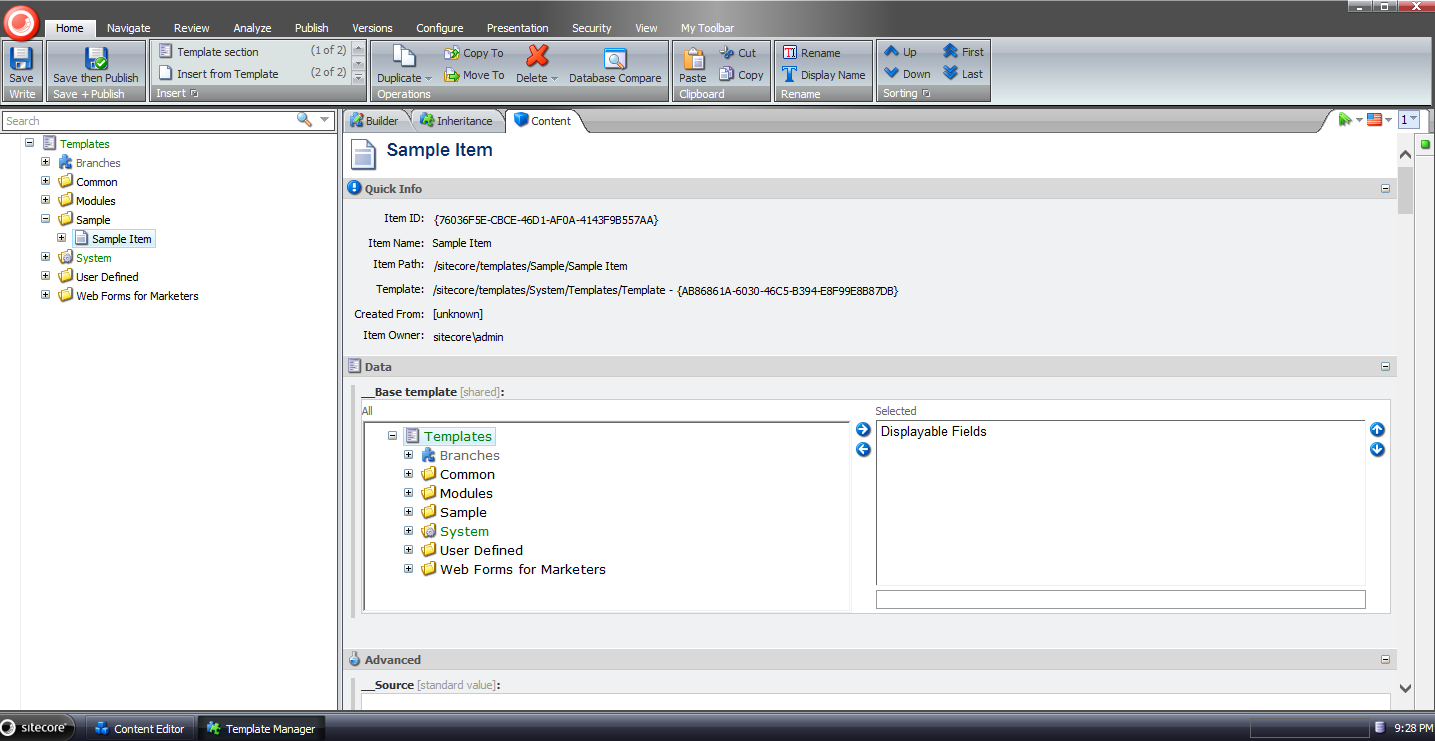
In order to remove fields, we need a <getContentEditorFields> pipeline processor. I built the following class for to serve as one:
using System;

using Sitecore.Configuration;
using Sitecore.Data.Fields;
using Sitecore.Data.Items;
using Sitecore.Data.Managers;
using Sitecore.Data.Templates;
using Sitecore.Diagnostics;
using Sitecore.Shell.Applications.ContentManager;
using Sitecore.Shell.Applications.ContentEditor.Pipelines.GetContentEditorFields;

using Sitecore.Sandbox.Utilities.ClientSettings;

namespace Sitecore.Sandbox.Shell.Applications.ContentEditor.Pipelines.GetContentEditorFields
{
    public class RemoveUndisplayableFields
    {
        public void Process(GetContentEditorFieldsArgs args)
        {
            Assert.ArgumentNotNull(args, "args");
            Assert.ArgumentNotNull(args.Item, "args.Item");
            Assert.ArgumentCondition(!string.IsNullOrWhiteSpace(DisplayableFieldsFieldName), "DisplayableFieldsFieldName", "DisplayableFieldsFieldName must be set in the configuration file!");
            if (!ShowDisplayableFieldsOnly.Current.IsOn())
            {
                return;
            }

            foreach (Editor.Section section in args.Sections)
            {
                AddDisplayableFields(args.Item[DisplayableFieldsFieldName], section);
            }
        }

        private void AddDisplayableFields(string displayableFieldIds, Editor.Section section)
        {
            Editor.Fields displayableFields = new Editor.Fields();
            foreach (Editor.Field field in section.Fields)
            {
                if (IsDisplayableField(displayableFieldIds, field))
                {
                    displayableFields.Add(field);
                }
            }

            section.Fields.Clear();
            section.Fields.AddRange(displayableFields);
        }

        private bool IsDisplayableField(string displayableFieldIds, Editor.Field field)
        {
            if (IsStandardValues(field.ItemField.Item))
            {
                return true;
            }

            if (IsDisplayableFieldsField(field.ItemField))
            {
                return false;
            }

            return IsStandardTemplateField(field.ItemField)
                    || string.IsNullOrWhiteSpace(displayableFieldIds)
                    || displayableFieldIds.Contains(field.ItemField.ID.ToString());
        }

        private bool IsDisplayableFieldsField(Field field)
        {
            return string.Equals(field.Name, DisplayableFieldsFieldName, StringComparison.CurrentCultureIgnoreCase);
        }

        private static bool IsStandardValues(Item item)
        {
            if (item.Template.StandardValues != null)
            {
                return item.Template.StandardValues.ID == item.ID;
            }

            return false;
        }

        private bool IsStandardTemplateField(Field field)
        {
            Assert.IsNotNull(StandardTemplate, "The Stardard Template could not be found.");
            return StandardTemplate.ContainsField(field.ID);
        }

        private static Template GetStandardTemplate()
        {
            return TemplateManager.GetTemplate(Settings.DefaultBaseTemplate, Context.ContentDatabase);
        }

        private Template _StandardTemplate;
        private Template StandardTemplate
        {
            get
            {
                if (_StandardTemplate == null)
                {
                    _StandardTemplate = GetStandardTemplate();
                }

                return _StandardTemplate;
            }
        }

        private string DisplayableFieldsFieldName { get; set; }
    }
}
The class above iterates over all fields for the supplied item, and adds only those that were selected in the Displayable Fields TreelistEx field, and also Standard Fields — we don’t want to remove these since they are shown/hidden by the Standard Fields feature in Sitecore — to a new Editor.Fields collection. This new collection is then set on the GetContentEditorFieldsArgs instance.
Plus, we don’t want to show the Displayable Fields TreelistEx field when the feature is turned on, and we are on an item. This field should only display when we are on the standard values item when the feature is turned on — this is how we will choose our displayable fields.
Now we have to handle sections without fields — especially after ripping them out via the pipeline processor above.
I built the following class to serve as a <renderContentEditor> pipeline processor to do this:
using System.Linq;

using Sitecore.Diagnostics;
using Sitecore.Shell.Applications.ContentManager;
using Sitecore.Shell.Applications.ContentEditor.Pipelines.RenderContentEditor;

namespace Sitecore.Sandbox.Shell.Applications.ContentEditor.Pipelines.RenderContentEditor
{
    public class FilterSectionsWithFields
    {
        public void Process(RenderContentEditorArgs args)
        {
            Assert.ArgumentNotNull(args, "args");
            args.Sections = GetSectionsWithFields(args.Sections);
        }

        private static Editor.Sections GetSectionsWithFields(Editor.Sections sections)
        {
            Assert.ArgumentNotNull(sections, "sections");
            Editor.Sections sectionsWithFields = new Editor.Sections();
            foreach (Editor.Section section in sections)
            {
                AddIfContainsFields(sectionsWithFields, section);
            }

            return sectionsWithFields;
        }

        private static void AddIfContainsFields(Editor.Sections sections, Editor.Section section)
        {
            Assert.ArgumentNotNull(sections, "sections");
            Assert.ArgumentNotNull(section, "section");
            if (!ContainsFields(section))
            {
                return;
            }

            sections.Add(section);
        }

        private static bool ContainsFields(Editor.Section section)
        {
            Assert.ArgumentNotNull(section, "section");
            return section.Fields != null && section.Fields.Any();
        }
    }
}
It basically builds a new collection of sections that contain at least one field, and sets it on the RenderContentEditorArgs instance being passed through the <renderContentEditor> pipeline.
In order for this to work, we must make this pipeline processor run before all other processors.
I tied all of the above together with the following patch configuration file:
<?xml version="1.0" encoding="utf-8"?>
<configuration xmlns:patch="http://www.sitecore.net/xmlconfig/">
  <sitecore>
    <commands>
      <command name="contenteditor:ToggleDisplayableFieldsVisibility" type="Sitecore.Sandbox.Commands.ToggleDisplayableFieldsVisibility, Sitecore.Sandbox"/>
    </commands>
    <pipelines>
      <getContentEditorFields>
        <processor type="Sitecore.Sandbox.Shell.Applications.ContentEditor.Pipelines.GetContentEditorFields.RemoveUndisplayableFields, Sitecore.Sandbox">
          <DisplayableFieldsFieldName>Displayable Fields</DisplayableFieldsFieldName>
        </processor>
      </getContentEditorFields>
      <renderContentEditor>
        <processor patch:before="processor[@type='Sitecore.Shell.Applications.ContentEditor.Pipelines.RenderContentEditor.RenderSkinedContentEditor, Sitecore.Client']"
                   type="Sitecore.Sandbox.Shell.Applications.ContentEditor.Pipelines.RenderContentEditor.FilterSectionsWithFields, Sitecore.Sandbox"/>
      </renderContentEditor>
    </pipelines>
  </sitecore>
</configuration>
Let’s try this out.
I navigated to the standard values item for my Sample Item data template, and selected the fields I want to display in the content editor:
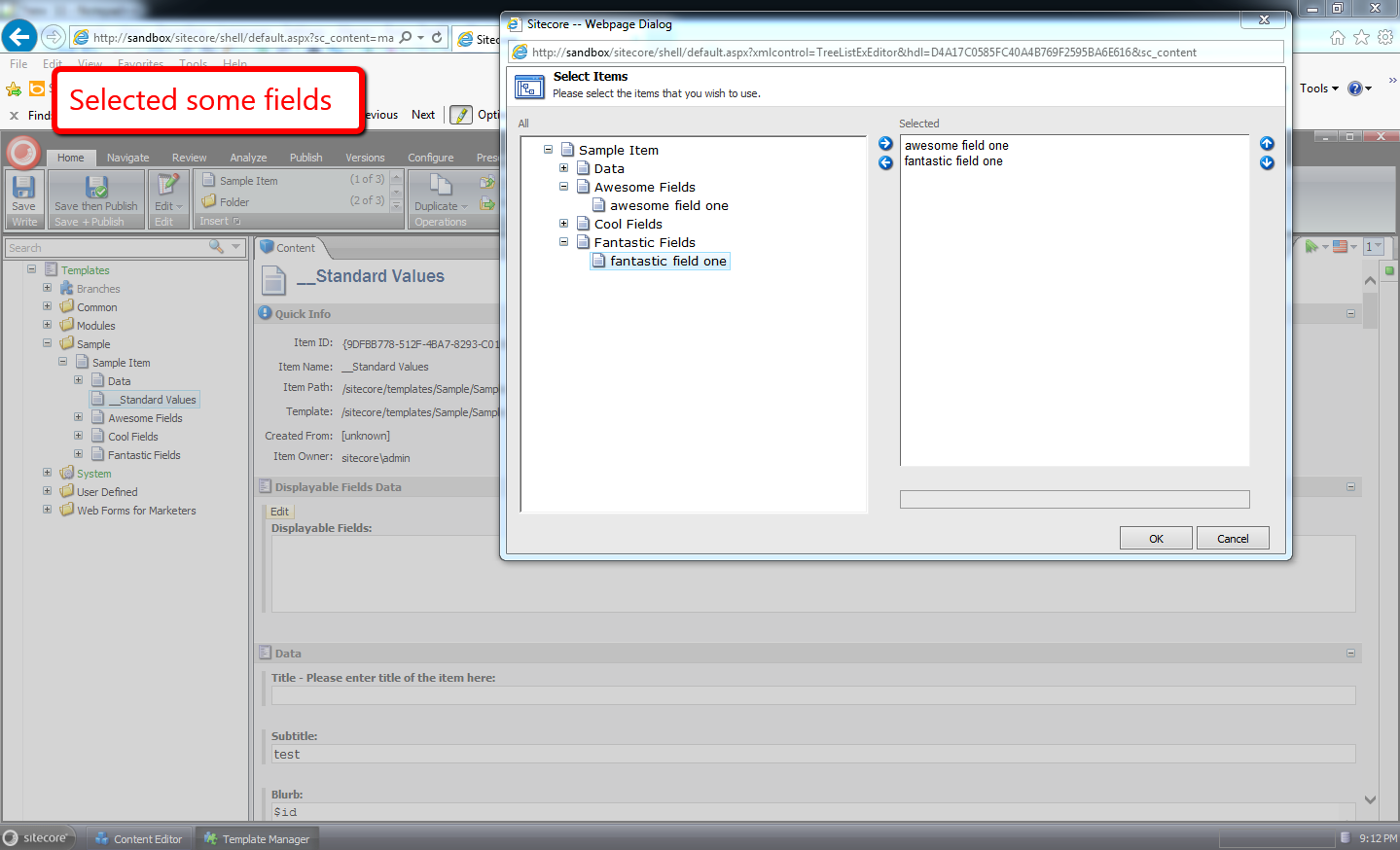
I then went to an item that uses this data template, and turned on the displayable fields feature:
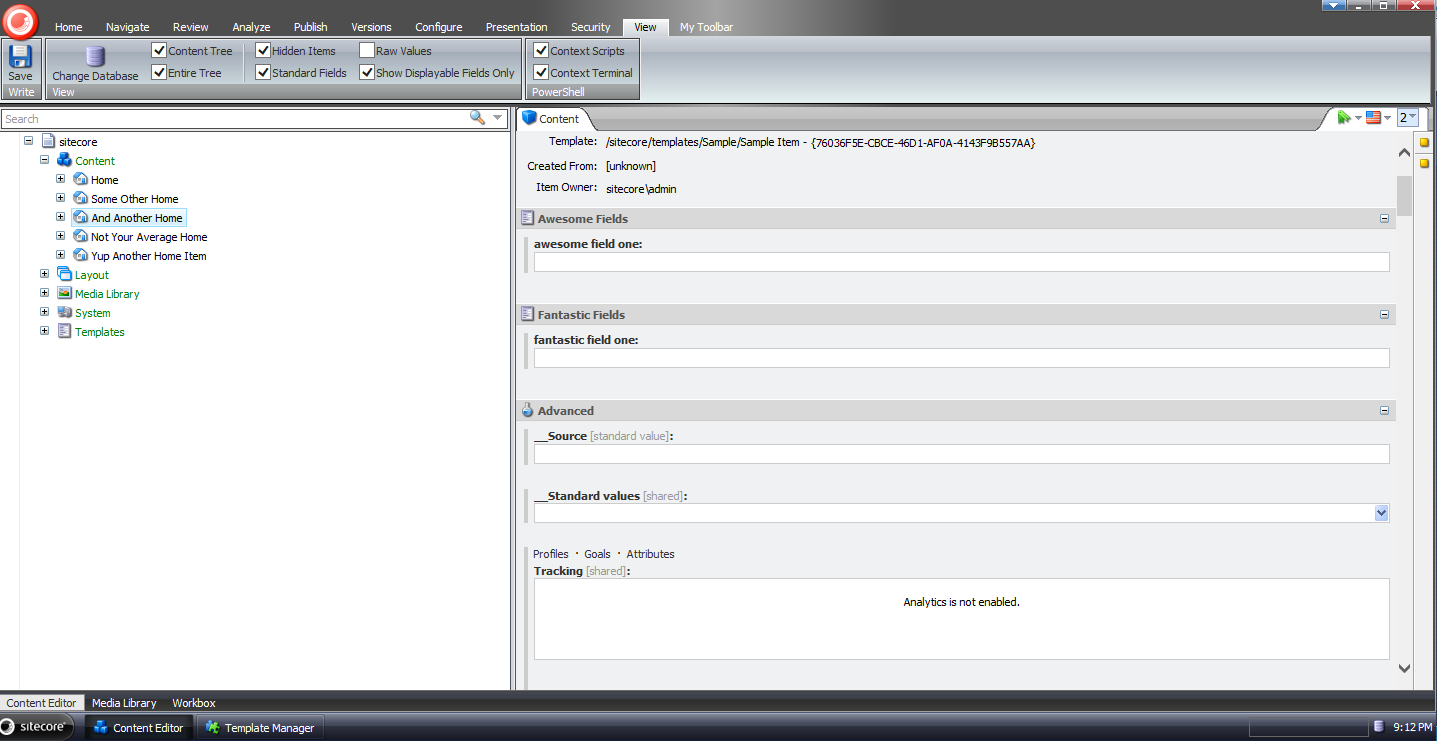
As you can see, only the fields we had chosen display — along with standard fields since the Standard Fields checkbox is checked.
I then turned off the displayable fields feature:
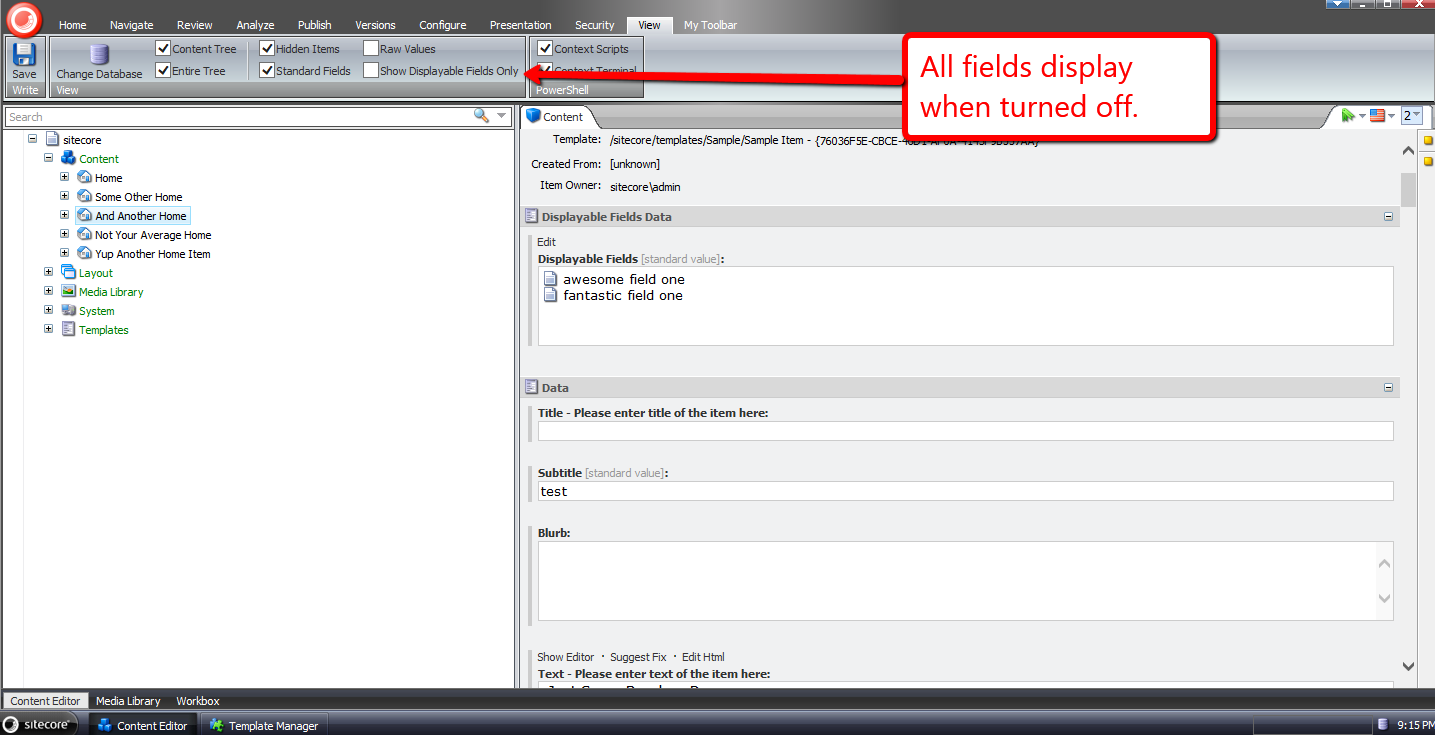
Now all fields for the item display.
I then turned the displayable fields feature back on, and turned off Standard Fields:
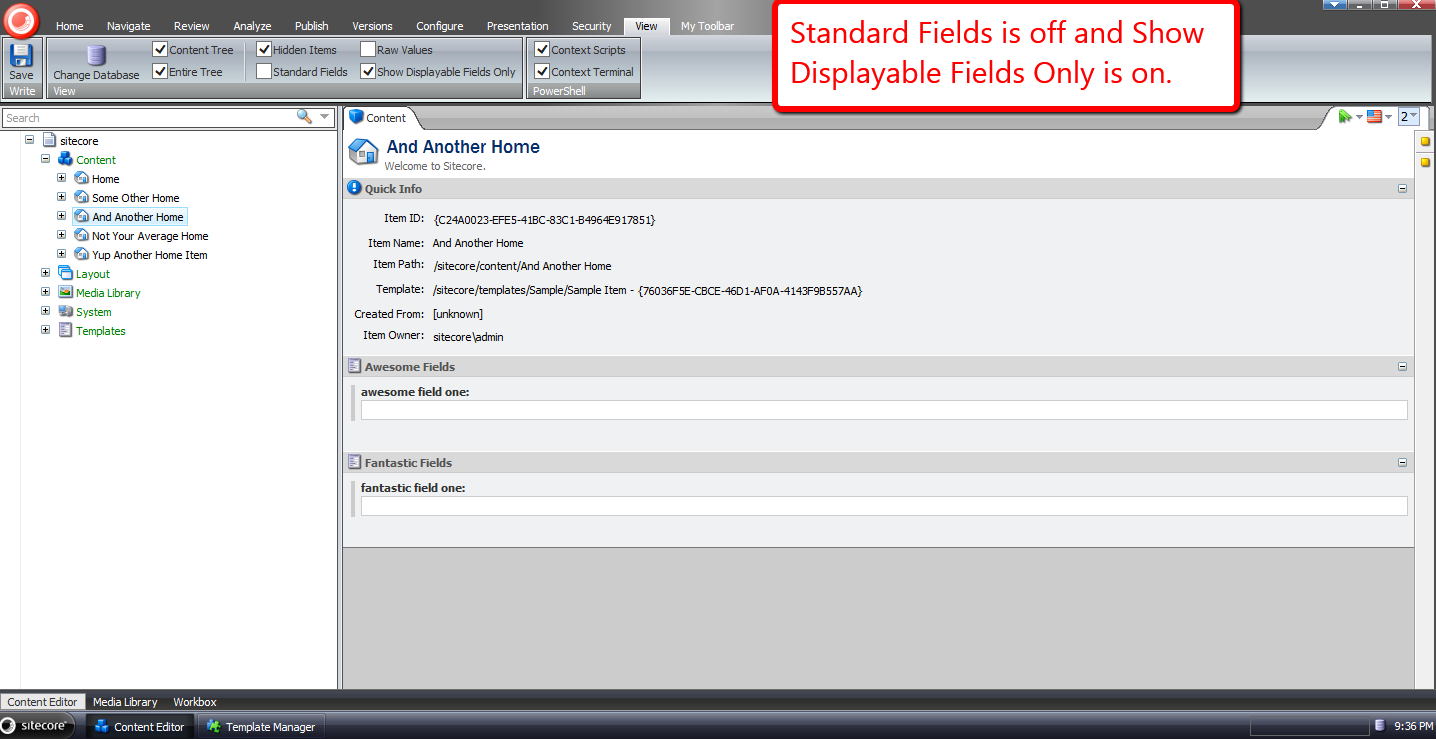
Now only our selected fields display.
If you have any thoughts on this, or ideas around making this better, please share in a comment.
Expand Tokens on Sitecore Items Using a PowerShell Function in Sitecore PowerShell Extensions
During my Sitecore from the Command Line presentation at the Sitecore User Group – New England, I had briefly showcased a custom PowerShell function that expands Sitecore tokens in fields of a supplied item, and how I had saved this function into the Functions section of the Script Library — /sitecore/system/Modules/PowerShell/Script Library/Functions — of the Sitecore PowerShell Extensions module. This blog post captures what I had shown.
This is the custom function I had shown — albeit I changed its name to adhere to the naming convention in PowerShell for functions and commands (Verb-SingularNoun):
function Expand-SitecoreToken {
	<#
        .SYNOPSIS
             Expand tokens on the supplied item

        .EXAMPLE
            Expand tokens on the home item.

            PS master:\> Get-Item "/sitecore/content/home" | Expand-SitecoreToken
    #>
	[CmdletBinding()]
    param(
		[ValidateNotNull()]
		[Parameter(ValueFromPipeline=$True)]
        [Sitecore.Data.Items.Item]$item
    )

    $item.Editing.BeginEdit()

    Try
    {
        $tokenReplacer = [Sitecore.Configuration.Factory]::GetMasterVariablesReplacer()
        $tokenReplacer.ReplaceItem($item)
        $result = $item.Editing.EndEdit()
        "Expanded tokens on item " + $item.Paths.Path
    }
    Catch [system.Exception]
    {
        $item.Editing.CancelEdit()
        "Failed to expand tokens on item"
        "Reason: " + $error
    }
}
The function above calls Sitecore.Configuration.Factory.GetMasterVariablesReplacer() for an instance of the MasterVariablesReplacer class — which is defined and can be overridden in the “MasterVariablesReplacer” setting in your Sitecore instance’s Web.config — and passes the item supplied to the function to the MasterVariablesReplacer instance’s ReplaceItem() method after the item has been put into editing mode.
Once tokens have been expanded, a confirmation message is sent to the Results window.
If an exception is caught, we display it — the exception is captured in the $error global variable.
I saved the above function into the Script Library of my copy of the Sitecore PowerShell Extensions module:
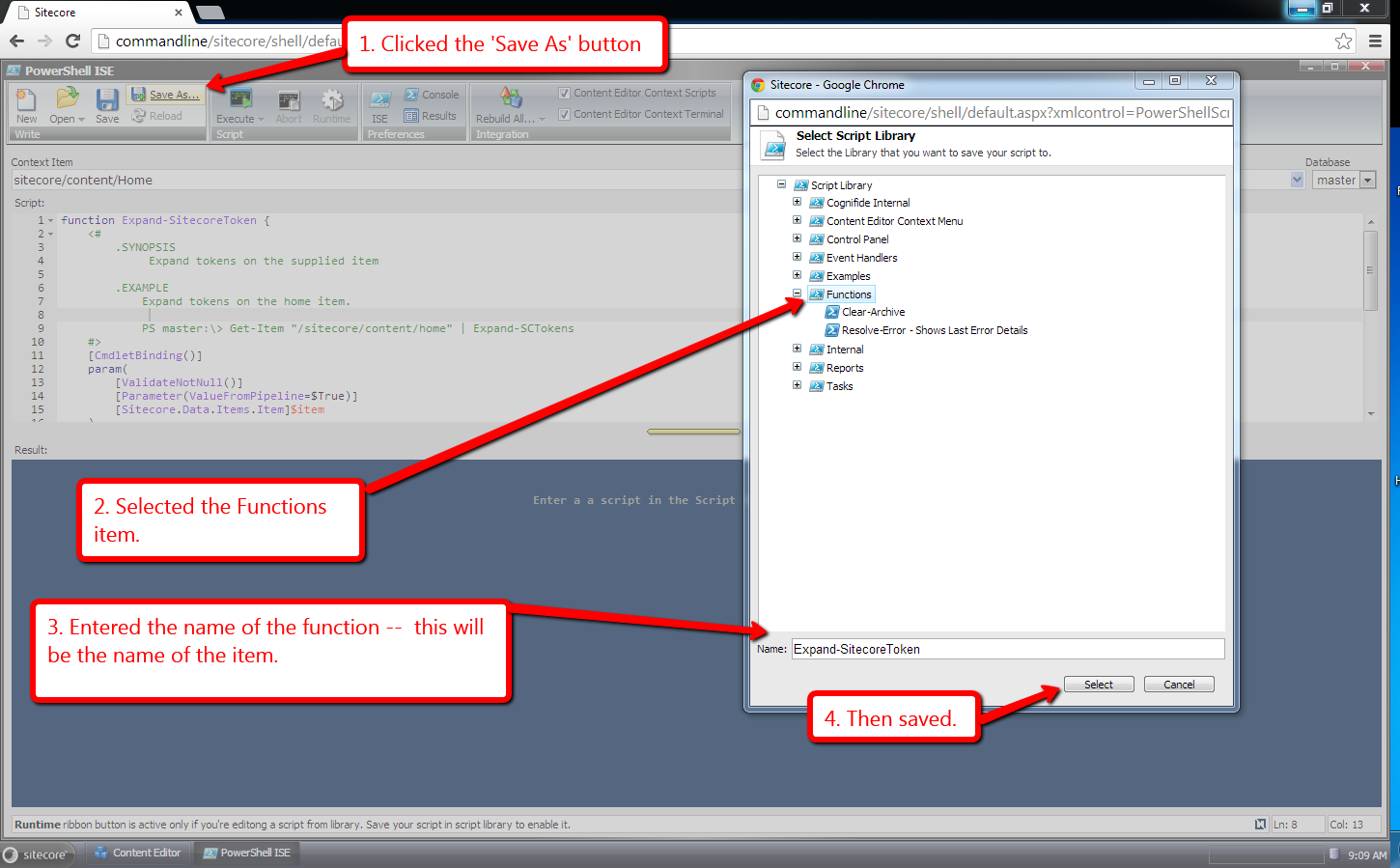
An item was created in the Script Library to house the function:
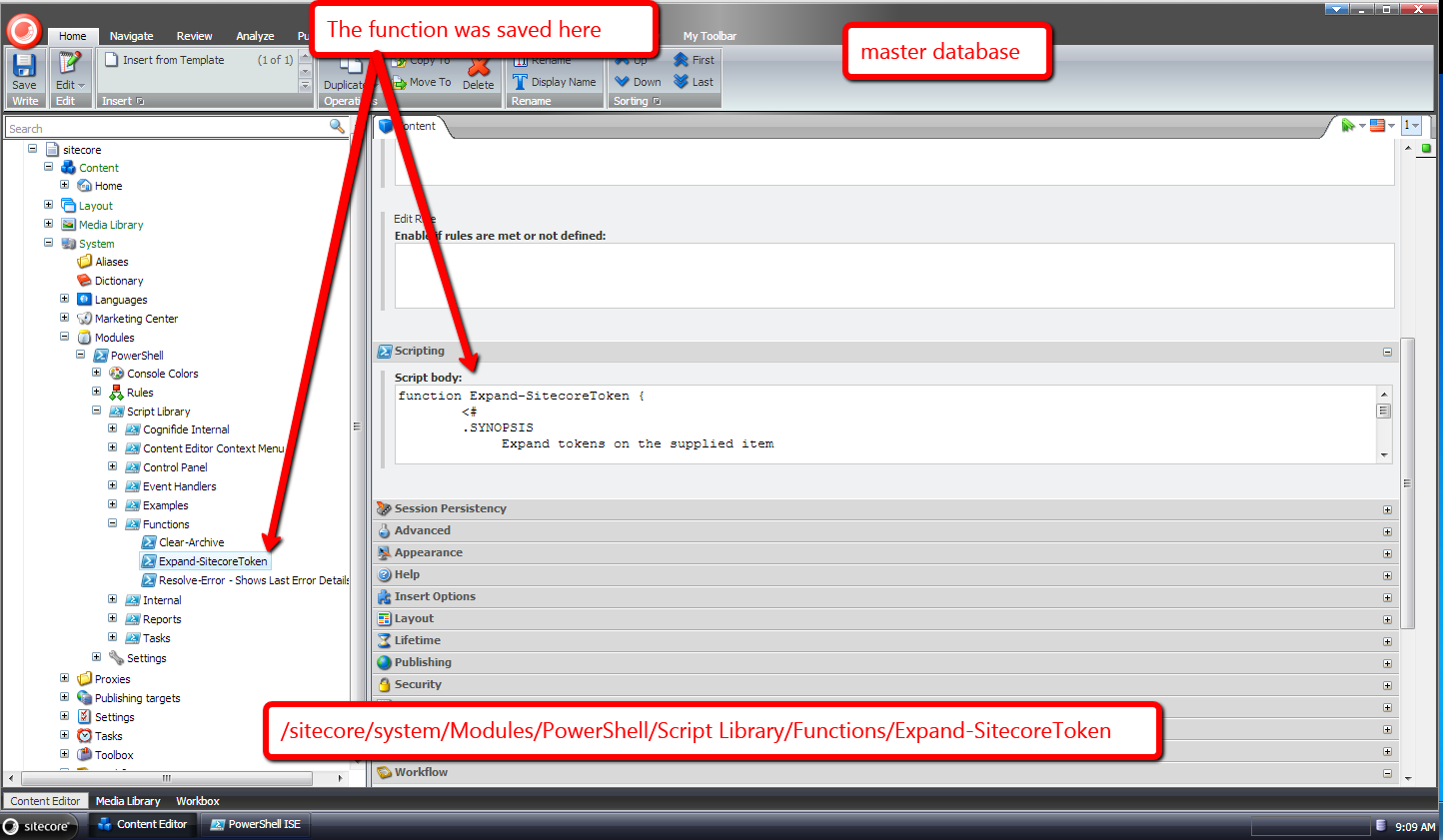
Let’s try it out.
Let’s expand tokens on the Home item:
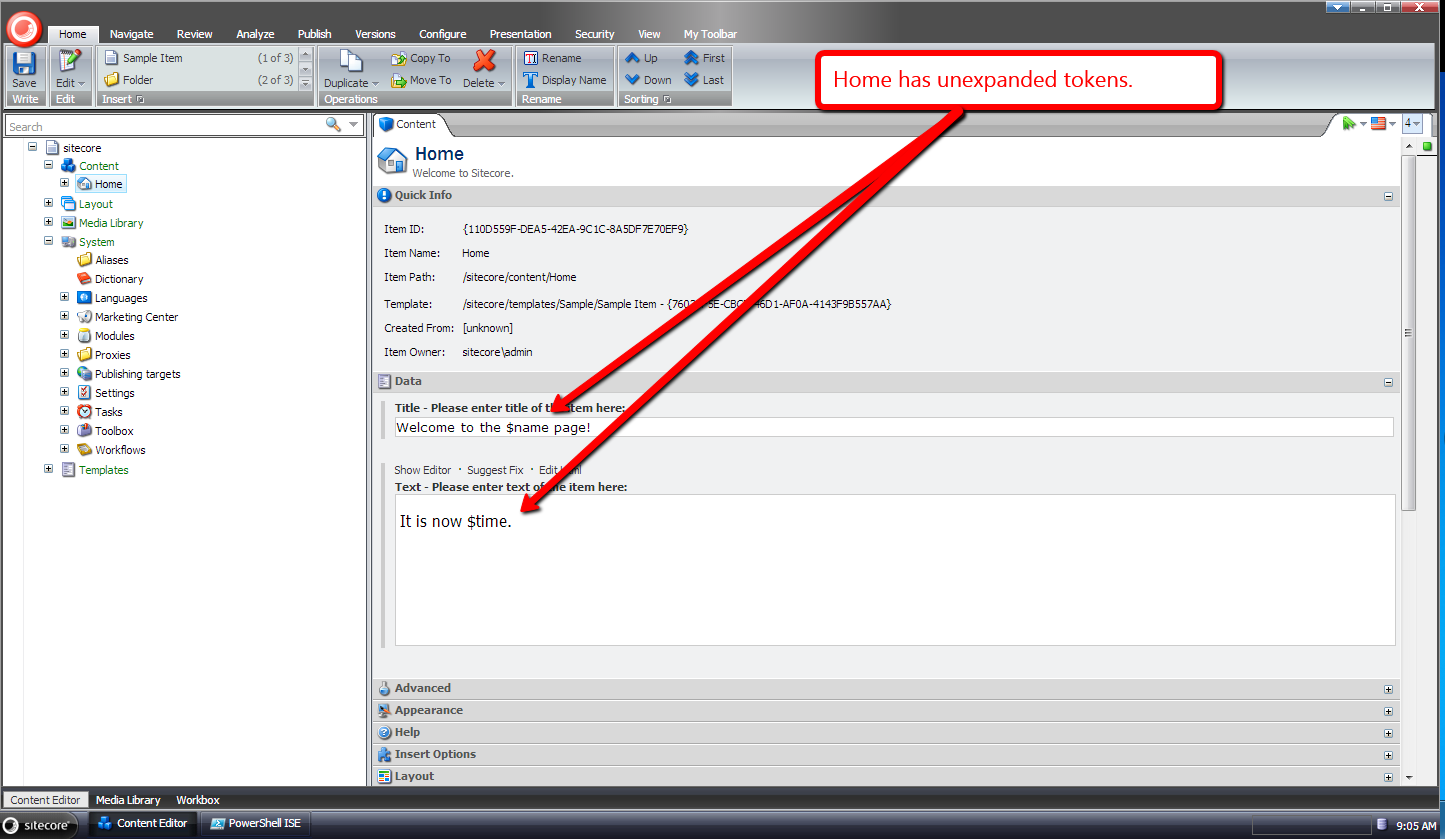
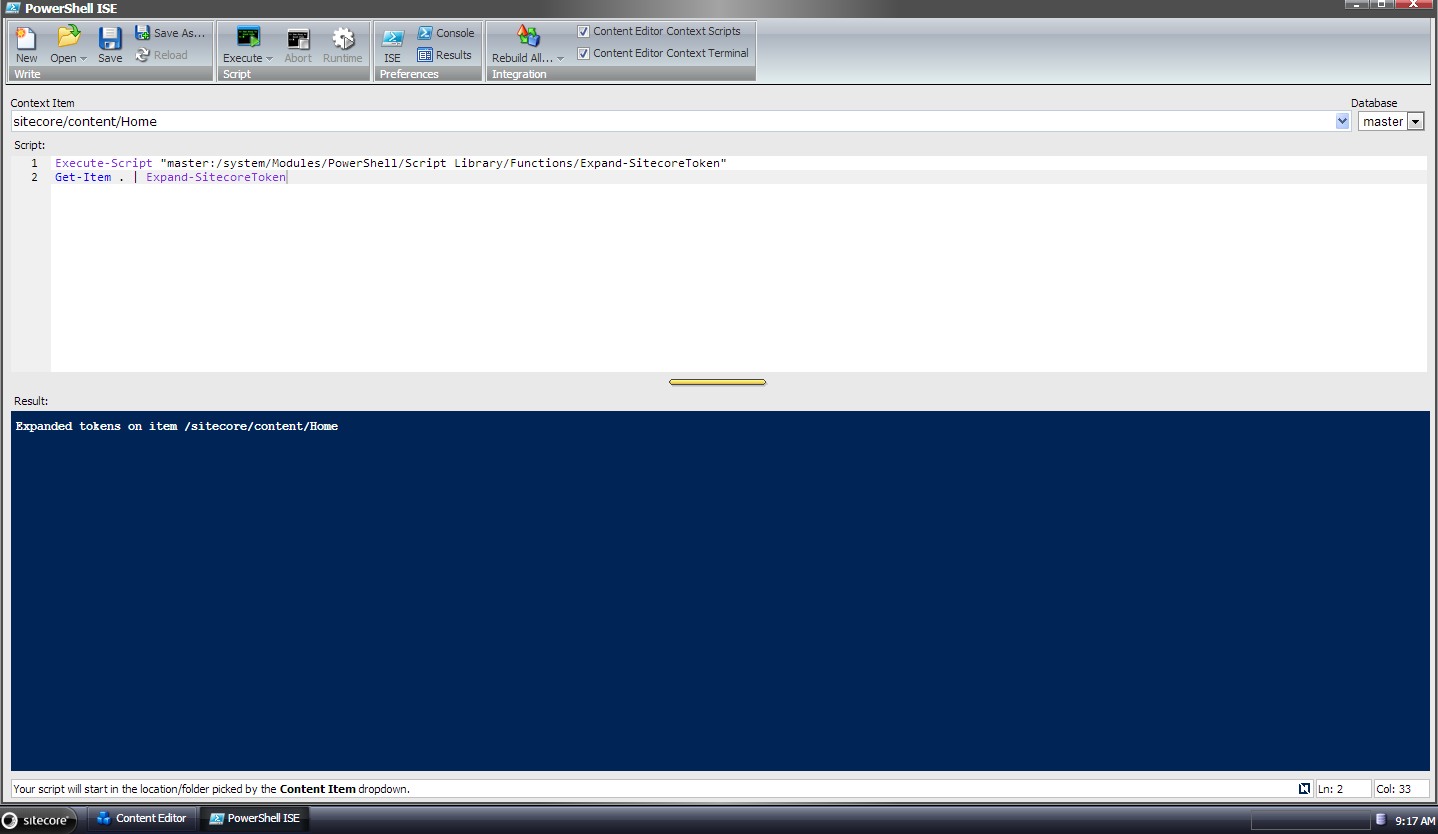
In the Integrated Scripting Environment of the Sitecore PowerShell Extensions module, I typed in the following code:
Execute-Script "master:/system/Modules/PowerShell/Script Library/Functions/Expand-SitecoreToken"
Get-Item . | Expand-SitecoreToken
You can consider the Execute-Script “master:/system/Modules/PowerShell/Script Library/Functions/Expand-SitecoreToken” line of code to be comparable to a javascript “script” tag — it will execute the script thus defining the function so we can execute it.
I then ran that code above:
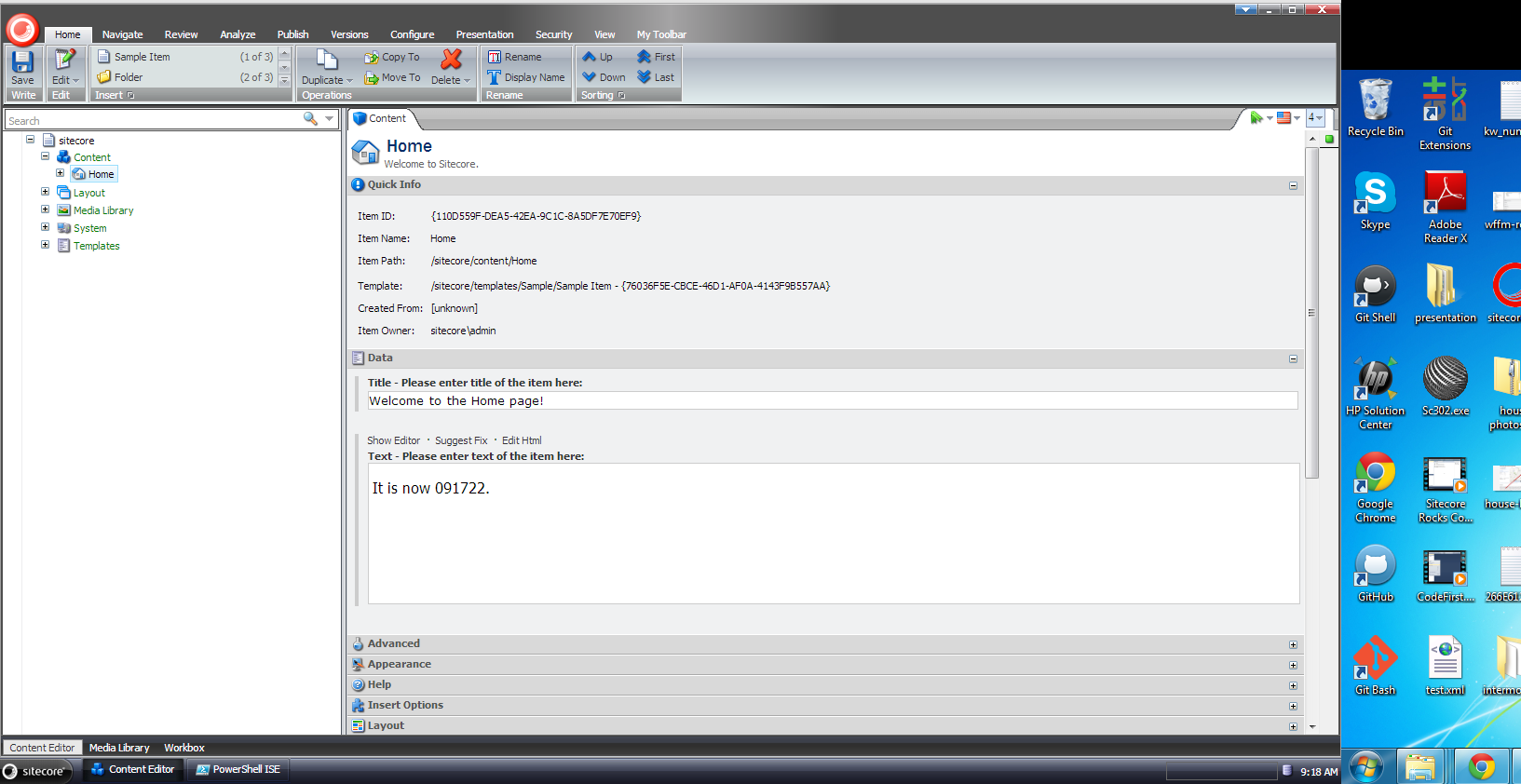
Once the script finished running, I went back over to the Content Editor, and saw that tokens were expanded on the Home item:
You might be thinking “Mike, I really don’t want to be bothered with expanding these tokens, and would rather have our Content Editors/Authors do it. is there something we can set up to make that happen?”
You bet. 🙂
In the Sitecore PowerShell Extension module, you can save PowerShell into the Script Library to be executed via an item context menu option click. All you have to do is save it into the Script Library under the Content Editor Context Menu item:
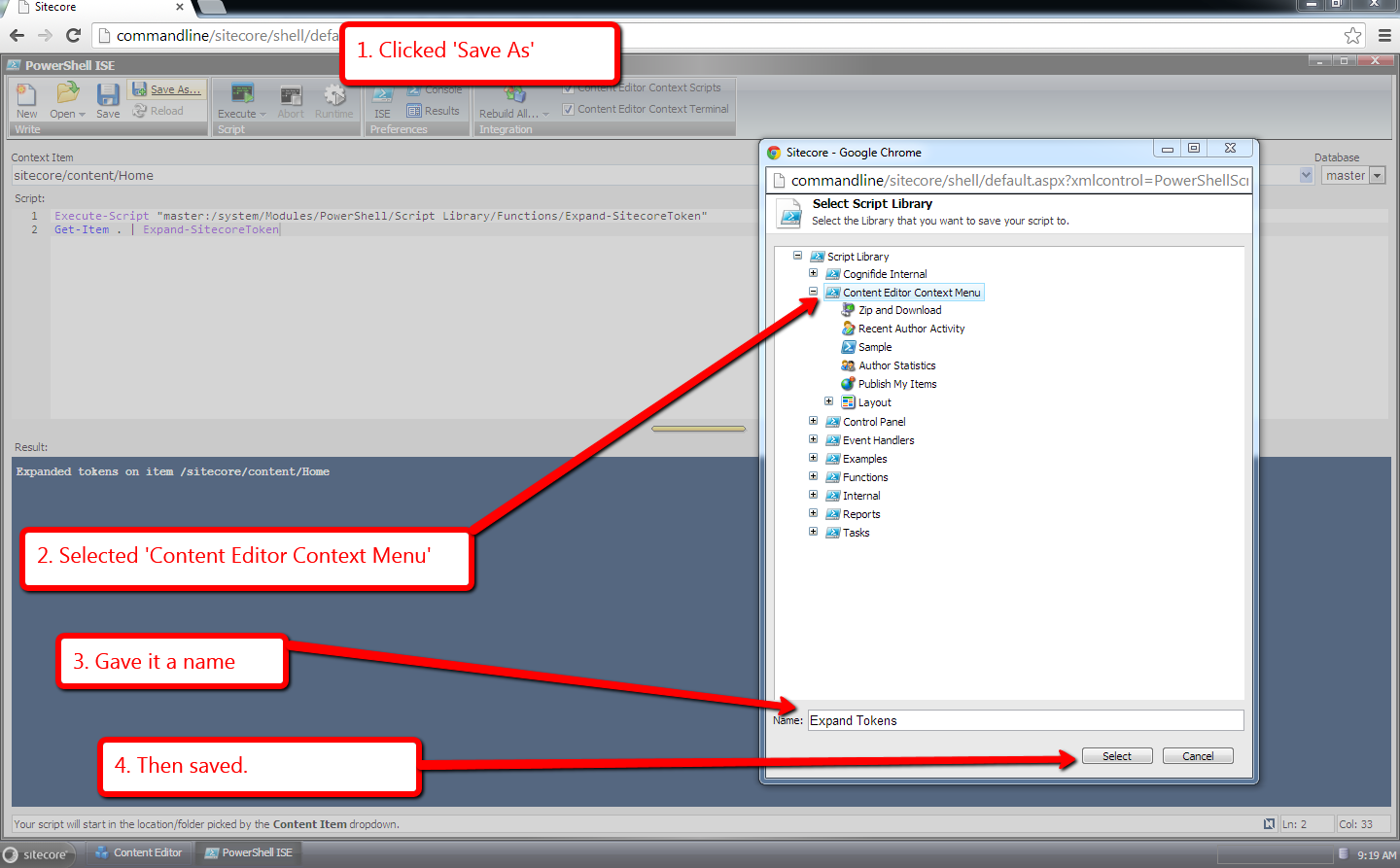
The script is then saved in a new item created under Content Editor Context Menu item in the Script Library:
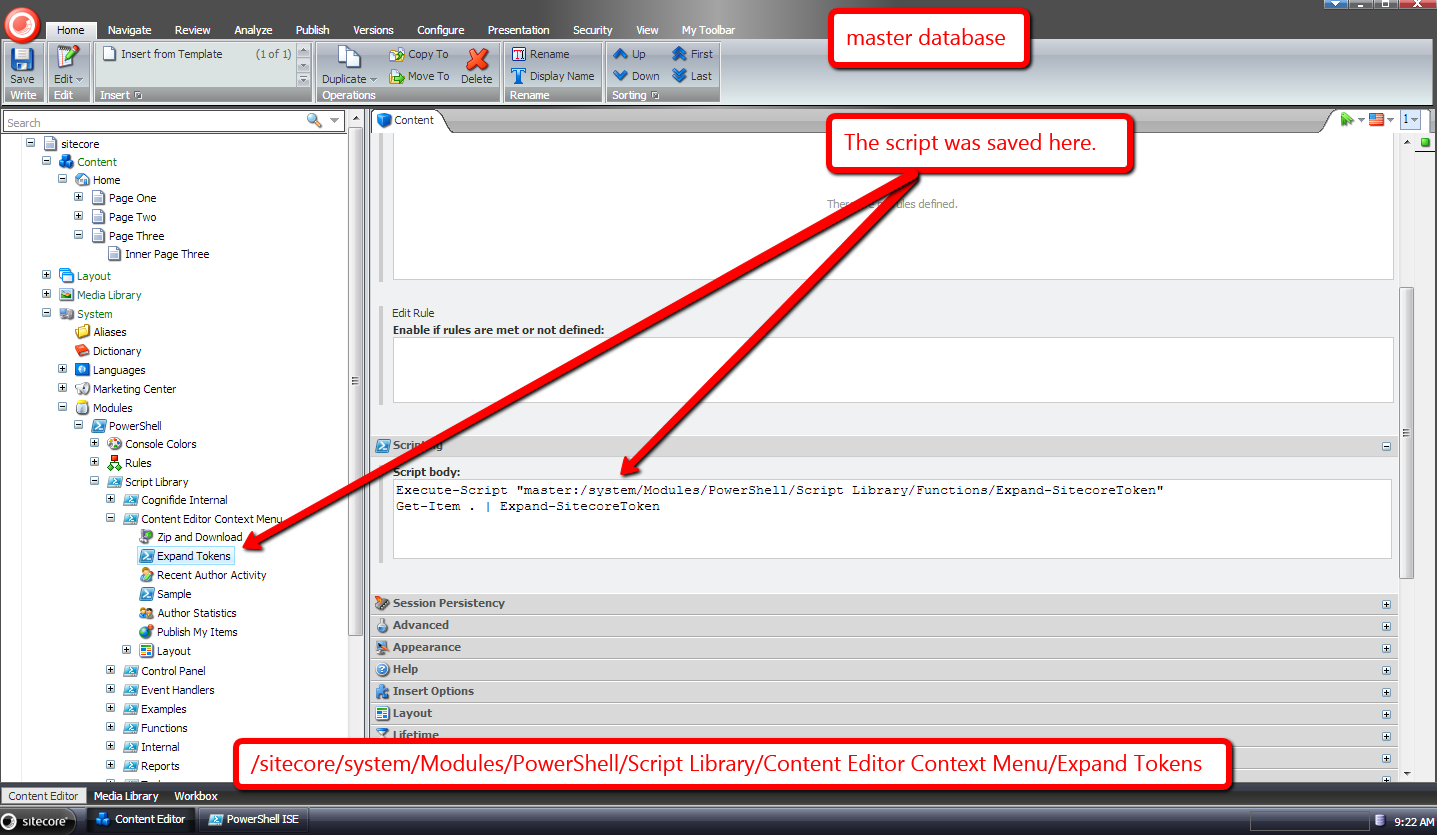
Let’s see it in action.
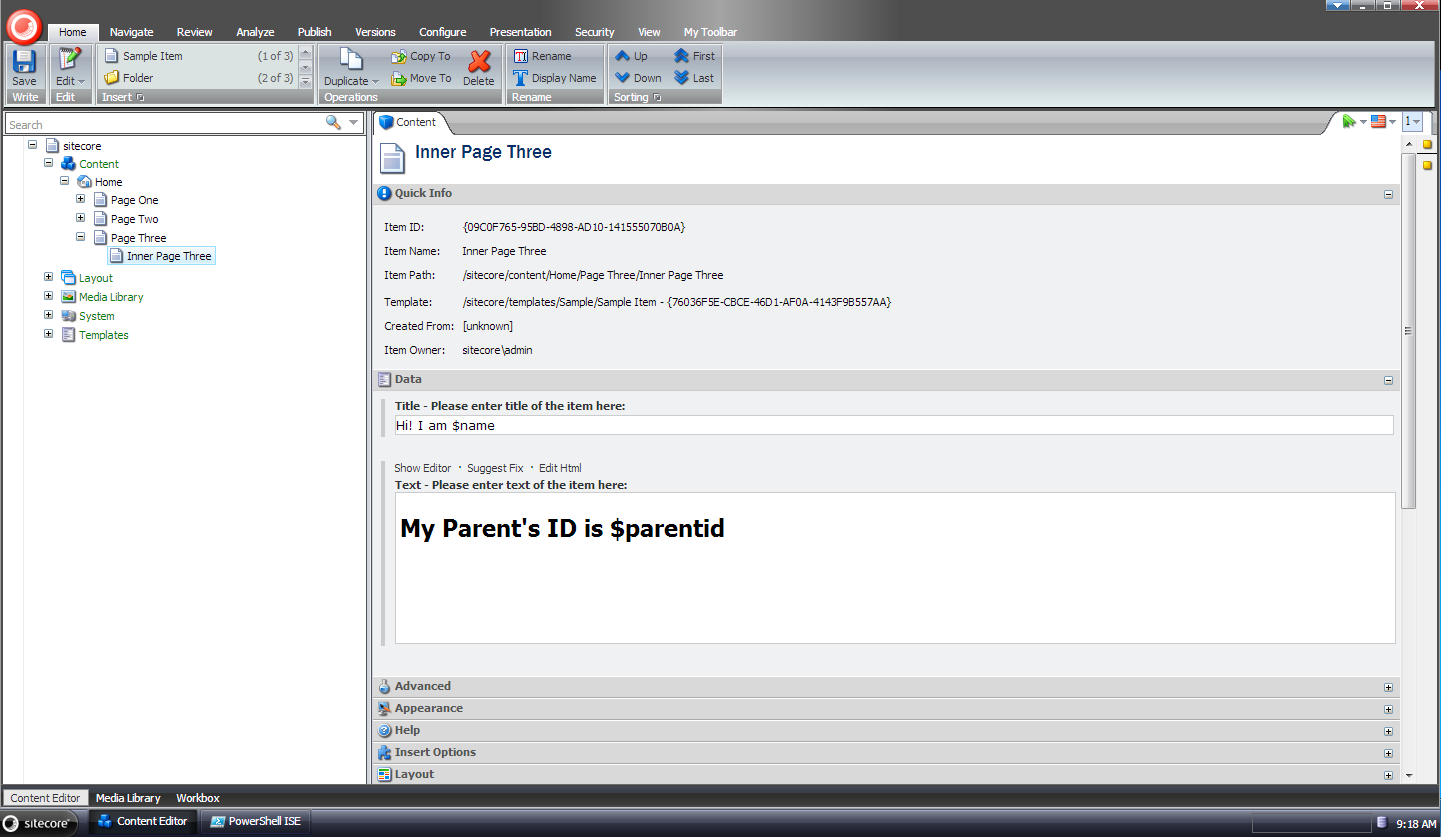
I chose the following page at random to expand tokens:
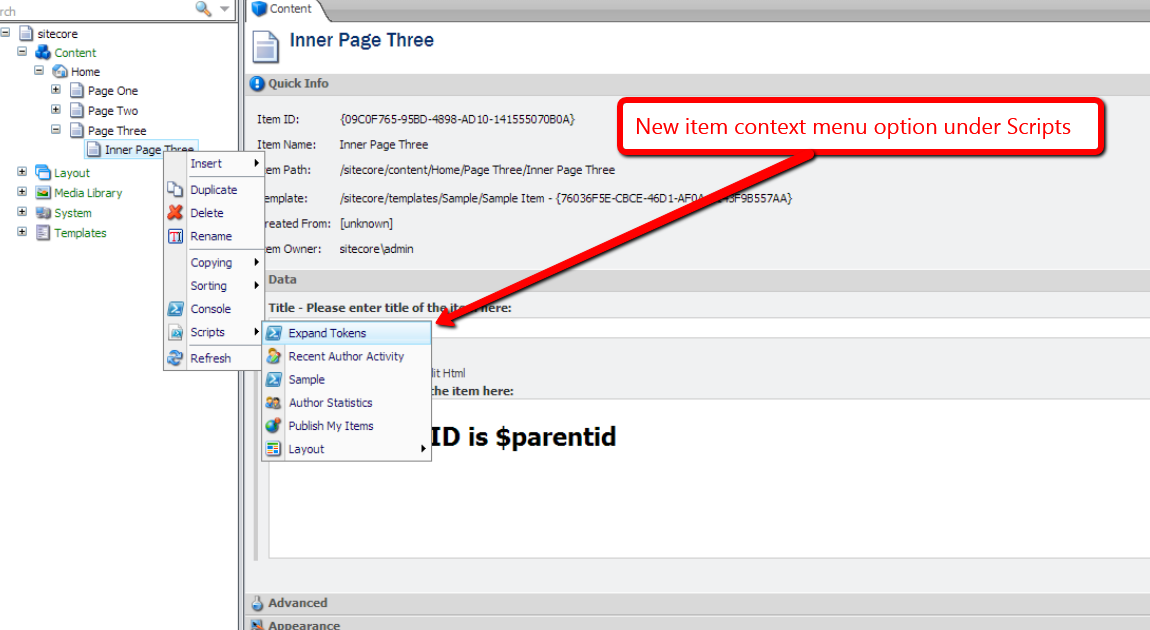
I right-clicked on the item to launch it’s context menu, opened up scripts, and saw a new “Expand Tokens” option:
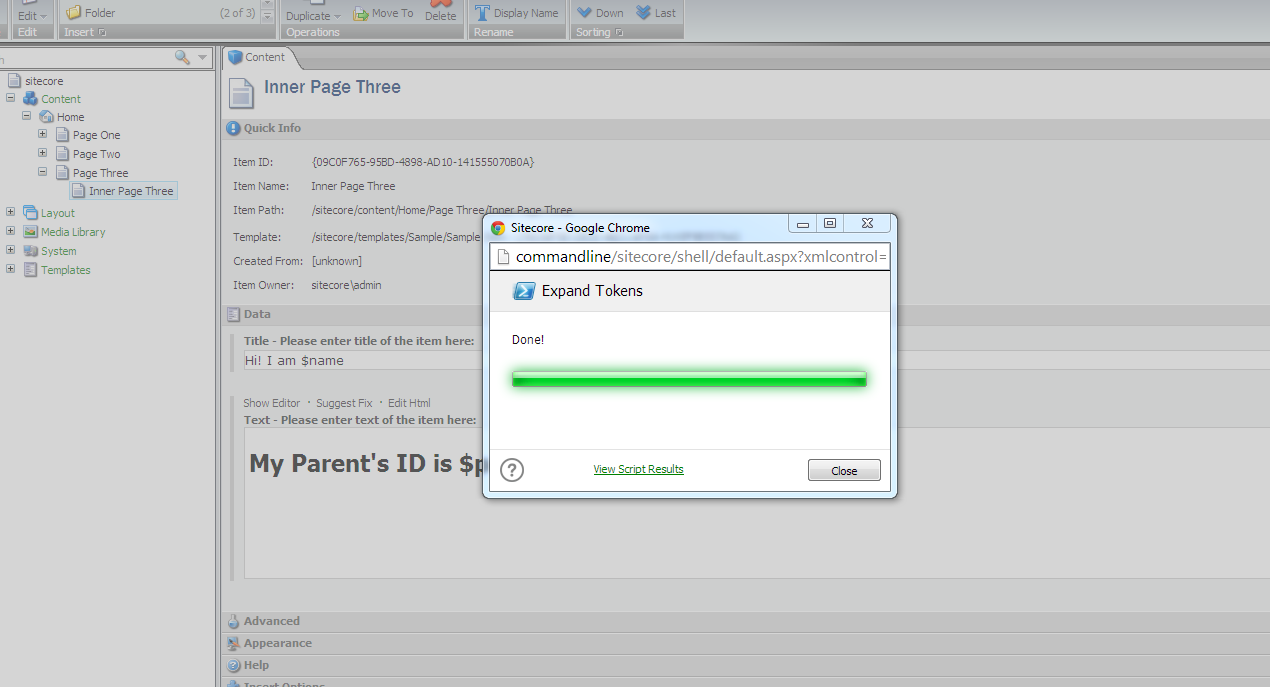
I clicked it, and was given a dialog with a status bar:
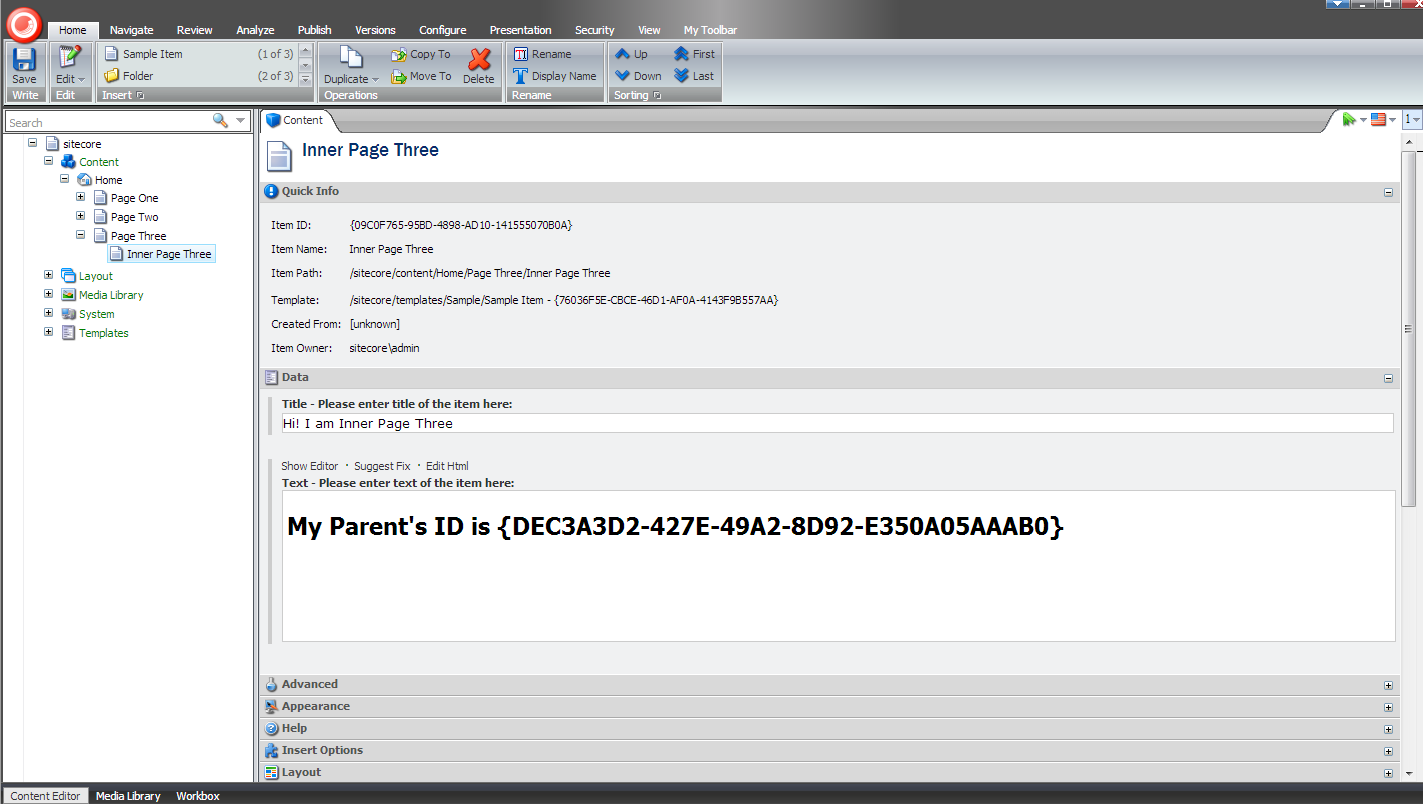
I refreshed the item, and saw that all tokens were expanded:
If you have any thoughts or questions on this, please leave a comment.
Until next time, have a scriptabulous day!
Expand Tokens on Sitecore Items Using a Custom Command in Sitecore PowerShell Extensions
During my Sitecore from the Command Line presentation at the Sitecore User Group – New England, I had shown attendees how they could go about adding a custom command into the Sitecore PowerShell Extensions module.
This blog post shows what I had presented — although the code in this post is an improved version over what I had presented at my talk. Many thanks to Sitecore MVP Adam Najmanowicz for helping me make this code better!
The following command will expand “out of the box” tokens in all fields of a supplied Sitecore item — check out Expand Tokens on Sitecore Items Using a Custom Command in Revolver where I discuss the problem commands like this address, and this article by Sitecore MVP Jens Mikkelsen which lists “out of the box” tokens available in Sitecore:
using System;
using System.Management.Automation;

using Sitecore.Configuration;

using Sitecore.Data;
using Sitecore.Data.Items;

using Cognifide.PowerShell.PowerShellIntegrations.Commandlets;

namespace CommandLineExtensions.PowerShell.Commandlets
{
    [Cmdlet("Expand", "Token")]
    [OutputType(new[] { typeof(Item) })]
    public class ExpandTokenCommand : BaseCommand
    {
        private static readonly MasterVariablesReplacer TokenReplacer = Factory.GetMasterVariablesReplacer();

        [Parameter(Position = 0, Mandatory = true, ValueFromPipeline = true)]
        public Item Item { get; set; }

        protected override void ProcessRecord()
        {
            Item.Editing.BeginEdit();
            try
            {
                TokenReplacer.ReplaceItem(Item);
                Item.Editing.EndEdit();
            }
            catch (Exception ex)
            {
                Item.Editing.CancelEdit();
                throw ex;
            }

            WriteItem(Item);
        }
    }
}
The command above subclasses Cognifide.PowerShell.PowerShellIntegrations.Commandlets.BaseCommand — the base class for most (if not all) commands in Sitecore PowerShell Extensions.
An item is passed to the command via a parameter, and is magically set on the Item property of the command class instance.
The ValueFromPipeline parameter being set to “true” on the Item property’s Parameter attribute will allow for chaining of this command with others so that items can be fed into it via a pipe bridging the commands together in PowerShell.
An instance of the Sitecore.Data.MasterVariablesReplacer class — which is created by the GetMasterVariablesReplacer() method of the Sitecore.Configuration.Factory class based on the “MasterVariablesReplacer” setting of your Sitecore instance’s Web.config — is used to expand tokens on the supplied Sitecore item after the item was flagged for editing.
Once tokens have been expanded on the item — or not in the event an exception is encountered — the item is written to the Results window via the WriteItem method which is defined in the BaseCommand class.
I then had to wire up the custom command via a patch configuration file:
<configuration xmlns:patch="http://www.sitecore.net/xmlconfig/">
  <sitecore>
    <powershell>
      <commandlets>
		    <add Name="Custom Commandlets" type="*, CommandLineExtensions" />
      </commandlets>
    </powershell>
  </sitecore>
</configuration>
Let’s take this custom command for a spin.
I created a bunch of test items, and set tokens in their fields. I then selected the following page at random for testing:

I opened up the Integrated Scripting Environment of Sitecore PowerShell Extensions, typed in the following PowerShell code, and executed by pressing Ctrl-E:

As you can see tokens were expanded on the Page One item:

How about expanding tokens on all descendants of the Home item? Let’s see an example of how we can do that.
I chose the following content item — a grandchild of the Home item — for testing:

I switched back over to the Integrated Scripting Environment, wrote the following code for testing — the Get-ChildItem command with the -r parameter (this means do this recursively) will grab all descendants of the Home item, and pipe each item in the result set into the Expand-Token command — and clicked the Execute button:

I then went back to the grandchild item of the Home page in the content tree, and saw that tokens were expanded in its fields:

If you have any thoughts or comments on this, or ideas for new commands in Sitecore PowerShell Extensions, please share in a comment.
Until next time, have a scriptolicious day!
Expand Tokens on Sitecore Items Using a Custom Command in Revolver
On September 18, 2013, I presented Sitecore from the Command Line at the Sitecore User Group – New England.
During my presentation, I gave an example of creating a custom command in Revolver — the first scripting platform for Sitecore built by Alistair Deneys — and thought I would write something up for those who had missed the presentation, or wanted to revisit what I had shown.
One thing that plagues some Sitecore developers — if you disagree please leave a comment — is not having a nice way to expand tokens on items when tokens are added to Standard Values after items had been created previously.
Newly added tokens “bleed” into preexisting items’ fields, and I’ve seen developers perform crazy feats of acrobatic gymnastics to expand them — writing a standalone web form to recursive crawl the content tree to expand these is such an example (take a look at Empower Your Content Authors to Expand Standard Values Tokens in the Sitecore Client where I offer an alternative way to expand tokens on content items).
The following custom Revolver command will expand tokens on a supplied Sitecore item, and help out on the front of expanding newly added tokens on preexisting items:
using System;
using Sitecore.Configuration;
using System.Linq;

using Sitecore.Data;
using Sitecore.Data.Items;

using Revolver.Core;
using Revolver.Core.Commands;

namespace CommandLineExtensions.Revolver.Commands
{
    public class ExpandTokensCommand : BaseCommand
    {
        private static readonly MasterVariablesReplacer TokenReplacer = Factory.GetMasterVariablesReplacer();

        public override string Description()
        {
            return "Expand tokens on an item";
        }

        public override HelpDetails Help()
        {
            HelpDetails details = new HelpDetails
            {
                Description = Description(),
                Usage = "<cmd> [path]"
            };

            details.AddExample("<cmd>");
            details.AddExample("<cmd> /item1/item2");
            return details;
        }

        public override CommandResult Run(string[] args)
        {
            string path = string.Empty;
            if (args.Any())
            {
                path = args.FirstOrDefault();
            }

            using (new ContextSwitcher(Context, path))
            {
                if (!Context.LastGoodPath.EndsWith(path, StringComparison.CurrentCultureIgnoreCase))
                {
                    return new CommandResult
                    (
                        CommandStatus.Failure,
                        string.Format("Failed to expand tokens on item {0}\nReason:\n\n An item does not exist at that location!", path)
                    );
                }

                CommandResult result;
                Item item = Context.CurrentItem;
                item.Editing.BeginEdit();
                try
                {
                    TokenReplacer.ReplaceItem(item);
                    result = new CommandResult(CommandStatus.Success, string.Concat("Expanded tokens on item ", Context.LastGoodPath));
                    item.Editing.EndEdit();
                }
                catch (Exception ex)
                {
                    item.Editing.CancelEdit();
                    result = new CommandResult(CommandStatus.Failure, string.Format("Failed to expand tokens on item {0}\nReason:\n\n{1}", path, ex));
                }

                return result;
            }
        }
    }
}
Tokens are expanded using an instance of the Sitecore.Data.MasterVariablesReplacer class — you can roll your own, and wire it up in the “MasterVariablesReplacer” setting of your Sitecore instance’s Web.config — which is provided by Sitecore.Configuration.Factory.GetMasterVariablesReplacer().
All custom commands in Revolver must implement the Revolver.Core.ICommand interface. I subclassed Revolver.Core.Commands.BaseCommand — which does implement this interface — since it seemed like the right thing to do given that all “out of the box” commands I saw in Revolver were subclassing it, and then implemented the Description(), Help() and Run() abstract methods.
I then had to bind the custom command to a new name — I chose “et” for “Expand Tokens”:
@echooff
@stoponerror

bind CommandLineExtensions.Revolver.Commands.ExpandTokensCommand,CommandLineExtensions et

@echoon
Since it wouldn’t be efficient to type and run this bind script every time I want to use the “et” command, I added it into a startup script in the core database:

I then had to create a user script for the startup script to run. I chose the Everyone role here for demonstration purposes:

The above startup script will be invoked when Revolver is opened, and our custom command will be bound.
Let’s see all of the above in action.
I added some tokens in my home item:

I then opened up Revolver, navigated to /sitecore/content, and ran the custom command on the home item:

As you can see the tokens were expanded:

You might be thinking “that’s wonderful Mike — except now I have to navigate to every item in my content tree using Revolver, and then run this custom command on it”.
Well, I do have a solution for this: a custom script that grabs an item and all of its descendants using a Sitecore query, and passes them to the custom command to expand tokens:
@echooff
@stoponerror

if ($1$ = \$1\$) (exit (Missing required parameter path))

@echoon

query -ns $1$/descendant-or-self::* et
I put this script in the core database, and named it “etr” for “Expand Tokens Recursively”:
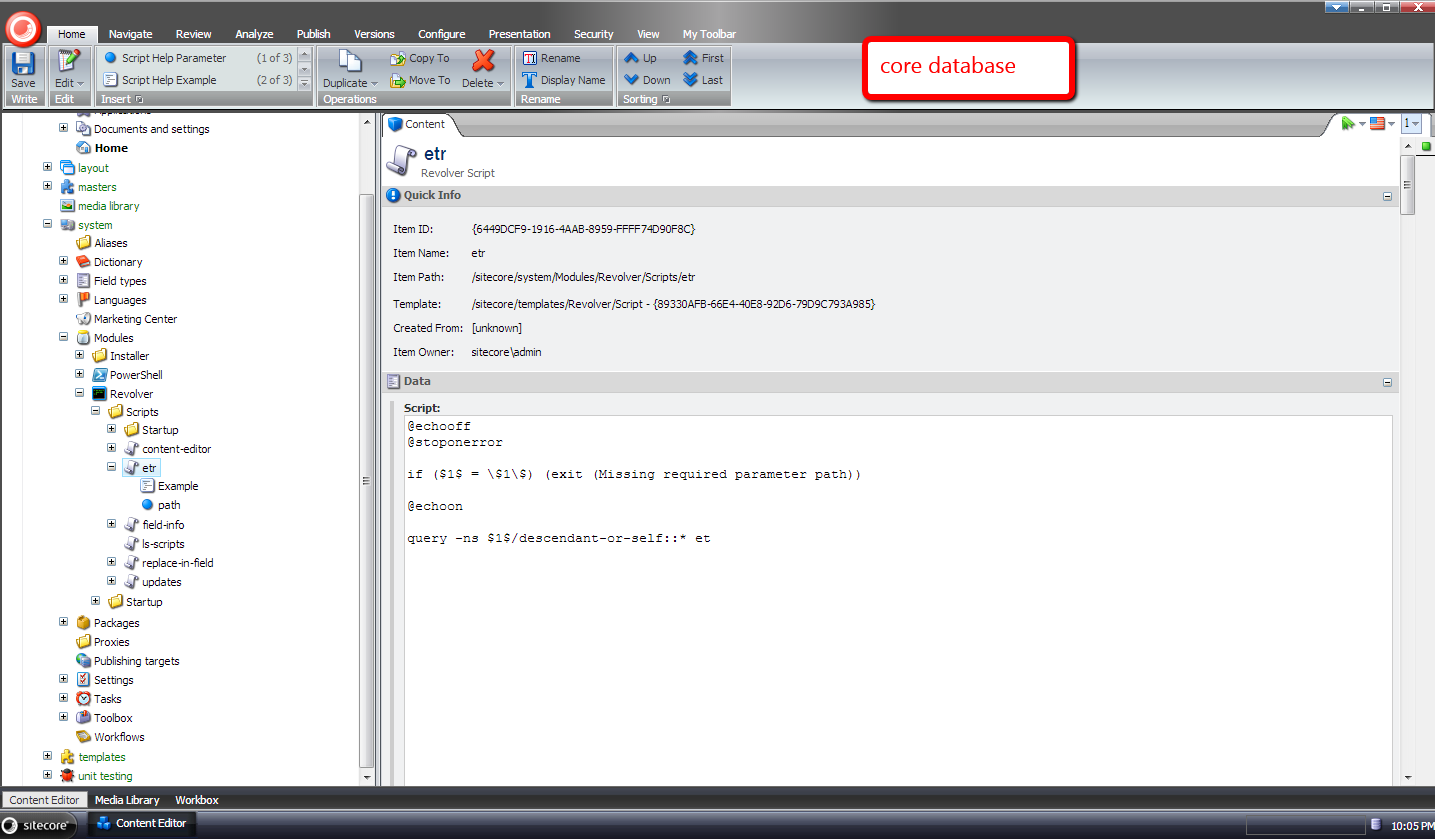
I navigated to a descendant of /sitecore/content/home, and see that it has some unexpanded tokens on it:

I went back to Revolver, and ran the “etr” command on the home item:

As you can see tokens were expanded on the descendant item:
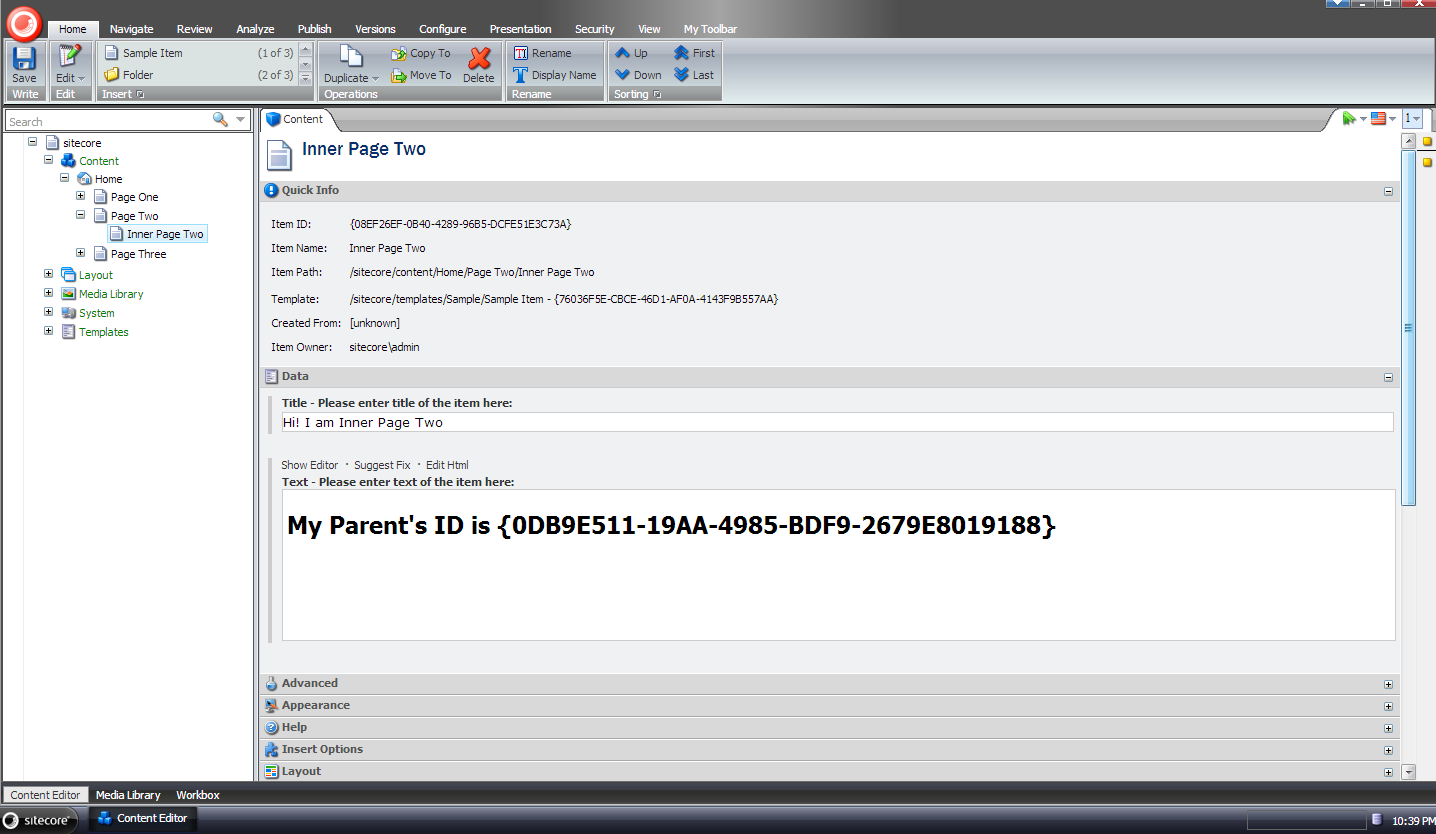
If you have any thoughts on this, or have ideas for other custom commands in Revolver, please share in a comment.
Shortcodes in Sitecore: A Proof of Concept
Today I stumbled upon a post in one of the SDN forums asking whether anyone had ever implemented shortcodes in Sitecore.
I have not seen an implementation of this for Sitecore — if you know of one, please drop a comment — but am quite familiar with these in WordPress — I use them to format code in my blog posts using the [code language=”csharp”]//code goes in here[/code] shortcode — and felt I should take on the challenge of implementing a “proof of concept” for this in Sitecore.
I first created a POCO that will hold shortcode data: the shortcode itself and the content (or markup) that the shortcode represents after being expanded:
namespace Sitecore.Sandbox.Pipelines.ExpandShortcodes
{
    public class Shortcode
    {
        public string Unexpanded { get; set; }

        public string Expanded { get; set; }
    }
}
I thought it would be best to put the logic that expands shortcodes into a new pipeline, and defined a pipeline arguments class for it:
using Sitecore.Pipelines;

namespace Sitecore.Sandbox.Pipelines.ExpandShortcodes
{
    public class ExpandShortcodesArgs : PipelineArgs
    {
        public string Content { get; set; }
    }
}
There really isn’t much to this arguments class — we will only be passing around a string of content that will contain shortcodes to be expanded.
Before moving forward on building pipeline processors for the new pipeline, I saw that I could leverage the template method pattern to help me process collections of Shortcode instances in an abstract base class:
using System.Collections.Generic;
using System.Linq;
using System.Text.RegularExpressions;

using Sitecore.Diagnostics;

namespace Sitecore.Sandbox.Pipelines.ExpandShortcodes
{
    public abstract class ExpandShortcodesProcessor
    {
        public virtual void Process(ExpandShortcodesArgs args)
        {
            if (string.IsNullOrWhiteSpace(args.Content))
            {
                return;
            }

            IEnumerable<Shortcode> shortcodes = GetShortcodes(args.Content);
            if (shortcodes == null || !shortcodes.Any())
            {
                return;
            }

            args.Content = ExpandShortcodes(shortcodes, args.Content);
        }

        protected abstract IEnumerable<Shortcode> GetShortcodes(string content);

        protected virtual string ExpandShortcodes(IEnumerable<Shortcode> shortcodes, string content)
        {
            Assert.ArgumentNotNull(shortcodes, "shortcodes");
            Assert.ArgumentNotNull(content, "content");
            string contentExpanded = content;
            foreach (Shortcode shortcode in shortcodes)
            {
                contentExpanded = contentExpanded.Replace(shortcode.Unexpanded, shortcode.Expanded);
            }

            return contentExpanded;
        }
    }
}
The above class iterates over all Shortcode instances, and replaces shortcodes with their expanded content.
Each subclass processor of ExpandShortcodesProcessor are to “fill in the blanks” of the algorithm defined in the base class by implementing the GetShortcodes method only — this is where the heavy lifting of grabbing the shortcodes from the passed string of content, and the expansion of these shortcodes are done. Both are then set in new Shortcode instances.
Once the base class was built, I developed an example ExpandShortcodesProcessor subclass to expand [BigBlueText]content goes in here[/BigBlueText] shortcodes (in case you’re wondering, I completely fabricated this shortcode — it does not exist in the real world):
using System.Collections.Generic;
using System.Text.RegularExpressions;

namespace Sitecore.Sandbox.Pipelines.ExpandShortcodes
{
    public class ExpandBigBlueTextShortcodes : ExpandShortcodesProcessor
    {
        protected override IEnumerable<Shortcode> GetShortcodes(string content)
        {
            if(string.IsNullOrWhiteSpace(content))
            {
                return new List<Shortcode>();
            }

            IList<Shortcode> shortcodes = new List<Shortcode>();
            MatchCollection matches = Regex.Matches(content, @"\[BigBlueText\](.*?)\[/BigBlueText\]", RegexOptions.IgnoreCase);

            foreach (Match match in matches)
            {
                string innerText = match.Groups[1].Value.Trim();
                if (!string.IsNullOrWhiteSpace(innerText))
                {
                    shortcodes.Add
                    (
                        new Shortcode
                        {
                            Unexpanded = match.Value,
                            Expanded = string.Format(@"<span style=""font-size:56px;color:blue;"">{0}</span>", innerText)
                        }
                    );
                }
            }

            return shortcodes;
        }
    }
}
I followed the above example processor with another — a new one to expand [YouTube id=”video id goes in here”] shortcodes (this one is made up as well, although YouTube shortcodes do exist out in the wild):
using System.Collections.Generic;
using System.Text.RegularExpressions;

namespace Sitecore.Sandbox.Pipelines.ExpandShortcodes
{
    public class ExpandYouTubeShortcodes : ExpandShortcodesProcessor
    {
        protected override IEnumerable<Shortcode> GetShortcodes(string content)
        {
            if(string.IsNullOrWhiteSpace(content))
            {
                return new List<Shortcode>();
            }

            IList<Shortcode> shortcodes = new List<Shortcode>();
            MatchCollection matches = Regex.Matches(content, @"\[youtube\s+id=""(.*?)""\]", RegexOptions.IgnoreCase);

            foreach (Match match in matches)
            {
                string id = match.Groups[1].Value.Trim();
                if (!string.IsNullOrWhiteSpace(id))
                {
                    shortcodes.Add
                    (
                        new Shortcode
                        {
                            Unexpanded = match.Value,
                            Expanded = string.Format(@"", id)
                        }
                    );
                }
            }

            return shortcodes;
        }
    }
}
Next I built a renderField pipeline processor to invoke our new pipeline when the field is a text field of some sort — yes, all fields in Sitecore are fundamentally strings behind the scenes but I’m referring to Single-Line Text, Multi-Line Text, Rich Text, and the deprecated text fields — to expand our shortcodes:
using Sitecore.Diagnostics;
using Sitecore.Pipelines;
using Sitecore.Pipelines.RenderField;

using Sitecore.Sandbox.Pipelines.ExpandShortcodes;

namespace Sitecore.Sandbox.Pipelines.RenderField
{
    public class ExpandShortcodes
    {
        public void Process(RenderFieldArgs args)
        {
            if (!ShouldFieldBeProcessed(args))
            {
                return;
            }

            args.Result.FirstPart = GetExpandedShortcodes(args.Result.FirstPart);
        }

        private static bool ShouldFieldBeProcessed(RenderFieldArgs args)
        {
            Assert.ArgumentNotNull(args, "args");
            Assert.ArgumentNotNull(args.FieldTypeKey, "args.FieldTypeKey");
            string fieldTypeKey = args.FieldTypeKey.ToLower();
            return fieldTypeKey == "text"
                    || fieldTypeKey == "rich text"
                    || fieldTypeKey == "single-line text"
                    || fieldTypeKey == "multi-line text";
        }

        private static string GetExpandedShortcodes(string content)
        {
            Assert.ArgumentNotNull(content, "content");
            ExpandShortcodesArgs args = new ExpandShortcodesArgs { Content = content };
            CorePipeline.Run("expandShortcodes", args);
            return args.Content;
        }
    }
}
I cemented all the pieces together using a Sitecore configuration file — this should go in your /App_Config/Include/ folder:
<?xml version="1.0" encoding="utf-8"?>
<configuration xmlns:patch="http://www.sitecore.net/xmlconfig/">
  <sitecore>
    <pipelines>
      <expandShortcodes>
        <processor type="Sitecore.Sandbox.Pipelines.ExpandShortcodes.ExpandYouTubeShortcodes, Sitecore.Sandbox" />
        <processor type="Sitecore.Sandbox.Pipelines.ExpandShortcodes.ExpandBigBlueTextShortcodes, Sitecore.Sandbox" />
      </expandShortcodes>
      <renderField>
        <processor type="Sitecore.Sandbox.Pipelines.RenderField.ExpandShortcodes, Sitecore.Sandbox"
                   patch:after="processor[@type='Sitecore.Pipelines.RenderField.GetTextFieldValue, Sitecore.Kernel']" />
      </renderField>
    </pipelines>
  </sitecore>
</configuration>
Let’s see the above code in action.
I created a test item, and added BigBlueText and YouTube shortcodes into two different text fields:

I saved, published, and then navigated to the test item:

As you can see, our shortcodes were expanded.
If you have any thoughts on this, or ideas around a better shortcode framework for Sitecore, please share in a comment.
Set New Media Library Item Fields Via the Sitecore Item Web API
On a recent project, I found the need to set field data on new media library items using the Sitecore Item Web API — a feature that is not supported “out of the box”.
After digging through Sitecore.ItemWebApi.dll, I discovered where one could add the ability to update fields on newly created media library items:

Unfortunately, the CreateMediaItems method in the Sitecore.ItemWebApi.Pipelines.Request.ResolveAction class is declared private — introducing code to set fields on new media library items will require some copying and pasting of code.
Honestly, I loathe duplicating code. 😦
Unfortunately, we must do it in order to add the capability of setting fields on media library items via the Sitecore Item Web API (if you can think of a better way, please leave a comment).
I did just that on the following subclass of Sitecore.ItemWebApi.Pipelines.Request.ResolveAction:
using System;
using System.Collections.Generic;
using System.IO;
using System.Web;

using Sitecore.Data;
using Sitecore.Data.Items;
using Sitecore.Diagnostics;
using Sitecore.IO;
using Sitecore.ItemWebApi;
using Sitecore.ItemWebApi.Pipelines.Read;
using Sitecore.ItemWebApi.Pipelines.Request;
using Sitecore.Pipelines;
using Sitecore.Resources.Media;
using Sitecore.Text;
using Sitecore.Data.Fields;

namespace Sitecore.Sandbox.ItemWebApi.Pipelines.Request
{
    public class ResolveActionMediaItems : ResolveAction
    {
        protected override void ExecuteCreateRequest(RequestArgs args)
        {
            Assert.ArgumentNotNull(args, "args");
            if (IsMediaCreation(args.Context))
            {
                CreateMediaItems(args);
                return;
            }

            base.ExecuteCreateRequest(args);
        }

        private void CreateMediaItems(RequestArgs args)
        {
            Assert.ArgumentNotNull(args, "args");
            Item parent = args.Context.Item;
            if (parent == null)
            {
                throw new Exception("The specified location not found.");
            }
            string fullPath = parent.Paths.FullPath;
            if (!fullPath.StartsWith("/sitecore/media library"))
            {
                throw new Exception(string.Format("The specified location of media items is not in the Media Library ({0}).", fullPath));
            }
            string name = args.Context.HttpContext.Request.Params["name"];
            if (string.IsNullOrEmpty(name))
            {
                throw new Exception("Item name not specified (HTTP parameter 'name').");
            }
            Database database = args.Context.Database;
            Assert.IsNotNull(database, "Database not resolved.");
            HttpFileCollection files = args.Context.HttpContext.Request.Files;
            Assert.IsTrue(files.Count > 0, "Files not found.");
            List<Item> list = new List<Item>();

            for (int i = 0; i < files.Count; i++)
            {
                HttpPostedFile file = files[i];
                if (file.ContentLength != 0)
                {
                    string fileName = file.FileName;
                    string uniqueName = ItemUtil.GetUniqueName(parent, name);
                    string destination = string.Format("{0}/{1}", fullPath, uniqueName);
                    MediaCreatorOptions options = new MediaCreatorOptions
                    {
                        AlternateText = fileName,
                        Database = database,
                        Destination = destination,
                        Versioned = false
                    };
                    Stream inputStream = file.InputStream;
                    string extension = FileUtil.GetExtension(fileName);
                    string filePath = string.Format("{0}.{1}", uniqueName, extension);
                    try
                    {
                        Item item = MediaManager.Creator.CreateFromStream(inputStream, filePath, options);
                        SetFields(item, args.Context.HttpContext.Request["fields"]); // MR: set field data on item if data is passed
                        list.Add(item);
                    }
                    catch
                    {
                        Logger.Warn("Cannot create the media item.");
                    }
                }
            }
            ReadArgs readArgs = new ReadArgs(list.ToArray());
            CorePipeline.Run("itemWebApiRead", readArgs);
            args.Result = readArgs.Result;
        }

        private static void SetFields(Item item, string fieldsQueryString)
        {
            if (!string.IsNullOrWhiteSpace(fieldsQueryString))
            {
                SetFields(item, new UrlString(fieldsQueryString));
            }
        }

        private static void SetFields(Item item, UrlString fields)
        {
            Assert.ArgumentNotNull(item, "item");
            Assert.ArgumentNotNull(fields, "fields");

            if (fields.Parameters.Count < 1)
            {
                return;
            }

            item.Editing.BeginEdit();

            foreach (string fieldName in fields.Parameters.Keys)
            {
                Field field = item.Fields[fieldName];
                if(field != null)
                {
                    field.Value = fields.Parameters[fieldName];
                }
            }

            item.Editing.EndEdit();
        }

        private bool IsMediaCreation(Sitecore.ItemWebApi.Context context)
        {
            Assert.ArgumentNotNull(context, "context");
            return context.HttpContext.Request.Files.Count > 0;
        }
    }
}
The above class reads fields supplied by client code via a query string passed in a query string parameter — the fields query string must be “url encoded” by the client code before being passed in the outer query string.
We then delegate to an instance of the Sitecore.Text.UrlString class when fields are supplied by client code — if you don’t check to see if the query string is null, empty or whitespace, the UrlString class will throw an exception if it’s not set — to parse the fields query string, and loop over the parameters within it — each parameter represents a field to be set on the item, and is set if it exists (see the SetFields methods above).
I replaced Sitecore.ItemWebApi.Pipelines.Request.ResolveAction in \App_Config\Include\Sitecore.ItemWebApi.config with our new pipeline processor above:
<?xml version="1.0" encoding="utf-8"?>
<configuration xmlns:patch="http://www.sitecore.net/xmlconfig/">
	<sitecore>
		<pipelines>
		<!-- there is more stuff up here -->
		<!--Processes Item Web API requests. -->
		<itemWebApiRequest>
			<!-- there are more pipeline processors up here -->
			<processor type="Sitecore.Sandbox.ItemWebApi.Pipelines.Request.ResolveActionMediaItems, Sitecore.Sandbox" />
			<!-- there are more pipeline processors down here -->
		</itemWebApiRequest>
		<!-- there is more stuff down here -->
		</pipelines>
	</sitecore>
</configuration>
I then modified the media library item creation code in my copy of the console application written by Kern Herskind Nightingale — Director of Technical Services at Sitecore UK — to send field data to the Sitecore Item Web API:

I set some fields using test data:

After I ran the console application, I got a response — this is a good sign 🙂

As you can see, our test field data has been set on our pizza media library item:

If you have any thoughts or suggestions on this, please drop a comment.
Now I’m hungry — perhaps I’ll order a pizza! 🙂
Encrypt Web Forms For Marketers Fields in Sitecore
In an earlier post, I walked you through how I experimented with data encryption of field values in Sitecore, and alluded to how I had done a similar thing for the Web Forms For Marketers (WFFM) module on a past project at work.
Months have gone by, and guilt has begun to gnaw away at my entire being — no, not really, I’m exaggerating a bit — but I definitely have been feeling bad for not sharing a solution.
In order to shake feeling bad, I decided to put my nose to the grindstone over the past few days to come up with a different solution than the one I had built at work, and this post shows the fruits of that labor.
I decided to reuse the interface I had created in my older post on data encryption. I am re-posting it here for reference:
using System;
using System.Collections.Generic;
using System.Linq;
using System.Text;

namespace Sitecore.Sandbox.Security.Encryption.Base
{
    public interface IEncryptor
    {
        string Encrypt(string input);

        string Decrypt(string input);
    }
}
I then asked myself “What encryption algorithm should I use?” I scavenged through the System.Security.Cryptography namespace in mscorlib.dll using .NET Reflector, and discovered some classes, when used together, achieve data encryption using the RC2 algorithm — an algorithm I know nothing about:
using System;
using System.Collections.Generic;
using System.Linq;
using System.Security.Cryptography;
using System.Text;

using Sitecore.Diagnostics;

using Sitecore.Sandbox.Security.Encryption.Base;

namespace Sitecore.Sandbox.Security.Encryption
{
    public class RC2Encryptor : IEncryptor
    {
        public string Key { get; set; }

        private RC2Encryptor(string key)
        {
            SetKey(key);
        }

        private void SetKey(string key)
        {
            Assert.ArgumentNotNullOrEmpty(key, "key");
            Key = key;
        }

        public string Encrypt(string input)
        {
            return Encrypt(input, Key);
        }

        public static string Encrypt(string input, string key)
        {
            byte[] inputArray = UTF8Encoding.UTF8.GetBytes(input);
            RC2CryptoServiceProvider rc2 = new RC2CryptoServiceProvider();
            rc2.Key = UTF8Encoding.UTF8.GetBytes(key);
            rc2.Mode = CipherMode.ECB;
            rc2.Padding = PaddingMode.PKCS7;
            ICryptoTransform cTransform = rc2.CreateEncryptor();
            byte[] resultArray = cTransform.TransformFinalBlock(inputArray, 0, inputArray.Length);
            rc2.Clear();
            return System.Convert.ToBase64String(resultArray, 0, resultArray.Length);
        }

        public string Decrypt(string input)
        {
            return Decrypt(input, Key);
        }

        public static string Decrypt(string input, string key)
        {
            byte[] inputArray = System.Convert.FromBase64String(input);
            RC2CryptoServiceProvider rc2 = new RC2CryptoServiceProvider();
            rc2.Key = UTF8Encoding.UTF8.GetBytes(key);
            rc2.Mode = CipherMode.ECB;
            rc2.Padding = PaddingMode.PKCS7;
            ICryptoTransform cTransform = rc2.CreateDecryptor();
            byte[] resultArray = cTransform.TransformFinalBlock(inputArray, 0, inputArray.Length);
            rc2.Clear();
            return UTF8Encoding.UTF8.GetString(resultArray);
        }

        public static IEncryptor CreateNewRC2Encryptor(string key)
        {
            return new RC2Encryptor(key);
        }
    }
}
As I had mentioned in my previous post on data encryption, I am not a cryptography expert, nor a security expert.
I am not aware of how strong the RC2 encryption algorithm is, or what it would take to crack it. I strongly advise against using this algorithm in any production system without first consulting with a security expert. I am using it in this post only as an example.
If you happen to be a security expert, or are able to compare encryption algorithms defined in the System.Security.Cryptography namespace in mscorlib.dll, please share in a comment.
In a previous post on manipulating field values for WFFM forms, I had to define a new class that implements Sitecore.Forms.Data.IField in Sitecore.Forms.Core.dll in order to change field values — it appears the property mutator for the “out of the box” class is ignored — and decided to reuse it here:
using System;

using Sitecore.Forms.Data;

namespace Sitecore.Sandbox.Utilities.Manipulators.DTO
{
    public class WFFMField : IField
    {
        public string Data { get; set; }

        public Guid FieldId { get; set; }

        public string FieldName { get; set; }

        public IForm Form { get; set; }

        public Guid Id { get; internal set; }

        public string Value { get; set; }
    }
}
Next, I created a WFFM Data Provider that encrypts and decrypts field names and values:
using System;
using System.Collections.Generic;

using Sitecore.Configuration;
using Sitecore.Diagnostics;
using Sitecore.Forms.Data;
using Sitecore.Forms.Data.DataProviders;
using Sitecore.Reflection;

using Sitecore.Sandbox.Security.DTO;
using Sitecore.Sandbox.Security.Encryption.Base;
using Sitecore.Sandbox.Security.Encryption;
using Sitecore.Sandbox.Utilities.Manipulators.DTO;

namespace Sitecore.Sandbox.WFFM.Forms.Data.DataProviders
{
    public class WFFMEncryptionDataProvider : WFMDataProviderBase
    {
        private WFMDataProviderBase InnerProvider { get; set; }
        private IEncryptor Encryptor { get; set; }

        public WFFMEncryptionDataProvider(string innerProvider)
            : this(CreateInnerProvider(innerProvider), CreateDefaultEncryptor())
        {
        }

        public WFFMEncryptionDataProvider(string connectionString, string innerProvider)
            : this(CreateInnerProvider(innerProvider, connectionString), CreateDefaultEncryptor())
        {
        }

        public WFFMEncryptionDataProvider(WFMDataProviderBase innerProvider)
            : this(innerProvider, CreateDefaultEncryptor())
        {
        }

        public WFFMEncryptionDataProvider(WFMDataProviderBase innerProvider, IEncryptor encryptor)
        {
            SetInnerProvider(innerProvider);
            SetEncryptor(encryptor);
        }

        private static WFMDataProviderBase CreateInnerProvider(string innerProvider, string connectionString = null)
        {
            Assert.ArgumentNotNullOrEmpty(innerProvider, "innerProvider");
            if (!string.IsNullOrWhiteSpace(connectionString))
            {
                return ReflectionUtil.CreateObject(innerProvider, new[] { connectionString }) as WFMDataProviderBase;
            }

            return ReflectionUtil.CreateObject(innerProvider, new object[0]) as WFMDataProviderBase;
        }

        private void SetInnerProvider(WFMDataProviderBase innerProvider)
        {
            Assert.ArgumentNotNull(innerProvider, "innerProvider");
            InnerProvider = innerProvider;
        }

        private static IEncryptor CreateDefaultEncryptor()
        {
            return DataNullTerminatorEncryptor.CreateNewDataNullTerminatorEncryptor(GetEncryptorSettings());
        }

        private static DataNullTerminatorEncryptorSettings GetEncryptorSettings()
        {
            return new DataNullTerminatorEncryptorSettings
            {
                EncryptionDataNullTerminator = Settings.GetSetting("WFFM.Encryption.DataNullTerminator"),
                InnerEncryptor = RC2Encryptor.CreateNewRC2Encryptor(Settings.GetSetting("WFFM.Encryption.Key"))
            };
        }

        private void SetEncryptor(IEncryptor encryptor)
        {
            Assert.ArgumentNotNull(encryptor, "encryptor");
            Encryptor = encryptor;
        }

        public override void ChangeStorage(Guid formItemId, string newStorage)
        {
            InnerProvider.ChangeStorage(formItemId, newStorage);
        }

        public override void ChangeStorageForForms(IEnumerable<Guid> ids, string storageName)
        {
            InnerProvider.ChangeStorageForForms(ids, storageName);
        }

        public override void DeleteForms(IEnumerable<Guid> formSubmitIds)
        {
            InnerProvider.DeleteForms(formSubmitIds);
        }

        public override void DeleteForms(Guid formItemId, string storageName)
        {
            InnerProvider.DeleteForms(formItemId, storageName);
        }

        public override IEnumerable<IPool> GetAbundantPools(Guid fieldId, int top, out int total)
        {
            return InnerProvider.GetAbundantPools(fieldId, top, out total);
        }

        public override IEnumerable<IForm> GetForms(QueryParams queryParams, out int total)
        {
            IEnumerable<IForm> forms = InnerProvider.GetForms(queryParams, out total);
            DecryptForms(forms);
            return forms;
        }

        public override IEnumerable<IForm> GetFormsByIds(IEnumerable<Guid> ids)
        {
            IEnumerable<IForm> forms = InnerProvider.GetFormsByIds(ids);
            DecryptForms(forms);
            return forms;
        }

        public override int GetFormsCount(Guid formItemId, string storageName, string filter)
        {
            return InnerProvider.GetFormsCount(formItemId, storageName, filter);
        }

        public override IEnumerable<IPool> GetPools(Guid fieldId)
        {
            return InnerProvider.GetPools(fieldId);
        }

        public override void InsertForm(IForm form)
        {
            EncryptForm(form);
            InnerProvider.InsertForm(form);
        }

        public override void ResetPool(Guid fieldId)
        {
            InnerProvider.ResetPool(fieldId);
        }

        public override IForm SelectSingleForm(Guid fieldId, string likeValue)
        {
            IForm form = InnerProvider.SelectSingleForm(fieldId, likeValue);
            DecryptForm(form);
            return form;
        }

        public override bool UpdateForm(IForm form)
        {
            EncryptForm(form);
            return InnerProvider.UpdateForm(form);
        }

        private void EncryptForms(IEnumerable<IForm> forms)
        {
            Assert.ArgumentNotNull(forms, "forms");
            foreach (IForm form in forms)
            {
                EncryptForm(form);
            }
        }

        private void EncryptForm(IForm form)
        {
            Assert.ArgumentNotNull(form, "form");
            Assert.ArgumentNotNull(form.Field, "form.Field");
            form.Field = EncryptFields(form.Field);
        }

        private IEnumerable<IField> EncryptFields(IEnumerable<IField> fields)
        {
            Assert.ArgumentNotNull(fields, "fields");
            IList<IField> encryptedFields = new List<IField>();
            foreach (IField field in fields)
            {
                encryptedFields.Add(EncryptField(field));
            }

            return encryptedFields;
        }

        private IField EncryptField(IField field)
        {
            Assert.ArgumentNotNull(field, "field");
            return CreateNewWFFMField(field, Encrypt(field.FieldName), Encrypt(field.Value));
        }

        private void DecryptForms(IEnumerable<IForm> forms)
        {
            Assert.ArgumentNotNull(forms, "forms");
            foreach (IForm form in forms)
            {
                DecryptForm(form);
            }
        }

        private void DecryptForm(IForm form)
        {
            Assert.ArgumentNotNull(form, "form");
            Assert.ArgumentNotNull(form.Field, "form.Field");
            form.Field = DecryptFields(form.Field);
        }

        private IEnumerable<IField> DecryptFields(IEnumerable<IField> fields)
        {
            Assert.ArgumentNotNull(fields, "fields");
            IList<IField> decryptedFields = new List<IField>();
            foreach (IField field in fields)
            {
                decryptedFields.Add(DecryptField(field));
            }

            return decryptedFields;
        }

        private IField DecryptField(IField field)
        {
            Assert.ArgumentNotNull(field, "field");
            return CreateNewWFFMField(field, Decrypt(field.FieldName), Decrypt(field.Value));
        }

        private string Encrypt(string input)
        {
            return Encryptor.Encrypt(input);
        }

        private string Decrypt(string input)
        {
            return Encryptor.Decrypt(input);
        }

        private static IField CreateNewWFFMField(IField field, string fieldName, string value)
        {
            if (field != null)
            {
                return new WFFMField
                {
                    Data = field.Data,
                    FieldId = field.FieldId,
                    FieldName = fieldName,
                    Form = field.Form,
                    Id = field.Id,
                    Value = value
                };
            }

            return null;
        }
    }
}
The above class employs the decorator pattern. An inner WFFM Data Provider — which is supplied via a parameter configuration node in \App_Config\Include\forms.config, and is created via magic within the Sitecore.Reflection.ReflectionUtil class — is wrapped.
Methods that save and retrieve form data in the above Data Provider decorate the same methods defined on the inner WFFM Data Provider.
Methods that save form data pass form(s) — and eventually their fields — through a chain of Encrypt methods. The Encrypt method that takes in an IField instance as an argument encrypts the instance’s field name and value, and returns a new instance of the WFFMField class using the encrypted data and the other properties on the IField instance untouched.
Similarly, a chain of Decrypt methods are called for form(s) being retrieved from the inner Data Provider — field names and values are decrypted and saved into a new instance of the WFFMField class, and the manipulated form(s) are returned.
I want to point out that the IEncryptor instance is actually an instance of DataNullTerminatorEncryptor — see my earlier post on data encryption to see how this is implemented — which decorates our RC2Encryptor. This decorating encryptor stamps encrypted strings with a special string so we don’t accidentally encrypt a value twice, and it also won’t try to decrypt a string value that isn’t encrypted.
I added a new include configuration file to hold encryption related settings — the IEncryptor’s key, and the string that will be put at the end of all encrypted data via the DataNullTerminatorEncryptor instance:
<?xml version="1.0" encoding="utf-8"?>
<configuration xmlns:patch="http://www.sitecore.net/xmlconfig/">
  <sitecore>
    <settings>
      <!-- TODO: change the terminator so it does not scream "PLEASE TRY TO CRACK ME!" -->
      <setting name="WFFM.Encryption.DataNullTerminator" value="#I_AM_ENCRYPTED#" />

      <!-- I found this key somewhere on the internet, so it must be secure -->
      <setting name="WFFM.Encryption.Key" value="88bca90e90875a" />
    </settings>
  </sitecore>
</configuration>
I then hooked in the encryption WFFM Data Provider in \App_Config\Include\forms.config, and set the type for the inner provider:
<configuration xmlns:patch="http://www.sitecore.net/xmlconfig/" xmlns:x="http://www.sitecore.net/xmlconfig/">
  <sitecore>

	<!-- There is stuff up here -->

	<!-- MS SQL -->
	<formsDataProvider type="Sitecore.Sandbox.WFFM.Forms.Data.DataProviders.WFFMEncryptionDataProvider, Sitecore.Sandbox">
		<!-- No, this is not my real connection string -->
		<param desc="connection string">user id=(user);password=(password);Data Source=(database)</param>
		<param desc="inner provider">Sitecore.Forms.Data.DataProviders.WFMDataProvider, Sitecore.Forms.Core</param>
	</formsDataProvider>

	<!-- There is stuff down here -->

	</sitecore>
</configuration>
Let’s see this in action.
I created a new WFFM form with some fields for testing:
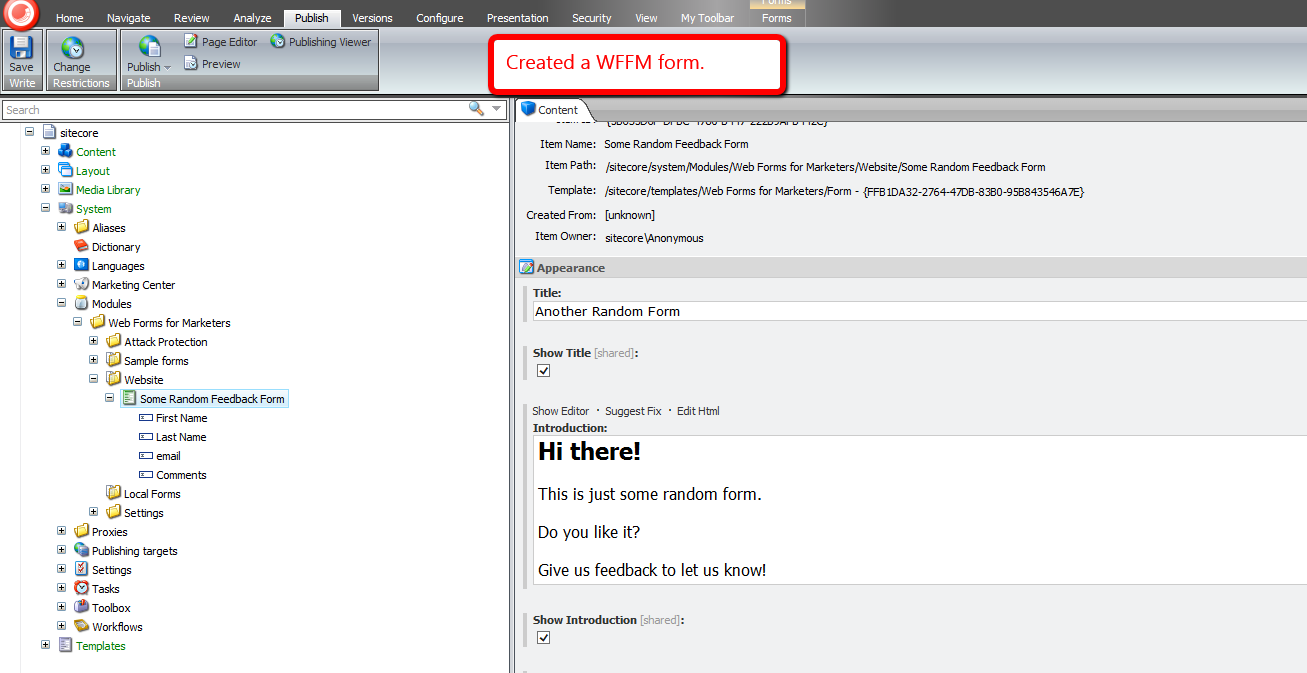
I then mapped the above form to a new page in Sitecore, and published both the form and page.
I navigated to the form page, and filled it out:

After clicking submit, I was given a ‘thank you’ page’:

Let’s see what our field data looks like in the WFFM database:

As you can see, the data is encrypted.
Now, let’s see if the data is also encrypted in the Forms Report for our test form:

As you can see, the end-user would be unaware that any data manipulation is happening under the hood.
If you have any thoughts on this, please leave a comment.
Tailor Sitecore Item Web API Field Values On Read
Last week Sitecore MVP Kamruz Jaman asked me in this tweet if I could answer this question on Stack Overflow.
The person asking the question wanted to know why alt text for images aren’t returned in responses from the Sitecore Item Web API, and was curious if it were possible to include these.
After digging around the Sitecore.ItemWebApi.dll and my local copy of /App_Config/Include/Sitecore.ItemWebApi.config — this config file defines a bunch of pipelines and their processors that can be augmented or overridden — I learned field values are returned via logic in the Sitecore.ItemWebApi.Pipelines.Read.GetResult class, which is exposed in /configuration/sitecore/pipelines/itemWebApiRead/processor[@type=”Sitecore.ItemWebApi.Pipelines.Read.GetResult, Sitecore.ItemWebApi”] in /App_Config/Include/Sitecore.ItemWebApi.config:

This is an example of a raw value for an image field — it does not include the alt text for the image:
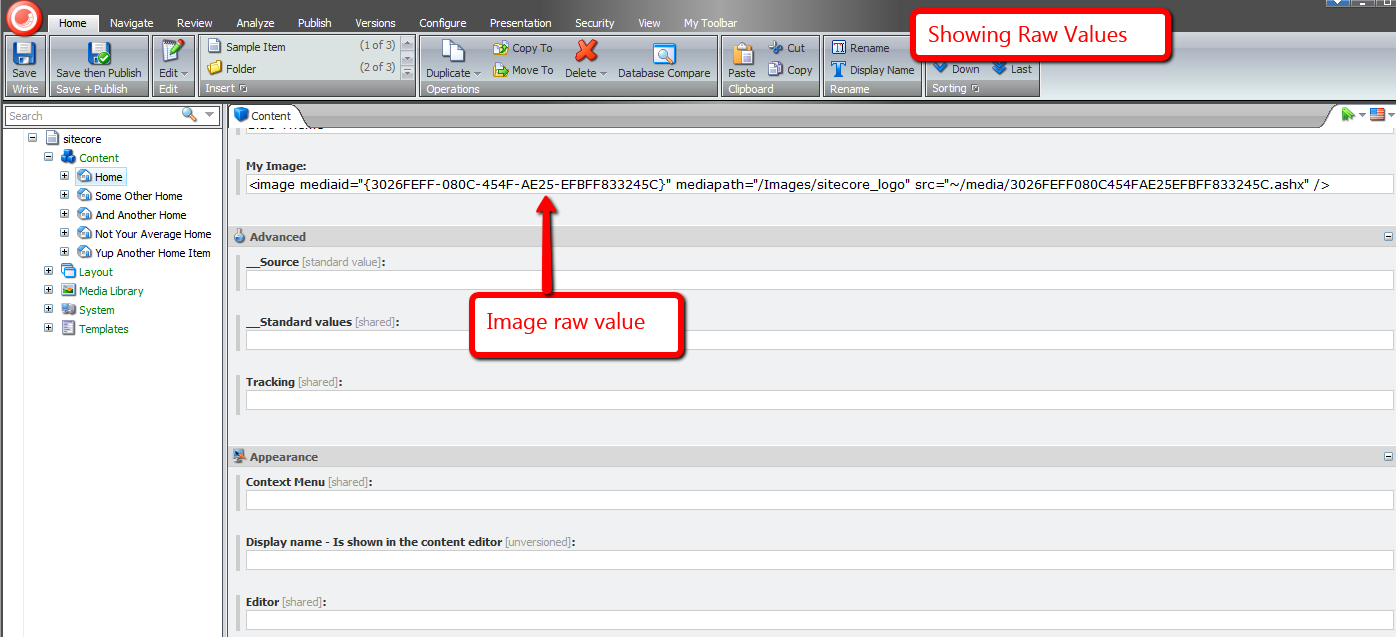
I spun up a copy of the console application written by Kern Herskind Nightingale — Director of Technical Services at Sitecore UK — to show the value returned by the above pipeline processor for an image field:

The Sitecore.ItemWebApi.Pipelines.Read.GetResult class exposes a virtual method hook — the protected method GetFieldInfo() — that allows custom code to change a field’s value before it is returned.
I wrote the following class as an example for changing an image field’s value:
using System;
using System.IO;
using System.Web;
using System.Web.UI;

using Sitecore.Data.Fields;
using Sitecore.Data.Items;
using Sitecore.Diagnostics;
using Sitecore.ItemWebApi;
using Sitecore.ItemWebApi.Pipelines.Read;
using Sitecore.Web.UI.WebControls;

using HtmlAgilityPack;

namespace Sitecore.Sandbox.ItemWebApi.Pipelines.Read
{
    public class EnsureImageFieldAltText : GetResult
    {
        protected override Dynamic GetFieldInfo(Field field)
        {
            Assert.ArgumentNotNull(field, "field");
            Dynamic dynamic = base.GetFieldInfo(field);
            AddAltTextForImageField(dynamic, field);
            return dynamic;
        }

        private static void AddAltTextForImageField(Dynamic dynamic, Field field)
        {
            Assert.ArgumentNotNull(dynamic, "dynamic");
            Assert.ArgumentNotNull(field, "field");

            if(IsImageField(field))
            {
                dynamic["Value"] = AddAltTextToImages(field.Value, GetAltText(field));
            }
        }

        private static string AddAltTextToImages(string imagesXml, string altText)
        {
            if (string.IsNullOrWhiteSpace(imagesXml) || string.IsNullOrWhiteSpace(altText))
            {
                return imagesXml;
            }

            HtmlDocument htmlDocument = new HtmlDocument();
            htmlDocument.LoadHtml(imagesXml);
            HtmlNodeCollection images = htmlDocument.DocumentNode.SelectNodes("//image");
            foreach (HtmlNode image in images)
            {
                if (image.Attributes["src"] != null)
                {
                    image.SetAttributeValue("src", GetAbsoluteUrl(image.GetAttributeValue("src", string.Empty)));
                }

                image.SetAttributeValue("alt", altText);
            }

            return htmlDocument.DocumentNode.InnerHtml;
        }

        private static string GetAbsoluteUrl(string url)
        {
            Assert.ArgumentNotNullOrEmpty(url, "url");
            Uri uri = HttpContext.Current.Request.Url;

            if (url.StartsWith(uri.Scheme))
            {
                return url;
            }

            string port = string.Empty;

            if (uri.Port != 80)
            {
                port = string.Concat(":", uri.Port);
            }

            return string.Format("{0}://{1}{2}/~{3}", uri.Scheme, uri.Host, port, VirtualPathUtility.ToAbsolute(url));
        }

        private static string GetAltText(Field field)
        {
            Assert.ArgumentNotNull(field, "field");
            if (IsImageField(field))
            {
                ImageField imageField = field;
                if (imageField != null)
                {
                    return imageField.Alt;
                }
            }

            return string.Empty;
        }

        private static bool IsImageField(Field field)
        {
            Assert.ArgumentNotNull(field, "field");
            return field.Type == "Image";
        }
    }
}
The class above — with the help of the Sitecore.Data.Fields.ImageField class — gets the alt text for the image, and adds a new alt XML attribute to the XML before it is returned.
The class also changes the relative url defined in the src attribute in to be an absolute url.
I then swapped out /configuration/sitecore/pipelines/itemWebApiRead/processor[@type=”Sitecore.ItemWebApi.Pipelines.Read.GetResult, Sitecore.ItemWebApi”] with the class above in /App_Config/Include/Sitecore.ItemWebApi.config:
<?xml version="1.0" encoding="utf-8"?>
<configuration xmlns:patch="http://www.sitecore.net/xmlconfig/">
  <sitecore>
    <pipelines>
      <!-- Lots of stuff here -->
      <!-- Handles the item read operation. -->
		<itemWebApiRead>
			<processor type="Sitecore.Sandbox.ItemWebApi.Pipelines.Read.EnsureImageFieldAltText, Sitecore.Sandbox" />
		</itemWebApiRead>
		  <!--Lots of stuff here too -->

    </pipelines>
	<!-- Even more stuff here -->
  </sitecore>
</configuration>
I then reran the console application to see what the XML now looks like, and as you can see the new alt attribute was added:

You might be thinking “Mike, image field XML values are great in Sitecore’s Content Editor, but client code consuming this data might have trouble with it. Is there anyway to have HTML be returned instead of XML?
You bet!
The following subclass of Sitecore.ItemWebApi.Pipelines.Read.GetResult returns HTML, not XML:
using System;
using System.IO;
using System.Web;
using System.Web.UI;

using Sitecore.Data.Fields;
using Sitecore.Data.Items;
using Sitecore.Diagnostics;
using Sitecore.ItemWebApi;
using Sitecore.ItemWebApi.Pipelines.Read;
using Sitecore.Web.UI.WebControls;

using HtmlAgilityPack;

namespace Sitecore.Sandbox.ItemWebApi.Pipelines.Read
{
    public class TailorFieldValue : GetResult
    {
        protected override Dynamic GetFieldInfo(Field field)
        {
            Assert.ArgumentNotNull(field, "field");
            Dynamic dynamic = base.GetFieldInfo(field);
            TailorValueForImageField(dynamic, field);
            return dynamic;
        }

        private static void TailorValueForImageField(Dynamic dynamic, Field field)
        {
            Assert.ArgumentNotNull(dynamic, "dynamic");
            Assert.ArgumentNotNull(field, "field");

            if (field.Type == "Image")
            {
                dynamic["Value"] = SetAbsoluteUrlsOnImages(GetImageHtml(field));
            }
        }

        private static string SetAbsoluteUrlsOnImages(string html)
        {
            if (string.IsNullOrWhiteSpace(html))
            {
                return html;
            }

            HtmlDocument htmlDocument = new HtmlDocument();
            htmlDocument.LoadHtml(html);
            HtmlNodeCollection images = htmlDocument.DocumentNode.SelectNodes("//img");
            foreach (HtmlNode image in images)
            {
                if (image.Attributes["src"] != null)
                {
                    image.SetAttributeValue("src", GetAbsoluteUrl(image.GetAttributeValue("src", string.Empty)));
                }
            }

            return htmlDocument.DocumentNode.InnerHtml;
        }

        private static string GetAbsoluteUrl(string url)
        {
            Assert.ArgumentNotNullOrEmpty(url, "url");
            Uri uri = HttpContext.Current.Request.Url;

            if (url.StartsWith(uri.Scheme))
            {
                return url;
            }

            string port = string.Empty;

            if (uri.Port != 80)
            {
                port = string.Concat(":", uri.Port);
            }

            return string.Format("{0}://{1}{2}{3}", uri.Scheme, uri.Host, port, VirtualPathUtility.ToAbsolute(url));
        }

        private static string GetImageHtml(Field field)
        {
            return GetImageHtml(field.Item, field.Name);
        }

        private static string GetImageHtml(Item item, string fieldName)
        {
            Assert.ArgumentNotNull(item, "item");
            Assert.ArgumentNotNullOrEmpty(fieldName, "fieldName");
            return RenderImageControlHtml(new Image { Item = item, Field = fieldName });
        }

        private static string RenderImageControlHtml(Image image)
        {
            Assert.ArgumentNotNull(image, "image");
            string html = string.Empty;

            using (TextWriter textWriter = new StringWriter())
            {
                using (HtmlTextWriter htmlTextWriter = new HtmlTextWriter(textWriter))
                {
                    image.RenderControl(htmlTextWriter);
                }

                html = textWriter.ToString();
            }

            return html;
        }
    }
}
The class above uses an instance of the Image field control (Sitecore.Web.UI.WebControls.Image) to do all the work for us around building the HTML for the image, and we also make sure the url within it is absolute — just as we had done above.
I then wired this up to my local Sitecore instance in /App_Config/Include/Sitecore.ItemWebApi.config:
<?xml version="1.0" encoding="utf-8"?>
<configuration xmlns:patch="http://www.sitecore.net/xmlconfig/">
  <sitecore>
    <pipelines>
      <!-- Lots of stuff here -->
      <!-- Handles the item read operation. -->
		<itemWebApiRead>
			<processor type="Sitecore.Sandbox.ItemWebApi.Pipelines.Read.TailorFieldValue, Sitecore.Sandbox" />
		</itemWebApiRead>
		  <!--Lots of stuff here too -->

    </pipelines>
	<!-- Even more stuff here -->
  </sitecore>
</configuration>
I then executed the console application, and was given back HTML for the image:

If you can think of other reasons for manipulating field values in subclasses of Sitecore.ItemWebApi.Pipelines.Read.GetResult, please drop a comment.
Addendum
Kieran Marron — a Lead Developer at Sitecore — wrote another Sitecore.ItemWebApi.Pipelines.Read.GetResult subclass example that returns an image’s alt text in the Sitecore Item Web API response via a new JSON property. Check it out!
Reuse Sitecore Data Template Fields by Pulling Them Up Into a Base Template
How many times have you discovered that you need to reuse some fields defined in a data template, but don’t want to use that data template as a base template since it defines a bunch of fields that you don’t want to use?
What do you usually do in such a situation?
In the past, I would have created a new data template, moved the fields I would like to reuse underneath it, followed by setting that new template as a base template on the data template I moved the fields from.
I’ve spoken with other Sitecore developers on what they do in this situation, and one developer conveyed he duplicates the template, and delete fields that are not to be reused — thus creating a new base template. Though this might save time, I would advise against it — any code referencing fields by IDs will break using this paradigm for creating a new base template.
Martin Fowler — in his book
Refactoring: Improving the Design of Existing Code — defined the refactoring technique ‘Pull Up Field’ for moving fields from a class up into its base class — dubbed superclass for the Java inclined audience.
One should employ this refactoring technique when other subclasses of the base class are to reuse the fields being pulled up.
When I first encountered this refactoring technique in Fowler’s book, I pondered over how useful this would be in the Sitecore data template world, and decided to build two tools for pulling up fields into a base template. One tool will create a new base template, and the other will allow users to move fields to an existing base template.
The following class defines methods that will be used by two new client pipelines I will define below:
using System;
using System.Collections.Generic;
using System.Linq;
using System.Text;

using Sitecore.Configuration;
using Sitecore.Data;
using Sitecore.Data.Items;
using Sitecore.Data.Managers;
using Sitecore.Data.Templates;
using Sitecore.Diagnostics;
using Sitecore.Shell.Applications.Dialogs.ItemLister;
using Sitecore.Shell.Framework;
using Sitecore.Text;
using Sitecore.Web;
using Sitecore.Web.UI.Sheer;

namespace Sitecore.Sandbox.Shell.Framework.Pipelines
{
    public class PullUpFieldsIntoBaseTemplate
    {
        private const char IDDelimiter = '|';
        private const string BaseTemplateFieldName = "__Base template";

        public void EnsureTemplate(ClientPipelineArgs args)
        {
            Item item = GetItem(args);
            if (!IsTemplate(item))
            {
                CancelOperation(args, "The supplied item is not a template!");
            }
        }

        private static bool IsTemplate(Item item)
        {
            Assert.ArgumentNotNull(item, "item");
            return TemplateManager.IsTemplate(item);
        }

        public void SelectFields(ClientPipelineArgs args)
        {
            Assert.ArgumentNotNull(args, "args");
            if (!args.IsPostBack)
            {
                UrlString urlString = new UrlString(UIUtil.GetUri("control:TreeListExEditor"));
                UrlHandle urlHandle = new UrlHandle();
                urlHandle["title"] = "Select Fields";
                urlHandle["text"] = "Select the fields to pull up into a base template.";
                urlHandle["source"] = GetSelectFieldsDialogSource(args);
                urlHandle.Add(urlString);
                SheerResponse.ShowModalDialog(urlString.ToString(), "800px", "500px", string.Empty, true);
                args.WaitForPostBack();
            }
            else if (args.HasResult)
            {
                args.Parameters["fieldIds"] = args.Result;
                args.IsPostBack = false;
            }
            else
            {
                CancelOperation(args);
            }
        }

        private static string GetSelectFieldsDialogSource(ClientPipelineArgs args)
        {
            Assert.ArgumentNotNull(args, "args");
            Assert.ArgumentNotNullOrEmpty(args.Parameters["database"], "args.Parameters[\"database\"]");
            Assert.ArgumentNotNullOrEmpty(args.Parameters["templateId"], "args.Parameters[\"templateId\"]");
            return string.Format
            (
                "AllowMultipleSelection=true&DatabaseName={0}&DataSource={1}&IncludeTemplatesForSelection=Template field",
                args.Parameters["database"],
                args.Parameters["templateId"]
            );
        }

        public void ChooseBaseTemplateName(ClientPipelineArgs args)
        {
            if (!args.IsPostBack)
            {
                SheerResponse.Input("Enter the name of the base template", string.Concat("New Base Template 1"));
                args.WaitForPostBack();
            }
            else if (args.HasResult)
            {
                args.Parameters["baseTemplateName"] = args.Result;
                args.IsPostBack = false;
            }
            else
            {
                CancelOperation(args);
            }
        }

        public void ChooseBaseTemplateLocation(ClientPipelineArgs args)
        {
            if (!args.IsPostBack)
            {
                Dialogs.BrowseItem
                (
                    "Select Base Template Location",
                    "Select the parent item under which the new base template will be created.",
                    args.Parameters["icon"],
                    "OK",
                    "/sitecore/templates",
                    args.Parameters["templateId"]
                );

                args.WaitForPostBack();
            }
            else if (args.HasResult)
            {
                args.Parameters["baseTemplateParentId"] = args.Result;
                args.IsPostBack = false;
            }
            else
            {
                CancelOperation(args);
            }
        }

        public void CreateNewBaseTemplate(ClientPipelineArgs args)
        {
            Database database = GetDatabase(args.Parameters["database"]);
            Item baseTemplateParent = database.GetItem(args.Parameters["baseTemplateParentId"]);
            Item baseTemplate = baseTemplateParent.Add(args.Parameters["baseTemplateName"], new TemplateID(TemplateIDs.Template));
            SetBaseTemplateField(baseTemplate, TemplateIDs.StandardTemplate);
            args.Parameters["baseTemplateId"] = baseTemplate.ID.ToString();
        }

        public void ChooseExistingBaseTemplate(ClientPipelineArgs args)
        {
            if (!args.IsPostBack)
            {
                ItemListerOptions itemListerOptions = new ItemListerOptions
                {
                    ButtonText = "OK",
                    Icon = args.Parameters["icon"],
                    Title = "Select Base Template",
                    Text = "Select the base template for pulling up the fields."
                };

                TemplateItem templateItem = GetItem(args);
                itemListerOptions.Items = ExcludeStandardTemplate(templateItem.BaseTemplates).Select(baseTemplate => baseTemplate.InnerItem).ToList();
                itemListerOptions.AddTemplate(TemplateIDs.Template);
                SheerResponse.ShowModalDialog(itemListerOptions.ToUrlString().ToString(), true);
                args.WaitForPostBack();
            }
            else if (args.HasResult)
            {
                args.Parameters["baseTemplateId"] = args.Result;
                args.IsPostBack = false;
            }
            else
            {
                CancelOperation(args);
            }
        }

        private static IEnumerable<TemplateItem> ExcludeStandardTemplate(IEnumerable<TemplateItem> baseTemplates)
        {
            if (baseTemplates != null && baseTemplates.Any())
            {
                return baseTemplates.Where(baseTemplate => baseTemplate.ID != TemplateIDs.StandardTemplate);
            }

            return baseTemplates;
        }

        public void EnsureCanCreateAtBaseTemplateLocation(ClientPipelineArgs args)
        {
            Item baseTemplateParent = GetItem(args.Parameters["database"], args.Parameters["baseTemplateParentId"]);
            if (!baseTemplateParent.Access.CanCreate())
            {
                CancelOperation(args, "You cannot create an item at the selected location!");
            }
        }

        public void Execute(ClientPipelineArgs args)
        {
            Database database = GetDatabase(args.Parameters["database"]);
            Item baseTemplate = database.GetItem(args.Parameters["baseTemplateId"]);
            SetBaseTemplateField(baseTemplate, TemplateIDs.StandardTemplate);
            IDictionary<SectionInformation, IList<Item>> sectionsWithFields = GetSectionsWithFields(database, args.Parameters["fieldIds"]);

            foreach (SectionInformation sectionInformation in sectionsWithFields.Keys)
            {
                IEnumerable<Item> fields = sectionsWithFields[sectionInformation];
                MoveFieldsToAppropriateSection(baseTemplate, sectionInformation, fields);
            }

            Item templateItem = database.GetItem(args.Parameters["templateId"]);
            ListString baseTemplateIDs = new ListString(templateItem[BaseTemplateFieldName], IDDelimiter);
            baseTemplateIDs.Add(baseTemplate.ID.ToString());
            SetBaseTemplateField(templateItem, baseTemplateIDs);
            Refresh(templateItem);
        }

        private static void MoveFieldsToAppropriateSection(Item baseTemplate, SectionInformation sectionInformation, IEnumerable<Item> fields)
        {
            TemplateItem templateItem = baseTemplate;
            TemplateSectionItem templateSectionItem = templateItem.GetSection(sectionInformation.Section.Name);

            if (templateSectionItem != null)
            {
                MoveFields(templateSectionItem, fields);
            }
            else
            {
                Item sectionItemCopy = sectionInformation.Section.CopyTo(baseTemplate, sectionInformation.Section.Name, ID.NewID, false);
                MoveFields(sectionItemCopy, fields);
            }

            if (!sectionInformation.Section.GetChildren().Any())
            {
                sectionInformation.Section.Delete();
            }
        }

        private static void MoveFields(TemplateSectionItem templateSectionItem, IEnumerable<Item> fields)
        {
            Assert.ArgumentNotNull(templateSectionItem, "templateSectionItem");
            Assert.ArgumentNotNull(fields, "fields");
            foreach (Item field in fields)
            {
                field.MoveTo(templateSectionItem.InnerItem);
            }
        }

        private static void SetBaseTemplateField(Item templateItem, object baseTemplateIds)
        {
            Assert.ArgumentNotNull(templateItem, "templateItem");
            templateItem.Editing.BeginEdit();
            templateItem[BaseTemplateFieldName] = EnsureDistinct(baseTemplateIds.ToString(), IDDelimiter);
            templateItem.Editing.EndEdit();
        }

        private static string EnsureDistinct(string strings, char delimiter)
        {
            return string.Join(delimiter.ToString(), EnsureDistinct(strings.ToString().Split(new[] { delimiter })));
        }

        private static IEnumerable<string> EnsureDistinct(IEnumerable<string> strings)
        {
            return strings.Distinct();
        }

        private static IDictionary<SectionInformation, IList<Item>> GetSectionsWithFields(Database database, string fieldIds)
        {
            IDictionary<SectionInformation, IList<Item>> sectionsWithFields = new Dictionary<SectionInformation, IList<Item>>();

            foreach (TemplateFieldItem field in GetFields(database, fieldIds))
            {
                SectionInformation sectionInformation = new SectionInformation(field.Section.InnerItem);
                if (sectionsWithFields.ContainsKey(sectionInformation))
                {
                    sectionsWithFields[sectionInformation].Add(field.InnerItem);
                }
                else
                {
                    sectionsWithFields.Add(sectionInformation, new List<Item>(new[] { field.InnerItem }));
                }
            }

            return sectionsWithFields;
        }

        private static IEnumerable<TemplateFieldItem> GetFields(Database database, string fieldIds)
        {
            ListString fieldIdsListString = new ListString(fieldIds, IDDelimiter);
            IList<TemplateFieldItem> fields = new List<TemplateFieldItem>();

            foreach (string fieldId in fieldIdsListString)
            {
                fields.Add(database.GetItem(fieldId));
            }

            return fields;
        }

        private static Item GetItem(ClientPipelineArgs args)
        {
            Assert.ArgumentNotNull(args, "args");
            Item item = GetItem(args.Parameters["database"], args.Parameters["templateId"]);
            Assert.IsNotNull(item, "Item cannot be null!");
            return item;
        }

        private static Item GetItem(string databaseName, string itemId)
        {
            Assert.ArgumentNotNullOrEmpty(databaseName, "databaseName");
            Assert.ArgumentNotNullOrEmpty(itemId, "itemId");
            ID id = GetID(itemId);
            Assert.IsTrue(!ID.IsNullOrEmpty(id), "itemId is not valid!");
            Database database = GetDatabase(databaseName);
            Assert.IsNotNull(database, "Database is not valid!");
            return database.GetItem(id);
        }

        private static ID GetID(string itemId)
        {
            ID id;
            if (ID.TryParse(itemId, out id))
            {
                return id;
            }

            return ID.Null;
        }

        private static Database GetDatabase(string databaseName)
        {
            Assert.ArgumentNotNullOrEmpty(databaseName, "databaseName");
            return Factory.GetDatabase(databaseName);
        }

        private static void CancelOperation(ClientPipelineArgs args)
        {
            Assert.ArgumentNotNull(args, "args");
            CancelOperation(args, "Operation has been cancelled!");
        }

        private static void CancelOperation(ClientPipelineArgs args, string alertMessage)
        {
            Assert.ArgumentNotNull(args, "args");

            if (!string.IsNullOrEmpty(alertMessage))
            {
                SheerResponse.Alert(alertMessage);
            }

            args.AbortPipeline();
        }

        private static void Refresh(Item item)
        {
            Assert.ArgumentNotNull(item, "item");
            Context.ClientPage.ClientResponse.Timer(string.Format("item:load(id={0})", item.ID), 1);
        }

        public class SectionInformation : IEquatable<SectionInformation>
        {
            public Item Section { get; set; }

            public SectionInformation(Item section)
            {
                Assert.ArgumentNotNull(section, "section");
                Section = section;
            }

            public override int GetHashCode()
            {
                return Section.ID.Guid.GetHashCode();
            }

            public override bool Equals(object other)
            {
                return Equals(other as SectionInformation);
            }

            public bool Equals(SectionInformation other)
            {
                return other != null
                        && Section.ID.Guid == Section.ID.Guid;
            }
        }
    }
}
This above class defines methods that will be used as pipeline processor steps to prompt users for input — via dialogs — needed for pulling up fields to a new or existing base template.
I then defined commands to launch the pipelines I will define later on. I employed the Template method pattern here — each subclass must define its icon path, and the client pipeline it depends on after being clicked:
using System.Collections.Specialized;
using System.Linq;

using Sitecore.Data.Items;
using Sitecore.Data.Managers;
using Sitecore.Diagnostics;
using Sitecore.Shell.Framework.Commands;

namespace Sitecore.Sandbox.Commands.Base
{
    public abstract class PullUpFieldsCommand : Command
    {
        public override void Execute(CommandContext context)
        {
            Assert.ArgumentNotNull(context, "context");
            Context.ClientPage.Start(GetPullUpFieldsClientPipelineName(), CreateNewParameters(GetItem(context)));
        }

        protected abstract string GetPullUpFieldsClientPipelineName();

        private NameValueCollection CreateNewParameters(Item templateItem)
        {
            return new NameValueCollection
            {
                {"icon", GetIcon()},
                {"database", templateItem.Database.Name},
                {"templateId", templateItem.ID.ToString()}
            };
        }

        protected abstract string GetIcon();

        public override CommandState QueryState(CommandContext context)
        {
            Assert.ArgumentNotNull(context, "context");
            if (ShouldEnable(GetItem(context)))
            {
                return CommandState.Enabled;
            }

            return CommandState.Hidden;
        }

        protected static Item GetItem(CommandContext context)
        {
            Assert.ArgumentNotNull(context, "context");
            Assert.ArgumentNotNull(context.Items, "context.Items");
            Assert.ArgumentCondition(context.Items.Any(), "context.Items", "At least one item must be present!");
            return context.Items.FirstOrDefault();
        }

        private static bool ShouldEnable(Item item)
        {
            return item != null && IsTemplate(item);
        }

        private static bool IsTemplate(Item item)
        {
            Assert.ArgumentNotNull(item, "item");
            return TemplateManager.IsTemplate(item);
        }
    }
}
The command for pulling up fields into a new base template:
using Sitecore.Sandbox.Commands.Base;

namespace Sitecore.Sandbox.Commands
{
    public class PullUpFieldsIntoNewBaseTemplate : PullUpFieldsCommand
    {
        protected override string GetIcon()
        {
            return "Business/32x32/up_plus.png";
        }

        protected override string GetPullUpFieldsClientPipelineName()
        {
            return "uiPullUpFieldsIntoNewBaseTemplate";
        }
    }
}
The command for pulling up fields into an existing base template — it will be visible only when the template has base templates, not including the Standard Template:
using System.Linq;

using Sitecore.Sandbox.Commands.Base;
using Sitecore.Data.Items;
using Sitecore.Diagnostics;

using Sitecore.Shell.Framework.Commands;

namespace Sitecore.Sandbox.Commands
{
    public class PullUpFieldsIntoExistingBaseTemplate : PullUpFieldsCommand
    {
        public override CommandState QueryState(CommandContext context)
        {
            Assert.ArgumentNotNull(context, "context");
            bool shouldEnabled = base.QueryState(context) == CommandState.Enabled
                                    && DoesTemplateHaveBaseTemplates(context);
            if (shouldEnabled)
            {
                return CommandState.Enabled;
            }

            return CommandState.Hidden;
        }

        private static bool DoesTemplateHaveBaseTemplates(CommandContext context)
        {
            Assert.ArgumentNotNull(context, "context");
            TemplateItem templateItem = GetItem(context);
            return templateItem.BaseTemplates.Count() > 1
                    || (templateItem.BaseTemplates.Any()
                            && templateItem.BaseTemplates.FirstOrDefault().ID != TemplateIDs.StandardTemplate);
        }

        protected override string GetIcon()
        {
            return "Business/32x32/up_minus.png";
        }

        protected override string GetPullUpFieldsClientPipelineName()
        {
            return "uiPullUpFieldsIntoExistingBaseTemplate";
        }
    }
}
I’ve omitted how I mapped these to context menu buttons in the core database. If you are unfamiliar with how this is done, please take a look at my first and second posts on augmenting the item context menu to see how this is done.
I registered my commands, and glued methods in the PullUpFieldsIntoBaseTemplate class together into two client pipelines in a configuration include file:
<?xml version="1.0"?>
<configuration xmlns:patch="http://www.sitecore.net/xmlconfig/">
  <sitecore>
    <commands>
      <command name="item:pullupfieldsintonewbasetemplate" type="Sitecore.Sandbox.Commands.PullUpFieldsIntoNewBaseTemplate,Sitecore.Sandbox"/>
      <command name="item:pullupfieldsintoexistingbasetemplate" type="Sitecore.Sandbox.Commands.PullUpFieldsIntoExistingBaseTemplate,Sitecore.Sandbox"/>
    </commands>
    <processors>
      <uiPullUpFieldsIntoNewBaseTemplate>
        <processor mode="on" type="Sitecore.Sandbox.Shell.Framework.Pipelines.PullUpFieldsIntoBaseTemplate,Sitecore.Sandbox" method="EnsureTemplate"/>
        <processor mode="on" type="Sitecore.Sandbox.Shell.Framework.Pipelines.PullUpFieldsIntoBaseTemplate,Sitecore.Sandbox" method="SelectFields"/>
        <processor mode="on" type="Sitecore.Sandbox.Shell.Framework.Pipelines.PullUpFieldsIntoBaseTemplate,Sitecore.Sandbox" method="ChooseBaseTemplateName"/>
        <processor mode="on" type="Sitecore.Sandbox.Shell.Framework.Pipelines.PullUpFieldsIntoBaseTemplate,Sitecore.Sandbox" method="ChooseBaseTemplateLocation"/>
        <processor mode="on" type="Sitecore.Sandbox.Shell.Framework.Pipelines.PullUpFieldsIntoBaseTemplate,Sitecore.Sandbox" method="EnsureCanCreateAtBaseTemplateLocation"/>
        <processor mode="on" type="Sitecore.Sandbox.Shell.Framework.Pipelines.PullUpFieldsIntoBaseTemplate,Sitecore.Sandbox" method="CreateNewBaseTemplate"/>
        <processor mode="on" type="Sitecore.Sandbox.Shell.Framework.Pipelines.PullUpFieldsIntoBaseTemplate,Sitecore.Sandbox" method="Execute"/>
      </uiPullUpFieldsIntoNewBaseTemplate>
      <uiPullUpFieldsIntoExistingBaseTemplate>
        <processor mode="on" type="Sitecore.Sandbox.Shell.Framework.Pipelines.PullUpFieldsIntoBaseTemplate,Sitecore.Sandbox" method="EnsureTemplate"/>
        <processor mode="on" type="Sitecore.Sandbox.Shell.Framework.Pipelines.PullUpFieldsIntoBaseTemplate,Sitecore.Sandbox" method="SelectFields"/>
        <processor mode="on" type="Sitecore.Sandbox.Shell.Framework.Pipelines.PullUpFieldsIntoBaseTemplate,Sitecore.Sandbox" method="ChooseExistingBaseTemplate"/>
        <processor mode="on" type="Sitecore.Sandbox.Shell.Framework.Pipelines.PullUpFieldsIntoBaseTemplate,Sitecore.Sandbox" method="Execute"/>
      </uiPullUpFieldsIntoExistingBaseTemplate>
    </processors>
  </sitecore>
</configuration>
The uiPullUpFieldsIntoNewBaseTemplate client pipeline contains processor steps to present the user with dialogs for pulling up fields into a new base template that is created during one of those steps.
The uiPullUpFieldsIntoExistingBaseTemplate pipeline prompts users to select a base template from the list of base templates set on the template.
Let’s see this in action.
I created a template with some fields for testing:

I right-clicked the on my Landing Page template to launch its context menu, and clicked on the ‘Pull Up Fields Into New Base Template’ context menu option:
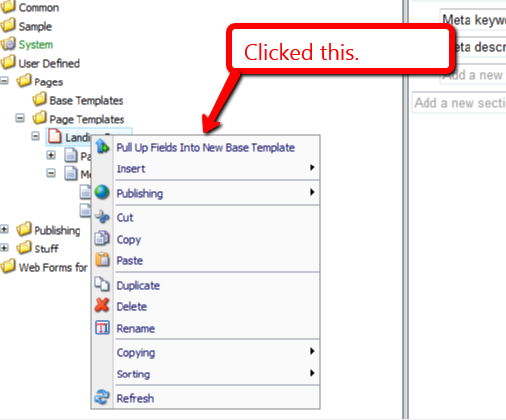
The following dialog was presented to me for selecting fields to pull up:

I clicked the ‘OK’ button, and was prompted to input a name for a new base template. I entered ‘Page Base’:

After clicking ‘OK’, I was asked to select the location where I want to store my new base template:
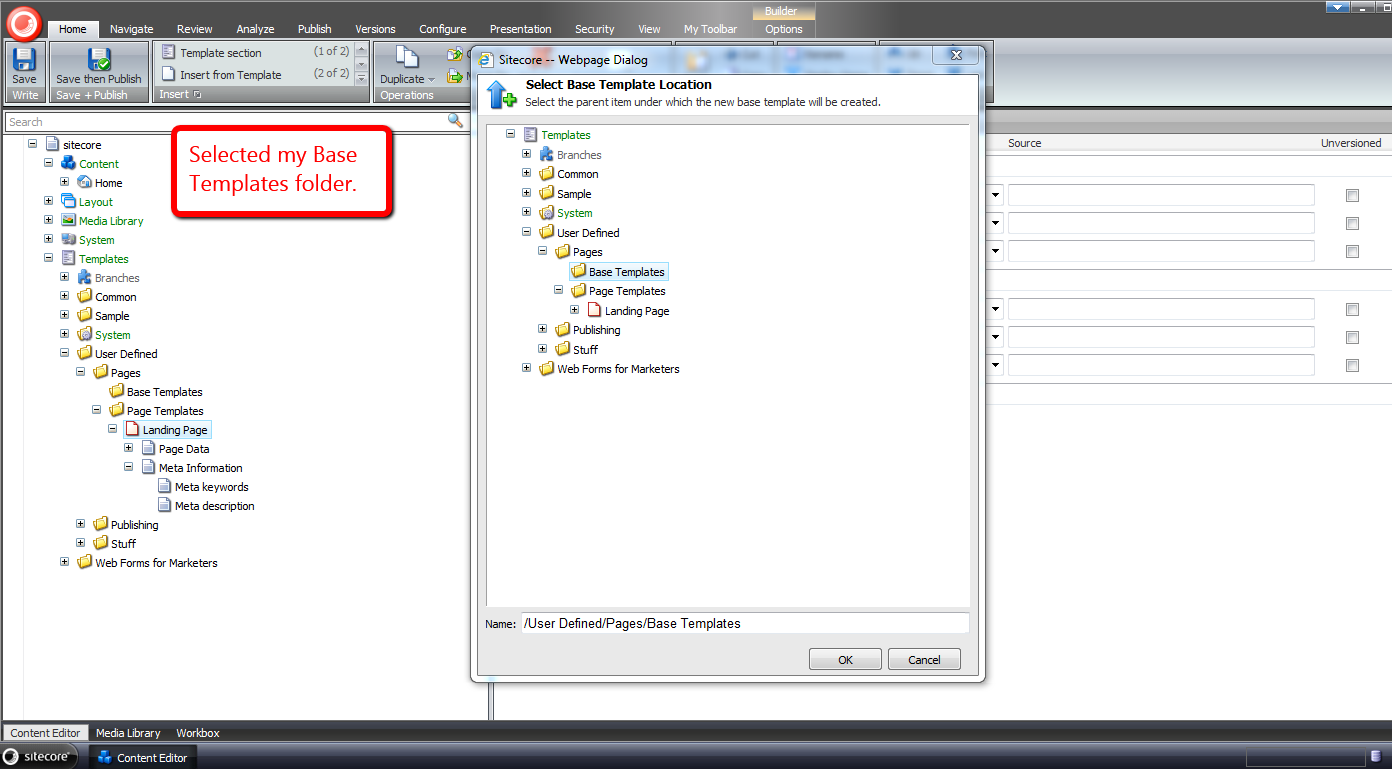
Not too long after clicking ‘OK’ again, I see that my new base template was created, and the Title field was moved into it:

Further, I see that my Landing Page template now has Page Base as one of its base templates:

I right-clicked again, and was presented with an additional context menu option to move fields into an existing base template — I clicked on this option:
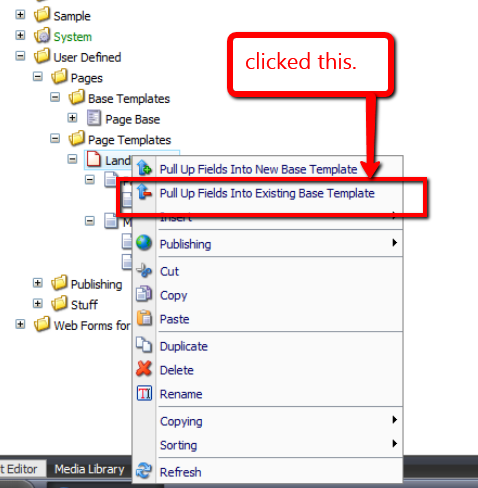
I then selected the remaining field under the Page Data section:

After clicking ‘OK’, a dialog presented me with a list of base templates to choose from — in this case there was only one base template to choose:
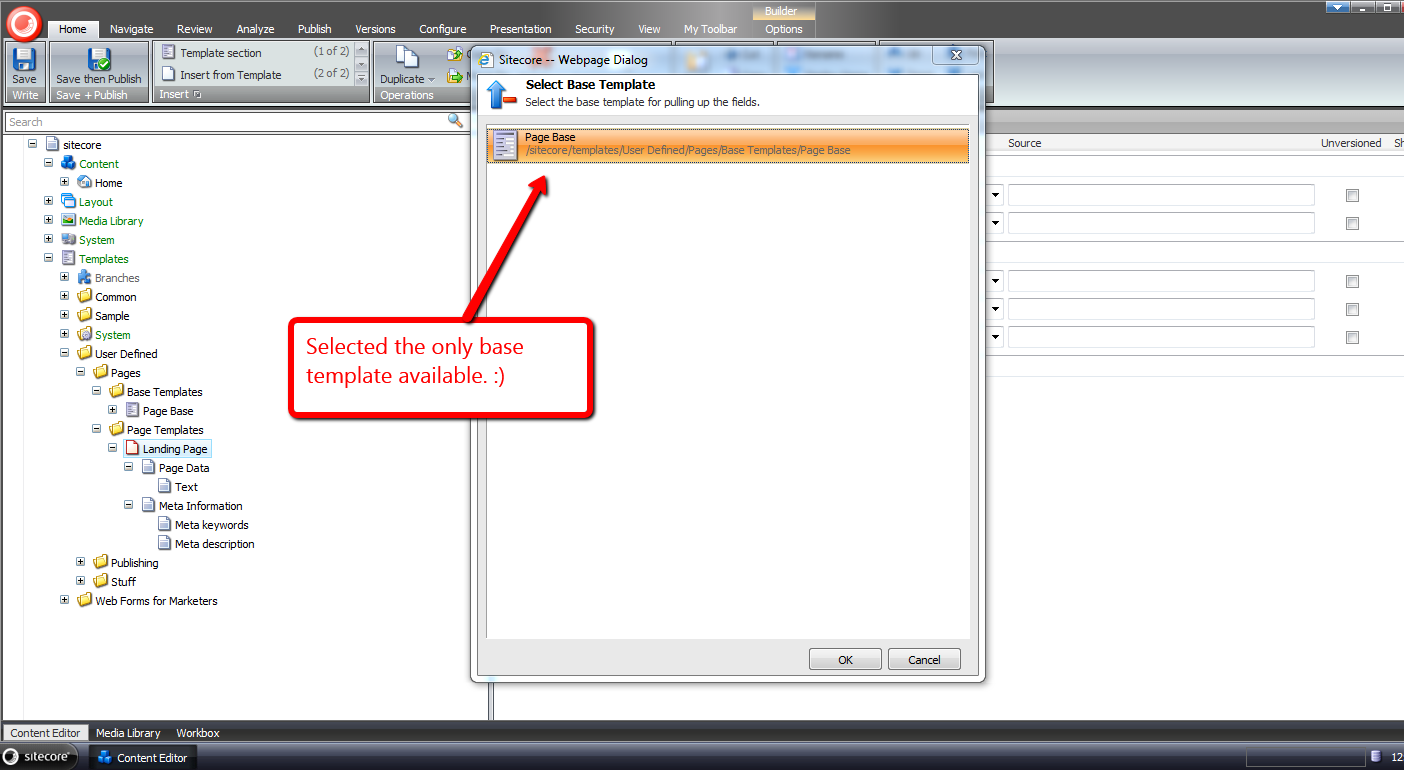
After clicking ‘OK’, I see that the Text field was moved into the Page Base template, and the Page Data section under my Landing Page template was removed:

I hope the above tools will save you time in pulling up fields into base templates.
If you can think of other development tools that would be useful in the Sitecore client, please drop a comment.
Addendum
I have put a polished version of the above onto the Sitecore Marketplace.
Copy Sitecore Item Field Values To Your Clipboard as JSON
With all the exciting things happening around json recently — the Sitecore Item Web API (check out this awesome presentation on the Sitecore Item Web API) and pasting JSON As classes in ASP.NET and Web Tools 2012.2 RC — I’ve been plagued by json on the brain.
For the past few weeks, I’ve been thinking about building a Sitecore client command that copies fields values from a Sitecore item into a string of json via the clipboard, though have been struggling with whether such a command has any utility.
Tonight, I decided to build such a command. Here is what I came up with.
using System;
using System.Collections.Generic;
using System.Linq;
using System.Text;

using Sitecore.Configuration;
using Sitecore.Data.Fields;
using Sitecore.Data.Items;
using Sitecore.Data.Managers;
using Sitecore.Data.Templates;
using Sitecore.Diagnostics;
using Sitecore.Shell.Framework.Commands;
using Sitecore.Web.UI.Sheer;

using Sitecore.Sandbox.Utilities.Serialization.Base;
using Sitecore.Sandbox.Utilities.Serialization;

namespace Sitecore.Sandbox.Commands
{
    public class CopyItemAsJsonToClipboard : ClipboardCommand
    {
        private const bool AlertIfClipboardCopyNotSupported = true;
        private static readonly CopyToClipboard CopyToClipboard = new CopyToClipboard();

        private Template _StandardTemplate;
        private Template StandardTemplate
        {
            get
            {
                if(_StandardTemplate == null)
                {
                    _StandardTemplate = GetStandardTemplate();
                }

                return _StandardTemplate;
            }
        }

        private static Template GetStandardTemplate()
        {
            return TemplateManager.GetTemplate(Settings.DefaultBaseTemplate, Context.ContentDatabase);
        }

        public override void Execute(CommandContext commandContext)
        {
            Assert.ArgumentNotNull(commandContext, "commandContext");

            if (IsSupported(AlertIfClipboardCopyNotSupported))
            {
                IEnumerable<Field> fields = GetNonStandardTemplateFields(commandContext);
                CopyToClipBoard(GetFieldsAsJson(fields));
            }
        }

        private static string GetFieldsAsJson(IEnumerable<Field> fields)
        {
            Assert.ArgumentNotNull(fields, "fields");
            IList<string> list = new List<string>();
            foreach(Field field in fields)
            {
                list.Add(string.Format("\"{0}\":\"{1}\"", field.Name, EscapeNewlines(field.Value)));
            }

            return string.Concat("{", string.Join(",", list), "}");
        }

        private static string EscapeNewlines(string value)
        {
            Assert.ArgumentNotNull(value, "value");
            return ReplaceSubstrings
            (
                value,
                new KeyValuePair<string, string>[]
                {
                    new KeyValuePair<string, string>("\n", "\\n"),
                    new KeyValuePair<string, string>("\r", "\\r")
                }
            );
        }

        private static string ReplaceSubstrings(string source, IEnumerable<KeyValuePair<string, string>> oldNewValues)
        {
            Assert.ArgumentNotNull(source, "source");
            Assert.ArgumentNotNull(oldNewValues, "oldNewValues");
            foreach (KeyValuePair<string, string> oldNewValue in oldNewValues)
            {
                source = source.Replace(oldNewValue.Key, oldNewValue.Value);
            }

            return source;
        }

        private IEnumerable<Field> GetNonStandardTemplateFields(CommandContext commandContext)
        {
            return GetNonStandardTemplateFields(GetItemWithAllFields(commandContext));
        }

        private IEnumerable<Field> GetNonStandardTemplateFields(Item item)
        {
            Assert.ArgumentNotNull(item, "item");
            return GetNonStandardTemplateFields(item.Fields);
        }

        private IEnumerable<Field> GetNonStandardTemplateFields(IEnumerable<Field> fields)
        {
            Assert.ArgumentNotNull(fields, "fields");
            return fields.Where(field => !IsStandardTemplateField(field));
        }

        private static void CopyToClipBoard(string json)
        {
            if(!string.IsNullOrEmpty(json))
            {
                SheerResponse.Eval(GetCopyToClipBoardJavascript(json));
            }
        }

        private static string GetCopyToClipBoardJavascript(string json)
        {
            Assert.ArgumentNotNullOrEmpty(json, "json");
            return string.Format("window.clipboardData.setData('Text', '{0}')", json);
        }

        public override CommandState QueryState(CommandContext commandContext)
        {
            Assert.ArgumentNotNull(commandContext, "commandContext");
            Item item = GetItemWithAllFields(commandContext);
            bool makeEnabled = CopyToClipboard.QueryState(commandContext) == CommandState.Enabled && HasFields(item);

            if (makeEnabled)
            {
                return CommandState.Enabled;
            }

            return CommandState.Disabled;
        }

        private static bool HasFields(Item item)
        {
            Assert.ArgumentNotNull(item, "item");
            return item.Fields.Any();
        }

        private static Item GetItemWithAllFields(CommandContext commandContext)
        {
            Assert.ArgumentNotNull(commandContext, "commandContext");
            Item item = GetItem(commandContext);

            if (item != null)
            {
                item.Fields.ReadAll();
            }

            return item;
        }

        public bool IsStandardTemplateField(Field field)
        {
            Assert.ArgumentNotNull(StandardTemplate, "StandardTemplate");
            return StandardTemplate.ContainsField(field.ID);
        }

        private static Item GetItem(CommandContext commandContext)
        {
            Assert.ArgumentNotNull(commandContext, "commandContext");
            Assert.ArgumentNotNull(commandContext.Items, "commandContext.Items");
            Assert.ArgumentCondition(commandContext.Items.Any(), "commandContext.Items", "There must be at least one item in the array!");
            return commandContext.Items.FirstOrDefault();
        }
    }
}
The command above iterates over all fields on the selected item — not including those that are defined in the Standard Template — and builds a string of json containing field names accompanied by their values.
I found this article by John West to be extremely helpful in writing the code above to determine if a field belongs to the Standard Template — this is used when leaving out these fields in our resulting json string.
Further, the command is only enabled when the selected item has fields coupled with the CommandState returned by a call to the QueryState() method on an instance of Sitecore.Shell.Framework.Commands.CopyToClipboard — this object’s QueryState() method checks things we care about, and I wanted to leverage its logic.
I then mapped the command above in a patch include file:
<?xml version="1.0" encoding="utf-8" ?>
<configuration>
  <sitecore>
    <commands>
      <command name="item:copyitemasjsontoclipboard" type="Sitecore.Sandbox.Commands.CopyItemAsJsonToClipboard,Sitecore.Sandbox"/>
    </commands>
  </sitecore>
</configuration>
Now that we have our command, let’s create an item context menu option for it:

Let’s see this thing in action.
I created an item for testing:

I right-clicked on our new item to launch its context menu, and then clicked on the ‘Copy As Json’ menu option:

I pasted the following from my clipboard into Notepad++:
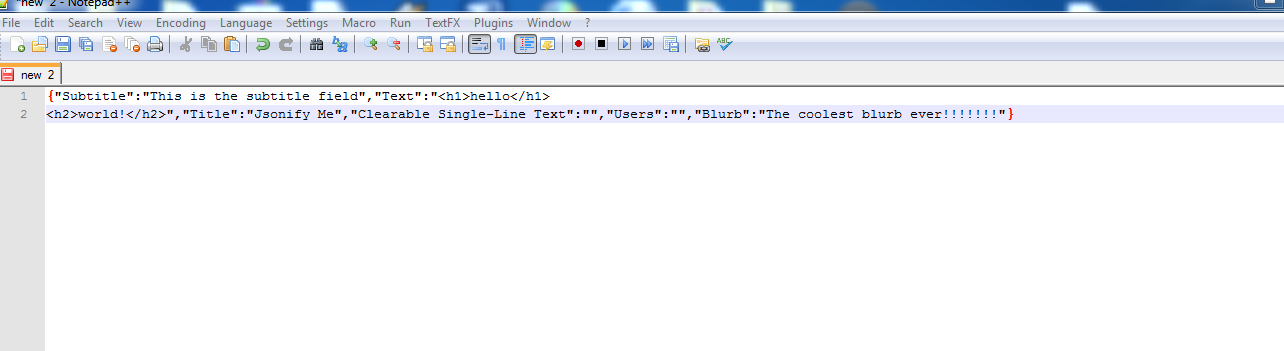
If you can think how this, or something similar could be useful, please drop a comment.
 SitecoreJunkie.com