Home » Items (Page 4)
Category Archives: Items
Rename Sitecore Clones When Renaming Their Source Item
Earlier today I discovered that clones in Sitecore are not renamed when their source Items are renamed — I’m baffled over how I have not noticed this before since I’ve been using Sitecore clones for a while now 
I’ve created some clones in my Sitecore instance to illustrate:

I then initiated the process for renaming the source item:

As you can see the clones were not renamed:

One might argue this is expected behavior for clones — only source Item field values are propagated to its clones when there are no data collisions (i.e. a source Item’s field value is pushed to the same field in its clone when that data has not changed directly on the clone — and the Item name should not be included in this process since it does not live in a field.
Sure, I see that point of view but one of the requirements of the project I am currently working on mandates that source Item name changes be pushed to the clones of that source Item.
So what did I do to solve this? I created an item:renamed event handler similar to the following (the one I built for my project is slightly different though the idea is the same):
using System;
using System.Collections.Generic;

using Sitecore.Data.Items;
using Sitecore.Diagnostics;
using Sitecore.Events;
using Sitecore.Links;
using Sitecore.SecurityModel;

namespace Sitecore.Sandbox.Data.Clones
{
    public class ItemEventHandler
    {
        protected void OnItemRenamed(object sender, EventArgs args)
        {
            Item item = GetItem(args);
            if (item == null)
            {
                return;
            }

            RenameClones(item);
        }

        protected virtual Item GetItem(EventArgs args)
        {
            if (args == null)
            {
                return null;
            }

            return Event.ExtractParameter(args, 0) as Item;
        }

        protected virtual void RenameClones(Item item)
        {
            Assert.ArgumentNotNull(item, "item");
            using (new LinkDisabler())
            {
                using (new SecurityDisabler())
                {
                    using (new StatisticDisabler())
                    {
                        Rename(GetClones(item), item.Name);
                    }
                }
            }
        }

        protected virtual IEnumerable<Item> GetClones(Item item)
        {
            Assert.ArgumentNotNull(item, "item");
            IEnumerable<Item> clones = item.GetClones();
            if (clones == null)
            {
                return new List<Item>();
            }

            return clones;
        }

        protected virtual void Rename(IEnumerable<Item> items, string newName)
        {
            Assert.ArgumentNotNull(items, "items");
            Assert.ArgumentNotNullOrEmpty(newName, "newName");
            foreach (Item item in items)
            {
                Rename(item, newName);
            }
        }

        protected virtual void Rename(Item item, string newName)
        {
            Assert.ArgumentNotNull(item, "item");
            Assert.ArgumentNotNullOrEmpty(newName, "newName");
            if (!item.Access.CanRename())
            {
                return;
            }

            item.Editing.BeginEdit();
            item.Name = newName;
            item.Editing.EndEdit();
        }
    }
}
The handler above retrieves all clones for the Item being renamed, and renames them using the new name of the source Item — I borrowed some logic from the Execute method in Sitecore.Shell.Framework.Pipelines.RenameItem in Sitecore.Kernel.dll (this serves as a processor of the <uiRenameItem> pipeline).
If you would like to learn more about events and their handlers, I encourage you to check out John West‘s post about them, and also take a look at this page on the
Sitecore Developer Network (SDN).
I then registered the above event handler in Sitecore using the following configuration file:
<?xml version="1.0" encoding="utf-8" ?>
<configuration xmlns:patch="http://www.sitecore.net/xmlconfig/">
  <sitecore>
    <events>
      <event name="item:renamed">
        <handler type="Sitecore.Sandbox.Data.Clones.ItemEventHandler, Sitecore.Sandbox" method="OnItemRenamed"/>
      </event>
    </events>
  </sitecore>
</configuration>
Let’s take this for a spin.
I went back to my source item, renamed it back to ‘My Cool Item’, and then initiated another rename operation on it:
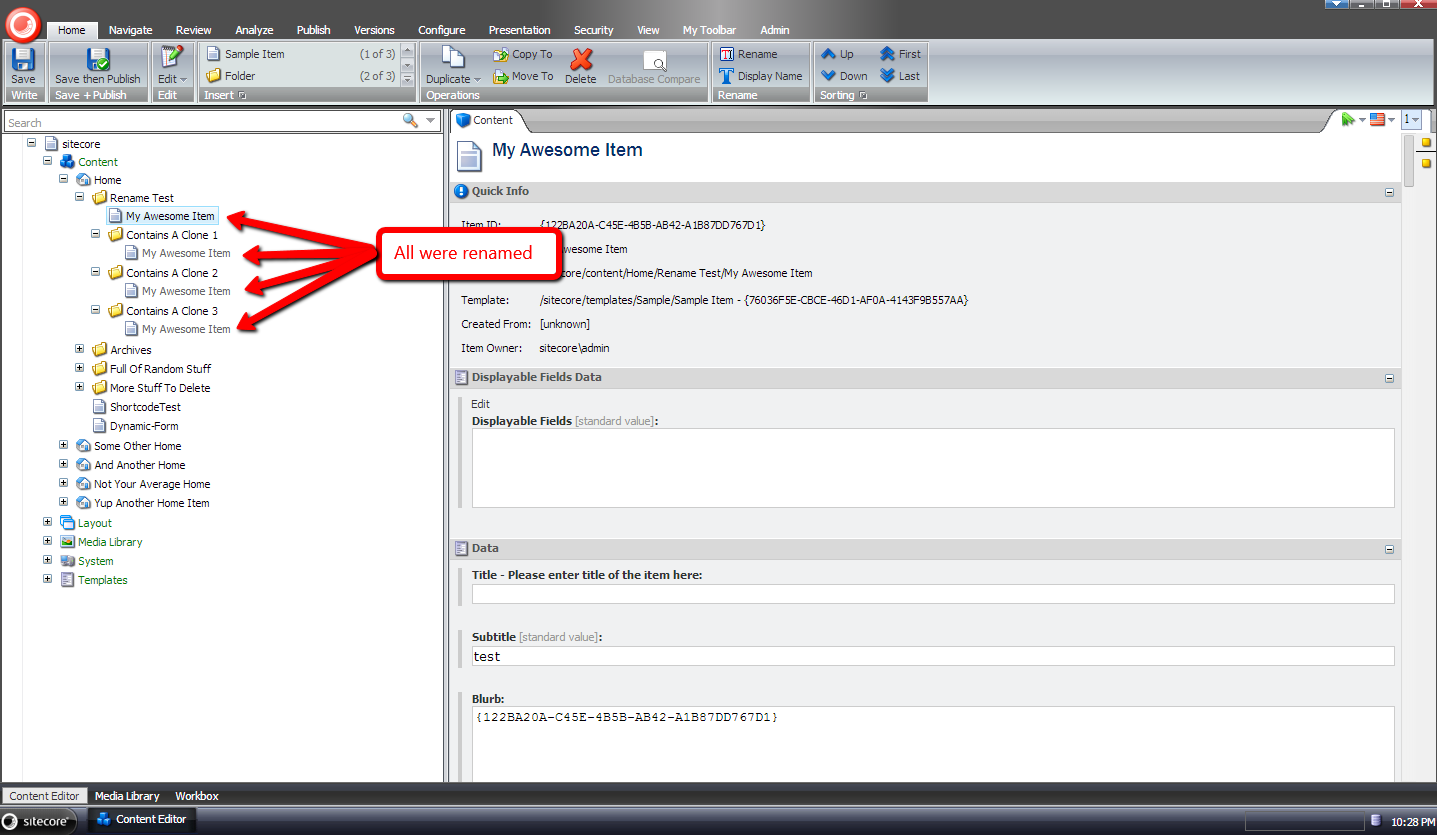
As you can see all clones were renamed:
If you have any thoughts/concerns on this approach, or ideas on other ways to accomplish this, please share in a comment.
Delete All But This: Delete Sibling Items Using a Custom Item Context Menu Option in Sitecore
Every so often I find myself having to delete all Sitecore items in a folder except for one — the reason for this eludes me at the moment, but it does make an appearance once in a while (if this also happens to you, and you remember the context for why it happens, please share in a comment) — and it feels like it takes ages to delete all of these items: I have to step through all of these items in the Sitecore content tree, and delete each individually .
When this happens I usually say to myself “wouldn’t it be cool to have something like the ‘Close All But This’ feature found in Visual Studio?”:

I always forget to write this idea down, but did remember it a couple of days ago, and decided to build something to save time when deleting all items in a folder except for one.
To delete all items in a folder, we need a way to get all sibling items, and exclude the item we don’t want to delete. I decided to create a custom pipeline to do this, and defined the following parameter object for it:
using System.Collections.Generic;
using System.Linq;

using Sitecore.Data.Items;
using Sitecore.Pipelines;

namespace Sitecore.Sandbox.Pipelines.GetSiblings
{
    public class GetSiblingsArgs : PipelineArgs
    {
        public Item Item { get; set; }

        public IEnumerable<Item> Siblings { get; set; }
    }
}
Now that we have the parameter object defined, we need a class with methods that will compose our custom pipeline for grabbing sibling items in Sitecore. The following class does the trick:
using System.Linq;

using Sitecore.Diagnostics;

namespace Sitecore.Sandbox.Pipelines.GetSiblings
{
    public class GetSiblingsOperations
    {
        public void EnsureItem(GetSiblingsArgs args)
        {
            Assert.ArgumentNotNull(args, "args");
            if (args.Item == null)
            {
                args.AbortPipeline();
            }
        }

        public void GetSiblings(GetSiblingsArgs args)
        {
            Assert.ArgumentNotNull(args, "args");
            Assert.ArgumentNotNull(args.Item, "args.Item");
            args.Siblings = (from sibling in args.Item.Parent.GetChildren()
                             where sibling.ID != args.Item.ID
                             select sibling).ToList();
        }
    }
}
The EnsureItem() method above just makes sure the item instance passed to it isn’t null, and aborts the pipeline if it is.
The GetSiblings() method gets all siblings items of the item — it just grabs all children of its parent, and excludes the item in question from the resulting collection using LINQ.
Now that we have a way to get sibling items, we need a way to delete them. I decided to build another custom pipeline to get sibling items for an item — by leveraging the pipeline created above — and delete them, and created the following parameter object for it:
using System.Collections.Generic;

using Sitecore.Data.Items;
using Sitecore.Web.UI.Sheer;

namespace Sitecore.Sandbox.Shell.Framework.Pipelines.DeleteSiblings
{
    public class DeleteSiblingsArgs : ClientPipelineArgs
    {
        public Item Item { get; set; }

        public bool ShouldDelete { get; set; }

        public IEnumerable<Item> Siblings { get; set; }
    }
}
The following class contains methods that will be used it our custom client pipeline to delete sibling items:
using System;
using System.Collections.Generic;

using Sitecore.Data.Items;
using Sitecore.Diagnostics;
using Sitecore.Pipelines;
using Sitecore.Web.UI.Sheer;

using Sitecore.Sandbox.Pipelines.GetSiblings;

namespace Sitecore.Sandbox.Shell.Framework.Pipelines.DeleteSiblings
{
    public class DeleteSiblingsOperations
    {
        private string DeleteConfirmationMessage { get; set; }
        private string DeleteConfirmationWindowWidth { get; set; }
        private string DeleteConfirmationWindowHeight { get; set; }

        public void ConfirmDeleteAction(DeleteSiblingsArgs args)
        {
            Assert.ArgumentNotNull(args, "args");
            Assert.ArgumentNotNullOrEmpty(DeleteConfirmationMessage, "DeleteConfirmationMessage");
            Assert.ArgumentNotNullOrEmpty(DeleteConfirmationWindowWidth, "DeleteConfirmationWindowWidth");
            Assert.ArgumentNotNullOrEmpty(DeleteConfirmationWindowHeight, "DeleteConfirmationWindowHeight");
            if (!args.IsPostBack)
            {
                SheerResponse.YesNoCancel(DeleteConfirmationMessage, DeleteConfirmationWindowWidth, DeleteConfirmationWindowHeight);
                args.WaitForPostBack();
            }
            else if (args.HasResult)
            {
                args.ShouldDelete = AreEqualIgnoreCase(args.Result, "yes");
                args.IsPostBack = false;
            }
        }

        public void GetSiblingsIfConfirmed(DeleteSiblingsArgs args)
        {
            Assert.ArgumentNotNull(args, "args");
            if (!args.ShouldDelete)
            {
                args.AbortPipeline();
                return;
            }

            args.Siblings = GetSiblings(args.Item);
        }

        protected virtual IEnumerable<Item> GetSiblings(Item item)
        {
            Assert.ArgumentNotNull(item, "item");
            GetSiblingsArgs getSiblingsArgs = new GetSiblingsArgs { Item = item };
            CorePipeline.Run("getSiblings", getSiblingsArgs);
            return getSiblingsArgs.Siblings;
        }

        public void DeleteSiblings(DeleteSiblingsArgs args)
        {
            Assert.ArgumentNotNull(args, "args");
            Assert.ArgumentNotNull(args.Siblings, "args.Siblings");
            DeleteItems(args.Siblings);
        }

        protected virtual void DeleteItems(IEnumerable<Item> items)
        {
            Assert.ArgumentNotNull(items, "items");
            foreach (Item item in items)
            {
                item.Recycle();
            }
        }

        private static bool AreEqualIgnoreCase(string one, string two)
        {
            return string.Equals(one, two, StringComparison.CurrentCultureIgnoreCase);
        }
    }
}
The ConfirmDeleteAction() method — which is invoked first in the custom client pipeline — asks the user if he/she would like to delete all sibling items for the item in question.
The GetSiblingsIfConfirmed() method is then processed next in the pipeline sequence, and ascertains whether the user had clicked the ‘Yes’ button — this is a button in the YesNoCancel dialog that was presented to the user via the ConfirmDeleteAction() method.
If the user had clicked the ‘Yes’ button, sibling items are grabbed from Sitecore — this is done using the custom pipeline built above — and is set on Siblings property of the DeleteSiblingsArgs instance.
The DeleteSiblings() method is then processed next, and basically does as named: it deletes all items in the Siblings property of the DeleteSiblingsArgs instance.
Now that we are armed with our pipelines above, we need a way to call them from the Sitecore UI. The following command was built for that purpose:
using System.Collections.Generic;
using System.Linq;

using Sitecore;
using Sitecore.Data.Items;
using Sitecore.Diagnostics;
using Sitecore.Pipelines;
using Sitecore.Shell.Framework.Commands;

using Sitecore.Sandbox.Pipelines.GetSiblings;
using Sitecore.Sandbox.Shell.Framework.Pipelines.DeleteSiblings;

namespace Sitecore.Sandbox.Shell.Framework.Commands
{
    public class DeleteAllButThis : Command
    {
        public override void Execute(CommandContext context)
        {
            Assert.ArgumentNotNull(context, "context");
            DeleteSiblings(context);
        }

        private static void DeleteSiblings(CommandContext context)
        {
            Context.ClientPage.Start("uiDeleteSiblings", new DeleteSiblingsArgs { Item = GetItem(context) });
        }

        public override CommandState QueryState(CommandContext context)
        {
            Assert.ArgumentNotNull(context, "context");
            if (!HasSiblings(GetItem(context)))
            {
                return CommandState.Hidden;
            }

            return CommandState.Enabled;
        }

        private static bool HasSiblings(Item item)
        {
            return GetSiblings(item).Any();
        }

        private static IEnumerable<Item> GetSiblings(Item item)
        {
            Assert.ArgumentNotNull(item, "item");
            GetSiblingsArgs getSiblingsArgs = new GetSiblingsArgs { Item = item };
            CorePipeline.Run("getSiblings", getSiblingsArgs);
            return getSiblingsArgs.Siblings;
        }

        private static Item GetItem(CommandContext context)
        {
            Assert.ArgumentNotNull(context, "context");
            Assert.ArgumentNotNull(context.Items, "context.Items");
            return context.Items.FirstOrDefault();
        }
    }
}
The command above will only display if the context item has siblings — we invoke the pipeline defined towards the beginning of this post to get sibling items. If none are returned, the command is hidden.
When the command executes, we basically just pass the context item to our custom pipeline that deletes sibling items, and sit back and wait for them to be deleted (I just lean back, and put my feet up on my desk).
I then strung everything together using the following configuration include file:
<?xml version="1.0" encoding="utf-8"?>
<configuration xmlns:patch="http://www.sitecore.net/xmlconfig/">
  <sitecore>
    <commands>
      <command name="item:DeleteAllButThis" type="Sitecore.Sandbox.Shell.Framework.Commands.DeleteAllButThis, Sitecore.Sandbox"/>
    </commands>
    <pipelines>
      <getSiblings>
        <processor type="Sitecore.Sandbox.Pipelines.GetSiblings.GetSiblingsOperations, Sitecore.Sandbox" method="EnsureItem" />
        <processor type="Sitecore.Sandbox.Pipelines.GetSiblings.GetSiblingsOperations, Sitecore.Sandbox" method="GetSiblings" />
      </getSiblings>
    </pipelines>
    <processors>
      <uiDeleteSiblings>
        <processor type="Sitecore.Sandbox.Shell.Framework.Pipelines.DeleteSiblings.DeleteSiblingsOperations, Sitecore.Sandbox" method="ConfirmDeleteAction">
          <DeleteConfirmationMessage>Are you sure you want to delete all sibling items and their descendants?</DeleteConfirmationMessage>
          <DeleteConfirmationWindowWidth>200</DeleteConfirmationWindowWidth>
          <DeleteConfirmationWindowHeight>200</DeleteConfirmationWindowHeight>
        </processor>
        <processor type="Sitecore.Sandbox.Shell.Framework.Pipelines.DeleteSiblings.DeleteSiblingsOperations, Sitecore.Sandbox" method="GetSiblingsIfConfirmed"/>
        <processor type="Sitecore.Sandbox.Shell.Framework.Pipelines.DeleteSiblings.DeleteSiblingsOperations, Sitecore.Sandbox" method="DeleteSiblings"/>
	    </uiDeleteSiblings>
    </processors>
  </sitecore>
</configuration>
I also had to wire the command above to the Sitecore UI by defining a context menu item in the core database. I’ve omitted how I’ve done this. If you would like to learn how to do this, check out my first and second posts on adding to the item context menu.
Let’s see this in action.
I first created some items to delete, and one item that I don’t want to delete:

I then right-clicked on the item I don’t want to delete, and was presented with the new item context menu option:

I was then prompted with a confirmation dialog:

I clicked ‘Yes’, and then saw that all sibling items were deleted:

If you have any suggestions on making this better, please drop a comment.
Until next time, have a Sitecoretastic day!
Choose Template Fields to Display in the Sitecore Content Editor
The other day I was going through search terms people had used to get to my blog, and discovered a few people made their way to my blog by searching for ‘sitecore hide sections in data template’.
I had built something like this in the past, but no longer remember how I had implemented that particular solution — not that I could show you that solution since it’s owned by a previous employer — and decided I would build another solution to accomplish this.
Before I move forward, I would like to point out that Sitecore MVP Andy Uzick wrote a blog post recently showing how to hide fields and sections in the content editor, though I did not have much luck with hiding sections in the way that he had done it — sections with no fields were still displaying for me in the content editor — and I decided to build a different solution altogether to make this work.
I thought it would be a good idea to let users turn this functionality on and off via a checkbox in the ribbon, and used some code from a previous post — in this post I had build an object to keep track of the state of a checkbox in the ribbon — as a model. In the spirit of that object, I defined the following interface:
namespace Sitecore.Sandbox.Utilities.ClientSettings
{
    public interface IRegistrySettingToggle
    {
        bool IsOn();

        void TurnOn();

        void TurnOff();
    }
}
I then created the following abstract class which implements the interface above, and stores the state of the setting defined by the given key — the key of the setting and the “on” value are passed to it via a subclass — in the Sitecore registry.
using Sitecore.Diagnostics;

using Sitecore.Web.UI.HtmlControls;

namespace Sitecore.Sandbox.Utilities.ClientSettings
{
    public abstract class RegistrySettingToggle : IRegistrySettingToggle
    {
        private string RegistrySettingKey { get; set; }

        private string RegistrySettingOnValue { get; set; }

        protected RegistrySettingToggle(string registrySettingKey, string registrySettingOnValue)
        {
            SetRegistrySettingKey(registrySettingKey);
            SetRegistrySettingOnValue(registrySettingOnValue);
        }

        private void SetRegistrySettingKey(string registrySettingKey)
        {
            Assert.ArgumentNotNullOrEmpty(registrySettingKey, "registrySettingKey");
            RegistrySettingKey = registrySettingKey;
        }

        private void SetRegistrySettingOnValue(string registrySettingOnValue)
        {
            Assert.ArgumentNotNullOrEmpty(registrySettingOnValue, "registrySettingOnValue");
            RegistrySettingOnValue = registrySettingOnValue;
        }

        public bool IsOn()
        {
            return Registry.GetString(RegistrySettingKey) == RegistrySettingOnValue;
        }

        public void TurnOn()
        {
            Registry.SetString(RegistrySettingKey, RegistrySettingOnValue);
        }

        public void TurnOff()
        {
            Registry.SetString(RegistrySettingKey, string.Empty);
        }
    }
}
I then built the following class to toggle the display settings for our displayable fields:
using System;

namespace Sitecore.Sandbox.Utilities.ClientSettings
{
    public class ShowDisplayableFieldsOnly : RegistrySettingToggle
    {
        private const string RegistrySettingKey = "/Current_User/Content Editor/Show Displayable Fields Only";
        private const string RegistrySettingOnValue = "on";

        private static volatile IRegistrySettingToggle current;
        private static object lockObject = new Object();

        public static IRegistrySettingToggle Current
        {
            get
            {
                if (current == null)
                {
                    lock (lockObject)
                    {
                        if (current == null)
                        {
                            current = new ShowDisplayableFieldsOnly();
                        }
                    }
                }

                return current;
            }
        }

        private ShowDisplayableFieldsOnly()
            : base(RegistrySettingKey, RegistrySettingOnValue)
        {
        }
    }
}
It passes its Sitecore registry key and “on” state value to the RegistrySettingToggle base class, and employs the Singleton pattern — I saw no reason for there to be multiple instances of this object floating around.
In order to use a checkbox in the ribbon, we have to create a new command for it:
using System.Linq;

using Sitecore.Data.Items;
using Sitecore.Diagnostics;
using Sitecore.Shell.Framework.Commands;

using Sitecore.Sandbox.Utilities.ClientSettings;

namespace Sitecore.Sandbox.Commands
{
    public class ToggleDisplayableFieldsVisibility : Command
    {
        public override void Execute(CommandContext context)
        {
            Assert.ArgumentNotNull(context, "context");
            ToggleDisplayableFields();
            Refresh(context);
        }

        private static void ToggleDisplayableFields()
        {
            IRegistrySettingToggle showDisplayableFieldsOnly = ShowDisplayableFieldsOnly.Current;
            if (!showDisplayableFieldsOnly.IsOn())
            {
                showDisplayableFieldsOnly.TurnOn();
            }
            else
            {
                showDisplayableFieldsOnly.TurnOff();
            }
        }

        public override CommandState QueryState(CommandContext context)
        {
            if (!ShowDisplayableFieldsOnly.Current.IsOn())
            {
                return CommandState.Enabled;
            }

            return CommandState.Down;
        }

        private static void Refresh(CommandContext context)
        {
            Refresh(GetItem(context));
        }

        private static void Refresh(Item item)
        {
            Assert.ArgumentNotNull(item, "item");
            Context.ClientPage.ClientResponse.Timer(string.Format("item:load(id={0})", item.ID), 1);
        }

        private static Item GetItem(CommandContext context)
        {
            Assert.ArgumentNotNull(context, "context");
            return context.Items.FirstOrDefault();
        }
    }
}
The command above leverages the instance of the ShowDisplayableFieldsOnly class defined above to turn the displayable fields feature on and off.
I followed the creation of the command above with the definition of the ribbon checkbox in the core database:

The command name above — which is set in the Click field — is defined in the patch configuration file towards the end of this post.
I then created the following data template with a TreelistEx field to store the displayable fields:

The TreelistEx field above will pull in all sections and their fields into the TreelistEx dialog, but only allow the selection of template fields, as is dictated by the following parameters that I have mapped in its Source field:
DataSource=/sitecore/templates/Sample/Sample Item&IncludeTemplatesForSelection=Template field&IncludeTemplatesForDisplay=Template section,Template field&AllowMultipleSelection=no
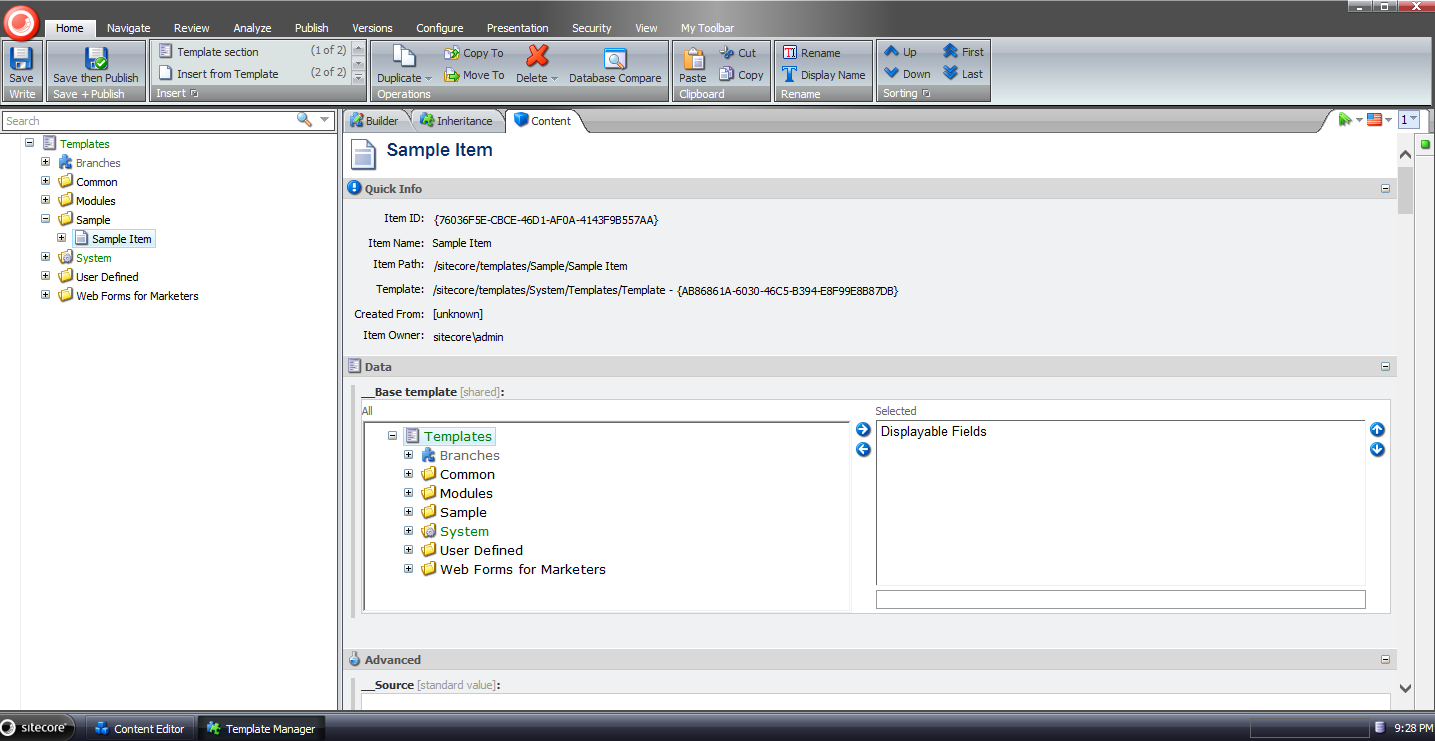
I then set this as a base template in my sandbox solution’s Sample Item template:
In order to remove fields, we need a <getContentEditorFields> pipeline processor. I built the following class for to serve as one:
using System;

using Sitecore.Configuration;
using Sitecore.Data.Fields;
using Sitecore.Data.Items;
using Sitecore.Data.Managers;
using Sitecore.Data.Templates;
using Sitecore.Diagnostics;
using Sitecore.Shell.Applications.ContentManager;
using Sitecore.Shell.Applications.ContentEditor.Pipelines.GetContentEditorFields;

using Sitecore.Sandbox.Utilities.ClientSettings;

namespace Sitecore.Sandbox.Shell.Applications.ContentEditor.Pipelines.GetContentEditorFields
{
    public class RemoveUndisplayableFields
    {
        public void Process(GetContentEditorFieldsArgs args)
        {
            Assert.ArgumentNotNull(args, "args");
            Assert.ArgumentNotNull(args.Item, "args.Item");
            Assert.ArgumentCondition(!string.IsNullOrWhiteSpace(DisplayableFieldsFieldName), "DisplayableFieldsFieldName", "DisplayableFieldsFieldName must be set in the configuration file!");
            if (!ShowDisplayableFieldsOnly.Current.IsOn())
            {
                return;
            }

            foreach (Editor.Section section in args.Sections)
            {
                AddDisplayableFields(args.Item[DisplayableFieldsFieldName], section);
            }
        }

        private void AddDisplayableFields(string displayableFieldIds, Editor.Section section)
        {
            Editor.Fields displayableFields = new Editor.Fields();
            foreach (Editor.Field field in section.Fields)
            {
                if (IsDisplayableField(displayableFieldIds, field))
                {
                    displayableFields.Add(field);
                }
            }

            section.Fields.Clear();
            section.Fields.AddRange(displayableFields);
        }

        private bool IsDisplayableField(string displayableFieldIds, Editor.Field field)
        {
            if (IsStandardValues(field.ItemField.Item))
            {
                return true;
            }

            if (IsDisplayableFieldsField(field.ItemField))
            {
                return false;
            }

            return IsStandardTemplateField(field.ItemField)
                    || string.IsNullOrWhiteSpace(displayableFieldIds)
                    || displayableFieldIds.Contains(field.ItemField.ID.ToString());
        }

        private bool IsDisplayableFieldsField(Field field)
        {
            return string.Equals(field.Name, DisplayableFieldsFieldName, StringComparison.CurrentCultureIgnoreCase);
        }

        private static bool IsStandardValues(Item item)
        {
            if (item.Template.StandardValues != null)
            {
                return item.Template.StandardValues.ID == item.ID;
            }

            return false;
        }

        private bool IsStandardTemplateField(Field field)
        {
            Assert.IsNotNull(StandardTemplate, "The Stardard Template could not be found.");
            return StandardTemplate.ContainsField(field.ID);
        }

        private static Template GetStandardTemplate()
        {
            return TemplateManager.GetTemplate(Settings.DefaultBaseTemplate, Context.ContentDatabase);
        }

        private Template _StandardTemplate;
        private Template StandardTemplate
        {
            get
            {
                if (_StandardTemplate == null)
                {
                    _StandardTemplate = GetStandardTemplate();
                }

                return _StandardTemplate;
            }
        }

        private string DisplayableFieldsFieldName { get; set; }
    }
}
The class above iterates over all fields for the supplied item, and adds only those that were selected in the Displayable Fields TreelistEx field, and also Standard Fields — we don’t want to remove these since they are shown/hidden by the Standard Fields feature in Sitecore — to a new Editor.Fields collection. This new collection is then set on the GetContentEditorFieldsArgs instance.
Plus, we don’t want to show the Displayable Fields TreelistEx field when the feature is turned on, and we are on an item. This field should only display when we are on the standard values item when the feature is turned on — this is how we will choose our displayable fields.
Now we have to handle sections without fields — especially after ripping them out via the pipeline processor above.
I built the following class to serve as a <renderContentEditor> pipeline processor to do this:
using System.Linq;

using Sitecore.Diagnostics;
using Sitecore.Shell.Applications.ContentManager;
using Sitecore.Shell.Applications.ContentEditor.Pipelines.RenderContentEditor;

namespace Sitecore.Sandbox.Shell.Applications.ContentEditor.Pipelines.RenderContentEditor
{
    public class FilterSectionsWithFields
    {
        public void Process(RenderContentEditorArgs args)
        {
            Assert.ArgumentNotNull(args, "args");
            args.Sections = GetSectionsWithFields(args.Sections);
        }

        private static Editor.Sections GetSectionsWithFields(Editor.Sections sections)
        {
            Assert.ArgumentNotNull(sections, "sections");
            Editor.Sections sectionsWithFields = new Editor.Sections();
            foreach (Editor.Section section in sections)
            {
                AddIfContainsFields(sectionsWithFields, section);
            }

            return sectionsWithFields;
        }

        private static void AddIfContainsFields(Editor.Sections sections, Editor.Section section)
        {
            Assert.ArgumentNotNull(sections, "sections");
            Assert.ArgumentNotNull(section, "section");
            if (!ContainsFields(section))
            {
                return;
            }

            sections.Add(section);
        }

        private static bool ContainsFields(Editor.Section section)
        {
            Assert.ArgumentNotNull(section, "section");
            return section.Fields != null && section.Fields.Any();
        }
    }
}
It basically builds a new collection of sections that contain at least one field, and sets it on the RenderContentEditorArgs instance being passed through the <renderContentEditor> pipeline.
In order for this to work, we must make this pipeline processor run before all other processors.
I tied all of the above together with the following patch configuration file:
<?xml version="1.0" encoding="utf-8"?>
<configuration xmlns:patch="http://www.sitecore.net/xmlconfig/">
  <sitecore>
    <commands>
      <command name="contenteditor:ToggleDisplayableFieldsVisibility" type="Sitecore.Sandbox.Commands.ToggleDisplayableFieldsVisibility, Sitecore.Sandbox"/>
    </commands>
    <pipelines>
      <getContentEditorFields>
        <processor type="Sitecore.Sandbox.Shell.Applications.ContentEditor.Pipelines.GetContentEditorFields.RemoveUndisplayableFields, Sitecore.Sandbox">
          <DisplayableFieldsFieldName>Displayable Fields</DisplayableFieldsFieldName>
        </processor>
      </getContentEditorFields>
      <renderContentEditor>
        <processor patch:before="processor[@type='Sitecore.Shell.Applications.ContentEditor.Pipelines.RenderContentEditor.RenderSkinedContentEditor, Sitecore.Client']"
                   type="Sitecore.Sandbox.Shell.Applications.ContentEditor.Pipelines.RenderContentEditor.FilterSectionsWithFields, Sitecore.Sandbox"/>
      </renderContentEditor>
    </pipelines>
  </sitecore>
</configuration>
Let’s try this out.
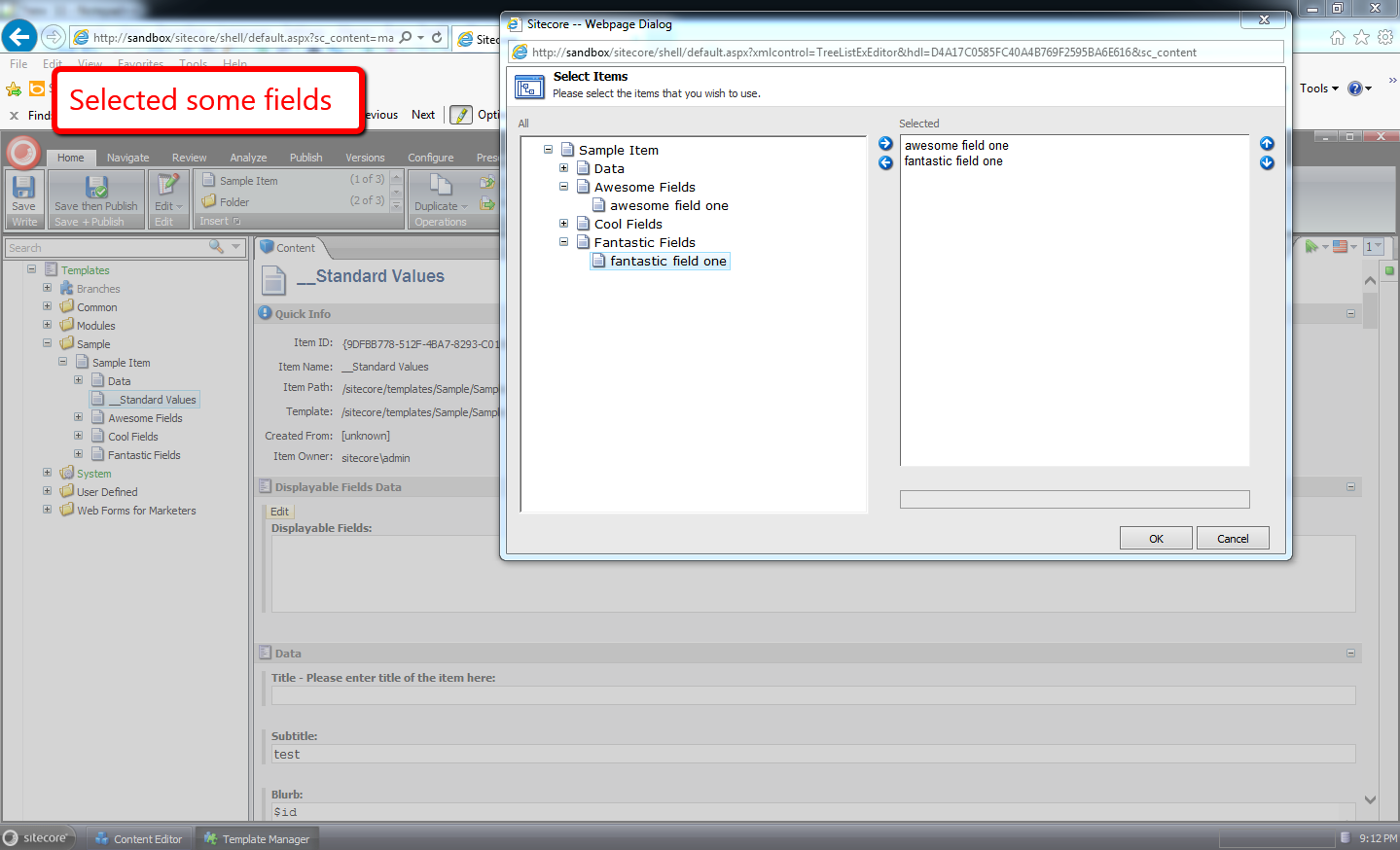
I navigated to the standard values item for my Sample Item data template, and selected the fields I want to display in the content editor:
I then went to an item that uses this data template, and turned on the displayable fields feature:
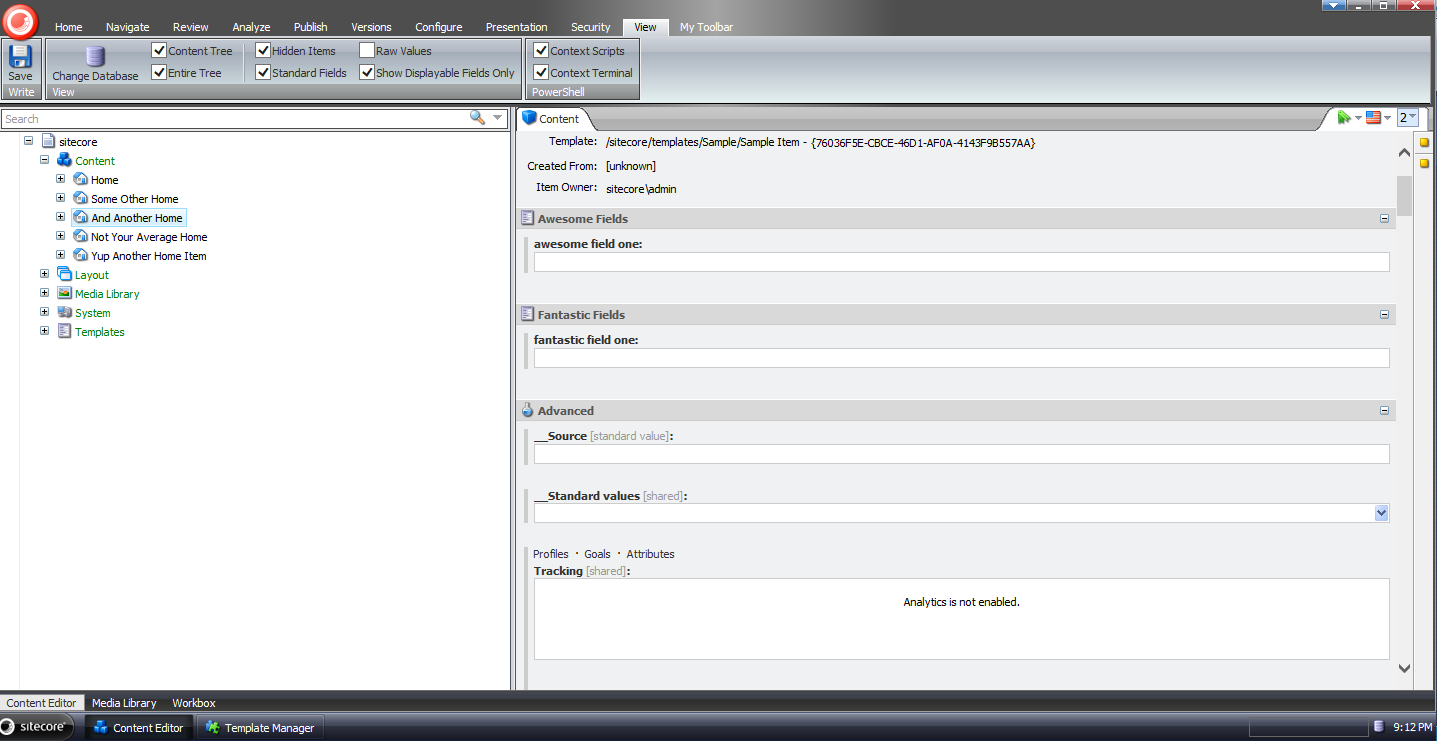
As you can see, only the fields we had chosen display — along with standard fields since the Standard Fields checkbox is checked.
I then turned off the displayable fields feature:
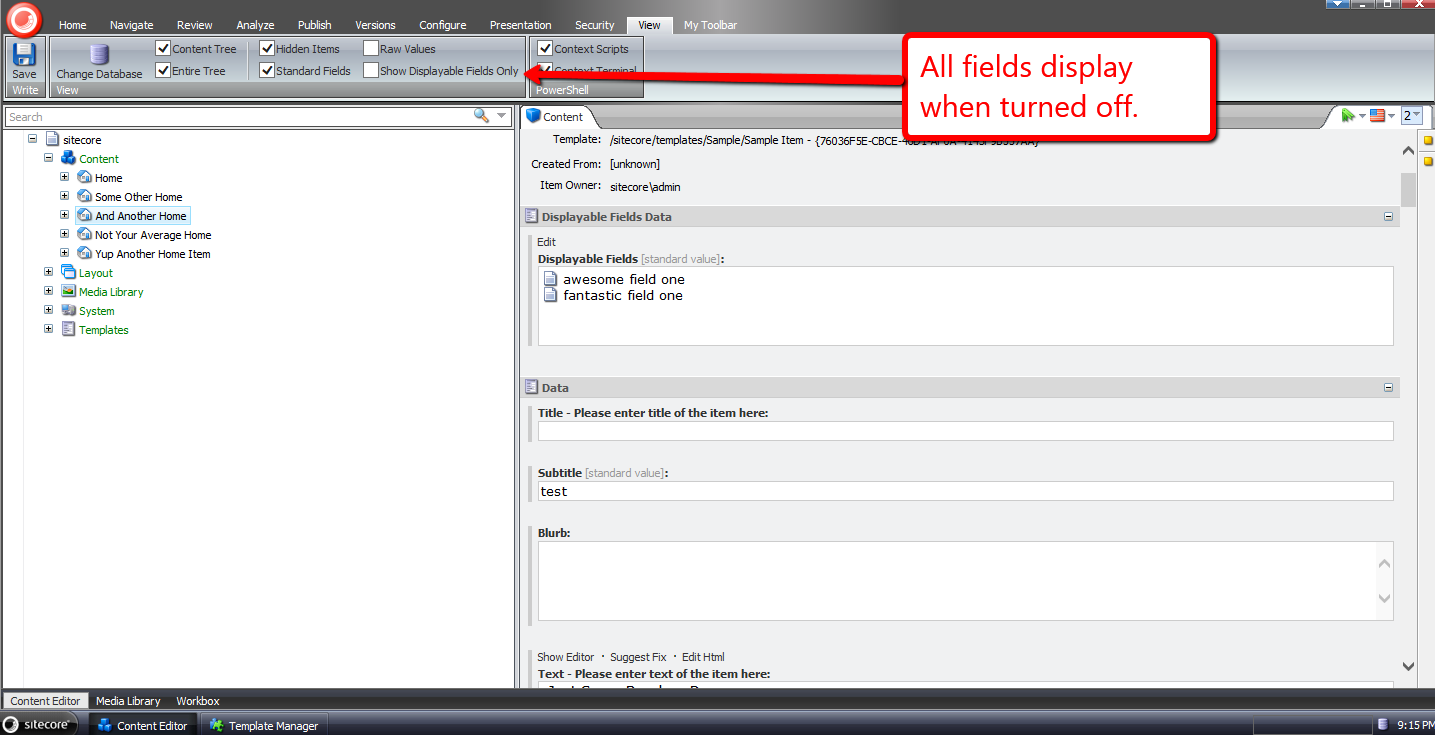
Now all fields for the item display.
I then turned the displayable fields feature back on, and turned off Standard Fields:
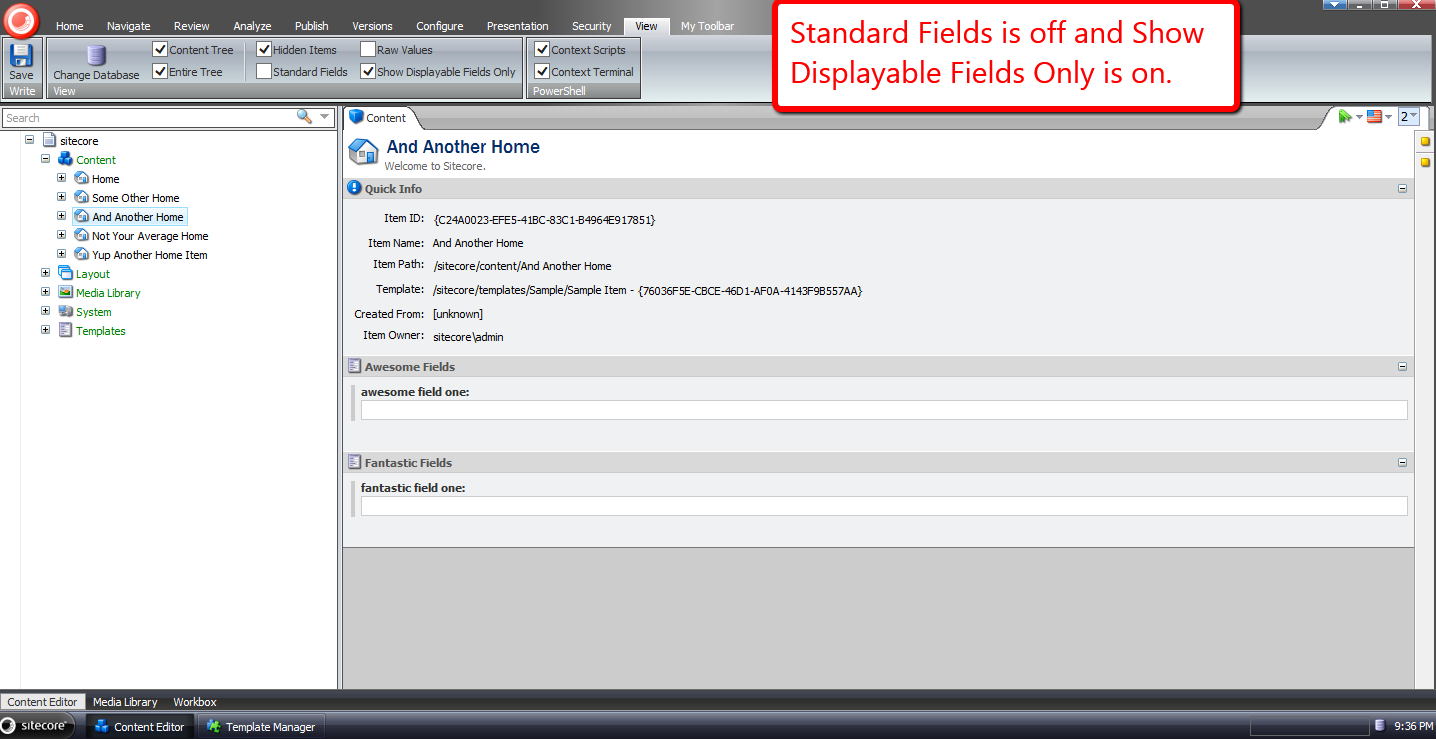
Now only our selected fields display.
If you have any thoughts on this, or ideas around making this better, please share in a comment.
Resolve Media Library Items Linked in Sitecore Aliases
Tonight I was doing research on extending the aliases feature in Sitecore, and discovered media library items linked in them are not served correctly “out of the box”:

As an enhancement, I wrote the following HttpRequestProcessor subclass to be used in the httpRequestBegin pipeline:
using Sitecore.Configuration;
using Sitecore.Data;
using Sitecore.Data.Items;
using Sitecore.Diagnostics;
using Sitecore.Pipelines.HttpRequest;
using Sitecore.Resources.Media;
using Sitecore.Web;

namespace Sitecore.Sandbox.Pipelines.HttpRequest
{
    public class MediaAliasResolver : HttpRequestProcessor
    {
        public override void Process(HttpRequestArgs args)
        {
            Assert.ArgumentNotNull(args, "args");
            if (!CanProcessAliases())
            {
                return;
            }

            string mediaUrl = GetMediaAliasTargetUrl(args);
            if (string.IsNullOrWhiteSpace(mediaUrl))
            {
                return;
            }

            Context.Page.FilePath = mediaUrl;
        }

        private static bool CanProcessAliases()
        {
            return Settings.AliasesActive && Context.Database != null;
        }

        private static string GetMediaAliasTargetUrl(HttpRequestArgs args)
        {
            Assert.ArgumentNotNull(args, "args");
            ID targetID = Context.Database.Aliases.GetTargetID(args.LocalPath);
            if (targetID.IsNull)
            {
                return string.Empty;
            }

            Item targetItem = args.GetItem(targetID);
            if (targetItem == null || !IsMediaItem(targetItem))
            {
                return string.Empty;
            }

            return GetAbsoluteMediaUrl(targetItem);
        }

        private static bool IsMediaItem(Item item)
        {
            Assert.ArgumentNotNull(item, "item");
            return item.Paths.IsMediaItem && item.TemplateID != TemplateIDs.MediaFolder;
        }

        private static string GetAbsoluteMediaUrl(MediaItem mediaItem)
        {
            string relativeUrl = MediaManager.GetMediaUrl(mediaItem);
            return WebUtil.GetFullUrl(relativeUrl);
        }
    }
}
The HttpRequestProcessor subclass above — after ascertaining the aliases feature is turned on, and the item linked in the requested alias is a media library item — gets the absolute URL for the media library item, and sets it on the FilePath property of the Sitecore.Context.Page instance — this is exactly how the “out of the box” Sitecore.Pipelines.HttpRequest.AliasResolver handles external URLs — and passes along the HttpRequestArgs instance.
I then wedged the HttpRequestProcessor subclass above into the httpRequestBegin pipeline directly before the Sitecore.Pipelines.HttpRequest.AliasResolver:
<?xml version="1.0" encoding="utf-8"?>
<configuration xmlns:patch="http://www.sitecore.net/xmlconfig/">
  <sitecore>
    <pipelines>
      <httpRequestBegin>
        <processor patch:before="processor[@type='Sitecore.Pipelines.HttpRequest.AliasResolver, Sitecore.Kernel']"
                   type="Sitecore.Sandbox.Pipelines.HttpRequest.MediaAliasResolver, Sitecore.Sandbox" />
      </httpRequestBegin>
    </pipelines>
  </sitecore>
</configuration>
Let’s take this for a spin.
I had already defined the following alias in Sitecore beforehand — the error page at the top of this post is evidence of that:
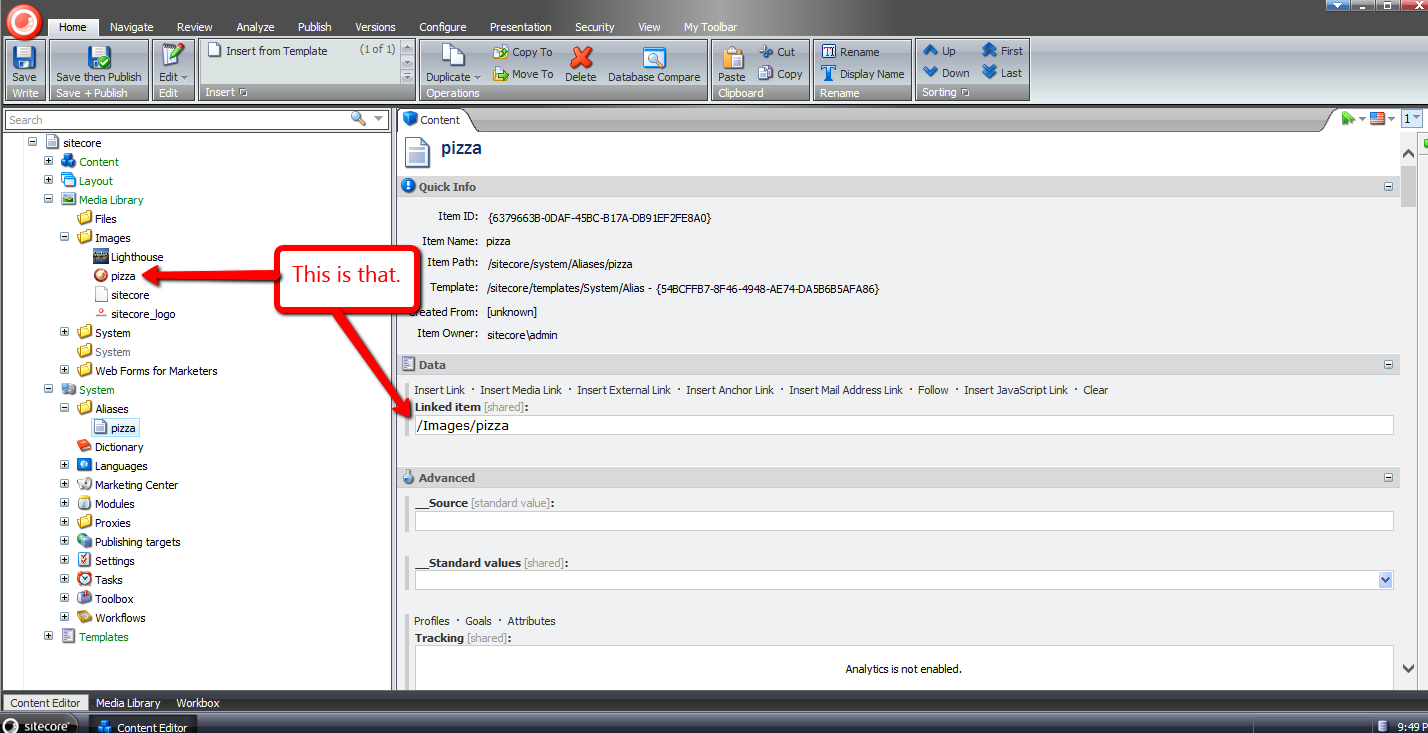
After navigating to http://sandbox/pizza — the URL to the pizza alias in my local Sitecore sandbox instance (don’t click on this link because it won’t go anywhere unless you have a website named sandbox running on your local machine) — I was brought to the media library image on the front-end:

If you have any recommendations on improving this, or further thoughts on using aliases in Sitecore, please share in a comment below.
Until next time, have a pizzalicious day!
Insert a New Item After a Sibling Item in Sitecore
Have you ever thought to yourself “wouldn’t it be nice to insert a new item in the Sitecore content tree at a specific place among its siblings without having to move the inserted item up or down multiple times to position it correctly?”
I’ve had this thought more than once, and decided to put something together to achieve this.
The following class consists of methods to be used in pipeline processors of the uiAddFromTemplate pipeline to make this happen:
using System.Collections.Generic;
using System.Linq;

using Sitecore.Configuration;
using Sitecore.Globalization;
using Sitecore.Data;
using Sitecore.Data.Items;
using Sitecore.Diagnostics;
using Sitecore.Shell.Applications.Dialogs.ItemLister;
using Sitecore.Shell.Framework;
using Sitecore.Web.UI.Sheer;

namespace Sitecore.Sandbox.Shell.Framework.Pipelines.AddFromTemplate
{
    public class InsertAfterItemOperations
    {
        private string SelectButtonText { get; set; }

        private string ModalIcon { get; set; }

        private string ModalTitle { get; set; }

        private string ModalInstructions { get; set; }

        public void StoreTemplateResult(ClientPipelineArgs args)
        {
            args.Parameters["Template"] = args.Result;
        }

        public void EnsureParentAndChildren(ClientPipelineArgs args)
        {
            AssertArguments(args);
            Item parent = GetParentItem(args);
            EnsureParentItem(parent, args);
            args.Parameters["HasChildren"] = parent.HasChildren.ToString();
            args.IsPostBack = false;
        }

        public void GetInsertAfterId(ClientPipelineArgs args)
        {
            AssertArguments(args);
            bool hasChildren = false;
            bool.TryParse(args.Parameters["HasChildren"], out hasChildren);
            if (!hasChildren)
            {
                SetCanAddItemFromTemplate(args);
                return;
            }

            Item parent = GetParentItem(args);
            EnsureParentItem(parent, args);
            if (!args.IsPostBack)
            {
                ItemListerOptions itemListerOptions = new ItemListerOptions
                {
                    ButtonText = SelectButtonText,
                    Icon = ModalIcon,
                    Title = ModalTitle,
                    Text = ModalInstructions,
                    Items = parent.Children.ToList()
                };

                SheerResponse.ShowModalDialog(itemListerOptions.ToUrlString().ToString(), true);
                args.WaitForPostBack();
            }
            else if (args.HasResult)
            {
                args.Parameters["InsertAfterId"] = args.Result;
                SetCanAddItemFromTemplate(args);
                args.IsPostBack = false;
            }
            else
            {
                SetCanAddItemFromTemplate(args);
                args.IsPostBack = false;
            }
        }

        private void SetCanAddItemFromTemplate(ClientPipelineArgs args)
        {
            Assert.ArgumentNotNull(args, "args");
            args.Parameters["CanAddItemFromTemplate"] = bool.TrueString;
        }

        private static Item GetParentItem(ClientPipelineArgs args)
        {
            AssertArguments(args);
            Assert.ArgumentNotNullOrEmpty(args.Parameters["id"], "id");
            return GetItem(GetDatabase(args.Parameters["database"]), args.Parameters["id"], args.Parameters["language"]);
        }

        private static void EnsureParentItem(Item parent, ClientPipelineArgs args)
        {
            if (parent != null)
            {
                return;
            }

            SheerResponse.Alert("Parent item could not be located -- perhaps it was deleted.");
            args.AbortPipeline();
        }

        public void AddItemFromTemplate(ClientPipelineArgs args)
        {
            Assert.ArgumentNotNull(args, "args");
            bool canAddItemFromTemplate = false;
            bool.TryParse(args.Parameters["CanAddItemFromTemplate"], out canAddItemFromTemplate);
            if (canAddItemFromTemplate)
            {
                int index = args.Parameters["Template"].IndexOf(',');
                Assert.IsTrue(index >= 0, "Invalid return value from dialog");
                string path = StringUtil.Left(args.Parameters["Template"], index);
                string name = StringUtil.Mid(args.Parameters["Template"], index + 1);
                Database database = GetDatabase(args.Parameters["database"]);
                Item parent = GetItem(database, args.Parameters["id"], args.Parameters["language"]);
                if (parent == null)
                {
                    SheerResponse.Alert("Parent item not found.");
                    args.AbortPipeline();
                    return;
                }

                if (!parent.Access.CanCreate())
                {
                    SheerResponse.Alert("You do not have permission to create items here.");
                    args.AbortPipeline();
                    return;
                }

                Item item = database.GetItem(path);
                if (item == null)
                {
                    SheerResponse.Alert("Item not found.");
                    args.AbortPipeline();
                    return;
                }

                History.Template = item.ID.ToString();
                Item added = null;
                if (item.TemplateID == TemplateIDs.Template)
                {
                    Log.Audit(this, "Add from template: {0}", new string[] { AuditFormatter.FormatItem(item) });
                    TemplateItem template = item;
                    added = Context.Workflow.AddItem(name, template, parent);
                }
                else
                {
                    Log.Audit(this, "Add from branch: {0}", new string[] { AuditFormatter.FormatItem(item) });
                    BranchItem branch = item;
                    added = Context.Workflow.AddItem(name, branch, parent);
                }

                if (added == null)
                {
                    SheerResponse.Alert("Something went terribly wrong when adding the item.");
                    args.AbortPipeline();
                    return;
                }

                args.Parameters["AddedId"] = added.ID.ToString();
            }
        }

        public void MoveAdded(ClientPipelineArgs args)
        {
            AssertArguments(args);
            Assert.ArgumentNotNullOrEmpty(args.Parameters["AddedId"], "AddedId");
            Item added = GetAddedItem(args);
            if (string.IsNullOrWhiteSpace(args.Parameters["InsertAfterId"]))
            {
                Items.MoveFirst(new [] { added });
            }

            SetSortorder(GetItemOrdering(added, args.Parameters["InsertAfterId"]));
        }

        private static void AssertArguments(ClientPipelineArgs args)
        {
            Assert.ArgumentNotNull(args, "args");
            Assert.ArgumentNotNull(args.Parameters, "args.Parameters");
            Assert.ArgumentNotNullOrEmpty(args.Parameters["database"], "database");
            Assert.ArgumentNotNullOrEmpty(args.Parameters["language"], "language");
        }

        private static Item GetAddedItem(ClientPipelineArgs args)
        {
            AssertArguments(args);
            Assert.ArgumentNotNullOrEmpty(args.Parameters["AddedId"], "AddedId");
            return GetItem(GetDatabase(args.Parameters["database"]), args.Parameters["AddedId"], args.Parameters["language"]);
        }

        private static Item GetItem(Database database, string id, string language)
        {
            Assert.ArgumentNotNull(database, "database");
            Assert.ArgumentNotNullOrEmpty(id, "id");
            Assert.ArgumentNotNullOrEmpty(language, "language");
            return database.Items[id, Language.Parse(language)];
        }

        private static Database GetDatabase(string databaseName)
        {
            Assert.ArgumentNotNullOrEmpty(databaseName, "databaseName");
            return Factory.GetDatabase(databaseName);
        }

        private static IList<Item> GetItemOrdering(Item added, string insertAfterId)
        {
            IList<Item> ordering = new List<Item>();
            foreach (Item child in added.Parent.GetChildren())
            {
                ordering.Add(child);
                bool shouldAddAfter = string.Equals(child.ID.ToString(), insertAfterId);
                if (shouldAddAfter)
                {
                    ordering.Add(added);
                }
            }

            return ordering;
        }

        private static void SetSortorder(IList<Item> items)
        {
            Assert.ArgumentNotNull(items, "items");
            for (int i = 0; i < items.Count; i++)
            {
                int sortorder = (i + 1) * 100;
                SetSortorder(items[i], sortorder);
            }
        }

        private static void SetSortorder(Item item, int sortorder)
        {
            Assert.ArgumentNotNull(item, "item");
            if (item.Access.CanWrite() && !item.Appearance.ReadOnly)
            {
                item.Editing.BeginEdit();
                item[FieldIDs.Sortorder] = sortorder.ToString();
                item.Editing.EndEdit();
            }
        }
    }
}
In the StoreTemplateResult method, we store the ID of the template selected in the ‘Insert from Template’ dialog. This dialog is launched by clicking the ‘Insert from Template’ menu option in the item context menu — an example of this can be seen in my test run near the bottom of this post.
The EnsureParentAndChildren method makes certain the parent item exists — we want to be sure another user did not delete it in another Sitecore session — and ascertains if the parent item has children.
Logic in the GetInsertAfterId method launches another dialog when the parent item does have children. This dialog prompts the user to select a sibling item to precede the new item. If the ‘Cancel’ button is clicked, the item will be inserted before all sibling items.
The AddItemFromTemplate method basically contains the same logic that can be found in the Execute method in the Sitecore.Shell.Framework.Pipelines.AddFromTemplate class in Sitecore.Kernel.dll, albeit with a few minor changes — I removed some of the nested if/else conditionals, and stored the ID of the newly created item, which is needed when reordering the sibling items (this is how we move the new item after the selected sibling item).
The MoveAdded method is where we reorder the siblings items with the newly created item so that the new item follows the selected sibling. If there is no selected sibling, we just move the new item to the first position.
I then put all of the above together using the following patch configuration file:
<?xml version="1.0" encoding="utf-8"?>
<configuration xmlns:patch="http://www.sitecore.net/xmlconfig/">
  <sitecore>
    <processors>
      <uiAddFromTemplate>
        <processor mode="on" patch:after="processor[@type='Sitecore.Shell.Framework.Pipelines.AddFromTemplate,Sitecore.Kernel' and @method='GetTemplate']"
                   type="Sitecore.Sandbox.Shell.Framework.Pipelines.AddFromTemplate.InsertAfterItemOperations, Sitecore.Sandbox" method="StoreTemplateResult"/>
        <processor mode="on" patch:after="processor[@type='Sitecore.Sandbox.Shell.Framework.Pipelines.AddFromTemplate.InsertAfterItemOperations, Sitecore.Sandbox' and @method='StoreTemplateResult']"
                   type="Sitecore.Sandbox.Shell.Framework.Pipelines.AddFromTemplate.InsertAfterItemOperations, Sitecore.Sandbox" method="EnsureParentAndChildren"/>
        <processor mode="on" patch:after="processor[@type='Sitecore.Sandbox.Shell.Framework.Pipelines.AddFromTemplate.InsertAfterItemOperations, Sitecore.Sandbox' and @method='EnsureParentAndChildren']"
                   type="Sitecore.Sandbox.Shell.Framework.Pipelines.AddFromTemplate.InsertAfterItemOperations, Sitecore.Sandbox" method="GetInsertAfterId">
          <SelectButtonText>Insert After</SelectButtonText>
          <ModalIcon>Applications/32x32/nav_up_right_blue.png</ModalIcon>
          <ModalTitle>Select Item to Insert After</ModalTitle>
          <ModalInstructions>Select the item you would like to insert after. If you would like to insert before the first item, just click 'Cancel'.</ModalInstructions>
        </processor>
        <processor mode="on" patch:instead="processor[@type='Sitecore.Shell.Framework.Pipelines.AddFromTemplate,Sitecore.Kernel' and @method='Execute']"
                   type="Sitecore.Sandbox.Shell.Framework.Pipelines.AddFromTemplate.InsertAfterItemOperations, Sitecore.Sandbox" method="AddItemFromTemplate" />
        <processor mode="on" patch:after="processor[@type='Sitecore.Sandbox.Shell.Framework.Pipelines.AddFromTemplate.InsertAfterItemOperations, Sitecore.Sandbox' and @method='AddItemFromTemplate']"
                   type="Sitecore.Sandbox.Shell.Framework.Pipelines.AddFromTemplate.InsertAfterItemOperations, Sitecore.Sandbox" method="MoveAdded" />
      </uiAddFromTemplate>
    </processors>
  </sitecore>
</configuration>
Let’s test this out.
This is how my content tree looked before adding new items:

I right-clicked on my Home item to launch its context menu, and clicked ‘Insert from Template’:

I was presented with the “out of the box” ‘Insert from Template’ dialog, and selected a template:
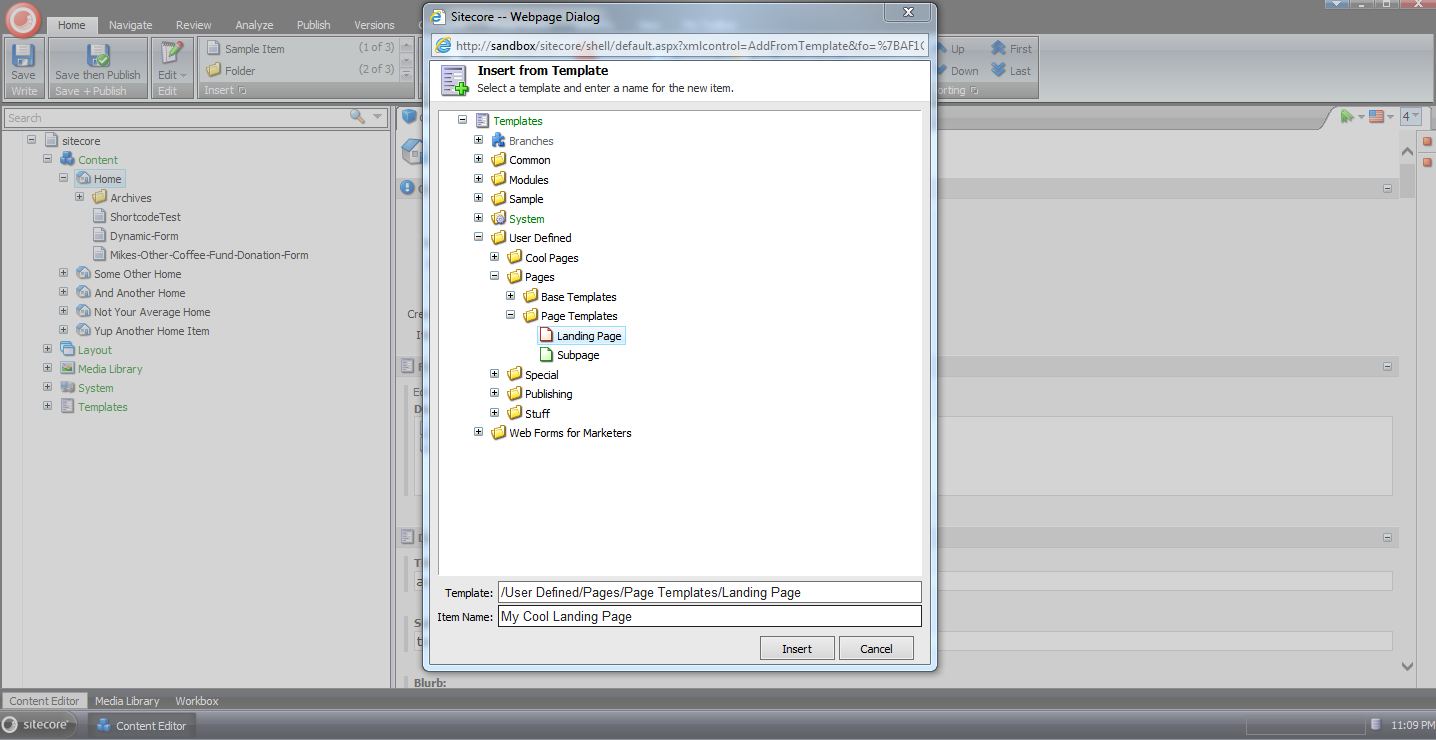
Next I was prompted to select a sibling item to insert the new item after:

As you can see the new item now resides after the selected sibling:

If you have any thoughts on this, or other ideas around modifying the uiAddFromTemplate pipeline, please share in a comment below.
Periodically Unlock Items of Idle Users in Sitecore
In my last post I showed a way to unlock locked items of a user when he/she logs out of Sitecore.
I wrote that article to help out the poster of this thread in one of the forums on SDN.
In response to my reply in that thread — I had linked to my previous post in that reply — John West, Chief Technology Officer of Sitecore, had asked whether we would also want to unlock items of users whose sessions had expired, and another SDN user had alluded to the fact that my solution would not unlock items for users who had closed their browser sessions instead of explicitly logging out of Sitecore.
Immediate after reading these responses, I began thinking about a supplemental solution to unlock items for “idle” users — users who have not triggered any sort of request in Sitecore after a certain amount of time.
I first began tinkering with the idea of using the last activity date/time of the logged in user — this is available as a DateTime in the user’s MembershipUser instance via the LastActivityDate property.
However — after reading this article — I learned this date and time does not mean what I thought it had meant, and decided to search for another way to ascertain whether a user is idle in Sitecore.
After some digging around, I discovered Sitecore.Web.Authentication.DomainAccessGuard.Sessions in Sitecore.Kernel.dll — this appears to be a collection of sessions in Sitecore — and immediately felt elated as if I had just won the lottery. I decided to put it to use in the following class (code in this class will be invoked via a scheduled task in Sitecore):
using System;
using System.Collections.Generic;
using System.Web.Security;

using Sitecore.Configuration;
using Sitecore.Data;
using Sitecore.Data.Items;
using Sitecore.Diagnostics;
using Sitecore.Security.Accounts;
using Sitecore.Tasks;
using Sitecore.Web.Authentication;

namespace Sitecore.Sandbox.Tasks
{
    public class UnlockItemsTask
    {
        private static readonly TimeSpan ElapsedTimeWhenIdle = GetElapsedTimeWhenIdle();

        public void UnlockIdleUserItems(Item[] items, CommandItem command, ScheduleItem schedule)
        {
            if (ElapsedTimeWhenIdle == TimeSpan.Zero)
            {
                return;
            }

            IEnumerable<Item> lockedItems = GetLockedItems(schedule.Database);
            foreach (Item lockedItem in lockedItems)
            {
                UnlockIfApplicable(lockedItem);
            }
        }

        private static IEnumerable<Item> GetLockedItems(Database database)
        {
            Assert.ArgumentNotNull(database, "database");
            return database.SelectItems("fast://*[@__lock='%owner=%']");
        }

        private void UnlockIfApplicable(Item item)
        {
            Assert.ArgumentNotNull(item, "item");
            if (!ShouldUnlockItem(item))
            {
                return;
            }

            Unlock(item);
        }

        private static bool ShouldUnlockItem(Item item)
        {
            Assert.ArgumentNotNull(item, "item");
            if(!item.Locking.IsLocked())
            {
                return false;
            }

            string owner = item.Locking.GetOwner();
            return !IsUserAdmin(owner) && IsUserIdle(owner);
        }

        private static bool IsUserAdmin(string username)
        {
            Assert.ArgumentNotNullOrEmpty(username, "username");
            User user = User.FromName(username, false);
            Assert.IsNotNull(user, "User must be null due to a wrinkle in the interwebs :-/");
            return user.IsAdministrator;
        }

        private static bool IsUserIdle(string username)
        {
            Assert.ArgumentNotNullOrEmpty(username, "username");
            DomainAccessGuard.Session userSession = DomainAccessGuard.Sessions.Find(session => session.UserName == username);
            if(userSession == null)
            {
                return true;
            }

            return userSession.LastRequest.Add(ElapsedTimeWhenIdle) <= DateTime.Now;
        }

        private void Unlock(Item item)
        {
            Assert.ArgumentNotNull(item, "item");
            try
            {
                string owner = item.Locking.GetOwner();
                item.Editing.BeginEdit();
                item.Locking.Unlock();
                item.Editing.EndEdit();
                Log.Info(string.Format("Unlocked {0} - was locked by {1}", item.Paths.Path, owner), this);
            }
            catch (Exception ex)
            {
                Log.Error(this.ToString(), ex, this);
            }
        }

        private static TimeSpan GetElapsedTimeWhenIdle()
        {
            TimeSpan elapsedTimeWhenIdle;
            if (TimeSpan.TryParse(Settings.GetSetting("UnlockItems.ElapsedTimeWhenIdle"), out elapsedTimeWhenIdle))
            {
                return elapsedTimeWhenIdle;
            }

            return TimeSpan.Zero;
        }
    }
}
Methods in the class above grab all locked items in Sitecore via a fast query, and unlock them if the users of each are not administrators, and are idle — I determine this from an idle threshold value that is stored in a custom setting (see the patch configuration file below) and the last time the user had made any sort of request in Sitecore via his/her DomainAccessGuard.Session instance from Sitecore.Web.Authentication.DomainAccessGuard.Sessions.
If a DomainAccessGuard.Session instance does not exist for the user — it’s null — this means the user’s session had expired, so we should also unlock the item.
I’ve also included code to log which items have been unlocked by the Unlock method — for auditing purposes — and of course log exceptions if any are encountered — we must do all we can to support our support teams by capturing information in log files :).
I then created a patch configuration file to store our idle threshold value — I’ve used one minute here for testing (I can’t sit around all day waiting for items to unlock ;)):
<?xml version="1.0" encoding="utf-8"?>
<configuration xmlns:patch="http://www.sitecore.net/xmlconfig/">
  <sitecore>
    <settings>
      <setting name="UnlockItems.ElapsedTimeWhenIdle" value="00:00:01:00" />
    </settings>
  </sitecore>
</configuration>
I then created a task command for the class above in Sitecore:

I then mapped the task command to a scheduled task (to learn about scheduled tasks, see John West’s blog post where he discusses them):

Let’s light the fuse on this, and see what it does.
I logged into Sitecore using one of my test accounts, and locked some items:

I then logged into Sitecore using a different account in a different browser session, and navigated to one of the locked items:
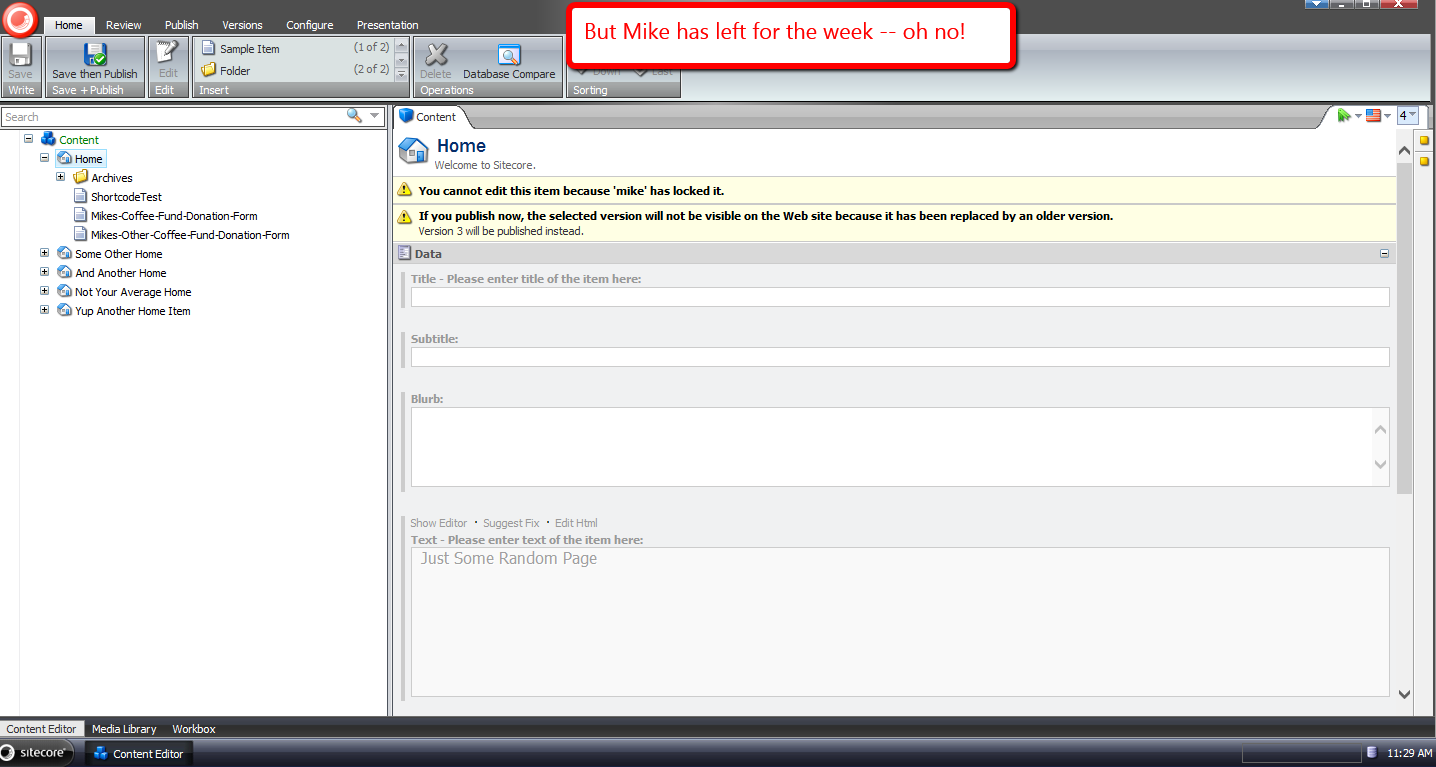
I then walked away, made a cup of coffee, returned, and saw this:
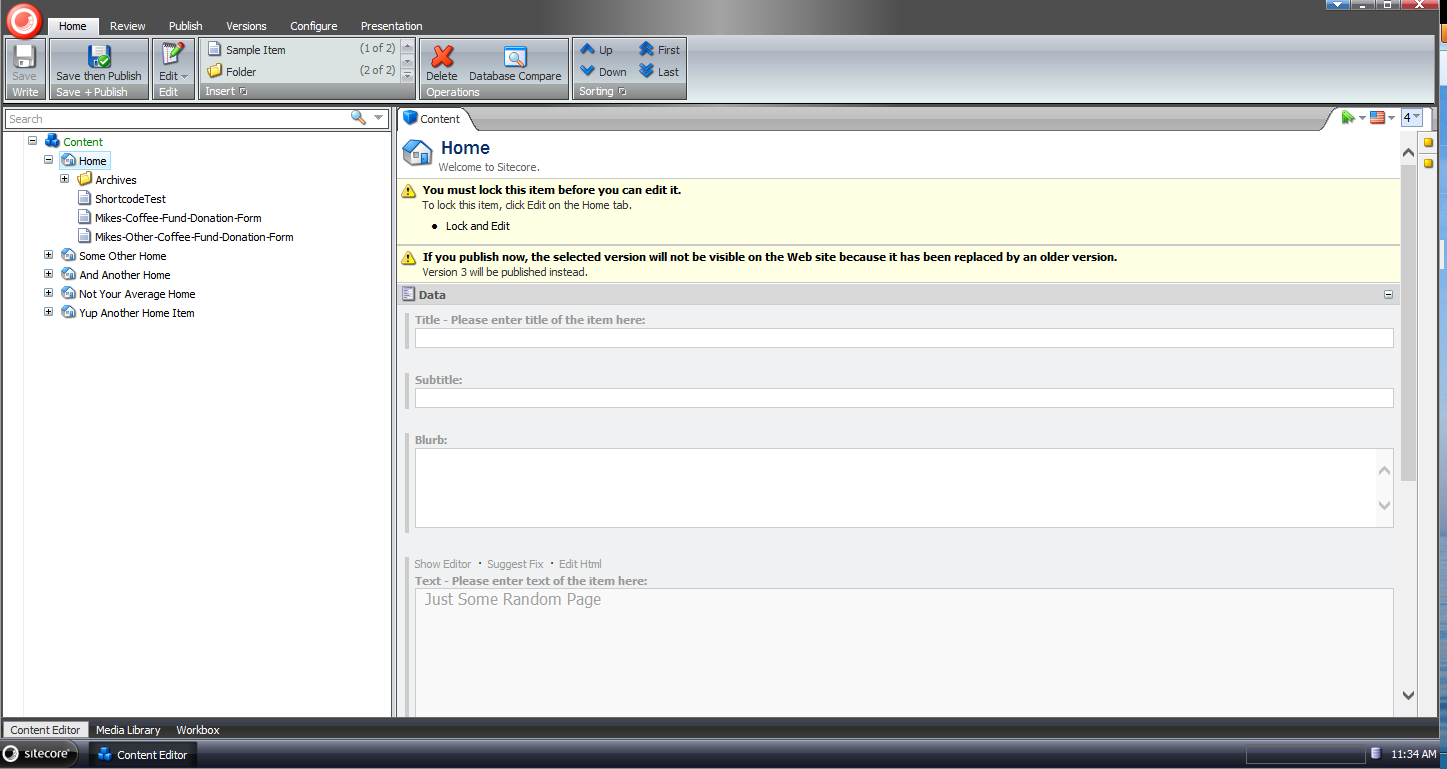
I opened up my latest Sitecore log, and saw the following:

I do want to caution you from running off with this code, and putting it into your Sitecore instance(s) — it is an all or nothing solution (it will unlock items for all non-adminstrators which might invoke some anger in users, and also defeat the purpose of locking items in the first place), so it’s quite important that a business decision is made before using this solution, or one that is similar in nature.
If you have any thoughts on this, please leave a comment.
Unlock Sitecore Users’ Items During Logout
The other day I saw a post in one of the SDN forums asking how one could go about building a solution to unlock items locked by a user when he/she logs out of Sitecore.
What immediately came to mind was building a new processor for the logout pipeline — this pipeline can be found at /configuration/sitecore/processors/logout in your Sitecore instance’s Web.config — but had to research how one would programmatically get all Sitecore items locked by the current user.
After a bit of fishing in Sitecore.Kernel.dll and Sitecore.Client.dll, I found a query in Sitecore.Client.dll that will give me all locked items for the current user:

Now all we need to do is add it into a custom logout pipeline processor:
using System;
using System.Collections.Generic;
using System.Linq;

using Sitecore.Data.Items;
using Sitecore.Diagnostics;
using Sitecore.Pipelines.Logout;

namespace Sitecore.Sandbox.Pipelines.Logout
{
    public class UnlockMyItems
    {
        public void Process(LogoutArgs args)
        {
            Assert.ArgumentNotNull(args, "args");
            UnlockMyItemsIfAny();
        }

        private void UnlockMyItemsIfAny()
        {
            IEnumerable<Item> lockedItems = GetMyLockedItems();
            if (!CanProcess(lockedItems))
            {
                return;
            }

            foreach (Item lockedItem in lockedItems)
            {
                Unlock(lockedItem);
            }
        }

        private static IEnumerable<Item> GetMyLockedItems()
        {
            return Context.ContentDatabase.SelectItems(GetMyLockedItemsQuery());
        }

        private static string GetMyLockedItemsQuery()
        {
            return string.Format("fast://*[@__lock='%\"{0}\"%']", Context.User.Name);
        }

        private static bool CanProcess(IEnumerable<Item> lockedItems)
        {
            return lockedItems != null
                    && lockedItems.Any()
                    && lockedItems.Select(item => item.Locking.HasLock()).Any();
        }

        private void Unlock(Item item)
        {
            Assert.ArgumentNotNull(item, "item");
            if (!item.Locking.HasLock())
            {
                return;
            }

            try
            {
                item.Editing.BeginEdit();
                item.Locking.Unlock();
                item.Editing.EndEdit();
            }
            catch (Exception ex)
            {
                Log.Error(this.ToString(), ex, this);
            }
        }
    }
}
The class above grabs all items locked by the current user in the context content database. If none are found, we don’t move forward on processing.
When there are locked items for the current user, the code checks to see if each item is locked before unlocking, just in case some other account unlocks the item before we unlock it — I don’t know what would happen if we try to unlock an item that isn’t locked. If you know, please share in a comment.
I then injected the above pipeline processor into the logout pipeline using the following patch configuration file:
<?xml version="1.0" encoding="utf-8" ?>
<configuration xmlns:patch="http://www.sitecore.net/xmlconfig/">
  <sitecore>
    <processors>
      <logout>
        <processor patch:after="*[@type='Sitecore.Pipelines.Logout.CheckModified, Sitecore.Kernel']" type="Sitecore.Sandbox.Pipelines.Logout.UnlockMyItems, Sitecore.Sandbox"/>
      </logout>
    </processors>
  </sitecore>
</configuration>
Let’s test-drive this.
I first logged into Sitecore using my ‘mike’ account, and chose the Home item to lock:
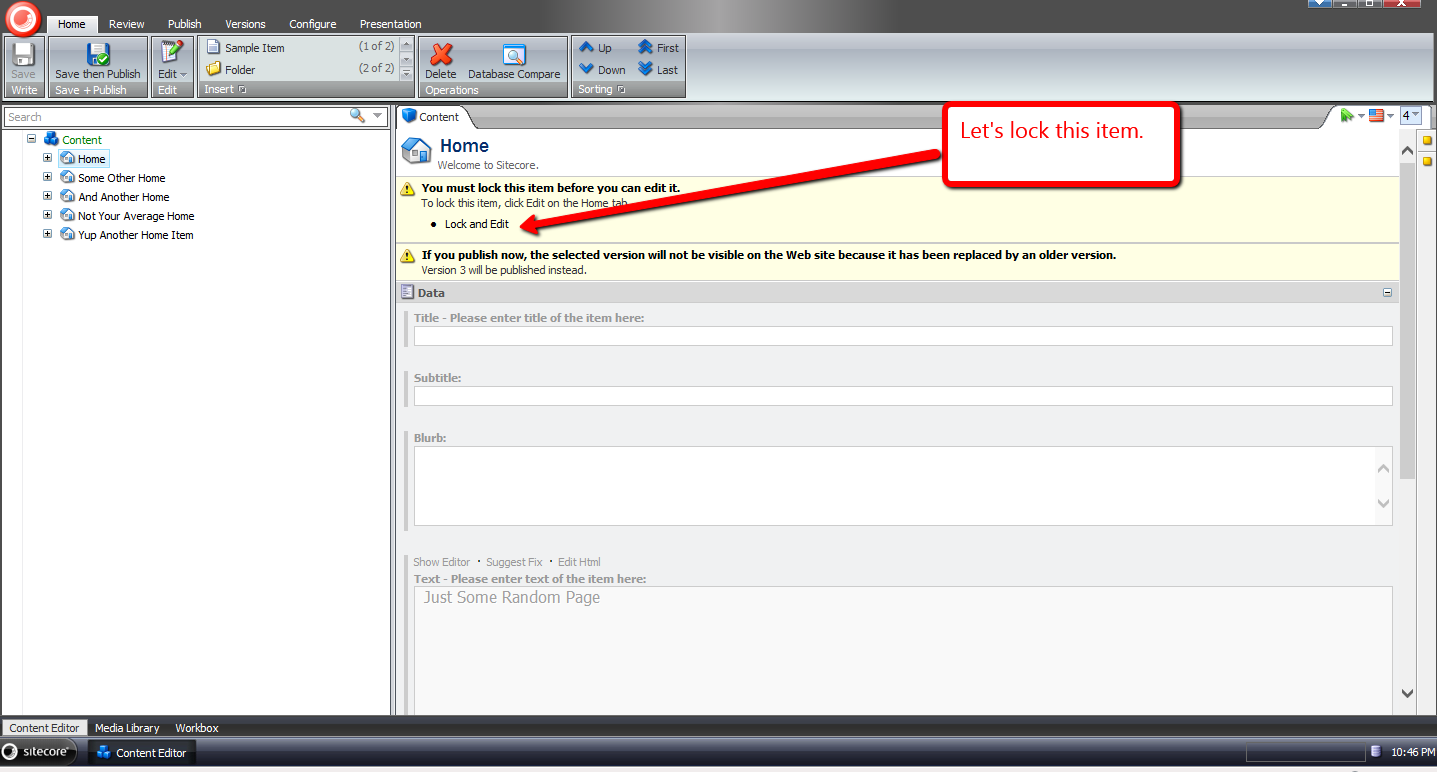
It is now locked:
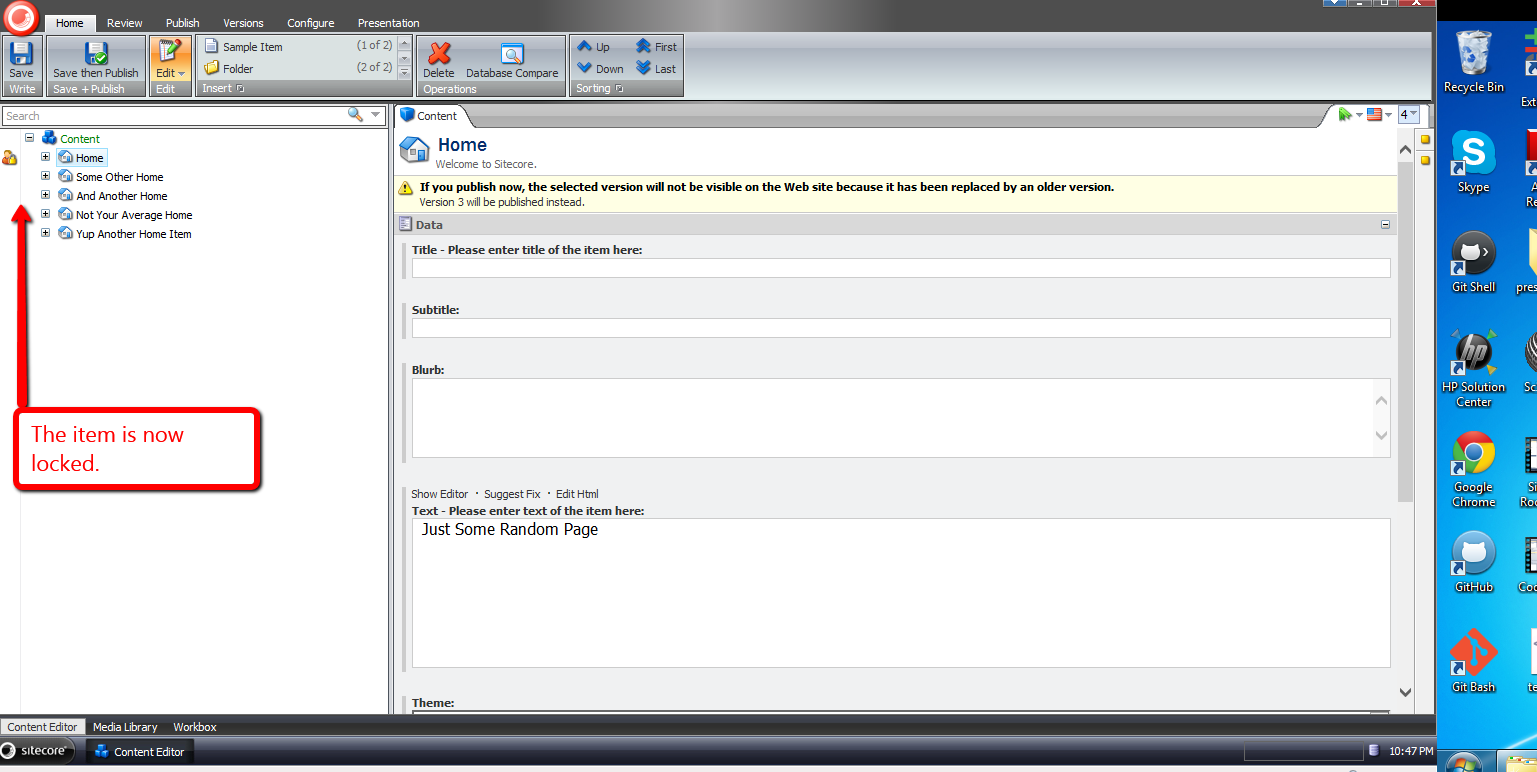
In another session, I logged in using another account, and saw that ‘mike’ had locked the Home item:

I switched back to the other session under the ‘mike’ user, and logged out:

When I logged back in, I saw that the Home item was no longer locked:

If you have any thoughts or suggestions on making this better, please share in a comment below.
Delete Associated Files on the Filesystem of Sitecore Items Deleted From the Recycle Bin
Last week a question was asked in one of the SDN forums on how one should go about deleting files on the filesystem that are associated with Items that are permanently deleted from the Recycle Bin — I wasn’t quite clear on what the original poster meant by files being linked to Items inside of Sitecore, but I assumed this relationship would be defined somewhere, or somehow.
After doing some research, I reckoned one could create a new command based on Sitecore.Shell.Framework.Commands.Archives.Delete in Sitecore.Kernel.dll to accomplish this:
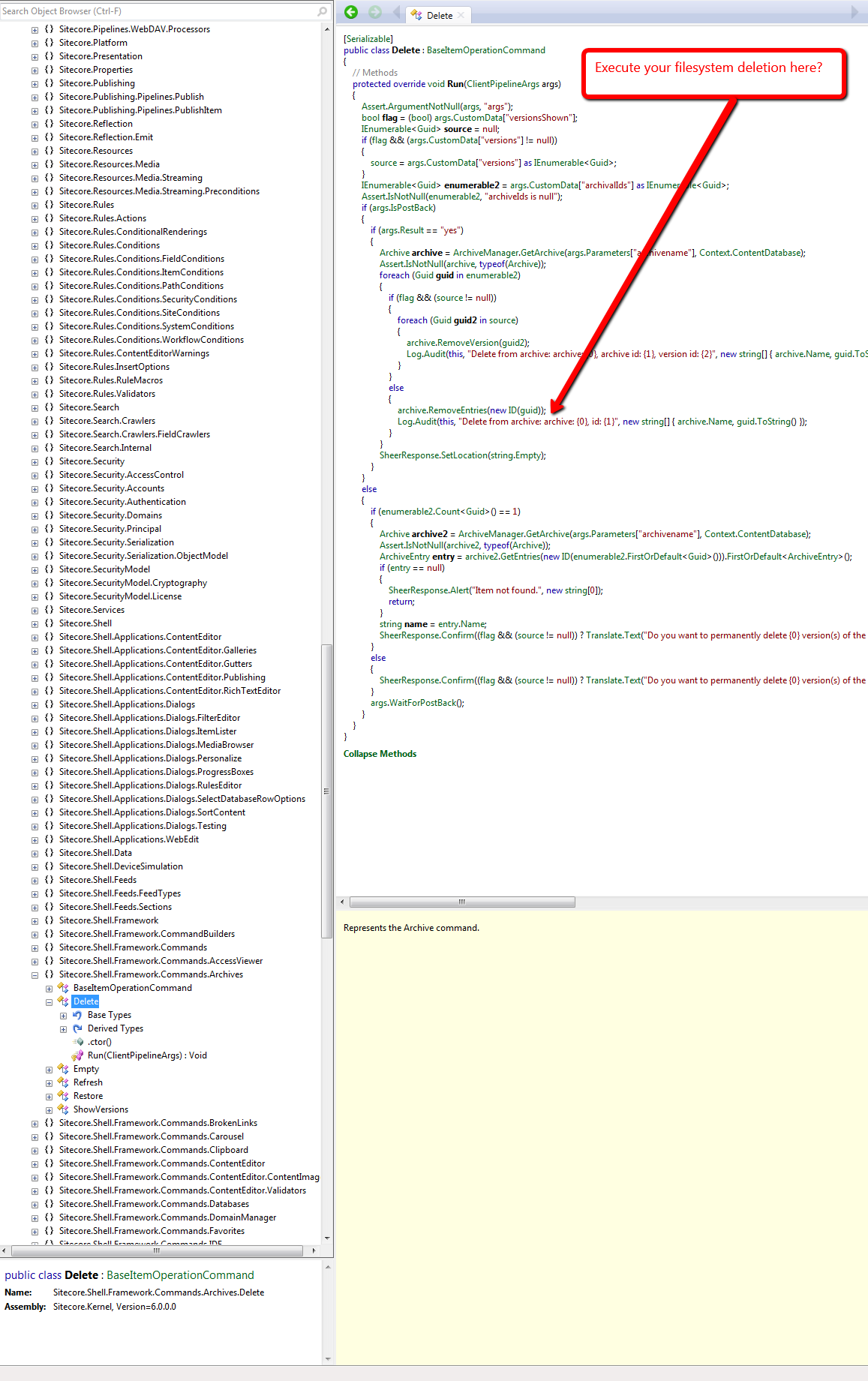
However, I wasn’t completely satisfied with this approach, especially when it would require a substantial amount of copying and pasting of code — a practice that I vehemently abhor — and decided to seek out a different, if not better, way of doing this.
From my research, I discovered that one could just create his/her own Archive class — it would have to ultimately derive from Sitecore.Data.Archiving.Archive in Sitecore.Kernel — which would delete a file on the filesystem associated with a Sitecore Item:
using System;
using System.IO;
using System.Linq;
using System.Web;

using Sitecore.Configuration;
using Sitecore.Data;
using Sitecore.Data.Archiving;
using Sitecore.Data.DataProviders.Sql;
using Sitecore.Diagnostics;

namespace Sitecore.Sandbox.Data.Archiving
{
    public class FileSystemHookSqlArchive : SqlArchive
    {
        private static readonly string FolderPath = GetFolderPath();

        public FileSystemHookSqlArchive(string name, Database database)
            : base(name, database)
        {
        }

        public override void RemoveEntries(ArchiveQuery query)
        {
            DeleteFromFileSystem(query);
            base.RemoveEntries(query);
        }

        protected virtual void DeleteFromFileSystem(ArchiveQuery query)
        {
            if (query.ArchivalId == Guid.Empty)
            {
                return;
            }

            Guid itemId = GetItemId(query.ArchivalId);
            if (itemId == Guid.Empty)
            {
                return;
            }

            string filePath = GetFilePath(itemId.ToString());
            if (string.IsNullOrWhiteSpace(filePath))
            {
                return;
            }

            TryDeleteFile(filePath);
        }

        private void TryDeleteFile(string filePath)
        {
            try
            {
                if (File.Exists(filePath))
                {
                    File.Delete(filePath);
                }
            }
            catch (Exception ex)
            {
                Log.Error(this.ToString(), ex, this);
            }
        }

        public virtual Guid GetItemId(Guid archivalId)
        {
            if (archivalId == Guid.Empty)
            {
                return Guid.Empty;
            }

            ArchiveQuery query = new ArchiveQuery
            {
                ArchivalId = archivalId
            };

            SqlStatement selectStatement = GetSelectStatement(query, "{0}ItemId{1}");
            if (selectStatement == null)
            {
                return Guid.Empty;
            }
            return GetGuid(selectStatement.Sql, selectStatement.GetParameters(), Guid.Empty);
        }

        private Guid GetGuid(string sql, object[] parameters, Guid defaultValue)
        {
            using (DataProviderReader reader = Api.CreateReader(sql, parameters))
            {
                if (!reader.Read())
                {
                    return defaultValue;
                }
                return Api.GetGuid(0, reader);
            }
        }

        private static string GetFilePath(string fileName)
        {
            string filePath = Directory.GetFiles(FolderPath, string.Concat(fileName, "*.*")).FirstOrDefault();
            if (!string.IsNullOrWhiteSpace(filePath))
            {
                return filePath;
            }

            return string.Empty;
        }

        private static string GetFolderPath()
        {
            return HttpContext.Current.Server.MapPath(Settings.GetSetting("FileSystemHookSqlArchive.Folder"));
        }
    }
}
In the subclass of Sitecore.Data.Archiving.SqlArchive above — I’m using Sitecore.Data.Archiving.SqlArchive since I’m using SqlServer for my Sitecore instance — I try to find a file that is named after its associated Item’s ID — minus the curly braces — in a folder that I’ve mapped in a configuration include file (see below).
I first have to get the Item’s ID from the database using the supplied ArchivalId — this is all the calling code gives us, so we have to make do with what we have.
If the file exists, we try to delete it — we do this before letting the base class delete the Item from Recycle Bin so that we can retrieve the Item’s ID from the database before it’s removed from the Archive database table — and log any errors we encounter upon exception.
I then hooked in an instance of the above Archive class in a custom Sitecore.Data.Archiving.ArchiveProvider class:
using System.Xml;

using Sitecore.Data;
using Sitecore.Data.Archiving;
using Sitecore.Xml;

namespace Sitecore.Sandbox.Data.Archiving
{
    public class FileSystemHookSqlArchiveProvider : SqlArchiveProvider
    {
        protected override Archive GetArchive(XmlNode configNode, Database database)
        {
            string attribute = XmlUtil.GetAttribute("name", configNode);
            if (string.IsNullOrEmpty(attribute))
            {
                return null;
            }

            return new FileSystemHookSqlArchive(attribute, database);
        }
    }
}
The above class — which derives from Sitecore.Data.Archiving.SqlArchiveProvider since I’m using SqlServer — only overrides its base class’s GetArchive factory method. We instantiate an instance of our Archive class instead of the “out of the box” Sitecore.Data.Archiving.SqlArchive class within it.
I then had to replace the “out of the box” Sitecore.Data.Archiving.ArchiveProvider reference, and define the location of our files in the following configuration file:
<?xml version="1.0" encoding="utf-8"?>
<configuration xmlns:patch="http://www.sitecore.net/xmlconfig/">
  <sitecore>
    <archives defaultProvider="sql" enabled="true">
      <providers>
        <add name="sql" patch:instead="add[@type='Sitecore.Data.Archiving.SqlArchiveProvider, Sitecore.Kernel']" type="Sitecore.Sandbox.Data.Archiving.FileSystemHookSqlArchiveProvider, Sitecore.Sandbox" database="*"/>
      </providers>
    </archives>
    <settings>
      <setting name="FileSystemHookSqlArchive.Folder" value="/test/" />
    </settings>
  </sitecore>
</configuration>
Let’s test this out.
I first created a test Item to delete:

I then had to create a test file on the filesystem in my test folder — the test folder lives in my Sitecore instance’s website root:

I deleted the test Item from the content tree, opened up the Recycle Bin, selected the test Item, and got an itchy trigger finger — I want to delete the Item forever 🙂 :

After clicking the Delete button, I saw that the file on the filesystem was deleted as well:

If you have any thoughts on this, or recommendations around making it better, please leave a comment.
Delete An Item Across Multiple Databases in Sitecore
Have you ever thought “wouldn’t it be handy to have the ability to delete an item across multiple databases in Sitecore?” In other words, wouldn’t it be nice to not have to publish the parent of an item — with sub-items — after deleting it, just to remove it from a target database?
This particular thought has crossed my mind more than once, and I decided to do something about it. This post showcases what I’ve done.
I spent some time surfing through Sitecore.Kernel.dll and Sitecore.Client.dll in search of a dialog that allows users to select multiple options simultaneously but came up shorthanded — if you are aware of one, please leave a comment — so I had to roll my own:
<?xml version="1.0" encoding="utf-8" ?>
<control xmlns:def="Definition" xmlns="http://schemas.sitecore.net/Visual-Studio-Intellisense">
	<DeleteInDatabases>
		<FormDialog ID="DeleteInDatabasesDialog" Icon="Business/32x32/data_delete.png" Header="Delete Item In Databases"
		  Text="Select the databases where you want to delete the item." OKButton="Delete">

		  <CodeBeside Type="Sitecore.Sandbox.Shell.Applications.Dialogs.DeleteInDatabasesForm,Sitecore.Sandbox"/>
		  <GridPanel Width="100%" Height="100%" Style="table-layout:fixed">
			<Border Padding="4" ID="Databases"/>
		  </GridPanel>
		</FormDialog>
	</DeleteInDatabases>
</control>
using System;
using System.Collections.Generic;
using System.Linq;
using System.Web.UI;
using System.Web.UI.HtmlControls;

using Sitecore.Configuration;
using Sitecore.Data;
using Sitecore.Data.Items;
using Sitecore.Diagnostics;
using Sitecore.Web;
using Sitecore.Web.UI.HtmlControls;
using Sitecore.Web.UI.Pages;
using Sitecore.Web.UI.Sheer;

namespace Sitecore.Sandbox.Shell.Applications.Dialogs
{
    public class DeleteInDatabasesForm : DialogForm
    {
        private const string DatabaseCheckboxIDPrefix = "db_";

        protected Border Databases;

        private string _ItemId;
        protected string ItemId
        {
            get
            {
                if (string.IsNullOrWhiteSpace(_ItemId))
                {
                    _ItemId = WebUtil.GetQueryString("id");
                }

                return _ItemId;
            }
        }

        protected override void OnLoad(EventArgs e)
        {
            AddDatabaseCheckboxes();
            base.OnLoad(e);
        }

        private void AddDatabaseCheckboxes()
        {
            Databases.Controls.Clear();
            foreach (string database in GetDatabasesForSelection())
            {
                HtmlGenericControl checkbox = new HtmlGenericControl("input");
                Databases.Controls.Add(checkbox);
                checkbox.Attributes["type"] = "checkbox";
                checkbox.Attributes["value"] = database;
                string checkboxId = string.Concat(DatabaseCheckboxIDPrefix, database);
                checkbox.ID = checkboxId;
                HtmlGenericControl label = new HtmlGenericControl("label");
                Databases.Controls.Add(label);
                label.Attributes["for"] = checkboxId;
                label.InnerText = database;
                Databases.Controls.Add(new LiteralControl("<br>"));
            }
        }

        private static IEnumerable<string> GetDatabasesForSelection()
        {
            return WebUtil.GetQueryString("db").Split("|".ToCharArray(), StringSplitOptions.RemoveEmptyEntries);
        }

        protected override void OnOK(object sender, EventArgs args)
        {
            IEnumerable<string> selectedDatabases = GetSelectedDabases();
            if (!selectedDatabases.Any())
            {
                SheerResponse.Alert("Please select at least one database!");
                return;
            }

            DeleteItemInDatabases(selectedDatabases, ItemId);
            SheerResponse.Alert("The item has been deleted in all selected databases!");
            base.OnOK(sender, args);
        }

        private static IEnumerable<string> GetSelectedDabases()
        {
            IList<string> databases = new List<string>();
            foreach (string id in Context.ClientPage.ClientRequest.Form.Keys)
            {
                if (!string.IsNullOrWhiteSpace(id) && id.StartsWith(DatabaseCheckboxIDPrefix))
                {
                    databases.Add(id.Substring(3));
                }
            }

            return databases;
        }

        private static void DeleteItemInDatabases(IEnumerable<string> databases, string itemId)
        {
            foreach(string database in databases)
            {
                DeleteItemInDatabase(database, itemId);
            }
        }

        private static void DeleteItemInDatabase(string databaseName, string itemId)
        {
            Assert.ArgumentNotNullOrEmpty(databaseName, "databaseName");
            Assert.ArgumentNotNullOrEmpty(itemId, "itemId");
            Database database = Factory.GetDatabase(databaseName);
            Assert.IsNotNull(database, "Invalid database!");
            DeleteItem(database.GetItem(itemId));
        }

        private static void DeleteItem(Item item)
        {
            Assert.ArgumentNotNull(item, "item");
            if (Settings.RecycleBinActive)
            {
                item.Recycle();
            }
            else
            {
                item.Delete();
            }
        }
    }
}
The dialog above takes in an item’s ID — this is the ID of the item the user has chosen to delete across multiple databases — and a list of databases a user can choose from as checkboxes.
Ideally the item should exist in each database, albeit the code will throw an exception via an assertion in the case when client code supplies a database, the user selects it, and the item does not live in it.
If the user does not check off one checkbox, and clicks the ‘Delete’ button, an ‘Alert’ box will let the user know s/he must select at least one database.
When databases are selected, and the ‘Delete’ button is clicked, the item will be deleted — or put into the Recycle Bin — in all selected databases.
Now we need a way to launch this dialog. I figured it would make sense to have it be available from the item context menu — just as the ‘Delete’ menu option is available there “out of the box” — and built the following command for it:
using System;
using System.Collections.Generic;
using System.Linq;

using Sitecore.Configuration;
using Sitecore.Data.Items;
using Sitecore.Diagnostics;
using Sitecore.Shell.Framework.Commands;
using Sitecore.Text;
using Sitecore.Web.UI.Sheer;

namespace Sitecore.Sandbox.Commands
{
    public class DeleteInDatabases : Command
    {
        public override void Execute(CommandContext commandContext)
        {
            Context.ClientPage.Start(this, "ShowDialog", CreateNewClientPipelineArgs(GetItem(commandContext)));
        }

        private static ClientPipelineArgs CreateNewClientPipelineArgs(Item item)
        {
            Assert.ArgumentNotNull(item, "item");
            ClientPipelineArgs args = new ClientPipelineArgs();
            args.Parameters["ItemId"] = item.ID.ToString();
            args.Parameters["ParentId"] = item.ParentID.ToString();
            return args;
        }

        private void ShowDialog(ClientPipelineArgs args)
        {
            if (!args.IsPostBack)
            {
                SheerResponse.ShowModalDialog
                (
                    GetDialogUrl
                    (
                        GetDatabasesForItem(args.Parameters["ItemId"]),
                        args.Parameters["ItemId"]
                    ),
                    "300px",
                    "500px",
                    string.Empty,
                    true
               );

               args.WaitForPostBack();
            }
            else
            {
                RefreshChildren(args.Parameters["ParentId"]);
            }
        }

        private void RefreshChildren(string parentId)
        {
            Assert.ArgumentNotNullOrEmpty(parentId, "parentId");
            Context.ClientPage.SendMessage(this, string.Format("item:refreshchildren(id={0})", parentId));
        }

        public override CommandState QueryState(CommandContext commandContext)
        {
            bool shouldEnable = Context.User.IsAdministrator
                                && IsInDatabasesOtherThanCurrentContent(GetItem(commandContext));

            if (shouldEnable)
            {
                return CommandState.Enabled;
            }

            return CommandState.Hidden;
        }

        private static bool IsInDatabasesOtherThanCurrentContent(Item item)
        {
            Assert.ArgumentNotNull(item, "item");
            return GetDatabasesForItem(item.ID.ToString()).Count() > 1;
        }
        private static Item GetItem(CommandContext commandContext)
        {
            Assert.ArgumentNotNull(commandContext, "commandContext");
            Assert.ArgumentNotNull(commandContext.Items, "commandContext.Items");
            return commandContext.Items.FirstOrDefault();
        }

        private static IEnumerable<string> GetDatabasesForItemExcludingContentDB(string id)
        {
            return GetDatabasesForItem(id).Where(db => string.Equals(db, Context.ContentDatabase.Name, StringComparison.CurrentCultureIgnoreCase));
        }

        private static IEnumerable<string> GetDatabasesForItem(string id)
        {
            Assert.ArgumentNotNullOrEmpty(id, "id");
            return (from database in Factory.GetDatabases()
                    let itemInDatabase = database.GetItem(id)
                    where itemInDatabase != null
                    select database.Name).ToList();
        }

        private static string GetDialogUrl(IEnumerable<string> databases, string id)
        {
            Assert.ArgumentNotNullOrEmpty(id, "id");
            Assert.ArgumentNotNull(databases, "databases");
            Assert.ArgumentCondition(databases.Any(), "databases", "At least one database should be supplied!");
            UrlString urlString = new UrlString(UIUtil.GetUri("control:DeleteInDatabases"));
            urlString.Append("id", id);
            urlString.Append("db", string.Join("|", databases));
            return urlString.ToString();
        }
    }
}
The command is only visible when the item is in another database other than the context content database and the user is an admin.
When the item context menu option is clicked, the command passes a pipe delimited list of database names — only databases that contain the item — and the item’s ID to the dialog through its query string.
Once the item is deleted via the dialog, control is returned back to the command, and it then refreshes all siblings of the deleted item — this is done so the deleted item is removed from the content tree if the context content database was chosen in the dialog.
I then made this command available in Sitecore using a configuration include file:
<?xml version="1.0"?>
<configuration xmlns:patch="http://www.sitecore.net/xmlconfig/">
  <sitecore>
    <commands>
      <command name="item:DeleteInDatabases" type="Sitecore.Sandbox.Commands.DeleteInDatabases,Sitecore.Sandbox"/>
    </commands>
  </sitecore>
</configuration>
I’ve omitted the step on how I’ve wired this up to the item context menu in the core database. For more information on adding to the item context menu, please see part one and part two of my post showing how to do this.
Let’s see this in action.
I navigated to a test item that lives in the master and web databases, and launched its item context menu:

I clicked the ‘Delete in Databases’ menu option, and was presented with this dialog:
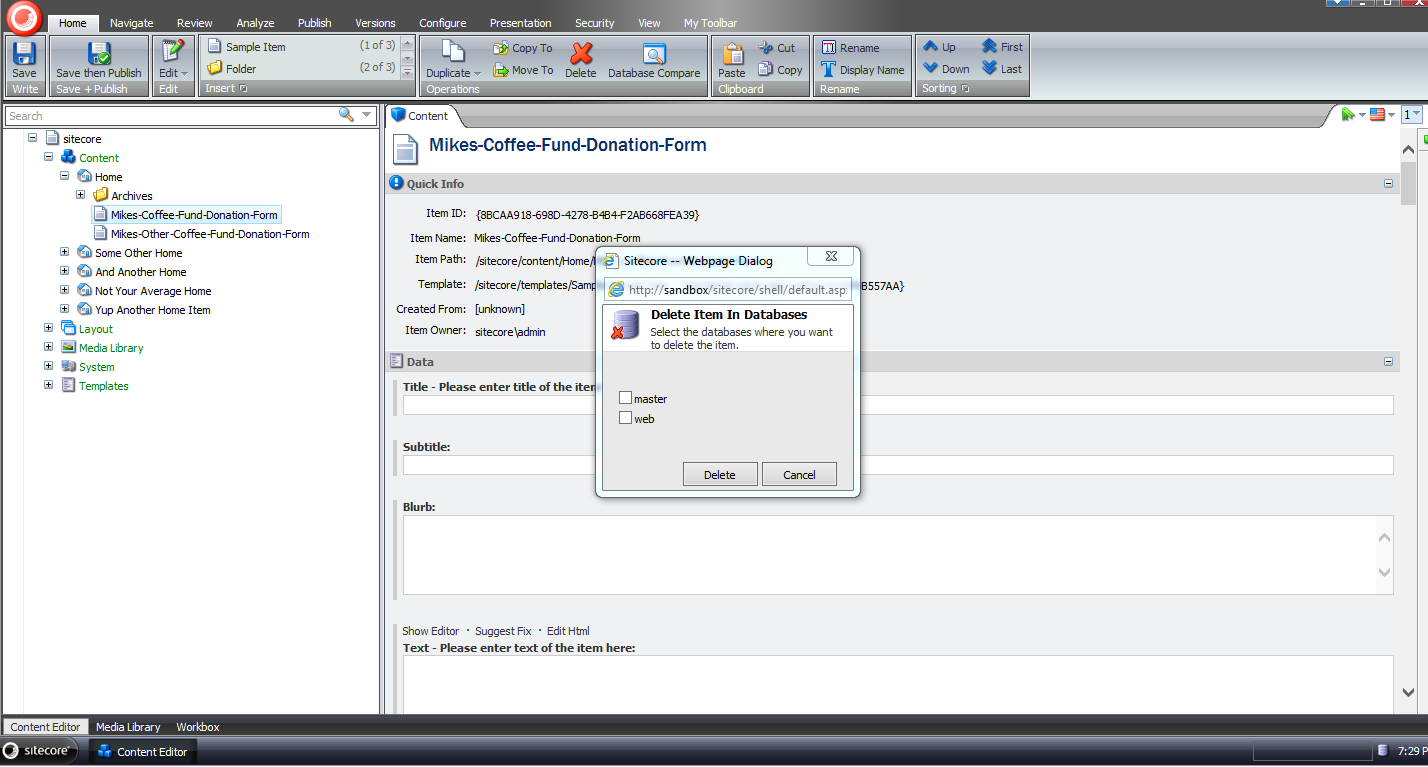
I got excited and forgot to select a database before clicking the ‘Delete’ button:

I then selected all databases, and clicked ‘Delete’:

When the dialog closed, we can see that our test item is gone:

Rest assured, it’s in the Recycle Bin:

It was also deleted in the web database as well — I’ve omitted screenshots of this since they would be identical to the last two screenshots above.
If you have any thoughts on this, or recommendations on making it better, please share in a comment.
Until next time, have a Sitecoretastic day!
Publish Items With the Sitecore Item Web API Using a Custom ResolveAction itemWebApiRequest Pipeline Processor
At the end of last week, when many people were probably thinking about what to do over the weekend, or were making plans with family and/or friends, I started thinking about what I might need to do next on the project I’m working on.
I realized I might need a way to publish Sitecore items I’ve touched via the Sitecore Item Web API — a feature that appears to be missing, or I just cannot figure out how to use from its documentation (if there is a way to do this “out of the box”, please share in a comment below).
After some digging around in Sitecore.ItemWebApi.dll and \App_Config\Include\Sitecore.ItemWebApi.config, I thought it would be a good idea to define a new action that employs a request method other than get, post, put, delete — these request methods are used by a vanilla install of the Sitecore Item Web API.
Where would one find a list of “standard” request methods? Of course Google knows all — I learned about the patch request method, and decided to use it.
According to Wikipedia — see this entry subsection discussing request methods — the patch request method is “used to apply partial modifications to a resource”, and one could argue that a publishing an item in Sitecore is a partial modification to that item — it’s being pushed to another database which is really an update on that item in the target database.
Now that our research is behind us — and we’ve learned about the patch request method — let’s get our hands dirty with some code.
Following the pipeline processor convention set forth in code for the Sitecore Item Web API for other request methods, I decide to box our new patch requests into a new pipeline, and doing this called for creating a new data transfer object for the new pipeline processor we will define below:
using Sitecore.Data.Items;

using Sitecore.ItemWebApi.Pipelines;

namespace Sitecore.Sandbox.ItemWebApi.Pipelines.Patch.DTO
{
    public class PatchArgs : OperationArgs
    {
        public PatchArgs(Item[] scope)
            : base(scope)
        {
        }
    }
}
Next, I created a base class for our new patch processor:
using Sitecore.ItemWebApi.Pipelines;

using Sitecore.Sandbox.ItemWebApi.Pipelines.Patch.DTO;

namespace Sitecore.Sandbox.ItemWebApi.Pipelines.Patch
{
    public abstract class PatchProcessor : OperationProcessor<PatchArgs>
    {
        protected PatchProcessor()
        {
        }
    }
}
I then created a new pipeline processor that will publish items passed to it:
using System;
using System.Collections.Generic;
using System.Linq;

using Sitecore.Configuration;
using Sitecore.Data;
using Sitecore.Data.Items;
using Sitecore.Diagnostics;
using Sitecore.ItemWebApi;
using Sitecore.Publishing;
using Sitecore.Web;

using Sitecore.Sandbox.ItemWebApi.Pipelines.Patch.DTO;

namespace Sitecore.Sandbox.ItemWebApi.Pipelines.Patch
{
    public class PublishScope : PatchProcessor
    {
        private string DefaultTargetDatabase { get; set; }

        public override void Process(PatchArgs arguments)
        {
            Assert.ArgumentNotNull(arguments, "arguments");
            Assert.IsNotNull(arguments.Scope, "The scope is null!");
            PublishItems(arguments.Scope, GetTargetDatabase());
            arguments.Result = GetResult(arguments.Scope);
        }

        private Database GetTargetDatabase()
        {
            return Factory.GetDatabase(GetTargetDatabaseName());
        }

        private string GetTargetDatabaseName()
        {
            string databaseName = WebUtil.GetQueryString("sc_target_database");
            if(!string.IsNullOrWhiteSpace(databaseName))
            {
                return databaseName;
            }

            Assert.IsNotNullOrEmpty(DefaultTargetDatabase, "DefaultTargetDatabase must be set!");
            return DefaultTargetDatabase;
        }

        private static void PublishItems(IEnumerable<Item> items, Database database)
        {
            foreach(Item item in items)
            {
                PublishItem(item, database);
            }
        }

        private static void PublishItem(Item item, Database database)
        {
           PublishOptions publishOptions = new PublishOptions
           (
               item.Database,
               database,
               Sitecore.Publishing.PublishMode.SingleItem,
               item.Language,
               DateTime.Now
           );

            Publisher publisher = new Publisher(publishOptions);
            publisher.Options.RootItem = item;
            publisher.Publish();
        }

        private static Dynamic GetResult(IEnumerable<Item> scope)
        {
            Assert.ArgumentNotNull(scope, "scope");
            Dynamic dynamic = new Dynamic();
            dynamic["statusCode"] = 200;
            dynamic["result"] = GetInnerResult(scope);
            return dynamic;
        }

        private static Dynamic GetInnerResult(IEnumerable<Item> scope)
        {
            Assert.ArgumentNotNull(scope, "scope");
            Dynamic dynamic = new Dynamic();
            dynamic["count"] = scope.Count();
            dynamic["itemIds"] = scope.Select(item => item.ID.ToString());
            return dynamic;
        }
    }
}
The above pipeline processor class serially publishes each item passed to it, and returns a Sitecore.ItemWebApi.Dynamic instance containing information on how many items were published; a collection of IDs of the items that were published; and an OK status code.
If the calling code does not supply a publishing target database via the sc_target_database query string parameter, the processor will use the value defined in DefaultTargetDatabase — this value is set in \App_Config\Include\Sitecore.ItemWebApi.config, which you will see later when I show changes I made to this file.
It had been awhile since I’ve had to publish items in code, so I searched for a refresher on how to do this.
In my quest for some Sitecore API code, I rediscovered this article by Sitecore MVP
Brian Pedersen showing how one can publish Sitecore items programmatically — many thanks to Brian for this article!
If you haven’t read Brian’s article, you should go check it out now. Don’t worry, I’ll wait. 🙂
I then created a new ResolveAction itemWebApiRequest pipeline processor:
using System;

using Sitecore.Diagnostics;
using Sitecore.Exceptions;
using Sitecore.ItemWebApi.Pipelines.Request;
using Sitecore.ItemWebApi.Security;
using Sitecore.Pipelines;

using Sitecore.Sandbox.ItemWebApi.Pipelines.Patch.DTO;

namespace Sitecore.Sandbox.ItemWebApi.Pipelines.Request
{
    public class ResolveAction : Sitecore.ItemWebApi.Pipelines.Request.ResolveAction
    {
        public override void Process(RequestArgs requestArgs)
        {
            Assert.ArgumentNotNull(requestArgs, "requestArgs");
            string method = GetMethod(requestArgs.Context);
            AssertOperation(requestArgs, method);

            if(IsCreateRequest(method))
            {
	            ExecuteCreateRequest(requestArgs);
	            return;
            }

            if(IsReadRequest(method))
            {
	            ExecuteReadRequest(requestArgs);
	            return;
            }

            if(IsUpdateRequest(method))
            {
               ExecuteUpdateRequest(requestArgs);
               return;
            }

            if(IsDeleteRequest(method))
            {
	            ExecuteDeleteRequest(requestArgs);
	            return;
            }

            if (IsPatchRequest(method))
            {
	            ExecutePatchRequest(requestArgs);
	            return;
            }
        }

        private static void AssertOperation(RequestArgs requestArgs, string method)
        {
            Assert.ArgumentNotNull(requestArgs, "requestArgs");
            if (requestArgs.Context.Settings.Access == AccessType.ReadOnly && !AreEqual(method, "get"))
            {
                throw new AccessDeniedException("The operation is not allowed.");
            }
        }

        private static bool IsCreateRequest(string method)
        {
            return AreEqual(method, "post");
        }

        private static bool IsReadRequest(string method)
        {
            return AreEqual(method, "get");
        }

        private static bool IsUpdateRequest(string method)
        {
            return AreEqual(method, "put");
        }

        private static bool IsDeleteRequest(string method)
        {
            return AreEqual(method, "delete");
        }

        private static bool IsPatchRequest(string method)
        {
            return AreEqual(method, "patch");
        }

        private static bool AreEqual(string one, string two)
        {
            return string.Equals(one, two, StringComparison.InvariantCultureIgnoreCase);
        }

        protected virtual void ExecutePatchRequest(RequestArgs requestArgs)
        {
            Assert.ArgumentNotNull(requestArgs, "requestArgs");
            PatchArgs patchArgsArgs = new PatchArgs(requestArgs.Scope);
            CorePipeline.Run("itemWebApiPatch", patchArgsArgs);
            requestArgs.Result = patchArgsArgs.Result;
        }

        private string GetMethod(Sitecore.ItemWebApi.Context context)
        {
            Assert.ArgumentNotNull(context, "context");
            return context.HttpContext.Request.HttpMethod.ToLower();
        }
    }
}
The class above contains the same logic as Sitecore.ItemWebApi.Pipelines.Request.ResolveAction, though I refactored it a bit — the nested conditional statements in the Process method were driving me bonkers, and I atomized logic by placing into new methods.
Plus, I added an additional check to see if the request we are to execute is a patch request — this is true when HttpContext.Request.HttpMethod.ToLower() in our Sitecore.ItemWebApi.Context instance is equal to “patch” — and call our new patch pipeline if this is the case.
I then added the new itemWebApiPatch pipeline with its new PublishScope processor, and replaced /configuration/sitecore/pipelines/itemWebApiRequest/processor[@type=”Sitecore.ItemWebApi.Pipelines.Request.ResolveAction, Sitecore.ItemWebApi”] with /configuration/sitecore/pipelines/itemWebApiRequest/processor[@type=”Sitecore.Sandbox.ItemWebApi.Pipelines.Request.ResolveAction, Sitecore.Sandbox”] in \App_Config\Include\Sitecore.ItemWebApi.config:
<?xml version="1.0" encoding="utf-8"?>
	<configuration xmlns:patch="http://www.sitecore.net/xmlconfig/">
		<sitecore>
			<pipelines>
				<itemWebApiRequest>
					<!-- stuff is defined up here -->
					<processor type="Sitecore.Sandbox.ItemWebApi.Pipelines.Request.ResolveAction, Sitecore.Sandbox" />
					<!-- stuff is defined right here -->
				</itemWebApiRequest>
				<!-- more stuff is defined here -->
				<itemWebApiPatch>
					<processor type="Sitecore.Sandbox.ItemWebApi.Pipelines.Patch.PublishScope, Sitecore.Sandbox">
						<DefaultTargetDatabase>web</DefaultTargetDatabase>
					</processor>
				</itemWebApiPatch>
			</pipelines>
			<!-- there's even more stuff defined down here -->
		</sitecore>
	</configuration>
Let’s test this out, and see how we did.
We’ll be publishing these items:

As you can see, they aren’t in the web database right now:

I had to modify code in my copy of the console application written by Kern Herskind Nightingale, Director of Technical Services at Sitecore UK, to use the patch request method for the ancestor home item shown above, and set a scope of self and recursive (scope=s|r) — checkout out this post where I added the recursive axe to the Sitecore Item Web API. I am excluding the console application code modification for the sake of brevity.
I then ran the console application above, and saw this:

All of these items now live in the web database:

If you have any thoughts on this, or ideas on other useful actions for the Sitecore Item Web API, please drop a comment.
 SitecoreJunkie.com