Home » Pipeline (Page 5)
Category Archives: Pipeline
Set New Media Library Item Fields Via the Sitecore Item Web API
On a recent project, I found the need to set field data on new media library items using the Sitecore Item Web API — a feature that is not supported “out of the box”.
After digging through Sitecore.ItemWebApi.dll, I discovered where one could add the ability to update fields on newly created media library items:

Unfortunately, the CreateMediaItems method in the Sitecore.ItemWebApi.Pipelines.Request.ResolveAction class is declared private — introducing code to set fields on new media library items will require some copying and pasting of code.
Honestly, I loathe duplicating code. 😦
Unfortunately, we must do it in order to add the capability of setting fields on media library items via the Sitecore Item Web API (if you can think of a better way, please leave a comment).
I did just that on the following subclass of Sitecore.ItemWebApi.Pipelines.Request.ResolveAction:
using System;
using System.Collections.Generic;
using System.IO;
using System.Web;

using Sitecore.Data;
using Sitecore.Data.Items;
using Sitecore.Diagnostics;
using Sitecore.IO;
using Sitecore.ItemWebApi;
using Sitecore.ItemWebApi.Pipelines.Read;
using Sitecore.ItemWebApi.Pipelines.Request;
using Sitecore.Pipelines;
using Sitecore.Resources.Media;
using Sitecore.Text;
using Sitecore.Data.Fields;

namespace Sitecore.Sandbox.ItemWebApi.Pipelines.Request
{
    public class ResolveActionMediaItems : ResolveAction
    {
        protected override void ExecuteCreateRequest(RequestArgs args)
        {
            Assert.ArgumentNotNull(args, "args");
            if (IsMediaCreation(args.Context))
            {
                CreateMediaItems(args);
                return;
            }

            base.ExecuteCreateRequest(args);
        }

        private void CreateMediaItems(RequestArgs args)
        {
            Assert.ArgumentNotNull(args, "args");
            Item parent = args.Context.Item;
            if (parent == null)
            {
                throw new Exception("The specified location not found.");
            }
            string fullPath = parent.Paths.FullPath;
            if (!fullPath.StartsWith("/sitecore/media library"))
            {
                throw new Exception(string.Format("The specified location of media items is not in the Media Library ({0}).", fullPath));
            }
            string name = args.Context.HttpContext.Request.Params["name"];
            if (string.IsNullOrEmpty(name))
            {
                throw new Exception("Item name not specified (HTTP parameter 'name').");
            }
            Database database = args.Context.Database;
            Assert.IsNotNull(database, "Database not resolved.");
            HttpFileCollection files = args.Context.HttpContext.Request.Files;
            Assert.IsTrue(files.Count > 0, "Files not found.");
            List<Item> list = new List<Item>();

            for (int i = 0; i < files.Count; i++)
            {
                HttpPostedFile file = files[i];
                if (file.ContentLength != 0)
                {
                    string fileName = file.FileName;
                    string uniqueName = ItemUtil.GetUniqueName(parent, name);
                    string destination = string.Format("{0}/{1}", fullPath, uniqueName);
                    MediaCreatorOptions options = new MediaCreatorOptions
                    {
                        AlternateText = fileName,
                        Database = database,
                        Destination = destination,
                        Versioned = false
                    };
                    Stream inputStream = file.InputStream;
                    string extension = FileUtil.GetExtension(fileName);
                    string filePath = string.Format("{0}.{1}", uniqueName, extension);
                    try
                    {
                        Item item = MediaManager.Creator.CreateFromStream(inputStream, filePath, options);
                        SetFields(item, args.Context.HttpContext.Request["fields"]); // MR: set field data on item if data is passed
                        list.Add(item);
                    }
                    catch
                    {
                        Logger.Warn("Cannot create the media item.");
                    }
                }
            }
            ReadArgs readArgs = new ReadArgs(list.ToArray());
            CorePipeline.Run("itemWebApiRead", readArgs);
            args.Result = readArgs.Result;
        }

        private static void SetFields(Item item, string fieldsQueryString)
        {
            if (!string.IsNullOrWhiteSpace(fieldsQueryString))
            {
                SetFields(item, new UrlString(fieldsQueryString));
            }
        }

        private static void SetFields(Item item, UrlString fields)
        {
            Assert.ArgumentNotNull(item, "item");
            Assert.ArgumentNotNull(fields, "fields");

            if (fields.Parameters.Count < 1)
            {
                return;
            }

            item.Editing.BeginEdit();

            foreach (string fieldName in fields.Parameters.Keys)
            {
                Field field = item.Fields[fieldName];
                if(field != null)
                {
                    field.Value = fields.Parameters[fieldName];
                }
            }

            item.Editing.EndEdit();
        }

        private bool IsMediaCreation(Sitecore.ItemWebApi.Context context)
        {
            Assert.ArgumentNotNull(context, "context");
            return context.HttpContext.Request.Files.Count > 0;
        }
    }
}
The above class reads fields supplied by client code via a query string passed in a query string parameter — the fields query string must be “url encoded” by the client code before being passed in the outer query string.
We then delegate to an instance of the Sitecore.Text.UrlString class when fields are supplied by client code — if you don’t check to see if the query string is null, empty or whitespace, the UrlString class will throw an exception if it’s not set — to parse the fields query string, and loop over the parameters within it — each parameter represents a field to be set on the item, and is set if it exists (see the SetFields methods above).
I replaced Sitecore.ItemWebApi.Pipelines.Request.ResolveAction in \App_Config\Include\Sitecore.ItemWebApi.config with our new pipeline processor above:
<?xml version="1.0" encoding="utf-8"?>
<configuration xmlns:patch="http://www.sitecore.net/xmlconfig/">
	<sitecore>
		<pipelines>
		<!-- there is more stuff up here -->
		<!--Processes Item Web API requests. -->
		<itemWebApiRequest>
			<!-- there are more pipeline processors up here -->
			<processor type="Sitecore.Sandbox.ItemWebApi.Pipelines.Request.ResolveActionMediaItems, Sitecore.Sandbox" />
			<!-- there are more pipeline processors down here -->
		</itemWebApiRequest>
		<!-- there is more stuff down here -->
		</pipelines>
	</sitecore>
</configuration>
I then modified the media library item creation code in my copy of the console application written by Kern Herskind Nightingale — Director of Technical Services at Sitecore UK — to send field data to the Sitecore Item Web API:

I set some fields using test data:

After I ran the console application, I got a response — this is a good sign 🙂

As you can see, our test field data has been set on our pizza media library item:

If you have any thoughts or suggestions on this, please drop a comment.
Now I’m hungry — perhaps I’ll order a pizza! 🙂
Publish Items With the Sitecore Item Web API Using a Custom ResolveAction itemWebApiRequest Pipeline Processor
At the end of last week, when many people were probably thinking about what to do over the weekend, or were making plans with family and/or friends, I started thinking about what I might need to do next on the project I’m working on.
I realized I might need a way to publish Sitecore items I’ve touched via the Sitecore Item Web API — a feature that appears to be missing, or I just cannot figure out how to use from its documentation (if there is a way to do this “out of the box”, please share in a comment below).
After some digging around in Sitecore.ItemWebApi.dll and \App_Config\Include\Sitecore.ItemWebApi.config, I thought it would be a good idea to define a new action that employs a request method other than get, post, put, delete — these request methods are used by a vanilla install of the Sitecore Item Web API.
Where would one find a list of “standard” request methods? Of course Google knows all — I learned about the patch request method, and decided to use it.
According to Wikipedia — see this entry subsection discussing request methods — the patch request method is “used to apply partial modifications to a resource”, and one could argue that a publishing an item in Sitecore is a partial modification to that item — it’s being pushed to another database which is really an update on that item in the target database.
Now that our research is behind us — and we’ve learned about the patch request method — let’s get our hands dirty with some code.
Following the pipeline processor convention set forth in code for the Sitecore Item Web API for other request methods, I decide to box our new patch requests into a new pipeline, and doing this called for creating a new data transfer object for the new pipeline processor we will define below:
using Sitecore.Data.Items;

using Sitecore.ItemWebApi.Pipelines;

namespace Sitecore.Sandbox.ItemWebApi.Pipelines.Patch.DTO
{
    public class PatchArgs : OperationArgs
    {
        public PatchArgs(Item[] scope)
            : base(scope)
        {
        }
    }
}
Next, I created a base class for our new patch processor:
using Sitecore.ItemWebApi.Pipelines;

using Sitecore.Sandbox.ItemWebApi.Pipelines.Patch.DTO;

namespace Sitecore.Sandbox.ItemWebApi.Pipelines.Patch
{
    public abstract class PatchProcessor : OperationProcessor<PatchArgs>
    {
        protected PatchProcessor()
        {
        }
    }
}
I then created a new pipeline processor that will publish items passed to it:
using System;
using System.Collections.Generic;
using System.Linq;

using Sitecore.Configuration;
using Sitecore.Data;
using Sitecore.Data.Items;
using Sitecore.Diagnostics;
using Sitecore.ItemWebApi;
using Sitecore.Publishing;
using Sitecore.Web;

using Sitecore.Sandbox.ItemWebApi.Pipelines.Patch.DTO;

namespace Sitecore.Sandbox.ItemWebApi.Pipelines.Patch
{
    public class PublishScope : PatchProcessor
    {
        private string DefaultTargetDatabase { get; set; }

        public override void Process(PatchArgs arguments)
        {
            Assert.ArgumentNotNull(arguments, "arguments");
            Assert.IsNotNull(arguments.Scope, "The scope is null!");
            PublishItems(arguments.Scope, GetTargetDatabase());
            arguments.Result = GetResult(arguments.Scope);
        }

        private Database GetTargetDatabase()
        {
            return Factory.GetDatabase(GetTargetDatabaseName());
        }

        private string GetTargetDatabaseName()
        {
            string databaseName = WebUtil.GetQueryString("sc_target_database");
            if(!string.IsNullOrWhiteSpace(databaseName))
            {
                return databaseName;
            }

            Assert.IsNotNullOrEmpty(DefaultTargetDatabase, "DefaultTargetDatabase must be set!");
            return DefaultTargetDatabase;
        }

        private static void PublishItems(IEnumerable<Item> items, Database database)
        {
            foreach(Item item in items)
            {
                PublishItem(item, database);
            }
        }

        private static void PublishItem(Item item, Database database)
        {
           PublishOptions publishOptions = new PublishOptions
           (
               item.Database,
               database,
               Sitecore.Publishing.PublishMode.SingleItem,
               item.Language,
               DateTime.Now
           );

            Publisher publisher = new Publisher(publishOptions);
            publisher.Options.RootItem = item;
            publisher.Publish();
        }

        private static Dynamic GetResult(IEnumerable<Item> scope)
        {
            Assert.ArgumentNotNull(scope, "scope");
            Dynamic dynamic = new Dynamic();
            dynamic["statusCode"] = 200;
            dynamic["result"] = GetInnerResult(scope);
            return dynamic;
        }

        private static Dynamic GetInnerResult(IEnumerable<Item> scope)
        {
            Assert.ArgumentNotNull(scope, "scope");
            Dynamic dynamic = new Dynamic();
            dynamic["count"] = scope.Count();
            dynamic["itemIds"] = scope.Select(item => item.ID.ToString());
            return dynamic;
        }
    }
}
The above pipeline processor class serially publishes each item passed to it, and returns a Sitecore.ItemWebApi.Dynamic instance containing information on how many items were published; a collection of IDs of the items that were published; and an OK status code.
If the calling code does not supply a publishing target database via the sc_target_database query string parameter, the processor will use the value defined in DefaultTargetDatabase — this value is set in \App_Config\Include\Sitecore.ItemWebApi.config, which you will see later when I show changes I made to this file.
It had been awhile since I’ve had to publish items in code, so I searched for a refresher on how to do this.
In my quest for some Sitecore API code, I rediscovered this article by Sitecore MVP
Brian Pedersen showing how one can publish Sitecore items programmatically — many thanks to Brian for this article!
If you haven’t read Brian’s article, you should go check it out now. Don’t worry, I’ll wait. 🙂
I then created a new ResolveAction itemWebApiRequest pipeline processor:
using System;

using Sitecore.Diagnostics;
using Sitecore.Exceptions;
using Sitecore.ItemWebApi.Pipelines.Request;
using Sitecore.ItemWebApi.Security;
using Sitecore.Pipelines;

using Sitecore.Sandbox.ItemWebApi.Pipelines.Patch.DTO;

namespace Sitecore.Sandbox.ItemWebApi.Pipelines.Request
{
    public class ResolveAction : Sitecore.ItemWebApi.Pipelines.Request.ResolveAction
    {
        public override void Process(RequestArgs requestArgs)
        {
            Assert.ArgumentNotNull(requestArgs, "requestArgs");
            string method = GetMethod(requestArgs.Context);
            AssertOperation(requestArgs, method);

            if(IsCreateRequest(method))
            {
	            ExecuteCreateRequest(requestArgs);
	            return;
            }

            if(IsReadRequest(method))
            {
	            ExecuteReadRequest(requestArgs);
	            return;
            }

            if(IsUpdateRequest(method))
            {
               ExecuteUpdateRequest(requestArgs);
               return;
            }

            if(IsDeleteRequest(method))
            {
	            ExecuteDeleteRequest(requestArgs);
	            return;
            }

            if (IsPatchRequest(method))
            {
	            ExecutePatchRequest(requestArgs);
	            return;
            }
        }

        private static void AssertOperation(RequestArgs requestArgs, string method)
        {
            Assert.ArgumentNotNull(requestArgs, "requestArgs");
            if (requestArgs.Context.Settings.Access == AccessType.ReadOnly && !AreEqual(method, "get"))
            {
                throw new AccessDeniedException("The operation is not allowed.");
            }
        }

        private static bool IsCreateRequest(string method)
        {
            return AreEqual(method, "post");
        }

        private static bool IsReadRequest(string method)
        {
            return AreEqual(method, "get");
        }

        private static bool IsUpdateRequest(string method)
        {
            return AreEqual(method, "put");
        }

        private static bool IsDeleteRequest(string method)
        {
            return AreEqual(method, "delete");
        }

        private static bool IsPatchRequest(string method)
        {
            return AreEqual(method, "patch");
        }

        private static bool AreEqual(string one, string two)
        {
            return string.Equals(one, two, StringComparison.InvariantCultureIgnoreCase);
        }

        protected virtual void ExecutePatchRequest(RequestArgs requestArgs)
        {
            Assert.ArgumentNotNull(requestArgs, "requestArgs");
            PatchArgs patchArgsArgs = new PatchArgs(requestArgs.Scope);
            CorePipeline.Run("itemWebApiPatch", patchArgsArgs);
            requestArgs.Result = patchArgsArgs.Result;
        }

        private string GetMethod(Sitecore.ItemWebApi.Context context)
        {
            Assert.ArgumentNotNull(context, "context");
            return context.HttpContext.Request.HttpMethod.ToLower();
        }
    }
}
The class above contains the same logic as Sitecore.ItemWebApi.Pipelines.Request.ResolveAction, though I refactored it a bit — the nested conditional statements in the Process method were driving me bonkers, and I atomized logic by placing into new methods.
Plus, I added an additional check to see if the request we are to execute is a patch request — this is true when HttpContext.Request.HttpMethod.ToLower() in our Sitecore.ItemWebApi.Context instance is equal to “patch” — and call our new patch pipeline if this is the case.
I then added the new itemWebApiPatch pipeline with its new PublishScope processor, and replaced /configuration/sitecore/pipelines/itemWebApiRequest/processor[@type=”Sitecore.ItemWebApi.Pipelines.Request.ResolveAction, Sitecore.ItemWebApi”] with /configuration/sitecore/pipelines/itemWebApiRequest/processor[@type=”Sitecore.Sandbox.ItemWebApi.Pipelines.Request.ResolveAction, Sitecore.Sandbox”] in \App_Config\Include\Sitecore.ItemWebApi.config:
<?xml version="1.0" encoding="utf-8"?>
	<configuration xmlns:patch="http://www.sitecore.net/xmlconfig/">
		<sitecore>
			<pipelines>
				<itemWebApiRequest>
					<!-- stuff is defined up here -->
					<processor type="Sitecore.Sandbox.ItemWebApi.Pipelines.Request.ResolveAction, Sitecore.Sandbox" />
					<!-- stuff is defined right here -->
				</itemWebApiRequest>
				<!-- more stuff is defined here -->
				<itemWebApiPatch>
					<processor type="Sitecore.Sandbox.ItemWebApi.Pipelines.Patch.PublishScope, Sitecore.Sandbox">
						<DefaultTargetDatabase>web</DefaultTargetDatabase>
					</processor>
				</itemWebApiPatch>
			</pipelines>
			<!-- there's even more stuff defined down here -->
		</sitecore>
	</configuration>
Let’s test this out, and see how we did.
We’ll be publishing these items:

As you can see, they aren’t in the web database right now:

I had to modify code in my copy of the console application written by Kern Herskind Nightingale, Director of Technical Services at Sitecore UK, to use the patch request method for the ancestor home item shown above, and set a scope of self and recursive (scope=s|r) — checkout out this post where I added the recursive axe to the Sitecore Item Web API. I am excluding the console application code modification for the sake of brevity.
I then ran the console application above, and saw this:

All of these items now live in the web database:

If you have any thoughts on this, or ideas on other useful actions for the Sitecore Item Web API, please drop a comment.
Expand Your Scope: Add Additional Axes Via a Custom Sitecore Item Web API itemWebApiRequest Pipeline Processor
The Sitecore Item Web API offers client code the choice of retrieving an Item’s parent, the Item itself, all of its children, or any combination of these by simply setting the scope query string parameter in the request.
For example, if you want an Item’s children, you would only set the scope query string parameter to be the axe “c” — this would be scope=c — or if you wanted all data for the Item and its children, you would just set the scope query string parameter to be the self and children axes separated by a pipe — e.g. scope=s|c. Multiple axes must be separated by a pipe.
The other day, however, for my current project, I realized I needed a way to retrieve all data for an Item and all of its descendants via the Sitecore Item Web API.
The three options that ship with the Sitecore Item Web API cannot help me here, unless I want to make multiple requests to get data for an Item and all of it’s children, and then loop over all children and get their children, ad infinitum (well, hopefully it does stop somewhere).
Such a solution would require more development time — I would have to write additional code to do all of the looping — and this would — without a doubt — yield poorer performance versus getting all data upfront in a single request.
Through my excavating efforts in \App_Config\Include\Sitecore.ItemWebApi.config and Sitecore.ItemWebApi.dll, I discovered we can replace this “out of the box” functionality — this lives in /configuration/sitecore/pipelines/itemWebApiRequest/processor[@type=”Sitecore.ItemWebApi.Pipelines.Request.ResolveScope, Sitecore.ItemWebApi”] in the Sitecore.ItemWebApi.config — via a custom itemWebApiRequest pipeline processor.
I thought it would be a good idea to define each of our scope operations in its own pipeline processor, albeit have all of these pipeline processors be nested within our itemWebApiRequest pipeline processor.
For the lack of a better term, I’m calling each of these a scope sub-pipeline processor (if you can think of a better name, or have seen this approach done before, please drop a comment).
The first thing I did was create a custom processor class to house two additional properties for our sub-pipeline processor:
using System.Xml;

using Sitecore.Pipelines;
using Sitecore.Diagnostics;

namespace Sitecore.Sandbox.ItemWebApi.Pipelines.Request
{
    public class ScopeProcessor : Processor
    {
        public string Suppresses { get; private set; }
        public string QueryString { get; private set; }

        public ScopeProcessor(XmlNode configNode)
            : base(GetAttributeValue(configNode, "name"), GetAttributeValue(configNode, "type"), GetAttributeValue(configNode, "methodName"))
        {
            Suppresses = GetAttributeValue(configNode, "suppresses");
            QueryString = GetAttributeValue(configNode, "queryString");
        }
        public ScopeProcessor(string name, string type, string methodName, string suppresses, string queryString)
            : base(name, type, methodName)
        {
            Suppresses = suppresses;
            QueryString = queryString;
        }

        private static string GetAttributeValue(XmlNode configNode, string attributeName)
        {
            Assert.ArgumentNotNull(configNode, "configNode");
            Assert.ArgumentNotNullOrEmpty(attributeName, "attributeName");
            XmlAttribute attribute = configNode.Attributes[attributeName];

            if (attribute != null)
            {
                return attribute.Value;
            }

            return string.Empty;
        }
    }
}
The QueryString property will contain the axe for the given scope, and Suppresses property maps to another scope sub-pipeline processor query string value that will be ignored when both are present.
I then created a new PipelineArgs class for the scope sub-pipeline processors:
using System.Collections.Generic;

using Sitecore.Data.Items;
using Sitecore.Pipelines;

namespace Sitecore.Sandbox.ItemWebApi.Pipelines.Request.DTO
{
    public class ScopeProcessorRequestArgs : PipelineArgs
    {
        private List<Item> _Items;
        public List<Item> Items
        {
            get
            {
                if (_Items == null)
                {
                    _Items = new List<Item>();
                }

                return _Items;
            }
            set
            {
                _Items = value;
            }
        }


        private List<Item> _Scope;
        public List<Item> Scope
        {
            get
            {
                if (_Scope == null)
                {
                    _Scope = new List<Item>();
                }

                return _Scope;
            }
            set
            {
                _Scope = value;
            }
        }

        public ScopeProcessorRequestArgs()
        {
        }
    }
}
Basically, the above class just holds Items that will be processed, and keeps track of Items in scope — these Items are added via the scope sub-pipeline processors for the supplied axes.
Now it’s time for our itemWebApiRequest pipeline processor:
using System.Collections.Generic;
using System.Linq;
using System.Xml;

using Sitecore.Data.Items;
using Sitecore.Diagnostics;
using Sitecore.ItemWebApi;
using Sitecore.ItemWebApi.Pipelines.Request;
using Sitecore.Web;

using Sitecore.Sandbox.ItemWebApi.Pipelines.Request.DTO;

namespace Sitecore.Sandbox.ItemWebApi.Pipelines.Request
{
    public class ResolveScope : RequestProcessor
    {
        private IDictionary<string, ScopeProcessor> _ScopeProcessors;
        private IDictionary<string, ScopeProcessor> ScopeProcessors
        {
            get
            {
                if(_ScopeProcessors == null)
                {
                    _ScopeProcessors = new Dictionary<string, ScopeProcessor>();
                }

                return _ScopeProcessors;
            }
        }

        public override void Process(RequestArgs arguments)
        {
            if(!HasItemsInSet(arguments))
            {
                return;
            }

            arguments.Scope = GetItemsInScope(arguments).ToArray();
        }

        private static bool HasItemsInSet(RequestArgs arguments)
        {
            Assert.ArgumentNotNull(arguments, "arguments");
            Assert.ArgumentNotNull(arguments.Items, "arguments.Items");
            if (arguments.Items.Length < 1)
            {
                Logger.Warn("Cannot resolve the scope because the item set is empty.");
                arguments.Scope = new Item[0];
                return false;
            }

            return true;
        }

        private IEnumerable<Item> GetItemsInScope(RequestArgs arguments)
        {
            List<Item> itemsInScope = new List<Item>();
            foreach (Item item in arguments.Items)
            {
                ScopeProcessorRequestArgs args = new ScopeProcessorRequestArgs();
                args.Items.Add(item);
                GetItemsInScope(args);
                itemsInScope.AddRange(args.Scope);
            }

            return itemsInScope;
        }

        private void GetItemsInScope(ScopeProcessorRequestArgs arguments)
        {
            IEnumerable<ScopeProcessor> scopeProcessors = GetScopeProcessorsForRequest();
            foreach (ScopeProcessor scopeProcessor in scopeProcessors)
            {
                scopeProcessor.Invoke(arguments);
            }
        }

        private IEnumerable<ScopeProcessor> GetScopeProcessorsForRequest()
        {
            List<ScopeProcessor> scopeProcessors = GetScopeProcessorsForAxes();
            List<ScopeProcessor> scopeProcessorsForRequest = new List<ScopeProcessor>();
            foreach(ScopeProcessor scopeProcessor in scopeProcessors)
            {
                bool canAddProcessor = !scopeProcessors.Exists(processor => processor.Suppresses.Equals(scopeProcessor.QueryString));
                if (canAddProcessor)
                {
                    scopeProcessorsForRequest.Add(scopeProcessor);
                }
            }

            return scopeProcessorsForRequest;
        }

        private List<ScopeProcessor> GetScopeProcessorsForAxes()
        {
            List<ScopeProcessor> scopeProcessors = new List<ScopeProcessor>();
            foreach (string axe in GetAxes())
            {
                ScopeProcessor scopeProcessor;
                ScopeProcessors.TryGetValue(axe, out scopeProcessor);
                if(scopeProcessor != null && !scopeProcessors.Contains(scopeProcessor))
                {
                    scopeProcessors.Add(scopeProcessor);
                }
            }

            return scopeProcessors;
        }

        private IEnumerable<string> GetAxes()
        {
            string queryString = WebUtil.GetQueryString("scope", null);
            if (string.IsNullOrWhiteSpace(queryString))
            {
                return new string[] { "s" };
            }

            return queryString.Split(new char[] { '|' }).Distinct();
        }

        private IEnumerable<string> GetScopeProcessorQueryStringValues()
        {
            return ScopeProcessors.Values.Select(scopeProcessors => scopeProcessors.QueryString).ToList();
        }

        public virtual void AddScopeProcessor(XmlNode configNode)
        {
            ScopeProcessor scopeProcessor = new ScopeProcessor(configNode);
            bool canAdd = !string.IsNullOrEmpty(scopeProcessor.QueryString)
                            && !ScopeProcessors.ContainsKey(scopeProcessor.QueryString);

            if (canAdd)
            {
                ScopeProcessors.Add(scopeProcessor.QueryString, scopeProcessor);
            }
        }

        public virtual void AddItemSelf(ScopeProcessorRequestArgs arguments)
        {
            foreach (Item item in arguments.Items)
            {
                arguments.Scope.AddRange(GetCanBeReadItems(new Item[] { item }));
            }
        }

        public virtual void AddItemParent(ScopeProcessorRequestArgs arguments)
        {
            foreach (Item item in arguments.Items)
            {
                arguments.Scope.AddRange(GetCanBeReadItems(new Item[] { item.Parent }));
            }
        }

        public virtual void AddItemDescendants(ScopeProcessorRequestArgs arguments)
        {
            foreach (Item item in arguments.Items)
            {
                arguments.Scope.AddRange(GetCanBeReadItems(item.Axes.GetDescendants()));
            }
        }

        public virtual void AddItemChildren(ScopeProcessorRequestArgs arguments)
        {
            foreach(Item item in arguments.Items)
            {
                arguments.Scope.AddRange(GetCanBeReadItems(item.GetChildren()));
            }
        }

        private static IEnumerable<Item> GetCanBeReadItems(IEnumerable<Item> list)
        {
            if (list == null)
            {
                return new List<Item>();
            }

            return list.Where(item => CanReadItem(item));
        }

        private static bool CanReadItem(Item item)
        {
            return Context.Site.Name != "shell"
                    && item.Access.CanRead()
                    && item.Access.CanReadLanguage();
        }
    }
}
When this class is instantiated, each scope sub-pipeline processor is added to a dictionary, keyed by its query string axe value.
When this processor is invoked, it performs some validation — similarly to what is being done in the “out of the box” Sitecore.ItemWebApi.Pipelines.Request.ResolveScope class — and determines which scope processors are applicable for the given request. Only those that found in the dictionary via the supplied axes are used, minus those that are suppressed.
Once the collection of scope sub-pipeline processors is in place, each are invoked with a ScopeProcessorRequestArgs instance containing an Item to be processed.
When a scope sub-pipeline processor is done executing, Items that were retrieved from it are added into master list of scope Items to be returned to the caller.
I then glued all of this together — including the scope sub-pipeline processors — in \App_Config\Include\Sitecore.ItemWebApi.config:
<?xml version="1.0" encoding="utf-8"?>
<configuration xmlns:patch="http://www.sitecore.net/xmlconfig/">
  <sitecore>
    <pipelines>
      <!-- stuff is defined up here too -->
      <itemWebApiRequest>
		<!-- stuff is defined up here -->
		<processor type="Sitecore.Sandbox.ItemWebApi.Pipelines.Request.ResolveScope, Sitecore.Sandbox">
		  <scopeProcessors hint="raw:AddScopeProcessor">
			<scopeProcessor type="Sitecore.Sandbox.ItemWebApi.Pipelines.Request.ResolveScope, Sitecore.Sandbox" methodName="AddItemSelf" name="self" queryString="s" />
			<scopeProcessor type="Sitecore.Sandbox.ItemWebApi.Pipelines.Request.ResolveScope, Sitecore.Sandbox" methodName="AddItemParent" name="parent" queryString="p" />
			<scopeProcessor type="Sitecore.Sandbox.ItemWebApi.Pipelines.Request.ResolveScope, Sitecore.Sandbox" methodName="AddItemDescendants" name="recursive" queryString="r" suppresses="c" />
			<scopeProcessor type="Sitecore.Sandbox.ItemWebApi.Pipelines.Request.ResolveScope, Sitecore.Sandbox" methodName="AddItemChildren" name="children" queryString="c" />
		  </scopeProcessors>
		</processor>
		<!-- some stuff is defined down here -->
		</itemWebApiRequest>
    </pipelines>
      <!-- there's more stuff defined down here -->
  </sitecore>
</configuration>
Let’s take the above for a spin.
First we need some items for testing. Lucky for me, I hadn’t cleaned up after myself when creating a previous blog post — yes, now I have a legitimate excuse for not picking up after myself — so let’s use these for testing:

After modifying some code in my copy of the console application written by Kern Herskind Nightingale, Director of Technical Services at Sitecore UK — I updated which item we are requesting conjoined for our scope query string parameter (scope=r) — I launched it to retrieve our test items:

If you have any thoughts on this, or ideas on improving the above, please leave a comment.
Enforce Password Expiration in the Sitecore CMS
I recently worked on a project that called for a feature to expire Sitecore users’ passwords after an elapsed period of time since their passwords were last changed.
The idea behind this is to lessen the probability that an attacker will infiltrate a system — or multiple systems if users reuse their passwords across different applications (this is more common than you think) — within an organization by acquiring old database backups containing users’ passwords.
Since I can’t show you what I built for that project, I cooked up another solution — a custom loggingin processor that determines whether a user’s password has expired in Sitecore:
using System;
using System.Web.Security;

using Sitecore.Diagnostics;
using Sitecore.Pipelines.LoggingIn;
using Sitecore.Web;

namespace Sitecore.Sandbox.Pipelines.LoggingIn
{
    public class CheckPasswordExpiration
    {
        private TimeSpan TimeSpanToExpirePassword { get; set; }
        private string ChangePasswordPageUrl { get; set; }

        public void Process(LoggingInArgs args)
        {
            Assert.ArgumentNotNull(args, "args");
            if (!IsEnabled())
            {
                return;
            }

            MembershipUser user = GetMembershipUser(args);
            if (HasPasswordExpired(user))
            {
                WebUtil.Redirect(ChangePasswordPageUrl);
            }
        }

        private bool IsEnabled()
        {
            return IsTimeSpanToExpirePasswordSet() && IsChangePasswordPageUrlSet();
        }

        private bool IsTimeSpanToExpirePasswordSet()
        {
            return TimeSpanToExpirePassword > default(TimeSpan);
        }

        private bool IsChangePasswordPageUrlSet()
        {
            return !string.IsNullOrWhiteSpace(ChangePasswordPageUrl);
        }

        private static MembershipUser GetMembershipUser(LoggingInArgs args)
        {
            Assert.ArgumentNotNull(args, "args");
            Assert.ArgumentNotNullOrEmpty(args.Username, "args.Username");
            return Membership.GetUser(args.Username, false);
        }

        private bool HasPasswordExpired(MembershipUser user)
        {
            return user.LastPasswordChangedDate.Add(TimeSpanToExpirePassword) <= DateTime.Now;
        }
    }
}
The processor above ascertains whether a user’s password has expired by adding a configured timespan — see the configuration file below — to the last date and time the password was changed, and if that date and time summation is in the past — this means the password should have been changed already — then we redirect the user to a change password page (this is configured to be the Change Password page in Sitecore).
I wired up the custom loggingin processor, its timespan on expiring passwords — here I am using 1 minute since I can’t wait around all day 😉 — and set the change password page to be the url of Sitecore’s Change Password page:
<?xml version="1.0" encoding="utf-8"?>
<configuration xmlns:patch="http://www.sitecore.net/xmlconfig/">
  <sitecore>
    <processors>
      <loggingin>
        <processor mode="on" type="Sitecore.Sandbox.Pipelines.LoggingIn.CheckPasswordExpiration, Sitecore.Sandbox"
					patch:before="processor[@type='Sitecore.Pipelines.LoggingIn.CheckStartPage, Sitecore.Kernel']">
          <!-- Number of days, hours, minutes and seconds after the last password change date to expire passwords -->
          <TimeSpanToExpirePassword>00:00:01:00</TimeSpanToExpirePassword>
          <ChangePasswordPageUrl>/sitecore/login/changepassword.aspx</ChangePasswordPageUrl>
        </processor>
      </loggingin>
    </processors>
  </sitecore>
</configuration>
Let’s test this out.
I went to Sitecore’s login page, and entered my username and password on the login form:

I clicked the Login button, and was redirected to the Change Password page as expected:

If you can think of any other security measures that should be added to Sitecore, please share in a comment.
Go Green: Put Items in the Recycle Bin When Deleting Via the Sitecore Item Web API
This morning I discovered that items are permanently deleted by the Sitecore Item Web API during a delete action. This is probably called out somewhere in its developer’s guide but I don’t recall having read this.
Regardless of whether it’s highlighted somewhere in documentation, I decided to investigate why this happens.
After combing through Sitecore Item Web API pipelines defined in \App_Config\Include\Sitecore.ItemWebApi.config and code in Sitecore.ItemWebApi.dll, I honed in on the following:
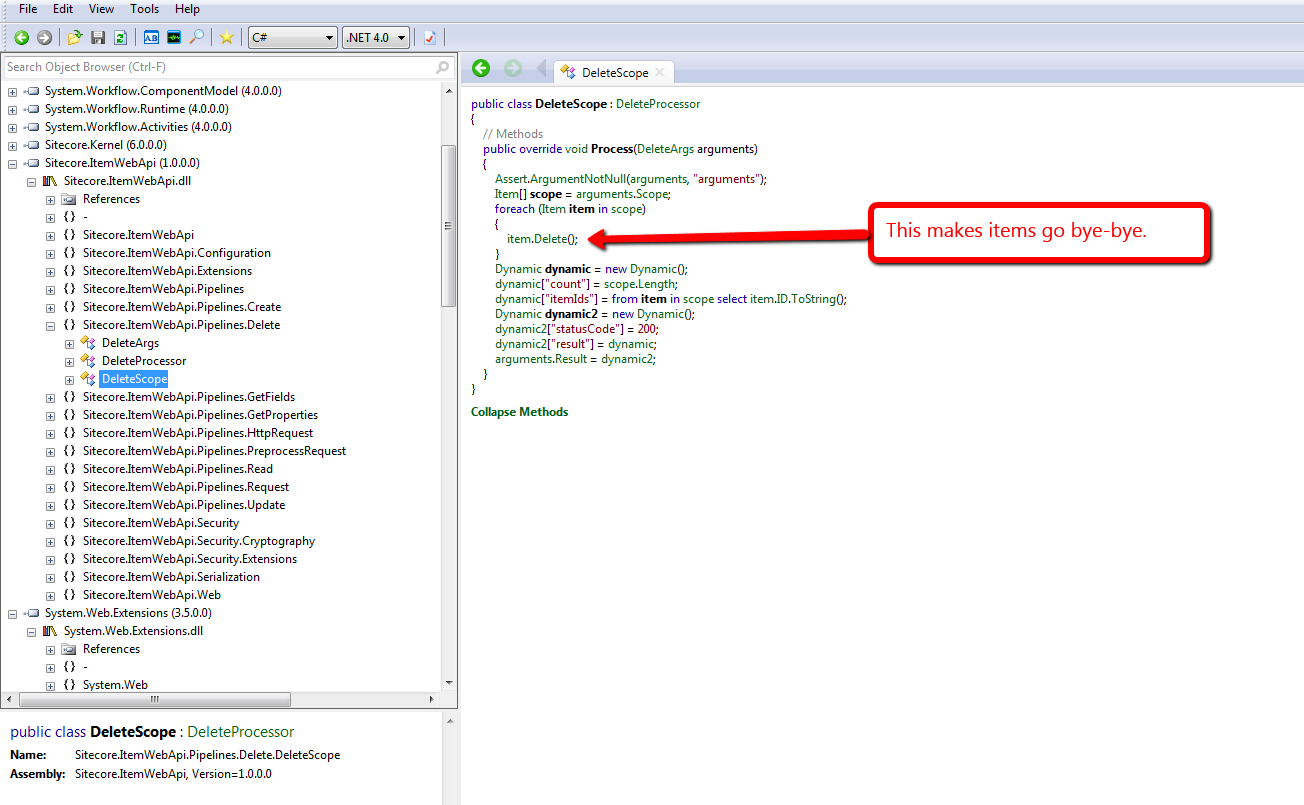
This above code lives in the only itemWebApiDelete pipeline processor that comes with the Sitecore Item Web API, and this processor can be found at /configuration/sitecore/pipelines/itemWebApiDelete/processor[@type=”Sitecore.ItemWebApi.Pipelines.Delete.DeleteScope, Sitecore.ItemWebApi”] in the \App_Config\Include\Sitecore.ItemWebApi.config file.
I don’t know about you, but I’m not always comfortable with deleting items permanently in Sitecore. I heavily rely on Sitecore’s Recycle Bin — yes, I have deleted items erroneously in the past, but recovered quickly by restoring them from the Recycle Bin (I hope I’m not the only one who has done this. :-/)
Unearthing the above prompted me to write a new itemWebApiDelete pipeline processor that puts items in the Recycle Bin when the Recycle Bin setting — see /configuration/sitecore/settings/setting[@name=”RecycleBinActive”] in the Web.config — is enabled:
using System.Collections.Generic;
using System.Linq;

using Sitecore.Configuration;
using Sitecore.Data;
using Sitecore.Data.Items;
using Sitecore.Diagnostics;
using Sitecore.ItemWebApi;
using Sitecore.ItemWebApi.Pipelines.Delete;

namespace Sitecore.Sandbox.ItemWebApi.Pipelines.Delete
{
    public class RecycleScope : DeleteProcessor
    {
        private const int OKStatusCode = 200;

        public override void Process(DeleteArgs arguments)
        {
            Assert.ArgumentNotNull(arguments, "arguments");
            IEnumerable<Item> itemsToDelete = arguments.Scope;
            DeleteItems(itemsToDelete);
            arguments.Result = GetStatusInformation(OKStatusCode, GetDeletionInformation(itemsToDelete));
        }

        private static void DeleteItems(IEnumerable<Item> itemsToDelete)
        {
            foreach (Item itemToDelete in itemsToDelete)
            {
                DeleteItem(itemToDelete);
            }
        }

        private static void DeleteItem(Item itemToDelete)
        {
            Assert.ArgumentNotNull(itemToDelete, "itemToDelete");

            // put items in the recycle bin if it's turned on
            if (Settings.RecycleBinActive)
            {
                itemToDelete.Recycle();
            }
            else
            {
                itemToDelete.Delete();
            }
        }

        private static Dynamic GetDeletionInformation(IEnumerable<Item> itemsToDelete)
        {
            return GetDeletionInformation(itemsToDelete.Count(), GetItemIds(itemsToDelete));
        }

        private static Dynamic GetDeletionInformation(int count, IEnumerable<ID> itemIds)
        {
            Dynamic deletionInformation = new Dynamic();
            deletionInformation["count"] = count;
            deletionInformation["itemIds"] = itemIds.Select(id => id.ToString());
            return deletionInformation;
        }

        private static IEnumerable<ID> GetItemIds(IEnumerable<Item> items)
        {
            Assert.ArgumentNotNull(items, "items");
            return items.Select(item => item.ID);
        }

        private static Dynamic GetStatusInformation(int statusCode, Dynamic result)
        {
            Assert.ArgumentNotNull(result, "result");
            Dynamic status = new Dynamic();
            status["statusCode"] = statusCode;
            status["result"] = result;
            return status;
        }
    }
}
There really isn’t anything magical about the code above. It utilizes most of the same logic that comes with the itemWebApiDelete pipeline processor that ships with the Sitecore Item Web API, although I did move code around into new methods.
The only major difference is the invocation of the Recycle method on item instances when the Recycle Bin is enabled in Sitecore. If the Recycle Bin is not enabled, we call the Delete method instead — as does the “out of the box” pipeline processor.
I then replaced the existing itemWebApiDelete pipeline processor in \App_Config\Include\Sitecore.ItemWebApi.config with our new one defined above:
<?xml version="1.0" encoding="utf-8"?>
<configuration xmlns:patch="http://www.sitecore.net/xmlconfig/">
  <sitecore>
    <pipelines>
      <!-- stuff is defined up here -->
      <itemWebApiDelete>
        <processor type="Sitecore.Sandbox.ItemWebApi.Pipelines.Delete.RecycleScope, Sitecore.Sandbox" />
	  </itemWebApiDelete>
      <!-- there's more stuff defined down here -->
  </sitecore>
</configuration>
Let’s see this in action.
We first need a test item. Let’s create one together:

I then tweaked the delete method in my copy of the console application written by Kern Herskind Nightingale, Director of Technical Services at Sitecore UK, to point to our test item in the master database — I have omitted this code for the sake of brevity — and then ran the console application calling the delete method only:

As you can see, our test item is now in the Recycle Bin:

If you have any thoughts on this, please leave a comment.
Add Additional Item Properties in Sitecore Item Web API Responses
The other day I was exploring pipelines of the Sitecore Item Web API, and took note of the itemWebApiGetProperties pipeline. This pipeline adds information about an item in the response returned by the Sitecore Item Web API. You can find this pipeline at /configuration/sitecore/pipelines/itemWebApiGetProperties in \App_Config\Include\Sitecore.ItemWebApi.config.
The following properties are set for an item in the response via the lonely pipeline processor — /configuration/sitecore/pipelines/itemWebApiGetProperties/processor[@type=”Sitecore.ItemWebApi.Pipelines.GetProperties.GetProperties, Sitecore.ItemWebApi”] — that ships with the Sitecore Item Web API:

Here’s an example of what the properties set by the above pipeline processor look like in the response — I invoked a read request to the Sitecore Item Web API via a copy of the console application written by Kern Herskind Nightingale, Director of Technical Services at Sitecore UK:

You might be asking “how difficult would it be to add in my own properties?” It’s not difficult at all!
I whipped up the following itemWebApiGetProperties pipeline processor to show how one can add more properties for an item:
using Sitecore.Data.Items;
using Sitecore.Diagnostics;
using Sitecore.ItemWebApi;
using Sitecore.ItemWebApi.Pipelines.GetProperties;

namespace Sitecore.Sandbox.ItemWebApi.Pipelines.GetProperties
{
    public class GetEvenMoreProperties : GetPropertiesProcessor
    {
        public override void Process(GetPropertiesArgs arguments)
        {
            Assert.ArgumentNotNull(arguments, "arguments");
            arguments.Properties.Add("ParentID", arguments.Item.ParentID.ToString());
            arguments.Properties.Add("ChildrenCount", arguments.Item.Children.Count);
            arguments.Properties.Add("Level", arguments.Item.Axes.Level);
            arguments.Properties.Add("IsItemClone", arguments.Item.IsItemClone);
            arguments.Properties.Add("CreatedBy", arguments.Item["__Created by"]);
            arguments.Properties.Add("UpdatedBy", GetItemUpdatedBy(arguments.Item));
        }

        private static Dynamic GetItemUpdatedBy(Item item)
        {
            Assert.ArgumentNotNull(item, "item");
            string[] usernamePieces = item["__Updated by"].Split('\\');

            Dynamic username = new Dynamic();
            if (usernamePieces.Length > 1)
            {
                username["Domain"] = usernamePieces[0];
                username["Username"] = usernamePieces[1];
            }
            else if (usernamePieces.Length > 0)
            {
                username["Username"] = usernamePieces[0];
            }

            return username;
        }
    }
}
The ParentID, ChildrenCount, Level and IsItemClone properties are simply added to the properties SortedDictionary within the GetPropertiesArgs instance, and will be serialized as is.
For the UpdatedBy property, I decided to leverage the Sitecore.ItemWebApi.Dynamic class in order to have the username set in the “__Updated by” field be represented by a JSON object. This JSON object sets the domain and username — without the domain — into different JSON properties.
As a side note — when writing your own service code for the Sitecore Item Web API — I strongly recommend using instances of the Sitecore.ItemWebApi.Dynamic class — or something similar — for complex objects. Developers writing code to consume your JSON will thank you many times for it. 🙂
I registered my new processor to the itemWebApiGetProperties pipeline in my Sitecore instance’s \App_Config\Include\Sitecore.ItemWebApi.config:
<?xml version="1.0" encoding="utf-8"?>
<configuration xmlns:patch="http://www.sitecore.net/xmlconfig/">
  <sitecore>
    <pipelines>
      <!-- there's stuff here -->
      <itemWebApiGetProperties>
        <processor type="Sitecore.ItemWebApi.Pipelines.GetProperties.GetProperties, Sitecore.ItemWebApi" />
        <processor type="Sitecore.Sandbox.ItemWebApi.Pipelines.GetProperties.GetEvenMoreProperties, Sitecore.Sandbox" />
      </itemWebApiGetProperties>
      <!-- there's stuff here as well -->
  </sitecore>
</configuration>
Let’s take this for a spin.
I ran the console application again to see what the response now looks like:

As you can see, our additional properties are now included in the response.
If you can think of other item properties that would be useful for Sitecore Item Web API client applications, please share in a comment.
Until next time, have a Sitecorelicious day!
Display Content Management Server Information in the Sitecore CMS
The other day I cogitated over potential uses for the getAboutInformation pipeline. Found at /configuration/sitecore/pipelines/getAboutInformation in the Web.config, it can be leveraged to display information on the Sitecore login page, and inside of the About dialog — a dialog that can be launched from the Content Editor.
One thing that came to mind was displaying some information for the Content Management (CM) server where the Sitecore instance lives. Having this information readily available might aid in troubleshooting issues that arise, or seeing the name of the server might stop you from making content changes on the wrong CM server (I am guilty as charged for committing such a blunder in the past).
This post shows how I translated that idea into code.
The first thing we need is a way to get server information. I defined the following interface to describe information we might be interested in for a server:
namespace Sitecore.Sandbox.Utilities.Server.Base
{
    public interface IServer
    {
        string Name { get; }

        string Cpu { get; }

        string OperatingSystem { get; }
    }
}
We now need a class to implement the above interface. I stumbled upon a page whose author shared how one can acquire server information using classes defined in the System.Management namespace in .NET.
Using information from that page coupled with some experimentation, I came up with the following class:
using System.Collections.Generic;
using System.Linq;
using System.Management;

using Sitecore.Diagnostics;

using Sitecore.Sandbox.Utilities.Server.Base;

namespace Sitecore.Sandbox.Utilities.Server
{
    public class Server : IServer
    {
        private string _Name;
        public string Name
        {
            get
            {
                if (string.IsNullOrEmpty(_Name))
                {
                    _Name = GetServerName();
                }

                return _Name;
            }
        }

        private string _Cpu;
        public string Cpu
        {
            get
            {
                if (string.IsNullOrEmpty(_Cpu))
                {
                    _Cpu = GetCpuInformation();
                }

                return _Cpu;
            }
        }

        private string _OperatingSystem;
        public string OperatingSystem
        {
            get
            {
                if (string.IsNullOrEmpty(_OperatingSystem))
                {
                    _OperatingSystem = GetOperatingSystemName();
                }

                return _OperatingSystem;
            }
        }

        private Server()
        {
        }

        private static string GetServerName()
        {
            return GetFirstManagementBaseObjectPropertyFirstInnerProperty("Win32_ComputerSystem", "name");
        }

        private static string GetCpuInformation()
        {
            return GetFirstManagementBaseObjectPropertyFirstInnerProperty("Win32_Processor", "name");
        }

        private static string GetOperatingSystemName()
        {
            return GetFirstManagementBaseObjectPropertyFirstInnerProperty("Win32_OperatingSystem", "name");
        }

        private static string GetFirstManagementBaseObjectPropertyFirstInnerProperty(string key, string propertyName)
        {
            return GetFirstManagementBaseObjectPropertyInnerProperties(key, propertyName).FirstOrDefault();
        }

        private static IEnumerable<string> GetFirstManagementBaseObjectPropertyInnerProperties(string key, string propertyName)
        {
            return GetFirstManagementBaseObjectProperty(key, propertyName).Split('|');
        }

        private static string GetFirstManagementBaseObjectProperty(string key, string propertyName)
        {
            return GetFirstManagementBaseObject(key)[propertyName].ToString();
        }

        private static ManagementBaseObject GetFirstManagementBaseObject(string key)
        {
            Assert.ArgumentNotNullOrEmpty(key, "key");
            WqlObjectQuery query = new WqlObjectQuery(string.Format("select * from {0}", key));
            ManagementObjectSearcher searcher = new ManagementObjectSearcher(query);
            return searcher.Get().Cast<ManagementBaseObject>().FirstOrDefault();
        }

        public static IServer CreateNewServer()
        {
            return new Server();
        }
    }
}
The class above grabs server information via three separate ManagementObjectSearcher queries, one for each property defined in our IServer interface.
In order to use classes defined in the System.Management namespace, I had to reference System.Management in my project in Visual Studio:

Next, I created a class that contains methods that will serve as our getAboutInformation pipeline processors:
using System.Collections.Generic;

using Sitecore.Diagnostics;
using Sitecore.Pipelines.GetAboutInformation;

using Sitecore.Sandbox.Utilities.Server.Base;
using Sitecore.Sandbox.Utilities.Server;

namespace Sitecore.Sandbox.Pipelines.GetAboutInformation
{
    public class GetContentManagementServerInformation
    {
        private static readonly string CurrentServerInformationHtml = GetCurrentServerInformationHtml();

        public void SetLoginPageText(GetAboutInformationArgs args)
        {
            args.LoginPageText = CurrentServerInformationHtml;
        }

        public void SetAboutText(GetAboutInformationArgs args)
        {
            args.AboutText = CurrentServerInformationHtml;
        }

        private static string GetCurrentServerInformationHtml()
        {
            return GetServerInformationHtml(Server.CreateNewServer());
        }

        private static string GetServerInformationHtml(IServer server)
        {
            Assert.ArgumentNotNull(server, "server");
            IList<string> information = new List<string>();

            if (!string.IsNullOrEmpty(server.Name))
            {
                information.Add(string.Format("<strong>Server Name</strong>: {0}", server.Name));
            }

            if (!string.IsNullOrEmpty(server.Cpu))
            {
                information.Add(string.Format("<strong>CPU</strong>: {0}", server.Cpu));
            }

            if (!string.IsNullOrEmpty(server.OperatingSystem))
            {
                information.Add(string.Format("<strong>OS</strong>: {0}", server.OperatingSystem));
            }

            return string.Join("<br />", information);
        }
    }
}
Both methods set properties on the GetAboutInformationArgs instance using the same HTML generated by the GetServerInformationHtml method. This method is given an instance of the Server class defined above by the GetCurrentServerInformationHtml method.
I then connected all of the above into Sitecore via a configuration include file:
<?xml version="1.0" encoding="utf-8"?>
<configuration xmlns:patch="http://www.sitecore.net/xmlconfig/">
  <sitecore>
    <pipelines>
      <getAboutInformation>
        <processor type="Sitecore.Sandbox.Pipelines.GetAboutInformation.GetContentManagementServerInformation, Sitecore.Sandbox" method="SetLoginPageText" />
        <processor type="Sitecore.Sandbox.Pipelines.GetAboutInformation.GetContentManagementServerInformation, Sitecore.Sandbox" method="SetAboutText" />
      </getAboutInformation>
    </pipelines>
  </sitecore>
</configuration>
Let’s see this in action.
When hitting the Sitecore login page in my browser, I saw server information in the right sidebar, under the Sitecore version and revision numbers:

Next, I logged into Sitecore, opened the Content Editor, and launched the About dialog:

As you can see, my CM server information is also displayed here.
You might be questioning why I didn’t include more server information on both the login page and About dialog. One reason why I omitted displaying other properties is due to discovering that the login page area for showing the LoginPageText string does not grow vertically — I saw this when I did include a few more properties in addition to the three shown above.
Sadly, I did not see what would happen when including these additional properties in the the About dialog. Ascertaining whether it is possible to include more information in the About dialog is warranted, though I will leave that exercise for another day.
If you have any other thoughts or ideas for utilizing getAboutInformation pipeline processors, or other areas in Sitecore where server information might be useful, please drop a comment.
Suppress Most Sitecore Wizard Cancel Confirmation Prompts
By default, clicking the ‘Cancel’ button on most wizard forms in Sitecore yields the following confirmation dialog:

Have you ever said to yourself “Yes, I’m sure I’m sure” after seeing this, and wondered if there were a setting you could toggle to turn it off?
Earlier today, while surfing through my Web.config, the closeWizard client pipeline — located at /sitecore/processors/closeWizard in the Web.config — had caught my eye, and I was taken aback over how I had not noticed it before. I was immediately curious over what gems I might find within its only processor — /sitecore/processors/closeWizard/processor[@type=’Sitecore.Web.UI.Pages.WizardForm, Sitecore.Kernel’ and @method=’Confirmation’] — and whether there would be any utility in overriding/extending it.
At first, I thought having a closeWizard client pipeline processor to completely suppress the “Are you sure you want to close the wizard?” confirmation prompt would be ideal, but then imagined how irate someone might be after clicking the ‘Cancel’ button by accident, which would result in the loss of his/her work.
As a happy medium between always prompting users whether they are certain they want to close their wizards and not prompting at all, I came up with the following closeWizard client pipeline processor:
using System;

using Sitecore.Configuration;
using Sitecore.Diagnostics;
using Sitecore.Web.UI.HtmlControls;
using Sitecore.Web.UI.Pages;
using Sitecore.Web.UI.Sheer;

namespace Sitecore.Sandbox.Web.UI.Pages
{
    public class SuppressConfirmationWizardForm : WizardForm
    {
        private const string SuppressConfirmationRegistryKey = "/Current_User/Content Editor/Suppress Close Wizard Confirmation";

        private static string YesNoCancelDialogPrompt { get; set; }
        private static int YesNoCancelDialogWidth { get; set; }
        private static int YesNoCancelDialogHeight { get; set; }

        static SuppressConfirmationWizardForm()
        {
            YesNoCancelDialogPrompt = Settings.GetSetting("SuppressConfirmationYesNoCancelDialog.Prompt");
            YesNoCancelDialogWidth = Settings.GetIntSetting("SuppressConfirmationYesNoCancelDialog.Width", 100);
            YesNoCancelDialogHeight = Settings.GetIntSetting("SuppressConfirmationYesNoCancelDialog.Height", 100);
        }

        public void CloseWizard(ClientPipelineArgs args)
        {
            if (IsCancel(args))
            {
                args.AbortPipeline();
                return;
            }

            if (ShouldSaveShouldSuppressConfirmationSetting(args))
            {
                SaveShouldSuppressConfirmationSetting(args);
            }

            if (ShouldCloseWizard(args))
            {
                EndWizard();
            }
            else
            {
                SheerResponse.YesNoCancel(YesNoCancelDialogPrompt, YesNoCancelDialogWidth.ToString(), YesNoCancelDialogHeight.ToString());
                args.WaitForPostBack();
            }
        }

        private static bool ShouldCloseWizard(ClientPipelineArgs args)
        {
            Assert.ArgumentNotNull(args, "args");
            return args.HasResult || ShouldSuppressConfirmationSetting();
        }

        private static bool ShouldSuppressConfirmationSetting()
        {
            return Registry.GetBool(SuppressConfirmationRegistryKey);
        }

        private static bool ShouldSaveShouldSuppressConfirmationSetting(ClientPipelineArgs args)
        {
            Assert.ArgumentNotNull(args, "args");
            return args.HasResult && !IsCancel(args);
        }

        private static void SaveShouldSuppressConfirmationSetting(ClientPipelineArgs args)
        {
            Assert.ArgumentNotNull(args, "args");
            Registry.SetBool(SuppressConfirmationRegistryKey, AreEqualIgnoreCase(args.Result, "yes"));
        }

        private static bool IsCancel(ClientPipelineArgs args)
        {
            Assert.ArgumentNotNull(args, "args");
            return AreEqualIgnoreCase(args.Result, "cancel");
        }

        private static bool AreEqualIgnoreCase(string one, string two)
        {
            return string.Equals(one, two, StringComparison.CurrentCultureIgnoreCase);
        }
    }
}
The pipeline processor above will let users decide whether they want to continue seeing the “Are you sure?”‘ confirmation prompt — albeit I had to change the messaging to something more fitting giving the new functionality (see the patch include configuration file or testing screenshot below for the new messaging).
If a user clicks ‘Yes’, s/he will never be prompted with this dialog again — this preference is saved in a Sitecore registry setting for the user.
Plus, suppressing this dialog in one place will suppress it everywhere it would display
Clicking ‘No’ will ensure the message is displayed again in the future.
Clicking ‘Cancel’ will just close the confirmation dialog, and return the user back to the wizard.
You might be wondering why I subclassed Sitecore.Web.UI.Pages.WizardForm. I had to do this in order to get access to its EndWizard() method which is a protected method. This method closes the wizard form.
I plugged it all in via a patch include configuration file:
<?xml version="1.0" encoding="utf-8" ?>
<configuration xmlns:patch="http://www.sitecore.net/xmlconfig/">
  <sitecore>
    <processors>
      <closeWizard>
        <processor mode="on" patch:instead="processor[@type='Sitecore.Web.UI.Pages.WizardForm, Sitecore.Kernel' and @method='Confirmation']" type="Sitecore.Sandbox.Web.UI.Pages.SuppressConfirmationWizardForm, Sitecore.Sandbox" method="CloseWizard"/>
      </closeWizard>
    </processors>
    <settings>
      <setting name="SuppressConfirmationYesNoCancelDialog.Prompt" value="You are about to close the wizard. Would you also like to avoid this message in the future?" />
      <setting name="SuppressConfirmationYesNoCancelDialog.Width" value="100" />
      <setting name="SuppressConfirmationYesNoCancelDialog.Height" value="100" />
    </settings>
  </sitecore>
</configuration>
I tested the above pipeline processor on the wizard for creating a new data template:

I decided to omit screenshots after clicking ‘Yes’, ‘No’ and ‘Cancel’ — there really isn’t much to show since all close the confirmation dialog, with the ‘Yes’ and ‘No’ buttons also closing the wizard.
I also did a little research to see what wizard forms in Sitecore might be impacted by the above, and compiled the following list of wizard form classes — this list contains classes from both Sitecore.Kernel.dll and Sitecore.Client.dll:
- Sitecore.Shell.Applications.Analytics.Lookups.RunLookupForm
- Sitecore.Shell.Applications.Analytics.Reports.Summary.UpdateForm
- Sitecore.Shell.Applications.Analytics.SynchronizeDatabase.SynchronizeDatabaseForm
- Sitecore.Shell.Applications.Analytics.VisitorIdentifications.RunVisitorIdentificationsForm
- Sitecore.Shell.Applications.Databases.CleanUp.CleanUpForm
- Sitecore.Shell.Applications.Dialogs.ArchiveDate.ArchiveDateForm
- Sitecore.Shell.Applications.Dialogs.FixLinks.FixLinksForm
- Sitecore.Shell.Applications.Dialogs.Publish.PublishForm
- Sitecore.Shell.Applications.Dialogs.RebuildLinkDatabase.RebuildLinkDatabaseForm
- Sitecore.Shell.Applications.Dialogs.Reminder.ReminderForm
- Sitecore.Shell.Applications.Dialogs.TransferToDatabase.TransferToDatabaseForm
- Sitecore.Shell.Applications.Dialogs.Upload.UploadForm
- Sitecore.Shell.Applications.Globalization.AddLanguage.AddLanguageForm
- Sitecore.Shell.Applications.Globalization.DeleteLanguage.DeleteLanguageForm
- Sitecore.Shell.Applications.Globalization.ExportLanguage.ExportLanguageForm
- Sitecore.Shell.Applications.Globalization.ImportLanguage.ImportLanguageForm
- Sitecore.Shell.Applications.Globalization.UntranslatedFields.UntranslatedFieldsForm
- Sitecore.Shell.Applications.Install.Dialogs.AddFileSourceForm
- Sitecore.Shell.Applications.Install.Dialogs.AddItemSourceForm
- Sitecore.Shell.Applications.Install.Dialogs.AddStaticFileSourceDialog
- Sitecore.Shell.Applications.Install.Dialogs.AddStaticItemSourceDialog
- Sitecore.Shell.Applications.Install.Dialogs.BuildPackage
- Sitecore.Shell.Applications.Install.Dialogs.InstallPackage.InstallPackageForm
- Sitecore.Shell.Applications.Install.Dialogs.UploadPackageForm
- Sitecore.Shell.Applications.Layouts.IDE.Wizards.NewFileWizard.IDENewFileWizardForm
- Sitecore.Shell.Applications.Layouts.IDE.Wizards.NewMethodRenderingWizard.IDENewMethodRenderingWizardForm
- Sitecore.Shell.Applications.Layouts.IDE.Wizards.NewUrlRenderingWizard.IDENewUrlRenderingWizardForm
- Sitecore.Shell.Applications.Layouts.IDE.Wizards.NewWebControlWizard.IDENewWebControlWizardForm
- Sitecore.Shell.Applications.Layouts.Layouter.Wizards.NewLayout.NewLayoutForm
- Sitecore.Shell.Applications.Layouts.Layouter.Wizards.NewSublayout.NewSublayoutForm
- Sitecore.Shell.Applications.Layouts.Layouter.Wizards.NewXMLLayout.NewXMLLayoutForm
- Sitecore.Shell.Applications.Layouts.Layouter.Wizards.NewXSL.NewXSLForm
- Sitecore.Shell.Applications.MarketingAutomation.Dialogs.ForceTriggerForm
- Sitecore.Shell.Applications.MarketingAutomation.Dialogs.ImportVisitorsForm
- Sitecore.Shell.Applications.ScheduledTasks.NewSchedule.NewScheduleForm
- Sitecore.Shell.Applications.ScheduledTasks.NewScheduleCommand.NewScheduleCommandForm
- Sitecore.Shell.Applications.Search.RebuildSearchIndex.RebuildSearchIndexForm
- Sitecore.Shell.Applications.Templates.ChangeTemplate.ChangeTemplateForm
- Sitecore.Shell.Applications.Templates.CreateTemplate.CreateTemplateForm
If you can think of any other ways of customizing this client pipeline, please drop a comment.
Swap Out Sitecore Layouts and Sublayouts Dynamically Based on a Theme
Out of the box, cloned items in Sitecore will retain the presentation components of their source items, and teasing these out could potentially lead to a mess.
I recently worked on a project where I had to architect a solution to avoid such a mess — this solution would ensure that items cloned across different websites in the same Sitecore instance could have a different look and feel from their source items.
Though I can’t show you what I did specifically on that project, I did go about creating a different solution just for you — yes, you — and this post showcases the fruit of that endeavor.
This is the basic idea of the solution:
For every sublayout (or the layout) set on an item, try to find a variant of that sublayout (or the layout) in a subfolder with the name of the selected theme. Otherwise, use the original.
For example, if /layouts/sublayouts/MySublayout.ascx is mapped to a sublayout set on the item and our selected theme is named “My Cool Theme”, try to find and use /layouts/sublayouts/My Cool Theme/MySublayout.ascx on the file system. If it does not exist, just use /layouts/sublayouts/MySublayout.ascx.
To start, I created some “theme” items. These items represent folders on my file system, and these folders house a specific layout and sublayouts pertinent to the theme. I set the parent folder of these items to be the source of the Theme droplist on my home page item:
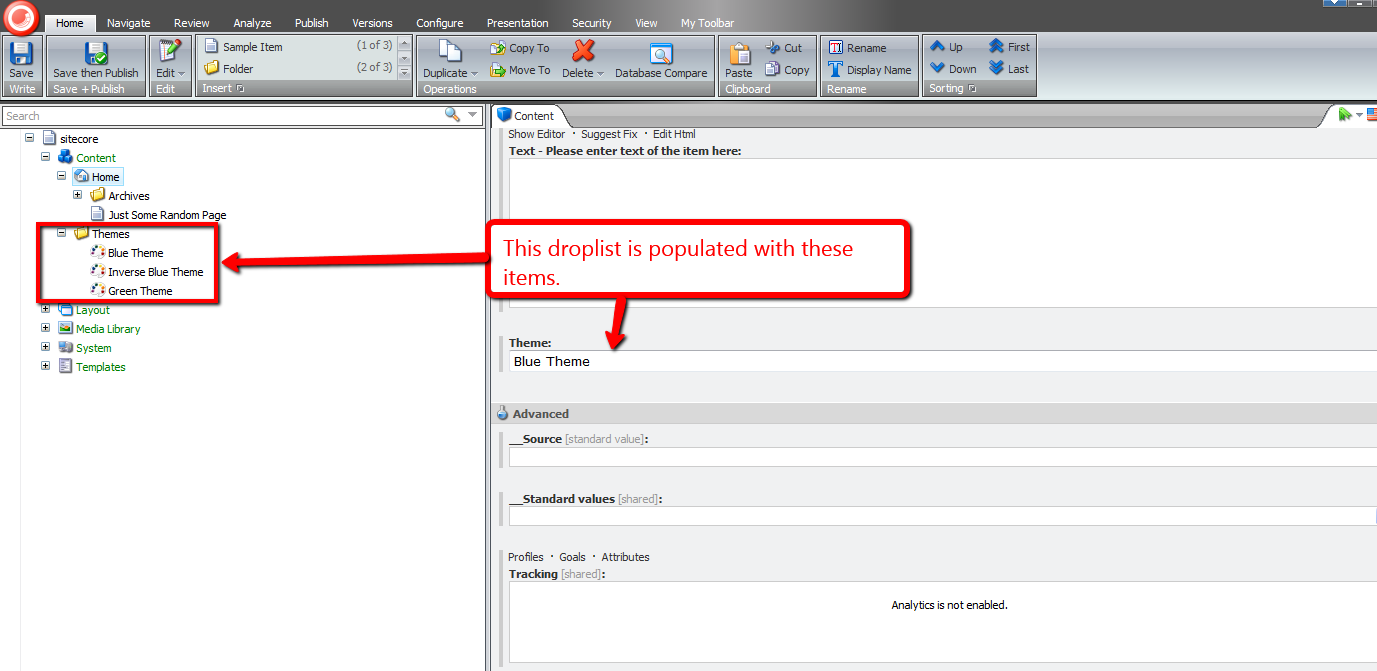
In this solution, I defined objects as detectors — objects that ascertain particular conditions, depending on encapsulated logic within the detector class for the given source. This is the contract for all detectors in my solution:
namespace Sitecore.Sandbox.Utilities.Detectors.Base
{
    public interface IDetector<T>
    {
        T Source { get; set; }

        bool Detect();
    }
}
In this solution, I am leveraging some string detectors:
namespace Sitecore.Sandbox.Utilities.Detectors.Base
{
    public interface IStringDetector : IDetector<string>
    {
    }
}
The first string detector I created was one to ascertain whether a file exists on the file system:
using System.IO;

using Sitecore.Diagnostics;
using Sitecore.Sandbox.Utilities.Detectors.Base;

namespace Sitecore.Sandbox.Utilities.Detectors
{
    public class FileExistsDetector : IStringDetector
    {
        private string _Source;
        public string Source
        {
            get
            {
                return _Source;
            }
            set
            {
                Assert.ArgumentNotNull(value, "Source");
                _Source = value;
            }
        }

        private FileExistsDetector()
        {
        }

        private FileExistsDetector(string source)
        {
            SetSource(source);
        }

        private void SetSource(string source)
        {
            Source = source;
        }

        public bool Detect()
        {
            Assert.ArgumentNotNull(Source, "Source");
            return File.Exists(Source);
        }

        public static IStringDetector CreateNewFileExistsDetector()
        {
            return new FileExistsDetector();
        }

        public static IStringDetector CreateNewFileExistsDetector(string source)
        {
            return new FileExistsDetector(source);
        }
    }
}
The detector above is not web server aware — paths containing forward slashes will not be found. This led to the creation of the following decorator to convert server to file system paths:
using System.IO;
using System.Web;

using Sitecore.Diagnostics;
using Sitecore.Sandbox.Utilities.Detectors.Base;

namespace Sitecore.Sandbox.Utilities.Detectors
{
    public class ServerFileExistsDetector : IStringDetector
    {
        private HttpServerUtility HttpServerUtility { get; set; }
        private IStringDetector Detector { get; set; }

        public string Source
        {
            get
            {
                return Detector.Source;
            }
            set
            {
                Assert.ArgumentNotNull(value, "Source");
                Detector.Source = HttpServerUtility.MapPath(value);
            }
        }

        private ServerFileExistsDetector(HttpServerUtility httpServerUtility, IStringDetector detector)
        {
            SetHttpServerUtility(httpServerUtility);
            SetDetector(detector);
        }

        private ServerFileExistsDetector(HttpServerUtility httpServerUtility, IStringDetector detector, string source)
        {
            SetHttpServerUtility(httpServerUtility);
            SetDetector(detector);
            SetSource(source);
        }

        private void SetHttpServerUtility(HttpServerUtility httpServerUtility)
        {
            Assert.ArgumentNotNull(httpServerUtility, "httpServerUtility");
            HttpServerUtility = httpServerUtility;
        }

        private void SetDetector(IStringDetector detector)
        {
            Assert.ArgumentNotNull(detector, "detector");
            Detector = detector;
        }

        private void SetSource(string source)
        {
            Source = source;
        }

        public bool Detect()
        {
            Assert.ArgumentNotNull(Source, "Source");
            return Detector.Detect();
        }

        public static IStringDetector CreateNewServerFileExistsDetector(HttpServerUtility httpServerUtility, IStringDetector detector)
        {
            return new ServerFileExistsDetector(httpServerUtility, detector);
        }

        public static IStringDetector CreateNewServerFileExistsDetector(HttpServerUtility httpServerUtility, IStringDetector detector, string source)
        {
            return new ServerFileExistsDetector(httpServerUtility, detector, source);
        }
    }
}
I thought it would be best to control the instantiation of the string detectors above into a factory class:
using System.Web;

namespace Sitecore.Sandbox.Utilities.Detectors.Base
{
    public interface IStringDetectorFactory
    {
        IStringDetector CreateNewFileExistsDetector();

        IStringDetector CreateNewFileExistsDetector(string source);

        IStringDetector CreateNewServerFileExistsDetector(HttpServerUtility httpServerUtility);

        IStringDetector CreateNewServerFileExistsDetector(HttpServerUtility httpServerUtility, IStringDetector detector);

        IStringDetector CreateNewServerFileExistsDetector(HttpServerUtility httpServerUtility, IStringDetector detector, string source);
    }
}
using System.Web;

using Sitecore.Sandbox.Utilities.Detectors.Base;

namespace Sitecore.Sandbox.Utilities.Detectors
{
    public class StringDetectorFactory : IStringDetectorFactory
    {
        private StringDetectorFactory()
        {
        }

        public IStringDetector CreateNewFileExistsDetector()
        {
            return FileExistsDetector.CreateNewFileExistsDetector();
        }

        public IStringDetector CreateNewFileExistsDetector(string source)
        {
            return FileExistsDetector.CreateNewFileExistsDetector(source);
        }

        public IStringDetector CreateNewServerFileExistsDetector(HttpServerUtility httpServerUtility)
        {
            return ServerFileExistsDetector.CreateNewServerFileExistsDetector(httpServerUtility, CreateNewFileExistsDetector());
        }

        public IStringDetector CreateNewServerFileExistsDetector(HttpServerUtility httpServerUtility, IStringDetector detector)
        {
            return ServerFileExistsDetector.CreateNewServerFileExistsDetector(httpServerUtility, detector);
        }

        public IStringDetector CreateNewServerFileExistsDetector(HttpServerUtility httpServerUtility, IStringDetector detector, string source)
        {
            return ServerFileExistsDetector.CreateNewServerFileExistsDetector(httpServerUtility, detector, source);
        }

        public static IStringDetectorFactory CreateNewStringDetectorFactory()
        {
            return new StringDetectorFactory();
        }
    }
}
I then needed a way to ascertain if an item is a sublayout — we shouldn’t be messing with presentation components that are not sublayouts (not including layouts which is handled in a different place):
using Sitecore.Data.Items;

namespace Sitecore.Sandbox.Utilities.Detectors.Base
{
    public interface IItemDetector : IDetector<Item>
    {
    }
}
using Sitecore.Data.Items;
using Sitecore.Diagnostics;

using Sitecore.Sandbox.Utilities.Detectors.Base;

namespace Sitecore.Sandbox.Utilities.Detectors
{
    public class SublayoutDetector : IItemDetector
    {
        private Item _Source;
        public Item Source
        {
            get
            {
                return _Source;
            }
            set
            {
                Assert.ArgumentNotNull(value, "Source");
                _Source = value;
            }
        }

        private SublayoutDetector()
        {
        }

        private SublayoutDetector(Item source)
        {
            SetSource(source);
        }

        private void SetSource(Item source)
        {
            Source = source;
        }

        public bool Detect()
        {
            Assert.ArgumentNotNull(Source, "Source");
            return Source.TemplateID == TemplateIDs.Sublayout;
        }

        public static IItemDetector CreateNewSublayoutDetector()
        {
            return new SublayoutDetector();
        }

        public static IItemDetector CreateNewSublayoutDetector(Item source)
        {
            return new SublayoutDetector(source);
        }
    }
}
I then reused the concept of manipulators — objects that transform an instance of an object into a different instance — from a prior blog post. I forget the post I used manipulators in, so I have decided to re-post the base contract for all manipulator classes:
namespace Sitecore.Sandbox.Utilities.Manipulators.Base
{
    public interface IManipulator<T>
    {
        T Manipulate(T source);
    }
}
Yes, we will be manipulating strings. 🙂
namespace Sitecore.Sandbox.Utilities.Manipulators.Base
{
    public interface IStringManipulator : IManipulator<string>
    {
    }
}
I also defined another interface containing an accessor and mutator for a string representing the selected theme:
namespace Sitecore.Sandbox.Utilities.Manipulators.Base
{
    public interface IThemeFolder
    {
        string ThemeFolder { get; set; }
    }
}
I created a class that will wedge in a theme folder name into a file path — it is inserted after the last forward slash in the file path — and returns the resulting string:
namespace Sitecore.Sandbox.Utilities.Manipulators.Base
{
    public interface IThemeFilePathManipulator : IStringManipulator, IThemeFolder
    {
    }
}
using Sitecore.Diagnostics;

using Sitecore.Sandbox.Utilities.Manipulators.Base;

namespace Sitecore.Sandbox.Utilities.Manipulators
{
    public class ThemeFilePathManipulator : IThemeFilePathManipulator
    {
        private const string Slash = "/";
        private const int NotFoundIndex = -1;

        private string _ThemeFolder;
        public string ThemeFolder
        {
            get
            {
                return _ThemeFolder;
            }
            set
            {
                _ThemeFolder = value;
            }
        }

        private ThemeFilePathManipulator()
        {
        }

        private ThemeFilePathManipulator(string themeFolder)
        {
            SetThemeFolder(themeFolder);
        }

        public string Manipulate(string source)
        {
            Assert.ArgumentNotNullOrEmpty(source, "source");
            int lastIndex = source.LastIndexOf(Slash);
            bool canManipulate = !string.IsNullOrEmpty(ThemeFolder) && lastIndex > NotFoundIndex;
            if (canManipulate)
            {
                return source.Insert(lastIndex + 1, string.Concat(ThemeFolder, Slash));
            }

            return source;
        }

        private void SetThemeFolder(string themeFolder)
        {
            ThemeFolder = themeFolder;
        }

        public static IThemeFilePathManipulator CreateNewThemeFilePathManipulator()
        {
            return new ThemeFilePathManipulator();
        }

        public static IThemeFilePathManipulator CreateNewThemeFilePathManipulator(string themeFolder)
        {
            return new ThemeFilePathManipulator(themeFolder);
        }
    }
}
But shouldn’t we see if the file exists, and then return the path if it does, or the original path if it does not? This question lead to the creation of the following decorator class to do just that:
using Sitecore.Diagnostics;

using Sitecore.Sandbox.Utilities.Detectors.Base;
using Sitecore.Sandbox.Utilities.Manipulators.Base;

namespace Sitecore.Sandbox.Utilities.Manipulators
{
    public class ThemeFilePathIfExistsManipulator : IThemeFilePathManipulator
    {
        private IThemeFilePathManipulator InnerManipulator { get; set; }
        private IStringDetector FileExistsDetector { get; set; }

        private string _ThemeFolder;
        public string ThemeFolder
        {
            get
            {
                return InnerManipulator.ThemeFolder;
            }
            set
            {
                InnerManipulator.ThemeFolder = value;
            }
        }

        private ThemeFilePathIfExistsManipulator(IThemeFilePathManipulator innerManipulator, IStringDetector fileExistsDetector)
        {
            SetInnerManipulator(innerManipulator);
            SetFileExistsDetector(fileExistsDetector);
        }

        private void SetInnerManipulator(IThemeFilePathManipulator innerManipulator)
        {
            Assert.ArgumentNotNull(innerManipulator, "innerManipulator");
            InnerManipulator = innerManipulator;
        }

        private void SetFileExistsDetector(IStringDetector fileExistsDetector)
        {
            Assert.ArgumentNotNull(fileExistsDetector, "fileExistsDetector");
            FileExistsDetector = fileExistsDetector;
        }

        public string Manipulate(string source)
        {
            Assert.ArgumentNotNullOrEmpty(source, "source");
            string filePath = InnerManipulator.Manipulate(source);
            if(!DoesFileExist(filePath))
            {
                return source;
            }

            return filePath;
        }

        private bool DoesFileExist(string filePath)
        {
            FileExistsDetector.Source = filePath;
            return FileExistsDetector.Detect();
        }

        private void SetThemeFolder(string themeFolder)
        {
            ThemeFolder = themeFolder;
        }

        public static IThemeFilePathManipulator CreateNewThemeFilePathManipulator(IThemeFilePathManipulator innerManipulator, IStringDetector fileExistsDetector)
        {
            return new ThemeFilePathIfExistsManipulator(innerManipulator, fileExistsDetector);
        }
    }
}
Next, I defined a contract for manipulators that transform instances of Sitecore.Layouts.RenderingReference:
using Sitecore.Layouts;

namespace Sitecore.Sandbox.Utilities.Manipulators.Base
{
    public interface IRenderingReferenceManipulator : IManipulator<RenderingReference>
    {
    }
}
I then created a class to manipulate instances of Sitecore.Layouts.RenderingReference by swapping out their sublayouts with new instances based on the path returned by the IThemeFilePathManipulator instance:
namespace Sitecore.Sandbox.Utilities.Manipulators.Base
{
    public interface IThemeRenderingReferenceManipulator : IRenderingReferenceManipulator, IThemeFolder
    {
    }
}
using Sitecore.Data.Items;
using Sitecore.Diagnostics;
using Sitecore.Layouts;
using Sitecore.Web.UI.WebControls;

using Sitecore.Sandbox.Utilities.Detectors.Base;
using Sitecore.Sandbox.Utilities.Manipulators.Base;

namespace Sitecore.Sandbox.Utilities.Manipulators
{
    public class ThemeRenderingReferenceManipulator : IThemeRenderingReferenceManipulator
    {
        private IItemDetector SublayoutDetector { get; set; }
        private IThemeFilePathManipulator ThemeFilePathManipulator { get; set; }

        public string ThemeFolder
        {
            get
            {
                return ThemeFilePathManipulator.ThemeFolder;
            }
            set
            {
                ThemeFilePathManipulator.ThemeFolder = value;
            }
        }

        private ThemeRenderingReferenceManipulator()
            : this(CreateDefaultThemeFilePathManipulator())
        {
        }

        private ThemeRenderingReferenceManipulator(IThemeFilePathManipulator themeFilePathManipulator)
            : this(CreateDefaultSublayoutDetector(), themeFilePathManipulator)
        {
        }

        private ThemeRenderingReferenceManipulator(IItemDetector sublayoutDetector, IThemeFilePathManipulator themeFilePathManipulator)
        {
            SetSublayoutDetector(sublayoutDetector);
            SetThemeFilePathManipulator(themeFilePathManipulator);
        }

        private void SetSublayoutDetector(IItemDetector sublayoutDetector)
        {
            Assert.ArgumentNotNull(sublayoutDetector, "sublayoutDetector");
            SublayoutDetector = sublayoutDetector;
        }

        private void SetThemeFilePathManipulator(IThemeFilePathManipulator themeFilePathManipulator)
        {
            Assert.ArgumentNotNull(themeFilePathManipulator, "themeFilePathManipulator");
            ThemeFilePathManipulator = themeFilePathManipulator;
        }

        public RenderingReference Manipulate(RenderingReference source)
        {
            Assert.ArgumentNotNull(source, "source");
            Assert.ArgumentNotNull(source.RenderingItem, "source.RenderingItem");

            if (!IsSublayout(source.RenderingItem.InnerItem))
            {
                return source;
            }

            RenderingReference renderingReference = source;
            Sublayout sublayout = source.GetControl() as Sublayout;

            if (sublayout == null)
            {
                return source;
            }

            renderingReference.SetControl(CreateNewSublayout(sublayout, ThemeFilePathManipulator.Manipulate(sublayout.Path)));
            return renderingReference;
        }

        private bool IsSublayout(Item item)
        {
            Assert.ArgumentNotNull(item, "item");
            SublayoutDetector.Source = item;
            return SublayoutDetector.Detect();
        }

        private static Sublayout CreateNewSublayout(Sublayout sublayout, string path)
        {
            Assert.ArgumentNotNull(sublayout, "sublayout");
            Assert.ArgumentNotNullOrEmpty(path, "path");
            return new Sublayout
            {
                ID = sublayout.ID,
                Path = path,
                Background = sublayout.Background,
                Border = sublayout.Border,
                Bordered = sublayout.Bordered,
                Cacheable = sublayout.Cacheable,
                CacheKey = sublayout.CacheKey,
                CacheTimeout = sublayout.CacheTimeout,
                Clear = sublayout.Clear,
                CssStyle = sublayout.CssStyle,
                Cursor = sublayout.Cursor,
                Database = sublayout.Database,
                DataSource = sublayout.DataSource,
                DisableDebug = sublayout.DisableDebug,
                DisableDots = sublayout.DisableDots,
                DisableSecurity = sublayout.DisableSecurity,
                Float = sublayout.Float,
                Foreground = sublayout.Foreground,
                LiveDisplay = sublayout.LiveDisplay,
                LoginRendering = sublayout.LoginRendering,
                Margin = sublayout.Margin,
                Padding = sublayout.Padding,
                Parameters = sublayout.Parameters,
                RenderAs = sublayout.RenderAs,
                RenderingID = sublayout.RenderingID,
                RenderingName = sublayout.RenderingName,
                VaryByData = sublayout.VaryByData,
                VaryByDevice = sublayout.VaryByDevice,
                VaryByLogin = sublayout.VaryByLogin,
                VaryByParm = sublayout.VaryByParm,
                VaryByQueryString = sublayout.VaryByQueryString,
                VaryByUser = sublayout.VaryByUser
            };
        }

        private static IThemeFilePathManipulator CreateDefaultThemeFilePathManipulator()
        {
            return Manipulators.ThemeFilePathManipulator.CreateNewThemeFilePathManipulator();
        }

        private static IItemDetector CreateDefaultSublayoutDetector()
        {
            return Utilities.Detectors.SublayoutDetector.CreateNewSublayoutDetector();
        }

        public static IThemeRenderingReferenceManipulator CreateNewRenderingReferenceManipulator()
        {
            return new ThemeRenderingReferenceManipulator();
        }

        public static IThemeRenderingReferenceManipulator CreateNewRenderingReferenceManipulator(IThemeFilePathManipulator themeFilePathManipulator)
        {
            return new ThemeRenderingReferenceManipulator(themeFilePathManipulator);
        }

        public static IThemeRenderingReferenceManipulator CreateNewRenderingReferenceManipulator(IItemDetector sublayoutDetector, IThemeFilePathManipulator themeFilePathManipulator)
        {
            return new ThemeRenderingReferenceManipulator(sublayoutDetector, themeFilePathManipulator);
        }
    }
}
I created a new httpRequestBegin pipeline processor to use a theme’s layout if found on the file system — such is done by delegating to instances of classes defined above:
using System;
using System.Web;

using Sitecore.Configuration;
using Sitecore.Data;
using Sitecore.Data.Items;
using Sitecore.Diagnostics;
using Sitecore.Pipelines.HttpRequest;

using Sitecore.Sandbox.Utilities.Manipulators;
using Sitecore.Sandbox.Utilities.Manipulators.Base;
using Sitecore.Sandbox.Utilities.Detectors;
using Sitecore.Sandbox.Utilities.Detectors.Base;

namespace Sitecore.Sandbox.Pipelines.HttpRequest
{
    public class ThemeLayoutResolver : HttpRequestProcessor
    {
        public override void Process(HttpRequestArgs args)
        {
            if (!CanProcess())
            {
                return;
            }

            string themeFilePath = GetThemeFilePath();
            bool swapOutFilePath = !AreEqualIgnoreCase(Context.Page.FilePath, themeFilePath);
            if (swapOutFilePath)
            {
                Context.Page.FilePath = themeFilePath;
            }
        }

        private static bool CanProcess()
        {
            return Context.Database != null
                    && !IsCore(Context.Database);
        }

        private static bool IsCore(Database database)
        {
            return database.Name == Constants.CoreDatabaseName;
        }

        private static string GetThemeFilePath()
        {
            IThemeFilePathManipulator themeFilePathManipulator = CreateNewThemeFilePathManipulator();
            themeFilePathManipulator.ThemeFolder = GetTheme();
            return themeFilePathManipulator.Manipulate(Context.Page.FilePath);
        }

        private static bool DoesFileExist(string filePath)
        {
            Assert.ArgumentNotNullOrEmpty(filePath, "filePath");
            IStringDetector fileExistsDetector = CreateNewServerFileExistsDetector();
            fileExistsDetector.Source = filePath;
            return fileExistsDetector.Detect();
        }

        private static IThemeFilePathManipulator CreateNewThemeFilePathManipulator()
        {
            return ThemeFilePathIfExistsManipulator.CreateNewThemeFilePathManipulator
            (
                ThemeFilePathManipulator.CreateNewThemeFilePathManipulator(),
                CreateNewServerFileExistsDetector()
            );
        }

        private static IStringDetector CreateNewServerFileExistsDetector()
        {
            IStringDetectorFactory factory = StringDetectorFactory.CreateNewStringDetectorFactory();
            return factory.CreateNewServerFileExistsDetector(HttpContext.Current.Server);
        }

        private static string GetTheme()
        {
            Item home = GetHomeItem();
            return home["Theme"];
        }

        private static Item GetHomeItem()
        {
            string startPath = Factory.GetSite(Sitecore.Context.GetSiteName()).StartPath;
            return Context.Database.GetItem(startPath);
        }

        private static bool AreEqualIgnoreCase(string stringOne, string stringTwo)
        {
            return string.Equals(stringOne, stringTwo, StringComparison.CurrentCultureIgnoreCase);
        }
    }
}
The above code should not run if the context database is the core database — this could mean we are in the Sitecore shell, or on the Sitecore login page (I painfully discovered this earlier today after doing a QA drop, and had to act fast to fix it).
I then created a RenderLayout pipeline processor to swap out sublayouts for themed sublayouts if they exist on the file system:
using System.Collections.Generic;
using System.Linq;
using System.Web;

using Sitecore.Configuration;
using Sitecore.Data.Items;
using Sitecore.Diagnostics;
using Sitecore.Layouts;
using Sitecore.Pipelines;
using Sitecore.Pipelines.InsertRenderings;
using Sitecore.Pipelines.RenderLayout;

using Sitecore.Sandbox.Utilities.Manipulators;
using Sitecore.Sandbox.Utilities.Manipulators.Base;
using Sitecore.Sandbox.Utilities.Detectors;
using Sitecore.Sandbox.Utilities.Detectors.Base;

namespace Sitecore.Sandbox.Pipelines.RenderLayout
{
    public class InsertThemeRenderings : RenderLayoutProcessor
    {
        public override void Process(RenderLayoutArgs args)
        {
            Assert.ArgumentNotNull(args, "args");
            if (Context.Item == null)
            {
                return;
            }

            using (new ProfileSection("Insert renderings into page."))
            {
                IEnumerable<RenderingReference> themeRenderingReferences = GetThemeRenderingReferences(GetRenderingReferences());
                foreach (RenderingReference renderingReference in themeRenderingReferences)
                {
                    Context.Page.AddRendering(renderingReference);
                }
            }
        }

        private static IEnumerable<RenderingReference> GetRenderingReferences()
        {
            InsertRenderingsArgs insertRenderingsArgs = new InsertRenderingsArgs();
            CorePipeline.Run("insertRenderings", insertRenderingsArgs);
            return insertRenderingsArgs.Renderings.ToList();
        }

        private static IEnumerable<RenderingReference> GetThemeRenderingReferences(IEnumerable<RenderingReference> renderingReferences)
        {
            Assert.ArgumentNotNull(renderingReferences, "renderingReferences");
            IList<RenderingReference> themeRenderingReferences = new List<RenderingReference>();
            IThemeRenderingReferenceManipulator themeRenderingReferenceManipulator = CreateNewRenderingReferenceManipulator();
            foreach (RenderingReference renderingReference in renderingReferences)
            {
                themeRenderingReferences.Add(themeRenderingReferenceManipulator.Manipulate(renderingReference));
            }

            return themeRenderingReferences;
        }

        private static IThemeRenderingReferenceManipulator CreateNewRenderingReferenceManipulator()
        {
            IThemeRenderingReferenceManipulator themeRenderingReferenceManipulator = ThemeRenderingReferenceManipulator.CreateNewRenderingReferenceManipulator(CreateNewThemeFilePathManipulator());
            themeRenderingReferenceManipulator.ThemeFolder = GetTheme();
            return themeRenderingReferenceManipulator;
        }

        private static IThemeFilePathManipulator CreateNewThemeFilePathManipulator()
        {
            return ThemeFilePathIfExistsManipulator.CreateNewThemeFilePathManipulator
            (
                ThemeFilePathManipulator.CreateNewThemeFilePathManipulator(),
                CreateNewServerFileExistsDetector()
            );
        }

        private static IStringDetector CreateNewServerFileExistsDetector()
        {
            IStringDetectorFactory factory = StringDetectorFactory.CreateNewStringDetectorFactory();
            return factory.CreateNewServerFileExistsDetector(HttpContext.Current.Server);
        }

        private static string GetTheme()
        {
            Item home = GetHomeItem();
            return home["Theme"];
        }

        private static Item GetHomeItem()
        {
            string startPath = Factory.GetSite(Sitecore.Context.GetSiteName()).StartPath;
            return Context.Database.GetItem(startPath);
        }
    }
}
I baked everything together in a patch include configuration file:
<?xml version="1.0" encoding="utf-8" ?>
<configuration xmlns:patch="http://www.sitecore.net/xmlconfig/">
  <sitecore>
    <pipelines>
      <renderLayout>
        <processor patch:instead="processor[@type='Sitecore.Pipelines.RenderLayout.InsertRenderings, Sitecore.Kernel']" type="Sitecore.Sandbox.Pipelines.RenderLayout.InsertThemeRenderings, Sitecore.Sandbox" />
      </renderLayout>
      <httpRequestBegin>
        <processor patch:after="processor[@type='Sitecore.Pipelines.HttpRequest.LayoutResolver, Sitecore.Kernel']" type="Sitecore.Sandbox.Pipelines.HttpRequest.ThemeLayoutResolver, Sitecore.Sandbox"/>
      </httpRequestBegin>
    </pipelines>
  </sitecore>
</configuration>
Here are the “out of the box” presentation components mapped to my test page:

The above layout and sublayouts live in /layouts from my website root.
For my themes, I duplicated the layout and some of the sublayouts above into themed folders, and added some css for color — I’ve omitted this for brevity (come on Mike, this post is already wicked long :)).
The “Blue Theme” layout and sublayout live in /layouts/Blue Theme from my website root:

I chose “Blue Theme” in the Theme droplist on my home item, published, and then navigated to my test page:

The “Inverse Blue Theme” sublayout lives in /layouts/Inverse Blue Theme from my website root:

I chose “Inverse Blue Theme” in the Theme droplist on my home item, published, and then reloaded my test page:
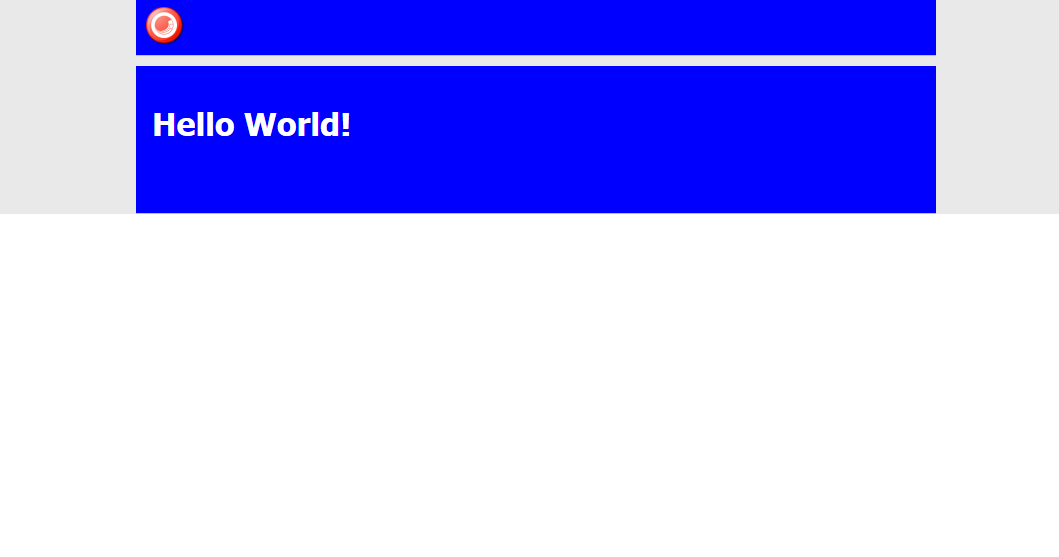
The “Green Theme” layout and sublayouts live in /layouts/Green Theme from my website root:
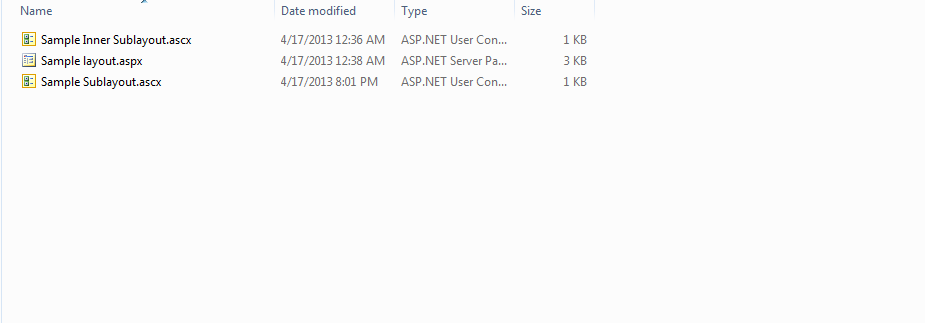
I chose “Green Theme” in the Theme droplist on my home item, published, and then refreshed my test page:
Do you know of or have an idea for another solution to accomplish the same? If so, please drop a comment.
Reuse Sitecore Data Template Fields by Pulling Them Up Into a Base Template
How many times have you discovered that you need to reuse some fields defined in a data template, but don’t want to use that data template as a base template since it defines a bunch of fields that you don’t want to use?
What do you usually do in such a situation?
In the past, I would have created a new data template, moved the fields I would like to reuse underneath it, followed by setting that new template as a base template on the data template I moved the fields from.
I’ve spoken with other Sitecore developers on what they do in this situation, and one developer conveyed he duplicates the template, and delete fields that are not to be reused — thus creating a new base template. Though this might save time, I would advise against it — any code referencing fields by IDs will break using this paradigm for creating a new base template.
Martin Fowler — in his book
Refactoring: Improving the Design of Existing Code — defined the refactoring technique ‘Pull Up Field’ for moving fields from a class up into its base class — dubbed superclass for the Java inclined audience.
One should employ this refactoring technique when other subclasses of the base class are to reuse the fields being pulled up.
When I first encountered this refactoring technique in Fowler’s book, I pondered over how useful this would be in the Sitecore data template world, and decided to build two tools for pulling up fields into a base template. One tool will create a new base template, and the other will allow users to move fields to an existing base template.
The following class defines methods that will be used by two new client pipelines I will define below:
using System;
using System.Collections.Generic;
using System.Linq;
using System.Text;

using Sitecore.Configuration;
using Sitecore.Data;
using Sitecore.Data.Items;
using Sitecore.Data.Managers;
using Sitecore.Data.Templates;
using Sitecore.Diagnostics;
using Sitecore.Shell.Applications.Dialogs.ItemLister;
using Sitecore.Shell.Framework;
using Sitecore.Text;
using Sitecore.Web;
using Sitecore.Web.UI.Sheer;

namespace Sitecore.Sandbox.Shell.Framework.Pipelines
{
    public class PullUpFieldsIntoBaseTemplate
    {
        private const char IDDelimiter = '|';
        private const string BaseTemplateFieldName = "__Base template";

        public void EnsureTemplate(ClientPipelineArgs args)
        {
            Item item = GetItem(args);
            if (!IsTemplate(item))
            {
                CancelOperation(args, "The supplied item is not a template!");
            }
        }

        private static bool IsTemplate(Item item)
        {
            Assert.ArgumentNotNull(item, "item");
            return TemplateManager.IsTemplate(item);
        }

        public void SelectFields(ClientPipelineArgs args)
        {
            Assert.ArgumentNotNull(args, "args");
            if (!args.IsPostBack)
            {
                UrlString urlString = new UrlString(UIUtil.GetUri("control:TreeListExEditor"));
                UrlHandle urlHandle = new UrlHandle();
                urlHandle["title"] = "Select Fields";
                urlHandle["text"] = "Select the fields to pull up into a base template.";
                urlHandle["source"] = GetSelectFieldsDialogSource(args);
                urlHandle.Add(urlString);
                SheerResponse.ShowModalDialog(urlString.ToString(), "800px", "500px", string.Empty, true);
                args.WaitForPostBack();
            }
            else if (args.HasResult)
            {
                args.Parameters["fieldIds"] = args.Result;
                args.IsPostBack = false;
            }
            else
            {
                CancelOperation(args);
            }
        }

        private static string GetSelectFieldsDialogSource(ClientPipelineArgs args)
        {
            Assert.ArgumentNotNull(args, "args");
            Assert.ArgumentNotNullOrEmpty(args.Parameters["database"], "args.Parameters[\"database\"]");
            Assert.ArgumentNotNullOrEmpty(args.Parameters["templateId"], "args.Parameters[\"templateId\"]");
            return string.Format
            (
                "AllowMultipleSelection=true&DatabaseName={0}&DataSource={1}&IncludeTemplatesForSelection=Template field",
                args.Parameters["database"],
                args.Parameters["templateId"]
            );
        }

        public void ChooseBaseTemplateName(ClientPipelineArgs args)
        {
            if (!args.IsPostBack)
            {
                SheerResponse.Input("Enter the name of the base template", string.Concat("New Base Template 1"));
                args.WaitForPostBack();
            }
            else if (args.HasResult)
            {
                args.Parameters["baseTemplateName"] = args.Result;
                args.IsPostBack = false;
            }
            else
            {
                CancelOperation(args);
            }
        }

        public void ChooseBaseTemplateLocation(ClientPipelineArgs args)
        {
            if (!args.IsPostBack)
            {
                Dialogs.BrowseItem
                (
                    "Select Base Template Location",
                    "Select the parent item under which the new base template will be created.",
                    args.Parameters["icon"],
                    "OK",
                    "/sitecore/templates",
                    args.Parameters["templateId"]
                );

                args.WaitForPostBack();
            }
            else if (args.HasResult)
            {
                args.Parameters["baseTemplateParentId"] = args.Result;
                args.IsPostBack = false;
            }
            else
            {
                CancelOperation(args);
            }
        }

        public void CreateNewBaseTemplate(ClientPipelineArgs args)
        {
            Database database = GetDatabase(args.Parameters["database"]);
            Item baseTemplateParent = database.GetItem(args.Parameters["baseTemplateParentId"]);
            Item baseTemplate = baseTemplateParent.Add(args.Parameters["baseTemplateName"], new TemplateID(TemplateIDs.Template));
            SetBaseTemplateField(baseTemplate, TemplateIDs.StandardTemplate);
            args.Parameters["baseTemplateId"] = baseTemplate.ID.ToString();
        }

        public void ChooseExistingBaseTemplate(ClientPipelineArgs args)
        {
            if (!args.IsPostBack)
            {
                ItemListerOptions itemListerOptions = new ItemListerOptions
                {
                    ButtonText = "OK",
                    Icon = args.Parameters["icon"],
                    Title = "Select Base Template",
                    Text = "Select the base template for pulling up the fields."
                };

                TemplateItem templateItem = GetItem(args);
                itemListerOptions.Items = ExcludeStandardTemplate(templateItem.BaseTemplates).Select(baseTemplate => baseTemplate.InnerItem).ToList();
                itemListerOptions.AddTemplate(TemplateIDs.Template);
                SheerResponse.ShowModalDialog(itemListerOptions.ToUrlString().ToString(), true);
                args.WaitForPostBack();
            }
            else if (args.HasResult)
            {
                args.Parameters["baseTemplateId"] = args.Result;
                args.IsPostBack = false;
            }
            else
            {
                CancelOperation(args);
            }
        }

        private static IEnumerable<TemplateItem> ExcludeStandardTemplate(IEnumerable<TemplateItem> baseTemplates)
        {
            if (baseTemplates != null && baseTemplates.Any())
            {
                return baseTemplates.Where(baseTemplate => baseTemplate.ID != TemplateIDs.StandardTemplate);
            }

            return baseTemplates;
        }

        public void EnsureCanCreateAtBaseTemplateLocation(ClientPipelineArgs args)
        {
            Item baseTemplateParent = GetItem(args.Parameters["database"], args.Parameters["baseTemplateParentId"]);
            if (!baseTemplateParent.Access.CanCreate())
            {
                CancelOperation(args, "You cannot create an item at the selected location!");
            }
        }

        public void Execute(ClientPipelineArgs args)
        {
            Database database = GetDatabase(args.Parameters["database"]);
            Item baseTemplate = database.GetItem(args.Parameters["baseTemplateId"]);
            SetBaseTemplateField(baseTemplate, TemplateIDs.StandardTemplate);
            IDictionary<SectionInformation, IList<Item>> sectionsWithFields = GetSectionsWithFields(database, args.Parameters["fieldIds"]);

            foreach (SectionInformation sectionInformation in sectionsWithFields.Keys)
            {
                IEnumerable<Item> fields = sectionsWithFields[sectionInformation];
                MoveFieldsToAppropriateSection(baseTemplate, sectionInformation, fields);
            }

            Item templateItem = database.GetItem(args.Parameters["templateId"]);
            ListString baseTemplateIDs = new ListString(templateItem[BaseTemplateFieldName], IDDelimiter);
            baseTemplateIDs.Add(baseTemplate.ID.ToString());
            SetBaseTemplateField(templateItem, baseTemplateIDs);
            Refresh(templateItem);
        }

        private static void MoveFieldsToAppropriateSection(Item baseTemplate, SectionInformation sectionInformation, IEnumerable<Item> fields)
        {
            TemplateItem templateItem = baseTemplate;
            TemplateSectionItem templateSectionItem = templateItem.GetSection(sectionInformation.Section.Name);

            if (templateSectionItem != null)
            {
                MoveFields(templateSectionItem, fields);
            }
            else
            {
                Item sectionItemCopy = sectionInformation.Section.CopyTo(baseTemplate, sectionInformation.Section.Name, ID.NewID, false);
                MoveFields(sectionItemCopy, fields);
            }

            if (!sectionInformation.Section.GetChildren().Any())
            {
                sectionInformation.Section.Delete();
            }
        }

        private static void MoveFields(TemplateSectionItem templateSectionItem, IEnumerable<Item> fields)
        {
            Assert.ArgumentNotNull(templateSectionItem, "templateSectionItem");
            Assert.ArgumentNotNull(fields, "fields");
            foreach (Item field in fields)
            {
                field.MoveTo(templateSectionItem.InnerItem);
            }
        }

        private static void SetBaseTemplateField(Item templateItem, object baseTemplateIds)
        {
            Assert.ArgumentNotNull(templateItem, "templateItem");
            templateItem.Editing.BeginEdit();
            templateItem[BaseTemplateFieldName] = EnsureDistinct(baseTemplateIds.ToString(), IDDelimiter);
            templateItem.Editing.EndEdit();
        }

        private static string EnsureDistinct(string strings, char delimiter)
        {
            return string.Join(delimiter.ToString(), EnsureDistinct(strings.ToString().Split(new[] { delimiter })));
        }

        private static IEnumerable<string> EnsureDistinct(IEnumerable<string> strings)
        {
            return strings.Distinct();
        }

        private static IDictionary<SectionInformation, IList<Item>> GetSectionsWithFields(Database database, string fieldIds)
        {
            IDictionary<SectionInformation, IList<Item>> sectionsWithFields = new Dictionary<SectionInformation, IList<Item>>();

            foreach (TemplateFieldItem field in GetFields(database, fieldIds))
            {
                SectionInformation sectionInformation = new SectionInformation(field.Section.InnerItem);
                if (sectionsWithFields.ContainsKey(sectionInformation))
                {
                    sectionsWithFields[sectionInformation].Add(field.InnerItem);
                }
                else
                {
                    sectionsWithFields.Add(sectionInformation, new List<Item>(new[] { field.InnerItem }));
                }
            }

            return sectionsWithFields;
        }

        private static IEnumerable<TemplateFieldItem> GetFields(Database database, string fieldIds)
        {
            ListString fieldIdsListString = new ListString(fieldIds, IDDelimiter);
            IList<TemplateFieldItem> fields = new List<TemplateFieldItem>();

            foreach (string fieldId in fieldIdsListString)
            {
                fields.Add(database.GetItem(fieldId));
            }

            return fields;
        }

        private static Item GetItem(ClientPipelineArgs args)
        {
            Assert.ArgumentNotNull(args, "args");
            Item item = GetItem(args.Parameters["database"], args.Parameters["templateId"]);
            Assert.IsNotNull(item, "Item cannot be null!");
            return item;
        }

        private static Item GetItem(string databaseName, string itemId)
        {
            Assert.ArgumentNotNullOrEmpty(databaseName, "databaseName");
            Assert.ArgumentNotNullOrEmpty(itemId, "itemId");
            ID id = GetID(itemId);
            Assert.IsTrue(!ID.IsNullOrEmpty(id), "itemId is not valid!");
            Database database = GetDatabase(databaseName);
            Assert.IsNotNull(database, "Database is not valid!");
            return database.GetItem(id);
        }

        private static ID GetID(string itemId)
        {
            ID id;
            if (ID.TryParse(itemId, out id))
            {
                return id;
            }

            return ID.Null;
        }

        private static Database GetDatabase(string databaseName)
        {
            Assert.ArgumentNotNullOrEmpty(databaseName, "databaseName");
            return Factory.GetDatabase(databaseName);
        }

        private static void CancelOperation(ClientPipelineArgs args)
        {
            Assert.ArgumentNotNull(args, "args");
            CancelOperation(args, "Operation has been cancelled!");
        }

        private static void CancelOperation(ClientPipelineArgs args, string alertMessage)
        {
            Assert.ArgumentNotNull(args, "args");

            if (!string.IsNullOrEmpty(alertMessage))
            {
                SheerResponse.Alert(alertMessage);
            }

            args.AbortPipeline();
        }

        private static void Refresh(Item item)
        {
            Assert.ArgumentNotNull(item, "item");
            Context.ClientPage.ClientResponse.Timer(string.Format("item:load(id={0})", item.ID), 1);
        }

        public class SectionInformation : IEquatable<SectionInformation>
        {
            public Item Section { get; set; }

            public SectionInformation(Item section)
            {
                Assert.ArgumentNotNull(section, "section");
                Section = section;
            }

            public override int GetHashCode()
            {
                return Section.ID.Guid.GetHashCode();
            }

            public override bool Equals(object other)
            {
                return Equals(other as SectionInformation);
            }

            public bool Equals(SectionInformation other)
            {
                return other != null
                        && Section.ID.Guid == Section.ID.Guid;
            }
        }
    }
}
This above class defines methods that will be used as pipeline processor steps to prompt users for input — via dialogs — needed for pulling up fields to a new or existing base template.
I then defined commands to launch the pipelines I will define later on. I employed the Template method pattern here — each subclass must define its icon path, and the client pipeline it depends on after being clicked:
using System.Collections.Specialized;
using System.Linq;

using Sitecore.Data.Items;
using Sitecore.Data.Managers;
using Sitecore.Diagnostics;
using Sitecore.Shell.Framework.Commands;

namespace Sitecore.Sandbox.Commands.Base
{
    public abstract class PullUpFieldsCommand : Command
    {
        public override void Execute(CommandContext context)
        {
            Assert.ArgumentNotNull(context, "context");
            Context.ClientPage.Start(GetPullUpFieldsClientPipelineName(), CreateNewParameters(GetItem(context)));
        }

        protected abstract string GetPullUpFieldsClientPipelineName();

        private NameValueCollection CreateNewParameters(Item templateItem)
        {
            return new NameValueCollection
            {
                {"icon", GetIcon()},
                {"database", templateItem.Database.Name},
                {"templateId", templateItem.ID.ToString()}
            };
        }

        protected abstract string GetIcon();

        public override CommandState QueryState(CommandContext context)
        {
            Assert.ArgumentNotNull(context, "context");
            if (ShouldEnable(GetItem(context)))
            {
                return CommandState.Enabled;
            }

            return CommandState.Hidden;
        }

        protected static Item GetItem(CommandContext context)
        {
            Assert.ArgumentNotNull(context, "context");
            Assert.ArgumentNotNull(context.Items, "context.Items");
            Assert.ArgumentCondition(context.Items.Any(), "context.Items", "At least one item must be present!");
            return context.Items.FirstOrDefault();
        }

        private static bool ShouldEnable(Item item)
        {
            return item != null && IsTemplate(item);
        }

        private static bool IsTemplate(Item item)
        {
            Assert.ArgumentNotNull(item, "item");
            return TemplateManager.IsTemplate(item);
        }
    }
}
The command for pulling up fields into a new base template:
using Sitecore.Sandbox.Commands.Base;

namespace Sitecore.Sandbox.Commands
{
    public class PullUpFieldsIntoNewBaseTemplate : PullUpFieldsCommand
    {
        protected override string GetIcon()
        {
            return "Business/32x32/up_plus.png";
        }

        protected override string GetPullUpFieldsClientPipelineName()
        {
            return "uiPullUpFieldsIntoNewBaseTemplate";
        }
    }
}
The command for pulling up fields into an existing base template — it will be visible only when the template has base templates, not including the Standard Template:
using System.Linq;

using Sitecore.Sandbox.Commands.Base;
using Sitecore.Data.Items;
using Sitecore.Diagnostics;

using Sitecore.Shell.Framework.Commands;

namespace Sitecore.Sandbox.Commands
{
    public class PullUpFieldsIntoExistingBaseTemplate : PullUpFieldsCommand
    {
        public override CommandState QueryState(CommandContext context)
        {
            Assert.ArgumentNotNull(context, "context");
            bool shouldEnabled = base.QueryState(context) == CommandState.Enabled
                                    && DoesTemplateHaveBaseTemplates(context);
            if (shouldEnabled)
            {
                return CommandState.Enabled;
            }

            return CommandState.Hidden;
        }

        private static bool DoesTemplateHaveBaseTemplates(CommandContext context)
        {
            Assert.ArgumentNotNull(context, "context");
            TemplateItem templateItem = GetItem(context);
            return templateItem.BaseTemplates.Count() > 1
                    || (templateItem.BaseTemplates.Any()
                            && templateItem.BaseTemplates.FirstOrDefault().ID != TemplateIDs.StandardTemplate);
        }

        protected override string GetIcon()
        {
            return "Business/32x32/up_minus.png";
        }

        protected override string GetPullUpFieldsClientPipelineName()
        {
            return "uiPullUpFieldsIntoExistingBaseTemplate";
        }
    }
}
I’ve omitted how I mapped these to context menu buttons in the core database. If you are unfamiliar with how this is done, please take a look at my first and second posts on augmenting the item context menu to see how this is done.
I registered my commands, and glued methods in the PullUpFieldsIntoBaseTemplate class together into two client pipelines in a configuration include file:
<?xml version="1.0"?>
<configuration xmlns:patch="http://www.sitecore.net/xmlconfig/">
  <sitecore>
    <commands>
      <command name="item:pullupfieldsintonewbasetemplate" type="Sitecore.Sandbox.Commands.PullUpFieldsIntoNewBaseTemplate,Sitecore.Sandbox"/>
      <command name="item:pullupfieldsintoexistingbasetemplate" type="Sitecore.Sandbox.Commands.PullUpFieldsIntoExistingBaseTemplate,Sitecore.Sandbox"/>
    </commands>
    <processors>
      <uiPullUpFieldsIntoNewBaseTemplate>
        <processor mode="on" type="Sitecore.Sandbox.Shell.Framework.Pipelines.PullUpFieldsIntoBaseTemplate,Sitecore.Sandbox" method="EnsureTemplate"/>
        <processor mode="on" type="Sitecore.Sandbox.Shell.Framework.Pipelines.PullUpFieldsIntoBaseTemplate,Sitecore.Sandbox" method="SelectFields"/>
        <processor mode="on" type="Sitecore.Sandbox.Shell.Framework.Pipelines.PullUpFieldsIntoBaseTemplate,Sitecore.Sandbox" method="ChooseBaseTemplateName"/>
        <processor mode="on" type="Sitecore.Sandbox.Shell.Framework.Pipelines.PullUpFieldsIntoBaseTemplate,Sitecore.Sandbox" method="ChooseBaseTemplateLocation"/>
        <processor mode="on" type="Sitecore.Sandbox.Shell.Framework.Pipelines.PullUpFieldsIntoBaseTemplate,Sitecore.Sandbox" method="EnsureCanCreateAtBaseTemplateLocation"/>
        <processor mode="on" type="Sitecore.Sandbox.Shell.Framework.Pipelines.PullUpFieldsIntoBaseTemplate,Sitecore.Sandbox" method="CreateNewBaseTemplate"/>
        <processor mode="on" type="Sitecore.Sandbox.Shell.Framework.Pipelines.PullUpFieldsIntoBaseTemplate,Sitecore.Sandbox" method="Execute"/>
      </uiPullUpFieldsIntoNewBaseTemplate>
      <uiPullUpFieldsIntoExistingBaseTemplate>
        <processor mode="on" type="Sitecore.Sandbox.Shell.Framework.Pipelines.PullUpFieldsIntoBaseTemplate,Sitecore.Sandbox" method="EnsureTemplate"/>
        <processor mode="on" type="Sitecore.Sandbox.Shell.Framework.Pipelines.PullUpFieldsIntoBaseTemplate,Sitecore.Sandbox" method="SelectFields"/>
        <processor mode="on" type="Sitecore.Sandbox.Shell.Framework.Pipelines.PullUpFieldsIntoBaseTemplate,Sitecore.Sandbox" method="ChooseExistingBaseTemplate"/>
        <processor mode="on" type="Sitecore.Sandbox.Shell.Framework.Pipelines.PullUpFieldsIntoBaseTemplate,Sitecore.Sandbox" method="Execute"/>
      </uiPullUpFieldsIntoExistingBaseTemplate>
    </processors>
  </sitecore>
</configuration>
The uiPullUpFieldsIntoNewBaseTemplate client pipeline contains processor steps to present the user with dialogs for pulling up fields into a new base template that is created during one of those steps.
The uiPullUpFieldsIntoExistingBaseTemplate pipeline prompts users to select a base template from the list of base templates set on the template.
Let’s see this in action.
I created a template with some fields for testing:

I right-clicked the on my Landing Page template to launch its context menu, and clicked on the ‘Pull Up Fields Into New Base Template’ context menu option:
The following dialog was presented to me for selecting fields to pull up:

I clicked the ‘OK’ button, and was prompted to input a name for a new base template. I entered ‘Page Base’:

After clicking ‘OK’, I was asked to select the location where I want to store my new base template:
Not too long after clicking ‘OK’ again, I see that my new base template was created, and the Title field was moved into it:

Further, I see that my Landing Page template now has Page Base as one of its base templates:

I right-clicked again, and was presented with an additional context menu option to move fields into an existing base template — I clicked on this option:
I then selected the remaining field under the Page Data section:

After clicking ‘OK’, a dialog presented me with a list of base templates to choose from — in this case there was only one base template to choose:
After clicking ‘OK’, I see that the Text field was moved into the Page Base template, and the Page Data section under my Landing Page template was removed:

I hope the above tools will save you time in pulling up fields into base templates.
If you can think of other development tools that would be useful in the Sitecore client, please drop a comment.
Addendum
I have put a polished version of the above onto the Sitecore Marketplace.
 SitecoreJunkie.com