Home » Pipeline (Page 6)
Category Archives: Pipeline
Where Is This Field Defined? Add ‘Goto Template’ Links for Fields in the Sitecore Content Editor
About a month ago, I read this answer on Stack Overflow by Sitecore MVP Dan Solovay, and thought to myself “what could I do with a custom EditorFormatter that might be useful?”
Today, I came up with an idea that might be useful, especially when working with many levels of nested base templates: having a ‘Goto Template’ link — or button depending on your naming preference, although I will refer to these as links throughout this post since they are hyperlinks — for each field that, when clicked, will bring you to the Sitecore template where the field is defined.
I first defined a class to manage the display state of our ‘Goto Template’ links in the Content Editor:
using System;
using System.Collections.Generic;
using System.Linq;
using System.Text;

using Sitecore.Web.UI.HtmlControls;

namespace Sitecore.Sandbox.Utilities.ClientSettings
{
    public class GotoTemplateLinksSettings
    {
        private const string RegistrySettingKey = "/Current_User/Content Editor/Goto Template Links";
        private const string RegistrySettingOnValue = "on";

        private static volatile GotoTemplateLinksSettings current;
        private static object lockObject = new Object();

        public static GotoTemplateLinksSettings Current
        {
            get
            {
                if (current == null)
                {
                    lock (lockObject)
                    {
                        if (current == null)
                            current = new GotoTemplateLinksSettings();
                    }
                }

                return current;
            }
        }

        private GotoTemplateLinksSettings()
        {
        }

        public bool IsOn()
        {
            return Registry.GetString(RegistrySettingKey) == RegistrySettingOnValue;
        }

        public void TurnOn()
        {
            Registry.SetString(RegistrySettingKey, RegistrySettingOnValue);
        }

        public void TurnOff()
        {
            Registry.SetString(RegistrySettingKey, string.Empty);
        }
    }
}
I decided to make the above class be a Singleton — there should only be one central place where the display state of our links is toggled.
I created a subclass of Sitecore.Shell.Applications.ContentEditor.EditorFormatter, and overrode the RenderField(Control, Editor.Field, bool) method to embed additional logic to render a ‘Goto Template’ link for each field in the Content Editor:
using System.Web.UI;

using Sitecore;
using Sitecore.Data.Fields;
using Sitecore.Data.Items;
using Sitecore.Diagnostics;

using Sitecore.Shell.Applications.ContentEditor;
using Sitecore.Shell.Applications.ContentManager;

using Sitecore.Sandbox.Utilities.ClientSettings;

namespace Sitecore.Sandbox.Shell.Applications.ContentEditor
{
    public class GotoTemplateEditorFormatter : EditorFormatter
    {
        public override void RenderField(Control parent, Editor.Field field, bool readOnly)
        {
            Assert.ArgumentNotNull(parent, "parent");
            Assert.ArgumentNotNull(field, "field");
            Field itemField = field.ItemField;
            Item fieldType = GetFieldType(itemField);

            if (fieldType != null)
            {
                if (!itemField.CanWrite)
                {
                    readOnly = true;
                }

                RenderMarkerBegin(parent, field.ControlID);
                RenderMenuButtons(parent, field, fieldType, readOnly);
                RenderLabel(parent, field, fieldType, readOnly);
                AddGotoTemplateLinkIfCanView(parent, field);
                RenderField(parent, field, fieldType, readOnly);
                RenderMarkerEnd(parent);
            }
        }

        public void AddGotoTemplateLinkIfCanView(Control parent, Editor.Field field)
        {
            if (CanViewGotoTemplateLink())
            {
                AddGotoTemplateLink(parent, field);
            }
        }

        private static bool CanViewGotoTemplateLink()
        {
            return IsGotoTemplateLinksOn();
        }

        private static bool IsGotoTemplateLinksOn()
        {
            return GotoTemplateLinksSettings.Current.IsOn();
        }

        public void AddGotoTemplateLink(Control parent, Editor.Field field)
        {
            Assert.ArgumentNotNull(parent, "parent");
            Assert.ArgumentNotNull(field, "field");
            AddLiteralControl(parent, CreateGotoTemplateLink(field));
        }

        private static string CreateGotoTemplateLink(Editor.Field field)
        {
            Assert.ArgumentNotNull(field, "field");
            return string.Format("<a title=\"Navigate to the template where this field is defined.\" style=\"float: right;position:absolute;margin-top:-20px;right:15px;\" href=\"#\" onclick=\"{0}\">{1}</a>", CreateGotoTemplateJavascript(field), CreateGotoTemplateLinkText());
        }

        private static string CreateGotoTemplateJavascript(Editor.Field field)
        {
            Assert.ArgumentNotNull(field, "field");
            return string.Format("javascript:scForm.postRequest('', '', '','item:load(id={0})');return false;", field.TemplateField.Template.ID);
        }

        private static string CreateGotoTemplateLinkText()
        {
            return "<img style=\"border: 0;\" src=\"/~/icon/Applications/16x16/information2.png\" width=\"16\" height=\"16\" />";
        }
    }
}
‘Goto Template’ links are only rendered to the Sitecore Client when the display state for showing them is turned on.
Plus, each ‘Goto Template’ link is locked and loaded to invoke the item load command to navigate to the template item where the field is defined.
As highlighted by Dan in his Stack Overflow answer above, I created a new Sitecore.Shell.Applications.ContentEditor.Pipelines.RenderContentEditor pipeline processor, and hooked in an instance of the GotoTemplateEditorFormatter class defined above:
using System;
using System.Collections.Generic;
using System.Linq;
using System.Text;

using Sitecore.Diagnostics;

using Sitecore.Shell.Applications.ContentEditor;
using Sitecore.Shell.Applications.ContentEditor.Pipelines.RenderContentEditor;

namespace Sitecore.Sandbox.Shell.Applications.ContentEditor.Pipelines.RenderContentEditor
{
    public class RenderStandardContentEditor
    {
        public void Process(RenderContentEditorArgs args)
        {
            Assert.ArgumentNotNull(args, "args");
            args.EditorFormatter = CreateNewGotoTemplateEditorFormatter(args);
            args.EditorFormatter.RenderSections(args.Parent, args.Sections, args.ReadOnly);
        }

        private static EditorFormatter CreateNewGotoTemplateEditorFormatter(RenderContentEditorArgs args)
        {
            Assert.ArgumentNotNull(args, "args");
            Assert.ArgumentNotNull(args.EditorFormatter, "args.EditorFormatter");
            return new GotoTemplateEditorFormatter
            {
                Arguments = args.EditorFormatter.Arguments,
                IsFieldEditor = args.EditorFormatter.IsFieldEditor
            };
        }
    }
}
Now we need a way to toggle the display state of our ‘Goto Template’ links. I decided to create a command to turn this state on and off:
using System;
using System.Collections.Generic;
using System.Linq;
using System.Text;

using Sitecore.Data.Items;
using Sitecore.Diagnostics;
using Sitecore.Shell;
using Sitecore.Shell.Framework.Commands;
using Sitecore.Web.UI.HtmlControls;

using Sitecore.Sandbox.Utilities.ClientSettings;

namespace Sitecore.Sandbox.Commands
{
    public class ToggleGotoTemplateLinks : Command
    {
        public override void Execute(CommandContext commandContext)
        {
            ToggleGotoTemplateLinksOn();
            Refresh(commandContext);
        }

        private static void ToggleGotoTemplateLinksOn()
        {
            GotoTemplateLinksSettings gotoTemplateLinksSettings = GotoTemplateLinksSettings.Current;

            if (!gotoTemplateLinksSettings.IsOn())
            {
                gotoTemplateLinksSettings.TurnOn();
            }
            else
            {
                gotoTemplateLinksSettings.TurnOff();
            }
        }

        private static void Refresh(CommandContext commandContext)
        {
            Refresh(GetItem(commandContext));
        }

        private static void Refresh(Item item)
        {
            Assert.ArgumentNotNull(item, "item");
            Context.ClientPage.ClientResponse.Timer(string.Format("item:load(id={0})", item.ID), 1);
        }

        private static Item GetItem(CommandContext commandContext)
        {
            Assert.ArgumentNotNull(commandContext, "commandContext");
            return commandContext.Items.FirstOrDefault();
        }

        public override CommandState QueryState(CommandContext context)
        {
            if (!GotoTemplateLinksSettings.Current.IsOn())
            {
                return CommandState.Enabled;
            }

            return CommandState.Down;
        }
    }
}
I registered the pipeline processor defined above coupled with the toggle command in a patch include configuration file:
<?xml version="1.0" encoding="utf-8"?>
<configuration xmlns:patch="http://www.sitecore.net/xmlconfig/">
  <sitecore>
    <commands>
      <command name="contenteditor:togglegototemplatelinks" type="Sitecore.Sandbox.Commands.ToggleGotoTemplateLinks, Sitecore.Sandbox"/>
    </commands>
    <pipelines>
      <renderContentEditor>
        <processor
            patch:instead="*[@type='Sitecore.Shell.Applications.ContentEditor.Pipelines.RenderContentEditor.RenderStandardContentEditor, Sitecore.Client']"
            type="Sitecore.Sandbox.Shell.Applications.ContentEditor.Pipelines.RenderContentEditor.RenderStandardContentEditor, Sitecore.Sandbox"/>
      </renderContentEditor>

    </pipelines>
  </sitecore>
</configuration>
I then added a toggle checkbox to the View ribbon, and wired up the ToggleGotoTemplateLinks command to it:
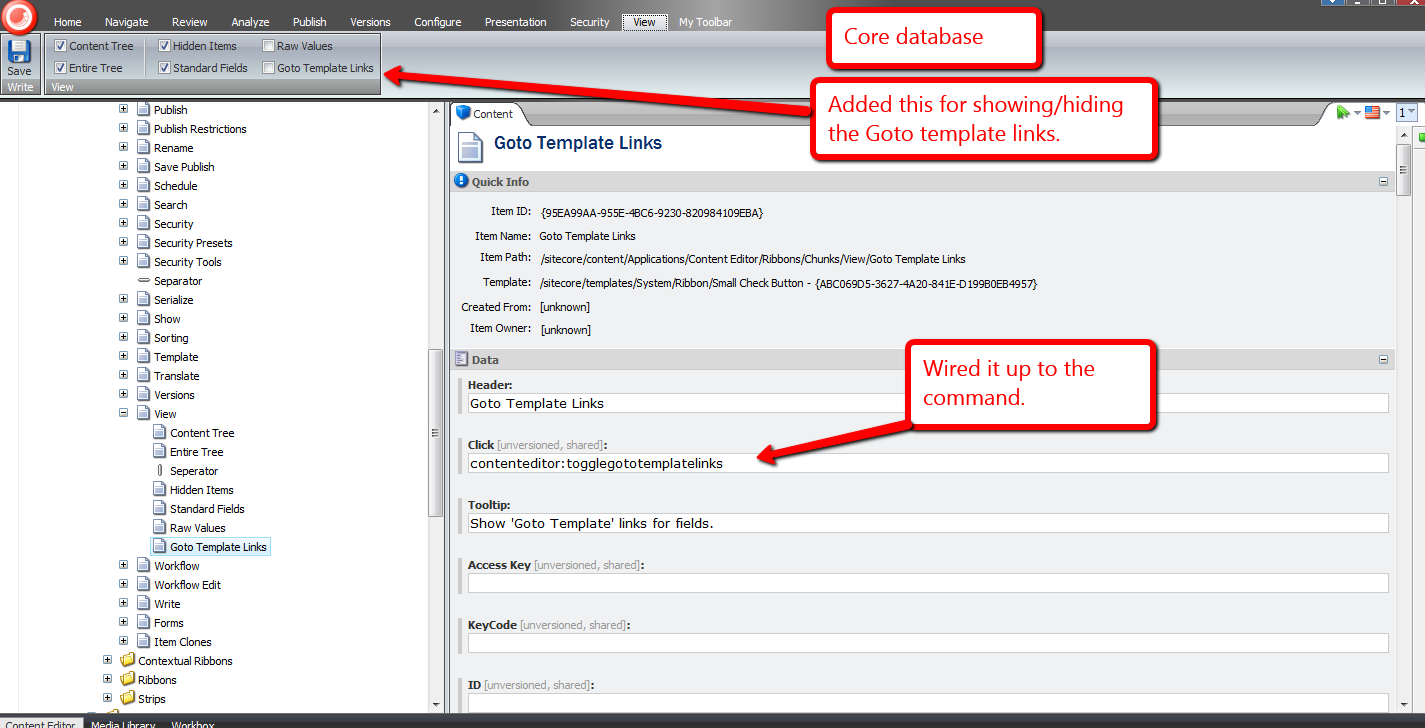
When the ‘Goto Template Links’ checkbox is checked, ‘Goto Template’ links are displayed for each field in the Content Editor:

When unchecked, the ‘Goto Template’ links are not rendered:

Let’s try it out.
Let’s click one of these ‘Goto Template’ links and see what it does, or where it takes us:

It brought us to the template where the Title field is defined:
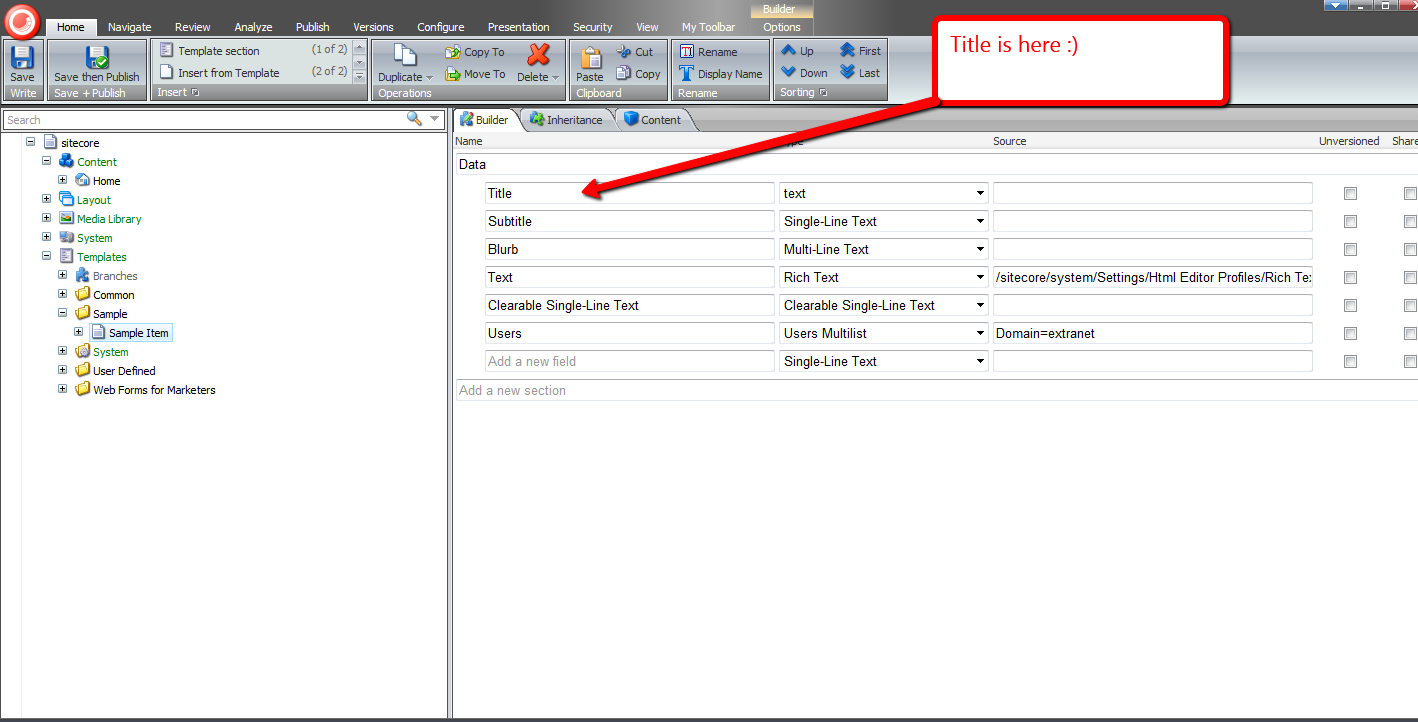
Let’s try another. How about the ‘Created By’ field?

Its link brought us to its template:

Without a doubt, the functionality above would be useful to developers and advanced users.
I’ve been trying to figure out other potential uses for other subclasses of EditorFormatter. Can you think of other ways we could leverage a custom EditorFormatter, especially one for non-technical Sitecore users? If you have any ideas, please drop a comment. 🙂
You Can’t Move This! Experiments in Disabling Move Related Commands in the getQueryState Sitecore Pipeline
I was scavenging through my local sandbox instance’s Web.config the other day — yes I was looking for things to customize — and noticed the getQueryState pipeline — a pipeline that contains no “out of the box” pipeline processors:
<?xml version="1.0" encoding="utf-8"?>
<configuration>
	<!-- Some stuff here -->
	<sitecore>
		<!-- Some more stuff here -->
		<pipelines>
			<!-- Even more stuff here -->
		<!--  Allows developers to programmatically disable or hide any button or panel in the Content Editor ribbons
            without overriding the individual commands.
            Processors must accept a single argument of type GetQueryStateArgs (namespace: Sitecore.Pipelines.GetQueryState)  -->
			<getQueryState>
			</getQueryState>
			<!-- Yeup, more stuff here -->
		</pipelines>
		<!-- wow, lots of stuff here too -->
	</sitecore>
	<!-- lots of stuff down here -->
</configuration>
The above abridged version of my Web.config contains an XML comment underscoring what this pipeline should be used for: disabling and/or hiding buttons in the Sitecore client.
Although I am still unclear around the practicality of using this pipeline overall — if you have an idea, please leave a comment — I thought it would be fun building one regardless, just to see how it works. Besides, I like to tinker with things — many of my previous posts corroborate this sentiment.
What I came up with is a getQueryState pipeline processor that disables buttons containing move related commands on a selected item in the content tree with a particular template. Sorting commands also fall under the umbrella of move related commands, so these are included in our set of commands to disable.
Here’s the pipeline processor I built:
using System;
using System.Collections.Generic;
using System.Linq;
using System.Text;

using Sitecore.Configuration;
using Sitecore.Data;
using Sitecore.Data.Items;
using Sitecore.Diagnostics;
using Sitecore.Pipelines.GetQueryState;
using Sitecore.Shell.Framework.Commands;

namespace Sitecore.Sandbox.Pipelines.GetQueryState
{
    public class DisableMoveCommands
    {
        private static readonly IEnumerable<string> Commands = GetCommands();
        private static readonly IEnumerable<string> UnmovableTemplateIDs = GetUnmovableTemplateIDs();

        public void Process(GetQueryStateArgs args)
        {
            if (!CanProcessGetQueryStateArgs(args))
            {
                return;
            }

            bool shouldDisableCommand = IsUnmovableItem(GetCommandContextItem(args)) && IsMovableCommand(args.CommandName);
            if (shouldDisableCommand)
            {
                args.CommandState = CommandState.Disabled;
            }
        }

        private static bool CanProcessGetQueryStateArgs(GetQueryStateArgs args)
        {
            return args != null
                    && !string.IsNullOrEmpty(args.CommandName)
                    && args.CommandContext != null
                    && args.CommandContext.Items.Any();
        }

        private static Item GetCommandContextItem(GetQueryStateArgs args)
        {
            Assert.ArgumentNotNull(args, "args");
            Assert.ArgumentNotNull(args.CommandContext, "args.CommandContext");
            Assert.ArgumentNotNull(args.CommandContext.Items, "args.CommandContext.Items");
            return args.CommandContext.Items.FirstOrDefault();
        }

        private static bool IsUnmovableItem(Item item)
        {
            Assert.ArgumentNotNull(item, "item");
            return IsUnmovableTemplateID(item.TemplateID);
        }

        private static bool IsUnmovableTemplateID(ID templateID)
        {
            Assert.ArgumentCondition(!ID.IsNullOrEmpty(templateID), "templateID", "templateID must be set!");
            return UnmovableTemplateIDs.Contains(templateID.ToString());
        }

        private static bool IsMovableCommand(string command)
        {
            Assert.ArgumentNotNullOrEmpty(command, "command");
            return Commands.Contains(command);
        }

        private static IEnumerable<string> GetCommands()
        {
            return GetStringCollection("moveCommandsToPrevent/command");
        }

        private static IEnumerable<string> GetUnmovableTemplateIDs()
        {
            return GetStringCollection("unmovableTemplates/id");
        }

        private static IEnumerable<string> GetStringCollection(string path)
        {
            Assert.ArgumentNotNullOrEmpty(path, "path");
            return Factory.GetStringSet(path);
        }
    }
}
The above pipeline processor checks to see if the selected item in the content tree has the unmovable template I defined, coupled with whether the current command is within the set of commands we are to disable. If both are cases are met, the pipeline processor will disable the context command.
I defined my unmovable template and commands to disable in a patch include config file, along with the getQueryState pipeline processor:
<?xml version="1.0" encoding="utf-8" ?>
<configuration xmlns:patch="http://www.sitecore.net/xmlconfig/">
  <sitecore>
    <pipelines>
      <getQueryState>
        <processor type="Sitecore.Sandbox.Pipelines.GetQueryState.DisableMoveCommands, Sitecore.Sandbox" />
      </getQueryState>
    </pipelines>
    <unmovableTemplates>
      <id>{8ADD3F45-027C-49C5-A8FB-0406B8C8728D}</id>
    </unmovableTemplates>
    <moveCommandsToPrevent>
      <command>item:moveto</command>
      <command>item:cuttoclipboard</command>
      <command>item:moveup</command>
      <command>item:movedown</command>
      <command>item:movefirst</command>
      <command>item:movelast</command>
      <command>item:moveto</command>
    </moveCommandsToPrevent>
  </sitecore>
</configuration>
Looking at the context menu on my unmovable item — appropriately named “You Cant Move This” — you can see the move related buttons are disabled:
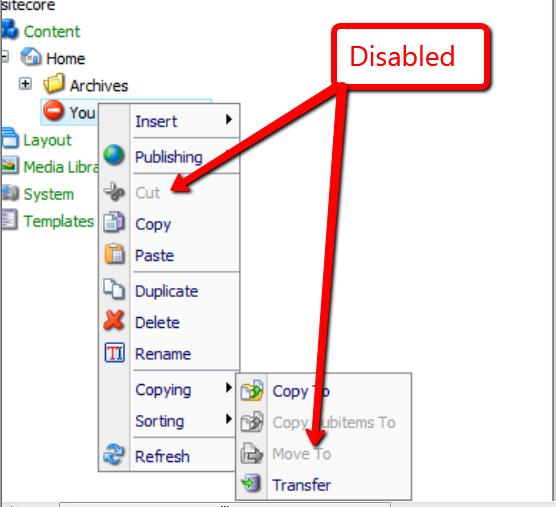
Plus, item level sorting commands are also disabled:

Move related buttons in the ribbon are also disabled:
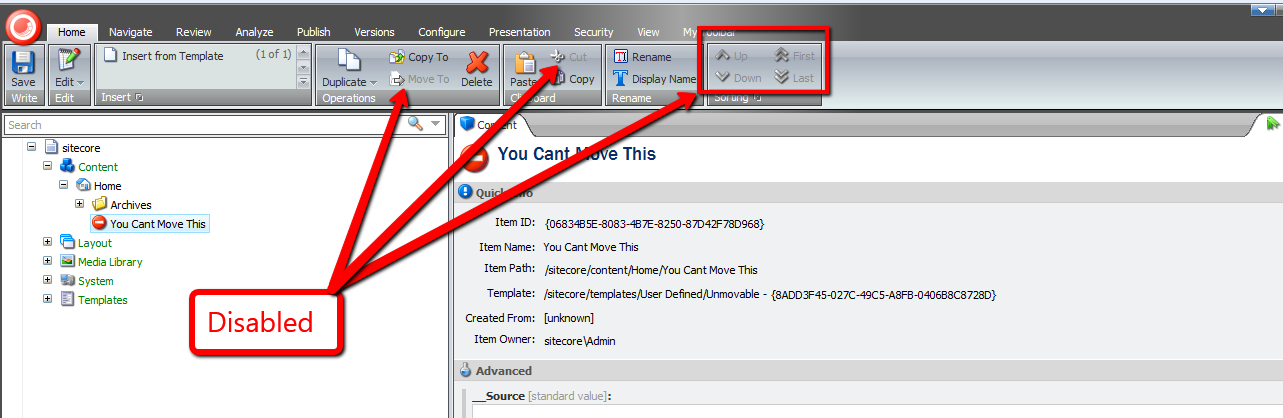
There really wasn’t much to building this pipeline processor, and this pipeline is at your disposal if you ever find yourself in a situation where you might have to disable buttons in the Sitecore client for whatever reason.
However, as I mentioned above, I still don’t understand why one would want to use this pipeline. If you have an idea why, please let me know.
Empower Your Content Authors to Expand Standard Values Tokens in the Sitecore Client
Have you ever seen a Standard Values token — $name is an example of a Standard Values token — in an item’s field, and ask yourself “how the world did that get there”, or alternatively, “what can be done to replace it with what should be there?”
This can occur when tokens are added to an item’s template’s Standard Values node after the item was created — tokens are expanded once an item is created, not after the fact.
John West wrote a blog article highlighting one solution for eradicating this issue by using the Sitecore Rules Engine.
In this post, I am proposing a completely different solution — one that empowers content authors to expand unexpanded tokens by clicking a link in a custom content editor warning box.
First, I created a series of utility objects that ascertain whether “Source” objects contain substrings that we are interested in. All implement the following interface:
using System;
using System.Collections.Generic;
using System.Linq;
using System.Text;

namespace Sitecore.Sandbox.Utilities.StringUtilities.Base
{
    public interface ISubstringsChecker<T>
    {
        T Source { get; set; }

        IEnumerable<string> Substrings { get; set; }

        bool ContainsSubstrings();
    }
}
All of our “checkers” will have a “Source” object, a collection of substrings to look for, and a method to convey to calling code whether a substring in the collection of substrings had been found in the “Source” object.
I decided to create a base abstract class with some abstract methods along with one method to serve as a hook for asserting the Source object — albeit I did not use this method anywhere in my solution (come on Mike, you’re forgetting YAGNI — let’s get with the program).
Utimately, I am employing the template method pattern — all subclasses of this abstract base class will just fill in the defined abstract stubs, and the parent class will take care of the rest:
using System;
using System.Collections.Generic;
using System.Linq;
using System.Text;

namespace Sitecore.Sandbox.Utilities.StringUtilities.Base
{
    public abstract class SubstringsChecker<T> : ISubstringsChecker<T>
    {
        public T Source { get; set; }

        public virtual IEnumerable<string> Substrings { get; set; }

        protected SubstringsChecker(T source)
        {
            SetSource(source);
        }

        private void SetSource(T source)
        {
            AssertSource(source);
            Source = source;
        }

        protected virtual void AssertSource(T source)
        {
            // a hook for subclasses to assert Source objects
        }

        public bool ContainsSubstrings()
        {
            if (CanDoCheck())
            {
                return DoCheck();
            }

            return false;
        }

        protected abstract bool CanDoCheck();
        protected abstract bool DoCheck();
    }
}
The first “checker” I created will find substrings in a string. It made sense for me to start here, especially when we are ultimately checking strings at the most atomic level in our series of “checker” utility objects.
using System;
using System.Collections.Generic;
using System.Linq;
using System.Text;

using Sitecore.Diagnostics;

using Sitecore.Sandbox.Utilities.StringUtilities.Base;
using Sitecore.Sandbox.Utilities.StringUtilities.DTO;

namespace Sitecore.Sandbox.Utilities.StringUtilities
{
    public class StringSubstringsChecker : SubstringsChecker<string>
    {
        private StringSubstringsChecker(IEnumerable<string> substrings)
            : this(null, substrings)
        {
        }

        private StringSubstringsChecker(string source, IEnumerable<string> substrings)
            : base(source)
        {
            SetSubstrings(substrings);
        }

        private void SetSubstrings(IEnumerable<string> substrings)
        {
            AssertSubstrings(substrings);
            Substrings = substrings;
        }

        private static void AssertSubstrings(IEnumerable<string> substrings)
        {
            Assert.ArgumentNotNull(substrings, "substrings");
            Assert.ArgumentCondition(substrings.Any(), "substrings", "substrings must contain as at least one string!");
        }

        protected override bool CanDoCheck()
        {
            return !string.IsNullOrEmpty(Source);
        }

        protected override bool DoCheck()
        {
            Assert.ArgumentNotNullOrEmpty(Source, "Source");

            foreach (string substring in Substrings)
            {
                if (Source.Contains(substring))
                {
                    return true;
                }
            }

            return false;
        }

        public static ISubstringsChecker<string> CreateNewStringSubstringsContainer(IEnumerable<string> substrings)
        {
            return new StringSubstringsChecker(substrings);
        }

        public static ISubstringsChecker<string> CreateNewStringSubstringsContainer(string source, IEnumerable<string> substrings)
        {
            return new StringSubstringsChecker(substrings);
        }
    }
}
The next level up from strings would naturally be Fields. I designed this “checker” to consume an instance of the string “checker” defined above — all for the purposes of reuse. The field “checker” delegates calls to its string “checker” instance.
using System;
using System.Collections.Generic;
using System.Linq;
using System.Text;

using Sitecore.Data.Fields;
using Sitecore.Diagnostics;

using Sitecore.Sandbox.Utilities.StringUtilities.Base;

namespace Sitecore.Sandbox.Utilities.StringUtilities
{
    public class FieldSubstringsChecker : SubstringsChecker<Field>
    {
        private ISubstringsChecker<string> StringSubstringsChecker { get; set; }

        public override IEnumerable<string> Substrings
        {
            get
            {
                return StringSubstringsChecker.Substrings;
            }
            set
            {
                StringSubstringsChecker.Substrings = value;
            }
        }

        private FieldSubstringsChecker(ISubstringsChecker<string> stringSubstringsChecker)
            : this(null, stringSubstringsChecker)
        {
        }

        private FieldSubstringsChecker(Field source, ISubstringsChecker<string> stringSubstringsChecker)
            : base(source)
        {
            SetStringSubstringsChecker(stringSubstringsChecker);
        }

        private void SetStringSubstringsChecker(ISubstringsChecker<string> stringSubstringsChecker)
        {
            Assert.ArgumentNotNull(stringSubstringsChecker, "stringSubstringsChecker");
            StringSubstringsChecker = stringSubstringsChecker;
        }

        protected override bool CanDoCheck()
        {
            return Source != null;
        }

        protected override bool DoCheck()
        {
            Assert.ArgumentNotNull(Source, "Source");
            StringSubstringsChecker.Source = Source.Value;
            return StringSubstringsChecker.ContainsSubstrings();
        }

        public static ISubstringsChecker<Field> CreateNewFieldSubstringsChecker(ISubstringsChecker<string> stringSubstringsChecker)
        {
            return new FieldSubstringsChecker(stringSubstringsChecker);
        }

        public static ISubstringsChecker<Field> CreateNewFieldSubstringsChecker(Field source, ISubstringsChecker<string> stringSubstringsChecker)
        {
            return new FieldSubstringsChecker(source, stringSubstringsChecker);
        }
    }
}
If I were to ask you what the next level up in our series of “checkers” would be, I hope your answer would be Items. Below is a “checker” that uses an Item as its “Source” object, and delegates calls to an instance of a field “checker”.
using System;
using System.Collections.Generic;
using System.Linq;
using System.Text;

using Sitecore.Data.Fields;
using Sitecore.Data.Items;
using Sitecore.Diagnostics;

using Sitecore.Sandbox.Utilities.StringUtilities.Base;

namespace Sitecore.Sandbox.Utilities.StringUtilities
{
    public class ItemSubstringsChecker : SubstringsChecker<Item>
    {
        private ISubstringsChecker<Field> FieldSubstringsChecker { get; set; }

        public override IEnumerable<string> Substrings
        {
            get
            {
                return FieldSubstringsChecker.Substrings;
            }
            set
            {
                FieldSubstringsChecker.Substrings = value;
            }
        }

        private ItemSubstringsChecker(ISubstringsChecker<Field> fieldSubstringsChecker)
            : this(null, fieldSubstringsChecker)
        {
        }

        private ItemSubstringsChecker(Item source, ISubstringsChecker<Field> fieldSubstringsChecker)
            : base(source)
        {
            SetFieldSubstringsChecker(fieldSubstringsChecker);
        }

        private void SetFieldSubstringsChecker(ISubstringsChecker<Field> fieldSubstringsChecker)
        {
            Assert.ArgumentNotNull(fieldSubstringsChecker, "fieldSubstringsChecker");
            FieldSubstringsChecker = fieldSubstringsChecker;
        }

        protected override bool CanDoCheck()
        {
            return Source != null && Source.Fields != null && Source.Fields.Any();
        }

        protected override bool DoCheck()
        {
            Assert.ArgumentNotNull(Source, "Source");
            bool containsSubstrings = false;

            for (int i = 0; !containsSubstrings && i < Source.Fields.Count; i++)
            {
                containsSubstrings = containsSubstrings || DoesFieldContainSubstrings(Source.Fields[i]);
            }

            return containsSubstrings;
        }

        private bool DoesFieldContainSubstrings(Field field)
        {
            FieldSubstringsChecker.Source = field;
            return FieldSubstringsChecker.ContainsSubstrings();
        }

        public static ISubstringsChecker<Item> CreateNewItemSubstringsChecker(ISubstringsChecker<Field> fieldSubstringsChecker)
        {
            return new ItemSubstringsChecker(fieldSubstringsChecker);
        }

        public static ISubstringsChecker<Item> CreateNewItemSubstringsChecker(Item source, ISubstringsChecker<Field> fieldSubstringsChecker)
        {
            return new ItemSubstringsChecker(source, fieldSubstringsChecker);
        }
    }
}
Next, I wrote code for a content editor warning box. I’m am completely indebted to .NET Reflector in helping out on this front — I looked at other content editor warning pipelines in Sitecore.Pipelines.GetContentEditorWarnings within Sitecore.Kernel to see how this is done:
using System;
using System.Collections.Generic;
using System.Linq;
using System.Text;

using Sitecore.Configuration;
using Sitecore.Data.Fields;
using Sitecore.Data.Items;
using Sitecore.Diagnostics;
using Sitecore.Globalization;
using Sitecore.Pipelines.GetContentEditorWarnings;

using Sitecore.Sandbox.Utilities.StringUtilities.Base;
using Sitecore.Sandbox.Utilities.StringUtilities;

namespace Sitecore.Sandbox.Pipelines.GetContentEditorWarnings
{
    public class HasUnexpandedTokens
    {
        private static readonly ISubstringsChecker<Item> SubstringsChecker = CreateNewItemSubstringsChecker();

        public void Process(GetContentEditorWarningsArgs args)
        {
            Assert.ArgumentNotNull(args, "args");
            if (CanExpandTokens(args.Item))
            {
                AddHasUnexpandedTokensWarning(args);
            }
        }

        private static bool CanExpandTokens(Item item)
        {
            Assert.ArgumentNotNull(item, "item");
            return !IsStandardValues(item) && DoesItemContainUnexpandedTokens(item);
        }

        private static bool DoesItemContainUnexpandedTokens(Item item)
        {
            Assert.ArgumentNotNull(item, "item");
            SubstringsChecker.Source = item;
            return SubstringsChecker.ContainsSubstrings();
        }

        private static bool IsStandardValues(Item item)
        {
            return item.Template.StandardValues.ID == item.ID;
        }

        private static void AddHasUnexpandedTokensWarning(GetContentEditorWarningsArgs args)
        {
            GetContentEditorWarningsArgs.ContentEditorWarning warning = args.Add();
            warning.Title = Translate.Text("Some fields contain unexpanded tokens.");
            warning.Text = Translate.Text("To expand tokens, click Expand Tokens.");
            warning.AddOption(Translate.Text("Expand Tokens"), "item:expandtokens");
        }

        private static ISubstringsChecker<Item> CreateNewItemSubstringsChecker()
        {
            return ItemSubstringsChecker.CreateNewItemSubstringsChecker(CreateNewFieldSubstringsChecker());
        }

        private static ISubstringsChecker<Field> CreateNewFieldSubstringsChecker()
        {
            return FieldSubstringsChecker.CreateNewFieldSubstringsChecker(CreateNewStringSubstringsChecker());
        }

        private static ISubstringsChecker<string> CreateNewStringSubstringsChecker()
        {
            return StringSubstringsChecker.CreateNewStringSubstringsContainer(GetTokens());
        }

        private static IEnumerable<string> GetTokens()
        {
            return Factory.GetStringSet("tokens/token");
        }
    }
}
In my pipeline above, I am pulling a collection of token names from Sitecore configuration — these are going to be defined in a patch include file below. I had to go down this road since these tokens are not publically exposed in the Sitecore API.
Plus, we should only allow for the expansion of tokens when not on the Standard values item — it wouldn’t make much sense to expand these tokens here.
Since I’m referencing a new command in the above pipeline — a command that I’ve named “item:expandtokens” — it’s now time to create that new command:
using System;
using System.Collections.Generic;
using System.Linq;
using System.Text;

using Sitecore.Configuration;
using Sitecore.Data;
using Sitecore.Data.Fields;
using Sitecore.Data.Items;
using Sitecore.Diagnostics;
using Sitecore.Shell.Framework.Commands;

using Sitecore.Sandbox.Utilities.StringUtilities;
using Sitecore.Sandbox.Utilities.StringUtilities.Base;
using Sitecore.Sandbox.Utilities.StringUtilities.DTO;

namespace Sitecore.Sandbox.Commands
{
    public class ExpandTokens : Command
    {
        public override void Execute(CommandContext commandContext)
        {
            if (!DoesCommandContextContainOneItem(commandContext))
            {
                return;
            }

            ExpandTokensInItem(GetCommandContextItem(commandContext));
        }

        private static void ExpandTokensInItem(Item item)
        {
            Assert.ArgumentNotNull(item, "item");
            item.Fields.ReadAll();
            item.Editing.BeginEdit();
            ExpandTokensViaMasterVariablesReplacer(item);
            item.Editing.EndEdit();
        }

        private static void ExpandTokensViaMasterVariablesReplacer(Item item)
        {
            MasterVariablesReplacer masterVariablesReplacer = Factory.GetMasterVariablesReplacer();
            masterVariablesReplacer.ReplaceItem(item);
        }

        public override CommandState QueryState(CommandContext commandContext)
        {
            if (ShouldHideCommand(commandContext))
            {
                return CommandState.Hidden;
            }

            if (ShouldDisableCommand(commandContext))
            {
                return CommandState.Disabled;
            }

            return base.QueryState(commandContext);
        }

        private bool ShouldHideCommand(CommandContext commandContext)
        {
            Assert.ArgumentNotNull(commandContext, "commandContext");
            return !DoesCommandContextContainOneItem(commandContext)
                    || !HasField(GetCommandContextItem(commandContext), FieldIDs.ReadOnly);
        }

        private static bool ShouldDisableCommand(CommandContext commandContext)
        {
            AssertCommandContextItems(commandContext);
            Item item = GetCommandContextItem(commandContext);

            return !item.Access.CanWrite()
                    || Command.IsLockedByOther(item)
                    || !Command.CanWriteField(item, FieldIDs.ReadOnly);
        }

        private static Item GetCommandContextItem(CommandContext commandContext)
        {
            Assert.ArgumentNotNull(commandContext, "commandContext");
            Assert.ArgumentNotNull(commandContext.Items, "commandContext.Items");
            return commandContext.Items.FirstOrDefault();
        }

        private static bool DoesCommandContextContainOneItem(CommandContext commandContext)
        {
            AssertCommandContextItems(commandContext);
            return commandContext.Items.Length == 1;
        }

        private static void AssertCommandContextItems(CommandContext commandContext)
        {
            Assert.ArgumentNotNull(commandContext, "commandContext");
            Assert.ArgumentNotNull(commandContext.Items, "commandContext.Items");
        }
    }
}
This new command just uses an instance of Sitecore.Data.MasterVariablesReplacer to expand Standard Values tokens on our item.
I had to register this command in the /App_Config/Commands.config file:
<?xml version="1.0" encoding="utf-8" ?>
<configuration>
	<! -- A bunch of commands defined here -->

	<command name="item:expandtokens" type="Sitecore.Sandbox.Commands.ExpandTokens,Sitecore.Sandbox" />

	<! -- A bunch more defined here too -->
</configuration>
I then put all the pieces together using a patch include config file:
<?xml version="1.0" encoding="utf-8"?>
<configuration xmlns:patch="http://www.sitecore.net/xmlconfig/">
  <sitecore>
    <pipelines>
      <getContentEditorWarnings>
        <processor type="Sitecore.Sandbox.Pipelines.GetContentEditorWarnings.HasUnexpandedTokens, Sitecore.Sandbox"/>
      </getContentEditorWarnings>
    </pipelines>
    <tokens>
      <token>$name</token>
      <token>$id</token>
      <token>$parentid</token>
      <token>$parentname</token>
      <token>$date</token>
      <token>$time</token>
      <token>$now</token>
    </tokens>
  </sitecore>
</configuration>
Let’s create an item for testing:

As you can see, the item’s Title field was populated automatically during item creation — the $name token lives on this item’s template’s Standard Values item in Sitecore and was expanded when we created our test item.
Let’s create the problem we are trying to solve by adding new tokens to our test item’s template’s Standard Values node:

As you can see, these new tokens appear in fields in our test item. However, don’t fret — we now have a way to fix this issue. 🙂

I clicked on the ‘Expand Tokens’ link, and saw the following:

Hopefully, this post has given you another weapon to add to your arsenal for solving the unexpanded tokens issue on existing items in Sitecore.
If you find another solution, please drop me a line — I would love to hear about it.
Dude, Where’s My Processor? Filling the Void in the SaveRichTextContent and LoadRichTextContent Sitecore Pipelines
Some of you might be aware that I frequently go through the Web.config of my local instance of Sitecore looking for opportunities to extend or customize class files referenced within it — I may have mentioned this in a previous post, and no doubt have told some Sitecore developers/enthusiasts in person I do this at least once per day. I must confess: I usually do this multiple times a day.
Last night, I was driven to explore something I have noticed in the Web.config of my v6.5 instance — my attention has been usurped many times by the saveRichTextContent and loadRichTextContent pipeline nodes being empty.
These two pipelines allow you to make changes to content within Rich Text fields before any save actions on your item in the Sitecore client.
I remembered that one of them did have a pipeline processor defined within it at one point. It was time to do some research.
After conducting some research — truth be told, I only googled a couple of times — I stumbled upon some release notes on SDN discussing the saveRichTextContent Web.config pipeline, and that this pipeline did contain a processor in it at one point — the Sitecore.Shell.Controls.RichTextEditor.Pipelines.SaveRichTextContent.EmbedInParagraph processor — although I don’t remember what this processor did, and don’t have an older version of Sitecore.Client.dll to investigate. I could download an older version of Sitecore from SDN, but decided to leave that exercise for another snowy weekend.
I decided to explore whether the option to add custom processors to these pipelines still existed. I came up with an idea straight out of the 1990’s — having marquee tags animate content across my pages.
As an aside, back in the 1990’s, almost every webpage — all webpages were called homepages then — had at least one marquee. Most had multiple — it was the cool thing to do back then, asymptotic only to having an ‘Under Construction’ image on your homepage. Employing this practice today would be considered anathema.
I decided to reuse my concept of manipulator from my Manipulate Field Values in a Custom Sitecore Web Forms for Marketers DataProvider article, and created a new manipulator to wrap specified tags in marquee tags:
using System;
using System.Collections.Generic;
using System.Linq;
using System.Text;

namespace Sitecore.Sandbox.Utilities.Manipulators.Base
{
    public interface IWrapHtmlTagsInTagManipulator : IManipulator<string>
    {
    }
}
I thought it would be a good idea to define a DTO for my manipulator to pass objects to it in a clean manner:
using System;
using System.Collections.Generic;
using System.Linq;
using System.Text;

namespace Sitecore.Sandbox.Utilities.Manipulators.DTO
{
    public class WrapHtmlTagsInTagManipulatorSettings
    {
        public string WrapperTag { get; set; }
        public IEnumerable<string> TagsToWrap { get; set; }
    }
}
Next, I built my manipulator:
using System;
using System.Collections.Generic;
using System.Linq;
using System.Text;

using Sitecore.Diagnostics;

using Sitecore.Sandbox.Utilities.Manipulators.Base;
using Sitecore.Sandbox.Utilities.Manipulators.DTO;

using HtmlAgilityPack;

namespace Sitecore.Sandbox.Utilities.Manipulators
{
    public class WrapHtmlTagsInTagManipulator : IWrapHtmlTagsInTagManipulator
    {
        private WrapHtmlTagsInTagManipulatorSettings Settings { get; set; }

        private WrapHtmlTagsInTagManipulator(WrapHtmlTagsInTagManipulatorSettings settings)
        {
            SetSettings(settings);
        }

        private void SetSettings(WrapHtmlTagsInTagManipulatorSettings settings)
        {
            AssertSettings(settings);
            Settings = settings;
        }

        private static void AssertSettings(WrapHtmlTagsInTagManipulatorSettings settings)
        {
            Assert.ArgumentNotNull(settings, "settings");
            Assert.ArgumentNotNullOrEmpty(settings.WrapperTag, "settings.WrapperTag");
            Assert.ArgumentNotNull(settings.TagsToWrap, "settings.TagsToWrap");
        }

        public string Manipulate(string html)
        {
            Assert.ArgumentNotNullOrEmpty(html, "html");
            HtmlNode documentNode = GetHtmlDocumentNode(html);

            foreach (string tagToWrap in Settings.TagsToWrap)
            {
                WrapTags(documentNode, tagToWrap);
            }

            return documentNode.InnerHtml;
        }

        private void WrapTags(HtmlNode documentNode, string tagToWrap)
        {
            HtmlNodeCollection htmlNodes = documentNode.SelectNodes(CreateNewDescendantsSelector(tagToWrap));

            foreach(HtmlNode htmlNode in htmlNodes)
            {
                WrapHtmlNodeIfApplicable(documentNode, htmlNode);
            }
        }

        private void WrapHtmlNodeIfApplicable(HtmlNode documentNode, HtmlNode htmlNode)
        {
            if (!AreEqualIgnoreCase(htmlNode.ParentNode.Name, Settings.WrapperTag))
            {
                WrapHtmlNode(documentNode, htmlNode, Settings.WrapperTag);
            }
        }

        private static void WrapHtmlNode(HtmlNode documentNode, HtmlNode htmlNode, string wrapperTag)
        {
            HtmlNode wrapperHtmlNode = documentNode.OwnerDocument.CreateElement(wrapperTag);
            AddNewParent(wrapperHtmlNode, htmlNode);
        }

        private static void AddNewParent(HtmlNode newParentHtmlNode, HtmlNode htmlNode)
        {
            Assert.ArgumentNotNull(newParentHtmlNode, "newParentHtmlNode");
            Assert.ArgumentNotNull(htmlNode, "htmlNode");
            htmlNode.ParentNode.ReplaceChild(newParentHtmlNode, htmlNode);
            newParentHtmlNode.AppendChild(htmlNode);
        }

        private static bool AreEqualIgnoreCase(string stringOne, string stringTwo)
        {
            return string.Equals(stringOne, stringTwo, StringComparison.InvariantCultureIgnoreCase);
        }

        private static string CreateNewDescendantsSelector(string tag)
        {
            Assert.ArgumentNotNullOrEmpty(tag, "tag");
            return string.Format("//{0}", tag);
        }

        private HtmlNode GetHtmlDocumentNode(string html)
        {
            HtmlDocument htmlDocument = CreateNewHtmlDocument(html);
            return htmlDocument.DocumentNode;
        }

        private HtmlDocument CreateNewHtmlDocument(string html)
        {
            HtmlDocument htmlDocument = new HtmlDocument();
            htmlDocument.LoadHtml(html);
            return htmlDocument;
        }

        public static IWrapHtmlTagsInTagManipulator CreateNewWrapHtmlTagsInTagManipulator(WrapHtmlTagsInTagManipulatorSettings settings)
        {
            return new WrapHtmlTagsInTagManipulator(settings);
        }
    }
}
My manipulator class above uses Html Agility Pack to find targeted html elements, and wrap them in newly created marquee tags — which are also created via Html Agility Pack.
I decided to create a base class to contain core logic that will be used across both of my pipeline processors:
using System;
using System.Collections.Generic;
using System.Linq;
using System.Text;

using Sitecore.Sandbox.Utilities.Manipulators;
using Sitecore.Sandbox.Utilities.Manipulators.Base;
using Sitecore.Sandbox.Utilities.Manipulators.DTO;

namespace Sitecore.Sandbox.Shell.Controls.RichTextEditor.Pipelines.Base
{
    public abstract class AddSomeMarqueesBase
    {
        private IWrapHtmlTagsInTagManipulator _HtmlManipulator;
        private IWrapHtmlTagsInTagManipulator HtmlManipulator
        {
            get
            {
                if(_HtmlManipulator == null)
                {
                    _HtmlManipulator = CreateNewWrapHtmlTagsInTagManipulator();
                }

                return _HtmlManipulator;
            }
        }

        private IWrapHtmlTagsInTagManipulator CreateNewWrapHtmlTagsInTagManipulator()
        {
            return WrapHtmlTagsInTagManipulator.CreateNewWrapHtmlTagsInTagManipulator(CreateNewWrapHtmlTagsInTagManipulatorSettings());
        }

        protected virtual WrapHtmlTagsInTagManipulatorSettings CreateNewWrapHtmlTagsInTagManipulatorSettings()
        {
            return new WrapHtmlTagsInTagManipulatorSettings
            {
                WrapperTag = "marquee",
                TagsToWrap = new string[] { "em", "img" }
            };
        }

        protected virtual string ManipulateHtml(string html)
        {
            if (!string.IsNullOrEmpty(html))
            {
                return HtmlManipulator.Manipulate(html);
            }

            return html;
        }
    }
}
This base class creates an instance of our manipulator class above, passing in the required DTO housing the wrapper tag and tags to wrap settings.
Honestly, while writing this article and looking at this code, I am not completely happy about how I implemented this base class. I should have added a constructor which takes in the manipulator instance — thus allowing subclasses to provide their own manipulators, especially if these subclasses need to use a different manipulator than the one used by default in the base class.
Further, it probably would have been prudent to put the html tags I defined in my DTO instance into a patch config file.
Next, I defined my loadRichTextContent pipeline processor:
using System;
using System.Collections.Generic;
using System.Linq;
using System.Text;

using Sitecore.Shell.Controls.RichTextEditor.Pipelines.LoadRichTextContent;

using Sitecore.Sandbox.Shell.Controls.RichTextEditor.Pipelines.Base;

namespace Sitecore.Sandbox.Shell.Controls.RichTextEditor.Pipelines.LoadRichTextContent
{
    public class AddSomeMarquees : AddSomeMarqueesBase
    {
        public void Process(LoadRichTextContentArgs args)
        {
            args.Content = ManipulateHtml(args.Content);
        }
    }
}
Followed by my saveRichTextContentpipeline processor:
using System;
using System.Collections.Generic;
using System.Linq;
using System.Text;

using Sitecore.Shell.Controls.RichTextEditor.Pipelines.SaveRichTextContent;

using Sitecore.Sandbox.Shell.Controls.RichTextEditor.Pipelines.Base;

namespace Sitecore.Sandbox.Shell.Controls.RichTextEditor.Pipelines.SaveRichTextContent
{
    public class AddSomeMarquees : AddSomeMarqueesBase
    {
        public void Process(SaveRichTextContentArgs args)
        {
            args.Content = ManipulateHtml(args.Content);
        }
    }
}
Thereafter, I glued everything together via a patch config file:
<?xml version="1.0" encoding="utf-8" ?>
<configuration xmlns:patch="http://www.sitecore.net/xmlconfig/">
  <sitecore>
    <pipelines>
      <loadRichTextContent>
        <processor type="Sitecore.Sandbox.Shell.Controls.RichTextEditor.Pipelines.LoadRichTextContent.AddSomeMarquees, Sitecore.Sandbox"/>
      </loadRichTextContent>
      <saveRichTextContent>
        <processor type="Sitecore.Sandbox.Shell.Controls.RichTextEditor.Pipelines.SaveRichTextContent.AddSomeMarquees, Sitecore.Sandbox"/>
      </saveRichTextContent>
    </pipelines>
  </sitecore>
</configuration>
Time to see the fruits of my labor above.
I’ve added some content in a Rich Text field:
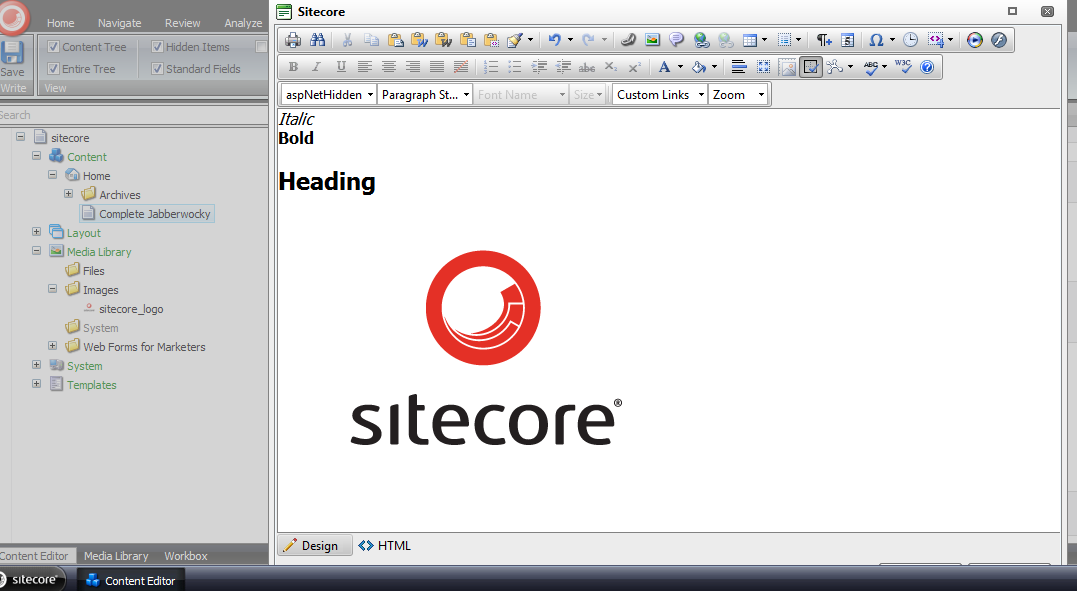
Here’s the html in the Rich Text field:

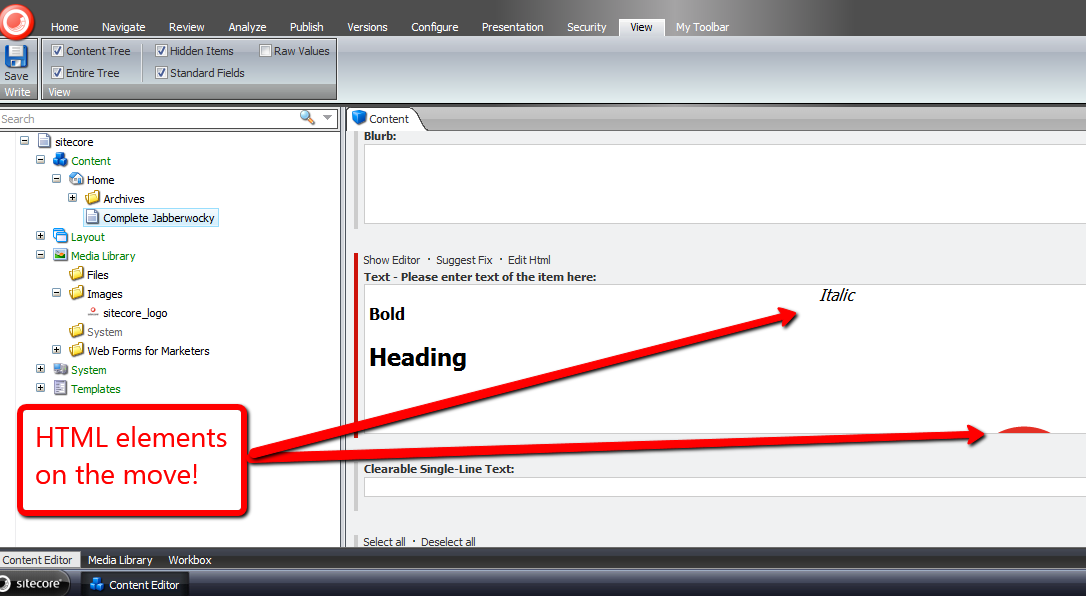
I clicked the ‘Accept’ button in the Rich Text dialog window, and then saw the targeted content come to life:
I launched the dialog window again to investigate what the html now looks like:
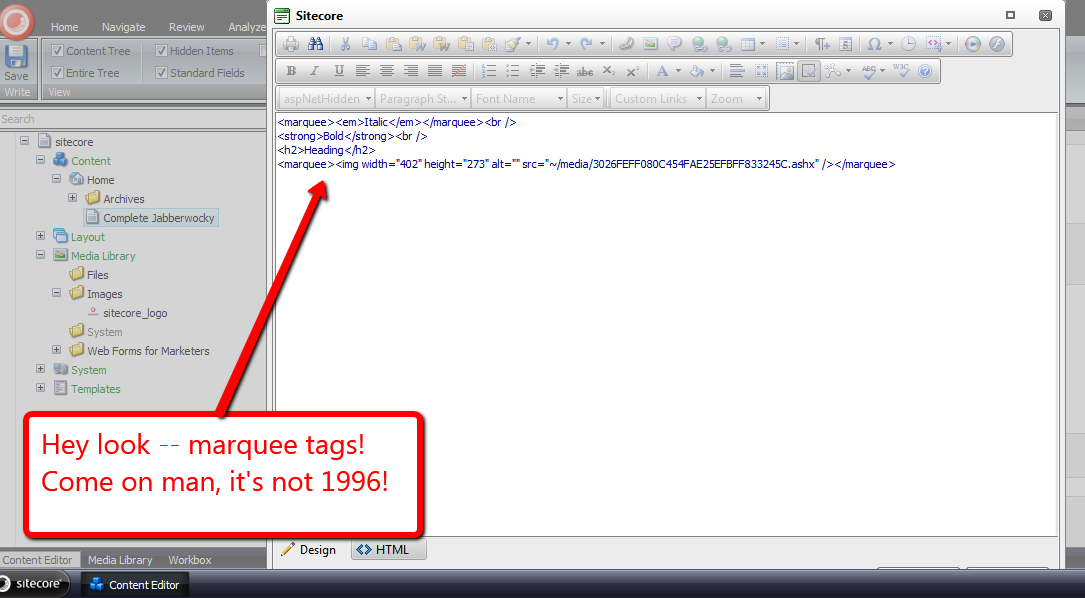
Mission accomplished — we now have marquees! 🙂
I do want to point out I could not get my loadRichTextContent pipeline processor to run. I thought it would run when opening the Rich Text dialog, although I was wrong — it did not. I also tried to get it to run via the ‘Edit Html’ button, but to no avail.
If I am looking in the wrong place, or this is a known issue in Sitecore, please drop a comment and let me know.
Kick-start Glass.Sitecore.Mapper in a Sitecore Initialize Pipeline
In my previous post, I used Glass.Sitecore.Mapper to grab content out of Sitecore for use in expanding tokens set in Standard Values fields.
While writing the code for that article, I recalled Alex Shyba asking whether it were possible to move Glass initialization code out of the Global.asax and into an initialize pipeline — Mike Edwards, the developer of Glass, illustrates how one initializes Glass in the Global.asax on github.
I do remember Mike saying it were possible, although I am uncertain whether anyone has done this.
As a follow up to Alex’s tweet, I’ve decided to do just that — create an initialize pipeline that will load up Glass models. I’ve also moved the model namespaces and assembly definitions into a patch config file along with defining the initialize pipeline.
Here is the pipeline I’ve written to do this:
using System.Collections.Generic;
using System.Linq;

using Sitecore.Configuration;
using Sitecore.Diagnostics;
using Sitecore.Pipelines;

using Glass.Sitecore.Mapper.Configuration.Attributes;

namespace Sitecore.Sandbox.Pipelines.Loader
{
    public class InitializeGlassMapper
    {
        public void Process(PipelineArgs args)
        {
            CreateContextIfApplicable(GetModelTypes());
        }

        private static void CreateContextIfApplicable(IEnumerable<string> modelTypes)
        {
            if (CanCreateContext(modelTypes))
            {
                CreateContext(CreateNewAttributeConfigurationLoader(modelTypes));
            }
        }

        private static bool CanCreateContext(IEnumerable<string> modelTypes)
        {
            return modelTypes != null && modelTypes.Count() > 0;
        }

        private static AttributeConfigurationLoader CreateNewAttributeConfigurationLoader(IEnumerable<string> modelTypes)
        {
            Assert.ArgumentNotNull(modelTypes, "modelTypes");
            Assert.ArgumentCondition(modelTypes.Count() > 0, "modelTypes", "modelTypes collection must contain at least one string!");
            return new AttributeConfigurationLoader(modelTypes.ToArray());
        }

        private static void CreateContext(AttributeConfigurationLoader loader)
        {
            Assert.ArgumentNotNull(loader, "loader");
            Glass.Sitecore.Mapper.Context context = new Glass.Sitecore.Mapper.Context(loader);
        }

        private static IEnumerable<string> GetModelTypes()
        {
            return Factory.GetStringSet("glassMapperModels/type");
        }
    }
}
I’ve defined my new initialize pipeline in a patch config, coupled with Glass model namespace/assembly pairs:
<?xml version="1.0" encoding="utf-8" ?>
<configuration xmlns:patch="http://www.sitecore.net/xmlconfig/">
  <sitecore>
    <pipelines>
      <initialize>
        <processor type="Sitecore.Sandbox.Pipelines.Loader.InitializeGlassMapper, Sitecore.Sandbox" />
      </initialize>
    </pipelines>
    <glassMapperModels>
      <type>Sitecore.Sandbox.Model, Sitecore.Sandbox</type>
    </glassMapperModels>
  </sitecore>
</configuration>
On the testing front, I validated what I developed for my previous post still works — it still works like a charm! 🙂
Who Just Published That? Log Publishing Statistics in the Sitecore Client
Time and time again, I keep hearing about content in Sitecore being published prematurely, and this usually occurs by accident — perhaps a cat walks across the malefactor’s keyboard — although I have a feeling something else might driving these erroneous publishes.
However, in some instances, the malefactor will not fess up to invoking said publish.
Seeking out who had published a Sitecore item is beyond the know how of most end users, and usually requires an advanced user or developer to fish around in the Sitecore log to ascertain who published what and when.
Here’s an example of publishing information in my local sandbox’s instance of a publish I had done earlier this evening:

Given that I keep hearing about this happening, I decided it would be a great exercise to develop a feature to bring publishing information into the Sitecore client. We can accomplish this by building a custom PublishItemProcessor pipeline to log statistics into publishing fields.
First, I created a template containing fields to hold publishing information.

These fields will only keep track of who published an item last, similar to how the fields in the Statistics section in the Standard Template.
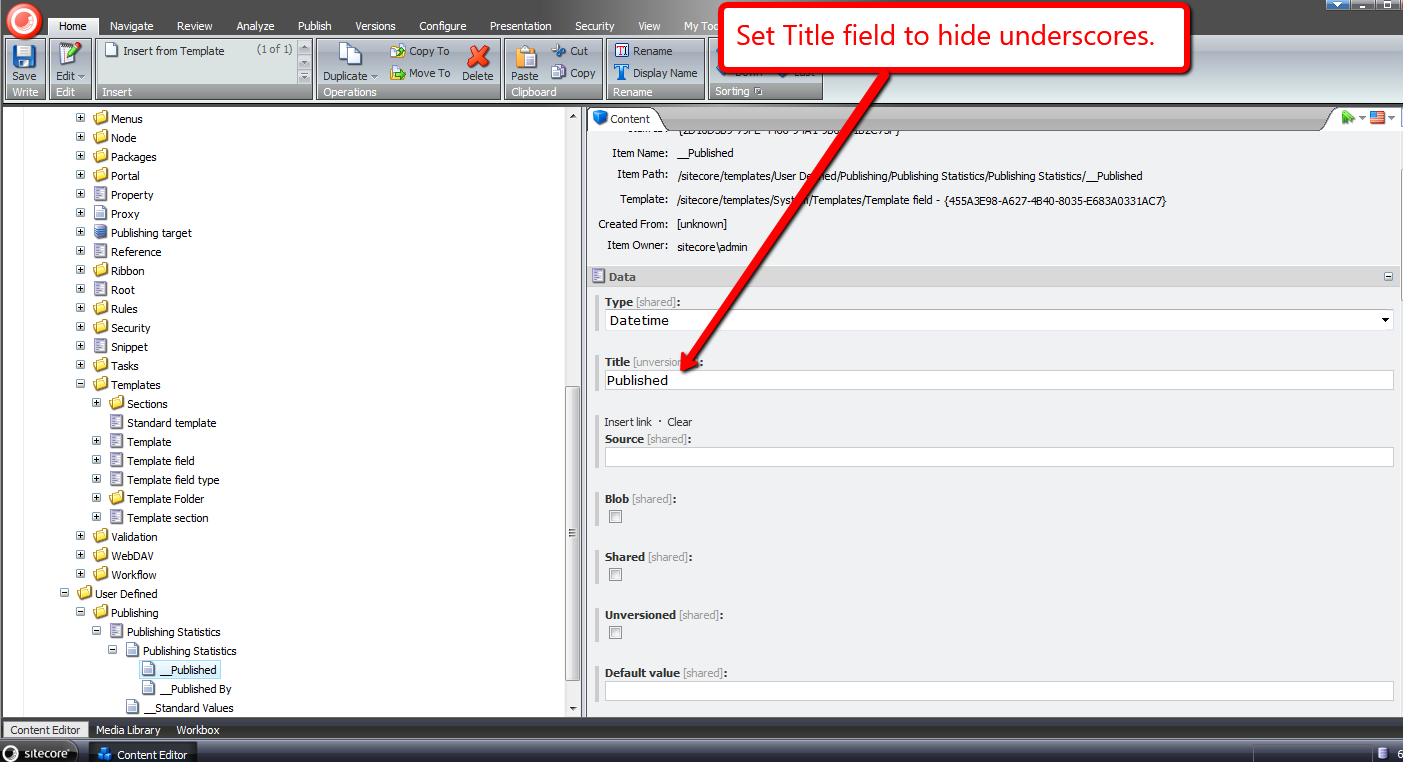
Next, I set the title of my fields to not show underscores:
I then added my template to the Standard Template:

Now that my publishing fields are in Sitecore, It’s time to build a custom PublishItemProcessor (Sitecore.Publishing.Pipelines.PublishItem.PublishItemProcessor):
using System;
using System.Collections.Generic;
using System.Linq;
using System.Text;

using Sitecore.Data;
using Sitecore.Data.Items;
using Sitecore.Data.Fields;
using Sitecore.Diagnostics;
using Sitecore.Publishing.Pipelines.PublishItem;
using Sitecore.SecurityModel;

namespace Sitecore.Sandbox.Pipelines.Publishing
{
    public class UpdatePublishingStatistics : PublishItemProcessor
    {
        private const string PublishedFieldName = "__Published";
        private const string PublishedByFieldName = "__Published By";

        public override void Process(PublishItemContext context)
        {
            SetPublishingStatisticsFields(context);
        }

        private void SetPublishingStatisticsFields(PublishItemContext context)
        {
            Assert.ArgumentNotNull(context, "context");
            Assert.ArgumentNotNull(context.PublishOptions, "context.PublishOptions");
            Assert.ArgumentNotNull(context.PublishOptions.SourceDatabase, "context.PublishOptions.SourceDatabase");
            Assert.ArgumentNotNull(context.PublishOptions.TargetDatabase, "context.PublishOptions.TargetDatabase");
            Assert.ArgumentCondition(!ID.IsNullOrEmpty(context.ItemId), "context.ItemId", "context.ItemId must be set!");
            Assert.ArgumentNotNull(context.User, "context.User");

            SetPublishingStatisticsFields(context.PublishOptions.SourceDatabase, context.ItemId, context.User.Name);
            SetPublishingStatisticsFields(context.PublishOptions.TargetDatabase, context.ItemId, context.User.Name);
        }

        private void SetPublishingStatisticsFields(Database database, ID itemId, string userName)
        {
            Assert.ArgumentNotNull(database, "database");
            Item item = TryGetItem(database, itemId);

            if (HasPublishingStatisticsFields(item))
            {
                SetPublishingStatisticsFields(item, DateUtil.IsoNow, userName);
            }
        }

        private void SetPublishingStatisticsFields(Item item, string isoDateTime, string userName)
        {
            Assert.ArgumentNotNull(item, "item");
            Assert.ArgumentNotNullOrEmpty(isoDateTime, "isoDateTime");
            Assert.ArgumentNotNullOrEmpty(userName, "userName");

            using (new SecurityDisabler())
            {
                item.Editing.BeginEdit();
                item.Fields[PublishedFieldName].Value = DateUtil.IsoNow;
                item.Fields[PublishedByFieldName].Value = userName;
                item.Editing.EndEdit();
            }
        }

        private Item TryGetItem(Database database, ID itemId)
        {
            try
            {
                return database.Items[itemId];
            }
            catch (Exception ex)
            {
                Log.Error(this.ToString(), ex, this);
            }

            return null;
        }

        private static bool HasPublishingStatisticsFields(Item item)
        {
            Assert.ArgumentNotNull(item, "item");
            return item.Fields[PublishedFieldName] != null
                    && item.Fields[PublishedByFieldName] != null;
        }
    }
}
My PublishItemProcessor sets the publishing statistics on my newly added fields on the item in both the source and target databases, and only when the publishing fields exist on the published item.
I then added my PublishItemProcessor after the UpdateStatistics PublishItemProcessor in a new patch config file:
<?xml version="1.0" encoding="utf-8"?>
<configuration xmlns:patch="http://www.sitecore.net/xmlconfig/">
  <sitecore>
    <pipelines>
      <publishItem>
        <processor type="Sitecore.Sandbox.Pipelines.Publishing.UpdatePublishingStatistics, Sitecore.Sandbox"
					patch:after="processor[@type='Sitecore.Publishing.Pipelines.PublishItem.UpdateStatistics, Sitecore.Kernel']" />
      </publishItem>
    </pipelines>
  </sitecore>
</configuration>
I created a new page for testing, put some dummy data in some fields and then published:
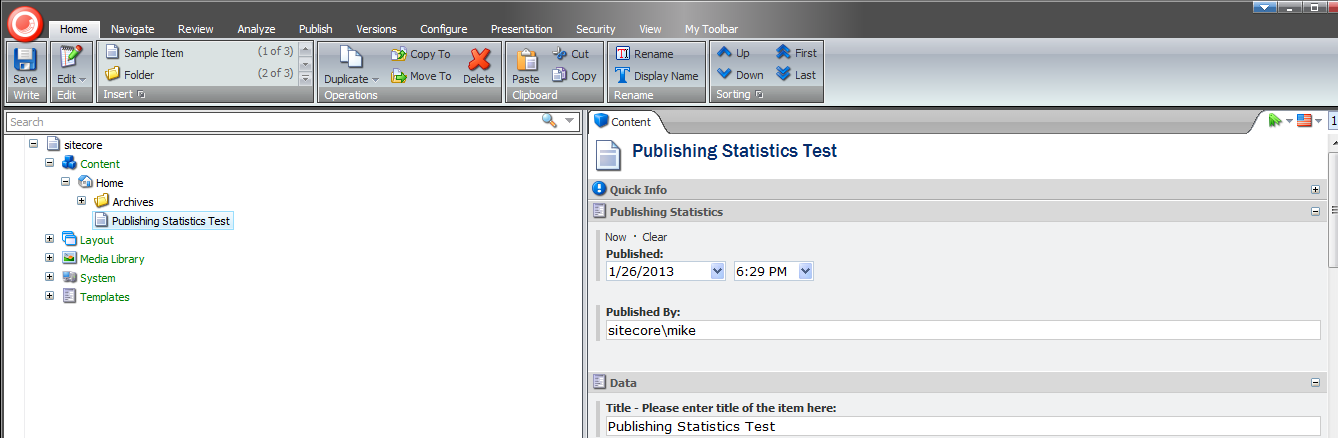
Beware — you can no longer hide after publishing when you shouldn’t! 🙂
Get Hooked on Hooks: Create a Custom Hook in Sitecore
Yesterday evening, I decided to fish around in my local Sitecore instance’s Web.config to look for customization opportunities — doing this definitely beats vegging out in front of the television any day — and thought it would be an interesting exercise to create a custom hook.
Before I dive into the custom hook I built, I’d like to discuss what a Sitecore hook is.
You can consider a hook to be an object containing code that you would like executed in your Sitecore instance, but see no logical place to put said code.
You’re probably saying to yourself “Mike, that is an extremely generic and ridiculous definition.” I don’t blame you for thinking this, although I can’t really define what a hook is any better than that. If you have a better definition, please leave a comment.
However, to put things into context that might aid in defining what a hook could be, a hook is usually defined as an object containing code that is executed periodically by a defined configuration setting time interval — albeit this isn’t a mandatory constraint since one could inject any code via a hook, as long as that hook implements the Sitecore.Events.Hooks.IHook interface.
This interface defines one method — the Initialize() method — which has a very simple signature: it takes in no parameters and does not return anything, thus giving you lots of freedom around how you implement your hook.
Out of the box, Sitecore employs two hooks:
- Sitecore.Diagnostics.HealthMonitorHook – a hook that launches a pipeline periodically to log cache, memory, and performance counter information to the Sitecore log.
- Sitecore.Diagnostics.MemoryMonitorHook – a hook that monitors memory periodically on the server, and clears caches/invokes the garbage collector when a defined thresholds are exceeded and settings defined in the Web.config allow for these actions.
Both hooks are defined in Sitecore.Kernel.dll.
Keeping with the monitoring theme of the prepackaged hooks, I decided to build a hook that monitors the size of my Sitecore databases after an elapsed period of time, and logs this information into my Sitecore log.
First, I created a data transfer object (DTO) that represents a size snapshot of a database:
using System;
using System.Collections.Generic;
using System.Linq;
using System.Text;

namespace Sitecore.Sandbox.Utilities.Database.DTO
{
    public class DatabaseStatistics
    {
        public string Name { get; set; }
        public string Size { get; set; }
        public string UnallocatedSpace { get; set; }
    }
}
The above DTO is created and returned by a class that gets information out of a database using the Sitecore.Data.SqlServer.SqlServerDataApi utility class used by Sitecore for database operations in MS SQL Server:
using System;
using System.Collections.Generic;
using System.Linq;
using System.Text;

using Sitecore.Sandbox.Utilities.Database.DTO;

namespace Sitecore.Sandbox.Utilities.Database.Base
{
    public interface IDatabaseStatisticsGatherer
    {
        DatabaseStatistics GetDatabaseStatistics();
    }
}
using System;
using System.Collections.Generic;
using System.Linq;
using System.Text;

using Sitecore.Data.DataProviders.Sql;
using Sitecore.Data.SqlServer;
using Sitecore.Diagnostics;

using Sitecore.Sandbox.Utilities.Database.Base;
using Sitecore.Sandbox.Utilities.Database.DTO;

namespace Sitecore.Sandbox.Utilities.Database
{
    public class DatabaseStatisticsGatherer : IDatabaseStatisticsGatherer
    {
        private const string GetSizeStaticsSQL = "exec sp_spaceused"; // this sproc gives database size information

        private SqlDataApi SqlDataApi { get; set; }

        private DatabaseStatisticsGatherer(string connectionString)
            : this(CreateNewSqlServerDataApi(connectionString))
        {
        }

        private DatabaseStatisticsGatherer(SqlDataApi sqlDataApi)
        {
            SetSqlDataApi(sqlDataApi);
        }

        private void SetSqlDataApi(SqlDataApi sqlDataApi)
        {
            Assert.ArgumentNotNull(sqlDataApi, "sqlDataApi");
            SqlDataApi = sqlDataApi;
        }

        public DatabaseStatistics GetDatabaseStatistics()
        {
            IEnumerable<string> columnValues = SqlDataApi.GetStringList(GetSizeStaticsSQL, new object[0]);
            return CreateNewDatabaseStatistics(columnValues);
        }

        private static DatabaseStatistics CreateNewDatabaseStatistics(IEnumerable<string> columnValues)
        {
            if (columnValues == null || columnValues.Count() < 1)
            {
                return null;
            }

            return new DatabaseStatistics
            {
                Name = columnValues.ElementAtOrDefault(0),
                Size = columnValues.ElementAtOrDefault(1),
                UnallocatedSpace = columnValues.ElementAtOrDefault(2)
            };
        }

        private static SqlDataApi CreateNewSqlServerDataApi(string connectionString)
        {
            Assert.ArgumentNotNullOrEmpty(connectionString, "connectionString");
            return new SqlServerDataApi(connectionString);
        }

        public static IDatabaseStatisticsGatherer CreateNewDatabaseStatisticsGatherer(string connectionString)
        {
            return new DatabaseStatisticsGatherer(connectionString);
        }

        public static IDatabaseStatisticsGatherer CreateNewDatabaseStatisticsGatherer(SqlDataApi sqlDataApi)
        {
            return new DatabaseStatisticsGatherer(sqlDataApi);
        }
    }
}
I decided to follow the paradigm set forth by Sitecore.Diagnostics.HealthMonitorHook: having my hook invoke a pipeline after an elapsed period of time. Here are this pipeline’s DTO and the pipeline class itself:
using System;
using System.Collections.Generic;
using System.Linq;
using System.Text;

using Sitecore.Pipelines;

namespace Sitecore.Sandbox.Pipelines.DatabaseMonitor.DTO
{
    public class DatabaseMonitorArgs : PipelineArgs
    {
        public IEnumerable<string> Databases { get; set; }
    }
}
using System;
using System.Collections;
using System.Collections.Generic;
using System.Configuration;
using System.Linq;
using System.Text;

using Sitecore.Collections;
using Sitecore.Data.Sql;
using Sitecore.Diagnostics;

using Sitecore.Sandbox.Pipelines.DatabaseMonitor.DTO;
using Sitecore.Sandbox.Utilities.Database;
using Sitecore.Sandbox.Utilities.Database.Base;
using Sitecore.Sandbox.Utilities.Database.DTO;

namespace Sitecore.Sandbox.Pipelines.DatabaseMonitor
{
    public class DatabaseMonitor
    {
        public void LogDatabasesSize(DatabaseMonitorArgs args)
        {
            foreach (string connectionStringKey in args.Databases)
            {
                LogDatabaseStatistics(connectionStringKey);
            }
        }

        private void LogDatabaseStatistics(string connectionStringKey)
        {
            LogDatabaseStatistics(GetDatabaseStatistics(connectionStringKey));
        }

        private static DatabaseStatistics GetDatabaseStatistics(string connectionStringKey)
        {
            IDatabaseStatisticsGatherer gatherer = DatabaseStatisticsGatherer.CreateNewDatabaseStatisticsGatherer(GetConnectionString(connectionStringKey));
            return gatherer.GetDatabaseStatistics();
        }

        private void LogDatabaseStatistics(DatabaseStatistics statistics)
        {
            if (statistics == null)
            {
                return;
            }

            Log.Info(GetLogEntry(statistics), this);
        }

        private static string GetConnectionString(string connectionStringKey)
        {
            Assert.ArgumentNotNullOrEmpty(connectionStringKey, "connectionStringKey");
            return ConfigurationManager.ConnectionStrings[connectionStringKey].ConnectionString;
        }

        private static string GetLogEntry(DatabaseStatistics statistics)
        {
            Assert.ArgumentNotNull(statistics, "statistics");
            return string.Format("Database size statistics: '{0}' (size: {1}, unallocated space: {2})", statistics.Name, statistics.Size, statistics.UnallocatedSpace);
        }
    }
}
Now, it’s time to hookup my hook. I followed how Sitecore.Diagnostics.HealthMonitorHook uses the AlarmClock class to continuously invoke code after a specified period of time:
using System;
using System.Collections.Generic;
using System.Linq;
using System.Text;

using Sitecore.Diagnostics;
using Sitecore.Events.Hooks;
using Sitecore.Pipelines;
using Sitecore.Services;
using Sitecore.Text;

using Sitecore.Sandbox.Pipelines.DatabaseMonitor.DTO;

namespace Sitecore.Sandbox.Hooks
{
    public class DatabaseMonitorHook : IHook
    {
        private static readonly char[] Delimiters = new char[] { ',', '|' };
        private static AlarmClock _alarmClock;

        private IEnumerable<string> Databases { get; set; }
        private TimeSpan Interval { get; set; }
        private bool Enabled { get; set; }

        public DatabaseMonitorHook(string databases, string interval, string enabled)
        {
            SetDatabases(databases);
            SetInterval(interval);
            SetEnabled(enabled);
        }

        private void SetDatabases(string databases)
        {
            Assert.ArgumentNotNullOrEmpty(databases, "databases");
            Databases = databases.Split(Delimiters, StringSplitOptions.RemoveEmptyEntries).Select(database => database.Trim());
        }

        private void SetInterval(string interval)
        {
            Assert.ArgumentNotNullOrEmpty(interval, "interval");
            Interval = TimeSpan.Parse(interval);
        }

        private void SetEnabled(string enabled)
        {
            bool isEnabled;
            if (bool.TryParse(enabled, out isEnabled))
            {
                Enabled = isEnabled;
            }
        }

        private void AlarmClock_Ring(object sender, EventArgs args)
        {
            Pipeline.Start("databaseMonitor", CreateNewDatabaseMonitorArgs());
        }

        private DatabaseMonitorArgs CreateNewDatabaseMonitorArgs()
        {
            return new DatabaseMonitorArgs { Databases = Databases };
        }

        public void Initialize()
        {
            if (Enabled && _alarmClock == null)
            {
                _alarmClock = CreateNewAlarmClock(Interval);
                _alarmClock.Ring += new EventHandler<EventArgs>(AlarmClock_Ring);
            }
        }

        private static AlarmClock CreateNewAlarmClock(TimeSpan interval)
        {
            return new AlarmClock(interval);
        }
    }
}
I glued everything together via a new config file where I define my new hook and pipeline:
<?xml version="1.0" encoding="utf-8"?>
<configuration xmlns:patch="http://www.sitecore.net/xmlconfig/">
  <sitecore>
    <hooks>
      <hook type="Sitecore.Sandbox.Hooks.DatabaseMonitorHook, Sitecore.Sandbox">
        <param desc="databases">core, master, web</param>
        <param desc="interval">00:01:00</param>
        <param desc="enabled">true</param>
      </hook>
    </hooks>
    <processors>
      <databaseMonitor>
        <processor type="Sitecore.Sandbox.Pipelines.DatabaseMonitor.DatabaseMonitor, Sitecore.Sandbox" method="LogDatabasesSize"/>
      </databaseMonitor>
    </processors>
  </sitecore>
</configuration>
After all of the above code was compiled and the configuration file was saved, I kick-started my local Sitecore instance by navigating to the home page of my site. I then walked away for a bit. When I returned, I opened up my most recent log file and saw the following:
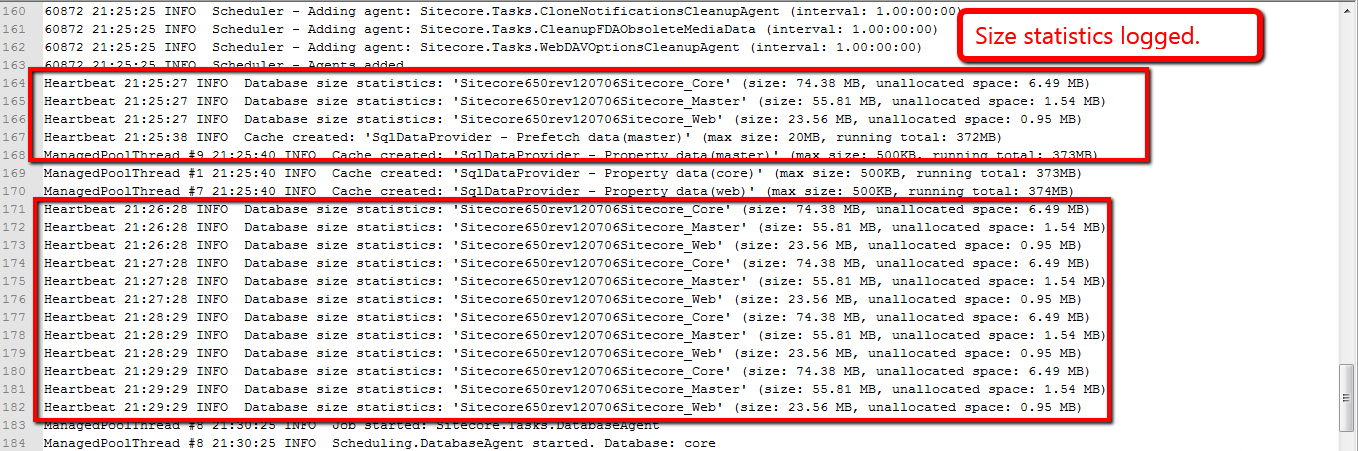
As shown in my log file entries, my hook along with its supporting classes were all hooked up correctly. 🙂
Custom Sitecore Rich Text Editor Button: Inserting Dynamic Content
Last Thursday, I stumbled upon an article discussing how to create and add a custom button to the Rich Text Editor in Sitecore. This article referenced an article written by Mark Stiles — his article set the foundation for me to do this very thing last Spring for a client.
Unlike the two articles above, I had to create two different buttons to insert dynamic content — special html containing references to other items in the Sitecore content tree via Item IDs — which I would ‘fix’ via a RenderField pipeline when a user would visit the page containing this special html. I had modeled my code around the ‘Insert Link’ button by delegating to a helper class to ‘expand’ my dynamic content as the LinkManager class does for Sitecore links.
The unfortunate thing is I cannot show you that code – it’s proprietary code owned by a previous employer.
Instead, I decided to build something similar to illustrate how I did this. I will insert special html that will ultimately transform into jQuery UI dialogs.
First, I needed to create items that represent dialog boxes. I created a new template with two fields — one field containing the dialog box’s heading and the other field containing copy that will go inside of the dialog box:
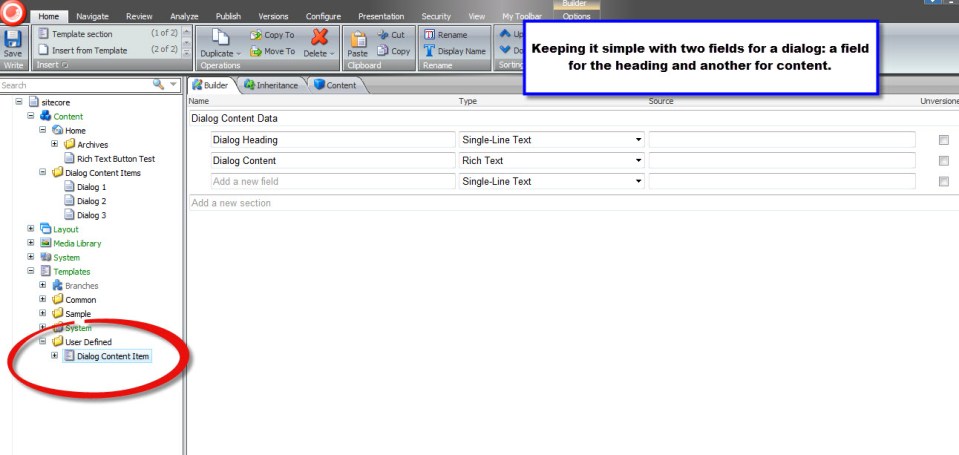
I then created three dialog box items with content that we will use later on when testing:
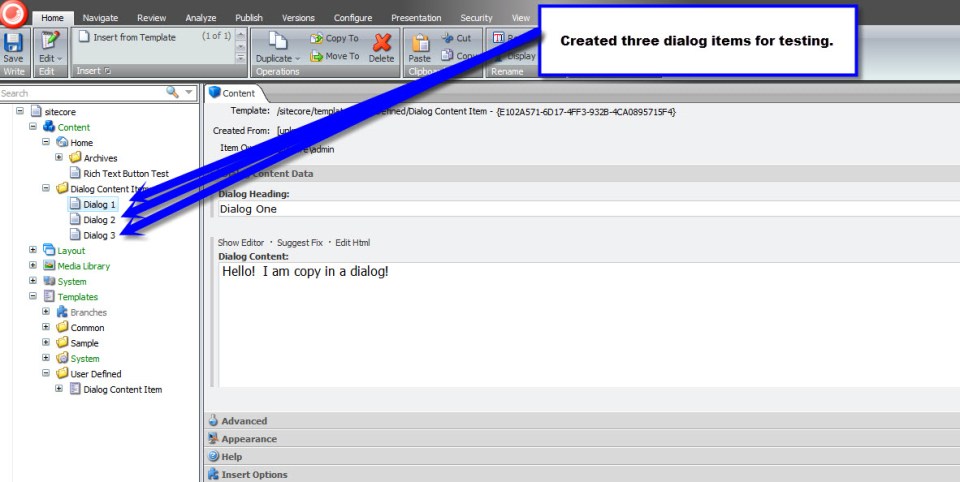
With the help of xml defined in /sitecore/shell/Controls/Rich Text Editor/InsertLink/InsertLink.xml and /sitecore/shell/Controls/Rich Text Editor/InsertImage/InsertImage.xml, I created my new xml control definition in a file named /sitecore/shell/Controls/Rich Text Editor/InsertDialog/InsertDialog.xml:
<?xml version="1.0" encoding="utf-8" ?>
<control xmlns:def="Definition" xmlns="http://schemas.sitecore.net/Visual-Studio-Intellisense">
	<RichText.InsertDialog>

		<!-- Don't forget to set your icon 🙂 -->
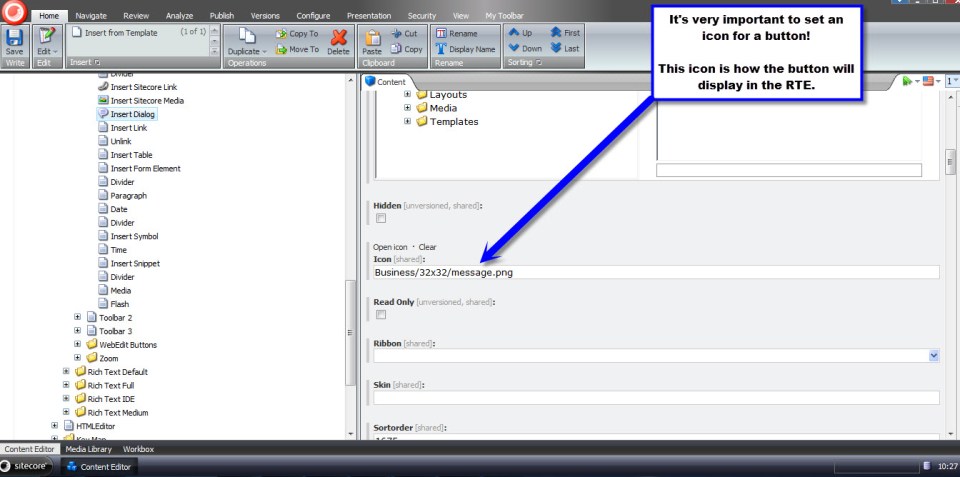
		<FormDialog Icon="Business/32x32/message.png" Header="Insert a Dialog" Text="Select the dialog content item you want to insert." OKButton="Insert Dialog">

			<!-- js reference to my InsertDialog.js script. -->
			<!-- For some strange reason, if the period within the script tag is not present, the dialog form won't work -->
			<script Type="text/javascript" src="/sitecore/shell/Controls/Rich Text Editor/InsertDialog/InsertDialog.js">.</script>

			<!-- Reference to my InsertDialogForm class -->
			<CodeBeside Type="Sitecore.Sandbox.RichTextEditor.InsertDialog.InsertDialogForm,Sitecore.Sandbox" />

			<!-- Root contains the ID of /sitecore/content/Dialog Content Items -->
			<DataContext ID="DialogFolderDataContext"  Root="{99B14D44-5A0F-43B6-988E-94197D73B348}" />
			<GridPanel Width="100%" Height="100%" Style="table-layout:fixed">
				<GridPanel Width="100%" Height="100%" Style="table-layout:fixed" Columns="3" GridPanel.Height="100%">
					<Scrollbox Class="scScrollbox scFixSize" Width="100%" Height="100%" Background="white" Border="1px inset" Padding="0" GridPanel.Height="100%" GridPanel.Width="50%" GridPanel.Valign="top">
						<TreeviewEx ID="DialogContentItems" DataContext="DialogFolderDataContext" Root="true" />
					</Scrollbox>
				</GridPanel>
			</GridPanel>
		</FormDialog>
	</RichText.InsertDialog>
</control>
My dialog form will house one lonely TreeviewEx containing all dialog items in the /sitecore/content/Dialog Content Items folder I created above.
I then created the ‘CodeBeside’ DialogForm class to accompany the xml above:
using System;
using System.Collections.Generic;
using System.Linq;
using System.Text;

using Sitecore.Data;
using Sitecore.Data.Items;
using Sitecore.Diagnostics;
using Sitecore.Shell.Framework;
using Sitecore.Web;
using Sitecore.Web.UI.HtmlControls;
using Sitecore.Web.UI.Pages;
using Sitecore.Web.UI.Sheer;
using Sitecore.Web.UI.WebControls;

namespace Sitecore.Sandbox.RichTextEditor.InsertDialog
{
    public class InsertDialogForm : DialogForm
    {
        protected DataContext DialogFolderDataContext;
        protected TreeviewEx DialogContentItems;

        protected string Mode
        {
            get
            {
                string mode = StringUtil.GetString(base.ServerProperties["Mode"]);

                if (!string.IsNullOrEmpty(mode))
                {
                    return mode;
                }

                return "shell";
            }
            set
            {
                Assert.ArgumentNotNull(value, "value");
                base.ServerProperties["Mode"] = value;
            }
        }

        protected override void OnLoad(EventArgs e)
        {
            Assert.ArgumentNotNull(e, "e");
            base.OnLoad(e);

            if (!Context.ClientPage.IsEvent)
            {
                Inialize();
            }
        }

        private void Inialize()
        {
            SetMode();
            SetDialogFolderDataContextFromQueryString();
        }

        private void SetMode()
        {
            Mode = WebUtil.GetQueryString("mo");
        }

        private void SetDialogFolderDataContextFromQueryString()
        {
            DialogFolderDataContext.GetFromQueryString();
        }

        protected override void OnOK(object sender, EventArgs args)
        {
            Assert.ArgumentNotNull(sender, "sender");
            Assert.ArgumentNotNull(args, "args");

            string selectedItemID = GetSelectedItemIDAsString();

            if (string.IsNullOrEmpty(selectedItemID))
            {
                return;
            }

            string selectedItemPath = GetSelectedItemPath();
            string javascriptArguments = string.Format("{0}, {1}", EscapeJavascriptString(selectedItemID), EscapeJavascriptString(selectedItemPath));

            if (IsWebEditMode())
            {
                SheerResponse.SetDialogValue(javascriptArguments);
                base.OnOK(sender, args);
            }
            else
            {
                string closeJavascript = string.Format("scClose({0})", javascriptArguments);
                SheerResponse.Eval(closeJavascript);
            }
        }

        private string GetSelectedItemIDAsString()
        {
            ID selectedID = GetSelectedItemID();

            if (selectedID != ID.Null)
            {
                return selectedID.ToString();
            }

            return string.Empty;
        }

        private ID GetSelectedItemID()
        {
            Item selectedItem = GetSelectedItem();

            if (selectedItem != null)
            {
                return selectedItem.ID;
            }

            return ID.Null;
        }

        private string GetSelectedItemPath()
        {
            Item selectedItem = GetSelectedItem();

            if (selectedItem != null)
            {
                return selectedItem.Paths.FullPath;
            }

            return string.Empty;
        }

        private Item GetSelectedItem()
        {
            return DialogContentItems.GetSelectionItem();
        }

        private static string EscapeJavascriptString(string stringToEscape)
        {
            return StringUtil.EscapeJavascriptString(stringToEscape);
        }

        protected override void OnCancel(object sender, EventArgs args)
        {
            Assert.ArgumentNotNull(sender, "sender");
            Assert.ArgumentNotNull(args, "args");

            if (IsWebEditMode())
            {
                base.OnCancel(sender, args);
            }
            else
            {
                SheerResponse.Eval("scCancel()");
            }
        }

        private bool IsWebEditMode()
        {
            return string.Equals(Mode, "webedit", StringComparison.InvariantCultureIgnoreCase);
        }
    }
}
This DialogForm basically sends a selected Item’s ID and path back to the client via the scClose() function defined below in a new file named /sitecore/shell/Controls/Rich Text Editor/InsertDialog/InsertDialog.js:
function GetDialogArguments() {
    return getRadWindow().ClientParameters;
}

function getRadWindow() {
  if (window.radWindow) {
        return window.radWindow;
  }

    if (window.frameElement && window.frameElement.radWindow) {
        return window.frameElement.radWindow;
    }

    return null;
}

var isRadWindow = true;

var radWindow = getRadWindow();

if (radWindow) {
  if (window.dialogArguments) {
    radWindow.Window = window;
  }
}

function scClose(dialogContentItemId, dialogContentItemPath) {
	// we're passing back an object holding data needed for inserting our special html into the RTE
	var dialogInfo = {
		dialogContentItemId: dialogContentItemId,
		dialogContentItemPath: dialogContentItemPath
	};

	getRadWindow().close(dialogInfo);
}

function scCancel() {
  getRadWindow().close();
}

if (window.focus && Prototype.Browser.Gecko) {
  window.focus();
}
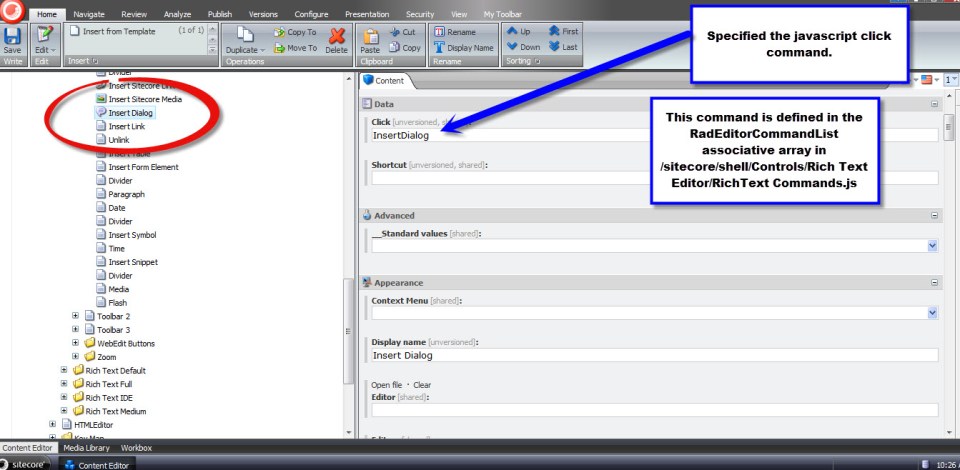
I then had to add a new javascript command in /sitecore/shell/Controls/Rich Text Editor/RichText Commands.js to open my dialog form and map this to a callback function — which I named scInsertDialog to follow the naming convention of other callbacks within this script file — to handle the dialogInfo javascript object above that is passed to it:
RadEditorCommandList["InsertDialog"] = function(commandName, editor, args) {
	scEditor = editor;

	editor.showExternalDialog(
		"/sitecore/shell/default.aspx?xmlcontrol=RichText.InsertDialog&la=" + scLanguage,
		null, //argument
		500,
		400,
		scInsertDialog, //callback
		null, // callback args
		"Insert Dialog",
		true, //modal
		Telerik.Web.UI.WindowBehaviors.Close, // behaviors
		false, //showStatusBar
		false //showTitleBar
	);
};

function scInsertDialog(sender, dialogInfo) {
	if (!dialogInfo) {
		return;
	}

	// build our special html to insert into the RTE
	var placeholderHtml = "<hr class=\"dialog-placeholder\" style=\"width: 100px; display: inline-block; height: 20px;border: blue 4px solid;\""
						+ "data-dialogContentItemId=\"" + dialogInfo.dialogContentItemId +"\" "
						+ "title=\"Dialog Content Path: " + dialogInfo.dialogContentItemPath + "\" />";

	scEditor.pasteHtml(placeholderHtml, "DocumentManager");
}
My callback function builds the special html that will be inserted into the Rich Text Editor. I decided to use a <hr /> tag to keep my html code self-closing — it’s much easier to use a self-closing html tag when doing this, since you don’t have to check whether you’re inserting more special html into preexisting special html. I also did this for the sake of brevity.
I am using the title attribute in my special html in order to assist content authors in knowing which dialog items they’ve inserted into rich text fields. When a dialog blue box is hovered over, a tooltip containing the dialog item’s content path will display.
I’m not completely satisfied with building my special html in this javascript file. It probably should be moved into C# somewhere to prevent the ease of changing it — someone could easily just change it without code compilation, and break how it’s rendered to users. We need this html to be a certain way when ‘fixing’ it in our RenderField pipeline defined later in this article.
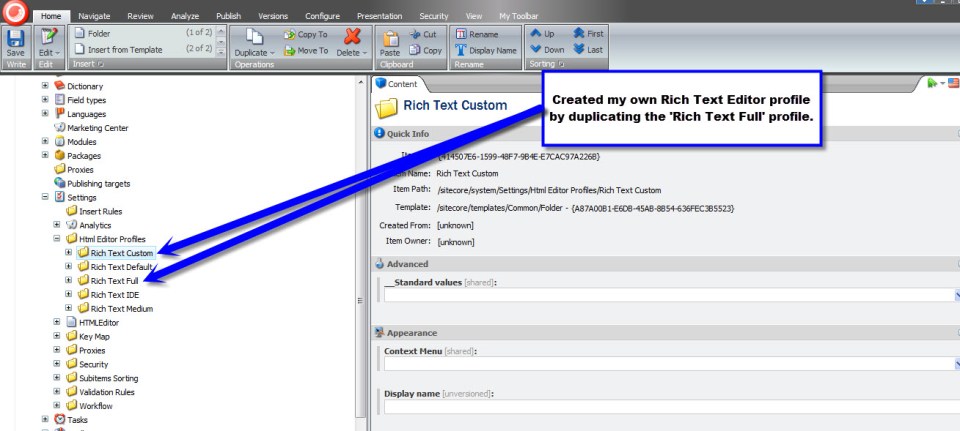
I then went into the core database and created a new Rich Text Editor profile under /sitecore/system/Settings/Html Editor Profiles:
Next, I created a new Html Editor Button (template: /sitecore/templates/System/Html Editor Profiles/Html Editor Button) using the __Html Editor Button master — wow, I never thought I would use the word master again when talking about Sitecore stuff 🙂 — and set its click and icon fields:
Now, we need to ‘fix’ our special html by converting it into presentable html to the user. I do this using the following RenderField pipeline:
using System;
using System.Collections.Generic;
using System.Linq;
using System.Text;

using Sitecore;
using Sitecore.Data.Items;
using Sitecore.Diagnostics;
using Sitecore.Links;
using Sitecore.Pipelines.RenderField;
using Sitecore.Xml.Xsl;

using HtmlAgilityPack;

namespace Sitecore.Sandbox.Pipelines.RenderField
{
    public class ExpandDialogContent
    {
        public void Process(RenderFieldArgs renderFieldArgs)
        {
            if (ShouldFieldBeProcessed(renderFieldArgs))
            {
                ExpandDialogContentTags(renderFieldArgs);
            }
        }

        private bool ShouldFieldBeProcessed(RenderFieldArgs renderFieldArgs)
        {
            return renderFieldArgs.FieldTypeKey.ToLower() == "rich text";
        }

        private void ExpandDialogContentTags(RenderFieldArgs renderFieldArgs)
        {
            HtmlNode documentNode = GetHtmlDocumentNode(renderFieldArgs.Result.FirstPart);
            HtmlNodeCollection dialogs = documentNode.SelectNodes("//hr[@class='dialog-placeholder']");

            foreach (HtmlNode dialogPlaceholder in dialogs)
            {
                HtmlNode dialog = CreateDialogHtmlNode(dialogPlaceholder);

                if (dialog != null)
                {
                    dialogPlaceholder.ParentNode.ReplaceChild(dialog, dialogPlaceholder);
                }
                else
                {
                    dialogPlaceholder.ParentNode.RemoveChild(dialogPlaceholder);
                }
            }

            renderFieldArgs.Result.FirstPart = documentNode.InnerHtml;
        }

        private HtmlNode GetHtmlDocumentNode(string html)
        {
            HtmlDocument htmlDocument = CreateNewHtmlDocument(html);
            return htmlDocument.DocumentNode;
        }

        private HtmlDocument CreateNewHtmlDocument(string html)
        {
            HtmlDocument htmlDocument = new HtmlDocument();
            htmlDocument.LoadHtml(html);
            return htmlDocument;
        }

        private HtmlNode CreateDialogHtmlNode(HtmlNode dialogPlaceholder)
        {
            string dialogContentItemId = dialogPlaceholder.Attributes["data-dialogContentItemId"].Value;
            Item dialogContentItem = TryGetItem(dialogContentItemId);

            if(dialogContentItem != null)
            {
                string heading = dialogContentItem["Dialog Heading"];
                string content = dialogContentItem["Dialog Content"];

                return CreateDialogHtmlNode(dialogPlaceholder.OwnerDocument, heading, content);
            }

            return null;
        }

        private Item TryGetItem(string id)
        {
            try
            {
                return Context.Database.Items[id];
            }
            catch (Exception ex)
            {
                Log.Error(this.ToString(), ex, this);
            }

            return null;
        }

        private static HtmlNode CreateDialogHtmlNode(HtmlDocument htmlDocument, string heading, string content)
        {
            if (string.IsNullOrEmpty(content))
            {
                return null;
            }

            HtmlNode dialog = htmlDocument.CreateElement("div");
            dialog.Attributes.Add("class", "dialog");
            dialog.Attributes.Add("title", heading);
            dialog.InnerHtml = content;

            return dialog;
        }
    }
}
The above uses Html Agility Pack for finding all instances of my special <hr /> tags and creates new html that my jQuery UI dialog code expects. If you’re not using Html Agility Pack, I strongly recommend checking it out — it has saved my hide on numerous occasions.
I then inject this RenderField pipeline betwixt others via a new patch include file named /App_Config/Include/ExpandDialogContent.config:
<?xml version="1.0" encoding="utf-8"?>
<configuration xmlns:patch="http://www.sitecore.net/xmlconfig/">
	<sitecore>
		<pipelines>
			<renderField>
				<processor type="Sitecore.Sandbox.Pipelines.RenderField.ExpandDialogContent, Sitecore.Sandbox"
					patch:after="processor[@type='Sitecore.Pipelines.RenderField.GetInternalLinkFieldValue, Sitecore.Kernel']" />
			</renderField>
		</pipelines>
	</sitecore>
</configuration>
Now, it’s time to see if all of my hard work above has paid off.
I set the rich text field on my Sample Item template to use my new Rich Text Editor profile:

Using the template above, I created a new test item, and opened its rich text field’s editor:

I then clicked my new ‘Insert Dialog’ button and saw Dialog items I could choose to insert:
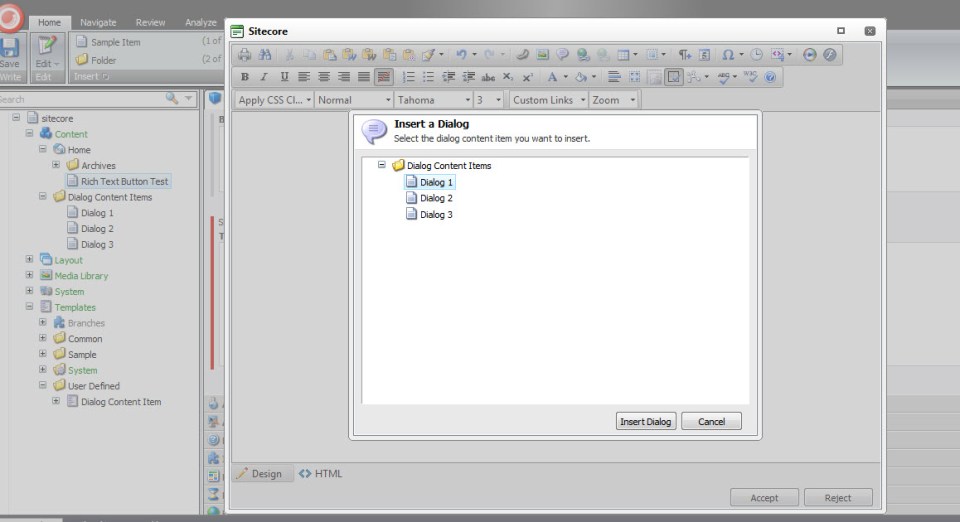
Since I’m extremely excited, I decided to insert them all:

I then forgot which dialog was which — the three uniform blue boxes are throwing me off a bit — so I hovered over the first blue box and saw that it was the first dialog item:

I then snuck a look at the html inserted — it was formatted the way I expected:
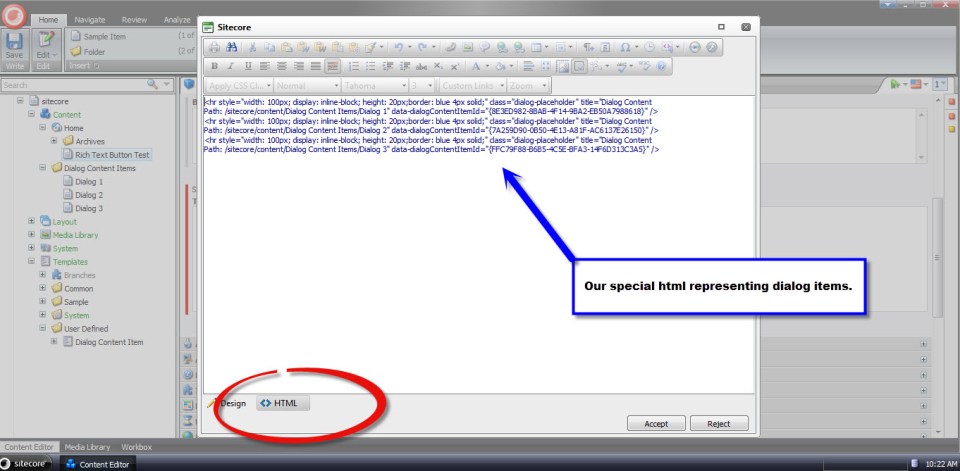
I then saved my item, published and navigated to my test page. My RenderField pipeline fixed the special html as I expected:

I would like to point out that I had to add link and script tags to reference jQuery UI’s css and js files — including the jQuery library — and initialized my dialogs using the jQuery UI Dialog constructor. I have omitted this code.
This does seem like a lot of code to get something so simple to work.
However, it is worth the effort. Not only will you impress your boss and make your clients happy, you’ll also be dubbed the ‘cool kid’ at parties. You really will, I swear. 🙂
Until next time, have a Sitecoretastic day!
Put Things Into Context: Augmenting the Item Context Menu – Part 2
In part 1 of this article, I helped out a friend by walking him through how I added new Publishing menu options — using existing commands in Sitecore — to my Item context menu.
In this final part of the article, I will show you how I created my own custom command and pipeline to copy subitems from one Item in the content tree to another, and wired them up to a new Item context menu option within the ‘Copying’ fly-out menu of the context menu.
Overriding two methods — CommandState QueryState(CommandContext context) and void Execute(CommandContext context) — is paramount when creating a custom Sitecore.Shell.Framework.Commands.Command.
The QueryState() method determines how we should treat the menu option given the current passed context. In other words, should the menu option be enabled, disabled, or hidden? This method serves as a hook — it’s declared virtual — and returns CommandState.Enabled by default. All menu options are enabled by default unless overridden to do otherwise.
The Execute method contains the true “meat and potatoes” of a command’s logic — this method is the place where we do “something” to items passed to it via the CommandContext object. This method is declared abstract in the Command class, ultimately forcing subclasses to define their own logic — there is no default logic for this method.
Here is my command to copy subitems from one location in the content tree to another:
using System;
using System.Collections.Generic;
using System.Collections.Specialized;
using System.Linq;
using System.Text;

using Sitecore.Data;
using Sitecore.Data.Items;
using Sitecore.Diagnostics;
using Sitecore.Shell.Framework;
using Sitecore.Shell.Framework.Commands;
using Sitecore.Shell.Framework.Pipelines;
using Sitecore.Text;
using Sitecore.Web.UI.Sheer;

using Sitecore.Sandbox.Pipelines.Base;
using Sitecore.Sandbox.Pipelines.Utilities;

namespace Sitecore.Sandbox.Commands
{
    public class CopySubitemsTo : Command
    {
        private const string CopySubitemsPipeline = "uiCopySubitems";

        public override void Execute(CommandContext commandContext)
        {
            Assert.ArgumentNotNull(commandContext, "commandContext");
            CopySubitems(commandContext);
        }

        private void CopySubitems(CommandContext commandContext)
        {
            Assert.ArgumentNotNull(commandContext, "commandContext");
            IEnumerable<Item> subitems = GetSubitems(commandContext);
            StartPipeline(subitems);
        }

        public static IEnumerable<Item> GetSubitems(CommandContext commandContext)
        {
            Assert.ArgumentNotNull(commandContext, "commandContext");
            return GetSubitems(commandContext.Items);
        }

        public static IEnumerable<Item> GetSubitems(IEnumerable<Item> items)
        {
            Assert.ArgumentNotNull(items, "items");
            List<Item> list = new List<Item>();

            foreach (Item item in items)
            {
                list.AddRange(item.Children.ToArray());
            }

            return list;
        }

        private void StartPipeline(IEnumerable<Item> subitems)
        {
            Assert.ArgumentNotNull(subitems, "subitems");
            Assert.ArgumentCondition(subitems.Count() > 0, "subitems", "There must be at least one subitem in the collection to copy!");

            IPipelineLauncher pipelineLauncher = CreateNewPipelineLauncher();
            pipelineLauncher.StartPipeline(CopySubitemsPipeline, new CopyItemsArgs(), subitems.First().Database, subitems);
        }

        private IPipelineLauncher CreateNewPipelineLauncher()
        {
            return PipelineLauncher.CreateNewPipelineLauncher(Context.ClientPage);
        }

        public override CommandState QueryState(CommandContext commandContext)
        {
            Assert.ArgumentNotNull(commandContext, "commandContext");
            int subitemsCount = CalculateSubitemsCount(commandContext);

            // if this item has no children, let's disable the menu option
            if (subitemsCount < 1)
            {
                return CommandState.Disabled;
            }

            return base.QueryState(commandContext);
        }

        private static int CalculateSubitemsCount(CommandContext commandContext)
        {
            int count = 0;

            foreach (Item item in commandContext.Items)
            {
                count += item.Children.Count;
            }

            return count;
        }
    }
}
My QueryState() method returns CommandState.Disabled if the current context item — although this does offer the ability to have multiple selected items — has no children. More complex logic could be written here, albeit I chose to keep it simple.
Many of the Commands within Sitecore.Shell.Framework.Commands that deal with Sitecore Items use the utility class Sitecore.Shell.Framework.Items. These commands delegate their core Execute() logic to static methods defined in this class.
Instead of creating my own Items utility class, I included my Comamnd’s logic in my Command class instead — I figure doing this makes it easier to illustrate it here (please Mike, stop writing so many classes :)). However, I would argue it should live in its own class.
The Sitecore.Shell.Framework.Commands.Item class also has a private Start() method that launches a pipeline and passes arguments to it. I decided to copy this code into a utility class that does just that, and used it above in my Command. Here is that class and its interface — the PipelineLauncher class:
using System;
using System.Collections.Generic;
using System.Linq;
using System.Text;

using Sitecore.Data;
using Sitecore.Data.Items;
using Sitecore.Web.UI.Sheer;

namespace Sitecore.Sandbox.Pipelines.Base
{
    public interface IPipelineLauncher
    {
        void StartPipeline(string pipelineName, ClientPipelineArgs args, Database database, IEnumerable<Item> items);
    }
}
using System;
using System.Collections.Generic;
using System.Collections.Specialized;
using System.Linq;
using System.Text;

using Sitecore.Data;
using Sitecore.Data.Items;
using Sitecore.Diagnostics;
using Sitecore.Text;
using Sitecore.Web.UI.Sheer;

using Sitecore.Sandbox.Pipelines.Base;

namespace Sitecore.Sandbox.Pipelines.Utilities
{
    public class PipelineLauncher : IPipelineLauncher
    {
        private const char PipeDelimiter = '|';

        private ClientPage ClientPage { get; set; }

        private PipelineLauncher(ClientPage clientPage)
        {
            SetClientPage(clientPage);
        }

        private void SetClientPage(ClientPage clientPage)
        {
            Assert.ArgumentNotNull(clientPage, "clientPage");
            ClientPage = clientPage;
        }

        public void StartPipeline(string pipelineName, ClientPipelineArgs args, Database database, IEnumerable<Item> items)
        {
            Assert.ArgumentNotNullOrEmpty(pipelineName, "pipelineName");
            Assert.ArgumentNotNull(args, "args");
            Assert.ArgumentNotNull(database, "database");
            Assert.ArgumentNotNull(items, "items");

            ListString listString = new ListString(PipeDelimiter);
            foreach (Item item in items)
            {
                listString.Add(item.ID.ToString());
            }

            NameValueCollection nameValueCollection = new NameValueCollection();
            nameValueCollection.Add("database", database.Name);
            nameValueCollection.Add("items", listString.ToString());

            args.Parameters = nameValueCollection;
            ClientPage.Start(pipelineName, args);
        }

        public static IPipelineLauncher CreateNewPipelineLauncher(ClientPage clientPage)
        {
            return new PipelineLauncher(clientPage);
        }
    }
}
Next, I created a pipeline that does virtually all of the heavy lifting of the command — it is truly the “man behind the curtain”.
Instead of writing all of copying logic to do this from scratch — not a difficult feat to accomplish — I decided to subclass the CopyTo pipeline used by the ‘Copy To’ command. This pipeline already copies multiples items from one location in the content tree to another. The only thing I needed to change was the url of my new dialog (I define a new dialog down below).
using System;
using System.Collections.Generic;
using System.Linq;
using System.Text;

using Sitecore.Configuration;
using Sitecore.Shell.Framework.Pipelines;

namespace Sitecore.Sandbox.Pipelines.UICopySubitems
{
    public class CopySubitems : CopyItems
    {
        private const string DialogUrlSettingName = "Pipelines.UICopySubitems.CopySubitems.DialogUrl";
        private static readonly string DialogUrl = Settings.GetSetting(DialogUrlSettingName);

        protected override string GetDialogUrl()
        {
            return DialogUrl;
        }
    }
}
This is the definition for my new dialog. This is really just a “copy and paste” job of /sitecore/shell/Applications/Dialogs/CopyTo/CopyTo.xml with some changed copy — I changed ‘Copy Item’ to ‘Copy Subitems’.
This dialog uses the same logic as the ‘Copy Item To’ dialog. I saved this xml into a file named /sitecore/shell/Applications/Dialogs/CopySubitemsTo/CopySubitemsTo.xml.
<?xml version="1.0" encoding="utf-8" ?>
<control xmlns:def="Definition" xmlns="http://schemas.sitecore.net/Visual-Studio-Intellisense">
  <CopyTo>
    <FormDialog Icon="Core3/24x24/Copy_To_Folder.png" Header="Copy Subitems To"
      Text="Select the location where you want to copy the subitems to." OKButton="Copy">

      <CodeBeside Type="Sitecore.Shell.Applications.Dialogs.CopyTo.CopyToForm,Sitecore.Client"/>

      <DataContext ID="DataContext" Root="/"/>

      <GridPanel Width="100%" Height="100%" Style="table-layout:fixed">
        <Scrollbox Height="100%" Class="scScrollbox scFixSize scFixSize4 scInsetBorder" Background="white" Padding="0px" GridPanel.Height="100%">
          <TreeviewEx ID="Treeview" DataContext="DataContext" Click="SelectTreeNode" ContextMenu='Treeview.GetContextMenu("contextmenu")' />
        </Scrollbox>

        <Border Padding="4px 0px 4px 0px">
          <GridPanel Width="100%" Columns="2">

            <Border Padding="0px 4px 0px 0px">
              <Literal Text="Name:"/>
            </Border>

            <Edit ID="Filename" Width="100%" GridPanel.Width="100%"/>
          </GridPanel>
        </Border>

      </GridPanel>

    </FormDialog>
  </CopyTo>
</control>
Now, we have to wedge in my new pipeline into the Web.config. I did this by defining my new pipeline in a file named /App_Config/Include/CopySubitems.config. I also added a setting for my dialog url — this is being acquired above in my pipeline class. I vehemently loathe hardcoding things :).
<?xml version="1.0" encoding="utf-8"?>
<configuration xmlns:patch="http://www.sitecore.net/xmlconfig/">
	<sitecore>
		<processors>
			<uiCopySubitems>
				<processor mode="on" type="Sitecore.Sandbox.Pipelines.UICopySubitems.CopySubitems,Sitecore.Sandbox" method="GetDestination"/>
				<processor mode="on" type="Sitecore.Sandbox.Pipelines.UICopySubitems.CopySubitems,Sitecore.Sandbox" method="CheckDestination"/>
				<processor mode="on" type="Sitecore.Sandbox.Pipelines.UICopySubitems.CopySubitems,Sitecore.Sandbox" method="CheckLanguage"/>
				<processor mode="on" type="Sitecore.Sandbox.Pipelines.UICopySubitems.CopySubitems,Sitecore.Sandbox" method="Execute"/>
			</uiCopySubitems>
		</processors>
		<settings>
			<setting name="Pipelines.UICopySubitems.CopySubitems.DialogUrl" value="/sitecore/shell/Applications/Dialogs/Copy Subitems to.aspx" />
		</settings>
	</sitecore>
</configuration>
Next, I had to define my new command in /App_Config/Commands.config:
<?xml version="1.0" encoding="utf-8" ?>
<configuration>

<!-- Some Stuff Defined Here -->

<command name="item:copysubitemsto" type="Sitecore.Sandbox.Commands.CopySubitemsTo, Sitecore.Sandbox" />

<!-- More Stuff Defined Here -->

</configuration>
As I had done in part 1 of this article, I created a new menu item — using the /sitecore/templates/System/Menus/Menu item template. I created a new menu item named ‘Copy Subitems To’ underneath /sitecore/content/Applications/Content Editor/Context Menues/Default/Copying in my Item context menu in the core database:
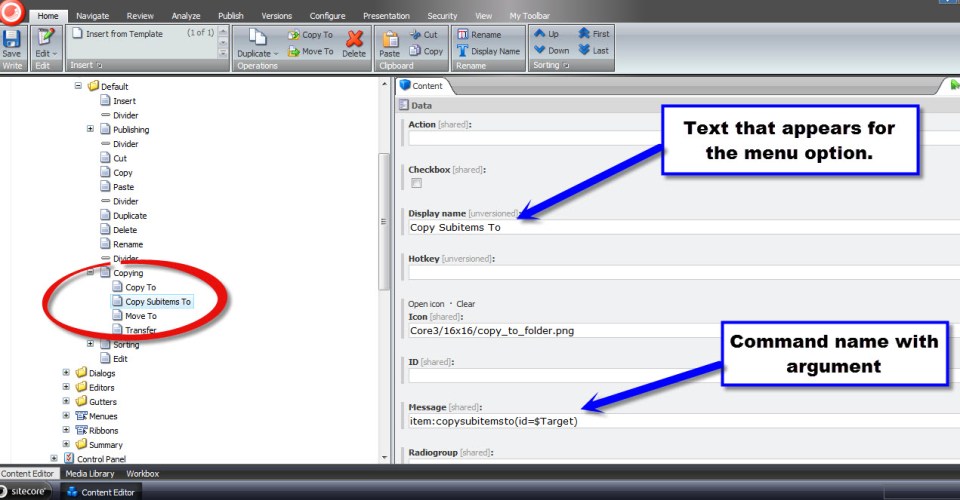
Oh look, I found some subitems I would like to copy somewhere else:

After right-clicking on the parent of my subitems and hovering over ‘Copying’, my beautiful new menu item displays:

I then clicked ‘Copy Subitems To’, and this dialog window appeared. I then selected a destination for my copied subitems, and clicked the ‘Copy’ button:
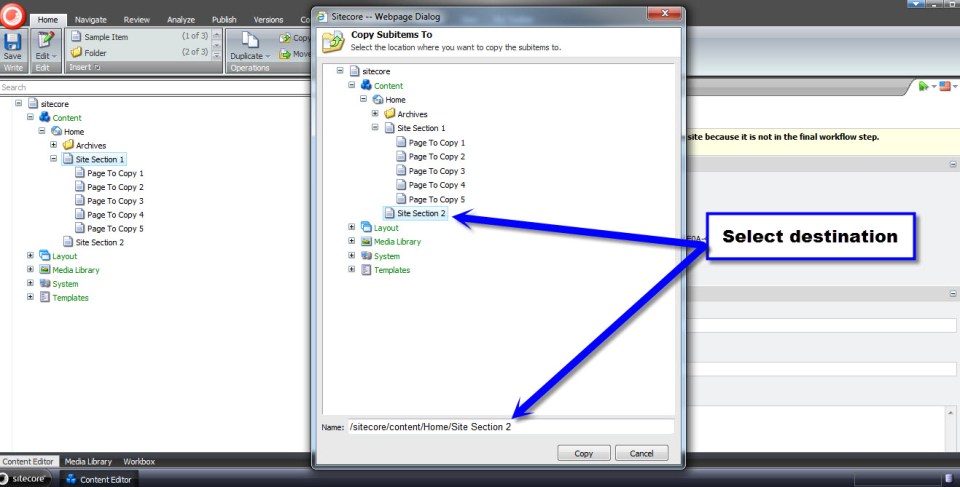
And — voilà! — my subitems were copied to my selected destination:

I had more fun with this later on by copying nested levels of subitems — it will copy all subitems beyond just one level below.
There are a few moving parts here, but nothing too overwhelming.
I hope you try out building your own custom Item context menu option. Trust me, you will have lots of fun building one. I know I did!
Until next time, happy coding!
Seek and Destroy: Root Out Newlines and Carriage Returns in Multi-Line Text Fields
A couple of days ago, Sitecore MVP Brian Pedersen wrote an article discussing how newlines and carriage returns in Multi-Line Text fields can intrusively launch Sitecore’s “Do you want to save the changes to the item?” dialog box when clicking away from an item — even when you’ve made no changes to the item. Brian then offered an extension method on the String class as a way to remedy this annoyance.
However, Brian’s extension method cannot serve a solution on its own. It has to be invoked from somewhere to stamp out the substring malefactors — newlines (“\n”), carriage returns (“\r”), tabs (“\t”), and non-breaking spaces (“\xA0”).
This article gives one possible solution for uprooting these from Multi-Line Text fields within the Sitecore client by removing them upon item save.
First, I created a utility class that removes specified substrings from a string passed to it.
using System;
using System.Collections.Generic;
using System.Linq;
using System.Text;

namespace Sitecore.Sandbox.Utilities.StringUtilities.Base
{
    public interface ISubstringAnnihilator
    {
        string AnnihilateSubstrings(string input);
    }
}
using System;
using System.Collections.Generic;
using System.Linq;
using System.Text;

using Sitecore.Sandbox.Utilities.StringUtilities.Base;

namespace Sitecore.Sandbox.Utilities.StringUtilities
{
    public class SubstringAnnihilator : ISubstringAnnihilator
    {
        private const string ReplacementString = " ";
        private static readonly IEnumerable<string> SubstringsToAnnihilate = new string[] { "\r\n", "\n", "\r", "\t", "\xA0"};

        private SubstringAnnihilator()
        {
        }

        public string AnnihilateSubstrings(string input)
        {
            foreach (string substringToAnnihilate in SubstringsToAnnihilate)
            {
                input = input.Replace(substringToAnnihilate, ReplacementString);
            }

            return input;
        }

        public static ISubstringAnnihilator CreateNewSubstringAnnihilator()
        {
            return new SubstringAnnihilator();
        }
    }
}
It would probably be ideal to move the target substrings defined within the SubstringsToAnnihilate string array into a configuration file or even into Sitecore itself. I decided not introduce that complexity here for the sake of brevity.
Next, I created a Save pipeline. I used .NET Reflector to see how other Save pipelines in /configuration/sitecore/processors/saveUI/ in the Web.config were built — I used these as a model for creating my own — and used my SubstringAnnihilator utility class to seek and destroy the target substrings (well, just replace them with a space :)).
using System;
using System.Collections.Generic;
using System.Linq;
using System.Text;

using Sitecore.Data;
using Sitecore.Data.Fields;
using Sitecore.Data.Items;
using Sitecore.Diagnostics;
using Sitecore.Pipelines.Save;

using Sitecore.Sandbox.Utilities.StringUtilities;
using Sitecore.Sandbox.Utilities.StringUtilities.Base;

namespace Sitecore.Sandbox.Pipelines.SaveUI
{
    public class FixMultiLineTextFields
    {
        private static readonly ISubstringAnnihilator Annihilator = SubstringAnnihilator.CreateNewSubstringAnnihilator();

        public void Process(SaveArgs saveArgs)
        {
            FixAllItemFieldsWhereApplicable(saveArgs);
        }

        private static void FixAllItemFieldsWhereApplicable(SaveArgs saveArgs)
        {
            AssertSaveArgs(saveArgs);
            foreach (SaveArgs.SaveItem saveItem in saveArgs.Items)
            {
                FixSaveItemFieldsWhereApplicable(saveItem);
            }
        }

        private static void AssertSaveArgs(SaveArgs saveArgs)
        {
            Assert.ArgumentNotNull(saveArgs, "saveArgs");
            Assert.IsNotNull(saveArgs.Items, "saveArgs.Items");
        }

        private static void FixSaveItemFieldsWhereApplicable(SaveArgs.SaveItem saveItem)
        {
            Item item = GetItem(saveItem);
            foreach (SaveArgs.SaveField saveField in saveItem.Fields)
            {
                FixSaveItemFieldIfApplicable(item, saveField);
            }
        }

        private static Item GetItem(SaveArgs.SaveItem saveItem)
        {
            if (saveItem != null)
            {
                return Client.ContentDatabase.Items[saveItem.ID, saveItem.Language, saveItem.Version];
            }

            return null;
        }

        private static void FixSaveItemFieldIfApplicable(Item item, SaveArgs.SaveField saveField)
        {
            if (ShouldEnsureFieldValue(item, saveField))
            {
                saveField.Value = Annihilator.AnnihilateSubstrings(saveField.Value);
            }
        }

        private static bool ShouldEnsureFieldValue(Item item, SaveArgs.SaveField saveField)
        {
            Field field = item.Fields[saveField.ID];
            return ShouldEnsureFieldValue(field);
        }

        private static bool ShouldEnsureFieldValue(Field field)
        {
            return field.TypeKey == "memo"
                    || field.TypeKey == "multi-line text";
        }
    }
}
Now, it’s time to insert my new Save pipeline within the SaveUI pipeline stack. I’ve done this with my /App_Config/Include/FixMultiLineTextFields.config file:
<?xml version="1.0" encoding="utf-8"?>
<configuration xmlns:patch="http://www.sitecore.net/xmlconfig/">
	<sitecore>
		<processors>
			<saveUI>
				<processor mode="on" type="Sitecore.Sandbox.Pipelines.SaveUI.FixMultiLineTextFields, Sitecore.Sandbox" patch:after="processor[@type='Sitecore.Pipelines.Save.TightenRelativeImageLinks, Sitecore.Kernel']" />
			</saveUI>
		</processors>
	</sitecore>
</configuration>
Let’s take the above for a spin. I’ve inserted a sentence with newlines after every word within it into my Blurb Multi-Line Text field:
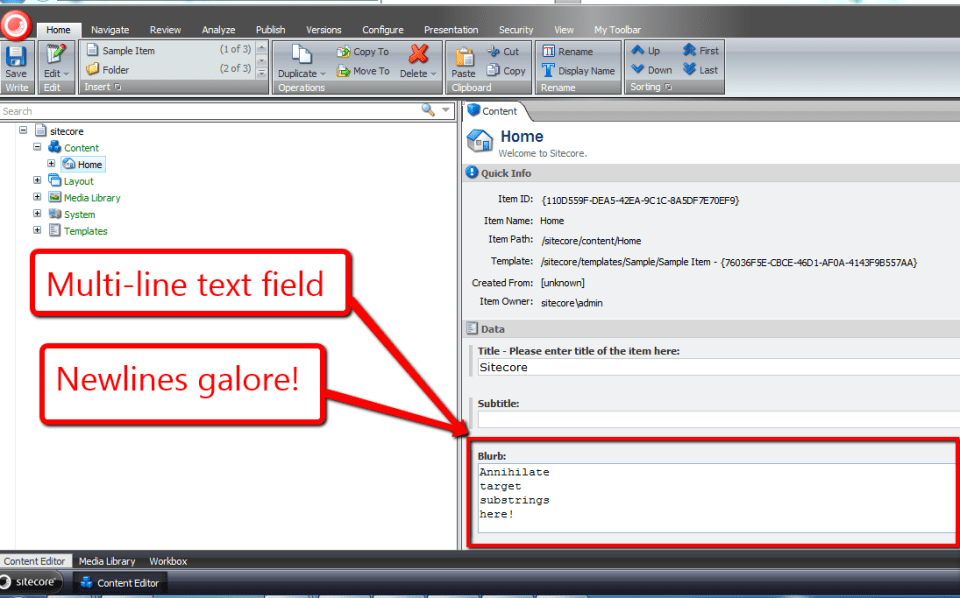
Now, I’ve clicked save, and all newlines within my Blurb Multi-Line Text field have been annihilated:
I would like to thank to Brian Pedersen for writing his article the other day — it served as the bedrock for this one, and kindled something in me to write the code above.
Keep smiling when coding!
 SitecoreJunkie.com