Home » Recycle Bin
Category Archives: Recycle Bin
Delete Associated Files on the Filesystem of Sitecore Items Deleted From the Recycle Bin
Last week a question was asked in one of the SDN forums on how one should go about deleting files on the filesystem that are associated with Items that are permanently deleted from the Recycle Bin — I wasn’t quite clear on what the original poster meant by files being linked to Items inside of Sitecore, but I assumed this relationship would be defined somewhere, or somehow.
After doing some research, I reckoned one could create a new command based on Sitecore.Shell.Framework.Commands.Archives.Delete in Sitecore.Kernel.dll to accomplish this:
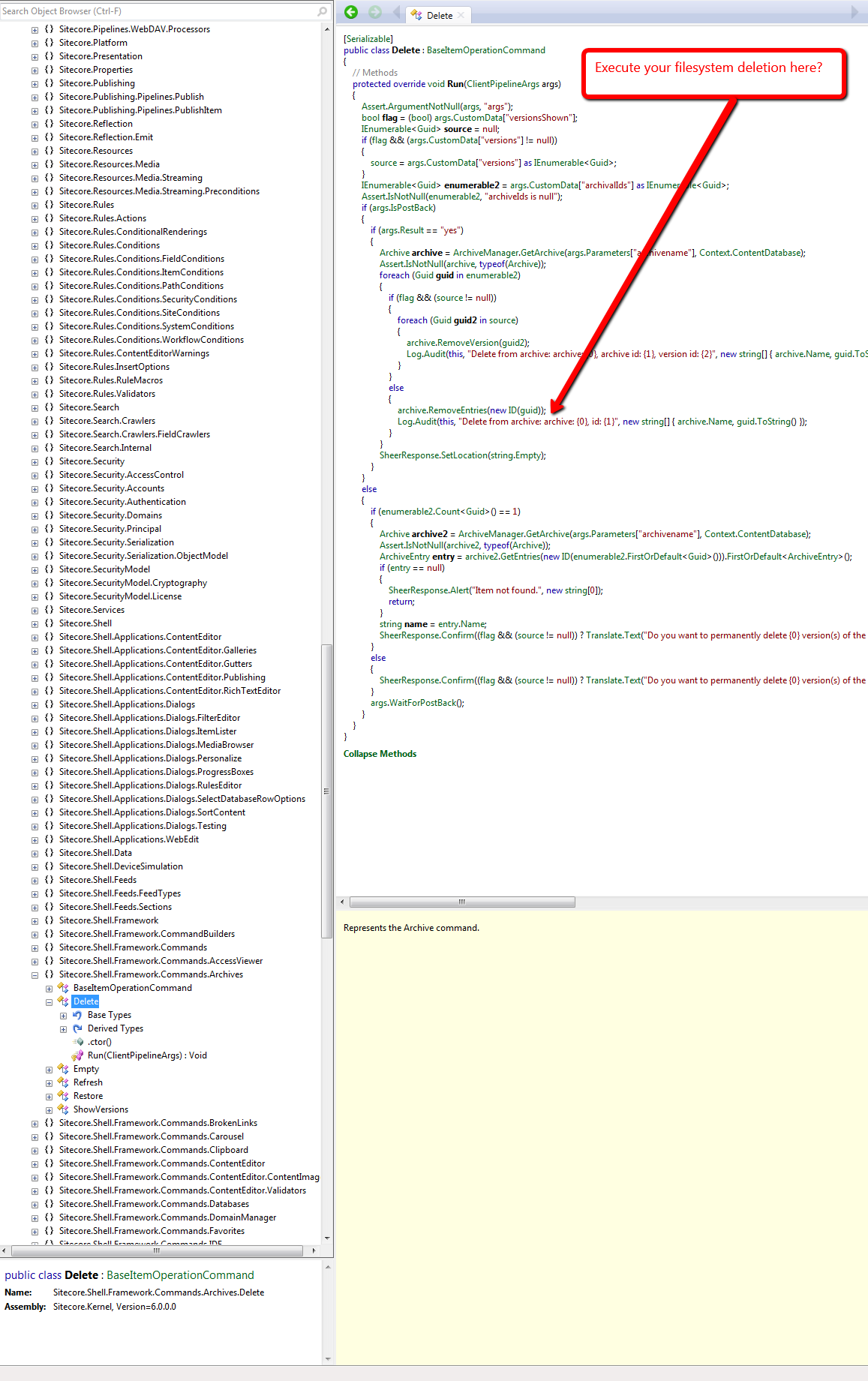
However, I wasn’t completely satisfied with this approach, especially when it would require a substantial amount of copying and pasting of code — a practice that I vehemently abhor — and decided to seek out a different, if not better, way of doing this.
From my research, I discovered that one could just create his/her own Archive class — it would have to ultimately derive from Sitecore.Data.Archiving.Archive in Sitecore.Kernel — which would delete a file on the filesystem associated with a Sitecore Item:
using System;
using System.IO;
using System.Linq;
using System.Web;

using Sitecore.Configuration;
using Sitecore.Data;
using Sitecore.Data.Archiving;
using Sitecore.Data.DataProviders.Sql;
using Sitecore.Diagnostics;

namespace Sitecore.Sandbox.Data.Archiving
{
    public class FileSystemHookSqlArchive : SqlArchive
    {
        private static readonly string FolderPath = GetFolderPath();

        public FileSystemHookSqlArchive(string name, Database database)
            : base(name, database)
        {
        }

        public override void RemoveEntries(ArchiveQuery query)
        {
            DeleteFromFileSystem(query);
            base.RemoveEntries(query);
        }

        protected virtual void DeleteFromFileSystem(ArchiveQuery query)
        {
            if (query.ArchivalId == Guid.Empty)
            {
                return;
            }

            Guid itemId = GetItemId(query.ArchivalId);
            if (itemId == Guid.Empty)
            {
                return;
            }

            string filePath = GetFilePath(itemId.ToString());
            if (string.IsNullOrWhiteSpace(filePath))
            {
                return;
            }

            TryDeleteFile(filePath);
        }

        private void TryDeleteFile(string filePath)
        {
            try
            {
                if (File.Exists(filePath))
                {
                    File.Delete(filePath);
                }
            }
            catch (Exception ex)
            {
                Log.Error(this.ToString(), ex, this);
            }
        }

        public virtual Guid GetItemId(Guid archivalId)
        {
            if (archivalId == Guid.Empty)
            {
                return Guid.Empty;
            }

            ArchiveQuery query = new ArchiveQuery
            {
                ArchivalId = archivalId
            };

            SqlStatement selectStatement = GetSelectStatement(query, "{0}ItemId{1}");
            if (selectStatement == null)
            {
                return Guid.Empty;
            }
            return GetGuid(selectStatement.Sql, selectStatement.GetParameters(), Guid.Empty);
        }

        private Guid GetGuid(string sql, object[] parameters, Guid defaultValue)
        {
            using (DataProviderReader reader = Api.CreateReader(sql, parameters))
            {
                if (!reader.Read())
                {
                    return defaultValue;
                }
                return Api.GetGuid(0, reader);
            }
        }

        private static string GetFilePath(string fileName)
        {
            string filePath = Directory.GetFiles(FolderPath, string.Concat(fileName, "*.*")).FirstOrDefault();
            if (!string.IsNullOrWhiteSpace(filePath))
            {
                return filePath;
            }

            return string.Empty;
        }

        private static string GetFolderPath()
        {
            return HttpContext.Current.Server.MapPath(Settings.GetSetting("FileSystemHookSqlArchive.Folder"));
        }
    }
}
In the subclass of Sitecore.Data.Archiving.SqlArchive above — I’m using Sitecore.Data.Archiving.SqlArchive since I’m using SqlServer for my Sitecore instance — I try to find a file that is named after its associated Item’s ID — minus the curly braces — in a folder that I’ve mapped in a configuration include file (see below).
I first have to get the Item’s ID from the database using the supplied ArchivalId — this is all the calling code gives us, so we have to make do with what we have.
If the file exists, we try to delete it — we do this before letting the base class delete the Item from Recycle Bin so that we can retrieve the Item’s ID from the database before it’s removed from the Archive database table — and log any errors we encounter upon exception.
I then hooked in an instance of the above Archive class in a custom Sitecore.Data.Archiving.ArchiveProvider class:
using System.Xml;

using Sitecore.Data;
using Sitecore.Data.Archiving;
using Sitecore.Xml;

namespace Sitecore.Sandbox.Data.Archiving
{
    public class FileSystemHookSqlArchiveProvider : SqlArchiveProvider
    {
        protected override Archive GetArchive(XmlNode configNode, Database database)
        {
            string attribute = XmlUtil.GetAttribute("name", configNode);
            if (string.IsNullOrEmpty(attribute))
            {
                return null;
            }

            return new FileSystemHookSqlArchive(attribute, database);
        }
    }
}
The above class — which derives from Sitecore.Data.Archiving.SqlArchiveProvider since I’m using SqlServer — only overrides its base class’s GetArchive factory method. We instantiate an instance of our Archive class instead of the “out of the box” Sitecore.Data.Archiving.SqlArchive class within it.
I then had to replace the “out of the box” Sitecore.Data.Archiving.ArchiveProvider reference, and define the location of our files in the following configuration file:
<?xml version="1.0" encoding="utf-8"?>
<configuration xmlns:patch="http://www.sitecore.net/xmlconfig/">
  <sitecore>
    <archives defaultProvider="sql" enabled="true">
      <providers>
        <add name="sql" patch:instead="add[@type='Sitecore.Data.Archiving.SqlArchiveProvider, Sitecore.Kernel']" type="Sitecore.Sandbox.Data.Archiving.FileSystemHookSqlArchiveProvider, Sitecore.Sandbox" database="*"/>
      </providers>
    </archives>
    <settings>
      <setting name="FileSystemHookSqlArchive.Folder" value="/test/" />
    </settings>
  </sitecore>
</configuration>
Let’s test this out.
I first created a test Item to delete:

I then had to create a test file on the filesystem in my test folder — the test folder lives in my Sitecore instance’s website root:

I deleted the test Item from the content tree, opened up the Recycle Bin, selected the test Item, and got an itchy trigger finger — I want to delete the Item forever 🙂 :

After clicking the Delete button, I saw that the file on the filesystem was deleted as well:

If you have any thoughts on this, or recommendations around making it better, please leave a comment.
Delete An Item Across Multiple Databases in Sitecore
Have you ever thought “wouldn’t it be handy to have the ability to delete an item across multiple databases in Sitecore?” In other words, wouldn’t it be nice to not have to publish the parent of an item — with sub-items — after deleting it, just to remove it from a target database?
This particular thought has crossed my mind more than once, and I decided to do something about it. This post showcases what I’ve done.
I spent some time surfing through Sitecore.Kernel.dll and Sitecore.Client.dll in search of a dialog that allows users to select multiple options simultaneously but came up shorthanded — if you are aware of one, please leave a comment — so I had to roll my own:
<?xml version="1.0" encoding="utf-8" ?>
<control xmlns:def="Definition" xmlns="http://schemas.sitecore.net/Visual-Studio-Intellisense">
	<DeleteInDatabases>
		<FormDialog ID="DeleteInDatabasesDialog" Icon="Business/32x32/data_delete.png" Header="Delete Item In Databases"
		  Text="Select the databases where you want to delete the item." OKButton="Delete">

		  <CodeBeside Type="Sitecore.Sandbox.Shell.Applications.Dialogs.DeleteInDatabasesForm,Sitecore.Sandbox"/>
		  <GridPanel Width="100%" Height="100%" Style="table-layout:fixed">
			<Border Padding="4" ID="Databases"/>
		  </GridPanel>
		</FormDialog>
	</DeleteInDatabases>
</control>
using System;
using System.Collections.Generic;
using System.Linq;
using System.Web.UI;
using System.Web.UI.HtmlControls;

using Sitecore.Configuration;
using Sitecore.Data;
using Sitecore.Data.Items;
using Sitecore.Diagnostics;
using Sitecore.Web;
using Sitecore.Web.UI.HtmlControls;
using Sitecore.Web.UI.Pages;
using Sitecore.Web.UI.Sheer;

namespace Sitecore.Sandbox.Shell.Applications.Dialogs
{
    public class DeleteInDatabasesForm : DialogForm
    {
        private const string DatabaseCheckboxIDPrefix = "db_";

        protected Border Databases;

        private string _ItemId;
        protected string ItemId
        {
            get
            {
                if (string.IsNullOrWhiteSpace(_ItemId))
                {
                    _ItemId = WebUtil.GetQueryString("id");
                }

                return _ItemId;
            }
        }

        protected override void OnLoad(EventArgs e)
        {
            AddDatabaseCheckboxes();
            base.OnLoad(e);
        }

        private void AddDatabaseCheckboxes()
        {
            Databases.Controls.Clear();
            foreach (string database in GetDatabasesForSelection())
            {
                HtmlGenericControl checkbox = new HtmlGenericControl("input");
                Databases.Controls.Add(checkbox);
                checkbox.Attributes["type"] = "checkbox";
                checkbox.Attributes["value"] = database;
                string checkboxId = string.Concat(DatabaseCheckboxIDPrefix, database);
                checkbox.ID = checkboxId;
                HtmlGenericControl label = new HtmlGenericControl("label");
                Databases.Controls.Add(label);
                label.Attributes["for"] = checkboxId;
                label.InnerText = database;
                Databases.Controls.Add(new LiteralControl("<br>"));
            }
        }

        private static IEnumerable<string> GetDatabasesForSelection()
        {
            return WebUtil.GetQueryString("db").Split("|".ToCharArray(), StringSplitOptions.RemoveEmptyEntries);
        }

        protected override void OnOK(object sender, EventArgs args)
        {
            IEnumerable<string> selectedDatabases = GetSelectedDabases();
            if (!selectedDatabases.Any())
            {
                SheerResponse.Alert("Please select at least one database!");
                return;
            }

            DeleteItemInDatabases(selectedDatabases, ItemId);
            SheerResponse.Alert("The item has been deleted in all selected databases!");
            base.OnOK(sender, args);
        }

        private static IEnumerable<string> GetSelectedDabases()
        {
            IList<string> databases = new List<string>();
            foreach (string id in Context.ClientPage.ClientRequest.Form.Keys)
            {
                if (!string.IsNullOrWhiteSpace(id) && id.StartsWith(DatabaseCheckboxIDPrefix))
                {
                    databases.Add(id.Substring(3));
                }
            }

            return databases;
        }

        private static void DeleteItemInDatabases(IEnumerable<string> databases, string itemId)
        {
            foreach(string database in databases)
            {
                DeleteItemInDatabase(database, itemId);
            }
        }

        private static void DeleteItemInDatabase(string databaseName, string itemId)
        {
            Assert.ArgumentNotNullOrEmpty(databaseName, "databaseName");
            Assert.ArgumentNotNullOrEmpty(itemId, "itemId");
            Database database = Factory.GetDatabase(databaseName);
            Assert.IsNotNull(database, "Invalid database!");
            DeleteItem(database.GetItem(itemId));
        }

        private static void DeleteItem(Item item)
        {
            Assert.ArgumentNotNull(item, "item");
            if (Settings.RecycleBinActive)
            {
                item.Recycle();
            }
            else
            {
                item.Delete();
            }
        }
    }
}
The dialog above takes in an item’s ID — this is the ID of the item the user has chosen to delete across multiple databases — and a list of databases a user can choose from as checkboxes.
Ideally the item should exist in each database, albeit the code will throw an exception via an assertion in the case when client code supplies a database, the user selects it, and the item does not live in it.
If the user does not check off one checkbox, and clicks the ‘Delete’ button, an ‘Alert’ box will let the user know s/he must select at least one database.
When databases are selected, and the ‘Delete’ button is clicked, the item will be deleted — or put into the Recycle Bin — in all selected databases.
Now we need a way to launch this dialog. I figured it would make sense to have it be available from the item context menu — just as the ‘Delete’ menu option is available there “out of the box” — and built the following command for it:
using System;
using System.Collections.Generic;
using System.Linq;

using Sitecore.Configuration;
using Sitecore.Data.Items;
using Sitecore.Diagnostics;
using Sitecore.Shell.Framework.Commands;
using Sitecore.Text;
using Sitecore.Web.UI.Sheer;

namespace Sitecore.Sandbox.Commands
{
    public class DeleteInDatabases : Command
    {
        public override void Execute(CommandContext commandContext)
        {
            Context.ClientPage.Start(this, "ShowDialog", CreateNewClientPipelineArgs(GetItem(commandContext)));
        }

        private static ClientPipelineArgs CreateNewClientPipelineArgs(Item item)
        {
            Assert.ArgumentNotNull(item, "item");
            ClientPipelineArgs args = new ClientPipelineArgs();
            args.Parameters["ItemId"] = item.ID.ToString();
            args.Parameters["ParentId"] = item.ParentID.ToString();
            return args;
        }

        private void ShowDialog(ClientPipelineArgs args)
        {
            if (!args.IsPostBack)
            {
                SheerResponse.ShowModalDialog
                (
                    GetDialogUrl
                    (
                        GetDatabasesForItem(args.Parameters["ItemId"]),
                        args.Parameters["ItemId"]
                    ),
                    "300px",
                    "500px",
                    string.Empty,
                    true
               );

               args.WaitForPostBack();
            }
            else
            {
                RefreshChildren(args.Parameters["ParentId"]);
            }
        }

        private void RefreshChildren(string parentId)
        {
            Assert.ArgumentNotNullOrEmpty(parentId, "parentId");
            Context.ClientPage.SendMessage(this, string.Format("item:refreshchildren(id={0})", parentId));
        }

        public override CommandState QueryState(CommandContext commandContext)
        {
            bool shouldEnable = Context.User.IsAdministrator
                                && IsInDatabasesOtherThanCurrentContent(GetItem(commandContext));

            if (shouldEnable)
            {
                return CommandState.Enabled;
            }

            return CommandState.Hidden;
        }

        private static bool IsInDatabasesOtherThanCurrentContent(Item item)
        {
            Assert.ArgumentNotNull(item, "item");
            return GetDatabasesForItem(item.ID.ToString()).Count() > 1;
        }
        private static Item GetItem(CommandContext commandContext)
        {
            Assert.ArgumentNotNull(commandContext, "commandContext");
            Assert.ArgumentNotNull(commandContext.Items, "commandContext.Items");
            return commandContext.Items.FirstOrDefault();
        }

        private static IEnumerable<string> GetDatabasesForItemExcludingContentDB(string id)
        {
            return GetDatabasesForItem(id).Where(db => string.Equals(db, Context.ContentDatabase.Name, StringComparison.CurrentCultureIgnoreCase));
        }

        private static IEnumerable<string> GetDatabasesForItem(string id)
        {
            Assert.ArgumentNotNullOrEmpty(id, "id");
            return (from database in Factory.GetDatabases()
                    let itemInDatabase = database.GetItem(id)
                    where itemInDatabase != null
                    select database.Name).ToList();
        }

        private static string GetDialogUrl(IEnumerable<string> databases, string id)
        {
            Assert.ArgumentNotNullOrEmpty(id, "id");
            Assert.ArgumentNotNull(databases, "databases");
            Assert.ArgumentCondition(databases.Any(), "databases", "At least one database should be supplied!");
            UrlString urlString = new UrlString(UIUtil.GetUri("control:DeleteInDatabases"));
            urlString.Append("id", id);
            urlString.Append("db", string.Join("|", databases));
            return urlString.ToString();
        }
    }
}
The command is only visible when the item is in another database other than the context content database and the user is an admin.
When the item context menu option is clicked, the command passes a pipe delimited list of database names — only databases that contain the item — and the item’s ID to the dialog through its query string.
Once the item is deleted via the dialog, control is returned back to the command, and it then refreshes all siblings of the deleted item — this is done so the deleted item is removed from the content tree if the context content database was chosen in the dialog.
I then made this command available in Sitecore using a configuration include file:
<?xml version="1.0"?>
<configuration xmlns:patch="http://www.sitecore.net/xmlconfig/">
  <sitecore>
    <commands>
      <command name="item:DeleteInDatabases" type="Sitecore.Sandbox.Commands.DeleteInDatabases,Sitecore.Sandbox"/>
    </commands>
  </sitecore>
</configuration>
I’ve omitted the step on how I’ve wired this up to the item context menu in the core database. For more information on adding to the item context menu, please see part one and part two of my post showing how to do this.
Let’s see this in action.
I navigated to a test item that lives in the master and web databases, and launched its item context menu:

I clicked the ‘Delete in Databases’ menu option, and was presented with this dialog:
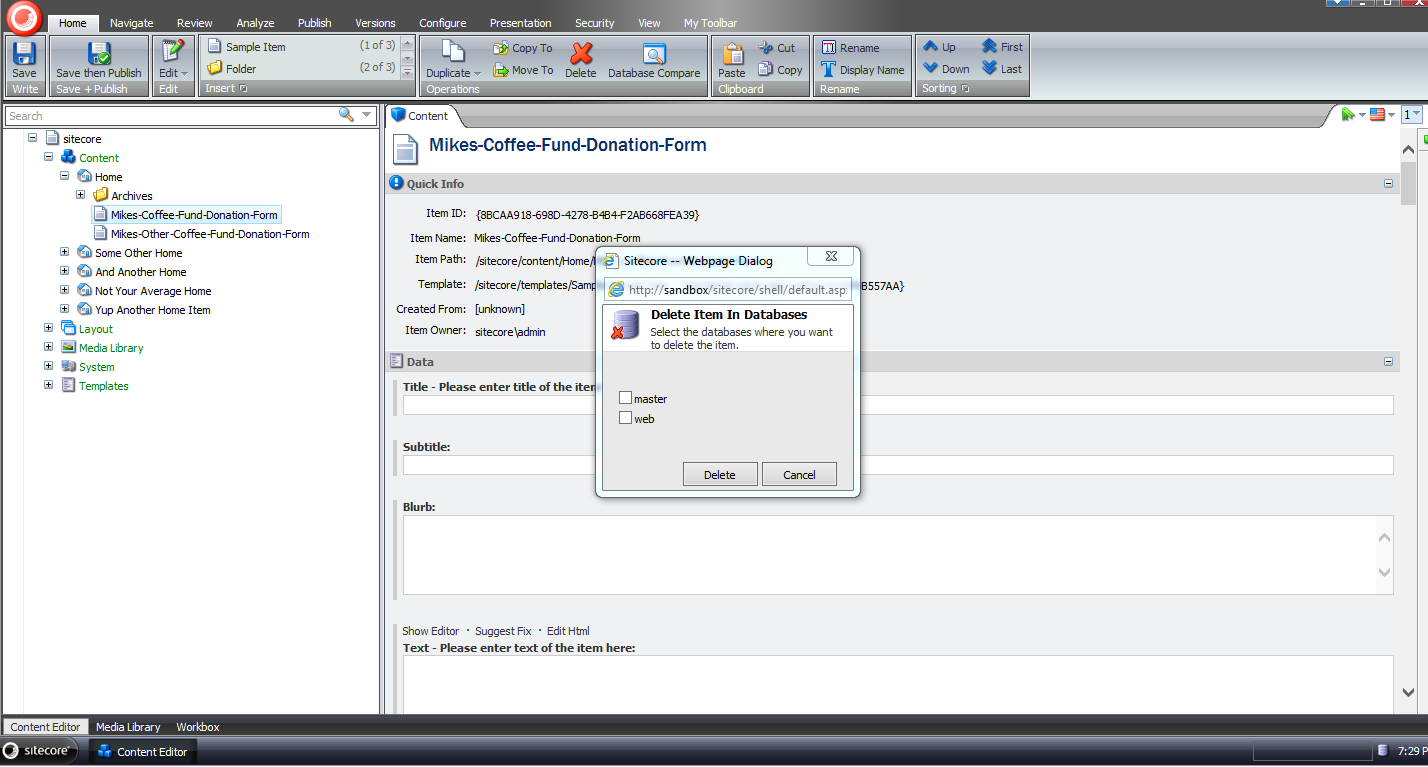
I got excited and forgot to select a database before clicking the ‘Delete’ button:

I then selected all databases, and clicked ‘Delete’:

When the dialog closed, we can see that our test item is gone:

Rest assured, it’s in the Recycle Bin:

It was also deleted in the web database as well — I’ve omitted screenshots of this since they would be identical to the last two screenshots above.
If you have any thoughts on this, or recommendations on making it better, please share in a comment.
Until next time, have a Sitecoretastic day!
Go Green: Put Items in the Recycle Bin When Deleting Via the Sitecore Item Web API
This morning I discovered that items are permanently deleted by the Sitecore Item Web API during a delete action. This is probably called out somewhere in its developer’s guide but I don’t recall having read this.
Regardless of whether it’s highlighted somewhere in documentation, I decided to investigate why this happens.
After combing through Sitecore Item Web API pipelines defined in \App_Config\Include\Sitecore.ItemWebApi.config and code in Sitecore.ItemWebApi.dll, I honed in on the following:
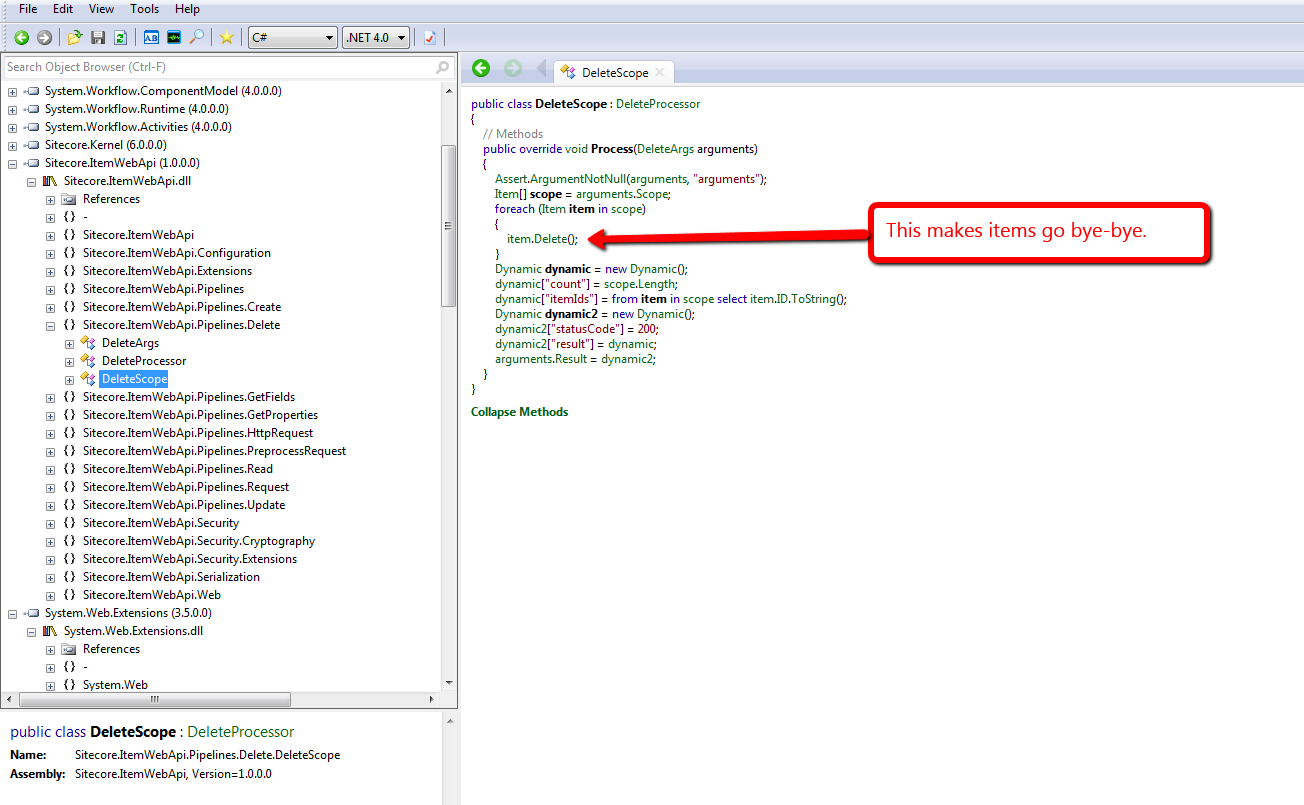
This above code lives in the only itemWebApiDelete pipeline processor that comes with the Sitecore Item Web API, and this processor can be found at /configuration/sitecore/pipelines/itemWebApiDelete/processor[@type=”Sitecore.ItemWebApi.Pipelines.Delete.DeleteScope, Sitecore.ItemWebApi”] in the \App_Config\Include\Sitecore.ItemWebApi.config file.
I don’t know about you, but I’m not always comfortable with deleting items permanently in Sitecore. I heavily rely on Sitecore’s Recycle Bin — yes, I have deleted items erroneously in the past, but recovered quickly by restoring them from the Recycle Bin (I hope I’m not the only one who has done this. :-/)
Unearthing the above prompted me to write a new itemWebApiDelete pipeline processor that puts items in the Recycle Bin when the Recycle Bin setting — see /configuration/sitecore/settings/setting[@name=”RecycleBinActive”] in the Web.config — is enabled:
using System.Collections.Generic;
using System.Linq;

using Sitecore.Configuration;
using Sitecore.Data;
using Sitecore.Data.Items;
using Sitecore.Diagnostics;
using Sitecore.ItemWebApi;
using Sitecore.ItemWebApi.Pipelines.Delete;

namespace Sitecore.Sandbox.ItemWebApi.Pipelines.Delete
{
    public class RecycleScope : DeleteProcessor
    {
        private const int OKStatusCode = 200;

        public override void Process(DeleteArgs arguments)
        {
            Assert.ArgumentNotNull(arguments, "arguments");
            IEnumerable<Item> itemsToDelete = arguments.Scope;
            DeleteItems(itemsToDelete);
            arguments.Result = GetStatusInformation(OKStatusCode, GetDeletionInformation(itemsToDelete));
        }

        private static void DeleteItems(IEnumerable<Item> itemsToDelete)
        {
            foreach (Item itemToDelete in itemsToDelete)
            {
                DeleteItem(itemToDelete);
            }
        }

        private static void DeleteItem(Item itemToDelete)
        {
            Assert.ArgumentNotNull(itemToDelete, "itemToDelete");

            // put items in the recycle bin if it's turned on
            if (Settings.RecycleBinActive)
            {
                itemToDelete.Recycle();
            }
            else
            {
                itemToDelete.Delete();
            }
        }

        private static Dynamic GetDeletionInformation(IEnumerable<Item> itemsToDelete)
        {
            return GetDeletionInformation(itemsToDelete.Count(), GetItemIds(itemsToDelete));
        }

        private static Dynamic GetDeletionInformation(int count, IEnumerable<ID> itemIds)
        {
            Dynamic deletionInformation = new Dynamic();
            deletionInformation["count"] = count;
            deletionInformation["itemIds"] = itemIds.Select(id => id.ToString());
            return deletionInformation;
        }

        private static IEnumerable<ID> GetItemIds(IEnumerable<Item> items)
        {
            Assert.ArgumentNotNull(items, "items");
            return items.Select(item => item.ID);
        }

        private static Dynamic GetStatusInformation(int statusCode, Dynamic result)
        {
            Assert.ArgumentNotNull(result, "result");
            Dynamic status = new Dynamic();
            status["statusCode"] = statusCode;
            status["result"] = result;
            return status;
        }
    }
}
There really isn’t anything magical about the code above. It utilizes most of the same logic that comes with the itemWebApiDelete pipeline processor that ships with the Sitecore Item Web API, although I did move code around into new methods.
The only major difference is the invocation of the Recycle method on item instances when the Recycle Bin is enabled in Sitecore. If the Recycle Bin is not enabled, we call the Delete method instead — as does the “out of the box” pipeline processor.
I then replaced the existing itemWebApiDelete pipeline processor in \App_Config\Include\Sitecore.ItemWebApi.config with our new one defined above:
<?xml version="1.0" encoding="utf-8"?>
<configuration xmlns:patch="http://www.sitecore.net/xmlconfig/">
  <sitecore>
    <pipelines>
      <!-- stuff is defined up here -->
      <itemWebApiDelete>
        <processor type="Sitecore.Sandbox.ItemWebApi.Pipelines.Delete.RecycleScope, Sitecore.Sandbox" />
	  </itemWebApiDelete>
      <!-- there's more stuff defined down here -->
  </sitecore>
</configuration>
Let’s see this in action.
We first need a test item. Let’s create one together:

I then tweaked the delete method in my copy of the console application written by Kern Herskind Nightingale, Director of Technical Services at Sitecore UK, to point to our test item in the master database — I have omitted this code for the sake of brevity — and then ran the console application calling the delete method only:

As you can see, our test item is now in the Recycle Bin:

If you have any thoughts on this, please leave a comment.
Put Sitecore to Work for You: Build Custom Task Agents
How many times have you seen some manual process and thought to yourself how much easier your life would be easier if that process were automated?
Custom Sitecore task agents could be of assistance on achieving some automation in Sitecore.
Last night, I built a custom task agent that deletes “expired” items from the recycle bin in all three Sitecore databases — items that have been sitting in the recycle bin after a specified number of days.
I came up with this idea after remembering an instance I had seen in the past where there were so many items in the recycle bin, finding an item to restore would be more difficult than finding a needle in a haystack.
Using .NET reflector, I looked at how Sitecore.Tasks.UrlAgent in Sitecore.Kernel.dll was coded to see if I had to do anything special when building my agent — an example would be ascertaining whether I needed to inherit from a custom base class — and also looked at code in Sitecore.Shell.Applications.Archives.RecycleBin.RecycleBinPage in Sitecore.Client.dll coupled with Sitecore.Shell.Framework.Commands.Archives.Delete in Sitecore.Kernel.dll to figure out how to permanently delete items in the recycle bin.
After doing my research in those two assemblies, I came up with this custom task agent:
using System;
using System.Collections.Generic;
using System.Linq;

using Sitecore.Configuration;
using Sitecore.Data;
using Sitecore.Data.Archiving;
using Sitecore.Diagnostics;

namespace Sitecore.Sandbox.Tasks
{
    public class RecycleBinCleanupAgent
    {
        private const string ArchiveName = "recyclebin";
        private static readonly char[] Delimiters = new char[] { ',', '|' };

        public IEnumerable<string> DatabaseNames { get; set; }

        private IEnumerable<Database> _Databases;
        private IEnumerable<Database> Databases
        {
            get
            {
                if (_Databases == null)
                {
                    _Databases = GetDatabases();
                }

                return _Databases;
            }
        }

        public int NumberOfDaysUntilExpiration { get; set; }

        public bool Enabled { get; set; }

        public bool LogActivity { get; set; }

        public RecycleBinCleanupAgent(string databases)
        {
            SetDatabases(databases);
        }

        private void SetDatabases(string databases)
        {
            Assert.ArgumentNotNullOrEmpty(databases, "databases");
            DatabaseNames = databases.Split(Delimiters, StringSplitOptions.RemoveEmptyEntries).Select(database => database.Trim()).ToList();
        }

        public void Run()
        {
            if (Enabled)
            {
                RemoveEntriesInAllDatabases();
            }
        }

        private void RemoveEntriesInAllDatabases()
        {
            DateTime expired = GetExpiredDateTime();

            if (expired == DateTime.MinValue)
            {
                return;
            }

            foreach (Database database in Databases)
            {
                RemoveEntries(database, expired);
            }
        }

        private DateTime GetExpiredDateTime()
        {
            if (NumberOfDaysUntilExpiration > 0)
            {
                return DateTime.Now.AddDays(-1 * NumberOfDaysUntilExpiration).ToUniversalTime();
            }

            return DateTime.MinValue;
        }

        private void RemoveEntries(Database database, DateTime expired)
        {
            int deletedEntriesCount = RemoveEntries(GetArchive(database), expired);
            LogInfo(deletedEntriesCount, database.Name);
        }

        private static int RemoveEntries(Archive archive, DateTime expired)
        {
            IEnumerable<ArchiveEntry> archiveEntries = GetAllEntries(archive);
            int deletedEntriesCount = 0;

            foreach (ArchiveEntry archiveEntry in archiveEntries)
            {
                if (ShouldDeleteEntry(archiveEntry, expired))
                {
                    archive.RemoveEntries(CreateNewArchiveQuery(archiveEntry));
                    deletedEntriesCount++;
                }
            }

            return deletedEntriesCount;
        }

        private static IEnumerable<ArchiveEntry> GetAllEntries(Archive archive)
        {
            Assert.ArgumentNotNull(archive, "archive");
            return archive.GetEntries(0, archive.GetEntryCount()); ;
        }

        private static bool ShouldDeleteEntry(ArchiveEntry archiveEntry, DateTime expired)
        {
            Assert.ArgumentNotNull(archiveEntry, "archiveEntry");
            Assert.ArgumentCondition(expired > DateTime.MinValue, "expired", "expired must be set!");
            return archiveEntry.ArchiveDate <= expired;
        }

        private static ArchiveQuery CreateNewArchiveQuery(ArchiveEntry archiveEntry)
        {
            Assert.ArgumentNotNull(archiveEntry, "archiveEntry");
            return CreateNewArchiveQuery(archiveEntry.ArchivalId);
        }

        private static ArchiveQuery CreateNewArchiveQuery(Guid archivalId)
        {
            Assert.ArgumentCondition(archivalId != Guid.Empty, "archivalId", "archivalId must be set!");
            return new ArchiveQuery { ArchivalId = archivalId };
        }

        private void LogInfo(int deletedEntriesCount, string databaseName)
        {
            bool canLogInfo = LogActivity
                              && deletedEntriesCount > 0
                              && !string.IsNullOrEmpty(databaseName);

            if (canLogInfo)
            {
                Log.Info(CreateNewLogEntry(deletedEntriesCount, databaseName, ArchiveName), this);
            }
        }

        private static string CreateNewLogEntry(int expiredEntryCount, string databaseName, string archiveName)
        {
            return string.Format("{0} expired archive entries permanently deleted (database: {1}, archive: {2})", expiredEntryCount, databaseName, archiveName);
        }

        private IEnumerable<Database> GetDatabases()
        {
            if (DatabaseNames != null)
            {
                return DatabaseNames.Select(database => Factory.GetDatabase(database)).ToList();
            }

            return new List<Database>();
        }

        private static Archive GetArchive(Database database)
        {
            Assert.ArgumentNotNull(database, "database");
            return ArchiveManager.GetArchive(ArchiveName, database);
        }
    }
}
Basically, it loops over all recycle bin archived entries in all specified databases after an allotted time interval — the time interval and target databases are set in a patch config file you will see below — and removes an entry when its archival date is older than the minimum expiration date — a date I derive from the NumberOfDaysUntilExpiration setting:
<?xml version="1.0" encoding="utf-8" ?>
<configuration xmlns:patch="http://www.sitecore.net/xmlconfig/">
  <sitecore>
    <scheduling>
      <agent type="Sitecore.Sandbox.Tasks.RecycleBinCleanupAgent, Sitecore.Sandbox" method="Run" interval="01:00:00">
        <param desc="databases">core, master, web</param>
        <NumberOfDaysUntilExpiration>30</NumberOfDaysUntilExpiration>
        <LogActivity>true</LogActivity>
        <Enabled>true</Enabled>
      </agent>
    </scheduling>
  </sitecore>
</configuration>
I had 89 items in my master database’s recycle bin before my task agent ran:

I walked away for a bit to watch some television, eat dinner, and surf Twitter for a bit, and phone my brother. I then returned to see the following in my Sitecore log:

I went into the recycle bin in my master database, and saw there were 5 items left after my task agent executed:
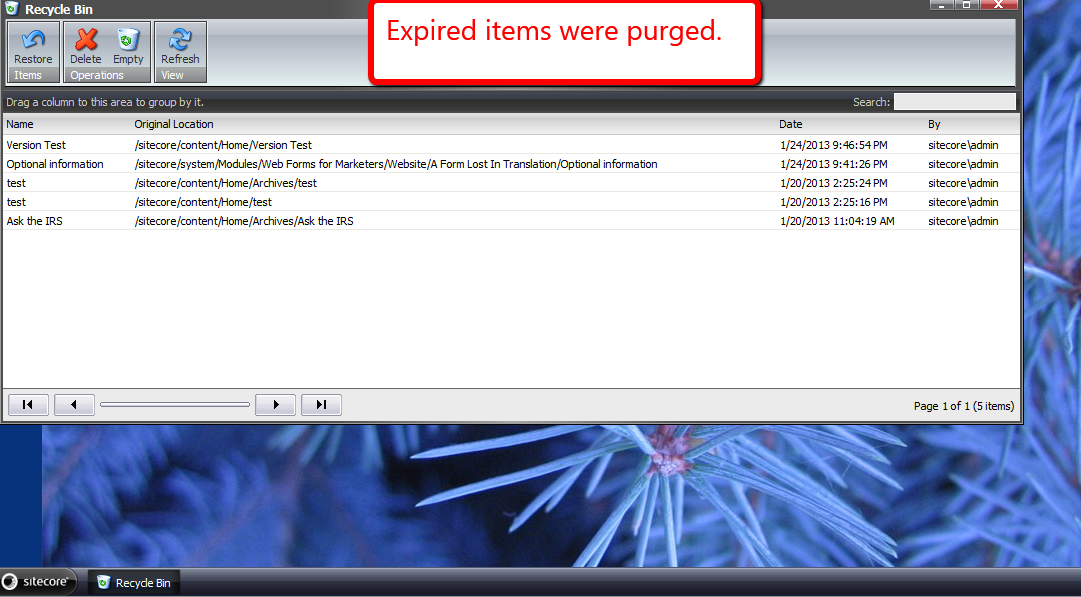
As you can see, my custom task agent deleted expired recycle bin items as designed. 🙂
 SitecoreJunkie.com