Home » Scripting (Page 2)
Category Archives: Scripting
Expand Tokens on Sitecore Items Using a PowerShell Function in Sitecore PowerShell Extensions
During my Sitecore from the Command Line presentation at the Sitecore User Group – New England, I had briefly showcased a custom PowerShell function that expands Sitecore tokens in fields of a supplied item, and how I had saved this function into the Functions section of the Script Library — /sitecore/system/Modules/PowerShell/Script Library/Functions — of the Sitecore PowerShell Extensions module. This blog post captures what I had shown.
This is the custom function I had shown — albeit I changed its name to adhere to the naming convention in PowerShell for functions and commands (Verb-SingularNoun):
function Expand-SitecoreToken {
	<#
        .SYNOPSIS
             Expand tokens on the supplied item

        .EXAMPLE
            Expand tokens on the home item.

            PS master:\> Get-Item "/sitecore/content/home" | Expand-SitecoreToken
    #>
	[CmdletBinding()]
    param(
		[ValidateNotNull()]
		[Parameter(ValueFromPipeline=$True)]
        [Sitecore.Data.Items.Item]$item
    )

    $item.Editing.BeginEdit()

    Try
    {
        $tokenReplacer = [Sitecore.Configuration.Factory]::GetMasterVariablesReplacer()
        $tokenReplacer.ReplaceItem($item)
        $result = $item.Editing.EndEdit()
        "Expanded tokens on item " + $item.Paths.Path
    }
    Catch [system.Exception]
    {
        $item.Editing.CancelEdit()
        "Failed to expand tokens on item"
        "Reason: " + $error
    }
}
The function above calls Sitecore.Configuration.Factory.GetMasterVariablesReplacer() for an instance of the MasterVariablesReplacer class — which is defined and can be overridden in the “MasterVariablesReplacer” setting in your Sitecore instance’s Web.config — and passes the item supplied to the function to the MasterVariablesReplacer instance’s ReplaceItem() method after the item has been put into editing mode.
Once tokens have been expanded, a confirmation message is sent to the Results window.
If an exception is caught, we display it — the exception is captured in the $error global variable.
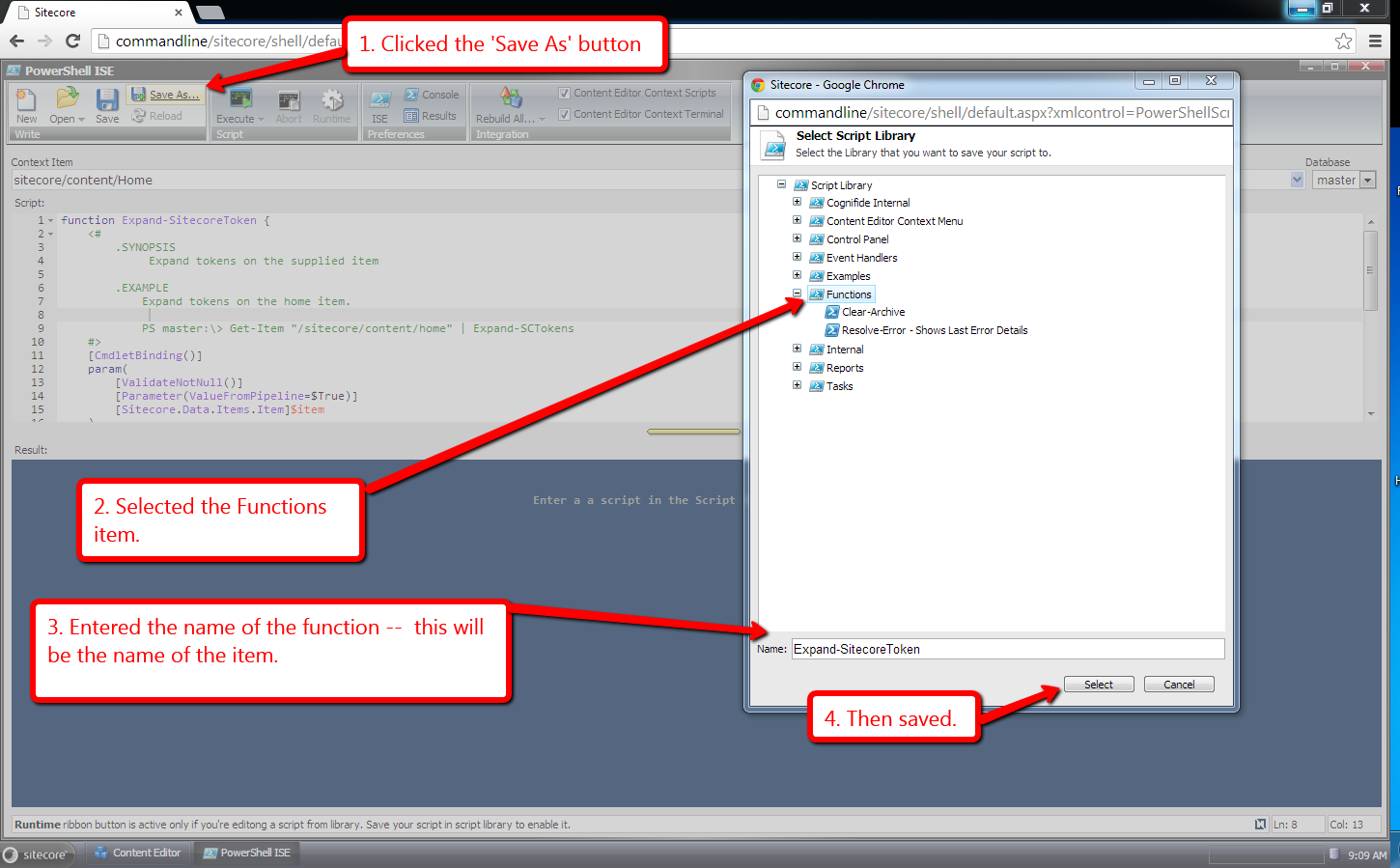
I saved the above function into the Script Library of my copy of the Sitecore PowerShell Extensions module:
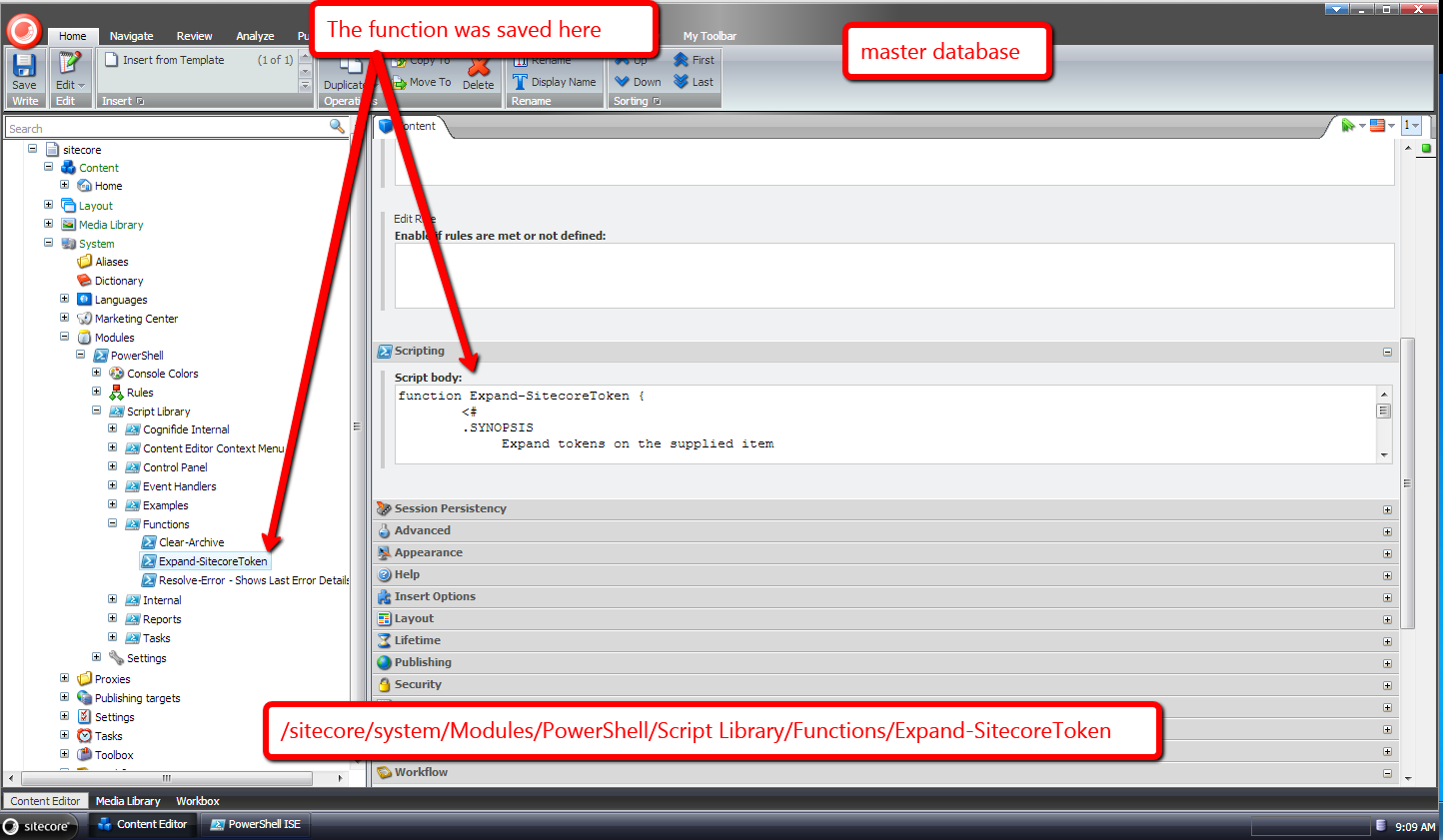
An item was created in the Script Library to house the function:
Let’s try it out.
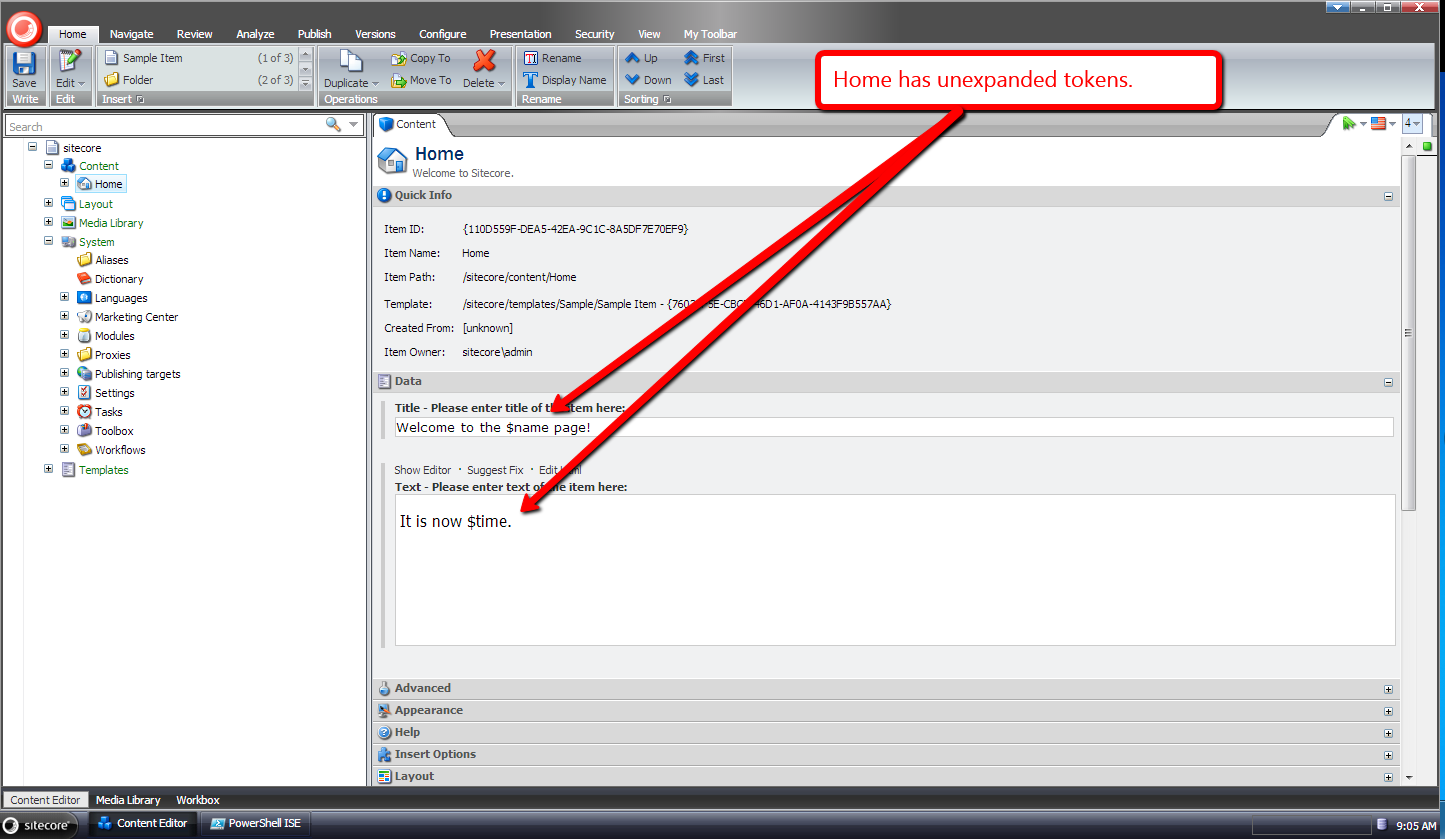
Let’s expand tokens on the Home item:
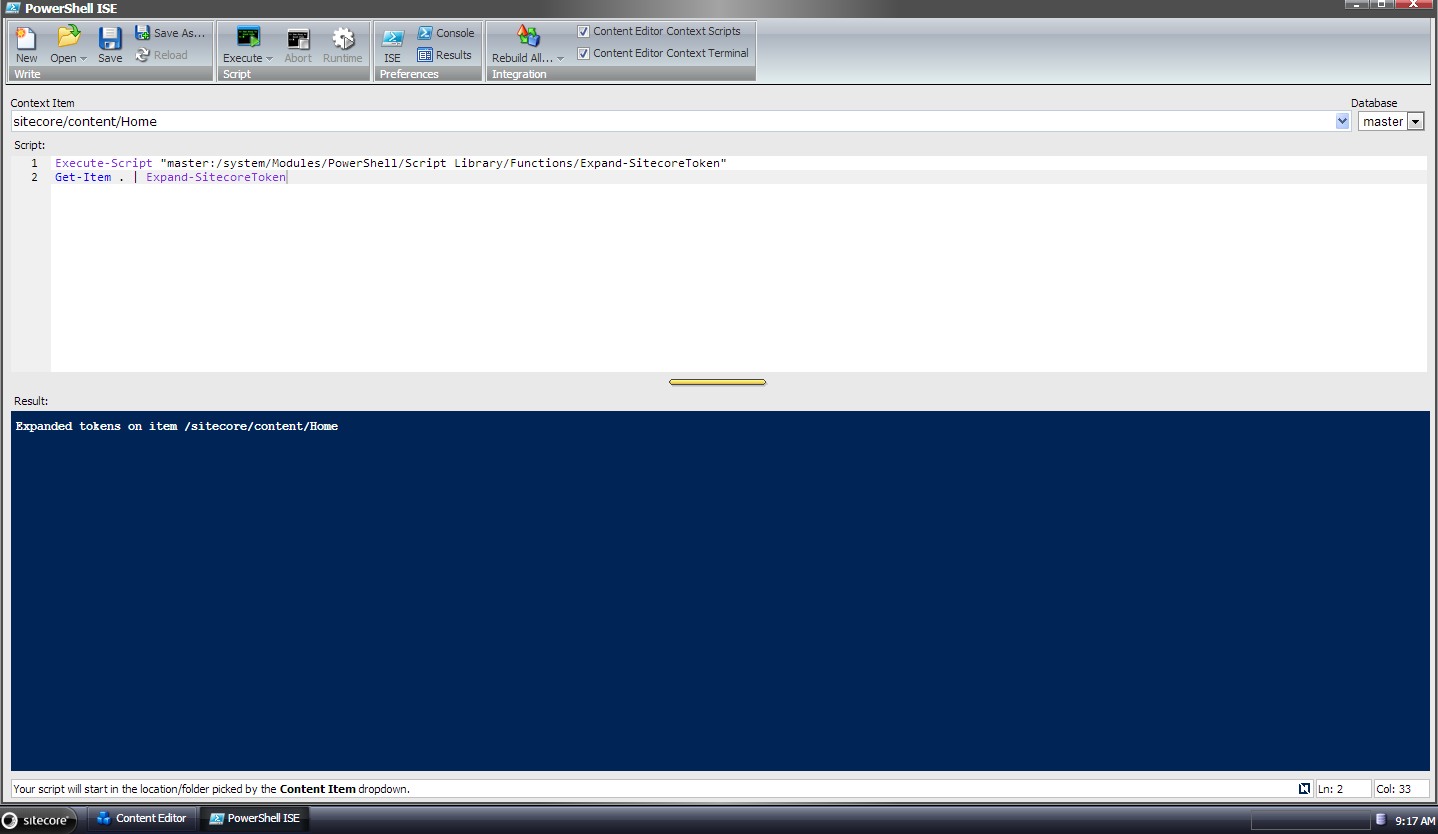
In the Integrated Scripting Environment of the Sitecore PowerShell Extensions module, I typed in the following code:
Execute-Script "master:/system/Modules/PowerShell/Script Library/Functions/Expand-SitecoreToken"
Get-Item . | Expand-SitecoreToken
You can consider the Execute-Script “master:/system/Modules/PowerShell/Script Library/Functions/Expand-SitecoreToken” line of code to be comparable to a javascript “script” tag — it will execute the script thus defining the function so we can execute it.
I then ran that code above:
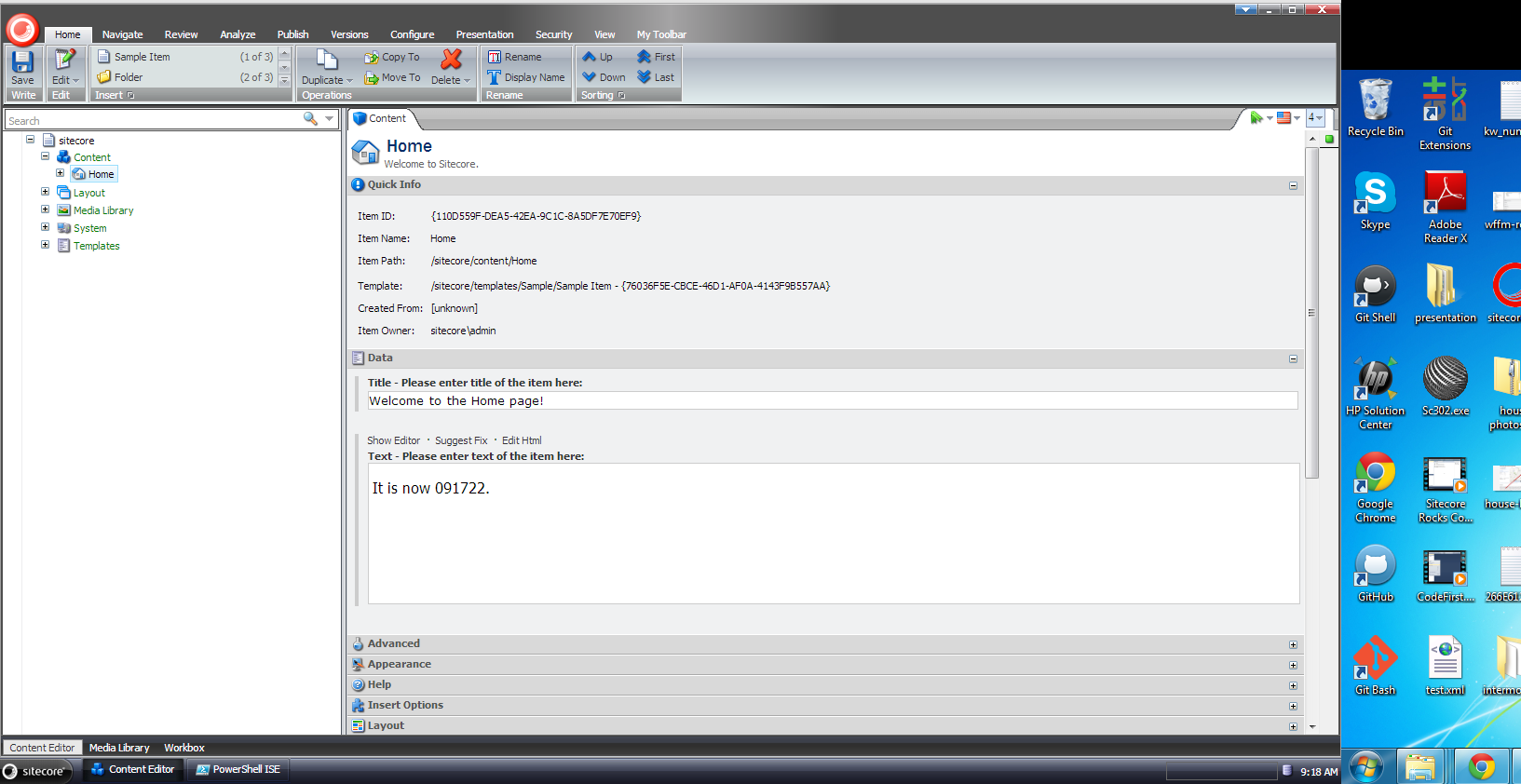
Once the script finished running, I went back over to the Content Editor, and saw that tokens were expanded on the Home item:
You might be thinking “Mike, I really don’t want to be bothered with expanding these tokens, and would rather have our Content Editors/Authors do it. is there something we can set up to make that happen?”
You bet. 🙂
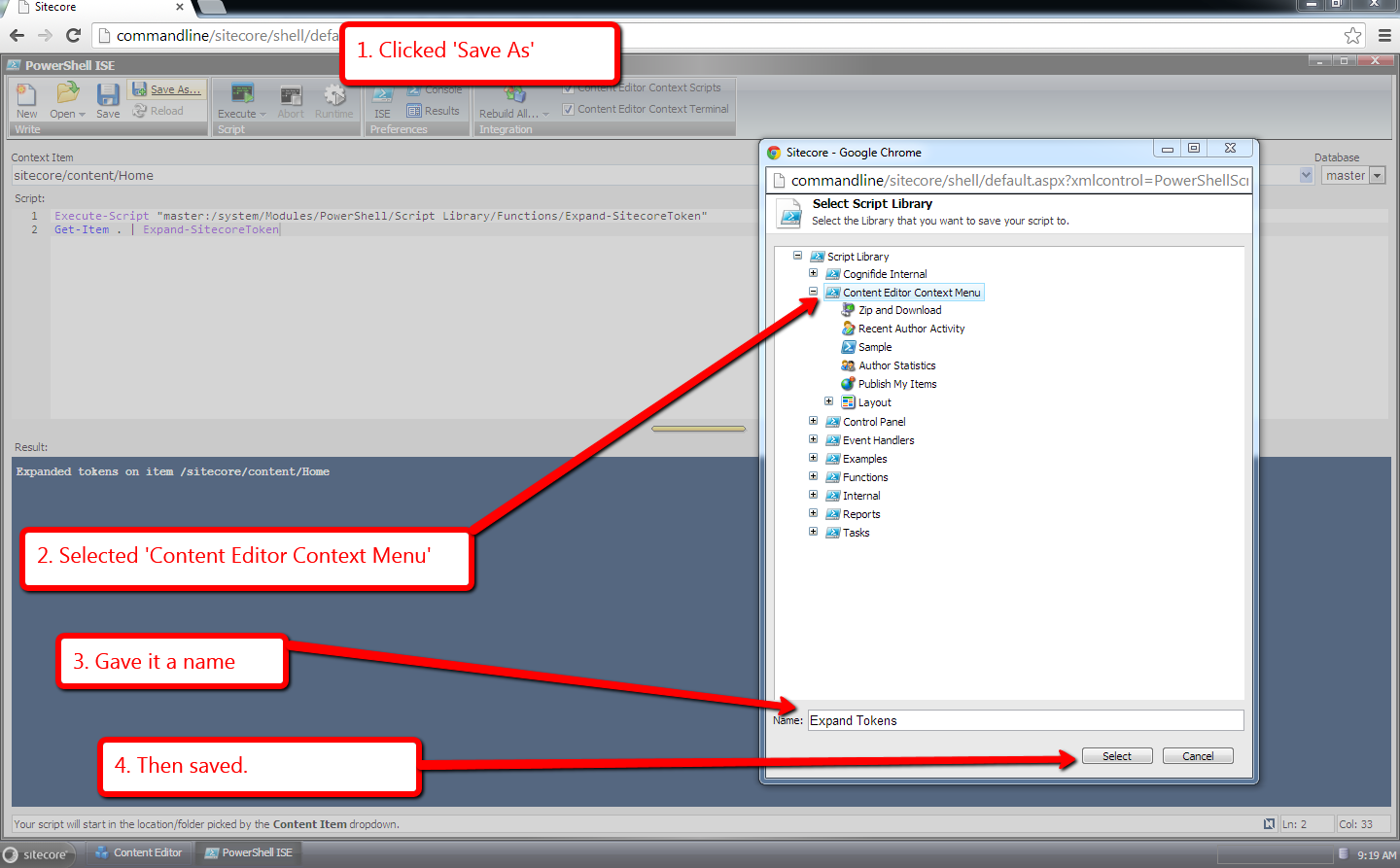
In the Sitecore PowerShell Extension module, you can save PowerShell into the Script Library to be executed via an item context menu option click. All you have to do is save it into the Script Library under the Content Editor Context Menu item:
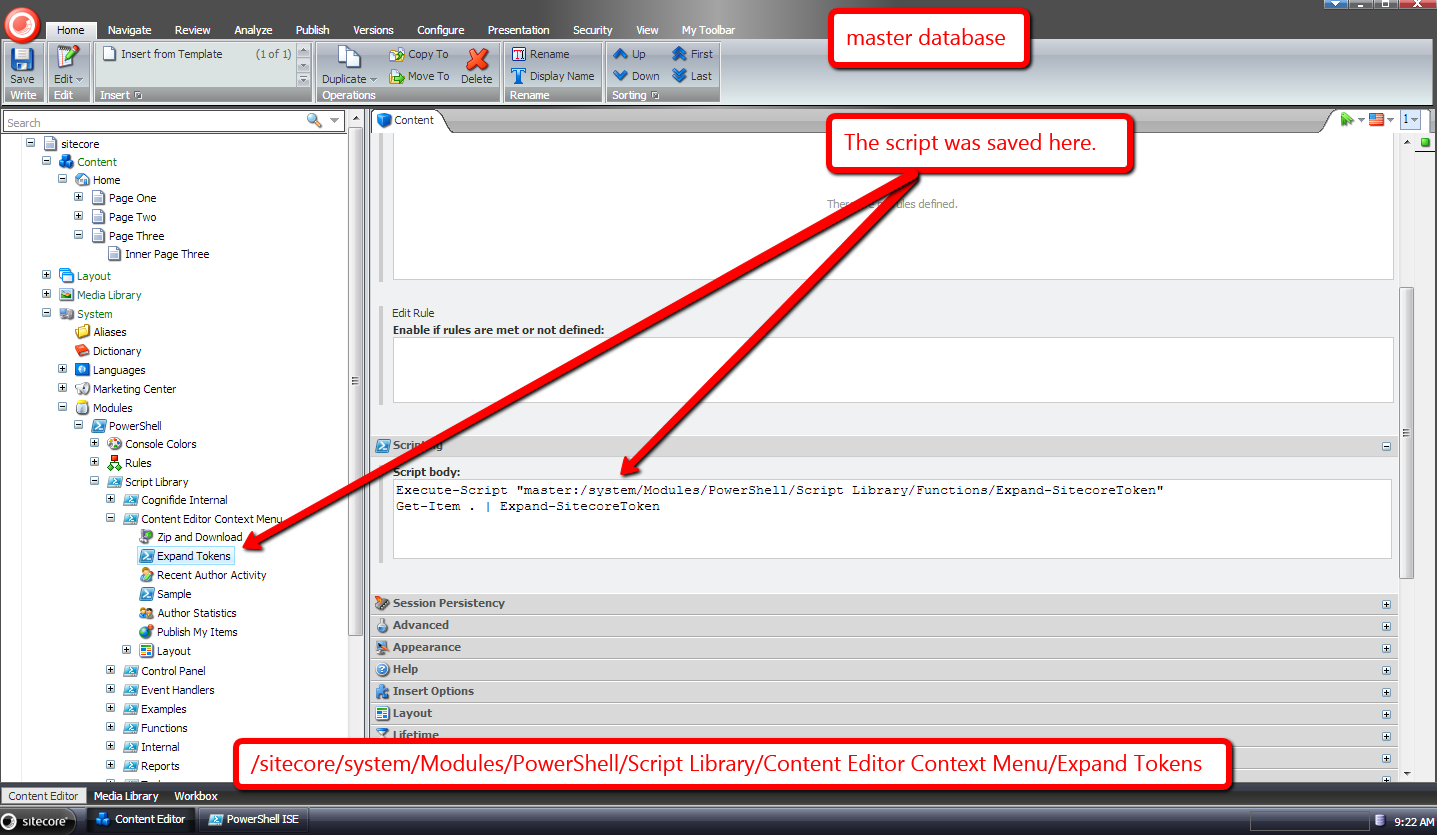
The script is then saved in a new item created under Content Editor Context Menu item in the Script Library:
Let’s see it in action.
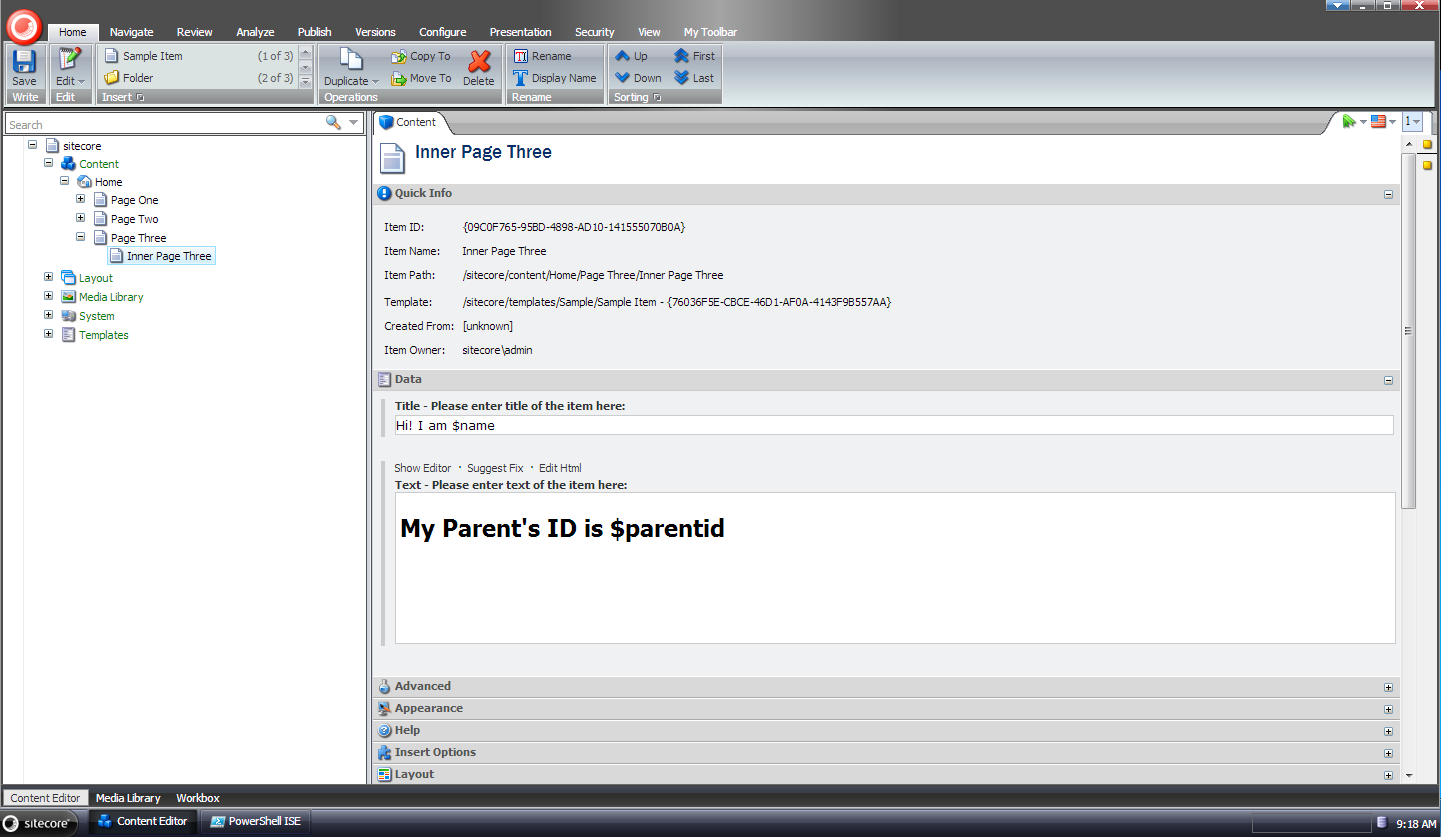
I chose the following page at random to expand tokens:
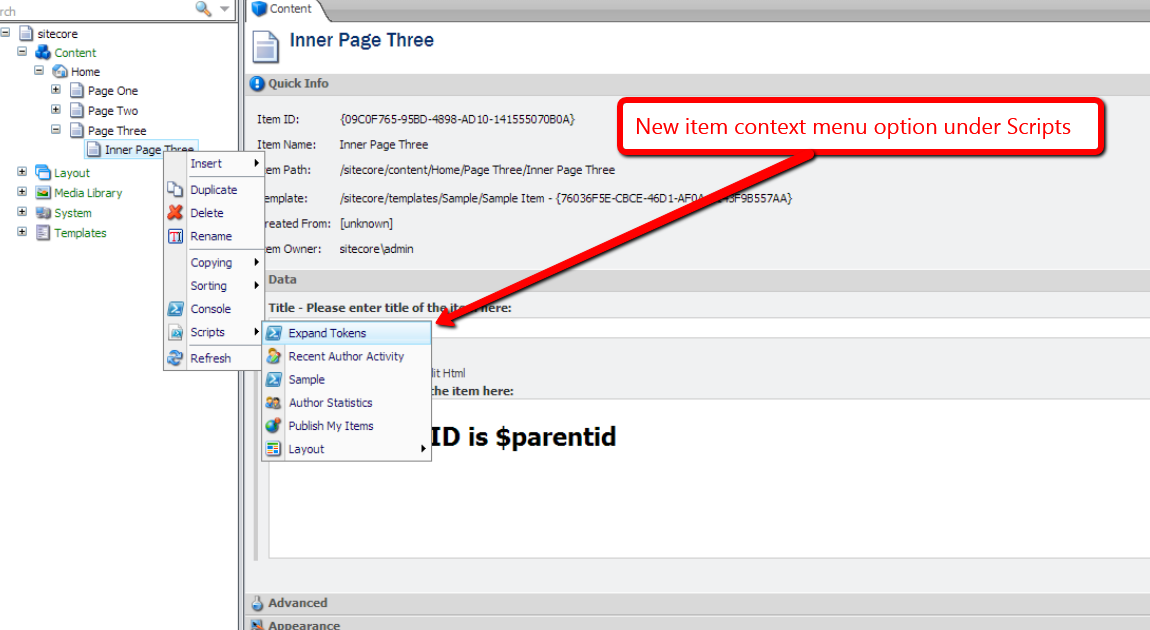
I right-clicked on the item to launch it’s context menu, opened up scripts, and saw a new “Expand Tokens” option:
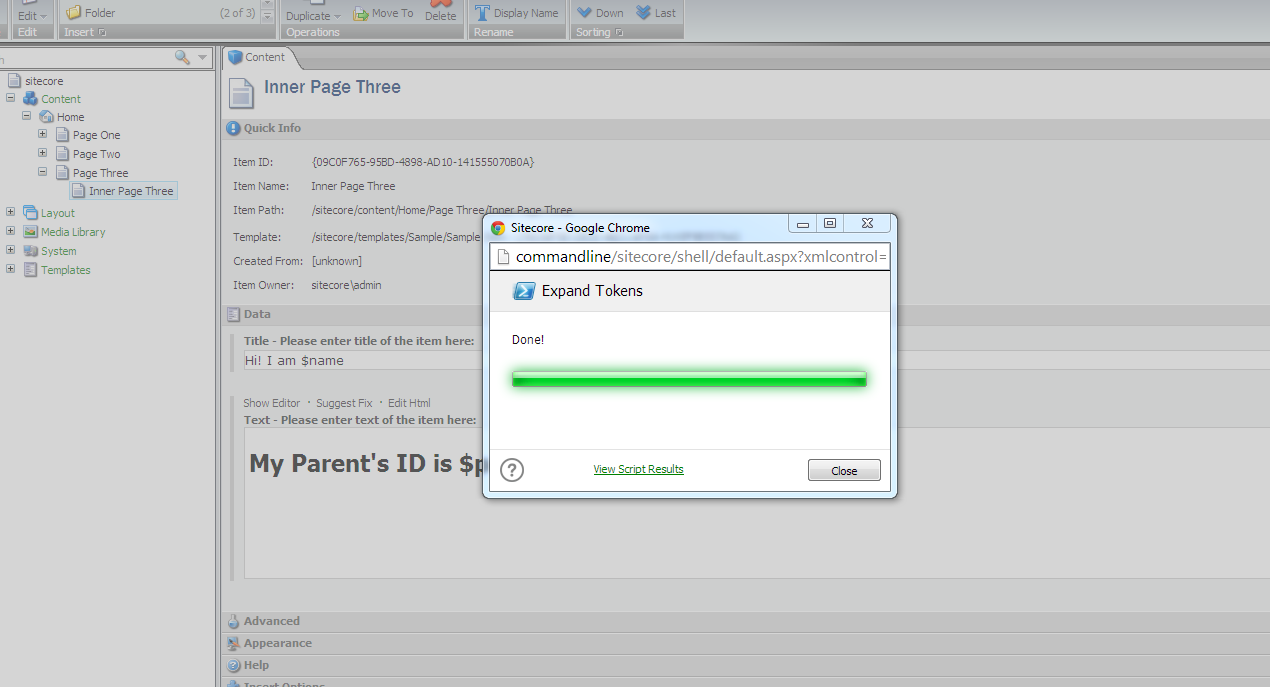
I clicked it, and was given a dialog with a status bar:
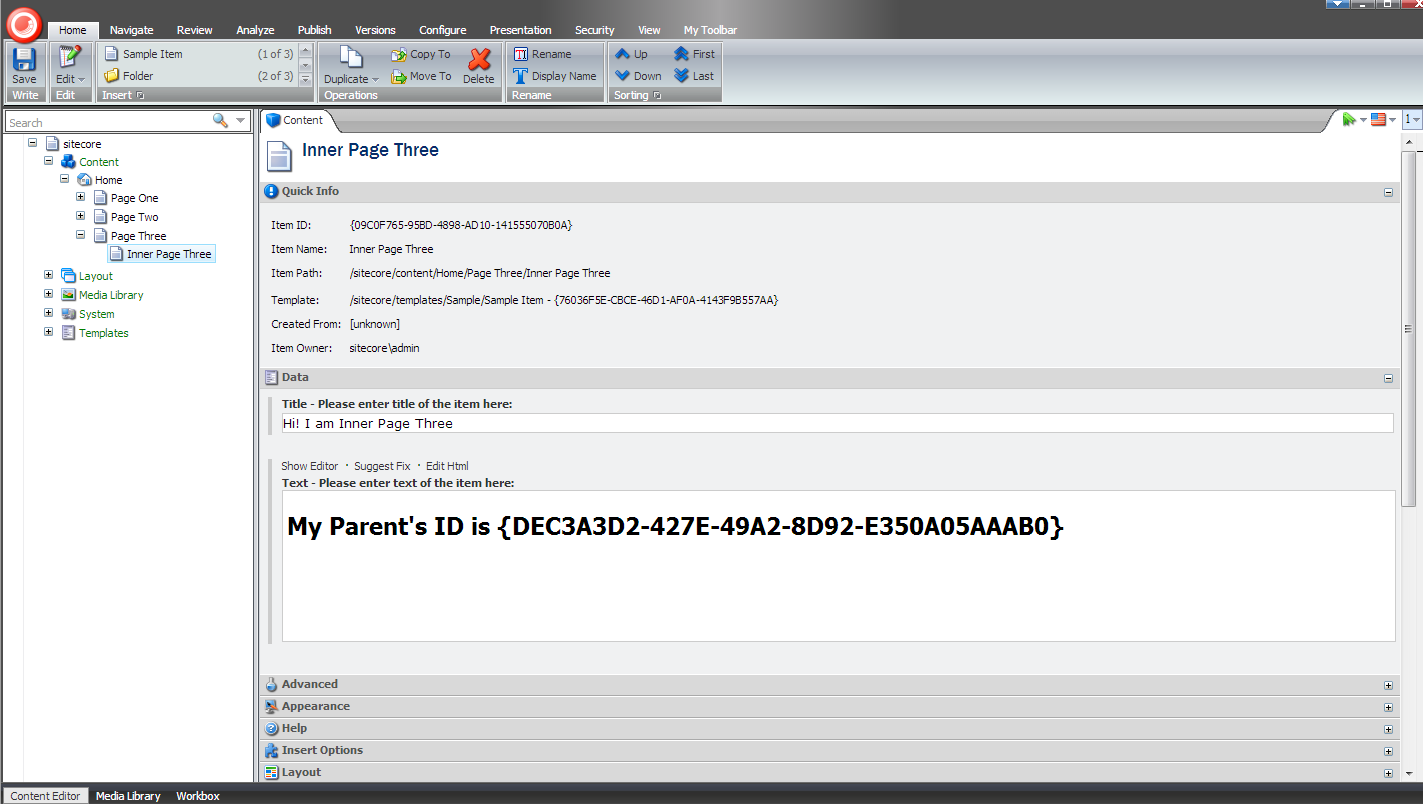
I refreshed the item, and saw that all tokens were expanded:
If you have any thoughts or questions on this, please leave a comment.
Until next time, have a scriptabulous day!
Expand Tokens on Sitecore Items Using a Custom Command in Sitecore PowerShell Extensions
During my Sitecore from the Command Line presentation at the Sitecore User Group – New England, I had shown attendees how they could go about adding a custom command into the Sitecore PowerShell Extensions module.
This blog post shows what I had presented — although the code in this post is an improved version over what I had presented at my talk. Many thanks to Sitecore MVP Adam Najmanowicz for helping me make this code better!
The following command will expand “out of the box” tokens in all fields of a supplied Sitecore item — check out Expand Tokens on Sitecore Items Using a Custom Command in Revolver where I discuss the problem commands like this address, and this article by Sitecore MVP Jens Mikkelsen which lists “out of the box” tokens available in Sitecore:
using System;
using System.Management.Automation;

using Sitecore.Configuration;

using Sitecore.Data;
using Sitecore.Data.Items;

using Cognifide.PowerShell.PowerShellIntegrations.Commandlets;

namespace CommandLineExtensions.PowerShell.Commandlets
{
    [Cmdlet("Expand", "Token")]
    [OutputType(new[] { typeof(Item) })]
    public class ExpandTokenCommand : BaseCommand
    {
        private static readonly MasterVariablesReplacer TokenReplacer = Factory.GetMasterVariablesReplacer();

        [Parameter(Position = 0, Mandatory = true, ValueFromPipeline = true)]
        public Item Item { get; set; }

        protected override void ProcessRecord()
        {
            Item.Editing.BeginEdit();
            try
            {
                TokenReplacer.ReplaceItem(Item);
                Item.Editing.EndEdit();
            }
            catch (Exception ex)
            {
                Item.Editing.CancelEdit();
                throw ex;
            }

            WriteItem(Item);
        }
    }
}
The command above subclasses Cognifide.PowerShell.PowerShellIntegrations.Commandlets.BaseCommand — the base class for most (if not all) commands in Sitecore PowerShell Extensions.
An item is passed to the command via a parameter, and is magically set on the Item property of the command class instance.
The ValueFromPipeline parameter being set to “true” on the Item property’s Parameter attribute will allow for chaining of this command with others so that items can be fed into it via a pipe bridging the commands together in PowerShell.
An instance of the Sitecore.Data.MasterVariablesReplacer class — which is created by the GetMasterVariablesReplacer() method of the Sitecore.Configuration.Factory class based on the “MasterVariablesReplacer” setting of your Sitecore instance’s Web.config — is used to expand tokens on the supplied Sitecore item after the item was flagged for editing.
Once tokens have been expanded on the item — or not in the event an exception is encountered — the item is written to the Results window via the WriteItem method which is defined in the BaseCommand class.
I then had to wire up the custom command via a patch configuration file:
<configuration xmlns:patch="http://www.sitecore.net/xmlconfig/">
  <sitecore>
    <powershell>
      <commandlets>
		    <add Name="Custom Commandlets" type="*, CommandLineExtensions" />
      </commandlets>
    </powershell>
  </sitecore>
</configuration>
Let’s take this custom command for a spin.
I created a bunch of test items, and set tokens in their fields. I then selected the following page at random for testing:

I opened up the Integrated Scripting Environment of Sitecore PowerShell Extensions, typed in the following PowerShell code, and executed by pressing Ctrl-E:

As you can see tokens were expanded on the Page One item:

How about expanding tokens on all descendants of the Home item? Let’s see an example of how we can do that.
I chose the following content item — a grandchild of the Home item — for testing:

I switched back over to the Integrated Scripting Environment, wrote the following code for testing — the Get-ChildItem command with the -r parameter (this means do this recursively) will grab all descendants of the Home item, and pipe each item in the result set into the Expand-Token command — and clicked the Execute button:

I then went back to the grandchild item of the Home page in the content tree, and saw that tokens were expanded in its fields:

If you have any thoughts or comments on this, or ideas for new commands in Sitecore PowerShell Extensions, please share in a comment.
Until next time, have a scriptolicious day!
Expand Tokens on Sitecore Items Using a Custom Command in Revolver
On September 18, 2013, I presented Sitecore from the Command Line at the Sitecore User Group – New England.
During my presentation, I gave an example of creating a custom command in Revolver — the first scripting platform for Sitecore built by Alistair Deneys — and thought I would write something up for those who had missed the presentation, or wanted to revisit what I had shown.
One thing that plagues some Sitecore developers — if you disagree please leave a comment — is not having a nice way to expand tokens on items when tokens are added to Standard Values after items had been created previously.
Newly added tokens “bleed” into preexisting items’ fields, and I’ve seen developers perform crazy feats of acrobatic gymnastics to expand them — writing a standalone web form to recursive crawl the content tree to expand these is such an example (take a look at Empower Your Content Authors to Expand Standard Values Tokens in the Sitecore Client where I offer an alternative way to expand tokens on content items).
The following custom Revolver command will expand tokens on a supplied Sitecore item, and help out on the front of expanding newly added tokens on preexisting items:
using System;
using Sitecore.Configuration;
using System.Linq;

using Sitecore.Data;
using Sitecore.Data.Items;

using Revolver.Core;
using Revolver.Core.Commands;

namespace CommandLineExtensions.Revolver.Commands
{
    public class ExpandTokensCommand : BaseCommand
    {
        private static readonly MasterVariablesReplacer TokenReplacer = Factory.GetMasterVariablesReplacer();

        public override string Description()
        {
            return "Expand tokens on an item";
        }

        public override HelpDetails Help()
        {
            HelpDetails details = new HelpDetails
            {
                Description = Description(),
                Usage = "<cmd> [path]"
            };

            details.AddExample("<cmd>");
            details.AddExample("<cmd> /item1/item2");
            return details;
        }

        public override CommandResult Run(string[] args)
        {
            string path = string.Empty;
            if (args.Any())
            {
                path = args.FirstOrDefault();
            }

            using (new ContextSwitcher(Context, path))
            {
                if (!Context.LastGoodPath.EndsWith(path, StringComparison.CurrentCultureIgnoreCase))
                {
                    return new CommandResult
                    (
                        CommandStatus.Failure,
                        string.Format("Failed to expand tokens on item {0}\nReason:\n\n An item does not exist at that location!", path)
                    );
                }

                CommandResult result;
                Item item = Context.CurrentItem;
                item.Editing.BeginEdit();
                try
                {
                    TokenReplacer.ReplaceItem(item);
                    result = new CommandResult(CommandStatus.Success, string.Concat("Expanded tokens on item ", Context.LastGoodPath));
                    item.Editing.EndEdit();
                }
                catch (Exception ex)
                {
                    item.Editing.CancelEdit();
                    result = new CommandResult(CommandStatus.Failure, string.Format("Failed to expand tokens on item {0}\nReason:\n\n{1}", path, ex));
                }

                return result;
            }
        }
    }
}
Tokens are expanded using an instance of the Sitecore.Data.MasterVariablesReplacer class — you can roll your own, and wire it up in the “MasterVariablesReplacer” setting of your Sitecore instance’s Web.config — which is provided by Sitecore.Configuration.Factory.GetMasterVariablesReplacer().
All custom commands in Revolver must implement the Revolver.Core.ICommand interface. I subclassed Revolver.Core.Commands.BaseCommand — which does implement this interface — since it seemed like the right thing to do given that all “out of the box” commands I saw in Revolver were subclassing it, and then implemented the Description(), Help() and Run() abstract methods.
I then had to bind the custom command to a new name — I chose “et” for “Expand Tokens”:
@echooff
@stoponerror

bind CommandLineExtensions.Revolver.Commands.ExpandTokensCommand,CommandLineExtensions et

@echoon
Since it wouldn’t be efficient to type and run this bind script every time I want to use the “et” command, I added it into a startup script in the core database:

I then had to create a user script for the startup script to run. I chose the Everyone role here for demonstration purposes:

The above startup script will be invoked when Revolver is opened, and our custom command will be bound.
Let’s see all of the above in action.
I added some tokens in my home item:

I then opened up Revolver, navigated to /sitecore/content, and ran the custom command on the home item:

As you can see the tokens were expanded:

You might be thinking “that’s wonderful Mike — except now I have to navigate to every item in my content tree using Revolver, and then run this custom command on it”.
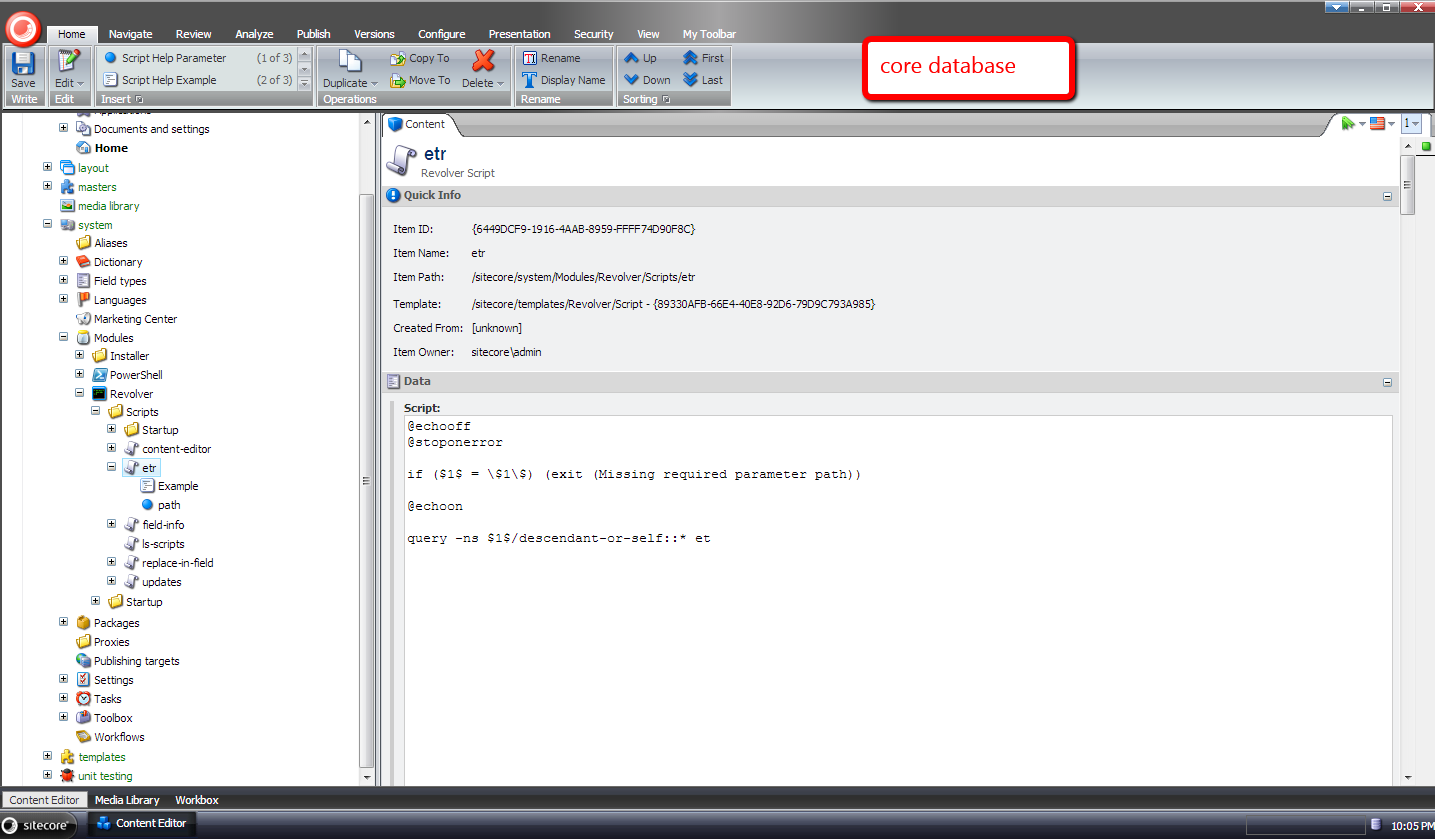
Well, I do have a solution for this: a custom script that grabs an item and all of its descendants using a Sitecore query, and passes them to the custom command to expand tokens:
@echooff
@stoponerror

if ($1$ = \$1\$) (exit (Missing required parameter path))

@echoon

query -ns $1$/descendant-or-self::* et
I put this script in the core database, and named it “etr” for “Expand Tokens Recursively”:
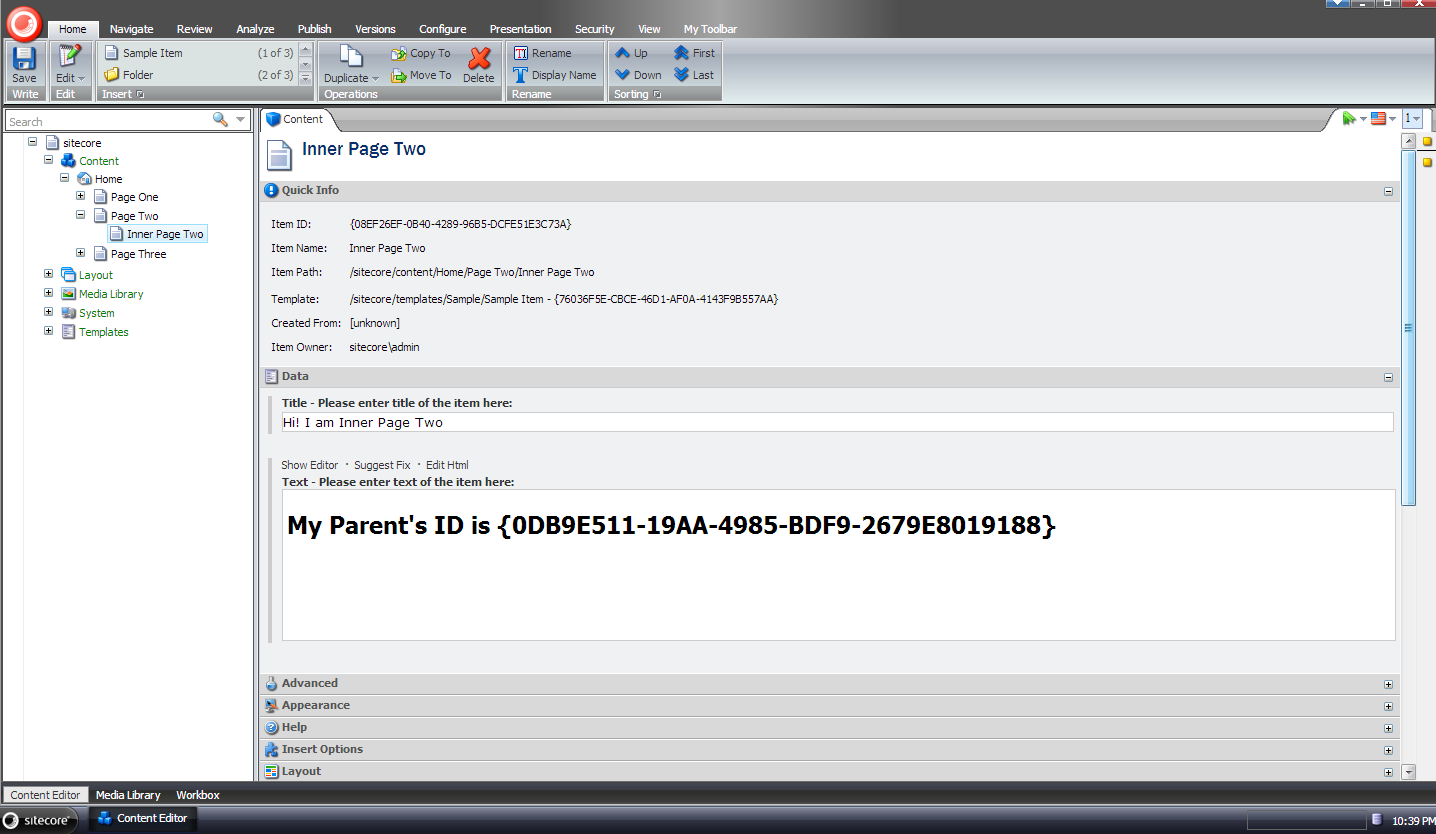
I navigated to a descendant of /sitecore/content/home, and see that it has some unexpanded tokens on it:

I went back to Revolver, and ran the “etr” command on the home item:

As you can see tokens were expanded on the descendant item:
If you have any thoughts on this, or have ideas for other custom commands in Revolver, please share in a comment.
 SitecoreJunkie.com