Home » Serialization
Category Archives: Serialization
Change the Data Serialization Format in the Sitecore Item Web API
I had a major urge yesterday to continue my tinkering of the Sitecore Item Web API, and wondered how one would go about changing the serialization format of its response.
Without re-reading the documentation on how one could go about doing this — I forgot that this was discussed in its documentation (check out pages 16-17 in the Sitecore Item Web API 1.0.0 Developer’s Guide where you can see how to use an XML serializer) — I tackled this by experimentation, and came up with a slightly different solution than the one offered in the Developer’s Guide.
I considered using an XML serializer for this blog post, but decided to fish around on the internet to see what other data serialization formats exist, and discovered YAML — a format that looks similar to JSON.
I continued my internet surfing — I mean research — and found a .NET library — YamlDotNet — that assists developers in converting objects into YAML, and decided to give it a go.
The following Sitecore item Web API Serializer uses this YAML library:
using System;
using System.Collections.Generic;
using System.IO;
using System.Linq;
using System.Text;

using Sitecore.Diagnostics;
using Sitecore.ItemWebApi.Serialization;

using YamlDotNet.RepresentationModel.Serialization;

namespace Sitecore.Sandbox.ItemWebApi.Serialization
{
    public class YamlSerializer : ISerializer
    {
        // Serializer in YamlDotNet.RepresentationModel.Serialization
        private static readonly Serializer Serializer = new Serializer();

        public YamlSerializer()
        {
        }

        public string Serialize(object value)
        {
            Assert.ArgumentNotNull(value, "value");
            string yaml = string.Empty;
            using(StringWriter stringWriter = new StringWriter())
            {
                Serializer.Serialize(stringWriter, value);
                yaml = stringWriter.ToString();
            }

            return yaml;
        }

        public string SerializedDataMediaType
        {
            get
            {
                return "application/x-yaml";
            }
        }
    }
}
The Serializer above just delegates responsibility to the YamlDotNet’s YAML serializer.
Now that we have our YamlSerializer ready to go, we have to somehow wire it up to the Sitecore Item Web API.
After some digging in Sitecore.ItemWebApi.dll, I learned the out of the box JsonSerializer is set in a preprocessRequest pipeline processor:

Following this lead, I created a custom preprocessRequest pipeline processor for setting our new YamlSerializer:
using System;
using System.Web;

using Sitecore.Pipelines.PreprocessRequest;
using Sitecore.Diagnostics;
using Sitecore.ItemWebApi.Serialization;

using Sitecore.Sandbox.ItemWebApi.Serialization;

namespace Sitecore.Sandbox.ItemWebApi.Pipelines.PreprocessRequest
{
    public class ResolveSerializer : PreprocessRequestProcessor
    {
        public override void Process(PreprocessRequestArgs arguments)
        {
            Assert.ArgumentNotNull(arguments, "arguments");
            Assert.ArgumentNotNull(arguments.Context, "arguments.Context");
            Assert.ArgumentNotNull(arguments.Context.Request, "arguments.Context.Request");
            ISerializer serializer = GetSerializer(arguments.Context.Request);
            if (serializer != null)
            {
                Sitecore.ItemWebApi.Context.Current.Serializer = serializer;
            }
        }

        private static ISerializer GetSerializer(HttpRequest request)
        {
            if(IsYamlRequest(request))
            {
                return new YamlSerializer();
            }

            return null;
        }

        private static bool IsYamlRequest(HttpRequest request)
        {
            Assert.ArgumentNotNull(request, "request");
            return string.Equals(request["format"], "yaml", StringComparison.CurrentCultureIgnoreCase);
        }
    }
}
We only set our YamlSerializer when client code requests data to be returned as YAML — this is made known when the client code sets “Yaml” in a HTTP request parameter named “format” (an example of this would be &format=Yaml via a query string).
I then added the new preprocessRequest pipeline processor in \App_Config\Include\Sitecore.ItemWebApi.config, and made sure it’s called right after /configuration/sitecore/pipelines/preprocessRequest/processor[@type=”Sitecore.ItemWebApi.Pipelines.PreprocessRequest.RewriteUrl, Sitecore.ItemWebApi”] — default instances are set here on the Sitecore Item Web API’s Context instance, and we should ensure this object exits before changing properties on it:
<?xml version="1.0" encoding="utf-8"?>
	<configuration xmlns:patch="http://www.sitecore.net/xmlconfig/">
		<sitecore>
			<pipelines>
			<!-- there is stuff up here -->
				<preprocessRequest>
					<processor type="Sitecore.Sandbox.ItemWebApi.Pipelines.PreprocessRequest.ResolveSerializer, Sitecore.Sandbox" patch:before="processor[@type='Sitecore.Pipelines.PreprocessRequest.CheckIgnoreFlag, Sitecore.Kernel']" />
					<processor type="Sitecore.ItemWebApi.Pipelines.PreprocessRequest.RewriteUrl, Sitecore.ItemWebApi" patch:before="processor[@type='Sitecore.Sandbox.ItemWebApi.Pipelines.PreprocessRequest.ResolveSerializer, Sitecore.Sandbox']" />
				</preprocessRequest>
			<!-- and more stuff down here -->
		</sitecore>
	</configuration>
After modifying some code in my copy of the console application written by Kern Herskind Nightingale, Director of Technical Services at Sitecore UK — I added &format=yaml as a query string parameter — I invoked it to retrieve an item in my local instance of Sitecore:

As you can see, the response is now in YAML.
If you have any thoughts on this, or have any recommendations on using other serialization formats, please drop a comment.
Add Additional Item Properties in Sitecore Item Web API Responses
The other day I was exploring pipelines of the Sitecore Item Web API, and took note of the itemWebApiGetProperties pipeline. This pipeline adds information about an item in the response returned by the Sitecore Item Web API. You can find this pipeline at /configuration/sitecore/pipelines/itemWebApiGetProperties in \App_Config\Include\Sitecore.ItemWebApi.config.
The following properties are set for an item in the response via the lonely pipeline processor — /configuration/sitecore/pipelines/itemWebApiGetProperties/processor[@type=”Sitecore.ItemWebApi.Pipelines.GetProperties.GetProperties, Sitecore.ItemWebApi”] — that ships with the Sitecore Item Web API:

Here’s an example of what the properties set by the above pipeline processor look like in the response — I invoked a read request to the Sitecore Item Web API via a copy of the console application written by Kern Herskind Nightingale, Director of Technical Services at Sitecore UK:

You might be asking “how difficult would it be to add in my own properties?” It’s not difficult at all!
I whipped up the following itemWebApiGetProperties pipeline processor to show how one can add more properties for an item:
using Sitecore.Data.Items;
using Sitecore.Diagnostics;
using Sitecore.ItemWebApi;
using Sitecore.ItemWebApi.Pipelines.GetProperties;

namespace Sitecore.Sandbox.ItemWebApi.Pipelines.GetProperties
{
    public class GetEvenMoreProperties : GetPropertiesProcessor
    {
        public override void Process(GetPropertiesArgs arguments)
        {
            Assert.ArgumentNotNull(arguments, "arguments");
            arguments.Properties.Add("ParentID", arguments.Item.ParentID.ToString());
            arguments.Properties.Add("ChildrenCount", arguments.Item.Children.Count);
            arguments.Properties.Add("Level", arguments.Item.Axes.Level);
            arguments.Properties.Add("IsItemClone", arguments.Item.IsItemClone);
            arguments.Properties.Add("CreatedBy", arguments.Item["__Created by"]);
            arguments.Properties.Add("UpdatedBy", GetItemUpdatedBy(arguments.Item));
        }

        private static Dynamic GetItemUpdatedBy(Item item)
        {
            Assert.ArgumentNotNull(item, "item");
            string[] usernamePieces = item["__Updated by"].Split('\\');

            Dynamic username = new Dynamic();
            if (usernamePieces.Length > 1)
            {
                username["Domain"] = usernamePieces[0];
                username["Username"] = usernamePieces[1];
            }
            else if (usernamePieces.Length > 0)
            {
                username["Username"] = usernamePieces[0];
            }

            return username;
        }
    }
}
The ParentID, ChildrenCount, Level and IsItemClone properties are simply added to the properties SortedDictionary within the GetPropertiesArgs instance, and will be serialized as is.
For the UpdatedBy property, I decided to leverage the Sitecore.ItemWebApi.Dynamic class in order to have the username set in the “__Updated by” field be represented by a JSON object. This JSON object sets the domain and username — without the domain — into different JSON properties.
As a side note — when writing your own service code for the Sitecore Item Web API — I strongly recommend using instances of the Sitecore.ItemWebApi.Dynamic class — or something similar — for complex objects. Developers writing code to consume your JSON will thank you many times for it. 🙂
I registered my new processor to the itemWebApiGetProperties pipeline in my Sitecore instance’s \App_Config\Include\Sitecore.ItemWebApi.config:
<?xml version="1.0" encoding="utf-8"?>
<configuration xmlns:patch="http://www.sitecore.net/xmlconfig/">
  <sitecore>
    <pipelines>
      <!-- there's stuff here -->
      <itemWebApiGetProperties>
        <processor type="Sitecore.ItemWebApi.Pipelines.GetProperties.GetProperties, Sitecore.ItemWebApi" />
        <processor type="Sitecore.Sandbox.ItemWebApi.Pipelines.GetProperties.GetEvenMoreProperties, Sitecore.Sandbox" />
      </itemWebApiGetProperties>
      <!-- there's stuff here as well -->
  </sitecore>
</configuration>
Let’s take this for a spin.
I ran the console application again to see what the response now looks like:

As you can see, our additional properties are now included in the response.
If you can think of other item properties that would be useful for Sitecore Item Web API client applications, please share in a comment.
Until next time, have a Sitecorelicious day!
Copy Sitecore Item Field Values To Your Clipboard as JSON
With all the exciting things happening around json recently — the Sitecore Item Web API (check out this awesome presentation on the Sitecore Item Web API) and pasting JSON As classes in ASP.NET and Web Tools 2012.2 RC — I’ve been plagued by json on the brain.
For the past few weeks, I’ve been thinking about building a Sitecore client command that copies fields values from a Sitecore item into a string of json via the clipboard, though have been struggling with whether such a command has any utility.
Tonight, I decided to build such a command. Here is what I came up with.
using System;
using System.Collections.Generic;
using System.Linq;
using System.Text;

using Sitecore.Configuration;
using Sitecore.Data.Fields;
using Sitecore.Data.Items;
using Sitecore.Data.Managers;
using Sitecore.Data.Templates;
using Sitecore.Diagnostics;
using Sitecore.Shell.Framework.Commands;
using Sitecore.Web.UI.Sheer;

using Sitecore.Sandbox.Utilities.Serialization.Base;
using Sitecore.Sandbox.Utilities.Serialization;

namespace Sitecore.Sandbox.Commands
{
    public class CopyItemAsJsonToClipboard : ClipboardCommand
    {
        private const bool AlertIfClipboardCopyNotSupported = true;
        private static readonly CopyToClipboard CopyToClipboard = new CopyToClipboard();

        private Template _StandardTemplate;
        private Template StandardTemplate
        {
            get
            {
                if(_StandardTemplate == null)
                {
                    _StandardTemplate = GetStandardTemplate();
                }

                return _StandardTemplate;
            }
        }

        private static Template GetStandardTemplate()
        {
            return TemplateManager.GetTemplate(Settings.DefaultBaseTemplate, Context.ContentDatabase);
        }

        public override void Execute(CommandContext commandContext)
        {
            Assert.ArgumentNotNull(commandContext, "commandContext");

            if (IsSupported(AlertIfClipboardCopyNotSupported))
            {
                IEnumerable<Field> fields = GetNonStandardTemplateFields(commandContext);
                CopyToClipBoard(GetFieldsAsJson(fields));
            }
        }

        private static string GetFieldsAsJson(IEnumerable<Field> fields)
        {
            Assert.ArgumentNotNull(fields, "fields");
            IList<string> list = new List<string>();
            foreach(Field field in fields)
            {
                list.Add(string.Format("\"{0}\":\"{1}\"", field.Name, EscapeNewlines(field.Value)));
            }

            return string.Concat("{", string.Join(",", list), "}");
        }

        private static string EscapeNewlines(string value)
        {
            Assert.ArgumentNotNull(value, "value");
            return ReplaceSubstrings
            (
                value,
                new KeyValuePair<string, string>[]
                {
                    new KeyValuePair<string, string>("\n", "\\n"),
                    new KeyValuePair<string, string>("\r", "\\r")
                }
            );
        }

        private static string ReplaceSubstrings(string source, IEnumerable<KeyValuePair<string, string>> oldNewValues)
        {
            Assert.ArgumentNotNull(source, "source");
            Assert.ArgumentNotNull(oldNewValues, "oldNewValues");
            foreach (KeyValuePair<string, string> oldNewValue in oldNewValues)
            {
                source = source.Replace(oldNewValue.Key, oldNewValue.Value);
            }

            return source;
        }

        private IEnumerable<Field> GetNonStandardTemplateFields(CommandContext commandContext)
        {
            return GetNonStandardTemplateFields(GetItemWithAllFields(commandContext));
        }

        private IEnumerable<Field> GetNonStandardTemplateFields(Item item)
        {
            Assert.ArgumentNotNull(item, "item");
            return GetNonStandardTemplateFields(item.Fields);
        }

        private IEnumerable<Field> GetNonStandardTemplateFields(IEnumerable<Field> fields)
        {
            Assert.ArgumentNotNull(fields, "fields");
            return fields.Where(field => !IsStandardTemplateField(field));
        }

        private static void CopyToClipBoard(string json)
        {
            if(!string.IsNullOrEmpty(json))
            {
                SheerResponse.Eval(GetCopyToClipBoardJavascript(json));
            }
        }

        private static string GetCopyToClipBoardJavascript(string json)
        {
            Assert.ArgumentNotNullOrEmpty(json, "json");
            return string.Format("window.clipboardData.setData('Text', '{0}')", json);
        }

        public override CommandState QueryState(CommandContext commandContext)
        {
            Assert.ArgumentNotNull(commandContext, "commandContext");
            Item item = GetItemWithAllFields(commandContext);
            bool makeEnabled = CopyToClipboard.QueryState(commandContext) == CommandState.Enabled && HasFields(item);

            if (makeEnabled)
            {
                return CommandState.Enabled;
            }

            return CommandState.Disabled;
        }

        private static bool HasFields(Item item)
        {
            Assert.ArgumentNotNull(item, "item");
            return item.Fields.Any();
        }

        private static Item GetItemWithAllFields(CommandContext commandContext)
        {
            Assert.ArgumentNotNull(commandContext, "commandContext");
            Item item = GetItem(commandContext);

            if (item != null)
            {
                item.Fields.ReadAll();
            }

            return item;
        }

        public bool IsStandardTemplateField(Field field)
        {
            Assert.ArgumentNotNull(StandardTemplate, "StandardTemplate");
            return StandardTemplate.ContainsField(field.ID);
        }

        private static Item GetItem(CommandContext commandContext)
        {
            Assert.ArgumentNotNull(commandContext, "commandContext");
            Assert.ArgumentNotNull(commandContext.Items, "commandContext.Items");
            Assert.ArgumentCondition(commandContext.Items.Any(), "commandContext.Items", "There must be at least one item in the array!");
            return commandContext.Items.FirstOrDefault();
        }
    }
}
The command above iterates over all fields on the selected item — not including those that are defined in the Standard Template — and builds a string of json containing field names accompanied by their values.
I found this article by John West to be extremely helpful in writing the code above to determine if a field belongs to the Standard Template — this is used when leaving out these fields in our resulting json string.
Further, the command is only enabled when the selected item has fields coupled with the CommandState returned by a call to the QueryState() method on an instance of Sitecore.Shell.Framework.Commands.CopyToClipboard — this object’s QueryState() method checks things we care about, and I wanted to leverage its logic.
I then mapped the command above in a patch include file:
<?xml version="1.0" encoding="utf-8" ?>
<configuration>
  <sitecore>
    <commands>
      <command name="item:copyitemasjsontoclipboard" type="Sitecore.Sandbox.Commands.CopyItemAsJsonToClipboard,Sitecore.Sandbox"/>
    </commands>
  </sitecore>
</configuration>
Now that we have our command, let’s create an item context menu option for it:

Let’s see this thing in action.
I created an item for testing:

I right-clicked on our new item to launch its context menu, and then clicked on the ‘Copy As Json’ menu option:

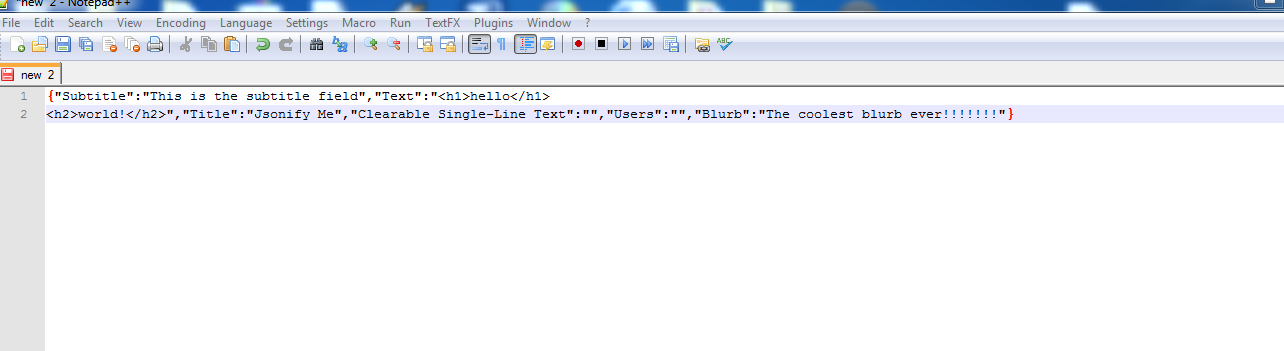
I pasted the following from my clipboard into Notepad++:
If you can think how this, or something similar could be useful, please drop a comment.
Going Bananas Over Typed Custom Properties and JSON on a Sitecore User Profile

Did you know squirrels love eating bananas? Neither did I until yesterday when I was enlightened by this tweet. Immediately, I knew I had to carve out a corner in the banana-loving-rodent market.
What better way to acquire leads than by offering free stuff after signing up for an account? I just needed an unsquirrely way to save answers to questions on my signup form to help me better understand my prospective customers.
I decided to take advantage of Sitecore’s ability to save custom information on user profiles but wanted to avoid passing strings directly to my users’ Sitecore.Security.UserProfile objects — saving lots of information in a string can be cumbersome if not downright messy.
Under the same JSON theme of the Sitecore Item Web API, I decided to build a wrapper class around the UserProfile object that uses an utility object to serialize/deserialize objects to/from strings of JSON before saving/retrieving.
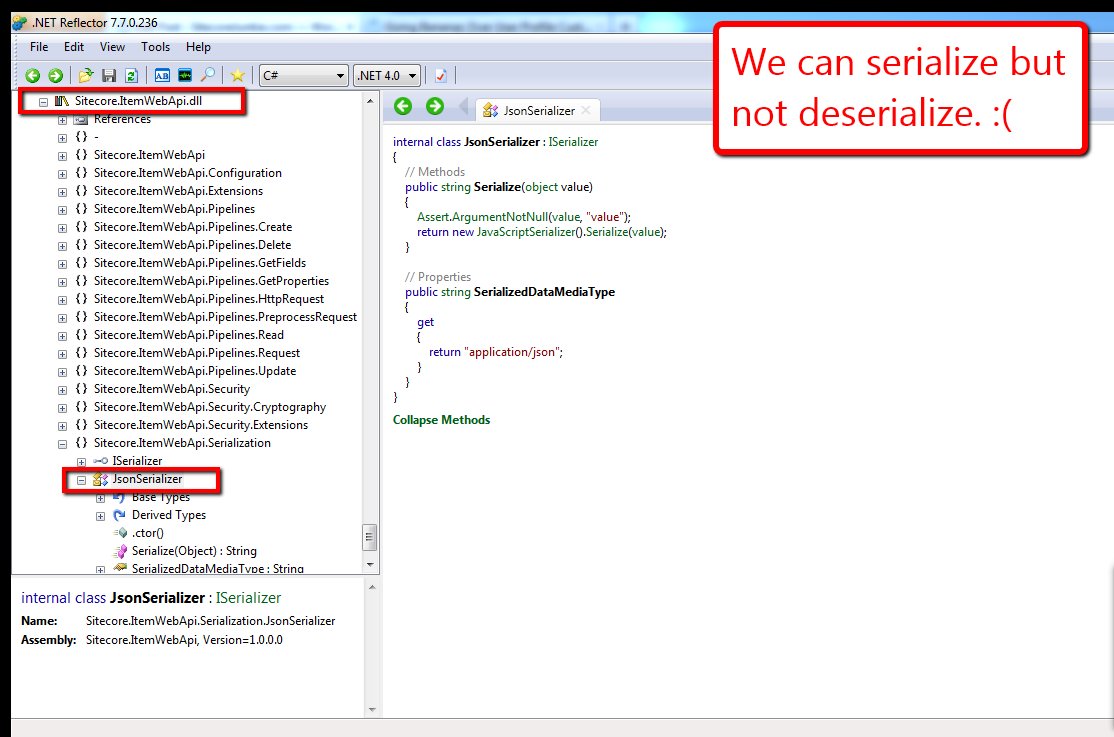
Knowing the Sitecore Item Web API converts objects into JSON, I poked around Sitecore.ItemWebApi.dll (v1.0.0 rev. 120828) using .NET Reflector in search of a serializer I could use in my solution. As I expected, I found a class that serializes objects into strings of JSON.
However, to my dismay, the same object does not deserialize strings back into objects:
Further, I found no classes within Sitecore.ItemWebApi.dll that deserialize JSON strings. This pretty much meant I had to “roll my own”:
using System;
using System.Collections.Generic;
using System.Linq;
using System.Text;

namespace Sitecore.Sandbox.Utilities.Serialization.Base
{
    public interface ISerializer
    {
        string Serialize(object objectToSerialize);

        T Deserialize<T>(string objectAsString);

        object Deserialize(string objectAsString, Type objectType);
    }
}
using System;
using System.Collections.Generic;
using System.Linq;
using System.Text;
using System.Web.Script.Serialization;

using Sitecore.Sandbox.Utilities.Serialization.Base;

namespace Sitecore.Sandbox.Utilities.Serialization
{
    public class JsonSerializer : ISerializer
    {
        private static JavaScriptSerializer _javaScriptSerializer = new JavaScriptSerializer();

        private JsonSerializer()
        {
        }

        public string Serialize(object objectToSerialize)
        {
            return _javaScriptSerializer.Serialize(objectToSerialize);
        }

        public T Deserialize<T>(string objectAsString)
        {
            return _javaScriptSerializer.Deserialize<T>(objectAsString);
        }

        public object Deserialize(string objectAsString, Type objectType)
        {
            return _javaScriptSerializer.Deserialize(objectAsString, objectType);
        }

        public static ISerializer CreateNewJsonSerializer()
        {
            return new JsonSerializer();
        }
    }
}
The JsonSerializer class above not only gives client-code the ability to serialize objects into JSON strings, but also offers methods for deserialization.
Plus, unlike the JsonSerializer class in Sitecore.ItemWebApi.Serialization, this JsonSerializer class creates only one instance of a JavaScriptSerializer object across multiple instances of itself. There is no need to have multiple instances of this class floating around in memory since the underlying core logic for this class will not — and should not — change.
Next, I defined my UserProfile wrapper class:
using System;
using System.Collections.Generic;
using System.Linq;
using System.Text;

namespace Sitecore.Sandbox.Security.UserProfiles.Base
{
    public interface IUserProfileTypedProperties
    {
        string FullName { get; set; }

        T GetCustomProperty<T>(string propertyName);

        void SetCustomProperty(string propertyName, object propertyValue);

        void Save();
    }
}
using System;
using System.Collections.Generic;
using System.Linq;
using System.Text;

using Sitecore.Diagnostics;
using Sitecore.Security;

using Sitecore.Sandbox.Utilities.Serialization.Base;
using Sitecore.Sandbox.Utilities.Serialization;
using Sitecore.Sandbox.Security.UserProfiles.Base;

namespace Sitecore.Sandbox.Security.UserProfiles
{
    public class UserProfileTypedProperties : IUserProfileTypedProperties
    {
        private static ISerializer _defaultSerializer = GetNewDefaultSerializer();

        private UserProfile UserProfile { get; set; }
        private ISerializer Serializer { get; set; }

        public string FullName
        {
            get
            {
                return UserProfile.FullName;
            }
            set
            {
                UserProfile.FullName = value;
            }
        }

        private UserProfileTypedProperties(UserProfile userProfile)
            :this(userProfile, _defaultSerializer)
        {
        }

        private UserProfileTypedProperties(UserProfile userProfile, ISerializer serializer)
        {
            SetUserProfile(userProfile);
            SetSerializer(serializer);
        }

        private void SetSerializer(ISerializer serializer)
        {
            Assert.ArgumentNotNull(serializer, "serializer");
            Serializer = serializer;
        }

        private void SetUserProfile(UserProfile userProfile)
        {
            Assert.ArgumentNotNull(userProfile, "userProfile");
            UserProfile = userProfile;
        }

        public T GetCustomProperty<T>(string propertyName)
        {
            string propertyValue = UserProfile.GetCustomProperty(propertyName);
            return Deserialize<T>(propertyValue);
        }

        private T Deserialize<T>(string objectAsString)
        {
            return Serializer.Deserialize<T>(objectAsString);
        }

        public void SetCustomProperty(string propertyName, object propertyValue)
        {
            string objectAsString = Serialize(propertyValue);
            SetCustomProperty(propertyName, objectAsString);
        }

        private void SetCustomProperty(string propertyName, string objectAsString)
        {
            UserProfile.SetCustomProperty(propertyName, objectAsString);
        }

        private string GetCustomProperty(string propertyName)
        {
            return UserProfile.GetCustomProperty(propertyName);
        }

        private string Serialize(object objectToSerialize)
        {
            return Serializer.Serialize(objectToSerialize);
        }

        public void Save()
        {
            UserProfile.Save();
        }

        public static IUserProfileTypedProperties CreateNewUserProfileTypedProperties(UserProfile userProfile)
        {
            return new UserProfileTypedProperties(userProfile);
        }

        public static IUserProfileTypedProperties CreateNewUserProfileTypedProperties(UserProfile userProfile, ISerializer serializer)
        {
            return new UserProfileTypedProperties(userProfile, serializer);
        }

        private static ISerializer GetNewDefaultSerializer()
        {
            return JsonSerializer.CreateNewJsonSerializer();
        }
    }
}
The UserProfile wrapper above offers client-code the option of passing in their own serializers — as long as their serializers implement the ISerializer interface I defined above — or provides an instance of the JsonSerializer by default.
Now, let’s test all of this stuff above using a simple form in a sublayout for creating an account and saving/retrieving a typed object from a custom UserProfile property:
<%@ Control Language="C#" AutoEventWireup="true" CodeBehind="UserProfile Typed Property Test.ascx.cs" Inherits="Sitecore650rev120706.layouts.sublayouts.UserProfile_Typed_Property_Test" %>
<style type="text/css">
.form-container
{
margin-left: 20px;
}
h1
{
margin-top: 0;
}
.form
{
list-style: none;
margin: 0;
padding: 0;
}
.form li,
td,
.cover
{
zoom: 1;
text-align: left;
}
.form li:after,
td:after,
.cover:after
{
content: ".";
display: block;
clear: both;
visibility: hidden;
line-height: 0;
height: 0;
}
.form > li > div,
input[type="radio"],
input[type="radio"] + label,
.float-left
{
float: left;
}
.form > li > div + div
{
margin-left: 5px;
}
.red
{
color: red;
}
.signup,
.bold
{
font-weight: bold;
}
input[type="radio"] + label
{
display: block;
width: 130px;
}
.signup,
.float-right
{
float: right;
}
.signup
{
width: 100px;
height: 50px;
font-size: 20px;
}
</style>
<div class="cover">
<asp:Image
ID="imgSquirrel"
CssClass="float-left"
ImageUrl="/img/squirrel-banana.jpg"
runat="server" />
<asp:MultiView ID="mvUserProfileInformation" ActiveViewIndex="0" runat="server">
<asp:View ID="vSignupForm" runat="server">
<div class="float-left form-container">
<h1>
Hey Squirrels
</h1>
<h2 class="red">
Free Bananas When You Signup!
</h2>
<ul class="form">
<li>
<div>
<asp:Label ID="lblName" CssClass="bold" Text="Name:" AssociatedControlID="txtName" runat="server" />
<span class="red">*</span>
</div>
<div>
<asp:TextBox ID="txtName" runat="server" />
<asp:RequiredFieldValidator
ID="rfvName"
ControlToValidate="txtName"
ErrorMessage="<br />Please tell us your name!"
CssClass="red"
Display="Dynamic"
ValidationGroup="SquirrelForm"
runat="server" />
</div>
</li>
<li>
<div>
<asp:Label ID="lblUsername" CssClass="bold" Text="Username:" AssociatedControlID="txtName" runat="server" />
<span class="red">*</span>
</div>
<div>
<asp:TextBox ID="txtUsername" runat="server" />
<asp:RequiredFieldValidator
ID="rfvUsername"
ControlToValidate="txtUsername"
ErrorMessage="<br />Please enter a username!"
CssClass="red"
Display="Dynamic"
ValidationGroup="SquirrelForm"
runat="server" />
</div>
</li>
<li>
<div>
<asp:Label ID="lblPassword" CssClass="bold" Text="Password:" AssociatedControlID="txtPassword" runat="server" />
<span class="red">*</span>
</div>
<div>
<asp:TextBox ID="txtPassword" TextMode="Password" runat="server" />
<asp:RequiredFieldValidator
ID="rfvPassword"
ControlToValidate="txtPassword"
ErrorMessage="<br />Choose a password!"
CssClass="red"
Display="Dynamic"
ValidationGroup="SquirrelForm"
runat="server" />
</div>
</li>
<li>
<div>
<asp:Label ID="lblPasswordConfirm" CssClass="bold" Text="Confirm Password:" AssociatedControlID="txtPasswordConfirm" runat="server" />
<span class="red">*</span>
</div>
<div>
<asp:TextBox ID="txtPasswordConfirm" TextMode="Password" runat="server" />
<asp:RequiredFieldValidator
ID="rfvPasswordConfirm"
ControlToValidate="txtPasswordConfirm"
ErrorMessage="<br />Please confirm your password!"
CssClass="red"
Display="Dynamic"
ValidationGroup="SquirrelForm"
runat="server" />
<asp:CompareValidator
ID="cvPasswordConfirm"
ControlToValidate="txtPasswordConfirm"
ControlToCompare="txtPassword"
ErrorMessage="<br />Passwords don't match!"
CssClass="red"
Display="Dynamic"
ValidationGroup="SquirrelForm"
runat="server" />
</div>
</li>
<li>
<div>
<asp:Label ID="lblWhereLive" CssClass="bold" Text="You live (choose one):" AssociatedControlID="cblFoods" runat="server" />
<span class="red">*</span>
</div>
<div>
<asp:RadioButtonList ID="rblWhereLive" runat="server">
<asp:ListItem Text="Up a tree" Value="Up a tree" />
<asp:ListItem Text="In an attic" Value="In an attic" />
<asp:ListItem Text="In a broken-down car up on cinder blocks" Value="In a broken-down car up on cinder blocks" />
</asp:RadioButtonList>
<asp:RequiredFieldValidator
ID="rfvWhereLive"
ControlToValidate="rblWhereLive"
ErrorMessage="<br />Please choose one domicile!"
CssClass="red"
Display="Dynamic"
ValidationGroup="SquirrelForm"
runat="server" />
</div>
</li>
<li>
<div>
<asp:Label ID="lblYouThinkYouARodent" CssClass="bold" Text="Do you think you're a rodent?:" AssociatedControlID="rblYouARodent" runat="server" />
</div>
<div>
<asp:RadioButtonList ID="rblYouARodent" runat="server">
<asp:ListItem Text="Yes" Value="Yes" Selected="true" />
<asp:ListItem Text="No" Value="No" />
</asp:RadioButtonList>
</div>
</li>
<li>
<div>
<asp:Label ID="lblFoodPreference" CssClass="bold" Text="I like to eat (check all that apply):" AssociatedControlID="cblFoods" runat="server" />
</div>
<div>
<asp:CheckBoxList ID="cblFoods" runat="server">
<asp:ListItem Text="Acorns" Value="Acorns" />
<asp:ListItem Text="Walnuts" Value="Walnuts" />
<asp:ListItem Text="Chestnuts" Value="Chestnuts" />
<asp:ListItem Text="Bananas" Value="Bananas" />
</asp:CheckBoxList>
</div>
</li>
</ul>
<asp:Button
ID="btnSignup"
CssClass="signup"
OnClick="btnSignup_Click"
Text="Signup"
ValidationGroup="SquirrelForm"
runat="server" />
</div>
</asp:View>
<asp:View ID="vUserProfileSavedInformation" runat="server">
<div class="float-left form-container" style="width: 330px;">
<h1>
Your information:
</h1>
<div>
<asp:Label
ID="lblYourName"
CssClass="bold"
Text="Name:"
runat="server" />
<asp:Literal ID="litYourName" runat="server" />
</div>
<div>
<asp:Label
ID="lblYourUsername"
CssClass="bold"
Text="Username:"
runat="server" />
<asp:Literal ID="litYourUsername" runat="server" />
</div>
<div>
<asp:Label
ID="lblYouARodent"
CssClass="bold"
Text="Do you think you're a rodent?:"
runat="server" />
<asp:Literal ID="litYouARodent" runat="server" />
</div>
<div>
<asp:Label
ID="lblYourDomicile"
CssClass="bold"
Text="You live:"
runat="server" />
<asp:Literal ID="litWhereLive" runat="server" />
</div>
<div>
<asp:Label
ID="lblYouLikeToEat"
CssClass="bold"
Text="You like to eat:"
runat="server" />
<asp:Literal ID="litFoodPreference" runat="server" />
</div>
</div>
</asp:View>
</asp:MultiView>
</div>
using System;
using System.Collections.Generic;
using System.Linq;
using System.Web;
using System.Web.UI;
using System.Web.UI.WebControls;

using Sitecore.Security;
using Sitecore.Security.Accounts;
using Sitecore.Security.Authentication;

using Sitecore.Sandbox.Security.UserProfiles;
using Sitecore.Sandbox.Security.UserProfiles.Base;

namespace Sitecore650rev120706.layouts.sublayouts
{
    public partial class UserProfile_Typed_Property_Test : System.Web.UI.UserControl
    {
        private const string SquirrelInformationPropertyName = "Squirrel Information";

        protected void Page_Load(object sender, EventArgs e)
        {
        }

        protected void btnSignup_Click(object sender, EventArgs e)
        {
            if (Page.IsValid)
            {
                string username = GetUsername();
                User user = CreateUser(username, txtPassword.Text);

                if(Login(user, txtPassword.Text))
                {
                    SaveSquirrelInformation();
                    ShowSquirrelInformation();
                }
            }
        }

        private User CreateUser(string username, string password)
        {
            return User.Create(username, txtPassword.Text);
        }

        private string GetUsername()
        {
            const string domain = "extranet";

            if(!string.IsNullOrEmpty(txtUsername.Text))
                return string.Concat(domain, "\\", txtUsername.Text);

            return string.Empty;
        }

        private bool Login(User user, string password)
        {
            if(user != null && user.Profile != null)
                return AuthenticationManager.Login(user.Profile.UserName, password, false);

            return false;
        }

        private void SaveSquirrelInformation()
        {
            SquirrelInformation squirrelInformation = GetSquirrelInformationFromForm();
            IUserProfileTypedProperties userProfileTypedProperties = UserProfileTypedProperties.CreateNewUserProfileTypedProperties(Sitecore.Context.User.Profile);
            userProfileTypedProperties.FullName = txtName.Text;
            userProfileTypedProperties.SetCustomProperty(SquirrelInformationPropertyName, squirrelInformation);
            userProfileTypedProperties.Save();
        }

        private SquirrelInformation GetSquirrelInformationFromForm()
        {
            return new SquirrelInformation
            {
                Domicile = rblWhereLive.SelectedValue,
                YouARodent = rblYouARodent.Text,
                FoodPreferences = GetFoodPreferencesFromForm()
            };
        }

        private List<string> GetFoodPreferencesFromForm()
        {
            List<string> foodPreferences = new List<string>();

            foreach (ListItem listItem in cblFoods.Items)
            {
                if (listItem.Selected)
                    foodPreferences.Add(listItem.Value);
            }

            return foodPreferences;
        }

        private void ShowSquirrelInformation()
        {
            UserProfile userProfile = Sitecore.Context.User.Profile;
            litYourName.Text = userProfile.FullName;
            litYourUsername.Text = userProfile.UserName;

            SquirrelInformation squirrelInformation = GetSavedSquirrelInformation(userProfile);
            litWhereLive.Text = squirrelInformation.Domicile;
            litYouARodent.Text = squirrelInformation.YouARodent;
            litFoodPreference.Text = string.Join(", ", squirrelInformation.FoodPreferences);
            mvUserProfileInformation.SetActiveView(vUserProfileSavedInformation);
        }

        private static SquirrelInformation GetSavedSquirrelInformation(UserProfile userProfile)
        {
            IUserProfileTypedProperties userProfileTypedProperties = UserProfileTypedProperties.CreateNewUserProfileTypedProperties(userProfile);
            return userProfileTypedProperties.GetCustomProperty<SquirrelInformation>(SquirrelInformationPropertyName);
        }

        private class SquirrelInformation
        {
            public string Domicile { get; set; }
            public string YouARodent { get; set; }
            public List<string> FoodPreferences { get; set; }
        }
    }
}
The form:

After creating an account, I just show a subset of the information the squirrel provided on the form:

Just to let you know, the logic in sublayout’s code-behind is not very robust — it throws an exception when users refresh the “confirmation” page after creating an account (I’m not checking to see if the user had already created an account and is logged in).
Plus, it’s in need of refactoring — I should move the SquirrelInformation class into its own file.
I’m not even going to mention how bad the front-end code needs some attention — my front-end friends are probably ashamed they even know me and are no doubt thinking I’ve gone completely bananas. They may be right. 🙂
I promise I’ll go back and clean it up. I just needed to get it out the door. Winter is quickly approaching and I need to market my bananas as soon as possible. I need to reap in some dough to buy and bury more acorns.
That’s it for now. I have to go climb a tree. Talk to you later 🙂
 SitecoreJunkie.com