Home » Sitecore Client (Page 6)
Category Archives: Sitecore Client
Show Clones of An Item In the Sitecore CMS
“Out of the box”, there is no specific way to see all clones for a given item — at least I haven’t found one yet.
One could see these by looking at referrers of an item:

Unfortunately, referrers in this dropdown aren’t just reserved for clones — all referrers of the item will display in this dropdown. An example would include an item referencing the item in a Droplink field.
In a previous post, I provided a solution for auto-cloning new subitems to clones of their parents. That solution leveraged an instance of the ItemClonesGatherer utility class I defined in that post to return a collection of clones for a given item.
Yesterday, I realized this class could be reused for a feature to show a listing of clones for an item in Sitecore, and this post showcases that solution.
I had to come up with a medium for displaying a list of clones of an item. I decided I would display these in a new content editor tab.
I recalled reading an article by Sitecore MVP Mark Stiles on adding new Editor tabs in Sitecore.
As Mark Stiles had done in his post, I created a stand-alone ASP.NET web form (/sitecore modules/Shell/ShowClones/default.aspx). This web form will display the content of our new “Show Clones” tab:
<%@ Page Language="C#" AutoEventWireup="true" CodeBehind="Default.aspx.cs" Inherits="Sitecore650rev120706.sitecore_modules.Shell.ShowClones.Default" %>

<!DOCTYPE html PUBLIC "-//W3C//DTD XHTML 1.0 Transitional//EN" "http://www.w3.org/TR/xhtml1/DTD/xhtml1-transitional.dtd">

<html xmlns="http://www.w3.org/1999/xhtml">
<head runat="server">
    <title>Show Clones</title>
    <style type="text/css">
        h1
        {
            color: #072d6b;
            font-size: 14pt;
            margin-bottom: 5px;
        }
        a
        {
            text-decoration: none;
            font-size: 8pt;
            font-family: Tahoma;
        }
        a:hover
        {
            text-decoration: underline;
        }
        #clones
        {
            margin: 10px;
        }
        #clone_listing
        {
            list-style-type: none;
            margin: 0 0 0 15px;
        }
        #clone_listing li
        {
            margin: 0;
        }
        #clone_listing li + li
        {
            margin-top: 5px;
        }
    </style>
</head>
<body>
    <form id="form1" runat="server">
        <div id="clones">
            <h1>Clones</h1>
            <asp:MultiView ID="mvClones" ActiveViewIndex="0" runat="server">
                <asp:View ID="vClones" runat="server">
                    <asp:Repeater ID="rptClones" runat="server">
                        <HeaderTemplate>
                            <ol id="clone_listing">
                        </HeaderTemplate>
                        <ItemTemplate>
                            <li>
                                <asp:HyperLink
                                    ID="hlClone"
                                    NavigateUrl="#"
                                    onclick='<%# string.Format("parent.scForm.invoke(\"item:load(id={0})\"); return false;", Eval("ID").ToString()) %>'
                                    Text='<%# Eval("Paths.FullPath") %>'
                                    runat="server" />
                            </li>
                        </ItemTemplate>
                        <FooterTemplate>
                            </ol>
                        </FooterTemplate>
                    </asp:Repeater>
                </asp:View>
                <asp:View ID="vNoClones" runat="server">
                    <script type="text/javascript">
                        parent.scContent.closeEditorTab('ShowClones');
                    </script>
                </asp:View>
            </asp:MultiView>
        </div>
    </form>
</body>
</html>
The web form’s code-behind:
using System;
using System.Collections.Generic;

using Sitecore.Data;
using Sitecore.Data.Items;
using Sitecore.Diagnostics;
using Sitecore.Globalization;
using Sitecore.Web;

using Sitecore.Sandbox.Utilities.Gatherers.Base;
using Sitecore.Sandbox.Utilities.Gatherers;

namespace Sitecore650rev120706.sitecore_modules.Shell.ShowClones
{
    public partial class Default : System.Web.UI.Page
    {
        private static readonly IItemsGatherer ClonesGatherer = ItemClonesGatherer.CreateNewItemClonesGatherer();

        protected void Page_Load(object sender, EventArgs e)
        {
            ShowClones();
        }

        private void ShowClones()
        {
            BindRepeater();
            ToggleViews();
        }

        private void BindRepeater()
        {
            rptClones.DataSource = GetClones();
            rptClones.DataBind();
        }

        private void ToggleViews()
        {
            if (rptClones.Items.Count > 0)
            {
                mvClones.SetActiveView(vClones);
            }
            else
            {
                mvClones.SetActiveView(vNoClones);
            }
        }

        private IEnumerable<Item> GetClones()
        {
            Item item = GetItem();
            if(item == null)
            {
                return new List<Item>();
            }

            ClonesGatherer.Source = item;
            return ClonesGatherer.Gather();
        }

        private Item GetItem()
        {
            Item item = null;

            try
            {
                item = Sitecore.Context.ContentDatabase.GetItem(GetID(), GetLanguage(), GetVersion());
            }
            catch(Exception ex)
            {
                Log.Error(this.ToString(), ex, this);
            }

            return item;
        }

        private ID GetID()
        {
            Sitecore.Data.ID id;
            if(Sitecore.Data.ID.TryParse(WebUtil.GetQueryString("id"), out id))
            {
                return id;
            }

            return Sitecore.Data.ID.Null;
        }

        private Language GetLanguage()
        {
            Language language;
            if(Language.TryParse(WebUtil.GetQueryString("la"), out language))
            {
                return language;
            }

            return Sitecore.Context.Language;
        }

        private Sitecore.Data.Version GetVersion()
        {
            Sitecore.Data.Version version;
            if (Sitecore.Data.Version.TryParse(WebUtil.GetQueryString("vs"), out version))
            {
                return version;
            }

            return Sitecore.Data.Version.Latest;
        }
    }
}
The code-behind above uses an instance of the ItemClonesGatherer class to get all clones for the passed item. If clones are found, these are bound to a repeater to display them as links.
If there are no clones, the Multiview in the web form is toggled to render JavaScript to close the tab — the tab should not be open if the item does not have any clones.
After revisiting Mark’s article, and realized I needed a different solution: one that will allow me to add a new tab on the fly.
Such a solution should only allow the tab to open when an item has clones, and it should not be be associated with any templates — it must be template oblivious.
I stumbled upon a command in one of the Sitecore DLLs — which one it was is evading me at the moment — and noticed it was using an instance of Sitecore.Web.UI.Framework.Scripts.ShowEditorTab. I decided to take a chance on using an instance of this object, hoping it might open up a new content editor tab on the fly.
Using that command as a model, I came up with the following command:
using System.Collections.Generic;
using System.Linq;

using Sitecore.Sandbox.Utilities.Gatherers.Base;
using Sitecore.Sandbox.Utilities.Gatherers;

using Sitecore.Data.Items;
using Sitecore.Diagnostics;
using Sitecore.Globalization;
using Sitecore.Resources;
using Sitecore.Shell.Framework.Commands;
using Sitecore.Text;
using Sitecore.Web;
using Sitecore.Web.UI.Framework.Scripts;
using Sitecore.Web.UI.Sheer;

namespace Sitecore.Sandbox.Commands
{
    public class ShowClones : Command
    {
        private static readonly IItemsGatherer ClonesGatherer = ItemClonesGatherer.CreateNewItemClonesGatherer();

        public override void Execute(CommandContext commandContext)
        {
            ShowClonesEditorTab(GetItem(commandContext));
        }

        private static void ShowClonesEditorTab(Item item)
        {
            Assert.ArgumentNotNull(item, "item");
            const string command = "contenteditor:pagedesigner";
            const string id = "ShowClones";

            bool shouldClickEditorTab = IsEditorTabOpen(command);

            if (IsEditorTabOpen(command))
            {
                ClickOpenEditorTab(id);
                return;
            }

            OpenEditorTab(CreateNewShowClonesEditorTab(item, command, id));
        }

        private static bool IsEditorTabOpen(string command)
        {
            Assert.ArgumentNotNullOrEmpty(command, "command");
            return WebUtil.GetFormValue("scEditorTabs").Contains(command);
        }

        private static void ClickOpenEditorTab(string id)
        {
            Assert.ArgumentNotNullOrEmpty(id, "id");
            SheerResponse.Eval(string.Format("scContent.onEditorTabClick(null, null, '{0}')", id));
        }

        private static void OpenEditorTab(ShowEditorTab tab)
        {
            Assert.ArgumentNotNull(tab, "tab");
            SheerResponse.Eval(tab.ToString());
        }

        private static ShowEditorTab CreateNewShowClonesEditorTab(Item item, string command, string id)
        {
            Assert.ArgumentNotNull(item, "item");
            Assert.ArgumentNotNullOrEmpty(command, "command");
            Assert.ArgumentNotNullOrEmpty(id, "id");

            UrlString urlString = new UrlString("/sitecore modules/shell/showclones/default.aspx");
            item.Uri.AddToUrlString(urlString);
            UIUtil.AddContentDatabaseParameter(urlString);
            return new ShowEditorTab
            {
                Command = command,
                Header = Translate.Text("Show Clones"),
                Icon = Images.GetThemedImageSource("Network/32x32/link_view.png"),
                Url = urlString.ToString(),
                Id = id,
                Closeable = true,
                Activate = true
            };
        }

        public override CommandState QueryState(CommandContext context)
        {
            if (!HasClones(GetItem(context)))
            {
                return CommandState.Hidden;
            }

            return CommandState.Enabled;
        }

        private static Item GetItem(CommandContext context)
        {
            Assert.ArgumentNotNull(context, "context");
            return context.Items.FirstOrDefault();
        }

        private static bool HasClones(Item item)
        {
            Assert.ArgumentNotNull(item, "item");
            return GetClones(item).Any();
        }

        private static IEnumerable<Item> GetClones(Item item)
        {
            Assert.ArgumentNotNull(item, "item");
            ClonesGatherer.Source = item;
            return ClonesGatherer.Gather();
        }
    }
}
The command above uses an instance of ItemClonesGatherer to get all clones for the item in the content tree, and ensures it is visible when the item has clones. The logic hides the command when the item does not have clones.
When the command is invoked, it will open a new “Show Clones” tab, or set focus on the “Show Clones” tab if it’s already present.
I then registered the command above in a patch include configuration file:
<?xml version="1.0"?>
<configuration xmlns:patch="http://www.sitecore.net/xmlconfig/">
  <sitecore>
    <commands>
      <command name="item:showclones" type="Sitecore.Sandbox.Commands.ShowClones,Sitecore.Sandbox"/>
    </commands>
  </sitecore>
</configuration>
Now, we need to lock and load this command in Sitecore. I switched over to the core database, and added a new item context menu option:

Let’s see this in action.
I first created a bunch of clones:

On my source item, I right-clicked, and was presented with a new context menu option to “Show Clones”:

After clicking the “Show Clones” context menu option, a new “Show Clones” tab appeared:

I then clicked on one of the links in the “Show Clones” tab, and was brought to its associated clone:

If you have other ideas around using clones in Sitecore, or if you know of another way of listing clones of an item, please leave a comment.
Automagically Clone New Child Items to Clones of Parent Items In the Sitecore CMS
“Out of the box”, content authors are prompted via a content editor warning to take action on clones of a source item when a new subitem is added under the source item:

Content authors have a choice to either clone or not clone the new subitem, and such an action must be repeated on all clones of the source item — such might be a daunting task, especially when there are multiple clones for a given source item.
In a recent project, I had a requirement to automatically clone newly added subitems under clones of their parents, and remove any content editor warnings by programmatically accepting the Sitecore notifications driving these warnings.
Although I cannot show you that solution, I did wake up from a sound sleep early this morning with another solution to this problem — it was quite a dream — and this post captures that idea.
In a previous post, I built a utility object that gathers things, and decided to reuse this basic concept. Here, I define a contract for what constitutes a general gatherer:
using System.Collections.Generic;

namespace Sitecore.Sandbox.Utilities.Gatherers.Base
{
    public interface IGatherer<T, U>
    {
        T Source { get; set; }

        IEnumerable<U> Gather();
    }
}
In this post, we will be gathering clones — these are Sitecore items:
using Sitecore.Data.Items;

namespace Sitecore.Sandbox.Utilities.Gatherers.Base
{
    public interface IItemsGatherer : IGatherer<Item, Item>
    {
    }
}
The following gatherer grabs all clones for a given item as they are cataloged in an instance of the LinkDatabase — in this solution we are using Globals.LinkDatabase as the default instance:
using System.Collections.Generic;
using System.Linq;

using Sitecore.Data.Items;
using Sitecore.Diagnostics;
using Sitecore.Links;

using Sitecore.Sandbox.Utilities.Gatherers.Base;

namespace Sitecore.Sandbox.Utilities.Gatherers
{
    public class ItemClonesGatherer : IItemsGatherer
    {
        private LinkDatabase LinkDatabase { get; set; }

        private Item _Source;
        public Item Source
        {
            get
            {
                return _Source;
            }
            set
            {
                Assert.ArgumentNotNull(value, "Source");
                _Source = value;
            }
        }

        private ItemClonesGatherer()
            : this(GetDefaultLinkDatabase())
        {
        }

        private ItemClonesGatherer(LinkDatabase linkDatabase)
        {
            SetLinkDatabase(linkDatabase);
        }

        private ItemClonesGatherer(LinkDatabase linkDatabase, Item source)
        {
            SetLinkDatabase(linkDatabase);
            SetSource(source);
        }

        private void SetLinkDatabase(LinkDatabase linkDatabase)
        {
            Assert.ArgumentNotNull(linkDatabase, "linkDatabase");
            LinkDatabase = linkDatabase;
        }

        private void SetSource(Item source)
        {
            Source = source;
        }

        public IEnumerable<Item> Gather()
        {
            return (from itemLink in GetReferrers()
                    where IsClonedItem(itemLink)
                    select itemLink.GetSourceItem()).ToList();
        }

        private IEnumerable<ItemLink> GetReferrers()
        {
            Assert.ArgumentNotNull(Source, "Source");
            return LinkDatabase.GetReferrers(Source);
        }

        private static bool IsClonedItem(ItemLink itemLink)
        {
            return IsSourceField(itemLink)
                    && !IsSourceItemNull(itemLink);
        }

        private static bool IsSourceField(ItemLink itemLink)
        {
            Assert.ArgumentNotNull(itemLink, "itemLink");
            return itemLink.SourceFieldID == FieldIDs.Source;
        }

        private static bool IsSourceItemNull(ItemLink itemLink)
        {
            Assert.ArgumentNotNull(itemLink, "itemLink");
            return itemLink.GetSourceItem() == null;
        }

        private static LinkDatabase GetDefaultLinkDatabase()
        {
            return Globals.LinkDatabase;
        }

        public static IItemsGatherer CreateNewItemClonesGatherer()
        {
            return new ItemClonesGatherer();
        }

        public static IItemsGatherer CreateNewItemClonesGatherer(LinkDatabase linkDatabase)
        {
            return new ItemClonesGatherer(linkDatabase);
        }

        public static IItemsGatherer CreateNewItemClonesGatherer(LinkDatabase linkDatabase, Item source)
        {
            return new ItemClonesGatherer(linkDatabase, source);
        }
    }
}
Next, we need a way to remove the content editor warning I alluded to above. The way to do this is to accept the notification that is triggered on the source item’s clones.
I decided to use the decorator pattern to accomplish this:
using Sitecore.Data.Clones;
using Sitecore.Data.Items;
using Sitecore.Diagnostics;

namespace Sitecore.Sandbox.Data.Clones
{
    public class AcceptAsIsNotification : Notification
    {
        private Notification InnerNotification { get; set; }

        private AcceptAsIsNotification(Notification innerNotification)
        {
            SetInnerNotification(innerNotification);
            SetProperties();
        }

        private void SetInnerNotification(Notification innerNotification)
        {
            Assert.ArgumentNotNull(innerNotification, "innerNotification");
            InnerNotification = innerNotification;
        }

        private void SetProperties()
        {
            ID = InnerNotification.ID;
            Processed = InnerNotification.Processed;
            Uri = InnerNotification.Uri;
        }

        public override void Accept(Item item)
        {
            base.Accept(item);
        }

        public override Notification Clone()
        {
            return InnerNotification.Clone();
        }

        public static Notification CreateNewAcceptAsIsNotification(Notification innerNotification)
        {
            return new AcceptAsIsNotification(innerNotification);
        }
    }
}
An instance of the above AcceptAsIsNotification class would wrap an instance of a notification, and accept the wrapped notification without any other action.
Notifications we care about in this solution are instances of Sitecore.Data.Clones.ChildCreatedNotification — in Sitecore.Kernel — for a given clone parent, and this notification clones a subitem during acceptance, a behavior we do not want to leverage since we have already cloned the subitem.
I then added an item:added event handler to use an instance of our gatherer defined above to get all clones of the newly added subitem’s parent; clone the subitem under these clones; and accept all instances of Sitecore.Data.Clones.ChildCreatedNotification on the parent item’s clones:
using System;
using System.Collections.Generic;
using System.Linq;

using Sitecore.Data;
using Sitecore.Data.Clones;
using Sitecore.Data.Items;
using Sitecore.Diagnostics;
using Sitecore.Events;

using Sitecore.Sandbox.Data.Clones;
using Sitecore.Sandbox.Utilities.Gatherers;
using Sitecore.Sandbox.Utilities.Gatherers.Base;

namespace Sitecore.Sandbox.Events.Handlers
{
    public class AutomagicallyCloneChildItemEventHandler
    {
        private static readonly IItemsGatherer ClonesGatherer = ItemClonesGatherer.CreateNewItemClonesGatherer();

        public void OnItemAdded(object sender, EventArgs args)
        {
            CloneItemIfApplicable(GetItem(args));
        }

        private static void CloneItemIfApplicable(Item item)
        {
            if (item == null)
            {
                return;
            }

            ChildCreatedNotification childCreatedNotification = CreateNewChildCreatedNotification();
            childCreatedNotification.ChildId = item.ID;
            IEnumerable<Item> clones = GetClones(item.Parent);
            foreach (Item clone in clones)
            {
                Item clonedChild = item.CloneTo(clone);
                RemoveChildCreatedNotifications(Context.ContentDatabase, clone);
            }
        }

        private static void RemoveChildCreatedNotifications(Database database, Item clone)
        {
            Assert.ArgumentNotNull(database, "database");
            Assert.ArgumentNotNull(clone, "clone");
            foreach (Notification notification in GetChildCreatedNotifications(database, clone))
            {
                AcceptNotificationAsIs(notification, clone);
            }
        }

        private static void AcceptNotificationAsIs(Notification notification, Item item)
        {
            Assert.ArgumentNotNull(notification, "notification");
            Assert.ArgumentNotNull(item, "item");
            Notification acceptAsIsNotification = AcceptAsIsNotification.CreateNewAcceptAsIsNotification(notification);
            acceptAsIsNotification.Accept(item);
        }

        private static IEnumerable<Notification> GetChildCreatedNotifications(Database database, Item clone)
        {
            Assert.ArgumentNotNull(database, "database");
            Assert.ArgumentNotNull(clone, "clone");
            return GetNotifications(database, clone).Where(notification => notification.GetType() == typeof(ChildCreatedNotification)).ToList();
        }
        private static IEnumerable<Notification> GetNotifications(Database database, Item clone)
        {
            Assert.ArgumentNotNull(database, "database");
            Assert.ArgumentNotNull(clone, "clone");
            return database.NotificationProvider.GetNotifications(clone);
        }

        private static IEnumerable<Item> GetClones(Item item)
        {
            ClonesGatherer.Source = item;
            return ClonesGatherer.Gather();
        }

        private static Item GetItem(EventArgs args)
        {
            return Event.ExtractParameter(args, 0) as Item;
        }

        private static ChildCreatedNotification CreateNewChildCreatedNotification()
        {
            return new ChildCreatedNotification();
        }
    }
}
I then plugged in the above in a patch include configuration file:
<?xml version="1.0" encoding="utf-8" ?>
<configuration>
  <sitecore>
    <events>
      <event name="item:added">
        <handler type="Sitecore.Sandbox.Events.Handlers.AutomagicallyCloneChildItemEventHandler, Sitecore.Sandbox" method="OnItemAdded"/>
      </event>
    </events>
  </sitecore>
</configuration>
Let’s try this out, and see how we did.
I created a new child item under my source item:

As you can see, clones were added under all clones of the source item.
Plus, the notification about a new child item being added under the source item is not present:

This notification was automatically accepted in code via an instance of AcceptAsIsNotification within the item:added event handler defined above.
If you can think of any other interesting ways to leverage Sitecore’s item cloning capabilities, please leave a comment.
Reuse Sitecore Data Template Fields by Pulling Them Up Into a Base Template
How many times have you discovered that you need to reuse some fields defined in a data template, but don’t want to use that data template as a base template since it defines a bunch of fields that you don’t want to use?
What do you usually do in such a situation?
In the past, I would have created a new data template, moved the fields I would like to reuse underneath it, followed by setting that new template as a base template on the data template I moved the fields from.
I’ve spoken with other Sitecore developers on what they do in this situation, and one developer conveyed he duplicates the template, and delete fields that are not to be reused — thus creating a new base template. Though this might save time, I would advise against it — any code referencing fields by IDs will break using this paradigm for creating a new base template.
Martin Fowler — in his book
Refactoring: Improving the Design of Existing Code — defined the refactoring technique ‘Pull Up Field’ for moving fields from a class up into its base class — dubbed superclass for the Java inclined audience.
One should employ this refactoring technique when other subclasses of the base class are to reuse the fields being pulled up.
When I first encountered this refactoring technique in Fowler’s book, I pondered over how useful this would be in the Sitecore data template world, and decided to build two tools for pulling up fields into a base template. One tool will create a new base template, and the other will allow users to move fields to an existing base template.
The following class defines methods that will be used by two new client pipelines I will define below:
using System;
using System.Collections.Generic;
using System.Linq;
using System.Text;

using Sitecore.Configuration;
using Sitecore.Data;
using Sitecore.Data.Items;
using Sitecore.Data.Managers;
using Sitecore.Data.Templates;
using Sitecore.Diagnostics;
using Sitecore.Shell.Applications.Dialogs.ItemLister;
using Sitecore.Shell.Framework;
using Sitecore.Text;
using Sitecore.Web;
using Sitecore.Web.UI.Sheer;

namespace Sitecore.Sandbox.Shell.Framework.Pipelines
{
    public class PullUpFieldsIntoBaseTemplate
    {
        private const char IDDelimiter = '|';
        private const string BaseTemplateFieldName = "__Base template";

        public void EnsureTemplate(ClientPipelineArgs args)
        {
            Item item = GetItem(args);
            if (!IsTemplate(item))
            {
                CancelOperation(args, "The supplied item is not a template!");
            }
        }

        private static bool IsTemplate(Item item)
        {
            Assert.ArgumentNotNull(item, "item");
            return TemplateManager.IsTemplate(item);
        }

        public void SelectFields(ClientPipelineArgs args)
        {
            Assert.ArgumentNotNull(args, "args");
            if (!args.IsPostBack)
            {
                UrlString urlString = new UrlString(UIUtil.GetUri("control:TreeListExEditor"));
                UrlHandle urlHandle = new UrlHandle();
                urlHandle["title"] = "Select Fields";
                urlHandle["text"] = "Select the fields to pull up into a base template.";
                urlHandle["source"] = GetSelectFieldsDialogSource(args);
                urlHandle.Add(urlString);
                SheerResponse.ShowModalDialog(urlString.ToString(), "800px", "500px", string.Empty, true);
                args.WaitForPostBack();
            }
            else if (args.HasResult)
            {
                args.Parameters["fieldIds"] = args.Result;
                args.IsPostBack = false;
            }
            else
            {
                CancelOperation(args);
            }
        }

        private static string GetSelectFieldsDialogSource(ClientPipelineArgs args)
        {
            Assert.ArgumentNotNull(args, "args");
            Assert.ArgumentNotNullOrEmpty(args.Parameters["database"], "args.Parameters[\"database\"]");
            Assert.ArgumentNotNullOrEmpty(args.Parameters["templateId"], "args.Parameters[\"templateId\"]");
            return string.Format
            (
                "AllowMultipleSelection=true&DatabaseName={0}&DataSource={1}&IncludeTemplatesForSelection=Template field",
                args.Parameters["database"],
                args.Parameters["templateId"]
            );
        }

        public void ChooseBaseTemplateName(ClientPipelineArgs args)
        {
            if (!args.IsPostBack)
            {
                SheerResponse.Input("Enter the name of the base template", string.Concat("New Base Template 1"));
                args.WaitForPostBack();
            }
            else if (args.HasResult)
            {
                args.Parameters["baseTemplateName"] = args.Result;
                args.IsPostBack = false;
            }
            else
            {
                CancelOperation(args);
            }
        }

        public void ChooseBaseTemplateLocation(ClientPipelineArgs args)
        {
            if (!args.IsPostBack)
            {
                Dialogs.BrowseItem
                (
                    "Select Base Template Location",
                    "Select the parent item under which the new base template will be created.",
                    args.Parameters["icon"],
                    "OK",
                    "/sitecore/templates",
                    args.Parameters["templateId"]
                );

                args.WaitForPostBack();
            }
            else if (args.HasResult)
            {
                args.Parameters["baseTemplateParentId"] = args.Result;
                args.IsPostBack = false;
            }
            else
            {
                CancelOperation(args);
            }
        }

        public void CreateNewBaseTemplate(ClientPipelineArgs args)
        {
            Database database = GetDatabase(args.Parameters["database"]);
            Item baseTemplateParent = database.GetItem(args.Parameters["baseTemplateParentId"]);
            Item baseTemplate = baseTemplateParent.Add(args.Parameters["baseTemplateName"], new TemplateID(TemplateIDs.Template));
            SetBaseTemplateField(baseTemplate, TemplateIDs.StandardTemplate);
            args.Parameters["baseTemplateId"] = baseTemplate.ID.ToString();
        }

        public void ChooseExistingBaseTemplate(ClientPipelineArgs args)
        {
            if (!args.IsPostBack)
            {
                ItemListerOptions itemListerOptions = new ItemListerOptions
                {
                    ButtonText = "OK",
                    Icon = args.Parameters["icon"],
                    Title = "Select Base Template",
                    Text = "Select the base template for pulling up the fields."
                };

                TemplateItem templateItem = GetItem(args);
                itemListerOptions.Items = ExcludeStandardTemplate(templateItem.BaseTemplates).Select(baseTemplate => baseTemplate.InnerItem).ToList();
                itemListerOptions.AddTemplate(TemplateIDs.Template);
                SheerResponse.ShowModalDialog(itemListerOptions.ToUrlString().ToString(), true);
                args.WaitForPostBack();
            }
            else if (args.HasResult)
            {
                args.Parameters["baseTemplateId"] = args.Result;
                args.IsPostBack = false;
            }
            else
            {
                CancelOperation(args);
            }
        }

        private static IEnumerable<TemplateItem> ExcludeStandardTemplate(IEnumerable<TemplateItem> baseTemplates)
        {
            if (baseTemplates != null && baseTemplates.Any())
            {
                return baseTemplates.Where(baseTemplate => baseTemplate.ID != TemplateIDs.StandardTemplate);
            }

            return baseTemplates;
        }

        public void EnsureCanCreateAtBaseTemplateLocation(ClientPipelineArgs args)
        {
            Item baseTemplateParent = GetItem(args.Parameters["database"], args.Parameters["baseTemplateParentId"]);
            if (!baseTemplateParent.Access.CanCreate())
            {
                CancelOperation(args, "You cannot create an item at the selected location!");
            }
        }

        public void Execute(ClientPipelineArgs args)
        {
            Database database = GetDatabase(args.Parameters["database"]);
            Item baseTemplate = database.GetItem(args.Parameters["baseTemplateId"]);
            SetBaseTemplateField(baseTemplate, TemplateIDs.StandardTemplate);
            IDictionary<SectionInformation, IList<Item>> sectionsWithFields = GetSectionsWithFields(database, args.Parameters["fieldIds"]);

            foreach (SectionInformation sectionInformation in sectionsWithFields.Keys)
            {
                IEnumerable<Item> fields = sectionsWithFields[sectionInformation];
                MoveFieldsToAppropriateSection(baseTemplate, sectionInformation, fields);
            }

            Item templateItem = database.GetItem(args.Parameters["templateId"]);
            ListString baseTemplateIDs = new ListString(templateItem[BaseTemplateFieldName], IDDelimiter);
            baseTemplateIDs.Add(baseTemplate.ID.ToString());
            SetBaseTemplateField(templateItem, baseTemplateIDs);
            Refresh(templateItem);
        }

        private static void MoveFieldsToAppropriateSection(Item baseTemplate, SectionInformation sectionInformation, IEnumerable<Item> fields)
        {
            TemplateItem templateItem = baseTemplate;
            TemplateSectionItem templateSectionItem = templateItem.GetSection(sectionInformation.Section.Name);

            if (templateSectionItem != null)
            {
                MoveFields(templateSectionItem, fields);
            }
            else
            {
                Item sectionItemCopy = sectionInformation.Section.CopyTo(baseTemplate, sectionInformation.Section.Name, ID.NewID, false);
                MoveFields(sectionItemCopy, fields);
            }

            if (!sectionInformation.Section.GetChildren().Any())
            {
                sectionInformation.Section.Delete();
            }
        }

        private static void MoveFields(TemplateSectionItem templateSectionItem, IEnumerable<Item> fields)
        {
            Assert.ArgumentNotNull(templateSectionItem, "templateSectionItem");
            Assert.ArgumentNotNull(fields, "fields");
            foreach (Item field in fields)
            {
                field.MoveTo(templateSectionItem.InnerItem);
            }
        }

        private static void SetBaseTemplateField(Item templateItem, object baseTemplateIds)
        {
            Assert.ArgumentNotNull(templateItem, "templateItem");
            templateItem.Editing.BeginEdit();
            templateItem[BaseTemplateFieldName] = EnsureDistinct(baseTemplateIds.ToString(), IDDelimiter);
            templateItem.Editing.EndEdit();
        }

        private static string EnsureDistinct(string strings, char delimiter)
        {
            return string.Join(delimiter.ToString(), EnsureDistinct(strings.ToString().Split(new[] { delimiter })));
        }

        private static IEnumerable<string> EnsureDistinct(IEnumerable<string> strings)
        {
            return strings.Distinct();
        }

        private static IDictionary<SectionInformation, IList<Item>> GetSectionsWithFields(Database database, string fieldIds)
        {
            IDictionary<SectionInformation, IList<Item>> sectionsWithFields = new Dictionary<SectionInformation, IList<Item>>();

            foreach (TemplateFieldItem field in GetFields(database, fieldIds))
            {
                SectionInformation sectionInformation = new SectionInformation(field.Section.InnerItem);
                if (sectionsWithFields.ContainsKey(sectionInformation))
                {
                    sectionsWithFields[sectionInformation].Add(field.InnerItem);
                }
                else
                {
                    sectionsWithFields.Add(sectionInformation, new List<Item>(new[] { field.InnerItem }));
                }
            }

            return sectionsWithFields;
        }

        private static IEnumerable<TemplateFieldItem> GetFields(Database database, string fieldIds)
        {
            ListString fieldIdsListString = new ListString(fieldIds, IDDelimiter);
            IList<TemplateFieldItem> fields = new List<TemplateFieldItem>();

            foreach (string fieldId in fieldIdsListString)
            {
                fields.Add(database.GetItem(fieldId));
            }

            return fields;
        }

        private static Item GetItem(ClientPipelineArgs args)
        {
            Assert.ArgumentNotNull(args, "args");
            Item item = GetItem(args.Parameters["database"], args.Parameters["templateId"]);
            Assert.IsNotNull(item, "Item cannot be null!");
            return item;
        }

        private static Item GetItem(string databaseName, string itemId)
        {
            Assert.ArgumentNotNullOrEmpty(databaseName, "databaseName");
            Assert.ArgumentNotNullOrEmpty(itemId, "itemId");
            ID id = GetID(itemId);
            Assert.IsTrue(!ID.IsNullOrEmpty(id), "itemId is not valid!");
            Database database = GetDatabase(databaseName);
            Assert.IsNotNull(database, "Database is not valid!");
            return database.GetItem(id);
        }

        private static ID GetID(string itemId)
        {
            ID id;
            if (ID.TryParse(itemId, out id))
            {
                return id;
            }

            return ID.Null;
        }

        private static Database GetDatabase(string databaseName)
        {
            Assert.ArgumentNotNullOrEmpty(databaseName, "databaseName");
            return Factory.GetDatabase(databaseName);
        }

        private static void CancelOperation(ClientPipelineArgs args)
        {
            Assert.ArgumentNotNull(args, "args");
            CancelOperation(args, "Operation has been cancelled!");
        }

        private static void CancelOperation(ClientPipelineArgs args, string alertMessage)
        {
            Assert.ArgumentNotNull(args, "args");

            if (!string.IsNullOrEmpty(alertMessage))
            {
                SheerResponse.Alert(alertMessage);
            }

            args.AbortPipeline();
        }

        private static void Refresh(Item item)
        {
            Assert.ArgumentNotNull(item, "item");
            Context.ClientPage.ClientResponse.Timer(string.Format("item:load(id={0})", item.ID), 1);
        }

        public class SectionInformation : IEquatable<SectionInformation>
        {
            public Item Section { get; set; }

            public SectionInformation(Item section)
            {
                Assert.ArgumentNotNull(section, "section");
                Section = section;
            }

            public override int GetHashCode()
            {
                return Section.ID.Guid.GetHashCode();
            }

            public override bool Equals(object other)
            {
                return Equals(other as SectionInformation);
            }

            public bool Equals(SectionInformation other)
            {
                return other != null
                        && Section.ID.Guid == Section.ID.Guid;
            }
        }
    }
}
This above class defines methods that will be used as pipeline processor steps to prompt users for input — via dialogs — needed for pulling up fields to a new or existing base template.
I then defined commands to launch the pipelines I will define later on. I employed the Template method pattern here — each subclass must define its icon path, and the client pipeline it depends on after being clicked:
using System.Collections.Specialized;
using System.Linq;

using Sitecore.Data.Items;
using Sitecore.Data.Managers;
using Sitecore.Diagnostics;
using Sitecore.Shell.Framework.Commands;

namespace Sitecore.Sandbox.Commands.Base
{
    public abstract class PullUpFieldsCommand : Command
    {
        public override void Execute(CommandContext context)
        {
            Assert.ArgumentNotNull(context, "context");
            Context.ClientPage.Start(GetPullUpFieldsClientPipelineName(), CreateNewParameters(GetItem(context)));
        }

        protected abstract string GetPullUpFieldsClientPipelineName();

        private NameValueCollection CreateNewParameters(Item templateItem)
        {
            return new NameValueCollection
            {
                {"icon", GetIcon()},
                {"database", templateItem.Database.Name},
                {"templateId", templateItem.ID.ToString()}
            };
        }

        protected abstract string GetIcon();

        public override CommandState QueryState(CommandContext context)
        {
            Assert.ArgumentNotNull(context, "context");
            if (ShouldEnable(GetItem(context)))
            {
                return CommandState.Enabled;
            }

            return CommandState.Hidden;
        }

        protected static Item GetItem(CommandContext context)
        {
            Assert.ArgumentNotNull(context, "context");
            Assert.ArgumentNotNull(context.Items, "context.Items");
            Assert.ArgumentCondition(context.Items.Any(), "context.Items", "At least one item must be present!");
            return context.Items.FirstOrDefault();
        }

        private static bool ShouldEnable(Item item)
        {
            return item != null && IsTemplate(item);
        }

        private static bool IsTemplate(Item item)
        {
            Assert.ArgumentNotNull(item, "item");
            return TemplateManager.IsTemplate(item);
        }
    }
}
The command for pulling up fields into a new base template:
using Sitecore.Sandbox.Commands.Base;

namespace Sitecore.Sandbox.Commands
{
    public class PullUpFieldsIntoNewBaseTemplate : PullUpFieldsCommand
    {
        protected override string GetIcon()
        {
            return "Business/32x32/up_plus.png";
        }

        protected override string GetPullUpFieldsClientPipelineName()
        {
            return "uiPullUpFieldsIntoNewBaseTemplate";
        }
    }
}
The command for pulling up fields into an existing base template — it will be visible only when the template has base templates, not including the Standard Template:
using System.Linq;

using Sitecore.Sandbox.Commands.Base;
using Sitecore.Data.Items;
using Sitecore.Diagnostics;

using Sitecore.Shell.Framework.Commands;

namespace Sitecore.Sandbox.Commands
{
    public class PullUpFieldsIntoExistingBaseTemplate : PullUpFieldsCommand
    {
        public override CommandState QueryState(CommandContext context)
        {
            Assert.ArgumentNotNull(context, "context");
            bool shouldEnabled = base.QueryState(context) == CommandState.Enabled
                                    && DoesTemplateHaveBaseTemplates(context);
            if (shouldEnabled)
            {
                return CommandState.Enabled;
            }

            return CommandState.Hidden;
        }

        private static bool DoesTemplateHaveBaseTemplates(CommandContext context)
        {
            Assert.ArgumentNotNull(context, "context");
            TemplateItem templateItem = GetItem(context);
            return templateItem.BaseTemplates.Count() > 1
                    || (templateItem.BaseTemplates.Any()
                            && templateItem.BaseTemplates.FirstOrDefault().ID != TemplateIDs.StandardTemplate);
        }

        protected override string GetIcon()
        {
            return "Business/32x32/up_minus.png";
        }

        protected override string GetPullUpFieldsClientPipelineName()
        {
            return "uiPullUpFieldsIntoExistingBaseTemplate";
        }
    }
}
I’ve omitted how I mapped these to context menu buttons in the core database. If you are unfamiliar with how this is done, please take a look at my first and second posts on augmenting the item context menu to see how this is done.
I registered my commands, and glued methods in the PullUpFieldsIntoBaseTemplate class together into two client pipelines in a configuration include file:
<?xml version="1.0"?>
<configuration xmlns:patch="http://www.sitecore.net/xmlconfig/">
  <sitecore>
    <commands>
      <command name="item:pullupfieldsintonewbasetemplate" type="Sitecore.Sandbox.Commands.PullUpFieldsIntoNewBaseTemplate,Sitecore.Sandbox"/>
      <command name="item:pullupfieldsintoexistingbasetemplate" type="Sitecore.Sandbox.Commands.PullUpFieldsIntoExistingBaseTemplate,Sitecore.Sandbox"/>
    </commands>
    <processors>
      <uiPullUpFieldsIntoNewBaseTemplate>
        <processor mode="on" type="Sitecore.Sandbox.Shell.Framework.Pipelines.PullUpFieldsIntoBaseTemplate,Sitecore.Sandbox" method="EnsureTemplate"/>
        <processor mode="on" type="Sitecore.Sandbox.Shell.Framework.Pipelines.PullUpFieldsIntoBaseTemplate,Sitecore.Sandbox" method="SelectFields"/>
        <processor mode="on" type="Sitecore.Sandbox.Shell.Framework.Pipelines.PullUpFieldsIntoBaseTemplate,Sitecore.Sandbox" method="ChooseBaseTemplateName"/>
        <processor mode="on" type="Sitecore.Sandbox.Shell.Framework.Pipelines.PullUpFieldsIntoBaseTemplate,Sitecore.Sandbox" method="ChooseBaseTemplateLocation"/>
        <processor mode="on" type="Sitecore.Sandbox.Shell.Framework.Pipelines.PullUpFieldsIntoBaseTemplate,Sitecore.Sandbox" method="EnsureCanCreateAtBaseTemplateLocation"/>
        <processor mode="on" type="Sitecore.Sandbox.Shell.Framework.Pipelines.PullUpFieldsIntoBaseTemplate,Sitecore.Sandbox" method="CreateNewBaseTemplate"/>
        <processor mode="on" type="Sitecore.Sandbox.Shell.Framework.Pipelines.PullUpFieldsIntoBaseTemplate,Sitecore.Sandbox" method="Execute"/>
      </uiPullUpFieldsIntoNewBaseTemplate>
      <uiPullUpFieldsIntoExistingBaseTemplate>
        <processor mode="on" type="Sitecore.Sandbox.Shell.Framework.Pipelines.PullUpFieldsIntoBaseTemplate,Sitecore.Sandbox" method="EnsureTemplate"/>
        <processor mode="on" type="Sitecore.Sandbox.Shell.Framework.Pipelines.PullUpFieldsIntoBaseTemplate,Sitecore.Sandbox" method="SelectFields"/>
        <processor mode="on" type="Sitecore.Sandbox.Shell.Framework.Pipelines.PullUpFieldsIntoBaseTemplate,Sitecore.Sandbox" method="ChooseExistingBaseTemplate"/>
        <processor mode="on" type="Sitecore.Sandbox.Shell.Framework.Pipelines.PullUpFieldsIntoBaseTemplate,Sitecore.Sandbox" method="Execute"/>
      </uiPullUpFieldsIntoExistingBaseTemplate>
    </processors>
  </sitecore>
</configuration>
The uiPullUpFieldsIntoNewBaseTemplate client pipeline contains processor steps to present the user with dialogs for pulling up fields into a new base template that is created during one of those steps.
The uiPullUpFieldsIntoExistingBaseTemplate pipeline prompts users to select a base template from the list of base templates set on the template.
Let’s see this in action.
I created a template with some fields for testing:

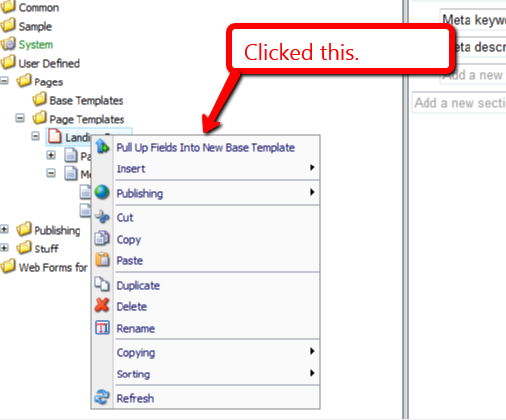
I right-clicked the on my Landing Page template to launch its context menu, and clicked on the ‘Pull Up Fields Into New Base Template’ context menu option:
The following dialog was presented to me for selecting fields to pull up:

I clicked the ‘OK’ button, and was prompted to input a name for a new base template. I entered ‘Page Base’:

After clicking ‘OK’, I was asked to select the location where I want to store my new base template:
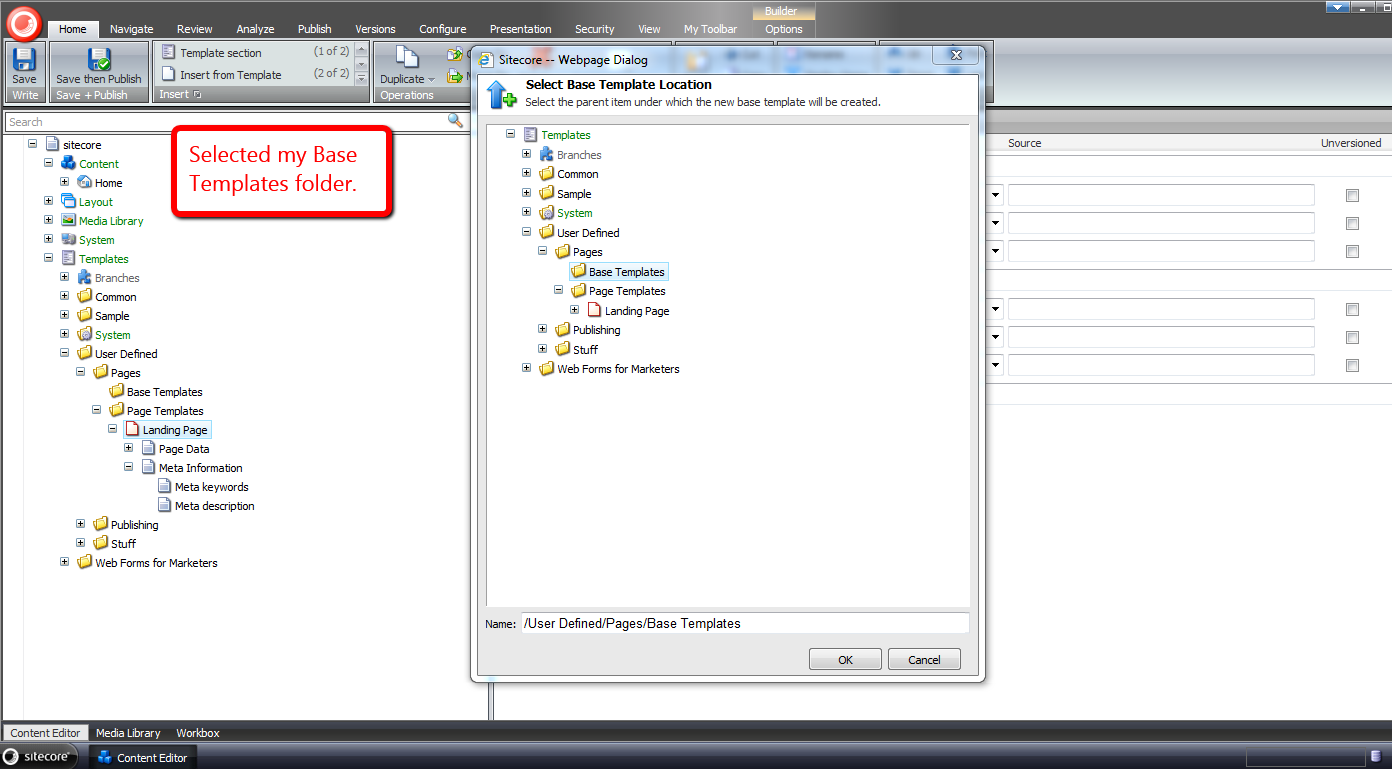
Not too long after clicking ‘OK’ again, I see that my new base template was created, and the Title field was moved into it:

Further, I see that my Landing Page template now has Page Base as one of its base templates:

I right-clicked again, and was presented with an additional context menu option to move fields into an existing base template — I clicked on this option:
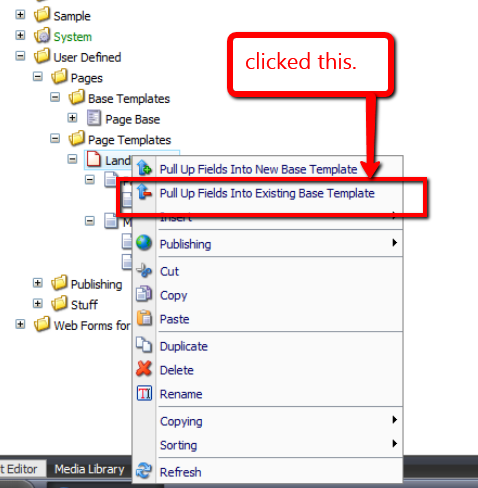
I then selected the remaining field under the Page Data section:

After clicking ‘OK’, a dialog presented me with a list of base templates to choose from — in this case there was only one base template to choose:
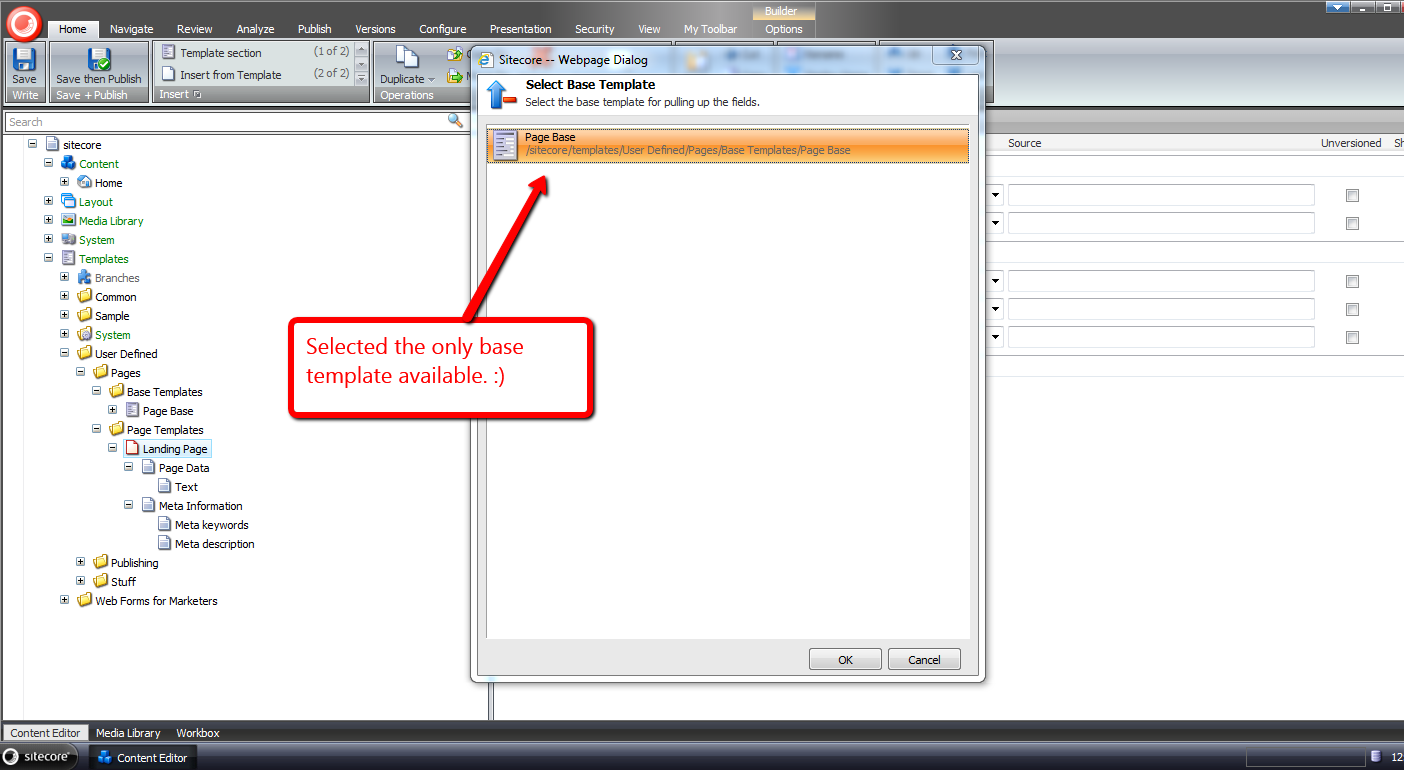
After clicking ‘OK’, I see that the Text field was moved into the Page Base template, and the Page Data section under my Landing Page template was removed:

I hope the above tools will save you time in pulling up fields into base templates.
If you can think of other development tools that would be useful in the Sitecore client, please drop a comment.
Addendum
I have put a polished version of the above onto the Sitecore Marketplace.
Copy Sitecore Item Field Values To Your Clipboard as JSON
With all the exciting things happening around json recently — the Sitecore Item Web API (check out this awesome presentation on the Sitecore Item Web API) and pasting JSON As classes in ASP.NET and Web Tools 2012.2 RC — I’ve been plagued by json on the brain.
For the past few weeks, I’ve been thinking about building a Sitecore client command that copies fields values from a Sitecore item into a string of json via the clipboard, though have been struggling with whether such a command has any utility.
Tonight, I decided to build such a command. Here is what I came up with.
using System;
using System.Collections.Generic;
using System.Linq;
using System.Text;

using Sitecore.Configuration;
using Sitecore.Data.Fields;
using Sitecore.Data.Items;
using Sitecore.Data.Managers;
using Sitecore.Data.Templates;
using Sitecore.Diagnostics;
using Sitecore.Shell.Framework.Commands;
using Sitecore.Web.UI.Sheer;

using Sitecore.Sandbox.Utilities.Serialization.Base;
using Sitecore.Sandbox.Utilities.Serialization;

namespace Sitecore.Sandbox.Commands
{
    public class CopyItemAsJsonToClipboard : ClipboardCommand
    {
        private const bool AlertIfClipboardCopyNotSupported = true;
        private static readonly CopyToClipboard CopyToClipboard = new CopyToClipboard();

        private Template _StandardTemplate;
        private Template StandardTemplate
        {
            get
            {
                if(_StandardTemplate == null)
                {
                    _StandardTemplate = GetStandardTemplate();
                }

                return _StandardTemplate;
            }
        }

        private static Template GetStandardTemplate()
        {
            return TemplateManager.GetTemplate(Settings.DefaultBaseTemplate, Context.ContentDatabase);
        }

        public override void Execute(CommandContext commandContext)
        {
            Assert.ArgumentNotNull(commandContext, "commandContext");

            if (IsSupported(AlertIfClipboardCopyNotSupported))
            {
                IEnumerable<Field> fields = GetNonStandardTemplateFields(commandContext);
                CopyToClipBoard(GetFieldsAsJson(fields));
            }
        }

        private static string GetFieldsAsJson(IEnumerable<Field> fields)
        {
            Assert.ArgumentNotNull(fields, "fields");
            IList<string> list = new List<string>();
            foreach(Field field in fields)
            {
                list.Add(string.Format("\"{0}\":\"{1}\"", field.Name, EscapeNewlines(field.Value)));
            }

            return string.Concat("{", string.Join(",", list), "}");
        }

        private static string EscapeNewlines(string value)
        {
            Assert.ArgumentNotNull(value, "value");
            return ReplaceSubstrings
            (
                value,
                new KeyValuePair<string, string>[]
                {
                    new KeyValuePair<string, string>("\n", "\\n"),
                    new KeyValuePair<string, string>("\r", "\\r")
                }
            );
        }

        private static string ReplaceSubstrings(string source, IEnumerable<KeyValuePair<string, string>> oldNewValues)
        {
            Assert.ArgumentNotNull(source, "source");
            Assert.ArgumentNotNull(oldNewValues, "oldNewValues");
            foreach (KeyValuePair<string, string> oldNewValue in oldNewValues)
            {
                source = source.Replace(oldNewValue.Key, oldNewValue.Value);
            }

            return source;
        }

        private IEnumerable<Field> GetNonStandardTemplateFields(CommandContext commandContext)
        {
            return GetNonStandardTemplateFields(GetItemWithAllFields(commandContext));
        }

        private IEnumerable<Field> GetNonStandardTemplateFields(Item item)
        {
            Assert.ArgumentNotNull(item, "item");
            return GetNonStandardTemplateFields(item.Fields);
        }

        private IEnumerable<Field> GetNonStandardTemplateFields(IEnumerable<Field> fields)
        {
            Assert.ArgumentNotNull(fields, "fields");
            return fields.Where(field => !IsStandardTemplateField(field));
        }

        private static void CopyToClipBoard(string json)
        {
            if(!string.IsNullOrEmpty(json))
            {
                SheerResponse.Eval(GetCopyToClipBoardJavascript(json));
            }
        }

        private static string GetCopyToClipBoardJavascript(string json)
        {
            Assert.ArgumentNotNullOrEmpty(json, "json");
            return string.Format("window.clipboardData.setData('Text', '{0}')", json);
        }

        public override CommandState QueryState(CommandContext commandContext)
        {
            Assert.ArgumentNotNull(commandContext, "commandContext");
            Item item = GetItemWithAllFields(commandContext);
            bool makeEnabled = CopyToClipboard.QueryState(commandContext) == CommandState.Enabled && HasFields(item);

            if (makeEnabled)
            {
                return CommandState.Enabled;
            }

            return CommandState.Disabled;
        }

        private static bool HasFields(Item item)
        {
            Assert.ArgumentNotNull(item, "item");
            return item.Fields.Any();
        }

        private static Item GetItemWithAllFields(CommandContext commandContext)
        {
            Assert.ArgumentNotNull(commandContext, "commandContext");
            Item item = GetItem(commandContext);

            if (item != null)
            {
                item.Fields.ReadAll();
            }

            return item;
        }

        public bool IsStandardTemplateField(Field field)
        {
            Assert.ArgumentNotNull(StandardTemplate, "StandardTemplate");
            return StandardTemplate.ContainsField(field.ID);
        }

        private static Item GetItem(CommandContext commandContext)
        {
            Assert.ArgumentNotNull(commandContext, "commandContext");
            Assert.ArgumentNotNull(commandContext.Items, "commandContext.Items");
            Assert.ArgumentCondition(commandContext.Items.Any(), "commandContext.Items", "There must be at least one item in the array!");
            return commandContext.Items.FirstOrDefault();
        }
    }
}
The command above iterates over all fields on the selected item — not including those that are defined in the Standard Template — and builds a string of json containing field names accompanied by their values.
I found this article by John West to be extremely helpful in writing the code above to determine if a field belongs to the Standard Template — this is used when leaving out these fields in our resulting json string.
Further, the command is only enabled when the selected item has fields coupled with the CommandState returned by a call to the QueryState() method on an instance of Sitecore.Shell.Framework.Commands.CopyToClipboard — this object’s QueryState() method checks things we care about, and I wanted to leverage its logic.
I then mapped the command above in a patch include file:
<?xml version="1.0" encoding="utf-8" ?>
<configuration>
  <sitecore>
    <commands>
      <command name="item:copyitemasjsontoclipboard" type="Sitecore.Sandbox.Commands.CopyItemAsJsonToClipboard,Sitecore.Sandbox"/>
    </commands>
  </sitecore>
</configuration>
Now that we have our command, let’s create an item context menu option for it:

Let’s see this thing in action.
I created an item for testing:

I right-clicked on our new item to launch its context menu, and then clicked on the ‘Copy As Json’ menu option:

I pasted the following from my clipboard into Notepad++:
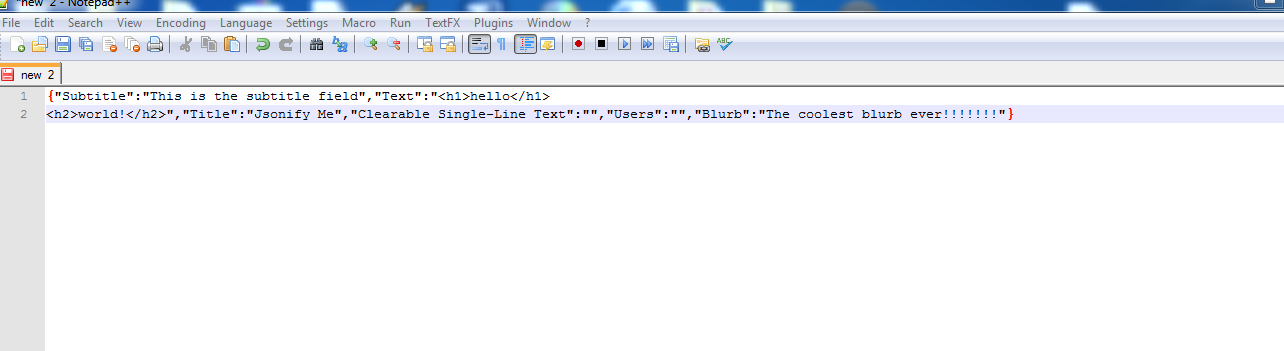
If you can think how this, or something similar could be useful, please drop a comment.
Make a Difference by Comparing Sitecore Items Across Different Databases
The other day I pondered whether anyone had ever built a tool in the Sitecore client to compare field values for the same item across different databases.
Instead of researching whether someone had built such a tool — bad, bad, bad Mike — I decided to build something to do just that — well, really leverage existing code used by Sitecore “out of the box”.
I thought it would be great if I could harness code used by the versions Diff tool — a tool that allows users to visually ascertain differences in fields of an item across different versions in the same database:

After digging around in Sitecore.Kernel.dll, I discovered I could reuse some logic from the versions Diff tool to accomplish this, and what follows showcases the fruit yielded from that research.
The first thing I built was a class — along with its interface — to return a collection of databases where an item resides:
using System.Collections.Generic;

namespace Sitecore.Sandbox.Utilities.Gatherers.Base
{
    public interface IDatabasesGatherer
    {
        IEnumerable<Sitecore.Data.Database> Gather();
    }
}
using System.Collections.Generic;
using System.Linq;

using Sitecore.Data;
using Sitecore.Data.Items;
using Sitecore.Diagnostics;
using Sitecore.Sandbox.Utilities.Gatherers.Base;
using Sitecore.Configuration;

namespace Sitecore.Sandbox.Utilities.Gatherers
{
    public class ItemInDatabasesGatherer : IDatabasesGatherer
    {
        private ID ID { get; set; }

        private ItemInDatabasesGatherer(string id)
            : this(MainUtil.GetID(id))
        {
        }

        private ItemInDatabasesGatherer(ID id)
        {
            SetID(id);
        }

        private void SetID(ID id)
        {
            AssertID(id);
            ID = id;
        }

        public IEnumerable<Sitecore.Data.Database> Gather()
        {
            return GetAllDatabases().Where(database => DoesDatabaseContainItemByID(database, ID));
        }

        private static IEnumerable<Sitecore.Data.Database> GetAllDatabases()
        {
            return Factory.GetDatabases();
        }

        private bool DoesDatabaseContainItemByID(Sitecore.Data.Database database, ID id)
        {
            return GetItem(database, id) != null;
        }

        private static Item GetItem(Sitecore.Data.Database database, ID id)
        {
            Assert.ArgumentNotNull(database, "database");
            AssertID(id);
            return database.GetItem(id);
        }

        private static void AssertID(ID id)
        {
            Assert.ArgumentCondition(!ID.IsNullOrEmpty(id), "id", "ID must be set!");
        }

        public static IDatabasesGatherer CreateNewItemInDatabasesGatherer(string id)
        {
            return new ItemInDatabasesGatherer(id);
        }

        public static IDatabasesGatherer CreateNewItemInDatabasesGatherer(ID id)
        {
            return new ItemInDatabasesGatherer(id);
        }
    }
}
I then copied the xml from the versions Diff dialog — this lives in /sitecore/shell/Applications/Dialogs/Diff/Diff.xml — and replaced the versions Combobox dropdowns with my own for showing Sitecore database names:
<?xml version="1.0" encoding="utf-8" ?>
<control xmlns:def="Definition" xmlns="http://schemas.sitecore.net/Visual-Studio-Intellisense">
<ItemDiff>
<FormDialog Icon="Applications/16x16/window_view.png" Header="Database Compare" Text="Compare the same item in different databases. The differences are highlighted." CancelButton="false">
<CodeBeside Type="Sitecore.Sandbox.Shell.Applications.Dialogs.Diff.ItemDiff,Sitecore.Sandbox"/>
<link href="/sitecore/shell/Applications/Dialogs/Diff/Diff.css" rel="stylesheet"/>
<Stylesheet>
.ie #GridContainer {
padding: 4px;
}
.ff #GridContainer > * {
padding: 4px;
}
.ff .scToolbutton, .ff .scToolbutton_Down, .ff .scToolbutton_Hover, .ff .scToolbutton_Down_Hover {
height: 20px;
float: left;
}
</Stylesheet>
<AutoToolbar DataSource="/sitecore/content/Applications/Dialogs/Diff/Toolbar" def:placeholder="Toolbar"/>
<GridPanel Columns="2" Width="100%" Height="100%" GridPanel.Height="100%">
<Combobox ID="DatabaseOneDropdown" Width="100%" GridPanel.Width="50%" GridPanel.Style="padding:0px 4px 4px 0px" Change="#"/>
<Combobox ID="DatabaseTwoDropdown" Width="100%" GridPanel.Width="50%" GridPanel.Style="padding:0px 0px 4px 0px" Change="#"/>
<Scrollbox ID="GridContainer" Padding="" Background="white" GridPanel.ColSpan="2" GridPanel.Height="100%">
<GridPanel ID="Grid" Width="100%" CellPadding="0" Fixed="true"></GridPanel>
</Scrollbox>
</GridPanel>
</FormDialog>
</ItemDiff>
</control>
I saved the above xml in /sitecore/shell/Applications/Dialogs/ItemDiff/ItemDiff.xml.
With the help of the code-beside of the versions Diff tool — this lives in Sitecore.Shell.Applications.Dialogs.Diff.DiffForm — I built the code-beside for the xml control above:
using System;
using System.Collections.Generic;
using System.Linq;
using System.Web.UI;

using Sitecore.Configuration;
using Sitecore.Data;
using Sitecore.Data.Items;
using Sitecore.Diagnostics;
using Sitecore.shell.Applications.Dialogs.Diff;
using Sitecore.Text.Diff.View;
using Sitecore.Web;
using Sitecore.Web.UI.HtmlControls;
using Sitecore.Web.UI.Sheer;
using Sitecore.Web.UI.WebControls;

using Sitecore.Sandbox.Utilities.Gatherers.Base;
using Sitecore.Sandbox.Utilities.Gatherers;

namespace Sitecore.Sandbox.Shell.Applications.Dialogs.Diff
{
    public class ItemDiff : BaseForm
    {
        private const string IDKey = "id";
        private const string OneColumnViewRegistry = "OneColumn";
        private const string TwoColumnViewRegistry = "TwoColumn";
        private const string ViewRegistryKey = "/Current_User/ItemDatabaseDiff/View";

        protected Button Cancel;
        protected GridPanel Grid;
        protected Button OK;
        protected Combobox DatabaseOneDropdown;
        protected Combobox DatabaseTwoDropdown;

        private ID _ID;
        private ID ID
        {
            get
            {
                if (ID.IsNullOrEmpty(_ID))
                {
                    _ID = GetID();
                }

                return _ID;
            }
        }

        private Database _DatabaseOne;
        private Database DatabaseOne
        {
            get
            {
                if (_DatabaseOne == null)
                {
                    _DatabaseOne = GetDatabaseOne();
                }

                return _DatabaseOne;
            }
        }

        private Database _DatabaseTwo;
        private Database DatabaseTwo
        {
            get
            {
                if (_DatabaseTwo == null)
                {
                    _DatabaseTwo = GetDatabaseTwo();
                }

                return _DatabaseTwo;
            }
        }

        private ID GetID()
        {
            return MainUtil.GetID(GetServerPropertySetIfApplicable(IDKey, IDKey), ID.Null);
        }

        private Database GetDatabaseOne()
        {
            return GetDatabase(DatabaseOneDropdown.SelectedItem.Value);
        }

        private Database GetDatabaseTwo()
        {
            return GetDatabase(DatabaseTwoDropdown.SelectedItem.Value);
        }

        private static Database GetDatabase(string databaseName)
        {
            if(!string.IsNullOrEmpty(databaseName))
            {
                return Factory.GetDatabase(databaseName);
            }

            return null;
        }

        private static string GetServerPropertySetIfApplicable(string serverPropertyKey, string queryStringName, string defaultValue = null)
        {
            Assert.ArgumentNotNullOrEmpty(serverPropertyKey, "serverPropertyKey");
            string value = GetServerProperty(serverPropertyKey);

            if(!string.IsNullOrEmpty(value))
            {
                return value;
            }

            SetServerProperty(serverPropertyKey, GetQueryString(queryStringName, defaultValue));
            return GetServerProperty(serverPropertyKey);
        }

        private static string GetServerProperty(string key)
        {
            Assert.ArgumentNotNullOrEmpty(key, "key");
            return GetServerProperty<string>(key);
        }

        private static T GetServerProperty<T>(string key) where T : class
        {
            Assert.ArgumentNotNullOrEmpty(key, "key");
            return Context.ClientPage.ServerProperties[key] as T;
        }

        private static void SetServerProperty(string key, object value)
        {
            Assert.ArgumentNotNullOrEmpty(key, "key");
            Context.ClientPage.ServerProperties[key] = value;
        }

        private static string GetQueryString(string name, string defaultValue = null)
        {
            Assert.ArgumentNotNullOrEmpty(name, "name");
            if(!string.IsNullOrEmpty(defaultValue))
            {
                return WebUtil.GetQueryString(name, defaultValue);
            }

            return WebUtil.GetQueryString(name);
        }

        private void Compare()
        {
            Compare(GetDiffView(), Grid, GetItemOne(), GetItemTwo());
        }

        private static void Compare(DiffView diffView, GridPanel gridPanel, Item itemOne, Item itemTwo)
        {
            Assert.ArgumentNotNull(diffView, "diffView");
            Assert.ArgumentNotNull(gridPanel, "gridPanel");
            Assert.ArgumentNotNull(itemOne, "itemOne");
            Assert.ArgumentNotNull(itemTwo, "itemTwo");
            diffView.Compare(gridPanel, itemOne, itemTwo, string.Empty);
        }

        private static DiffView GetDiffView()
        {
            if (IsOneColumnSelected())
            {
                return new OneColumnDiffView();
            }

            return new TwoCoumnsDiffView();
        }

        private Item GetItemOne()
        {
            Assert.IsNotNull(DatabaseOne, "DatabaseOne must be set!");
            return DatabaseOne.Items[ID];
        }

        private Item GetItemTwo()
        {
            Assert.IsNotNull(DatabaseOne, "DatabaseTwo must be set!");
            return DatabaseTwo.Items[ID];
        }

        private static void OnCancel(object sender, EventArgs e)
        {
            Assert.ArgumentNotNull(sender, "sender");
            Assert.ArgumentNotNull(e, "e");
            Context.ClientPage.ClientResponse.CloseWindow();
        }

        protected override void OnLoad(EventArgs e)
        {
            Assert.ArgumentNotNull(e, "e");
            base.OnLoad(e);

            OK.OnClick += new EventHandler(OnOK);
            Cancel.OnClick += new EventHandler(OnCancel);

            DatabaseOneDropdown.OnChange += new EventHandler(OnUpdate);
            DatabaseTwoDropdown.OnChange += new EventHandler(OnUpdate);
        }

        private static void OnOK(object sender, EventArgs e)
        {
            Assert.ArgumentNotNull(sender, "sender");
            Assert.ArgumentNotNull(e, "e");
            Context.ClientPage.ClientResponse.CloseWindow();
        }

        protected override void OnPreRender(EventArgs e)
        {
            Assert.ArgumentNotNull(e, "e");
            base.OnPreRender(e);

            if (!Context.ClientPage.IsEvent)
            {
                PopuplateDatabaseDropdowns();
                Compare();
                UpdateButtons();
            }
        }

        private void PopuplateDatabaseDropdowns()
        {
            IDatabasesGatherer IDatabasesGatherer = ItemInDatabasesGatherer.CreateNewItemInDatabasesGatherer(ID);
            PopuplateDatabaseDropdowns(IDatabasesGatherer.Gather());
        }

        private void PopuplateDatabaseDropdowns(IEnumerable<Database> databases)
        {
            PopuplateDatabaseDropdown(DatabaseOneDropdown, databases, Context.ContentDatabase);
            PopuplateDatabaseDropdown(DatabaseTwoDropdown, databases, Context.ContentDatabase);
        }

        private static void PopuplateDatabaseDropdown(Combobox databaseDropdown, IEnumerable<Database> databases, Database selectedDatabase)
        {
            Assert.ArgumentNotNull(databaseDropdown, "databaseDropdown");
            Assert.ArgumentNotNull(databases, "databases");

            foreach (Database database in databases)
            {
                databaseDropdown.Controls.Add
                (
                    new ListItem
                    {
                        ID = Sitecore.Web.UI.HtmlControls.Control.GetUniqueID("ListItem"),
                        Header = database.Name,
                        Value = database.Name,
                        Selected = string.Equals(database.Name, selectedDatabase.Name)
                    }
                );
            }
        }

        private void OnUpdate(object sender, EventArgs e)
        {
            Assert.ArgumentNotNull(sender, "sender");
            Assert.ArgumentNotNull(e, "e");
            Refresh();
        }

        private void Refresh()
        {
            Grid.Controls.Clear();
            Compare();
            Context.ClientPage.ClientResponse.SetOuterHtml("Grid", Grid);
        }

        protected void ShowOneColumn()
        {
            SetRegistryString(ViewRegistryKey, OneColumnViewRegistry);
            UpdateButtons();
            Refresh();
        }

        protected void ShowTwoColumns()
        {
            SetRegistryString(ViewRegistryKey, TwoColumnViewRegistry);
            UpdateButtons();
            Refresh();
        }

        private static void UpdateButtons()
        {
            bool isOneColumnSelected = IsOneColumnSelected();
            SetToolButtonDown("OneColumn", isOneColumnSelected);
            SetToolButtonDown("TwoColumn", !isOneColumnSelected);
        }

        private static bool IsOneColumnSelected()
        {
            return string.Equals(GetRegistryString(ViewRegistryKey, OneColumnViewRegistry), OneColumnViewRegistry);
        }

        private static void SetToolButtonDown(string controlID, bool isDown)
        {
            Assert.ArgumentNotNullOrEmpty(controlID, "controlID");
            Toolbutton toolbutton = FindClientPageControl<Toolbutton>(controlID);
            toolbutton.Down = isDown;
        }

        private static T FindClientPageControl<T>(string controlID) where T : System.Web.UI.Control
        {
            Assert.ArgumentNotNullOrEmpty(controlID, "controlID");
            T control = Context.ClientPage.FindControl(controlID) as T;
            Assert.IsNotNull(control, typeof(T));
            return control;
        }

        private static string GetRegistryString(string key, string defaultValue = null)
        {
            Assert.ArgumentNotNullOrEmpty(key, "key");

            if(!string.IsNullOrEmpty(defaultValue))
            {
                return Sitecore.Web.UI.HtmlControls.Registry.GetString(key, defaultValue);
            }

            return Sitecore.Web.UI.HtmlControls.Registry.GetString(key);
        }

        private static void SetRegistryString(string key, string value)
        {
            Assert.ArgumentNotNullOrEmpty(key, "key");
            Sitecore.Web.UI.HtmlControls.Registry.SetString(key, value);
        }
    }
}
The code-beside file above populates the two database dropdowns with the names of the databases where the Item is found, and selects the current content database on both dropdowns when the dialog is first launched.
Users have the ability to toggle between one and two column layouts — just as is offered by the versions Diff tool — and can compare field values on the item across any database where the item is found — the true magic occurs in the instance of the Sitecore.Text.Diff.View.DiffView class.
Now that we have a dialog form, we need a way to launch it:
using System;
using System.Collections.Generic;
using System.Linq;

using Sitecore.Data;
using Sitecore.Data.Items;
using Sitecore.Diagnostics;
using Sitecore.Shell.Framework.Commands;
using Sitecore.Text;
using Sitecore.Web.UI.Sheer;

using Sitecore.Sandbox.Utilities.Gatherers.Base;
using Sitecore.Sandbox.Utilities.Gatherers;

namespace Sitecore.Sandbox.Commands
{
    public class LaunchDatabaseCompare : Command
    {
        public override void Execute(CommandContext commandContext)
        {
            SheerResponse.CheckModified(false);
            SheerResponse.ShowModalDialog(GetDialogUrl(commandContext));
        }

        private static string GetDialogUrl(CommandContext commandContext)
        {
            return GetDialogUrl(GetItem(commandContext).ID);
        }

        private static string GetDialogUrl(ID id)
        {
            Assert.ArgumentCondition(!ID.IsNullOrEmpty(id), "id", "ID must be set!");
            UrlString urlString = new UrlString(UIUtil.GetUri("control:ItemDiff"));
            urlString.Append("id", id.ToString());
            return urlString.ToString();
        }

        public override CommandState QueryState(CommandContext commandContext)
        {
            IDatabasesGatherer databasesGatherer = ItemInDatabasesGatherer.CreateNewItemInDatabasesGatherer(GetItem(commandContext).ID);

            if (databasesGatherer.Gather().Count() > 1)
            {
                return CommandState.Enabled;
            }

            return CommandState.Disabled;
        }

        private static Item GetItem(CommandContext commandContext)
        {
            Assert.ArgumentNotNull(commandContext, "commandContext");
            Assert.ArgumentNotNull(commandContext.Items, "commandContext.Items");
            return commandContext.Items.FirstOrDefault();
        }
    }
}
The above command launches our ItemDiff dialog, and passes the ID of the selected item to it.
If the item is only found in one database — this will be the current content database — the command is disabled. What would be the point of comparing the item in the same database?
I then registered this command in a patch include configuration file:
<?xml version="1.0" encoding="utf-8" ?>
<configuration>
  <sitecore>
    <commands>
      <command name="item:launchdatabasecompare" type="Sitecore.Sandbox.Commands.LaunchDatabaseCompare,Sitecore.Sandbox"/>
    </commands>
  </sitecore>
</configuration>
Now that we have our command ready to go, we need to lock and load this command in the Sitecore client. I added a button for our new command in the Operations chunk under the Home ribbon:
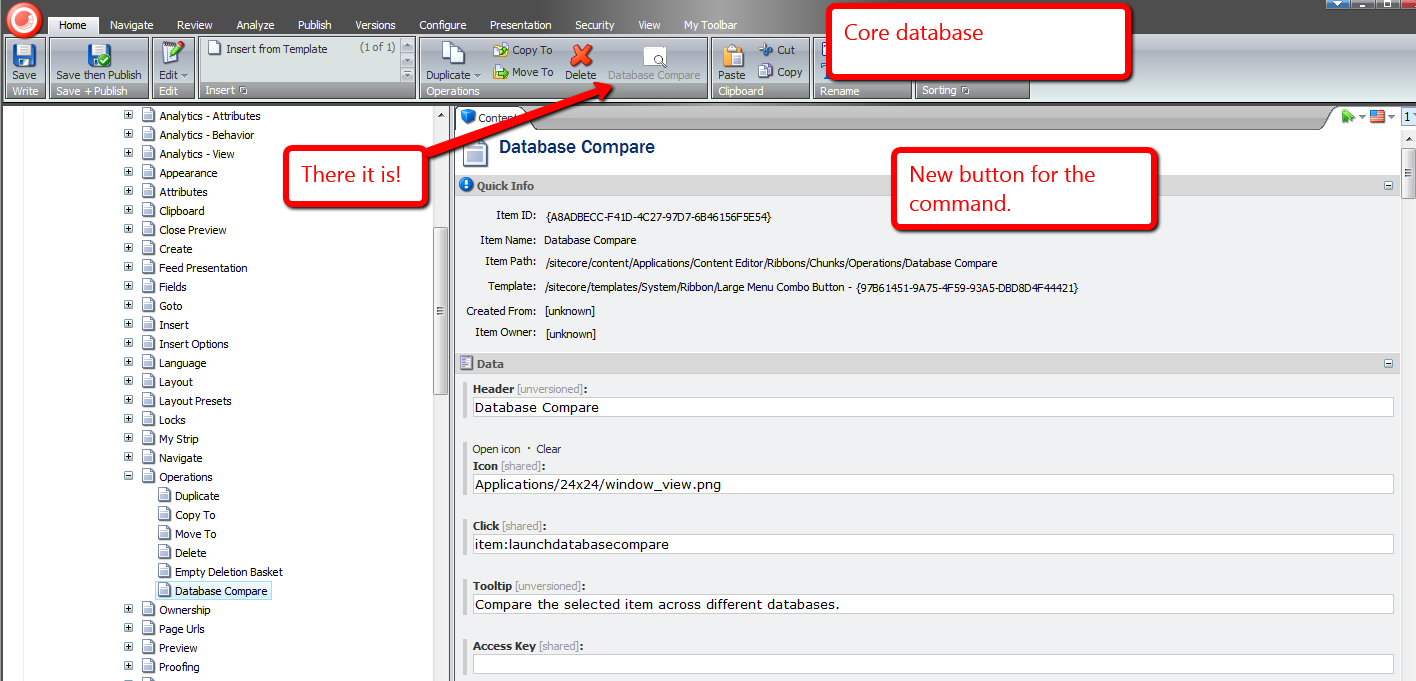
Time for some fun.
I created a new item for testing:

I published this item, and made some changes to it:

I clicked the Database Compare button to launch our dialog form:

As expected, we see differences in this item across the master and web databases:

Here are those differences in the two column layout:

One thing I might consider adding in the future is supporting comparisons of different versions of items across databases. The above solution is limited in only allowing users to compare the latest version of the Item in each database.
If you can think of anything else that could be added to this to make it better, please drop a comment.
Where Is This Field Defined? Add ‘Goto Template’ Links for Fields in the Sitecore Content Editor
About a month ago, I read this answer on Stack Overflow by Sitecore MVP Dan Solovay, and thought to myself “what could I do with a custom EditorFormatter that might be useful?”
Today, I came up with an idea that might be useful, especially when working with many levels of nested base templates: having a ‘Goto Template’ link — or button depending on your naming preference, although I will refer to these as links throughout this post since they are hyperlinks — for each field that, when clicked, will bring you to the Sitecore template where the field is defined.
I first defined a class to manage the display state of our ‘Goto Template’ links in the Content Editor:
using System;
using System.Collections.Generic;
using System.Linq;
using System.Text;

using Sitecore.Web.UI.HtmlControls;

namespace Sitecore.Sandbox.Utilities.ClientSettings
{
    public class GotoTemplateLinksSettings
    {
        private const string RegistrySettingKey = "/Current_User/Content Editor/Goto Template Links";
        private const string RegistrySettingOnValue = "on";

        private static volatile GotoTemplateLinksSettings current;
        private static object lockObject = new Object();

        public static GotoTemplateLinksSettings Current
        {
            get
            {
                if (current == null)
                {
                    lock (lockObject)
                    {
                        if (current == null)
                            current = new GotoTemplateLinksSettings();
                    }
                }

                return current;
            }
        }

        private GotoTemplateLinksSettings()
        {
        }

        public bool IsOn()
        {
            return Registry.GetString(RegistrySettingKey) == RegistrySettingOnValue;
        }

        public void TurnOn()
        {
            Registry.SetString(RegistrySettingKey, RegistrySettingOnValue);
        }

        public void TurnOff()
        {
            Registry.SetString(RegistrySettingKey, string.Empty);
        }
    }
}
I decided to make the above class be a Singleton — there should only be one central place where the display state of our links is toggled.
I created a subclass of Sitecore.Shell.Applications.ContentEditor.EditorFormatter, and overrode the RenderField(Control, Editor.Field, bool) method to embed additional logic to render a ‘Goto Template’ link for each field in the Content Editor:
using System.Web.UI;

using Sitecore;
using Sitecore.Data.Fields;
using Sitecore.Data.Items;
using Sitecore.Diagnostics;

using Sitecore.Shell.Applications.ContentEditor;
using Sitecore.Shell.Applications.ContentManager;

using Sitecore.Sandbox.Utilities.ClientSettings;

namespace Sitecore.Sandbox.Shell.Applications.ContentEditor
{
    public class GotoTemplateEditorFormatter : EditorFormatter
    {
        public override void RenderField(Control parent, Editor.Field field, bool readOnly)
        {
            Assert.ArgumentNotNull(parent, "parent");
            Assert.ArgumentNotNull(field, "field");
            Field itemField = field.ItemField;
            Item fieldType = GetFieldType(itemField);

            if (fieldType != null)
            {
                if (!itemField.CanWrite)
                {
                    readOnly = true;
                }

                RenderMarkerBegin(parent, field.ControlID);
                RenderMenuButtons(parent, field, fieldType, readOnly);
                RenderLabel(parent, field, fieldType, readOnly);
                AddGotoTemplateLinkIfCanView(parent, field);
                RenderField(parent, field, fieldType, readOnly);
                RenderMarkerEnd(parent);
            }
        }

        public void AddGotoTemplateLinkIfCanView(Control parent, Editor.Field field)
        {
            if (CanViewGotoTemplateLink())
            {
                AddGotoTemplateLink(parent, field);
            }
        }

        private static bool CanViewGotoTemplateLink()
        {
            return IsGotoTemplateLinksOn();
        }

        private static bool IsGotoTemplateLinksOn()
        {
            return GotoTemplateLinksSettings.Current.IsOn();
        }

        public void AddGotoTemplateLink(Control parent, Editor.Field field)
        {
            Assert.ArgumentNotNull(parent, "parent");
            Assert.ArgumentNotNull(field, "field");
            AddLiteralControl(parent, CreateGotoTemplateLink(field));
        }

        private static string CreateGotoTemplateLink(Editor.Field field)
        {
            Assert.ArgumentNotNull(field, "field");
            return string.Format("<a title=\"Navigate to the template where this field is defined.\" style=\"float: right;position:absolute;margin-top:-20px;right:15px;\" href=\"#\" onclick=\"{0}\">{1}</a>", CreateGotoTemplateJavascript(field), CreateGotoTemplateLinkText());
        }

        private static string CreateGotoTemplateJavascript(Editor.Field field)
        {
            Assert.ArgumentNotNull(field, "field");
            return string.Format("javascript:scForm.postRequest('', '', '','item:load(id={0})');return false;", field.TemplateField.Template.ID);
        }

        private static string CreateGotoTemplateLinkText()
        {
            return "<img style=\"border: 0;\" src=\"/~/icon/Applications/16x16/information2.png\" width=\"16\" height=\"16\" />";
        }
    }
}
‘Goto Template’ links are only rendered to the Sitecore Client when the display state for showing them is turned on.
Plus, each ‘Goto Template’ link is locked and loaded to invoke the item load command to navigate to the template item where the field is defined.
As highlighted by Dan in his Stack Overflow answer above, I created a new Sitecore.Shell.Applications.ContentEditor.Pipelines.RenderContentEditor pipeline processor, and hooked in an instance of the GotoTemplateEditorFormatter class defined above:
using System;
using System.Collections.Generic;
using System.Linq;
using System.Text;

using Sitecore.Diagnostics;

using Sitecore.Shell.Applications.ContentEditor;
using Sitecore.Shell.Applications.ContentEditor.Pipelines.RenderContentEditor;

namespace Sitecore.Sandbox.Shell.Applications.ContentEditor.Pipelines.RenderContentEditor
{
    public class RenderStandardContentEditor
    {
        public void Process(RenderContentEditorArgs args)
        {
            Assert.ArgumentNotNull(args, "args");
            args.EditorFormatter = CreateNewGotoTemplateEditorFormatter(args);
            args.EditorFormatter.RenderSections(args.Parent, args.Sections, args.ReadOnly);
        }

        private static EditorFormatter CreateNewGotoTemplateEditorFormatter(RenderContentEditorArgs args)
        {
            Assert.ArgumentNotNull(args, "args");
            Assert.ArgumentNotNull(args.EditorFormatter, "args.EditorFormatter");
            return new GotoTemplateEditorFormatter
            {
                Arguments = args.EditorFormatter.Arguments,
                IsFieldEditor = args.EditorFormatter.IsFieldEditor
            };
        }
    }
}
Now we need a way to toggle the display state of our ‘Goto Template’ links. I decided to create a command to turn this state on and off:
using System;
using System.Collections.Generic;
using System.Linq;
using System.Text;

using Sitecore.Data.Items;
using Sitecore.Diagnostics;
using Sitecore.Shell;
using Sitecore.Shell.Framework.Commands;
using Sitecore.Web.UI.HtmlControls;

using Sitecore.Sandbox.Utilities.ClientSettings;

namespace Sitecore.Sandbox.Commands
{
    public class ToggleGotoTemplateLinks : Command
    {
        public override void Execute(CommandContext commandContext)
        {
            ToggleGotoTemplateLinksOn();
            Refresh(commandContext);
        }

        private static void ToggleGotoTemplateLinksOn()
        {
            GotoTemplateLinksSettings gotoTemplateLinksSettings = GotoTemplateLinksSettings.Current;

            if (!gotoTemplateLinksSettings.IsOn())
            {
                gotoTemplateLinksSettings.TurnOn();
            }
            else
            {
                gotoTemplateLinksSettings.TurnOff();
            }
        }

        private static void Refresh(CommandContext commandContext)
        {
            Refresh(GetItem(commandContext));
        }

        private static void Refresh(Item item)
        {
            Assert.ArgumentNotNull(item, "item");
            Context.ClientPage.ClientResponse.Timer(string.Format("item:load(id={0})", item.ID), 1);
        }

        private static Item GetItem(CommandContext commandContext)
        {
            Assert.ArgumentNotNull(commandContext, "commandContext");
            return commandContext.Items.FirstOrDefault();
        }

        public override CommandState QueryState(CommandContext context)
        {
            if (!GotoTemplateLinksSettings.Current.IsOn())
            {
                return CommandState.Enabled;
            }

            return CommandState.Down;
        }
    }
}
I registered the pipeline processor defined above coupled with the toggle command in a patch include configuration file:
<?xml version="1.0" encoding="utf-8"?>
<configuration xmlns:patch="http://www.sitecore.net/xmlconfig/">
  <sitecore>
    <commands>
      <command name="contenteditor:togglegototemplatelinks" type="Sitecore.Sandbox.Commands.ToggleGotoTemplateLinks, Sitecore.Sandbox"/>
    </commands>
    <pipelines>
      <renderContentEditor>
        <processor
            patch:instead="*[@type='Sitecore.Shell.Applications.ContentEditor.Pipelines.RenderContentEditor.RenderStandardContentEditor, Sitecore.Client']"
            type="Sitecore.Sandbox.Shell.Applications.ContentEditor.Pipelines.RenderContentEditor.RenderStandardContentEditor, Sitecore.Sandbox"/>
      </renderContentEditor>

    </pipelines>
  </sitecore>
</configuration>
I then added a toggle checkbox to the View ribbon, and wired up the ToggleGotoTemplateLinks command to it:
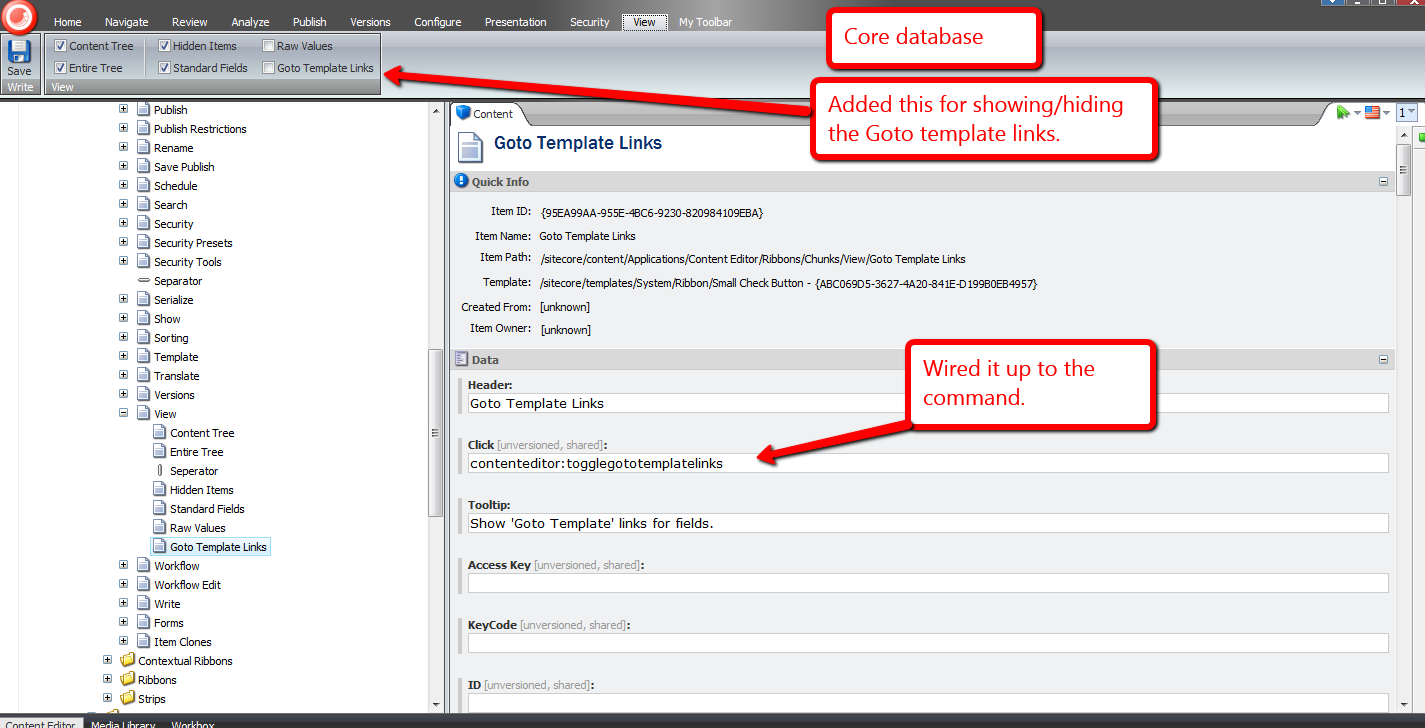
When the ‘Goto Template Links’ checkbox is checked, ‘Goto Template’ links are displayed for each field in the Content Editor:

When unchecked, the ‘Goto Template’ links are not rendered:

Let’s try it out.
Let’s click one of these ‘Goto Template’ links and see what it does, or where it takes us:

It brought us to the template where the Title field is defined:
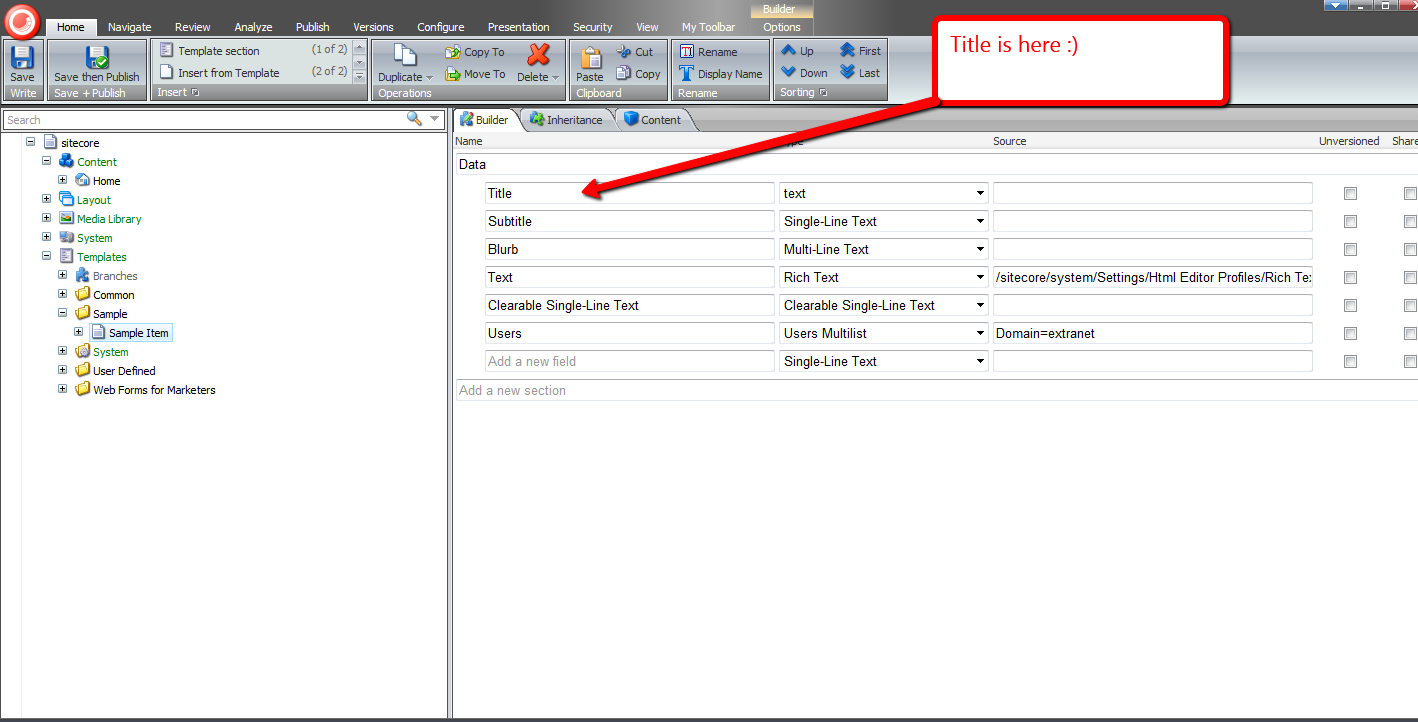
Let’s try another. How about the ‘Created By’ field?

Its link brought us to its template:

Without a doubt, the functionality above would be useful to developers and advanced users.
I’ve been trying to figure out other potential uses for other subclasses of EditorFormatter. Can you think of other ways we could leverage a custom EditorFormatter, especially one for non-technical Sitecore users? If you have any ideas, please drop a comment. 🙂
Take the Field By Replicating Sitecore Field Values
I pondered the other day whether anyone had ever erroneously put content into fields on the wrong Sitecore item, only to discover they had erred after laboring away for an extended period of time — imagine the ensuing frustration after realizing such a blunder.
You might think that this isn’t a big deal — why not just rename the item to be the name of the item you were supposed to be putting content into in the first place?
Well, things might not be that simple.
What if the item already had content in it before? What do you do?
This hypothetical — or fictitious — scenario got the creative juices flowing. Why not create new item context menu options — check out part 1 and part 2 of my post discussing how one would go about augmenting the item context menu, and also my last post showing how one can delete sitecore items using a deletion basket which is serves as another example of adding to the item context menu — that give copy and paste functionality for field values?
The cornerstone of my idea comes from functionality that comes with Sitecore “out of the box”. You have the option to cut, copy and paste items:

I find these three menu options to be indispensable. I frequently use them throughout the day when developing new features in Sitecore, and have also seen content authors use these to do their work.
The only problem with these is they don’t work at the field level, ergo the reason for this post: to showcase my efforts in building copy and paste utilities that work at the field level.
I first had to come up with a way to save field values. The following interface serves as the definition of objects that save information associated with a key:
namespace Sitecore.Sandbox.Utilities.Storage.Base
{
    public interface IRepository<TKey, TValue>
    {
        bool Contains(TKey key);

        TValue this[TKey key] { get; set; }

        void Put(TKey key, TValue value);

        void Remove(TKey key);

        void Clear();

        TValue Get(TKey key);
    }
}
For my copy and paste utilities, I decided I would store them in session. That steered me into building the following session repository class:
using System;
using System.Collections.Generic;
using System.Linq;
using System.Runtime.Serialization;
using System.Text;
using System.Web;
using System.Web.SessionState;

using Sitecore.Diagnostics;

using Sitecore.Sandbox.Utilities.Storage.Base;

namespace Sitecore.Sandbox.Utilities.Storage
{
    public class SessionRepository : IRepository<string, object>
    {
        private HttpSessionStateBase Session { get; set; }

        public object this[string key]
        {
            get
            {
                return Get(key);
            }
            set
            {
                Put(key, value);
            }
        }

        private SessionRepository(HttpSessionState session)
            : this(CreateNewHttpSessionStateWrapper(session))
        {
        }

        private SessionRepository(HttpSessionStateBase session)
        {
            SetSession(session);
        }

        private void SetSession(HttpSessionStateBase session)
        {
            Assert.ArgumentNotNull(session, "session");
            Session = session;
        }

        public bool Contains(string key)
        {
            return Session[key] != null;
        }

        public void Put(string key, object value)
        {
            Assert.ArgumentNotNullOrEmpty(key, "key");
            Assert.ArgumentCondition(IsSerializable(value), "value", "value must be serializable!");
            Session[key] = value;
        }

        private static bool IsSerializable(object instance)
        {
            Assert.ArgumentNotNull(instance, "instance");
            return instance.GetType().IsSerializable;
        }

        public void Remove(string key)
        {
            Session.Remove(key);
        }

        public void Clear()
        {
            Session.Clear();
        }

        public object Get(string key)
        {
            return Session[key];
        }

        private static HttpSessionStateWrapper CreateNewHttpSessionStateWrapper(HttpSessionState session)
        {
            Assert.ArgumentNotNull(session, "session");
            return new HttpSessionStateWrapper(session);
        }

        public static IRepository<string, object> CreateNewSessionRepository(HttpSessionState session)
        {
            return new SessionRepository(session);
        }

        public static IRepository<string, object> CreateNewSessionRepository(HttpSessionStateBase session)
        {
            return new SessionRepository(session);
        }
    }
}
If you’ve read some of my previous posts, you must have ascertained how I favor composition over inheritance — check out this article that discusses this subject — and created another utility object for storing string values — instances of this class delegate to other repository objects that save generic objects (an instance of the session repository class above is an example of such an object):
using System;
using System.Collections.Generic;
using System.Linq;
using System.Runtime.Serialization;
using System.Text;
using System.Web;
using System.Web.SessionState;

using Sitecore.Diagnostics;

using Sitecore.Sandbox.Utilities.Storage.Base;

namespace Sitecore.Sandbox.Utilities.Storage
{
    public class StringRepository : IRepository<string, string>
    {
        private IRepository<string, object> InnerRepository { get; set; }

        public string this[string key]
        {
            get
            {
                return Get(key);
            }
            set
            {
                Put(key, value);
            }
        }

        private StringRepository(IRepository<string, object> innerRepository)
        {
            SetInnerRepository(innerRepository);
        }

        private void SetInnerRepository(IRepository<string, object> innerRepository)
        {
            Assert.ArgumentNotNull(innerRepository, "innerRepository");
            InnerRepository = innerRepository;
        }

        public bool Contains(string key)
        {
            return InnerRepository.Contains(key);
        }

        public void Put(string key, string value)
        {
            Assert.ArgumentNotNullOrEmpty(key, "key");
            InnerRepository.Put(key, value);
        }

        public void Remove(string key)
        {
            InnerRepository.Remove(key);
        }

        public void Clear()
        {
            InnerRepository.Clear();
        }

        public string Get(string key)
        {
            return InnerRepository.Get(key) as string;
        }

        public static IRepository<string, string> CreateNewStringRepository(IRepository<string, object> innerRepository)
        {
            return new StringRepository(innerRepository);
        }
    }
}
I then built another — yes one more — repository class that uses instances of Sitecore.Data.ID as keys:
using System;
using System.Collections.Generic;
using System.Linq;
using System.Text;

using Sitecore.Data;
using Sitecore.Data.Fields;
using Sitecore.Diagnostics;

using Sitecore.Sandbox.Utilities.Storage.Base;

namespace Sitecore.Sandbox.Utilities.Storage
{
    class IDValueRepository : IRepository<ID, string>
    {
        private IRepository<string, string> InnerRepository { get; set; }

        public string this[ID key]
        {
            get
            {
                return Get(key);
            }
            set
            {
                Put(key, value);
            }
        }

        private IDValueRepository(IRepository<string, string> innerRepository)
        {
            SetInnerRepository(innerRepository);
        }

        private void SetInnerRepository(IRepository<string, string> innerRepository)
        {
            Assert.ArgumentNotNull(innerRepository, "innerRepository");
            InnerRepository = innerRepository;
        }

        public bool Contains(ID key)
        {
            return InnerRepository.Contains(GetInnerRepositoryKey(key));
        }

        public void Put(ID key, string value)
        {
            InnerRepository.Put(GetInnerRepositoryKey(key), value);
        }

        public void Remove(ID key)
        {
            InnerRepository.Remove(GetInnerRepositoryKey(key));
        }

        public void Clear()
        {
            InnerRepository.Clear();
        }

        public string Get(ID key)
        {
            return InnerRepository.Get(GetInnerRepositoryKey(key));
        }

        private static string GetInnerRepositoryKey(ID key)
        {
            AssertKey(key);
            return key.ToString();
        }

        private static void AssertKey(ID key)
        {
            Assert.ArgumentNotNull(key, "key");
            Assert.ArgumentCondition(!ID.IsNullOrEmpty(key), "key", "key must be set!");
        }

        public static IRepository<ID, string> CreateNewIDValueRepository(IRepository<string, string> innerRepository)
        {
            return new IDValueRepository(innerRepository);
        }
    }
}
Instances of the above class delegate down to repository objects that save strings using strings as keys.
Now that I have an unwieldy arsenal of repository utility classes — I went a little bananas on creating the utility classes above — I figured having a factory class as a central place to instantiate these repository objects would aid in keeping things organized:
using System;
using System.Collections.Generic;
using System.Linq;
using System.Text;
using Sitecore.Data.Fields;
using System.Web;
using System.Web.SessionState;
using Sitecore.Data;

namespace Sitecore.Sandbox.Utilities.Storage.Base
{
    public interface IStorageFactory
    {
        IRepository<string, object> CreateNewSessionRepository(HttpSessionState session);

        IRepository<string, object> CreateNewSessionRepository(HttpSessionStateBase session);

        IRepository<string, string> CreateNewStringRepository(IRepository<string, object> innerRepository);

        IRepository<ID, string> CreateNewIDValueRepository(HttpSessionState session);

        IRepository<ID, string> CreateNewIDValueRepository(IRepository<string, string> innerRepository);
    }
}
using System;
using System.Collections.Generic;
using System.Linq;
using System.Text;
using System.Web;
using System.Web.SessionState;

using Sitecore.Data;
using Sitecore.Data.Fields;

using Sitecore.Sandbox.Utilities.Storage.Base;

namespace Sitecore.Sandbox.Utilities.Storage
{
    public class StorageFactory : IStorageFactory
    {
        private StorageFactory()
        {
        }

        public IRepository<string, object> CreateNewSessionRepository(HttpSessionState session)
        {
            return SessionRepository.CreateNewSessionRepository(session);
        }

        public IRepository<string, object> CreateNewSessionRepository(HttpSessionStateBase session)
        {
            return SessionRepository.CreateNewSessionRepository(session);
        }

        public IRepository<string, string> CreateNewStringRepository(IRepository<string, object> innerRepository)
        {
            return StringRepository.CreateNewStringRepository(innerRepository);
        }

        public IRepository<ID, string> CreateNewIDValueRepository(HttpSessionState session)
        {
            return CreateNewIDValueRepository(CreateNewStringRepository(CreateNewSessionRepository(session)));
        }

        public IRepository<ID, string> CreateNewIDValueRepository(IRepository<string, string> innerRepository)
        {
            return IDValueRepository.CreateNewIDValueRepository(innerRepository);
        }

        public static IStorageFactory CreateNewStorageFactory()
        {
            return new StorageFactory();
        }
    }
}
Let’s make these utility repository classes earn their keep. It’s time to build a copy command:
using System;
using System.Collections.Generic;
using System.Linq;
using System.Text;
using System.Web;

using Sitecore.Collections;
using Sitecore.Data;
using Sitecore.Data.Items;
using Sitecore.Data.Fields;
using Sitecore.Diagnostics;
using Sitecore.Shell.Framework.Commands;

using Sitecore.Sandbox.Utilities.Storage;
using Sitecore.Sandbox.Utilities.Storage.Base;

namespace Sitecore.Sandbox.Commands
{
    public class CopyFieldValues : Command
    {
        private static readonly IStorageFactory Factory = StorageFactory.CreateNewStorageFactory();
        private static readonly IRepository<ID, string> FieldValueRepository = CreateNewIDValueRepository();

        public override void Execute(CommandContext commandContext)
        {
            Assert.ArgumentNotNull(commandContext, "commandContext");
            StoreFieldValues(GetItem(commandContext));
        }

        private static void StoreFieldValues(Item item)
        {
            if (item != null)
            {
                item.Fields.ReadAll();
                StoreFieldValues(item.Fields);
            }
        }

        private static void StoreFieldValues(IEnumerable<Field> fields)
        {
            Assert.ArgumentNotNull(fields, "fields");
            foreach (Field field in fields)
            {
                FieldValueRepository.Put(field.ID, field.Value);
            }
        }

        public override CommandState QueryState(CommandContext commandContext)
        {
            Assert.ArgumentNotNull(commandContext, "commandContext");
            if (GetItem(commandContext).Appearance.ReadOnly)
            {
                return CommandState.Disabled;
            }

            return base.QueryState(commandContext);
        }

        private static Item GetItem(CommandContext commandContext)
        {
            Assert.ArgumentNotNull(commandContext, "commandContext");
            Assert.ArgumentNotNull(commandContext.Items, "commandContext.Items");
            Assert.ArgumentCondition(commandContext.Items.Count() > 0, "commandContext.Items", "There must be at least one item in the array!");
            return commandContext.Items.FirstOrDefault();
        }

        private static IRepository<ID, string> CreateNewIDValueRepository()
        {
            return Factory.CreateNewIDValueRepository(HttpContext.Current.Session);
        }
    }
}
The above command iterates over all fields on the currently select item in the content tree, and saves their values using an instance of the IDValueRepository class.
What good is a copy command without a paste? The following paste command complements the copy command defined above:
using System;
using System.Collections.Generic;
using System.Collections.Specialized;
using System.Linq;
using System.Text;
using System.Web;

using Sitecore.Collections;
using Sitecore.Data;
using Sitecore.Data.Fields;
using Sitecore.Data.Items;
using Sitecore.Diagnostics;
using Sitecore.Shell.Framework.Commands;
using Sitecore.Web.UI.Sheer;

using Sitecore.Sandbox.Utilities.Storage;
using Sitecore.Sandbox.Utilities.Storage.Base;

namespace Sitecore.Sandbox.Commands
{
    public class PasteFieldValues : Command
    {
        private static readonly IStorageFactory Factory = StorageFactory.CreateNewStorageFactory();
        private static readonly IRepository<ID, string> FieldValueRepository = CreateNewIDValueRepository();

        public override void Execute(CommandContext commandContext)
        {
            Assert.ArgumentNotNull(commandContext, "commandContext");
            PasteValuesIfApplicable(commandContext);
        }

        private void PasteValuesIfApplicable(CommandContext commandContext)
        {
            Item item = GetItem(commandContext);
            if (item == null)
            {
                return;
            }

            PasteValuesIfApplicable(item);
        }

        private void PasteValuesIfApplicable(Item item)
        {
            Assert.ArgumentNotNull(item, "item");

            if (DoesFieldsHaveValues(item))
            {
                ConfirmThenPaste(item);
            }
            else
            {
                PasteValues(item);
            }
        }

        private static bool DoesFieldsHaveValues(Item item)
        {
            Assert.ArgumentNotNull(item, "item");
            Assert.ArgumentNotNull(item.Fields, "item.Fields");

            foreach (Field field in item.Fields)
            {
                if (!string.IsNullOrEmpty(field.Value))
                {
                    return true;
                }
            }

            return false;
        }

        private void ConfirmThenPaste(Item item)
        {
            NameValueCollection parameters = new NameValueCollection();
            parameters["items"] = SerializeItems(new Item[] { item });
            Context.ClientPage.Start(this, "ConfirmAndPaste", new ClientPipelineArgs { Parameters = parameters });
        }

        private void ConfirmAndPaste(ClientPipelineArgs args)
        {
            ShowConfirmationDialogIfApplicable(args);
            PasteValuesIfConfirmed(args);
        }

        private void ShowConfirmationDialogIfApplicable(ClientPipelineArgs args)
        {
            if (!args.IsPostBack)
            {
                Context.ClientPage.ClientResponse.YesNoCancel("Some fields are not empty! Are you sure you want to paste field values into this item?", "200", "200");
                args.WaitForPostBack();
            }
        }

        private void PasteValuesIfConfirmed(ClientPipelineArgs args)
        {
            bool canPaste = args.IsPostBack && args.Result == "yes";
            if (canPaste)
            {
                Item item = DeserializeItems(args.Parameters["items"]).FirstOrDefault();
                PasteValues(item);
            }
        }

        private static void PasteValues(Item item)
        {
            if (item != null)
            {
                item.Editing.BeginEdit();
                item.Fields.ReadAll();
                PasteValues(item.Fields);
                item.Editing.EndEdit();
            }
        }

        private static void PasteValues(IEnumerable<Field> fields)
        {
            Assert.ArgumentNotNull(fields, "fields");
            foreach (Field field in fields)
            {
                string value = FieldValueRepository.Get(field.ID);
                if (!string.IsNullOrEmpty(value))
                {
                    field.Value = value;
                }

                FieldValueRepository.Remove(field.ID);
            }
        }

        public override CommandState QueryState(CommandContext commandContext)
        {
            Assert.ArgumentNotNull(commandContext, "commandContext");
            if (GetItem(commandContext).Appearance.ReadOnly)
            {
                return CommandState.Disabled;
            }

            return base.QueryState(commandContext);
        }

        private static Item GetItem(CommandContext commandContext)
        {
            Assert.ArgumentNotNull(commandContext, "commandContext");
            Assert.ArgumentNotNull(commandContext.Items, "commandContext.Items");
            Assert.ArgumentCondition(commandContext.Items.Count() > 0, "commandContext.Items", "There must be at least one item in the array!");
            return commandContext.Items.FirstOrDefault();
        }

        private static IRepository<ID, string> CreateNewIDValueRepository()
        {
            return Factory.CreateNewIDValueRepository(HttpContext.Current.Session);
        }
    }
}
The paste command determines if the target item has any fields with content in them — a confirmation dialog box is displayed if any of the fields are not empty — and pastes values into fields if they are present on the item.
Plus, once a field value is retrieved from the IDValueRepository instance, the above command removes it. I couldn’t think of a good reason why these should linger in session after they are pasted. If you can of a reason why they should persist in session, please leave a comment.
I registered the copy and paste commands above into a patch include file:
<?xml version="1.0" encoding="utf-8" ?>
<configuration>
  <sitecore>
    <commands>
      <command name="item:copyfieldvalues" type="Sitecore.Sandbox.Commands.CopyFieldValues,Sitecore.Sandbox"/>
      <command name="item:pastefieldvalues" type="Sitecore.Sandbox.Commands.PasteFieldValues,Sitecore.Sandbox"/>
    </commands>
  </sitecore>
</configuration>
I created context menu options for these in the Core database:

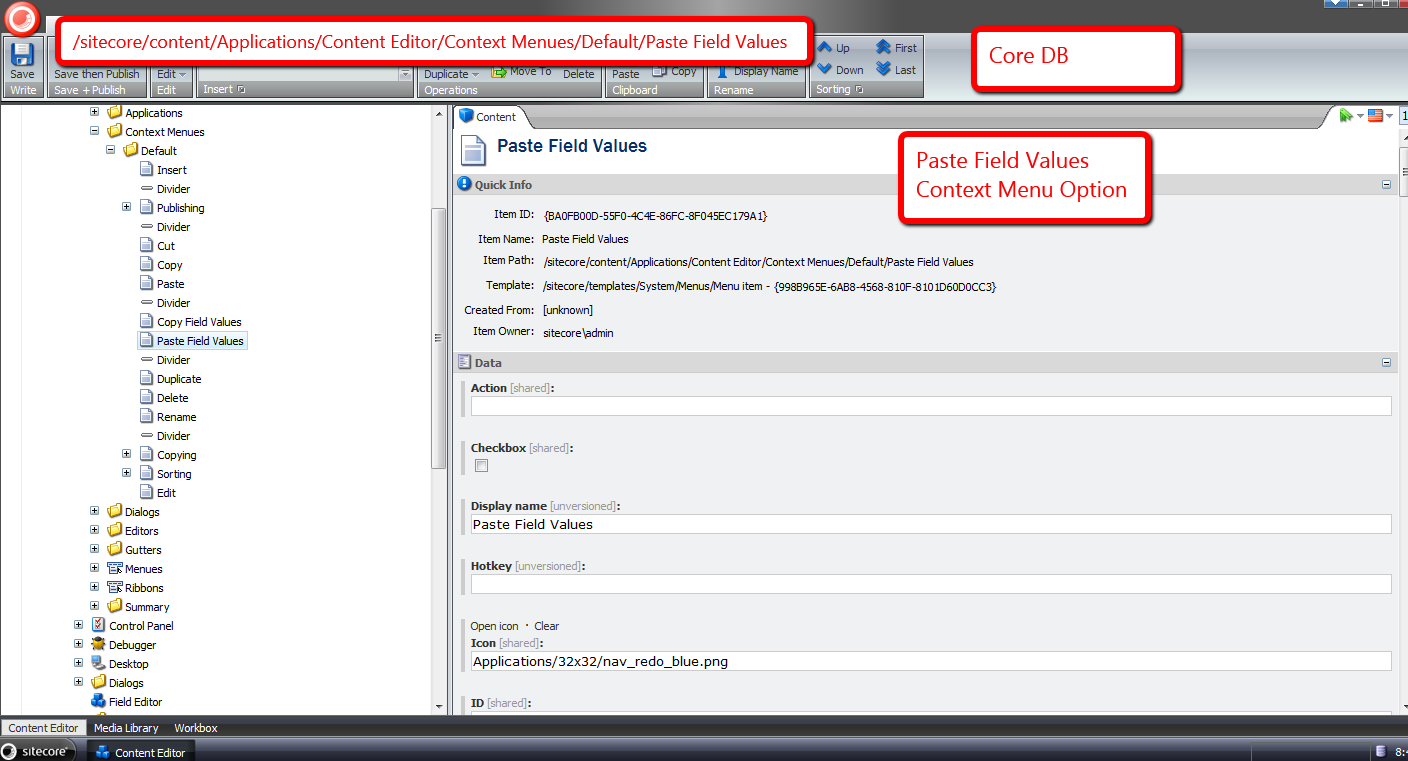
Let’s take all of the above for a spin.
I created an item with some content:

I then created another item with less content:
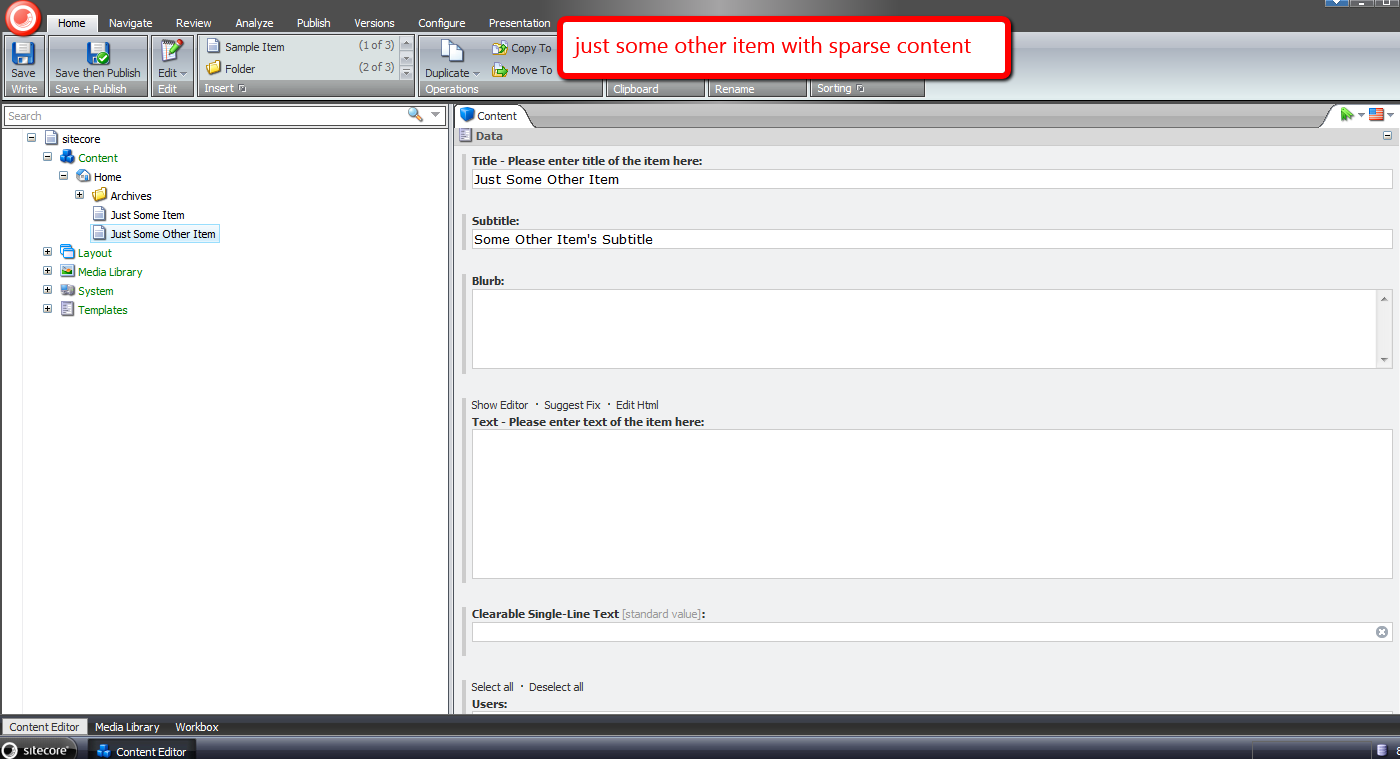
I right-clicked to launch the item context menu, and clicked the ‘Copy Field Values’ option:

I then navigated to the second item I created in the content tree, right-clicked, and selected the ‘Paste Field Values’ option:

By now, I had put my feet up on my desk thinking it was smooth sailing from this point on, only to be impeded by an intrusive confirmation box ;):

I clicked ‘Yes’, and saw the following thereafter:
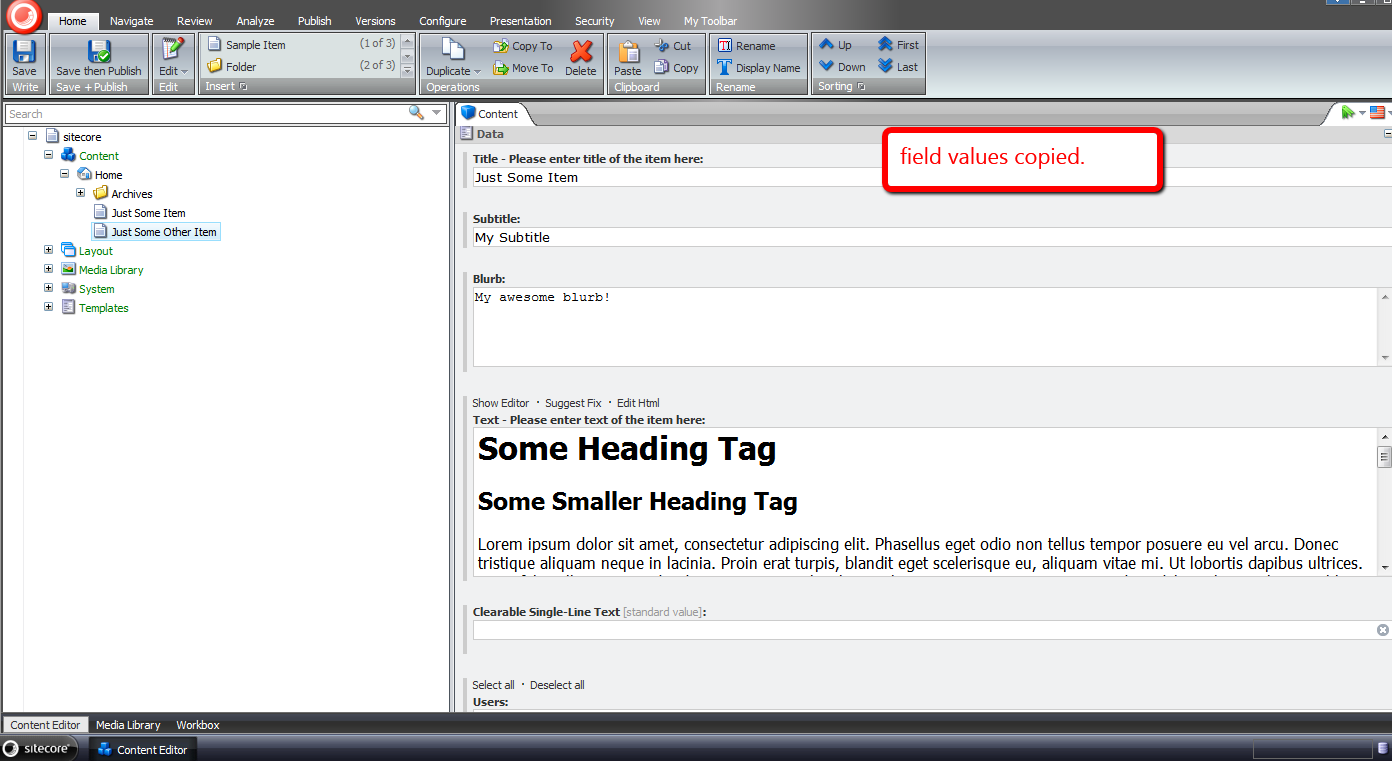
In retrospect, it probably would have made more sense to omit standard fields from being copied, albeit I will leave that for another day.
Until next time, have a Sitecoretastic day! 🙂
Delete Sitecore Items Using a Deletion Basket
For the past week, I’ve been battling a nasty strain of the rhinovirus — don’t worry, that’s just the fancy medical term for what is known as the common cold — albeit there appears to be nothing common about this cold. I think I have a frankencold (I just made up this word, and might submit it to Merriam-Webster for inclusion in the English dictionary).
In my sickened state — perhaps it could be classified as a state of frenzy — I started pondering over strange feature ideas. The ‘Dislike’ button was one idea that came to mind. It would serve as the antithesis to the ‘Like’ button found on most social networking outlets. Such a feature would definitely be a whimsical thing to build, although might foment more trouble than it’s worth.
Another idea that came to mind was a deletion basket in the Sitecore client. It would be similar in theme to a shopping cart found on most e-commerce websites. Users would queue items in their deletion basket, and delete them after they are finished adding items — a checkout step for the lack of a better term.
The latter idea seemed useful — most importantly fun — so I decided to build it.
I first created a Deletion Basket class:
using System;
using System.Collections.Generic;
using System.Linq;
using System.Text;

using Sitecore.Data;
using Sitecore.Data.Items;

namespace Sitecore.Sandbox.Utilities.Items.Base
{
    public interface IDeletionBasket
    {
        int Count();

        bool IsEmpty();

        IEnumerable<Item> GetItemsToDelete();

        bool Contains(Item item);

        void Add(Item item);

        void Remove(Item item);

        void DeleteAll();

        void Clear();
    }
}
using System;
using System.Collections.Generic;
using System.Linq;
using System.Text;
using System.Web;

using Sitecore.Configuration;
using Sitecore.Data;
using Sitecore.Data.Items;
using Sitecore.Diagnostics;
using Sitecore.Web.UI.HtmlControls;
using Sitecore.Web.UI.Sheer;

using Sitecore.Sandbox.Utilities.Items.Base;

namespace Sitecore.Sandbox.Utilities.Items
{
    public class DeletionBasket : IDeletionBasket
    {
        private static volatile IDeletionBasket current;
        private static object lockObject = new Object();

        public static IDeletionBasket Current
        {
            get
            {
                if (current == null)
                {
                    lock (lockObject)
                    {
                        if (current == null)
                            current = new DeletionBasket();
                    }
                }

                return current;
            }
        }

        private IList<Item> _ItemsToDelete;
        private IList<Item> ItemsToDelete
        {
            get
            {
                if (_ItemsToDelete == null)
                {
                    _ItemsToDelete = new List<Item>();
                }

                return _ItemsToDelete;
            }
        }

        private DeletionBasket()
        {
        }

        public int Count()
        {
            return ItemsToDelete.Count();
        }

        public bool IsEmpty()
        {
            return !ItemsToDelete.Any();
        }

        public IEnumerable<Item> GetItemsToDelete()
        {
            return ItemsToDelete;
        }

        public bool Contains(Item item)
        {
            return FindItemInBasket(item) != null;
        }

        private Item FindItemInBasket(Item item)
        {
            Assert.ArgumentNotNull(item, "item");
            return FindItemInBasketByID(item.ID);
        }

        private Item FindItemInBasketByID(ID id)
        {
            AssertID(id);
            return FindItemsInBasketByID(id).FirstOrDefault();
        }

        private IEnumerable<Item> FindItemsInBasketByID(ID id)
        {
            AssertID(id);
            return ItemsToDelete.Where(i => i.ID == id);
        }

        private static void AssertID(ID id)
        {
            Assert.ArgumentCondition(!ID.IsNullOrEmpty(id), "id", "ID must be set!");
        }

        public void Add(Item item)
        {
            Item itemInBasket = FindItemInBasket(item);
            if (itemInBasket == null)
            {
                ItemsToDelete.Add(item);
                AddChildren(item);
            }
        }

        private void AddChildren(Item item)
        {
            if (!item.HasChildren)
            {
                return;
            }

            foreach (Item child in item.Children)
            {
                Add(child);
            }
        }

        public void Remove(Item item)
        {
            Item itemInBasket = FindItemInBasket(item);
            if (itemInBasket != null)
            {
                ItemsToDelete.Remove(itemInBasket);
            }
        }

        public void DeleteAll()
        {
            Sitecore.Context.ClientPage.Start(this, "ConfirmAndDeleteAll", new ClientPipelineArgs());
        }

        private void ConfirmAndDeleteAll(ClientPipelineArgs args)
        {
            ShowConfirmationDialogIfApplicable(args);
            DeleteAllIfApplicable(args);
        }

        private void ShowConfirmationDialogIfApplicable(ClientPipelineArgs args)
        {
            if (!args.IsPostBack)
            {
                Context.ClientPage.ClientResponse.YesNoCancel(string.Format("Are you sure you want to delete the {0} item(s) in your Deletion Basket?", Count()), "200", "200");
                args.WaitForPostBack();
            }
        }

        private void DeleteAllIfApplicable(ClientPipelineArgs args)
        {
            bool canDelete = args.IsPostBack && args.Result == "yes";
            if (canDelete)
            {
                foreach (Item itemToDelete in ItemsToDelete)
                {
                    DeleteItem(itemToDelete);
                }

                Clear();
            }
        }

        private static void DeleteItem(Item item)
        {
            Assert.ArgumentNotNull(item, "item");
            if (Settings.RecycleBinActive)
            {
                item.Recycle();
            }
            else
            {
                item.Delete();
            }
        }

        public void Clear()
        {
            ItemsToDelete.Clear();
        }
    }
}
The above class stores and deletes items from a list, and prompts users ascertaining if they truly want to delete items within the deletion basket.
Only one instance of the above class can exist — I employed the Singleton pattern for this purpose — to keep the code simple for this blog post, although it probably would make more sense to make baskets session aware — have different baskets for different sessions.
Next, I created a command to add or remove an item from the deletion basket — depending on whether the item is in the basket:
using System.Linq;

using Sitecore.Data.Items;
using Sitecore.Diagnostics;
using Sitecore.Globalization;
using Sitecore.Shell.Framework.Commands;

using Sitecore.Sandbox.Utilities.Items;
using Sitecore.Sandbox.Utilities.Items.Base;

namespace Sitecore.Sandbox.Commands
{
    class ToggleItemInDeletionBasket : Command
    {
        private static readonly Delete DeleteCommand = new Delete();

        public override void Execute(CommandContext commandContext)
        {
            Assert.ArgumentNotNull(commandContext, "commandContext");
            ToggleInDeletionBasketIfEnabled(commandContext);
        }

        private void ToggleInDeletionBasketIfEnabled(CommandContext commandContext)
        {
            Assert.ArgumentNotNull(commandContext, "commandContext");
            if (QueryState(commandContext) == CommandState.Enabled)
            {
                ToggleInDeletionBasketAndRefresh(GetItem(commandContext));
            }
        }

        public override CommandState QueryState(CommandContext commandContext)
        {
            Assert.ArgumentNotNull(commandContext, "commandContext");
            return DeleteCommand.QueryState(commandContext);
        }

        private static void ToggleInDeletionBasketAndRefresh(Item item)
        {
            ToggleInDeletionBasket(item);
            RefreshItem(item);
        }

        private static void ToggleInDeletionBasket(Item item)
        {
            Assert.ArgumentNotNull(item, "item");
            IDeletionBasket deletionBasket = DeletionBasket.Current;

            if(deletionBasket.Contains(item))
            {
                deletionBasket.Remove(item);
            }
            else
            {
                deletionBasket.Add(item);
            }
        }

        private static Item GetItem(CommandContext commandContext)
        {
            Assert.ArgumentNotNull(commandContext, "commandContext");
            Assert.ArgumentNotNull(commandContext.Items, "commandContext.Items");
            Assert.ArgumentCondition(commandContext.Items.Count() > 0, "commandContext.Items", "There must be at least one item in the array!");
            return commandContext.Items.FirstOrDefault();
        }

        public override string GetHeader(CommandContext commandContext, string header)
        {
            if (DeletionBasket.Current.Contains(GetItem(commandContext)))
            {
                return Translate.Text("Remove from Deletion Basket");
            }

            return Translate.Text("Add to Deletion Basket");
        }

        private static void RefreshItem(Item item)
        {
            Assert.ArgumentNotNull(item, "item");
            Context.ClientPage.ClientResponse.Timer(string.Format("item:load(id={0})", item.ID), 1);
        }
    }
}
The text of the command is different when the item is in the basket versus when it is not.
The command also reloads the item in the Sitecore client — this is done to update the state of the deletion basket buttons in the ribbon.
Now, we need a command to delete items queued in the deletion basket. The ‘Empty Deletion Basket’ command does just that:
using System.Linq;

using Sitecore.Data.Items;
using Sitecore.Diagnostics;
using Sitecore.Globalization;
using Sitecore.Shell.Framework.Commands;

using Sitecore.Sandbox.Utilities.Items;
using Sitecore.Sandbox.Utilities.Items.Base;

namespace Sitecore.Sandbox.Commands
{
    public class EmptyDeletionBasket : Command
    {
        public override void Execute(CommandContext commandContext)
        {
            Assert.ArgumentNotNull(commandContext, "commandContext");
            EmptyDeletionBasketIfEnabled(commandContext);
        }

        private void EmptyDeletionBasketIfEnabled(CommandContext commandContext)
        {
            if (QueryState(commandContext) == CommandState.Enabled)
            {
                DeleteAllItemsInDeletionBasketAndRefresh();
            }
        }

        public override CommandState QueryState(CommandContext commandContext)
        {
            Assert.ArgumentNotNull(commandContext, "commandContext");

            if (DeletionBasket.Current.IsEmpty())
            {
                return CommandState.Hidden;
            }

            return base.QueryState(commandContext);
        }

        private static void DeleteAllItemsInDeletionBasketAndRefresh()
        {
            Item firstItemParent = GetFirstItemParent();
            DeleteAllItemsInDeletionBasket();
            RefreshItem(firstItemParent);
        }

        private static void DeleteAllItemsInDeletionBasket()
        {
            DeletionBasket.Current.DeleteAll();
        }

        private static Item GetFirstItemParent()
        {
            Item itemForRefresh = DeletionBasket.Current.GetItemsToDelete().FirstOrDefault();
            if (itemForRefresh != null && itemForRefresh.Parent != null)
            {
                return itemForRefresh.Parent;
            }

            return null;
        }

        private static void RefreshItem(Item item)
        {
            Assert.ArgumentNotNull(item, "item");
            Context.ClientPage.ClientResponse.Timer(string.Format("item:load(id={0})", item.ID), 1);
        }

        public override string GetHeader(CommandContext commandContext, string header)
        {
            IDeletionBasket deletionBasket = DeletionBasket.Current;
            return Translate.Text(string.Format("Delete {0} Item(s)", deletionBasket.Count()));
        }
    }
}
This command also reloads the Sitecore client — using the the parent item of the first item flagged for deletion (you can’t reload an item that was already deleted). This is also done to refresh the state of the buttons in the ribbon.
Plus, the command is hidden when there are no items in the deletion basket.
We shouldn’t force users to only add and delete items in their basket. We should also allow them to clear out their baskets, in case they change their mind on what they want to delete. I created a ‘Clear Deletion Basket’ command for this very reason:
using System.Linq;

using Sitecore.Data;
using Sitecore.Data.Items;
using Sitecore.Diagnostics;
using Sitecore.Shell.Framework.Commands;
using Sitecore.Web.UI.Sheer;

using Sitecore.Sandbox.Utilities.Items;

namespace Sitecore.Sandbox.Commands
{
    public class ClearDeletionBasket : Command
    {
        public override void Execute(CommandContext commandContext)
        {
            Assert.ArgumentNotNull(commandContext, "commandContext");
            ClearDeletionBasketIfEnabled(commandContext);
        }

        private void ClearDeletionBasketIfEnabled(CommandContext commandContext)
        {
            if (QueryState(commandContext) == CommandState.Enabled)
            {
                ClearAllItemsInDeletionBasketAndRfresh();
            }
        }

        public override CommandState QueryState(CommandContext commandContext)
        {
            Assert.ArgumentNotNull(commandContext, "commandContext");

            if (DeletionBasket.Current.IsEmpty())
            {
                return CommandState.Disabled;
            }

            return base.QueryState(commandContext);
        }

        private static void ClearAllItemsInDeletionBasketAndRfresh()
        {
            Item lastItem = GetLastItem();
            ClearAllItemsInDeletionBasket();
            RefreshItem(lastItem);
        }

        private static void ClearAllItemsInDeletionBasket()
        {
            DeletionBasket.Current.Clear();
        }

        private static Item GetLastItem()
        {
            Item itemForRefresh = DeletionBasket.Current.GetItemsToDelete().LastOrDefault();
            if (itemForRefresh != null)
            {
                return itemForRefresh;
            }

            return null;
        }

        private static void RefreshItem(Item item)
        {
            Assert.ArgumentNotNull(item, "item");
            Context.ClientPage.ClientResponse.Timer(string.Format("item:load(id={0})", item.ID), 1);
        }
    }
}
In order to use our commands above, we have to define them in /App_Config/Commands.config:
<?xml version="1.0" encoding="utf-8" ?>
<configuration>

	<!-- There's a bunch of commands up here -->

	<command name="item:toggleitemindeletionbasket" type="Sitecore.Sandbox.Commands.ToggleItemInDeletionBasket,Sitecore.Sandbox"/>
	<command name="item:cleardeletionbasket" type="Sitecore.Sandbox.Commands.ClearDeletionBasket,Sitecore.Sandbox"/>
	<command name="item:emptydeletionbasket" type="Sitecore.Sandbox.Commands.EmptyDeletionBasket,Sitecore.Sandbox"/>
</configuration>
Now that our commands are defined in /App_Config/Commands.config, we can now wire them up in the Core database.
I’ve wired up the ‘Empty Deletion Basket’ button:

Followed by wiring up the ‘Clear Deletion Basket’ dropdown button:
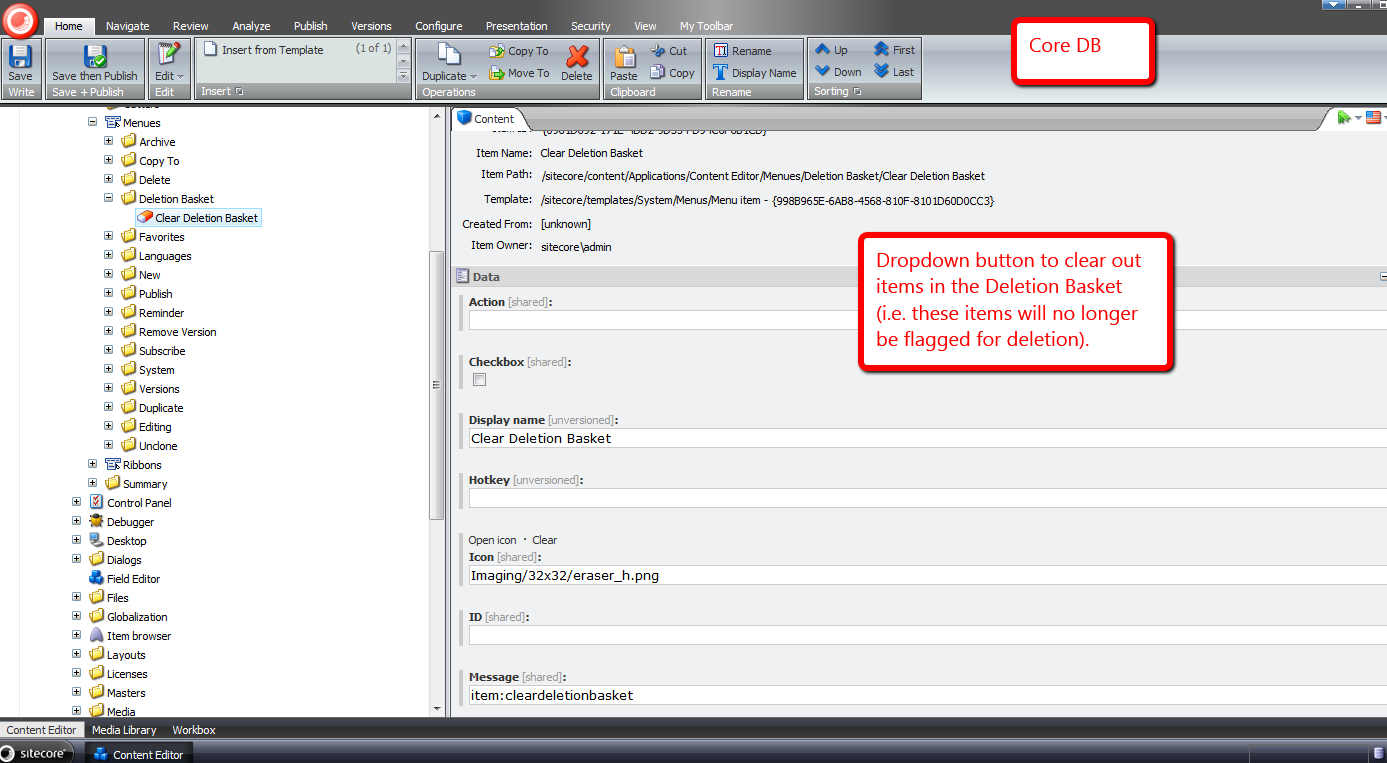
Next, I set up the ‘Toggle Item In Deletion Basket’ item context menu button:

Let’s see how we did.
I’ve switched back over to the master database, picked an item at random, and right-clicked. There’s our new ‘Toggle Item In Deletion Basket’ button:
The appropriate wording is displayed since the item is not in the Deletion Basket.
I’ve clicked the ‘Toggle Item In Deletion Basket’ button in the item context menu, and then right-clicked on the item again to launch it again:

We see that button’s text has changed to convey that this item is in the deletion basket, and can be removed from the deletion basket by clicking the item context menu button again.
Plus, the deletion basket buttons in the ribbon have magically appeared.
I’ve clicked the dropdown on the deletion basket button in the ribbon, and we now see the ‘Clear Deletion Basket’ button:

I’m going to add a bunch of items to our deletion basket:

They’ve all been added. Let’s get rid of them:
Doh — I’ve been blocked by an instrusive confirmation box:
I’ve clicked ‘Yes’, and now the items are gone:
That was all in good fun.
Time to investigate adding a ‘Dislike’ button to the popular social media channels. 😉
Chain Together Sitecore Client Commands using a Composite Command
Today, I procrastinated on doing chores around the house by exploring whether one could chain together Sitecore client commands in order to reduce the number of clicks and/or keypresses required when invoking these commands separately — combining the click of the ‘Save’ button followed by one of the publishing buttons would be an example of this.
Immediately, the composite design pattern came to mind for a candidate solution — you can read more about this pattern in the the Gang of Four’s book on design patterns.
This high-level plan of attack lead to the following custom composite command.
using System;
using System.Collections.Generic;
using System.Linq;
using System.Text;
using System.Xml;

using Sitecore.Configuration;
using Sitecore.Diagnostics;
using Sitecore.Shell.Framework.Commands;
using Sitecore.Text;

namespace Sitecore.Sandbox.Commands
{
    public class CompositeCommand : Command
    {
        public override void Execute(CommandContext commandContext)
        {
            IEnumerable<Command> commands = GetCommands();

            foreach (Command command in commands)
            {
                command.Execute(commandContext);
            }
        }

        protected IEnumerable<Command> GetCommands()
        {
            ListString commandNames = GetCommandNames();
            IList<Command> commands = new List<Command>();

            foreach(string commandName in commandNames)
            {
                AddToListIfNotNull(commands, CommandManager.GetCommand(commandName));
            }

            return commands;
        }

        private ListString GetCommandNames()
        {
            return new ListString(GetCommandsFieldValue(), '|');
        }

        private string GetCommandsFieldValue()
        {
            XmlNode xmlNode = Factory.GetConfigNode(string.Format("commands/command[@name='{0}']", Name));
            bool canGetCommands = xmlNode != null && xmlNode.Attributes["commands"] != null;

            if (canGetCommands)
            {
                return xmlNode.Attributes["commands"].Value;
            }

            return string.Empty;
        }

        private static void AddToListIfNotNull<T>(IList<T> list, T objectToAdd) where T : class
        {
            Assert.ArgumentNotNull(list, "list");
            if (objectToAdd != null)
            {
                list.Add(objectToAdd);
            }
        }
    }
}
The above command — using the Sitecore.Configuration.Factory class — gets its XML configuration element; parses the list of commands it wraps from a new attribute I’ve added — I’ve named this attribute “commands”; gets instances of these commands via Sitecore.Shell.Framework.Commands.CommandManager (from Sitecore.Kernel.dll); and invokes all Command instances’ Execute() methods consecutively — ordered from left to right, separated by pipes, in the “commands” attribute on the command XML element in /App_Config/Commands.config.
To test this out, I thought I’d create a composite command combining the item save command with the publish command — the command that launches the Publish Item Wizard.
I first had to wire up my new command by adding a new command XML element to /App_Config/Commands.config:
<?xml version="1.0" encoding="utf-8" ?>
<configuration>
	<!-- bunch of commands up here -->
	<command name="composite:savethenpublish" commands="contenteditor:save|item:publish" type="Sitecore.Sandbox.Commands.CompositeCommand,Sitecore.Sandbox"/>
</configuration>
Next, in the core db, I had to create a reference under the home strip:

Followed by a chunk containing a button that holds the name of our new command:

Let’s see this new composite command in action. I did the following:

After the Sitecore save animation completed, the Publish Item Wizard popped up:

Now, it’s time for some fun. Let’s combine commands that make little sense in chaining together.
Let’s chain together:
- the command I built in my post on expanding Standard Values tokens
- the command to move an item before all its siblings in the content tree
- the command to move an item down in the content tree
Here’s what the command’s configuration looks like in /App_Config/Commands.config:
<?xml version="1.0" encoding="utf-8" ?>
<configuration>
	<!-- bunch of commands up here -->
	<command name="composite:chainsomeunrelatedcommands" commands="item:expandtokens|item:movefirst|item:movedown" type="Sitecore.Sandbox.Commands.CompositeCommand,Sitecore.Sandbox"/>
</configuration>
I decided to add this to the item context menu — for more information on adding to the context menu for items, please check out my post that shows you how to do this — so I created new menu option in the context menu for items in the core database:

I switched back to the master database; added some Standard Values tokens to some fields in the Page 4 item I created for testing; right-clicked on on it; and clicked my new context menu option:

After a second or two, I saw that the tokens were expanded, and the item was moved:

That’s all for now. It’s now time to go do some house chores. Otherwise, people might start thinking I’m truly addicted to building things in Sitecore. 🙂
Prevent Sitecore Users from Using Common Dictionary Words in Passwords
Lately, enhancing security measures in Sitecore have been on my mind. One idea that came to mind today was finding a way to prevent password cracking — a scenario where a script tries to ascertain a user’s password by guessing over and over again what a user’s password might be, by supplying common words from a data store, or dictionary in the password textbox on the Sitecore login page.
As a way to prevent users from using common words in their Sitecore passwords, I decided to build a custom System.Web.Security.MembershipProvider — the interface (not a .NET interface but an abstract class) used by Sitecore out of the box for user management. Before we dive into that code, we need a dictionary of some sort.
I decided to use a list of fruits — all for the purposes of keeping this post simple — that I found on a Wikipedia page. People aren’t kidding when they say you can virtually find everything on Wikipedia, and no doubt all content on Wikipedia is authoritative — just ask any university professor. 😉
I copied some of the fruits on that Wikipedia page into a patch include config file — albeit it would make more sense to put these into a database, or perhaps into Sitecore if doing such a thing in a real-world solution. I am not doing this here for the sake of brevity.
<?xml version="1.0" encoding="utf-8"?>
<configuration xmlns:patch="http://www.sitecore.net/xmlconfig/">
  <sitecore>
    <dictionaryWords>
      <word>Apple</word>
      <word>Apricot</word>
      <word>Avocado</word>
      <word>Banana</word>
      <word>Breadfruit</word>
      <word>Bilberry</word>
      <word>Blackberry</word>
      <word>Blackcurrant</word>
      <word>Blueberry</word>
      <word>Currant</word>
      <word>Cherry</word>
      <word>Cherimoya</word>
      <word>Clementine</word>
      <word>Cloudberry</word>
      <word>Coconut</word>
      <word>Date</word>
      <word>Damson</word>
      <word>Dragonfruit</word>
      <word>Durian</word>
      <word>Eggplant</word>
      <word>Elderberry</word>
      <word>Feijoa</word>
      <word>Fig</word>
      <word>Gooseberry</word>
      <word>Grape</word>
      <word>Grapefruit</word>
      <word>Guava</word>
      <word>Huckleberry</word>
      <word>Honeydew</word>
      <word>Jackfruit</word>
      <word>Jettamelon</word>
      <word>Jambul</word>
      <word>Jujube</word>
      <word>Kiwi fruit</word>
      <word>Kumquat</word>
      <word>Legume</word>
      <word>Lemon</word>
      <word>Lime</word>
      <word>Loquat</word>
      <word>Lychee</word>
      <word>Mandarine</word>
      <word>Mango</word>
      <word>Melon</word>
    </dictionaryWords>
  </sitecore>
</configuration>
I decided to reuse a utility class I built for my post on expanding Standard Values tokens.
using System;
using System.Collections.Generic;
using System.Linq;
using System.Text;

using Sitecore.Diagnostics;

using Sitecore.Sandbox.Utilities.StringUtilities.Base;
using Sitecore.Sandbox.Utilities.StringUtilities.DTO;

namespace Sitecore.Sandbox.Utilities.StringUtilities
{
    public class StringSubstringsChecker : SubstringsChecker<string>
    {
        private bool IgnoreCase { get; set; }

        private StringSubstringsChecker(IEnumerable<string> substrings)
            : this(null, substrings, false)
        {
        }

        private StringSubstringsChecker(IEnumerable<string> substrings, bool ignoreCase)
            : this(null, substrings, ignoreCase)
        {
        }

        private StringSubstringsChecker(string source, IEnumerable<string> substrings, bool ignoreCase)
            : base(source)
        {
            SetSubstrings(substrings);
            SetIgnoreCase(ignoreCase);
        }

        private void SetSubstrings(IEnumerable<string> substrings)
        {
            AssertSubstrings(substrings);
            Substrings = substrings;
        }

        private static void AssertSubstrings(IEnumerable<string> substrings)
        {
            Assert.ArgumentNotNull(substrings, "substrings");
            Assert.ArgumentCondition(substrings.Any(), "substrings", "substrings must contain as at least one string!");
        }

        private void SetIgnoreCase(bool ignoreCase)
        {
            IgnoreCase = ignoreCase;
        }

        protected override bool CanDoCheck()
        {
            return !string.IsNullOrEmpty(Source);
        }

        protected override bool DoCheck()
        {
            Assert.ArgumentNotNullOrEmpty(Source, "Source");

            foreach (string substring in Substrings)
            {
                if(DoesSourceContainSubstring(substring))
                {
                    return true;
                }
            }

            return false;
        }

        private bool DoesSourceContainSubstring(string substring)
        {
            if (IgnoreCase)
            {
                return !IsNotFoundIndex(Source.IndexOf(substring, StringComparison.CurrentCultureIgnoreCase));
            }

            return !IsNotFoundIndex(Source.IndexOf(substring));
        }

        private static bool IsNotFoundIndex(int index)
        {
            const int notFound = -1;
            return index == notFound;
        }

        public static ISubstringsChecker<string> CreateNewStringSubstringsContainer(IEnumerable<string> substrings)
        {
            return new StringSubstringsChecker(substrings);
        }

        public static ISubstringsChecker<string> CreateNewStringSubstringsContainer(IEnumerable<string> substrings, bool ignoreCase)
        {
            return new StringSubstringsChecker(substrings, ignoreCase);
        }

        public static ISubstringsChecker<string> CreateNewStringSubstringsContainer(string source, IEnumerable<string> substrings, bool ignoreCase)
        {
            return new StringSubstringsChecker(source, substrings, ignoreCase);
        }
    }
}
In the version of our “checker” class above, I added the option to have the “checker” ignore case comparisons for the source and substrings.
Next, I created a new System.Web.Security.MembershipProvider subclass where I am utilizing the decorator pattern to decorate methods around changing passwords and creating users.
By default, we are instantiating an instance of the System.Web.Security.SqlMembershipProvider — this is what my local Sitecore sandbox instance is using, in order to get at the ASP.NET Membership tables in the core database.
using System;
using System.Collections.Generic;
using System.Collections.Specialized;
using System.Linq;
using System.Text;
using System.Web.Security;

using Sitecore.Configuration;
using Sitecore.Diagnostics;
using Sitecore.Security;

using Sitecore.Sandbox.Utilities.StringUtilities;
using Sitecore.Sandbox.Utilities.StringUtilities.Base;

namespace Sitecore.Sandbox.Security.MembershipProviders
{
    public class PreventDictionaryWordPasswordsMembershipProvider : MembershipProvider
    {
        private static IEnumerable<string> _DictionaryWords;
        private static IEnumerable<string> DictionaryWords
        {
            get
            {
                if (_DictionaryWords == null)
                {
                    _DictionaryWords = GetDictionaryWords();
                }

                return _DictionaryWords;
            }
        }

        public override string Name
        {
            get
            {
                return InnerMembershipProvider.Name;
            }
        }

        public override string ApplicationName
        {
            get
            {
                return InnerMembershipProvider.ApplicationName;
            }
            set
            {
                InnerMembershipProvider.ApplicationName = value;
            }
        }

        public override bool EnablePasswordReset
        {
            get
            {
                return InnerMembershipProvider.EnablePasswordReset;
            }
        }

        public override bool EnablePasswordRetrieval
        {
            get
            {
                return InnerMembershipProvider.EnablePasswordRetrieval;
            }
        }

        public override int MaxInvalidPasswordAttempts
        {
            get
            {
                return InnerMembershipProvider.MaxInvalidPasswordAttempts;
            }
        }

        public override int MinRequiredNonAlphanumericCharacters
        {
            get
            {
                return InnerMembershipProvider.MinRequiredNonAlphanumericCharacters;
            }
        }

        public override int MinRequiredPasswordLength
        {
            get
            {
                return InnerMembershipProvider.MinRequiredPasswordLength;
            }
        }

        public override int PasswordAttemptWindow
        {
            get
            {
                return InnerMembershipProvider.PasswordAttemptWindow;
            }
        }

        public override MembershipPasswordFormat PasswordFormat
        {
            get
            {
                return InnerMembershipProvider.PasswordFormat;
            }
        }

        public override string PasswordStrengthRegularExpression
        {
            get
            {
                return InnerMembershipProvider.PasswordStrengthRegularExpression;
            }
        }

        public override bool RequiresQuestionAndAnswer
        {
            get
            {
                return InnerMembershipProvider.RequiresQuestionAndAnswer;
            }
        }

        public override bool RequiresUniqueEmail
        {
            get
            {
                return InnerMembershipProvider.RequiresUniqueEmail;
            }
        }

        private MembershipProvider InnerMembershipProvider { get; set; }
        private ISubstringsChecker<string> DictionaryWordsSubstringsChecker { get; set; }

        public PreventDictionaryWordPasswordsMembershipProvider()
            : this(CreateNewSqlMembershipProvider(), CreateNewDictionaryWordsSubstringsChecker())
        {
        }

        public PreventDictionaryWordPasswordsMembershipProvider(MembershipProvider innerMembershipProvider, ISubstringsChecker<string> dictionaryWordsSubstringsChecker)
        {
            SetInnerMembershipProvider(innerMembershipProvider);
            SetDictionaryWordsSubstringsChecker(dictionaryWordsSubstringsChecker);
        }

        private void SetInnerMembershipProvider(MembershipProvider innerMembershipProvider)
        {
            Assert.ArgumentNotNull(innerMembershipProvider, "innerMembershipProvider");
            InnerMembershipProvider = innerMembershipProvider;
        }

        private void SetDictionaryWordsSubstringsChecker(ISubstringsChecker<string> dictionaryWordsSubstringsChecker)
        {
            Assert.ArgumentNotNull(dictionaryWordsSubstringsChecker, "dictionaryWordsSubstringsChecker");
            DictionaryWordsSubstringsChecker = dictionaryWordsSubstringsChecker;
        }

        private static MembershipProvider CreateNewSqlMembershipProvider()
        {
            return new SqlMembershipProvider();
        }

        private static ISubstringsChecker<string> CreateNewDictionaryWordsSubstringsChecker()
        {
            return CreateNewStringSubstringsChecker(DictionaryWords);
        }

        private static ISubstringsChecker<string> CreateNewStringSubstringsChecker(IEnumerable<string> substrings)
        {
            Assert.ArgumentNotNull(substrings, "substrings");
            const bool ignoreCase = true;
            return StringSubstringsChecker.CreateNewStringSubstringsContainer(substrings, ignoreCase);
        }

        private static IEnumerable<string> GetDictionaryWords()
        {
            return Factory.GetStringSet("dictionaryWords/word");
        }

        public override bool ChangePassword(string username, string oldPassword, string newPassword)
        {
            if (DoesPasswordContainDictionaryWord(newPassword))
            {
                return false;
            }

            return InnerMembershipProvider.ChangePassword(username, oldPassword, newPassword);
        }

        private bool DoesPasswordContainDictionaryWord(string password)
        {
            Assert.ArgumentNotNullOrEmpty(password, "password");
            DictionaryWordsSubstringsChecker.Source = password;
            return DictionaryWordsSubstringsChecker.ContainsSubstrings();
        }

        public override bool ChangePasswordQuestionAndAnswer(string username, string password, string newPasswordQuestion, string newPasswordAnswer)
        {
            return InnerMembershipProvider.ChangePasswordQuestionAndAnswer(username, password, newPasswordQuestion, newPasswordAnswer);
        }

        public override MembershipUser CreateUser(string username, string password, string email, string passwordQuestion, string passwordAnswer, bool isApproved, object providerUserKey, out MembershipCreateStatus status)
        {
            if (DoesPasswordContainDictionaryWord(password))
            {
                status = MembershipCreateStatus.InvalidPassword;
                return null;
            }

            return InnerMembershipProvider.CreateUser(username, password, email, passwordQuestion, passwordAnswer, isApproved, providerUserKey, out status);
        }

        public override bool DeleteUser(string userName, bool deleteAllRelatedData)
        {
            return InnerMembershipProvider.DeleteUser(userName, deleteAllRelatedData);
        }

        public override MembershipUserCollection FindUsersByEmail(string emailToMatch, int pageIndex, int pageSize, out int totalRecords)
        {
            return InnerMembershipProvider.FindUsersByEmail(emailToMatch, pageIndex, pageSize, out totalRecords);
        }

        public override MembershipUserCollection FindUsersByName(string userNameToMatch, int pageIndex, int pageSize, out int totalRecords)
        {
            return InnerMembershipProvider.FindUsersByName(userNameToMatch, pageIndex, pageSize, out totalRecords);
        }

        public override MembershipUserCollection GetAllUsers(int pageIndex, int pageSize, out int totalRecords)
        {
            return InnerMembershipProvider.GetAllUsers(pageIndex, pageSize, out totalRecords);
        }

        public override int GetNumberOfUsersOnline()
        {
            return InnerMembershipProvider.GetNumberOfUsersOnline();
        }

        public override string GetPassword(string username, string answer)
        {
            return InnerMembershipProvider.GetPassword(username, answer);
        }

        public override MembershipUser GetUser(object providerUserKey, bool userIsOnline)
        {
            return InnerMembershipProvider.GetUser(providerUserKey, userIsOnline);
        }

        public override MembershipUser GetUser(string username, bool userIsOnline)
        {
            return InnerMembershipProvider.GetUser(username, userIsOnline);
        }

        public override string GetUserNameByEmail(string email)
        {
            return InnerMembershipProvider.GetUserNameByEmail(email);
        }

        public override void Initialize(string name, NameValueCollection config)
        {
            InnerMembershipProvider.Initialize(name, config);
        }

        public override string ResetPassword(string username, string answer)
        {
            return InnerMembershipProvider.ResetPassword(username, answer);
        }

        public override bool UnlockUser(string userName)
        {
            return InnerMembershipProvider.UnlockUser(userName);
        }

        public override void UpdateUser(MembershipUser user)
        {
            InnerMembershipProvider.UpdateUser(user);
        }

        public override bool ValidateUser(string username, string password)
        {
            return InnerMembershipProvider.ValidateUser(username, password);
        }
    }
}
In our MembershipProvider above, we have decorated the ChangePassword() and CreateUser() methods by employing a helper method to delegate to our DictionaryWordsSubstringsChecker instance — an instance of the StringSubstringsChecker class above — to see if the supplied password contains any of the fruits found in our collection, and prevent the workflow from moving forward in changing a user’s password, or creating a new user if one of the fruits is found in the provided password.
If we don’t find one of the fruits in the password, we then delegate to the inner MembershipProvider instance — this instance takes care of the rest around changing passwords, or creating new users.
I then had to register my MemberProvider in my Web.config — this cannot be placed in a patch include file since it lives outside of the <sitecore></sitecore> element.
<configuration>
	<membership defaultProvider="sitecore" hashAlgorithmType="SHA1">
		<providers>
			<clear/>
			<add name="sitecore" type="Sitecore.Security.SitecoreMembershipProvider, Sitecore.Kernel" realProviderName="sql" providerWildcard="%" raiseEvents="true"/>

			<!-- our new provider -->
			<add name="sql" type="Sitecore.Sandbox.Security.MembershipProviders.PreventDictionaryWordPasswordsMembershipProvider, Sitecore.Sandbox" connectionStringName="core" applicationName="sitecore" minRequiredPasswordLength="6" requiresQuestionAndAnswer="false" requiresUniqueEmail="false" maxInvalidPasswordAttempts="256"/>

			<add name="switcher" type="Sitecore.Security.SwitchingMembershipProvider, Sitecore.Kernel" applicationName="sitecore" mappings="switchingProviders/membership"/>
		</providers>
    </membership>
</configuration>
So, let’s see what the code above does.
I first tried to create a new user with a password containing a fruit.
I then used a fruit that was not in the collection of fruits above, and successfully created my new user.
Next, I tried to change an existing user’s password to one that contains the word “apple”.

I successfully changed this same user’s password using the word orange — it does not live in our collection of fruits above.
And that’s all there is to it. If you can think of alternative ways of doing this, or additional security features to implement, please drop a comment.
Until next time, have a Sitecoretastic day!
 SitecoreJunkie.com