Home » Sitecore (Page 6)
Category Archives: Sitecore
A Fix for the Hard-coded Submit Button Text in Web Forms for Marketers on Sitecore MVC
No doubt you have heard the latest version of Web Forms for Marketers — better known as WFFM — now works on Sitecore MVC — don’t know about you but I am quite excited over this!
Plus, as an added bonus — and this made my day when I installed it 😀 — you can change most of the rendered markup for forms in Views that ship with the module (these are installed into ~\Views\Form\EditorTemplates\ of your Sitecore instance).
However, the other day, I discovered the submit button text is hard-coded in one of the module’s Views:

As you may know, the module does provide a field on Form Items to change the submit button text:

Unfortunately, the value of this field is not being put into the value attribute of the submit button in the View above.
I have alerted Sitecore support of this issue via a ticket though do recommend modifying ~\Views\Form\EditorTemplates\FormModel.cshtml to use the submit button text set on the Form Item if you are using WFFM on Sitecore MVC:

As you can see, the value of the submit button text field is set on a property of the model, and can be easily be put into the value attribute of the submit button.
If you have any thoughts on this, please share in a comment.
Add Scripts to the PowerShell Toolbox in Sitecore PowerShell Extensions
During our ‘Take charge of your Sitecore instance using Sitecore tools’ session at Sitecore Symposium 2014 Las Vegas, Sitecore MVP Sean Holmesby and I shared how easy it is to leverage/extend popular Sitecore development tools out there, and built up a fictitious Sitecore website where we pulled in #SitecoreSelfie Tweets.
The code that pulls in these Tweets is supposed to follow a naming convention where Tweet IDs are appended to Media Library Item names, as you can see here:

Sadly, right before our talk, I mistakenly 😉 made a code change which broke our naming convention for some images:

Upon further investigation, we had discovered our issue was much larger than anticipated: all Selfie Media Library Item names do not end with their Tweet IDs:

To fix this, I decided to create a PowerShell Toolbox script in Sitecore PowerShell Extensions using the following script:
<#
    .SYNOPSIS
        Rename selfie image items to include tweet ID where missing.

    .NOTES
        Mike Reynolds
#>
$items = Get-ChildItem -Path "master:\sitecore\content\Social-Media\Twitter\Tweets" -Recurse | Where-Object { $_.TemplateName -eq "Tweet" }

$changedItems = @()
foreach($item in $items) {
	$tweetID = $item["TweetID"]
	$selfieImageField = [Sitecore.Data.Fields.ImageField]$item.Fields["SelfieImage"]
	$selfieImage = $selfieImageField.MediaItem
	if($selfieImage -ne $null -and -not $selfieImage.Name.EndsWith($tweetID)) {
		$oldName = $selfieImage.Name
		$newName = $oldName + "_" + $tweetID
		$selfieImage.Editing.BeginEdit()
		$selfieImage.Name = $newName
		$selfieImage.Editing.EndEdit()

		$changedItem = New-Object PSObject -Property @{
		    Icon = $selfieImage.Appearance.Icon
			OldName = $oldName
			NewName = $newName
			Path = $selfieImage.Paths.Path
			Alt = $selfieImage["Alt"]
			Title = $selfieImage["Title"]
			Width = $selfieImage["Width"]
			Height = $selfieImage["Height"]
			MimeType = $selfieImage["Mime Type"]
			Size = $selfieImage["Size"]
		}

		$changedItems += $changedItem
	}
}

if($changedItems.Count -gt 0) {
    $changedItems |
        Show-ListView -Property @{Label="Icon"; Expression={$_.Icon} },
            @{Label="Old Name"; Expression={$_.OldName} },
    		@{Label="New Name"; Expression={$_.NewName} },
    		@{Label="Path"; Expression={$_.Path} },
            @{Label="Alt"; Expression={$_.Alt} },
    		@{Label="Title"; Expression={$_.Title} },
            @{Label="Width"; Expression={$_.Width} },
            @{Label="Height"; Expression={$_.Height} },
            @{Label="Mime Type"; Expression={$_.MimeType} },
    		@{Label="Size"; Expression={$_.Size} }
} else {
    Show-Alert "There are no selfie image items missing tweet IDs in their name."
}
Close-Window
The above PowerShell script grabs all Tweet Items in Sitecore; ascertains whether referenced Selfie images in the Media Library — these are referenced in the “SelfieImage” field on the Tweet Items — end with the Tweet IDs of their referring Tweet Items (the Tweet ID is stored in a field on the Tweet Item); and renames the Selfie images to include their Tweet IDs if not. The script also launches a dialog showing the images that have changed.
To save the above script in the PowerShell Toolbox, I launched the PowerShell Integrated Scripting Environment (ISE) in Sitecore PowerShell Extensions:

I pasted in the above script, and saved it in the PowerShell Toolbox library:

As you can see, our new script is in the PowerShell Toolbox:

I then clicked the new PowerShell Toolbox option, and was presented with the following dialog:

The above dialog gives information about the images along with their old and new Item names.
I then navigated to where these images live in the Media Library, and see that they were all renamed to include Tweet IDs:

If you have any thoughts on this, or suggestions for other PowerShell Toolbox scripts, please share in a comment.
Until next time, have a #SitecoreSelfie type of day!
Clone Items using the Sitecore Item Web API
Yesterday, I had the privilege to present with Ben Lipson and Jamie Michalski, both of Velir, on the Sitecore Item Web API at the New England Sitecore User Group — if you want to see us in action, check out the recording of our presentation!
Plus, my slides are available here!
During my presentation, I demonstrated how easy it is to customize the Sitecore Item API by adding a custom <itemWebApiRequest> pipeline processor, and a custom pipeline to handle a cloning request — for another example on adding a custom <itemWebApiRequest> pipeline processor, and another pipeline to execute a different custom operation, have a look at this post where I show how to publish Items using the Sitecore Item Web API.
For any custom pipeline you build for the Sitecore Item Web API, you must define a Parameter Object that inherits from Sitecore.ItemWebApi.Pipelines.OperationArgs:
using System.Collections.Generic;

using Sitecore.Data.Items;

using Sitecore.ItemWebApi.Pipelines;

namespace Sitecore.Sandbox.ItemWebApi.Pipelines.Clone
{
    public class CloneArgs : OperationArgs
    {
        public CloneArgs(Item[] scope)
            : base(scope)
        {
        }

        public IEnumerable<Item> Destinations { get; set; }

        public bool IsRecursive { get; set; }

        public IEnumerable<Item> Clones { get; set; }
    }
}
I added three properties to the class above: a property to hold parent destinations for clones; another indicating whether all descendants should be cloned; and a property to hold a collection of the clones.
I then created a base class for processors of my custom pipeline for cloning:
using Sitecore.ItemWebApi.Pipelines;

namespace Sitecore.Sandbox.ItemWebApi.Pipelines.Clone
{
    public abstract class CloneProcessor : OperationProcessor<CloneArgs>
    {
        protected CloneProcessor()
        {
        }
    }
}
The above class inherits from Sitecore.ItemWebApi.Pipelines.OperationProcessor which is the base class for most Sitecore Item Web API pipelines.
The following class serves as one processor of my custom cloning pipeline:
using System.Collections.Generic;

using Sitecore.Data.Items;
using Sitecore.Diagnostics;

namespace Sitecore.Sandbox.ItemWebApi.Pipelines.Clone
{
    public class CloneItems : CloneProcessor
    {
        public override void Process(CloneArgs args)
        {
            Assert.ArgumentNotNull(args, "args");
            Assert.ArgumentNotNull(args.Scope, "args.Scope");
            Assert.ArgumentNotNull(args.Destinations, "args.Destinations");
            IList<Item> clones = new List<Item>();
            foreach (Item itemToClone in args.Scope)
            {
                foreach (Item destination in args.Destinations)
                {
                    clones.Add(CloneItem(itemToClone, destination, args.IsRecursive));
                }
            }

            args.Clones = clones;
        }

        private Item CloneItem(Item item, Item destination, bool isRecursive)
        {
            Assert.ArgumentNotNull(item, "item");
            Assert.ArgumentNotNull(destination, "destination");
            return item.CloneTo(destination, isRecursive);
        }
    }
}
The class above iterates over all Items in scope — these are the Items being cloned — and clones all to the specified destinations (parent Items of the clones).
I then spun up the following class to serve as another processor in my custom cloning pipeline:
using System.Linq;

using Sitecore.Diagnostics;
using Sitecore.Pipelines;

using Sitecore.ItemWebApi.Pipelines.Read;

namespace Sitecore.Sandbox.ItemWebApi.Pipelines.Clone
{
    public class SetResult : CloneProcessor
    {
        public override void Process(CloneArgs args)
        {
            Assert.ArgumentNotNull(args, "args");
            Assert.ArgumentNotNull(args.Clones, "args.Clones");
            if (args.Result == null)
            {
                ReadArgs readArgs = new ReadArgs(args.Clones.ToArray());
                CorePipeline.Run("itemWebApiRead", readArgs);
                args.Result = readArgs.Result;
            }
        }
    }
}
The above class delegates to the <itemWebApiRead> pipeline which retrieves the clones from Sitecore, and stores these in the Parameter Object instance for the custom cloning pipeline.
In order to handle custom requests in the Sitecore Item Web API, you must create a custom <itemWebApiRequest> pipeline processor. I put together the following class to handle my cloning operation:
using System;
using System.Collections.Generic;
using System.Linq;

using Sitecore.Data.Items;
using Sitecore.Diagnostics;
using Sitecore.ItemWebApi;
using Sitecore.ItemWebApi.Pipelines.Request;
using Sitecore.Pipelines;
using Sitecore.Text;
using Sitecore.Web;

using Sitecore.Sandbox.ItemWebApi.Pipelines.Clone;

namespace Sitecore.Sandbox.ItemWebApi.Pipelines.Request
{
    public class ResolveCloneAction : RequestProcessor
    {
        public override void Process(RequestArgs args)
        {
            Assert.ArgumentNotNull(args, "args");
            Assert.ArgumentNotNullOrEmpty(RequestMethod, "RequestMethod");
            Assert.ArgumentNotNullOrEmpty(MultipleItemsDelimiter, "MultipleItemsDelimiter");
            if (!ShouldProcessRequest(args))
            {
                return;
            }

            IEnumerable<Item> destinations = GetDestinationItems();
            if (!destinations.Any())
            {
                Logger.Warn("Cannot process clone action: there are no destination items!");
                return;
            }

            CloneArgs cloneArgs = new CloneArgs(args.Scope)
            {
                Destinations = destinations,
                IsRecursive = DoRecursiveCloning()
            };
            CorePipeline.Run("itemWebApiClone", cloneArgs);
            args.Result = cloneArgs.Result;
        }

        private bool ShouldProcessRequest(RequestArgs args)
        {
            // Is this the request method we care about?
            if (!AreEqualIgnoreCase(args.Context.HttpContext.Request.HttpMethod, RequestMethod))
            {
                return false;
            }

            // are multiple axes supplied?
            if (WebUtil.GetQueryString("scope").Contains(MultipleItemsDelimiter))
            {
                Logger.Warn("Cannot process clone action: multiple axes detected!");
                return false;
            }

            // are there any items in scope?
            if (!args.Scope.Any())
            {
                Logger.Warn("Cannot process clone action: there are no items in Scope!");
                return false;
            }

            return true;
        }

        private static bool AreEqualIgnoreCase(string one, string two)
        {
            return string.Equals(one, two, StringComparison.CurrentCultureIgnoreCase);
        }

        private IEnumerable<Item> GetDestinationItems()
        {
            char delimiter;
            Assert.ArgumentCondition(char.TryParse(MultipleItemsDelimiter, out delimiter), "MultipleItemsDelimiter", "MultipleItemsDelimiter must be a single character!");
            ListString destinations = new ListString(WebUtil.GetQueryString("destinations"), delimiter);
            return (from destination in destinations
                    let destinationItem = GetItem(destination)
                    where destinationItem != null
                    select destinationItem).ToList();
        }

        private Item GetItem(string path)
        {
            try
            {
                return Sitecore.ItemWebApi.Context.Current.Database.Items[path];
            }
            catch (Exception ex)
            {
                Logger.Error(ex);
            }

            return null;
        }

        private bool DoRecursiveCloning()
        {
            bool recursive;
            if (bool.TryParse(WebUtil.GetQueryString("recursive"), out recursive))
            {
                return recursive;
            }

            return false;
        }

        private string RequestMethod { get; set; }

        private string MultipleItemsDelimiter { get; set; }
    }
}
The above class ascertains whether it should handle the request: is the RequestMethod passed via configuration equal to the request method detected, and are there any Items in scope? I also built this processor to handle only one axe in order to keep the code simple.
Once the class determines it should handle the request, it grabs all destination Items from the context database — this is Sitecore.ItemWebApi.Context.Current.Database which is populated via the sc_database query string parameter passed via the request.
Further, the class above detects whether the cloning operation is recursive: should we clone all descendants of the Items in scope? This is also passed by a query string parameter.
I then glued everything together using the following Sitecore configuration file:
<?xml version="1.0" encoding="utf-8"?>
<configuration xmlns:patch="http://www.sitecore.net/xmlconfig/">
  <sitecore>
    <pipelines>
      <itemWebApiClone>
        <processor type="Sitecore.Sandbox.ItemWebApi.Pipelines.Clone.CloneItems, Sitecore.Sandbox" />
        <processor type="Sitecore.Sandbox.ItemWebApi.Pipelines.Clone.SetResult, Sitecore.Sandbox" />
      </itemWebApiClone>
      <itemWebApiRequest>
        <processor patch:before="*[@type='Sitecore.ItemWebApi.Pipelines.Request.ResolveAction, Sitecore.ItemWebApi']"
                   type="Sitecore.Sandbox.ItemWebApi.Pipelines.Request.ResolveCloneAction, Sitecore.Sandbox">
          <RequestMethod>clone</RequestMethod>
          <MultipleItemsDelimiter>|</MultipleItemsDelimiter>
        </processor>
      </itemWebApiRequest>
    </pipelines>
  </sitecore>
</configuration>
Let’s clone the following Sitecore Item with descendants to two folders:

In order to make this happen, I spun up the following HTML page using jQuery — no doubt the front-end gurus reading this are cringing when seeing the following code, but I am not much of a front-end developer:
<!DOCTYPE html>
<html lang="en">
	<head>
		<script src="//ajax.googleapis.com/ajax/libs/jquery/2.1.1/jquery.min.js"></script>
		<script src="//cdnjs.cloudflare.com/ajax/libs/json3/3.3.2/json3.min.js"></script>
		<script src="//cdnjs.cloudflare.com/ajax/libs/prettify/r224/prettify.js"></script>
		<link rel="stylesheet" type="text/css" href="//cdnjs.cloudflare.com/ajax/libs/prettify/r224/prettify.css" />
	</head>
	<body>
		<img width="400" style="display: block; margin-left: auto; margin-right: auto" src="/assets/img/clone-all-the-things.jpg" />
		<input type="button" id="button" value="Clone" style="width:100px;height:50px;font-size: 24px;" />
		<h2 id="confirmation" style="display: none;">Whoa! Something happened!</h2>
		<div id="working" style="display: none;"><img style="display: block; margin-left: auto; margin-right: auto" src="/assets/img/arrow-working.gif" /></div>
		<pre id="responseContainer" class="prettyprint" style="display: none;"><code id="response" class="language-javascript"></code></pre>
		<script type="text/javascript">
		$('#button').click(function() {
			$('#confirmation').hide();
			$('#responseContainer').hide();
			$('#working').show();
			$.ajax({
					type:'clone',
					url: "http://sandbox7/-/item/v1/sitecore/content/Home/Landing Page One?scope=s&destinations=/sitecore/content/Home/Clones|/sitecore/content/Home/Some More Clones&recursive=true&sc_database=master",
					headers:{
						"X-Scitemwebapi-Username":"extranet\\ItemWebAPI",
						"X-Scitemwebapi-Password":"1t3mW3bAP1"}
				}).done(function(response) {
					$('#confirmation').show();
					$('#response').html(JSON.stringify(response, null, 4));
					$('#working').hide();
					$('#responseContainer').show();
				});
		});
		</script>
	</body>
</html>
Plus, please pardon the hard-coded Sitecore credentials — I know you would never store a username and password in front-end code, right? 😉
The above HTML page looks like this on initial load:

I then clicked the ‘Clone’ button, and saw the following:

As you can see, the target Item with descendants were cloned to the destination folders set in the jQuery above:

If you have any thoughts on this, or have other ideas around customizing the Sitecore Item Web API, please share in a comment.
Restart the Sitecore Server Using a Custom FileWatcher
For a few months now, I’ve been contemplating potential uses for a custom Sitecore.IO.FileWatcher — this lives in Sitecore.Kernel.dll, and defines abstract methods to handle changes to files on the file system within your Sitecore web application — and finally came up with something: how about a FileWatcher that restarts the Sitecore server when a certain file is uploaded to a specific directory?
You might be thinking “why would I ever want use such a thing?” Well, suppose you need to restart the Sitecore server on one of your Content Delivery Servers immediately, but you do not have direct access to it, and the person who does has left for the week. What do you do?
The following FileWatcher might be one option for the scenario above (another option might be to make frantic phone calls to get the server restarted):
using System;

using Sitecore.Diagnostics;
using Sitecore.Install;
using Sitecore.IO;

namespace Sitecore.Sandbox.IO
{
    public class RestartServerWatcher : FileWatcher
    {
        public RestartServerWatcher()
            : base("watchers/restartServer")
        {
        }

        protected override void Created(string fullPath)
        {
            try
            {
                Log.Info(string.Format("Restart server file detected: {0}. Restarting the server.", fullPath), this);
                FileUtil.Delete(fullPath);
                Installer.RestartServer();
            }
            catch (Exception exception)
            {
                Log.Error("Error in RestartServerWatcher", exception, typeof(RestartServerWatcher));
            }
        }

        protected override void Deleted(string filePath)
        {
            return;
        }

        protected override void Renamed(string filePath, string oldFilePath)
        {
            return;
        }
    }
}
All of the magic occurs in the Created() method above — we do not care if the file is renamed or deleted. If the file is detected, the code in the Created() method logs information to the Sitecore log, deletes the file, and then initiates a Sitecore server restart.
I created the following patch configuration file for the RestartServerWatcher class above:
<?xml version="1.0" encoding="utf-8" ?>
<configuration xmlns:patch="http://www.sitecore.net/xmlconfig/">
  <sitecore>
    <watchers>
      <restartServer>
        <folder>/restart</folder>
        <filter>restart-server.txt</filter>
      </restartServer>
    </watchers>
  </sitecore>
</configuration>
Since FileWatchers are HttpModules, I had to register the RestartServerWatcher in the <system.webServer> section of my Web.config (this configuration element lives outside of the <sitecore> configuration element, and cannot be mapped via a Sitecore patch configuration file):
<?xml version="1.0" encoding="utf-8"?>
<configuration>
<!-- Lots of stuff up here -->
<system.webServer>
	<!-- Some stuff here -->
	<add type="Sitecore.Sandbox.IO.RestartServerWatcher, Sitecore.Sandbox" name="SitecoreRestartServerWatcher"/>
</system.webServer>
<!-- More stuff down here -->
</configuration>
For testing, I uploaded my target file into the target location via the Sitecore File Explorer to trigger a Sitecore server restart:

I then opened up my Sitecore log, and saw the following entries:

If you have any thoughts on this, or have other ideas for custom FileWatchers, please share in a comment.
Leverage the Sitecore Configuration Factory: Inject Value Types as Dependencies
In a previous post, I had mentioned primitive types cannot be injected into classes via Sitecore’s Configuration Factory, and further learned through exploring and experimentation that this applies to all value types in C#.
However, after some digging in Sitecore.Configuration.Factory — this lives in Sitecore.Kernel.dll — I discovered the CreateFromFactoryMethod() method which calls a static method — this method is defined in an XML attribute named “factoryMethod” — on a class defined in the “type” attribute on the XML configuration element being processed, and felt I could take advantage of this hidden gem for injecting value types into my configuration-defined classes.
Despite the fact the method defined in the “factoryMethod” attribute must be static, I decided to define an interface for classes that do value type conversions from strings, and created the following interface (don’t worry, I haven’t completely lost my mind — yes, I did say it requires a static method — but do bear with me until we get further down in this post 😉 ):
namespace Sitecore.Sandbox.Configuration
{
    public interface IValueTypesConverter
    {
        bool ConvertToBoolean(string argument);

        char ConvertToCharacter(string argument);

        decimal ConvertToDecimal(string argument);

        double ConvertToDouble(string argument);

        float ConvertToFloat(string argument);

        int ConvertToInteger(string argument);
    }
}
I then created the following class to implement the interface above:
using Sitecore.Diagnostics;

namespace Sitecore.Sandbox.Configuration
{
    public class ValueTypesConverter : IValueTypesConverter
    {
        public bool ConvertToBoolean(string argument)
        {
            bool value;
            Assert.ArgumentCondition(bool.TryParse(argument, out value), "argument", "argument is not a boolean!");
            return value;
        }

        public char ConvertToCharacter(string argument)
        {
            char value;
            Assert.ArgumentCondition(char.TryParse(argument, out value), "argument", "argument is not a character!");
            return value;
        }

        public decimal ConvertToDecimal(string argument)
        {
            decimal value;
            Assert.ArgumentCondition(decimal.TryParse(argument, out value), "argument", "argument is not a decimal!");
            return value;
        }

        public double ConvertToDouble(string argument)
        {
            double value;
            Assert.ArgumentCondition(double.TryParse(argument, out value), "argument", "argument is not a double!");
            return value;
        }

        public float ConvertToFloat(string argument)
        {
            float value;
            Assert.ArgumentCondition(float.TryParse(argument, out value), "argument", "argument is not a float!");
            return value;
        }

        public int ConvertToInteger(string argument)
        {
            int value;
            Assert.ArgumentCondition(int.TryParse(argument, out value), "argument", "argument is not an integer!");
            return value;
        }
    }
}
Each method in the class above calls its specific value type’s TryParse() method to convert the passed string to the value type. We ensure the argument was in the correct format: an assertion is done to check if the argument was of the type the method was expecting.
I then created the following adapter which wraps an instance of a class that implements the interface defined above:
using Sitecore.Configuration;

namespace Sitecore.Sandbox.Configuration
{
    public class TypesConverter
    {
        static TypesConverter()
        {
            ValueTypesConverter = Factory.CreateObject("valueTypesConverter", true) as IValueTypesConverter;
        }

        public static bool ConvertToBoolean(string argument)
        {
            return ValueTypesConverter.ConvertToBoolean(argument);
        }

        public static char ConvertToCharacter(string argument)
        {
            return ValueTypesConverter.ConvertToCharacter(argument);
        }

        public static decimal ConvertToDecimal(string argument)
        {
            return ValueTypesConverter.ConvertToDecimal(argument);
        }

        public static double ConvertToDouble(string argument)
        {
            return ValueTypesConverter.ConvertToDouble(argument);
        }

        public static float ConvertToFloat(string argument)
        {
            return ValueTypesConverter.ConvertToFloat(argument);
        }

        public static int ConvertToInteger(string argument)
        {
            return ValueTypesConverter.ConvertToInteger(argument);
        }

        private static IValueTypesConverter ValueTypesConverter { get; set; }
    }
}
The class above creates an instance of the ValueTypesConverter class via the Sitecore.Configuration.Factory.CreateObject() method. I felt defining the class that implements the IValueTypesConverter interface in Sitecore configuration would allow for customization if one would ever need to do so.
Further, all methods in the class above just delegate calls to the ValueTypesConverter instance.
For testing, I created the following class to serve as a <renderField> pipeline processor:
using System.Text;

using Sitecore.Diagnostics;
using Sitecore.Pipelines.RenderField;

namespace Sitecore.Sandbox.Pipelines.RenderField
{
    public class ValueTypesTest
    {
        public void Process(RenderFieldArgs args)
        {
            Assert.ArgumentNotNull(args, "args");
            StringBuilder htmlBuilder = new StringBuilder();
            htmlBuilder.AppendFormat("SomeBoolean ==> {0} <br />", SomeBoolean);
            htmlBuilder.AppendFormat("SomeCharacter ==> {0} <br />", SomeCharacter);
            htmlBuilder.AppendFormat("SomeDecimal ==> {0} <br />", SomeDecimal);
            htmlBuilder.AppendFormat("SomeDouble ==> {0} <br />", SomeDouble);
            htmlBuilder.AppendFormat("SomeFloat ==> {0} <br />", SomeFloat);
            htmlBuilder.AppendFormat("SomeInteger ==> {0}", SomeInteger);
            args.Result.FirstPart = htmlBuilder.ToString();
        }

        private bool SomeBoolean { get; set; }

        private char SomeCharacter { get; set; }

        private decimal SomeDecimal { get; set; }

        private double SomeDouble { get; set; }

        private float SomeFloat { get; set; }

        private int SomeInteger { get; set; }
    }
}
The class above defines properties that will be populated magically by Sitecore’s Configuration Factory, and builds a string of HTML to be rendered on the front-end.
I wired everything together in the following Sitecore configuration file:
<?xml version="1.0" encoding="utf-8" ?>
<configuration xmlns:patch="http://www.sitecore.net/xmlconfig/">
  <sitecore>
    <pipelines>
      <renderField>
        <processor type="Sitecore.Sandbox.Pipelines.RenderField.ValueTypesTest, Sitecore.Sandbox">
          <SomeBoolean type="Sitecore.Sandbox.Configuration.TypesConverter, Sitecore.Sandbox" factoryMethod="ConvertToBoolean" arg0="true" />
          <SomeCharacter type="Sitecore.Sandbox.Configuration.TypesConverter, Sitecore.Sandbox" factoryMethod="ConvertToCharacter" arg0="b" />
          <SomeDecimal type="Sitecore.Sandbox.Configuration.TypesConverter, Sitecore.Sandbox" factoryMethod="ConvertToDecimal" arg0="0.1" />
          <SomeDouble type="Sitecore.Sandbox.Configuration.TypesConverter, Sitecore.Sandbox" factoryMethod="ConvertToDouble" arg0="1234.5678" />
          <SomeFloat type="Sitecore.Sandbox.Configuration.TypesConverter, Sitecore.Sandbox" factoryMethod="ConvertToFloat" arg0=".98765" />
          <SomeInteger type="Sitecore.Sandbox.Configuration.TypesConverter, Sitecore.Sandbox" factoryMethod="ConvertToInteger" arg0="2" />
        </processor>
      </renderField>
    </pipelines>
    <valueTypesConverter type="Sitecore.Sandbox.Configuration.ValueTypesConverter, Sitecore.Sandbox" />
  </sitecore>
</configuration>
When I loaded my home page, I saw that all value types defined in configuration were accounted for:

If you have any thoughts on this, or ideas around implementing this in a different way, please share in a comment.
Leverage the Sitecore Configuration Factory: Inject Dependencies Through Class Constructors
In my previous post, I showed how you can leverage Sitecore’s Configuration Factory to inject dependencies into properties of class instances — this is known as Setter injection in the Dependency injection world — and thought I would share another way you can inject dependencies into instances of classes defined in configuration: through class constructors (this is known as Constructor injection).
Suppose we have the following interface for objects that perform some kind of operation on parameters passed to their DoSomeOtherStuff() method:
namespace Sitecore.Sandbox.Pipelines.SomePipeline
{
    public interface ISomeOtherThing
    {
        void DoSomeOtherStuff(SomeProcessorArgs args, string someString);
    }
}
The following dummy class implements the interface above — sadly, it does not do anything:
namespace Sitecore.Sandbox.Pipelines.SomePipeline
{
    public class SomeOtherThing : ISomeOtherThing
    {
        public void DoSomeOtherStuff(SomeProcessorArgs args, string someString)
        {
            // TODO: add code to do some other stuff
        }
    }
}
In my previous post, I defined the following interface for objects that “do stuff”, and will reuse it here:
namespace Sitecore.Sandbox.Pipelines.SomePipeline
{
    public interface ISomeThing
    {
        void DoStuff(SomeProcessorArgs args);
    }
}
I have modified the SomeThing class from my previous post to consume an instance of a class that implements the ISomeOtherThing interface above along with a string instance:
using Sitecore.Diagnostics;

namespace Sitecore.Sandbox.Pipelines.SomePipeline
{
    public class SomeThing : ISomeThing
    {
        public SomeThing(ISomeOtherThing someOtherThing, string someString)
        {
            Assert.ArgumentNotNull(someOtherThing, "someOtherThing");
            Assert.ArgumentNotNullOrEmpty(someString, "someString");
            SomeOtherThing = someOtherThing;
            SomeString = someString;
        }

        public void DoStuff(SomeProcessorArgs args)
        {
            SomeOtherThing.DoSomeOtherStuff(args, SomeString);
        }

        private ISomeOtherThing SomeOtherThing { get; set; }

        private string SomeString { get; set; }
    }
}
The Sitecore Configuration Factory will magically create instances of the types passed to the constructor of the SomeThing class defined above, and you can then assign these instances to members defined in your class.
As far as I know — I did a lot of digging in Sitecore.Kernel.dll for answers, and some code experimentation — the Sitecore Configuration Factory will only magically inject instances of class types and strings: it will not inject .NET primitive types (if I am incorrect on this, please share in a comment).
I have reused the SomeProcessor class from my previous post — I did not change any code in it:
using Sitecore.Diagnostics;

namespace Sitecore.Sandbox.Pipelines.SomePipeline
{
    public class SomeProcessor
    {
        public void Process(SomeProcessorArgs args)
        {
            DoSomethingWithArgs(args);
        }

        private void DoSomethingWithArgs(SomeProcessorArgs args)
        {
            Assert.ArgumentNotNull(SomeThing, "SomeThing");
            SomeThing.DoStuff(args);
        }

        private ISomeThing SomeThing { get; set; } // is populated magically via Setter injection!
    }
}
We can then piece everything together using a Sitecore patch configuration file:
<?xml version="1.0" encoding="utf-8" ?>
<configuration xmlns:patch="http://www.sitecore.net/xmlconfig/">
  <sitecore>
    <pipelines>
      <somePipeline>
        <processor type="Sitecore.Sandbox.Pipelines.SomePipeline.SomeProcessor, Sitecore.Sandbox">
          <SomeThing type="Sitecore.Sandbox.Pipelines.SomePipeline.SomeThing, Sitecore.Sandbox">
            <param hint="1" type="Sitecore.Sandbox.Pipelines.SomePipeline.SomeOtherThing, Sitecore.Sandbox" />
            <param hint="2">just some string</param>
          </SomeThing>
        </processor>
      </somePipeline>
    </pipelines>
  </sitecore>
</configuration>
You must define <param> elements in order to pass arguments to constructors. The “hint” attribute determines the order of the parameters passed to the class constructor, though I believe using this attribute is optional (if I am wrong on this assumption, please share in a comment below).
If you have any thoughts on this, please drop a comment.
Leverage the Sitecore Configuration Factory: Populate Class Properties with Instances of Types Defined in Configuration
I thought I would jot down some information that frequently comes up when I am asked to recommend plans of attack on projects. The first recommendation I always give for any Sitecore project is: define as much as you possibly can in Sitecore configuration. Doing so introduces seams in your code: code that does not have to change when its underlying behavior changes — think interfaces. 😉
When defining types in Sitecore configuration, you are leveraging Sitecore’s built-in Dependency Injection framework: Sitecore’s Configuration Factory will magically inject instances of classes — yes, you would define these in configuration files — into properties of classes that are used for your pipeline processors, event handlers, and other Sitecore configuration-defined objects.
For example, suppose we have the following interface for classes that change state on an instance of a phony subclass of Sitecore.Pipelines.PipelineArgs:
namespace Sitecore.Sandbox.Pipelines.SomePipeline
{
    public interface ISomeThing
    {
        void DoStuff(SomeProcessorArgs args);
    }
}
Let’s create a fake class that implements the ISomeThing interface above:
namespace Sitecore.Sandbox.Pipelines.SomePipeline
{
    public class SomeThing : ISomeThing
    {
        public void DoStuff(SomeProcessorArgs args)
        {
            // it would be nice if we had code in here
        }
    }
}
We can then define a class property with the ISomeThing interface type in a class that serves as a pipeline processor:
using Sitecore.Diagnostics;

namespace Sitecore.Sandbox.Pipelines.SomePipeline
{
    public class SomeProcessor
    {
        public void Process(SomeProcessorArgs args)
        {
            DoSomethingWithArgs(args);
        }

        private void DoSomethingWithArgs(SomeProcessorArgs args)
        {
            Assert.IsNotNull(SomeThing, "SomeThing must be set in your configuration!");
            SomeThing.DoStuff(args);
        }

        private ISomeThing SomeThing { get; set; } // this is populated magically!
    }
}
The class above would serve as a processor for the dummy <somePipeline> defined in the following configuration file:
<?xml version="1.0" encoding="utf-8" ?>
<configuration xmlns:patch="http://www.sitecore.net/xmlconfig/">
  <sitecore>
    <pipelines>
      <somePipeline>
        <processor type="Sitecore.Sandbox.Pipelines.SomePipeline.SomeProcessor, Sitecore.Sandbox">
          <SomeThing type="Sitecore.Sandbox.Pipelines.SomePipeline.SomeThing, Sitecore.Sandbox" />
        </processor>
      </somePipeline>
    </pipelines>
  </sitecore>
</configuration>
In the configuration file above, we defined a <SomeThing /> element within the processor element of the <somePipeline> pipeline, and this directly maps to the SomeThing property in the SomeProcessor class shown above. Keep in mind that names matter here, so the name of the configuration element must match the name of the property.
Until next time, have a Sitecoretastic day!
Omit HTML Breaks From Rendered Multi-Line Text Fields in Sitecore
Earlier today while preparing a training session on how to add JavaScript from a Multi-Line Text field to a rendered Sitecore page, I encountered something I had seen in the past but forgot about: Sitecore FieldControls and the FieldRenderer Web Control will convert newlines into HTML breaks.
For example, suppose you have the following JavaScript in a Multi-Line Text field:

You could use a Text FieldControl to render it:
<%@ Control Language="c#" AutoEventWireup="true" TargetSchema="http://schemas.microsoft.com/intellisense/ie5" %>
<sc:Text ID="scJavaScript" Field="JavaScript" runat="server" />
Unfortunately, your JavaScript will not work since it will contain HTML breaks:

Why does this happen? In the RenderField() method in Sitecore.Web.UI.WebControls.FieldRenderer — this lives in Sitecore.Kernel.dll, and is called by all FieldControls — passes a “linebreaks” parameter to the <renderField> pipeline:

The Process() method in Sitecore.Pipelines.RenderField.GetMemoFieldValue — this serves as one of the “out of the box” processors of the <renderField> pipeline — converts all carriage returns, line feeds, and newlines into HTML breaks:

What can we do to prevent this from happening? Well, you could spin up a new class with a Process() method to serve as a new <renderField> pipeline processor, and use that instead of Sitecore.Pipelines.RenderField.GetMemoFieldValue:
using System;

using Sitecore.Diagnostics;
using Sitecore.Pipelines.RenderField;

namespace Sitecore.Sandbox.Pipelines.RenderField
{
    public class GetRawMemoFieldValueWhenApplicable
    {
        public void Process(RenderFieldArgs args)
        {
            Assert.ArgumentNotNull(args, "args");
            if(!AreEqualIgnoreCase(args.FieldTypeKey, "memo") && !AreEqualIgnoreCase(args.FieldTypeKey, "multi-line text"))
            {
                return;
            }

            bool omitHtmlBreaks;
            if (bool.TryParse(args.Parameters["omitHtmlBreaks"], out omitHtmlBreaks))
            {
                return;
            }

            Assert.IsNotNull(DefaultGetMemoFieldValueProcessor, "DefaultGetMemoFieldValueProcessor must be set in your configuration!");
            DefaultGetMemoFieldValueProcessor.Process(args);
        }

        private static bool AreEqualIgnoreCase(string stringOne, string stringTwo)
        {
            return string.Equals(stringOne, stringTwo, StringComparison.CurrentCultureIgnoreCase);
        }

        private GetMemoFieldValue DefaultGetMemoFieldValueProcessor { get; set; }
    }
}
The Process() method in the class above looks for an “omitHtmlBreaks” parameter, and just exits out of the Process() method when it is set to true — it leaves the field value “as is”.
If the “omitHtmlBreaks”parameter is not found in the RenderFieldArgs instance, or it is set to false, the Process() method delegates to the Process() method of its DefaultGetMemoFieldValueProcessor property — this would be an instance of the “out of the box” Sitecore.Pipelines.RenderField.GetMemoFieldValue, and this is passed to the new <renderField> pipeline processor via the following configuration file:
<?xml version="1.0" encoding="utf-8" ?>
<configuration xmlns:patch="http://www.sitecore.net/xmlconfig/">
  <sitecore>
    <pipelines>
      <renderField>
        <processor patch:instead="processor[@type='Sitecore.Pipelines.RenderField.GetMemoFieldValue, Sitecore.Kernel']"
                   type="Sitecore.Sandbox.Pipelines.RenderField.GetRawMemoFieldValueWhenApplicable, Sitecore.Sandbox">
          <DefaultGetMemoFieldValueProcessor type="Sitecore.Pipelines.RenderField.GetMemoFieldValue, Sitecore.Kernel" />
        </processor>
      </renderField>
    </pipelines>
  </sitecore>
</configuration>
Let’s test this.
I added the “omitHtmlBreaks” parameter to the control I had shown above:
<%@ Control Language="c#" AutoEventWireup="true" TargetSchema="http://schemas.microsoft.com/intellisense/ie5" %>
<sc:Text ID="scJavaScript" Field="JavaScript" Parameters="omitHtmlBreaks=true" runat="server" />
When I loaded my page, I was given a warm welcome:

When I viewed my page’s source, I no longer see HTML breaks:

If you have any thoughts on this, or know of another way to do this, please share in a comment.
Chain Source and Clone Items Together in Sitecore Workflow
Two months ago, I worked on a project where I had to find a solution to chain source Items and their clones together in Sitecore workflow — don’t worry, the clone Items were “locked down” by being protected so content authors cannot make changes to content on the clones — the clones serve as content copies of their source Items for a multi-site solution in a single Sitecore instance.
After some research, a few mistakes — well, maybe more than a few 😉 — and massive help from Oleg Burov, Escalation Engineer at Sitecore USA, I put together a subclass of Sitecore.Workflows.Simple.Workflow — this lives in Sitecore.Kernel.dll — similar to the following:
using Sitecore.Data.Items;
using Sitecore.Workflows;
using Sitecore.Workflows.Simple;

namespace Sitecore.Sandbox.Workflows.Simple
{
    public class ChainSourceClonesWorkflow : Workflow
    {
        public ChainSourceClonesWorkflow(string workflowID, WorkflowProvider owner)
            : base(workflowID, owner)
        {

        }
        public override WorkflowResult Execute(string commandID, Item item, string comments, bool allowUI, params object[] parameters)
        {
            WorkflowResult result = base.Execute(commandID, item, comments, allowUI, parameters);
            foreach (Item clone in item.GetClones())
            {
                base.Execute(commandID, clone, comments, allowUI, parameters);
            }

            return result;
        }
    }
}
The Execute() method above basically moves the passed Item through to the next workflow state by calling the base class’ Execute() method, and grabs all clones for the passed Item — each are also pushed through to the next workflow state via the base class’ Execute() method.
Workflow instances are created by Sitecore.Workflows.Simple.WorkflowProvider. I created the following class to return an instance of the ChainSourceClonesWorkflow class above:
using Sitecore.Workflows;
using Sitecore.Workflows.Simple;

namespace Sitecore.Sandbox.Workflows.Simple
{
    public class ChainSourceClonesWorkflowProvider : WorkflowProvider
    {
        public ChainSourceClonesWorkflowProvider(string databaseName, HistoryStore historyStore)
            : base(databaseName, historyStore)
        {
        }

        protected override IWorkflow InstantiateWorkflow(string workflowId, WorkflowProvider owner)
        {
            return new ChainSourceClonesWorkflow(workflowId, owner);
        }
    }
}
I then replaced the “out of the box” WorkflowProvider with the one defined above using the following configuration file:
<?xml version="1.0" encoding="utf-8" ?>
<configuration xmlns:patch="http://www.sitecore.net/xmlconfig/">
  <sitecore>
    <databases>
      <database id="master">
        <workflowProvider type="Sitecore.Workflows.Simple.WorkflowProvider, Sitecore.Kernel">
          <patch:attribute name="type">Sitecore.Sandbox.Workflows.Simple.ChainSourceClonesWorkflowProvider, Sitecore.Sandbox</patch:attribute>
        </workflowProvider>
      </database>
    </databases>
  </sitecore>
</configuration>
Let’s take this for a spin!
I first started with a source and clone in a “Draft” workflow state:

Let’s push the source — and hopefully clone 😉 — through to the next workflow state by submitting it:

As you can see, both are “Awaiting Approval”:

Let’s approve them:
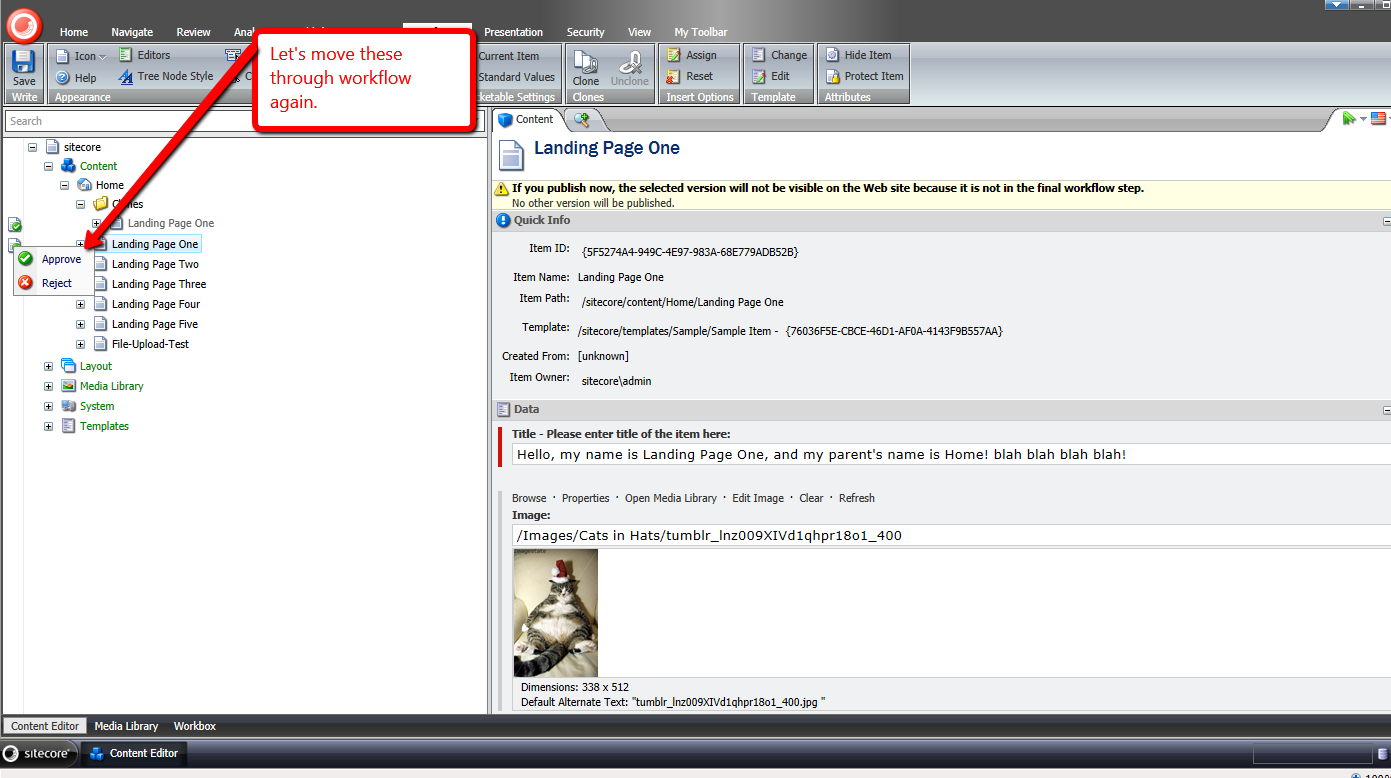
As you can see, both are approved:

If you have any thoughts or comments on this, or know of ways to improve the code above, please drop a comment.
Also, keep in mind the paradigm above is not ideal when content authors are able to make content changes to clones which differ from their source Items. In that scenario, it would be best to let source and clone Items’ workflow be independent.
Accept All Notifications on Clones of an Item using a Custom Command in Sitecore
As I was walking along a beach near my apartment tonight, I thought “wouldn’t it be nifty to have a button in the Sitecore ribbon to accept all notifications on clones of an Item instead of having to accept these manually on each clone?”
I immediately returned home, and whipped up the following command class:
using System.Collections.Generic;
using System.Linq;

using Sitecore.Data.Clones;
using Sitecore.Data.Items;
using Sitecore.Diagnostics;
using Sitecore.Shell.Framework.Commands;

namespace Sitecore.Sandbox.Shell.Framework.Commands
{
    public class AcceptAllNotificationsOnClones : Command
    {
        public override CommandState QueryState(CommandContext context)
        {
            Assert.ArgumentNotNull(context, "context");
            IEnumerable<Item> clones = GetClonesWithNotifications(GetItem(context));
            if(!clones.Any())
            {
                return CommandState.Hidden;
            }

            return CommandState.Enabled;
        }

        public override void Execute(CommandContext context)
        {
            Assert.ArgumentNotNull(context, "context");
            Item item = GetItem(context);
            IEnumerable<Item> clones = GetClonesWithNotifications(item);
            if(!clones.Any())
            {
                return;
            }

            foreach (Item clone in clones)
            {
                AcceptAllNotifications(item.Database.NotificationProvider, clone);
            }
        }

        protected virtual Item GetItem(CommandContext context)
        {
            Assert.ArgumentNotNull(context, "context");
            return context.Items.FirstOrDefault();
        }

        protected virtual IEnumerable<Item> GetClonesWithNotifications(Item item)
        {
            Assert.ArgumentNotNull(item, "item");
            IEnumerable<Item> clones = item.GetClones();
            if(!clones.Any())
            {
                return new List<Item>();
            }

            IEnumerable<Item> clonesWithNotifications = GetClonesWithNotifications(item.Database.NotificationProvider, clones);
            if(!clonesWithNotifications.Any())
            {
                return new List<Item>();
            }

            return clonesWithNotifications;
        }

        protected virtual IEnumerable<Item> GetClonesWithNotifications(NotificationProvider notificationProvider, IEnumerable<Item> clones)
        {
            Assert.ArgumentNotNull(notificationProvider, "notificationProvider");
            Assert.ArgumentNotNull(clones, "clones");
            return (from clone in clones
                    let notifications = notificationProvider.GetNotifications(clone)
                    where notifications.Any()
                    select clone).ToList();
        }

        protected virtual void AcceptAllNotifications(NotificationProvider notificationProvider, Item clone)
        {
            Assert.ArgumentNotNull(notificationProvider, "notificationProvider");
            Assert.ArgumentNotNull(clone, "clone");
            foreach (Notification notification in notificationProvider.GetNotifications(clone))
            {
                notification.Accept(clone);
            }
        }
    }
}
The code in the command above ensures the command is only visible when the selected Item in the Sitecore content tree has clones, and those clones have notifications — this visibility logic is contained in the QueryState() method.
When the command is invoked — this happens through the Execute() method — all clones with notifications of the selected Item are retrieved, and iterated over — each are passed to the AcceptAllNotifications() method which contains logic to accept all notifications on them via the Accept() method on a NotificationProvider instance: this NotificationProvider instance comes from the source Item’s Database property.
I then registered the above command class in Sitecore using the following configuration file:
<?xml version="1.0" encoding="utf-8" ?>
<configuration xmlns:patch="http://www.sitecore.net/xmlconfig/">
  <sitecore>
    <commands>
      <command name="item:AcceptAllNotificationsOnClones" type="Sitecore.Sandbox.Shell.Framework.Commands.AcceptAllNotificationsOnClones, Sitecore.Sandbox"/>
    </commands>
  </sitecore>
</configuration>
We need a way to invoke this command. I created a new button to go into the ‘Item Clones’ chunk in the ribbon:

Let’s take this for a test drive!
I first created some clones:

I then changed a field value on one of those clones:

On the clone’s source Item, I changed the same field’s value with something completely different, and added a new child item — the new button appeared after saving the Item:

Now, the clone has notifications on it:

I went back to the source Item, clicked the ‘Accept Notifications On Clones’ button in the ribbon, and navigated back to the clone:

As you can see, the notifications were accepted.
If you have any thoughts on this, please share in a comment.
 SitecoreJunkie.com