Home » Utilities (Page 3)
Category Archives: Utilities
Get a Handle on UrlHandle
Over the past year or so, I’ve been having random blobs of information bubbling up into my consciousness and grabbing my attention — please don’t worry, these are pretty geeky things, mostly things I’ve encountered within Sitecore.Kernel.dll using .NET Reflector, or things I’ve discussed with other Sitecore developers. These random tidbits usually commandeer my attention during mundane events — examples include vegging out in front of TV, taking a shower, or during my long walks. I don’t mind when this happens since it has the benefit of keeping my mind engaged in something interesting, and perhaps constructive.
The UrlHandle class — a utility class found within the Sitecore.Web namespace in Sitecore.Kernel.dll — is probably the one thing that grabs my attention the most. This class usurps my attention at least once a day — more often multiple times a day — and does so usually in the context of a question that I will ask you at the end of this post. There is no doubt in my mind you’ll have a good answer to my question.
I remember hearing about the UrlHandle class for the first time at Dreamcore 2010 North America during a talk given by Lars Fløe Nielsen. Nielsen, co-founder and Senior VP of Technical Marketing at Sitecore, sold me on using this class around its core function of transferring a huge set of query string data between two pages without being confined to browser imposed limits.
The UrlHandle class is used within the content editor. An example of its usage can be seen within code for the TreelistEx field. The TreelistEx field passes information to its dialog window via the UrlHandle class.

Below, I created two sublayouts for the purpose of showing you how the UrlHandle class works, and how you may use it in your own solutions.
Sublayout on the originating page:
<%@ Control Language="C#" AutoEventWireup="true" CodeBehind="UrlHandle Origin.ascx.cs" Inherits="Sitecore650rev120706.layouts.sublayouts.UrlHandle_Origin" %>

<h2>Querystring:</h2>
<asp:Literal ID="litQueryStringForGettingAHandle" runat="server" /><br /><br />
<asp:Button ID="btnGotoDestinationPage" OnClick="btnGotoDestinationPage_Click" Text="Goto Destination Page" runat="server" />
using System;
using System.Collections.Generic;
using System.Linq;
using System.Text;
using System.Web;
using System.Web.UI;
using System.Web.UI.WebControls;

using Sitecore.Text;
using Sitecore.Web;

namespace Sitecore650rev120706.layouts.sublayouts
{
    public partial class UrlHandle_Origin : System.Web.UI.UserControl
    {
        protected void Page_Load(object sender, EventArgs e)
        {
            if (!IsPostBack)
            {
                SetQueryStringLiteral();
            }
        }

        protected void btnGotoDestinationPage_Click(object sender, EventArgs e)
        {
            AddToUrlHandleAndRedirect();
        }

        private string GetBigQueryString()
        {
            const char startLetter = 'a';
            const string queryStringParamFormat = "{0}={1}";
            Random random = new Random();

            IList<string> stringBuffer = new List<string>();

            for (int i = 0; i < 26; i++)
            {
                int ascii = i + (int)startLetter;
                char letter = (char)ascii;
                string queryStringParam = string.Format(queryStringParamFormat, letter.ToString(), random.Next(1000000000));
                stringBuffer.Add(queryStringParam);
            }

            string queryString = string.Join("&", stringBuffer);
            return string.Concat("?", queryString);
        }

        private void SetQueryStringLiteral()
        {
            litQueryStringForGettingAHandle.Text = GetBigQueryString();
        }

        private void AddToUrlHandleAndRedirect()
        {
            UrlHandle urlHandle = new UrlHandle();
            urlHandle["My Big Query String"] = litQueryStringForGettingAHandle.Text;

            UrlString urlString = new UrlString("/urlhandle-destination.aspx");
            urlHandle.Add(urlString);

            Response.Redirect(urlString.ToString());
        }
    }
}
The originating page’s sublayout above generates a querystring using all letters in the English alphabet coupled with random integers. These are placed within an instance of the UrlHandle class, with a key of the destination page’s url via the UrlString class.
If you are unfamiliar with the UrlString class, Jimmi Lyhne Andersen wrote a good blog post on using the UrlString class. I recommend that you check it out.
Output of the originating page:

Sublayout on the destination page:
<%@ Control Language="C#" AutoEventWireup="true" CodeBehind="UrlHandle Destination.ascx.cs" Inherits="Sitecore650rev120706.layouts.sublayouts.UrlHandle_Destination" %>

<h2>Querystring in UrlHandle:</h2>
<asp:Literal ID="litQueryStringFromHandle" runat="server" />
using System;
using System.Collections.Generic;
using System.Linq;
using System.Web;
using System.Web.UI;
using System.Web.UI.WebControls;

using Sitecore.Web;

namespace Sitecore650rev120706.layouts.sublayouts
{
    public partial class UrlHandle_Destination : System.Web.UI.UserControl
    {
        private UrlHandle _UrlHandle;
        private UrlHandle UrlHandle
        {
            get
            {
                if (_UrlHandle == null)
                    _UrlHandle = UrlHandle.Get();

                return _UrlHandle;
            }
        }

        protected void Page_Load(object sender, EventArgs e)
        {
            SetLiterals();
        }

        private void SetLiterals()
        {
            litQueryStringFromHandle.Text = UrlHandle["My Big Query String"];
        }
    }
}
In the code-behind of the destination page’s sublayout, we use the parameterless static Get() method on the UrlHandle class to get a UrlHandle instance associated with the current url, and it uses “hdl” as the default handle name. Please be aware that an exception will be thrown if a url passed to this method is not associated with a UrlHandle object — or the current url if we are using the parameterless method. The Get method has overloads for passing in different parameters — one being a UrlString instance, and another being the name of the handle key. You have the ability to override the default handle name of “hdl” if you desire.
The handle value itself is a ShortID as the following screenshot highlights. Basically, this ShortID conjoined with the url of the destination page serve a unique key into the UrlHandle object for retrieving saved information.
Output of the destination page:

Once you pull information out of the UrlHandle class, it is removed from the UrlHandle’s repository of saved information. There is a way to override this default behavior in the object’s Get method by passing a boolean parameter.
So, you may be asking yourself how this class works behind the scenes. Well, it’s quite simple, and even I was surprised to learn how it really worked once I took a peek:
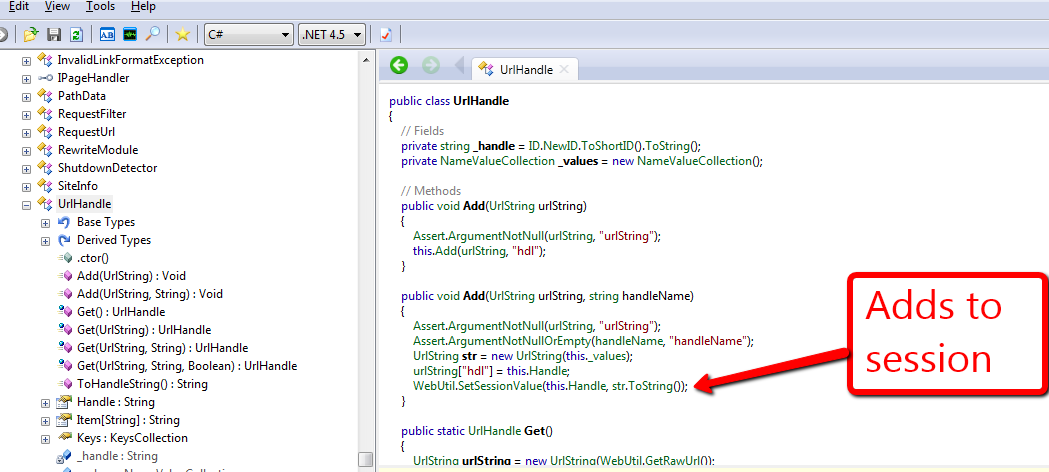

I thought there was some kind of magic happening under the hood but had a reality check after seeing how it really work — this ultimately reminded me of the KISS principle.
Everyday, I ponder and vacillate on whether it would be a good idea to create another class similar to the UrlHandle that would persist across sessions. At this point, I am convinced there is no utility in building such a class. What would be your argument for or against building such a class?
Kicking It Into Overdrive With NVelocity
A few weeks ago, I was tasked with improving one of our Healthcare Specific Website Modules, and felt compelled to share how I used NVelocity to replace tokens set in a Rich Text field — $name and $date are examples of Sitecore tokens. But, before I dive into some code, I will briefly touch upon what NVelocity is.
What exactly is NVelocity? NVelocity is a .NET template engine for replacing string tokens with code references. In other words, NVelocity is a framework that will replace tokens with values returned from code snippets given to the template engine.
There a many examples of using NVelocity in Sitecore across the web. Sitecore provides one such example in this article. This article — although a bit dated since it was written for Sitecore v5.1 — provides code examples that could still be used today.
Alistair Deneys also wrote a good article about NVelocity here. Deneys posits Sitecore no longer uses NVelocity for token replacement. However, three years after Deneys’ penned his article, code within Sitecore.Kernel still references it. Here is an example of it being used within Sitecore.Kernel (v6.5.0 rev. 111123):
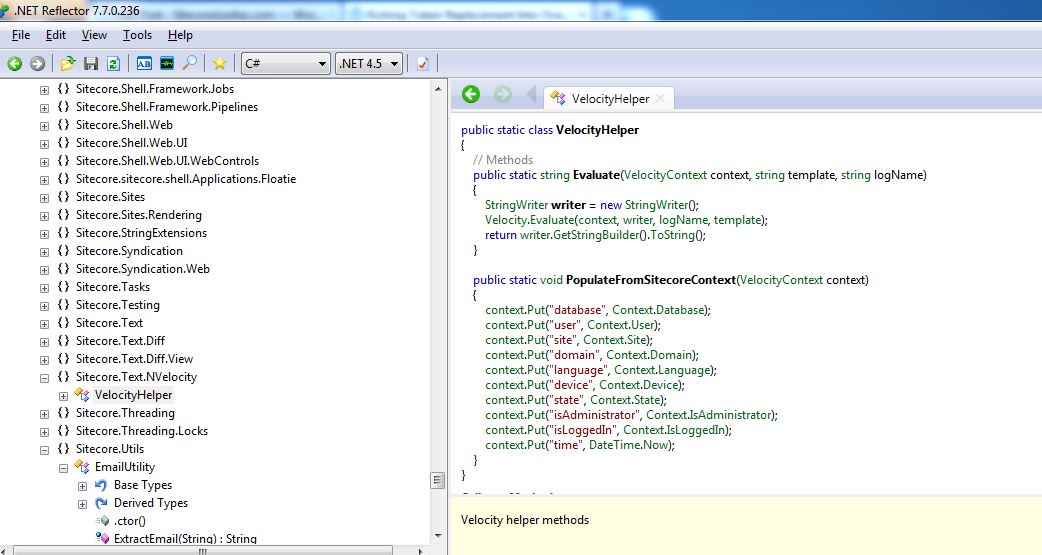
Sitecore has created its own API around NVelocity. Sitecore’s wrapper API is defined within Sitecore.NVelocity.dll. In order to use the following code, you must reference this assembly.
Now, let’s get our hands dirty with some code.
First, I created an adapter to encapsulate Sitecore’s static Velocity engine object for doing token replacements.
using System;
using System.Collections.Generic;
using System.IO;
using System.Linq;
using System.Text;

using NVelocity.Context;

namespace Sitecore.Sandbox.Utilities.StringUtilities.Base
{
    public interface ITokenContextEvaluator
    {
        bool Evaluate(IContext context, TextWriter writer, string logTag, Stream instream);

        bool Evaluate(IContext context, TextWriter out_Renamed, string logTag, string instring);

        bool Evaluate(IContext context, TextWriter writer, string logTag, TextReader reader);
    }
}
using System;
using System.Collections.Generic;
using System.IO;
using System.Linq;
using System.Text;

using NVelocity.App;
using NVelocity.Context;

using Sitecore.Sandbox.Utilities.StringUtilities.Base;

namespace Sitecore.Sandbox.Utilities.StringUtilities
{
    public class TokenContextEvaluator : ITokenContextEvaluator
    {
        private TokenContextEvaluator()
        {
            Initailize();
        }

        private void Initailize()
        {
            Velocity.Init();
        }

        public bool Evaluate(IContext context, TextWriter writer, string logTag, Stream instream)
        {
            return Velocity.Evaluate(context, writer, logTag, instream);
        }

        public bool Evaluate(IContext context, TextWriter out_Renamed, string logTag, string instring)
        {
            return Velocity.Evaluate(context, out_Renamed, logTag, instring);
        }

        public bool Evaluate(IContext context, TextWriter writer, string logTag, TextReader reader)
        {
            return Velocity.Evaluate(context, writer, logTag, reader);
        }

        public static ITokenContextEvaluator CreateNewTokenContextEvaluator()
        {
            return new TokenContextEvaluator();
        }
    }
}
Next, I created a class that defines an one-to-one mapping between a string token and an object reference — the value of the code given to the template engine.
using System;
using System.Collections.Generic;
using System.Linq;
using System.Text;

using Sitecore.Diagnostics;

namespace Sitecore.Sandbox.Utilities.StringUtilities.DTO
{
    public class TokenKeyValue
    {
        public string Key { get; private set; }
        public object Value { get; private set; }

        public TokenKeyValue(string key, object value)
        {
            SetKey(key);
            SetValue(value);
        }

        private void SetKey(string key)
        {
            Assert.ArgumentNotNullOrEmpty(key, "key");
            Key = key;
        }

        private void SetValue(object value)
        {
            Value = value;
        }
    }
}
Then I created a Data transfer object to pass an instance of the adapter defined above, a collection of token mappings and an instance of NVelocity’s IContext to the main Tokenator class below — all this being done this way to allow for dependency injection.
using System;
using System.Collections.Generic;
using System.Linq;
using System.Text;

using NVelocity.Context;

using Sitecore.Sandbox.Utilities.StringUtilities.Base;

namespace Sitecore.Sandbox.Utilities.StringUtilities.DTO
{
    public class TokenatorSettings
    {
        public ITokenContextEvaluator TokenContextEvaluator { get; set; }

        public IContext TokenContext { get; set; }

        public IEnumerable<TokenKeyValue> TokenKeyValues { get; set; }

        public TokenatorSettings()
        {
        }
    }
}
With all the pieces above floating around, it’s now time to glue them all together in the main Tokenator class:
using System;
using System.Collections.Generic;
using System.Linq;
using System.Text;

namespace Sitecore.Sandbox.Utilities.StringUtilities.Base
{
    public interface ITokenator
    {
        string ReplaceTokens(string value);
    }
}
using System;
using System.Collections.Generic;
using System.IO;
using System.Linq;
using System.Text;

using Sitecore.Diagnostics;
using Sitecore.Text.NVelocity;

using NVelocity;
using NVelocity.App;
using NVelocity.Context;

using Sitecore.Sandbox.Utilities.StringUtilities.Base;
using Sitecore.Sandbox.Utilities.StringUtilities.DTO;

namespace Sitecore.Sandbox.Utilities.StringUtilities
{
    public class Tokenator : ITokenator
    {
        private const string LogName = "Tokenator Replacement Action";

        private TokenatorSettings TokenatorSettings { get; set; }

        private Tokenator(IEnumerable<TokenKeyValue> tokenKeyValues)
            : this(CreateNewTokenatorSettingsWithDefaults(tokenKeyValues))
        {
        }

        private Tokenator(TokenatorSettings tokenatorSettings)
        {
            SetTokenatorSettings(tokenatorSettings);
            Initialize();
        }

        private void SetTokenatorSettings(TokenatorSettings tokenatorSettings)
        {
            AssertTokenatorSettings(tokenatorSettings);
            TokenatorSettings = tokenatorSettings;
        }

        private void AssertTokenatorSettings(TokenatorSettings tokenatorSettings)
        {
            Assert.ArgumentNotNull(tokenatorSettings, "tokenatorSettings");
            Assert.ArgumentNotNull(tokenatorSettings.TokenContextEvaluator, "tokenatorSettings.TokenContextEvaluator");
            Assert.ArgumentNotNull(tokenatorSettings.TokenContext, "tokenatorSettings.TokenContext");
            Assert.ArgumentNotNull(tokenatorSettings.TokenKeyValues, "tokenatorSettings.TokenKeyValues");
        }

        private void Initialize()
        {
            foreach (TokenKeyValue tokenKeyValue in TokenatorSettings.TokenKeyValues)
            {
                TokenatorSettings.TokenContext.Put(tokenKeyValue.Key, tokenKeyValue.Value);
            }
        }

        public string ReplaceTokens(string value)
        {
            string tokensReplaced = string.Empty;

            using (StringWriter stringWriter = new StringWriter())
            {
                TokenatorSettings.TokenContextEvaluator.Evaluate(TokenatorSettings.TokenContext, stringWriter, LogName, value);
                tokensReplaced = stringWriter.ToString();
            }

            return tokensReplaced;
        }

        private void LogError(Exception exception)
        {
            Log.Error(this.ToString(), exception, this);
        }

        private static TokenatorSettings CreateNewTokenatorSettingsWithDefaults(IEnumerable<TokenKeyValue> tokenKeyValues)
        {
            return new TokenatorSettings
            {
                TokenContextEvaluator = GetDefaultTokenContextEvaluator(),
                TokenContext = GetDefaultTokenContext(),
                TokenKeyValues = tokenKeyValues
            };
        }

        private static ITokenContextEvaluator GetDefaultTokenContextEvaluator()
        {
            return StringUtilities.TokenContextEvaluator.CreateNewTokenContextEvaluator();
        }

        private static IContext GetDefaultTokenContext()
        {
            return new VelocityContext();
        }

        public static ITokenator CreateNewTokenator(IEnumerable<TokenKeyValue> tokenKeyValues)
        {
            return new Tokenator(tokenKeyValues);
        }

        public static ITokenator CreateNewTokenator(TokenatorSettings tokenatorSettings)
        {
            return new Tokenator(tokenatorSettings);
        }
    }
}
The following sublayout code was used as a test harness for my Tokenator object, and to illustrate how client code would use it.
<%@ Control Language="C#" AutoEventWireup="true" CodeBehind="Tokenator Test.ascx.cs" Inherits="Sitecore650rev120706.layouts.sublayouts.Tokenator_Test" %>
<asp:Literal ID="litTokenatorTest" runat="server" />
using System;
using System.Collections.Generic;
using System.Linq;
using System.Web;
using System.Web.UI;
using System.Web.UI.WebControls;

using Sitecore.Sandbox.Utilities.StringUtilities;
using Sitecore.Sandbox.Utilities.StringUtilities.Base;
using Sitecore.Sandbox.Utilities.StringUtilities.DTO;

namespace Sitecore650rev120706.layouts.sublayouts
{
    public partial class Tokenator_Test : System.Web.UI.UserControl
    {
        protected void Page_Load(object sender, EventArgs e)
        {
            SetLiteralText();
        }

        private void SetLiteralText()
        {
            litTokenatorTest.Text = GetTokenReplacedContent();
        }

        private string GetTokenReplacedContent()
        {
            string content = Sitecore.Context.Item["Text"];
            return ReplaceTokens(content);
        }

        private string ReplaceTokens(string content)
        {
            IEnumerable<TokenKeyValue> tokenKeyValues = GetTokenKeyValues();
            ITokenator tokenator = Tokenator.CreateNewTokenator(tokenKeyValues);
            return tokenator.ReplaceTokens(content);
        }

        private IEnumerable<TokenKeyValue> GetTokenKeyValues()
        {
            IList<TokenKeyValue> tokenKeyValues = new List<TokenKeyValue>();
            tokenKeyValues.Add(new TokenKeyValue("localtime", DateTime.Now));
            tokenKeyValues.Add(new TokenKeyValue("developer", "@mike_i_reynolds"));
            tokenKeyValues.Add(new TokenKeyValue("random", new Random().Next(10000)));
            return tokenKeyValues;
        }
    }
}
Token content in a Rich Text field:

Test output:

NVelocity is definitely a great tool to tap into and harness — especially to make content more dynamic.
However, if there is one takeaway I would like for you the reader to part with, it would be this: stay relentlessly curious, and keep on digging through the treasure troves in Sitecore’s assemblies. This article would not have been possible if I did not have a copy of .NET Reflector, Sitecore.Kernel.dll, Sitecore.NVelocity.dll and an unquenchable thirst for learning.
Happy coding!
 SitecoreJunkie.com