Home » Data (Page 3)
Category Archives: Data
Use the Factory Method Pattern for Object Creation in Sitecore
This post is a continuation of a series of posts I’m putting together around using design patterns in Sitecore, and will show a “proof of concept” around using the Factory Method pattern — a creational pattern whereby client code obtain instances of objects without knowing the concrete class types of these objects. This pattern promotes loose coupling between objects being created and the client code that use them.
In this “proof of concept”, I am using an Item Validator to call a factory method to obtain a “fields comparer” object to ascertain whether one field contains a value greater than a value in another field, and will show this for two different field types in Sitecore.
I first defined an interface for objects that will compare values in two Sitecore fields:
using Sitecore.Data.Fields;

namespace Sitecore.Sandbox.Data.Validators.ItemValidators.FieldComparers
{
    public interface IFieldsComparer
    {
        bool IsFieldOneLessThanOrEqualToFieldTwo(Field fieldOne, Field fieldTwo);
    }
}
Instances of classes that implement the IFieldsComparer interface above will ascertain whether the value in fieldOne is less than or equal to the value in fieldTwo.
I then defined a class that implements the IFieldsComparer interface to compare integer values in two fields:
using System;

using Sitecore.Data.Fields;
using Sitecore.Diagnostics;

namespace Sitecore.Sandbox.Data.Validators.ItemValidators.FieldComparers
{
    public class IntegerFieldsComparer : IFieldsComparer
    {
        public bool IsFieldOneLessThanOrEqualToFieldTwo(Field fieldOne, Field fieldTwo)
        {
            Assert.ArgumentNotNull(fieldOne, "fieldOne");
            Assert.ArgumentNotNull(fieldTwo, "fieldTwo");
            return ParseInteger(fieldOne) <= ParseInteger(fieldTwo);
        }

        protected virtual int ParseInteger(Field field)
        {
            int fieldValue;
            int.TryParse(field.Value, out fieldValue);
            return fieldValue;
        }
    }
}
There isn’t much to see in the class above. The class parses the integer values in each field, and checks to see if the value in fieldOne is less than or equal to the value in fieldTwo.
Now, let’s create a another class — one that compares DateTime values in two different fields:
using System;

using Sitecore.Data.Fields;
using Sitecore.Diagnostics;

namespace Sitecore.Sandbox.Data.Validators.ItemValidators.FieldComparers
{
    public class DateFieldsComparer : IFieldsComparer
    {
        public bool IsFieldOneLessThanOrEqualToFieldTwo(Field fieldOne, Field fieldTwo)
        {
            Assert.ArgumentNotNull(fieldOne, "fieldOne");
            Assert.ArgumentNotNull(fieldTwo, "fieldTwo");
            return ParseDateTime(fieldOne) <= ParseDateTime(fieldTwo);
        }

        protected virtual DateTime ParseDateTime(Field field)
        {
            return DateUtil.IsoDateToDateTime(field.Value);
        }
    }
}
Similarly to the IFieldsComparer class for integers, the class above parses the field values into DateTime instances, and ascertains whether the DateTime value in fieldOne occurs before or at the same time as the DateTime value in fieldTwo.
You might now be asking “Mike, what about other field types?” Well, I could have defined more IFieldsComparer classes for other fields but this post would go on and on, and we both don’t want that 😉 So, to account for other field types, I’ve defined the following Null Object for fields that are not accounted for:
using Sitecore.Data.Fields;

namespace Sitecore.Sandbox.Data.Validators.ItemValidators.FieldComparers
{
    public class NullFieldsComparer : IFieldsComparer
    {
        public bool IsFieldOneLessThanOrEqualToFieldTwo(Field fieldOne, Field fieldTwo)
        {
            return true;
        }
    }
}
The Null Object class above just returns true without performing any comparison.
Now that we have “fields comparers”, we need a Factory method. I’ve defined the following interface for objects that will create instances of our IFieldsComparer:
using Sitecore.Data.Fields;

namespace Sitecore.Sandbox.Data.Validators.ItemValidators.FieldComparers
{
    public interface IFieldsComparerFactory
    {
        IFieldsComparer GetFieldsComparer(Field fieldOne, Field fieldTwo);
    }
}
Instances of classes that implement the interface above will return the appropriate IFieldsComparer for comparing the two passed fields.
The following class implements the IFieldsComparerFactory interface above:
using System;
using System.Collections.Generic;
using System.Xml;

using Sitecore.Configuration;
using Sitecore.Data.Fields;
using Sitecore.Diagnostics;

namespace Sitecore.Sandbox.Data.Validators.ItemValidators.FieldComparers
{
    public class FieldsComparerFactory : IFieldsComparerFactory
    {
        private static volatile IFieldsComparerFactory current;
        private static object locker = new Object();

        public static IFieldsComparerFactory Current
        {
            get
            {
                if (current == null)
                {
                    lock (locker)
                    {
                        if (current == null)
                        {
                            current = CreateNewFieldsComparerFactory();
                        }
                    }
                }

                return current;
            }
        }

        private static IDictionary<string, XmlNode> FieldsComparersTypes { get; set; }

        private IFieldsComparer NullFieldsComparer { get; set; }

        static FieldsComparerFactory()
        {
            FieldsComparersTypes = new Dictionary<string, XmlNode>();
        }

        public IFieldsComparer GetFieldsComparer(Field fieldOne, Field fieldTwo)
        {
            Assert.IsNotNull(NullFieldsComparer, "NullFieldsComparer must be set in configuration!");
            if (!AreEqualIgnoreCase(fieldOne.Type, fieldTwo.Type) || !FieldsComparersTypes.ContainsKey(fieldOne.Type))
            {
                return NullFieldsComparer;
            }

            XmlNode configNode = FieldsComparersTypes[fieldOne.Type];
            if(configNode == null)
            {
                return NullFieldsComparer;
            }

            IFieldsComparer comparer = Factory.CreateObject(configNode, false) as IFieldsComparer;
            if (comparer == null)
            {
                return NullFieldsComparer;
            }

            return comparer;
        }

        private static bool AreEqualIgnoreCase(string stringOne, string stringTwo)
        {
            return string.Equals(stringOne, stringTwo, StringComparison.CurrentCultureIgnoreCase);
        }

        protected virtual void AddFieldsComparerConfigNode(XmlNode configNode)
        {
            if(configNode.Attributes["fieldType"] == null || string.IsNullOrWhiteSpace(configNode.Attributes["fieldType"].Value))
            {
                return;
            }

            if (configNode.Attributes["type"] == null || string.IsNullOrWhiteSpace(configNode.Attributes["type"].Value))
            {
                return;
            }

            FieldsComparersTypes[configNode.Attributes["fieldType"].Value] = configNode;
        }

        private static IFieldsComparerFactory CreateNewFieldsComparerFactory()
        {
            return Factory.CreateObject("factories/fieldsComparerFactory", true) as IFieldsComparerFactory;
        }
    }
}
The AddFieldsComparerConfigNode() method above is used by the Sitecore Configuration Factory to add configuration-defined Xml nodes that define field types and their IFieldsComparer — these are placed into the FieldsComparersTypes dictionary for later look-up and instantiation.
The GetFieldsComparer() factory method tries to figure out which IFieldsComparer to return from the FieldsComparersTypes dictionary. If an appropriate IFieldsComparer is found for the two fields, the method uses Sitecore.Configuration.Factory.CreateObject() — this is defined in Sitecore.Kernel.dll — to create the instance that is defined in the type attribute of the XmlNode that is stored in the FieldsComparersTypes dictionary.
If an appropriate IFieldsComparer cannot be determined for the passed fields, then the Null Object IFieldsComparer — this is injected into the NullFieldsComparer property via the Sitecore Configuration Factory — is returned.
As a quick and dirty solution for retrieving an instance of the class above, I’ve used the Singleton pattern. An instance of the class above is created by the Sitecore Configuration Factory via the CreateNewFieldsComparerFactory() method, and is placed into the Current property.
I then defined all of the above in the following Sitecore patch configuration file:
<?xml version="1.0" encoding="utf-8" ?>
<configuration xmlns:patch="http://www.sitecore.net/xmlconfig/">
  <sitecore>
    <factories>
      <fieldsComparerFactory type="Sitecore.Sandbox.Data.Validators.ItemValidators.FieldComparers.FieldsComparerFactory, Sitecore.Sandbox">
        <NullFieldsComparer type="Sitecore.Sandbox.Data.Validators.ItemValidators.FieldComparers.NullFieldsComparer, Sitecore.Sandbox" />
        <fieldComparers hint="raw:AddFieldsComparerConfigNode">
          <fieldComparer fieldType="Datetime" type="Sitecore.Sandbox.Data.Validators.ItemValidators.FieldComparers.DateFieldsComparer, Sitecore.Sandbox" />
          <fieldComparer fieldType="Integer" type="Sitecore.Sandbox.Data.Validators.ItemValidators.FieldComparers.IntegerFieldsComparer, Sitecore.Sandbox" />
        </fieldComparers>
      </fieldsComparerFactory>
    </factories>
  </sitecore>
</configuration>
Now that we have our factory in place, we need an Item Validator to use it:
using System.Runtime.Serialization;

using Sitecore.Data.Fields;
using Sitecore.Data.Items;
using Sitecore.Data.Validators;

using Sitecore.Sandbox.Data.Validators.ItemValidators.FieldComparers;

namespace Sitecore.Sandbox.Data.Validators.ItemValidators
{
    public class FieldOneValueLessThanOrEqualToFieldTwoValueValidator : StandardValidator
    {
        public override string Name
        {
            get
            {
                return Parameters["Name"];
            }
        }

        private string fieldOneName;
        private string FieldOneName
        {
            get
            {
                if (string.IsNullOrWhiteSpace(fieldOneName))
                {
                    fieldOneName = Parameters["FieldOneName"];
                }

                return fieldOneName;
            }
        }

        private string fieldTwoName;
        private string FieldTwoName
        {
            get
            {
                if (string.IsNullOrWhiteSpace(fieldTwoName))
                {
                    fieldTwoName = Parameters["FieldTwoName"];
                }

                return fieldTwoName;
            }
        }

        public FieldOneValueLessThanOrEqualToFieldTwoValueValidator()
        {
        }

        public FieldOneValueLessThanOrEqualToFieldTwoValueValidator(SerializationInfo info, StreamingContext context)
            : base(info, context)
        {
        }

        protected override ValidatorResult Evaluate()
        {
            Item item = GetItem();
            if (IsValid(item))
            {
                return ValidatorResult.Valid;
            }

            Text = GetErrorMessage(item);
            return GetFailedResult(ValidatorResult.Warning);
        }

        private bool IsValid(Item item)
        {
            if (item == null || string.IsNullOrWhiteSpace(FieldOneName) || string.IsNullOrWhiteSpace(FieldTwoName))
            {
                return true;
            }

            Field fieldOne = item.Fields[FieldOneName];
            Field fieldTwo = item.Fields[FieldTwoName];
            if(fieldOne == null || fieldTwo == null)
            {
                return true;
            }

            return IsFieldOneLessThanOrEqualToFieldTwo(fieldOne, fieldTwo);
        }

        private bool IsFieldOneLessThanOrEqualToFieldTwo(Field fieldOne, Field fieldTwo)
        {
            IFieldsComparer fieldComparer = GetFieldsComparer(fieldOne, fieldTwo);
            return fieldComparer.IsFieldOneLessThanOrEqualToFieldTwo(fieldOne, fieldTwo);
        }

        protected virtual IFieldsComparer GetFieldsComparer(Field fieldOne, Field fieldTwo)
        {
            return FieldsComparerFactory.Current.GetFieldsComparer(fieldOne, fieldTwo);
        }

        protected virtual string GetErrorMessage(Item item)
        {
            string message = Parameters["ErrorMessage"];
            if (string.IsNullOrWhiteSpace(message))
            {
                return string.Empty;
            }

            message = message.Replace("$fieldOneName", FieldOneName);
            message = message.Replace("$fieldTwoName", FieldTwoName);

            return GetText(message, new[] { item.DisplayName });
        }

        protected override ValidatorResult GetMaxValidatorResult()
        {
            return base.GetFailedResult(ValidatorResult.Suggestion);
        }
    }
}
The real magic of the class above occurs in the IsValid(), IsFieldOneLessThanOrEqualToFieldTwo() and GetFieldsComparer() methods.
The IsValid() method gets the two fields being compared, and passes these along to the IsFieldOneLessThanOrEqualToFieldTwo() method.
The IsFieldOneLessThanOrEqualToFieldTwo() method passes the two fields to the GetFieldsComparer() — this returns the appropriate IFieldsComparer from the GetFieldsComparer() factory method on the FieldsComparerFactory Singleton — and uses the IFieldsComparer to ascertain whether the value in fieldOne is less than or equal to the value in fieldTwo.
If the value in fieldOne is less than or equal to the value in fieldTwo then the Item has passed validation. Otherwise, it has not, and an error message is passed back to the Sitecore client — we are replacing some tokens for fieldOne and fieldTwo in a format string to give the end user some information on the fields that are in question.
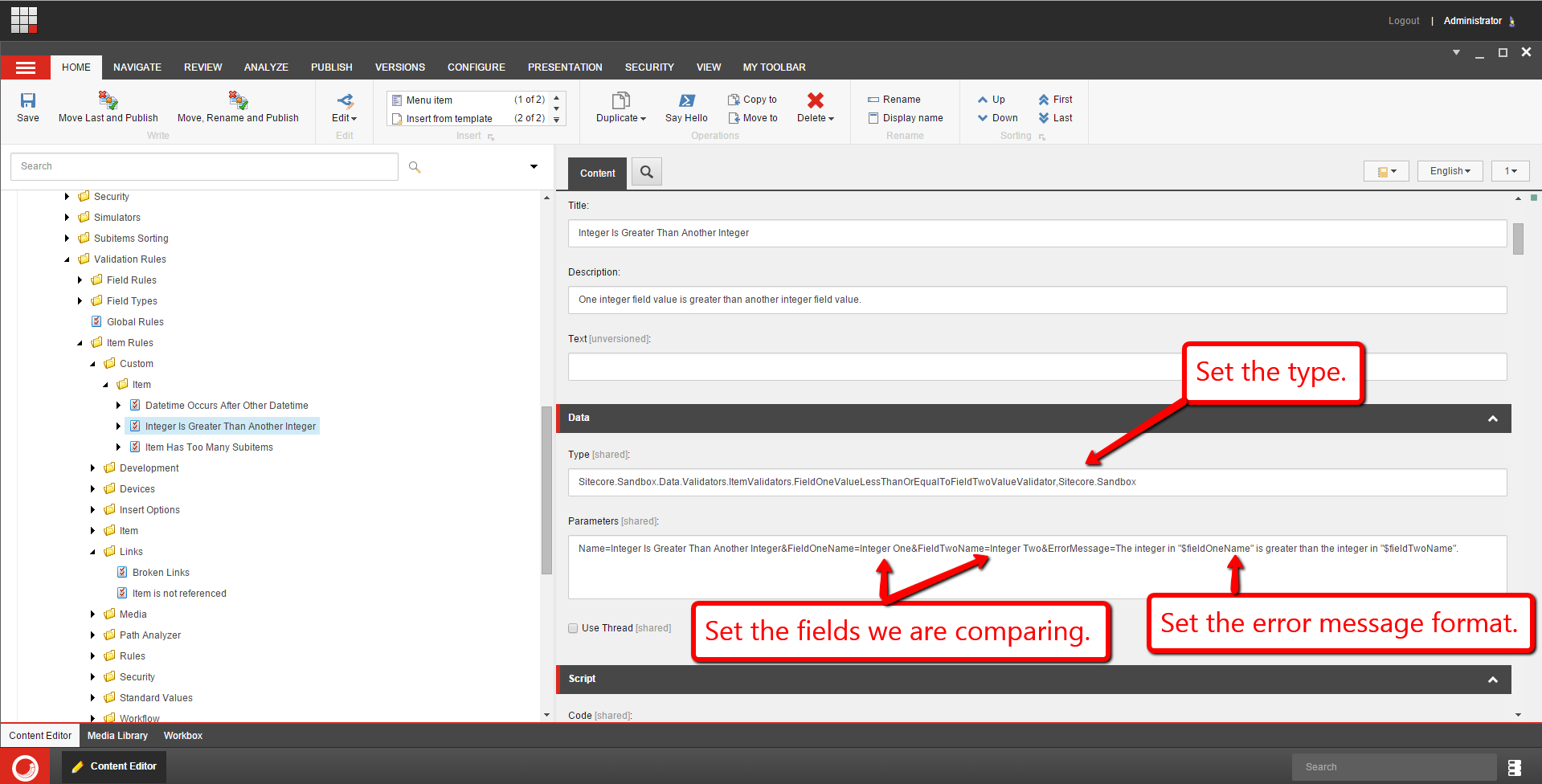
I then set up the Item Validator for Integer fields:
I also set up another Item Validator for Datetime fields:

Let’s take this for a spin!
I entered some integer values in the two integer fields being compared:

As you can see, we get a warning.
I then set some Datetime field values on the two Datetime fields being compared:

Since ‘Datetime One’ occurs in time after ‘Datetime Two’, we get a warning as expected.
If you have any thoughts on this, please share in a comment.
Expand Tokens on Items Using a Sitecore PowerShell Extensions Toolbox Script
Last Wednesday I had the opportunity of presenting Sitecore PowerShell Extensions (SPE) at the Milwaukee Sitecore Meetup. During this presentation, I demonstrated how quickly and easily one can add, execute and reuse PowerShell scripts in SPE, and I did this using version 3.0 of SPE on Sitecore XP 8.
During one segment of the presentation, I shared how one can seamlessly add scripts to the SPE Toolbox — a repository of utility scripts if you will — and used the following script when showing this:
<#
    .NAME
        Expand tokens in all content items

    .SYNOPSIS
        Expand tokens in all fields in all content items
    .NOTES
        Mike Reynolds
#>

$items = Get-ChildItem -Path "master:\sitecore\content" -Recurse
$items | ForEach-Object { $_.Fields.ReadAll() }
$items |  Expand-Token
Close-Window
The script above grabs all descendant Items under /sitecore/content/; iterates over them to ensure all field values are available — the ReadAll() method on the FieldCollection instance will ensure values from fields on the Item’s template’s Standard Values Item are pulled in for processing; and sends in these Items into the Expand-Token commandlet which comes “out of the box” with SPE.
The script also closes the processing dialog.
I then saved the above script into my Toolbox library in my SPE module:

Let’s try this out. Let’s find some Items with tokens in some fields. It looks like the Home Item has some:

Here’s another Item that also has tokens:

Let’s go to the SPE Toolbox, and click on our Toolbox utility:

As you can see the tokens were expanded on the Home Item:

Tokens were also expanded on the descendant Item:

If you have any thoughts and/or suggestions on this, or have ideas for other SPE Toolbox scripts, please drop a comment.
If you would like to watch the Milwaukee Sitecore Meetup presentation where I showed the above — you’ll also get to see some epic Sitecore PowerShell Extensions stuff from Adam Brauer, Senior Product Engineer at Active Commerce, in this presentation as well — have a look below:
If you would like to see another example of adding a script to the SPE Toolbox, please see my previous post on this subject.
Until next time, have a scriptaculous day!
Add Additional Item Fields to RSS Feeds Generated by Sitecore
Earlier today a colleague had asked me how to add additional Item fields into RSS feeds generated by Sitecore.
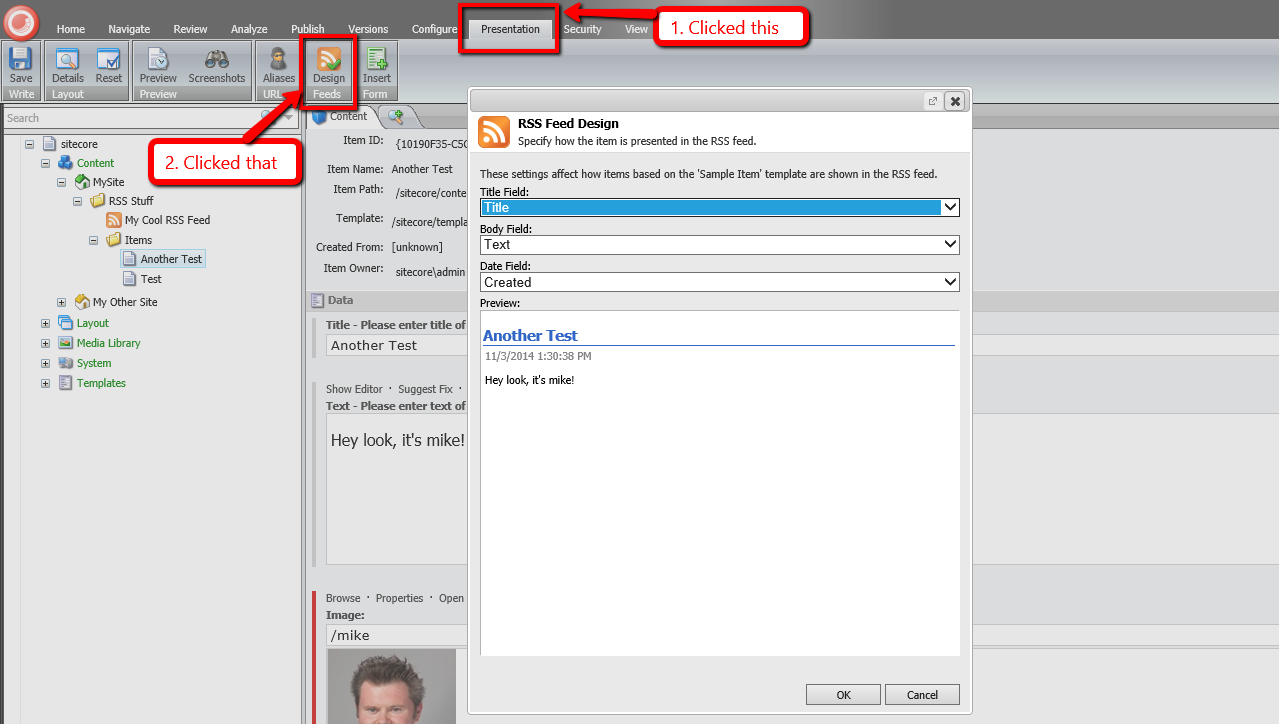
I could have sworn there was an easy way to do this, but when looking at the RSS Feed Design dialog in Sitecore, it appears you are limited to three fields on your Items “out of the box”:
After a lot of digging in Sitecore.Kernel.dll, I discovered that one can inject a subclass of Sitecore.Syndication.PublicFeed to override/augment RSS feed functionality:

As a proof-of-concept, I whipped up the following subclass of Sitecore.Syndication.PublicFeed:
using System.ServiceModel.Syndication; // Note: you must reference System.ServiceModel.dll to use this!

using Sitecore.Diagnostics;
using Sitecore.Configuration;
using Sitecore.Data.Items;
using Sitecore.Pipelines;
using Sitecore.Pipelines.RenderField;
using Sitecore.Syndication;

namespace Sitecore.Sandbox.Syndication
{
    public class ImageInContentPublicFeed : PublicFeed
    {
        private static string ImageFieldName { get; set; }

        private static string RenderFieldPipelineName { get; set; }

        static ImageInContentPublicFeed()
        {
            ImageFieldName = Settings.GetSetting("RSS.Fields.ImageFieldName");
            RenderFieldPipelineName = Settings.GetSetting("Pipelines.RenderField");
        }

        protected override SyndicationItem RenderItem(Item item)
        {
            SyndicationItem syndicationItem = base.RenderItem(item);
            AddImageHtmlToContent(syndicationItem, GetImageFieldHtml(item));
            return syndicationItem;
        }

        protected virtual string GetImageFieldHtml(Item item)
        {
            if (string.IsNullOrWhiteSpace(ImageFieldName))
            {
                return string.Empty;
            }

            return GetImageFieldHtml(item, ImageFieldName);
        }

        private static string GetImageFieldHtml(Item item, string imageFieldName)
        {
            Assert.ArgumentNotNull(item, "item");
            Assert.ArgumentNotNullOrEmpty(imageFieldName, "imageFieldName");
            Assert.ArgumentNotNullOrEmpty(RenderFieldPipelineName, "RenderFieldPipelineName");
            if (item == null || item.Fields[imageFieldName] == null)
            {
                return string.Empty;
            }

            RenderFieldArgs args = new RenderFieldArgs { Item = item, FieldName = imageFieldName };
            CorePipeline.Run(RenderFieldPipelineName, args);
            if (args.Result.IsEmpty)
            {
                return string.Empty;
            }

            return args.Result.ToString();
        }

        protected virtual void AddImageHtmlToContent(SyndicationItem syndicationItem, string imageHtml)
        {
            if (string.IsNullOrWhiteSpace(imageHtml) || !(syndicationItem.Content is TextSyndicationContent))
            {
                return;
            }

            TextSyndicationContent content = syndicationItem.Content as TextSyndicationContent;
            syndicationItem.Content = new TextSyndicationContent(string.Concat(imageHtml, content.Text), TextSyndicationContentKind.Html);
        }
    }
}
The class above ultimately overrides the RenderItem(Item item) method defined on Sitecore.Syndication.PublicFeed — it is declared virtual. The RenderItem(Item item) method above delegates to the RenderItem(Item item) method of Sitecore.Syndication.PublicFeed; grabs the System.ServiceModel.Syndication.SyndicationContent instance set in the Content property of the returned SyndicationItem object — this happens to be an instance of System.ServiceModel.Syndication.TextSyndicationContent; delegates to the <renderField> pipeline to generate HTML for the image set in the Image Field on the item; creates a new System.ServiceModel.Syndication.TextSyndicationContent instance with the HTML of the image combined with the HTML from the original TextSyndicationContent instance; sets the Content property with this new System.ServiceModel.Syndication.TextSyndicationContent instance; and returns the SyndicationItem instance to the caller.
Since I hate hard-coding things, I put the Image Field’s name and <renderField> pipeline’s name in a patch configuration file:
<configuration xmlns:patch="http://www.sitecore.net/xmlconfig/">
  <sitecore>
    <settings>
      <setting name="RSS.Fields.ImageFieldName" value="Image" />
      <setting name="Pipelines.RenderField" value="renderField" />
    </settings>
  </sitecore>
</configuration>
I then mapped the above subclass of Sitecore.Syndication.PublicFeed to the RSS Feed Item I created:

For testing, I added two Items — one with an image and another without an image:


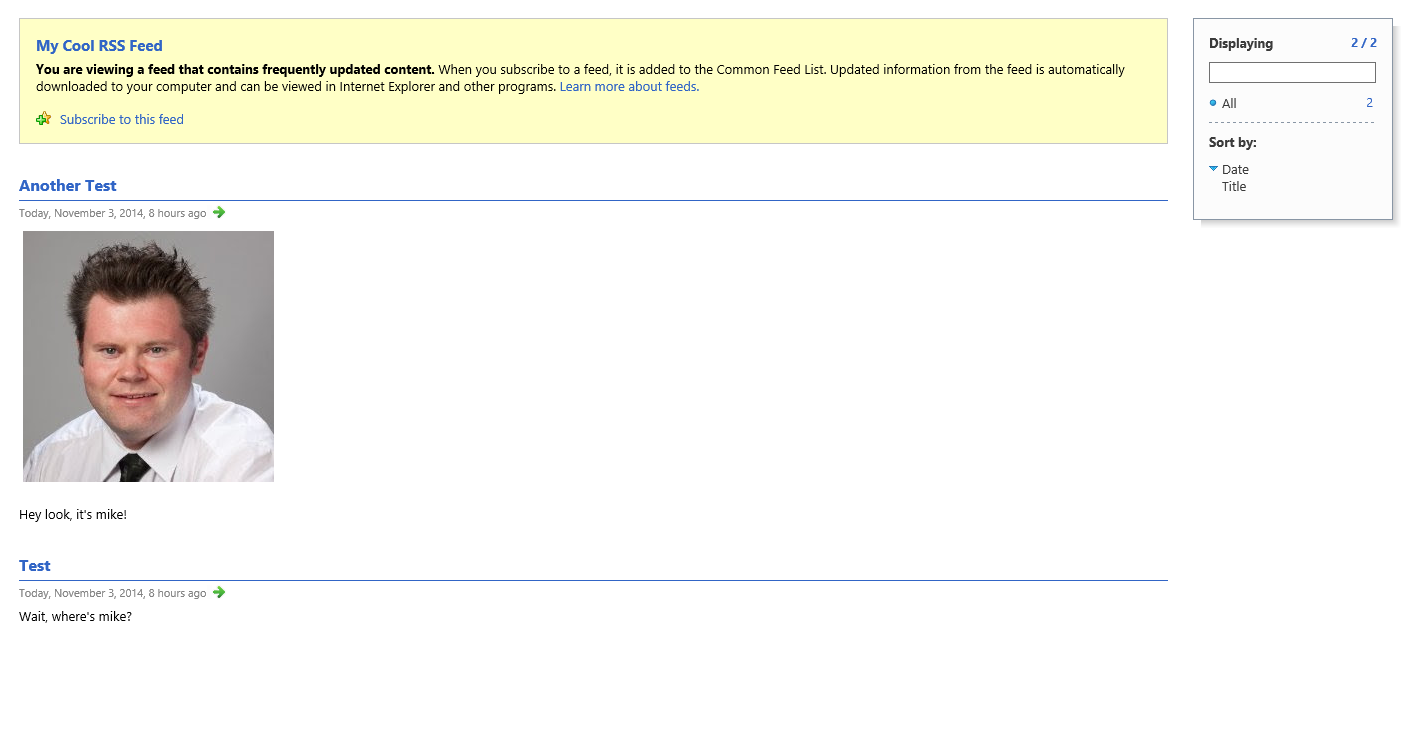
After publishing everything, I loaded the RSS feed in my browser and saw the following:
If you know of other ways to add additional Item fields into Sitecore RSS feeds, please share in a comment.
Add Scripts to the PowerShell Toolbox in Sitecore PowerShell Extensions
During our ‘Take charge of your Sitecore instance using Sitecore tools’ session at Sitecore Symposium 2014 Las Vegas, Sitecore MVP Sean Holmesby and I shared how easy it is to leverage/extend popular Sitecore development tools out there, and built up a fictitious Sitecore website where we pulled in #SitecoreSelfie Tweets.
The code that pulls in these Tweets is supposed to follow a naming convention where Tweet IDs are appended to Media Library Item names, as you can see here:

Sadly, right before our talk, I mistakenly 😉 made a code change which broke our naming convention for some images:

Upon further investigation, we had discovered our issue was much larger than anticipated: all Selfie Media Library Item names do not end with their Tweet IDs:

To fix this, I decided to create a PowerShell Toolbox script in Sitecore PowerShell Extensions using the following script:
<#
    .SYNOPSIS
        Rename selfie image items to include tweet ID where missing.

    .NOTES
        Mike Reynolds
#>
$items = Get-ChildItem -Path "master:\sitecore\content\Social-Media\Twitter\Tweets" -Recurse | Where-Object { $_.TemplateName -eq "Tweet" }

$changedItems = @()
foreach($item in $items) {
	$tweetID = $item["TweetID"]
	$selfieImageField = [Sitecore.Data.Fields.ImageField]$item.Fields["SelfieImage"]
	$selfieImage = $selfieImageField.MediaItem
	if($selfieImage -ne $null -and -not $selfieImage.Name.EndsWith($tweetID)) {
		$oldName = $selfieImage.Name
		$newName = $oldName + "_" + $tweetID
		$selfieImage.Editing.BeginEdit()
		$selfieImage.Name = $newName
		$selfieImage.Editing.EndEdit()

		$changedItem = New-Object PSObject -Property @{
		    Icon = $selfieImage.Appearance.Icon
			OldName = $oldName
			NewName = $newName
			Path = $selfieImage.Paths.Path
			Alt = $selfieImage["Alt"]
			Title = $selfieImage["Title"]
			Width = $selfieImage["Width"]
			Height = $selfieImage["Height"]
			MimeType = $selfieImage["Mime Type"]
			Size = $selfieImage["Size"]
		}

		$changedItems += $changedItem
	}
}

if($changedItems.Count -gt 0) {
    $changedItems |
        Show-ListView -Property @{Label="Icon"; Expression={$_.Icon} },
            @{Label="Old Name"; Expression={$_.OldName} },
    		@{Label="New Name"; Expression={$_.NewName} },
    		@{Label="Path"; Expression={$_.Path} },
            @{Label="Alt"; Expression={$_.Alt} },
    		@{Label="Title"; Expression={$_.Title} },
            @{Label="Width"; Expression={$_.Width} },
            @{Label="Height"; Expression={$_.Height} },
            @{Label="Mime Type"; Expression={$_.MimeType} },
    		@{Label="Size"; Expression={$_.Size} }
} else {
    Show-Alert "There are no selfie image items missing tweet IDs in their name."
}
Close-Window
The above PowerShell script grabs all Tweet Items in Sitecore; ascertains whether referenced Selfie images in the Media Library — these are referenced in the “SelfieImage” field on the Tweet Items — end with the Tweet IDs of their referring Tweet Items (the Tweet ID is stored in a field on the Tweet Item); and renames the Selfie images to include their Tweet IDs if not. The script also launches a dialog showing the images that have changed.
To save the above script in the PowerShell Toolbox, I launched the PowerShell Integrated Scripting Environment (ISE) in Sitecore PowerShell Extensions:

I pasted in the above script, and saved it in the PowerShell Toolbox library:

As you can see, our new script is in the PowerShell Toolbox:

I then clicked the new PowerShell Toolbox option, and was presented with the following dialog:

The above dialog gives information about the images along with their old and new Item names.
I then navigated to where these images live in the Media Library, and see that they were all renamed to include Tweet IDs:

If you have any thoughts on this, or suggestions for other PowerShell Toolbox scripts, please share in a comment.
Until next time, have a #SitecoreSelfie type of day!
Clone Items using the Sitecore Item Web API
Yesterday, I had the privilege to present with Ben Lipson and Jamie Michalski, both of Velir, on the Sitecore Item Web API at the New England Sitecore User Group — if you want to see us in action, check out the recording of our presentation!
Plus, my slides are available here!
During my presentation, I demonstrated how easy it is to customize the Sitecore Item API by adding a custom <itemWebApiRequest> pipeline processor, and a custom pipeline to handle a cloning request — for another example on adding a custom <itemWebApiRequest> pipeline processor, and another pipeline to execute a different custom operation, have a look at this post where I show how to publish Items using the Sitecore Item Web API.
For any custom pipeline you build for the Sitecore Item Web API, you must define a Parameter Object that inherits from Sitecore.ItemWebApi.Pipelines.OperationArgs:
using System.Collections.Generic;

using Sitecore.Data.Items;

using Sitecore.ItemWebApi.Pipelines;

namespace Sitecore.Sandbox.ItemWebApi.Pipelines.Clone
{
    public class CloneArgs : OperationArgs
    {
        public CloneArgs(Item[] scope)
            : base(scope)
        {
        }

        public IEnumerable<Item> Destinations { get; set; }

        public bool IsRecursive { get; set; }

        public IEnumerable<Item> Clones { get; set; }
    }
}
I added three properties to the class above: a property to hold parent destinations for clones; another indicating whether all descendants should be cloned; and a property to hold a collection of the clones.
I then created a base class for processors of my custom pipeline for cloning:
using Sitecore.ItemWebApi.Pipelines;

namespace Sitecore.Sandbox.ItemWebApi.Pipelines.Clone
{
    public abstract class CloneProcessor : OperationProcessor<CloneArgs>
    {
        protected CloneProcessor()
        {
        }
    }
}
The above class inherits from Sitecore.ItemWebApi.Pipelines.OperationProcessor which is the base class for most Sitecore Item Web API pipelines.
The following class serves as one processor of my custom cloning pipeline:
using System.Collections.Generic;

using Sitecore.Data.Items;
using Sitecore.Diagnostics;

namespace Sitecore.Sandbox.ItemWebApi.Pipelines.Clone
{
    public class CloneItems : CloneProcessor
    {
        public override void Process(CloneArgs args)
        {
            Assert.ArgumentNotNull(args, "args");
            Assert.ArgumentNotNull(args.Scope, "args.Scope");
            Assert.ArgumentNotNull(args.Destinations, "args.Destinations");
            IList<Item> clones = new List<Item>();
            foreach (Item itemToClone in args.Scope)
            {
                foreach (Item destination in args.Destinations)
                {
                    clones.Add(CloneItem(itemToClone, destination, args.IsRecursive));
                }
            }

            args.Clones = clones;
        }

        private Item CloneItem(Item item, Item destination, bool isRecursive)
        {
            Assert.ArgumentNotNull(item, "item");
            Assert.ArgumentNotNull(destination, "destination");
            return item.CloneTo(destination, isRecursive);
        }
    }
}
The class above iterates over all Items in scope — these are the Items being cloned — and clones all to the specified destinations (parent Items of the clones).
I then spun up the following class to serve as another processor in my custom cloning pipeline:
using System.Linq;

using Sitecore.Diagnostics;
using Sitecore.Pipelines;

using Sitecore.ItemWebApi.Pipelines.Read;

namespace Sitecore.Sandbox.ItemWebApi.Pipelines.Clone
{
    public class SetResult : CloneProcessor
    {
        public override void Process(CloneArgs args)
        {
            Assert.ArgumentNotNull(args, "args");
            Assert.ArgumentNotNull(args.Clones, "args.Clones");
            if (args.Result == null)
            {
                ReadArgs readArgs = new ReadArgs(args.Clones.ToArray());
                CorePipeline.Run("itemWebApiRead", readArgs);
                args.Result = readArgs.Result;
            }
        }
    }
}
The above class delegates to the <itemWebApiRead> pipeline which retrieves the clones from Sitecore, and stores these in the Parameter Object instance for the custom cloning pipeline.
In order to handle custom requests in the Sitecore Item Web API, you must create a custom <itemWebApiRequest> pipeline processor. I put together the following class to handle my cloning operation:
using System;
using System.Collections.Generic;
using System.Linq;

using Sitecore.Data.Items;
using Sitecore.Diagnostics;
using Sitecore.ItemWebApi;
using Sitecore.ItemWebApi.Pipelines.Request;
using Sitecore.Pipelines;
using Sitecore.Text;
using Sitecore.Web;

using Sitecore.Sandbox.ItemWebApi.Pipelines.Clone;

namespace Sitecore.Sandbox.ItemWebApi.Pipelines.Request
{
    public class ResolveCloneAction : RequestProcessor
    {
        public override void Process(RequestArgs args)
        {
            Assert.ArgumentNotNull(args, "args");
            Assert.ArgumentNotNullOrEmpty(RequestMethod, "RequestMethod");
            Assert.ArgumentNotNullOrEmpty(MultipleItemsDelimiter, "MultipleItemsDelimiter");
            if (!ShouldProcessRequest(args))
            {
                return;
            }

            IEnumerable<Item> destinations = GetDestinationItems();
            if (!destinations.Any())
            {
                Logger.Warn("Cannot process clone action: there are no destination items!");
                return;
            }

            CloneArgs cloneArgs = new CloneArgs(args.Scope)
            {
                Destinations = destinations,
                IsRecursive = DoRecursiveCloning()
            };
            CorePipeline.Run("itemWebApiClone", cloneArgs);
            args.Result = cloneArgs.Result;
        }

        private bool ShouldProcessRequest(RequestArgs args)
        {
            // Is this the request method we care about?
            if (!AreEqualIgnoreCase(args.Context.HttpContext.Request.HttpMethod, RequestMethod))
            {
                return false;
            }

            // are multiple axes supplied?
            if (WebUtil.GetQueryString("scope").Contains(MultipleItemsDelimiter))
            {
                Logger.Warn("Cannot process clone action: multiple axes detected!");
                return false;
            }

            // are there any items in scope?
            if (!args.Scope.Any())
            {
                Logger.Warn("Cannot process clone action: there are no items in Scope!");
                return false;
            }

            return true;
        }

        private static bool AreEqualIgnoreCase(string one, string two)
        {
            return string.Equals(one, two, StringComparison.CurrentCultureIgnoreCase);
        }

        private IEnumerable<Item> GetDestinationItems()
        {
            char delimiter;
            Assert.ArgumentCondition(char.TryParse(MultipleItemsDelimiter, out delimiter), "MultipleItemsDelimiter", "MultipleItemsDelimiter must be a single character!");
            ListString destinations = new ListString(WebUtil.GetQueryString("destinations"), delimiter);
            return (from destination in destinations
                    let destinationItem = GetItem(destination)
                    where destinationItem != null
                    select destinationItem).ToList();
        }

        private Item GetItem(string path)
        {
            try
            {
                return Sitecore.ItemWebApi.Context.Current.Database.Items[path];
            }
            catch (Exception ex)
            {
                Logger.Error(ex);
            }

            return null;
        }

        private bool DoRecursiveCloning()
        {
            bool recursive;
            if (bool.TryParse(WebUtil.GetQueryString("recursive"), out recursive))
            {
                return recursive;
            }

            return false;
        }

        private string RequestMethod { get; set; }

        private string MultipleItemsDelimiter { get; set; }
    }
}
The above class ascertains whether it should handle the request: is the RequestMethod passed via configuration equal to the request method detected, and are there any Items in scope? I also built this processor to handle only one axe in order to keep the code simple.
Once the class determines it should handle the request, it grabs all destination Items from the context database — this is Sitecore.ItemWebApi.Context.Current.Database which is populated via the sc_database query string parameter passed via the request.
Further, the class above detects whether the cloning operation is recursive: should we clone all descendants of the Items in scope? This is also passed by a query string parameter.
I then glued everything together using the following Sitecore configuration file:
<?xml version="1.0" encoding="utf-8"?>
<configuration xmlns:patch="http://www.sitecore.net/xmlconfig/">
  <sitecore>
    <pipelines>
      <itemWebApiClone>
        <processor type="Sitecore.Sandbox.ItemWebApi.Pipelines.Clone.CloneItems, Sitecore.Sandbox" />
        <processor type="Sitecore.Sandbox.ItemWebApi.Pipelines.Clone.SetResult, Sitecore.Sandbox" />
      </itemWebApiClone>
      <itemWebApiRequest>
        <processor patch:before="*[@type='Sitecore.ItemWebApi.Pipelines.Request.ResolveAction, Sitecore.ItemWebApi']"
                   type="Sitecore.Sandbox.ItemWebApi.Pipelines.Request.ResolveCloneAction, Sitecore.Sandbox">
          <RequestMethod>clone</RequestMethod>
          <MultipleItemsDelimiter>|</MultipleItemsDelimiter>
        </processor>
      </itemWebApiRequest>
    </pipelines>
  </sitecore>
</configuration>
Let’s clone the following Sitecore Item with descendants to two folders:

In order to make this happen, I spun up the following HTML page using jQuery — no doubt the front-end gurus reading this are cringing when seeing the following code, but I am not much of a front-end developer:
<!DOCTYPE html>
<html lang="en">
	<head>
		<script src="//ajax.googleapis.com/ajax/libs/jquery/2.1.1/jquery.min.js"></script>
		<script src="//cdnjs.cloudflare.com/ajax/libs/json3/3.3.2/json3.min.js"></script>
		<script src="//cdnjs.cloudflare.com/ajax/libs/prettify/r224/prettify.js"></script>
		<link rel="stylesheet" type="text/css" href="//cdnjs.cloudflare.com/ajax/libs/prettify/r224/prettify.css" />
	</head>
	<body>
		<img width="400" style="display: block; margin-left: auto; margin-right: auto" src="/assets/img/clone-all-the-things.jpg" />
		<input type="button" id="button" value="Clone" style="width:100px;height:50px;font-size: 24px;" />
		<h2 id="confirmation" style="display: none;">Whoa! Something happened!</h2>
		<div id="working" style="display: none;"><img style="display: block; margin-left: auto; margin-right: auto" src="/assets/img/arrow-working.gif" /></div>
		<pre id="responseContainer" class="prettyprint" style="display: none;"><code id="response" class="language-javascript"></code></pre>
		<script type="text/javascript">
		$('#button').click(function() {
			$('#confirmation').hide();
			$('#responseContainer').hide();
			$('#working').show();
			$.ajax({
					type:'clone',
					url: "http://sandbox7/-/item/v1/sitecore/content/Home/Landing Page One?scope=s&destinations=/sitecore/content/Home/Clones|/sitecore/content/Home/Some More Clones&recursive=true&sc_database=master",
					headers:{
						"X-Scitemwebapi-Username":"extranet\\ItemWebAPI",
						"X-Scitemwebapi-Password":"1t3mW3bAP1"}
				}).done(function(response) {
					$('#confirmation').show();
					$('#response').html(JSON.stringify(response, null, 4));
					$('#working').hide();
					$('#responseContainer').show();
				});
		});
		</script>
	</body>
</html>
Plus, please pardon the hard-coded Sitecore credentials — I know you would never store a username and password in front-end code, right? 😉
The above HTML page looks like this on initial load:

I then clicked the ‘Clone’ button, and saw the following:

As you can see, the target Item with descendants were cloned to the destination folders set in the jQuery above:

If you have any thoughts on this, or have other ideas around customizing the Sitecore Item Web API, please share in a comment.
Omit HTML Breaks From Rendered Multi-Line Text Fields in Sitecore
Earlier today while preparing a training session on how to add JavaScript from a Multi-Line Text field to a rendered Sitecore page, I encountered something I had seen in the past but forgot about: Sitecore FieldControls and the FieldRenderer Web Control will convert newlines into HTML breaks.
For example, suppose you have the following JavaScript in a Multi-Line Text field:

You could use a Text FieldControl to render it:
<%@ Control Language="c#" AutoEventWireup="true" TargetSchema="http://schemas.microsoft.com/intellisense/ie5" %>
<sc:Text ID="scJavaScript" Field="JavaScript" runat="server" />
Unfortunately, your JavaScript will not work since it will contain HTML breaks:

Why does this happen? In the RenderField() method in Sitecore.Web.UI.WebControls.FieldRenderer — this lives in Sitecore.Kernel.dll, and is called by all FieldControls — passes a “linebreaks” parameter to the <renderField> pipeline:

The Process() method in Sitecore.Pipelines.RenderField.GetMemoFieldValue — this serves as one of the “out of the box” processors of the <renderField> pipeline — converts all carriage returns, line feeds, and newlines into HTML breaks:

What can we do to prevent this from happening? Well, you could spin up a new class with a Process() method to serve as a new <renderField> pipeline processor, and use that instead of Sitecore.Pipelines.RenderField.GetMemoFieldValue:
using System;

using Sitecore.Diagnostics;
using Sitecore.Pipelines.RenderField;

namespace Sitecore.Sandbox.Pipelines.RenderField
{
    public class GetRawMemoFieldValueWhenApplicable
    {
        public void Process(RenderFieldArgs args)
        {
            Assert.ArgumentNotNull(args, "args");
            if(!AreEqualIgnoreCase(args.FieldTypeKey, "memo") && !AreEqualIgnoreCase(args.FieldTypeKey, "multi-line text"))
            {
                return;
            }

            bool omitHtmlBreaks;
            if (bool.TryParse(args.Parameters["omitHtmlBreaks"], out omitHtmlBreaks))
            {
                return;
            }

            Assert.IsNotNull(DefaultGetMemoFieldValueProcessor, "DefaultGetMemoFieldValueProcessor must be set in your configuration!");
            DefaultGetMemoFieldValueProcessor.Process(args);
        }

        private static bool AreEqualIgnoreCase(string stringOne, string stringTwo)
        {
            return string.Equals(stringOne, stringTwo, StringComparison.CurrentCultureIgnoreCase);
        }

        private GetMemoFieldValue DefaultGetMemoFieldValueProcessor { get; set; }
    }
}
The Process() method in the class above looks for an “omitHtmlBreaks” parameter, and just exits out of the Process() method when it is set to true — it leaves the field value “as is”.
If the “omitHtmlBreaks”parameter is not found in the RenderFieldArgs instance, or it is set to false, the Process() method delegates to the Process() method of its DefaultGetMemoFieldValueProcessor property — this would be an instance of the “out of the box” Sitecore.Pipelines.RenderField.GetMemoFieldValue, and this is passed to the new <renderField> pipeline processor via the following configuration file:
<?xml version="1.0" encoding="utf-8" ?>
<configuration xmlns:patch="http://www.sitecore.net/xmlconfig/">
  <sitecore>
    <pipelines>
      <renderField>
        <processor patch:instead="processor[@type='Sitecore.Pipelines.RenderField.GetMemoFieldValue, Sitecore.Kernel']"
                   type="Sitecore.Sandbox.Pipelines.RenderField.GetRawMemoFieldValueWhenApplicable, Sitecore.Sandbox">
          <DefaultGetMemoFieldValueProcessor type="Sitecore.Pipelines.RenderField.GetMemoFieldValue, Sitecore.Kernel" />
        </processor>
      </renderField>
    </pipelines>
  </sitecore>
</configuration>
Let’s test this.
I added the “omitHtmlBreaks” parameter to the control I had shown above:
<%@ Control Language="c#" AutoEventWireup="true" TargetSchema="http://schemas.microsoft.com/intellisense/ie5" %>
<sc:Text ID="scJavaScript" Field="JavaScript" Parameters="omitHtmlBreaks=true" runat="server" />
When I loaded my page, I was given a warm welcome:

When I viewed my page’s source, I no longer see HTML breaks:

If you have any thoughts on this, or know of another way to do this, please share in a comment.
Accept All Notifications on Clones of an Item using a Custom Command in Sitecore
As I was walking along a beach near my apartment tonight, I thought “wouldn’t it be nifty to have a button in the Sitecore ribbon to accept all notifications on clones of an Item instead of having to accept these manually on each clone?”
I immediately returned home, and whipped up the following command class:
using System.Collections.Generic;
using System.Linq;

using Sitecore.Data.Clones;
using Sitecore.Data.Items;
using Sitecore.Diagnostics;
using Sitecore.Shell.Framework.Commands;

namespace Sitecore.Sandbox.Shell.Framework.Commands
{
    public class AcceptAllNotificationsOnClones : Command
    {
        public override CommandState QueryState(CommandContext context)
        {
            Assert.ArgumentNotNull(context, "context");
            IEnumerable<Item> clones = GetClonesWithNotifications(GetItem(context));
            if(!clones.Any())
            {
                return CommandState.Hidden;
            }

            return CommandState.Enabled;
        }

        public override void Execute(CommandContext context)
        {
            Assert.ArgumentNotNull(context, "context");
            Item item = GetItem(context);
            IEnumerable<Item> clones = GetClonesWithNotifications(item);
            if(!clones.Any())
            {
                return;
            }

            foreach (Item clone in clones)
            {
                AcceptAllNotifications(item.Database.NotificationProvider, clone);
            }
        }

        protected virtual Item GetItem(CommandContext context)
        {
            Assert.ArgumentNotNull(context, "context");
            return context.Items.FirstOrDefault();
        }

        protected virtual IEnumerable<Item> GetClonesWithNotifications(Item item)
        {
            Assert.ArgumentNotNull(item, "item");
            IEnumerable<Item> clones = item.GetClones();
            if(!clones.Any())
            {
                return new List<Item>();
            }

            IEnumerable<Item> clonesWithNotifications = GetClonesWithNotifications(item.Database.NotificationProvider, clones);
            if(!clonesWithNotifications.Any())
            {
                return new List<Item>();
            }

            return clonesWithNotifications;
        }

        protected virtual IEnumerable<Item> GetClonesWithNotifications(NotificationProvider notificationProvider, IEnumerable<Item> clones)
        {
            Assert.ArgumentNotNull(notificationProvider, "notificationProvider");
            Assert.ArgumentNotNull(clones, "clones");
            return (from clone in clones
                    let notifications = notificationProvider.GetNotifications(clone)
                    where notifications.Any()
                    select clone).ToList();
        }

        protected virtual void AcceptAllNotifications(NotificationProvider notificationProvider, Item clone)
        {
            Assert.ArgumentNotNull(notificationProvider, "notificationProvider");
            Assert.ArgumentNotNull(clone, "clone");
            foreach (Notification notification in notificationProvider.GetNotifications(clone))
            {
                notification.Accept(clone);
            }
        }
    }
}
The code in the command above ensures the command is only visible when the selected Item in the Sitecore content tree has clones, and those clones have notifications — this visibility logic is contained in the QueryState() method.
When the command is invoked — this happens through the Execute() method — all clones with notifications of the selected Item are retrieved, and iterated over — each are passed to the AcceptAllNotifications() method which contains logic to accept all notifications on them via the Accept() method on a NotificationProvider instance: this NotificationProvider instance comes from the source Item’s Database property.
I then registered the above command class in Sitecore using the following configuration file:
<?xml version="1.0" encoding="utf-8" ?>
<configuration xmlns:patch="http://www.sitecore.net/xmlconfig/">
  <sitecore>
    <commands>
      <command name="item:AcceptAllNotificationsOnClones" type="Sitecore.Sandbox.Shell.Framework.Commands.AcceptAllNotificationsOnClones, Sitecore.Sandbox"/>
    </commands>
  </sitecore>
</configuration>
We need a way to invoke this command. I created a new button to go into the ‘Item Clones’ chunk in the ribbon:

Let’s take this for a test drive!
I first created some clones:

I then changed a field value on one of those clones:

On the clone’s source Item, I changed the same field’s value with something completely different, and added a new child item — the new button appeared after saving the Item:

Now, the clone has notifications on it:

I went back to the source Item, clicked the ‘Accept Notifications On Clones’ button in the ribbon, and navigated back to the clone:

As you can see, the notifications were accepted.
If you have any thoughts on this, please share in a comment.
Show Submitted Web Forms for Marketers Form Field Values on a Confirmation Page in Sitecore
Recently on my About page, someone had asked me how to show submitted form field values in Web Forms for Marketers.
I had done such a thing in a past project, and thought I would share how I went about accomplishing this.
This solution reuses an instance of a storage class I had used in a previous post.
This is the interface for that storage class:
namespace Sitecore.Sandbox.Utilities.Storage
{
    public interface IRepository<TKey, TValue>
    {
        bool Contains(TKey key);

        TValue this[TKey key] { get; set; }

        void Put(TKey key, TValue value);

        void Remove(TKey key);

        void Clear();

        TValue Get(TKey key);
    }
}
This is the implementation of the storage class:
using System.Web;
using System.Web.SessionState;

using Sitecore.Diagnostics;

namespace Sitecore.Sandbox.Utilities.Storage
{
    public class SessionRepository : IRepository<string, object>
    {
        private HttpSessionStateBase Session { get; set; }

        public object this[string key]
        {
            get
            {
                return Get(key);
            }
            set
            {
                Put(key, value);
            }
        }

        public SessionRepository()
            : this(HttpContext.Current.Session)
        {
        }

        public SessionRepository(HttpSessionState session)
            : this(CreateNewHttpSessionStateWrapper(session))
        {
        }

        public SessionRepository(HttpSessionStateBase session)
        {
            SetSession(session);
        }

        private void SetSession(HttpSessionStateBase session)
        {
            Assert.ArgumentNotNull(session, "session");
            Session = session;
        }

        public bool Contains(string key)
        {
            return Session[key] != null;
        }

        public void Put(string key, object value)
        {
            Assert.ArgumentNotNullOrEmpty(key, "key");
            Assert.ArgumentCondition(IsSerializable(value), "value", "value must be serializable!");
            Session[key] = value;
        }

        private static bool IsSerializable(object instance)
        {
            Assert.ArgumentNotNull(instance, "instance");
            return instance.GetType().IsSerializable;
        }

        public void Remove(string key)
        {
            Session.Remove(key);
        }

        public void Clear()
        {
            Session.Clear();
        }

        public object Get(string key)
        {
            return Session[key];
        }

        private static HttpSessionStateWrapper CreateNewHttpSessionStateWrapper(HttpSessionState session)
        {
            Assert.ArgumentNotNull(session, "session");
            return new HttpSessionStateWrapper(session);
        }
    }
}
The class above basically serializes a supplied object, and puts it into session using a key given by the calling code.
Plus, you can remove objects saved in it using a key.
I modified this class from the original version: I declared the constructors public so that I can reference them in a Sitecore configuration file (you will see this configuration file further down in this post).
I then created a POCO to house form field values for serialization purposes:
using System;
using System.Collections.Generic;

namespace Sitecore.Sandbox.Form.Submit.DTO
{
    [Serializable]
    public class Field
    {
        public string Name { get; set; }

        public string Value { get; set; }
    }
}
Field values belong to a form, so I built another POCO class to store a collection of Sitecore.Sandbox.Form.Submit.DTO.Field class instances, and also hold on to the submitted form’s ID:
using System;
using System.Collections.Generic;

namespace Sitecore.Sandbox.Form.Submit.DTO
{
    [Serializable]
    public class FormSubmission
    {
        public Guid ID { get; set; }

        public List<Field> Fields { get; set; }
    }
}
Now we need a custom Web Forms for Marketers SaveAction — all custom SaveActions must implement Sitecore.Form.Core.Client.Data.Submit.ISaveAction which is defined in Sitecore.Forms.Core.dll — to create and store instances of the POCO classes defined above:
using System.Collections.Generic;

using Sitecore.Configuration;
using Sitecore.Data;
using Sitecore.Diagnostics;
using Sitecore.Web;

using Sitecore.Form.Core.Client.Data.Submit;
using Sitecore.Form.Core.Controls.Data;
using Sitecore.Form.Submit;

using Sitecore.Sandbox.Form.Submit.DTO;
using Sitecore.Sandbox.Utilities.Storage;

namespace Sitecore.Sandbox.Form.Submit
{
    public class StoreForm : ISaveAction
    {
        static StoreForm()
        {
            RepositoryKey = Settings.GetSetting("RepositoryKey");
            Assert.IsNotNullOrEmpty(RepositoryKey, "RepositoryKey must be set in your configuration!");

            Repository = Factory.CreateObject("repository", true) as IRepository<string, object>;
            Assert.IsNotNull(Repository, "Repository must be set in your configuration!");
        }

        public void Execute(ID formid, AdaptedResultList fields, params object[] data)
        {
            StoreFormSubmission(formid, fields);
        }

        protected virtual void StoreFormSubmission(ID formid, AdaptedResultList fields)
        {
            FormSubmission form = CreateNewFormSubmission(formid, fields);
            Repository[GetRepositoryKey()] = form;
        }

        protected virtual FormSubmission CreateNewFormSubmission(ID formid, AdaptedResultList fields)
        {
            return new FormSubmission
            {
                ID = formid.Guid,
                Fields = CreateNewFields(fields)
            };
        }

        protected virtual List<Field> CreateNewFields(AdaptedResultList results)
        {
            Assert.ArgumentNotNull(results, "results");
            List<Field> fields = new List<Field>();
            foreach (AdaptedControlResult result in results)
            {
                fields.Add(new Field{ Name = result.FieldName, Value = result.Value });
            }

            return fields;
        }

        protected virtual string GetRepositoryKey()
        {
            return string.Concat(RepositoryKey, "_", WebUtil.GetSessionID());
        }

        private static string RepositoryKey { get; set; }

        private static IRepository<string, object> Repository { get; set; }
    }
}
The SaveAction above creates instances of the POCO classes above using the submitted form field values, and passes these to an instance of a IRepository: this is defined in the configuration file below jointly with a substring of the unique storage key (this is a concatenation of the key defined in the following configuration file and the user’s session ID to guarantee a unique key):
<?xml version="1.0" encoding="utf-8" ?>
<configuration xmlns:patch="http://www.sitecore.net/xmlconfig/">
  <sitecore>
    <repository type="Sitecore.Sandbox.Utilities.Storage.SessionRepository" />
    <settings>
      <setting name="RepositoryKey" value="MyRepository"/>
    </settings>
  </sitecore>
</configuration>
I then registered the ISaveAction class above in Web Forms for Marketers:

I then wired it up to my test form:

For testing, I created the following sublayout — no, it’s not the prettiest code I have ever written but I needed something quick for testing — which I mapped to a confirmation page:
<%@ Control Language="C#" AutoEventWireup="true" CodeBehind="Form Submission Confirmation.ascx.cs" Inherits="Sandbox.layouts.sublayouts.FormSubmissionConfirmation" %>
<asp:Repeater ID="rptConfirmation" runat="server">
    <HeaderTemplate>
        <h2>What you gave us:</h2>
    </HeaderTemplate>
    <ItemTemplate>
        <%# Eval("Name") %>: <%# Eval("Value") %>
    </ItemTemplate>
    <SeparatorTemplate>
        <br />
    </SeparatorTemplate>
</asp:Repeater>
The following class serves as the code-behind for the sublayout:
using System;
using System.Collections.Generic;
using System.Linq;
using System.Web;
using System.Web.UI;
using System.Web.UI.WebControls;

using Sitecore.Configuration;
using Sitecore.Diagnostics;
using Sitecore.Sandbox.Form.Submit.DTO;
using Sitecore.Sandbox.Utilities.Storage;
using Sitecore.Web;

namespace Sandbox.layouts.sublayouts
{
    public partial class FormSubmissionConfirmation : System.Web.UI.UserControl
    {
        private static string RepositoryKey { get; set; }

        private static IRepository<string, object> Repository { get; set; }

        static FormSubmissionConfirmation()
        {
            RepositoryKey = Settings.GetSetting("RepositoryKey");
            Assert.IsNotNullOrEmpty(RepositoryKey, "RepositoryKey must be set in your configuration!");

            Repository = Factory.CreateObject("repository", true) as IRepository<string, object>;
            Assert.IsNotNull(Repository, "Repository must be set in your configuration!");
        }

        protected void Page_Load(object sender, EventArgs e)
        {
            string key = GetRepositoryKey();
            FormSubmission submission = Repository.Get(key) as FormSubmission;
            Repository.Remove(key);
            if (submission == null || !submission.Fields.Any())
            {
               Visible = false;
                return;
            }

            rptConfirmation.DataSource = submission.Fields;
            rptConfirmation.DataBind();
        }

        protected virtual string GetRepositoryKey()
        {
            return string.Concat(RepositoryKey, "_", WebUtil.GetSessionID());
        }
    }
}
The code-behind above gets the FormSubmission instance from the IRepository instance defined in the configuration file shown above, and passes the Field POCO instances within it to a repeater.
Let’s see this in action!
I navigated to my test form, and filled it in:

After submitting the form, I was redirected to my confirmation page. As you can see the form values I had entered are displayed:

One thing to note: the solution above only works when your Web Forms for Marketers confirmation page is its own page, and you set your form to redirect to it after submitting the form.
If you have any thoughts on this, or know of other ways to show submitted Web Forms for Marketers form field values on a confirmation page, please share in a comment.
Make Bulk Item Updates using Sitecore PowerShell Extensions
In my Sitecore PowerShell Extensions presentation at the Sitecore User Group Conference 2014, I demonstrated how simple it is to make bulk Item updates — perform the same update to multiple Sitecore items — using a simple PowerShell script, and thought I would write down what I had shown.
Sadly, I do not remember which script I had shared with the audience — the scratchpad text file I referenced during my presentation contains multiple scripts for making bulk updates to Items (if you attended my talk, and remember exactly what I had shown, please drop a comment).
Since I cannot recall which script I had shown — please forgive me 😉 — let’s look at the following PowerShell script (this might be the script I had shown):
@(Get-Item .) + (Get-ChildItem -r .) | ForEach-Object { Expand-Token $_ }
This script grabs the context Item — this is denoted by a period — within the PowerShell ISE via the Get-Item command, and puts it into an array so that we can concatenate it with an array of all of its descendants — this is returned by the Get-ChildItem command with the -r parameter (r stands for recursive). The script then iterates over all Items in the resulting array, passes each to the Expand-Token command — this command is offered “out of the box” in Sitecore PowerShell Extensions — which expands tokens in every field on the Item.
Let’s see this in action!
My home Item has some tokens in its Title field:

One of its descendants also has tokens in its Title field:

I opened up the PowerShell ISE, wrote my script, and executed:

As you can see, the tokens on the home Item were expanded:

They were also expanded on the home Item’s descendant:

If you have any thoughts or questions on this, please share in a comment.
Launch PowerShell Scripts in the Item Context Menu using Sitecore PowerShell Extensions
Last week during my Sitecore PowerShell Extensions presentation at the Sitecore User Group Conference 2014 — a conference held in Utrecht, Netherlands — I demonstrated how to invoke PowerShell scripts from the Item context menu in Sitecore, and felt I should capture what I had shown in a blog post — yes, this is indeed that blog post. 😉
During that piece of my presentation, I shared the following PowerShell script to expands tokens in fields of a Sitecore item (if you want to learn more about tokens in Sitecore, please take a look at John West’s post about them, and also be aware that one can also invoke the Expand-Token PowerShell command that comes with Sitecore PowerShell Extensions to expand tokens on Sitecore items — this makes things a whole lot easier 😉 ):
$item = Get-Item .
$tokenReplacer = [Sitecore.Configuration.Factory]::GetMasterVariablesReplacer()
$item.Editing.BeginEdit()
$tokenReplacer.ReplaceItem($item)
$item.Editing.EndEdit()
Close-Window
The script above calls Sitecore.Configuration.Factory.GetMasterVariablesReplacer() for an instance of the MasterVariablesReplacer class — which is defined and can be overridden in the “MasterVariablesReplacer” setting in your Sitecore instance’s Web.config — and passes the context item — this is denote by a period — to the MasterVariablesReplacer instance’s ReplaceItem() method after the item has been put into editing mode.
Once the Item has been processed, it is taken out of editing mode.
So how do we save this script so that we can use it in the Item context menu? The following screenshot walks you through the steps to do just that:

The script is saved to an Item created by the dialog above:

Let’s test this out!
I selected an Item with unexpanded tokens:

I then launched its Item context menu, and clicked the option we created to ‘Expand Tokens’:

As you can see the tokens were expanded:

If you have any questions or thoughts on this, please drop a comment.
Until next time, have a scriptolicious day 😉
 SitecoreJunkie.com