Home » Data (Page 4)
Category Archives: Data
Add ‘Has Content In Language’ Property to Sitecore Item Web API Responses
The other day I had read a forum thread on SDN where the poster had asked whether one could determine if content returned from the Sitecore Item Web API for an Item was the actual content for the Item in the requested language.
I was intrigued by this question because I would have assumed that no results would be returned for the Item when it does not have content in the requested language but that is not the case: I had replicated what the poster had seen.
As a workaround, I built the following class to serve as an <itemWebApiGetProperties> pipeline processor which sets a property in the response indicating whether the Item has content in the requested language (check out my previous post on adding additional properties to Sitecore Item Web API responses for more information on this topic):
using System.Collections.Generic;
using System.Linq;

using Sitecore.Data.Items;
using Sitecore.Diagnostics;
using Sitecore.Globalization;
using Sitecore.ItemWebApi.Pipelines.GetProperties;

namespace Sitecore.Sandbox.ItemWebApi.Pipelines.GetProperties
{
    public class SetHasContentInLanguageProperty : GetPropertiesProcessor
    {
        public override void Process(GetPropertiesArgs arguments)
        {
            Assert.ArgumentNotNull(arguments, "arguments");
            Assert.ArgumentNotNull(arguments.Item, "arguments.Item");
            arguments.Properties.Add("HasContentInLanguage", IsLanguageInCollection(arguments.Item.Languages, arguments.Item.Language));
        }

        private static bool IsLanguageInCollection(IEnumerable<Language> languages, Language language)
        {
            Assert.ArgumentNotNull(languages, "languages");
            Assert.ArgumentNotNull(language, "language");
            return languages.Any(lang => lang == language);
        }
    }
}
The code in the above class checks to see if the Item has content in the requested language — the latter is set in the Language property of the Item instance, and the Languages property contains a list of all languages it has content for.
I then added the above pipeline processor via the following configuration file:
<?xml version="1.0" encoding="utf-8"?>
<configuration xmlns:patch="http://www.sitecore.net/xmlconfig/">
  <sitecore>
    <pipelines>
      <itemWebApiGetProperties>
        <processor patch:after="processor[@type='Sitecore.ItemWebApi.Pipelines.GetProperties.GetProperties, Sitecore.ItemWebApi']"
            type="Sitecore.Sandbox.ItemWebApi.Pipelines.GetProperties.SetHasContentInLanguageProperty, Sitecore.Sandbox" />
      </itemWebApiGetProperties>
    </pipelines>
  </sitecore>
</configuration>
Let’s see how this works!
I first created an Item for testing:

This Item only has content in English:

I then toggled my Sitecore Item Web API configuration to allow for anonymous access so that I can make requests in my browser, and made a request for the test Item in English:

The Item does have content in English, and this is denoted by the ‘HasContentInLanguage’ property.
I then made a request for the Item in French:
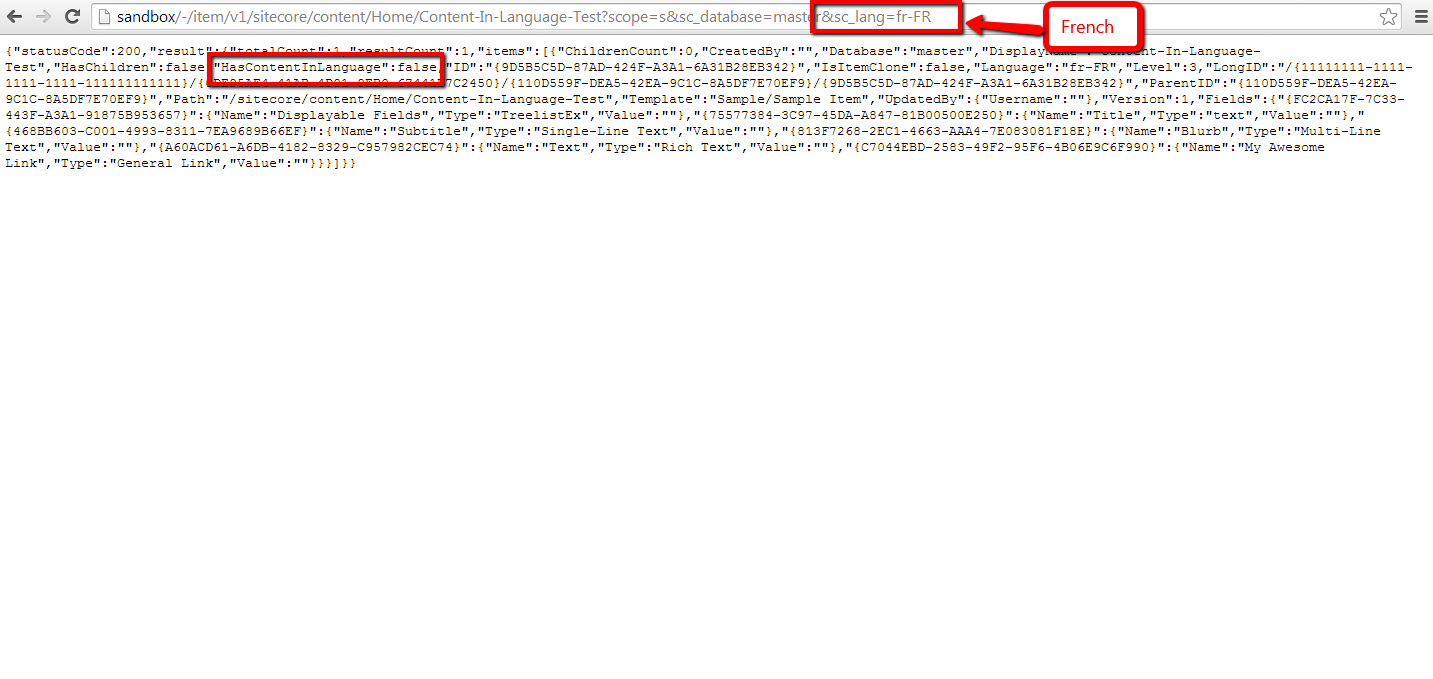
As expected, the ‘HasContentInLanguage’ is false since the Item does not have content in French.
If you have any questions or thoughts on this, please drop a comment.
Export to CSV in the Form Reports of Sitecore’s Web Forms for Marketers
The other day I was poking around Sitecore.Forms.Core.dll — this is one of the assemblies that comes with Web Forms for Marketers (what, you don’t randomly look at code in the Sitecore assemblies? 😉 ) — and decided to check out how the export functionality of the Form Reports work.
Once I felt I understood how the export code functions, I decided to take a stab at building my own custom export: functionality to export to CSV, and built the following class to serve as a pipeline processor to wedge Form Reports data into CSV format:
using System;
using System.Collections.Generic;
using System.Linq;

using Sitecore.Diagnostics;
using Sitecore.Form.Core.Configuration;
using Sitecore.Form.Core.Pipelines.Export;
using Sitecore.Forms.Data;
using Sitecore.Jobs;

namespace Sitecore.Sandbox.Form.Core.Pipelines.Export.Csv
{
    public class ExportToCsv
    {
        public void Process(ExportArgs args)
        {
            Assert.ArgumentNotNull(args, "args");
            LogInfo();
            args.Result = GenerateCsv(args.Packet.Entries);
        }

        protected virtual void LogInfo()
        {
            Job job = Context.Job;
            if (job != null)
            {
                job.Status.LogInfo(ResourceManager.Localize("EXPORTING_DATA"));
            }
        }

        private string GenerateCsv(IEnumerable<IForm> forms)
        {
            return string.Join(Environment.NewLine, GenerateAllCsvRows(forms));
        }

        protected virtual IEnumerable<string> GenerateAllCsvRows(IEnumerable<IForm> forms)
        {
            Assert.ArgumentNotNull(forms, "forms");
            IList<string> rows = new List<string>();
            rows.Add(GenerateCsvHeader(forms.FirstOrDefault()));
            foreach (IForm form in forms)
            {
                string row = GenerateCsvRow(form);
                if (!string.IsNullOrWhiteSpace(row))
                {
                    rows.Add(row);
                }
            }

            return rows;
        }

        protected virtual string GenerateCsvHeader(IForm form)
        {
            Assert.ArgumentNotNull(form, "form");
            return string.Join(",", form.Field.Select(field => field.FieldName));
        }

        protected virtual string GenerateCsvRow(IForm form)
        {
            Assert.ArgumentNotNull(form, "form");
            return string.Join(",", form.Field.Select(field => field.Value));
        }
    }
}
There really isn’t anything magical happening in the code above. The code creates a string of comma-separated values for each row of entries in args.Packet.Entries, and puts these plus a CSV header into a collection of strings.
Once all rows have been placed into a collection of strings, they are munged together on the newline character ultimately creating a multi-row CSV string. This CSV string is then set on the Result property of the ExportArgs instance.
Now we need a way to invoke a pipeline that contains the above class as a processor, and the following command does just that:
using System.Collections.Specialized;

using Sitecore.Diagnostics;
using Sitecore.Forms.Core.Commands.Export;
using Sitecore.Form.Core.Configuration;
using Sitecore.Shell.Framework.Commands;

namespace Sitecore.Sandbox.Forms.Core.Commands.Export
{
    public class Export : ExportToXml
    {
        protected override void AddParameters(NameValueCollection parameters)
        {
            parameters["filename"] = FileName;
            parameters["contentType"] = MimeType;
        }

        public override void Execute(CommandContext context)
        {
            SetProperties(context);
            base.Execute(context);
        }

        private void SetProperties(CommandContext context)
        {
            Assert.ArgumentNotNull(context, "context");
            Assert.ArgumentNotNull(context.Parameters, "context.Parameters");
            Assert.ArgumentNotNullOrEmpty(context.Parameters["fileName"], "context.Parameters[\"fileName\"]");
            Assert.ArgumentNotNullOrEmpty(context.Parameters["mimeType"], "context.Parameters[\"mimeType\"]");
            Assert.ArgumentNotNullOrEmpty(context.Parameters["exportPipeline"], "context.Parameters[\"exportPipeline\"]");
            Assert.ArgumentNotNullOrEmpty(context.Parameters["progressDialogTitle"], "context.Parameters[\"progressDialogTitle\"]");
            FileName = context.Parameters["fileName"];
            MimeType = context.Parameters["mimeType"];
            ExportPipeline = context.Parameters["exportPipeline"];
            ProgressDialogTitle = context.Parameters["progressDialogTitle"];
        }

        protected override string GetName()
        {
            return ProgressDialogTitle;
        }

        protected override string GetProcessorName()
        {
            return ExportPipeline;
        }

        private string FileName { get; set; }

        private string MimeType { get; set; }

        private string ExportPipeline { get; set; }

        private string ProgressDialogTitle { get; set; }
    }
}
I modeled the above command after Sitecore.Forms.Core.Commands.Export.ExportToExcel in Sitecore.Forms.Core.dll: this command inherits some useful logic of Sitecore.Forms.Core.Commands.Export.ExportToXml but differs along the pipeline being invoked, the name of the export file, and content type of the file being created.
I decided to make the above command be generic: the name of the file, pipeline, progress dialog title — this is a heading that is displayed in a modal dialog that is launched when the data is being exported from the Form Reports — and content type of the file are passed to it from Sitecore via Sheer UI buttons (see below).
I then registered all of the above in Sitecore via the following patch configuration file:
<?xml version="1.0" encoding="utf-8"?>
<configuration xmlns:patch="http://www.sitecore.net/xmlconfig/">
  <sitecore>
    <commands>
      <command name="forms:export" type="Sitecore.Sandbox.Forms.Core.Commands.Export.Export, Sitecore.Sandbox" />
    </commands>
    <pipelines>
      <exportToCsv>
        <processor type="Sitecore.Sandbox.Form.Core.Pipelines.Export.Csv.ExportToCsv, Sitecore.Sandbox" />
        <processor type="Sitecore.Form.Core.Pipelines.Export.SaveContent, Sitecore.Forms.Core" />
      </exportToCsv>
    </pipelines>
  </sitecore>
</configuration>
Now we must wire the command to Sheer UI buttons. This is how I wired up the export ‘All’ button (this button is available in a dropdown of the main export button in the Form Reports):

I then created another export button which is used when exporting selected rows in the Form Reports:

Let’s see this in action!
I opened up the Form Reports for a test form I had built for a previous blog post, and selected some rows (notice the ‘To CSV’ button in the ribbon):

I clicked the ‘To CSV’ button — doing this launched a progress dialog (I wasn’t fast enough to grab a screenshot of it) — and was prompted to download the following file:

As you can see, the file looks beautiful in Excel 😉 :
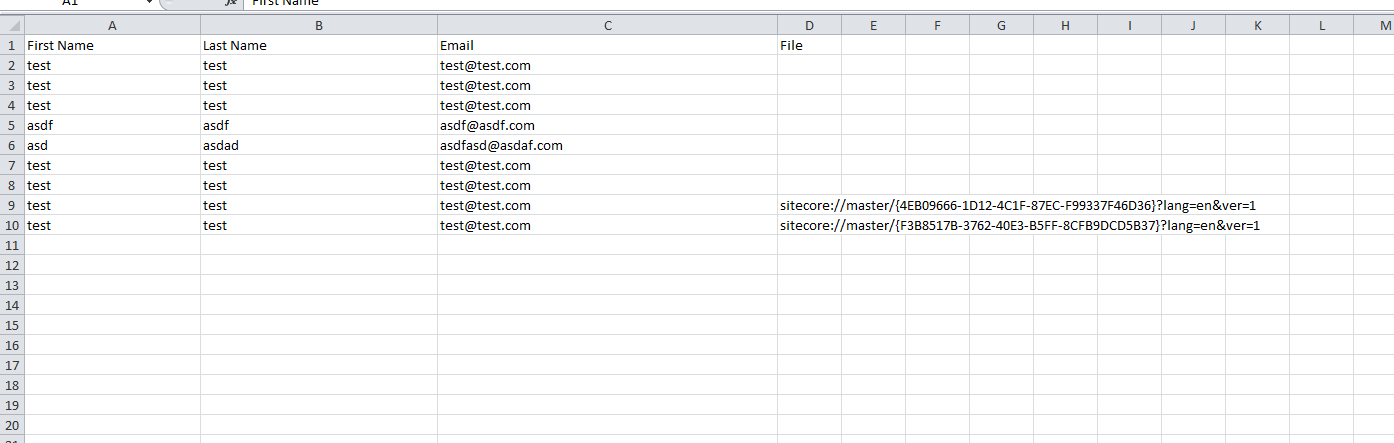
If you have any thoughts on this, or ideas for other export data formats that could be incorporated into the Form Reports of Web Forms for Marketers, please share in a comment.
Until next time, have a Sitecoretastic day!
Add the HTML5 Range Input Control into Web Forms for Marketers in Sitecore
A couple of weeks ago, I was researching what new input controls exist in HTML5 — I am quite a dinosaur when it comes to front-end code, and felt it was a good idea to see what is currently available or possible — and discovered the range HTML control:
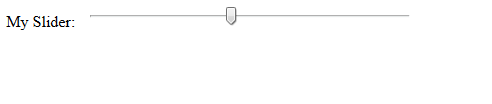
I immediately wanted to add this HTML5 input control into Web Forms for Marketers in Sitecore, and built the following control class as a proof of concept:
using System;
using System.Web.UI;
using System.Web.UI.WebControls;

using Sitecore.Diagnostics;
using Sitecore.Form.Web.UI.Controls;

namespace Sitecore.Sandbox.Form.Web.UI.Controls
{
    public class Range : InputControl
    {
        public Range() : this(HtmlTextWriterTag.Div)
        {
        }

        public Range(HtmlTextWriterTag tag)
            : base(tag)
        {
        }

        protected override void OnInit(EventArgs e)
        {
            base.textbox.CssClass = "scfSingleLineTextBox";
            base.help.CssClass = "scfSingleLineTextUsefulInfo";
            base.generalPanel.CssClass = "scfSingleLineGeneralPanel";
            base.title.CssClass = "scfSingleLineTextLabel";
            this.Controls.AddAt(0, base.generalPanel);
            this.Controls.AddAt(0, base.title);
            base.generalPanel.Controls.AddAt(0, base.help);
            base.generalPanel.Controls.AddAt(0, textbox);
        }

        protected override void DoRender(HtmlTextWriter writer)
        {
            textbox.Attributes["type"] = "range";
            TrySetIntegerAttribute("min", MinimumValue);
            TrySetIntegerAttribute("max", MaximumValue);
            TrySetIntegerAttribute("step", StepInterval);
            EnsureDefaultValue();
            textbox.MaxLength = 0;
            base.DoRender(writer);
        }

        protected virtual void TrySetIntegerAttribute(string attributeName, string value)
        {
            int integerValue;
            if (int.TryParse(value, out integerValue))
            {
                SetAttribute(attributeName, integerValue.ToString());
            }
        }

        protected virtual void SetAttribute(string attributeName, string value)
        {
            Assert.ArgumentNotNull(textbox, "textbox");
            Assert.ArgumentNotNullOrEmpty(attributeName, "attributeName");
            textbox.Attributes[attributeName] = value;
        }

        protected virtual void EnsureDefaultValue()
        {
            int value;
            if (!int.TryParse(Text, out value))
            {
                textbox.Text = string.Empty;
            }
        }

        public string MinimumValue { get; set; }

        public string MaximumValue { get; set; }

        public string StepInterval { get; set; }
    }
}
Most of the magic behind how this works occurs in the DoRender() method above. In that method we are changing the “type” attribute on the TextBox instance defined in the parent InputControl class to be “range” instead of “text”: this is how the browser will know that it is to render a range control instead of a textbox.
The DoRender() method also delegates to other helper methods: one to set the default value for the control, and another to add additional attributes to our control — the “step”, “min”, and “max” attributes in particular (you can learn more about these attributes by reading this specification for the range control) — and these are only set when values are passed to our code via XML defined in Sitecore for the control:

Let’s test this out!
I whipped up a test form, and added a range field to it:

This is what the form looked like on the page before I clicked the submit button (trust me, that’s 75 😉 ):

After clicking submit, I was given a confirmation message:

As you can see in the Form Reports for our test form, the value selected on the range control was captured:

I will admit that I had a lot of fun adding this range input control into Web Forms for Marketers but do question whether anyone would use this control.
Why?
I found no way to add label markers for the different values on the control (if you are aware of a way to do this, please leave a comment).
Also, it should be noted that this control will not work in Internet Explorer 9 or earlier versions.
If you can think of ways around making this better, or have ideas for other HTML5 controls that could/should be added to Web Forms for Marketers, please share in a comment.
Embedded Tweets in Sitecore: A Proof of Concept
In a previous post, I showcased a “proof of concept” for shortcodes in Sitecore — this is a shorthand notation for embedding things like YouTube videos in your webpages without having to type up a bunch of HTML — and felt I should follow up with another “proof of concept” around incorporating Embedded Tweets in Sitecore.
You might be asking “what’s an Embedded Tweet?” An Embedded Tweet is basically the process of pasting a Tweet URL from Twitter into an editable content area of your website/blog/whatever (think Rich Text field in Sitecore), and let the code that builds the HTML for your site figure out how to display it.
For example, I had used an Embedded Tweet in a recent post:

This is what is seen on the rendered page:

While doing some research via Google on how to do this in Sitecore, I found this page from Twitter that discusses how you could go about accomplishing this, and discovered how to get JSON containing information about a Tweet — including its HTML — using one of Twitter’s API URLs:

The JSON above drove me to build the following POCO class to represent data returned by that URL:
using System.Runtime.Serialization;

namespace Sitecore.Sandbox.Pipelines.RenderField.Tweets
{
    public class Tweet
    {
        [DataMember(Name = "cache_age")]
        public int CacheAgeMilliseconds { get; set; }

        [DataMember(Name = "url")]
        public string Url { get; set; }

        [DataMember(Name = "html")]
        public string Html { get; set; }
    }
}
I decided to omit some of the JSON properties returned by the Twitter URL from my class above — width and height are examples — since I felt I did not need to use them for this “proof of concept”.
I then leveraged the class above in the following class that will serve as a <renderField> pipeline processor to embed Tweets:
using System;
using System.IO;
using System.Net;
using System.Text.RegularExpressions;
using System.Web;

using Sitecore.Caching;
using Sitecore.Diagnostics;
using Sitecore.Pipelines.RenderField;

using Newtonsoft.Json;
using Newtonsoft.Json.Linq;

namespace Sitecore.Sandbox.Pipelines.RenderField.Tweets
{
    public class ExpandTweets
    {
        private string TwitterWidgetScriptTag {get ; set; }

        private string TwitterApiUrlFormat { get; set; }

        private string _TweetPattern;
        private string TweetPattern
        {
            get
            {
                return _TweetPattern;
            }
            set
            {
                _TweetPattern = value;
                if (!string.IsNullOrWhiteSpace(_TweetPattern))
                {
                    _TweetPattern = HttpUtility.HtmlDecode(_TweetPattern);
                }
            }
        }

        private HtmlCache _HtmlCache;
        private HtmlCache HtmlCache
        {
            get
            {
                if (_HtmlCache == null)
                {
                    _HtmlCache = CacheManager.GetHtmlCache(Context.Site);
                }

                return _HtmlCache;
            }
        }

        public void Process(RenderFieldArgs args)
        {
            Assert.ArgumentNotNull(args, "args");
            AssertRequired();
            if(!ShouldFieldBeProcessed(args))
            {
                return;
            }

            args.Result.FirstPart = ExpandTweetUrls(args.Result.FirstPart);
        }

        private static bool ShouldFieldBeProcessed(RenderFieldArgs args)
        {
            Assert.ArgumentNotNull(args, "args");
            Assert.ArgumentNotNull(args.FieldTypeKey, "args.FieldTypeKey");
            string fieldTypeKey = args.FieldTypeKey.ToLower();
            return fieldTypeKey == "text"
                    || fieldTypeKey == "rich text"
                    || fieldTypeKey == "single-line text"
                    || fieldTypeKey == "multi-line text";
        }

        private void AssertRequired()
        {
            Assert.IsNotNullOrEmpty(TwitterWidgetScriptTag, "TwitterWidgetScriptTag must be set! Check your configuration!");
            Assert.IsNotNullOrEmpty(TwitterApiUrlFormat, "TwitterApiUrlFormat must be set! Check your configuration!");
            Assert.IsNotNullOrEmpty(TweetPattern, "TweetPattern must be set! Check your configuration!");
        }

        protected virtual string ExpandTweetUrls(string html)
        {
            string htmlExpanded = html;
            MatchCollection matches = Regex.Matches(htmlExpanded, TweetPattern, RegexOptions.Compiled | RegexOptions.IgnoreCase);
            foreach (Match match in matches)
            {
                string tweetHtml = GetTweetHtml(match.Groups["id"].Value);
                if (!string.IsNullOrWhiteSpace(tweetHtml))
                {
                    htmlExpanded = htmlExpanded.Replace(match.Value, tweetHtml);
                }
            }

            if (matches.Count > 0)
            {
                htmlExpanded = string.Concat(htmlExpanded, TwitterWidgetScriptTag);
            }

            return htmlExpanded;
        }

        protected virtual string GetTweetHtml(string id)
        {
            string html = GetTweetHtmlFromCache(id);
            if (!string.IsNullOrWhiteSpace(html))
            {
                return html;
            }

            Tweet tweet = GetTweetFromApi(id);
            AddTweetHtmlToCache(id, tweet);
            return tweet.Html;
        }

        private string GetTweetHtmlFromCache(string id)
        {
            return HtmlCache.GetHtml(id);
        }

        private void AddTweetHtmlToCache(string id, Tweet tweet)
        {
            if (string.IsNullOrWhiteSpace(tweet.Html))
            {
                return;
            }

            if (tweet.CacheAgeMilliseconds > 0)
            {
                HtmlCache.SetHtml(id, tweet.Html, DateTime.Now.AddMilliseconds(tweet.CacheAgeMilliseconds));
                return;
            }

            HtmlCache.SetHtml(id, tweet.Html);
        }

        protected virtual Tweet GetTweetFromApi(string id)
        {
            HttpWebRequest request = (HttpWebRequest)WebRequest.Create(string.Format(TwitterApiUrlFormat, id));
            try
            {
                HttpWebResponse response = (HttpWebResponse)request.GetResponse();
                using (StreamReader reader = new StreamReader(response.GetResponseStream()))
                {
                    var result = reader.ReadToEnd();
                    JObject jObject = JObject.Parse(result);
                    return JsonConvert.DeserializeObject<Tweet>(jObject.ToString());
                }
            }
            catch (Exception ex)
            {
                Log.Error(this.ToString(), ex, this);
            }

            return new Tweet { Html = string.Empty };
        }
    }
}
Methods in the class above find all Tweet URLs in the Rich Text, Single-Line Text, or Multi-Line Text field being processed — the code determines if it’s a Tweet URL based on a pattern that is supplied by a configuration setting (you will see this below in this post); extract Tweets’ Twitter identifiers (these are located at the end of the Tweet URLs); and attempt to find the Tweets’ HTML in Sitecore’s HTML cache.
If the HTML is found in cache for a Tweet, we return it. Otherwise, we make a request to Twitter’s API to get it, put it in cache one we have it (it is set to expire after a specified number of milliseconds from the time it was retrieved: Twitter returns the number of milliseconds in one full year by default), and then we return it.
If the returned HTML is not empty, we replace it in the field’s value for display.
If the HTML returned is empty — this could happen when an exception is encountered during the Twitter API call (of course we log the exception in the Sitecore log when this happens 😉 ) — we don’t touch the Tweet URL in the field’s value.
Once all Tweet URLs have been processed, we append a script tag referencing Twitter’s widget.js file — this is supplied through a configuration setting, and it does the heavy lifting on making the Tweet HTML look Twitterific 😉 — to the field’s rendered HTML.
I then tied everything together using the following patch configuration file:
<?xml version="1.0" encoding="utf-8"?>
<configuration xmlns:patch="http://www.sitecore.net/xmlconfig/">
<sitecore>
<pipelines>
<renderField>
<processor type="Sitecore.Sandbox.Pipelines.RenderField.Tweets.ExpandTweets, Sitecore.Sandbox"
patch:after="processor[@type='Sitecore.Pipelines.RenderField.GetTextFieldValue, Sitecore.Kernel']">
<TwitterWidgetScriptTag><script async src="//platform.twitter.com/widgets.js" charset="utf-8"></script></TwitterWidgetScriptTag>
<TwitterApiUrlFormat>https://api.twitter.com/1/statuses/oembed.json?id={0}&omit_script=true</TwitterApiUrlFormat>
<TweetPattern>https://twitter.com/.+/status/(?<id>\d*)</TweetPattern>
</processor>
</renderField>
</pipelines>
</sitecore>
</configuration>
Let’s see this in action!
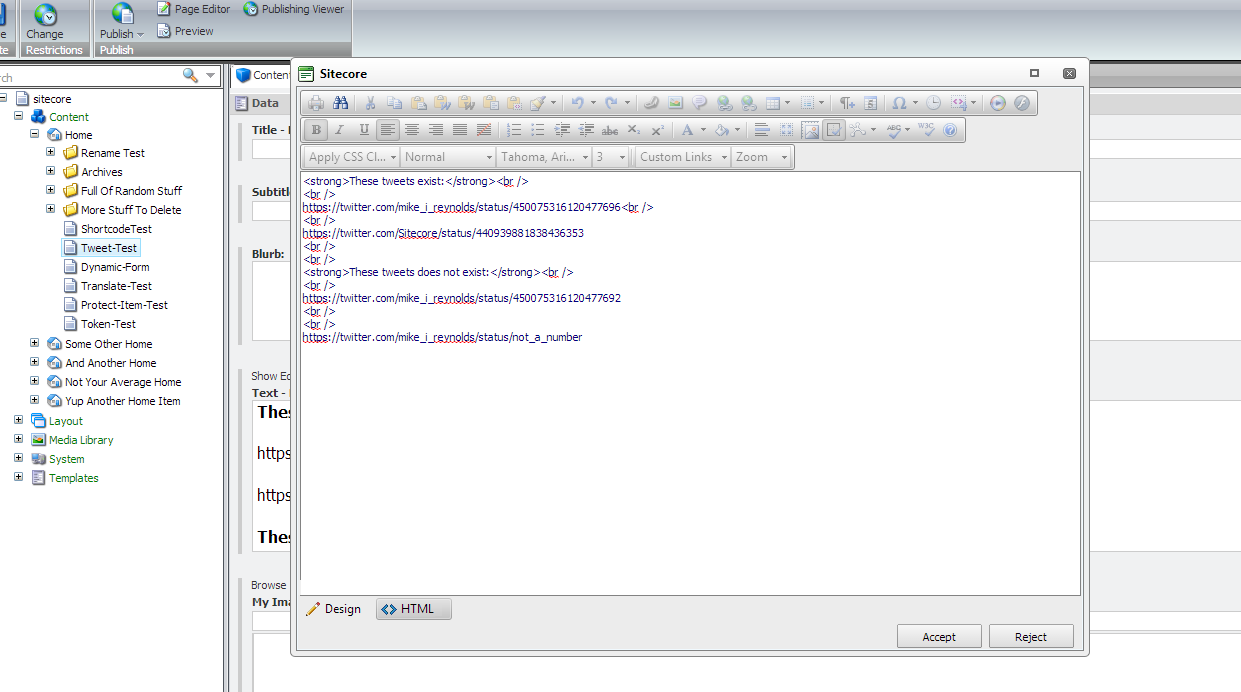
I created a test Item, and added some legitimate and bogus Tweet URLs into one of its Rich Text fields (please pardon the grammatical issues in the following screenshots :-/):

This isn’t the most aesthetically pleasing HTML, but it will serve its purpose for testing:
After saving and publishing, I navigated to my test Item’s page, and saw this:

If you have any suggestions on making this better, or have other ideas for embedding Tweets in Sitecore, please share in a comment.
Add Sitecore Rocks Commands to Protect and Unprotect Items
The other day I read this post where the author showcased a new Clipboard command he had added into Sitecore Rocks, and immediately wanted to experiment with adding my own custom command into Sitecore Rocks.
After some research, I stumbled upon this post which gave a walk-through on augmenting Sitecore Rocks by adding a Server Component — this is an assembled library of code for your Sitecore instance to handle requests from Sitecore Rocks — and a Plugin — this is an assembled library of code that can contain custom commands — and decided to follow its lead.
I first created a Sitecore Rocks Server Component project in Visual Studio:

After some pondering, I decided to ‘cut my teeth’ on creating custom commands to protect and unprotect Items in Sitecore (for more information on protecting/unprotecting Items in Sitecore, check out ‘How to Protect or Unprotect an Item’ in Sitecore’s Client Configuration
Cookbook).
I decided to use the template method pattern for the classes that will handle requests from Sitecore Rocks — I envisioned some shared logic across the two — and put this shared logic into the following base class:
using Sitecore.Configuration;
using Sitecore.Data;
using Sitecore.Data.Items;
using Sitecore.Diagnostics;

namespace Sitecore.Rocks.Server.Requests
{
    public abstract class EditItem
    {
        public string Execute(string id, string databaseName)
        {
            Assert.ArgumentNotNullOrEmpty(id, "id");
            return ExecuteEditItem(GetItem(id, databaseName));
        }

        private string ExecuteEditItem(Item item)
        {
            Assert.ArgumentNotNull(item, "item");
            item.Editing.BeginEdit();
            string response = UpdateItem(item);
            item.Editing.EndEdit();
            return response;
        }

        protected abstract string UpdateItem(Item item);

        private static Item GetItem(string id, string databaseName)
        {
            Assert.ArgumentNotNullOrEmpty(id, "id");
            Database database = GetDatabase(databaseName);
            Assert.IsNotNull(database, string.Format("database: {0} does not exist!", databaseName));
            return database.GetItem(id);
        }

        private static Database GetDatabase(string databaseName)
        {
            Assert.ArgumentNotNullOrEmpty(databaseName, "databaseName");
            return Factory.GetDatabase(databaseName);
        }
    }
}
The EditItem base class above gets the Item in the requested database, and puts the Item into edit mode. It then passes the Item to the UpdateItem method — subclasses must implement this method — and then turns off edit mode for the Item.
As a side note, all Server Component request handlers must have a method named Execute.
For protecting a Sitecore item, I built the following subclass of the EditItem class above:
using Sitecore.Data.Items;

namespace Sitecore.Rocks.Server.Requests.Attributes
{
    public class ProtectItem : EditItem
    {
        protected override string UpdateItem(Item item)
        {
            item.Appearance.ReadOnly = true;
            return string.Empty;
        }
    }
}
The ProtectItem class above just protects the Item passed to it.
I then built the following subclass of EditItem to unprotect an item passed to its UpdateItem method:
using Sitecore.Data.Items;

namespace Sitecore.Rocks.Server.Requests.Attributes
{
    public class UnprotectItem : EditItem
    {
        protected override string UpdateItem(Item item)
        {
            item.Appearance.ReadOnly = false;
            return string.Empty;
        }
    }
}
I built the above Server Component solution, and put its resulting assembly into the /bin folder of my Sitecore instance.
I then created a Plugin solution to handle the protect/unprotect commands in Sitecore Rocks:
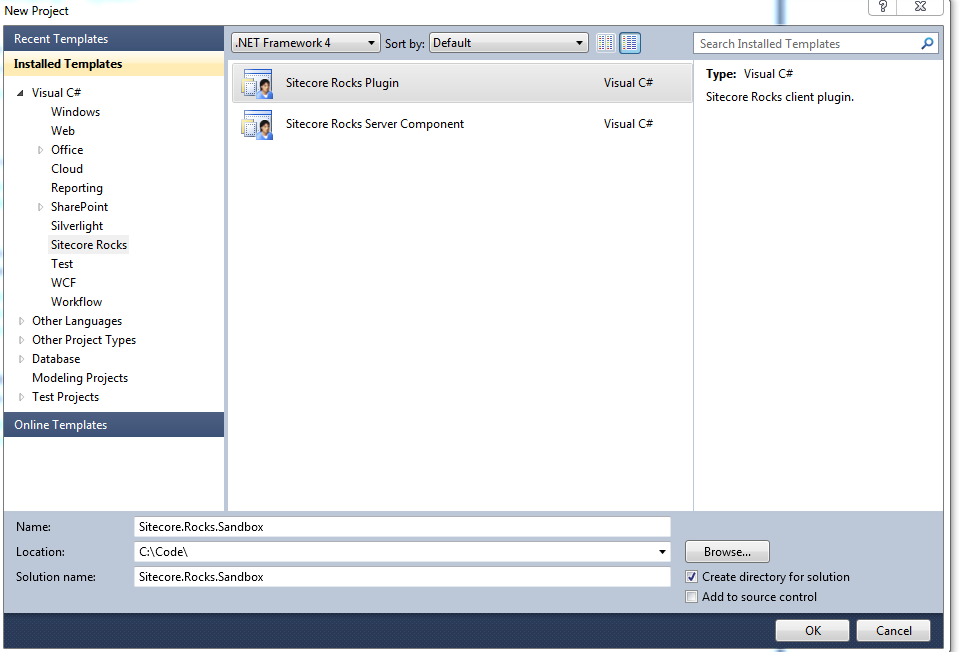
I created the following command to protect a Sitecore Item:
using System;
using System.Linq;

using Sitecore.VisualStudio.Annotations;
using Sitecore.VisualStudio.Commands;
using Sitecore.VisualStudio.Data;
using Sitecore.VisualStudio.Data.DataServices;

using SmartAssembly.SmartExceptionsCore;

namespace Sitecore.Rocks.Sandbox.Commands
{
    [Command]
    public class ProtectItemCommand : CommandBase
    {
        public ProtectItemCommand()
        {
            Text = "Protect Item";
            Group = "Edit";
            SortingValue = 4010;
        }

        public override bool CanExecute([CanBeNull] object parameter)
        {
            IItemSelectionContext context = null;
            bool canExecute = false;
            try
            {
                context = parameter as IItemSelectionContext;
                canExecute = context != null && context.Items.Count() == 1 && !IsProtected(context.Items.FirstOrDefault());
            }
            catch (Exception ex)
            {
                StackFrameHelper.CreateException3(ex, context, this, parameter);
                throw;
            }

            return canExecute;
        }

        private static bool IsProtected(IItem item)
        {
            ItemVersionUri itemVersionUri = new ItemVersionUri(item.ItemUri, LanguageManager.CurrentLanguage, Sitecore.VisualStudio.Data.Version.Latest);
            Item item2 = item.ItemUri.Site.DataService.GetItemFields(itemVersionUri);
            foreach (Field field in item2.Fields)
            {
                if (string.Equals("__Read Only", field.Name, StringComparison.CurrentCultureIgnoreCase) && field.Value == "1")
                {
                    return true;
                }
            }

            return false;
        }

        public override void Execute([CanBeNull] object parameter)
        {
            IItemSelectionContext context = null;
            try
            {
                context = parameter as IItemSelectionContext;
                IItem item = context.Items.FirstOrDefault();
                item.ItemUri.Site.DataService.ExecuteAsync
                (
                    "Attributes.ProtectItem",
                    CreateEmptyCallback(),
                    new object[]
                    {
	                    item.ItemUri.ItemId.ToString(),
	                    item.ItemUri.DatabaseName.ToString()
                    }
                );
            }
            catch (Exception ex)
            {
                StackFrameHelper.CreateException3(ex, context, this, parameter);
                throw;
            }
        }

        private ExecuteCompleted CreateEmptyCallback()
        {
            return (response, executeResult) => { return; };
        }
    }
}
The ProtectItemCommand command above is only displayed when the selected Item is not protected — this is ascertained by logic in the CanExecute method — and fires off a request to the Sitecore.Rocks.Server.Requests.Attributes.ProtectItem request handler in the Server Component above to protect the selected Item.
I then built the following command to do the exact opposite of the command above: only appear when the selected Item is protected, and make a request to Sitecore.Rocks.Server.Requests.Attributes.UnprotectItem — shown above in the Server Component — to unprotect the selected Item:
using System;
using System.Linq;

using Sitecore.VisualStudio.Annotations;
using Sitecore.VisualStudio.Commands;
using Sitecore.VisualStudio.Data;
using Sitecore.VisualStudio.Data.DataServices;

using SmartAssembly.SmartExceptionsCore;

namespace Sitecore.Rocks.Sandbox.Commands
{
    [Command]
    public class UnprotectItemCommand : CommandBase
    {
        public UnprotectItemCommand()
        {
            Text = "Unprotect Item";
            Group = "Edit";
            SortingValue = 4020;
        }

        public override bool CanExecute([CanBeNull] object parameter)
        {
            IItemSelectionContext context = null;
            bool canExecute = false;
            try
            {
                context = parameter as IItemSelectionContext;
                canExecute = context != null && context.Items.Count() == 1 && IsProtected(context.Items.FirstOrDefault());
            }
            catch (Exception ex)
            {
                StackFrameHelper.CreateException3(ex, context, this, parameter);
                throw;
            }

            return canExecute;
        }

        private static bool IsProtected(IItem item)
        {
            ItemVersionUri itemVersionUri = new ItemVersionUri(item.ItemUri, LanguageManager.CurrentLanguage, Sitecore.VisualStudio.Data.Version.Latest);
            Item item2 = item.ItemUri.Site.DataService.GetItemFields(itemVersionUri);
            foreach (Field field in item2.Fields)
            {
                if (string.Equals("__Read Only", field.Name, StringComparison.CurrentCultureIgnoreCase) && field.Value == "1")
                {
                    return true;
                }
            }

            return false;
        }

        public override void Execute([CanBeNull] object parameter)
        {
            IItemSelectionContext context = null;
            try
            {
                context = parameter as IItemSelectionContext;
                IItem item = context.Items.FirstOrDefault();
                item.ItemUri.Site.DataService.ExecuteAsync
                (
                    "Attributes.UnprotectItem",
                    CreateEmptyCallback(),
                    new object[]
                    {
	                    item.ItemUri.ItemId.ToString(),
	                    item.ItemUri.DatabaseName.ToString()
                    }
                );
            }
            catch (Exception ex)
            {
                StackFrameHelper.CreateException3(ex, context, this, parameter);
                throw;
            }
        }

        private ExecuteCompleted CreateEmptyCallback()
        {
            return (response, executeResult) => { return; };
        }
    }
}
I had to do a lot of discovery in Sitecore.Rocks.dll via .NET Reflector in order to build the above commands, and had a lot of fun while searching and learning.
Unfortunately, I could not get the commands above to show up in the Sitecore Explorer context menu in my instance of Sitecore Rocks even though my plugin did make its way out to my C:\Users\[my username]\AppData\Local\Sitecore\Sitecore.Rocks\Plugins\ folder.
I troubleshooted for some time but could not determine why these commands were not appearing — if you have any ideas, please leave a comment — and decided to register my commands using Extensions in Sitecore Rocks as a fallback plan:
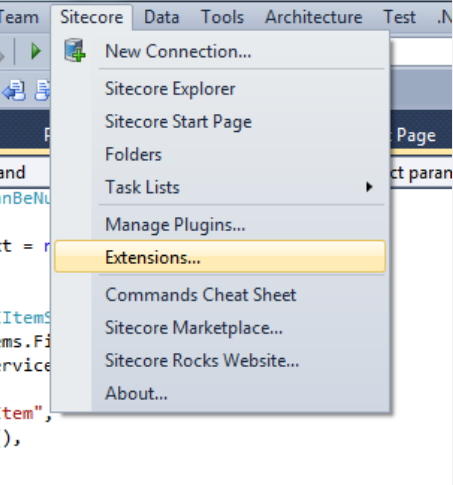
After clicking ‘Extensions’ in the Sitecore dropdown menu in Visual Studio, I was presented with the following dialog, and added my classes via the ‘Add’ button on the right:

Let’s see this in action.
I first created a Sitecore Item for testing:

I navigated to that Item in the Sitecore Explorer in Sitecore Rocks, and right-clicked on it:
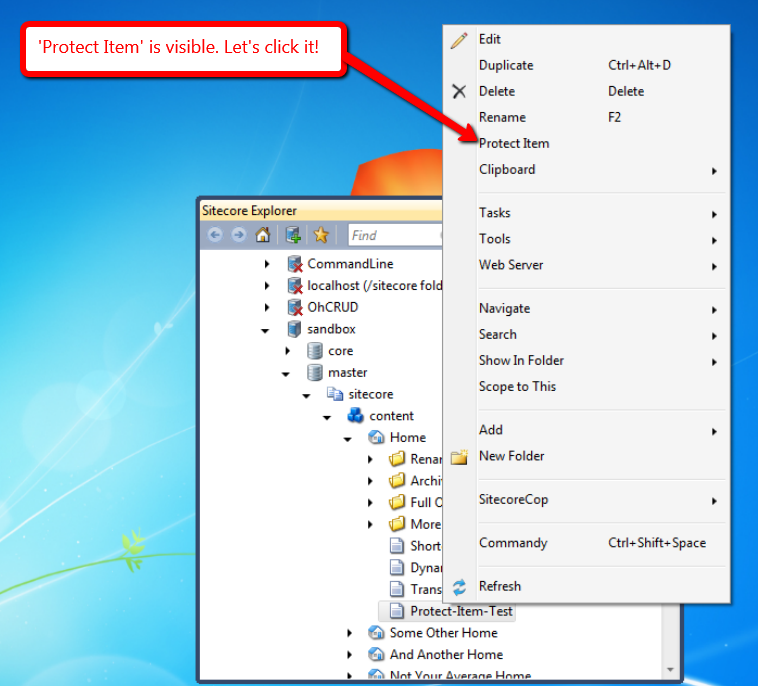
After clicking ‘Protect Item’, I verified the Item was protected in Sitecore:

I then went back to our test Item in the Sitecore Explorer of Sitecore Rocks, and right-clicked again:

After clicking ‘Unprotect Item’, I took a look at the Item in Sitecore, and saw that it was no longer protected:
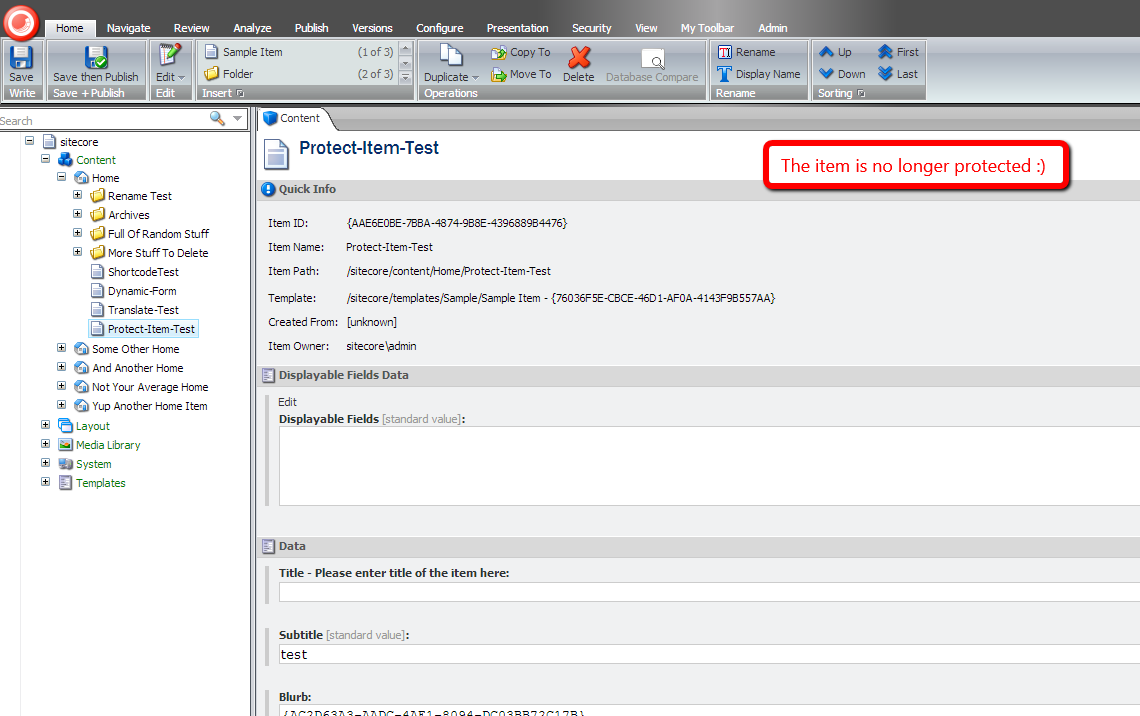
If you have any thoughts on this, or ideas for other commands that you would like to see in Sitecore Rocks, please drop a comment.
Until next time, have a Sitecoretastic day, and don’t forget: Sitecore Rocks!
Prevent Sitecore Dictionary Entry Keys From Appearing When Their Phrase Field is Empty
Earlier today when doing research for another blog post around on-demand language translation in Sitecore, I remembered I wanted to blog about an issue I saw a while back when using the Sitecore Dictionary, but before I dive into that issue — and a possible approach for resolving it — let me give you a little information on what the Sitecore Dictionary is, and why you might want to use it — actually you probably should use it!
The Sitecore Dictionary is a place in Sitecore where you can store multilingual content for labels or string literals in your code (this could be front-end code, or even content displayed in the Sitecore shell). I’ve created the following Dictionary entry as an example:

The “coffee” item above is the Dictionary entry, and its parent item “beverage types” is a Dictionary folder.
You could use a sublayout like the following to display the text stored in the Phrase field on the front-end of your website:
<%@ Control Language="C#" AutoEventWireup="true" CodeBehind="Translate Test.ascx.cs" Inherits="Sandbox.layouts.sublayouts.Translate_Test" %>
<h2>Dictionary Test</h2>
Key => <asp:Literal ID="litKey" runat="server" /><br />
Phrase => <asp:Literal ID="litTranslateTest" runat="server" />
The code-behind of the sublayout:
using System;

using Sitecore.Globalization;

namespace Sandbox.layouts.sublayouts
{
    public partial class Translate_Test : System.Web.UI.UserControl
    {
        protected void Page_Load(object sender, EventArgs e)
        {
            string key = "beveragetypes.coffee";
            litKey.Text = key;
            litTranslateTest.Text = Translate.Text(key);
        }
    }
}
In the Page_Load method above, I’ve invoked Sitecore.Globalization.Translate.Text() to grab the value out of the Phrase field of the “coffee” Dictionary entry using its key. The Sitecore.Globalization.Translate.Text() method uses Sitecore.Context.Language to ascertain which language version of the Dictionary entry to use.
When I navigated to the page that has the sublayout above mapped to its presentation, I see the “coffee” entry’s Phrase appear:

Let’s see how this works using another language version of this Dictionary entry. I added a Danish version for our “coffee” entry:

I navigated to my page again after embedding the Danish language code in its URL to get the Danish version of this Dictionary entry:

As you can see the Danish version appeared, and I did not have to write any additional code to make this happen.
Well, this is great and all until someone forgets to include a phrase for a Dictionary entry:

When we go to the front-end, we see that the Dictionary entry’s key appears instead of its phrase:

As a fix for this, I created the following class to serve as a processor for the <getTranslation> pipeline (this pipeline was introduced in Sitecore 6.6):
using System.Collections.Generic;

using Sitecore.Diagnostics;
using Sitecore.Pipelines.GetTranslation;

namespace Sitecore.Sandbox.Pipelines.GetTranslation
{
    public class SetAsEmpty
    {
        private IList<string> _KeyPrefixes;
        private IList<string> KeyPrefixes
        {
            get
            {
                if (_KeyPrefixes == null)
                {
                    _KeyPrefixes = new List<string>();
                }

                return _KeyPrefixes;
            }
        }

        public void Process(GetTranslationArgs args)
        {
            if (!ShouldSetAsEmpty(args))
            {
                return;
            }

            args.Result = string.Empty;
        }

        protected virtual bool ShouldSetAsEmpty(GetTranslationArgs args)
        {
            Assert.ArgumentNotNull(args, "args");
            return args.Result == null && HasKeyPrefix(args.Key);
        }

        protected virtual bool HasKeyPrefix(string key)
        {
            if (string.IsNullOrWhiteSpace(key))
            {
                return false;
            }

            foreach (string keyPrefix in KeyPrefixes)
            {
                if (key.StartsWith(keyPrefix))
                {
                    return true;
                }
            }

            return false;
        }

        protected virtual void AddKeyPrefix(string keyPrefix)
        {
            if(string.IsNullOrWhiteSpace(keyPrefix))
            {
                return;
            }

            KeyPrefixes.Add(keyPrefix);
        }
    }
}
The idea here is to check to see if the Dictionary entry’s key starts with a configuration defined prefix, and if it does, set the GetTranslationArgs instance’s Result property to the empty string when it’s null.
The reason why we check for a specific prefix is to ensure we don’t impact other parts of Sitecore that use methods that leverage the <getTranslation> pipeline (I learned this the hard way when virtually all labels in my instance’s Content Editor disappeared before adding the logic above to check whether a Dictionary entry’s key started with a config defined prefix).
I then wired this up in Sitecore using the following configuration file:
<?xml version="1.0" encoding="utf-8"?>
<configuration xmlns:patch="http://www.sitecore.net/xmlconfig/">
  <sitecore>
    <pipelines>
      <getTranslation>
        <processor type="Sitecore.Sandbox.Pipelines.GetTranslation.SetAsEmpty, Sitecore.Sandbox">
          <keyPrefixes hint="list:AddKeyPrefix">
            <prefix>beveragetypes.</prefix>
          </keyPrefixes>
        </processor>
      </getTranslation>
    </pipelines>
  </sitecore>
</configuration>
When I navigated back to my page, I see that nothing appears for the Dictionary entry’s phrase since it was set to the empty string by our pipeline processor above.

One thing I should note: I have only tested this in Sitecore 6.6, and I’m not aware if this Dictionary entry issue exists in Sitecore 7. If this issue was fixed in Sitecore 7, please share in a comment.
Plus, if you have any comments on this, or other ideas for solving this problem, please leave a comment.
Rename Sitecore Clones When Renaming Their Source Item
Earlier today I discovered that clones in Sitecore are not renamed when their source Items are renamed — I’m baffled over how I have not noticed this before since I’ve been using Sitecore clones for a while now 
I’ve created some clones in my Sitecore instance to illustrate:

I then initiated the process for renaming the source item:

As you can see the clones were not renamed:

One might argue this is expected behavior for clones — only source Item field values are propagated to its clones when there are no data collisions (i.e. a source Item’s field value is pushed to the same field in its clone when that data has not changed directly on the clone — and the Item name should not be included in this process since it does not live in a field.
Sure, I see that point of view but one of the requirements of the project I am currently working on mandates that source Item name changes be pushed to the clones of that source Item.
So what did I do to solve this? I created an item:renamed event handler similar to the following (the one I built for my project is slightly different though the idea is the same):
using System;
using System.Collections.Generic;

using Sitecore.Data.Items;
using Sitecore.Diagnostics;
using Sitecore.Events;
using Sitecore.Links;
using Sitecore.SecurityModel;

namespace Sitecore.Sandbox.Data.Clones
{
    public class ItemEventHandler
    {
        protected void OnItemRenamed(object sender, EventArgs args)
        {
            Item item = GetItem(args);
            if (item == null)
            {
                return;
            }

            RenameClones(item);
        }

        protected virtual Item GetItem(EventArgs args)
        {
            if (args == null)
            {
                return null;
            }

            return Event.ExtractParameter(args, 0) as Item;
        }

        protected virtual void RenameClones(Item item)
        {
            Assert.ArgumentNotNull(item, "item");
            using (new LinkDisabler())
            {
                using (new SecurityDisabler())
                {
                    using (new StatisticDisabler())
                    {
                        Rename(GetClones(item), item.Name);
                    }
                }
            }
        }

        protected virtual IEnumerable<Item> GetClones(Item item)
        {
            Assert.ArgumentNotNull(item, "item");
            IEnumerable<Item> clones = item.GetClones();
            if (clones == null)
            {
                return new List<Item>();
            }

            return clones;
        }

        protected virtual void Rename(IEnumerable<Item> items, string newName)
        {
            Assert.ArgumentNotNull(items, "items");
            Assert.ArgumentNotNullOrEmpty(newName, "newName");
            foreach (Item item in items)
            {
                Rename(item, newName);
            }
        }

        protected virtual void Rename(Item item, string newName)
        {
            Assert.ArgumentNotNull(item, "item");
            Assert.ArgumentNotNullOrEmpty(newName, "newName");
            if (!item.Access.CanRename())
            {
                return;
            }

            item.Editing.BeginEdit();
            item.Name = newName;
            item.Editing.EndEdit();
        }
    }
}
The handler above retrieves all clones for the Item being renamed, and renames them using the new name of the source Item — I borrowed some logic from the Execute method in Sitecore.Shell.Framework.Pipelines.RenameItem in Sitecore.Kernel.dll (this serves as a processor of the <uiRenameItem> pipeline).
If you would like to learn more about events and their handlers, I encourage you to check out John West‘s post about them, and also take a look at this page on the
Sitecore Developer Network (SDN).
I then registered the above event handler in Sitecore using the following configuration file:
<?xml version="1.0" encoding="utf-8" ?>
<configuration xmlns:patch="http://www.sitecore.net/xmlconfig/">
  <sitecore>
    <events>
      <event name="item:renamed">
        <handler type="Sitecore.Sandbox.Data.Clones.ItemEventHandler, Sitecore.Sandbox" method="OnItemRenamed"/>
      </event>
    </events>
  </sitecore>
</configuration>
Let’s take this for a spin.
I went back to my source item, renamed it back to ‘My Cool Item’, and then initiated another rename operation on it:
As you can see all clones were renamed:
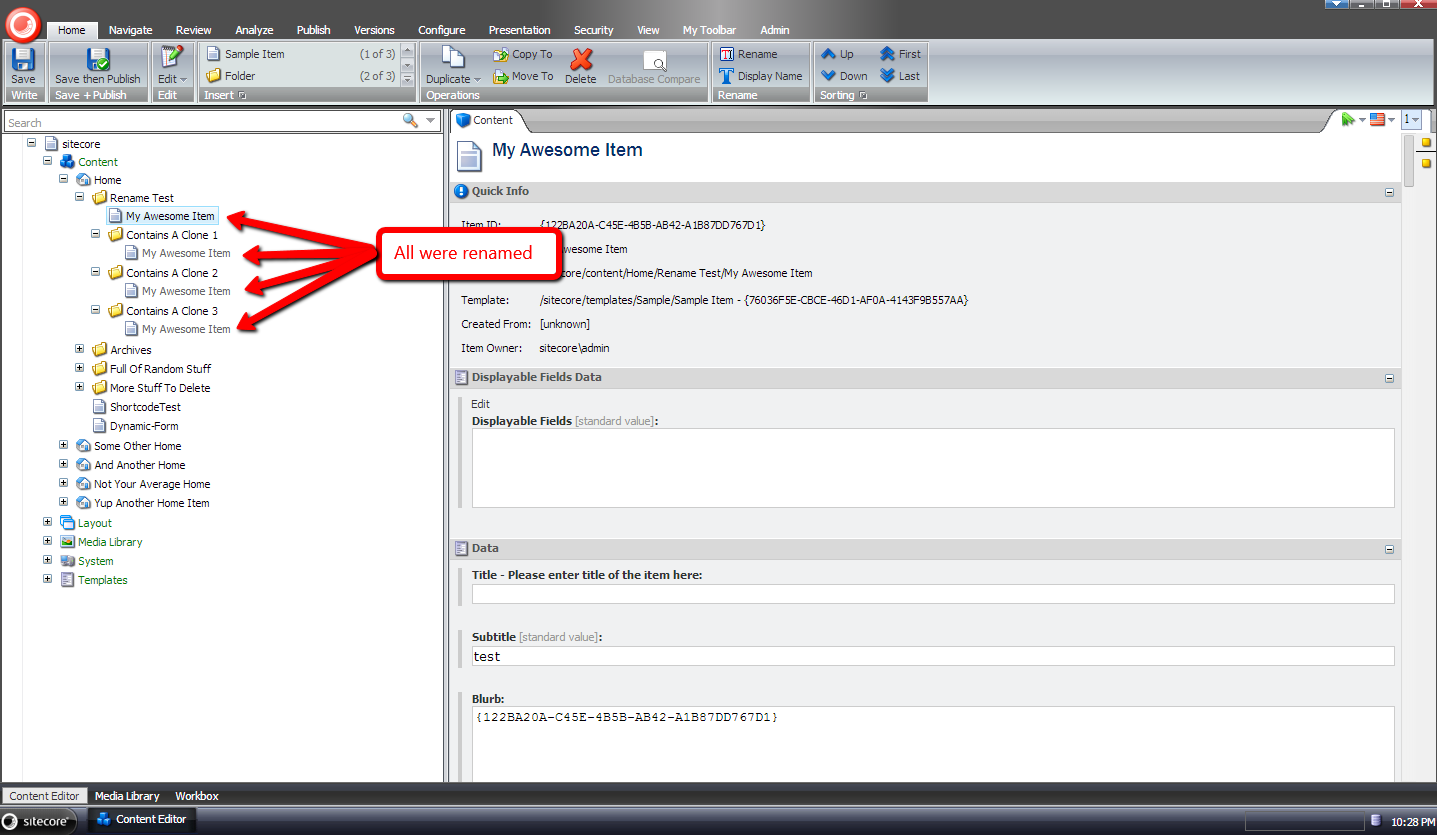
If you have any thoughts/concerns on this approach, or ideas on other ways to accomplish this, please share in a comment.
Synchronize IDTable Entries Across Multiple Sitecore Databases Using a Custom publishItem Pipeline Processor
In a previous post I showed a solution that uses the Composite design pattern in an attempt to answer the following question by Sitecore MVP Kyle Heon:
Although I enjoyed building that solution, it isn’t ideal for synchronizing IDTable entries across multiple Sitecore databases — entries are added to all configured IDTables even when Items might not exist in all databases of those IDTables (e.g. the Sitecore Items have not been published to those databases).
I came up with another solution to avoid the aforementioned problem — one that synchronizes IDTable entries using a custom <publishItem> pipeline processor, and the following class contains code for that processor:
using System.Collections.Generic;
using System.Linq;

using Sitecore.Configuration;
using Sitecore.Data;
using Sitecore.Data.IDTables;
using Sitecore.Diagnostics;
using Sitecore.Publishing.Pipelines.PublishItem;

namespace Sitecore.Sandbox.Pipelines.Publishing
{
    public class SynchronizeIDTables : PublishItemProcessor
    {
        private IEnumerable<string> _IDTablePrefixes;
        private IEnumerable<string> IDTablePrefixes
        {
            get
            {
                if (_IDTablePrefixes == null)
                {
                    _IDTablePrefixes = GetIDTablePrefixes();
                }

                return _IDTablePrefixes;
            }
        }

        private string IDTablePrefixesConfigPath { get; set; }

        public override void Process(PublishItemContext context)
        {
            Assert.ArgumentNotNull(context, "context");
            Assert.ArgumentNotNull(context.PublishOptions, "context.PublishOptions");
            Assert.ArgumentNotNull(context.PublishOptions.SourceDatabase, "context.PublishOptions.SourceDatabase");
            Assert.ArgumentNotNull(context.PublishOptions.TargetDatabase, "context.PublishOptions.TargetDatabase");
            IDTableProvider sourceProvider = CreateNewIDTableProvider(context.PublishOptions.SourceDatabase);
            IDTableProvider targetProvider = CreateNewIDTableProvider(context.PublishOptions.TargetDatabase);
            RemoveEntries(targetProvider, GetAllEntries(targetProvider, context.ItemId));
            AddEntries(targetProvider, GetAllEntries(sourceProvider, context.ItemId));
        }

        protected virtual IDTableProvider CreateNewIDTableProvider(Database database)
        {
            Assert.ArgumentNotNull(database, "database");
            return Factory.CreateObject(string.Format("IDTable[@id='{0}']", database.Name), true) as IDTableProvider;
        }

        protected virtual IEnumerable<IDTableEntry> GetAllEntries(IDTableProvider provider, ID itemId)
        {
            Assert.ArgumentNotNull(provider, "provider");
            Assert.ArgumentCondition(!ID.IsNullOrEmpty(itemId), "itemId", "itemId cannot be null or empty!");
            List<IDTableEntry> entries = new List<IDTableEntry>();
            foreach(string prefix in IDTablePrefixes)
            {
                IEnumerable<IDTableEntry> entriesForPrefix = provider.GetKeys(prefix, itemId);
                if (entriesForPrefix.Any())
                {
                    entries.AddRange(entriesForPrefix);
                }
            }

            return entries;
        }

        private static void RemoveEntries(IDTableProvider provider, IEnumerable<IDTableEntry> entries)
        {
            Assert.ArgumentNotNull(provider, "provider");
            Assert.ArgumentNotNull(entries, "entries");
            foreach (IDTableEntry entry in entries)
            {
                provider.Remove(entry.Prefix, entry.Key);
            }
        }

        private static void AddEntries(IDTableProvider provider, IEnumerable<IDTableEntry> entries)
        {
            Assert.ArgumentNotNull(provider, "provider");
            Assert.ArgumentNotNull(entries, "entries");
            foreach (IDTableEntry entry in entries)
            {
                provider.Add(entry);
            }
        }

        protected virtual IEnumerable<string> GetIDTablePrefixes()
        {
            Assert.ArgumentNotNullOrEmpty(IDTablePrefixesConfigPath, "IDTablePrefixConfigPath");
            return Factory.GetStringSet(IDTablePrefixesConfigPath);
        }
    }
}
The Process method above grabs all IDTable entries for all defined IDTable prefixes — these are pulled from the configuration file that is shown later on in this post — from the source database for the Item being published, and pushes them all to the target database after deleting all preexisting entries from the target database for the Item (the code is doing a complete overwrite for the Item’s IDTable entries in the target database).
I also added the following code to serve as an item:deleted event handler (if you would like to learn more about events and their handlers, check out John West‘s post about them, and also take a look at this page on the
Sitecore Developer Network (SDN)) to remove entries for the Item when it’s being deleted:
using System;
using System.Collections.Generic;
using System.Linq;

using Sitecore.Configuration;
using Sitecore.Data;
using Sitecore.Data.Events;
using Sitecore.Data.IDTables;
using Sitecore.Data.Items;
using Sitecore.Diagnostics;
using Sitecore.Events;

namespace Sitecore.Sandbox.Data.IDTables
{
    public class ItemEventHandler
    {
        private IEnumerable<string> _IDTablePrefixes;
        private IEnumerable<string> IDTablePrefixes
        {
            get
            {
                if (_IDTablePrefixes == null)
                {
                    _IDTablePrefixes = GetIDTablePrefixes();
                }

                return _IDTablePrefixes;
            }
        }

        private string IDTablePrefixesConfigPath { get; set; }

        protected void OnItemDeleted(object sender, EventArgs args)
        {
            if (args == null)
            {
                return;
            }

            Item item = Event.ExtractParameter(args, 0) as Item;
            if (item == null)
            {
                return;
            }

            DeleteItemEntries(item);
        }

        private void DeleteItemEntries(Item item)
        {
            Assert.ArgumentNotNull(item, "item");
            IDTableProvider provider = CreateNewIDTableProvider(item.Database.Name);
            foreach (IDTableEntry entry in GetAllEntries(provider, item.ID))
            {
                provider.Remove(entry.Prefix, entry.Key);
            }
        }

        protected virtual IEnumerable<IDTableEntry> GetAllEntries(IDTableProvider provider, ID itemId)
        {
            Assert.ArgumentNotNull(provider, "provider");
            Assert.ArgumentCondition(!ID.IsNullOrEmpty(itemId), "itemId", "itemId cannot be null or empty!");
            List<IDTableEntry> entries = new List<IDTableEntry>();
            foreach (string prefix in IDTablePrefixes)
            {
                IEnumerable<IDTableEntry> entriesForPrefix = provider.GetKeys(prefix, itemId);
                if (entriesForPrefix.Any())
                {
                    entries.AddRange(entriesForPrefix);
                }
            }

            return entries;
        }

        private static void RemoveEntries(IDTableProvider provider, IEnumerable<IDTableEntry> entries)
        {
            Assert.ArgumentNotNull(provider, "provider");
            Assert.ArgumentNotNull(entries, "entries");
            foreach (IDTableEntry entry in entries)
            {
                provider.Remove(entry.Prefix, entry.Key);
            }
        }

        protected virtual IDTableProvider CreateNewIDTableProvider(string databaseName)
        {
            return Factory.CreateObject(string.Format("IDTable[@id='{0}']", databaseName), true) as IDTableProvider;
        }

        protected virtual IEnumerable<string> GetIDTablePrefixes()
        {
            Assert.ArgumentNotNullOrEmpty(IDTablePrefixesConfigPath, "IDTablePrefixConfigPath");
            return Factory.GetStringSet(IDTablePrefixesConfigPath);
        }
    }
}
The above code retrieves all IDTable entries for the Item being deleted — filtered by the configuration defined IDTable prefixes — from its database’s IDTable, and calls the Remove method on the IDTableProvider instance that is created for the Item’s database for each entry.
I then registered all of the above in Sitecore using the following configuration file:
<?xml version="1.0" encoding="utf-8" ?>
<configuration xmlns:patch="http://www.sitecore.net/xmlconfig/">
  <sitecore>
    <events>
      <event name="item:deleted">
        <handler type="Sitecore.Sandbox.Data.IDTables.ItemEventHandler, Sitecore.Sandbox" method="OnItemDeleted">
          <IDTablePrefixesConfigPath>IDTablePrefixes/IDTablePrefix</IDTablePrefixesConfigPath>
        </handler>
      </event>
    </events>
    <IDTable type="Sitecore.Data.$(database).$(database)IDTable, Sitecore.Kernel" singleInstance="true">
      <patch:attribute name="id">master</patch:attribute>
      <param connectionStringName="master"/>
      <param desc="cacheSize">500KB</param>
    </IDTable>
    <IDTable id="web" type="Sitecore.Data.$(database).$(database)IDTable, Sitecore.Kernel" singleInstance="true">
      <param connectionStringName="web"/>
      <param desc="cacheSize">500KB</param>
    </IDTable>
    <IDTablePrefixes>
      <IDTablePrefix>IDTableTest</IDTablePrefix>
    </IDTablePrefixes>
    <pipelines>
      <publishItem>
        <processor type="Sitecore.Sandbox.Pipelines.Publishing.SynchronizeIDTables, Sitecore.Sandbox">
          <IDTablePrefixesConfigPath>IDTablePrefixes/IDTablePrefix</IDTablePrefixesConfigPath>
        </processor>
      </publishItem>
    </pipelines>
  </sitecore>
</configuration>
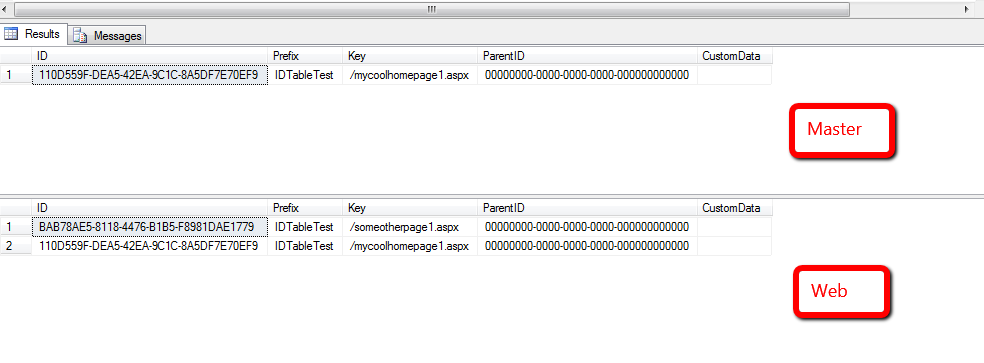
For testing, I quickly whipped up a web form to add a couple of IDTable entries using an IDTableProvider for the master database — I am omitting that code for brevity — and ran a query to verify the entries were added into the IDTable in my master database (I also ran another query for the IDTable in my web database to show that it contains no entries):

I published both items, and queried the IDTable in the master and web databases:

As you can see, both entries were inserted into the web database’s IDTable.
I then deleted one of the items from the master database via the Sitecore Content Editor:
It was removed from the IDTable in the master database.
I then published the deleted item’s parent with subitems:

As you can see, it was removed from the IDTable in the web database.
If you have any suggestions for making this code better, or have another solution for synchronizing IDTable entries across multiple Sitecore databases, please share in a comment.
Synchronize IDTable Entries Across Multiple Sitecore Databases Using a Composite IDTableProvider
The other day Sitecore MVP Kyle Heon asked:
This tweet got the wheels turning — more like got the hamster wheel spinning in my head — and I began experimenting on ways to synchronize IDTable entries across different Sitecore databases.
In this post, I will show the first solution I had come up with — yes I’ve come up with two solutions to this although no doubt there are more (if you have ideas for other solutions, or have tackled this problem in the past, please share in a comment) — but before I show that solution, I’d like to explain what the IDTable in Sitecore is, and why you might want to use it.
Assuming you’re using SQL Server for Sitecore, the “out of the box” IDTable in Sitecore is a database table that lives in all Sitecore databases — though Sitecore’s prepackaged configuration only points to the IDTable in the master database.
One has the ability to store key/value pairs in this table in the event you don’t want to “roll your own” custom database table — or use some other data store — and don’t want to expose these key/value pair relationships in Items in Sitecore.
The key must be a character string, and the value must be a Sitecore Item ID.
Plus, one has the ability to couple these key/value pairs with “custom data” — this, like the key, is stored in the database as a string which makes it cumbersome around storing complex data structures (having some sort of serialization/deserialization paradigm in place would be required to make this work).
Alex Shyba showed how one could leverage the IDTable for URLs for fictitious products stored in Sitecore in this post, and this article employed the IDTable for a custom Data Provider.
If you would like to know more about the IDTable, please leave a comment, and I will devote a future post to it.
Let’s take a look at the first solution I came up with:
using System;
using System.Collections.Generic;
using System.Xml;

using Sitecore.Configuration;
using Sitecore.Data;
using Sitecore.Data.IDTables;
using Sitecore.Diagnostics;

using Sitecore.Sandbox.Data.IDTables;

namespace Sitecore.Sandbox.Data.SqlServer
{
    public class CompositeSqlServerIDTable : IDTableProvider
    {
        private IDictionary<string, IDTableProvider> _IDTableProviders;
        private IDictionary<string, IDTableProvider> IDTableProviders
        {
            get
            {
                if (_IDTableProviders == null)
                {
                    _IDTableProviders = new Dictionary<string, IDTableProvider>();
                }

                return _IDTableProviders;
            }
        }

        private string DatabaseName { get; set; }

        public CompositeSqlServerIDTable()
            : this(GetDefaultDatabaseName())
        {
        }

        public CompositeSqlServerIDTable(string databaseName)
        {
            SetDatabaseName(databaseName);
        }

        private void SetDatabaseName(string databaseName)
        {
            Assert.ArgumentNotNullOrEmpty(databaseName, "databaseName");
            DatabaseName = databaseName;
        }

        public override void Add(IDTableEntry entry)
        {
            foreach (IDTableProvider provider in IDTableProviders.Values)
            {
                provider.Add(entry);
            }
        }

        public override IDTableEntry GetID(string prefix, string key)
        {
            return GetContextIDTableProvider().GetID(prefix, key);
        }

        public override IDTableEntry[] GetKeys(string prefix)
        {
            return GetContextIDTableProvider().GetKeys(prefix);
        }

        public override IDTableEntry[] GetKeys(string prefix, ID id)
        {
            return GetContextIDTableProvider().GetKeys(prefix, id);
        }

        protected virtual IDTableProvider GetContextIDTableProvider()
        {
            IDTableProvider provider;
            if (IDTableProviders.TryGetValue(DatabaseName, out provider))
            {
                return provider;
            }

            return new NullIDTable();
        }

        public override void Remove(string prefix, string key)
        {
            foreach (IDTableProvider provider in IDTableProviders.Values)
            {
                provider.Remove(prefix, key);
            }
        }

        protected virtual void AddIDTable(XmlNode configNode)
        {
            if (configNode == null || string.IsNullOrWhiteSpace(configNode.InnerText))
            {
                return;
            }

            IDTableProvider idTable = Factory.CreateObject<IDTableProvider>(configNode);
            if (idTable == null)
            {
                Log.Error("Configuration invalid for an IDTable!", this);
                return;
            }

            XmlAttribute idAttribute = configNode.Attributes["id"];
            if (idAttribute == null || string.IsNullOrWhiteSpace(idAttribute.Value))
            {
                Log.Error("IDTable configuration should have an id attribute set!", this);
                return;
            }

            if(IDTableProviders.ContainsKey(idAttribute.Value))
            {
                Log.Error("Duplicate IDTable id encountered!", this);
                return;
            }

            IDTableProviders.Add(idAttribute.Value, idTable);
        }

        private static string GetDefaultDatabaseName()
        {
            if (Context.ContentDatabase != null)
            {
                return Context.ContentDatabase.Name;
            }

            return Context.Database.Name;
        }
    }
}
The above class uses the Composite design pattern — it adds/removes entries in multiple IDTableProvider instances (these instances are specified in the configuration file that is shown later in this post), and delegates calls to the GetKeys and GetID methods of the instance that is referenced by the database name passed in to the class’ constructor.
The CompositeSqlServerIDTable class also utilizes a Null Object by creating an instance of the following class when the context database does not exist in the collection:
using System.Collections.Generic;

using Sitecore.Data;
using Sitecore.Data.IDTables;

namespace Sitecore.Sandbox.Data.IDTables
{
    public class NullIDTable : IDTableProvider
    {
        public NullIDTable()
        {
        }

        public override void Add(IDTableEntry entry)
        {
            return;
        }

        public override IDTableEntry GetID(string prefix, string key)
        {
            return null;
        }

        public override IDTableEntry[] GetKeys(string prefix)
        {
            return new List<IDTableEntry>().ToArray();
        }

        public override IDTableEntry[] GetKeys(string prefix, ID id)
        {
            return new List<IDTableEntry>().ToArray();
        }

        public override void Remove(string prefix, string key)
        {
            return;
        }
    }
}
The NullIDTable class above basically has no behavior, returns null for the GetID method, and an empty collection for both GetKeys methods. Having a Null Object helps us avoid checking for nulls when performing operations on the IDTableProvider instance when an instance cannot be found in the IDTableProviders Dictionary property — although we lose visibility around the context database not being present in the Dictionary (I probably should’ve included some logging code to capture this).
I then glued everything together using the following configuration file:
<?xml version="1.0" encoding="utf-8" ?>
<configuration xmlns:patch="http://www.sitecore.net/xmlconfig/">
  <sitecore>
    <IDTable patch:instead="IDTable[@type='Sitecore.Data.$(database).$(database)IDTable, Sitecore.Kernel']" type="Sitecore.Sandbox.Data.$(database).Composite$(database)IDTable" singleInstance="true">
      <IDTables hint="raw:AddIDTable">
        <IDTable id="core" type="Sitecore.Data.$(database).$(database)IDTable, Sitecore.Kernel" singleInstance="true">
          <param connectionStringName="$(id)"/>
          <param desc="cacheSize">500KB</param>
        </IDTable>
        <IDTable id="master" type="Sitecore.Data.$(database).$(database)IDTable, Sitecore.Kernel" singleInstance="true">
          <param connectionStringName="$(id)"/>
          <param desc="cacheSize">500KB</param>
        </IDTable>
        <IDTable id="web" type="Sitecore.Data.$(database).$(database)IDTable, Sitecore.Kernel" singleInstance="true">
          <param connectionStringName="$(id)"/>
          <param desc="cacheSize">500KB</param>
        </IDTable>
      </IDTables>
    </IDTable>
  </sitecore>
</configuration>
To test the code above, I created the following web form which basically invokes add/remove methods on the instance of our IDTableProvider, and displays the entries in our IDTables after each add/remove operation:
using System;
using System.Collections.Generic;
using System.Linq;

using Sitecore.Configuration;
using Sitecore.Data.IDTables;

namespace Sandbox
{
    public partial class IDTableTest : System.Web.UI.Page
    {
        protected void Page_Load(object sender, EventArgs e)
        {
            AddEntries();
            ShowEntries();
            RemoveOneEntry();
            ShowEntries();
            RemoveAllEntries();
            ShowEntries();
        }

        private void AddEntries()
        {
            Response.Write("Adding two entries...<br /><br />");
            IDTable.Add("IDTableTest", "/mycoolhomepage1.aspx", Sitecore.Data.ID.Parse("{110D559F-DEA5-42EA-9C1C-8A5DF7E70EF9}"));
            IDTable.Add("IDTableTest", "/someotherpage1.aspx", Sitecore.Data.ID.Parse("{BAB78AE5-8118-4476-B1B5-F8981DAE1779}"));
        }

        private void RemoveOneEntry()
        {
            Response.Write("Removing one entry...<br /><br />");
            IDTable.RemoveKey("IDTableTest", "/mycoolhomepage1.aspx");
        }

        private void RemoveAllEntries()
        {
            Response.Write("Removing all entries...<br /><br />");
            foreach (IDTableEntry entry in IDTable.GetKeys("IDTableTest"))
            {
                IDTable.RemoveKey(entry.Prefix, entry.Key);
            }
        }

        private void ShowEntries()
        {
            ShowEntries("core");
            ShowEntries("master");
            ShowEntries("web");
        }

        private void ShowEntries(string databaseName)
        {
            IDTableProvider provider = CreateNewIDTableProvider(databaseName);
            IEnumerable<IDTableEntry> entries = IDTable.GetKeys("IDTableTest");
            Response.Write(string.Format("{0} entries in IDTable in the {1} database:<br />", entries.Count(), databaseName));
            foreach (IDTableEntry entry in provider.GetKeys("IDTableTest"))
            {
                Response.Write(string.Format("key: {0} id: {1}<br />", entry.Key, entry.ID));
            }
            Response.Write("<br />");
        }

        protected virtual IDTableProvider CreateNewIDTableProvider(string databaseName)
        {
            return Factory.CreateObject(string.Format("//IDTable[@id='{0}']", databaseName), true) as IDTableProvider;
        }
    }
}
When I loaded up the web form above in a browser, I saw that things were working as expected:

Although I had fun in writing all of the code above, I feel this isn’t exactly ideal for synchronizing entries in IDTables across multiple Sitecore databases. I cannot see why one would want an entry for a Item in master that has not yet been published to the web database.
If you know of a scenario where the above code could be useful, or have suggestions on making it better, please drop a comment.
In my next post, I will show you what I feel is a better approach to synchronizing entries across IDTables — a solution that synchronizes entries via publishing and Item deletion.
Until next time, have a Sitecorelicious day!
Periodically Rebuild Link Databases using an Agent in Sitecore
Last week a colleague had asked me whether rebuilding the Link Database would solve an issue she was seeing. That conversation got me thinking: wouldn’t it be nice if we could automate the rebuilding of the Link Database for each Sitecore database at a scheduled time?
I am certain others have already created solutions to do this — if you know of any, please share in a comment — but I didn’t conduct a search to find any (I normally advocate not reinventing the wheel for code solutions but wanted to have some fun building a new solution).
In the spirit of my post on putting Sitecore to work for you, I built the following Sitecore agent (check out John West’s blog post on Sitecore agents to learn more):
using System;
using System.Collections.Generic;
using System.Diagnostics;
using System.Xml;

using Sitecore.Configuration;
using Sitecore.Data;
using Sitecore.Diagnostics;
using Sitecore.Jobs;

namespace Sitecore.Sandbox.Tasks
{
    public class RebuildLinkDatabasesAgent
    {
        private static readonly IList<Database> Databases = new List<Database>();
        private static readonly Stopwatch Stopwatch = Stopwatch.StartNew();

        public void Run()
        {
            JobManager.Start(CreateNewJobOptions());
        }

        protected virtual JobOptions CreateNewJobOptions()
        {
            return new JobOptions("RebuildLinkDatabasesAgent", "index", Context.Site.Name, this, "RebuildLinkDatabases");
        }

        protected virtual void RebuildLinkDatabases()
        {
            Job job = Context.Job;
            try
            {
                RebuildLinkDatabases(Databases);
            }
            catch (Exception ex)
            {
                job.Status.Failed = true;
                job.Status.Messages.Add(ex.ToString());
            }

            job.Status.State = JobState.Finished;
        }

        private void RebuildLinkDatabases(IEnumerable<Database> databases)
        {
            Assert.ArgumentNotNull(databases, "databases");
            foreach (Database database in databases)
            {
                Stopwatch.Start();
                RebuildLinkDatabase(database);
                Stopwatch.Stop();
                LogEntry(database, Stopwatch.Elapsed.Milliseconds);
            }
        }

        protected virtual void RebuildLinkDatabase(Database database)
        {
            Assert.ArgumentNotNull(database, "database");
            Globals.LinkDatabase.Rebuild(database);
        }

        protected virtual void LogEntry(Database database, int elapsedMilliseconds)
        {
            Assert.ArgumentNotNull(database, "database");
            if (string.IsNullOrWhiteSpace(LogEntryFormat))
            {
                return;
            }

            Log.Info(string.Format(LogEntryFormat, database.Name, elapsedMilliseconds), this);
        }

        private static void AddDatabase(XmlNode configNode)
        {
            if (configNode == null || string.IsNullOrWhiteSpace(configNode.InnerText))
            {
                return;
            }

            Database database = TryGetDatabase(configNode.InnerText);
            if (database != null)
            {
                Databases.Add(database);
            }
        }

        private static Database TryGetDatabase(string databaseName)
        {
            Assert.ArgumentNotNullOrEmpty(databaseName, "databaseName");
            try
            {
                return Factory.GetDatabase(databaseName);
            }
            catch (Exception ex)
            {
                Type agentType = typeof(RebuildLinkDatabasesAgent);
                Log.Error(agentType.ToString(), ex, agentType);
            }

            return null;
        }

        private string LogEntryFormat { get; set; }
    }
}
Logic in the class above reads in a list of databases set in a configuration file, adds them to a list for processing — these are only added to the list if they exist — and rebuilds the Link Database in each via a Sitecore job.
I added some timing logic to see how long it takes to rebuild each database, and capture this information in the Sitecore log.
I then wired up the above class in Sitecore using the following patch include configuration file:
<?xml version="1.0" encoding="utf-8"?>
<configuration xmlns:patch="http://www.sitecore.net/xmlconfig/">
  <sitecore>
    <scheduling>
      <agent type="Sitecore.Sandbox.Tasks.RebuildLinkDatabasesAgent" method="Run" interval="00:01:00">
        <databases hint="raw:AddDatabase">
          <database>core</database>
          <database>master</database>
          <database>web</database>
        </databases>
        <LogEntryFormat>Rebuilt link database: {0} in {1} milliseconds.</LogEntryFormat>
      </agent>
    </scheduling>
  </sitecore>
</configuration>
I’ve set this agent to run every minute for testing, but it would probably be wise to have this run no more than once or twice a day.
After waiting a bit, I saw the following in my Sitecore log:

I do question the rebuild times. These seem quite small, especially when it takes a while to rebuild the Link Databases via the Sitecore Control Panel. If you have any ideas/thoughts on why there is an incongruence between the times in my log and how long it takes to rebuild these via the Sitecore Control Panel, please share in a comment.
Further, if you have any recommendations on making this code better, or have other ideas on automating the rebuilding of Link Databases in Sitecore, please drop a comment.
Until next time, have a Sitecoretastic day!
 SitecoreJunkie.com