Home » Data (Page 8)
Category Archives: Data
Manipulate Field Values in a Custom Sitecore Web Forms for Marketers DataProvider
In my Experiments with Field Data Encryption in Sitecore article, I briefly mentioned designing a custom Web Forms for Marketers (WFFM) DataProvider that uses the decorator pattern for encrypting and decrypting field values before saving and retrieving field values from the WFFM database.
From the time I penned that article up until now, I have been feeling a bit guilty that I may have left you hanging by not going into the mechanics around how I did that — I built that DataProvider for my company to be used in one of our healthcare specific content management modules.
To make up for not showing you this, I decided to build another custom WFFM DataProvider — one that will replace periods with smiley faces and the word “Sitecore” with “Sitecore®”, case insensitively.
First, I defined an interface for utility classes that will manipulate objects for us. All manipulators will consume an object of a specified type, manipulate that object in some way, and then return the maniputed object to the manipulator object’s client:
namespace Sitecore.Sandbox.Utilities.Manipulators.Base
{
    public interface IManipulator<T>
    {
        T Manipulate(T source);
    }
}
The first manipulator I built is a string manipulator. Basically, this object will take in a string and replace a specified substring with another:
namespace Sitecore.Sandbox.Utilities.Manipulators.Base
{
    public interface IStringReplacementManipulator : IManipulator<string>
    {
    }
}
using System;
using System.Collections.Generic;
using System.Linq;
using System.Text;
using System.Text.RegularExpressions;

using Sitecore.Diagnostics;

using Sitecore.Sandbox.Utilities.Manipulators.Base;

namespace Sitecore.Sandbox.Utilities.Manipulators
{
    public class StringReplacementManipulator : IStringReplacementManipulator
    {
        private string PatternToReplace { get; set; }
        private string ReplacementString { get; set; }
        private bool IgnoreCase { get; set; }

        private StringReplacementManipulator(string patternToReplace, string replacementString)
            : this(patternToReplace, replacementString, false)
        {
        }

        private StringReplacementManipulator(string patternToReplace, string replacementString, bool ignoreCase)
        {
            SetPatternToReplace(patternToReplace);
            SetReplacementString(replacementString);
            SetIgnoreCase(ignoreCase);
        }

        private void SetPatternToReplace(string patternToReplace)
        {
            Assert.ArgumentNotNullOrEmpty(patternToReplace, "patternToReplace");
            PatternToReplace = patternToReplace;
        }

        private void SetReplacementString(string replacementString)
        {
            ReplacementString = replacementString;
        }

        private void SetIgnoreCase(bool ignoreCase)
        {
            IgnoreCase = ignoreCase;
        }

        public string Manipulate(string source)
        {
            Assert.ArgumentNotNullOrEmpty(source, "source");
            RegexOptions regexOptions = RegexOptions.None;

            if (IgnoreCase)
            {
                regexOptions = RegexOptions.IgnoreCase;
            }

            return Regex.Replace(source, PatternToReplace, ReplacementString, regexOptions);
        }

        public static IStringReplacementManipulator CreateNewStringReplacementManipulator(string patternToReplace, string replacementString)
        {
            return new StringReplacementManipulator(patternToReplace, replacementString);
        }

        public static IStringReplacementManipulator CreateNewStringReplacementManipulator(string patternToReplace, string replacementString, bool ignoreCase)
        {
            return new StringReplacementManipulator(patternToReplace, replacementString, ignoreCase);
        }
    }
}
Clients of this class can choose to have substrings replaced in a case sensitive or insensitive manner.
By experimenting in a custom WFFM DataProvider and investigating code via .NET reflector in the WFFM assemblies, I discovered I had to create a custom object that implements Sitecore.Forms.Data.IField.
Out of the box, WFFM uses Sitecore.Forms.Data.DefiniteField — a class that implements Sitecore.Forms.Data.IField, albeit this class is declared internal and cannot be reused outside of the Sitecore.Forms.Core.dll assembly.
When I attempted to change the Value property of this object in a custom WFFM DataProvider, changes did not stick for some reason — a reason that I have not definitely ascertained.
However, to get around these lost Value property changes, I created a custom object that implements Sitecore.Forms.Data.IField:
using System;

using Sitecore.Forms.Data;

namespace Sitecore.Sandbox.Utilities.Manipulators.DTO
{
    public class WFFMField : IField
    {
        public string Data { get; set; }

        public Guid FieldId { get; set; }

        public string FieldName { get; set; }

        public IForm Form { get; set; }

        public Guid Id { get; internal set; }

        public string Value { get; set; }
    }
}
Next, I built a WFFM Field collection manipulator — an IEnumerable of Sitecore.Forms.Data.IField defined in Sitecore.Forms.Core.dll — using the DTO defined above:
using System.Collections.Generic;

using Sitecore.Forms.Data;

namespace Sitecore.Sandbox.Utilities.Manipulators.Base
{
    public interface IWFFMFieldsManipulator : IManipulator<IEnumerable<IField>>
    {
    }
}
using System;
using System.Collections.Generic;
using System.Linq;
using System.Text;

using Sitecore.Diagnostics;
using Sitecore.Forms.Data;

using Sitecore.Sandbox.Utilities.Manipulators.Base;
using Sitecore.Sandbox.Utilities.Manipulators.DTO;

namespace Sitecore.Sandbox.Utilities.Manipulators
{
    public class WFFMFieldsManipulator : IWFFMFieldsManipulator
    {
        private IEnumerable<IStringReplacementManipulator> FieldValueManipulators { get; set; }

        private WFFMFieldsManipulator(params IStringReplacementManipulator[] fieldValueManipulator)
            : this(fieldValueManipulator.AsEnumerable())
        {
        }

        private WFFMFieldsManipulator(IEnumerable<IStringReplacementManipulator> fieldValueManipulators)
        {
            SetFieldValueManipulator(fieldValueManipulators);
        }

        private void SetFieldValueManipulator(IEnumerable<IStringReplacementManipulator> fieldValueManipulators)
        {
            Assert.ArgumentNotNull(fieldValueManipulators, "fieldValueManipulators");
            foreach (IStringReplacementManipulator fieldValueManipulator in fieldValueManipulators)
            {
                Assert.ArgumentNotNull(fieldValueManipulator, "fieldValueManipulator");
            }

            FieldValueManipulators = fieldValueManipulators;
        }

        public IEnumerable<IField> Manipulate(IEnumerable<IField> fields)
        {
            IList<IField> maniuplatdFields = new List<IField>();

            foreach (IField field in fields)
            {
                maniuplatdFields.Add(MainpulateFieldValue(field));
            }

            return maniuplatdFields;
        }

        private IField MainpulateFieldValue(IField field)
        {
            IField maniuplatedField = CreateNewWFFMField(field);

            if (maniuplatedField != null)
            {
                maniuplatedField.Value = ManipulateString(maniuplatedField.Value);
            }

            return maniuplatedField;
        }

        private static IField CreateNewWFFMField(IField field)
        {
            if(field != null)
            {
                return new WFFMField
                {
                    Data = field.Data,
                    FieldId = field.FieldId,
                    FieldName = field.FieldName,
                    Form = field.Form,
                    Id = field.Id,
                    Value = field.Value
                };
            }

            return null;
        }

        private string ManipulateString(string stringToManipulate)
        {
            if (string.IsNullOrEmpty(stringToManipulate))
            {
                return string.Empty;
            }

            string manipulatedString = stringToManipulate;

            foreach(IStringReplacementManipulator fieldValueManipulator in FieldValueManipulators)
            {
                manipulatedString = fieldValueManipulator.Manipulate(manipulatedString);
            }

            return manipulatedString;
        }

        public static IWFFMFieldsManipulator CreateNewWFFMFieldsManipulator(params IStringReplacementManipulator[] fieldValueManipulators)
        {
            return new WFFMFieldsManipulator(fieldValueManipulators);
        }

        public static IWFFMFieldsManipulator CreateNewWFFMFieldsManipulator(IEnumerable<IStringReplacementManipulator> fieldValueManipulators)
        {
            return new WFFMFieldsManipulator(fieldValueManipulators);
        }
    }
}
This manipulator consumes a collection of string manipulators and delegates to these for making changes to WFFM field values.
Now, it’s time to create a custom WFFM DataProvider that uses our manipulators defined above.
In my local sandbox Sitecore instance, I’m using SQLite for my WFFM module, and must decorate an instance of Sitecore.Forms.Data.DataProviders.SQLite.SQLiteWFMDataProvider — although this approach would be the same using MS SQL or Oracle since all WFFM DataProviders should inherit from the abstract class Sitecore.Forms.Data.DataProviders.WFMDataProviderBase:
using System;
using System.Collections.Generic;
using System.Linq;
using System.Text;

using Sitecore.Diagnostics;
using Sitecore.Forms.Data;
using Sitecore.Forms.Data.DataProviders;
using Sitecore.Forms.Data.DataProviders.SQLite;

using Sitecore.Sandbox.Translation.Base;
using Sitecore.Sandbox.Utilities.Manipulators.Base;
using Sitecore.Sandbox.Utilities.Manipulators;

namespace Sitecore.Sandbox.WFFM.Data.DataProviders
{
    public class FieldValueManipulationSQLiteWFMDataProvider : WFMDataProviderBase
    {
        private static readonly IStringReplacementManipulator RegisteredTrademarkManipulator = StringReplacementManipulator.CreateNewStringReplacementManipulator("sitecore", " Sitecore®", true);
        private static readonly IStringReplacementManipulator PeriodsToSmiliesManipulator = StringReplacementManipulator.CreateNewStringReplacementManipulator("\\.", " :)");
        private static readonly IWFFMFieldsManipulator FieldsManipulator = WFFMFieldsManipulator.CreateNewWFFMFieldsManipulator(RegisteredTrademarkManipulator, PeriodsToSmiliesManipulator);

	    private WFMDataProviderBase InnerProvider { get; set; }

        public FieldValueManipulationSQLiteWFMDataProvider()
		    : this(CreateNewSQLiteWFMDataProvider())
        {
        }

        public FieldValueManipulationSQLiteWFMDataProvider(string connectionString)
		    : this(CreateNewSQLiteWFMDataProvider(connectionString))
        {
        }

        public FieldValueManipulationSQLiteWFMDataProvider(WFMDataProviderBase innerProvider)
        {
		    SetInnerProvider(innerProvider);
	    }

	    private void SetInnerProvider(WFMDataProviderBase innerProvider)
	    {
		    Assert.ArgumentNotNull(innerProvider, "innerProvider");
		    InnerProvider = innerProvider;
	    }

        private static WFMDataProviderBase CreateNewSQLiteWFMDataProvider()
	    {
            return new SQLiteWFMDataProvider();
	    }

        private static WFMDataProviderBase CreateNewSQLiteWFMDataProvider(string connectionString)
	    {
		    Assert.ArgumentNotNullOrEmpty(connectionString, "connectionString");
            return new SQLiteWFMDataProvider(connectionString);
	    }

        public override void ChangeStorage(Guid formItemId, string newStorage)
        {
            InnerProvider.ChangeStorage(formItemId, newStorage);
        }

        public override void ChangeStorageForForms(IEnumerable<Guid> ids, string storageName)
        {
            InnerProvider.ChangeStorageForForms(ids, storageName);
        }

        public override void DeleteForms(IEnumerable<Guid> formSubmitIds)
        {
            InnerProvider.DeleteForms(formSubmitIds);
        }

        public override void DeleteForms(Guid formItemId, string storageName)
        {
            InnerProvider.DeleteForms(formItemId, storageName);
        }

        public override IEnumerable<IPool> GetAbundantPools(Guid fieldId, int top, out int total)
        {
            return InnerProvider.GetAbundantPools(fieldId, top, out total);
        }

        public override IEnumerable<IForm> GetForms(QueryParams queryParams, out int total)
        {
            return InnerProvider.GetForms(queryParams, out total);
        }

        public override IEnumerable<IForm> GetFormsByIds(IEnumerable<Guid> ids)
        {
            return InnerProvider.GetFormsByIds(ids);
        }

        public override int GetFormsCount(Guid formItemId, string storageName, string filter)
        {
            return InnerProvider.GetFormsCount(formItemId, storageName, filter);
        }

        public override IEnumerable<IPool> GetPools(Guid fieldId)
        {
            return InnerProvider.GetPools(fieldId);
        }

        public override void InsertForm(IForm form)
        {
            ManipulateFields(form);
            InnerProvider.InsertForm(form);
        }

        public override void ResetPool(Guid fieldId)
        {
            InnerProvider.ResetPool(fieldId);
        }

        public override IForm SelectSingleForm(Guid fieldId, string likeValue)
        {
            return InnerProvider.SelectSingleForm(fieldId, likeValue);
        }

        public override bool UpdateForm(IForm form)
        {
            ManipulateFields(form);
            return InnerProvider.UpdateForm(form);
        }

        private static void ManipulateFields(IForm form)
        {
            Assert.ArgumentNotNull(form, "form");
            Assert.ArgumentNotNull(form.Field, "form.Field");
            form.Field = FieldsManipulator.Manipulate(form.Field);
        }
    }
}
This custom DataProvider creates an instance of Sitecore.Forms.Data.DataProviders.SQLite.SQLiteWFMDataProvider and delegates method calls to it.
However, before delegating to insert and update method calls, forms fields are manipulated via our manipulators objects — our manipulators will replace periods with smiley faces, and the word “Sitecore” with “Sitecore®”.
I then had to configure WFFM to use my custom DataProvider above in /App_Config/Include/forms.config:
<configuration xmlns:patch="http://www.sitecore.net/xmlconfig/" xmlns:x="http://www.sitecore.net/xmlconfig/">
	<sitecore>

		<!-- A bunch of stuff here -->

		<!-- SQLite -->
		<formsDataProvider type="Sitecore.Sandbox.WFFM.Data.DataProviders.FieldValueManipulationSQLiteWFMDataProvider,Sitecore.Sandbox">
			<param desc="connection string">Data Source=/data/sitecore_webforms.db;version=3;BinaryGUID=true</param>
		</formsDataProvider>

		<!-- A bunch of stuff here -->

	</sitecore>
</configuration>
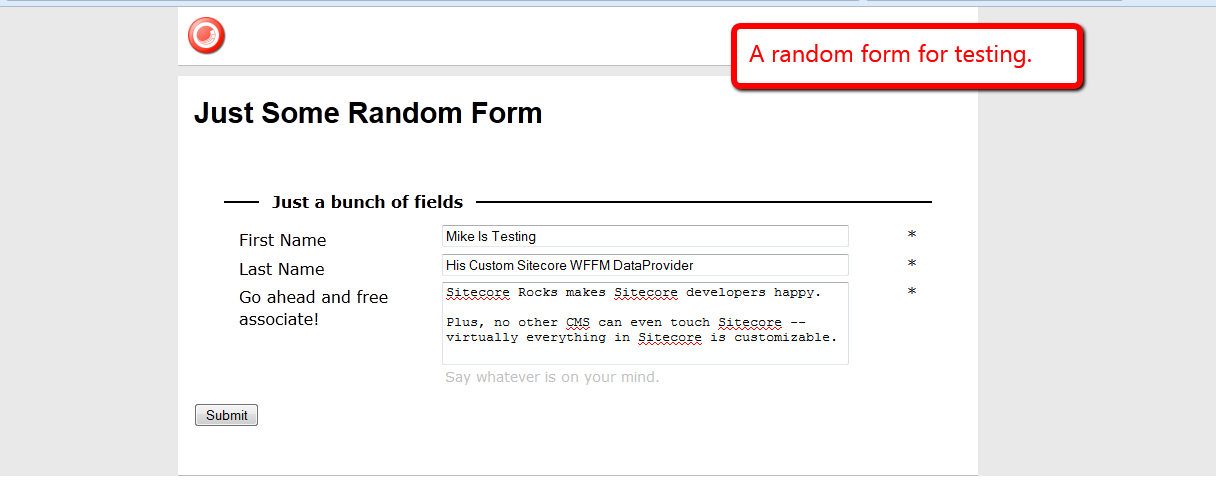
For testing, I build a random WFFM form containing three fields, and created a page item to hold this form.
I then navigated to my form page and filled it in:
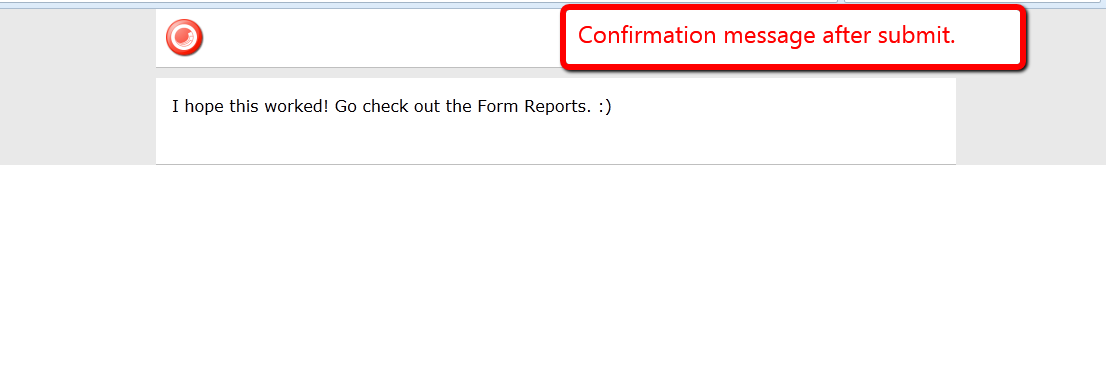
I then clicked the Submit button:
I then opened up the Form Reports for my form:

As you can see, it all gelled together nicely. 🙂
Rip Out Sitecore Web Forms for Marketers Field Values During a Custom Save Action
A couple of weeks ago, I architected a Web Forms for Marketers (WFFM) solution that sends credit card information to a third-party credit card processor — via a custom form verification step — and blanks out sensitive credit card information before saving into the WFFM database.
Out of the box, WFFM will save credit card information in plain text to its database — yes, the data is hidden in the form report, although is saved to the database as plain text. This information being saved as plain text is a security risk.
One could create a solution similar to what I had done in my article discussing data encryption — albeit it might be in your best interest to avoid any headaches and potential security issues around saving and holding onto credit card information.
I can’t share the solution I built a couple of weeks ago — I built it for my current employer. I will, however, share a similar solution where I blank out the value of a field containing a social security number — a unique identifier of a citizen of the United States — of a person posing a question to the Internal Revenue Service (IRS) of the United States (yes, I chose this topic since tax season is upon us here in the US, and I loathe doing taxes :)).
First, I created a custom Web Forms for Marketers field for social security numbers. It is just a composite control containing three textboxes separated by labels containing hyphens:
using System;
using System.Collections.Generic;
using System.ComponentModel;
using System.Linq;
using System.Text;
using System.Web.UI;
using System.Web.UI.WebControls;

using Sitecore.Form.Core.Attributes;
using Sitecore.Form.Core.Controls.Data;
using Sitecore.Form.Core.Visual;
using Sitecore.Form.Web.UI.Controls;

namespace Sitecore.Sandbox.WFFM.Controls
{
    public class SocialSecurityNumber : InputControl
    {
        private const string Hyphen = "-";
        private static readonly string baseCssClassName = "scfSingleLineTextBorder";
        protected TextBox firstPart;
        protected System.Web.UI.WebControls.Label firstMiddleSeparator;
        protected TextBox middlePart;
        protected System.Web.UI.WebControls.Label middleLastSeparator;
        protected TextBox lastPart;

        public SocialSecurityNumber() : this(HtmlTextWriterTag.Div)
        {
            firstPart = new TextBox();
            firstMiddleSeparator = new System.Web.UI.WebControls.Label { Text = Hyphen };
            middlePart = new TextBox();
            middleLastSeparator = new System.Web.UI.WebControls.Label { Text = Hyphen };
            lastPart = new TextBox();
        }

        public SocialSecurityNumber(HtmlTextWriterTag tag)
            : base(tag)
        {
            this.CssClass = baseCssClassName;
        }

        protected override void OnInit(EventArgs e)
        {
            SetCssClasses();
            SetTextBoxeWidths();
            SetMaxLengths();
            SetTextBoxModes();
            AddChildControls();
        }

        private void SetCssClasses()
        {
            help.CssClass = "scfSingleLineTextUsefulInfo";
            title.CssClass = "scfSingleLineTextLabel";
            generalPanel.CssClass = "scfSingleLineGeneralPanel";
        }

        private void SetTextBoxeWidths()
        {
            firstPart.Style.Add("width", "40px");
            middlePart.Style.Add("width", "35px");
            lastPart.Style.Add("width", "50px");
        }

        private void SetMaxLengths()
        {
            firstPart.MaxLength = 3;
            middlePart.MaxLength = 2;
            lastPart.MaxLength = 4;
        }

        private void SetTextBoxModes()
        {
            firstPart.TextMode = TextBoxMode.SingleLine;
            middlePart.TextMode = TextBoxMode.SingleLine;
            lastPart.TextMode = TextBoxMode.SingleLine;
        }

        private void AddChildControls()
        {
            Controls.AddAt(0, generalPanel);
            Controls.AddAt(0, title);

            generalPanel.Controls.Add(firstPart);
            generalPanel.Controls.Add(firstMiddleSeparator);
            generalPanel.Controls.Add(middlePart);
            generalPanel.Controls.Add(middleLastSeparator);
            generalPanel.Controls.Add(lastPart);
            generalPanel.Controls.Add(help);
        }

        public override string ID
        {
            get
            {
                return firstPart.ID;
            }
            set
            {
                title.ID = string.Concat(value, "_text");
                firstPart.ID = value;
                base.ID = string.Concat(value, "_scope");
                title.AssociatedControlID = firstPart.ID;
            }
        }

        public override ControlResult Result
        {
            get
            {
                return GetNewControlResult();
            }
        }

        private ControlResult GetNewControlResult()
        {
            TrimAllTextBoxes();
            return new ControlResult(ControlName, GetValue(), string.Empty);
        }

        private string GetValue()
        {
            bool hasValue = !string.IsNullOrEmpty(firstPart.Text)
                            && !string.IsNullOrEmpty(middlePart.Text)
                            && !string.IsNullOrEmpty(lastPart.Text);

            if (hasValue)
            {
                return string.Concat(firstPart.Text, firstMiddleSeparator.Text, middlePart.Text, middleLastSeparator.Text, lastPart.Text);
            }

            return string.Empty;
        }

        private void TrimAllTextBoxes()
        {
            firstPart.Text = firstPart.Text.Trim();
            middlePart.Text = middlePart.Text.Trim();
            lastPart.Text = lastPart.Text.Trim();
        }
    }
}
I then registered this custom field in Sitecore. I added my custom field item under /sitecore/system/Modules/Web Forms for Marketers/Settings/Field Types/Custom:

Next, I decided to create a generic interface that defines objects that will excise or rip out values from a given object of a certain type, and returns a new object of another type — although both types could be the same:
using System;
using System.Collections.Generic;
using System.Linq;
using System.Text;

namespace Sitecore.Sandbox.Utilities.Excisors.Base
{
    public interface IExcisor<T, U>
    {
        U Excise(T source);
    }
}
My WFFM excisor will take in a collection of WFFM fields and return a new collection where the targeted field values — field values that I don’t want saved into the WFFM database — are set to the empty string.
using System;
using System.Collections.Generic;
using System.Linq;
using System.Text;

using Sitecore.Form.Core.Controls.Data;
using Sitecore.Form.Core.Client.Data.Submit;

namespace Sitecore.Sandbox.Utilities.Excisors.Base
{
    public interface IWFFMFieldValuesExcisor : IExcisor<AdaptedResultList, AdaptedResultList>
    {
    }
}
using System;
using System.Collections.Generic;
using System.Linq;
using System.Text;

using Sitecore.Diagnostics;
using Sitecore.Form.Core.Client.Data.Submit;
using Sitecore.Form.Core.Controls.Data;

using Sitecore.Sandbox.Utilities.Excisors.Base;

namespace Sitecore.Sandbox.Utilities.Excisors
{
    public class WFFMFieldValuesExcisor : IWFFMFieldValuesExcisor
    {
        private IEnumerable<string> FieldNamesForExtraction { get; set; }

        private WFFMFieldValuesExcisor(IEnumerable<string> fieldNamesForExtraction)
        {
            SetFieldNamesForExtraction(fieldNamesForExtraction);
        }

        private void SetFieldNamesForExtraction(IEnumerable<string> fieldNamesForExtraction)
        {
            Assert.ArgumentNotNull(fieldNamesForExtraction, "fieldNamesForExtraction");
            FieldNamesForExtraction = fieldNamesForExtraction;
        }

        public AdaptedResultList Excise(AdaptedResultList fields)
        {
            if(fields == null || fields.Count() < 1)
            {
                return fields;
            }

            List<AdaptedControlResult> adaptedControlResults = new List<AdaptedControlResult>();

            foreach(AdaptedControlResult field in fields)
            {
                adaptedControlResults.Add(GetExtractValueFieldIfApplicable(field));
            }

            return adaptedControlResults;
        }

        private AdaptedControlResult GetExtractValueFieldIfApplicable(AdaptedControlResult field)
        {
            if(ShouldExtractFieldValue(field))
            {
                return GetExtractedValueField(field);
            }

            return field;
        }

        private bool ShouldExtractFieldValue(ControlResult field)
        {
            return FieldNamesForExtraction.Contains(field.FieldName);
        }

        private static AdaptedControlResult GetExtractedValueField(ControlResult field)
        {
            return new AdaptedControlResult(CreateNewControlResultWithEmptyValue(field), true);
        }

        private static ControlResult CreateNewControlResultWithEmptyValue(ControlResult field)
        {
            ControlResult controlResult = new ControlResult(field.FieldName, string.Empty, field.Parameters);
            controlResult.FieldID = field.FieldID;
            return controlResult;
        }

        public static IWFFMFieldValuesExcisor CreateNewWFFMFieldValuesExcisor(IEnumerable<string> fieldNamesForExtraction)
        {
            return new WFFMFieldValuesExcisor(fieldNamesForExtraction);
        }
    }
}
For scalability purposes and to avoid hard-coding field name values, I put my targeted fields — I only have one at the moment — into a config file:
<?xml version="1.0" encoding="utf-8"?>
<configuration xmlns:patch="http://www.sitecore.net/xmlconfig/">
	<sitecore>
		<settings>
			<setting name="ExciseFields.SocialSecurityNumberField" value="Social Security Number" />
		</settings>
	</sitecore>
</configuration>
I then created a custom save to database action where I call my utility class to rip out my specified targeted fields, and pass that through onto the base save to database action class:
using System;
using System.Collections.Generic;
using System.Linq;
using System.Text;

using Sitecore.Configuration;
using Sitecore.Data;
using Sitecore.Form.Core.Client.Data.Submit;
using Sitecore.Form.Submit;

using Sitecore.Sandbox.Utilities.Excisors;
using Sitecore.Sandbox.Utilities.Excisors.Base;

namespace Sitecore.Sandbox.WFFM.Actions
{
    public class ExciseFieldValuesThenSaveToDatabase : SaveToDatabase
    {
        private static readonly IEnumerable<string> FieldsToExcise = new string[] { Settings.GetSetting("ExciseFields.SocialSecurityNumberField") };

        public override void Execute(ID formId, AdaptedResultList fields, object[] data)
        {
            base.Execute(formId, ExciseFields(fields), data);
        }

        private AdaptedResultList ExciseFields(AdaptedResultList fields)
        {
            IWFFMFieldValuesExcisor excisor = WFFMFieldValuesExcisor.CreateNewWFFMFieldValuesExcisor(FieldsToExcise);
            return excisor.Excise(fields);
        }
    }
}
I created a new item to register my custom save to database action under /sitecore/system/Modules/Web Forms for Marketers/Settings/Actions/Save Actions:

I then created my form:
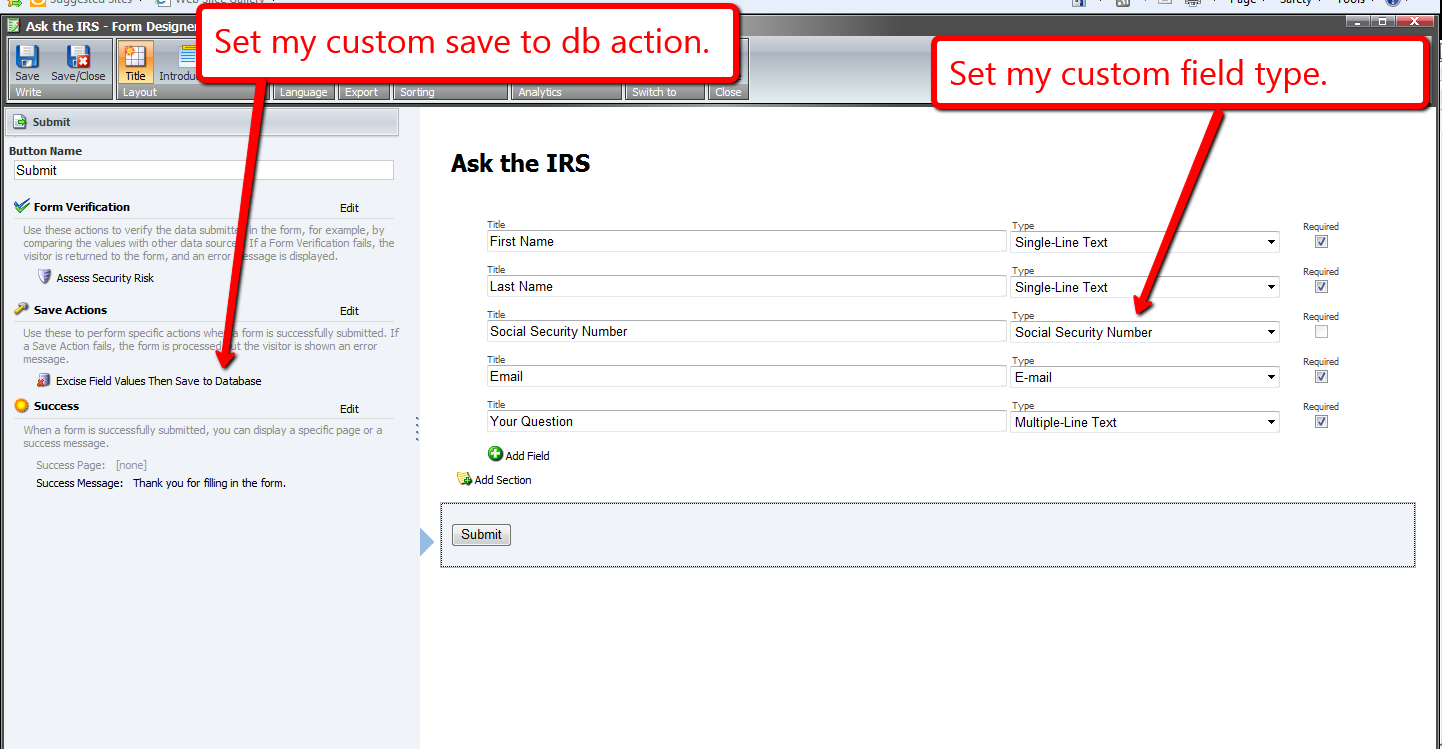
I set this form on a new page item, and published all of my changes above.
Now, it’s time to test this out. I navigated to my form, and filled it in as an irate tax payer might:

Looking at my form’s report, I see that the social security number was blanked out before being saved to the database:

A similar solution could also be used to add new field values into the collection of fields — values of fields that wouldn’t be available on the form, but should be displayed in the form report. An example might include a transaction ID or approval ID returned from a third-party credit card processor. Instead of ripping values, values would be inserted into the collection of fields, and then passed along to the base save to database action class.
Have a Field Day With Custom Sitecore Fields
This week, I’ve been off from work, and have been spending most of my downtime experimenting with Sitecore-ry development things — no, not you Mike — primarily poking around the core database to find things I can override or extend — for a thought provoking article about whether to override or extend things in Sitecore, check out John West’s blog post on this topic — and decided get my hands dirty by creating a custom Sitecore field.
This is something I feel isn’t being done enough by developers out in the wild — myself included — so I decided to take a stab at it, and share how you could go about accomplishing this.
The first field I created was a custom Single-Line Text field with a clear button. Since the jQuery library is available in the Sitecore client, I utilized a jQuery plugin to help me with this. It’s not a very robust plugin — I did have to make a couple of changes due to issues I encountered which I will omit from this article — albeit the purpose of me creating this field was to see how difficult it truly is.
As you can see below, creating a custom Single-Line Text isn’t difficult at all. All one has to do is subclass Sitecore.Shell.Applications.ContentEditor.Text in Sitecore.Kernel.dll, and ultimately override the DoRender() method:
using System;
using System.Collections.Generic;
using System.Linq;
using System.Web.UI;
using System.Web;

namespace Sitecore.Sandbox.Shell.Applications.ContentEditor
{
    public class ClearableSingleLineText : Sitecore.Shell.Applications.ContentEditor.Text
    {
        protected override void DoRender(HtmlTextWriter output)
        {
            SetWidthAndHeightStyle();
            RenderMyHtml(output);
            RenderChildren(output);
            RenderAutoSizeJavascript(output);
        }

        private void RenderMyHtml(HtmlTextWriter output)
        {
            const string htmlFormat = "<input{0}/>";
            output.Write(string.Format(htmlFormat, ControlAttributes));
        }

        private void RenderAutoSizeJavascript(HtmlTextWriter output)
        {
			/* I'm calling the jQuery() function directly since $() is defined for prototype.js in the Sitecore client */
            const string jsFormat = "<script type=\"text/javascript\">jQuery('#{0}').clearable();</script>";
            output.Write(string.Format(jsFormat, ID));
        }
    }
}
I then added a script reference to the jQuery plugin above, and embedded some css in /sitecore/shell/Applications/Content Manager/Default.aspx:
<script type="text/javaScript" language="javascript" src="/sitecore/shell/Controls/Lib/jQuery/jquery.clearable.js"></script>

<style type="text/css">
/* Most of this css was provided by the jquery.clearable plugin author */
a.clearlink
{
	background: url("/img/close-button.png") no-repeat scroll 0 0 transparent;
	background-position: center center;
	cursor: pointer;
	display: -moz-inline-stack;
	display: inline-block;
	zoom:1;
	*display:inline;
	height: 12px;
	width: 12px;
	z-index: 2000;
	border: 0px solid;
	position: relative;
	top: -18px;
	left: -5px;
	float: right;
}

a.clearlink:hover
{
	background: url("/img/close-button.png") no-repeat scroll -12px 0 transparent;
	background-position: center center;
}
</style>
What I did above doesn’t sit well with me. If a future version of Sitecore makes any changes to this .aspx, these changes might be lost (well, hopefully you would keep a copy of this file in a source control system somewhere).
However, I could not think of a better way of adding this javascript and css. If you know of a better way, please leave a comment.
I then defined my library of controls for my custom fields — not much of a library, since I only defined one field so far 🙂 — in a new patch config file /App_Config/Include/CustomFields.config:
<?xml version="1.0" encoding="utf-8"?>
<configuration xmlns:patch="http://www.sitecore.net/xmlconfig/">
	<sitecore>
		<controlSources>
			<source mode="on" namespace="Sitecore.Sandbox.Shell.Applications.ContentEditor" assembly="Sitecore.Sandbox" prefix="contentcustom"/>
		</controlSources>
	  </sitecore>
</configuration>
In the core database, I created a new field type for my custom Single-Line Text:

I then added a new field to my template using this new custom field definition in my master database:

Let’s see this new custom field in action.
I typed in some text on my item, followed by clicking the clear button:
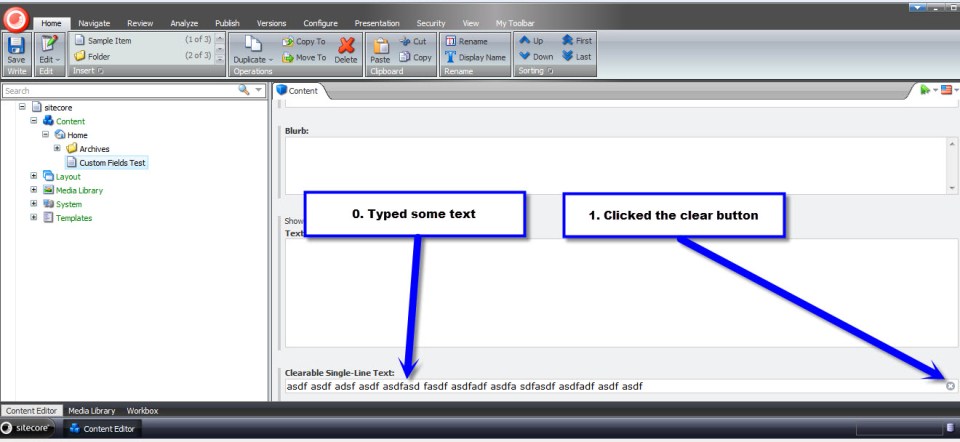
As expected, the text that I had typed was removed from the field:

After having done the above, I wanted to see if I could create a different type of custom field — creating a custom Text field was way too easy, and I wanted something more challenging. I figured creating a custom Multilist field might offer a challenge, so I decided to give it a go.
What I came up with was a custom Multilist field containing Sitecore users, instead of Items as options. I don’t know if there is any practicality in creating such a field, but I decided to go with it just for the purpose of creating a custom Multilist field.
First, I created a class to delegate responsibility for getting selected/unselected users in my field — I creating this class just in case I ever wanted to reuse this in a future custom field that should also contain Sitecore users.
using System;
using System.Collections.Generic;
using System.Linq;
using System.Text;

using Sitecore.Security.Accounts;

namespace Sitecore.Sandbox.Shell.Applications.ContentEditor.Base
{
    public interface IUsersField
    {
        IEnumerable<User> GetSelectedUsers();

        IEnumerable<User> GetUnselectedUsers();

        string GetProviderUserKey(User user);
    }
}
using System;
using System.Collections.Generic;
using System.Linq;
using System.Text;
using System.Web.Security;

using Sitecore.Configuration;
using Sitecore.Diagnostics;
using Sitecore.Security.Accounts;
using Sitecore.Text;

using Sitecore.Sandbox.Shell.Applications.ContentEditor.Base;

namespace Sitecore.Sandbox.Shell.Applications.ContentEditor
{
    public class UsersField : IUsersField
    {
        private static readonly string DomainParameterName = Settings.GetSetting("UsersField.DomainParameterName");

        private ListString _SelectedUsers;
        private ListString SelectedUsers
        {
            get
            {
                if (_SelectedUsers == null)
                {
                    _SelectedUsers = new ListString(Value);
                }

                return _SelectedUsers;
            }
        }

        private IEnumerable<User> _UsersInDomain;
        private IEnumerable<User> UsersInDomain
        {
            get
            {
                if (_UsersInDomain == null)
                {
                    _UsersInDomain = GetUsersInDomain();
                }

                return _UsersInDomain;
            }
        }

        private IEnumerable<User> _Users;
        private IEnumerable<User> Users
        {
            get
            {
                if(_Users == null)
                {
                    _Users = GetUsers();
                }

                return _Users;
            }
        }

        private string _Domain;
        private string Domain
        {
            get
            {
                if (string.IsNullOrEmpty(_Domain))
                {
                    _Domain = FieldSettings[DomainParameterName];
                }

                return _Domain;
            }
        }

        private UrlString _FieldSettings;
        private UrlString FieldSettings
        {
            get
            {
                if (_FieldSettings == null)
                {
                    _FieldSettings = GetFieldSettings();
                }

                return _FieldSettings;
            }
        }

        private string Source { get; set; }
        private string Value { get; set; }

        private UsersField(string source, string value)
        {
            SetSource(source);
            SetValue(value);
        }

        private void SetSource(string source)
        {
            Source = source;
        }

        private void SetValue(string value)
        {
            Value = value;
        }

        private IEnumerable<User> GetUsersInDomain()
        {
            if (!string.IsNullOrEmpty(Domain))
            {
                return Users.Where(user => IsUserInDomain(user, Domain));
            }

            return Users;
        }

        private static IEnumerable<User> GetUsers()
        {
            IEnumerable<User> users = UserManager.GetUsers();

            if (users != null)
            {
                return users;
            }

            return new List<User>();
        }

        private static bool IsUserInDomain(User user, string domain)
        {
            Assert.ArgumentNotNull(user, "user");
            Assert.ArgumentNotNullOrEmpty(domain, "domain");

            string userNameLowerCase = user.Profile.UserName.ToLower();
            string domainLowerCase = domain.ToLower();

            return userNameLowerCase.StartsWith(domainLowerCase);
        }

        private UrlString GetFieldSettings()
        {
            try
            {
                if (!string.IsNullOrEmpty(Source))
                {
                    return new UrlString(Source);
                }
            }
            catch (Exception ex)
            {
                Log.Error(this.ToString(), ex, this);
            }

            return new UrlString();
        }

        public IEnumerable<User> GetSelectedUsers()
        {
            IList<User> selectedUsers = new List<User>();

            foreach (string providerUserKey in SelectedUsers)
            {
                User selectedUser = UsersInDomain.Where(user => GetProviderUserKey(user) == providerUserKey).FirstOrDefault();
                if (selectedUser != null)
                {
                    selectedUsers.Add(selectedUser);
                }
            }

            return selectedUsers;
        }

        public IEnumerable<User> GetUnselectedUsers()
        {
            IList<User> unselectedUsers = new List<User>();

            foreach (User user in UsersInDomain)
            {
                if (!IsUserSelected(user))
                {
                    unselectedUsers.Add(user);
                }
            }

            return unselectedUsers;
        }

        private bool IsUserSelected(User user)
        {
            string providerUserKey = GetProviderUserKey(user);
            return IsUserSelected(providerUserKey);
        }

        private bool IsUserSelected(string providerUserKey)
        {
            return SelectedUsers.IndexOf(providerUserKey) > -1;
        }

        public string GetProviderUserKey(User user)
        {
            Assert.ArgumentNotNull(user, "user");
            MembershipUser membershipUser = Membership.GetUser(user.Profile.UserName);
            return membershipUser.ProviderUserKey.ToString();
        }

        public static IUsersField CreateNewUsersField(string source, string value)
        {
            return new UsersField(source, value);
        }
    }
}
I then modified my patch config file defined above (/App_Config/Include/CustomFields.config) with a new setting — a setting that specifies the parameter name for filtering on users’ Sitecore domain:
<?xml version="1.0" encoding="utf-8"?>
<configuration xmlns:patch="http://www.sitecore.net/xmlconfig/">
	<sitecore>
		<controlSources>
			<source mode="on" namespace="Sitecore.Sandbox.Shell.Applications.ContentEditor" assembly="Sitecore.Sandbox" prefix="contentcustom"/>
		</controlSources>
		<settings>
			<!-- Parameter name for users' Sitecore domain -->
			<setting name="UsersField.DomainParameterName" value="Domain" />
		</settings>
	  </sitecore>
</configuration>
I then created a new subclass of Sitecore.Shell.Applications.ContentEditor.MultilistEx — I ascertained this to be the class used by the Multilist field in Sitecore by looking at /sitecore/system/Field types/List Types/Multilist field type in the core database:
using System;
using System.Collections;
using System.Collections.Generic;
using System.Linq;
using System.Text;
using System.Web.Security;
using System.Web.UI;

using Sitecore.Configuration;
using Sitecore.Diagnostics;
using Sitecore.Globalization;
using Sitecore.Resources;
using Sitecore.Security.Accounts;
using Sitecore.Shell.Applications.ContentEditor;
using Sitecore.Text;

using Sitecore.Sandbox.Shell.Applications.ContentEditor.Base;

namespace Sitecore.Sandbox.Shell.Applications.ContentEditor
{
    public class UsersMultilist : MultilistEx
    {
        private IUsersField _UsersField;
        private IUsersField UsersField
        {
            get
            {
                if (_UsersField == null)
                {
                    _UsersField = CreateNewUsersField();
                }

                return _UsersField;
            }
        }

        public UsersMultilist()
        {
        }

        protected override void DoRender(HtmlTextWriter output)
        {
            Assert.ArgumentNotNull(output, "output");

            SetIDProperty();
            string disabledAttribute = string.Empty;

            if (ReadOnly)
            {
                disabledAttribute = " disabled=\"disabled\"";
            }

            output.Write(string.Format("<input id=\"{0}_Value\" type=\"hidden\" value=\"{1}\" />", ID, StringUtil.EscapeQuote(Value)));
            output.Write(string.Format("<table{0}>", GetControlAttributes()));
            output.Write("<tr>");
            output.Write(string.Format("<td class=\"scContentControlMultilistCaption\" width=\"50%\">{0}</td>", GetAllLabel()));
            output.Write(string.Format("<td width=\"20\">{0}</td>", Images.GetSpacer(20, 1)));
            output.Write(string.Format("<td class=\"scContentControlMultilistCaption\" width=\"50%\">{0}</td>", GetSelectedLabel()));
            output.Write(string.Format("<td width=\"20\">{0}</td>", Images.GetSpacer(20, 1), "</td>"));
            output.Write("</tr>");
            output.Write("<tr>");
            output.Write("<td valign=\"top\" height=\"100%\">");
            output.Write(string.Format("<select id=\"{0}_unselected\" class=\"scContentControlMultilistBox\" multiple=\"multiple\"{1} size=\"10\" ondblclick=\"javascript:scContent.multilistMoveRight('{2}')\" onchange=\"javascript:document.getElementById('{3}_all_help').innerHTML=this.selectedIndex>=0?this.options[this.selectedIndex].innerHTML:''\">", ID, disabledAttribute, ID, ID));

            IEnumerable<User> unselectedUsers = GetUnselectedUsers();
            foreach (User unselectedUser in unselectedUsers)
            {
                output.Write(string.Format("<option value=\"{0}\">{1}</option>", GetProviderUserKey(unselectedUser), unselectedUser.Profile.UserName));
            }

            output.Write("</select>");
            output.Write("</td>");
            output.Write("<td valign=\"top\">");
            RenderButton(output, "Core/16x16/arrow_blue_right.png", string.Format("javascript:scContent.multilistMoveRight('{0}')", ID));
            output.Write("<br />");
            RenderButton(output, "Core/16x16/arrow_blue_left.png", string.Format("javascript:scContent.multilistMoveLeft('{0}')", ID));
            output.Write("</td>");
            output.Write("<td valign=\"top\" height=\"100%\">");
            output.Write(string.Format("<select id=\"{0}_selected\" class=\"scContentControlMultilistBox\" multiple=\"multiple\"{1} size=\"10\" ondblclick=\"javascript:scContent.multilistMoveLeft('{2}')\" onchange=\"javascript:document.getElementById('{3}_selected_help').innerHTML=this.selectedIndex>=0?this.options[this.selectedIndex].innerHTML:''\">", ID, disabledAttribute, ID, ID));

            IEnumerable<User> selectedUsers = GetSelectedUsers();
            foreach (User selectedUser in selectedUsers)
            {
                output.Write(string.Format("<option value=\"{0}\">{1}</option>", GetProviderUserKey(selectedUser), selectedUser.Profile.UserName));
            }

            output.Write("</select>");
            output.Write("</td>");
            output.Write("<td valign=\"top\">");
            RenderButton(output, "Core/16x16/arrow_blue_up.png", string.Format("javascript:scContent.multilistMoveUp('{0}')", ID));
            output.Write("<br />");
            RenderButton(output, "Core/16x16/arrow_blue_down.png", string.Format("javascript:scContent.multilistMoveDown('{0}')", ID));
            output.Write("</td>");
            output.Write("</tr>");
            output.Write("<tr>");
            output.Write("<td valign=\"top\">");
            output.Write(string.Format("<div style=\"border:1px solid #999999;font:8pt tahoma;padding:2px;margin:4px 0px 4px 0px;height:14px\" id=\"{0}_all_help\"></div>", ID));
            output.Write("</td>");
            output.Write("<td></td>");
            output.Write("<td valign=\"top\">");
            output.Write(string.Format("<div style=\"border:1px solid #999999;font:8pt tahoma;padding:2px;margin:4px 0px 4px 0px;height:14px\" id=\"{0}_selected_help\"></div>", ID));
            output.Write("</td>");
            output.Write("<td></td>");
            output.Write("</tr>");
            output.Write("</table>");
        }

        protected void SetIDProperty()
        {
            ServerProperties["ID"] = ID;
        }

        protected static string GetAllLabel()
        {
            return GetLabel("All");
        }

        protected static string GetSelectedLabel()
        {
            return GetLabel("Selected");
        }

        protected static string GetLabel(string key)
        {
            return Translate.Text(key);
        }

        protected IEnumerable<User> GetSelectedUsers()
        {
            return UsersField.GetSelectedUsers();
        }

        protected IEnumerable<User> GetUnselectedUsers()
        {
            return UsersField.GetUnselectedUsers();
        }

        protected string GetProviderUserKey(User user)
        {
            return UsersField.GetProviderUserKey(user);
        }

        // Method "borrowed" from MultilistEx control
        protected void RenderButton(HtmlTextWriter output, string icon, string click)
        {
            Assert.ArgumentNotNull(output, "output");
            Assert.ArgumentNotNull(icon, "icon");
            Assert.ArgumentNotNull(click, "click");
            ImageBuilder builder = new ImageBuilder
            {
                Src = icon,
                Width = 0x10,
                Height = 0x10,
                Margin = "2px"
            };
            if (!ReadOnly)
            {
                builder.OnClick = click;
            }
            output.Write(builder.ToString());
        }

        private IUsersField CreateNewUsersField()
        {
            return ContentEditor.UsersField.CreateNewUsersField(Source, Value);
        }
    }
}
Overriding the DoRender() method paved the way for me to insert my custom Multilist options — options containg Sitecore users. Selected users will be saved as a pipe delimitered list of ASP.NET Membership UserIDs.
As I had done for my custom Single-Line Text above, I defined my custom Multilist field in the core database:

In the master database, I added a new field to my template using this new field type:

Now, let’s take this custom field for a test drive.
I went back to my item and saw that all Sitecore users were available for selection in my new field:

Facetiously imagine that a project manager has just run up to you anxiously lamenting — while breathing rapidly and sweating copiously — we cannot show users in the sitecore domain in our field, only those within the extranet domain — to do so will taint our credibility with our clients as Sitecore experts :). You then put on your superhero cape and proudly proclaim “rest assured, we’ve already baked this domain filtering functionality into our custom Multilist field!”:

I saved my template and navigated back to my item:

I selected a couple of users and saved:

I see their Membership UserIDs are being saved as designed:

My intent on creating the above custom fields was to showcase that the option to create your own fields exists in Sitecore. Why not have yourself a field day by creating your own? 🙂
Custom Sitecore Rich Text Editor Button: Inserting Dynamic Content
Last Thursday, I stumbled upon an article discussing how to create and add a custom button to the Rich Text Editor in Sitecore. This article referenced an article written by Mark Stiles — his article set the foundation for me to do this very thing last Spring for a client.
Unlike the two articles above, I had to create two different buttons to insert dynamic content — special html containing references to other items in the Sitecore content tree via Item IDs — which I would ‘fix’ via a RenderField pipeline when a user would visit the page containing this special html. I had modeled my code around the ‘Insert Link’ button by delegating to a helper class to ‘expand’ my dynamic content as the LinkManager class does for Sitecore links.
The unfortunate thing is I cannot show you that code – it’s proprietary code owned by a previous employer.
Instead, I decided to build something similar to illustrate how I did this. I will insert special html that will ultimately transform into jQuery UI dialogs.
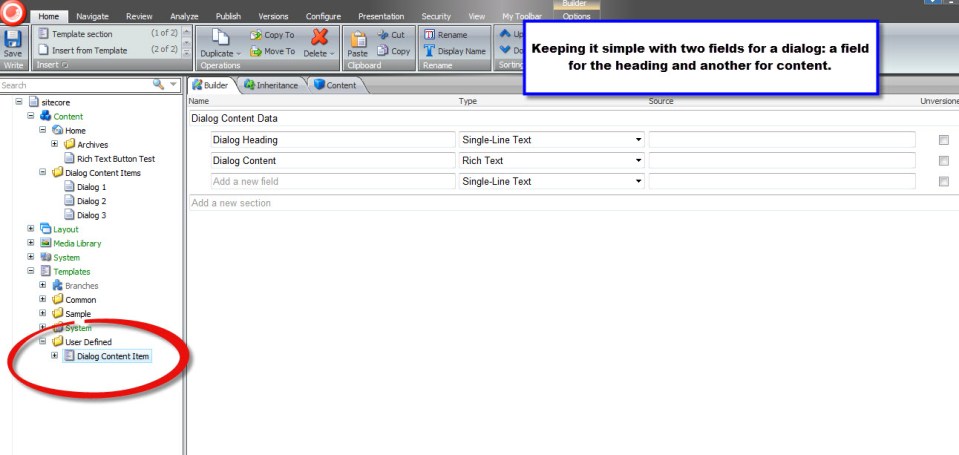
First, I needed to create items that represent dialog boxes. I created a new template with two fields — one field containing the dialog box’s heading and the other field containing copy that will go inside of the dialog box:
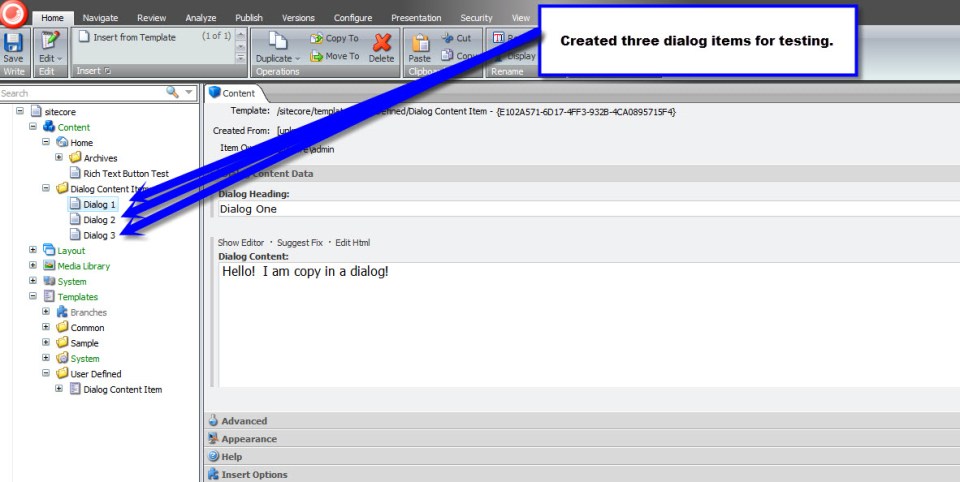
I then created three dialog box items with content that we will use later on when testing:
With the help of xml defined in /sitecore/shell/Controls/Rich Text Editor/InsertLink/InsertLink.xml and /sitecore/shell/Controls/Rich Text Editor/InsertImage/InsertImage.xml, I created my new xml control definition in a file named /sitecore/shell/Controls/Rich Text Editor/InsertDialog/InsertDialog.xml:
<?xml version="1.0" encoding="utf-8" ?>
<control xmlns:def="Definition" xmlns="http://schemas.sitecore.net/Visual-Studio-Intellisense">
	<RichText.InsertDialog>

		<!-- Don't forget to set your icon 🙂 -->
		<FormDialog Icon="Business/32x32/message.png" Header="Insert a Dialog" Text="Select the dialog content item you want to insert." OKButton="Insert Dialog">

			<!-- js reference to my InsertDialog.js script. -->
			<!-- For some strange reason, if the period within the script tag is not present, the dialog form won't work -->
			<script Type="text/javascript" src="/sitecore/shell/Controls/Rich Text Editor/InsertDialog/InsertDialog.js">.</script>

			<!-- Reference to my InsertDialogForm class -->
			<CodeBeside Type="Sitecore.Sandbox.RichTextEditor.InsertDialog.InsertDialogForm,Sitecore.Sandbox" />

			<!-- Root contains the ID of /sitecore/content/Dialog Content Items -->
			<DataContext ID="DialogFolderDataContext"  Root="{99B14D44-5A0F-43B6-988E-94197D73B348}" />
			<GridPanel Width="100%" Height="100%" Style="table-layout:fixed">
				<GridPanel Width="100%" Height="100%" Style="table-layout:fixed" Columns="3" GridPanel.Height="100%">
					<Scrollbox Class="scScrollbox scFixSize" Width="100%" Height="100%" Background="white" Border="1px inset" Padding="0" GridPanel.Height="100%" GridPanel.Width="50%" GridPanel.Valign="top">
						<TreeviewEx ID="DialogContentItems" DataContext="DialogFolderDataContext" Root="true" />
					</Scrollbox>
				</GridPanel>
			</GridPanel>
		</FormDialog>
	</RichText.InsertDialog>
</control>
My dialog form will house one lonely TreeviewEx containing all dialog items in the /sitecore/content/Dialog Content Items folder I created above.
I then created the ‘CodeBeside’ DialogForm class to accompany the xml above:
using System;
using System.Collections.Generic;
using System.Linq;
using System.Text;

using Sitecore.Data;
using Sitecore.Data.Items;
using Sitecore.Diagnostics;
using Sitecore.Shell.Framework;
using Sitecore.Web;
using Sitecore.Web.UI.HtmlControls;
using Sitecore.Web.UI.Pages;
using Sitecore.Web.UI.Sheer;
using Sitecore.Web.UI.WebControls;

namespace Sitecore.Sandbox.RichTextEditor.InsertDialog
{
    public class InsertDialogForm : DialogForm
    {
        protected DataContext DialogFolderDataContext;
        protected TreeviewEx DialogContentItems;

        protected string Mode
        {
            get
            {
                string mode = StringUtil.GetString(base.ServerProperties["Mode"]);

                if (!string.IsNullOrEmpty(mode))
                {
                    return mode;
                }

                return "shell";
            }
            set
            {
                Assert.ArgumentNotNull(value, "value");
                base.ServerProperties["Mode"] = value;
            }
        }

        protected override void OnLoad(EventArgs e)
        {
            Assert.ArgumentNotNull(e, "e");
            base.OnLoad(e);

            if (!Context.ClientPage.IsEvent)
            {
                Inialize();
            }
        }

        private void Inialize()
        {
            SetMode();
            SetDialogFolderDataContextFromQueryString();
        }

        private void SetMode()
        {
            Mode = WebUtil.GetQueryString("mo");
        }

        private void SetDialogFolderDataContextFromQueryString()
        {
            DialogFolderDataContext.GetFromQueryString();
        }

        protected override void OnOK(object sender, EventArgs args)
        {
            Assert.ArgumentNotNull(sender, "sender");
            Assert.ArgumentNotNull(args, "args");

            string selectedItemID = GetSelectedItemIDAsString();

            if (string.IsNullOrEmpty(selectedItemID))
            {
                return;
            }

            string selectedItemPath = GetSelectedItemPath();
            string javascriptArguments = string.Format("{0}, {1}", EscapeJavascriptString(selectedItemID), EscapeJavascriptString(selectedItemPath));

            if (IsWebEditMode())
            {
                SheerResponse.SetDialogValue(javascriptArguments);
                base.OnOK(sender, args);
            }
            else
            {
                string closeJavascript = string.Format("scClose({0})", javascriptArguments);
                SheerResponse.Eval(closeJavascript);
            }
        }

        private string GetSelectedItemIDAsString()
        {
            ID selectedID = GetSelectedItemID();

            if (selectedID != ID.Null)
            {
                return selectedID.ToString();
            }

            return string.Empty;
        }

        private ID GetSelectedItemID()
        {
            Item selectedItem = GetSelectedItem();

            if (selectedItem != null)
            {
                return selectedItem.ID;
            }

            return ID.Null;
        }

        private string GetSelectedItemPath()
        {
            Item selectedItem = GetSelectedItem();

            if (selectedItem != null)
            {
                return selectedItem.Paths.FullPath;
            }

            return string.Empty;
        }

        private Item GetSelectedItem()
        {
            return DialogContentItems.GetSelectionItem();
        }

        private static string EscapeJavascriptString(string stringToEscape)
        {
            return StringUtil.EscapeJavascriptString(stringToEscape);
        }

        protected override void OnCancel(object sender, EventArgs args)
        {
            Assert.ArgumentNotNull(sender, "sender");
            Assert.ArgumentNotNull(args, "args");

            if (IsWebEditMode())
            {
                base.OnCancel(sender, args);
            }
            else
            {
                SheerResponse.Eval("scCancel()");
            }
        }

        private bool IsWebEditMode()
        {
            return string.Equals(Mode, "webedit", StringComparison.InvariantCultureIgnoreCase);
        }
    }
}
This DialogForm basically sends a selected Item’s ID and path back to the client via the scClose() function defined below in a new file named /sitecore/shell/Controls/Rich Text Editor/InsertDialog/InsertDialog.js:
function GetDialogArguments() {
    return getRadWindow().ClientParameters;
}

function getRadWindow() {
  if (window.radWindow) {
        return window.radWindow;
  }

    if (window.frameElement && window.frameElement.radWindow) {
        return window.frameElement.radWindow;
    }

    return null;
}

var isRadWindow = true;

var radWindow = getRadWindow();

if (radWindow) {
  if (window.dialogArguments) {
    radWindow.Window = window;
  }
}

function scClose(dialogContentItemId, dialogContentItemPath) {
	// we're passing back an object holding data needed for inserting our special html into the RTE
	var dialogInfo = {
		dialogContentItemId: dialogContentItemId,
		dialogContentItemPath: dialogContentItemPath
	};

	getRadWindow().close(dialogInfo);
}

function scCancel() {
  getRadWindow().close();
}

if (window.focus && Prototype.Browser.Gecko) {
  window.focus();
}
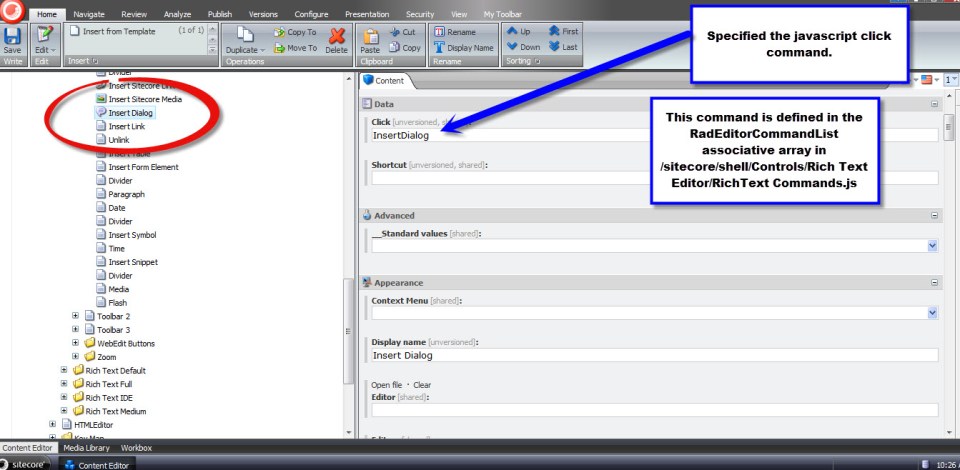
I then had to add a new javascript command in /sitecore/shell/Controls/Rich Text Editor/RichText Commands.js to open my dialog form and map this to a callback function — which I named scInsertDialog to follow the naming convention of other callbacks within this script file — to handle the dialogInfo javascript object above that is passed to it:
RadEditorCommandList["InsertDialog"] = function(commandName, editor, args) {
	scEditor = editor;

	editor.showExternalDialog(
		"/sitecore/shell/default.aspx?xmlcontrol=RichText.InsertDialog&la=" + scLanguage,
		null, //argument
		500,
		400,
		scInsertDialog, //callback
		null, // callback args
		"Insert Dialog",
		true, //modal
		Telerik.Web.UI.WindowBehaviors.Close, // behaviors
		false, //showStatusBar
		false //showTitleBar
	);
};

function scInsertDialog(sender, dialogInfo) {
	if (!dialogInfo) {
		return;
	}

	// build our special html to insert into the RTE
	var placeholderHtml = "<hr class=\"dialog-placeholder\" style=\"width: 100px; display: inline-block; height: 20px;border: blue 4px solid;\""
						+ "data-dialogContentItemId=\"" + dialogInfo.dialogContentItemId +"\" "
						+ "title=\"Dialog Content Path: " + dialogInfo.dialogContentItemPath + "\" />";

	scEditor.pasteHtml(placeholderHtml, "DocumentManager");
}
My callback function builds the special html that will be inserted into the Rich Text Editor. I decided to use a <hr /> tag to keep my html code self-closing — it’s much easier to use a self-closing html tag when doing this, since you don’t have to check whether you’re inserting more special html into preexisting special html. I also did this for the sake of brevity.
I am using the title attribute in my special html in order to assist content authors in knowing which dialog items they’ve inserted into rich text fields. When a dialog blue box is hovered over, a tooltip containing the dialog item’s content path will display.
I’m not completely satisfied with building my special html in this javascript file. It probably should be moved into C# somewhere to prevent the ease of changing it — someone could easily just change it without code compilation, and break how it’s rendered to users. We need this html to be a certain way when ‘fixing’ it in our RenderField pipeline defined later in this article.
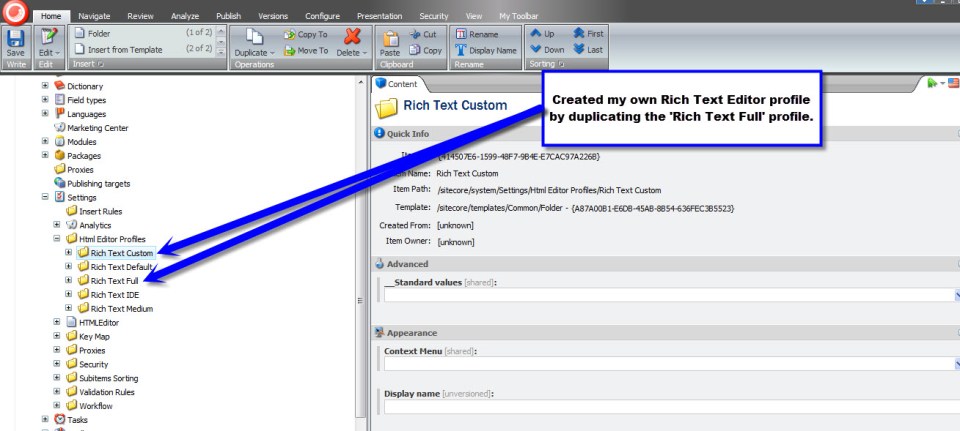
I then went into the core database and created a new Rich Text Editor profile under /sitecore/system/Settings/Html Editor Profiles:
Next, I created a new Html Editor Button (template: /sitecore/templates/System/Html Editor Profiles/Html Editor Button) using the __Html Editor Button master — wow, I never thought I would use the word master again when talking about Sitecore stuff 🙂 — and set its click and icon fields:
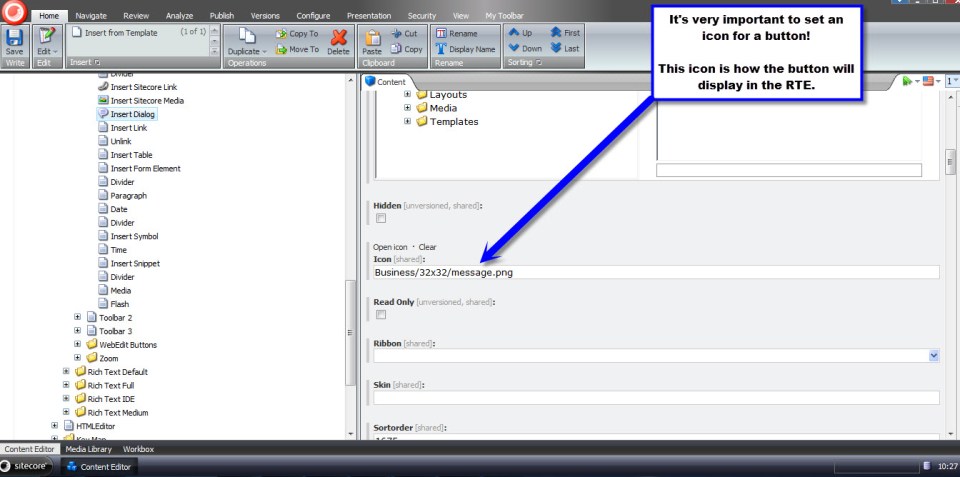
Now, we need to ‘fix’ our special html by converting it into presentable html to the user. I do this using the following RenderField pipeline:
using System;
using System.Collections.Generic;
using System.Linq;
using System.Text;

using Sitecore;
using Sitecore.Data.Items;
using Sitecore.Diagnostics;
using Sitecore.Links;
using Sitecore.Pipelines.RenderField;
using Sitecore.Xml.Xsl;

using HtmlAgilityPack;

namespace Sitecore.Sandbox.Pipelines.RenderField
{
    public class ExpandDialogContent
    {
        public void Process(RenderFieldArgs renderFieldArgs)
        {
            if (ShouldFieldBeProcessed(renderFieldArgs))
            {
                ExpandDialogContentTags(renderFieldArgs);
            }
        }

        private bool ShouldFieldBeProcessed(RenderFieldArgs renderFieldArgs)
        {
            return renderFieldArgs.FieldTypeKey.ToLower() == "rich text";
        }

        private void ExpandDialogContentTags(RenderFieldArgs renderFieldArgs)
        {
            HtmlNode documentNode = GetHtmlDocumentNode(renderFieldArgs.Result.FirstPart);
            HtmlNodeCollection dialogs = documentNode.SelectNodes("//hr[@class='dialog-placeholder']");

            foreach (HtmlNode dialogPlaceholder in dialogs)
            {
                HtmlNode dialog = CreateDialogHtmlNode(dialogPlaceholder);

                if (dialog != null)
                {
                    dialogPlaceholder.ParentNode.ReplaceChild(dialog, dialogPlaceholder);
                }
                else
                {
                    dialogPlaceholder.ParentNode.RemoveChild(dialogPlaceholder);
                }
            }

            renderFieldArgs.Result.FirstPart = documentNode.InnerHtml;
        }

        private HtmlNode GetHtmlDocumentNode(string html)
        {
            HtmlDocument htmlDocument = CreateNewHtmlDocument(html);
            return htmlDocument.DocumentNode;
        }

        private HtmlDocument CreateNewHtmlDocument(string html)
        {
            HtmlDocument htmlDocument = new HtmlDocument();
            htmlDocument.LoadHtml(html);
            return htmlDocument;
        }

        private HtmlNode CreateDialogHtmlNode(HtmlNode dialogPlaceholder)
        {
            string dialogContentItemId = dialogPlaceholder.Attributes["data-dialogContentItemId"].Value;
            Item dialogContentItem = TryGetItem(dialogContentItemId);

            if(dialogContentItem != null)
            {
                string heading = dialogContentItem["Dialog Heading"];
                string content = dialogContentItem["Dialog Content"];

                return CreateDialogHtmlNode(dialogPlaceholder.OwnerDocument, heading, content);
            }

            return null;
        }

        private Item TryGetItem(string id)
        {
            try
            {
                return Context.Database.Items[id];
            }
            catch (Exception ex)
            {
                Log.Error(this.ToString(), ex, this);
            }

            return null;
        }

        private static HtmlNode CreateDialogHtmlNode(HtmlDocument htmlDocument, string heading, string content)
        {
            if (string.IsNullOrEmpty(content))
            {
                return null;
            }

            HtmlNode dialog = htmlDocument.CreateElement("div");
            dialog.Attributes.Add("class", "dialog");
            dialog.Attributes.Add("title", heading);
            dialog.InnerHtml = content;

            return dialog;
        }
    }
}
The above uses Html Agility Pack for finding all instances of my special <hr /> tags and creates new html that my jQuery UI dialog code expects. If you’re not using Html Agility Pack, I strongly recommend checking it out — it has saved my hide on numerous occasions.
I then inject this RenderField pipeline betwixt others via a new patch include file named /App_Config/Include/ExpandDialogContent.config:
<?xml version="1.0" encoding="utf-8"?>
<configuration xmlns:patch="http://www.sitecore.net/xmlconfig/">
	<sitecore>
		<pipelines>
			<renderField>
				<processor type="Sitecore.Sandbox.Pipelines.RenderField.ExpandDialogContent, Sitecore.Sandbox"
					patch:after="processor[@type='Sitecore.Pipelines.RenderField.GetInternalLinkFieldValue, Sitecore.Kernel']" />
			</renderField>
		</pipelines>
	</sitecore>
</configuration>
Now, it’s time to see if all of my hard work above has paid off.
I set the rich text field on my Sample Item template to use my new Rich Text Editor profile:

Using the template above, I created a new test item, and opened its rich text field’s editor:

I then clicked my new ‘Insert Dialog’ button and saw Dialog items I could choose to insert:
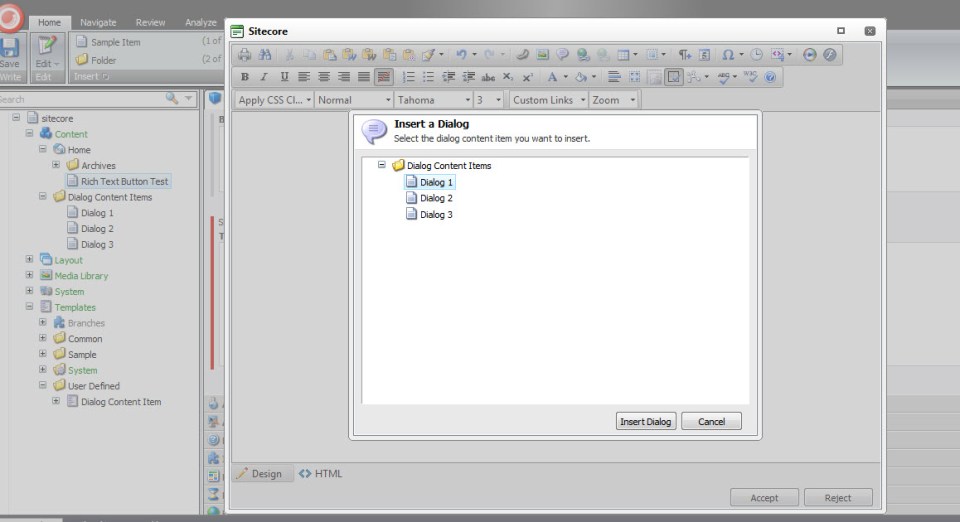
Since I’m extremely excited, I decided to insert them all:

I then forgot which dialog was which — the three uniform blue boxes are throwing me off a bit — so I hovered over the first blue box and saw that it was the first dialog item:

I then snuck a look at the html inserted — it was formatted the way I expected:
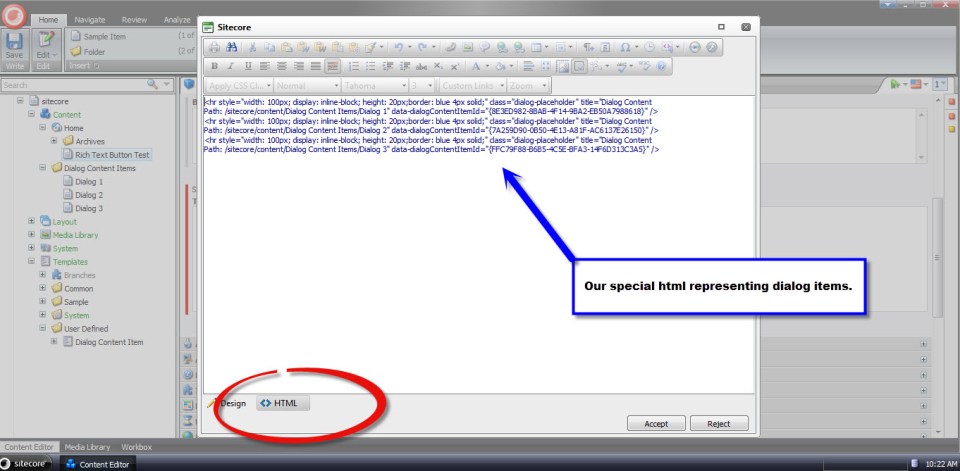
I then saved my item, published and navigated to my test page. My RenderField pipeline fixed the special html as I expected:

I would like to point out that I had to add link and script tags to reference jQuery UI’s css and js files — including the jQuery library — and initialized my dialogs using the jQuery UI Dialog constructor. I have omitted this code.
This does seem like a lot of code to get something so simple to work.
However, it is worth the effort. Not only will you impress your boss and make your clients happy, you’ll also be dubbed the ‘cool kid’ at parties. You really will, I swear. 🙂
Until next time, have a Sitecoretastic day!
Experiments with Field Data Encryption in Sitecore
Last week, I came up with a design employing the decorator pattern for encrypting and decrypting Web Forms for Marketers form data. My design encapsulates and decorates an instance of Sitecore.Forms.Data.DataProviders.WFMDataProvider — the main data provider that lives in the Sitecore.Forms.Core assembly and is used by the module for saving/retrieving form data from its database — by extending and implementing its base class and interface, respectively, and delegates requests to its public methods using the same method signatures. The “decoration” part occurs before before form data is inserted and updated in the database, and decrypted after being retrieved.
Once I completed this design, I began to ponder whether it would be possible to take this one step further and encrypt/decrypt all field data in Sitecore as a whole.
I knew I would eventually have to do some research to see if this were possible. However, I decided to begin my encryption ventures by building classes that encrypt/decrypt data.
I envisioned stockpiling an arsenal of encryption algorithms. I imagined all encryption algorithms having the same public methods to encrypt and decrypt strings of data, so I created the following interface:
using System;
using System.Collections.Generic;
using System.Linq;
using System.Text;

namespace Sitecore.Sandbox.Security.Encryption.Base
{
    public interface IEncryptor
    {
        string Encrypt(string input);

        string Decrypt(string input);
    }
}
Since I am lightyears away from being a cryptography expert — or even considering myself a novice — I had to go fishing on the internet to find an encryption utility class in .NET. I found the following algorithm at http://www.deltasblog.co.uk/code-snippets/basic-encryptiondecryption-c/, and put it within a class that adheres to my IEncryptor interface above:
using System;
using System.Collections.Generic;
using System.Linq;
using System.Security.Cryptography;
using System.Text;

using Sitecore.Diagnostics;

using Sitecore.Sandbox.Security.Encryption.Base;

namespace Sitecore.Sandbox.Security.Encryption
{
    // retrieved from http://www.deltasblog.co.uk/code-snippets/basic-encryptiondecryption-c/

    public class TripleDESEncryptor : IEncryptor
    {
        private string Key { get; set; }

        private TripleDESEncryptor(string key)
        {
            SetKey(key);
        }

        private void SetKey(string key)
        {
            Assert.ArgumentNotNullOrEmpty(key, "key");
            Key = key;
        }

        public string Encrypt(string input)
        {
            return Encrypt(input, Key);
        }

        public static string Encrypt(string input, string key)
        {
            byte[] inputArray = UTF8Encoding.UTF8.GetBytes(input);
            TripleDESCryptoServiceProvider tripleDES = new TripleDESCryptoServiceProvider();
            tripleDES.Key = UTF8Encoding.UTF8.GetBytes(key);
            tripleDES.Mode = CipherMode.ECB;
            tripleDES.Padding = PaddingMode.PKCS7;
            ICryptoTransform cTransform = tripleDES.CreateEncryptor();
            byte[] resultArray = cTransform.TransformFinalBlock(inputArray, 0, inputArray.Length);
            tripleDES.Clear();
            return System.Convert.ToBase64String(resultArray, 0, resultArray.Length);
        }

        public string Decrypt(string input)
        {
            return Decrypt(input, Key);
        }

        public static string Decrypt(string input, string key)
        {
            byte[] inputArray = System.Convert.FromBase64String(input);
            TripleDESCryptoServiceProvider tripleDES = new TripleDESCryptoServiceProvider();
            tripleDES.Key = UTF8Encoding.UTF8.GetBytes(key);
            tripleDES.Mode = CipherMode.ECB;
            tripleDES.Padding = PaddingMode.PKCS7;
            ICryptoTransform cTransform = tripleDES.CreateDecryptor();
            byte[] resultArray = cTransform.TransformFinalBlock(inputArray, 0, inputArray.Length);
            tripleDES.Clear();
            return UTF8Encoding.UTF8.GetString(resultArray);
        }

        public static IEncryptor CreateNewTripleDESEncryptor(string key)
        {
            return new TripleDESEncryptor(key);
        }
    }
}
I then started wondering how I could ascertain whether data needed to be encrypted or decrypted. In other words, how could I prevent encrypting data that is already encrypted and, conversely, not decrypting data that isn’t encrypted?
I came up with building a decorator class that looks for a string terminator — a substring at the end of a string — and only encrypts the passed string when this terminating substring is not present, or decrypts only when this substring is found at the end of the string.
I decided to use a data transfer object (DTO) for my encryptor decorator, just in case I ever decide to use this same decorator with any encryption class that implements my encryptor interface. I also send in the encryption key and string terminator via this DTO:
using System;
using System.Collections.Generic;
using System.Linq;
using System.Text;

using Sitecore.Sandbox.Security.Encryption.Base;

namespace Sitecore.Sandbox.Security.DTO
{
    public class DataNullTerminatorEncryptorSettings
    {
        public string EncryptionDataNullTerminator { get; set; }
        public string EncryptionKey { get; set; }
        public IEncryptor Encryptor { get; set; }
    }
}
using System;
using System.Collections.Generic;
using System.Linq;
using System.Text;

using Sitecore.Diagnostics;

using Sitecore.Sandbox.Security.DTO;
using Sitecore.Sandbox.Security.Encryption.Base;

namespace Sitecore.Sandbox.Security.Encryption
{
    public class DataNullTerminatorEncryptor : IEncryptor
    {
        private DataNullTerminatorEncryptorSettings DataNullTerminatorEncryptorSettings { get; set; }

        private DataNullTerminatorEncryptor(DataNullTerminatorEncryptorSettings dataNullTerminatorEncryptorSettings)
        {
            SetDataNullTerminatorEncryptorSettings(dataNullTerminatorEncryptorSettings);
        }

        private void SetDataNullTerminatorEncryptorSettings(DataNullTerminatorEncryptorSettings dataNullTerminatorEncryptorSettings)
        {
            Assert.ArgumentNotNull(dataNullTerminatorEncryptorSettings, "dataNullTerminatorEncryptorSettings");
            Assert.ArgumentNotNullOrEmpty(dataNullTerminatorEncryptorSettings.EncryptionDataNullTerminator, "dataNullTerminatorEncryptorSettings.EncryptionDataNullTerminator");
            Assert.ArgumentNotNullOrEmpty(dataNullTerminatorEncryptorSettings.EncryptionKey, "dataNullTerminatorEncryptorSettings.EncryptionKey");
            Assert.ArgumentNotNull(dataNullTerminatorEncryptorSettings.Encryptor, "dataNullTerminatorEncryptorSettings.Encryptor");
            DataNullTerminatorEncryptorSettings = dataNullTerminatorEncryptorSettings;
        }

        public string Encrypt(string input)
        {
            if (!IsEncrypted(input))
            {
                string encryptedInput = DataNullTerminatorEncryptorSettings.Encryptor.Encrypt(input);
                return string.Concat(encryptedInput, DataNullTerminatorEncryptorSettings.EncryptionDataNullTerminator);
            }

            return input;
        }

        public string Decrypt(string input)
        {
            if (IsEncrypted(input))
            {
                input = input.Replace(DataNullTerminatorEncryptorSettings.EncryptionDataNullTerminator, string.Empty);
                return DataNullTerminatorEncryptorSettings.Encryptor.Decrypt(input);
            }

            return input;
        }

        private bool IsEncrypted(string input)
        {
            if (!string.IsNullOrEmpty(input))
                return input.EndsWith(DataNullTerminatorEncryptorSettings.EncryptionDataNullTerminator);

            return false;
        }

        public static IEncryptor CreateNewDataNullTerminatorEncryptor(DataNullTerminatorEncryptorSettings dataNullTerminatorEncryptorSettings)
        {
            return new DataNullTerminatorEncryptor(dataNullTerminatorEncryptorSettings);
        }
    }
}
Now that I have two encryptors — the TripleDESEncryptor and DataNullTerminatorEncryptor classes — I thought it would be prudent to create a factory class:
using System;
using System.Collections.Generic;
using System.Linq;
using System.Text;

using Sitecore.Sandbox.Security.DTO;

namespace Sitecore.Sandbox.Security.Encryption.Base
{
    public interface IEncryptorFactory
    {
        IEncryptor CreateNewTripleDESEncryptor(string encryptionKey);

        IEncryptor CreateNewDataNullTerminatorEncryptor();

        IEncryptor CreateNewDataNullTerminatorEncryptor(string encryptionDataNullTerminator, string encryptionKey);

        IEncryptor CreateNewDataNullTerminatorEncryptor(DataNullTerminatorEncryptorSettings dataNullTerminatorEncryptorSettings);
    }
}
using System;
using System.Collections.Generic;
using System.Linq;
using System.Text;

using Sitecore.Configuration;

using Sitecore.Sandbox.Security.DTO;
using Sitecore.Sandbox.Security.Encryption.Base;

namespace Sitecore.Sandbox.Security.Encryption
{
    public class EncryptorFactory : IEncryptorFactory
    {
        private static volatile IEncryptorFactory _Current;
        private static object lockObject = new Object();

        public static IEncryptorFactory Current
        {
            get
            {
                if (_Current == null)
                {
                    lock (lockObject)
                    {
                        if (_Current == null)
                        {
                            _Current = new EncryptorFactory();
                        }
                    }
                }

                return _Current;
            }
        }

        private EncryptorFactory()
        {
        }

        public IEncryptor CreateNewTripleDESEncryptor(string encryptionKey)
        {
            return TripleDESEncryptor.CreateNewTripleDESEncryptor(encryptionKey);
        }

        public IEncryptor CreateNewDataNullTerminatorEncryptor()
        {
            string encryptionDataNullTerminator = Settings.GetSetting("Encryption.DataNullTerminator");
            string encryptionKey = Settings.GetSetting("Encryption.Key");
            return CreateNewDataNullTerminatorEncryptor(encryptionDataNullTerminator, encryptionKey);
        }

        public IEncryptor CreateNewDataNullTerminatorEncryptor(string encryptionDataNullTerminator, string encryptionKey)
        {
            DataNullTerminatorEncryptorSettings dataNullTerminatorEncryptorSettings = new DataNullTerminatorEncryptorSettings
            {
                EncryptionDataNullTerminator = encryptionDataNullTerminator,
                EncryptionKey = encryptionDataNullTerminator,
                // we're going to use the TripleDESEncryptor by default
                Encryptor = CreateNewTripleDESEncryptor(encryptionKey)
            };

            return CreateNewDataNullTerminatorEncryptor(dataNullTerminatorEncryptorSettings);
        }

        public IEncryptor CreateNewDataNullTerminatorEncryptor(DataNullTerminatorEncryptorSettings dataNullTerminatorEncryptorSettings)
        {
            return DataNullTerminatorEncryptor.CreateNewDataNullTerminatorEncryptor(dataNullTerminatorEncryptorSettings);
        }
    }
}
I decided to make my factory class be a singleton. I saw no need of having multiple instances of this factory object floating around in memory, and envisioned using this same factory object in a tool I wrote to encrypt all field data in all Sitecore databases. I will discuss this tool at the end of this article.
It’s now time to do some research to see whether I have the ability to hijack the main mechanism for saving/retrieving data from Sitecore.
While snooping around in my Web.config, I saw that the core, master and web databases use a data provider defined at configuration/sitecore/dataProviders/main:
<configuration>
	<sitecore database="SqlServer">

		<!-- More stuff here -->

		<dataProviders>
			<main type="Sitecore.Data.$(database).$(database)DataProvider, Sitecore.Kernel">
				<param connectionStringName="$(1)"/>
				<Name>$(1)</Name>
			</main>

			<!-- More stuff here -->

		<dataProviders>

			<!-- More stuff here -->

	</sitecore>
</configuration>
In my local instance, this points to the class Sitecore.Data.SqlServer.SqlServerDataProvider in Sitecore.Kernel.dll. I knew I had open up .NET Reflector and start investigating.
I discovered that there wasn’t much happening in this class at the field level. I also noticed this class used Sitecore.Data.DataProviders.Sql.SqlDataProvider as its base class, so I continued my research there.
I struck gold in the Sitecore.Data.DataProviders.Sql.SqlDataProvider class. Therein, I found methods that deal with saving/retrieving field data from an instance of the database utility class Sitecore.Data.DataProviders.Sql.SqlDataApi.
I knew this was the object I had to either decorate or override. Since most of the methods I needed to decorate with my encryption functionality were signed as protected, I had to subclass this class in order to get access to them. I then wrapped these methods with calls to my encryptor’s Encrypt(string input) and Decrypt(string input) methods:
using System;
using System.Collections;
using System.Collections.Generic;
using System.Linq;
using System.Security.Cryptography;
using System.Text;

using Sitecore.Collections;
using Sitecore.Configuration;
using Sitecore.Data;
using Sitecore.Data.DataProviders;
using Sitecore.Data.DataProviders.Sql;
using Sitecore.Data.Fields;
using Sitecore.Data.Items;

using Sitecore.Sandbox.Security.Encryption;
using Sitecore.Sandbox.Security.Encryption.Base;

namespace Sitecore.Sandbox.Data.DataProviders.Sql
{
    public class EncryptionSqlDataProvider : SqlDataProvider
    {
        private static readonly IEncryptorFactory EncryptorBegetter = EncryptorFactory.Current;
        private static readonly IEncryptor Encryptor = EncryptorBegetter.CreateNewDataNullTerminatorEncryptor();

        public EncryptionSqlDataProvider(SqlDataApi sqlDataApi)
            : base(sqlDataApi)
        {
        }

        public override FieldList GetItemFields(ItemDefinition itemDefinition, VersionUri versionUri, CallContext context)
        {
            FieldList fieldList = base.GetItemFields(itemDefinition, versionUri, context);

            if (fieldList == null)
                return null;

            FieldList fieldListDecrypted = new FieldList();
            foreach (KeyValuePair<ID, string> field in fieldList)
            {
                string decryptedValue = Decrypt(field.Value);
                fieldListDecrypted.Add(field.Key, decryptedValue);
            }

            return fieldListDecrypted;
        }

        protected override string GetFieldValue(string tableName, Guid entryId)
        {
            string value = base.GetFieldValue(tableName, entryId);
            return Decrypt(value);
        }

        protected override void SetFieldValue(string tableName, Guid entryId, string value)
        {
            string encryptedValue = Encrypt(value);
            base.SetFieldValue(tableName, entryId, encryptedValue);
        }

        protected override void WriteSharedField(ID itemId, FieldChange change, DateTime now, bool fieldsAreEmpty)
        {
            FieldChange unencryptedFieldChange = GetEncryptedFieldChange(itemId, change);
            base.WriteSharedField(itemId, unencryptedFieldChange, now, fieldsAreEmpty);
        }

        protected override void WriteUnversionedField(ID itemId, FieldChange change, DateTime now, bool fieldsAreEmpty)
        {
            FieldChange unencryptedFieldChange = GetEncryptedFieldChange(itemId, change);
            base.WriteUnversionedField(itemId, unencryptedFieldChange, now, fieldsAreEmpty);
        }

        protected override void WriteVersionedField(ID itemId, FieldChange change, DateTime now, bool fieldsAreEmpty)
        {
            FieldChange unencryptedFieldChange = GetEncryptedFieldChange(itemId, change);
            base.WriteVersionedField(itemId, unencryptedFieldChange, now, fieldsAreEmpty);
        }

        private FieldChange GetEncryptedFieldChange(ID itemId, FieldChange unencryptedFieldChange)
        {
            if (!string.IsNullOrEmpty(unencryptedFieldChange.Value))
            {
                Field field = GetField(itemId, unencryptedFieldChange.FieldID);
                string encryptedValue = Encrypt(unencryptedFieldChange.Value);
                return new FieldChange(field, encryptedValue);
            }

            return unencryptedFieldChange;
        }

        private Field GetField(ID itemId, ID fieldID)
        {
            Item item = GetItem(itemId);
            return GetField(item, fieldID);
        }

        private Item GetItem(ID itemId)
        {
            return base.Database.Items[itemId];
        }

        private static Field GetField(Item owner, ID fieldID)
        {
            return new Field(fieldID, owner);
        }

        private static string Encrypt(string value)
        {
            return Encryptor.Encrypt(value);
        }

        private static string Decrypt(string value)
        {
            return Encryptor.Decrypt(value);
        }
    }
}
After creating my new EncryptionSqlDataProvider above, I had to define my own SqlServerDataProvider that inherits from it:
using System;
using System.Collections.Generic;
using System.Linq;
using System.Text;

using Sitecore.Data.SqlServer;

using Sitecore.Sandbox.Data.DataProviders.Sql;

namespace Sitecore.Sandbox.Data.SqlServer
{
    public class EncryptionSqlServerDataProvider : EncryptionSqlDataProvider
    {
        public EncryptionSqlServerDataProvider(string connectionString)
             : base(new SqlServerDataApi(connectionString))
        {
        }
    }
}
I put in a patch reference to my new EncryptionSqlServerDataProvider in a new config file (/App_Config/Include/EncryptionDatabaseProvider.config), and defined the settings used by my encryptors:
<?xml version="1.0" encoding="utf-8"?>
<configuration xmlns:patch="http://www.sitecore.net/xmlconfig/">
	<sitecore>
		<dataProviders>
			<main type="Sitecore.Data.$(database).$(database)DataProvider, Sitecore.Kernel">
				<patch:attribute name="type">Sitecore.Sandbox.Data.$(database).Encryption$(database)DataProvider, Sitecore.Sandbox</patch:attribute>
		       </main>
		</dataProviders>
		<settings>
			<!-- must be 24 characters long -->
			<setting name="Encryption.Key" value="4rgjvqm234gswdfd045r3f4q" />

			<!-- this is added to the end of encrypted data in the database -->
			<setting name="Encryption.DataNullTerminator" value="%IS_ENCRYPTED%" />
		</settings>
	</sitecore>
</configuration>
Will the above work, or will I be retreating back to the whiteboard scratching my head while being in a state of bewilderment?. Let’s try out the above to see where my fate lies.
I inserted a new Sample Item under my Home node, entered some content into four fields, and then clicked the Save button:
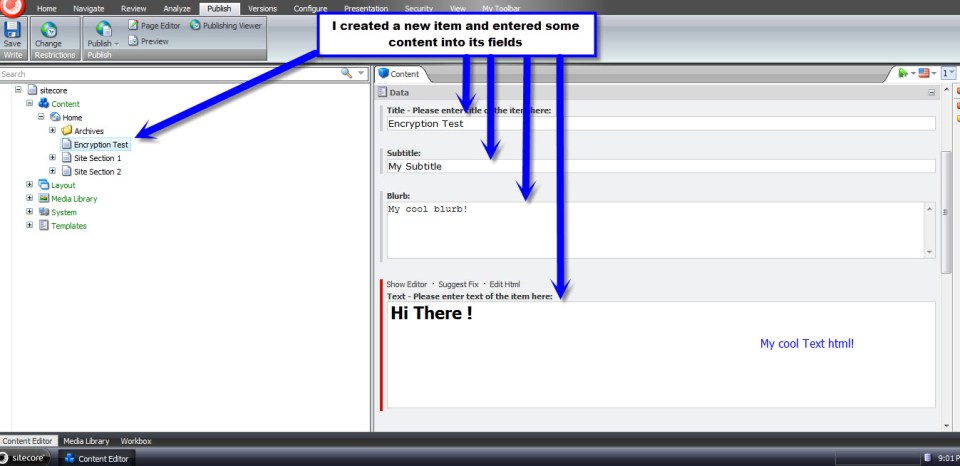
I opened up my Sitecore master database in Microsoft SQL Server Management Studio — I don’t recommend this being a standard Sitecore development practice, although I am doing this here to see if my encryption scheme worked — to see if my field data was encrypted. It was encrypted successfully:
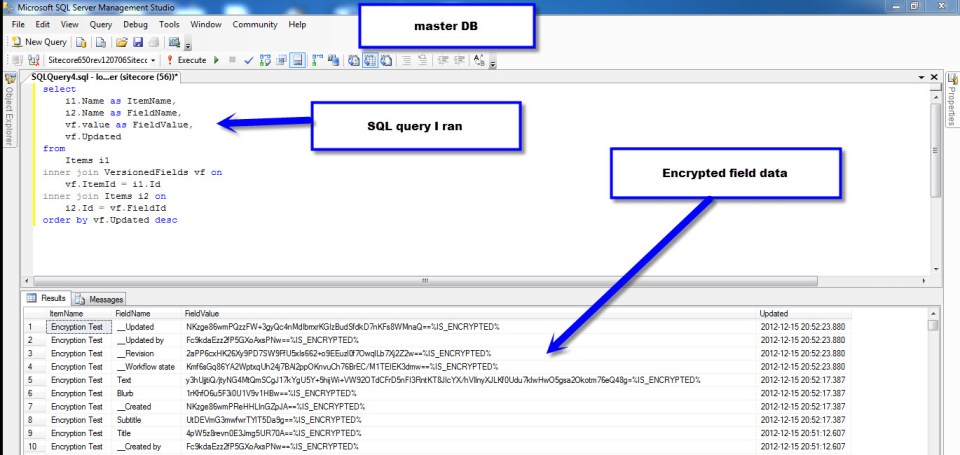
I then published my item to the web database, and pulled up my new Sample Item page in a browser to make sure it works despite being encrypted in the database:

Hooray! It works!
You might be asking yourself: how would we go about encrypting “legacy” field data in all Sitecore databases? Well, I wrote tool — the reason for creating my EncryptorFactory above — yesterday to do this. It encrypted all field data in the core, master and web databases.
However, when I opened up the desktop view of the Sitecore client, many of my tray buttons disappeared. Seeing this has lead me to conclude it’s not a good idea to encrypt data in the core database.
Plus, after having rolled back my core database to its previous state — a state of being unencrypted — I tried to open up the Content Editor in the master database. I then received an exception stemming from the rules engine — apparently not all fields in both the master and web databases should be encrypted. There must be code outside of the main data provider accessing data in all three databases.
Future research is needed to discover which fields are good candidates for having their data encrypted, and which fields should be ignored.
Seek and Destroy: Root Out Newlines and Carriage Returns in Multi-Line Text Fields
A couple of days ago, Sitecore MVP Brian Pedersen wrote an article discussing how newlines and carriage returns in Multi-Line Text fields can intrusively launch Sitecore’s “Do you want to save the changes to the item?” dialog box when clicking away from an item — even when you’ve made no changes to the item. Brian then offered an extension method on the String class as a way to remedy this annoyance.
However, Brian’s extension method cannot serve a solution on its own. It has to be invoked from somewhere to stamp out the substring malefactors — newlines (“\n”), carriage returns (“\r”), tabs (“\t”), and non-breaking spaces (“\xA0”).
This article gives one possible solution for uprooting these from Multi-Line Text fields within the Sitecore client by removing them upon item save.
First, I created a utility class that removes specified substrings from a string passed to it.
using System;
using System.Collections.Generic;
using System.Linq;
using System.Text;

namespace Sitecore.Sandbox.Utilities.StringUtilities.Base
{
    public interface ISubstringAnnihilator
    {
        string AnnihilateSubstrings(string input);
    }
}
using System;
using System.Collections.Generic;
using System.Linq;
using System.Text;

using Sitecore.Sandbox.Utilities.StringUtilities.Base;

namespace Sitecore.Sandbox.Utilities.StringUtilities
{
    public class SubstringAnnihilator : ISubstringAnnihilator
    {
        private const string ReplacementString = " ";
        private static readonly IEnumerable<string> SubstringsToAnnihilate = new string[] { "\r\n", "\n", "\r", "\t", "\xA0"};

        private SubstringAnnihilator()
        {
        }

        public string AnnihilateSubstrings(string input)
        {
            foreach (string substringToAnnihilate in SubstringsToAnnihilate)
            {
                input = input.Replace(substringToAnnihilate, ReplacementString);
            }

            return input;
        }

        public static ISubstringAnnihilator CreateNewSubstringAnnihilator()
        {
            return new SubstringAnnihilator();
        }
    }
}
It would probably be ideal to move the target substrings defined within the SubstringsToAnnihilate string array into a configuration file or even into Sitecore itself. I decided not introduce that complexity here for the sake of brevity.
Next, I created a Save pipeline. I used .NET Reflector to see how other Save pipelines in /configuration/sitecore/processors/saveUI/ in the Web.config were built — I used these as a model for creating my own — and used my SubstringAnnihilator utility class to seek and destroy the target substrings (well, just replace them with a space :)).
using System;
using System.Collections.Generic;
using System.Linq;
using System.Text;

using Sitecore.Data;
using Sitecore.Data.Fields;
using Sitecore.Data.Items;
using Sitecore.Diagnostics;
using Sitecore.Pipelines.Save;

using Sitecore.Sandbox.Utilities.StringUtilities;
using Sitecore.Sandbox.Utilities.StringUtilities.Base;

namespace Sitecore.Sandbox.Pipelines.SaveUI
{
    public class FixMultiLineTextFields
    {
        private static readonly ISubstringAnnihilator Annihilator = SubstringAnnihilator.CreateNewSubstringAnnihilator();

        public void Process(SaveArgs saveArgs)
        {
            FixAllItemFieldsWhereApplicable(saveArgs);
        }

        private static void FixAllItemFieldsWhereApplicable(SaveArgs saveArgs)
        {
            AssertSaveArgs(saveArgs);
            foreach (SaveArgs.SaveItem saveItem in saveArgs.Items)
            {
                FixSaveItemFieldsWhereApplicable(saveItem);
            }
        }

        private static void AssertSaveArgs(SaveArgs saveArgs)
        {
            Assert.ArgumentNotNull(saveArgs, "saveArgs");
            Assert.IsNotNull(saveArgs.Items, "saveArgs.Items");
        }

        private static void FixSaveItemFieldsWhereApplicable(SaveArgs.SaveItem saveItem)
        {
            Item item = GetItem(saveItem);
            foreach (SaveArgs.SaveField saveField in saveItem.Fields)
            {
                FixSaveItemFieldIfApplicable(item, saveField);
            }
        }

        private static Item GetItem(SaveArgs.SaveItem saveItem)
        {
            if (saveItem != null)
            {
                return Client.ContentDatabase.Items[saveItem.ID, saveItem.Language, saveItem.Version];
            }

            return null;
        }

        private static void FixSaveItemFieldIfApplicable(Item item, SaveArgs.SaveField saveField)
        {
            if (ShouldEnsureFieldValue(item, saveField))
            {
                saveField.Value = Annihilator.AnnihilateSubstrings(saveField.Value);
            }
        }

        private static bool ShouldEnsureFieldValue(Item item, SaveArgs.SaveField saveField)
        {
            Field field = item.Fields[saveField.ID];
            return ShouldEnsureFieldValue(field);
        }

        private static bool ShouldEnsureFieldValue(Field field)
        {
            return field.TypeKey == "memo"
                    || field.TypeKey == "multi-line text";
        }
    }
}
Now, it’s time to insert my new Save pipeline within the SaveUI pipeline stack. I’ve done this with my /App_Config/Include/FixMultiLineTextFields.config file:
<?xml version="1.0" encoding="utf-8"?>
<configuration xmlns:patch="http://www.sitecore.net/xmlconfig/">
	<sitecore>
		<processors>
			<saveUI>
				<processor mode="on" type="Sitecore.Sandbox.Pipelines.SaveUI.FixMultiLineTextFields, Sitecore.Sandbox" patch:after="processor[@type='Sitecore.Pipelines.Save.TightenRelativeImageLinks, Sitecore.Kernel']" />
			</saveUI>
		</processors>
	</sitecore>
</configuration>
Let’s take the above for a spin. I’ve inserted a sentence with newlines after every word within it into my Blurb Multi-Line Text field:
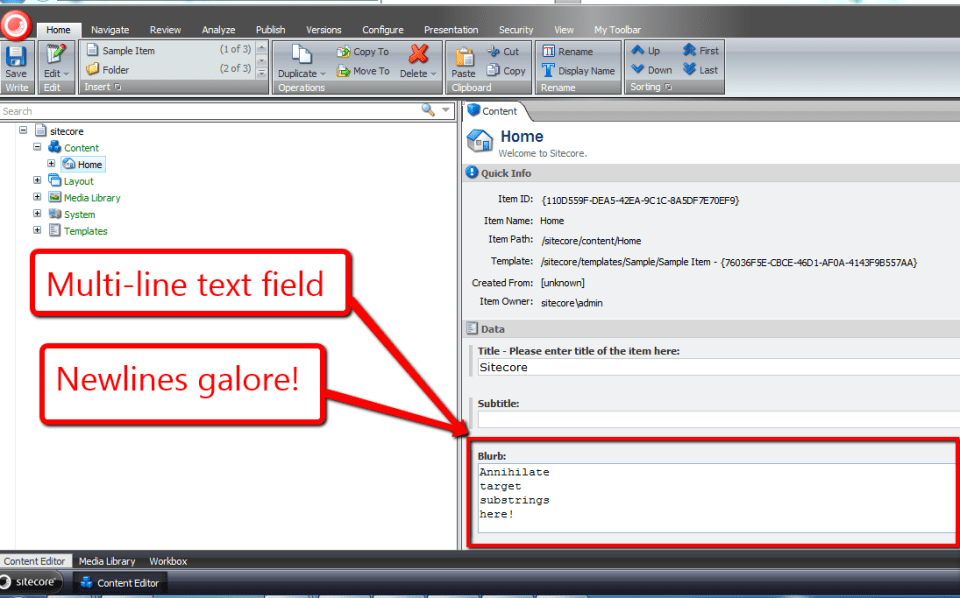
Now, I’ve clicked save, and all newlines within my Blurb Multi-Line Text field have been annihilated:
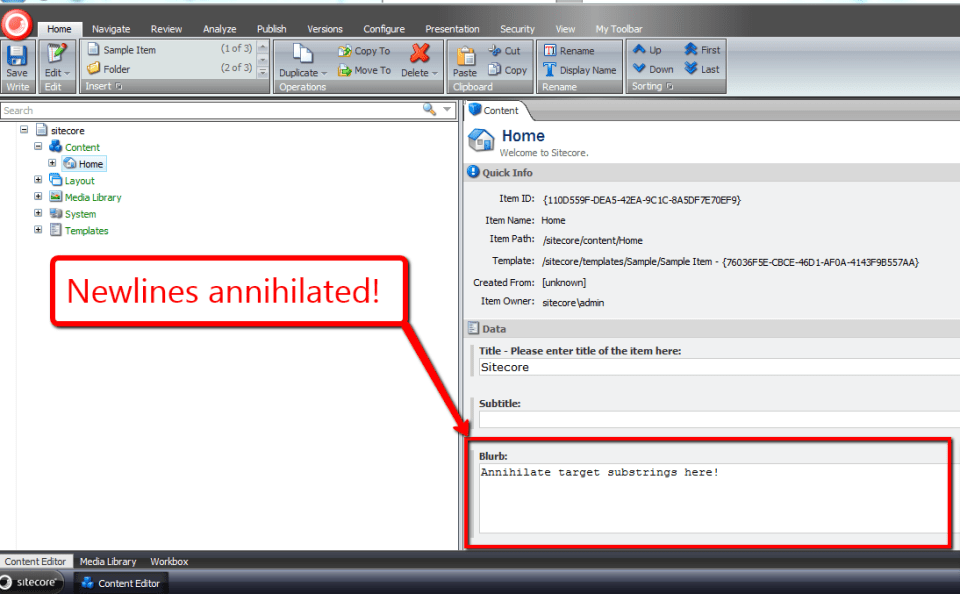
I would like to thank to Brian Pedersen for writing his article the other day — it served as the bedrock for this one, and kindled something in me to write the code above.
Keep smiling when coding!
Going Bananas Over Typed Custom Properties and JSON on a Sitecore User Profile

Did you know squirrels love eating bananas? Neither did I until yesterday when I was enlightened by this tweet. Immediately, I knew I had to carve out a corner in the banana-loving-rodent market.
What better way to acquire leads than by offering free stuff after signing up for an account? I just needed an unsquirrely way to save answers to questions on my signup form to help me better understand my prospective customers.
I decided to take advantage of Sitecore’s ability to save custom information on user profiles but wanted to avoid passing strings directly to my users’ Sitecore.Security.UserProfile objects — saving lots of information in a string can be cumbersome if not downright messy.
Under the same JSON theme of the Sitecore Item Web API, I decided to build a wrapper class around the UserProfile object that uses an utility object to serialize/deserialize objects to/from strings of JSON before saving/retrieving.
Knowing the Sitecore Item Web API converts objects into JSON, I poked around Sitecore.ItemWebApi.dll (v1.0.0 rev. 120828) using .NET Reflector in search of a serializer I could use in my solution. As I expected, I found a class that serializes objects into strings of JSON.
However, to my dismay, the same object does not deserialize strings back into objects:
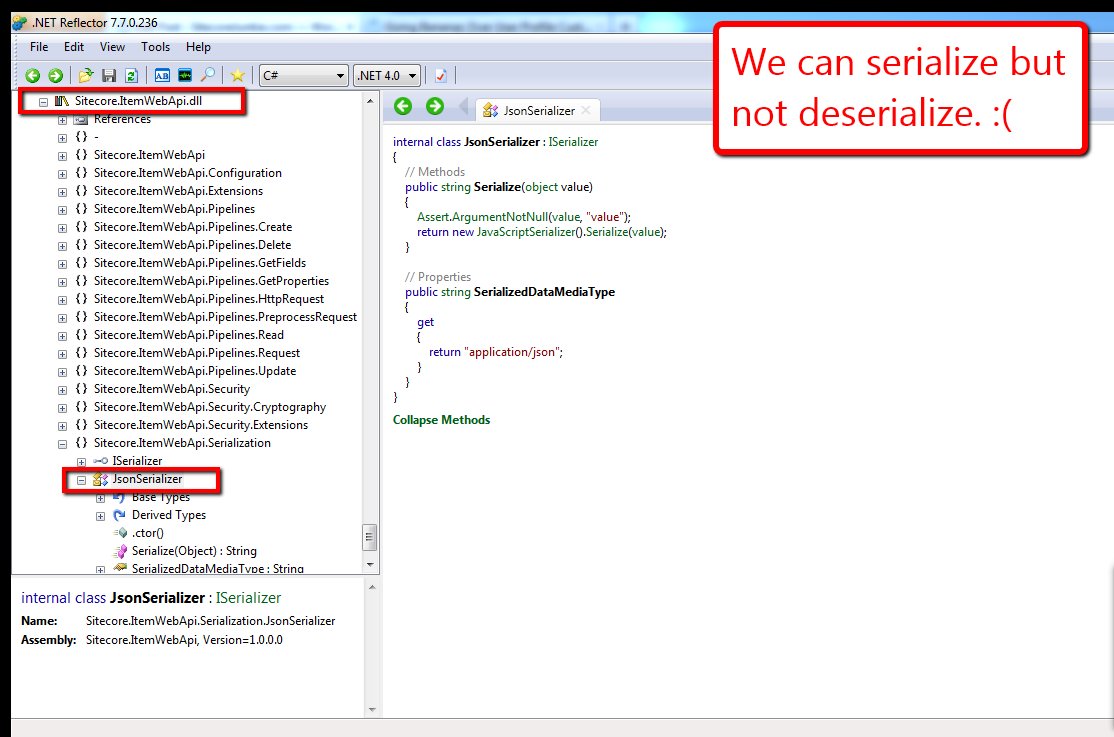
Further, I found no classes within Sitecore.ItemWebApi.dll that deserialize JSON strings. This pretty much meant I had to “roll my own”:
using System;
using System.Collections.Generic;
using System.Linq;
using System.Text;

namespace Sitecore.Sandbox.Utilities.Serialization.Base
{
    public interface ISerializer
    {
        string Serialize(object objectToSerialize);

        T Deserialize<T>(string objectAsString);

        object Deserialize(string objectAsString, Type objectType);
    }
}
using System;
using System.Collections.Generic;
using System.Linq;
using System.Text;
using System.Web.Script.Serialization;

using Sitecore.Sandbox.Utilities.Serialization.Base;

namespace Sitecore.Sandbox.Utilities.Serialization
{
    public class JsonSerializer : ISerializer
    {
        private static JavaScriptSerializer _javaScriptSerializer = new JavaScriptSerializer();

        private JsonSerializer()
        {
        }

        public string Serialize(object objectToSerialize)
        {
            return _javaScriptSerializer.Serialize(objectToSerialize);
        }

        public T Deserialize<T>(string objectAsString)
        {
            return _javaScriptSerializer.Deserialize<T>(objectAsString);
        }

        public object Deserialize(string objectAsString, Type objectType)
        {
            return _javaScriptSerializer.Deserialize(objectAsString, objectType);
        }

        public static ISerializer CreateNewJsonSerializer()
        {
            return new JsonSerializer();
        }
    }
}
The JsonSerializer class above not only gives client-code the ability to serialize objects into JSON strings, but also offers methods for deserialization.
Plus, unlike the JsonSerializer class in Sitecore.ItemWebApi.Serialization, this JsonSerializer class creates only one instance of a JavaScriptSerializer object across multiple instances of itself. There is no need to have multiple instances of this class floating around in memory since the underlying core logic for this class will not — and should not — change.
Next, I defined my UserProfile wrapper class:
using System;
using System.Collections.Generic;
using System.Linq;
using System.Text;

namespace Sitecore.Sandbox.Security.UserProfiles.Base
{
    public interface IUserProfileTypedProperties
    {
        string FullName { get; set; }

        T GetCustomProperty<T>(string propertyName);

        void SetCustomProperty(string propertyName, object propertyValue);

        void Save();
    }
}
using System;
using System.Collections.Generic;
using System.Linq;
using System.Text;

using Sitecore.Diagnostics;
using Sitecore.Security;

using Sitecore.Sandbox.Utilities.Serialization.Base;
using Sitecore.Sandbox.Utilities.Serialization;
using Sitecore.Sandbox.Security.UserProfiles.Base;

namespace Sitecore.Sandbox.Security.UserProfiles
{
    public class UserProfileTypedProperties : IUserProfileTypedProperties
    {
        private static ISerializer _defaultSerializer = GetNewDefaultSerializer();

        private UserProfile UserProfile { get; set; }
        private ISerializer Serializer { get; set; }

        public string FullName
        {
            get
            {
                return UserProfile.FullName;
            }
            set
            {
                UserProfile.FullName = value;
            }
        }

        private UserProfileTypedProperties(UserProfile userProfile)
            :this(userProfile, _defaultSerializer)
        {
        }

        private UserProfileTypedProperties(UserProfile userProfile, ISerializer serializer)
        {
            SetUserProfile(userProfile);
            SetSerializer(serializer);
        }

        private void SetSerializer(ISerializer serializer)
        {
            Assert.ArgumentNotNull(serializer, "serializer");
            Serializer = serializer;
        }

        private void SetUserProfile(UserProfile userProfile)
        {
            Assert.ArgumentNotNull(userProfile, "userProfile");
            UserProfile = userProfile;
        }

        public T GetCustomProperty<T>(string propertyName)
        {
            string propertyValue = UserProfile.GetCustomProperty(propertyName);
            return Deserialize<T>(propertyValue);
        }

        private T Deserialize<T>(string objectAsString)
        {
            return Serializer.Deserialize<T>(objectAsString);
        }

        public void SetCustomProperty(string propertyName, object propertyValue)
        {
            string objectAsString = Serialize(propertyValue);
            SetCustomProperty(propertyName, objectAsString);
        }

        private void SetCustomProperty(string propertyName, string objectAsString)
        {
            UserProfile.SetCustomProperty(propertyName, objectAsString);
        }

        private string GetCustomProperty(string propertyName)
        {
            return UserProfile.GetCustomProperty(propertyName);
        }

        private string Serialize(object objectToSerialize)
        {
            return Serializer.Serialize(objectToSerialize);
        }

        public void Save()
        {
            UserProfile.Save();
        }

        public static IUserProfileTypedProperties CreateNewUserProfileTypedProperties(UserProfile userProfile)
        {
            return new UserProfileTypedProperties(userProfile);
        }

        public static IUserProfileTypedProperties CreateNewUserProfileTypedProperties(UserProfile userProfile, ISerializer serializer)
        {
            return new UserProfileTypedProperties(userProfile, serializer);
        }

        private static ISerializer GetNewDefaultSerializer()
        {
            return JsonSerializer.CreateNewJsonSerializer();
        }
    }
}
The UserProfile wrapper above offers client-code the option of passing in their own serializers — as long as their serializers implement the ISerializer interface I defined above — or provides an instance of the JsonSerializer by default.
Now, let’s test all of this stuff above using a simple form in a sublayout for creating an account and saving/retrieving a typed object from a custom UserProfile property:
<%@ Control Language="C#" AutoEventWireup="true" CodeBehind="UserProfile Typed Property Test.ascx.cs" Inherits="Sitecore650rev120706.layouts.sublayouts.UserProfile_Typed_Property_Test" %>
<style type="text/css">
.form-container
{
margin-left: 20px;
}
h1
{
margin-top: 0;
}
.form
{
list-style: none;
margin: 0;
padding: 0;
}
.form li,
td,
.cover
{
zoom: 1;
text-align: left;
}
.form li:after,
td:after,
.cover:after
{
content: ".";
display: block;
clear: both;
visibility: hidden;
line-height: 0;
height: 0;
}
.form > li > div,
input[type="radio"],
input[type="radio"] + label,
.float-left
{
float: left;
}
.form > li > div + div
{
margin-left: 5px;
}
.red
{
color: red;
}
.signup,
.bold
{
font-weight: bold;
}
input[type="radio"] + label
{
display: block;
width: 130px;
}
.signup,
.float-right
{
float: right;
}
.signup
{
width: 100px;
height: 50px;
font-size: 20px;
}
</style>
<div class="cover">
<asp:Image
ID="imgSquirrel"
CssClass="float-left"
ImageUrl="/img/squirrel-banana.jpg"
runat="server" />
<asp:MultiView ID="mvUserProfileInformation" ActiveViewIndex="0" runat="server">
<asp:View ID="vSignupForm" runat="server">
<div class="float-left form-container">
<h1>
Hey Squirrels
</h1>
<h2 class="red">
Free Bananas When You Signup!
</h2>
<ul class="form">
<li>
<div>
<asp:Label ID="lblName" CssClass="bold" Text="Name:" AssociatedControlID="txtName" runat="server" />
<span class="red">*</span>
</div>
<div>
<asp:TextBox ID="txtName" runat="server" />
<asp:RequiredFieldValidator
ID="rfvName"
ControlToValidate="txtName"
ErrorMessage="<br />Please tell us your name!"
CssClass="red"
Display="Dynamic"
ValidationGroup="SquirrelForm"
runat="server" />
</div>
</li>
<li>
<div>
<asp:Label ID="lblUsername" CssClass="bold" Text="Username:" AssociatedControlID="txtName" runat="server" />
<span class="red">*</span>
</div>
<div>
<asp:TextBox ID="txtUsername" runat="server" />
<asp:RequiredFieldValidator
ID="rfvUsername"
ControlToValidate="txtUsername"
ErrorMessage="<br />Please enter a username!"
CssClass="red"
Display="Dynamic"
ValidationGroup="SquirrelForm"
runat="server" />
</div>
</li>
<li>
<div>
<asp:Label ID="lblPassword" CssClass="bold" Text="Password:" AssociatedControlID="txtPassword" runat="server" />
<span class="red">*</span>
</div>
<div>
<asp:TextBox ID="txtPassword" TextMode="Password" runat="server" />
<asp:RequiredFieldValidator
ID="rfvPassword"
ControlToValidate="txtPassword"
ErrorMessage="<br />Choose a password!"
CssClass="red"
Display="Dynamic"
ValidationGroup="SquirrelForm"
runat="server" />
</div>
</li>
<li>
<div>
<asp:Label ID="lblPasswordConfirm" CssClass="bold" Text="Confirm Password:" AssociatedControlID="txtPasswordConfirm" runat="server" />
<span class="red">*</span>
</div>
<div>
<asp:TextBox ID="txtPasswordConfirm" TextMode="Password" runat="server" />
<asp:RequiredFieldValidator
ID="rfvPasswordConfirm"
ControlToValidate="txtPasswordConfirm"
ErrorMessage="<br />Please confirm your password!"
CssClass="red"
Display="Dynamic"
ValidationGroup="SquirrelForm"
runat="server" />
<asp:CompareValidator
ID="cvPasswordConfirm"
ControlToValidate="txtPasswordConfirm"
ControlToCompare="txtPassword"
ErrorMessage="<br />Passwords don't match!"
CssClass="red"
Display="Dynamic"
ValidationGroup="SquirrelForm"
runat="server" />
</div>
</li>
<li>
<div>
<asp:Label ID="lblWhereLive" CssClass="bold" Text="You live (choose one):" AssociatedControlID="cblFoods" runat="server" />
<span class="red">*</span>
</div>
<div>
<asp:RadioButtonList ID="rblWhereLive" runat="server">
<asp:ListItem Text="Up a tree" Value="Up a tree" />
<asp:ListItem Text="In an attic" Value="In an attic" />
<asp:ListItem Text="In a broken-down car up on cinder blocks" Value="In a broken-down car up on cinder blocks" />
</asp:RadioButtonList>
<asp:RequiredFieldValidator
ID="rfvWhereLive"
ControlToValidate="rblWhereLive"
ErrorMessage="<br />Please choose one domicile!"
CssClass="red"
Display="Dynamic"
ValidationGroup="SquirrelForm"
runat="server" />
</div>
</li>
<li>
<div>
<asp:Label ID="lblYouThinkYouARodent" CssClass="bold" Text="Do you think you're a rodent?:" AssociatedControlID="rblYouARodent" runat="server" />
</div>
<div>
<asp:RadioButtonList ID="rblYouARodent" runat="server">
<asp:ListItem Text="Yes" Value="Yes" Selected="true" />
<asp:ListItem Text="No" Value="No" />
</asp:RadioButtonList>
</div>
</li>
<li>
<div>
<asp:Label ID="lblFoodPreference" CssClass="bold" Text="I like to eat (check all that apply):" AssociatedControlID="cblFoods" runat="server" />
</div>
<div>
<asp:CheckBoxList ID="cblFoods" runat="server">
<asp:ListItem Text="Acorns" Value="Acorns" />
<asp:ListItem Text="Walnuts" Value="Walnuts" />
<asp:ListItem Text="Chestnuts" Value="Chestnuts" />
<asp:ListItem Text="Bananas" Value="Bananas" />
</asp:CheckBoxList>
</div>
</li>
</ul>
<asp:Button
ID="btnSignup"
CssClass="signup"
OnClick="btnSignup_Click"
Text="Signup"
ValidationGroup="SquirrelForm"
runat="server" />
</div>
</asp:View>
<asp:View ID="vUserProfileSavedInformation" runat="server">
<div class="float-left form-container" style="width: 330px;">
<h1>
Your information:
</h1>
<div>
<asp:Label
ID="lblYourName"
CssClass="bold"
Text="Name:"
runat="server" />
<asp:Literal ID="litYourName" runat="server" />
</div>
<div>
<asp:Label
ID="lblYourUsername"
CssClass="bold"
Text="Username:"
runat="server" />
<asp:Literal ID="litYourUsername" runat="server" />
</div>
<div>
<asp:Label
ID="lblYouARodent"
CssClass="bold"
Text="Do you think you're a rodent?:"
runat="server" />
<asp:Literal ID="litYouARodent" runat="server" />
</div>
<div>
<asp:Label
ID="lblYourDomicile"
CssClass="bold"
Text="You live:"
runat="server" />
<asp:Literal ID="litWhereLive" runat="server" />
</div>
<div>
<asp:Label
ID="lblYouLikeToEat"
CssClass="bold"
Text="You like to eat:"
runat="server" />
<asp:Literal ID="litFoodPreference" runat="server" />
</div>
</div>
</asp:View>
</asp:MultiView>
</div>
using System;
using System.Collections.Generic;
using System.Linq;
using System.Web;
using System.Web.UI;
using System.Web.UI.WebControls;

using Sitecore.Security;
using Sitecore.Security.Accounts;
using Sitecore.Security.Authentication;

using Sitecore.Sandbox.Security.UserProfiles;
using Sitecore.Sandbox.Security.UserProfiles.Base;

namespace Sitecore650rev120706.layouts.sublayouts
{
    public partial class UserProfile_Typed_Property_Test : System.Web.UI.UserControl
    {
        private const string SquirrelInformationPropertyName = "Squirrel Information";

        protected void Page_Load(object sender, EventArgs e)
        {
        }

        protected void btnSignup_Click(object sender, EventArgs e)
        {
            if (Page.IsValid)
            {
                string username = GetUsername();
                User user = CreateUser(username, txtPassword.Text);

                if(Login(user, txtPassword.Text))
                {
                    SaveSquirrelInformation();
                    ShowSquirrelInformation();
                }
            }
        }

        private User CreateUser(string username, string password)
        {
            return User.Create(username, txtPassword.Text);
        }

        private string GetUsername()
        {
            const string domain = "extranet";

            if(!string.IsNullOrEmpty(txtUsername.Text))
                return string.Concat(domain, "\\", txtUsername.Text);

            return string.Empty;
        }

        private bool Login(User user, string password)
        {
            if(user != null && user.Profile != null)
                return AuthenticationManager.Login(user.Profile.UserName, password, false);

            return false;
        }

        private void SaveSquirrelInformation()
        {
            SquirrelInformation squirrelInformation = GetSquirrelInformationFromForm();
            IUserProfileTypedProperties userProfileTypedProperties = UserProfileTypedProperties.CreateNewUserProfileTypedProperties(Sitecore.Context.User.Profile);
            userProfileTypedProperties.FullName = txtName.Text;
            userProfileTypedProperties.SetCustomProperty(SquirrelInformationPropertyName, squirrelInformation);
            userProfileTypedProperties.Save();
        }

        private SquirrelInformation GetSquirrelInformationFromForm()
        {
            return new SquirrelInformation
            {
                Domicile = rblWhereLive.SelectedValue,
                YouARodent = rblYouARodent.Text,
                FoodPreferences = GetFoodPreferencesFromForm()
            };
        }

        private List<string> GetFoodPreferencesFromForm()
        {
            List<string> foodPreferences = new List<string>();

            foreach (ListItem listItem in cblFoods.Items)
            {
                if (listItem.Selected)
                    foodPreferences.Add(listItem.Value);
            }

            return foodPreferences;
        }

        private void ShowSquirrelInformation()
        {
            UserProfile userProfile = Sitecore.Context.User.Profile;
            litYourName.Text = userProfile.FullName;
            litYourUsername.Text = userProfile.UserName;

            SquirrelInformation squirrelInformation = GetSavedSquirrelInformation(userProfile);
            litWhereLive.Text = squirrelInformation.Domicile;
            litYouARodent.Text = squirrelInformation.YouARodent;
            litFoodPreference.Text = string.Join(", ", squirrelInformation.FoodPreferences);
            mvUserProfileInformation.SetActiveView(vUserProfileSavedInformation);
        }

        private static SquirrelInformation GetSavedSquirrelInformation(UserProfile userProfile)
        {
            IUserProfileTypedProperties userProfileTypedProperties = UserProfileTypedProperties.CreateNewUserProfileTypedProperties(userProfile);
            return userProfileTypedProperties.GetCustomProperty<SquirrelInformation>(SquirrelInformationPropertyName);
        }

        private class SquirrelInformation
        {
            public string Domicile { get; set; }
            public string YouARodent { get; set; }
            public List<string> FoodPreferences { get; set; }
        }
    }
}
The form:

After creating an account, I just show a subset of the information the squirrel provided on the form:

Just to let you know, the logic in sublayout’s code-behind is not very robust — it throws an exception when users refresh the “confirmation” page after creating an account (I’m not checking to see if the user had already created an account and is logged in).
Plus, it’s in need of refactoring — I should move the SquirrelInformation class into its own file.
I’m not even going to mention how bad the front-end code needs some attention — my front-end friends are probably ashamed they even know me and are no doubt thinking I’ve gone completely bananas. They may be right. 🙂
I promise I’ll go back and clean it up. I just needed to get it out the door. Winter is quickly approaching and I need to market my bananas as soon as possible. I need to reap in some dough to buy and bury more acorns.
That’s it for now. I have to go climb a tree. Talk to you later 🙂
Honey, I Shrunk the Content: Experiments with a Custom Sitecore Cache and Compression
A few days ago, I pondered whether there would be any utility in creating a custom Sitecore cache that compresses data before it’s stored and decompresses data upon retrieval. I wondered whether having such a cache would facilitate in conserving memory resources, thus curtailing the need to beef up servers from a memory perspective.
You’re probably thinking “Mike, who cares? Memory is cheaper today than ever before!” That thought is definitely valid.
However, I would argue we owe it to our clients and to ourselves as developers to push the envelope as much as possible by architecting our solutions to be as efficient and resource conscious as possible.
Plus, I was curious over how expensive compress/decompress operations would be for real-time requests.
The following code showcases my ventures into trying to answer these questions.
First, I defined an interface for compressors. Compressors must define methods to compress and decompress data (duh :)). I also added an additional Decompress method to cast the data object to a particular type — all for the purpose of saving client code the trouble of having to do their own type casting (yeah right, I really did it to be fancy).
using System;
using System.Collections.Generic;
using System.Linq;
using System.Text;

namespace Sitecore.Sandbox.Utilities.Compression.Compressors.Base
{
    public interface ICompressor
    {
        string Name { get; }

        byte[] Compress(object uncompressedData);

        T Decompress<T>(byte[] compressedData) where T : class;

        object Decompress(byte[] compressedData);

        long GetDataSize(object data);
    }
}
I decided to use two compression algorithms available in the System.IO.Compression namespace — Deflate and GZip. Since both algorithms within this namespace implement System.IO.Stream, I found an opportunity to use the Template method pattern.
In the spirit of this design pattern, I created an abstract class — see the CompressionStreamCompressor class below — which contains shared logic for compressing/decompressing data using methods defined by the Stream class. Subclasses only have to “fill in the blanks” by implementing the abstract method CreateNewCompressionStream — a method that returns a new instance of the compression stream represented by the subclass.
CompressionStreamCompressor:
using System;
using System.Collections.Generic;
using System.IO;
using System.IO.Compression;
using System.Linq;
using System.Runtime.Serialization;
using System.Runtime.Serialization.Formatters.Binary;
using System.Text;

using Sitecore.Diagnostics;

namespace Sitecore.Sandbox.Utilities.Compression.Compressors.Base
{
    public abstract class CompressionStreamCompressor : ICompressor
    {
        protected CompressionStreamCompressor()
        {
        }

        public virtual byte[] Compress(object uncompressedData)
        {
            Assert.ArgumentNotNull(uncompressedData, "uncompressedData");

            byte[] uncompressedBytes = ConvertObjectToBytes(uncompressedData);
            return Compress(uncompressedBytes);
        }

        private byte[] Compress(byte[] uncompressedData)
        {
            Assert.ArgumentNotNull(uncompressedData, "uncompressedData");

            using (MemoryStream memoryStream = new MemoryStream())
            {
                using (Stream compressionStream = CreateNewCompressionStream(memoryStream, CompressionMode.Compress))
                {
                    compressionStream.Write(uncompressedData, 0, uncompressedData.Length);
                }

                return memoryStream.ToArray();
            }
        }

        public virtual T Decompress<T>(byte[] compressedData) where T : class
        {
            object decompressedData = Decompress(compressedData);
            return decompressedData as T;
        }

        public virtual object Decompress(byte[] compressedBytes)
        {
            Assert.ArgumentNotNull(compressedBytes, "compressedBytes");

            using (MemoryStream inputMemoryStream = new MemoryStream(compressedBytes))
            {
                using (Stream compressionStream = CreateNewCompressionStream(inputMemoryStream, CompressionMode.Decompress))
                {
                    using (MemoryStream outputMemoryStream = new MemoryStream())
                    {
                        compressionStream.CopyTo(outputMemoryStream);
                        return ConvertBytesToObject(outputMemoryStream.ToArray());
                    }
                }
            }
        }

        protected abstract Stream CreateNewCompressionStream(Stream stream, CompressionMode compressionMode);

        public long GetDataSize(object data)
        {
            if (data == null)
                return 0;

            IFormatter formatter = new BinaryFormatter();
            long size = 0;

            using (MemoryStream memoryStream = new MemoryStream())
            {
                formatter.Serialize(memoryStream, data);
                size = memoryStream.Length;
            }

            return size;
        }

        protected static byte[] ConvertObjectToBytes(object data)
        {
            if (data == null)
                return null;

            byte[] bytes = null;
            IFormatter formatter = new BinaryFormatter();

            using (MemoryStream memoryStream = new MemoryStream())
            {
                formatter.Serialize(memoryStream, data);
                bytes = memoryStream.ToArray();
            }

            return bytes;
        }

        protected static object ConvertBytesToObject(byte[] bytes)
        {
            if (bytes == null)
                return null;

            object deserialized = null;

            using (MemoryStream memoryStream = new MemoryStream(bytes))
            {
                IFormatter formatter = new BinaryFormatter();
                memoryStream.Position = 0;
                deserialized = formatter.Deserialize(memoryStream);
            }

            return deserialized;
        }
    }
}
DeflateCompressor:
using System;
using System.Collections.Generic;
using System.IO;
using System.IO.Compression;
using System.Linq;
using System.Runtime.Serialization;
using System.Runtime.Serialization.Formatters.Binary;
using System.Text;

using Sitecore.Diagnostics;

using Sitecore.Sandbox.Utilities.Compression.Compressors.Base;

namespace Sitecore.Sandbox.Utilities.Compression
{
    public class DeflateCompressor : CompressionStreamCompressor
    {
        private DeflateCompressor()
        {
        }

        protected override Stream CreateNewCompressionStream(Stream stream, CompressionMode compressionMode)
        {
            return new DeflateStream(stream, compressionMode, false);
        }

        public static ICompressor CreateNewCompressor()
        {
            return new DeflateCompressor();
        }
    }
}
GZipCompressor:
using System;
using System.Collections.Generic;
using System.IO;
using System.IO.Compression;
using System.Linq;
using System.Runtime.Serialization;
using System.Runtime.Serialization.Formatters.Binary;
using System.Text;

using Sitecore.Diagnostics;

using Sitecore.Sandbox.Utilities.Compression.Compressors.Base;

namespace Sitecore.Sandbox.Utilities.Compression
{
    public class GZipCompressor : CompressionStreamCompressor
    {
        private GZipCompressor()
        {
        }

        protected override Stream CreateNewCompressionStream(Stream stream, CompressionMode compressionMode)
        {
            return new GZipStream(stream, compressionMode, false);
        }

        public static ICompressor CreateNewCompressor()
        {
            return new GZipCompressor();
        }
    }
}
If Microsoft ever decides to augment their arsenal of compression streams in System.IO.Compression, we could easily add new Compressor classes for these via the template method paradigm above — as long as these new compression streams implement System.IO.Stream.
After implementing the classes above, I decided I needed a “dummy” Compressor — a compressor that does not execute any compression algorithm but implements the ICompressor interface. My reasoning for doing so is to have a default Compressor be returned via a compressor factory (you will see that I created one further down), and also for ascertaining baseline benchmarks.
Plus, I figured it would be nice to have an object that closely follows the Null Object pattern — albeit in our case, we aren’t truly using this design pattern since our “Null” class is actually executing logic — so client code can avoid having null checks all over the place.
I had to go back and change my Compress and Decompress methods to be virtual in my abstract class so that I can override them within my “Null” Compressor class. The methods just take in the expected parameters and return expected types with no compression or decompression actions in the mix.
using System;
using System.Collections.Generic;
using System.IO;
using System.IO.Compression;
using System.Linq;
using System.Runtime.Serialization;
using System.Runtime.Serialization.Formatters.Binary;
using System.Text;

using Sitecore.Diagnostics;

using Sitecore.Sandbox.Utilities.Compression.Compressors.Base;

namespace Sitecore.Sandbox.Utilities.Compression.Compressors
{
    class NullCompressor : CompressionStreamCompressor
    {
        private NullCompressor()
        {
        }

        public override byte[] Compress(object uncompressedData)
        {
            Assert.ArgumentNotNull(uncompressedData, "uncompressedData");
            return ConvertObjectToBytes(uncompressedData);
        }

        public override object Decompress(byte[] compressedBytes)
        {
            Assert.ArgumentNotNull(compressedBytes, "compressedBytes");
            return ConvertBytesToObject(compressedBytes);
        }

        protected override Stream CreateNewCompressionStream(Stream stream, CompressionMode compressionMode)
        {
            return null;
        }

        public static ICompressor CreateNewCompressor()
        {
            return new NullCompressor();
        }
    }
}
Next, I defined my custom Sitecore cache with its interface and settings Data transfer object.
An extremely important thing to keep in mind when creating a custom Sitecore cache is knowing you must subclass CustomCache in Sitecore.Caching — most methods that add or get from cache are protected methods, and you won’t have access to these unless you subclass this abstract class (I wasn’t paying attention when I built my cache for the first time, and had to go back to the drawing board when i discovered my code would not compile due to restricted access rights).
using System;
using System.Collections.Generic;
using System.Linq;
using System.Text;

using Sitecore.Caching;

using Sitecore.Sandbox.Utilities.Compression.Compressors.Base;

namespace Sitecore.Sandbox.Utilities.Caching.DTO
{
    public class SquashedCacheSettings
    {
        public string Name { get; set; }
        public long MaxSize { get; set; }
        public ICompressor Compressor { get; set; }
        public bool CompressionEnabled { get; set; }
    }
}
using System;
using System.Collections.Generic;
using System.Linq;
using System.Text;

using Sitecore.Sandbox.Utilities.Compression.Compressors.Base;

namespace Sitecore.Sandbox.Utilities.Caching.Base
{
    public interface ISquashedCache
    {
        ICompressor Compressor { get; }

        void AddToCache(object key, object value);

        T GetFromCache<T>(object key) where T : class;

        object GetFromCache(object key);
    }
}
using System;
using System.Collections.Generic;
using System.Linq;
using System.Text;

using Sitecore.Caching;
using Sitecore.Data;
using Sitecore.Diagnostics;

using Sitecore.Sandbox.Utilities.Caching.Base;
using Sitecore.Sandbox.Utilities.Caching.DTO;
using Sitecore.Sandbox.Utilities.Compression.Compressors.Base;

namespace Sitecore.Sandbox.Utilities.Caching
{
    public class SquashedCache : CustomCache, ISquashedCache
    {
        private SquashedCacheSettings SquashedCacheSettings { get; set; }

        public ICompressor Compressor
        {
            get
            {
                return SquashedCacheSettings.Compressor;
            }
        }

        private SquashedCache(SquashedCacheSettings squashedCacheSettings)
            : base(squashedCacheSettings.Name, squashedCacheSettings.MaxSize)
        {
            SetSquashedCacheSettings(squashedCacheSettings);
        }

        private void SetSquashedCacheSettings(SquashedCacheSettings squashedCacheSettings)
        {
            SquashedCacheSettings = squashedCacheSettings;
        }

        public void AddToCache(object key, object value)
        {
            DataInformation dataInformation = GetCompressedDataInformation(value);
            SetObject(key, dataInformation.Data, dataInformation.Size);
        }

        private DataInformation GetCompressedDataInformation(object data)
        {
            long size = SquashedCacheSettings.Compressor.GetDataSize(data);
            return GetCompressedDataInformation(data, size);
        }

        private DataInformation GetCompressedDataInformation(object data, long size)
        {
            if (SquashedCacheSettings.CompressionEnabled)
            {
                data = SquashedCacheSettings.Compressor.Compress(data);
                size = SquashedCacheSettings.Compressor.GetDataSize(data);
            }

            return new DataInformation(data, size);
        }

        public T GetFromCache<T>(object key) where T : class
        {
            object value = GetFromCache(key);
            return value as T;
        }

        public object GetFromCache(object key)
        {
            byte[] value = (byte[])GetObject(key);
            return SquashedCacheSettings.Compressor.Decompress(value);
        }

        private T GetDecompressedData<T>(byte[] data) where T : class
        {
            if (SquashedCacheSettings.CompressionEnabled)
            {
                return SquashedCacheSettings.Compressor.Decompress<T>(data);
            }

            return data as T;
        }

        private object GetDecompressedData(byte[] data)
        {
            if (SquashedCacheSettings.CompressionEnabled)
            {
                return SquashedCacheSettings.Compressor.Decompress(data);
            }

            return data;
        }

        private struct DataInformation
        {
            public object Data;
            public long Size;

            public DataInformation(object data, long size)
            {
                Data = data;
                Size = size;
            }
        }

        public static ISquashedCache CreateNewSquashedCache(SquashedCacheSettings squashedCacheSettings)
        {
            AssertSquashedCacheSettings(squashedCacheSettings);
            return new SquashedCache(squashedCacheSettings);
        }

        private static void AssertSquashedCacheSettings(SquashedCacheSettings squashedCacheSettings)
        {
            Assert.ArgumentNotNull(squashedCacheSettings, "squashedCacheSettings");
            Assert.ArgumentNotNullOrEmpty(squashedCacheSettings.Name, "squashedCacheSettings.Name");
            Assert.ArgumentCondition(squashedCacheSettings.MaxSize > 0, "squashedCacheSettings.MaxSize", "MaxSize must be greater than zero.");
            Assert.ArgumentNotNull(squashedCacheSettings.Compressor, "squashedCacheSettings.Compressor");
        }
    }
}
You’re probably thinking “Mike, what’s up with the name SquashedCache”? Well, truth be told, I was thinking about Thanksgiving here in the United States — it’s just around the corner — and how squash is a usually found on the table for Thanksgiving dinner. The name SquashedCache just fit in perfectly in the spirit of our Thanksgiving holiday.
However, the following class names were considered.
public class SirSquishALot
{
}public class MiniMeCache
{
}// this became part of this post’s title instead 🙂
public class HoneyIShrunkTheContent
{
}
I figured having a Factory class for compressor objects would offer a clean and central place for creating them.
using System;
using System.Collections.Generic;
using System.Linq;
using System.Text;

namespace Sitecore.Sandbox.Utilities.Compression.Compressors.Enums
{
    public enum CompressorType
    {
        Deflate,
        GZip,
        Null
    }
}
using System;
using System.Collections.Generic;
using System.Linq;
using System.Text;

using Sitecore.Sandbox.Utilities.Compression.Compressors.Enums;

namespace Sitecore.Sandbox.Utilities.Compression.Compressors.Base
{
    public interface ICompressorFactory
    {
        ICompressor CreateNewCompressor(CompressorType compressorType);
    }
}
using System;
using System.Collections.Generic;
using System.Linq;
using System.Text;

using Sitecore.Sandbox.Utilities.Compression.Compressors.Base;
using Sitecore.Sandbox.Utilities.Compression.Compressors.Enums;

namespace Sitecore.Sandbox.Utilities.Compression.Compressors
{
    public class CompressorFactory : ICompressorFactory
    {
        private CompressorFactory()
        {
        }

        public ICompressor CreateNewCompressor(CompressorType compressorType)
        {
            if (compressorType == CompressorType.Deflate)
            {
                return DeflateCompressor.CreateNewCompressor();
            }
            else if (compressorType == CompressorType.GZip)
            {
                return GZipCompressor.CreateNewCompressor();
            }

            return NullCompressor.CreateNewCompressor();
        }

        public static ICompressorFactory CreateNewCompressorFactory()
        {
            return new CompressorFactory();
        }
    }
}
Now, it’s time to test everything above and look at some statistics. I basically created a sublayout containing some repeaters to highlight how each compressor performed against the others — including the “Null” compressor which serves as the baseline.
<%@ Control Language="C#" AutoEventWireup="true" CodeBehind="Squash Test.ascx.cs" Inherits="Sitecore650rev120706.layouts.sublayouts.Squash_Test" %>

<div>
    <h2><u>Compression Test</u></h2>
    Uncompressed Size: <asp:Literal ID="litUncompressedSize" runat="server" /> bytes
    <asp:Repeater ID="rptCompressionTest" runat="server">
        <HeaderTemplate>
            <br /><br />
        </HeaderTemplate>
        <ItemTemplate>
                <div>
                    Compressed Size using <%# Eval("TestName")%>: <%# Eval("CompressedSize")%> bytes <br />
                    Compression Ratio using <%# Eval("TestName")%>: <%# Eval("CompressionRatio","{0:p}") %> of original size
                </div>
        </ItemTemplate>
        <SeparatorTemplate>
            <br />
        </SeparatorTemplate>
    </asp:Repeater>
</div>

<asp:Repeater ID="rptAddToCacheTest" runat="server">
    <HeaderTemplate>
        <div>
            <h2><u>AddToCache() Test</u></h2>
    </HeaderTemplate>
    <ItemTemplate>
            <div>
                AddToCache() Elasped Time for <%# Eval("TestName")%>: <%# Eval("ElapsedMilliseconds")%> ms
            </div>
    </ItemTemplate>
    <FooterTemplate>
        </div>
    </FooterTemplate>
</asp:Repeater>

<asp:Repeater ID="rptGetFromCacheTest" runat="server">
    <HeaderTemplate>
        <div>
            <h2><u>GetFromCache() Test</u></h2>
    </HeaderTemplate>
    <ItemTemplate>
            <div>
                GetFromCache() Elasped Time for <%# Eval("TestName")%>: <%# Eval("ElapsedMilliseconds")%> ms
            </div>
    </ItemTemplate>
    <FooterTemplate>
        </div>
    </FooterTemplate>
</asp:Repeater>

<asp:Repeater ID="rptDataIntegrityTest" runat="server">
    <HeaderTemplate>
        <div>
            <h2><u>Data Integrity Test</u></h2>
    </HeaderTemplate>
    <ItemTemplate>
            <div>
                Data Retrieved From <%# Eval("TestName")%> Equals Original: <%# Eval("AreEqual")%>
            </div>
    </ItemTemplate>
    <FooterTemplate>
        </div>
    </FooterTemplate>
</asp:Repeater>
In my code-behind, I’m grabbing the full text of the book War and Peace by Leo Tolstoy for testing purposes. The full text of this copy of the book is over 3.25 MB.
using System;
using System.Collections.Generic;
using System.Diagnostics;
using System.IO;
using System.Net;
using System.Linq;
using System.Web;
using System.Web.UI;
using System.Web.UI.WebControls;

using Sitecore;

using Sitecore.Sandbox.Utilities.Caching;
using Sitecore.Sandbox.Utilities.Caching.Base;
using Sitecore.Sandbox.Utilities.Caching.DTO;

using Sitecore.Sandbox.Utilities.Compression.Compressors;
using Sitecore.Sandbox.Utilities.Compression.Compressors.Base;
using Sitecore.Sandbox.Utilities.Compression.Compressors.Enums;

namespace Sitecore650rev120706.layouts.sublayouts
{
    public partial class Squash_Test : System.Web.UI.UserControl
    {
        private const string CacheKey = "War and Peace";
        private const string WarAndPeaceUrl = "http://www.gutenberg.org/cache/epub/2600/pg2600.txt";
        private const string MaxSize = "50MB";

        private ICompressorFactory _Factory;
        private ICompressorFactory Factory
        {
            get
            {
                if(_Factory == null)
                    _Factory = CompressorFactory.CreateNewCompressorFactory();

                return _Factory;
            }
        }

        private IEnumerable<ISquashedCache> _SquashedCaches;
        private IEnumerable<ISquashedCache> SquashedCaches
        {
            get
            {
                if(_SquashedCaches == null)
                    _SquashedCaches = CreateAllSquashedCaches();

                return _SquashedCaches;
            }
        }

        private string _WarAndPeaceText;
        private string WarAndPeaceText
        {
            get
            {
                if (string.IsNullOrEmpty(_WarAndPeaceText))
                    _WarAndPeaceText = GetWarAndPeaceText();

                return _WarAndPeaceText;
            }
        }

        private long _UncompressedSize;
        private long UncompressedSize
        {
            get
            {
                if(_UncompressedSize == 0)
                    _UncompressedSize = GetUncompressedSize();

                return _UncompressedSize;
            }
        }


        private Stopwatch _Stopwatch;
        private Stopwatch Stopwatch
        {
            get
            {
                if (_Stopwatch == null)
                    _Stopwatch = Stopwatch.StartNew();

                return _Stopwatch;
            }
        }

        protected void Page_Load(object sender, EventArgs e)
        {
            SetUncomopressedSizeLiteral();
            BindAllRepeaters();
        }

        private void SetUncomopressedSizeLiteral()
        {
            litUncompressedSize.Text = UncompressedSize.ToString();
        }

        private void BindAllRepeaters()
        {
            BindCompressionTestRepeater();
            BindAddToCacheTestRepeater();
            BindGetFromCacheTestRepeater();
            BindDataIntegrityTestRepeater();
        }

        private void BindCompressionTestRepeater()
        {
            rptCompressionTest.DataSource = GetCompressionTestData();
            rptCompressionTest.DataBind();
        }

        private IEnumerable<CompressionRatioAtom> GetCompressionTestData()
        {
            IList<CompressionRatioAtom> compressionRatioAtoms = new List<CompressionRatioAtom>();

            foreach (ISquashedCache squashedCache in SquashedCaches)
            {
                byte[] compressed = squashedCache.Compressor.Compress(WarAndPeaceText);
                long compressedSize = squashedCache.Compressor.GetDataSize(compressed);

                CompressionRatioAtom compressionRatioAtom = new CompressionRatioAtom
                {
                    TestName = squashedCache.Name,
                    CompressedSize = compressedSize,
                    CompressionRatio = ((decimal)compressedSize / UncompressedSize)
                };

                compressionRatioAtoms.Add(compressionRatioAtom);
            }

            return compressionRatioAtoms;
        }

        private void BindAddToCacheTestRepeater()
        {
            rptAddToCacheTest.DataSource = GetAddToCacheTestData();
            rptAddToCacheTest.DataBind();
        }

        private IEnumerable<TimeTestAtom> GetAddToCacheTestData()
        {
            IList<TimeTestAtom> timeTestAtoms = new List<TimeTestAtom>();

            foreach (ISquashedCache squashedCache in SquashedCaches)
            {
                Stopwatch.Start();
                squashedCache.AddToCache(CacheKey, WarAndPeaceText);
                Stopwatch.Stop();

                TimeTestAtom timeTestAtom = new TimeTestAtom
                {
                    TestName = squashedCache.Name,
                    ElapsedMilliseconds = Stopwatch.Elapsed.TotalMilliseconds
                };

                timeTestAtoms.Add(timeTestAtom);
            }

            return timeTestAtoms;
        }

        private void BindGetFromCacheTestRepeater()
        {
            rptGetFromCacheTest.DataSource = GetGetFromCacheTestData();
            rptGetFromCacheTest.DataBind();
        }

        private IEnumerable<TimeTestAtom> GetGetFromCacheTestData()
        {
            IList<TimeTestAtom> timeTestAtoms = new List<TimeTestAtom>();

            foreach (ISquashedCache squashedCache in SquashedCaches)
            {
                Stopwatch.Start();
                squashedCache.GetFromCache<string>(CacheKey);
                Stopwatch.Stop();

                TimeTestAtom timeTestAtom = new TimeTestAtom
                {
                    TestName = squashedCache.Name,
                    ElapsedMilliseconds = Stopwatch.Elapsed.TotalMilliseconds
                };

                timeTestAtoms.Add(timeTestAtom);
            }

            return timeTestAtoms;
        }

        private void BindDataIntegrityTestRepeater()
        {
            rptDataIntegrityTest.DataSource = GetDataIntegrityTestData();
            rptDataIntegrityTest.DataBind();
        }

        private IEnumerable<DataIntegrityTestAtom> GetDataIntegrityTestData()
        {
            IList<DataIntegrityTestAtom> dataIntegrityTestAtoms = new List<DataIntegrityTestAtom>();

            foreach (ISquashedCache squashedCache in SquashedCaches)
            {
                string cachedContent = squashedCache.GetFromCache<string>(CacheKey);

                DataIntegrityTestAtom dataIntegrityTestAtom = new DataIntegrityTestAtom
                {
                    TestName = squashedCache.Name,
                    AreEqual = cachedContent == WarAndPeaceText
                };

                dataIntegrityTestAtoms.Add(dataIntegrityTestAtom);
            }

            return dataIntegrityTestAtoms;

        }

        private IEnumerable<ISquashedCache> CreateAllSquashedCaches()
        {
            IList<ISquashedCache> squashedCaches = new List<ISquashedCache>();
            squashedCaches.Add(CreateNewNullSquashedCache());
            squashedCaches.Add(CreateNewDeflateSquashedCache());
            squashedCaches.Add(CreateNewGZipSquashedCache());
            return squashedCaches;
        }

        private ISquashedCache CreateNewNullSquashedCache()
        {
            return CreateNewSquashedCache("Null Cache", MaxSize, CompressorType.Null);
        }

        private ISquashedCache CreateNewDeflateSquashedCache()
        {
            return CreateNewSquashedCache("Deflate Cache", MaxSize, CompressorType.Deflate);
        }

        private ISquashedCache CreateNewGZipSquashedCache()
        {
            return CreateNewSquashedCache("GZip Cache", MaxSize, CompressorType.GZip);
        }

        private ISquashedCache CreateNewSquashedCache(string cacheName, string maxSize, CompressorType compressorType)
        {
            SquashedCacheSettings squashedCacheSettings = CreateNewSquashedCacheSettings(cacheName, maxSize, compressorType);
            return SquashedCache.CreateNewSquashedCache(squashedCacheSettings);
        }

        private SquashedCacheSettings CreateNewSquashedCacheSettings(string cacheName, string maxSize, CompressorType compressorType)
        {
            return new SquashedCacheSettings
            {
                Name = cacheName,
                MaxSize = StringUtil.ParseSizeString(maxSize),
                Compressor = Factory.CreateNewCompressor(compressorType),
                CompressionEnabled = true
            };
        }

        private static string GetWarAndPeaceText()
        {
            WebRequest webRequest = (HttpWebRequest)WebRequest.Create(WarAndPeaceUrl);
            HttpWebResponse httpWebResponse = (HttpWebResponse)webRequest.GetResponse();

            string warAndPeaceText = string.Empty;

            using (StreamReader streamReader = new StreamReader(httpWebResponse.GetResponseStream()))
            {
                warAndPeaceText = streamReader.ReadToEnd();
            }

            return warAndPeaceText;
        }

        private long GetUncompressedSize()
        {
            return SquashedCaches.FirstOrDefault().Compressor.GetDataSize(WarAndPeaceText);
        }

        private class CompressionRatioAtom
        {
            public string TestName { get; set; }
            public long CompressedSize { get; set; }
            public decimal CompressionRatio { get; set; }
        }

        private class TimeTestAtom
        {
            public string TestName { get; set; }
            public double ElapsedMilliseconds { get; set; }
        }

        private class DataIntegrityTestAtom
        {
            public string TestName { get; set; }
            public bool AreEqual { get; set; }
        }
    }
}
From my screenshot below, we can see that both compression algorithms compress War and Peace down to virtually the same ratio of the original size.
Plus, the add operations are quite expensive for the true compressors over the “Null” compressor — GZip yielding the worst performance next to the others.
However, the get operations don’t appear to be that far off from each other — albeit I cannot truly conclude this I am only showing one test outcome here. It would be best to make such assertions after performing load testing to truly ascertain the performance of these algorithms. My ventures here were only to acquire a rough sense of how these algorithms perform.

In the future, I may want to explore how other compression algorithms stack up next to the two above. LZF — a real-time compression algorithm that promises good performance — is one algorithm I’m considering.
I will let you know my results if I take this algorithm for a dry run.
Gobble Gobble!
Get a Handle on UrlHandle
Over the past year or so, I’ve been having random blobs of information bubbling up into my consciousness and grabbing my attention — please don’t worry, these are pretty geeky things, mostly things I’ve encountered within Sitecore.Kernel.dll using .NET Reflector, or things I’ve discussed with other Sitecore developers. These random tidbits usually commandeer my attention during mundane events — examples include vegging out in front of TV, taking a shower, or during my long walks. I don’t mind when this happens since it has the benefit of keeping my mind engaged in something interesting, and perhaps constructive.
The UrlHandle class — a utility class found within the Sitecore.Web namespace in Sitecore.Kernel.dll — is probably the one thing that grabs my attention the most. This class usurps my attention at least once a day — more often multiple times a day — and does so usually in the context of a question that I will ask you at the end of this post. There is no doubt in my mind you’ll have a good answer to my question.
I remember hearing about the UrlHandle class for the first time at Dreamcore 2010 North America during a talk given by Lars Fløe Nielsen. Nielsen, co-founder and Senior VP of Technical Marketing at Sitecore, sold me on using this class around its core function of transferring a huge set of query string data between two pages without being confined to browser imposed limits.
The UrlHandle class is used within the content editor. An example of its usage can be seen within code for the TreelistEx field. The TreelistEx field passes information to its dialog window via the UrlHandle class.

Below, I created two sublayouts for the purpose of showing you how the UrlHandle class works, and how you may use it in your own solutions.
Sublayout on the originating page:
<%@ Control Language="C#" AutoEventWireup="true" CodeBehind="UrlHandle Origin.ascx.cs" Inherits="Sitecore650rev120706.layouts.sublayouts.UrlHandle_Origin" %>

<h2>Querystring:</h2>
<asp:Literal ID="litQueryStringForGettingAHandle" runat="server" /><br /><br />
<asp:Button ID="btnGotoDestinationPage" OnClick="btnGotoDestinationPage_Click" Text="Goto Destination Page" runat="server" />
using System;
using System.Collections.Generic;
using System.Linq;
using System.Text;
using System.Web;
using System.Web.UI;
using System.Web.UI.WebControls;

using Sitecore.Text;
using Sitecore.Web;

namespace Sitecore650rev120706.layouts.sublayouts
{
    public partial class UrlHandle_Origin : System.Web.UI.UserControl
    {
        protected void Page_Load(object sender, EventArgs e)
        {
            if (!IsPostBack)
            {
                SetQueryStringLiteral();
            }
        }

        protected void btnGotoDestinationPage_Click(object sender, EventArgs e)
        {
            AddToUrlHandleAndRedirect();
        }

        private string GetBigQueryString()
        {
            const char startLetter = 'a';
            const string queryStringParamFormat = "{0}={1}";
            Random random = new Random();

            IList<string> stringBuffer = new List<string>();

            for (int i = 0; i < 26; i++)
            {
                int ascii = i + (int)startLetter;
                char letter = (char)ascii;
                string queryStringParam = string.Format(queryStringParamFormat, letter.ToString(), random.Next(1000000000));
                stringBuffer.Add(queryStringParam);
            }

            string queryString = string.Join("&", stringBuffer);
            return string.Concat("?", queryString);
        }

        private void SetQueryStringLiteral()
        {
            litQueryStringForGettingAHandle.Text = GetBigQueryString();
        }

        private void AddToUrlHandleAndRedirect()
        {
            UrlHandle urlHandle = new UrlHandle();
            urlHandle["My Big Query String"] = litQueryStringForGettingAHandle.Text;

            UrlString urlString = new UrlString("/urlhandle-destination.aspx");
            urlHandle.Add(urlString);

            Response.Redirect(urlString.ToString());
        }
    }
}
The originating page’s sublayout above generates a querystring using all letters in the English alphabet coupled with random integers. These are placed within an instance of the UrlHandle class, with a key of the destination page’s url via the UrlString class.
If you are unfamiliar with the UrlString class, Jimmi Lyhne Andersen wrote a good blog post on using the UrlString class. I recommend that you check it out.
Output of the originating page:

Sublayout on the destination page:
<%@ Control Language="C#" AutoEventWireup="true" CodeBehind="UrlHandle Destination.ascx.cs" Inherits="Sitecore650rev120706.layouts.sublayouts.UrlHandle_Destination" %>

<h2>Querystring in UrlHandle:</h2>
<asp:Literal ID="litQueryStringFromHandle" runat="server" />
using System;
using System.Collections.Generic;
using System.Linq;
using System.Web;
using System.Web.UI;
using System.Web.UI.WebControls;

using Sitecore.Web;

namespace Sitecore650rev120706.layouts.sublayouts
{
    public partial class UrlHandle_Destination : System.Web.UI.UserControl
    {
        private UrlHandle _UrlHandle;
        private UrlHandle UrlHandle
        {
            get
            {
                if (_UrlHandle == null)
                    _UrlHandle = UrlHandle.Get();

                return _UrlHandle;
            }
        }

        protected void Page_Load(object sender, EventArgs e)
        {
            SetLiterals();
        }

        private void SetLiterals()
        {
            litQueryStringFromHandle.Text = UrlHandle["My Big Query String"];
        }
    }
}
In the code-behind of the destination page’s sublayout, we use the parameterless static Get() method on the UrlHandle class to get a UrlHandle instance associated with the current url, and it uses “hdl” as the default handle name. Please be aware that an exception will be thrown if a url passed to this method is not associated with a UrlHandle object — or the current url if we are using the parameterless method. The Get method has overloads for passing in different parameters — one being a UrlString instance, and another being the name of the handle key. You have the ability to override the default handle name of “hdl” if you desire.
The handle value itself is a ShortID as the following screenshot highlights. Basically, this ShortID conjoined with the url of the destination page serve a unique key into the UrlHandle object for retrieving saved information.
Output of the destination page:

Once you pull information out of the UrlHandle class, it is removed from the UrlHandle’s repository of saved information. There is a way to override this default behavior in the object’s Get method by passing a boolean parameter.
So, you may be asking yourself how this class works behind the scenes. Well, it’s quite simple, and even I was surprised to learn how it really worked once I took a peek:
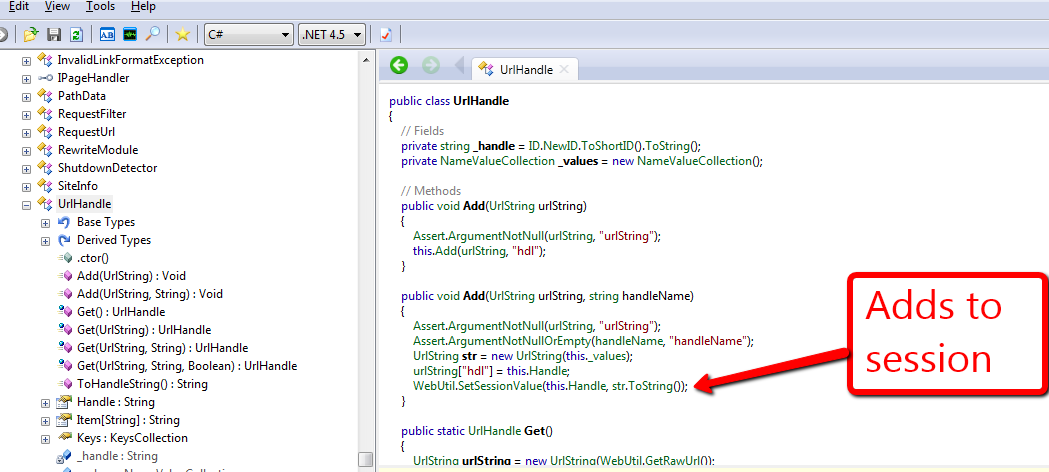

I thought there was some kind of magic happening under the hood but had a reality check after seeing how it really work — this ultimately reminded me of the KISS principle.
Everyday, I ponder and vacillate on whether it would be a good idea to create another class similar to the UrlHandle that would persist across sessions. At this point, I am convinced there is no utility in building such a class. What would be your argument for or against building such a class?
 SitecoreJunkie.com