Home » Item Buckets (Page 2)
Category Archives: Item Buckets
Warn Content Authors on Having Too Many Sub-items Under an Item in Sitecore
In my previous post, I shared two field validators that will warn content authors/editors when they link to Items without presentation in Internal and General Link fields.
When I was building those two validators, I came up with another validator idea: how about warning content authors/editors when they have too many sub-items under an Item?
To accomplish this, I came up with the following class that serves as an Item validator:
using System;
using System.Runtime.Serialization;

using Sitecore.Buckets.Managers;
using Sitecore.Data.Items;
using Sitecore.Data.Validators;

namespace Sitecore.Sandbox.Data.Validators.ItemValidators
{
    [Serializable]
    public class ItemHasTooManySubitemsValidator : StandardValidator
    {
        public override string Name
        {
            get
            {
                return Parameters["Name"];
            }
        }

        private int MaxNumberOfSubitems
        {
            get
            {
                int maxNumberOfSubitems;
                if (!int.TryParse(Parameters["MaxNumberOfSubitems"], out maxNumberOfSubitems))
                {
                    return 0;
                }

                return maxNumberOfSubitems;
            }
        }

        public ItemHasTooManySubitemsValidator()
        {
        }

        public ItemHasTooManySubitemsValidator(SerializationInfo info, StreamingContext context)
            : base(info, context)
        {
        }

        protected override ValidatorResult Evaluate()
        {
            Item item = GetItem();
            if(IsValid(item))
            {
                return ValidatorResult.Valid;
            }

            Text = GetErrorMessage(item);
            return GetFailedResult(ValidatorResult.Suggestion);
        }

        protected virtual bool IsValid(Item item)
        {
            return MaxNumberOfSubitems < 1
                   || item == null
                   || IsBucket(item)
                   || !item.HasChildren
                   || item.Children.Count <= MaxNumberOfSubitems;
        }

        protected virtual bool IsBucket(Item item)
        {
            if(item == null)
            {
                return false;
            }

            return BucketManager.IsBucket(item);
        }

        protected virtual string GetErrorMessage(Item item)
        {
            string message = Parameters["ErrorMessage"];
            if (string.IsNullOrWhiteSpace(message))
            {
                return string.Empty;
            }

            return GetText(message, new[] { item.DisplayName });
        }

        protected override ValidatorResult GetMaxValidatorResult()
        {
            return base.GetFailedResult(ValidatorResult.Suggestion);
        }
    }
}
The class above inherits from Sitecore.Data.Validators.StandardValidator in Sitecore.Kernel.dll — this is the base class which most validators in Sitecore inherit from — and ascertains whether the Item being validated has too many sub-items underneath it (the maximum number of allowed sub-items is passed to the class’ instance via the MaxNumberOfSubitems parameter set on the Validation Rule item — these have the /sitecore/templates/System/Validation/Validation Rule template — in Sitecore which is shown later in this post).
If the Item being validated has more sub-items than is allowed and isn’t an Item Bucket, the validator’s error message is set on the Text property of the class instance — the error message is passed via a parameter on the Validation Rule item — and a ValidatorResult instance is returned to the caller.
I then wired up the above class in Sitecore on a Validation Rule item, and set the maximum number of allowed sub-items to be four for testing (no, I’m not going to create a gazillion Items to test this):

Now that we have the Validation Rule Item in place, we should probably give content authors/editors the ability to remedy having too many sub-items under an Item.
How?
Let’s give them the ability to convert the Item into an Item Bucket. I created the following Menu item — this has the template of /sitecore/templates/System/Menus/Menu item — to empower content authors/editors on making this conversion:

I then had to set up my Sample Item template to be bucketable since we are giving the ability to bucket Items with this template:

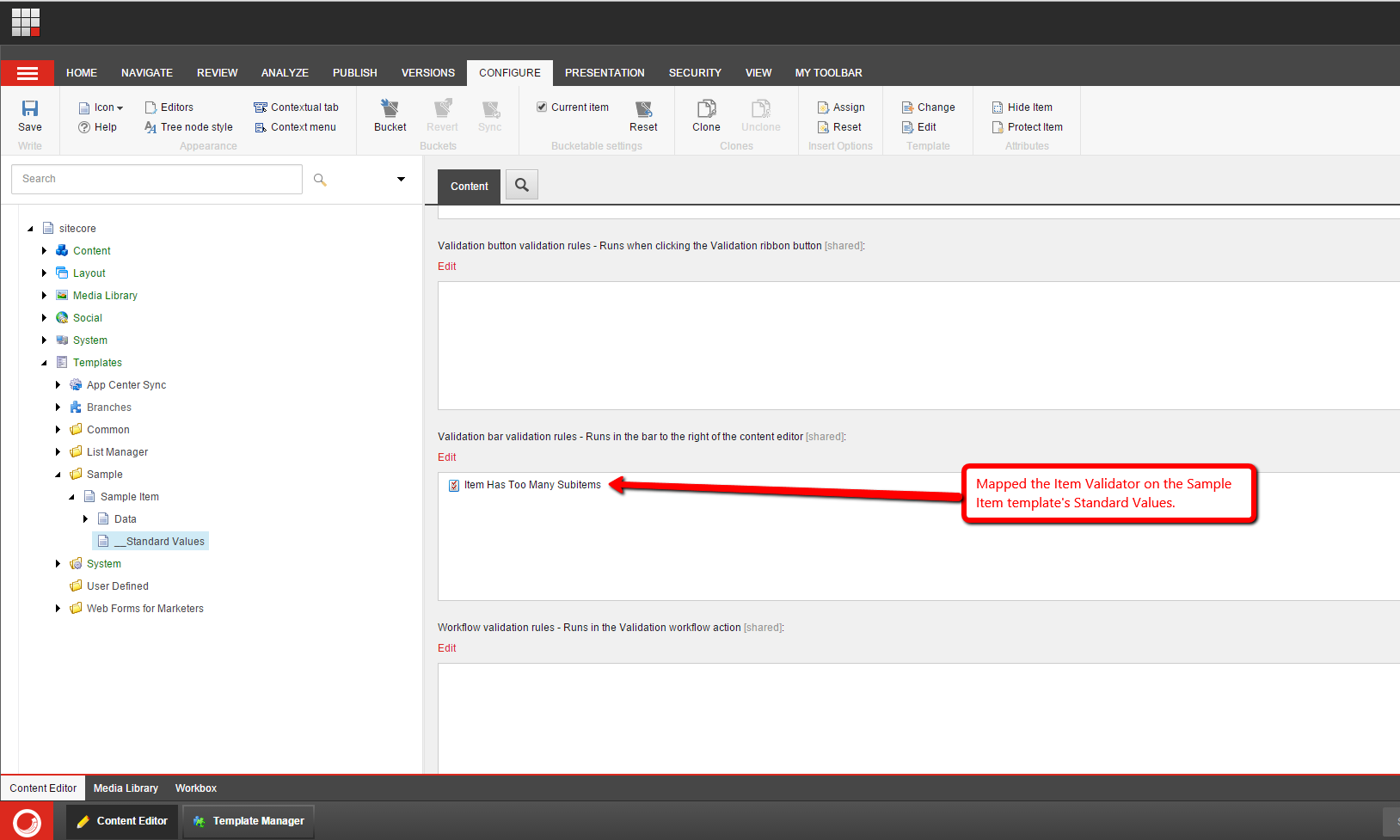
I then mapped the Item validator to the Standard Values item of my Sample Item template:
For testing, I created some Items underneath another Item:
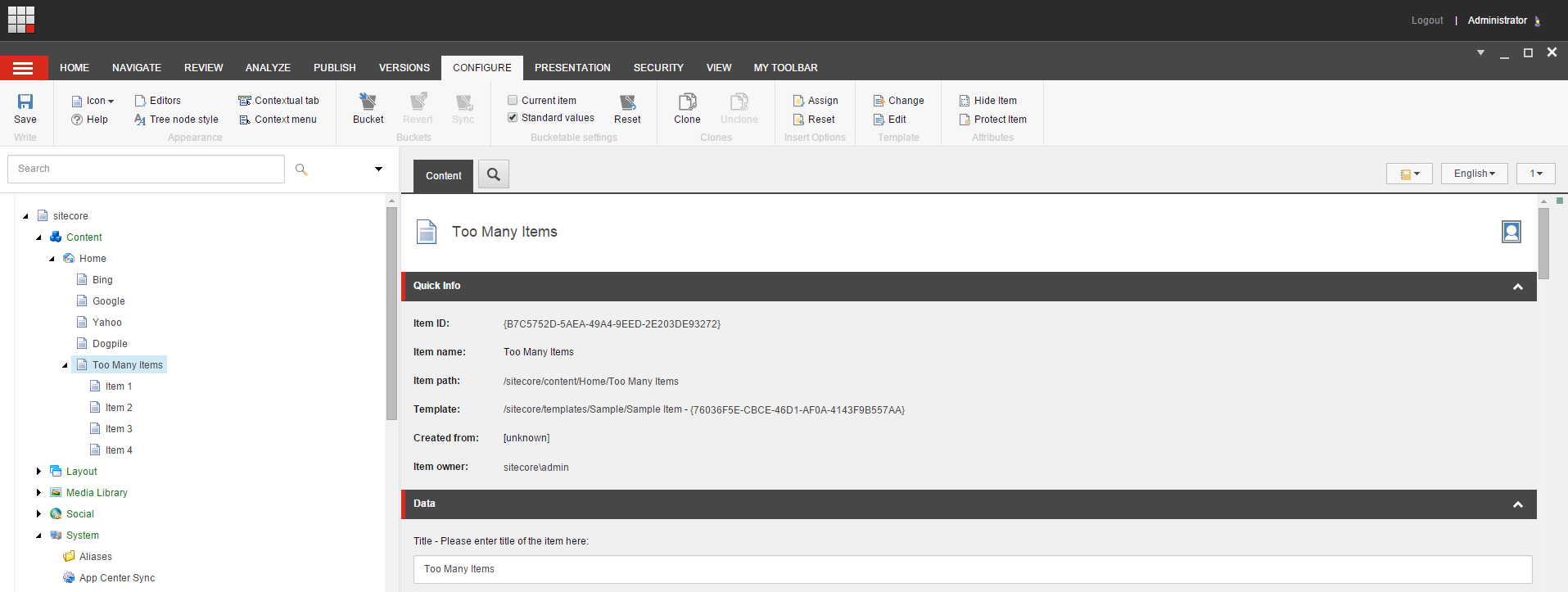
As you can see, we haven’t exceeded the maximum number of 4 quite yet.
I then created a fifth item, and was presented with a validation warning:

I right clicked on the square in the Validation Bar, and was presented with some options:

I clicked on “Convert to Item Bucket”, and then saw a magical progress dialog followed by this:

If you have any thoughts on this, or ideas for other Item validators, please drop a comment.
 SitecoreJunkie.com