Home » MediaProvider
Category Archives: MediaProvider
Upload Files via the Sitecore UploadWatcher to a Configuration Specified Media Library Folder
In my previous to last post, I discussed the Sitecore UploadWatcher — a Sitecore.IO.FileWatcher which uploads files to the Media Library when files are dropped into the /upload directory of your Sitecore website root.
Unfortunately, in the “out of the box” solution, files are uploaded directly under the Media Library root (/sitecore/media library). Imagine having to sift through all kinds of Media Library Items and folders just to find the image that you are looking for. Such would be an arduous task at best.
I decided to dig through Sitecore.Kernel.dll to see why this is the case, and discovered why: the FileCreated() method on the Sitecore.Resources.Media.MediaCreator class uses an empty Sitecore.Resources.Media.MediaCreatorOptions instance. In order for the file to be uploaded to a specified location in the Media Library, the Destination property on the Sitecore.Resources.Media.MediaCreatorOptions instance must be set, or it will be uploaded directly to the Media Library root.
Here’s the good news: the FileCreated() method is declared virtual, so why not subclass it and then override this method to include some custom logic to set the Destination property on the MediaCreatorOptions instance?
I did just that in the following class:
using System.IO;

using Sitecore.Configuration;
using Sitecore.Data.Items;
using Sitecore.Diagnostics;
using Sitecore.IO;
using Sitecore.Pipelines.GetMediaCreatorOptions;
using Sitecore.Resources.Media;

namespace Sitecore.Sandbox.Resources.Media
{
    public class MediaCreator : Sitecore.Resources.Media.MediaCreator
    {
        private string UploadLocation { get; set; }

        public override void FileCreated(string filePath)
        {
            Assert.ArgumentNotNullOrEmpty(filePath, "filePath");
            if (string.IsNullOrWhiteSpace(UploadLocation))
            {
                base.FileCreated(filePath);
                return;
            }

            SetContext();
            lock (FileUtil.GetFileLock(filePath))
            {
                string destination = GetMediaItemDestination(filePath);
                if (FileUtil.IsFolder(filePath))
                {
                    MediaCreatorOptions options = MediaCreatorOptions.Empty;
                    options.Destination = destination;
                    options.Build(GetMediaCreatorOptionsArgs.FileBasedContext);
                    this.CreateFromFolder(filePath, options);
                }
                else
                {
                    MediaCreatorOptions options = MediaCreatorOptions.Empty;
                    options.Destination = destination;
                    long length = new FileInfo(filePath).Length;
                    options.FileBased = (length > Settings.Media.MaxSizeInDatabase) || Settings.Media.UploadAsFiles;
                    options.Build(GetMediaCreatorOptionsArgs.FileBasedContext);
                    this.CreateFromFile(filePath, options);
                }
            }
        }

        protected virtual void SetContext()
        {
            if (Context.Site == null)
            {
                Context.SetActiveSite("shell");
            }
        }

        protected virtual string GetMediaItemDestination(string filePath)
        {
            if(string.IsNullOrWhiteSpace(UploadLocation))
            {
                return null;
            }

            string fileNameNoExtension = Path.GetFileNameWithoutExtension(filePath);
            string itemName = ItemUtil.ProposeValidItemName(fileNameNoExtension);
            return string.Format("{0}/{1}", UploadLocation, itemName);
        }
    }
}
The UploadLocation property in the class above is to be defined in Sitecore Configuration — see the patch include configuration file below — and then populated via the Sitecore Configuration Factory when the class is instantiated (yes, I’m defining this class in Sitecore Configuration as well).
Most of the logic in the FileCreated() method above comes from its base class Sitecore.Resources.Media.MediaCreator. I had to copy and paste most of this code from its base class’ FileCreated() method as I couldn’t just delegate to the base class’ FileCreated() method — I needed to set the Destination property on the MediaCreatorOptions instance.
The Destination property on the MediaCreatorOptions instance is being set to be the UploadLocation plus the Media Library Item name — I determine this full path in the GetMediaItemDestination() method.
Unfortunately, I also had to bring in the SetContext() method from the base class since it’s declared private — this method is needed in the FileCreated() method to ensure we have a context site defined.
Now, we need a way to set an instance of the above in the Creator property on the Sitecore.Sandbox.Resources.Media.MediaProvider instance. Unfortunately, there was no easy way to do this without having to subclass the Sitecore.Sandbox.Resources.Media.MediaProvider class, and then set the Creator property via its constructor:
using Sitecore.Configuration;

namespace Sitecore.Sandbox.Resources.Media
{
    public class MediaProvider : Sitecore.Resources.Media.MediaProvider
    {
        private MediaCreator MediaCreator { get; set; }

        public MediaProvider()
        {
            OverrideMediaCreator();
        }

        protected virtual void OverrideMediaCreator()
        {
            Sitecore.Resources.Media.MediaCreator mediaCreator = GetMediaCreator();
            if (mediaCreator == null)
            {
                return;
            }

            Creator = mediaCreator;
        }

        protected virtual Sitecore.Resources.Media.MediaCreator GetMediaCreator()
        {
            return Factory.CreateObject("mediaLibrary/mediaCreator", false) as MediaCreator;
        }
    }
}
The OverrideMediaCreator() method above tries to get an instance of a Sitecore.Resources.Media.MediaCreator using the Sitecore Configuration Factory — it delegates to the GetMediaCreator() method to get this instance — and then set it on the Creator property of its base class if the MediaCreator obtained from the GetMediaCreator() method isn’t null.
If it is null, it just exits out — there is a default instance created in the Sitecore.Resources.Media.MediaCreator base class, so that one would be used instead.
I then replaced the “out of the box” Sitecore.Resources.Media.MediaProvider with the new one above, and also defined the MediaCreator above in the following patch include configuration file:
<configuration xmlns:patch="http://www.sitecore.net/xmlconfig/">
  <sitecore>
    <mediaLibrary>
      <mediaProvider patch:instead="mediaProvider[@type='Sitecore.Resources.Media.MediaProvider, Sitecore.Kernel']"
                     type="Sitecore.Sandbox.Resources.Media.MediaProvider, Sitecore.Sandbox" />
      <mediaCreator type="Sitecore.Sandbox.Resources.Media.MediaCreator, Sitecore.Sandbox">
        <UploadLocation>/sitecore/media library/uploaded</UploadLocation>
      </mediaCreator>
  </mediaLibrary>
  </sitecore>
</configuration>
Let’s see how we did.
As you can see, I have an empty uploaded Media Library folder:
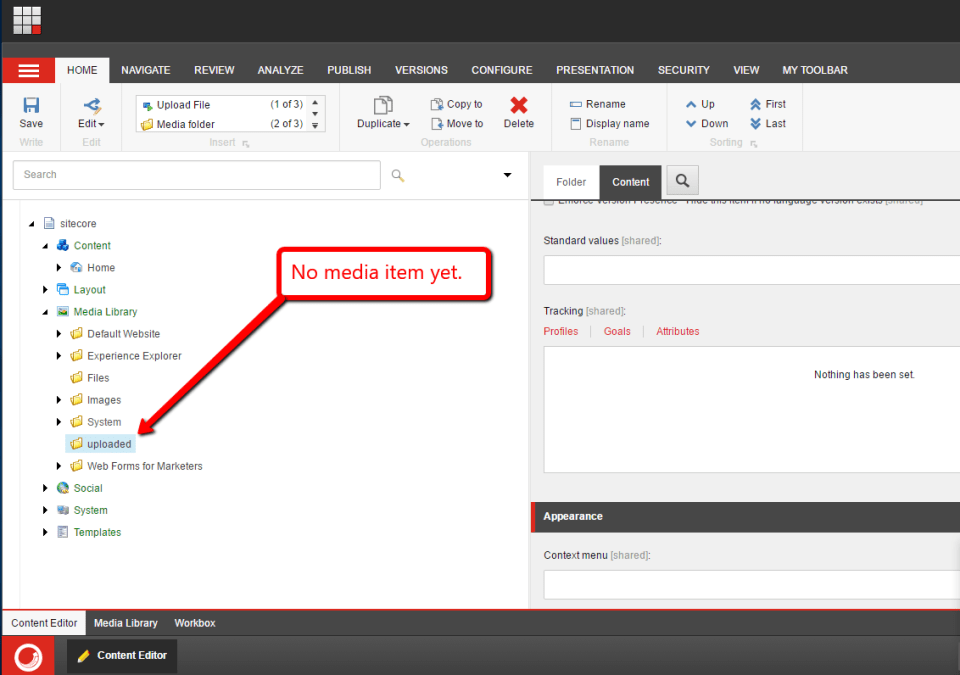
Let’s move an image into the /upload folder of my Sitecore instance:

After reloading the “uploaded” Media Library folder, I see that the image was uploaded to it:
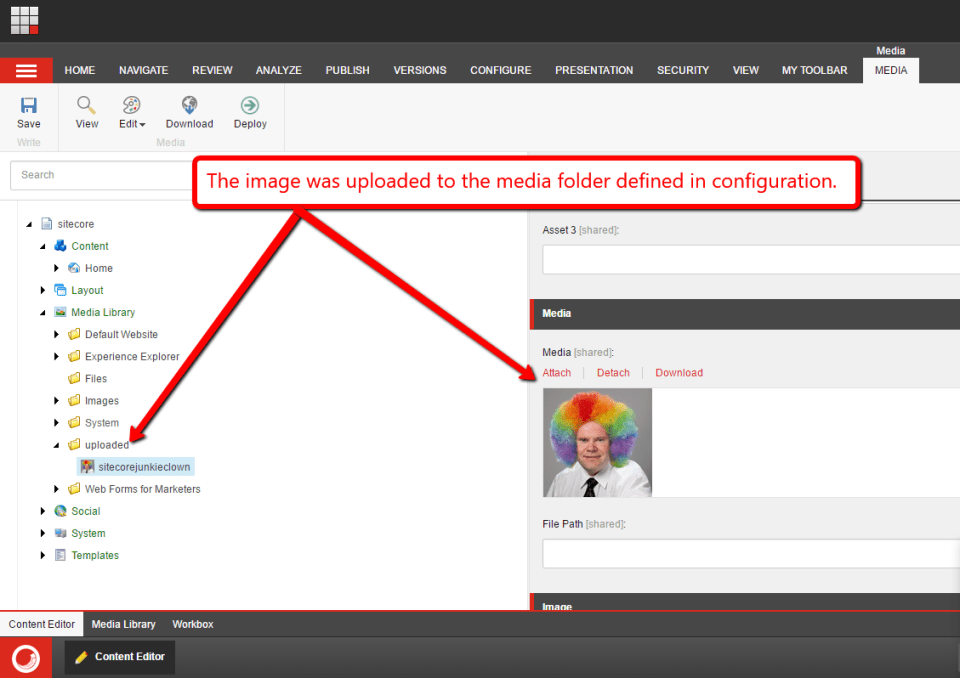
I would also to like to mention that this solution will also work if there is no uploaded folder in the Media Library — it will be created during upload process.
If you have any thoughts on this, please share in a comment.
Make Incompatible Class Interfaces Work Together using the Adapter Pattern in Sitecore
This post is a continuation of a series of blog posts I’m putting together around using design patterns in Sitecore, and will share a “proof of concept” on employing the Adapter pattern — a structural pattern used when you need classes of different interfaces to work together. In other words, you need one class’ interface to “adapt” to another.
Believe it or not, most developers — and hopefully most reading this post — are already quite familiar with the Adapter pattern even if it’s not recognizable by name.
How so?
Well, I don’t know about you but I spend a lot of time making code from different APIs work together. I typically have to do this when making use of a third-party library that I cannot change, and usually do this by having one class “wrap” another and its methods. Commonly, the Adapter pattern is known as a “wrapper”.
I showcased the following “proof of concept” during my presentation at SUGCON Europe 2015. This code flips images upside down after they are uploaded to the Media Library — yeah, I know, pretty useful, right? 😉 Keep in mind this code is for educational purposes only, and serves no utility in any practical sense in your Sitecore solutions — if you do have a business need for flipping images upside down after uploading them to the Media Library, please share in a comment.
I first started off with the following interface:
using Sitecore.Data.Items;

namespace Sitecore.Sandbox.Resources.Media
{
    public interface IMediaImageFlipper
    {
        MediaItem MediaItem { get; set; }

        void Flip();
    }
}
Classes that implement the interface above basically flip images within Sitecore.Data.Items.MediaItem instances — this is defined in Sitecore.Kernel.dll — upside down via their Flip() method.
The following class implements the above interface:
using System;
using System.Collections.Generic;
using System.Linq;
using System.IO;

using Sitecore.Data.Items;
using Sitecore.Diagnostics;

using ImageProcessor;

namespace Sitecore.Sandbox.Resources.Media
{
    public class ImageFactoryFlipper : IMediaImageFlipper
    {
        public MediaItem MediaItem { get; set; }

        private List<string> TargetMimeTypes { get; set; }

        private ImageFactory ImageFactory { get; set; }

        public ImageFactoryFlipper()
            : this(new ImageFactory())
        {
        }

        public ImageFactoryFlipper(ImageFactory imageFactory)
        {
            TargetMimeTypes = new List<string>();
            Assert.ArgumentNotNull(imageFactory, "imageFactory");
            ImageFactory = imageFactory;
        }

        public void Flip()
        {
            if (!ShouldFlip(MediaItem))
            {
                return;
            }

            using (MemoryStream outputStream = new MemoryStream())
            {
                ImageFactory.Load(MediaItem.GetMediaStream()).Rotate(180.0f).Save(outputStream);

                using (new EditContext(MediaItem))
                {
                    MediaItem.InnerItem.Fields["Blob"].SetBlobStream(outputStream);
                }
            }
        }

        protected virtual bool ShouldFlip(MediaItem mediaItem)
        {
            if (mediaItem == null || string.IsNullOrWhiteSpace(mediaItem.MimeType) || !TargetMimeTypes.Any() || ImageFactory == null)
            {
                return false;
            }

            return TargetMimeTypes.Any(targetMimeType => string.Equals(targetMimeType, mediaItem.MimeType, StringComparison.CurrentCultureIgnoreCase));
        }
    }
}
In the above class, I am “wrapping” an ImageFactory class instance — this class comes with the ImageProcessor .NET library which does some image manipulation (I found this .NET library via a Google search and have no idea how good it is, but it’s good enough for this “proof of concept”) — and inject it using Poor man’s dependency injection via the default constructor.
The Flip() method is where the magic happens. It calls the ShouldFlip() method which ascertains whether the MediaItem property is set on the class instance and whether the image found within it should be flipped — an image should be flipped if it has a MIME type that is within the list of MIME types that are injected into the class instance via the Sitecore Configuration Factory (see the patch configuration file below).
If the image should be flipped, the Flip() method uses the ImageFactory instance to flip the image upside down — it does this by rotating it 180 degrees — and then saves the flipped image contained within the MemoryStream instance into the MediaItem’s Blob field (this is where images are saved on Media Library Items).
Now that we have a class that flips images, we need a MediaCreator — a subclass of Sitecore.Resources.Media.MediaCreator (this lives in Sitecore.Kernel.dll) — to leverage an instance of the IMediaImageFlipper to do the image manipulation. The follow class does this:
using System.IO;

using Sitecore.Data.Items;
using Sitecore.Resources.Media;

namespace Sitecore.Sandbox.Resources.Media
{
    public class ImageFlipperMediaCreator : MediaCreator
    {
        private IMediaImageFlipper Flipper { get; set; }

        public override Item CreateFromStream(Stream stream, string filePath, bool setStreamIfEmpty, MediaCreatorOptions options)
        {
            MediaItem mediaItem = base.CreateFromStream(stream, filePath, setStreamIfEmpty, options);
            if (Flipper == null)
            {
                return mediaItem;
            }

            Flipper.MediaItem = mediaItem;
            Flipper.Flip();
            return mediaItem;
        }
    }
}
After an image is uploaded to the Media Library, we pass the new MediaItem to the IMediaImageFlipper instance — this instance is injected using the Sitecore Configuration Factory (see the configuration file below) — and invoke its Flip() method to flip the image, and return the new MediaItem when complete.
I then utilize an instance of the MediaCreator above in a subclass of Resources.Media.MediaProvider.MediaProvider (I am going to replace the “out of the box” MediaProvider with the following class using the configuration file below):
using Sitecore.Diagnostics;
using Sitecore.Resources.Media;

namespace Sitecore.Sandbox.Resources.Media
{
    public class ImageFlipperMediaProvider : MediaProvider
    {
        private MediaCreator FlipperCreator { get; set; }

        public override MediaCreator Creator
        {
            get
            {
                return FlipperCreator ?? base.Creator;
            }
            set
            {
                Assert.ArgumentNotNull(value, "value");
                FlipperCreator = value;
            }
        }
    }
}
The MediaCreator that lives in the FlipperCreator property is injected into the class instance through the Sitecore Configuration Factory (see the patch configuration file below), and is returned by the Creator property’s accessor if it’s not null.
I then registered all of the above in Sitecore using the following patch configuration file:
<?xml version="1.0" encoding="utf-8" ?>
<configuration xmlns:patch="http://www.sitecore.net/xmlconfig/">
  <sitecore>
    <mediaLibrary>
      <mediaProvider>
        <patch:attribute name="type">Sitecore.Sandbox.Resources.Media.ImageFlipperMediaProvider, Sitecore.Sandbox</patch:attribute>
        <FlipperCreator type="Sitecore.Sandbox.Resources.Media.ImageFlipperMediaCreator, Sitecore.Sandbox">
          <Flipper type="Sitecore.Sandbox.Resources.Media.ImageFactoryFlipper, Sitecore.Sandbox">
            <TargetMimeTypes hint="list">
              <TargetMimeType>image/jpeg</TargetMimeType>
              <TargetMimeType>image/png</TargetMimeType>
            </TargetMimeTypes>
          </Flipper>
		    </FlipperCreator>
      </mediaProvider>
    </mediaLibrary>
  </sitecore>
</configuration>
Let’s test this.
I selected the following images for uploading to the Media Library:

As you can see, all uploaded images were flipped upside down:

If you have any thoughts on this, or examples where you’ve employed the Adapter pattern in your Sitecore solutions, please share in a comment.
Until next time, have a Sitecorelicious day!
 SitecoreJunkie.com