Home » Pipeline (Page 3)
Category Archives: Pipeline
Omit HTML Breaks From Rendered Multi-Line Text Fields in Sitecore
Earlier today while preparing a training session on how to add JavaScript from a Multi-Line Text field to a rendered Sitecore page, I encountered something I had seen in the past but forgot about: Sitecore FieldControls and the FieldRenderer Web Control will convert newlines into HTML breaks.
For example, suppose you have the following JavaScript in a Multi-Line Text field:

You could use a Text FieldControl to render it:
<%@ Control Language="c#" AutoEventWireup="true" TargetSchema="http://schemas.microsoft.com/intellisense/ie5" %>
<sc:Text ID="scJavaScript" Field="JavaScript" runat="server" />
Unfortunately, your JavaScript will not work since it will contain HTML breaks:

Why does this happen? In the RenderField() method in Sitecore.Web.UI.WebControls.FieldRenderer — this lives in Sitecore.Kernel.dll, and is called by all FieldControls — passes a “linebreaks” parameter to the <renderField> pipeline:

The Process() method in Sitecore.Pipelines.RenderField.GetMemoFieldValue — this serves as one of the “out of the box” processors of the <renderField> pipeline — converts all carriage returns, line feeds, and newlines into HTML breaks:

What can we do to prevent this from happening? Well, you could spin up a new class with a Process() method to serve as a new <renderField> pipeline processor, and use that instead of Sitecore.Pipelines.RenderField.GetMemoFieldValue:
using System;

using Sitecore.Diagnostics;
using Sitecore.Pipelines.RenderField;

namespace Sitecore.Sandbox.Pipelines.RenderField
{
    public class GetRawMemoFieldValueWhenApplicable
    {
        public void Process(RenderFieldArgs args)
        {
            Assert.ArgumentNotNull(args, "args");
            if(!AreEqualIgnoreCase(args.FieldTypeKey, "memo") && !AreEqualIgnoreCase(args.FieldTypeKey, "multi-line text"))
            {
                return;
            }

            bool omitHtmlBreaks;
            if (bool.TryParse(args.Parameters["omitHtmlBreaks"], out omitHtmlBreaks))
            {
                return;
            }

            Assert.IsNotNull(DefaultGetMemoFieldValueProcessor, "DefaultGetMemoFieldValueProcessor must be set in your configuration!");
            DefaultGetMemoFieldValueProcessor.Process(args);
        }

        private static bool AreEqualIgnoreCase(string stringOne, string stringTwo)
        {
            return string.Equals(stringOne, stringTwo, StringComparison.CurrentCultureIgnoreCase);
        }

        private GetMemoFieldValue DefaultGetMemoFieldValueProcessor { get; set; }
    }
}
The Process() method in the class above looks for an “omitHtmlBreaks” parameter, and just exits out of the Process() method when it is set to true — it leaves the field value “as is”.
If the “omitHtmlBreaks”parameter is not found in the RenderFieldArgs instance, or it is set to false, the Process() method delegates to the Process() method of its DefaultGetMemoFieldValueProcessor property — this would be an instance of the “out of the box” Sitecore.Pipelines.RenderField.GetMemoFieldValue, and this is passed to the new <renderField> pipeline processor via the following configuration file:
<?xml version="1.0" encoding="utf-8" ?>
<configuration xmlns:patch="http://www.sitecore.net/xmlconfig/">
  <sitecore>
    <pipelines>
      <renderField>
        <processor patch:instead="processor[@type='Sitecore.Pipelines.RenderField.GetMemoFieldValue, Sitecore.Kernel']"
                   type="Sitecore.Sandbox.Pipelines.RenderField.GetRawMemoFieldValueWhenApplicable, Sitecore.Sandbox">
          <DefaultGetMemoFieldValueProcessor type="Sitecore.Pipelines.RenderField.GetMemoFieldValue, Sitecore.Kernel" />
        </processor>
      </renderField>
    </pipelines>
  </sitecore>
</configuration>
Let’s test this.
I added the “omitHtmlBreaks” parameter to the control I had shown above:
<%@ Control Language="c#" AutoEventWireup="true" TargetSchema="http://schemas.microsoft.com/intellisense/ie5" %>
<sc:Text ID="scJavaScript" Field="JavaScript" Parameters="omitHtmlBreaks=true" runat="server" />
When I loaded my page, I was given a warm welcome:

When I viewed my page’s source, I no longer see HTML breaks:

If you have any thoughts on this, or know of another way to do this, please share in a comment.
Set Default Alternate Text on Images Uploaded to the Sitecore Media Library
For the past couple of years, I have been trying to come up with an idea for adding a custom <getMediaCreatorOptions> pipeline processor — this is no lie or exaggeration — but had not thought of any good reason to do so until today: I figured out that I could add a processor to set default alternate text on an image being uploaded into the Sitecore Media Library.
The following class contains code to serve as a <getMediaCreatorOptions> pipeline processor to set default alternate text on an image Item during upload:
using Sitecore.Diagnostics;
using Sitecore.Pipelines.GetMediaCreatorOptions;

namespace Sitecore.Sandbox.Pipelines.GetMediaCreatorOptions
{
    public class SetDefaultAlternateTextIfNeed
    {
        public void Process(GetMediaCreatorOptionsArgs args)
        {
            Assert.ArgumentNotNull(args, "args");
            if (!string.IsNullOrWhiteSpace(args.Options.AlternateText))
            {
                return;
            }

            args.Options.AlternateText = GetAlternateText(args);
        }

        protected virtual string GetAlternateText(GetMediaCreatorOptionsArgs args)
        {
            Assert.ArgumentNotNull(args, "args");
            if (string.IsNullOrWhiteSpace(args.Options.Destination) || args.Options.Destination.IndexOf("/") < 0)
            {
                return string.Empty;
            }

            int startofNameIndex = args.Options.Destination.LastIndexOf("/") + 1;
            return args.Options.Destination.Substring(startofNameIndex);
        }
    }
}
The code above will set the AlternateText property of the Options property of the GetMediaCreatorOptionsArgs instance when its not set: I set it to be the name of the Media Library Item by default — I extract this from the path destination of the Item.
I then registered the above class as a <getMediaCreatorOptions> pipeline processor in the following Sitecore configuration file:
<?xml version="1.0" encoding="utf-8" ?>
<configuration xmlns:patch="http://www.sitecore.net/xmlconfig/">
  <sitecore>
    <pipelines>
      <getMediaCreatorOptions>
        <processor type="Sitecore.Sandbox.Pipelines.GetMediaCreatorOptions.SetDefaultAlternateTextIfNeed, Sitecore.Sandbox"/>
      </getMediaCreatorOptions>
    </pipelines>
  </sitecore>
</configuration>
Let’s try this out.
I went to my Media Library, and selected an image to upload:

During the upload, I did not specify its alternate text.
As you can see, it was given an alternate text value by default:
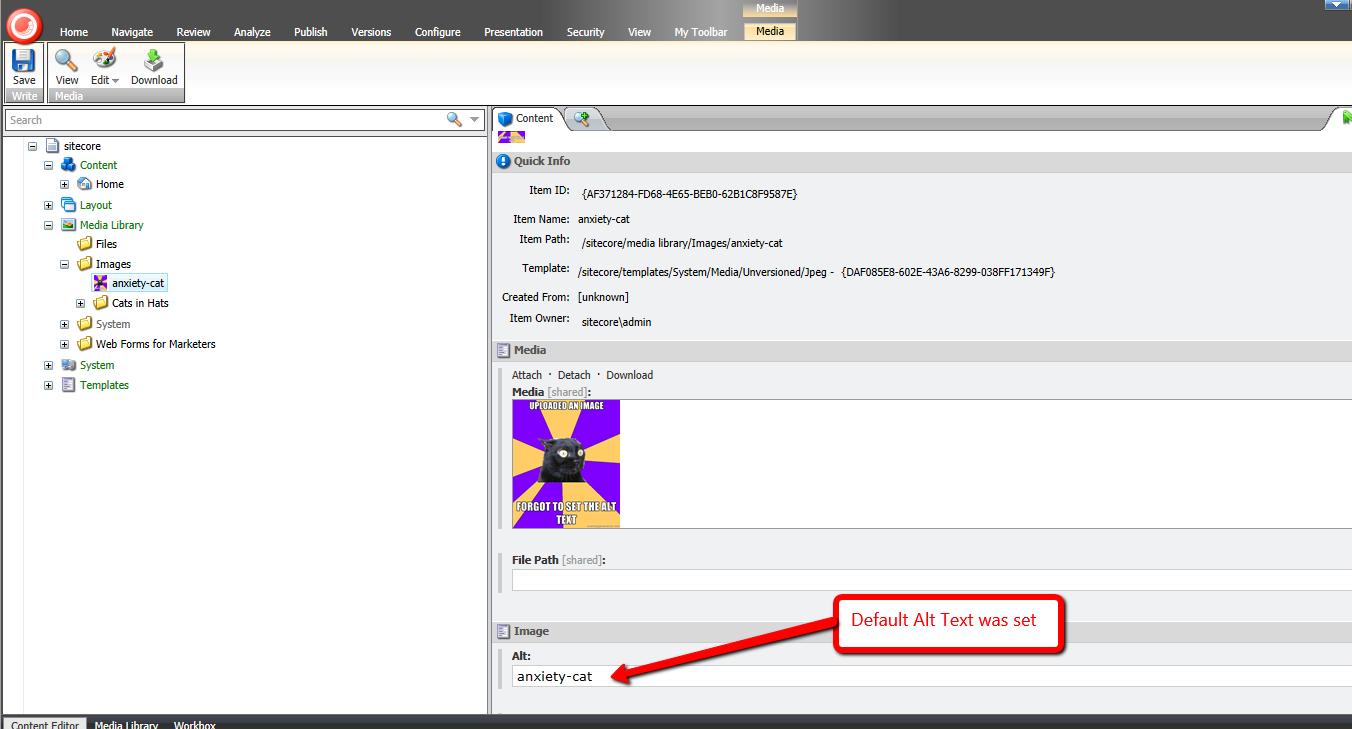
If you have any thoughts on this, please drop a comment.
But whatever you do, just don’t let this happen to you:

Restrict Certain Files from Being Uploaded Through Web Forms for Marketers Forms in Sitecore: an Alternative Approach
This past weekend I noticed the <formUploadFile> pipeline in Web Forms for Marketers (WFFM), and wondered whether I could create an alternative solution to the one I had shared in this post — I had built a custom WFFM field type to prevent certain files from being uploaded through WFFM forms.
After some tinkering, I came up the following class to serve as a <formUploadFile> pipeline processor:
using System;
using System.Collections.Generic;
using System.Web;

using Sitecore.Diagnostics;

using Sitecore.Form.Core.Pipelines.FormUploadFile;

namespace Sitecore.Sandbox.Form.Pipelines.FormUploadFile
{
    public class CheckMimeTypesNotAllowed
    {
        static CheckMimeTypesNotAllowed()
        {
            MimeTypesNotAllowed = new List<string>();
        }

        public void Process(FormUploadFileArgs args)
        {
            Assert.ArgumentNotNull(args, "args");
            string mimeType = GetMimeType(args.File.FileName);
            if (IsMimeTypeAllowed(mimeType))
            {
                return;
            }

            throw new Exception(string.Format("Uploading a file with MIME type {0} is not allowed", mimeType));
        }

        protected virtual string GetMimeType(string fileName)
        {
            Assert.ArgumentNotNullOrEmpty(fileName, "fileName");
            return MimeMapping.GetMimeMapping(fileName);
        }

        protected virtual bool IsMimeTypeAllowed(string mimeType)
        {
            foreach (string mimeTypeNotAllowed in MimeTypesNotAllowed)
            {
                if (AreEqualIgnoreCase(mimeTypeNotAllowed, mimeType))
                {
                    return false;
                }
            }

            return true;
        }

        private static bool AreEqualIgnoreCase(string stringOne, string stringTwo)
        {
            return string.Equals(stringOne, stringTwo, StringComparison.CurrentCultureIgnoreCase);
        }

        private static void AddMimeTypeNotAllowed(string mimeType)
        {
            if (string.IsNullOrWhiteSpace(mimeType) || MimeTypesNotAllowed.Contains(mimeType))
            {
                return;
            }

            MimeTypesNotAllowed.Add(mimeType);
        }

        private static IList<string> MimeTypesNotAllowed { get; set; }
    }
}
The class above adds restricted MIME types to a list — these MIME types are defined in a configuration file shown below — and checks to see if the uploaded file’s MIME type is in the restricted list. If it is restricted, an exception is thrown with some information — throwing an exception in WFFM prevents the form from being submitted.
MIME types are inferred using System.Web.MimeMapping.GetMimeMapping(string fileName), a method that is new in .NET 4.5 (this solution will not work in older versions of .NET).
I then registered the class above as a <formUploadFile> pipeline processor via the following configuration file:
<configuration xmlns:patch="http://www.sitecore.net/xmlconfig/" xmlns:x="http://www.sitecore.net/xmlconfig/">
  <sitecore>
    <pipelines>
      <formUploadFile>
        <processor patch:before="processor[@type='Sitecore.Form.Core.Pipelines.FormUploadFile.Save, Sitecore.Forms.Core']"
                   type="Sitecore.Sandbox.Form.Pipelines.FormUploadFile.CheckMimeTypesNotAllowed">
          <mimeTypesNotAllowed hint="list:AddMimeTypeNotAllowed">
            <mimeType>application/octet-stream</mimeType>
          </mimeTypesNotAllowed >
        </processor>
      </formUploadFile>
    </pipelines>
  </sitecore>
</configuration>
In case you are wondering, the MIME type being passed to the processor in the configuration file is for executables.
Let’s see how we did. 😉
I whipped up a test form, and pulled it up in a browser:
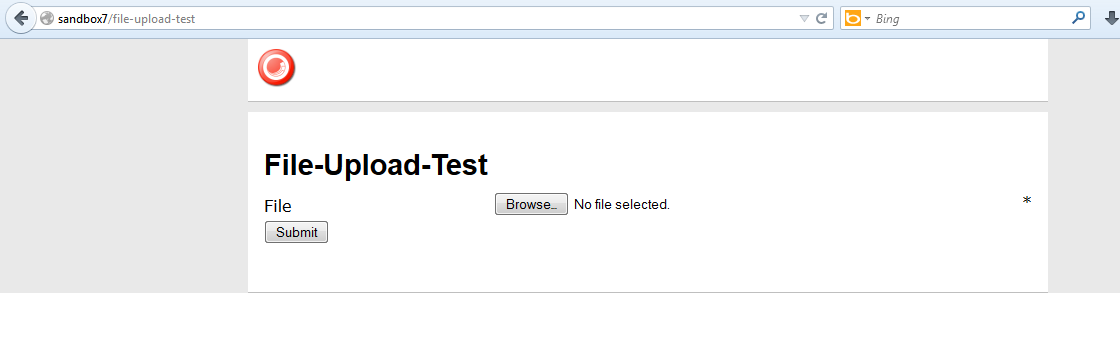
I then selected an executable:
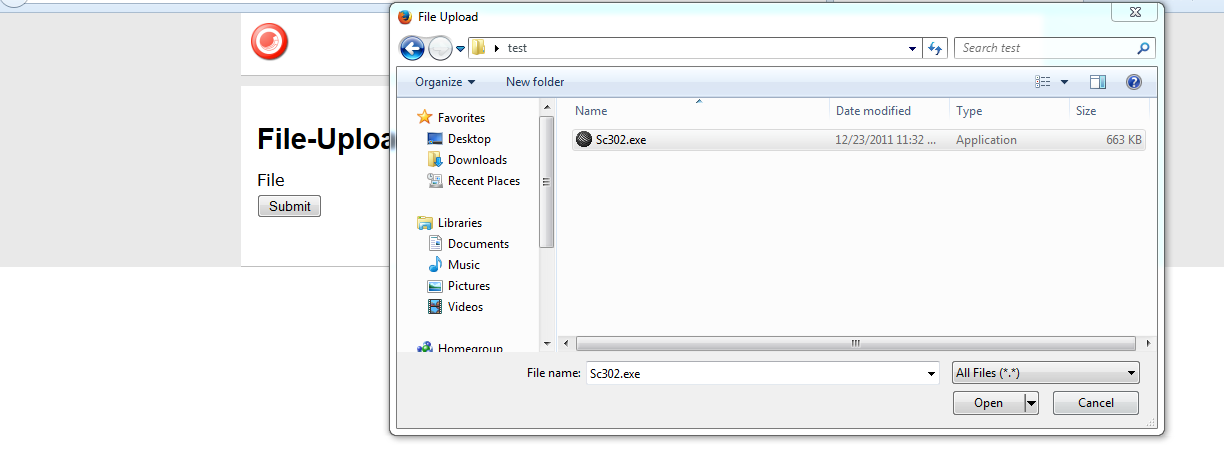
I saw this after an attempt to submit the form:

And my log file expressed why:

I then copied a jpeg into my test folder, and selected it to be uploaded:

After clicking the submit button, I was given a nice confirmation message:
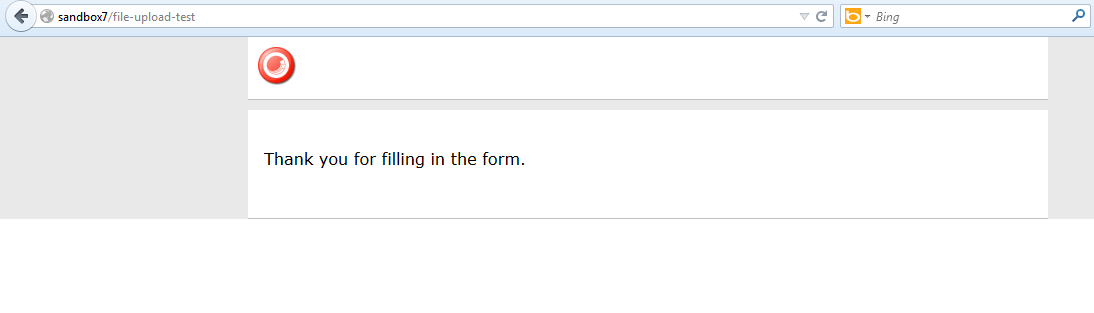
There is one problem with the solution above that I would like to point out: it does not address the issue of file extensions being changed. I could not solve this problem since the MIME type of the file being uploaded cannot be determined from the Sitecore.Form.Core.Media.PostedFile instance set in the arguments object: there is no property for it. 😦
If you know of another way to determine MIME types on Sitecore.Form.Core.Media.PostedFile instances, or have other ideas for restricting certain files from being uploaded through WFFM, please share in a comment.
Add ‘Has Content In Language’ Property to Sitecore Item Web API Responses
The other day I had read a forum thread on SDN where the poster had asked whether one could determine if content returned from the Sitecore Item Web API for an Item was the actual content for the Item in the requested language.
I was intrigued by this question because I would have assumed that no results would be returned for the Item when it does not have content in the requested language but that is not the case: I had replicated what the poster had seen.
As a workaround, I built the following class to serve as an <itemWebApiGetProperties> pipeline processor which sets a property in the response indicating whether the Item has content in the requested language (check out my previous post on adding additional properties to Sitecore Item Web API responses for more information on this topic):
using System.Collections.Generic;
using System.Linq;

using Sitecore.Data.Items;
using Sitecore.Diagnostics;
using Sitecore.Globalization;
using Sitecore.ItemWebApi.Pipelines.GetProperties;

namespace Sitecore.Sandbox.ItemWebApi.Pipelines.GetProperties
{
    public class SetHasContentInLanguageProperty : GetPropertiesProcessor
    {
        public override void Process(GetPropertiesArgs arguments)
        {
            Assert.ArgumentNotNull(arguments, "arguments");
            Assert.ArgumentNotNull(arguments.Item, "arguments.Item");
            arguments.Properties.Add("HasContentInLanguage", IsLanguageInCollection(arguments.Item.Languages, arguments.Item.Language));
        }

        private static bool IsLanguageInCollection(IEnumerable<Language> languages, Language language)
        {
            Assert.ArgumentNotNull(languages, "languages");
            Assert.ArgumentNotNull(language, "language");
            return languages.Any(lang => lang == language);
        }
    }
}
The code in the above class checks to see if the Item has content in the requested language — the latter is set in the Language property of the Item instance, and the Languages property contains a list of all languages it has content for.
I then added the above pipeline processor via the following configuration file:
<?xml version="1.0" encoding="utf-8"?>
<configuration xmlns:patch="http://www.sitecore.net/xmlconfig/">
  <sitecore>
    <pipelines>
      <itemWebApiGetProperties>
        <processor patch:after="processor[@type='Sitecore.ItemWebApi.Pipelines.GetProperties.GetProperties, Sitecore.ItemWebApi']"
            type="Sitecore.Sandbox.ItemWebApi.Pipelines.GetProperties.SetHasContentInLanguageProperty, Sitecore.Sandbox" />
      </itemWebApiGetProperties>
    </pipelines>
  </sitecore>
</configuration>
Let’s see how this works!
I first created an Item for testing:

This Item only has content in English:

I then toggled my Sitecore Item Web API configuration to allow for anonymous access so that I can make requests in my browser, and made a request for the test Item in English:

The Item does have content in English, and this is denoted by the ‘HasContentInLanguage’ property.
I then made a request for the Item in French:
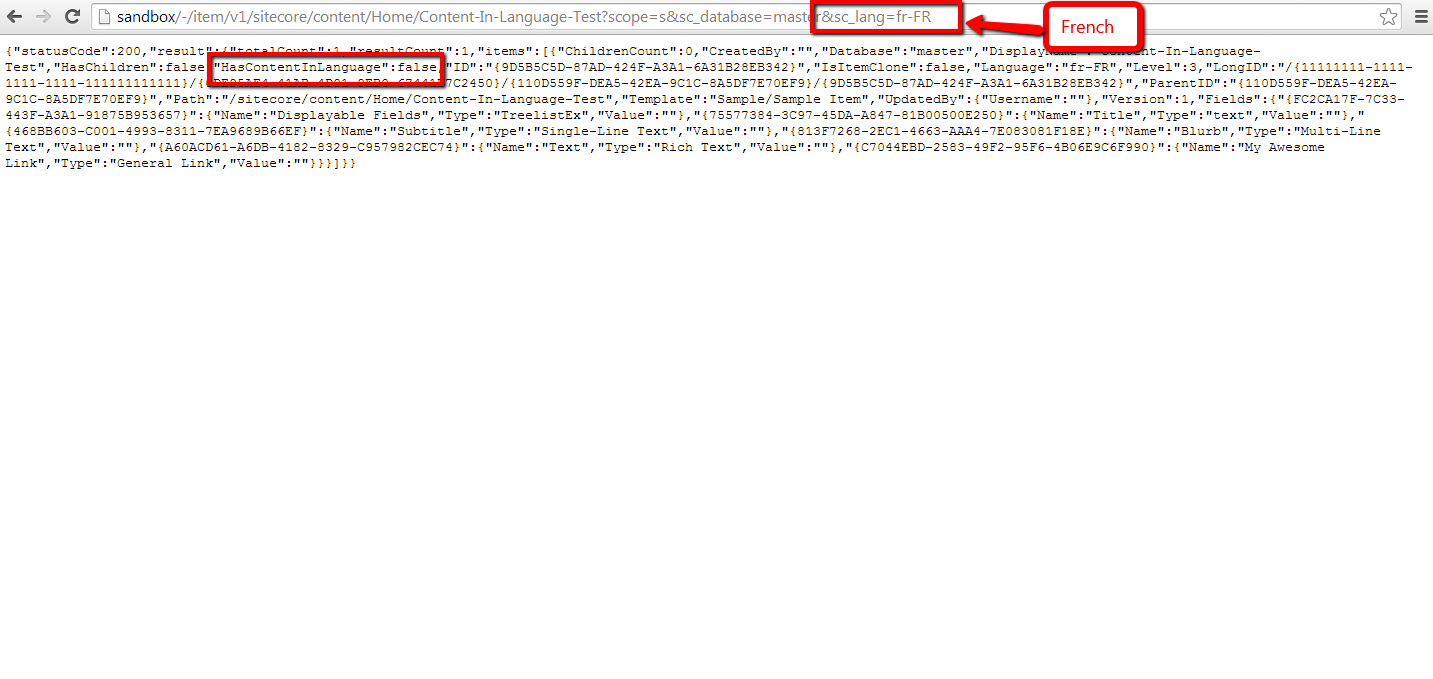
As expected, the ‘HasContentInLanguage’ is false since the Item does not have content in French.
If you have any questions or thoughts on this, please drop a comment.
Export to CSV in the Form Reports of Sitecore’s Web Forms for Marketers
The other day I was poking around Sitecore.Forms.Core.dll — this is one of the assemblies that comes with Web Forms for Marketers (what, you don’t randomly look at code in the Sitecore assemblies? 😉 ) — and decided to check out how the export functionality of the Form Reports work.
Once I felt I understood how the export code functions, I decided to take a stab at building my own custom export: functionality to export to CSV, and built the following class to serve as a pipeline processor to wedge Form Reports data into CSV format:
using System;
using System.Collections.Generic;
using System.Linq;

using Sitecore.Diagnostics;
using Sitecore.Form.Core.Configuration;
using Sitecore.Form.Core.Pipelines.Export;
using Sitecore.Forms.Data;
using Sitecore.Jobs;

namespace Sitecore.Sandbox.Form.Core.Pipelines.Export.Csv
{
    public class ExportToCsv
    {
        public void Process(ExportArgs args)
        {
            Assert.ArgumentNotNull(args, "args");
            LogInfo();
            args.Result = GenerateCsv(args.Packet.Entries);
        }

        protected virtual void LogInfo()
        {
            Job job = Context.Job;
            if (job != null)
            {
                job.Status.LogInfo(ResourceManager.Localize("EXPORTING_DATA"));
            }
        }

        private string GenerateCsv(IEnumerable<IForm> forms)
        {
            return string.Join(Environment.NewLine, GenerateAllCsvRows(forms));
        }

        protected virtual IEnumerable<string> GenerateAllCsvRows(IEnumerable<IForm> forms)
        {
            Assert.ArgumentNotNull(forms, "forms");
            IList<string> rows = new List<string>();
            rows.Add(GenerateCsvHeader(forms.FirstOrDefault()));
            foreach (IForm form in forms)
            {
                string row = GenerateCsvRow(form);
                if (!string.IsNullOrWhiteSpace(row))
                {
                    rows.Add(row);
                }
            }

            return rows;
        }

        protected virtual string GenerateCsvHeader(IForm form)
        {
            Assert.ArgumentNotNull(form, "form");
            return string.Join(",", form.Field.Select(field => field.FieldName));
        }

        protected virtual string GenerateCsvRow(IForm form)
        {
            Assert.ArgumentNotNull(form, "form");
            return string.Join(",", form.Field.Select(field => field.Value));
        }
    }
}
There really isn’t anything magical happening in the code above. The code creates a string of comma-separated values for each row of entries in args.Packet.Entries, and puts these plus a CSV header into a collection of strings.
Once all rows have been placed into a collection of strings, they are munged together on the newline character ultimately creating a multi-row CSV string. This CSV string is then set on the Result property of the ExportArgs instance.
Now we need a way to invoke a pipeline that contains the above class as a processor, and the following command does just that:
using System.Collections.Specialized;

using Sitecore.Diagnostics;
using Sitecore.Forms.Core.Commands.Export;
using Sitecore.Form.Core.Configuration;
using Sitecore.Shell.Framework.Commands;

namespace Sitecore.Sandbox.Forms.Core.Commands.Export
{
    public class Export : ExportToXml
    {
        protected override void AddParameters(NameValueCollection parameters)
        {
            parameters["filename"] = FileName;
            parameters["contentType"] = MimeType;
        }

        public override void Execute(CommandContext context)
        {
            SetProperties(context);
            base.Execute(context);
        }

        private void SetProperties(CommandContext context)
        {
            Assert.ArgumentNotNull(context, "context");
            Assert.ArgumentNotNull(context.Parameters, "context.Parameters");
            Assert.ArgumentNotNullOrEmpty(context.Parameters["fileName"], "context.Parameters[\"fileName\"]");
            Assert.ArgumentNotNullOrEmpty(context.Parameters["mimeType"], "context.Parameters[\"mimeType\"]");
            Assert.ArgumentNotNullOrEmpty(context.Parameters["exportPipeline"], "context.Parameters[\"exportPipeline\"]");
            Assert.ArgumentNotNullOrEmpty(context.Parameters["progressDialogTitle"], "context.Parameters[\"progressDialogTitle\"]");
            FileName = context.Parameters["fileName"];
            MimeType = context.Parameters["mimeType"];
            ExportPipeline = context.Parameters["exportPipeline"];
            ProgressDialogTitle = context.Parameters["progressDialogTitle"];
        }

        protected override string GetName()
        {
            return ProgressDialogTitle;
        }

        protected override string GetProcessorName()
        {
            return ExportPipeline;
        }

        private string FileName { get; set; }

        private string MimeType { get; set; }

        private string ExportPipeline { get; set; }

        private string ProgressDialogTitle { get; set; }
    }
}
I modeled the above command after Sitecore.Forms.Core.Commands.Export.ExportToExcel in Sitecore.Forms.Core.dll: this command inherits some useful logic of Sitecore.Forms.Core.Commands.Export.ExportToXml but differs along the pipeline being invoked, the name of the export file, and content type of the file being created.
I decided to make the above command be generic: the name of the file, pipeline, progress dialog title — this is a heading that is displayed in a modal dialog that is launched when the data is being exported from the Form Reports — and content type of the file are passed to it from Sitecore via Sheer UI buttons (see below).
I then registered all of the above in Sitecore via the following patch configuration file:
<?xml version="1.0" encoding="utf-8"?>
<configuration xmlns:patch="http://www.sitecore.net/xmlconfig/">
  <sitecore>
    <commands>
      <command name="forms:export" type="Sitecore.Sandbox.Forms.Core.Commands.Export.Export, Sitecore.Sandbox" />
    </commands>
    <pipelines>
      <exportToCsv>
        <processor type="Sitecore.Sandbox.Form.Core.Pipelines.Export.Csv.ExportToCsv, Sitecore.Sandbox" />
        <processor type="Sitecore.Form.Core.Pipelines.Export.SaveContent, Sitecore.Forms.Core" />
      </exportToCsv>
    </pipelines>
  </sitecore>
</configuration>
Now we must wire the command to Sheer UI buttons. This is how I wired up the export ‘All’ button (this button is available in a dropdown of the main export button in the Form Reports):

I then created another export button which is used when exporting selected rows in the Form Reports:

Let’s see this in action!
I opened up the Form Reports for a test form I had built for a previous blog post, and selected some rows (notice the ‘To CSV’ button in the ribbon):

I clicked the ‘To CSV’ button — doing this launched a progress dialog (I wasn’t fast enough to grab a screenshot of it) — and was prompted to download the following file:

As you can see, the file looks beautiful in Excel 😉 :
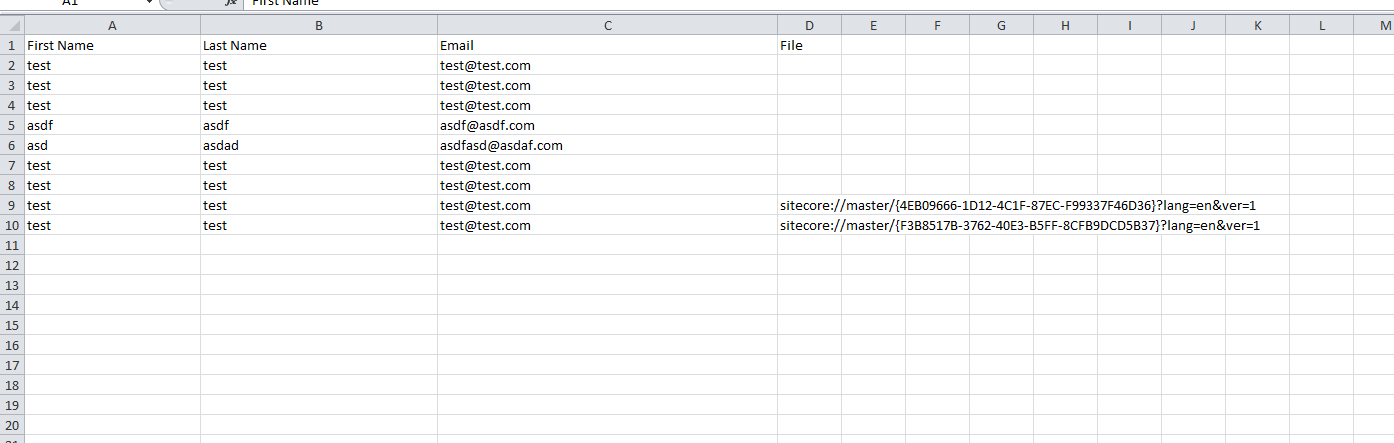
If you have any thoughts on this, or ideas for other export data formats that could be incorporated into the Form Reports of Web Forms for Marketers, please share in a comment.
Until next time, have a Sitecoretastic day!
Restrict IP Access of Directories and Files in Your Sitecore Web Application Using a httpRequestBegin Pipeline Processor
Last week my friend and colleague Greg Coffman had asked me if I knew of a way to restrict IP access to directories within the Sitecore web application, and I recalled reading a post by Alex Shyba quite some time ago.
Although Alex’s solution is probably good enough in most circumstances, I decided to explore other solutions, and came up with the following <httpRequestBegin> pipeline processor as another way to accomplish this:
using System;
using System.Collections.Generic;
using System.Linq;
using System.Web.Hosting;

using Sitecore.Configuration;
using Sitecore.Diagnostics;
using Sitecore.Pipelines.HttpRequest;
using Sitecore.Web;

namespace Sitecore.Sandbox.Pipelines.HttpRequest
{
    public class FilePathRestrictor : HttpRequestProcessor
    {
        public override void Process(HttpRequestArgs args)
        {
            Assert.ArgumentNotNull(args, "args");
            if (!ShouldRedirect(args))
            {
                return;
            }

            RedirectToNoAccessUrl();
        }

        private bool ShouldRedirect(HttpRequestArgs args)
        {
            return CanProcess(args, GetFilePath(args))
                    && !CanAccess(args.Context.Request.UserHostAddress);
        }

        protected virtual string GetFilePath(HttpRequestArgs args)
        {
            if (string.IsNullOrWhiteSpace(Context.Page.FilePath))
            {
                return args.Url.FilePath;
            }

            return Context.Page.FilePath;
        }

        protected virtual bool CanProcess(HttpRequestArgs args, string filePath)
        {
            return !string.IsNullOrWhiteSpace(filePath)
                    && !string.IsNullOrWhiteSpace(RootFilePath)
                    && AllowedIPs != null
                    && AllowedIPs.Any()
                    && (HostingEnvironment.VirtualPathProvider.DirectoryExists(filePath)
                        || HostingEnvironment.VirtualPathProvider.FileExists(filePath))
                    && args.Url.FilePath.StartsWith(RootFilePath, StringComparison.CurrentCultureIgnoreCase)
                    && !string.IsNullOrWhiteSpace(args.Context.Request.UserHostAddress)
                    && !string.Equals(filePath, Settings.NoAccessUrl, StringComparison.CurrentCultureIgnoreCase);
        }

        protected virtual bool CanAccess(string ip)
        {
            Assert.ArgumentNotNullOrEmpty(ip, "ip");
            return AllowedIPs.Contains(ip);
        }

        protected virtual void RedirectToNoAccessUrl()
        {
            WebUtil.Redirect(Settings.NoAccessUrl);
        }

        protected virtual void AddAllowedIP(string ip)
        {
            if (string.IsNullOrWhiteSpace(ip) || AllowedIPs.Contains(ip))
            {
                return;
            }

            AllowedIPs.Add(ip);
        }

        private string RootFilePath { get; set; }

        private IList<string> _AllowedIPs;
        private IList<string> AllowedIPs
        {
            get
            {
                if (_AllowedIPs == null)
                {
                    _AllowedIPs = new List<string>();
                }

                return _AllowedIPs;
            }
        }
    }
}
The pipeline processor above determines whether the IP making the request has access to the directory or file on the file system — a list of IP addresses that should have access are passed to the pipeline processor via a configuration file, and the code does check to see if the requested URL is a directory or a file on the file system — by matching the beginning of the URL with a configuration defined root path.
If the user does not have access to the requested path, s/he is redirected to the “No Access Url” which is specified in the Sitecore instance’s configuration.
The list of IP addresses that should have access to the directory — including everything within it — and the root path are handed to the pipeline processor via the following patch configuration file:
<?xml version="1.0" encoding="utf-8" ?>
<configuration xmlns:patch="http://www.sitecore.net/xmlconfig/">
  <sitecore>
    <pipelines>
      <httpRequestBegin>
        <processor patch:before=" processor[@type='Sitecore.Pipelines.HttpRequest.FileResolver, Sitecore.Kernel']"
                   type="Sitecore.Sandbox.Pipelines.HttpRequest.FilePathRestrictor, Sitecore.Sandbox">
          <RootFilePath>/sitecore</RootFilePath>
          <AllowedIPs hint="list:AddAllowedIP">
            <IP>127.0.0.2</IP>
          </AllowedIPs>
        </processor>
      </httpRequestBegin>
    </pipelines>
  </sitecore>
</configuration>
Since my IP is 127.0.0.1, I decided to only allow 127.0.0.2 access to my Sitecore directory — this also includes everything within it — in the above configuration file for testing.
After navigating to /sitecore of my local sandbox instance, I was redirected to the “No Access Url” page defined in my Web.config:

If you have any thoughts on this, or know of other solutions, please share in a comment.
Embedded Tweets in Sitecore: A Proof of Concept
In a previous post, I showcased a “proof of concept” for shortcodes in Sitecore — this is a shorthand notation for embedding things like YouTube videos in your webpages without having to type up a bunch of HTML — and felt I should follow up with another “proof of concept” around incorporating Embedded Tweets in Sitecore.
You might be asking “what’s an Embedded Tweet?” An Embedded Tweet is basically the process of pasting a Tweet URL from Twitter into an editable content area of your website/blog/whatever (think Rich Text field in Sitecore), and let the code that builds the HTML for your site figure out how to display it.
For example, I had used an Embedded Tweet in a recent post:

This is what is seen on the rendered page:

While doing some research via Google on how to do this in Sitecore, I found this page from Twitter that discusses how you could go about accomplishing this, and discovered how to get JSON containing information about a Tweet — including its HTML — using one of Twitter’s API URLs:

The JSON above drove me to build the following POCO class to represent data returned by that URL:
using System.Runtime.Serialization;

namespace Sitecore.Sandbox.Pipelines.RenderField.Tweets
{
    public class Tweet
    {
        [DataMember(Name = "cache_age")]
        public int CacheAgeMilliseconds { get; set; }

        [DataMember(Name = "url")]
        public string Url { get; set; }

        [DataMember(Name = "html")]
        public string Html { get; set; }
    }
}
I decided to omit some of the JSON properties returned by the Twitter URL from my class above — width and height are examples — since I felt I did not need to use them for this “proof of concept”.
I then leveraged the class above in the following class that will serve as a <renderField> pipeline processor to embed Tweets:
using System;
using System.IO;
using System.Net;
using System.Text.RegularExpressions;
using System.Web;

using Sitecore.Caching;
using Sitecore.Diagnostics;
using Sitecore.Pipelines.RenderField;

using Newtonsoft.Json;
using Newtonsoft.Json.Linq;

namespace Sitecore.Sandbox.Pipelines.RenderField.Tweets
{
    public class ExpandTweets
    {
        private string TwitterWidgetScriptTag {get ; set; }

        private string TwitterApiUrlFormat { get; set; }

        private string _TweetPattern;
        private string TweetPattern
        {
            get
            {
                return _TweetPattern;
            }
            set
            {
                _TweetPattern = value;
                if (!string.IsNullOrWhiteSpace(_TweetPattern))
                {
                    _TweetPattern = HttpUtility.HtmlDecode(_TweetPattern);
                }
            }
        }

        private HtmlCache _HtmlCache;
        private HtmlCache HtmlCache
        {
            get
            {
                if (_HtmlCache == null)
                {
                    _HtmlCache = CacheManager.GetHtmlCache(Context.Site);
                }

                return _HtmlCache;
            }
        }

        public void Process(RenderFieldArgs args)
        {
            Assert.ArgumentNotNull(args, "args");
            AssertRequired();
            if(!ShouldFieldBeProcessed(args))
            {
                return;
            }

            args.Result.FirstPart = ExpandTweetUrls(args.Result.FirstPart);
        }

        private static bool ShouldFieldBeProcessed(RenderFieldArgs args)
        {
            Assert.ArgumentNotNull(args, "args");
            Assert.ArgumentNotNull(args.FieldTypeKey, "args.FieldTypeKey");
            string fieldTypeKey = args.FieldTypeKey.ToLower();
            return fieldTypeKey == "text"
                    || fieldTypeKey == "rich text"
                    || fieldTypeKey == "single-line text"
                    || fieldTypeKey == "multi-line text";
        }

        private void AssertRequired()
        {
            Assert.IsNotNullOrEmpty(TwitterWidgetScriptTag, "TwitterWidgetScriptTag must be set! Check your configuration!");
            Assert.IsNotNullOrEmpty(TwitterApiUrlFormat, "TwitterApiUrlFormat must be set! Check your configuration!");
            Assert.IsNotNullOrEmpty(TweetPattern, "TweetPattern must be set! Check your configuration!");
        }

        protected virtual string ExpandTweetUrls(string html)
        {
            string htmlExpanded = html;
            MatchCollection matches = Regex.Matches(htmlExpanded, TweetPattern, RegexOptions.Compiled | RegexOptions.IgnoreCase);
            foreach (Match match in matches)
            {
                string tweetHtml = GetTweetHtml(match.Groups["id"].Value);
                if (!string.IsNullOrWhiteSpace(tweetHtml))
                {
                    htmlExpanded = htmlExpanded.Replace(match.Value, tweetHtml);
                }
            }

            if (matches.Count > 0)
            {
                htmlExpanded = string.Concat(htmlExpanded, TwitterWidgetScriptTag);
            }

            return htmlExpanded;
        }

        protected virtual string GetTweetHtml(string id)
        {
            string html = GetTweetHtmlFromCache(id);
            if (!string.IsNullOrWhiteSpace(html))
            {
                return html;
            }

            Tweet tweet = GetTweetFromApi(id);
            AddTweetHtmlToCache(id, tweet);
            return tweet.Html;
        }

        private string GetTweetHtmlFromCache(string id)
        {
            return HtmlCache.GetHtml(id);
        }

        private void AddTweetHtmlToCache(string id, Tweet tweet)
        {
            if (string.IsNullOrWhiteSpace(tweet.Html))
            {
                return;
            }

            if (tweet.CacheAgeMilliseconds > 0)
            {
                HtmlCache.SetHtml(id, tweet.Html, DateTime.Now.AddMilliseconds(tweet.CacheAgeMilliseconds));
                return;
            }

            HtmlCache.SetHtml(id, tweet.Html);
        }

        protected virtual Tweet GetTweetFromApi(string id)
        {
            HttpWebRequest request = (HttpWebRequest)WebRequest.Create(string.Format(TwitterApiUrlFormat, id));
            try
            {
                HttpWebResponse response = (HttpWebResponse)request.GetResponse();
                using (StreamReader reader = new StreamReader(response.GetResponseStream()))
                {
                    var result = reader.ReadToEnd();
                    JObject jObject = JObject.Parse(result);
                    return JsonConvert.DeserializeObject<Tweet>(jObject.ToString());
                }
            }
            catch (Exception ex)
            {
                Log.Error(this.ToString(), ex, this);
            }

            return new Tweet { Html = string.Empty };
        }
    }
}
Methods in the class above find all Tweet URLs in the Rich Text, Single-Line Text, or Multi-Line Text field being processed — the code determines if it’s a Tweet URL based on a pattern that is supplied by a configuration setting (you will see this below in this post); extract Tweets’ Twitter identifiers (these are located at the end of the Tweet URLs); and attempt to find the Tweets’ HTML in Sitecore’s HTML cache.
If the HTML is found in cache for a Tweet, we return it. Otherwise, we make a request to Twitter’s API to get it, put it in cache one we have it (it is set to expire after a specified number of milliseconds from the time it was retrieved: Twitter returns the number of milliseconds in one full year by default), and then we return it.
If the returned HTML is not empty, we replace it in the field’s value for display.
If the HTML returned is empty — this could happen when an exception is encountered during the Twitter API call (of course we log the exception in the Sitecore log when this happens 😉 ) — we don’t touch the Tweet URL in the field’s value.
Once all Tweet URLs have been processed, we append a script tag referencing Twitter’s widget.js file — this is supplied through a configuration setting, and it does the heavy lifting on making the Tweet HTML look Twitterific 😉 — to the field’s rendered HTML.
I then tied everything together using the following patch configuration file:
<?xml version="1.0" encoding="utf-8"?>
<configuration xmlns:patch="http://www.sitecore.net/xmlconfig/">
<sitecore>
<pipelines>
<renderField>
<processor type="Sitecore.Sandbox.Pipelines.RenderField.Tweets.ExpandTweets, Sitecore.Sandbox"
patch:after="processor[@type='Sitecore.Pipelines.RenderField.GetTextFieldValue, Sitecore.Kernel']">
<TwitterWidgetScriptTag><script async src="//platform.twitter.com/widgets.js" charset="utf-8"></script></TwitterWidgetScriptTag>
<TwitterApiUrlFormat>https://api.twitter.com/1/statuses/oembed.json?id={0}&omit_script=true</TwitterApiUrlFormat>
<TweetPattern>https://twitter.com/.+/status/(?<id>\d*)</TweetPattern>
</processor>
</renderField>
</pipelines>
</sitecore>
</configuration>
Let’s see this in action!
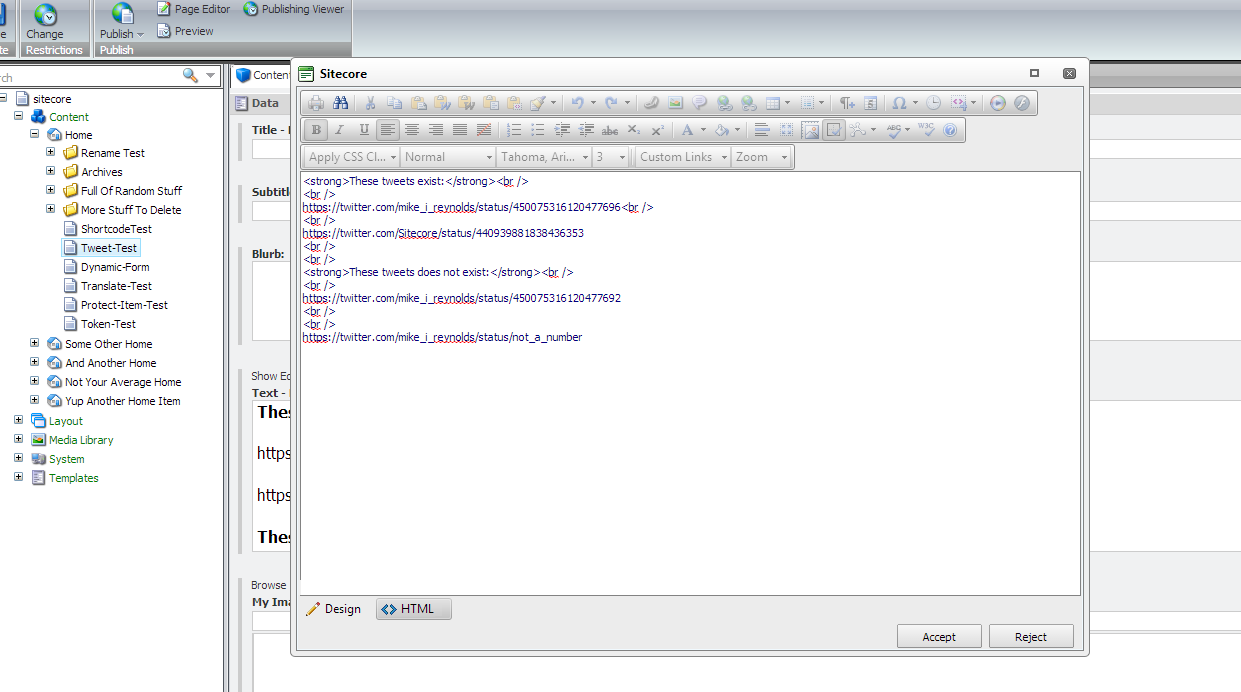
I created a test Item, and added some legitimate and bogus Tweet URLs into one of its Rich Text fields (please pardon the grammatical issues in the following screenshots :-/):

This isn’t the most aesthetically pleasing HTML, but it will serve its purpose for testing:
After saving and publishing, I navigated to my test Item’s page, and saw this:

If you have any suggestions on making this better, or have other ideas for embedding Tweets in Sitecore, please share in a comment.
Prevent Sitecore Dictionary Entry Keys From Appearing When Their Phrase Field is Empty
Earlier today when doing research for another blog post around on-demand language translation in Sitecore, I remembered I wanted to blog about an issue I saw a while back when using the Sitecore Dictionary, but before I dive into that issue — and a possible approach for resolving it — let me give you a little information on what the Sitecore Dictionary is, and why you might want to use it — actually you probably should use it!
The Sitecore Dictionary is a place in Sitecore where you can store multilingual content for labels or string literals in your code (this could be front-end code, or even content displayed in the Sitecore shell). I’ve created the following Dictionary entry as an example:

The “coffee” item above is the Dictionary entry, and its parent item “beverage types” is a Dictionary folder.
You could use a sublayout like the following to display the text stored in the Phrase field on the front-end of your website:
<%@ Control Language="C#" AutoEventWireup="true" CodeBehind="Translate Test.ascx.cs" Inherits="Sandbox.layouts.sublayouts.Translate_Test" %>
<h2>Dictionary Test</h2>
Key => <asp:Literal ID="litKey" runat="server" /><br />
Phrase => <asp:Literal ID="litTranslateTest" runat="server" />
The code-behind of the sublayout:
using System;

using Sitecore.Globalization;

namespace Sandbox.layouts.sublayouts
{
    public partial class Translate_Test : System.Web.UI.UserControl
    {
        protected void Page_Load(object sender, EventArgs e)
        {
            string key = "beveragetypes.coffee";
            litKey.Text = key;
            litTranslateTest.Text = Translate.Text(key);
        }
    }
}
In the Page_Load method above, I’ve invoked Sitecore.Globalization.Translate.Text() to grab the value out of the Phrase field of the “coffee” Dictionary entry using its key. The Sitecore.Globalization.Translate.Text() method uses Sitecore.Context.Language to ascertain which language version of the Dictionary entry to use.
When I navigated to the page that has the sublayout above mapped to its presentation, I see the “coffee” entry’s Phrase appear:

Let’s see how this works using another language version of this Dictionary entry. I added a Danish version for our “coffee” entry:

I navigated to my page again after embedding the Danish language code in its URL to get the Danish version of this Dictionary entry:

As you can see the Danish version appeared, and I did not have to write any additional code to make this happen.
Well, this is great and all until someone forgets to include a phrase for a Dictionary entry:

When we go to the front-end, we see that the Dictionary entry’s key appears instead of its phrase:

As a fix for this, I created the following class to serve as a processor for the <getTranslation> pipeline (this pipeline was introduced in Sitecore 6.6):
using System.Collections.Generic;

using Sitecore.Diagnostics;
using Sitecore.Pipelines.GetTranslation;

namespace Sitecore.Sandbox.Pipelines.GetTranslation
{
    public class SetAsEmpty
    {
        private IList<string> _KeyPrefixes;
        private IList<string> KeyPrefixes
        {
            get
            {
                if (_KeyPrefixes == null)
                {
                    _KeyPrefixes = new List<string>();
                }

                return _KeyPrefixes;
            }
        }

        public void Process(GetTranslationArgs args)
        {
            if (!ShouldSetAsEmpty(args))
            {
                return;
            }

            args.Result = string.Empty;
        }

        protected virtual bool ShouldSetAsEmpty(GetTranslationArgs args)
        {
            Assert.ArgumentNotNull(args, "args");
            return args.Result == null && HasKeyPrefix(args.Key);
        }

        protected virtual bool HasKeyPrefix(string key)
        {
            if (string.IsNullOrWhiteSpace(key))
            {
                return false;
            }

            foreach (string keyPrefix in KeyPrefixes)
            {
                if (key.StartsWith(keyPrefix))
                {
                    return true;
                }
            }

            return false;
        }

        protected virtual void AddKeyPrefix(string keyPrefix)
        {
            if(string.IsNullOrWhiteSpace(keyPrefix))
            {
                return;
            }

            KeyPrefixes.Add(keyPrefix);
        }
    }
}
The idea here is to check to see if the Dictionary entry’s key starts with a configuration defined prefix, and if it does, set the GetTranslationArgs instance’s Result property to the empty string when it’s null.
The reason why we check for a specific prefix is to ensure we don’t impact other parts of Sitecore that use methods that leverage the <getTranslation> pipeline (I learned this the hard way when virtually all labels in my instance’s Content Editor disappeared before adding the logic above to check whether a Dictionary entry’s key started with a config defined prefix).
I then wired this up in Sitecore using the following configuration file:
<?xml version="1.0" encoding="utf-8"?>
<configuration xmlns:patch="http://www.sitecore.net/xmlconfig/">
  <sitecore>
    <pipelines>
      <getTranslation>
        <processor type="Sitecore.Sandbox.Pipelines.GetTranslation.SetAsEmpty, Sitecore.Sandbox">
          <keyPrefixes hint="list:AddKeyPrefix">
            <prefix>beveragetypes.</prefix>
          </keyPrefixes>
        </processor>
      </getTranslation>
    </pipelines>
  </sitecore>
</configuration>
When I navigated back to my page, I see that nothing appears for the Dictionary entry’s phrase since it was set to the empty string by our pipeline processor above.

One thing I should note: I have only tested this in Sitecore 6.6, and I’m not aware if this Dictionary entry issue exists in Sitecore 7. If this issue was fixed in Sitecore 7, please share in a comment.
Plus, if you have any comments on this, or other ideas for solving this problem, please leave a comment.
Synchronize IDTable Entries Across Multiple Sitecore Databases Using a Custom publishItem Pipeline Processor
In a previous post I showed a solution that uses the Composite design pattern in an attempt to answer the following question by Sitecore MVP Kyle Heon:
Although I enjoyed building that solution, it isn’t ideal for synchronizing IDTable entries across multiple Sitecore databases — entries are added to all configured IDTables even when Items might not exist in all databases of those IDTables (e.g. the Sitecore Items have not been published to those databases).
I came up with another solution to avoid the aforementioned problem — one that synchronizes IDTable entries using a custom <publishItem> pipeline processor, and the following class contains code for that processor:
using System.Collections.Generic;
using System.Linq;

using Sitecore.Configuration;
using Sitecore.Data;
using Sitecore.Data.IDTables;
using Sitecore.Diagnostics;
using Sitecore.Publishing.Pipelines.PublishItem;

namespace Sitecore.Sandbox.Pipelines.Publishing
{
    public class SynchronizeIDTables : PublishItemProcessor
    {
        private IEnumerable<string> _IDTablePrefixes;
        private IEnumerable<string> IDTablePrefixes
        {
            get
            {
                if (_IDTablePrefixes == null)
                {
                    _IDTablePrefixes = GetIDTablePrefixes();
                }

                return _IDTablePrefixes;
            }
        }

        private string IDTablePrefixesConfigPath { get; set; }

        public override void Process(PublishItemContext context)
        {
            Assert.ArgumentNotNull(context, "context");
            Assert.ArgumentNotNull(context.PublishOptions, "context.PublishOptions");
            Assert.ArgumentNotNull(context.PublishOptions.SourceDatabase, "context.PublishOptions.SourceDatabase");
            Assert.ArgumentNotNull(context.PublishOptions.TargetDatabase, "context.PublishOptions.TargetDatabase");
            IDTableProvider sourceProvider = CreateNewIDTableProvider(context.PublishOptions.SourceDatabase);
            IDTableProvider targetProvider = CreateNewIDTableProvider(context.PublishOptions.TargetDatabase);
            RemoveEntries(targetProvider, GetAllEntries(targetProvider, context.ItemId));
            AddEntries(targetProvider, GetAllEntries(sourceProvider, context.ItemId));
        }

        protected virtual IDTableProvider CreateNewIDTableProvider(Database database)
        {
            Assert.ArgumentNotNull(database, "database");
            return Factory.CreateObject(string.Format("IDTable[@id='{0}']", database.Name), true) as IDTableProvider;
        }

        protected virtual IEnumerable<IDTableEntry> GetAllEntries(IDTableProvider provider, ID itemId)
        {
            Assert.ArgumentNotNull(provider, "provider");
            Assert.ArgumentCondition(!ID.IsNullOrEmpty(itemId), "itemId", "itemId cannot be null or empty!");
            List<IDTableEntry> entries = new List<IDTableEntry>();
            foreach(string prefix in IDTablePrefixes)
            {
                IEnumerable<IDTableEntry> entriesForPrefix = provider.GetKeys(prefix, itemId);
                if (entriesForPrefix.Any())
                {
                    entries.AddRange(entriesForPrefix);
                }
            }

            return entries;
        }

        private static void RemoveEntries(IDTableProvider provider, IEnumerable<IDTableEntry> entries)
        {
            Assert.ArgumentNotNull(provider, "provider");
            Assert.ArgumentNotNull(entries, "entries");
            foreach (IDTableEntry entry in entries)
            {
                provider.Remove(entry.Prefix, entry.Key);
            }
        }

        private static void AddEntries(IDTableProvider provider, IEnumerable<IDTableEntry> entries)
        {
            Assert.ArgumentNotNull(provider, "provider");
            Assert.ArgumentNotNull(entries, "entries");
            foreach (IDTableEntry entry in entries)
            {
                provider.Add(entry);
            }
        }

        protected virtual IEnumerable<string> GetIDTablePrefixes()
        {
            Assert.ArgumentNotNullOrEmpty(IDTablePrefixesConfigPath, "IDTablePrefixConfigPath");
            return Factory.GetStringSet(IDTablePrefixesConfigPath);
        }
    }
}
The Process method above grabs all IDTable entries for all defined IDTable prefixes — these are pulled from the configuration file that is shown later on in this post — from the source database for the Item being published, and pushes them all to the target database after deleting all preexisting entries from the target database for the Item (the code is doing a complete overwrite for the Item’s IDTable entries in the target database).
I also added the following code to serve as an item:deleted event handler (if you would like to learn more about events and their handlers, check out John West‘s post about them, and also take a look at this page on the
Sitecore Developer Network (SDN)) to remove entries for the Item when it’s being deleted:
using System;
using System.Collections.Generic;
using System.Linq;

using Sitecore.Configuration;
using Sitecore.Data;
using Sitecore.Data.Events;
using Sitecore.Data.IDTables;
using Sitecore.Data.Items;
using Sitecore.Diagnostics;
using Sitecore.Events;

namespace Sitecore.Sandbox.Data.IDTables
{
    public class ItemEventHandler
    {
        private IEnumerable<string> _IDTablePrefixes;
        private IEnumerable<string> IDTablePrefixes
        {
            get
            {
                if (_IDTablePrefixes == null)
                {
                    _IDTablePrefixes = GetIDTablePrefixes();
                }

                return _IDTablePrefixes;
            }
        }

        private string IDTablePrefixesConfigPath { get; set; }

        protected void OnItemDeleted(object sender, EventArgs args)
        {
            if (args == null)
            {
                return;
            }

            Item item = Event.ExtractParameter(args, 0) as Item;
            if (item == null)
            {
                return;
            }

            DeleteItemEntries(item);
        }

        private void DeleteItemEntries(Item item)
        {
            Assert.ArgumentNotNull(item, "item");
            IDTableProvider provider = CreateNewIDTableProvider(item.Database.Name);
            foreach (IDTableEntry entry in GetAllEntries(provider, item.ID))
            {
                provider.Remove(entry.Prefix, entry.Key);
            }
        }

        protected virtual IEnumerable<IDTableEntry> GetAllEntries(IDTableProvider provider, ID itemId)
        {
            Assert.ArgumentNotNull(provider, "provider");
            Assert.ArgumentCondition(!ID.IsNullOrEmpty(itemId), "itemId", "itemId cannot be null or empty!");
            List<IDTableEntry> entries = new List<IDTableEntry>();
            foreach (string prefix in IDTablePrefixes)
            {
                IEnumerable<IDTableEntry> entriesForPrefix = provider.GetKeys(prefix, itemId);
                if (entriesForPrefix.Any())
                {
                    entries.AddRange(entriesForPrefix);
                }
            }

            return entries;
        }

        private static void RemoveEntries(IDTableProvider provider, IEnumerable<IDTableEntry> entries)
        {
            Assert.ArgumentNotNull(provider, "provider");
            Assert.ArgumentNotNull(entries, "entries");
            foreach (IDTableEntry entry in entries)
            {
                provider.Remove(entry.Prefix, entry.Key);
            }
        }

        protected virtual IDTableProvider CreateNewIDTableProvider(string databaseName)
        {
            return Factory.CreateObject(string.Format("IDTable[@id='{0}']", databaseName), true) as IDTableProvider;
        }

        protected virtual IEnumerable<string> GetIDTablePrefixes()
        {
            Assert.ArgumentNotNullOrEmpty(IDTablePrefixesConfigPath, "IDTablePrefixConfigPath");
            return Factory.GetStringSet(IDTablePrefixesConfigPath);
        }
    }
}
The above code retrieves all IDTable entries for the Item being deleted — filtered by the configuration defined IDTable prefixes — from its database’s IDTable, and calls the Remove method on the IDTableProvider instance that is created for the Item’s database for each entry.
I then registered all of the above in Sitecore using the following configuration file:
<?xml version="1.0" encoding="utf-8" ?>
<configuration xmlns:patch="http://www.sitecore.net/xmlconfig/">
  <sitecore>
    <events>
      <event name="item:deleted">
        <handler type="Sitecore.Sandbox.Data.IDTables.ItemEventHandler, Sitecore.Sandbox" method="OnItemDeleted">
          <IDTablePrefixesConfigPath>IDTablePrefixes/IDTablePrefix</IDTablePrefixesConfigPath>
        </handler>
      </event>
    </events>
    <IDTable type="Sitecore.Data.$(database).$(database)IDTable, Sitecore.Kernel" singleInstance="true">
      <patch:attribute name="id">master</patch:attribute>
      <param connectionStringName="master"/>
      <param desc="cacheSize">500KB</param>
    </IDTable>
    <IDTable id="web" type="Sitecore.Data.$(database).$(database)IDTable, Sitecore.Kernel" singleInstance="true">
      <param connectionStringName="web"/>
      <param desc="cacheSize">500KB</param>
    </IDTable>
    <IDTablePrefixes>
      <IDTablePrefix>IDTableTest</IDTablePrefix>
    </IDTablePrefixes>
    <pipelines>
      <publishItem>
        <processor type="Sitecore.Sandbox.Pipelines.Publishing.SynchronizeIDTables, Sitecore.Sandbox">
          <IDTablePrefixesConfigPath>IDTablePrefixes/IDTablePrefix</IDTablePrefixesConfigPath>
        </processor>
      </publishItem>
    </pipelines>
  </sitecore>
</configuration>
For testing, I quickly whipped up a web form to add a couple of IDTable entries using an IDTableProvider for the master database — I am omitting that code for brevity — and ran a query to verify the entries were added into the IDTable in my master database (I also ran another query for the IDTable in my web database to show that it contains no entries):

I published both items, and queried the IDTable in the master and web databases:

As you can see, both entries were inserted into the web database’s IDTable.
I then deleted one of the items from the master database via the Sitecore Content Editor:
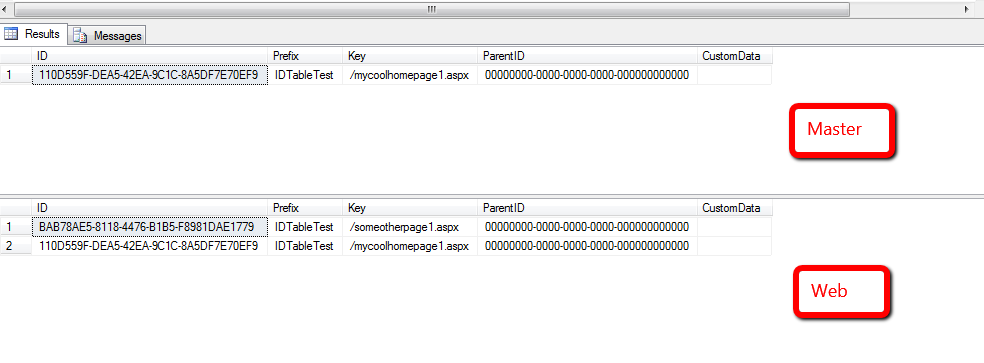
It was removed from the IDTable in the master database.
I then published the deleted item’s parent with subitems:

As you can see, it was removed from the IDTable in the web database.
If you have any suggestions for making this code better, or have another solution for synchronizing IDTable entries across multiple Sitecore databases, please share in a comment.
Delete All But This: Delete Sibling Items Using a Custom Item Context Menu Option in Sitecore
Every so often I find myself having to delete all Sitecore items in a folder except for one — the reason for this eludes me at the moment, but it does make an appearance once in a while (if this also happens to you, and you remember the context for why it happens, please share in a comment) — and it feels like it takes ages to delete all of these items: I have to step through all of these items in the Sitecore content tree, and delete each individually .
When this happens I usually say to myself “wouldn’t it be cool to have something like the ‘Close All But This’ feature found in Visual Studio?”:

I always forget to write this idea down, but did remember it a couple of days ago, and decided to build something to save time when deleting all items in a folder except for one.
To delete all items in a folder, we need a way to get all sibling items, and exclude the item we don’t want to delete. I decided to create a custom pipeline to do this, and defined the following parameter object for it:
using System.Collections.Generic;
using System.Linq;

using Sitecore.Data.Items;
using Sitecore.Pipelines;

namespace Sitecore.Sandbox.Pipelines.GetSiblings
{
    public class GetSiblingsArgs : PipelineArgs
    {
        public Item Item { get; set; }

        public IEnumerable<Item> Siblings { get; set; }
    }
}
Now that we have the parameter object defined, we need a class with methods that will compose our custom pipeline for grabbing sibling items in Sitecore. The following class does the trick:
using System.Linq;

using Sitecore.Diagnostics;

namespace Sitecore.Sandbox.Pipelines.GetSiblings
{
    public class GetSiblingsOperations
    {
        public void EnsureItem(GetSiblingsArgs args)
        {
            Assert.ArgumentNotNull(args, "args");
            if (args.Item == null)
            {
                args.AbortPipeline();
            }
        }

        public void GetSiblings(GetSiblingsArgs args)
        {
            Assert.ArgumentNotNull(args, "args");
            Assert.ArgumentNotNull(args.Item, "args.Item");
            args.Siblings = (from sibling in args.Item.Parent.GetChildren()
                             where sibling.ID != args.Item.ID
                             select sibling).ToList();
        }
    }
}
The EnsureItem() method above just makes sure the item instance passed to it isn’t null, and aborts the pipeline if it is.
The GetSiblings() method gets all siblings items of the item — it just grabs all children of its parent, and excludes the item in question from the resulting collection using LINQ.
Now that we have a way to get sibling items, we need a way to delete them. I decided to build another custom pipeline to get sibling items for an item — by leveraging the pipeline created above — and delete them, and created the following parameter object for it:
using System.Collections.Generic;

using Sitecore.Data.Items;
using Sitecore.Web.UI.Sheer;

namespace Sitecore.Sandbox.Shell.Framework.Pipelines.DeleteSiblings
{
    public class DeleteSiblingsArgs : ClientPipelineArgs
    {
        public Item Item { get; set; }

        public bool ShouldDelete { get; set; }

        public IEnumerable<Item> Siblings { get; set; }
    }
}
The following class contains methods that will be used it our custom client pipeline to delete sibling items:
using System;
using System.Collections.Generic;

using Sitecore.Data.Items;
using Sitecore.Diagnostics;
using Sitecore.Pipelines;
using Sitecore.Web.UI.Sheer;

using Sitecore.Sandbox.Pipelines.GetSiblings;

namespace Sitecore.Sandbox.Shell.Framework.Pipelines.DeleteSiblings
{
    public class DeleteSiblingsOperations
    {
        private string DeleteConfirmationMessage { get; set; }
        private string DeleteConfirmationWindowWidth { get; set; }
        private string DeleteConfirmationWindowHeight { get; set; }

        public void ConfirmDeleteAction(DeleteSiblingsArgs args)
        {
            Assert.ArgumentNotNull(args, "args");
            Assert.ArgumentNotNullOrEmpty(DeleteConfirmationMessage, "DeleteConfirmationMessage");
            Assert.ArgumentNotNullOrEmpty(DeleteConfirmationWindowWidth, "DeleteConfirmationWindowWidth");
            Assert.ArgumentNotNullOrEmpty(DeleteConfirmationWindowHeight, "DeleteConfirmationWindowHeight");
            if (!args.IsPostBack)
            {
                SheerResponse.YesNoCancel(DeleteConfirmationMessage, DeleteConfirmationWindowWidth, DeleteConfirmationWindowHeight);
                args.WaitForPostBack();
            }
            else if (args.HasResult)
            {
                args.ShouldDelete = AreEqualIgnoreCase(args.Result, "yes");
                args.IsPostBack = false;
            }
        }

        public void GetSiblingsIfConfirmed(DeleteSiblingsArgs args)
        {
            Assert.ArgumentNotNull(args, "args");
            if (!args.ShouldDelete)
            {
                args.AbortPipeline();
                return;
            }

            args.Siblings = GetSiblings(args.Item);
        }

        protected virtual IEnumerable<Item> GetSiblings(Item item)
        {
            Assert.ArgumentNotNull(item, "item");
            GetSiblingsArgs getSiblingsArgs = new GetSiblingsArgs { Item = item };
            CorePipeline.Run("getSiblings", getSiblingsArgs);
            return getSiblingsArgs.Siblings;
        }

        public void DeleteSiblings(DeleteSiblingsArgs args)
        {
            Assert.ArgumentNotNull(args, "args");
            Assert.ArgumentNotNull(args.Siblings, "args.Siblings");
            DeleteItems(args.Siblings);
        }

        protected virtual void DeleteItems(IEnumerable<Item> items)
        {
            Assert.ArgumentNotNull(items, "items");
            foreach (Item item in items)
            {
                item.Recycle();
            }
        }

        private static bool AreEqualIgnoreCase(string one, string two)
        {
            return string.Equals(one, two, StringComparison.CurrentCultureIgnoreCase);
        }
    }
}
The ConfirmDeleteAction() method — which is invoked first in the custom client pipeline — asks the user if he/she would like to delete all sibling items for the item in question.
The GetSiblingsIfConfirmed() method is then processed next in the pipeline sequence, and ascertains whether the user had clicked the ‘Yes’ button — this is a button in the YesNoCancel dialog that was presented to the user via the ConfirmDeleteAction() method.
If the user had clicked the ‘Yes’ button, sibling items are grabbed from Sitecore — this is done using the custom pipeline built above — and is set on Siblings property of the DeleteSiblingsArgs instance.
The DeleteSiblings() method is then processed next, and basically does as named: it deletes all items in the Siblings property of the DeleteSiblingsArgs instance.
Now that we are armed with our pipelines above, we need a way to call them from the Sitecore UI. The following command was built for that purpose:
using System.Collections.Generic;
using System.Linq;

using Sitecore;
using Sitecore.Data.Items;
using Sitecore.Diagnostics;
using Sitecore.Pipelines;
using Sitecore.Shell.Framework.Commands;

using Sitecore.Sandbox.Pipelines.GetSiblings;
using Sitecore.Sandbox.Shell.Framework.Pipelines.DeleteSiblings;

namespace Sitecore.Sandbox.Shell.Framework.Commands
{
    public class DeleteAllButThis : Command
    {
        public override void Execute(CommandContext context)
        {
            Assert.ArgumentNotNull(context, "context");
            DeleteSiblings(context);
        }

        private static void DeleteSiblings(CommandContext context)
        {
            Context.ClientPage.Start("uiDeleteSiblings", new DeleteSiblingsArgs { Item = GetItem(context) });
        }

        public override CommandState QueryState(CommandContext context)
        {
            Assert.ArgumentNotNull(context, "context");
            if (!HasSiblings(GetItem(context)))
            {
                return CommandState.Hidden;
            }

            return CommandState.Enabled;
        }

        private static bool HasSiblings(Item item)
        {
            return GetSiblings(item).Any();
        }

        private static IEnumerable<Item> GetSiblings(Item item)
        {
            Assert.ArgumentNotNull(item, "item");
            GetSiblingsArgs getSiblingsArgs = new GetSiblingsArgs { Item = item };
            CorePipeline.Run("getSiblings", getSiblingsArgs);
            return getSiblingsArgs.Siblings;
        }

        private static Item GetItem(CommandContext context)
        {
            Assert.ArgumentNotNull(context, "context");
            Assert.ArgumentNotNull(context.Items, "context.Items");
            return context.Items.FirstOrDefault();
        }
    }
}
The command above will only display if the context item has siblings — we invoke the pipeline defined towards the beginning of this post to get sibling items. If none are returned, the command is hidden.
When the command executes, we basically just pass the context item to our custom pipeline that deletes sibling items, and sit back and wait for them to be deleted (I just lean back, and put my feet up on my desk).
I then strung everything together using the following configuration include file:
<?xml version="1.0" encoding="utf-8"?>
<configuration xmlns:patch="http://www.sitecore.net/xmlconfig/">
  <sitecore>
    <commands>
      <command name="item:DeleteAllButThis" type="Sitecore.Sandbox.Shell.Framework.Commands.DeleteAllButThis, Sitecore.Sandbox"/>
    </commands>
    <pipelines>
      <getSiblings>
        <processor type="Sitecore.Sandbox.Pipelines.GetSiblings.GetSiblingsOperations, Sitecore.Sandbox" method="EnsureItem" />
        <processor type="Sitecore.Sandbox.Pipelines.GetSiblings.GetSiblingsOperations, Sitecore.Sandbox" method="GetSiblings" />
      </getSiblings>
    </pipelines>
    <processors>
      <uiDeleteSiblings>
        <processor type="Sitecore.Sandbox.Shell.Framework.Pipelines.DeleteSiblings.DeleteSiblingsOperations, Sitecore.Sandbox" method="ConfirmDeleteAction">
          <DeleteConfirmationMessage>Are you sure you want to delete all sibling items and their descendants?</DeleteConfirmationMessage>
          <DeleteConfirmationWindowWidth>200</DeleteConfirmationWindowWidth>
          <DeleteConfirmationWindowHeight>200</DeleteConfirmationWindowHeight>
        </processor>
        <processor type="Sitecore.Sandbox.Shell.Framework.Pipelines.DeleteSiblings.DeleteSiblingsOperations, Sitecore.Sandbox" method="GetSiblingsIfConfirmed"/>
        <processor type="Sitecore.Sandbox.Shell.Framework.Pipelines.DeleteSiblings.DeleteSiblingsOperations, Sitecore.Sandbox" method="DeleteSiblings"/>
	    </uiDeleteSiblings>
    </processors>
  </sitecore>
</configuration>
I also had to wire the command above to the Sitecore UI by defining a context menu item in the core database. I’ve omitted how I’ve done this. If you would like to learn how to do this, check out my first and second posts on adding to the item context menu.
Let’s see this in action.
I first created some items to delete, and one item that I don’t want to delete:

I then right-clicked on the item I don’t want to delete, and was presented with the new item context menu option:

I was then prompted with a confirmation dialog:

I clicked ‘Yes’, and then saw that all sibling items were deleted:

If you have any suggestions on making this better, please drop a comment.
Until next time, have a Sitecoretastic day!
 SitecoreJunkie.com