Home » Processors (Page 4)
Category Archives: Processors
Resolve Media Library Items Linked in Sitecore Aliases
Tonight I was doing research on extending the aliases feature in Sitecore, and discovered media library items linked in them are not served correctly “out of the box”:

As an enhancement, I wrote the following HttpRequestProcessor subclass to be used in the httpRequestBegin pipeline:
using Sitecore.Configuration;
using Sitecore.Data;
using Sitecore.Data.Items;
using Sitecore.Diagnostics;
using Sitecore.Pipelines.HttpRequest;
using Sitecore.Resources.Media;
using Sitecore.Web;

namespace Sitecore.Sandbox.Pipelines.HttpRequest
{
    public class MediaAliasResolver : HttpRequestProcessor
    {
        public override void Process(HttpRequestArgs args)
        {
            Assert.ArgumentNotNull(args, "args");
            if (!CanProcessAliases())
            {
                return;
            }

            string mediaUrl = GetMediaAliasTargetUrl(args);
            if (string.IsNullOrWhiteSpace(mediaUrl))
            {
                return;
            }

            Context.Page.FilePath = mediaUrl;
        }

        private static bool CanProcessAliases()
        {
            return Settings.AliasesActive && Context.Database != null;
        }

        private static string GetMediaAliasTargetUrl(HttpRequestArgs args)
        {
            Assert.ArgumentNotNull(args, "args");
            ID targetID = Context.Database.Aliases.GetTargetID(args.LocalPath);
            if (targetID.IsNull)
            {
                return string.Empty;
            }

            Item targetItem = args.GetItem(targetID);
            if (targetItem == null || !IsMediaItem(targetItem))
            {
                return string.Empty;
            }

            return GetAbsoluteMediaUrl(targetItem);
        }

        private static bool IsMediaItem(Item item)
        {
            Assert.ArgumentNotNull(item, "item");
            return item.Paths.IsMediaItem && item.TemplateID != TemplateIDs.MediaFolder;
        }

        private static string GetAbsoluteMediaUrl(MediaItem mediaItem)
        {
            string relativeUrl = MediaManager.GetMediaUrl(mediaItem);
            return WebUtil.GetFullUrl(relativeUrl);
        }
    }
}
The HttpRequestProcessor subclass above — after ascertaining the aliases feature is turned on, and the item linked in the requested alias is a media library item — gets the absolute URL for the media library item, and sets it on the FilePath property of the Sitecore.Context.Page instance — this is exactly how the “out of the box” Sitecore.Pipelines.HttpRequest.AliasResolver handles external URLs — and passes along the HttpRequestArgs instance.
I then wedged the HttpRequestProcessor subclass above into the httpRequestBegin pipeline directly before the Sitecore.Pipelines.HttpRequest.AliasResolver:
<?xml version="1.0" encoding="utf-8"?>
<configuration xmlns:patch="http://www.sitecore.net/xmlconfig/">
  <sitecore>
    <pipelines>
      <httpRequestBegin>
        <processor patch:before="processor[@type='Sitecore.Pipelines.HttpRequest.AliasResolver, Sitecore.Kernel']"
                   type="Sitecore.Sandbox.Pipelines.HttpRequest.MediaAliasResolver, Sitecore.Sandbox" />
      </httpRequestBegin>
    </pipelines>
  </sitecore>
</configuration>
Let’s take this for a spin.
I had already defined the following alias in Sitecore beforehand — the error page at the top of this post is evidence of that:
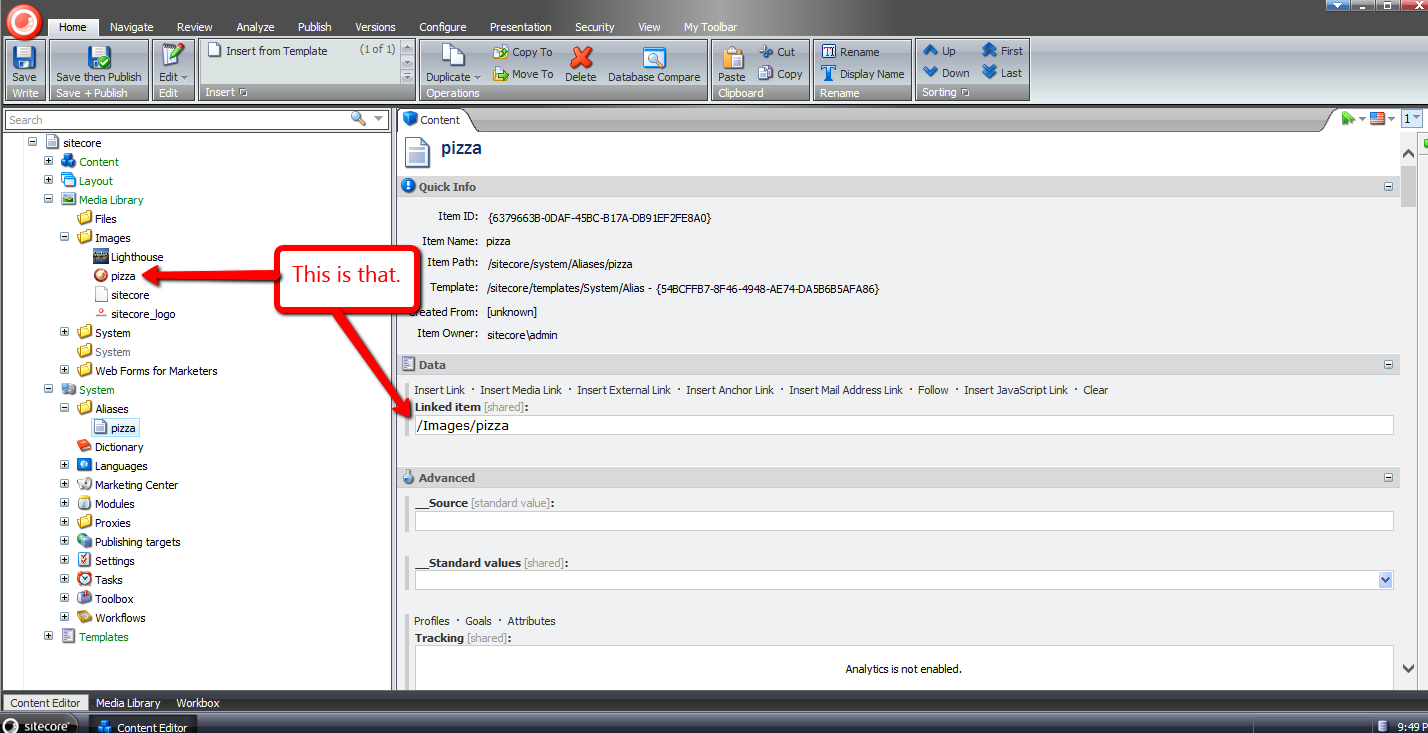
After navigating to http://sandbox/pizza — the URL to the pizza alias in my local Sitecore sandbox instance (don’t click on this link because it won’t go anywhere unless you have a website named sandbox running on your local machine) — I was brought to the media library image on the front-end:

If you have any recommendations on improving this, or further thoughts on using aliases in Sitecore, please share in a comment below.
Until next time, have a pizzalicious day!
Insert a New Item After a Sibling Item in Sitecore
Have you ever thought to yourself “wouldn’t it be nice to insert a new item in the Sitecore content tree at a specific place among its siblings without having to move the inserted item up or down multiple times to position it correctly?”
I’ve had this thought more than once, and decided to put something together to achieve this.
The following class consists of methods to be used in pipeline processors of the uiAddFromTemplate pipeline to make this happen:
using System.Collections.Generic;
using System.Linq;

using Sitecore.Configuration;
using Sitecore.Globalization;
using Sitecore.Data;
using Sitecore.Data.Items;
using Sitecore.Diagnostics;
using Sitecore.Shell.Applications.Dialogs.ItemLister;
using Sitecore.Shell.Framework;
using Sitecore.Web.UI.Sheer;

namespace Sitecore.Sandbox.Shell.Framework.Pipelines.AddFromTemplate
{
    public class InsertAfterItemOperations
    {
        private string SelectButtonText { get; set; }

        private string ModalIcon { get; set; }

        private string ModalTitle { get; set; }

        private string ModalInstructions { get; set; }

        public void StoreTemplateResult(ClientPipelineArgs args)
        {
            args.Parameters["Template"] = args.Result;
        }

        public void EnsureParentAndChildren(ClientPipelineArgs args)
        {
            AssertArguments(args);
            Item parent = GetParentItem(args);
            EnsureParentItem(parent, args);
            args.Parameters["HasChildren"] = parent.HasChildren.ToString();
            args.IsPostBack = false;
        }

        public void GetInsertAfterId(ClientPipelineArgs args)
        {
            AssertArguments(args);
            bool hasChildren = false;
            bool.TryParse(args.Parameters["HasChildren"], out hasChildren);
            if (!hasChildren)
            {
                SetCanAddItemFromTemplate(args);
                return;
            }

            Item parent = GetParentItem(args);
            EnsureParentItem(parent, args);
            if (!args.IsPostBack)
            {
                ItemListerOptions itemListerOptions = new ItemListerOptions
                {
                    ButtonText = SelectButtonText,
                    Icon = ModalIcon,
                    Title = ModalTitle,
                    Text = ModalInstructions,
                    Items = parent.Children.ToList()
                };

                SheerResponse.ShowModalDialog(itemListerOptions.ToUrlString().ToString(), true);
                args.WaitForPostBack();
            }
            else if (args.HasResult)
            {
                args.Parameters["InsertAfterId"] = args.Result;
                SetCanAddItemFromTemplate(args);
                args.IsPostBack = false;
            }
            else
            {
                SetCanAddItemFromTemplate(args);
                args.IsPostBack = false;
            }
        }

        private void SetCanAddItemFromTemplate(ClientPipelineArgs args)
        {
            Assert.ArgumentNotNull(args, "args");
            args.Parameters["CanAddItemFromTemplate"] = bool.TrueString;
        }

        private static Item GetParentItem(ClientPipelineArgs args)
        {
            AssertArguments(args);
            Assert.ArgumentNotNullOrEmpty(args.Parameters["id"], "id");
            return GetItem(GetDatabase(args.Parameters["database"]), args.Parameters["id"], args.Parameters["language"]);
        }

        private static void EnsureParentItem(Item parent, ClientPipelineArgs args)
        {
            if (parent != null)
            {
                return;
            }

            SheerResponse.Alert("Parent item could not be located -- perhaps it was deleted.");
            args.AbortPipeline();
        }

        public void AddItemFromTemplate(ClientPipelineArgs args)
        {
            Assert.ArgumentNotNull(args, "args");
            bool canAddItemFromTemplate = false;
            bool.TryParse(args.Parameters["CanAddItemFromTemplate"], out canAddItemFromTemplate);
            if (canAddItemFromTemplate)
            {
                int index = args.Parameters["Template"].IndexOf(',');
                Assert.IsTrue(index >= 0, "Invalid return value from dialog");
                string path = StringUtil.Left(args.Parameters["Template"], index);
                string name = StringUtil.Mid(args.Parameters["Template"], index + 1);
                Database database = GetDatabase(args.Parameters["database"]);
                Item parent = GetItem(database, args.Parameters["id"], args.Parameters["language"]);
                if (parent == null)
                {
                    SheerResponse.Alert("Parent item not found.");
                    args.AbortPipeline();
                    return;
                }

                if (!parent.Access.CanCreate())
                {
                    SheerResponse.Alert("You do not have permission to create items here.");
                    args.AbortPipeline();
                    return;
                }

                Item item = database.GetItem(path);
                if (item == null)
                {
                    SheerResponse.Alert("Item not found.");
                    args.AbortPipeline();
                    return;
                }

                History.Template = item.ID.ToString();
                Item added = null;
                if (item.TemplateID == TemplateIDs.Template)
                {
                    Log.Audit(this, "Add from template: {0}", new string[] { AuditFormatter.FormatItem(item) });
                    TemplateItem template = item;
                    added = Context.Workflow.AddItem(name, template, parent);
                }
                else
                {
                    Log.Audit(this, "Add from branch: {0}", new string[] { AuditFormatter.FormatItem(item) });
                    BranchItem branch = item;
                    added = Context.Workflow.AddItem(name, branch, parent);
                }

                if (added == null)
                {
                    SheerResponse.Alert("Something went terribly wrong when adding the item.");
                    args.AbortPipeline();
                    return;
                }

                args.Parameters["AddedId"] = added.ID.ToString();
            }
        }

        public void MoveAdded(ClientPipelineArgs args)
        {
            AssertArguments(args);
            Assert.ArgumentNotNullOrEmpty(args.Parameters["AddedId"], "AddedId");
            Item added = GetAddedItem(args);
            if (string.IsNullOrWhiteSpace(args.Parameters["InsertAfterId"]))
            {
                Items.MoveFirst(new [] { added });
            }

            SetSortorder(GetItemOrdering(added, args.Parameters["InsertAfterId"]));
        }

        private static void AssertArguments(ClientPipelineArgs args)
        {
            Assert.ArgumentNotNull(args, "args");
            Assert.ArgumentNotNull(args.Parameters, "args.Parameters");
            Assert.ArgumentNotNullOrEmpty(args.Parameters["database"], "database");
            Assert.ArgumentNotNullOrEmpty(args.Parameters["language"], "language");
        }

        private static Item GetAddedItem(ClientPipelineArgs args)
        {
            AssertArguments(args);
            Assert.ArgumentNotNullOrEmpty(args.Parameters["AddedId"], "AddedId");
            return GetItem(GetDatabase(args.Parameters["database"]), args.Parameters["AddedId"], args.Parameters["language"]);
        }

        private static Item GetItem(Database database, string id, string language)
        {
            Assert.ArgumentNotNull(database, "database");
            Assert.ArgumentNotNullOrEmpty(id, "id");
            Assert.ArgumentNotNullOrEmpty(language, "language");
            return database.Items[id, Language.Parse(language)];
        }

        private static Database GetDatabase(string databaseName)
        {
            Assert.ArgumentNotNullOrEmpty(databaseName, "databaseName");
            return Factory.GetDatabase(databaseName);
        }

        private static IList<Item> GetItemOrdering(Item added, string insertAfterId)
        {
            IList<Item> ordering = new List<Item>();
            foreach (Item child in added.Parent.GetChildren())
            {
                ordering.Add(child);
                bool shouldAddAfter = string.Equals(child.ID.ToString(), insertAfterId);
                if (shouldAddAfter)
                {
                    ordering.Add(added);
                }
            }

            return ordering;
        }

        private static void SetSortorder(IList<Item> items)
        {
            Assert.ArgumentNotNull(items, "items");
            for (int i = 0; i < items.Count; i++)
            {
                int sortorder = (i + 1) * 100;
                SetSortorder(items[i], sortorder);
            }
        }

        private static void SetSortorder(Item item, int sortorder)
        {
            Assert.ArgumentNotNull(item, "item");
            if (item.Access.CanWrite() && !item.Appearance.ReadOnly)
            {
                item.Editing.BeginEdit();
                item[FieldIDs.Sortorder] = sortorder.ToString();
                item.Editing.EndEdit();
            }
        }
    }
}
In the StoreTemplateResult method, we store the ID of the template selected in the ‘Insert from Template’ dialog. This dialog is launched by clicking the ‘Insert from Template’ menu option in the item context menu — an example of this can be seen in my test run near the bottom of this post.
The EnsureParentAndChildren method makes certain the parent item exists — we want to be sure another user did not delete it in another Sitecore session — and ascertains if the parent item has children.
Logic in the GetInsertAfterId method launches another dialog when the parent item does have children. This dialog prompts the user to select a sibling item to precede the new item. If the ‘Cancel’ button is clicked, the item will be inserted before all sibling items.
The AddItemFromTemplate method basically contains the same logic that can be found in the Execute method in the Sitecore.Shell.Framework.Pipelines.AddFromTemplate class in Sitecore.Kernel.dll, albeit with a few minor changes — I removed some of the nested if/else conditionals, and stored the ID of the newly created item, which is needed when reordering the sibling items (this is how we move the new item after the selected sibling item).
The MoveAdded method is where we reorder the siblings items with the newly created item so that the new item follows the selected sibling. If there is no selected sibling, we just move the new item to the first position.
I then put all of the above together using the following patch configuration file:
<?xml version="1.0" encoding="utf-8"?>
<configuration xmlns:patch="http://www.sitecore.net/xmlconfig/">
  <sitecore>
    <processors>
      <uiAddFromTemplate>
        <processor mode="on" patch:after="processor[@type='Sitecore.Shell.Framework.Pipelines.AddFromTemplate,Sitecore.Kernel' and @method='GetTemplate']"
                   type="Sitecore.Sandbox.Shell.Framework.Pipelines.AddFromTemplate.InsertAfterItemOperations, Sitecore.Sandbox" method="StoreTemplateResult"/>
        <processor mode="on" patch:after="processor[@type='Sitecore.Sandbox.Shell.Framework.Pipelines.AddFromTemplate.InsertAfterItemOperations, Sitecore.Sandbox' and @method='StoreTemplateResult']"
                   type="Sitecore.Sandbox.Shell.Framework.Pipelines.AddFromTemplate.InsertAfterItemOperations, Sitecore.Sandbox" method="EnsureParentAndChildren"/>
        <processor mode="on" patch:after="processor[@type='Sitecore.Sandbox.Shell.Framework.Pipelines.AddFromTemplate.InsertAfterItemOperations, Sitecore.Sandbox' and @method='EnsureParentAndChildren']"
                   type="Sitecore.Sandbox.Shell.Framework.Pipelines.AddFromTemplate.InsertAfterItemOperations, Sitecore.Sandbox" method="GetInsertAfterId">
          <SelectButtonText>Insert After</SelectButtonText>
          <ModalIcon>Applications/32x32/nav_up_right_blue.png</ModalIcon>
          <ModalTitle>Select Item to Insert After</ModalTitle>
          <ModalInstructions>Select the item you would like to insert after. If you would like to insert before the first item, just click 'Cancel'.</ModalInstructions>
        </processor>
        <processor mode="on" patch:instead="processor[@type='Sitecore.Shell.Framework.Pipelines.AddFromTemplate,Sitecore.Kernel' and @method='Execute']"
                   type="Sitecore.Sandbox.Shell.Framework.Pipelines.AddFromTemplate.InsertAfterItemOperations, Sitecore.Sandbox" method="AddItemFromTemplate" />
        <processor mode="on" patch:after="processor[@type='Sitecore.Sandbox.Shell.Framework.Pipelines.AddFromTemplate.InsertAfterItemOperations, Sitecore.Sandbox' and @method='AddItemFromTemplate']"
                   type="Sitecore.Sandbox.Shell.Framework.Pipelines.AddFromTemplate.InsertAfterItemOperations, Sitecore.Sandbox" method="MoveAdded" />
      </uiAddFromTemplate>
    </processors>
  </sitecore>
</configuration>
Let’s test this out.
This is how my content tree looked before adding new items:

I right-clicked on my Home item to launch its context menu, and clicked ‘Insert from Template’:

I was presented with the “out of the box” ‘Insert from Template’ dialog, and selected a template:
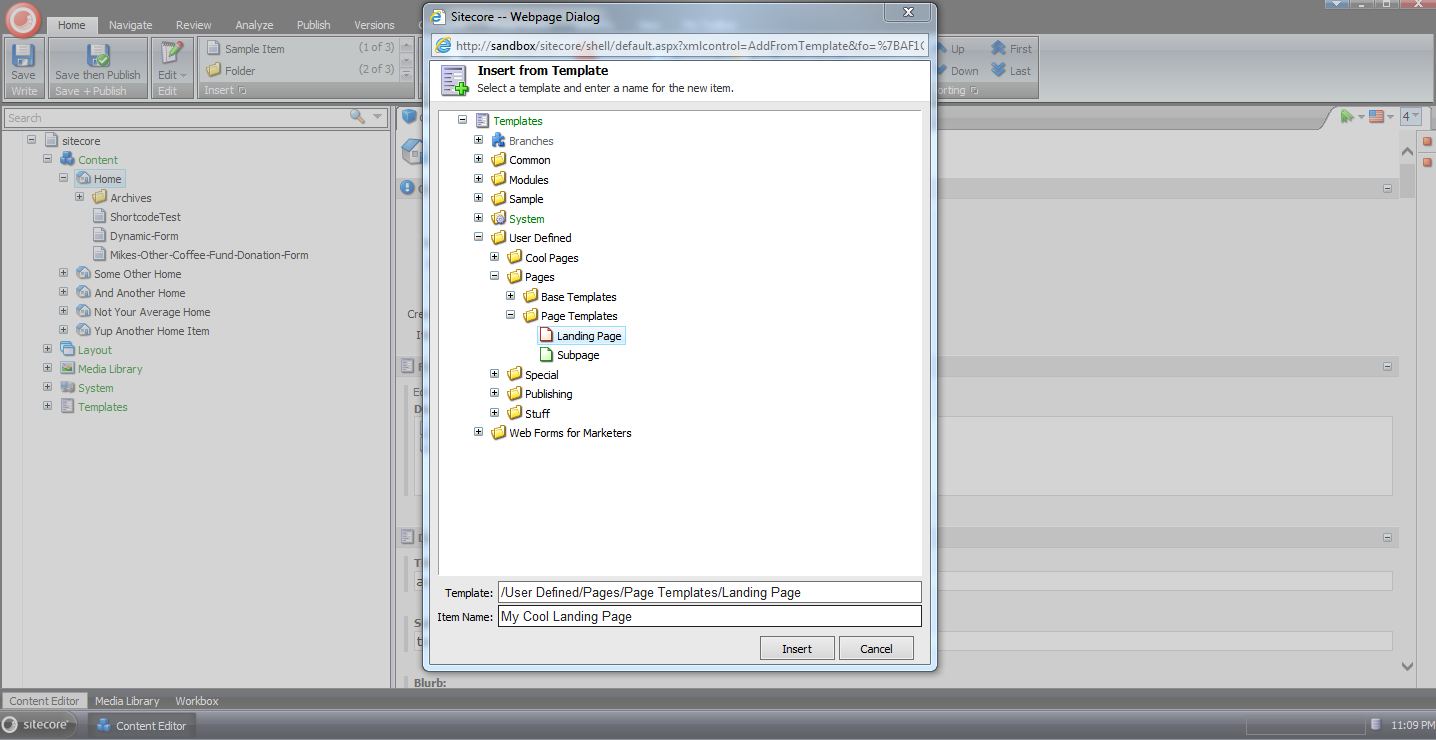
Next I was prompted to select a sibling item to insert the new item after:

As you can see the new item now resides after the selected sibling:

If you have any thoughts on this, or other ideas around modifying the uiAddFromTemplate pipeline, please share in a comment below.
Specify the Maximum Width of Images Uploaded to the Sitecore Media Library
Last week someone started a thread in one of the SDN forums asking how one could go about making Sitecore resize images larger than a specific width down to that width.
Yesterday an astute SDN visitor recommended using a custom getMediaStream pipeline processor to set the maximum width for images — a property for this maximum width is exposed via the GetMediaStreamPipelineArgs parameters object passed through the getMediaStream pipeline.
I thought I would try out the suggestion, and came up with the following getMediaStream pipeline processor:
using Sitecore.Diagnostics;

using Sitecore.Resources.Media;

namespace Sitecore.Sandbox.Resources.Media
{
    public class MaxWidthProcessor
    {
        public int MaxWidth { get; set; }

        public void Process(GetMediaStreamPipelineArgs args)
        {
            Assert.ArgumentNotNull(args, "args");
            if (!ShouldSetMaxWidth(args))
            {
                return;
            }

            args.Options.MaxWidth = MaxWidth;
        }

        private bool ShouldSetMaxWidth(GetMediaStreamPipelineArgs args)
        {
            Assert.ArgumentNotNull(args, "args");
            return MaxWidth > 0 && args.Options.MaxWidth < 1;
        }
    }
}
I then interlaced it into the getMediaStream pipeline before the ResizeProcessor processor — this is the processor where the magical resizing happens — using the following patch configuration file:
<?xml version="1.0" encoding="utf-8"?>
<configuration xmlns:patch="http://www.sitecore.net/xmlconfig/">
  <sitecore>
    <pipelines>
      <getMediaStream>
        <processor patch:before="processor[@type='Sitecore.Resources.Media.ResizeProcessor, Sitecore.Kernel']"
                   type="Sitecore.Sandbox.Resources.Media.MaxWidthProcessor, Sitecore.Sandbox">
          <MaxWidth>1024</MaxWidth>
        </processor>
      </getMediaStream>
    </pipelines>
  </sitecore>
</configuration>
The maximum width for images is set to 1024 pixels — the width I am using in my test below.
Let’s see how we did.
I decided to use one of my favorite images that ships with Sitecore for testing:

As you can see its width is much larger than 1024 pixels:

After uploading the lighthouse image into the media library, its width was set to the maximum specified, and its height was scaled down proportionally:

If you have any thoughts on this, or other ideas on resizing images uploaded to the media library, please drop a comment.
Unlock Sitecore Users’ Items During Logout
The other day I saw a post in one of the SDN forums asking how one could go about building a solution to unlock items locked by a user when he/she logs out of Sitecore.
What immediately came to mind was building a new processor for the logout pipeline — this pipeline can be found at /configuration/sitecore/processors/logout in your Sitecore instance’s Web.config — but had to research how one would programmatically get all Sitecore items locked by the current user.
After a bit of fishing in Sitecore.Kernel.dll and Sitecore.Client.dll, I found a query in Sitecore.Client.dll that will give me all locked items for the current user:

Now all we need to do is add it into a custom logout pipeline processor:
using System;
using System.Collections.Generic;
using System.Linq;

using Sitecore.Data.Items;
using Sitecore.Diagnostics;
using Sitecore.Pipelines.Logout;

namespace Sitecore.Sandbox.Pipelines.Logout
{
    public class UnlockMyItems
    {
        public void Process(LogoutArgs args)
        {
            Assert.ArgumentNotNull(args, "args");
            UnlockMyItemsIfAny();
        }

        private void UnlockMyItemsIfAny()
        {
            IEnumerable<Item> lockedItems = GetMyLockedItems();
            if (!CanProcess(lockedItems))
            {
                return;
            }

            foreach (Item lockedItem in lockedItems)
            {
                Unlock(lockedItem);
            }
        }

        private static IEnumerable<Item> GetMyLockedItems()
        {
            return Context.ContentDatabase.SelectItems(GetMyLockedItemsQuery());
        }

        private static string GetMyLockedItemsQuery()
        {
            return string.Format("fast://*[@__lock='%\"{0}\"%']", Context.User.Name);
        }

        private static bool CanProcess(IEnumerable<Item> lockedItems)
        {
            return lockedItems != null
                    && lockedItems.Any()
                    && lockedItems.Select(item => item.Locking.HasLock()).Any();
        }

        private void Unlock(Item item)
        {
            Assert.ArgumentNotNull(item, "item");
            if (!item.Locking.HasLock())
            {
                return;
            }

            try
            {
                item.Editing.BeginEdit();
                item.Locking.Unlock();
                item.Editing.EndEdit();
            }
            catch (Exception ex)
            {
                Log.Error(this.ToString(), ex, this);
            }
        }
    }
}
The class above grabs all items locked by the current user in the context content database. If none are found, we don’t move forward on processing.
When there are locked items for the current user, the code checks to see if each item is locked before unlocking, just in case some other account unlocks the item before we unlock it — I don’t know what would happen if we try to unlock an item that isn’t locked. If you know, please share in a comment.
I then injected the above pipeline processor into the logout pipeline using the following patch configuration file:
<?xml version="1.0" encoding="utf-8" ?>
<configuration xmlns:patch="http://www.sitecore.net/xmlconfig/">
  <sitecore>
    <processors>
      <logout>
        <processor patch:after="*[@type='Sitecore.Pipelines.Logout.CheckModified, Sitecore.Kernel']" type="Sitecore.Sandbox.Pipelines.Logout.UnlockMyItems, Sitecore.Sandbox"/>
      </logout>
    </processors>
  </sitecore>
</configuration>
Let’s test-drive this.
I first logged into Sitecore using my ‘mike’ account, and chose the Home item to lock:
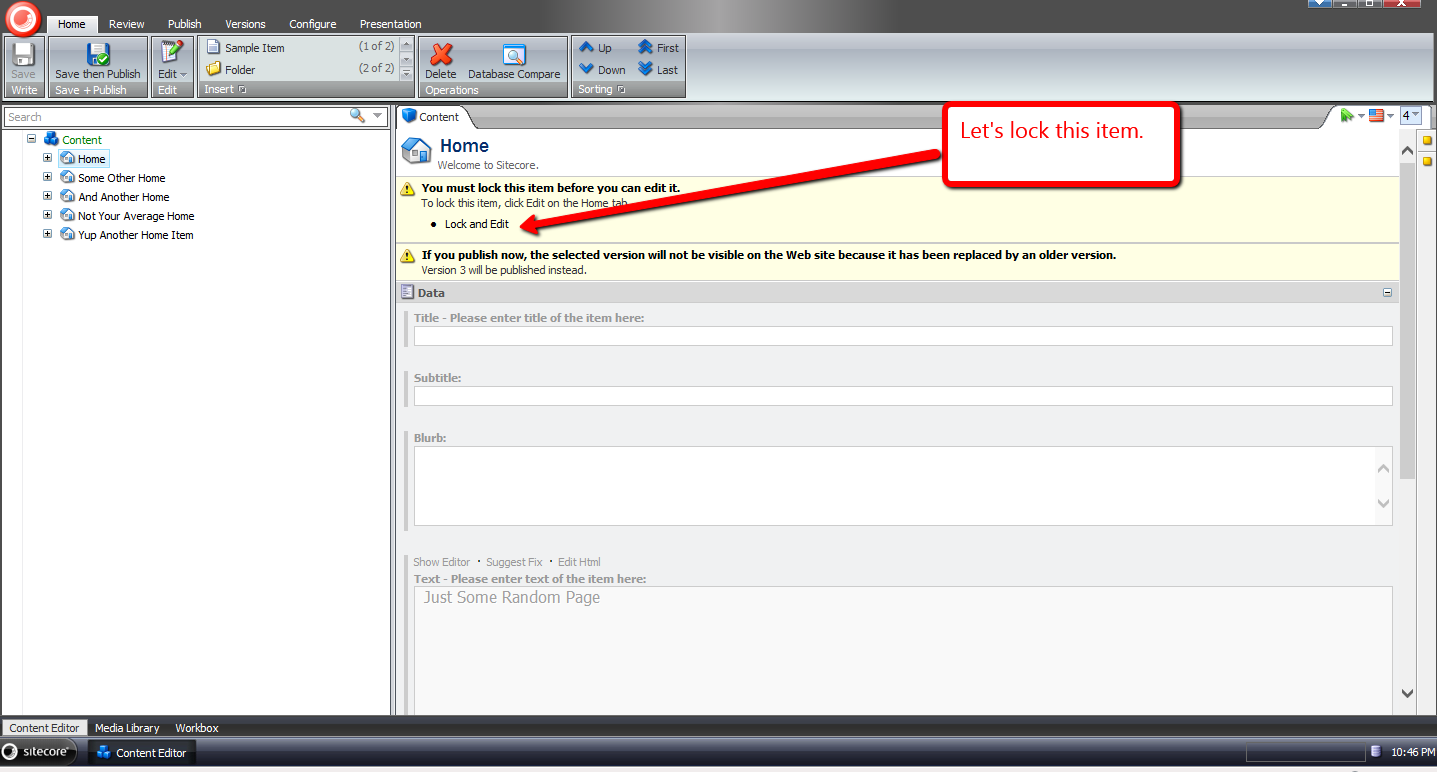
It is now locked:
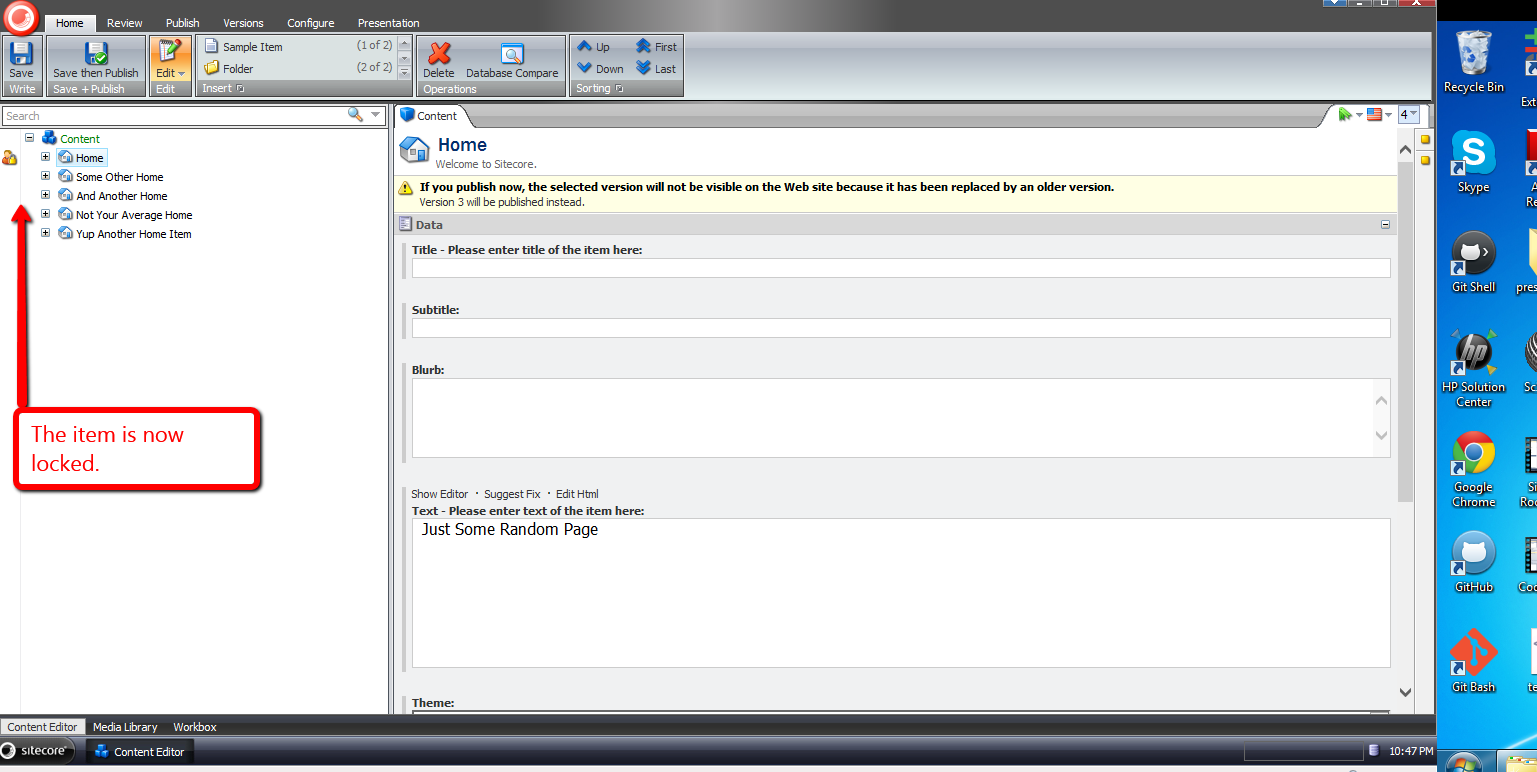
In another session, I logged in using another account, and saw that ‘mike’ had locked the Home item:

I switched back to the other session under the ‘mike’ user, and logged out:

When I logged back in, I saw that the Home item was no longer locked:

If you have any thoughts or suggestions on making this better, please share in a comment below.
Navigate to Base Templates of a Template using a Sitecore Command
Have you ever said to yourself when looking at base templates of a template in its Content tab “wouldn’t it be great if I could easily navigate to one of these?”
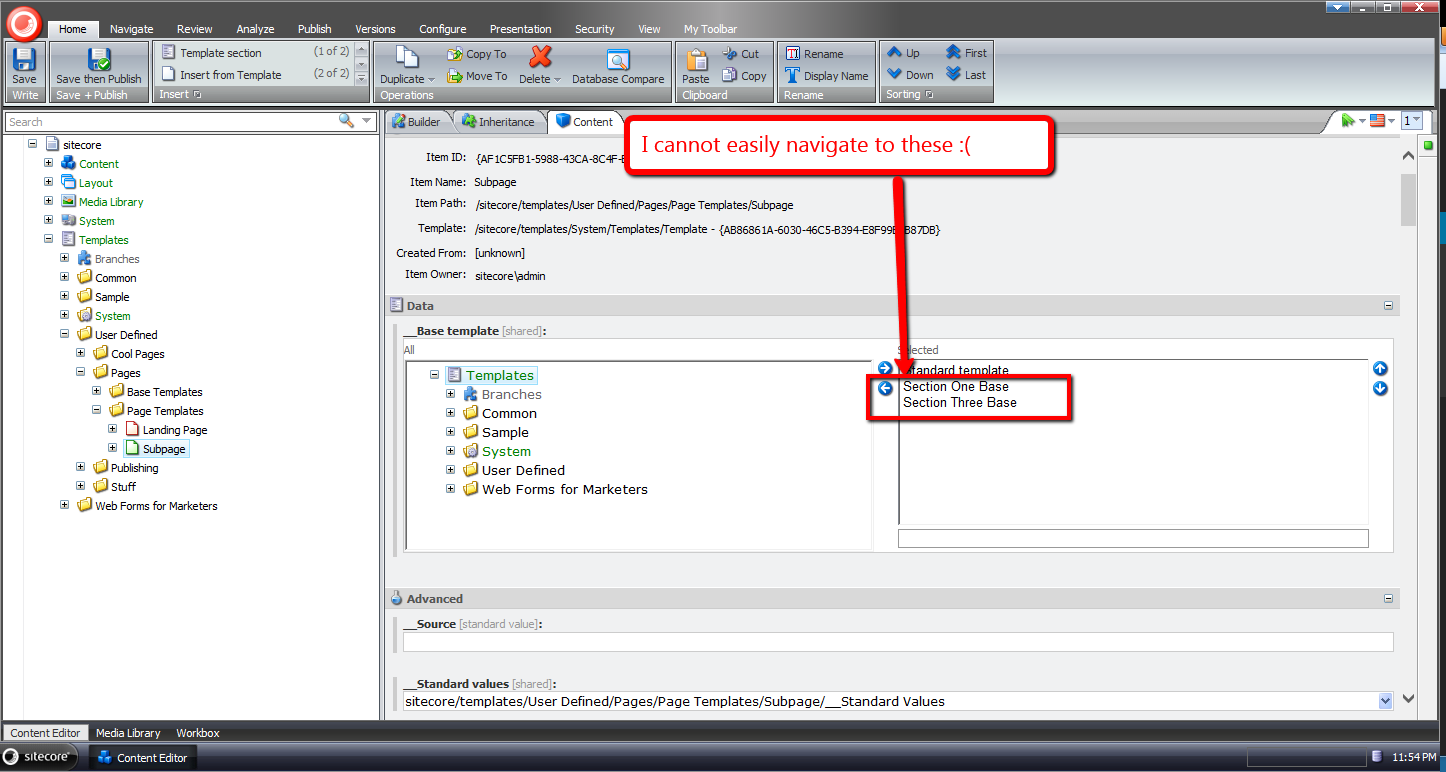
I have had this thought more than once despite having the ability to do this in a template’s Inheritance tab — you can do this by clicking one of the base template links listed:
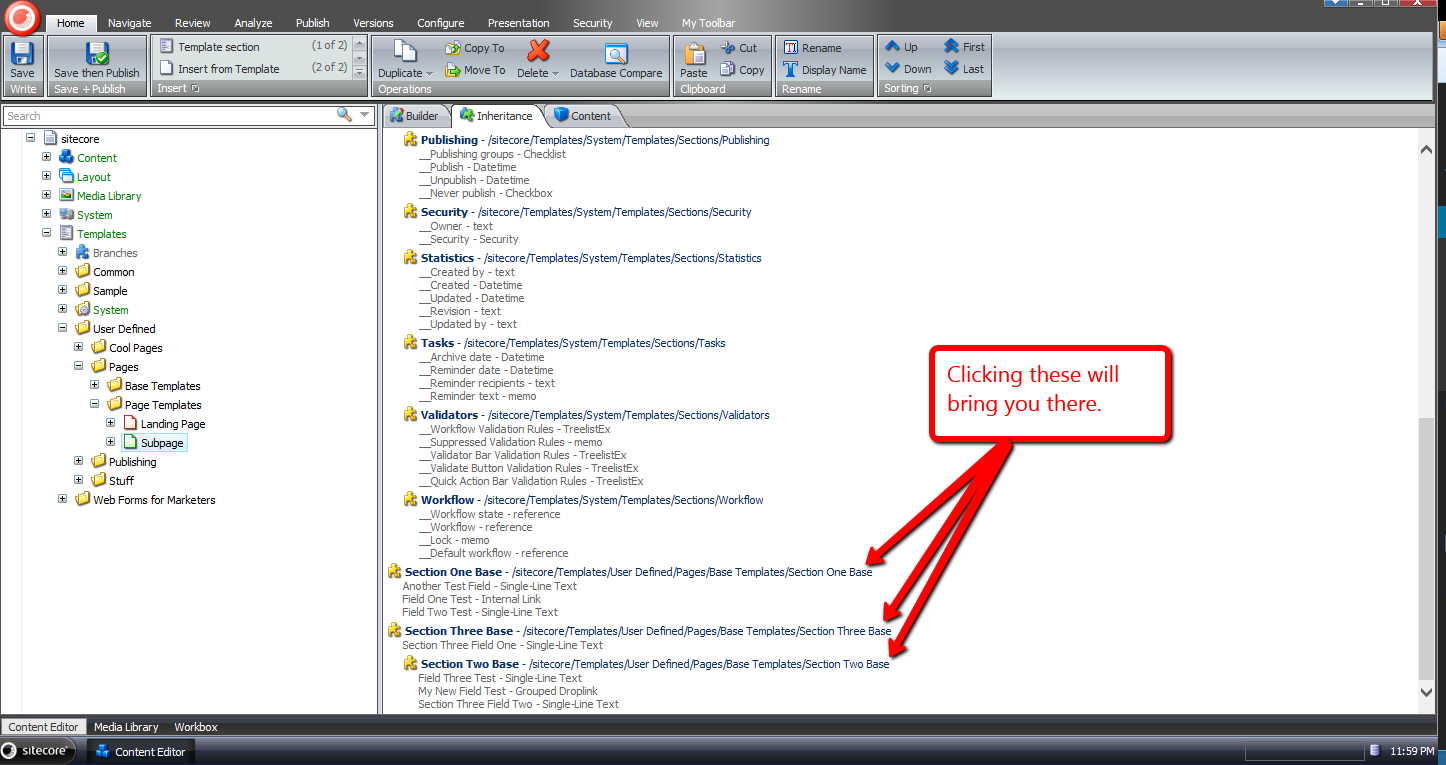
For some reason I sometimes forget you have the ability to get to a base template of a template in the Inheritance tab — why I forget is no doubt a larger issue I should try to tackle, albeit I’ll leave that for another day — and decided to build something that will be more difficult for me to forget: launching a dialog via a new item context menu option, and selecting one of the base templates of a template in that dialog.
I decided to atomize functionality in my solution by building custom pipelines/processors wherever I felt doing so made sense.
I started off by building a custom pipeline that gets base templates for a template, and defined a data transfer object (DTO) class for it:
using System.Collections.Generic;

using Sitecore.Data.Items;
using Sitecore.Pipelines;
using Sitecore.Web.UI.Sheer;

namespace Sitecore.Sandbox.Shell.Framework.Pipelines
{
    public class GetBaseTemplatesArgs : PipelineArgs
    {
        public TemplateItem TemplateItem { get; set; }

        public bool IncludeAncestorBaseTemplates { get; set; }

        private List<TemplateItem> _BaseTemplates;
        public List<TemplateItem> BaseTemplates
        {
            get
            {
                if (_BaseTemplates == null)
                {
                    _BaseTemplates = new List<TemplateItem>();
                }

                return _BaseTemplates;
            }
            set
            {
                _BaseTemplates = value;
            }
        }
    }
}
Client code must supply the template item that will be used as the starting point for gathering base templates, and can request all ancestor base templates — excluding the Standard Template as you will see below — by setting the IncludeAncestorBaseTemplates property to true.
I then created a class with a Process method that will serve as the only pipeline processor for my new pipeline:
using System;
using System.Collections.Generic;
using System.Linq;
using System.Text;

using Sitecore.Data.Items;
using Sitecore.Diagnostics;

namespace Sitecore.Sandbox.Shell.Framework.Pipelines
{
    public class GetBaseTemplates
    {
        public void Process(GetBaseTemplatesArgs args)
        {
            Assert.ArgumentNotNull(args, "args");
            Assert.ArgumentNotNull(args.TemplateItem, "args.TemplateItem");
            List<TemplateItem> baseTemplates = new List<TemplateItem>();
            GatherBaseTemplateItems(baseTemplates, args.TemplateItem, args.IncludeAncestorBaseTemplates);
            args.BaseTemplates = baseTemplates;
        }

        private static void GatherBaseTemplateItems(List<TemplateItem> baseTemplates, TemplateItem templateItem, bool includeAncestors)
        {
            if (includeAncestors)
            {
                foreach (TemplateItem baseTemplateItem in templateItem.BaseTemplates)
                {
                    GatherBaseTemplateItems(baseTemplates, baseTemplateItem, includeAncestors);
                }
            }

            if (!IsStandardTemplate(templateItem) && templateItem.BaseTemplates != null && templateItem.BaseTemplates.Any())
            {
                baseTemplates.AddRange(GetBaseTemplatesExcludeStandardTemplate(templateItem.BaseTemplates));
            }
        }

        private static IEnumerable<TemplateItem> GetBaseTemplatesExcludeStandardTemplate(TemplateItem templateItem)
        {
            if (templateItem == null)
            {
                return new List<TemplateItem>();
            }

            return GetBaseTemplatesExcludeStandardTemplate(templateItem.BaseTemplates);
        }

        private static IEnumerable<TemplateItem> GetBaseTemplatesExcludeStandardTemplate(IEnumerable<TemplateItem> baseTemplates)
        {
            if (baseTemplates != null && baseTemplates.Any())
            {
                return baseTemplates.Where(baseTemplate => !IsStandardTemplate(baseTemplate));
            }

            return baseTemplates;
        }

        private static bool IsStandardTemplate(TemplateItem templateItem)
        {
            return templateItem.ID == TemplateIDs.StandardTemplate;
        }
    }
}
Methods in the above class add base templates to a list when the templates are not the Standard Template — I thought it would be a rare occurrence for one to navigate to it, and decided not to include it in the collection.
Further, the method that gathers base templates is recursively executed when client code requests all ancestor base templates be include in the collection.
The next thing I built was functionality to prompt the user for a base template via a dialog, and track which base template was chosen. I decided to do this using a custom client processor, and built the following DTO for it:
using System;
using System.Collections.Generic;
using System.Linq;
using System.Text;
using Sitecore.Web.UI.Sheer;
using Sitecore.Data.Items;

namespace Sitecore.Sandbox.Shell.Framework.Pipelines
{
    public class GotoBaseTemplateArgs : ClientPipelineArgs
    {
        public TemplateItem TemplateItem { get; set; }

        public string SelectedBaseTemplateId { get; set; }
    }
}
Just like the other DTO defined above, client code must suppy a template item. The SelectedBaseTemplateId property is set after a user selects a base template in the modal launched by the following class:
using System.Collections.Generic;
using System.Linq;

using Sitecore.Data.Items;
using Sitecore.Data.Managers;
using Sitecore.Diagnostics;
using Sitecore.Pipelines;
using Sitecore.Shell.Applications.Dialogs.ItemLister;
using Sitecore.Web.UI.Sheer;

namespace Sitecore.Sandbox.Shell.Framework.Pipelines
{
    public class GotoBaseTemplate
    {
        public string SelectTemplateButtonText { get; set; }

        public string ModalIcon { get; set; }

        public string ModalTitle { get; set; }

        public string ModalInstructions { get; set; }

        public void SelectBaseTemplate(GotoBaseTemplateArgs args)
        {
            Assert.ArgumentNotNull(args, "args");
            Assert.ArgumentNotNull(args.TemplateItem, "args.TemplateItem");
            Assert.ArgumentNotNullOrEmpty(SelectTemplateButtonText, "SelectTemplateButtonText");
            Assert.ArgumentNotNullOrEmpty(ModalIcon, "ModalIcon");
            Assert.ArgumentNotNullOrEmpty(ModalTitle, "ModalTitle");
            Assert.ArgumentNotNullOrEmpty(ModalInstructions, "ModalInstructions");

            if (!args.IsPostBack)
            {
                ItemListerOptions itemListerOptions = new ItemListerOptions
                {
                    ButtonText = SelectTemplateButtonText,
                    Icon = ModalIcon,
                    Title = ModalTitle,
                    Text = ModalInstructions
                };

                itemListerOptions.Items = GetBaseTemplateItemsForSelection(args.TemplateItem).Select(template => template.InnerItem).ToList();
                itemListerOptions.AddTemplate(TemplateIDs.Template);
                SheerResponse.ShowModalDialog(itemListerOptions.ToUrlString().ToString(), true);
                args.WaitForPostBack();
            }
            else if (args.HasResult)
            {
                args.SelectedBaseTemplateId = args.Result;
                args.IsPostBack = false;
            }
            else
            {
                args.AbortPipeline();
            }
        }

        private IEnumerable<TemplateItem> GetBaseTemplateItemsForSelection(TemplateItem templateItem)
        {
            GetBaseTemplatesArgs args = new GetBaseTemplatesArgs
            {
                TemplateItem = templateItem,
                IncludeAncestorBaseTemplates = true,
            };
            CorePipeline.Run("getBaseTemplates", args);
            return args.BaseTemplates;
        }

        public void Execute(GotoBaseTemplateArgs args)
        {
            Assert.ArgumentNotNull(args, "args");
            Assert.ArgumentNotNullOrEmpty(args.SelectedBaseTemplateId, "args.SelectedBaseTemplateId");
            Context.ClientPage.ClientResponse.Timer(string.Format("item:load(id={0})", args.SelectedBaseTemplateId), 1);
        }
    }
}
The SelectBaseTemplate method above gives the user a list of base templates to choose from — this includes all ancestor base templates of a template minus the Standard Template.
The title, icon, helper text of the modal are supplied via the processor’s xml node in its configuration file — you’ll see this later on in this post.
Once a base template is chosen, its Id is then set in the SelectedBaseTemplateId property of the GotoBaseTemplateArgs instance.
The Execute method brings the user to the selected base template item in the Sitecore content tree.
Now we need a way to launch the code above.
I did this using a custom command that will be wired up to the item context menu:
using System.Collections.Generic;
using System.Linq;

using Sitecore.Data.Items;
using Sitecore.Data.Managers;
using Sitecore.Diagnostics;
using Sitecore.Shell.Framework.Commands;

using Sitecore.Sandbox.Shell.Framework.Pipelines;
using Sitecore.Web.UI.Sheer;
using Sitecore.Pipelines;

namespace Sitecore.Sandbox.Commands
{
    public class GotoBaseTemplateCommand : Command
    {
        public override void Execute(CommandContext context)
        {
            Context.ClientPage.Start("gotoBaseTemplate", new GotoBaseTemplateArgs { TemplateItem = GetItem(context) });
        }

        public override CommandState QueryState(CommandContext context)
        {
            if (ShouldEnable(GetItem(context)))
            {
                return CommandState.Enabled;
            }

            return CommandState.Hidden;
        }

        private static bool ShouldEnable(Item item)
        {
            return item != null
                    && IsTemplate(item)
                    && GetBaseTemplates(item).Any();
        }

        private static Item GetItem(CommandContext context)
        {
            Assert.ArgumentNotNull(context, "context");
            Assert.ArgumentNotNull(context.Items, "context.Items");
            return context.Items.FirstOrDefault();
        }

        private static bool IsTemplate(Item item)
        {
            Assert.ArgumentNotNull(item, "item");
            return TemplateManager.IsTemplate(item);
        }

        private static IEnumerable<TemplateItem> GetBaseTemplates(TemplateItem templateItem)
        {
            Assert.ArgumentNotNull(templateItem, "templateItem");
            GetBaseTemplatesArgs args = new GetBaseTemplatesArgs
            {
                TemplateItem = templateItem,
                IncludeAncestorBaseTemplates = false
            };

            CorePipeline.Run("getBaseTemplates", args);
            return args.BaseTemplates;
        }
    }
}
The command above is visible only when the item is a template, and has base templates on it — we invoke the custom pipeline built above to get base templates.
When the command is invoked, we call our custom client processor to prompt the user for a base template to go to.
I then glued everything together using the following configuration file:
<?xml version="1.0" encoding="utf-8" ?>
<configuration>
  <sitecore>
    <commands>
      <command name="item:GotoBaseTemplate" type="Sitecore.Sandbox.Commands.GotoBaseTemplateCommand, Sitecore.Sandbox"/>
    </commands>
    <pipelines>
      <getBaseTemplates>
        <processor type="Sitecore.Sandbox.Shell.Framework.Pipelines.GetBaseTemplates, Sitecore.Sandbox"/>
      </getBaseTemplates>
    </pipelines>
    <processors>
      <gotoBaseTemplate>
        <processor mode="on" type="Sitecore.Sandbox.Shell.Framework.Pipelines.GotoBaseTemplate, Sitecore.Sandbox" method="SelectBaseTemplate">
          <SelectTemplateButtonText>OK</SelectTemplateButtonText>
          <ModalIcon>Applications/32x32/nav_up_right_blue.png</ModalIcon>
          <ModalTitle>Select A Base Template</ModalTitle>
          <ModalInstructions>Select the base template you want to navigate to.</ModalInstructions>
        </processor>
        <processor mode="on" type="Sitecore.Sandbox.Shell.Framework.Pipelines.GotoBaseTemplate, Sitecore.Sandbox" method="Execute"/>
      </gotoBaseTemplate>
    </processors>
  </sitecore>
</configuration>
I’ve left out how I’ve added the command shown above to the item context menu in the core database. For more information on adding to the item context menu, please see part one and part two of my post showing how to do this.
Let’s see how we did.
I first created some templates for testing. The following template named ‘Meta’ uses two other test templates as base templates:

I also created a ‘Base Page’ template which uses the ‘Meta’ template above:

Next I created ‘The Coolest Page Template Ever’ template — this uses the ‘Base Page’ template as its base template:

I then right-clicked on ‘The Coolest Page Template Ever’ template to launch its context menu, and selected our new menu option:
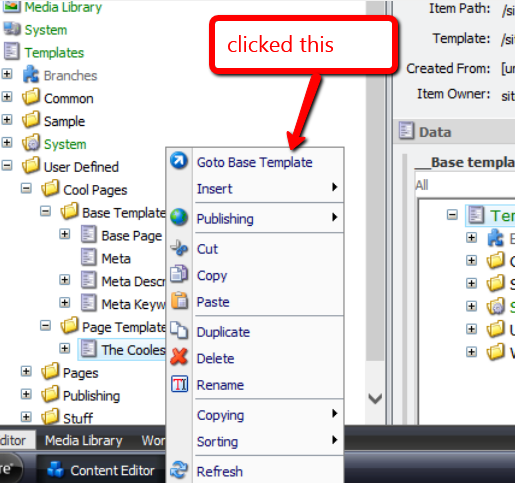
I was then presented with a dialog asking me to select the base template I want to navigate to:

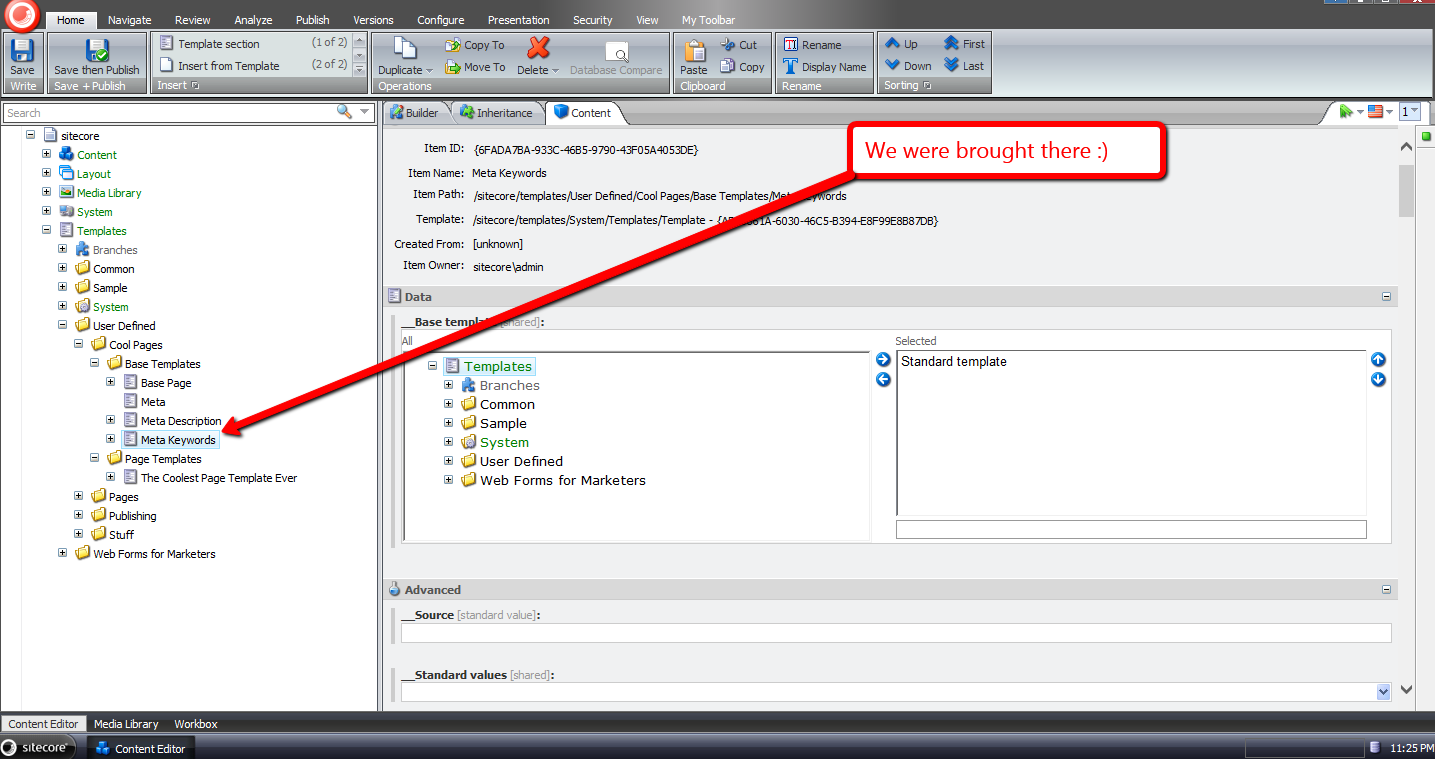
I chose one of the base templates, and clicked ‘OK’:

I was then brought to the base template I had chosen:
If you have any thoughts on this, please leave a comment.
 SitecoreJunkie.com