Home » Sitecore Client (Page 7)
Category Archives: Sitecore Client
You Can’t Move This! Experiments in Disabling Move Related Commands in the getQueryState Sitecore Pipeline
I was scavenging through my local sandbox instance’s Web.config the other day — yes I was looking for things to customize — and noticed the getQueryState pipeline — a pipeline that contains no “out of the box” pipeline processors:
<?xml version="1.0" encoding="utf-8"?>
<configuration>
	<!-- Some stuff here -->
	<sitecore>
		<!-- Some more stuff here -->
		<pipelines>
			<!-- Even more stuff here -->
		<!--  Allows developers to programmatically disable or hide any button or panel in the Content Editor ribbons
            without overriding the individual commands.
            Processors must accept a single argument of type GetQueryStateArgs (namespace: Sitecore.Pipelines.GetQueryState)  -->
			<getQueryState>
			</getQueryState>
			<!-- Yeup, more stuff here -->
		</pipelines>
		<!-- wow, lots of stuff here too -->
	</sitecore>
	<!-- lots of stuff down here -->
</configuration>
The above abridged version of my Web.config contains an XML comment underscoring what this pipeline should be used for: disabling and/or hiding buttons in the Sitecore client.
Although I am still unclear around the practicality of using this pipeline overall — if you have an idea, please leave a comment — I thought it would be fun building one regardless, just to see how it works. Besides, I like to tinker with things — many of my previous posts corroborate this sentiment.
What I came up with is a getQueryState pipeline processor that disables buttons containing move related commands on a selected item in the content tree with a particular template. Sorting commands also fall under the umbrella of move related commands, so these are included in our set of commands to disable.
Here’s the pipeline processor I built:
using System;
using System.Collections.Generic;
using System.Linq;
using System.Text;

using Sitecore.Configuration;
using Sitecore.Data;
using Sitecore.Data.Items;
using Sitecore.Diagnostics;
using Sitecore.Pipelines.GetQueryState;
using Sitecore.Shell.Framework.Commands;

namespace Sitecore.Sandbox.Pipelines.GetQueryState
{
    public class DisableMoveCommands
    {
        private static readonly IEnumerable<string> Commands = GetCommands();
        private static readonly IEnumerable<string> UnmovableTemplateIDs = GetUnmovableTemplateIDs();

        public void Process(GetQueryStateArgs args)
        {
            if (!CanProcessGetQueryStateArgs(args))
            {
                return;
            }

            bool shouldDisableCommand = IsUnmovableItem(GetCommandContextItem(args)) && IsMovableCommand(args.CommandName);
            if (shouldDisableCommand)
            {
                args.CommandState = CommandState.Disabled;
            }
        }

        private static bool CanProcessGetQueryStateArgs(GetQueryStateArgs args)
        {
            return args != null
                    && !string.IsNullOrEmpty(args.CommandName)
                    && args.CommandContext != null
                    && args.CommandContext.Items.Any();
        }

        private static Item GetCommandContextItem(GetQueryStateArgs args)
        {
            Assert.ArgumentNotNull(args, "args");
            Assert.ArgumentNotNull(args.CommandContext, "args.CommandContext");
            Assert.ArgumentNotNull(args.CommandContext.Items, "args.CommandContext.Items");
            return args.CommandContext.Items.FirstOrDefault();
        }

        private static bool IsUnmovableItem(Item item)
        {
            Assert.ArgumentNotNull(item, "item");
            return IsUnmovableTemplateID(item.TemplateID);
        }

        private static bool IsUnmovableTemplateID(ID templateID)
        {
            Assert.ArgumentCondition(!ID.IsNullOrEmpty(templateID), "templateID", "templateID must be set!");
            return UnmovableTemplateIDs.Contains(templateID.ToString());
        }

        private static bool IsMovableCommand(string command)
        {
            Assert.ArgumentNotNullOrEmpty(command, "command");
            return Commands.Contains(command);
        }

        private static IEnumerable<string> GetCommands()
        {
            return GetStringCollection("moveCommandsToPrevent/command");
        }

        private static IEnumerable<string> GetUnmovableTemplateIDs()
        {
            return GetStringCollection("unmovableTemplates/id");
        }

        private static IEnumerable<string> GetStringCollection(string path)
        {
            Assert.ArgumentNotNullOrEmpty(path, "path");
            return Factory.GetStringSet(path);
        }
    }
}
The above pipeline processor checks to see if the selected item in the content tree has the unmovable template I defined, coupled with whether the current command is within the set of commands we are to disable. If both are cases are met, the pipeline processor will disable the context command.
I defined my unmovable template and commands to disable in a patch include config file, along with the getQueryState pipeline processor:
<?xml version="1.0" encoding="utf-8" ?>
<configuration xmlns:patch="http://www.sitecore.net/xmlconfig/">
  <sitecore>
    <pipelines>
      <getQueryState>
        <processor type="Sitecore.Sandbox.Pipelines.GetQueryState.DisableMoveCommands, Sitecore.Sandbox" />
      </getQueryState>
    </pipelines>
    <unmovableTemplates>
      <id>{8ADD3F45-027C-49C5-A8FB-0406B8C8728D}</id>
    </unmovableTemplates>
    <moveCommandsToPrevent>
      <command>item:moveto</command>
      <command>item:cuttoclipboard</command>
      <command>item:moveup</command>
      <command>item:movedown</command>
      <command>item:movefirst</command>
      <command>item:movelast</command>
      <command>item:moveto</command>
    </moveCommandsToPrevent>
  </sitecore>
</configuration>
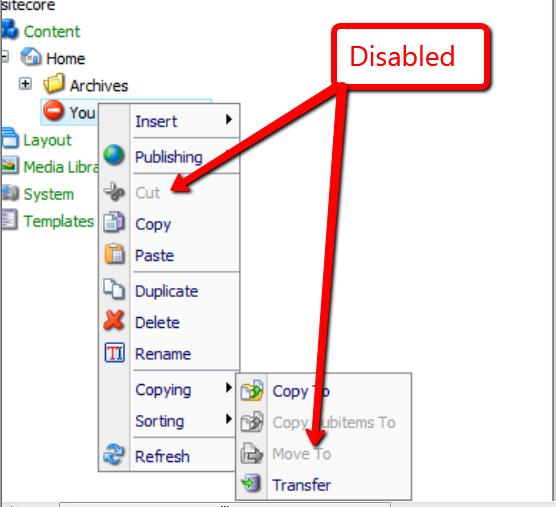
Looking at the context menu on my unmovable item — appropriately named “You Cant Move This” — you can see the move related buttons are disabled:
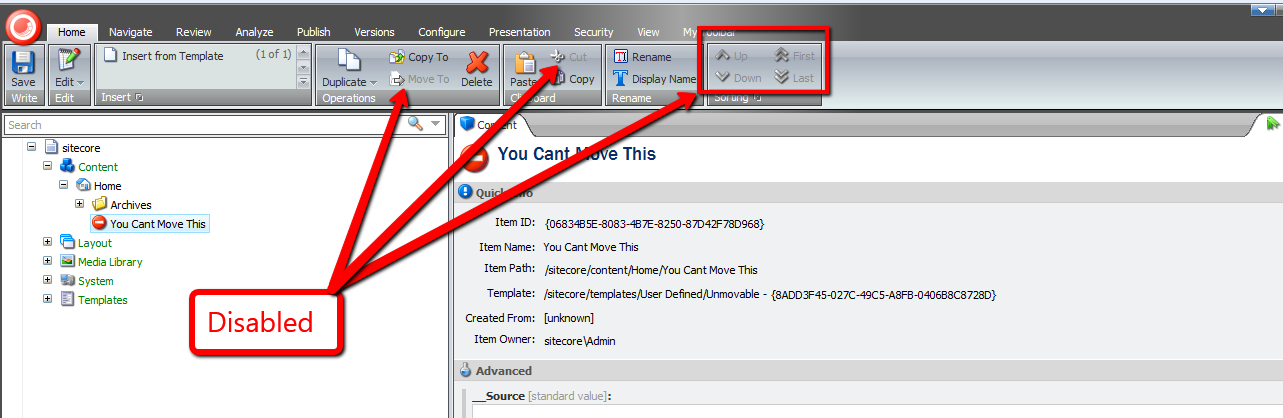
Plus, item level sorting commands are also disabled:

Move related buttons in the ribbon are also disabled:
There really wasn’t much to building this pipeline processor, and this pipeline is at your disposal if you ever find yourself in a situation where you might have to disable buttons in the Sitecore client for whatever reason.
However, as I mentioned above, I still don’t understand why one would want to use this pipeline. If you have an idea why, please let me know.
Empower Your Content Authors to Expand Standard Values Tokens in the Sitecore Client
Have you ever seen a Standard Values token — $name is an example of a Standard Values token — in an item’s field, and ask yourself “how the world did that get there”, or alternatively, “what can be done to replace it with what should be there?”
This can occur when tokens are added to an item’s template’s Standard Values node after the item was created — tokens are expanded once an item is created, not after the fact.
John West wrote a blog article highlighting one solution for eradicating this issue by using the Sitecore Rules Engine.
In this post, I am proposing a completely different solution — one that empowers content authors to expand unexpanded tokens by clicking a link in a custom content editor warning box.
First, I created a series of utility objects that ascertain whether “Source” objects contain substrings that we are interested in. All implement the following interface:
using System;
using System.Collections.Generic;
using System.Linq;
using System.Text;

namespace Sitecore.Sandbox.Utilities.StringUtilities.Base
{
    public interface ISubstringsChecker<T>
    {
        T Source { get; set; }

        IEnumerable<string> Substrings { get; set; }

        bool ContainsSubstrings();
    }
}
All of our “checkers” will have a “Source” object, a collection of substrings to look for, and a method to convey to calling code whether a substring in the collection of substrings had been found in the “Source” object.
I decided to create a base abstract class with some abstract methods along with one method to serve as a hook for asserting the Source object — albeit I did not use this method anywhere in my solution (come on Mike, you’re forgetting YAGNI — let’s get with the program).
Utimately, I am employing the template method pattern — all subclasses of this abstract base class will just fill in the defined abstract stubs, and the parent class will take care of the rest:
using System;
using System.Collections.Generic;
using System.Linq;
using System.Text;

namespace Sitecore.Sandbox.Utilities.StringUtilities.Base
{
    public abstract class SubstringsChecker<T> : ISubstringsChecker<T>
    {
        public T Source { get; set; }

        public virtual IEnumerable<string> Substrings { get; set; }

        protected SubstringsChecker(T source)
        {
            SetSource(source);
        }

        private void SetSource(T source)
        {
            AssertSource(source);
            Source = source;
        }

        protected virtual void AssertSource(T source)
        {
            // a hook for subclasses to assert Source objects
        }

        public bool ContainsSubstrings()
        {
            if (CanDoCheck())
            {
                return DoCheck();
            }

            return false;
        }

        protected abstract bool CanDoCheck();
        protected abstract bool DoCheck();
    }
}
The first “checker” I created will find substrings in a string. It made sense for me to start here, especially when we are ultimately checking strings at the most atomic level in our series of “checker” utility objects.
using System;
using System.Collections.Generic;
using System.Linq;
using System.Text;

using Sitecore.Diagnostics;

using Sitecore.Sandbox.Utilities.StringUtilities.Base;
using Sitecore.Sandbox.Utilities.StringUtilities.DTO;

namespace Sitecore.Sandbox.Utilities.StringUtilities
{
    public class StringSubstringsChecker : SubstringsChecker<string>
    {
        private StringSubstringsChecker(IEnumerable<string> substrings)
            : this(null, substrings)
        {
        }

        private StringSubstringsChecker(string source, IEnumerable<string> substrings)
            : base(source)
        {
            SetSubstrings(substrings);
        }

        private void SetSubstrings(IEnumerable<string> substrings)
        {
            AssertSubstrings(substrings);
            Substrings = substrings;
        }

        private static void AssertSubstrings(IEnumerable<string> substrings)
        {
            Assert.ArgumentNotNull(substrings, "substrings");
            Assert.ArgumentCondition(substrings.Any(), "substrings", "substrings must contain as at least one string!");
        }

        protected override bool CanDoCheck()
        {
            return !string.IsNullOrEmpty(Source);
        }

        protected override bool DoCheck()
        {
            Assert.ArgumentNotNullOrEmpty(Source, "Source");

            foreach (string substring in Substrings)
            {
                if (Source.Contains(substring))
                {
                    return true;
                }
            }

            return false;
        }

        public static ISubstringsChecker<string> CreateNewStringSubstringsContainer(IEnumerable<string> substrings)
        {
            return new StringSubstringsChecker(substrings);
        }

        public static ISubstringsChecker<string> CreateNewStringSubstringsContainer(string source, IEnumerable<string> substrings)
        {
            return new StringSubstringsChecker(substrings);
        }
    }
}
The next level up from strings would naturally be Fields. I designed this “checker” to consume an instance of the string “checker” defined above — all for the purposes of reuse. The field “checker” delegates calls to its string “checker” instance.
using System;
using System.Collections.Generic;
using System.Linq;
using System.Text;

using Sitecore.Data.Fields;
using Sitecore.Diagnostics;

using Sitecore.Sandbox.Utilities.StringUtilities.Base;

namespace Sitecore.Sandbox.Utilities.StringUtilities
{
    public class FieldSubstringsChecker : SubstringsChecker<Field>
    {
        private ISubstringsChecker<string> StringSubstringsChecker { get; set; }

        public override IEnumerable<string> Substrings
        {
            get
            {
                return StringSubstringsChecker.Substrings;
            }
            set
            {
                StringSubstringsChecker.Substrings = value;
            }
        }

        private FieldSubstringsChecker(ISubstringsChecker<string> stringSubstringsChecker)
            : this(null, stringSubstringsChecker)
        {
        }

        private FieldSubstringsChecker(Field source, ISubstringsChecker<string> stringSubstringsChecker)
            : base(source)
        {
            SetStringSubstringsChecker(stringSubstringsChecker);
        }

        private void SetStringSubstringsChecker(ISubstringsChecker<string> stringSubstringsChecker)
        {
            Assert.ArgumentNotNull(stringSubstringsChecker, "stringSubstringsChecker");
            StringSubstringsChecker = stringSubstringsChecker;
        }

        protected override bool CanDoCheck()
        {
            return Source != null;
        }

        protected override bool DoCheck()
        {
            Assert.ArgumentNotNull(Source, "Source");
            StringSubstringsChecker.Source = Source.Value;
            return StringSubstringsChecker.ContainsSubstrings();
        }

        public static ISubstringsChecker<Field> CreateNewFieldSubstringsChecker(ISubstringsChecker<string> stringSubstringsChecker)
        {
            return new FieldSubstringsChecker(stringSubstringsChecker);
        }

        public static ISubstringsChecker<Field> CreateNewFieldSubstringsChecker(Field source, ISubstringsChecker<string> stringSubstringsChecker)
        {
            return new FieldSubstringsChecker(source, stringSubstringsChecker);
        }
    }
}
If I were to ask you what the next level up in our series of “checkers” would be, I hope your answer would be Items. Below is a “checker” that uses an Item as its “Source” object, and delegates calls to an instance of a field “checker”.
using System;
using System.Collections.Generic;
using System.Linq;
using System.Text;

using Sitecore.Data.Fields;
using Sitecore.Data.Items;
using Sitecore.Diagnostics;

using Sitecore.Sandbox.Utilities.StringUtilities.Base;

namespace Sitecore.Sandbox.Utilities.StringUtilities
{
    public class ItemSubstringsChecker : SubstringsChecker<Item>
    {
        private ISubstringsChecker<Field> FieldSubstringsChecker { get; set; }

        public override IEnumerable<string> Substrings
        {
            get
            {
                return FieldSubstringsChecker.Substrings;
            }
            set
            {
                FieldSubstringsChecker.Substrings = value;
            }
        }

        private ItemSubstringsChecker(ISubstringsChecker<Field> fieldSubstringsChecker)
            : this(null, fieldSubstringsChecker)
        {
        }

        private ItemSubstringsChecker(Item source, ISubstringsChecker<Field> fieldSubstringsChecker)
            : base(source)
        {
            SetFieldSubstringsChecker(fieldSubstringsChecker);
        }

        private void SetFieldSubstringsChecker(ISubstringsChecker<Field> fieldSubstringsChecker)
        {
            Assert.ArgumentNotNull(fieldSubstringsChecker, "fieldSubstringsChecker");
            FieldSubstringsChecker = fieldSubstringsChecker;
        }

        protected override bool CanDoCheck()
        {
            return Source != null && Source.Fields != null && Source.Fields.Any();
        }

        protected override bool DoCheck()
        {
            Assert.ArgumentNotNull(Source, "Source");
            bool containsSubstrings = false;

            for (int i = 0; !containsSubstrings && i < Source.Fields.Count; i++)
            {
                containsSubstrings = containsSubstrings || DoesFieldContainSubstrings(Source.Fields[i]);
            }

            return containsSubstrings;
        }

        private bool DoesFieldContainSubstrings(Field field)
        {
            FieldSubstringsChecker.Source = field;
            return FieldSubstringsChecker.ContainsSubstrings();
        }

        public static ISubstringsChecker<Item> CreateNewItemSubstringsChecker(ISubstringsChecker<Field> fieldSubstringsChecker)
        {
            return new ItemSubstringsChecker(fieldSubstringsChecker);
        }

        public static ISubstringsChecker<Item> CreateNewItemSubstringsChecker(Item source, ISubstringsChecker<Field> fieldSubstringsChecker)
        {
            return new ItemSubstringsChecker(source, fieldSubstringsChecker);
        }
    }
}
Next, I wrote code for a content editor warning box. I’m am completely indebted to .NET Reflector in helping out on this front — I looked at other content editor warning pipelines in Sitecore.Pipelines.GetContentEditorWarnings within Sitecore.Kernel to see how this is done:
using System;
using System.Collections.Generic;
using System.Linq;
using System.Text;

using Sitecore.Configuration;
using Sitecore.Data.Fields;
using Sitecore.Data.Items;
using Sitecore.Diagnostics;
using Sitecore.Globalization;
using Sitecore.Pipelines.GetContentEditorWarnings;

using Sitecore.Sandbox.Utilities.StringUtilities.Base;
using Sitecore.Sandbox.Utilities.StringUtilities;

namespace Sitecore.Sandbox.Pipelines.GetContentEditorWarnings
{
    public class HasUnexpandedTokens
    {
        private static readonly ISubstringsChecker<Item> SubstringsChecker = CreateNewItemSubstringsChecker();

        public void Process(GetContentEditorWarningsArgs args)
        {
            Assert.ArgumentNotNull(args, "args");
            if (CanExpandTokens(args.Item))
            {
                AddHasUnexpandedTokensWarning(args);
            }
        }

        private static bool CanExpandTokens(Item item)
        {
            Assert.ArgumentNotNull(item, "item");
            return !IsStandardValues(item) && DoesItemContainUnexpandedTokens(item);
        }

        private static bool DoesItemContainUnexpandedTokens(Item item)
        {
            Assert.ArgumentNotNull(item, "item");
            SubstringsChecker.Source = item;
            return SubstringsChecker.ContainsSubstrings();
        }

        private static bool IsStandardValues(Item item)
        {
            return item.Template.StandardValues.ID == item.ID;
        }

        private static void AddHasUnexpandedTokensWarning(GetContentEditorWarningsArgs args)
        {
            GetContentEditorWarningsArgs.ContentEditorWarning warning = args.Add();
            warning.Title = Translate.Text("Some fields contain unexpanded tokens.");
            warning.Text = Translate.Text("To expand tokens, click Expand Tokens.");
            warning.AddOption(Translate.Text("Expand Tokens"), "item:expandtokens");
        }

        private static ISubstringsChecker<Item> CreateNewItemSubstringsChecker()
        {
            return ItemSubstringsChecker.CreateNewItemSubstringsChecker(CreateNewFieldSubstringsChecker());
        }

        private static ISubstringsChecker<Field> CreateNewFieldSubstringsChecker()
        {
            return FieldSubstringsChecker.CreateNewFieldSubstringsChecker(CreateNewStringSubstringsChecker());
        }

        private static ISubstringsChecker<string> CreateNewStringSubstringsChecker()
        {
            return StringSubstringsChecker.CreateNewStringSubstringsContainer(GetTokens());
        }

        private static IEnumerable<string> GetTokens()
        {
            return Factory.GetStringSet("tokens/token");
        }
    }
}
In my pipeline above, I am pulling a collection of token names from Sitecore configuration — these are going to be defined in a patch include file below. I had to go down this road since these tokens are not publically exposed in the Sitecore API.
Plus, we should only allow for the expansion of tokens when not on the Standard values item — it wouldn’t make much sense to expand these tokens here.
Since I’m referencing a new command in the above pipeline — a command that I’ve named “item:expandtokens” — it’s now time to create that new command:
using System;
using System.Collections.Generic;
using System.Linq;
using System.Text;

using Sitecore.Configuration;
using Sitecore.Data;
using Sitecore.Data.Fields;
using Sitecore.Data.Items;
using Sitecore.Diagnostics;
using Sitecore.Shell.Framework.Commands;

using Sitecore.Sandbox.Utilities.StringUtilities;
using Sitecore.Sandbox.Utilities.StringUtilities.Base;
using Sitecore.Sandbox.Utilities.StringUtilities.DTO;

namespace Sitecore.Sandbox.Commands
{
    public class ExpandTokens : Command
    {
        public override void Execute(CommandContext commandContext)
        {
            if (!DoesCommandContextContainOneItem(commandContext))
            {
                return;
            }

            ExpandTokensInItem(GetCommandContextItem(commandContext));
        }

        private static void ExpandTokensInItem(Item item)
        {
            Assert.ArgumentNotNull(item, "item");
            item.Fields.ReadAll();
            item.Editing.BeginEdit();
            ExpandTokensViaMasterVariablesReplacer(item);
            item.Editing.EndEdit();
        }

        private static void ExpandTokensViaMasterVariablesReplacer(Item item)
        {
            MasterVariablesReplacer masterVariablesReplacer = Factory.GetMasterVariablesReplacer();
            masterVariablesReplacer.ReplaceItem(item);
        }

        public override CommandState QueryState(CommandContext commandContext)
        {
            if (ShouldHideCommand(commandContext))
            {
                return CommandState.Hidden;
            }

            if (ShouldDisableCommand(commandContext))
            {
                return CommandState.Disabled;
            }

            return base.QueryState(commandContext);
        }

        private bool ShouldHideCommand(CommandContext commandContext)
        {
            Assert.ArgumentNotNull(commandContext, "commandContext");
            return !DoesCommandContextContainOneItem(commandContext)
                    || !HasField(GetCommandContextItem(commandContext), FieldIDs.ReadOnly);
        }

        private static bool ShouldDisableCommand(CommandContext commandContext)
        {
            AssertCommandContextItems(commandContext);
            Item item = GetCommandContextItem(commandContext);

            return !item.Access.CanWrite()
                    || Command.IsLockedByOther(item)
                    || !Command.CanWriteField(item, FieldIDs.ReadOnly);
        }

        private static Item GetCommandContextItem(CommandContext commandContext)
        {
            Assert.ArgumentNotNull(commandContext, "commandContext");
            Assert.ArgumentNotNull(commandContext.Items, "commandContext.Items");
            return commandContext.Items.FirstOrDefault();
        }

        private static bool DoesCommandContextContainOneItem(CommandContext commandContext)
        {
            AssertCommandContextItems(commandContext);
            return commandContext.Items.Length == 1;
        }

        private static void AssertCommandContextItems(CommandContext commandContext)
        {
            Assert.ArgumentNotNull(commandContext, "commandContext");
            Assert.ArgumentNotNull(commandContext.Items, "commandContext.Items");
        }
    }
}
This new command just uses an instance of Sitecore.Data.MasterVariablesReplacer to expand Standard Values tokens on our item.
I had to register this command in the /App_Config/Commands.config file:
<?xml version="1.0" encoding="utf-8" ?>
<configuration>
	<! -- A bunch of commands defined here -->

	<command name="item:expandtokens" type="Sitecore.Sandbox.Commands.ExpandTokens,Sitecore.Sandbox" />

	<! -- A bunch more defined here too -->
</configuration>
I then put all the pieces together using a patch include config file:
<?xml version="1.0" encoding="utf-8"?>
<configuration xmlns:patch="http://www.sitecore.net/xmlconfig/">
  <sitecore>
    <pipelines>
      <getContentEditorWarnings>
        <processor type="Sitecore.Sandbox.Pipelines.GetContentEditorWarnings.HasUnexpandedTokens, Sitecore.Sandbox"/>
      </getContentEditorWarnings>
    </pipelines>
    <tokens>
      <token>$name</token>
      <token>$id</token>
      <token>$parentid</token>
      <token>$parentname</token>
      <token>$date</token>
      <token>$time</token>
      <token>$now</token>
    </tokens>
  </sitecore>
</configuration>
Let’s create an item for testing:

As you can see, the item’s Title field was populated automatically during item creation — the $name token lives on this item’s template’s Standard Values item in Sitecore and was expanded when we created our test item.
Let’s create the problem we are trying to solve by adding new tokens to our test item’s template’s Standard Values node:

As you can see, these new tokens appear in fields in our test item. However, don’t fret — we now have a way to fix this issue. 🙂

I clicked on the ‘Expand Tokens’ link, and saw the following:

Hopefully, this post has given you another weapon to add to your arsenal for solving the unexpanded tokens issue on existing items in Sitecore.
If you find another solution, please drop me a line — I would love to hear about it.
Dude, Where’s My Processor? Filling the Void in the SaveRichTextContent and LoadRichTextContent Sitecore Pipelines
Some of you might be aware that I frequently go through the Web.config of my local instance of Sitecore looking for opportunities to extend or customize class files referenced within it — I may have mentioned this in a previous post, and no doubt have told some Sitecore developers/enthusiasts in person I do this at least once per day. I must confess: I usually do this multiple times a day.
Last night, I was driven to explore something I have noticed in the Web.config of my v6.5 instance — my attention has been usurped many times by the saveRichTextContent and loadRichTextContent pipeline nodes being empty.
These two pipelines allow you to make changes to content within Rich Text fields before any save actions on your item in the Sitecore client.
I remembered that one of them did have a pipeline processor defined within it at one point. It was time to do some research.
After conducting some research — truth be told, I only googled a couple of times — I stumbled upon some release notes on SDN discussing the saveRichTextContent Web.config pipeline, and that this pipeline did contain a processor in it at one point — the Sitecore.Shell.Controls.RichTextEditor.Pipelines.SaveRichTextContent.EmbedInParagraph processor — although I don’t remember what this processor did, and don’t have an older version of Sitecore.Client.dll to investigate. I could download an older version of Sitecore from SDN, but decided to leave that exercise for another snowy weekend.
I decided to explore whether the option to add custom processors to these pipelines still existed. I came up with an idea straight out of the 1990’s — having marquee tags animate content across my pages.
As an aside, back in the 1990’s, almost every webpage — all webpages were called homepages then — had at least one marquee. Most had multiple — it was the cool thing to do back then, asymptotic only to having an ‘Under Construction’ image on your homepage. Employing this practice today would be considered anathema.
I decided to reuse my concept of manipulator from my Manipulate Field Values in a Custom Sitecore Web Forms for Marketers DataProvider article, and created a new manipulator to wrap specified tags in marquee tags:
using System;
using System.Collections.Generic;
using System.Linq;
using System.Text;

namespace Sitecore.Sandbox.Utilities.Manipulators.Base
{
    public interface IWrapHtmlTagsInTagManipulator : IManipulator<string>
    {
    }
}
I thought it would be a good idea to define a DTO for my manipulator to pass objects to it in a clean manner:
using System;
using System.Collections.Generic;
using System.Linq;
using System.Text;

namespace Sitecore.Sandbox.Utilities.Manipulators.DTO
{
    public class WrapHtmlTagsInTagManipulatorSettings
    {
        public string WrapperTag { get; set; }
        public IEnumerable<string> TagsToWrap { get; set; }
    }
}
Next, I built my manipulator:
using System;
using System.Collections.Generic;
using System.Linq;
using System.Text;

using Sitecore.Diagnostics;

using Sitecore.Sandbox.Utilities.Manipulators.Base;
using Sitecore.Sandbox.Utilities.Manipulators.DTO;

using HtmlAgilityPack;

namespace Sitecore.Sandbox.Utilities.Manipulators
{
    public class WrapHtmlTagsInTagManipulator : IWrapHtmlTagsInTagManipulator
    {
        private WrapHtmlTagsInTagManipulatorSettings Settings { get; set; }

        private WrapHtmlTagsInTagManipulator(WrapHtmlTagsInTagManipulatorSettings settings)
        {
            SetSettings(settings);
        }

        private void SetSettings(WrapHtmlTagsInTagManipulatorSettings settings)
        {
            AssertSettings(settings);
            Settings = settings;
        }

        private static void AssertSettings(WrapHtmlTagsInTagManipulatorSettings settings)
        {
            Assert.ArgumentNotNull(settings, "settings");
            Assert.ArgumentNotNullOrEmpty(settings.WrapperTag, "settings.WrapperTag");
            Assert.ArgumentNotNull(settings.TagsToWrap, "settings.TagsToWrap");
        }

        public string Manipulate(string html)
        {
            Assert.ArgumentNotNullOrEmpty(html, "html");
            HtmlNode documentNode = GetHtmlDocumentNode(html);

            foreach (string tagToWrap in Settings.TagsToWrap)
            {
                WrapTags(documentNode, tagToWrap);
            }

            return documentNode.InnerHtml;
        }

        private void WrapTags(HtmlNode documentNode, string tagToWrap)
        {
            HtmlNodeCollection htmlNodes = documentNode.SelectNodes(CreateNewDescendantsSelector(tagToWrap));

            foreach(HtmlNode htmlNode in htmlNodes)
            {
                WrapHtmlNodeIfApplicable(documentNode, htmlNode);
            }
        }

        private void WrapHtmlNodeIfApplicable(HtmlNode documentNode, HtmlNode htmlNode)
        {
            if (!AreEqualIgnoreCase(htmlNode.ParentNode.Name, Settings.WrapperTag))
            {
                WrapHtmlNode(documentNode, htmlNode, Settings.WrapperTag);
            }
        }

        private static void WrapHtmlNode(HtmlNode documentNode, HtmlNode htmlNode, string wrapperTag)
        {
            HtmlNode wrapperHtmlNode = documentNode.OwnerDocument.CreateElement(wrapperTag);
            AddNewParent(wrapperHtmlNode, htmlNode);
        }

        private static void AddNewParent(HtmlNode newParentHtmlNode, HtmlNode htmlNode)
        {
            Assert.ArgumentNotNull(newParentHtmlNode, "newParentHtmlNode");
            Assert.ArgumentNotNull(htmlNode, "htmlNode");
            htmlNode.ParentNode.ReplaceChild(newParentHtmlNode, htmlNode);
            newParentHtmlNode.AppendChild(htmlNode);
        }

        private static bool AreEqualIgnoreCase(string stringOne, string stringTwo)
        {
            return string.Equals(stringOne, stringTwo, StringComparison.InvariantCultureIgnoreCase);
        }

        private static string CreateNewDescendantsSelector(string tag)
        {
            Assert.ArgumentNotNullOrEmpty(tag, "tag");
            return string.Format("//{0}", tag);
        }

        private HtmlNode GetHtmlDocumentNode(string html)
        {
            HtmlDocument htmlDocument = CreateNewHtmlDocument(html);
            return htmlDocument.DocumentNode;
        }

        private HtmlDocument CreateNewHtmlDocument(string html)
        {
            HtmlDocument htmlDocument = new HtmlDocument();
            htmlDocument.LoadHtml(html);
            return htmlDocument;
        }

        public static IWrapHtmlTagsInTagManipulator CreateNewWrapHtmlTagsInTagManipulator(WrapHtmlTagsInTagManipulatorSettings settings)
        {
            return new WrapHtmlTagsInTagManipulator(settings);
        }
    }
}
My manipulator class above uses Html Agility Pack to find targeted html elements, and wrap them in newly created marquee tags — which are also created via Html Agility Pack.
I decided to create a base class to contain core logic that will be used across both of my pipeline processors:
using System;
using System.Collections.Generic;
using System.Linq;
using System.Text;

using Sitecore.Sandbox.Utilities.Manipulators;
using Sitecore.Sandbox.Utilities.Manipulators.Base;
using Sitecore.Sandbox.Utilities.Manipulators.DTO;

namespace Sitecore.Sandbox.Shell.Controls.RichTextEditor.Pipelines.Base
{
    public abstract class AddSomeMarqueesBase
    {
        private IWrapHtmlTagsInTagManipulator _HtmlManipulator;
        private IWrapHtmlTagsInTagManipulator HtmlManipulator
        {
            get
            {
                if(_HtmlManipulator == null)
                {
                    _HtmlManipulator = CreateNewWrapHtmlTagsInTagManipulator();
                }

                return _HtmlManipulator;
            }
        }

        private IWrapHtmlTagsInTagManipulator CreateNewWrapHtmlTagsInTagManipulator()
        {
            return WrapHtmlTagsInTagManipulator.CreateNewWrapHtmlTagsInTagManipulator(CreateNewWrapHtmlTagsInTagManipulatorSettings());
        }

        protected virtual WrapHtmlTagsInTagManipulatorSettings CreateNewWrapHtmlTagsInTagManipulatorSettings()
        {
            return new WrapHtmlTagsInTagManipulatorSettings
            {
                WrapperTag = "marquee",
                TagsToWrap = new string[] { "em", "img" }
            };
        }

        protected virtual string ManipulateHtml(string html)
        {
            if (!string.IsNullOrEmpty(html))
            {
                return HtmlManipulator.Manipulate(html);
            }

            return html;
        }
    }
}
This base class creates an instance of our manipulator class above, passing in the required DTO housing the wrapper tag and tags to wrap settings.
Honestly, while writing this article and looking at this code, I am not completely happy about how I implemented this base class. I should have added a constructor which takes in the manipulator instance — thus allowing subclasses to provide their own manipulators, especially if these subclasses need to use a different manipulator than the one used by default in the base class.
Further, it probably would have been prudent to put the html tags I defined in my DTO instance into a patch config file.
Next, I defined my loadRichTextContent pipeline processor:
using System;
using System.Collections.Generic;
using System.Linq;
using System.Text;

using Sitecore.Shell.Controls.RichTextEditor.Pipelines.LoadRichTextContent;

using Sitecore.Sandbox.Shell.Controls.RichTextEditor.Pipelines.Base;

namespace Sitecore.Sandbox.Shell.Controls.RichTextEditor.Pipelines.LoadRichTextContent
{
    public class AddSomeMarquees : AddSomeMarqueesBase
    {
        public void Process(LoadRichTextContentArgs args)
        {
            args.Content = ManipulateHtml(args.Content);
        }
    }
}
Followed by my saveRichTextContentpipeline processor:
using System;
using System.Collections.Generic;
using System.Linq;
using System.Text;

using Sitecore.Shell.Controls.RichTextEditor.Pipelines.SaveRichTextContent;

using Sitecore.Sandbox.Shell.Controls.RichTextEditor.Pipelines.Base;

namespace Sitecore.Sandbox.Shell.Controls.RichTextEditor.Pipelines.SaveRichTextContent
{
    public class AddSomeMarquees : AddSomeMarqueesBase
    {
        public void Process(SaveRichTextContentArgs args)
        {
            args.Content = ManipulateHtml(args.Content);
        }
    }
}
Thereafter, I glued everything together via a patch config file:
<?xml version="1.0" encoding="utf-8" ?>
<configuration xmlns:patch="http://www.sitecore.net/xmlconfig/">
  <sitecore>
    <pipelines>
      <loadRichTextContent>
        <processor type="Sitecore.Sandbox.Shell.Controls.RichTextEditor.Pipelines.LoadRichTextContent.AddSomeMarquees, Sitecore.Sandbox"/>
      </loadRichTextContent>
      <saveRichTextContent>
        <processor type="Sitecore.Sandbox.Shell.Controls.RichTextEditor.Pipelines.SaveRichTextContent.AddSomeMarquees, Sitecore.Sandbox"/>
      </saveRichTextContent>
    </pipelines>
  </sitecore>
</configuration>
Time to see the fruits of my labor above.
I’ve added some content in a Rich Text field:
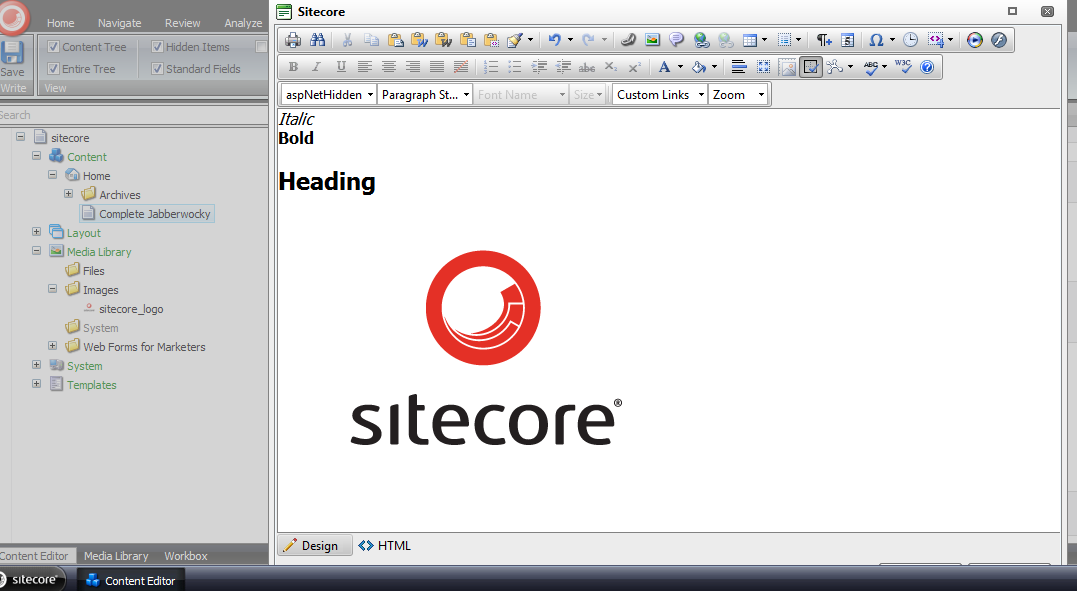
Here’s the html in the Rich Text field:

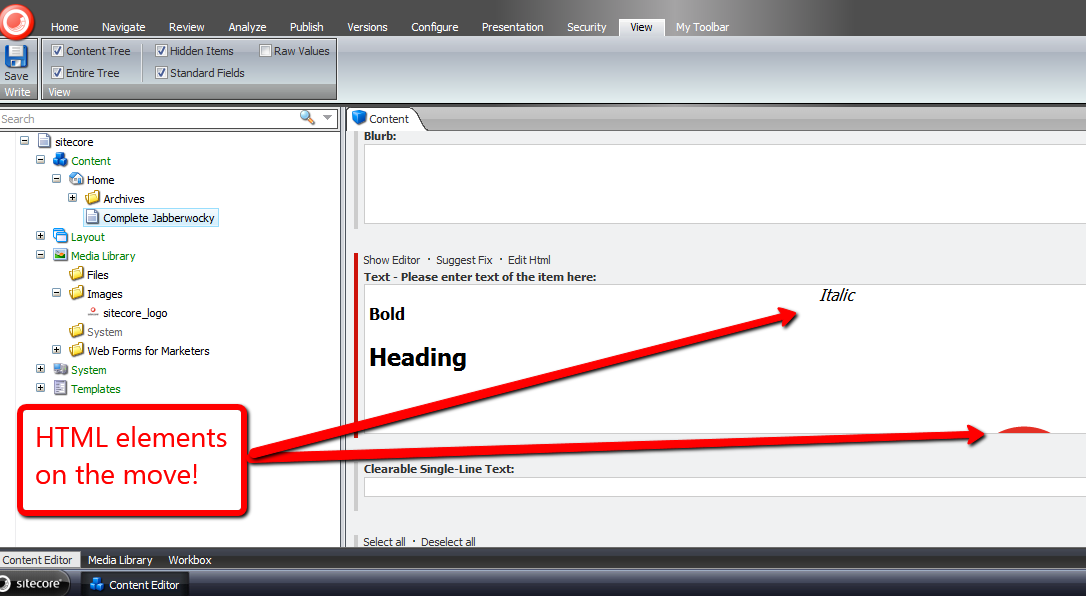
I clicked the ‘Accept’ button in the Rich Text dialog window, and then saw the targeted content come to life:
I launched the dialog window again to investigate what the html now looks like:
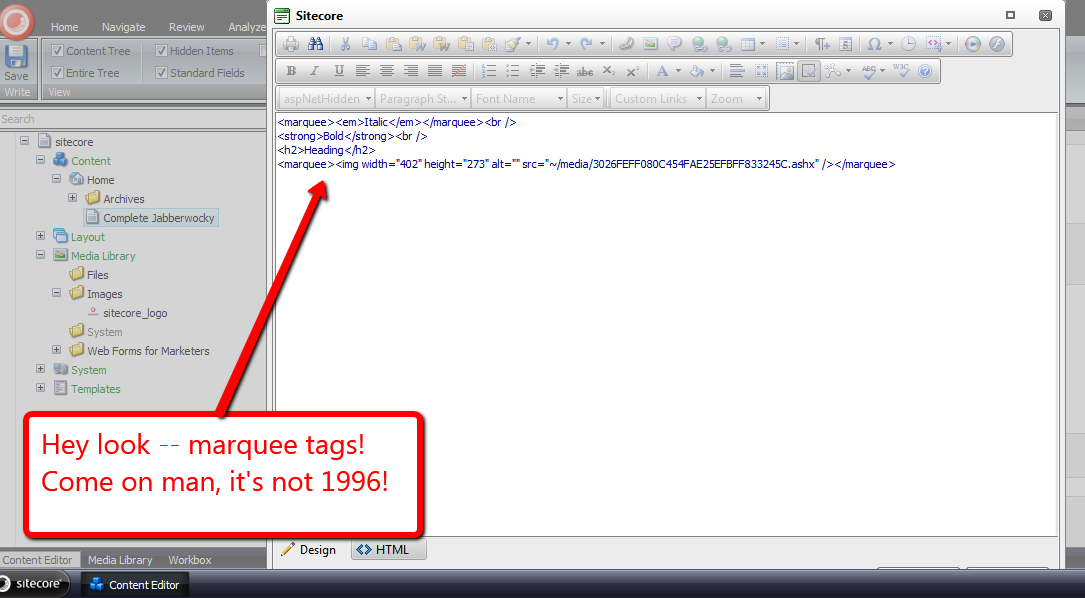
Mission accomplished — we now have marquees! 🙂
I do want to point out I could not get my loadRichTextContent pipeline processor to run. I thought it would run when opening the Rich Text dialog, although I was wrong — it did not. I also tried to get it to run via the ‘Edit Html’ button, but to no avail.
If I am looking in the wrong place, or this is a known issue in Sitecore, please drop a comment and let me know.
Content Manage Custom Standard Values Tokens in the Sitecore Client
A few days back, John West — Chief Technology Officer at Sitecore USA — blogged about adding custom tokens in a subclass of Sitecore.Data.MasterVariablesReplacer.
One thing that surprised me was how his solution did not use NVelocity, albeit I discovered why: the class Sitecore.Data.MasterVariablesReplacer does not use it, and as John states in this tweet, using NVelocity in his solution would have been overkill — only a finite number of tokens are defined, so why do this?
This kindled an idea — what if we could define such tokens in the Sitecore Client? How would one go about doing that?
This post shows how I did just that, and used NVelocity via a utility class I had built for my article discussing NVelocity
I first created two templates: one that defines the Standard Values variable token — I named this Variable — and the template for a parent Master Variables folder item — this has no fields on it, so I’ve omitted its screenshot:

I then defined some Glass.Sitecore.Mapper Models for my Variable and Master Variables templates — if you’re not familiar with Glass, or are but aren’t using it, I strongly recommend you go to http://www.glass.lu/ and check it out!
using System;
using System.Collections.Generic;
using System.Linq;
using System.Reflection;
using System.Text;

using Sitecore.Diagnostics;
using Sitecore.Reflection;

using Glass.Sitecore.Mapper.Configuration.Attributes;

namespace Sitecore.Sandbox.Model
{
    [SitecoreClass(TemplateId="{E14F91E4-7AF6-42EC-A9A8-E71E47598BA1}")]
    public class Variable
    {
        [SitecoreField(FieldId="{34DCAC45-E5B2-436A-8A09-89F1FB785F60}")]
        public virtual string Token { get; set; }

        [SitecoreField(FieldId = "{CD749583-B111-4E69-90F2-1772B5C96146}")]
        public virtual string Type { get; set; }

        [SitecoreField(FieldId = "{E3AB8CED-1602-4A7F-AC9B-B9031FCA2290}")]
        public virtual string PropertyName { get; set; }

        public object _TypeInstance;
        public object TypeInstance
        {
            get
            {
                bool shouldCreateNewInstance = !string.IsNullOrEmpty(Type)
                                                && !string.IsNullOrEmpty(PropertyName)
                                                && _TypeInstance == null;

                if (shouldCreateNewInstance)
                {
                    _TypeInstance = CreateObject(Type, PropertyName);
                }

                return _TypeInstance;
            }
        }

        private object CreateObject(string type, string propertyName)
        {
            try
            {
                return GetStaticPropertyValue(type, propertyName);
            }
            catch (Exception ex)
            {
                Log.Error(this.ToString(), ex, this);
            }

            return null;
        }

        private object GetStaticPropertyValue(string type, string propertyName)
        {
            PropertyInfo propertyInfo = GetPropertyInfo(type, propertyName);
            return GetStaticPropertyValue(propertyInfo);
        }

        private PropertyInfo GetPropertyInfo(string type, string propertyName)
        {
            return GetType(type).GetProperty(propertyName);
        }

        private object GetStaticPropertyValue(PropertyInfo propertyInfo)
        {
            Assert.ArgumentNotNull(propertyInfo, "propertyInfo");
            return propertyInfo.GetValue(null, null);
        }

        private Type GetType(string type)
        {
            return ReflectionUtil.GetTypeInfo(type);
        }
    }
}
In my Variable model class, I added some logic that employs reflection to convert the defined type into an object we can use. This logic at the moment will only work with static properties, although could be extended for instance properties, and even methods on classes.
Here is the model for the Master Variables folder:
using System;
using System.Collections.Generic;
using System.Linq;
using System.Text;

using Glass.Sitecore.Mapper.Configuration.Attributes;

namespace Sitecore.Sandbox.Model
{
    [SitecoreClass(TemplateId = "{855A1D19-5475-43CB-B3E8-A4960A81FEFF}")]
    public class MasterVariables
    {
        [SitecoreChildren(IsLazy=true)]
        public virtual IEnumerable<Variable> Variables { get; set; }
    }
}
I then hooked up my Glass models in my Global.asax:
<%@Application Language='C#' Inherits="Sitecore.Web.Application" %>
<%@ Import Namespace="Glass.Sitecore.Mapper.Configuration.Attributes" %>
<script runat="server">
    protected void Application_Start(object sender, EventArgs e)
    {
        AttributeConfigurationLoader loader = new AttributeConfigurationLoader
        (
            new string[] { "Sitecore.Sandbox.Model, Sitecore.Sandbox" }
        );

        Glass.Sitecore.Mapper.Context context = new Glass.Sitecore.Mapper.Context(loader);
    }

    public void Application_End()
    {
    }

    public void Application_Error(object sender, EventArgs args)
    {
    }
</script>
Since my solution only works with static properties, I defined a wrapper class that accesses properties from Sitecore.Context for illustration:
using System;
using System.Collections.Generic;
using System.Linq;
using System.Text;

namespace Sitecore.Sandbox.Data
{
    public class SitecoreContextProperties
    {
        public static string DomainName
        {
            get
            {
                return Sitecore.Context.Domain.Name;
            }
        }

        public static string Username
        {
            get
            {
                return Sitecore.Context.User.Name;
            }
        }

        public static string DatabaseName
        {
            get
            {
                return Sitecore.Context.Database.Name;
            }
        }

        public static string CultureName
        {
            get
            {
                return Sitecore.Context.Culture.Name;
            }
        }

        public static string LanguageName
        {
            get
            {
                return Sitecore.Context.Language.Name;
            }
        }
    }
}
I then defined my subclass of Sitecore.Data.MasterVariablesReplacer. I let the “out of the box” tokens be expanded by the Sitecore.Data.MasterVariablesReplacer base class, and expand those defined in the Sitecore Client by using my token replacement utility class and content acquired from the master database via my Glass models:
using System;
using System.Collections.Generic;
using System.Linq;
using System.Text;

using Sitecore.Collections;
using Sitecore.Data;
using Sitecore.Diagnostics;
using Sitecore.Data.Fields;
using Sitecore.Data.Items;
using Sitecore.Text;

using Glass.Sitecore.Mapper;

using Sitecore.Sandbox.Model;
using Sitecore.Sandbox.Utilities.StringUtilities.Base;
using Sitecore.Sandbox.Utilities.StringUtilities;
using Sitecore.Sandbox.Utilities.StringUtilities.DTO;

namespace Sitecore.Sandbox.Data
{
    public class ContentManagedMasterVariablesReplacer : MasterVariablesReplacer
    {
        private const string MasterVariablesDatabase = "master";

        public override string Replace(string text, Item targetItem)
        {
            return CreateNewTokenator().ReplaceTokens(base.Replace(text, targetItem));
        }

        public override void ReplaceField(Item item, Field field)
        {
            base.ReplaceField(item, field);
            field.Value = CreateNewTokenator().ReplaceTokens(field.Value);
        }

        private static ITokenator CreateNewTokenator()
        {
            return Utilities.StringUtilities.Tokenator.CreateNewTokenator(CreateTokenKeyValues());
        }

        private static IEnumerable<TokenKeyValue> CreateTokenKeyValues()
        {
            IEnumerable<Variable> variables = GetVariables();
            IList<TokenKeyValue> tokenKeyValues = new List<TokenKeyValue>();

            foreach (Variable variable in variables)
            {
                AddVariable(tokenKeyValues, variable);
            }

            return tokenKeyValues;
        }

        private static void AddVariable(IList<TokenKeyValue> tokenKeyValues, Variable variable)
        {
            Assert.ArgumentNotNull(variable, "variable");
            bool canAddVariable = !string.IsNullOrEmpty(variable.Token) && variable.TypeInstance != null;

            if (canAddVariable)
            {
                tokenKeyValues.Add(new TokenKeyValue(variable.Token, variable.TypeInstance));
            }
        }

        private static IEnumerable<Variable> GetVariables()
        {
            MasterVariables masterVariables = GetMasterVariables();

            if (masterVariables != null)
            {
                return masterVariables.Variables;
            }

            return new List<Variable>();
        }

        private static MasterVariables GetMasterVariables()
        {
            const string masterVariablesPath = "/sitecore/content/Settings/Master Variables"; // hardcoded here for illustration -- please don't hardcode paths!
            ISitecoreService sitecoreService = GetSitecoreService();
            return sitecoreService.GetItem<MasterVariables>(masterVariablesPath);
        }

        private static ISitecoreService GetSitecoreService()
        {
            return new SitecoreService(MasterVariablesDatabase);
        }
    }
}
At first, I tried to lazy instantiate my Tokenator instance in a property, but discovered that this class is only instantiated once — that would prevent newly added tokens from ever making their way into the ContentManagedMasterVariablesReplacer instance. This is why I call CreateNewTokenator() in each place where a Tokenator instance is needed.
I then wedged in my ContentManagedMasterVariablesReplacer class using a patch config file:
<?xml version="1.0" encoding="utf-8" ?>
<configuration xmlns:patch="http://www.sitecore.net/xmlconfig/">
  <sitecore>
    <settings>
      <setting name="MasterVariablesReplacer">
        <patch:attribute name="value">Sitecore.Sandbox.Data.ContentManagedMasterVariablesReplacer,Sitecore.Sandbox</patch:attribute>
      </setting>
    </settings>
  </sitecore>
</configuration>
Now, let’s see if this works.
We first need some variables:


Next, we’ll need an item for testing. Let’s create a template with fields that will be populated using my Sitecore.Sandbox.Data.ContentManagedMasterVariablesReplacer class:

Under /sitecore/content/Home, I created a new item based on this test template.
We can see that hardcoded tokens were populated from the base Sitecore.Data.MasterVariablesReplacer class:

The content managed tokens were populated from the Sitecore.Sandbox.Data.ContentManagedMasterVariablesReplacer class:
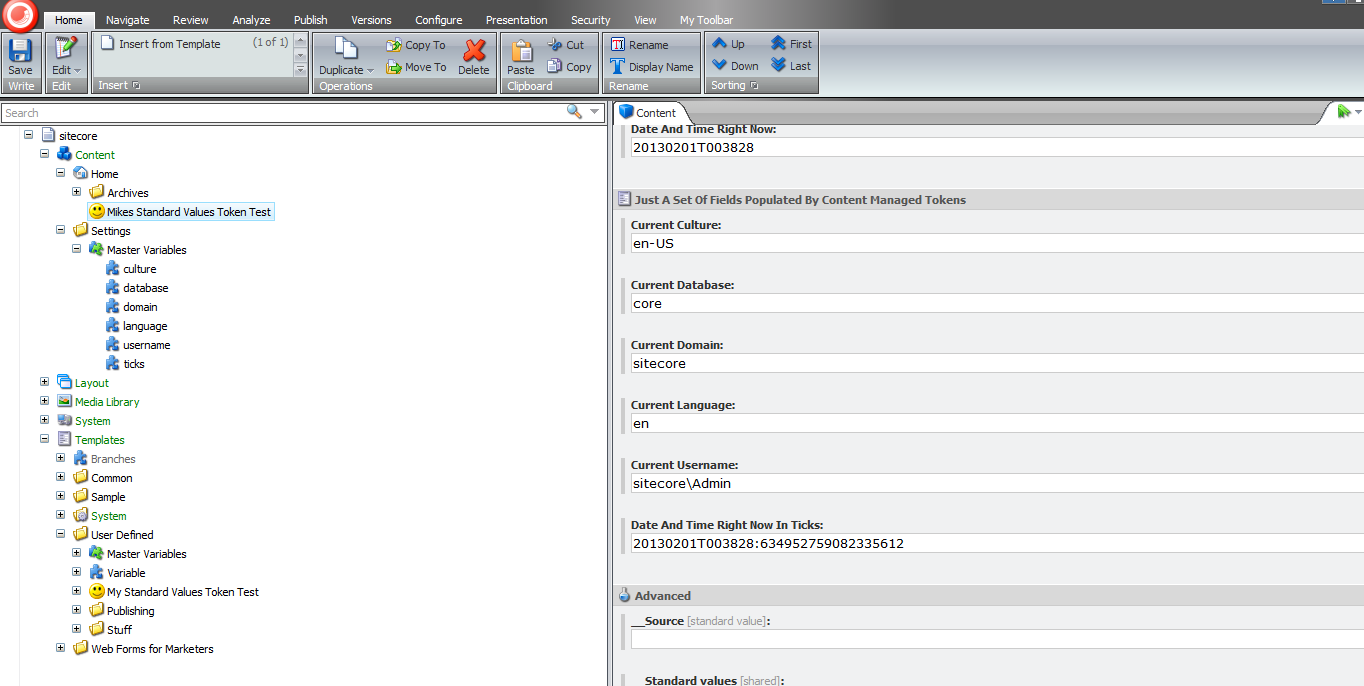
That’s all there is to it.
Please keep in mind there could be potential performance issues with the above, especially when there are lots of Variable items — the code always creates an instance of the Tokenator in the ContentManagedMasterVariablesReplacer instance, which is pulling content from Sitecore each time, and we’re using reflection for each Variable. It would probably be best to enhance the above by leveraging Lucene in some way to increase its performance.
Further, these items should only be created/edited by advanced users or developers familiar with ASP.NET code — how else would one be able to populate the Type and Property Name fields in a Variable item?
Despite these, just imagine the big smiley your boss will send your way when you say new Standard Values variables no longer require any code changes coupled with a deployment. I hope that smiley puts a big smile on your face! 🙂
Put Sitecore to Work for You: Build Custom Task Agents
How many times have you seen some manual process and thought to yourself how much easier your life would be easier if that process were automated?
Custom Sitecore task agents could be of assistance on achieving some automation in Sitecore.
Last night, I built a custom task agent that deletes “expired” items from the recycle bin in all three Sitecore databases — items that have been sitting in the recycle bin after a specified number of days.
I came up with this idea after remembering an instance I had seen in the past where there were so many items in the recycle bin, finding an item to restore would be more difficult than finding a needle in a haystack.
Using .NET reflector, I looked at how Sitecore.Tasks.UrlAgent in Sitecore.Kernel.dll was coded to see if I had to do anything special when building my agent — an example would be ascertaining whether I needed to inherit from a custom base class — and also looked at code in Sitecore.Shell.Applications.Archives.RecycleBin.RecycleBinPage in Sitecore.Client.dll coupled with Sitecore.Shell.Framework.Commands.Archives.Delete in Sitecore.Kernel.dll to figure out how to permanently delete items in the recycle bin.
After doing my research in those two assemblies, I came up with this custom task agent:
using System;
using System.Collections.Generic;
using System.Linq;

using Sitecore.Configuration;
using Sitecore.Data;
using Sitecore.Data.Archiving;
using Sitecore.Diagnostics;

namespace Sitecore.Sandbox.Tasks
{
    public class RecycleBinCleanupAgent
    {
        private const string ArchiveName = "recyclebin";
        private static readonly char[] Delimiters = new char[] { ',', '|' };

        public IEnumerable<string> DatabaseNames { get; set; }

        private IEnumerable<Database> _Databases;
        private IEnumerable<Database> Databases
        {
            get
            {
                if (_Databases == null)
                {
                    _Databases = GetDatabases();
                }

                return _Databases;
            }
        }

        public int NumberOfDaysUntilExpiration { get; set; }

        public bool Enabled { get; set; }

        public bool LogActivity { get; set; }

        public RecycleBinCleanupAgent(string databases)
        {
            SetDatabases(databases);
        }

        private void SetDatabases(string databases)
        {
            Assert.ArgumentNotNullOrEmpty(databases, "databases");
            DatabaseNames = databases.Split(Delimiters, StringSplitOptions.RemoveEmptyEntries).Select(database => database.Trim()).ToList();
        }

        public void Run()
        {
            if (Enabled)
            {
                RemoveEntriesInAllDatabases();
            }
        }

        private void RemoveEntriesInAllDatabases()
        {
            DateTime expired = GetExpiredDateTime();

            if (expired == DateTime.MinValue)
            {
                return;
            }

            foreach (Database database in Databases)
            {
                RemoveEntries(database, expired);
            }
        }

        private DateTime GetExpiredDateTime()
        {
            if (NumberOfDaysUntilExpiration > 0)
            {
                return DateTime.Now.AddDays(-1 * NumberOfDaysUntilExpiration).ToUniversalTime();
            }

            return DateTime.MinValue;
        }

        private void RemoveEntries(Database database, DateTime expired)
        {
            int deletedEntriesCount = RemoveEntries(GetArchive(database), expired);
            LogInfo(deletedEntriesCount, database.Name);
        }

        private static int RemoveEntries(Archive archive, DateTime expired)
        {
            IEnumerable<ArchiveEntry> archiveEntries = GetAllEntries(archive);
            int deletedEntriesCount = 0;

            foreach (ArchiveEntry archiveEntry in archiveEntries)
            {
                if (ShouldDeleteEntry(archiveEntry, expired))
                {
                    archive.RemoveEntries(CreateNewArchiveQuery(archiveEntry));
                    deletedEntriesCount++;
                }
            }

            return deletedEntriesCount;
        }

        private static IEnumerable<ArchiveEntry> GetAllEntries(Archive archive)
        {
            Assert.ArgumentNotNull(archive, "archive");
            return archive.GetEntries(0, archive.GetEntryCount()); ;
        }

        private static bool ShouldDeleteEntry(ArchiveEntry archiveEntry, DateTime expired)
        {
            Assert.ArgumentNotNull(archiveEntry, "archiveEntry");
            Assert.ArgumentCondition(expired > DateTime.MinValue, "expired", "expired must be set!");
            return archiveEntry.ArchiveDate <= expired;
        }

        private static ArchiveQuery CreateNewArchiveQuery(ArchiveEntry archiveEntry)
        {
            Assert.ArgumentNotNull(archiveEntry, "archiveEntry");
            return CreateNewArchiveQuery(archiveEntry.ArchivalId);
        }

        private static ArchiveQuery CreateNewArchiveQuery(Guid archivalId)
        {
            Assert.ArgumentCondition(archivalId != Guid.Empty, "archivalId", "archivalId must be set!");
            return new ArchiveQuery { ArchivalId = archivalId };
        }

        private void LogInfo(int deletedEntriesCount, string databaseName)
        {
            bool canLogInfo = LogActivity
                              && deletedEntriesCount > 0
                              && !string.IsNullOrEmpty(databaseName);

            if (canLogInfo)
            {
                Log.Info(CreateNewLogEntry(deletedEntriesCount, databaseName, ArchiveName), this);
            }
        }

        private static string CreateNewLogEntry(int expiredEntryCount, string databaseName, string archiveName)
        {
            return string.Format("{0} expired archive entries permanently deleted (database: {1}, archive: {2})", expiredEntryCount, databaseName, archiveName);
        }

        private IEnumerable<Database> GetDatabases()
        {
            if (DatabaseNames != null)
            {
                return DatabaseNames.Select(database => Factory.GetDatabase(database)).ToList();
            }

            return new List<Database>();
        }

        private static Archive GetArchive(Database database)
        {
            Assert.ArgumentNotNull(database, "database");
            return ArchiveManager.GetArchive(ArchiveName, database);
        }
    }
}
Basically, it loops over all recycle bin archived entries in all specified databases after an allotted time interval — the time interval and target databases are set in a patch config file you will see below — and removes an entry when its archival date is older than the minimum expiration date — a date I derive from the NumberOfDaysUntilExpiration setting:
<?xml version="1.0" encoding="utf-8" ?>
<configuration xmlns:patch="http://www.sitecore.net/xmlconfig/">
  <sitecore>
    <scheduling>
      <agent type="Sitecore.Sandbox.Tasks.RecycleBinCleanupAgent, Sitecore.Sandbox" method="Run" interval="01:00:00">
        <param desc="databases">core, master, web</param>
        <NumberOfDaysUntilExpiration>30</NumberOfDaysUntilExpiration>
        <LogActivity>true</LogActivity>
        <Enabled>true</Enabled>
      </agent>
    </scheduling>
  </sitecore>
</configuration>
I had 89 items in my master database’s recycle bin before my task agent ran:

I walked away for a bit to watch some television, eat dinner, and surf Twitter for a bit, and phone my brother. I then returned to see the following in my Sitecore log:

I went into the recycle bin in my master database, and saw there were 5 items left after my task agent executed:
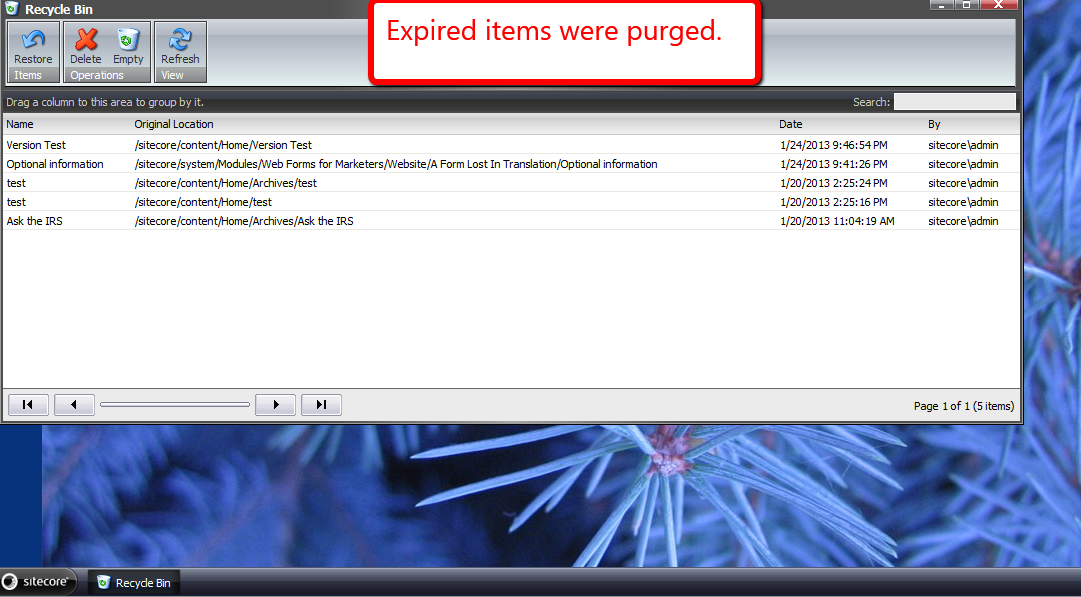
As you can see, my custom task agent deleted expired recycle bin items as designed. 🙂
Who Just Published That? Log Publishing Statistics in the Sitecore Client
Time and time again, I keep hearing about content in Sitecore being published prematurely, and this usually occurs by accident — perhaps a cat walks across the malefactor’s keyboard — although I have a feeling something else might driving these erroneous publishes.
However, in some instances, the malefactor will not fess up to invoking said publish.
Seeking out who had published a Sitecore item is beyond the know how of most end users, and usually requires an advanced user or developer to fish around in the Sitecore log to ascertain who published what and when.
Here’s an example of publishing information in my local sandbox’s instance of a publish I had done earlier this evening:

Given that I keep hearing about this happening, I decided it would be a great exercise to develop a feature to bring publishing information into the Sitecore client. We can accomplish this by building a custom PublishItemProcessor pipeline to log statistics into publishing fields.
First, I created a template containing fields to hold publishing information.

These fields will only keep track of who published an item last, similar to how the fields in the Statistics section in the Standard Template.
Next, I set the title of my fields to not show underscores:
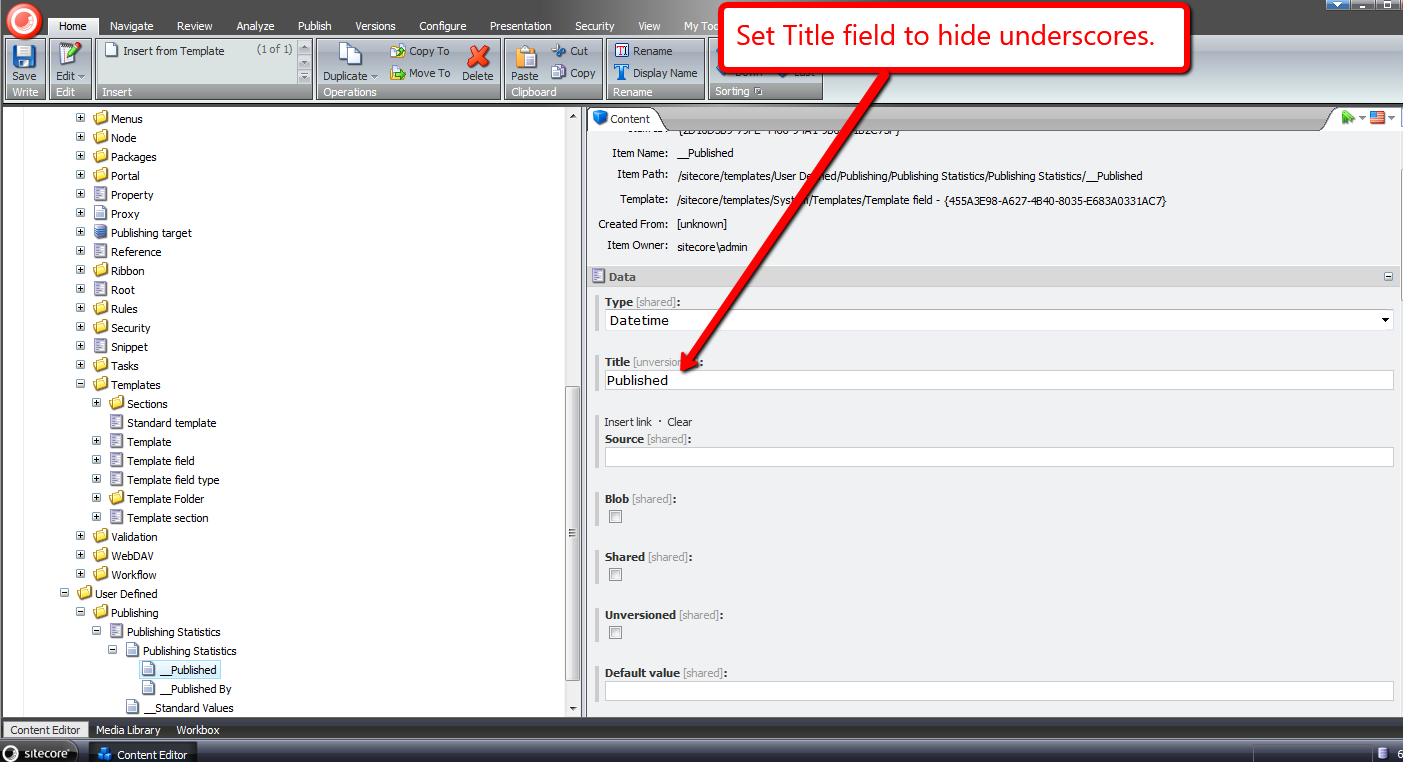
I then added my template to the Standard Template:

Now that my publishing fields are in Sitecore, It’s time to build a custom PublishItemProcessor (Sitecore.Publishing.Pipelines.PublishItem.PublishItemProcessor):
using System;
using System.Collections.Generic;
using System.Linq;
using System.Text;

using Sitecore.Data;
using Sitecore.Data.Items;
using Sitecore.Data.Fields;
using Sitecore.Diagnostics;
using Sitecore.Publishing.Pipelines.PublishItem;
using Sitecore.SecurityModel;

namespace Sitecore.Sandbox.Pipelines.Publishing
{
    public class UpdatePublishingStatistics : PublishItemProcessor
    {
        private const string PublishedFieldName = "__Published";
        private const string PublishedByFieldName = "__Published By";

        public override void Process(PublishItemContext context)
        {
            SetPublishingStatisticsFields(context);
        }

        private void SetPublishingStatisticsFields(PublishItemContext context)
        {
            Assert.ArgumentNotNull(context, "context");
            Assert.ArgumentNotNull(context.PublishOptions, "context.PublishOptions");
            Assert.ArgumentNotNull(context.PublishOptions.SourceDatabase, "context.PublishOptions.SourceDatabase");
            Assert.ArgumentNotNull(context.PublishOptions.TargetDatabase, "context.PublishOptions.TargetDatabase");
            Assert.ArgumentCondition(!ID.IsNullOrEmpty(context.ItemId), "context.ItemId", "context.ItemId must be set!");
            Assert.ArgumentNotNull(context.User, "context.User");

            SetPublishingStatisticsFields(context.PublishOptions.SourceDatabase, context.ItemId, context.User.Name);
            SetPublishingStatisticsFields(context.PublishOptions.TargetDatabase, context.ItemId, context.User.Name);
        }

        private void SetPublishingStatisticsFields(Database database, ID itemId, string userName)
        {
            Assert.ArgumentNotNull(database, "database");
            Item item = TryGetItem(database, itemId);

            if (HasPublishingStatisticsFields(item))
            {
                SetPublishingStatisticsFields(item, DateUtil.IsoNow, userName);
            }
        }

        private void SetPublishingStatisticsFields(Item item, string isoDateTime, string userName)
        {
            Assert.ArgumentNotNull(item, "item");
            Assert.ArgumentNotNullOrEmpty(isoDateTime, "isoDateTime");
            Assert.ArgumentNotNullOrEmpty(userName, "userName");

            using (new SecurityDisabler())
            {
                item.Editing.BeginEdit();
                item.Fields[PublishedFieldName].Value = DateUtil.IsoNow;
                item.Fields[PublishedByFieldName].Value = userName;
                item.Editing.EndEdit();
            }
        }

        private Item TryGetItem(Database database, ID itemId)
        {
            try
            {
                return database.Items[itemId];
            }
            catch (Exception ex)
            {
                Log.Error(this.ToString(), ex, this);
            }

            return null;
        }

        private static bool HasPublishingStatisticsFields(Item item)
        {
            Assert.ArgumentNotNull(item, "item");
            return item.Fields[PublishedFieldName] != null
                    && item.Fields[PublishedByFieldName] != null;
        }
    }
}
My PublishItemProcessor sets the publishing statistics on my newly added fields on the item in both the source and target databases, and only when the publishing fields exist on the published item.
I then added my PublishItemProcessor after the UpdateStatistics PublishItemProcessor in a new patch config file:
<?xml version="1.0" encoding="utf-8"?>
<configuration xmlns:patch="http://www.sitecore.net/xmlconfig/">
  <sitecore>
    <pipelines>
      <publishItem>
        <processor type="Sitecore.Sandbox.Pipelines.Publishing.UpdatePublishingStatistics, Sitecore.Sandbox"
					patch:after="processor[@type='Sitecore.Publishing.Pipelines.PublishItem.UpdateStatistics, Sitecore.Kernel']" />
      </publishItem>
    </pipelines>
  </sitecore>
</configuration>
I created a new page for testing, put some dummy data in some fields and then published:
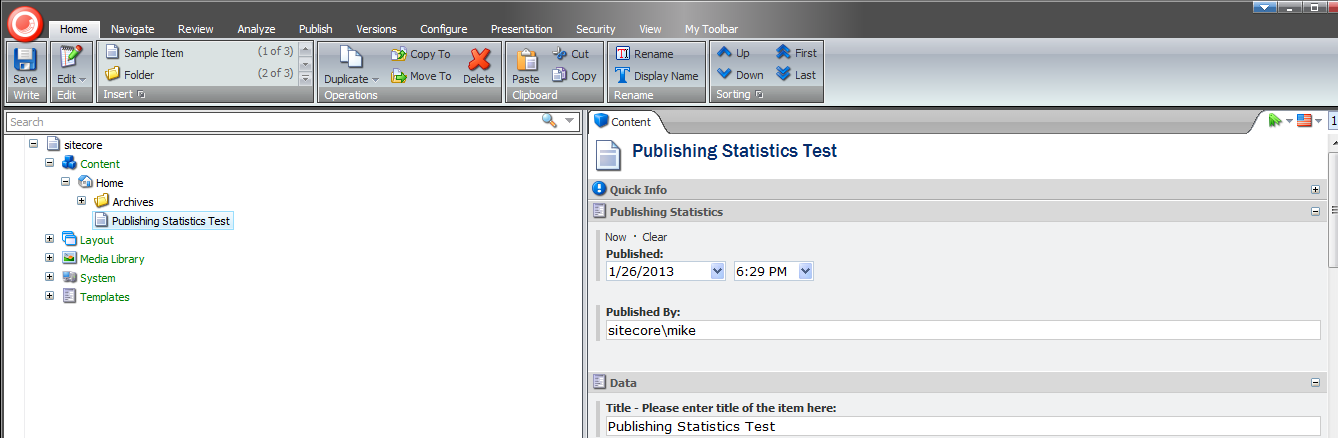
Beware — you can no longer hide after publishing when you shouldn’t! 🙂
Have a Field Day With Custom Sitecore Fields
This week, I’ve been off from work, and have been spending most of my downtime experimenting with Sitecore-ry development things — no, not you Mike — primarily poking around the core database to find things I can override or extend — for a thought provoking article about whether to override or extend things in Sitecore, check out John West’s blog post on this topic — and decided get my hands dirty by creating a custom Sitecore field.
This is something I feel isn’t being done enough by developers out in the wild — myself included — so I decided to take a stab at it, and share how you could go about accomplishing this.
The first field I created was a custom Single-Line Text field with a clear button. Since the jQuery library is available in the Sitecore client, I utilized a jQuery plugin to help me with this. It’s not a very robust plugin — I did have to make a couple of changes due to issues I encountered which I will omit from this article — albeit the purpose of me creating this field was to see how difficult it truly is.
As you can see below, creating a custom Single-Line Text isn’t difficult at all. All one has to do is subclass Sitecore.Shell.Applications.ContentEditor.Text in Sitecore.Kernel.dll, and ultimately override the DoRender() method:
using System;
using System.Collections.Generic;
using System.Linq;
using System.Web.UI;
using System.Web;

namespace Sitecore.Sandbox.Shell.Applications.ContentEditor
{
    public class ClearableSingleLineText : Sitecore.Shell.Applications.ContentEditor.Text
    {
        protected override void DoRender(HtmlTextWriter output)
        {
            SetWidthAndHeightStyle();
            RenderMyHtml(output);
            RenderChildren(output);
            RenderAutoSizeJavascript(output);
        }

        private void RenderMyHtml(HtmlTextWriter output)
        {
            const string htmlFormat = "<input{0}/>";
            output.Write(string.Format(htmlFormat, ControlAttributes));
        }

        private void RenderAutoSizeJavascript(HtmlTextWriter output)
        {
			/* I'm calling the jQuery() function directly since $() is defined for prototype.js in the Sitecore client */
            const string jsFormat = "<script type=\"text/javascript\">jQuery('#{0}').clearable();</script>";
            output.Write(string.Format(jsFormat, ID));
        }
    }
}
I then added a script reference to the jQuery plugin above, and embedded some css in /sitecore/shell/Applications/Content Manager/Default.aspx:
<script type="text/javaScript" language="javascript" src="/sitecore/shell/Controls/Lib/jQuery/jquery.clearable.js"></script>

<style type="text/css">
/* Most of this css was provided by the jquery.clearable plugin author */
a.clearlink
{
	background: url("/img/close-button.png") no-repeat scroll 0 0 transparent;
	background-position: center center;
	cursor: pointer;
	display: -moz-inline-stack;
	display: inline-block;
	zoom:1;
	*display:inline;
	height: 12px;
	width: 12px;
	z-index: 2000;
	border: 0px solid;
	position: relative;
	top: -18px;
	left: -5px;
	float: right;
}

a.clearlink:hover
{
	background: url("/img/close-button.png") no-repeat scroll -12px 0 transparent;
	background-position: center center;
}
</style>
What I did above doesn’t sit well with me. If a future version of Sitecore makes any changes to this .aspx, these changes might be lost (well, hopefully you would keep a copy of this file in a source control system somewhere).
However, I could not think of a better way of adding this javascript and css. If you know of a better way, please leave a comment.
I then defined my library of controls for my custom fields — not much of a library, since I only defined one field so far 🙂 — in a new patch config file /App_Config/Include/CustomFields.config:
<?xml version="1.0" encoding="utf-8"?>
<configuration xmlns:patch="http://www.sitecore.net/xmlconfig/">
	<sitecore>
		<controlSources>
			<source mode="on" namespace="Sitecore.Sandbox.Shell.Applications.ContentEditor" assembly="Sitecore.Sandbox" prefix="contentcustom"/>
		</controlSources>
	  </sitecore>
</configuration>
In the core database, I created a new field type for my custom Single-Line Text:

I then added a new field to my template using this new custom field definition in my master database:

Let’s see this new custom field in action.
I typed in some text on my item, followed by clicking the clear button:
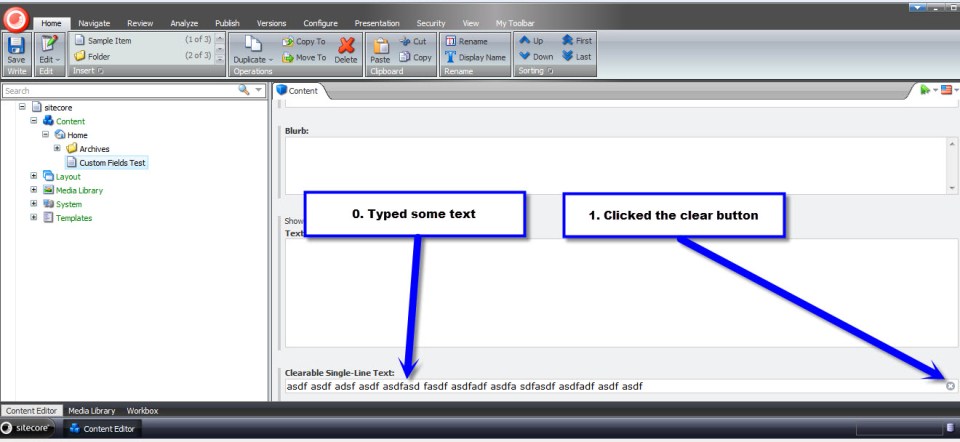
As expected, the text that I had typed was removed from the field:

After having done the above, I wanted to see if I could create a different type of custom field — creating a custom Text field was way too easy, and I wanted something more challenging. I figured creating a custom Multilist field might offer a challenge, so I decided to give it a go.
What I came up with was a custom Multilist field containing Sitecore users, instead of Items as options. I don’t know if there is any practicality in creating such a field, but I decided to go with it just for the purpose of creating a custom Multilist field.
First, I created a class to delegate responsibility for getting selected/unselected users in my field — I creating this class just in case I ever wanted to reuse this in a future custom field that should also contain Sitecore users.
using System;
using System.Collections.Generic;
using System.Linq;
using System.Text;

using Sitecore.Security.Accounts;

namespace Sitecore.Sandbox.Shell.Applications.ContentEditor.Base
{
    public interface IUsersField
    {
        IEnumerable<User> GetSelectedUsers();

        IEnumerable<User> GetUnselectedUsers();

        string GetProviderUserKey(User user);
    }
}
using System;
using System.Collections.Generic;
using System.Linq;
using System.Text;
using System.Web.Security;

using Sitecore.Configuration;
using Sitecore.Diagnostics;
using Sitecore.Security.Accounts;
using Sitecore.Text;

using Sitecore.Sandbox.Shell.Applications.ContentEditor.Base;

namespace Sitecore.Sandbox.Shell.Applications.ContentEditor
{
    public class UsersField : IUsersField
    {
        private static readonly string DomainParameterName = Settings.GetSetting("UsersField.DomainParameterName");

        private ListString _SelectedUsers;
        private ListString SelectedUsers
        {
            get
            {
                if (_SelectedUsers == null)
                {
                    _SelectedUsers = new ListString(Value);
                }

                return _SelectedUsers;
            }
        }

        private IEnumerable<User> _UsersInDomain;
        private IEnumerable<User> UsersInDomain
        {
            get
            {
                if (_UsersInDomain == null)
                {
                    _UsersInDomain = GetUsersInDomain();
                }

                return _UsersInDomain;
            }
        }

        private IEnumerable<User> _Users;
        private IEnumerable<User> Users
        {
            get
            {
                if(_Users == null)
                {
                    _Users = GetUsers();
                }

                return _Users;
            }
        }

        private string _Domain;
        private string Domain
        {
            get
            {
                if (string.IsNullOrEmpty(_Domain))
                {
                    _Domain = FieldSettings[DomainParameterName];
                }

                return _Domain;
            }
        }

        private UrlString _FieldSettings;
        private UrlString FieldSettings
        {
            get
            {
                if (_FieldSettings == null)
                {
                    _FieldSettings = GetFieldSettings();
                }

                return _FieldSettings;
            }
        }

        private string Source { get; set; }
        private string Value { get; set; }

        private UsersField(string source, string value)
        {
            SetSource(source);
            SetValue(value);
        }

        private void SetSource(string source)
        {
            Source = source;
        }

        private void SetValue(string value)
        {
            Value = value;
        }

        private IEnumerable<User> GetUsersInDomain()
        {
            if (!string.IsNullOrEmpty(Domain))
            {
                return Users.Where(user => IsUserInDomain(user, Domain));
            }

            return Users;
        }

        private static IEnumerable<User> GetUsers()
        {
            IEnumerable<User> users = UserManager.GetUsers();

            if (users != null)
            {
                return users;
            }

            return new List<User>();
        }

        private static bool IsUserInDomain(User user, string domain)
        {
            Assert.ArgumentNotNull(user, "user");
            Assert.ArgumentNotNullOrEmpty(domain, "domain");

            string userNameLowerCase = user.Profile.UserName.ToLower();
            string domainLowerCase = domain.ToLower();

            return userNameLowerCase.StartsWith(domainLowerCase);
        }

        private UrlString GetFieldSettings()
        {
            try
            {
                if (!string.IsNullOrEmpty(Source))
                {
                    return new UrlString(Source);
                }
            }
            catch (Exception ex)
            {
                Log.Error(this.ToString(), ex, this);
            }

            return new UrlString();
        }

        public IEnumerable<User> GetSelectedUsers()
        {
            IList<User> selectedUsers = new List<User>();

            foreach (string providerUserKey in SelectedUsers)
            {
                User selectedUser = UsersInDomain.Where(user => GetProviderUserKey(user) == providerUserKey).FirstOrDefault();
                if (selectedUser != null)
                {
                    selectedUsers.Add(selectedUser);
                }
            }

            return selectedUsers;
        }

        public IEnumerable<User> GetUnselectedUsers()
        {
            IList<User> unselectedUsers = new List<User>();

            foreach (User user in UsersInDomain)
            {
                if (!IsUserSelected(user))
                {
                    unselectedUsers.Add(user);
                }
            }

            return unselectedUsers;
        }

        private bool IsUserSelected(User user)
        {
            string providerUserKey = GetProviderUserKey(user);
            return IsUserSelected(providerUserKey);
        }

        private bool IsUserSelected(string providerUserKey)
        {
            return SelectedUsers.IndexOf(providerUserKey) > -1;
        }

        public string GetProviderUserKey(User user)
        {
            Assert.ArgumentNotNull(user, "user");
            MembershipUser membershipUser = Membership.GetUser(user.Profile.UserName);
            return membershipUser.ProviderUserKey.ToString();
        }

        public static IUsersField CreateNewUsersField(string source, string value)
        {
            return new UsersField(source, value);
        }
    }
}
I then modified my patch config file defined above (/App_Config/Include/CustomFields.config) with a new setting — a setting that specifies the parameter name for filtering on users’ Sitecore domain:
<?xml version="1.0" encoding="utf-8"?>
<configuration xmlns:patch="http://www.sitecore.net/xmlconfig/">
	<sitecore>
		<controlSources>
			<source mode="on" namespace="Sitecore.Sandbox.Shell.Applications.ContentEditor" assembly="Sitecore.Sandbox" prefix="contentcustom"/>
		</controlSources>
		<settings>
			<!-- Parameter name for users' Sitecore domain -->
			<setting name="UsersField.DomainParameterName" value="Domain" />
		</settings>
	  </sitecore>
</configuration>
I then created a new subclass of Sitecore.Shell.Applications.ContentEditor.MultilistEx — I ascertained this to be the class used by the Multilist field in Sitecore by looking at /sitecore/system/Field types/List Types/Multilist field type in the core database:
using System;
using System.Collections;
using System.Collections.Generic;
using System.Linq;
using System.Text;
using System.Web.Security;
using System.Web.UI;

using Sitecore.Configuration;
using Sitecore.Diagnostics;
using Sitecore.Globalization;
using Sitecore.Resources;
using Sitecore.Security.Accounts;
using Sitecore.Shell.Applications.ContentEditor;
using Sitecore.Text;

using Sitecore.Sandbox.Shell.Applications.ContentEditor.Base;

namespace Sitecore.Sandbox.Shell.Applications.ContentEditor
{
    public class UsersMultilist : MultilistEx
    {
        private IUsersField _UsersField;
        private IUsersField UsersField
        {
            get
            {
                if (_UsersField == null)
                {
                    _UsersField = CreateNewUsersField();
                }

                return _UsersField;
            }
        }

        public UsersMultilist()
        {
        }

        protected override void DoRender(HtmlTextWriter output)
        {
            Assert.ArgumentNotNull(output, "output");

            SetIDProperty();
            string disabledAttribute = string.Empty;

            if (ReadOnly)
            {
                disabledAttribute = " disabled=\"disabled\"";
            }

            output.Write(string.Format("<input id=\"{0}_Value\" type=\"hidden\" value=\"{1}\" />", ID, StringUtil.EscapeQuote(Value)));
            output.Write(string.Format("<table{0}>", GetControlAttributes()));
            output.Write("<tr>");
            output.Write(string.Format("<td class=\"scContentControlMultilistCaption\" width=\"50%\">{0}</td>", GetAllLabel()));
            output.Write(string.Format("<td width=\"20\">{0}</td>", Images.GetSpacer(20, 1)));
            output.Write(string.Format("<td class=\"scContentControlMultilistCaption\" width=\"50%\">{0}</td>", GetSelectedLabel()));
            output.Write(string.Format("<td width=\"20\">{0}</td>", Images.GetSpacer(20, 1), "</td>"));
            output.Write("</tr>");
            output.Write("<tr>");
            output.Write("<td valign=\"top\" height=\"100%\">");
            output.Write(string.Format("<select id=\"{0}_unselected\" class=\"scContentControlMultilistBox\" multiple=\"multiple\"{1} size=\"10\" ondblclick=\"javascript:scContent.multilistMoveRight('{2}')\" onchange=\"javascript:document.getElementById('{3}_all_help').innerHTML=this.selectedIndex>=0?this.options[this.selectedIndex].innerHTML:''\">", ID, disabledAttribute, ID, ID));

            IEnumerable<User> unselectedUsers = GetUnselectedUsers();
            foreach (User unselectedUser in unselectedUsers)
            {
                output.Write(string.Format("<option value=\"{0}\">{1}</option>", GetProviderUserKey(unselectedUser), unselectedUser.Profile.UserName));
            }

            output.Write("</select>");
            output.Write("</td>");
            output.Write("<td valign=\"top\">");
            RenderButton(output, "Core/16x16/arrow_blue_right.png", string.Format("javascript:scContent.multilistMoveRight('{0}')", ID));
            output.Write("<br />");
            RenderButton(output, "Core/16x16/arrow_blue_left.png", string.Format("javascript:scContent.multilistMoveLeft('{0}')", ID));
            output.Write("</td>");
            output.Write("<td valign=\"top\" height=\"100%\">");
            output.Write(string.Format("<select id=\"{0}_selected\" class=\"scContentControlMultilistBox\" multiple=\"multiple\"{1} size=\"10\" ondblclick=\"javascript:scContent.multilistMoveLeft('{2}')\" onchange=\"javascript:document.getElementById('{3}_selected_help').innerHTML=this.selectedIndex>=0?this.options[this.selectedIndex].innerHTML:''\">", ID, disabledAttribute, ID, ID));

            IEnumerable<User> selectedUsers = GetSelectedUsers();
            foreach (User selectedUser in selectedUsers)
            {
                output.Write(string.Format("<option value=\"{0}\">{1}</option>", GetProviderUserKey(selectedUser), selectedUser.Profile.UserName));
            }

            output.Write("</select>");
            output.Write("</td>");
            output.Write("<td valign=\"top\">");
            RenderButton(output, "Core/16x16/arrow_blue_up.png", string.Format("javascript:scContent.multilistMoveUp('{0}')", ID));
            output.Write("<br />");
            RenderButton(output, "Core/16x16/arrow_blue_down.png", string.Format("javascript:scContent.multilistMoveDown('{0}')", ID));
            output.Write("</td>");
            output.Write("</tr>");
            output.Write("<tr>");
            output.Write("<td valign=\"top\">");
            output.Write(string.Format("<div style=\"border:1px solid #999999;font:8pt tahoma;padding:2px;margin:4px 0px 4px 0px;height:14px\" id=\"{0}_all_help\"></div>", ID));
            output.Write("</td>");
            output.Write("<td></td>");
            output.Write("<td valign=\"top\">");
            output.Write(string.Format("<div style=\"border:1px solid #999999;font:8pt tahoma;padding:2px;margin:4px 0px 4px 0px;height:14px\" id=\"{0}_selected_help\"></div>", ID));
            output.Write("</td>");
            output.Write("<td></td>");
            output.Write("</tr>");
            output.Write("</table>");
        }

        protected void SetIDProperty()
        {
            ServerProperties["ID"] = ID;
        }

        protected static string GetAllLabel()
        {
            return GetLabel("All");
        }

        protected static string GetSelectedLabel()
        {
            return GetLabel("Selected");
        }

        protected static string GetLabel(string key)
        {
            return Translate.Text(key);
        }

        protected IEnumerable<User> GetSelectedUsers()
        {
            return UsersField.GetSelectedUsers();
        }

        protected IEnumerable<User> GetUnselectedUsers()
        {
            return UsersField.GetUnselectedUsers();
        }

        protected string GetProviderUserKey(User user)
        {
            return UsersField.GetProviderUserKey(user);
        }

        // Method "borrowed" from MultilistEx control
        protected void RenderButton(HtmlTextWriter output, string icon, string click)
        {
            Assert.ArgumentNotNull(output, "output");
            Assert.ArgumentNotNull(icon, "icon");
            Assert.ArgumentNotNull(click, "click");
            ImageBuilder builder = new ImageBuilder
            {
                Src = icon,
                Width = 0x10,
                Height = 0x10,
                Margin = "2px"
            };
            if (!ReadOnly)
            {
                builder.OnClick = click;
            }
            output.Write(builder.ToString());
        }

        private IUsersField CreateNewUsersField()
        {
            return ContentEditor.UsersField.CreateNewUsersField(Source, Value);
        }
    }
}
Overriding the DoRender() method paved the way for me to insert my custom Multilist options — options containg Sitecore users. Selected users will be saved as a pipe delimitered list of ASP.NET Membership UserIDs.
As I had done for my custom Single-Line Text above, I defined my custom Multilist field in the core database:

In the master database, I added a new field to my template using this new field type:

Now, let’s take this custom field for a test drive.
I went back to my item and saw that all Sitecore users were available for selection in my new field:

Facetiously imagine that a project manager has just run up to you anxiously lamenting — while breathing rapidly and sweating copiously — we cannot show users in the sitecore domain in our field, only those within the extranet domain — to do so will taint our credibility with our clients as Sitecore experts :). You then put on your superhero cape and proudly proclaim “rest assured, we’ve already baked this domain filtering functionality into our custom Multilist field!”:

I saved my template and navigated back to my item:

I selected a couple of users and saved:

I see their Membership UserIDs are being saved as designed:

My intent on creating the above custom fields was to showcase that the option to create your own fields exists in Sitecore. Why not have yourself a field day by creating your own? 🙂
Get Your House in Order: Create Your Own Subitems Sorting Comparer
This morning, I was fishing around in the core database of my local instance to research my next article — yeah, I know it’s Christmas morning and I should be resting, but unwrapping hidden gems in Sitecore.Kernel beats opening up presents anyday — and discovered that one can easily add his/her own subitems sorting comparer.
After opening up .NET reflector and using Sitecore.Data.Comparers.UpdatedComparer as a model, I created the following Comparer within minutes:
using System;
using System.Collections.Generic;
using System.Linq;
using System.Text;

using Sitecore.Data.Comparers;
using Sitecore.Data.Items;
using Sitecore.Diagnostics;

namespace Sitecore.Sandbox.Data.Comparers
{
    public class ItemNameLengthComparer : ExtractedKeysComparer
    {
        protected override int CompareKeys(IKey keyOne, IKey keyTwo)
        {
            Assert.ArgumentNotNull(keyOne, "keyOne");
            Assert.ArgumentNotNull(keyTwo, "keyTwo");
            return IntegerCompareTo(keyOne.Key, keyTwo.Key);
        }

        protected override int DoCompare(Item itemOne, Item itemTwo)
        {
            return IntegerCompareTo(itemOne.Name.Length, itemTwo.Name.Length);
        }

        private static int IntegerCompareTo(object itemOneNameLength, object itemTwoNameLength)
        {
            return IntegerCompareTo((int)itemOneNameLength, (int)itemTwoNameLength);
        }

        private static int IntegerCompareTo(int itemOneNameLength, int itemTwoNameLength)
        {
            return itemOneNameLength.CompareTo(itemTwoNameLength);
        }

        public override IKey ExtractKey(Item item)
        {
            Assert.ArgumentNotNull(item, "item");
            return new KeyObj
            {
                Item = item,
                Key = item.Name.Length,
                Sortorder = item.Appearance.Sortorder
            };
        }
    }
}
All we have to do is override and add our own custom logic to the DoCompare(), CompareKeys() and ExtractKey() methods defined in the ExtractedKeysComparer base class.
The above Comparer will sort items based on the length of their names — items with shorter names will appear before their siblings with longer names.
Next, I created a new Child Sorting item in my master database — yes, I did say the master database since I learned the hard way (my sorting option wasn’t appearing) that these sorting comparers are to be defined in each database where they are used — for my Comparer:

Let’s see how this Comparer fares in the wild.
I first created a handful of test items with different item name lengths in a new parent folder under my Home node:
I then opened up the Subitems Sorting dialog and saw my new subitems sorting option in the ‘Sorting’ dropdown:

Nervously, I selected my new subitems sorting option and clicked ‘OK’:

I then wiped my brow and exhaled with relief after seeing that it had worked as I intended:

The above is further evidence of how customizable the Sitecore client truly is. Remember, the Sitecore client was built using the same API/technologies we use each and everyday to build websites within it — thus empowering us to extend the client where we see fit.
Happy Holidays! 🙂
 SitecoreJunkie.com