Home » Pipeline (Page 2)
Category Archives: Pipeline
Add a Custom Attribute to the General Link Field in Sitecore
In my current project, I needed to find a way to give content authors the ability to add a custom attribute — let’s call this custom attribute Tag for simplicity– to the “Insert Link” and “Insert External Link” dialogs of the General Link field (NOTE: the following solution does not use the “out of the box” SPEAK dialogs that ship with Sitecore 7.2 and up. This solution uses the older Sheer UI dialogs. Perhaps I will share a solution in the future on how to do the following using the newer SPEAK dialogs).
You might be asking why? Well, let’s imagine that there is some magical JavaScript code that puts a click event on links, and grabs the value of the tag attribute for reporting purposes — perhaps the JavaScript calls a service that captures this information.
In this post, I am going to share how I went about doing this minus the code I needed to add to get this to work in the Glass.Mapper ORM (I’m going to show you this code in my next blog post).
I first built the following custom LinkField class (this class is not used in this solution but will be used in my next blog post where I should how to integrate the functionality below in Glass.Mapper. I’m just setting the stage 😉 ):
using Sitecore.Data.Fields;

namespace Sitecore.Sandbox.Data.Fields
{
    public class TagLinkField : LinkField
    {
        public TagLinkField(Field innerField)
            : base(innerField)
        {
        }

        public TagLinkField(Field innerField, string runtimeValue)
            : base(innerField, runtimeValue)
        {
        }

        public string Tag
        {
            get
            {
                return GetAttribute("tag");
            }
            set
            {
                this.SetAttribute("tag", value);
            }
        }
    }
}
The class above subclasses Sitecore.Data.Fields.Link (this lives in Sitecore.Kernel.dll) — this class represents a link in Sitecore — and added a new Tag property (this class will magically parse or save this value into the field’s underlying XML).
Next, I created the following Sheer UI form for a custom “Insert Link” dialog:
using System;
using System.Xml;
using System.Collections.Specialized;

using Sitecore;
using Sitecore.Data;
using Sitecore.Data.Items;
using Sitecore.Diagnostics;
using Sitecore.Shell.Applications.Dialogs;
using Sitecore.Shell.Applications.Dialogs.InternalLink;
using Sitecore.Web.UI.HtmlControls;
using Sitecore.Web.UI.Sheer;
using Sitecore.Xml;

namespace Sitecore.Sandbox.Shell.Applications.Dialogs.InternalLink
{
    public class TagInternalLinkForm : InternalLinkForm
    {
        private const string TagAttributeName = "tag";

        protected Edit Tag;

        private NameValueCollection customLinkAttributes;
        protected NameValueCollection CustomLinkAttributes
        {
            get
            {
                if(customLinkAttributes == null)
                {
                    customLinkAttributes = new NameValueCollection();
                    ParseLinkAttributes(GetLink());
                }

                return customLinkAttributes;
            }
        }

        protected override void OnLoad(EventArgs e)
        {
            Assert.ArgumentNotNull(e, "e");
            base.OnLoad(e);
            if (Context.ClientPage.IsEvent)
            {
                return;
            }

            LoadControls();
        }

        protected override void ParseLink(string link)
        {
            base.ParseLink(link);
            ParseLinkAttributes(link);
        }

        protected virtual void ParseLinkAttributes(string link)
        {
            Assert.ArgumentNotNull(link, "link");
            XmlDocument xmlDocument = XmlUtil.LoadXml(link);
            if (xmlDocument == null)
            {
                return;
            }

            XmlNode node = xmlDocument.SelectSingleNode("/link");
            if (node == null)
            {
                return;
            }

            CustomLinkAttributes[TagAttributeName] = XmlUtil.GetAttribute(TagAttributeName, node);
        }

        protected virtual void LoadControls()
        {
            string tagValue = CustomLinkAttributes[TagAttributeName];
            if (!string.IsNullOrWhiteSpace(tagValue))
            {
                Tag.Value = tagValue;
            }
        }

        protected override void OnOK(object sender, EventArgs args)
        {
            Assert.ArgumentNotNull(sender, "sender");
            Assert.ArgumentNotNull(args, "args");
            Item selectionItem = Treeview.GetSelectionItem();
            if (selectionItem == null)
            {
                Context.ClientPage.ClientResponse.Alert("Select an item.");
            }
            else
            {
                string attributeFromValue = LinkForm.GetLinkTargetAttributeFromValue(this.Target.Value, this.CustomTarget.Value);
                string queryString = this.Querystring.Value;
                if (queryString.StartsWith("?", StringComparison.InvariantCulture))
                    queryString = queryString.Substring(1);

                Packet packet = new Packet("link", new string[0]);
                LinkForm.SetAttribute(packet, "text", (Control)Text);
                LinkForm.SetAttribute(packet, "linktype", "internal");
                LinkForm.SetAttribute(packet, "anchor", (Control)Anchor);
                LinkForm.SetAttribute(packet, "title", (Control)Title);
                LinkForm.SetAttribute(packet, "class", (Control)Class);
                LinkForm.SetAttribute(packet, "querystring", queryString);
                LinkForm.SetAttribute(packet, "target", attributeFromValue);
                LinkForm.SetAttribute(packet, "id", selectionItem.ID.ToString());

                TrimEditControl(Tag);
                LinkForm.SetAttribute(packet, TagAttributeName, (Control)Tag);

                Assert.IsTrue(!string.IsNullOrEmpty(selectionItem.ID.ToString()) && ID.IsID(selectionItem.ID.ToString()), "ID doesn't exist.");
                SheerResponse.SetDialogValue(packet.OuterXml);
                SheerResponse.CloseWindow();
            }
        }

        protected virtual void TrimEditControl(Edit control)
        {
            if(control == null || string.IsNullOrEmpty(control.Value))
            {
                return;
            }

            control.Value = control.Value.Trim();
        }
    }
}
The OnLoad method invokes its base class’ OnLoad method — the base class’ OnLoad method loads values from the field’s XML into the Edit controls on the form — and also parses the value from the tag XML attribute and places it into the Tag Edit control.
The ParseLink method above is where values from the field’s XML are extracted — these are extracted from the XML attributes of the field. The ParseLink method delegates to the ParseLinkAttributes method which extracts the value from the tag attribute.
The OnOK method is where values from the Edit controls are extract and passed to a class instance that generates XML for the field. I could not call the base class’ OnOK method since it would prevent me from saving the custom tag attribute and value, so I “borrowed/stole” code from it, and then added my modifications.
I then added new Tag Literal and Edit controls to the “Internal Link” dialog, and also updated the CodeBeside xml element to point to my new class (I copy and pasted this from /sitecore/shell/Applications/Dialogs/InsertLink.InsertLink.xml and put my new file into /sitecore/shell/Override/InternalLink/InsertLink.xml in my website root — always put custom Sheer UI dialogs XML files in /sitecore/shell/Override/ so that you don’t run into issues when upgrading Sitecore):
<?xml version="1.0" encoding="utf-8" ?>
<control xmlns:def="Definition" xmlns="http://schemas.sitecore.net/Visual-Studio-Intellisense">
  <InternalLink>
    <FormDialog Icon="Network/32x32/link.png" Header="Internal Link" Text="Select the item that you want to create a link to and specify the appropriate properties." OKButton="OK">
      <Stylesheet Key="Style">
        .ff input {
          width: 160px;
        }
      </Stylesheet>
      <CodeBeside Type="Sitecore.Sandbox.Shell.Applications.Dialogs.InternalLink.TagInternalLinkForm, Sitecore.Sandbox" />

      <DataContext ID="InternalLinkDataContext"/>

      <GridPanel Columns="2" Width="100%" Height="100%" CellPadding="4" Style="table-layout:fixed">
        <Scrollbox Width="100%" Height="100%" Class="scScrollbox scFixSize" Background="window" Padding="0" Border="1px solid #CFCFCF" GridPanel.VAlign="top" GridPanel.Width="100%" GridPanel.Height="100%">
          <TreeviewEx ID="Treeview" DataContext="InternalLinkDataContext" MultiSelect="False" Width="100%"/>
        </Scrollbox>

        <Scrollbox Width="256" Height="100%" Background="transparent" Border="none" GridPanel.VAlign="top" GridPanel.Width="256">
          <GridPanel CellPadding="2" Columns="2">
            <Literal Text="Link Description:" GridPanel.NoWrap="true"/>
            <Edit ID="Text"/>

            <Literal Text="Anchor:" GridPanel.NoWrap="true"/>
            <Edit ID="Anchor"/>

            <Label for="Target" GridPanel.NoWrap="true"><Literal Text="Target Window:"/></Label>
            <Combobox ID="Target" Width="100%" Change="OnListboxChanged">
              <ListItem Value="Self" Header="Active browser"/>
              <ListItem Value="New" Header="New browser"/>
              <ListItem Value="Custom" Header="Custom"/>
            </Combobox>

            <Panel ID="CustomLabel" Background="transparent" Border="none" GridPanel.NoWrap="true" GridPanel.Align="right"><Label For="CustomTarget"><Literal Text="Custom:" /></Label></Panel>
            <Edit ID="CustomTarget" />

            <Literal Text="Style Class:" GridPanel.NoWrap="true"/>
            <Edit ID="Class"/>

            <Literal Text="Alternate Text:" GridPanel.NoWrap="true"/>
            <Edit ID="Title"/>

            <Literal Text="Query String:" GridPanel.NoWrap="true"/>
            <Edit ID="Querystring"/>

            <Literal Text="Tag:" GridPanel.NoWrap="true"/>
            <Edit ID="Tag"/>
          </GridPanel>
        </Scrollbox>

      </GridPanel>

    </FormDialog>
  </InternalLink>
</control>
Likewise, I repeated the steps for the “External Link” dialog’s code-beside class (I’m not going to go into details here since they are the same as the “Insert Link” dialog class above):
using System;

using Sitecore;
using Sitecore.Diagnostics;
using Sitecore.Shell.Applications.Dialogs;
using Sitecore.Shell.Applications.Dialogs.ExternalLink;
using Sitecore.Web.UI.HtmlControls;
using Sitecore.Web.UI.Sheer;
using Sitecore.Xml;
using System.Collections.Specialized;
using System.Xml;

namespace Sitecore.Sandbox.Shell.Applications.Dialogs.ExternalLink
{
    public class TagExternalLinkForm : ExternalLinkForm
    {
        private const string TagAttributeName = "tag";

        protected Edit Tag;

        private NameValueCollection customLinkAttributes;
        protected NameValueCollection CustomLinkAttributes
        {
            get
            {
                if (customLinkAttributes == null)
                {
                    customLinkAttributes = new NameValueCollection();
                    ParseLinkAttributes(GetLink());
                }

                return customLinkAttributes;
            }
        }

        protected override void ParseLink(string link)
        {
            base.ParseLink(link);
            ParseLinkAttributes(link);
        }

        protected virtual void ParseLinkAttributes(string link)
        {
            Assert.ArgumentNotNull(link, "link");
            XmlDocument xmlDocument = XmlUtil.LoadXml(link);
            if (xmlDocument == null)
            {
                return;
            }

            XmlNode node = xmlDocument.SelectSingleNode("/link");
            if (node == null)
            {
                return;
            }

            CustomLinkAttributes[TagAttributeName] = XmlUtil.GetAttribute(TagAttributeName, node);
        }

        protected override void OnLoad(EventArgs e)
        {
            Assert.ArgumentNotNull(e, "e");
            base.OnLoad(e);
            if (Context.ClientPage.IsEvent)
            {
                return;
            }

            LoadControls();
        }

        protected virtual void LoadControls()
        {
            string tagValue = CustomLinkAttributes[TagAttributeName];
            if (!string.IsNullOrWhiteSpace(tagValue))
            {
                Tag.Value = tagValue;
            }
        }

        protected override void OnOK(object sender, EventArgs args)
        {
            Assert.ArgumentNotNull(sender, "sender");
            Assert.ArgumentNotNull(args, "args");
            string path = GetPath();
            string attributeFromValue = LinkForm.GetLinkTargetAttributeFromValue(Target.Value, CustomTarget.Value);
            Packet packet = new Packet("link", new string[0]);
            LinkForm.SetAttribute(packet, "text", (Control)Text);
            LinkForm.SetAttribute(packet, "linktype", "external");
            LinkForm.SetAttribute(packet, "url", path);
            LinkForm.SetAttribute(packet, "anchor", string.Empty);
            LinkForm.SetAttribute(packet, "title", (Control)Title);
            LinkForm.SetAttribute(packet, "class", (Control)Class);
            LinkForm.SetAttribute(packet, "target", attributeFromValue);

            TrimEditControl(Tag);
            LinkForm.SetAttribute(packet, TagAttributeName, (Control)Tag);

            SheerResponse.SetDialogValue(packet.OuterXml);
            SheerResponse.CloseWindow();
        }

        private string GetPath()
        {
            string url = this.Url.Value;
            if (url.Length > 0 && url.IndexOf("://", StringComparison.InvariantCulture) < 0 && !url.StartsWith("/", StringComparison.InvariantCulture))
            {
                url = string.Concat("http://", url);
            }

            return url;
        }

        protected virtual void TrimEditControl(Edit control)
        {
            if (control == null || string.IsNullOrEmpty(control.Value))
            {
                return;
            }

            control.Value = control.Value.Trim();
        }
    }
}
I also added a Label and Edit control for the Tag as I did for the “Insert Link” dialog above (the “out of the box” External Link dialog xml file lives in /sitecore/shell/Applications/Dialogs/ExternalLink/ExternalLink.xml of the Sitecore website root. When creating custom one be sure to put it in /sitecore/shell/override of your website root):
<?xml version="1.0" encoding="utf-8" ?>
<control xmlns:def="Definition" xmlns="http://schemas.sitecore.net/Visual-Studio-Intellisense">
  <ExternalLink>
    <FormDialog Header="Insert External Link" Text="Enter the URL for the external website that you want to insert a link to and specify any additional properties for the link." OKButton="Insert">

      <CodeBeside Type="Sitecore.Sandbox.Shell.Applications.Dialogs.ExternalLink.TagExternalLinkForm, Sitecore.Sandbox"/>

      <GridPanel Class="scFormTable" CellPadding="2" Columns="2" Width="100%">
        <Label For="Text" GridPanel.NoWrap="true">
          <Literal Text="Link description:"/>
        </Label>
        <Edit ID="Text" Width="100%" GridPanel.Width="100%"/>

        <Label For="Url" GridPanel.NoWrap="true">
          <Literal Text="URL:"/>
        </Label>
        <Border>
          <GridPanel Columns="2" Width="100%">
            <Edit ID="Url" Width="100%" GridPanel.Width="100%" />
            <Button id="Test" Header="Test" Style="margin-left: 10px;" Click="OnTest"/>
          </GridPanel>
        </Border>

        <Label for="Target" GridPanel.NoWrap="true">
          <Literal Text="Target window:"/>
        </Label>
        <Combobox ID="Target" GridPanel.Width="100%" Width="100%" Change="OnListboxChanged">
          <ListItem Value="Self" Header="Active browser"/>
          <ListItem Value="New" Header="New browser"/>
          <ListItem Value="Custom" Header="Custom"/>
        </Combobox>

        <Panel ID="CustomLabel" Disabled="true" Background="transparent" Border="none" GridPanel.NoWrap="true">
          <Label For="CustomTarget">
            <Literal Text="Custom:" />
          </Label>
        </Panel>
        <Edit ID="CustomTarget" Width="100%" Disabled="true"/>

        <Label For="Class" GridPanel.NoWrap="true">
          <Literal Text="Style class:" />
        </Label>
        <Edit ID="Class" Width="100%" />

        <Label for="Title" GridPanel.NoWrap="true">
          <Literal Text="Alternate text:"/>
        </Label>
        <Edit ID="Title" Width="100%" />

        <Label for="Tag" GridPanel.NoWrap="true">
          <Literal Text="Tag:"/>
        </Label>
        <Edit ID="Tag" Width="100%" />
      </GridPanel>

    </FormDialog>
  </ExternalLink>
</control>
Since the “out of the box” “External Link” dialog isn’t tall enough for the new Tag Label and Edit controls — I had no quick way of changing this since the height of the dialog is hard-coded in Sitecore.Shell.Applications.ContentEditor.Link in Sitecore.Client — I decided to create a new Content Editor field for the General Link field — this is further down in this post — which grabs the Url of the dialog and dimensions from a custom pipeline I built (the dimensions live in the patch configuration file that is found later on in this post). This custom pipeline uses the following PipelineArgs class:
using Sitecore.Collections;
using Sitecore.Pipelines;

namespace Sitecore.Sandbox.Pipelines.DialogInfo
{
    public class DialogInfoArgs : PipelineArgs
    {
        public string Message { get; set; }

        public string Url { get; set; }

        public SafeDictionary<string, string> Parameters { get; set; }

        public DialogInfoArgs()
        {
            Parameters = new SafeDictionary<string, string>();
        }

        public bool HasInformation()
        {
            return !string.IsNullOrWhiteSpace(Url);
        }
    }
}
Each dialog defined in a pipeline processor of this custom pipeline will specify the dialog’s Url; it’s message — this is how the code ascertains which dialog to load; and any properties of the dialog (e.g. height).
I then built the following class that serves as a processor for this custom pipeline:
using System;
using System.Xml;

using Sitecore.Collections;
using Sitecore.Diagnostics;

namespace Sitecore.Sandbox.Pipelines.DialogInfo
{
    public class SetDialogInfo
    {
        protected virtual string ParameterNameAttributeName { get; private set; }

        protected virtual string ParameterValueAttributeName { get; private set; }

        protected virtual string Message { get; private set; }

        protected virtual string Url { get; private set; }

        protected virtual SafeDictionary<string, string> Parameters { get; private set; }

        public SetDialogInfo()
        {
            Parameters = new SafeDictionary<string, string>();
        }

        public void Process(DialogInfoArgs args)
        {
            Assert.ArgumentNotNull(args, "args");
            if(!CanProcess(args))
            {
                return;
            }

            SetDialogInformation(args);
        }

        protected virtual bool CanProcess(DialogInfoArgs args)
        {
            return !string.IsNullOrWhiteSpace(Message)
                && !string.IsNullOrWhiteSpace(Url)
                && args != null
                && !string.IsNullOrWhiteSpace(args.Message)
                && string.Equals(args.Message, Message, StringComparison.CurrentCultureIgnoreCase);
        }

        protected virtual void SetDialogInformation(DialogInfoArgs args)
        {
            args.Url = Url;
            args.Parameters = Parameters;
        }

        protected virtual void AddParameter(XmlNode node)
        {
            Assert.ArgumentNotNullOrEmpty(ParameterNameAttributeName, "ParameterNameAttributeName");
            Assert.ArgumentNotNullOrEmpty(ParameterValueAttributeName, "ParameterValueAttributeName");
            if (node == null || !IsAttributeSet(node.Attributes[ParameterNameAttributeName]) || !IsAttributeSet(node.Attributes[ParameterValueAttributeName]))
            {
                return;
            }

            Parameters[node.Attributes[ParameterNameAttributeName].Value] = node.Attributes[ParameterValueAttributeName].Value;
        }

        protected bool IsAttributeSet(XmlAttribute attribute)
        {
            return attribute != null && !string.IsNullOrEmpty(attribute.Value);
        }
    }
}
The Sitecore Configuration Factory injects the dialog’s url, message and parameters into the class instance.
The CanProcess method determines if there is match with the message that is sent via the DialogInfoArgs instance passed to the processor’s Process method. If there is a match, the Url and dialog parameters are set on the DialogInfoArgs instance.
If there isn’t a match, the processor just exits and does nothing.
I then built the following class to serve as a custom Sitecore.Shell.Applications.ContentEditor.Link:
using System;
using System.Collections.Specialized;

using Sitecore.Collections;
using Sitecore.Diagnostics;
using Sitecore.Pipelines;
using Sitecore.Shell.Applications.ContentEditor;
using Sitecore.Web.UI.Sheer;

using Sitecore.Sandbox.Pipelines.DialogInfo;

namespace Sitecore.Sandbox.Shell.Applications.ContentEditor
{
    public class TagLink : Link
    {
        public override void HandleMessage(Message message)
        {
            Assert.ArgumentNotNull(message, "message");
            if (message["id"] != ID)
            {
                return;
            }

            DialogInfoArgs info = GetDialogInformation(message.Name);
            if (info.HasInformation())
            {
                Insert(info.Url, ToNameValueCollection(info.Parameters));
                return;
            }

            base.HandleMessage(message);
        }

        protected virtual DialogInfoArgs GetDialogInformation(string message)
        {
            Assert.ArgumentNotNullOrEmpty(message, "message");
            DialogInfoArgs args = new DialogInfoArgs { Message = message };
            CorePipeline.Run("dialogInfo", args);
            return args;
        }

        protected virtual NameValueCollection ToNameValueCollection(SafeDictionary<string, string> dictionary)
        {
            if(dictionary == null)
            {
                return new NameValueCollection();
            }

            NameValueCollection collection = new NameValueCollection();
            foreach(string key in dictionary.Keys)
            {
                collection.Add(key, dictionary[key]);
            }

            return collection;
        }
    }
}
The HandleMessage method above passes the message name to the custom <dialogInfo> pipeline and gets back a DialogInfoArgs instance with the dialog’s Url and parameters if there is a match. If there is no match, then the HandleMessage method delegates to its base class’ HandleMessage method (there are dialog Urls and Parameters baked in it).
Now we need to let Sitecore know about the above Content Editor class. We do so like this:

Now that the Content Editor bits are in place, we need some code to render the tag on the front-end of the website. I do this in the following class which serves as a custom <renderField> pipeline processor:
using System.Xml;

using Sitecore.Pipelines.RenderField;
using Sitecore.Xml;

namespace Sitecore.Sandbox.Pipelines.RenderField
{
    public class SetTagAttributeOnLink
    {
        private string TagXmlAttributeName { get; set; }

        private string TagAttributeName { get; set; }

        private string BeginningHtml { get; set; }

        public void Process(RenderFieldArgs args)
        {
            if (!CanProcess(args))
            {
                return;
            }

            args.Result.FirstPart = AddTagAttributeValue(args.Result.FirstPart, TagAttributeName, GetXmlAttributeValue(args.FieldValue, TagXmlAttributeName));
        }

        protected virtual bool CanProcess(RenderFieldArgs args)
        {
            return !string.IsNullOrWhiteSpace(TagAttributeName)
                    && !string.IsNullOrWhiteSpace(BeginningHtml)
                    && !string.IsNullOrWhiteSpace(TagXmlAttributeName)
                    && args != null
                    && args.Result != null
                    && HasXmlAttributeValue(args.FieldValue, TagAttributeName)
                    && !string.IsNullOrWhiteSpace(args.Result.FirstPart)
                    && args.Result.FirstPart.ToLower().StartsWith(BeginningHtml.ToLower());
        }

        protected virtual bool HasXmlAttributeValue(string linkXml, string attributeName)
        {
            return !string.IsNullOrWhiteSpace(GetXmlAttributeValue(linkXml, attributeName));
        }

        protected virtual string GetXmlAttributeValue(string linkXml, string attributeName)
        {
            XmlDocument xmlDocument = XmlUtil.LoadXml(linkXml);
            if(xmlDocument == null)
            {
                return string.Empty;
            }

            XmlNode node = xmlDocument.SelectSingleNode("/link");
            if (node == null)
            {
                return string.Empty;
            }

            return XmlUtil.GetAttribute(TagAttributeName, node);
        }

        protected virtual string AddTagAttributeValue(string html, string attributeName, string attributeValue)
        {
            if(string.IsNullOrWhiteSpace(html) || string.IsNullOrWhiteSpace(attributeName) || string.IsNullOrWhiteSpace(attributeValue))
            {
                return html;
            }

            int index = html.LastIndexOf(">");
            if (index < 0)
            {
                return html;
            }

            string firstPart = html.Substring(0, index);
            string attribute = string.Format(" {0}=\"{1}\"", attributeName, attributeValue);
            string lastPart = html.Substring(index);
            return string.Concat(firstPart, attribute, lastPart);
        }
    }
}
The Process method above delegates to the CanProcess method which determines if the generated HTML by the previous <renderField> pipeline processors should be manipulated — the code should only run it the generated HTML is a link and only when there is a tag attribute set on the field.
If the HTML should be manipulated, we basically add the tag attribute with its value it to the generated link HTML — this is done in the AddTagAttributeValue method.
I then wired everything together via the following patch configuration file:
<configuration xmlns:patch="http://www.sitecore.net/xmlconfig/">
<sitecore>
<controlSources>
<source mode="on" namespace="Sitecore.Sandbox.Shell.Applications.ContentEditor" assembly="Sitecore.Sandbox" prefix="sandbox-content"/>
</controlSources>
<fieldTypes>
<fieldType name="General Link">
<patch:attribute name="type">Sitecore.Sandbox.Data.Fields.TagLinkField, Sitecore.Sandbox</patch:attribute>
</fieldType>
<fieldType name="General Link with Search">
<patch:attribute name="type">Sitecore.Sandbox.Data.Fields.TagLinkField, Sitecore.Sandbox</patch:attribute>
</fieldType>
<fieldType name="link">
<patch:attribute name="type">Sitecore.Sandbox.Data.Fields.TagLinkField, Sitecore.Sandbox</patch:attribute>
</fieldType>
</fieldTypes>
<pipelines>
<dialogInfo>
<processor type="Sitecore.Sandbox.Pipelines.DialogInfo.SetDialogInfo, Sitecore.Sandbox">
<ParameterNameAttributeName>name</ParameterNameAttributeName>
<ParameterValueAttributeName>value</ParameterValueAttributeName>
<Message>contentlink:externallink</Message>
<Url>/sitecore/shell/Applications/Dialogs/External link.aspx</Url>
<parameters hint="raw:AddParameter">
<parameter name="height" value="300" />
</parameters>
</processor>
</dialogInfo>
<renderField>
<processor patch:after="processor[@type='Sitecore.Pipelines.RenderField.GetInternalLinkFieldValue, Sitecore.Kernel']"
type="Sitecore.Sandbox.Pipelines.RenderField.SetTagAttributeOnLink, Sitecore.Sandbox">
<TagXmlAttributeName>tag</TagXmlAttributeName>
<TagAttributeName>tag</TagAttributeName>
<BeginningHtml><a </BeginningHtml>
</processor>
</renderField>
</pipelines>
</sitecore>
</configuration>
Let’s try this out!
For testing I added two General Link fields to the Sample Item template (/sitecore/templates/Sample/Sample Item in the master database):

I also had to add two Link field controls to the sample rendering.xslt that ships with Sitecore:

Let’s test the “Insert Link” dialog:
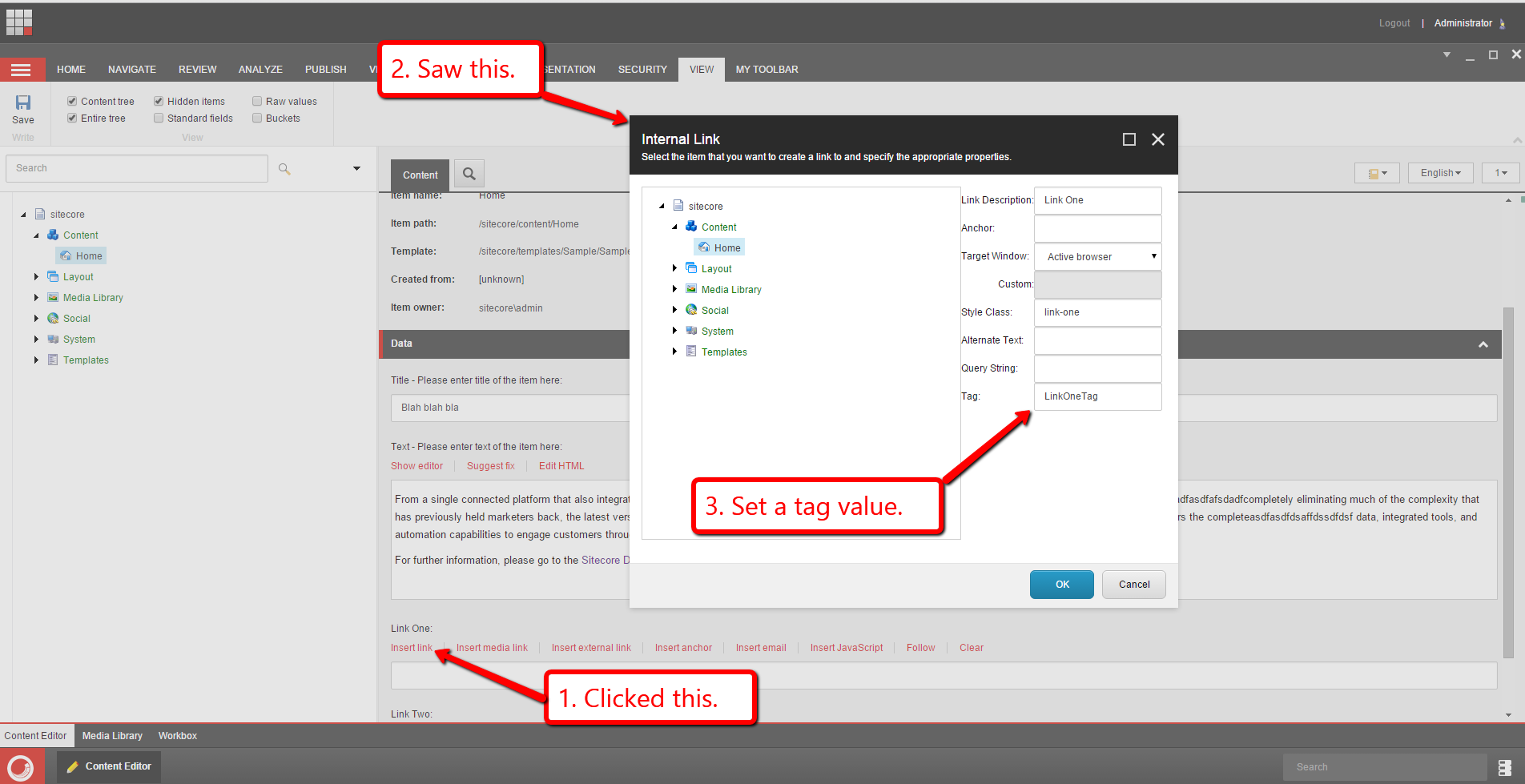
After clicking the “OK” button and saving the Item, I looked at the “Raw values” on the field and saw that the tag was added to the field’s xml:
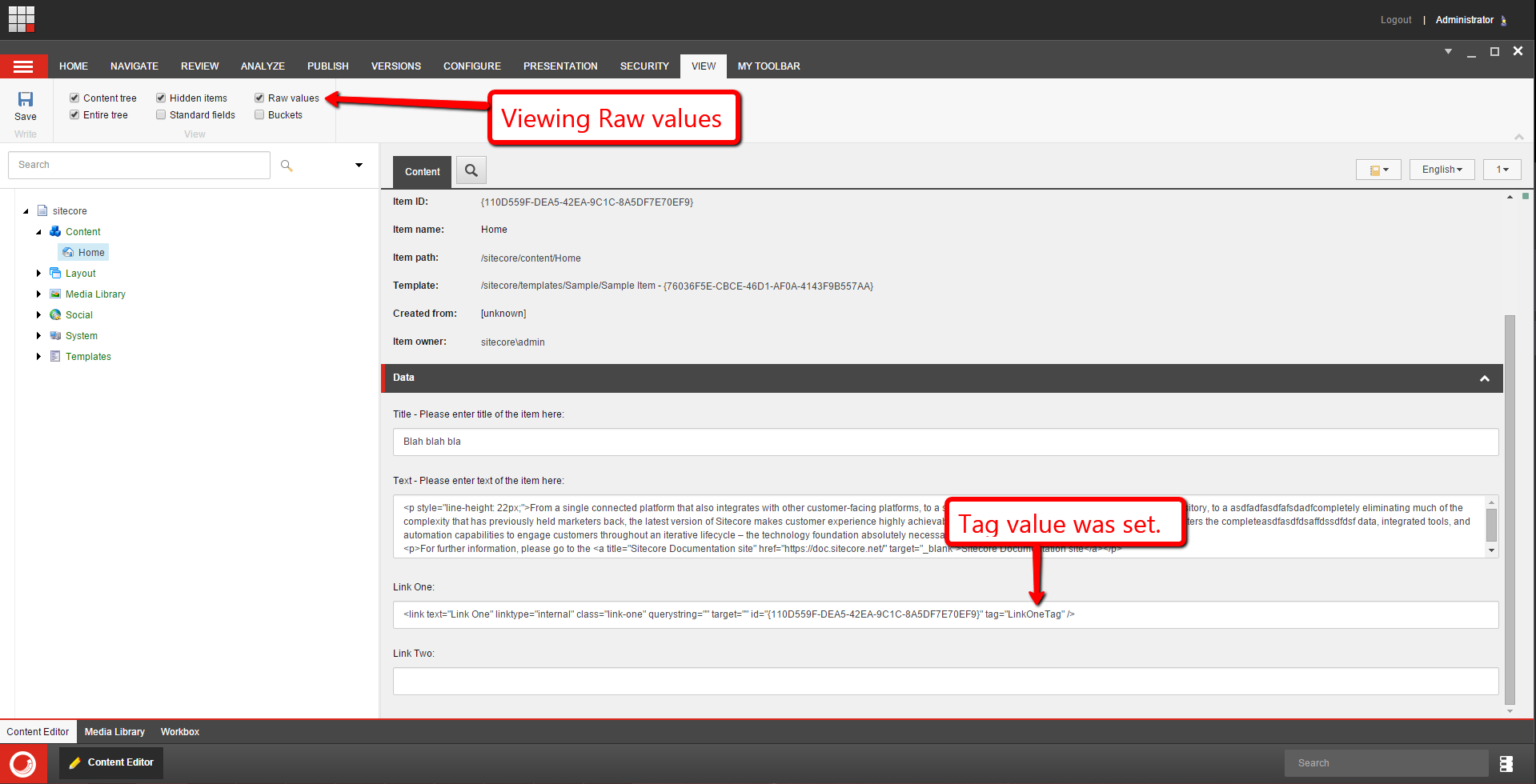
Let’s see if this works on the “Insert External Link” dialog:

After clicking the “OK” button and saving the Item, I looked at the “Raw values” on the field and saw that the tag was added to the field’s xml:

After publishing everything, I navigated to my home page and looked at its rendered HTML. As you can see, the tag attributes were added to the links:

If you have any comments or thoughts on this, please drop a comment.
Until next time, keep on Sitecoring!
Expand New Tokens Added to Standard Values on All Items Using Its Template in Sitecore
If you have read some of my older posts, you probably know by now how much I love writing code that expands tokens on Items in Sitecore, and decided to build another solution that expands new tokens added to Standard Values Items of Templates — out of the box, these aren’t expanded on preexisting Items that use the Template of the Standard Values Item, and end up making their way in fields on those preexisting Items (for an alternative solution, check out this older post I wrote some time ago).
In the following solution — this solution is primarily composed of a custom pipeline — tokens that are added to fields on the Standard Values Item will be expanded on all Items that use the Template of the Standard Values Item after the Standard Values Item is saved in the Sitecore client (I hook into the <saveUI> pipeline for this action on save).
We first need a class whose instance serves as the custom pipeline’s argument object:
using Sitecore.Data.Items;
using Sitecore.Pipelines;
using System.Collections.Generic;

namespace Sitecore.Sandbox.Pipelines.ExpandNewTokensOnAllItems
{
    public class ExpandNewTokensOnAllItemsArgs : PipelineArgs
    {
        public Item StandardValuesItem { get; set; }

        private List<Item> items;
        public List<Item> Items
        {
            get
            {
                if(items == null)
                {
                    items = new List<Item>();
                }

                return items;
            }
            set
            {
                items = value;
            }
        }
    }
}
The caller of the custom pipeline is required to pass the Standard Values Item that contains the new tokens. One of the processors of the custom pipeline will collect all Items that use its Template — these are stored in the Items collection property.
The instance of the following class serves as the first processor of the custom pipeline:
using System;

using Sitecore.Data;
using Sitecore.Data.Items;
using Sitecore.Data.Managers;
using Sitecore.Diagnostics;

namespace Sitecore.Sandbox.Pipelines.ExpandNewTokensOnAllItems
{
    public class EnsureStandardValues
    {
        public void Process(ExpandNewTokensOnAllItemsArgs args)
        {
            Assert.ArgumentNotNull(args, "args");
            Assert.ArgumentNotNull(args.StandardValuesItem, "args.StandardValuesItem");
            if(IsStandardValues(args.StandardValuesItem))
            {
                return;
            }

            args.AbortPipeline();
        }

        protected virtual bool IsStandardValues(Item item)
        {
            Assert.ArgumentNotNull(item, "item");
            return StandardValuesManager.IsStandardValuesHolder(item);
        }
    }
}
This processor basically just ascertains whether the Item passed as the Standard Values Item is indeed a Standard Values Item — the code just delegates to the static IsStandardValuesHolder() method on Sitecore.Data.StandardValuesManager (this lives in Sitecore.Kernel.dll).
The instance of the next class serves as the second step of the custom pipeline:
using System.Collections.Generic;
using System.Linq;

using Sitecore.Data.Fields;
using Sitecore.Diagnostics;

namespace Sitecore.Sandbox.Pipelines.ExpandNewTokensOnAllItems
{
    public class EnsureUnexpandedTokens
    {
        private List<string> Tokens { get; set; }

        public EnsureUnexpandedTokens()
        {
            Tokens = new List<string>();
        }

        public void Process(ExpandNewTokensOnAllItemsArgs args)
        {
            Assert.ArgumentNotNull(args, "args");
            Assert.ArgumentNotNull(args.StandardValuesItem, "args.StandardValuesItem");
            if (!Tokens.Any())
            {
                args.AbortPipeline();
                return;
            }

            args.StandardValuesItem.Fields.ReadAll();
            foreach(Field field in args.StandardValuesItem.Fields)
            {
                if(HasUnexpandedTokens(field))
                {
                    return;
                }
            }

            args.AbortPipeline();
        }

        protected virtual bool HasUnexpandedTokens(Field field)
        {
            Assert.ArgumentNotNull(field, "field");
            foreach(string token in Tokens)
            {
                if(field.Value.Contains(token))
                {
                    return true;
                }
            }

            return false;
        }
    }
}
A collection of tokens are injected into the class’ instance via the Sitecore Configuration Factory — see the patch configuration file further down in this post — and determines if tokens exist in any of its fields. If no tokens are found, then the pipeline is aborted. Otherwise, we exit the Process() method immediately.
The instance of the following class serves as the third processor of the custom pipeline:
using System;
using System.Collections.Generic;
using System.Linq;

using Sitecore.ContentSearch;
using Sitecore.ContentSearch.SearchTypes;
using Sitecore.Data;
using Sitecore.Data.Items;
using Sitecore.Data.Managers;
using Sitecore.Diagnostics;

namespace Sitecore.Sandbox.Pipelines.ExpandNewTokensOnAllItems
{
    public class CollectAllItems
    {
        public void Process(ExpandNewTokensOnAllItemsArgs args)
        {
            Assert.ArgumentNotNull(args, "args");
            Assert.ArgumentNotNull(args.StandardValuesItem, "args.StandardValuesItem");
            args.Items = GetAllItemsByTemplateID(args.StandardValuesItem.TemplateID);
            if(args.Items.Any())
            {
                return;
            }

            args.AbortPipeline();
        }

        protected virtual List<Item> GetAllItemsByTemplateID(ID templateID)
        {
            Assert.ArgumentCondition(!ID.IsNullOrEmpty(templateID), "templateID", "templateID cannot be null or empty!");
            using (var context = ContentSearchManager.GetIndex("sitecore_master_index").CreateSearchContext())
            {
                var query = context.GetQueryable<SearchResultItem>().Where(i => i.TemplateId == templateID);
                return query.ToList().Select(result => result.GetItem()).ToList();
            }
        }
    }
}
This class uses the Sitecore.ContentSearch API to find all Items that use the Template of the Standard Values Item. If at least one Item is found, we exit the Process() method immediately. Otherwise, we abort the pipeline.
The instance of the class below serves as the fourth processor of the custom pipeline:
using System;
using System.Collections.Generic;
using System.Linq;

using Sitecore.ContentSearch;
using Sitecore.ContentSearch.SearchTypes;
using Sitecore.Data;
using Sitecore.Data.Items;
using Sitecore.Data.Managers;
using Sitecore.Diagnostics;

namespace Sitecore.Sandbox.Pipelines.ExpandNewTokensOnAllItems
{
    public class FilterStandardValuesItem
    {
        public void Process(ExpandNewTokensOnAllItemsArgs args)
        {
            Assert.ArgumentNotNull(args, "args");
            Assert.ArgumentNotNull(args.Items, "args.Items");
            if(!args.Items.Any())
            {
                return;
            }

            args.Items = args.Items.Where(item => !IsStandardValues(item)).ToList();
        }

        protected virtual bool IsStandardValues(Item item)
        {
            Assert.ArgumentNotNull(item, "item");
            return StandardValuesManager.IsStandardValuesHolder(item);
        }
    }
}
The code in this class ensures the Stardard Values Item is not in the collection of Items. It’s probably not a good idea to expand tokens on the Standard Values Item. 🙂
The instance of the next class serves as the final processor of the custom pipeline:
using System.Linq;

using Sitecore.Configuration;
using Sitecore.Data.Items;
using Sitecore.Diagnostics;
using Sitecore.Data;

namespace Sitecore.Sandbox.Pipelines.ExpandNewTokensOnAllItems
{
    public class ExpandTokens
    {
        private MasterVariablesReplacer TokenReplacer { get; set; }

        public ExpandTokens()
        {
            TokenReplacer = GetTokenReplacer();
        }

        public void Process(ExpandNewTokensOnAllItemsArgs args)
        {
            Assert.ArgumentNotNull(args, "args");
            Assert.ArgumentNotNull(args.Items, "args.Items");
            if (!args.Items.Any())
            {
                args.AbortPipeline();
                return;
            }

            foreach(Item item in args.Items)
            {
                ExpandTokensOnItem(item);
            }
        }

        protected virtual void ExpandTokensOnItem(Item item)
        {
            Assert.ArgumentNotNull(item, "item");
            item.Fields.ReadAll();
            item.Editing.BeginEdit();
            TokenReplacer.ReplaceItem(item);
            item.Editing.EndEdit();
        }

        protected virtual MasterVariablesReplacer GetTokenReplacer()
        {
            return Factory.GetMasterVariablesReplacer();
        }
    }
}
The code above uses the instance of Sitecore.Data.MasterVariablesReplacer (subclass or otherwise) — this is defined in your Sitecore configuration at settings/setting[@name=”MasterVariablesReplacer”] — and passes all Items housed in the pipeline argument instance to its ReplaceItem() method — each Item is placed in an editing state before having their tokens expanded.
I then built the following class to serve as a <saveUI> pipeline processor (this pipeline is triggered when someone saves an Item in the Sitecore client):
using Sitecore;
using Sitecore.Data;
using Sitecore.Data.Items;
using Sitecore.Diagnostics;
using Sitecore.Pipelines;
using Sitecore.Pipelines.Save;

using Sitecore.Sandbox.Pipelines.ExpandNewTokensOnAllItems;

namespace Sitecore.Sandbox.Pipelines.SaveUI
{
    public class ExpandNewStandardValuesTokens
    {
        private string ExpandNewTokensOnAllItemsPipeline { get; set; }

        public void Process(SaveArgs args)
        {
            Assert.IsNotNullOrEmpty(ExpandNewTokensOnAllItemsPipeline, "ExpandNewTokensOnAllItemsPipeline must be set in configuration!");
            foreach (SaveArgs.SaveItem saveItem in args.Items)
            {
                Item item = GetItem(saveItem);
                if(IsStandardValues(item))
                {
                    ExpandNewTokensOnAllItems(item);
                }
            }
        }

        protected virtual Item GetItem(SaveArgs.SaveItem saveItem)
        {
            Assert.ArgumentNotNull(saveItem, "saveItem");
            return Client.ContentDatabase.Items[saveItem.ID, saveItem.Language, saveItem.Version];
        }

        protected virtual bool IsStandardValues(Item item)
        {
            Assert.ArgumentNotNull(item, "item");
            return StandardValuesManager.IsStandardValuesHolder(item);
        }

        protected virtual void ExpandNewTokensOnAllItems(Item standardValues)
        {
            CorePipeline.Run(ExpandNewTokensOnAllItemsPipeline, new ExpandNewTokensOnAllItemsArgs { StandardValuesItem = standardValues });
        }
    }
}
The code above invokes the custom pipeline when the Item being saved is a Standard Values Item — the Standard Values Item is passed to the pipeline via a new ExpandNewTokensOnAllItemsArgs instance.
I then glued all of the pieces above together in the following patch configuration file:
<?xml version="1.0" encoding="utf-8" ?>
<configuration xmlns:patch="http://www.sitecore.net/xmlconfig/">
  <sitecore>
    <pipelines>
      <expandNewTokensOnAllItems>
        <processor type="Sitecore.Sandbox.Pipelines.ExpandNewTokensOnAllItems.EnsureStandardValues, Sitecore.Sandbox" />
        <processor type="Sitecore.Sandbox.Pipelines.ExpandNewTokensOnAllItems.EnsureUnexpandedTokens, Sitecore.Sandbox">
          <Tokens hint="list">
            <Token>$name</Token>
            <Token>$id</Token>
            <Token>$parentid</Token>
            <Token>$parentname</Token>
            <Token>$date</Token>
            <Token>$time</Token>
            <Token>$now</Token>
          </Tokens>
        </processor>
        <processor type="Sitecore.Sandbox.Pipelines.ExpandNewTokensOnAllItems.CollectAllItems, Sitecore.Sandbox" />
        <processor type="Sitecore.Sandbox.Pipelines.ExpandNewTokensOnAllItems.FilterStandardValuesItem, Sitecore.Sandbox" />
        <processor type="Sitecore.Sandbox.Pipelines.ExpandNewTokensOnAllItems.ExpandTokens, Sitecore.Sandbox" />
      </expandNewTokensOnAllItems>
    </pipelines>
    <processors>
      <saveUI>
        <processor patch:before="saveUI/processor[@type='Sitecore.Pipelines.Save.Save, Sitecore.Kernel']"
                   mode="on" type="Sitecore.Sandbox.Pipelines.SaveUI.ExpandNewStandardValuesTokens">
          <ExpandNewTokensOnAllItemsPipeline>expandNewTokensOnAllItems</ExpandNewTokensOnAllItemsPipeline>
        </processor>
      </saveUI>
    </processors>
  </sitecore>
</configuration>
Let’s see this in action!
I added three new fields to a template, and added some tokens in them:

After clicking save, I navigated to one of the content Items that use this Template:

As you can see, the tokens were expanded. 🙂
If you have any thoughts on this, please drop a comment.
Utilize the Strategy Design Pattern for Content Editor Warnings in Sitecore
This post is a continuation of a series of posts I’m putting together around using design patterns in Sitecore implementations, and will show a “proof of concept” around using the Strategy pattern — a pattern where a family of “algorithms” (for simplicity you can think of these as classes that implement the same interface) which should be interchangeable when used by client code, and such holds true even when each do something completely different than others within the same family.
The Strategy pattern can serve as an alternative to the Template method pattern — a pattern where classes have an abstract base class that defines most of an “algorithm” for how classes that inherit from it work but provides method stubs (abstract methods) and method hooks (virtual methods) for subclasses to implement or override — and will prove this in this post by providing an alternative solution to the one I had shown in my previous post on the Template method pattern.
In this “proof of concept”, I will be adding a processor to the <getContentEditorWarnings> pipeline in order to add custom content editor warnings for Items — if you are unfamiliar with content editor warnings in Sitecore, the following screenshot illustrates an “out of the box” content editor warning around publishing and workflow state:

To start, I am reusing the following interface and classes from my previous post on the Template method pattern:
using System.Collections.Generic;

namespace Sitecore.Sandbox.Pipelines.GetContentEditorWarnings
{
    public interface IWarning
    {
        string Title { get; set; }

        string Message { get; set; }

        List<CommandLink> Links { get; set; }

        bool HasContent();

        IWarning Clone();
    }
}
Warnings will have a title, an error message for display, and a list of Sheer UI command links — the CommandLink class is defined further down in this post — to be displayed and invoked when clicked.
You might be asking why I am defining this when I can just use what’s available in the Sitecore API? Well, I want to inject these values via the Sitecore Configuration Factory, and hopefully this will become clear once you have a look at the Sitecore configuration file further down in this post.
Next, we have a class that implements the interface above:
using System.Collections.Generic;

namespace Sitecore.Sandbox.Pipelines.GetContentEditorWarnings
{
    public class Warning : IWarning
    {
        public string Title { get; set; }

        public string Message { get; set; }

        public List<CommandLink> Links { get; set; }

        public Warning()
        {
            Links = new List<CommandLink>();
        }

        public bool HasContent()
        {
            return !string.IsNullOrWhiteSpace(Title)
                    || !string.IsNullOrWhiteSpace(Title)
                    || !string.IsNullOrWhiteSpace(Message);
        }

        public IWarning Clone()
        {
            IWarning clone = new Warning { Title = Title, Message = Message };
            foreach (CommandLink link in Links)
            {
                clone.Links.Add(new CommandLink { Text = link.Text, Command = link.Command });
            }

            return clone;
        }
    }
}
The HasContent() method just returns “true” if the instance has any content to display though this does not include CommandLinks — what’s the point in displaying these if there is no warning content to be displayed with them?
The Clone() method makes a new instance of the Warning class, and copies values into it — this is useful when defining tokens in strings that must be expanded before being displayed. If we expand them on the instance that is injected via the Sitecore Configuration Factory, the changed strings will persistent in memory until the application pool is recycled for the Sitecore instance.
The following class represents a Sheer UI command link to be displayed in the content editor warning so content editors/authors can take action on the warning:
namespace Sitecore.Sandbox.Pipelines.GetContentEditorWarnings
{
    public class CommandLink
    {
        public string Text { get; set; }

        public string Command { get; set; }
    }
}
The Strategy pattern calls for a family of “algorithms” which can be interchangeably used. In order for us to achieve this, we need to define an interface for this family of “algorithms”:
using System.Collections.Generic;

using Sitecore.Data.Items;

namespace Sitecore.Sandbox.Pipelines.GetContentEditorWarnings.Strategy_Pattern
{
    public interface IWarningsGenerator
    {
        Item Item { get; set; }

        IEnumerable<IWarning> Generate();
    }
}
Next, I created the following class that implements the interface above to ascertain whether a supplied Item has too many child Items:
using System.Collections.Generic;

using Sitecore.Data.Items;
using Sitecore.Diagnostics;

namespace Sitecore.Sandbox.Pipelines.GetContentEditorWarnings.Strategy_Pattern
{
    public class TooManyChildItemsWarningsGenerator : IWarningsGenerator
    {
        private int MaxNumberOfChildItems { get; set; }

        private IWarning Warning { get; set; }

        public Item Item { get; set; }

        public IEnumerable<IWarning> Generate()
        {
            AssertProperties();
            if (Item.Children.Count <= MaxNumberOfChildItems)
            {
                return new List<IWarning>();
            }

            return new[] { Warning };
        }

        private void AssertProperties()
        {
            Assert.ArgumentCondition(MaxNumberOfChildItems > 0, "MaxNumberOfChildItems", "MaxNumberOfChildItems must be set correctly in configuration!");
            Assert.IsNotNull(Warning, "Warning", "Warning must be set in configuration!");
            Assert.ArgumentCondition(Warning.HasContent(), "Warning", "Warning should have some fields populated from configuration!");
            Assert.IsNotNull(Item, "Item", "Item must be set!");
        }
    }
}
The “maximum number of child items allowed” value — this is stored in the MaxNumberOfChildItems integer property of the class — is passed to the class instance via the Sitecore Configuration Factory (you’ll see this defined in the Sitecore configuration file further down in this post).
The IWarning instance that is injected into the instance of this class will give content authors/editors the ability to convert the Item into an Item Bucket when it has too many child Items.
I then defined another class that implements the interface above — a class whose instances determine whether Items have invalid characters in their names:
using System.Collections.Generic;
using System.Linq;

using Sitecore.Data.Items;
using Sitecore.Diagnostics;

namespace Sitecore.Sandbox.Pipelines.GetContentEditorWarnings.Strategy_Pattern
{
    public class HasInvalidCharacetersInNameWarningsGenerator : IWarningsGenerator
    {
        private string CharacterSeparator { get; set; }

        private string Conjunction { get; set; }

        private List<string> InvalidCharacters { get; set; }

        private IWarning Warning { get; set; }

        public Item Item { get; set; }

        public HasInvalidCharacetersInNameWarningsGenerator()
        {
            InvalidCharacters = new List<string>();
        }

        public IEnumerable<IWarning> Generate()
        {
            AssertProperties();
            HashSet<string> charactersFound = new HashSet<string>();
            foreach (string character in InvalidCharacters)
            {
                if (Item.Name.Contains(character))
                {
                    charactersFound.Add(character.ToString());
                }
            }

            if(!charactersFound.Any())
            {
                return new List<IWarning>();
            }

            IWarning warning = Warning.Clone();
            string charactersFoundString = string.Join(CharacterSeparator, charactersFound);
            int lastSeparator = charactersFoundString.LastIndexOf(CharacterSeparator);
            if (lastSeparator < 0)
            {
                warning.Message = ReplaceInvalidCharactersToken(warning.Message, charactersFoundString);
                return new[] { warning };
            }

            warning.Message = ReplaceInvalidCharactersToken(warning.Message, Splice(charactersFoundString, lastSeparator, CharacterSeparator.Length, Conjunction));
            return new[] { warning };
        }

        private void AssertProperties()
        {
            Assert.IsNotNullOrEmpty(CharacterSeparator, "CharacterSeparator", "CharacterSeparator must be set in configuration!");
            Assert.ArgumentCondition(InvalidCharacters != null && InvalidCharacters.Any(), "InvalidCharacters", "InvalidCharacters must be set in configuration!");
            Assert.IsNotNull(Warning, "Warning", "Warning must be set in configuration!");
            Assert.ArgumentCondition(Warning.HasContent(), "Warning", "Warning should have some fields populated from configuration!");
            Assert.IsNotNull(Item, "Item", "Item must be set!");
        }

        private static string Splice(string value, int startIndex, int length, string replacement)
        {
            if(string.IsNullOrWhiteSpace(value))
            {
                return value;
            }

            return string.Concat(value.Substring(0, startIndex), replacement, value.Substring(startIndex + length));
        }

        private static string ReplaceInvalidCharactersToken(string value, string replacement)
        {
            return value.Replace("$invalidCharacters", replacement);
        }
    }
}
The above class will return an IWarning instance when an Item has invalid characters in its name — these invalid characters are defined in Sitecore configuration.
The Generate() method iterates over all invalid characters passed from Sitecore configuration and determines if they exist in the Item name. If they do, they are added to a HashSet<string> instance — I’m using a HashSet<string> to ensure the same character isn’t added more than once to the collection — which is used for constructing the warning message to be displayed to the content author/editor.
Once the Generate() method has iterated through all invalid characters, a string is built using the HashSet<string> instance, and is put in place wherever the $invalidCharacters token is defined in the Message property of the IWarning instance.
Now that we have our family of “algorithms” defined, we need a class to encapsulate and invoke these. I defined the following interface for classes that perform this role:
using System.Collections.Generic;

using Sitecore.Data.Items;

namespace Sitecore.Sandbox.Pipelines.GetContentEditorWarnings.Strategy_Pattern
{
    public interface IWarningsGeneratorContext
    {
        IWarningsGenerator Generator { get; set; }

        IEnumerable<IWarning> GetWarnings(Item item);
    }
}
I then defined the following class which implements the interface above:
using System.Collections.Generic;

using Sitecore.Data.Items;
using Sitecore.Diagnostics;

namespace Sitecore.Sandbox.Pipelines.GetContentEditorWarnings.Strategy_Pattern
{
    public class WarningsGeneratorContext : IWarningsGeneratorContext
    {
        public IWarningsGenerator Generator { get; set; }

        public IEnumerable<IWarning> GetWarnings(Item item)
        {
            Assert.IsNotNull(Generator, "Generator", "Generator must be set!");
            Assert.ArgumentNotNull(item, "item");
            Generator.Item = item;
            return Generator.Generate();
        }
    }
}
Instances of the class above take in an instance of IWarningsGenerator via its Generator property — in a sense, we are “lock and loading” WarningsGeneratorContext instances to get them ready. Instances then pass a supplied Item instance to the IWarningsGenerator instance, and invoke its GetWarnings() method. This method returns a collection of IWarning instances.
In a way, the IWarningsGeneratorContext instances are really adapters for IWarningsGenerator instances — IWarningsGeneratorContext instances provide a bridge for client code to use IWarningsGenerator instances via its own little API.
Now that we have all of the stuff above — yes, I know, there is a lot of code in this post, and we’ll reflect on this at the end of the post — we need a class whose instance will serve as a <getContentEditorWarnings> pipeline processor:
using System.Collections.Generic;
using System.Linq;

using Sitecore.Data.Items;
using Sitecore.Diagnostics;
using Sitecore.Globalization;
using Sitecore.Pipelines.GetContentEditorWarnings;

namespace Sitecore.Sandbox.Pipelines.GetContentEditorWarnings.Strategy_Pattern
{
    public class ContentEditorWarnings
    {
        private List<IWarningsGenerator> WarningsGenerators { get; set; }

        private IWarningsGeneratorContext WarningsGeneratorContext { get; set; }

        public ContentEditorWarnings()
        {
            WarningsGenerators = new List<IWarningsGenerator>();
        }

        public void Process(GetContentEditorWarningsArgs args)
        {
            AssertProperties();
            Assert.ArgumentNotNull(args, "args");
            Assert.ArgumentNotNull(args.Item, "args.Item");

            IEnumerable<IWarning> warnings = GetWarnings(args.Item);
            if(warnings == null || !warnings.Any())
            {
                return;
            }

            foreach(IWarning warning in warnings)
            {
                AddWarning(args, warning);
            }
        }

        private IEnumerable<IWarning> GetWarnings(Item item)
        {
            List<IWarning> warnings = new List<IWarning>();
            foreach(IWarningsGenerator generator in WarningsGenerators)
            {
                IEnumerable<IWarning> generatorWarnings = GetWarnings(generator, item);
                if(generatorWarnings != null && generatorWarnings.Any())
                {
                    warnings.AddRange(generatorWarnings);
                }
            }

            return warnings;
        }

        private IEnumerable<IWarning> GetWarnings(IWarningsGenerator generator, Item item)
        {
            WarningsGeneratorContext.Generator = generator;
            return WarningsGeneratorContext.GetWarnings(item);
        }

        private void AddWarning(GetContentEditorWarningsArgs args, IWarning warning)
        {
            if(!warning.HasContent())
            {
                return;
            }

            GetContentEditorWarningsArgs.ContentEditorWarning editorWarning = args.Add();
            if(!string.IsNullOrWhiteSpace(warning.Title))
            {
                editorWarning.Title = TranslateText(warning.Title);
            }

            if(!string.IsNullOrWhiteSpace(warning.Message))
            {
                editorWarning.Text = TranslateText(warning.Message);
            }

            if (!warning.Links.Any())
            {
                return;
            }

            foreach(CommandLink link in warning.Links)
            {
                editorWarning.AddOption(TranslateText(link.Text), link.Command);
            }
        }

        private string TranslateText(string text)
        {
            if(string.IsNullOrWhiteSpace(text))
            {
                return text;
            }

            return Translate.Text(text);
        }

        private void AssertProperties()
        {
            Assert.IsNotNull(WarningsGeneratorContext, "WarningsGeneratorContext", "WarningsGeneratorContext must be set in configuration!");
            Assert.ArgumentCondition(WarningsGenerators != null && WarningsGenerators.Any(), "WarningsGenerators", "At least one WarningsGenerator must be set in configuration!");
        }
    }
}
The Process() method is the main entry into the pipeline processor. The method delegates to the GetWarnings() method to get a collection of IWarning instances from all IWarningGenerator instances that were injected into the class instance via the Sitecore Configuration Factory.
The GetWarnings() method iterates over all IWarningsGenerator instances, and passes each to the other GetWarnings() method overload which basically sets the IWarningGenerator on the IWarningsGeneratorContext instance, and invokes its GetWarnings() method with the supplied Item instance.
Once all IWarning instances have been collected, the Process() method iterates over the IWarning collection, and adds them to the GetContentEditorWarningsArgs instance via the AddWarning() method.
I then registered everything above in Sitecore using the following Sitecore patch configuration file:
<?xml version="1.0" encoding="utf-8" ?>
<configuration xmlns:patch="http://www.sitecore.net/xmlconfig/">
<sitecore>
<pipelines>
<getContentEditorWarnings>
<processor type="Sitecore.Sandbox.Pipelines.GetContentEditorWarnings.Strategy_Pattern.ContentEditorWarnings, Sitecore.Sandbox">
<WarningsGenerators hint="list">
<WarningsGenerator type="Sitecore.Sandbox.Pipelines.GetContentEditorWarnings.Strategy_Pattern.TooManyChildItemsWarningsGenerator, Sitecore.Sandbox">
<MaxNumberOfChildItems>20</MaxNumberOfChildItems>
<Warning type="Sitecore.Sandbox.Pipelines.GetContentEditorWarnings.Warning, Sitecore.Sandbox">
<Title>This Item has too many child items!</Title>
<Message>Please consider converting this Item into an Item Bucket.</Message>
<Links hint="list">
<Link type="Sitecore.Sandbox.Pipelines.GetContentEditorWarnings.CommandLink">
<Text>Convert to Item Bucket</Text>
<Command>item:bucket</Command>
</Link>
</Links>
</Warning>
</WarningsGenerator>
<WarningsGenerator type="Sitecore.Sandbox.Pipelines.GetContentEditorWarnings.Strategy_Pattern.HasInvalidCharacetersInNameWarningsGenerator, Sitecore.Sandbox">
<CharacterSeparator>,&nbsp;</CharacterSeparator>
<Conjunction>&nbsp;and&nbsp;</Conjunction>
<InvalidCharacters hint="list">
<Character>-</Character>
<Character>$</Character>
<Character>1</Character>
</InvalidCharacters>
<Warning type="Sitecore.Sandbox.Pipelines.GetContentEditorWarnings.Warning, Sitecore.Sandbox">
<Title>The name of this Item has invalid characters!</Title>
<Message>The name of this Item contains $invalidCharacters. Please consider renaming the Item.</Message>
<Links hint="list">
<Link type="Sitecore.Sandbox.Pipelines.GetContentEditorWarnings.CommandLink">
<Text>Rename Item</Text>
<Command>item:rename</Command>
</Link>
</Links>
</Warning>
</WarningsGenerator>
</WarningsGenerators>
<WarningsGeneratorContext type="Sitecore.Sandbox.Pipelines.GetContentEditorWarnings.Strategy_Pattern.WarningsGeneratorContext, Sitecore.Sandbox" />
</processor>
</getContentEditorWarnings>
</pipelines>
</sitecore>
</configuration>
Let’s test this out.
I set up an Item with more than 20 child Items, and gave it a name that includes -, $ and 1 — these are defined as invalid in the configuration file above:

As you can see, both warnings appear on the Item in the content editor.
Let’s convert the Item into an Item Bucket:

As you can see the Item is now an Item Bucket:
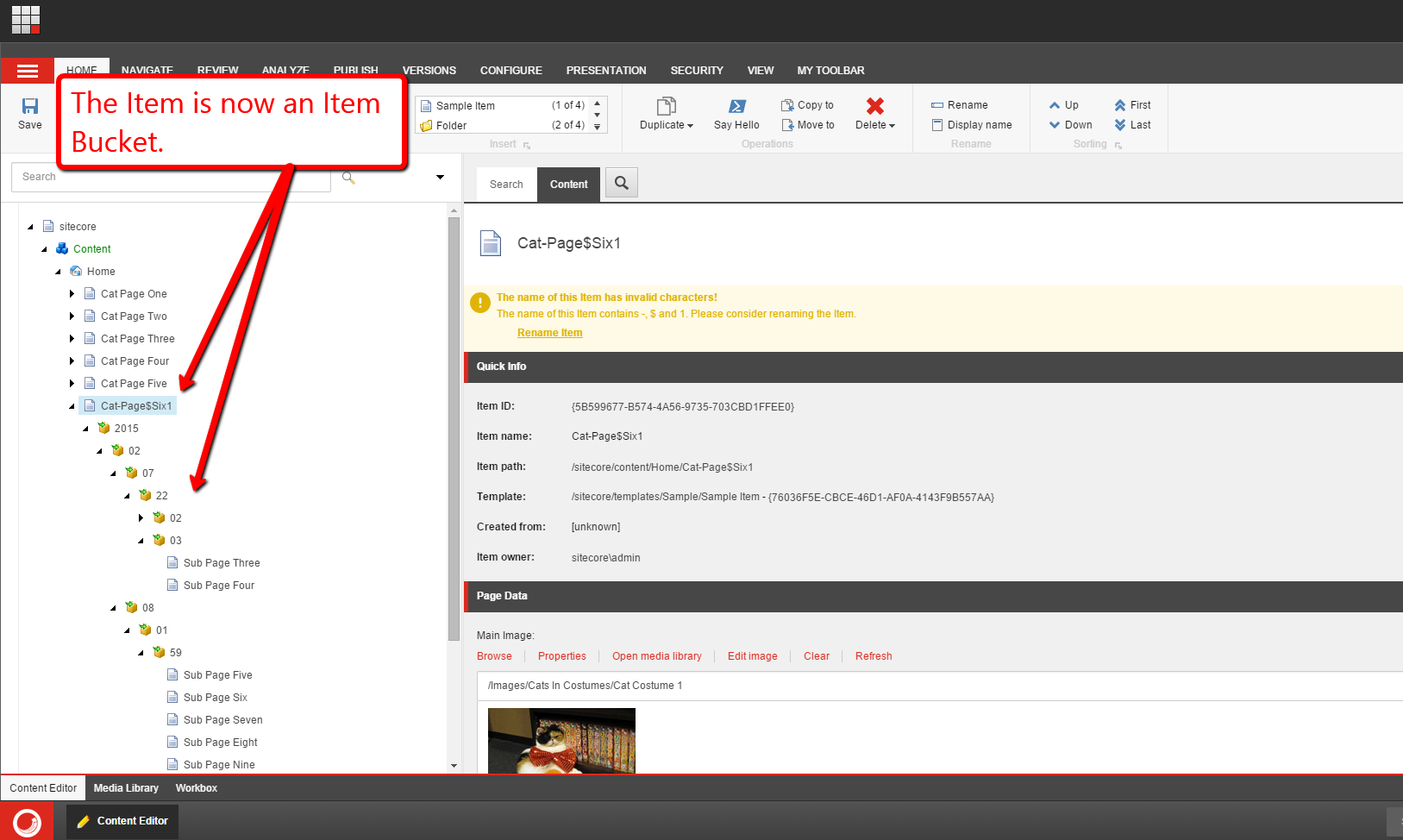
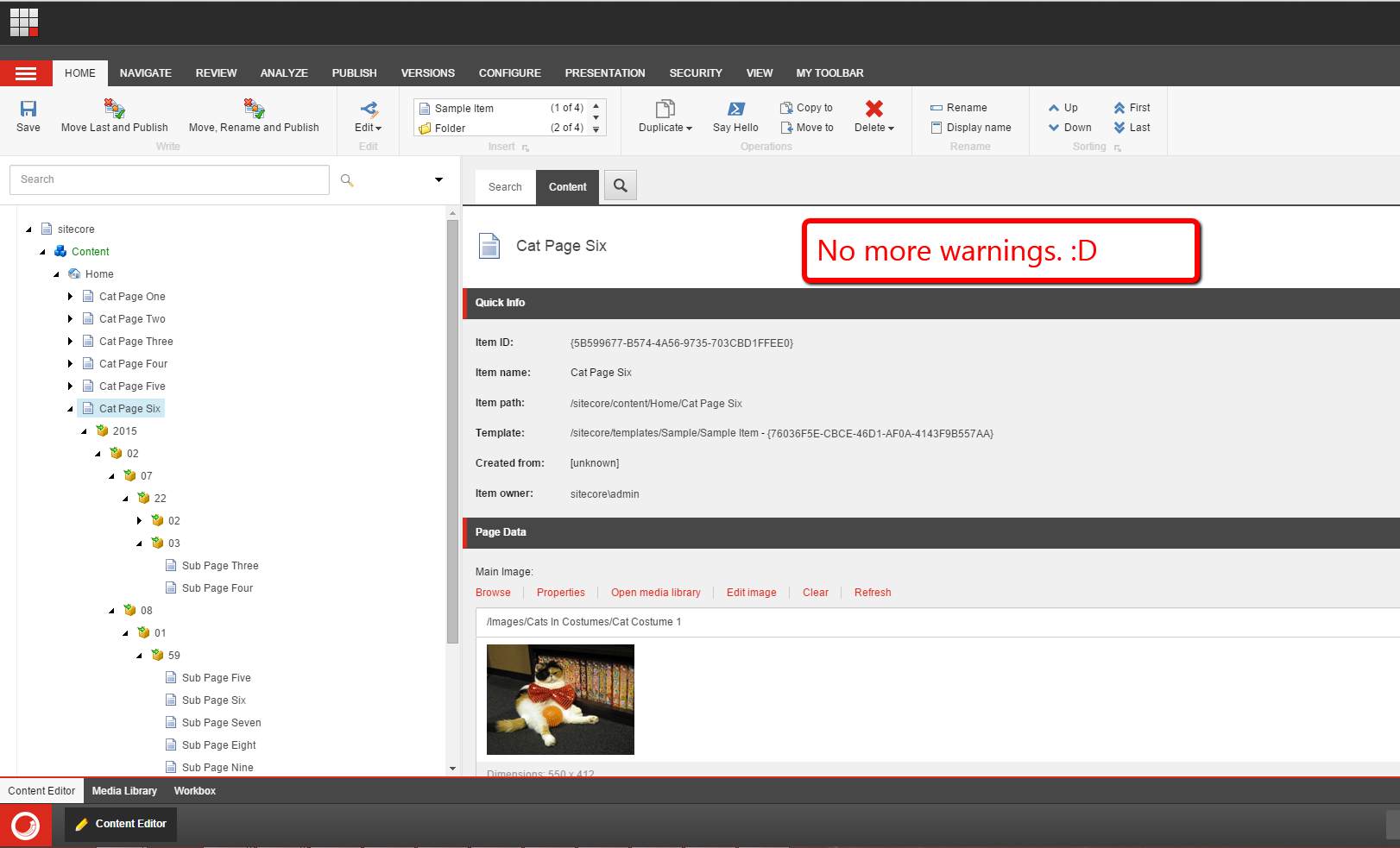
Let’s fix the Item’s name:

The Item’s name is now fixed, and there are no more content editor warnings:
You might be thinking “Mike, that is a lot of code — a significant amount over what you had shown in your previous post where you used the Template method pattern — so why bother with the Strategy pattern?”
Yes, there is more code here, and definitely more moving parts to the Strategy pattern over the Template method pattern.
So, what’s the benefit here?
Well, in the Template method pattern, subclasses are tightly coupled to their abstract base class. A change to the parent class could potentially break code in the subclasses, and this will require code in all subclasses to be changed. This could be quite a task if subclasses are defined in multiple projects that don’t reside in the same solution as the parent class.
The Strategy pattern forces loose coupling among all instances within the pattern thus reducing the likelihood that changes in one class will adversely affect others.
However, with that said, it does add complexity by introducing more code, so you should consider the pros and cons of using the Strategy pattern over the Template method pattern, or perhaps even decide if you should use a pattern to begin with.
Remember, the KISS principle should be followed wherever/whenever possible when designing and developing software.
If you have any thoughts on this, please drop a comment.
Employ the Template Method Design Pattern for Content Editor Warnings in Sitecore
This post is a continuation of a series of posts I’m putting together around using design patterns in Sitecore solutions, and will show a “proof of concept” around using the Template method pattern — a pattern where classes have an abstract base class that defines most of an “algorithm” for how classes that inherit from it work but provides method stubs — these are abstract methods that must be implemented by subclasses to “fill in the blanks” of the “algorithm” — and method hooks — these are virtual methods that can be overridden if needed.
In this “proof of concept”, I am tapping into the <getContentEditorWarnings> pipeline in order to add custom content editor warnings for Items — if you are unfamiliar with content editor warnings in Sitecore, the following screenshot illustrates an “out of the box” content editor warning around publishing and workflow state:
To start, I defined the following interface for classes that will contain content for warnings that will be displayed in the content editor:
using System.Collections.Generic;

namespace Sitecore.Sandbox.Pipelines.GetContentEditorWarnings
{
    public interface IWarning
    {
        string Title { get; set; }

        string Message { get; set; }

        List<CommandLink> Links { get; set; }

        bool HasContent();

        IWarning Clone();
    }
}
Warnings will have a title, an error message for display, and a list of Sheer UI command links — the CommandLink class is defined further down this post — to be displayed and invoked when clicked.
You might be asking why I am defining this when I can just use what’s available in the Sitecore API? Well, I want to inject these values via the Sitecore Configuration Factory, and hopefully this will become clear once you have a look at the Sitecore configuration file further down in this post.
Next, I defined the following class that implements the interface above:
using System.Collections.Generic;

namespace Sitecore.Sandbox.Pipelines.GetContentEditorWarnings
{
    public class Warning : IWarning
    {
        public string Title { get; set; }

        public string Message { get; set; }

        public List<CommandLink> Links { get; set; }

        public Warning()
        {
            Links = new List<CommandLink>();
        }

        public bool HasContent()
        {
            return !string.IsNullOrWhiteSpace(Title)
                    || !string.IsNullOrWhiteSpace(Title)
                    || !string.IsNullOrWhiteSpace(Message);
        }

        public IWarning Clone()
        {
            IWarning clone = new Warning { Title = Title, Message = Message };
            foreach (CommandLink link in Links)
            {
                clone.Links.Add(new CommandLink { Text = link.Text, Command = link.Command });
            }

            return clone;
        }
    }
}
The HasContent() method just returns “true” if the instance has any content to display though this does not include CommandLinks — what’s the point in displaying these if there is no warning content to be displayed with them?
The Clone() method makes a new instance of the Warning class, and copies values into it — this is useful when defining tokens in strings that must be expanded before being displayed. If we expand them on the instance that is injected via the Sitecore Configuration Factory, the changed strings will persistent in memory until the application pool is recycled for the Sitecore instance.
The following class represents a Sheer UI command link to be displayed in the content editor warning so content editors/authors can take action on the warning:
namespace Sitecore.Sandbox.Pipelines.GetContentEditorWarnings
{
    public class CommandLink
    {
        public string Text { get; set; }

        public string Command { get; set; }
    }
}
I then built the following abstract class to serve as the base class for all classes whose instances will serve as a <getContentEditorWarnings> pipeline processor:
using System.Collections.Generic;
using System.Linq;

using Sitecore.Data.Items;
using Sitecore.Diagnostics;
using Sitecore.Globalization;
using Sitecore.Pipelines.GetContentEditorWarnings;

namespace Sitecore.Sandbox.Pipelines.GetContentEditorWarnings.Template_Method_Pattern
{
    public abstract class ContentEditorWarnings
    {
        public void Process(GetContentEditorWarningsArgs args)
        {
            Assert.ArgumentNotNull(args, "args");
            Assert.ArgumentNotNull(args.Item, "args.Item");
            IEnumerable<IWarning> warnings = GetWarnings(args.Item);
            if(warnings == null || !warnings.Any())
            {
                return;
            }

            foreach(IWarning warning in warnings)
            {
                AddWarning(args, warning);
            }
        }

        protected abstract IEnumerable<IWarning> GetWarnings(Item item);

        private void AddWarning(GetContentEditorWarningsArgs args, IWarning warning)
        {
            if(!warning.HasContent())
            {
                return;
            }

            GetContentEditorWarningsArgs.ContentEditorWarning editorWarning = args.Add();
            if(!string.IsNullOrWhiteSpace(warning.Title))
            {
                editorWarning.Title = TranslateText(warning.Title);
            }

            if(!string.IsNullOrWhiteSpace(warning.Message))
            {
                editorWarning.Text = TranslateText(warning.Message);
            }

            if (!warning.Links.Any())
            {
                return;
            }

            foreach(CommandLink link in warning.Links)
            {
                editorWarning.AddOption(TranslateText(link.Text), link.Command);
            }
        }

        protected virtual string TranslateText(string text)
        {
            if(string.IsNullOrWhiteSpace(text))
            {
                return text;
            }

            return Translate.Text(text);
        }
    }
}
So what’s going on in this class? Well, the Process() method gets a collection of IWarnings from the GetWarnings() method — this method must be defined by subclasses of this class; iterates over them; and delegates to the AddWarning() method to add each to the GetContentEditorWarningsArgs instance.
The TranslateText() method calls the Text() method on the Sitecore.Globalization.Translate class — this lives in Sitecore.Kernel.dll — and is used when adding values on IWarning instances to the GetContentEditorWarningsArgs instance. This method is a hook, and can be overridden by subclasses if needed. I am not overriding this method on the subclasses further down in this post.
I then defined the following subclass of the class above to serve as a <getContentEditorWarnings> pipeline processor to warn content authors/editors if an Item has too many child Items:
using System.Collections.Generic;
using System.Linq;

using Sitecore.Data.Items;
using Sitecore.Diagnostics;

namespace Sitecore.Sandbox.Pipelines.GetContentEditorWarnings.Template_Method_Pattern
{
    public class TooManyChildItemsWarnings : ContentEditorWarnings
    {
        private int MaxNumberOfChildItems { get; set; }

        private IWarning Warning { get; set; }

        protected override IEnumerable<IWarning> GetWarnings(Item item)
        {
            AssertProperties();
            if(item.Children.Count <= MaxNumberOfChildItems)
            {
                return new List<IWarning>();
            }

            return new[] { Warning };
        }

        private void AssertProperties()
        {
            Assert.ArgumentCondition(MaxNumberOfChildItems > 0, "MaxNumberOfChildItems", "MaxNumberOfChildItems must be set correctly in configuration!");
            Assert.IsNotNull(Warning, "Warning", "Warning must be set in configuration!");
            Assert.ArgumentCondition(Warning.HasContent(), "Warning", "Warning should have some fields populated from configuration!");
        }
    }
}
The class above is getting its IWarning instance and maximum number of child Items value from Sitecore configuration.
The GetWarnings() method ascertains whether the Item has too many child Items and returns the IWarning instance when it does in a collection — I defined this to be a collection to allow <getContentEditorWarnings> pipeline processors subclassing the abstract base class above to return more than one warning if needed.
I then defined another subclass of the abstract class above to serve as another <getContentEditorWarnings> pipeline processor:
using System.Collections.Generic;
using System.Linq;

using Sitecore.Data.Items;
using Sitecore.Diagnostics;

namespace Sitecore.Sandbox.Pipelines.GetContentEditorWarnings.Template_Method_Pattern
{
    public class HasInvalidCharacetersInNameWarnings : ContentEditorWarnings
    {
        private string CharacterSeparator { get; set; }

        private string Conjunction { get; set; }

        private List<string> InvalidCharacters { get; set; }

        private IWarning Warning { get; set; }

        public HasInvalidCharacetersInNameWarnings()
        {
            InvalidCharacters = new List<string>();
        }

        protected override IEnumerable<IWarning> GetWarnings(Item item)
        {
            AssertProperties();
            HashSet<string> charactersFound = new HashSet<string>();
            foreach (string character in InvalidCharacters)
            {
                if(item.Name.Contains(character))
                {
                    charactersFound.Add(character.ToString());
                }
            }

            if(!charactersFound.Any())
            {
                return new List<IWarning>();
            }

            IWarning warning = Warning.Clone();
            string charactersFoundString = string.Join(CharacterSeparator, charactersFound);
            int lastSeparator = charactersFoundString.LastIndexOf(CharacterSeparator);
            if (lastSeparator < 0)
            {
                warning.Message = ReplaceInvalidCharactersToken(warning.Message, charactersFoundString);
                return new[] { warning };
            }

            warning.Message = ReplaceInvalidCharactersToken(warning.Message, Splice(charactersFoundString, lastSeparator, CharacterSeparator.Length, Conjunction));
            return new[] { warning };
        }

        private void AssertProperties()
        {
            Assert.IsNotNullOrEmpty(CharacterSeparator, "CharacterSeparator", "CharacterSeparator must be set in configuration!");
            Assert.ArgumentCondition(InvalidCharacters != null && InvalidCharacters.Any(), "InvalidCharacters", "InvalidCharacters must be set in configuration!");
            Assert.IsNotNull(Warning, "Warning", "Warning must be set in configuration!");
            Assert.ArgumentCondition(Warning.HasContent(), "Warning", "Warning should have some fields populated from configuration!");
        }

        private static string Splice(string value, int startIndex, int length, string replacement)
        {
            if(string.IsNullOrWhiteSpace(value))
            {
                return value;
            }

            return string.Concat(value.Substring(0, startIndex), replacement, value.Substring(startIndex + length));
        }

        private static string ReplaceInvalidCharactersToken(string value, string replacement)
        {
            return value.Replace("$invalidCharacters", replacement);
        }
    }
}
The above class will return an IWarning instance when an Item has invalid characters in its name — these invalid characters are defined in Sitecore configuration.
The GetWarnings() method iterates over all invalid characters passed from Sitecore configuration and determines if they exist in the Item name. If they do, they are added to a HashSet<string> instance — I’m using a HashSet<string> to ensure the same character isn’t added more than once to the collection — which is be used for constructing the warning message to be displayed to the content author/editor.
Once the GetWarnings() method has iterated through all invalid characters, a string is built using the HashSet<string> instance, and is put in place wherever the $invalidCharacters token is defined in the Message property of the IWarning instance.
I then registered everything above in Sitecore via the following patch configuration file:
<?xml version="1.0" encoding="utf-8" ?>
<configuration xmlns:patch="http://www.sitecore.net/xmlconfig/">
<sitecore>
<pipelines>
<getContentEditorWarnings>
<processor type="Sitecore.Sandbox.Pipelines.GetContentEditorWarnings.Template_Method_Pattern.TooManyChildItemsWarnings, Sitecore.Sandbox">
<MaxNumberOfChildItems>20</MaxNumberOfChildItems>
<Warning type="Sitecore.Sandbox.Pipelines.GetContentEditorWarnings.Warning, Sitecore.Sandbox">
<Title>This Item has too many child items!</Title>
<Message>Please consider converting this Item into an Item Bucket.</Message>
<Links hint="list">
<Link type="Sitecore.Sandbox.Pipelines.GetContentEditorWarnings.CommandLink">
<Text>Convert to Item Bucket</Text>
<Command>item:bucket</Command>
</Link>
</Links>
</Warning>
</processor>
<processor type="Sitecore.Sandbox.Pipelines.GetContentEditorWarnings.Template_Method_Pattern.HasInvalidCharacetersInNameWarnings, Sitecore.Sandbox">
<CharacterSeparator>,&nbsp;</CharacterSeparator>
<Conjunction>&nbsp;and&nbsp;</Conjunction>
<InvalidCharacters hint="list">
<Character>-</Character>
<Character>$</Character>
<Character>1</Character>
</InvalidCharacters>
<Warning type="Sitecore.Sandbox.Pipelines.GetContentEditorWarnings.Warning, Sitecore.Sandbox">
<Title>The name of this Item has invalid characters!</Title>
<Message>The name of this Item contains $invalidCharacters. Please consider renaming the Item.</Message>
<Links hint="list">
<Link type="Sitecore.Sandbox.Pipelines.GetContentEditorWarnings.CommandLink">
<Text>Rename Item</Text>
<Command>item:rename</Command>
</Link>
</Links>
</Warning>
</processor>
</getContentEditorWarnings>
</pipelines>
</sitecore>
</configuration>
As you can see, I am injecting warning data into my <getContentEditorWarnings> pipeline processors as well as other things which are used in code for each.
For the TooManyChildItemsWarnings <getContentEditorWarnings> pipeline processor, we are giving content authors/editors the ability to convert the Item into an Item bucket — we are injecting the item:bucket command via the configuration file above.
For the HasInvalidCharacetersInNameWarnings <getContentEditorWarnings> pipeline processor, we are passing in the Sheer UI command that will launch the Item Rename dialog to give content authors/editors the ability to rename the Item if it has invalid characters in its name.
Let’s see if this works.
I navigated to an Item in my content tree that has less than 20 child Items and has no invalid characters in its name:

As you can see, there are no warnings.
Let’s go to another Item, one that not only has more than 20 child Items but also has invalid characters in its name:

As you can see, both warnings are appearing for this Item.
Let’s now rename the Item:

Great! Now the ‘invalid characters in name” warning is gone. Let’s convert this Item into an Item Bucket:

After clicking the ‘Convert to Item Bucket’ link, I saw the following dialog:
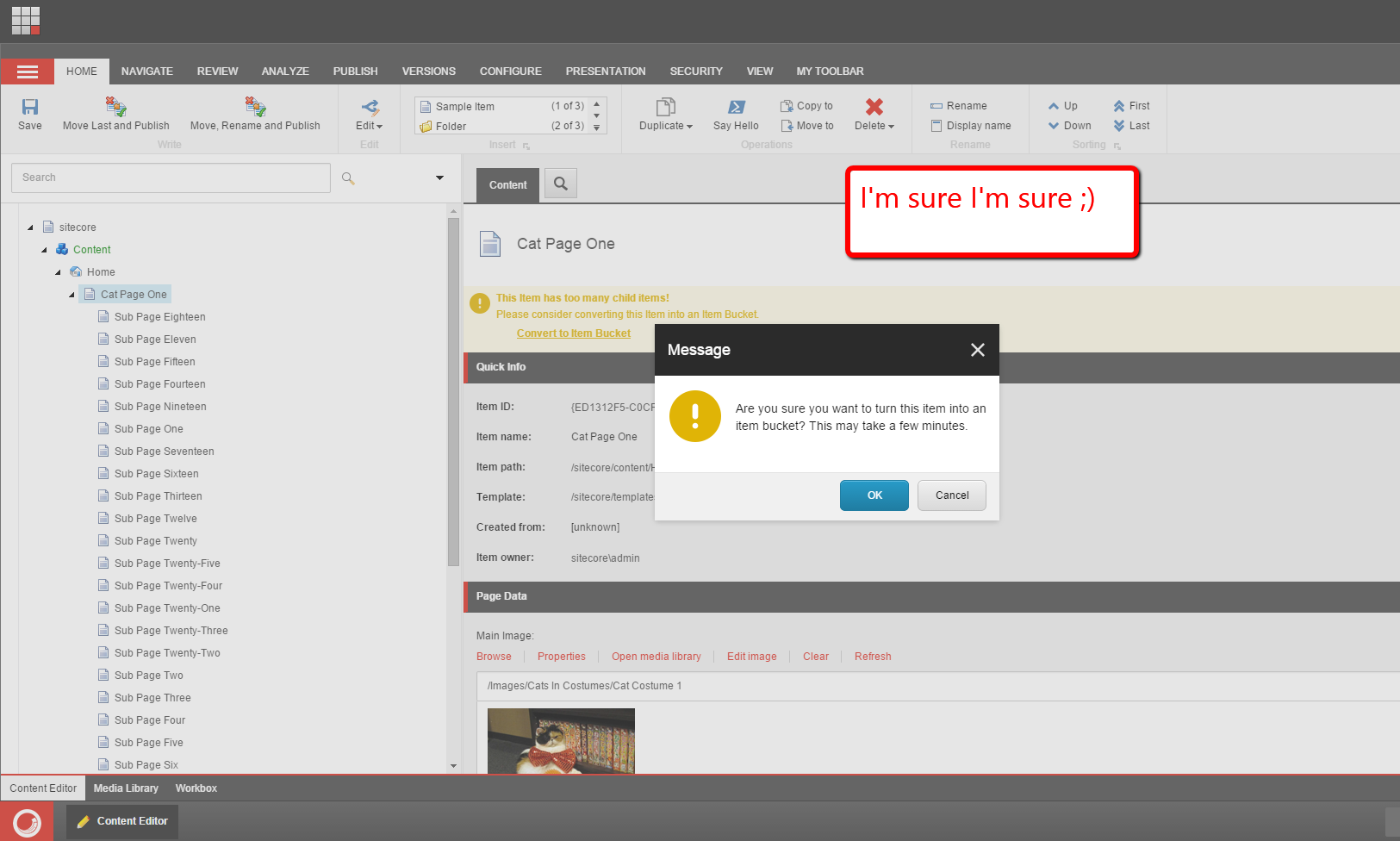
After clicking the ‘OK’ button, I saw the following progress dialog:

As you can see, the Item is now an Item Bucket, and both content editor warnings are gone:

If you have any thoughts on this, or have ideas on other places where you might want to employ the Template method pattern, please share in a comment.
Also, if you would like to see another example around adding a custom content editor warning in Sitecore, check out an older post of mine where I added one for expanding tokens in fields on an Item.
Until next time, keep on learning and keep on Sitecoring — Sitecoring is a legit verb, isn’t it? 😉
Augment Functionality in Sitecore Using the Decorator Design Pattern
Over the past few days, I’ve been trying to come up with a good idea for a blog post showing the usage of the Decorator design pattern in Sitecore.
During this time of cogitation, I was having difficulties coming up with a good example despite having had used this pattern in Sitecore on many past projects — I can’t really share those solutions since they are owned by either previous employers or clients.
However, I finally had an “EUREKA!” moment after John West — CTO of Sitecore USA — wrote a blog post earlier today where he shared an <httpRequestBegin> pipeline processor which redirects to a canonical URL for an Item.
So, what exactly did I come up with?
I built the following example which simply “decorates” the “out of the box” ItemResolver — Sitecore.Pipelines.HttpRequest.ItemResolver in Sitecore.Kernel.dll — which is used as an <httpRequestBegin> pipeline processor to figure out what the context Item should be from the URL being requested by looking for an entry in the IDTable in Sitecore (note: this idea is adapted from a blog post that Alex Shyba — Director of Platform Innovation and Engineering at Sitecore — wrote a few years ago):
using Sitecore;
using Sitecore.Data;
using Sitecore.Data.IDTables;
using Sitecore.Data.Items;
using Sitecore.Diagnostics;
using Sitecore.Pipelines.HttpRequest;

namespace Sitecore.Sandbox.Pipelines.HttpRequest
{
    public class IDTableItemResolver : HttpRequestProcessor
    {
        private string Prefix { get; set; }

        private HttpRequestProcessor InnerProcessor { get; set; }

        public override void Process(HttpRequestArgs args)
        {
            Assert.ArgumentNotNull(args, "args");
            AssertProperties();

            Item item = GetItem(args.Url.FilePath);
            if (item == null)
            {
                InnerProcessor.Process(args);
                return;
            }

            Context.Item = item;
        }

        protected virtual void AssertProperties()
        {
            Assert.IsNotNullOrEmpty(Prefix, "Prefix", "Prefix must be set in configuration!");
            Assert.IsNotNull(InnerProcessor, "InnerProcessor", "InnerProcessor must be set in configuration!");
        }

        protected virtual Item GetItem(string url)
        {
            IDTableEntry entry = IDTable.GetID(Prefix, url);
            if (entry == null || entry.ID.IsNull)
            {
                return null;
            }

            return GetItem(entry.ID);
        }

        protected Item GetItem(ID id)
        {
            Database database = GetDatabase();
            if (database == null)
            {
                return null;
            }

            return database.GetItem(id);
        }

        protected virtual Database GetDatabase()
        {
            return Context.Database;
        }
    }
}
What is the above class doing? It’s basically seeing if it can find an Item for the passed relative URL — this is passed via the FilePath property of the Url property of the HttpRequestArgs instance taken in by the Process() method — by delegating to a method that looks up an entry in the IDTable for the URL — the URL would be the key into the IDTable — and return the Item from the context database if an entry is found. If no entry is found, it just returns null.
If null is returned, that pretty much means there is no entry in the IDTable for the given relative URL so a delegation to the Process() method of the InnerProcessor is needed in order to preserve “out of the box” Sitecore functionality for Item URL resolution.
I then replaced the “out of the box” ItemResolver with the above in the following patch include configuration file:
<?xml version="1.0" encoding="utf-8" ?>
<configuration xmlns:patch="http://www.sitecore.net/xmlconfig/">
  <sitecore>
    <pipelines>
      <httpRequestBegin>
        <processor patch:instead="*[@type='Sitecore.Pipelines.HttpRequest.ItemResolver, Sitecore.Kernel']"
                   type="Sitecore.Sandbox.Pipelines.HttpRequest.IDTableItemResolver, Sitecore.Sandbox">
          <Prefix>UrlRewrite</Prefix>
          <InnerProcessor type="Sitecore.Pipelines.HttpRequest.ItemResolver, Sitecore.Kernel" />
        </processor>
      </httpRequestBegin>
    </pipelines>
  </sitecore>
</configuration>
In the above configuration file, we are setting the “out of the box” ItemResolver to be injected into the class above so that its Process() method can be “decorated”.
Let’s see this in action!
Let’s try this out with the following page Item:

In order to see the above <httpRequestBegin> pipeline processor in action, I had to add an entry into my IDTable — let’s make pretend an UrlRewrite module on the Sitecore Marketplace added this entry for us:

I loaded up another browser window; navigated to the relative URL specified in the IDTable entry; and then saw the following:

As you can see, it worked.
We can also navigate to the same page using its true URL — the one resolved by Sitecore “out of the box”:

The above worked because the inner processor resolved it.
Let’s now go to a completely different page Item altogether. Let’s use this one:

As you can see, that also worked:

If you have any thoughts on this, or have other ideas around using the Decorator pattern in Sitecore, please share in a comment.
Add Additional Item Fields to RSS Feeds Generated by Sitecore
Earlier today a colleague had asked me how to add additional Item fields into RSS feeds generated by Sitecore.
I could have sworn there was an easy way to do this, but when looking at the RSS Feed Design dialog in Sitecore, it appears you are limited to three fields on your Items “out of the box”:
After a lot of digging in Sitecore.Kernel.dll, I discovered that one can inject a subclass of Sitecore.Syndication.PublicFeed to override/augment RSS feed functionality:

As a proof-of-concept, I whipped up the following subclass of Sitecore.Syndication.PublicFeed:
using System.ServiceModel.Syndication; // Note: you must reference System.ServiceModel.dll to use this!

using Sitecore.Diagnostics;
using Sitecore.Configuration;
using Sitecore.Data.Items;
using Sitecore.Pipelines;
using Sitecore.Pipelines.RenderField;
using Sitecore.Syndication;

namespace Sitecore.Sandbox.Syndication
{
    public class ImageInContentPublicFeed : PublicFeed
    {
        private static string ImageFieldName { get; set; }

        private static string RenderFieldPipelineName { get; set; }

        static ImageInContentPublicFeed()
        {
            ImageFieldName = Settings.GetSetting("RSS.Fields.ImageFieldName");
            RenderFieldPipelineName = Settings.GetSetting("Pipelines.RenderField");
        }

        protected override SyndicationItem RenderItem(Item item)
        {
            SyndicationItem syndicationItem = base.RenderItem(item);
            AddImageHtmlToContent(syndicationItem, GetImageFieldHtml(item));
            return syndicationItem;
        }

        protected virtual string GetImageFieldHtml(Item item)
        {
            if (string.IsNullOrWhiteSpace(ImageFieldName))
            {
                return string.Empty;
            }

            return GetImageFieldHtml(item, ImageFieldName);
        }

        private static string GetImageFieldHtml(Item item, string imageFieldName)
        {
            Assert.ArgumentNotNull(item, "item");
            Assert.ArgumentNotNullOrEmpty(imageFieldName, "imageFieldName");
            Assert.ArgumentNotNullOrEmpty(RenderFieldPipelineName, "RenderFieldPipelineName");
            if (item == null || item.Fields[imageFieldName] == null)
            {
                return string.Empty;
            }

            RenderFieldArgs args = new RenderFieldArgs { Item = item, FieldName = imageFieldName };
            CorePipeline.Run(RenderFieldPipelineName, args);
            if (args.Result.IsEmpty)
            {
                return string.Empty;
            }

            return args.Result.ToString();
        }

        protected virtual void AddImageHtmlToContent(SyndicationItem syndicationItem, string imageHtml)
        {
            if (string.IsNullOrWhiteSpace(imageHtml) || !(syndicationItem.Content is TextSyndicationContent))
            {
                return;
            }

            TextSyndicationContent content = syndicationItem.Content as TextSyndicationContent;
            syndicationItem.Content = new TextSyndicationContent(string.Concat(imageHtml, content.Text), TextSyndicationContentKind.Html);
        }
    }
}
The class above ultimately overrides the RenderItem(Item item) method defined on Sitecore.Syndication.PublicFeed — it is declared virtual. The RenderItem(Item item) method above delegates to the RenderItem(Item item) method of Sitecore.Syndication.PublicFeed; grabs the System.ServiceModel.Syndication.SyndicationContent instance set in the Content property of the returned SyndicationItem object — this happens to be an instance of System.ServiceModel.Syndication.TextSyndicationContent; delegates to the <renderField> pipeline to generate HTML for the image set in the Image Field on the item; creates a new System.ServiceModel.Syndication.TextSyndicationContent instance with the HTML of the image combined with the HTML from the original TextSyndicationContent instance; sets the Content property with this new System.ServiceModel.Syndication.TextSyndicationContent instance; and returns the SyndicationItem instance to the caller.
Since I hate hard-coding things, I put the Image Field’s name and <renderField> pipeline’s name in a patch configuration file:
<configuration xmlns:patch="http://www.sitecore.net/xmlconfig/">
  <sitecore>
    <settings>
      <setting name="RSS.Fields.ImageFieldName" value="Image" />
      <setting name="Pipelines.RenderField" value="renderField" />
    </settings>
  </sitecore>
</configuration>
I then mapped the above subclass of Sitecore.Syndication.PublicFeed to the RSS Feed Item I created:

For testing, I added two Items — one with an image and another without an image:


After publishing everything, I loaded the RSS feed in my browser and saw the following:
If you know of other ways to add additional Item fields into Sitecore RSS feeds, please share in a comment.
Bundle CSS and JavaScript Files in Sitecore MVC
The other day I was poking around Sitecore.Forms.Mvc.dll — this assembly ships with Web Forms for Marketers (WFFM), and is used when WFFM is running on Sitecore MVC — and noticed WFFM does some bundling of JavaScript and CSS files:

WFFM uses the above class as an <initialize> pipeline processor. You can see this defined in Sitecore.Forms.Mvc.config:

This got me thinking: why not build my own class to serve as an <initialize> pipeline processor to bundle my CSS and JavaScript files?
As an experiment I whipped up the following class to do just that:
using System.Collections.Generic;
using System.Linq;
using System.Web.Optimization;

using Sitecore.Pipelines;

namespace Sitecore.Sandbox.Forms.Mvc.Pipelines
{
    public class RegisterAdditionalFormBundles
    {
        public RegisterAdditionalFormBundles()
        {
            CssFiles = new List<string>();
            JavaScriptFiles = new List<string>();
        }

        public void Process(PipelineArgs args)
        {
            BundleCollection bundles = GetBundleCollection();
            if (bundles == null)
            {
                return;
            }

            AddBundle(bundles, CreateCssBundle());
            AddBundle(bundles, CreateJavaScriptBundle());
        }

        protected virtual BundleCollection GetBundleCollection()
        {
            return BundleTable.Bundles;
        }

        protected virtual Bundle CreateCssBundle()
        {
            if (!CanBundleAssets(CssVirtualPath, CssFiles))
            {
                return null;
            }

            return new StyleBundle(CssVirtualPath).Include(CssFiles.ToArray());
        }

        protected virtual Bundle CreateJavaScriptBundle()
        {
            if (!CanBundleAssets(JavaScriptVirtualPath, JavaScriptFiles))
            {
                return null;
            }

            return new ScriptBundle(JavaScriptVirtualPath).Include(JavaScriptFiles.ToArray());
        }

        protected virtual bool CanBundleAssets(string virtualPath, IEnumerable<string> filePaths)
        {
            return !string.IsNullOrWhiteSpace(virtualPath)
                    && filePaths != null
                    && filePaths.Any();
        }

        private static void AddBundle(BundleCollection bundles, Bundle bundle)
        {
            if(bundle == null)
            {
                return;
            }

            bundles.Add(bundle);
        }

        private string CssVirtualPath { get; set; }

        private List<string> CssFiles { get; set; }

        private string JavaScriptVirtualPath { get; set; }

        private List<string> JavaScriptFiles { get; set; }
    }
}
The class above basically takes in a collection of CSS and JavaScript file paths as well as their virtual bundled paths — these are magically populated by Sitecore’s Configuration Factory using values provided by the configuration file shown below — iterates over both collections, and adds them to the BundleTable — the BundleTable is defined in System.Web.Optimization.dll.
I then glued everything together using a patch configuration file:
<configuration xmlns:patch="http://www.sitecore.net/xmlconfig/">
  <sitecore>
    <pipelines>
      <initialize>
        <processor patch:after="processor[@type='Sitecore.Forms.Mvc.Pipelines.RegisterFormBundles, Sitecore.Forms.Mvc']"
          type="Sitecore.Sandbox.Forms.Mvc.Pipelines.RegisterAdditionalFormBundles, Sitecore.Sandbox">
          <CssVirtualPath>~/wffm-bundles/styles.css</CssVirtualPath>
          <CssFiles hint="list">
            <CssFile>~/css/uniform.aristo.css</CssFile>
          </CssFiles>
          <JavaScriptVirtualPath>~/wffm-bundles/scripts.js</JavaScriptVirtualPath>
          <JavaScriptFiles hint="list">
            <JavaScriptFile>~/js/jquery.min.js</JavaScriptFile>
            <JavaScriptFile>~/js/jquery.uniform.min.js</JavaScriptFile>
            <JavaScriptFile>~/js/bind.uniform.js</JavaScriptFile>
          </JavaScriptFiles>
        </processor>
      </initialize>
    </pipelines>
  </sitecore>
</configuration>
I’m adding the <initialize> pipeline processor shown above after WFFM’s though theoretically you could add it anywhere within the <initialize> pipeline.
The CSS and JavaScript files defined in the configuration file above are from the Uniform project — this project includes CSS, JavaScript and images to make forms look nice, though I am in no way endorsing this project. I only needed some CSS and JavaScript files to spin up something quickly for testing.
For testing, I built the following View — it uses some helpers to render the <link> and <script> tags for the bundles — and tied it to my Layout in Sitecore:
@using System.Web.Optimization
@using Sitecore.Mvc
@using Sitecore.Mvc.Presentation

<!DOCTYPE html>
<html>

<head>
    <title></title>

    @Styles.Render("~/wffm-bundles/styles.css")
    @Scripts.Render("~/wffm-bundles/scripts.js")

</head>
<body>


    @Html.Sitecore().Placeholder("page content")

</body>
</html>
I then built a “Feedback” form in WFFM; mapped it to the “page content” placeholder defined in the View above; published it; and pulled it up in my browser. As you can see the code from the Uniform project styled the form:

For comparison, this is what the form looks like without the <initialize> pipeline processor above:

If you have any thoughts on this, or have alternative ways of bundling CSS and JavaScript files in your Sitecore MVC solutions, please share in a comment.
Clone Items using the Sitecore Item Web API
Yesterday, I had the privilege to present with Ben Lipson and Jamie Michalski, both of Velir, on the Sitecore Item Web API at the New England Sitecore User Group — if you want to see us in action, check out the recording of our presentation!
Plus, my slides are available here!
During my presentation, I demonstrated how easy it is to customize the Sitecore Item API by adding a custom <itemWebApiRequest> pipeline processor, and a custom pipeline to handle a cloning request — for another example on adding a custom <itemWebApiRequest> pipeline processor, and another pipeline to execute a different custom operation, have a look at this post where I show how to publish Items using the Sitecore Item Web API.
For any custom pipeline you build for the Sitecore Item Web API, you must define a Parameter Object that inherits from Sitecore.ItemWebApi.Pipelines.OperationArgs:
using System.Collections.Generic;

using Sitecore.Data.Items;

using Sitecore.ItemWebApi.Pipelines;

namespace Sitecore.Sandbox.ItemWebApi.Pipelines.Clone
{
    public class CloneArgs : OperationArgs
    {
        public CloneArgs(Item[] scope)
            : base(scope)
        {
        }

        public IEnumerable<Item> Destinations { get; set; }

        public bool IsRecursive { get; set; }

        public IEnumerable<Item> Clones { get; set; }
    }
}
I added three properties to the class above: a property to hold parent destinations for clones; another indicating whether all descendants should be cloned; and a property to hold a collection of the clones.
I then created a base class for processors of my custom pipeline for cloning:
using Sitecore.ItemWebApi.Pipelines;

namespace Sitecore.Sandbox.ItemWebApi.Pipelines.Clone
{
    public abstract class CloneProcessor : OperationProcessor<CloneArgs>
    {
        protected CloneProcessor()
        {
        }
    }
}
The above class inherits from Sitecore.ItemWebApi.Pipelines.OperationProcessor which is the base class for most Sitecore Item Web API pipelines.
The following class serves as one processor of my custom cloning pipeline:
using System.Collections.Generic;

using Sitecore.Data.Items;
using Sitecore.Diagnostics;

namespace Sitecore.Sandbox.ItemWebApi.Pipelines.Clone
{
    public class CloneItems : CloneProcessor
    {
        public override void Process(CloneArgs args)
        {
            Assert.ArgumentNotNull(args, "args");
            Assert.ArgumentNotNull(args.Scope, "args.Scope");
            Assert.ArgumentNotNull(args.Destinations, "args.Destinations");
            IList<Item> clones = new List<Item>();
            foreach (Item itemToClone in args.Scope)
            {
                foreach (Item destination in args.Destinations)
                {
                    clones.Add(CloneItem(itemToClone, destination, args.IsRecursive));
                }
            }

            args.Clones = clones;
        }

        private Item CloneItem(Item item, Item destination, bool isRecursive)
        {
            Assert.ArgumentNotNull(item, "item");
            Assert.ArgumentNotNull(destination, "destination");
            return item.CloneTo(destination, isRecursive);
        }
    }
}
The class above iterates over all Items in scope — these are the Items being cloned — and clones all to the specified destinations (parent Items of the clones).
I then spun up the following class to serve as another processor in my custom cloning pipeline:
using System.Linq;

using Sitecore.Diagnostics;
using Sitecore.Pipelines;

using Sitecore.ItemWebApi.Pipelines.Read;

namespace Sitecore.Sandbox.ItemWebApi.Pipelines.Clone
{
    public class SetResult : CloneProcessor
    {
        public override void Process(CloneArgs args)
        {
            Assert.ArgumentNotNull(args, "args");
            Assert.ArgumentNotNull(args.Clones, "args.Clones");
            if (args.Result == null)
            {
                ReadArgs readArgs = new ReadArgs(args.Clones.ToArray());
                CorePipeline.Run("itemWebApiRead", readArgs);
                args.Result = readArgs.Result;
            }
        }
    }
}
The above class delegates to the <itemWebApiRead> pipeline which retrieves the clones from Sitecore, and stores these in the Parameter Object instance for the custom cloning pipeline.
In order to handle custom requests in the Sitecore Item Web API, you must create a custom <itemWebApiRequest> pipeline processor. I put together the following class to handle my cloning operation:
using System;
using System.Collections.Generic;
using System.Linq;

using Sitecore.Data.Items;
using Sitecore.Diagnostics;
using Sitecore.ItemWebApi;
using Sitecore.ItemWebApi.Pipelines.Request;
using Sitecore.Pipelines;
using Sitecore.Text;
using Sitecore.Web;

using Sitecore.Sandbox.ItemWebApi.Pipelines.Clone;

namespace Sitecore.Sandbox.ItemWebApi.Pipelines.Request
{
    public class ResolveCloneAction : RequestProcessor
    {
        public override void Process(RequestArgs args)
        {
            Assert.ArgumentNotNull(args, "args");
            Assert.ArgumentNotNullOrEmpty(RequestMethod, "RequestMethod");
            Assert.ArgumentNotNullOrEmpty(MultipleItemsDelimiter, "MultipleItemsDelimiter");
            if (!ShouldProcessRequest(args))
            {
                return;
            }

            IEnumerable<Item> destinations = GetDestinationItems();
            if (!destinations.Any())
            {
                Logger.Warn("Cannot process clone action: there are no destination items!");
                return;
            }

            CloneArgs cloneArgs = new CloneArgs(args.Scope)
            {
                Destinations = destinations,
                IsRecursive = DoRecursiveCloning()
            };
            CorePipeline.Run("itemWebApiClone", cloneArgs);
            args.Result = cloneArgs.Result;
        }

        private bool ShouldProcessRequest(RequestArgs args)
        {
            // Is this the request method we care about?
            if (!AreEqualIgnoreCase(args.Context.HttpContext.Request.HttpMethod, RequestMethod))
            {
                return false;
            }

            // are multiple axes supplied?
            if (WebUtil.GetQueryString("scope").Contains(MultipleItemsDelimiter))
            {
                Logger.Warn("Cannot process clone action: multiple axes detected!");
                return false;
            }

            // are there any items in scope?
            if (!args.Scope.Any())
            {
                Logger.Warn("Cannot process clone action: there are no items in Scope!");
                return false;
            }

            return true;
        }

        private static bool AreEqualIgnoreCase(string one, string two)
        {
            return string.Equals(one, two, StringComparison.CurrentCultureIgnoreCase);
        }

        private IEnumerable<Item> GetDestinationItems()
        {
            char delimiter;
            Assert.ArgumentCondition(char.TryParse(MultipleItemsDelimiter, out delimiter), "MultipleItemsDelimiter", "MultipleItemsDelimiter must be a single character!");
            ListString destinations = new ListString(WebUtil.GetQueryString("destinations"), delimiter);
            return (from destination in destinations
                    let destinationItem = GetItem(destination)
                    where destinationItem != null
                    select destinationItem).ToList();
        }

        private Item GetItem(string path)
        {
            try
            {
                return Sitecore.ItemWebApi.Context.Current.Database.Items[path];
            }
            catch (Exception ex)
            {
                Logger.Error(ex);
            }

            return null;
        }

        private bool DoRecursiveCloning()
        {
            bool recursive;
            if (bool.TryParse(WebUtil.GetQueryString("recursive"), out recursive))
            {
                return recursive;
            }

            return false;
        }

        private string RequestMethod { get; set; }

        private string MultipleItemsDelimiter { get; set; }
    }
}
The above class ascertains whether it should handle the request: is the RequestMethod passed via configuration equal to the request method detected, and are there any Items in scope? I also built this processor to handle only one axe in order to keep the code simple.
Once the class determines it should handle the request, it grabs all destination Items from the context database — this is Sitecore.ItemWebApi.Context.Current.Database which is populated via the sc_database query string parameter passed via the request.
Further, the class above detects whether the cloning operation is recursive: should we clone all descendants of the Items in scope? This is also passed by a query string parameter.
I then glued everything together using the following Sitecore configuration file:
<?xml version="1.0" encoding="utf-8"?>
<configuration xmlns:patch="http://www.sitecore.net/xmlconfig/">
  <sitecore>
    <pipelines>
      <itemWebApiClone>
        <processor type="Sitecore.Sandbox.ItemWebApi.Pipelines.Clone.CloneItems, Sitecore.Sandbox" />
        <processor type="Sitecore.Sandbox.ItemWebApi.Pipelines.Clone.SetResult, Sitecore.Sandbox" />
      </itemWebApiClone>
      <itemWebApiRequest>
        <processor patch:before="*[@type='Sitecore.ItemWebApi.Pipelines.Request.ResolveAction, Sitecore.ItemWebApi']"
                   type="Sitecore.Sandbox.ItemWebApi.Pipelines.Request.ResolveCloneAction, Sitecore.Sandbox">
          <RequestMethod>clone</RequestMethod>
          <MultipleItemsDelimiter>|</MultipleItemsDelimiter>
        </processor>
      </itemWebApiRequest>
    </pipelines>
  </sitecore>
</configuration>
Let’s clone the following Sitecore Item with descendants to two folders:

In order to make this happen, I spun up the following HTML page using jQuery — no doubt the front-end gurus reading this are cringing when seeing the following code, but I am not much of a front-end developer:
<!DOCTYPE html>
<html lang="en">
	<head>
		<script src="//ajax.googleapis.com/ajax/libs/jquery/2.1.1/jquery.min.js"></script>
		<script src="//cdnjs.cloudflare.com/ajax/libs/json3/3.3.2/json3.min.js"></script>
		<script src="//cdnjs.cloudflare.com/ajax/libs/prettify/r224/prettify.js"></script>
		<link rel="stylesheet" type="text/css" href="//cdnjs.cloudflare.com/ajax/libs/prettify/r224/prettify.css" />
	</head>
	<body>
		<img width="400" style="display: block; margin-left: auto; margin-right: auto" src="/assets/img/clone-all-the-things.jpg" />
		<input type="button" id="button" value="Clone" style="width:100px;height:50px;font-size: 24px;" />
		<h2 id="confirmation" style="display: none;">Whoa! Something happened!</h2>
		<div id="working" style="display: none;"><img style="display: block; margin-left: auto; margin-right: auto" src="/assets/img/arrow-working.gif" /></div>
		<pre id="responseContainer" class="prettyprint" style="display: none;"><code id="response" class="language-javascript"></code></pre>
		<script type="text/javascript">
		$('#button').click(function() {
			$('#confirmation').hide();
			$('#responseContainer').hide();
			$('#working').show();
			$.ajax({
					type:'clone',
					url: "http://sandbox7/-/item/v1/sitecore/content/Home/Landing Page One?scope=s&destinations=/sitecore/content/Home/Clones|/sitecore/content/Home/Some More Clones&recursive=true&sc_database=master",
					headers:{
						"X-Scitemwebapi-Username":"extranet\\ItemWebAPI",
						"X-Scitemwebapi-Password":"1t3mW3bAP1"}
				}).done(function(response) {
					$('#confirmation').show();
					$('#response').html(JSON.stringify(response, null, 4));
					$('#working').hide();
					$('#responseContainer').show();
				});
		});
		</script>
	</body>
</html>
Plus, please pardon the hard-coded Sitecore credentials — I know you would never store a username and password in front-end code, right? 😉
The above HTML page looks like this on initial load:

I then clicked the ‘Clone’ button, and saw the following:

As you can see, the target Item with descendants were cloned to the destination folders set in the jQuery above:

If you have any thoughts on this, or have other ideas around customizing the Sitecore Item Web API, please share in a comment.
Leverage the Sitecore Configuration Factory: Inject Dependencies Through Class Constructors
In my previous post, I showed how you can leverage Sitecore’s Configuration Factory to inject dependencies into properties of class instances — this is known as Setter injection in the Dependency injection world — and thought I would share another way you can inject dependencies into instances of classes defined in configuration: through class constructors (this is known as Constructor injection).
Suppose we have the following interface for objects that perform some kind of operation on parameters passed to their DoSomeOtherStuff() method:
namespace Sitecore.Sandbox.Pipelines.SomePipeline
{
    public interface ISomeOtherThing
    {
        void DoSomeOtherStuff(SomeProcessorArgs args, string someString);
    }
}
The following dummy class implements the interface above — sadly, it does not do anything:
namespace Sitecore.Sandbox.Pipelines.SomePipeline
{
    public class SomeOtherThing : ISomeOtherThing
    {
        public void DoSomeOtherStuff(SomeProcessorArgs args, string someString)
        {
            // TODO: add code to do some other stuff
        }
    }
}
In my previous post, I defined the following interface for objects that “do stuff”, and will reuse it here:
namespace Sitecore.Sandbox.Pipelines.SomePipeline
{
    public interface ISomeThing
    {
        void DoStuff(SomeProcessorArgs args);
    }
}
I have modified the SomeThing class from my previous post to consume an instance of a class that implements the ISomeOtherThing interface above along with a string instance:
using Sitecore.Diagnostics;

namespace Sitecore.Sandbox.Pipelines.SomePipeline
{
    public class SomeThing : ISomeThing
    {
        public SomeThing(ISomeOtherThing someOtherThing, string someString)
        {
            Assert.ArgumentNotNull(someOtherThing, "someOtherThing");
            Assert.ArgumentNotNullOrEmpty(someString, "someString");
            SomeOtherThing = someOtherThing;
            SomeString = someString;
        }

        public void DoStuff(SomeProcessorArgs args)
        {
            SomeOtherThing.DoSomeOtherStuff(args, SomeString);
        }

        private ISomeOtherThing SomeOtherThing { get; set; }

        private string SomeString { get; set; }
    }
}
The Sitecore Configuration Factory will magically create instances of the types passed to the constructor of the SomeThing class defined above, and you can then assign these instances to members defined in your class.
As far as I know — I did a lot of digging in Sitecore.Kernel.dll for answers, and some code experimentation — the Sitecore Configuration Factory will only magically inject instances of class types and strings: it will not inject .NET primitive types (if I am incorrect on this, please share in a comment).
I have reused the SomeProcessor class from my previous post — I did not change any code in it:
using Sitecore.Diagnostics;

namespace Sitecore.Sandbox.Pipelines.SomePipeline
{
    public class SomeProcessor
    {
        public void Process(SomeProcessorArgs args)
        {
            DoSomethingWithArgs(args);
        }

        private void DoSomethingWithArgs(SomeProcessorArgs args)
        {
            Assert.ArgumentNotNull(SomeThing, "SomeThing");
            SomeThing.DoStuff(args);
        }

        private ISomeThing SomeThing { get; set; } // is populated magically via Setter injection!
    }
}
We can then piece everything together using a Sitecore patch configuration file:
<?xml version="1.0" encoding="utf-8" ?>
<configuration xmlns:patch="http://www.sitecore.net/xmlconfig/">
  <sitecore>
    <pipelines>
      <somePipeline>
        <processor type="Sitecore.Sandbox.Pipelines.SomePipeline.SomeProcessor, Sitecore.Sandbox">
          <SomeThing type="Sitecore.Sandbox.Pipelines.SomePipeline.SomeThing, Sitecore.Sandbox">
            <param hint="1" type="Sitecore.Sandbox.Pipelines.SomePipeline.SomeOtherThing, Sitecore.Sandbox" />
            <param hint="2">just some string</param>
          </SomeThing>
        </processor>
      </somePipeline>
    </pipelines>
  </sitecore>
</configuration>
You must define <param> elements in order to pass arguments to constructors. The “hint” attribute determines the order of the parameters passed to the class constructor, though I believe using this attribute is optional (if I am wrong on this assumption, please share in a comment below).
If you have any thoughts on this, please drop a comment.
Leverage the Sitecore Configuration Factory: Populate Class Properties with Instances of Types Defined in Configuration
I thought I would jot down some information that frequently comes up when I am asked to recommend plans of attack on projects. The first recommendation I always give for any Sitecore project is: define as much as you possibly can in Sitecore configuration. Doing so introduces seams in your code: code that does not have to change when its underlying behavior changes — think interfaces. 😉
When defining types in Sitecore configuration, you are leveraging Sitecore’s built-in Dependency Injection framework: Sitecore’s Configuration Factory will magically inject instances of classes — yes, you would define these in configuration files — into properties of classes that are used for your pipeline processors, event handlers, and other Sitecore configuration-defined objects.
For example, suppose we have the following interface for classes that change state on an instance of a phony subclass of Sitecore.Pipelines.PipelineArgs:
namespace Sitecore.Sandbox.Pipelines.SomePipeline
{
    public interface ISomeThing
    {
        void DoStuff(SomeProcessorArgs args);
    }
}
Let’s create a fake class that implements the ISomeThing interface above:
namespace Sitecore.Sandbox.Pipelines.SomePipeline
{
    public class SomeThing : ISomeThing
    {
        public void DoStuff(SomeProcessorArgs args)
        {
            // it would be nice if we had code in here
        }
    }
}
We can then define a class property with the ISomeThing interface type in a class that serves as a pipeline processor:
using Sitecore.Diagnostics;

namespace Sitecore.Sandbox.Pipelines.SomePipeline
{
    public class SomeProcessor
    {
        public void Process(SomeProcessorArgs args)
        {
            DoSomethingWithArgs(args);
        }

        private void DoSomethingWithArgs(SomeProcessorArgs args)
        {
            Assert.IsNotNull(SomeThing, "SomeThing must be set in your configuration!");
            SomeThing.DoStuff(args);
        }

        private ISomeThing SomeThing { get; set; } // this is populated magically!
    }
}
The class above would serve as a processor for the dummy <somePipeline> defined in the following configuration file:
<?xml version="1.0" encoding="utf-8" ?>
<configuration xmlns:patch="http://www.sitecore.net/xmlconfig/">
  <sitecore>
    <pipelines>
      <somePipeline>
        <processor type="Sitecore.Sandbox.Pipelines.SomePipeline.SomeProcessor, Sitecore.Sandbox">
          <SomeThing type="Sitecore.Sandbox.Pipelines.SomePipeline.SomeThing, Sitecore.Sandbox" />
        </processor>
      </somePipeline>
    </pipelines>
  </sitecore>
</configuration>
In the configuration file above, we defined a <SomeThing /> element within the processor element of the <somePipeline> pipeline, and this directly maps to the SomeThing property in the SomeProcessor class shown above. Keep in mind that names matter here, so the name of the configuration element must match the name of the property.
Until next time, have a Sitecoretastic day!
 SitecoreJunkie.com