



Earlier today I discovered that clones in Sitecore are not renamed when their source Items are renamed — I’m baffled over how I have not noticed this before since I’ve been using Sitecore clones for a while now 
I’ve created some clones in my Sitecore instance to illustrate:

I then initiated the process for renaming the source item:

As you can see the clones were not renamed:

One might argue this is expected behavior for clones — only source Item field values are propagated to its clones when there are no data collisions (i.e. a source Item’s field value is pushed to the same field in its clone when that data has not changed directly on the clone — and the Item name should not be included in this process since it does not live in a field.
Sure, I see that point of view but one of the requirements of the project I am currently working on mandates that source Item name changes be pushed to the clones of that source Item.
So what did I do to solve this? I created an item:renamed event handler similar to the following (the one I built for my project is slightly different though the idea is the same):
using System;
using System.Collections.Generic;

using Sitecore.Data.Items;
using Sitecore.Diagnostics;
using Sitecore.Events;
using Sitecore.Links;
using Sitecore.SecurityModel;

namespace Sitecore.Sandbox.Data.Clones
{
    public class ItemEventHandler
    {
        protected void OnItemRenamed(object sender, EventArgs args)
        {
            Item item = GetItem(args);
            if (item == null)
            {
                return;
            }

            RenameClones(item);
        }

        protected virtual Item GetItem(EventArgs args)
        {
            if (args == null)
            {
                return null;
            }

            return Event.ExtractParameter(args, 0) as Item;
        }

        protected virtual void RenameClones(Item item)
        {
            Assert.ArgumentNotNull(item, "item");
            using (new LinkDisabler())
            {
                using (new SecurityDisabler())
                {
                    using (new StatisticDisabler())
                    {
                        Rename(GetClones(item), item.Name);
                    }
                }
            }
        }

        protected virtual IEnumerable<Item> GetClones(Item item)
        {
            Assert.ArgumentNotNull(item, "item");
            IEnumerable<Item> clones = item.GetClones();
            if (clones == null)
            {
                return new List<Item>();
            }

            return clones;
        }

        protected virtual void Rename(IEnumerable<Item> items, string newName)
        {
            Assert.ArgumentNotNull(items, "items");
            Assert.ArgumentNotNullOrEmpty(newName, "newName");
            foreach (Item item in items)
            {
                Rename(item, newName);
            }
        }

        protected virtual void Rename(Item item, string newName)
        {
            Assert.ArgumentNotNull(item, "item");
            Assert.ArgumentNotNullOrEmpty(newName, "newName");
            if (!item.Access.CanRename())
            {
                return;
            }

            item.Editing.BeginEdit();
            item.Name = newName;
            item.Editing.EndEdit();
        }
    }
}
The handler above retrieves all clones for the Item being renamed, and renames them using the new name of the source Item — I borrowed some logic from the Execute method in Sitecore.Shell.Framework.Pipelines.RenameItem in Sitecore.Kernel.dll (this serves as a processor of the <uiRenameItem> pipeline).
If you would like to learn more about events and their handlers, I encourage you to check out John West‘s post about them, and also take a look at this page on the
Sitecore Developer Network (SDN).
I then registered the above event handler in Sitecore using the following configuration file:
<?xml version="1.0" encoding="utf-8" ?>
<configuration xmlns:patch="http://www.sitecore.net/xmlconfig/">
  <sitecore>
    <events>
      <event name="item:renamed">
        <handler type="Sitecore.Sandbox.Data.Clones.ItemEventHandler, Sitecore.Sandbox" method="OnItemRenamed"/>
      </event>
    </events>
  </sitecore>
</configuration>
Let’s take this for a spin.
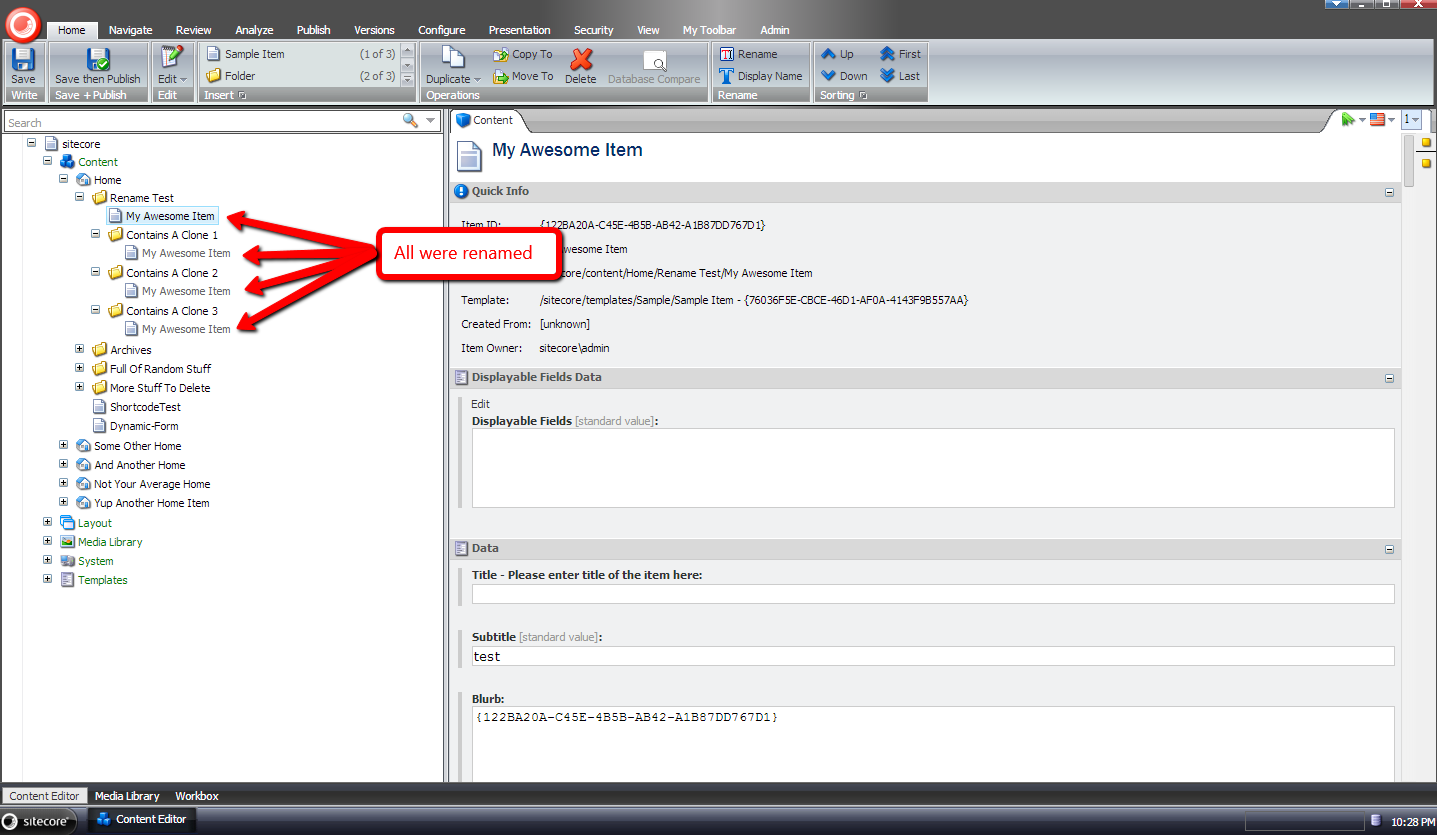
I went back to my source item, renamed it back to ‘My Cool Item’, and then initiated another rename operation on it:
As you can see all clones were renamed:
If you have any thoughts/concerns on this approach, or ideas on other ways to accomplish this, please share in a comment.
 SitecoreJunkie.com