



A couple of days ago, Sitecore MVP Brian Pedersen wrote an article discussing how newlines and carriage returns in Multi-Line Text fields can intrusively launch Sitecore’s “Do you want to save the changes to the item?” dialog box when clicking away from an item — even when you’ve made no changes to the item. Brian then offered an extension method on the String class as a way to remedy this annoyance.
However, Brian’s extension method cannot serve a solution on its own. It has to be invoked from somewhere to stamp out the substring malefactors — newlines (“\n”), carriage returns (“\r”), tabs (“\t”), and non-breaking spaces (“\xA0”).
This article gives one possible solution for uprooting these from Multi-Line Text fields within the Sitecore client by removing them upon item save.
First, I created a utility class that removes specified substrings from a string passed to it.
using System;
using System.Collections.Generic;
using System.Linq;
using System.Text;

namespace Sitecore.Sandbox.Utilities.StringUtilities.Base
{
    public interface ISubstringAnnihilator
    {
        string AnnihilateSubstrings(string input);
    }
}
using System;
using System.Collections.Generic;
using System.Linq;
using System.Text;

using Sitecore.Sandbox.Utilities.StringUtilities.Base;

namespace Sitecore.Sandbox.Utilities.StringUtilities
{
    public class SubstringAnnihilator : ISubstringAnnihilator
    {
        private const string ReplacementString = " ";
        private static readonly IEnumerable<string> SubstringsToAnnihilate = new string[] { "\r\n", "\n", "\r", "\t", "\xA0"};

        private SubstringAnnihilator()
        {
        }

        public string AnnihilateSubstrings(string input)
        {
            foreach (string substringToAnnihilate in SubstringsToAnnihilate)
            {
                input = input.Replace(substringToAnnihilate, ReplacementString);
            }

            return input;
        }

        public static ISubstringAnnihilator CreateNewSubstringAnnihilator()
        {
            return new SubstringAnnihilator();
        }
    }
}
It would probably be ideal to move the target substrings defined within the SubstringsToAnnihilate string array into a configuration file or even into Sitecore itself. I decided not introduce that complexity here for the sake of brevity.
Next, I created a Save pipeline. I used .NET Reflector to see how other Save pipelines in /configuration/sitecore/processors/saveUI/ in the Web.config were built — I used these as a model for creating my own — and used my SubstringAnnihilator utility class to seek and destroy the target substrings (well, just replace them with a space :)).
using System;
using System.Collections.Generic;
using System.Linq;
using System.Text;

using Sitecore.Data;
using Sitecore.Data.Fields;
using Sitecore.Data.Items;
using Sitecore.Diagnostics;
using Sitecore.Pipelines.Save;

using Sitecore.Sandbox.Utilities.StringUtilities;
using Sitecore.Sandbox.Utilities.StringUtilities.Base;

namespace Sitecore.Sandbox.Pipelines.SaveUI
{
    public class FixMultiLineTextFields
    {
        private static readonly ISubstringAnnihilator Annihilator = SubstringAnnihilator.CreateNewSubstringAnnihilator();

        public void Process(SaveArgs saveArgs)
        {
            FixAllItemFieldsWhereApplicable(saveArgs);
        }

        private static void FixAllItemFieldsWhereApplicable(SaveArgs saveArgs)
        {
            AssertSaveArgs(saveArgs);
            foreach (SaveArgs.SaveItem saveItem in saveArgs.Items)
            {
                FixSaveItemFieldsWhereApplicable(saveItem);
            }
        }

        private static void AssertSaveArgs(SaveArgs saveArgs)
        {
            Assert.ArgumentNotNull(saveArgs, "saveArgs");
            Assert.IsNotNull(saveArgs.Items, "saveArgs.Items");
        }

        private static void FixSaveItemFieldsWhereApplicable(SaveArgs.SaveItem saveItem)
        {
            Item item = GetItem(saveItem);
            foreach (SaveArgs.SaveField saveField in saveItem.Fields)
            {
                FixSaveItemFieldIfApplicable(item, saveField);
            }
        }

        private static Item GetItem(SaveArgs.SaveItem saveItem)
        {
            if (saveItem != null)
            {
                return Client.ContentDatabase.Items[saveItem.ID, saveItem.Language, saveItem.Version];
            }

            return null;
        }

        private static void FixSaveItemFieldIfApplicable(Item item, SaveArgs.SaveField saveField)
        {
            if (ShouldEnsureFieldValue(item, saveField))
            {
                saveField.Value = Annihilator.AnnihilateSubstrings(saveField.Value);
            }
        }

        private static bool ShouldEnsureFieldValue(Item item, SaveArgs.SaveField saveField)
        {
            Field field = item.Fields[saveField.ID];
            return ShouldEnsureFieldValue(field);
        }

        private static bool ShouldEnsureFieldValue(Field field)
        {
            return field.TypeKey == "memo"
                    || field.TypeKey == "multi-line text";
        }
    }
}
Now, it’s time to insert my new Save pipeline within the SaveUI pipeline stack. I’ve done this with my /App_Config/Include/FixMultiLineTextFields.config file:
<?xml version="1.0" encoding="utf-8"?>
<configuration xmlns:patch="http://www.sitecore.net/xmlconfig/">
	<sitecore>
		<processors>
			<saveUI>
				<processor mode="on" type="Sitecore.Sandbox.Pipelines.SaveUI.FixMultiLineTextFields, Sitecore.Sandbox" patch:after="processor[@type='Sitecore.Pipelines.Save.TightenRelativeImageLinks, Sitecore.Kernel']" />
			</saveUI>
		</processors>
	</sitecore>
</configuration>
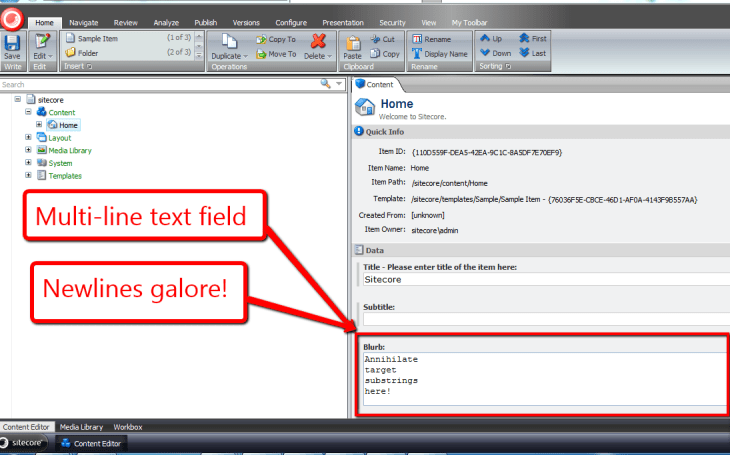
Let’s take the above for a spin. I’ve inserted a sentence with newlines after every word within it into my Blurb Multi-Line Text field:
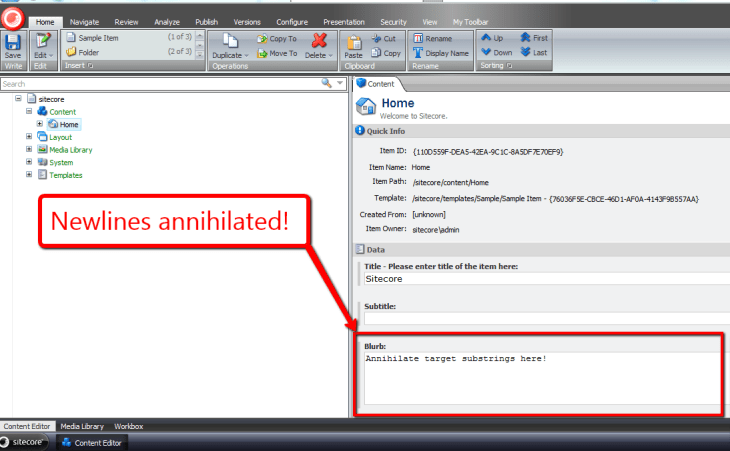
Now, I’ve clicked save, and all newlines within my Blurb Multi-Line Text field have been annihilated:
I would like to thank to Brian Pedersen for writing his article the other day — it served as the bedrock for this one, and kindled something in me to write the code above.
Keep smiling when coding!
 SitecoreJunkie.com
Very good article. I’m experiencing a few of these issues as well..