



In my previous post I discussed the Sitecore UploadWatcher — a Sitecore.IO.FileWatcher which monitors the /upload directory of your Sitecore instance and uploads files dropped into that directory into the Media Library.
One thing I could never find in the UploadWatcher is functionality to delete files in the /upload directory after they are uploaded into the Media Library — if you know of an “out of the box” way of doing this, please drop a comment.
After peeking into Sitecore.Resources.Media.UploadWatcher using .NET Reflector, I discovered I could add this functionality quite easily since its Created() method — this method handles the uploading of the files into the Media Library by delegating to Sitecore.Resources.Media.MediaManager.Creator.FileCreated() — is overridable. In theory, all I would need to do would be to subclass the UploadWatcher class; override the Created() method; delegate to the base class’ Created() method to handle the upload of the file to the Media Library; then delete the file once the base class’ Create() method was done executing.
After coding, experimenting and refactoring, I built the following class that subclasses Sitecore.Resources.Media.UploadWatcher:
using System;
using System.Collections.Generic;
using System.IO;
using System.Linq;
using System.Xml;

using Sitecore.Configuration;
using Sitecore.Diagnostics;
using Sitecore.IO;
using Sitecore.Resources.Media;
using Sitecore.Xml;

namespace Sitecore.Sandbox.Resources.Media
{
    public class CleanupUploadWatcher : UploadWatcher
    {
        private IEnumerable<string> PathsToIgnore { get; set; }

        private IEnumerable<string> FileNamePartsToIgnore { get; set; }

        private bool ShouldDeleteAfterUpload { get; set; }

        public CleanupUploadWatcher()
            : base()
        {
            Initialize();
        }

        private void Initialize()
        {
            IEnumerable<XmlNode> configNodes = GetIgnoreConfigNodes();
            PathsToIgnore = GetPathsToIgnore(configNodes);
            FileNamePartsToIgnore = GetFileNamePartsToIgnore(configNodes);
            ShouldDeleteAfterUpload = GetShouldDeleteAfterUpload();
        }

        protected virtual IEnumerable<XmlNode> GetIgnoreConfigNodes()
        {
            string configNodeRoot = GetConfigNodeRoot();
            if (string.IsNullOrWhiteSpace(configNodeRoot))
            {
                return Enumerable.Empty<XmlNode>();
            }

            XmlNode rootNode = Factory.GetConfigNode(configNodeRoot);
            if (rootNode == null)
            {
                return Enumerable.Empty<XmlNode>();
            }

            return XmlUtil.GetChildNodes(rootNode, true);
        }

        protected virtual string GetConfigNodeRoot()
        {
            return "mediaLibrary/watcher/ignoreList";
        }

        protected virtual IEnumerable<string> GetPathsToIgnore(IEnumerable<XmlNode> nodes)
        {
            if (IsEmpty(nodes))
            {
                return Enumerable.Empty<string>();
            }

            HashSet<string> pathsToIgnore = new HashSet<string>();
            foreach (XmlNode node in nodes)
            {
                string containsValue = XmlUtil.GetAttribute("contains", node);
                if (ShouldAddContainsValue(containsValue, node, "ignorepath"))
                {
                    pathsToIgnore.Add(containsValue);
                }
            }

            return pathsToIgnore;
        }

        protected virtual IEnumerable<string> GetFileNamePartsToIgnore(IEnumerable<XmlNode> nodes)
        {
            if (IsEmpty(nodes))
            {
                return Enumerable.Empty<string>();
            }

            HashSet<string> partsToIgnore = new HashSet<string>();
            foreach (XmlNode node in nodes)
            {
                string containsValue = XmlUtil.GetAttribute("contains", node);
                if (ShouldAddContainsValue(containsValue, node, "ignore"))
                {
                    partsToIgnore.Add(containsValue);
                }
            }

            return partsToIgnore;
        }

        protected virtual bool ShouldAddContainsValue(string containsValue, XmlNode node, string targetNodeName)
        {
            return !string.IsNullOrWhiteSpace(containsValue)
                    && node != null
                    && string.Equals(node.Name, targetNodeName, StringComparison.OrdinalIgnoreCase);
        }

        protected static bool IsEmpty<T>(IEnumerable<T> collection)
        {
            return collection == null || !collection.Any();
        }

        protected override void Created(string filePath)
        {
            Assert.ArgumentNotNullOrEmpty(filePath, "filePath");
            if (!ShouldIgnoreFile(filePath))
            {
                base.Created(filePath);
                DeleteFile(filePath);
            }
        }

        protected virtual bool GetShouldDeleteAfterUpload()
        {
            XmlNode node = Factory.GetConfigNode("watchers/media/additionalSettings");
            if (node == null)
            {
                return false;
            }

            string deleteAfterUploadValue = XmlUtil.GetAttribute("deleteAfterUpload", node);
            if(string.IsNullOrWhiteSpace(deleteAfterUploadValue))
            {
                return false;
            }

            bool shouldDelete;
            bool.TryParse(deleteAfterUploadValue, out shouldDelete);
            return shouldDelete;
        }

        protected virtual bool ShouldIgnoreFile(string filePath)
        {
            Assert.ArgumentNotNullOrEmpty(filePath, "filePath");
            foreach (string path in PathsToIgnore)
            {
                if (ContainsSubstring(filePath, path))
                {
                    return true;
                }
            }

            string fileName = Path.GetFileName(filePath);
            foreach (string part in FileNamePartsToIgnore)
            {
                if(ContainsSubstring(fileName, part))
                {
                    return true;
                }
            }

            return false;
        }

        protected virtual bool ContainsSubstring(string value, string substring)
        {
            if(string.IsNullOrWhiteSpace(value) || string.IsNullOrWhiteSpace(substring))
            {
                return false;
            }

            return value.IndexOf(substring, StringComparison.OrdinalIgnoreCase) > -1;
        }

        protected virtual void DeleteFile(string filePath)
        {
            Assert.ArgumentNotNullOrEmpty(filePath, "filePath");
            if(!ShouldDeleteAfterUpload)
            {
                return;
            }

            try
            {
                FileUtil.Delete(filePath);
            }
            catch(Exception ex)
            {
                Log.Error(ToString(), ex, this);
            }
        }
    }
}
You might thinking “Mike, there is more going on in here than just delegating to the base class’ Created() method and deleting the file. Well, you are correct — I had to do a few things further than what I thought I needed to do, and I’ll explain why.
I had to duplicate the logic — actually I wrote my own logic — to parse the Sitecore configuration which defines the substrings of file names and paths to ignore since these collections on the base UploadWatcher class are private — subclasses cannot access these collections — in order to prevent the code from deleting a file that should be ignored.
I also wedged in configuration with code to turn off the delete functionality if needed.
I then created the following patch include configuration file to hold the configuration setting to turn the delete functionality on/off:
<configuration xmlns:patch="http://www.sitecore.net/xmlconfig/">
  <sitecore>
    <watchers>
      <media>
        <additionalSettings deleteAfterUpload="true" />
      </media>
    </watchers>
  </sitecore>
</configuration>
I then registered the new CleanupUploadWatcher in the Web.config — please see my previous post which explains why this is needed:
<system.webServer>
    <modules runAllManagedModulesForAllRequests="true">

      <!-- stuff here -->

      <!-- <add type="Sitecore.Resources.Media.UploadWatcher, Sitecore.Kernel" name="SitecoreUploadWatcher" /> -->
      <add type="Sitecore.Sandbox.Resources.Media.CleanupUploadWatcher, Sitecore.Sandbox" name="SitecoreUploadWatcher" />

      <!-- more stuff down here -->

    </modules>

    <!-- and more stuff down here -->

<system.webServer>
Let’s see this in action!
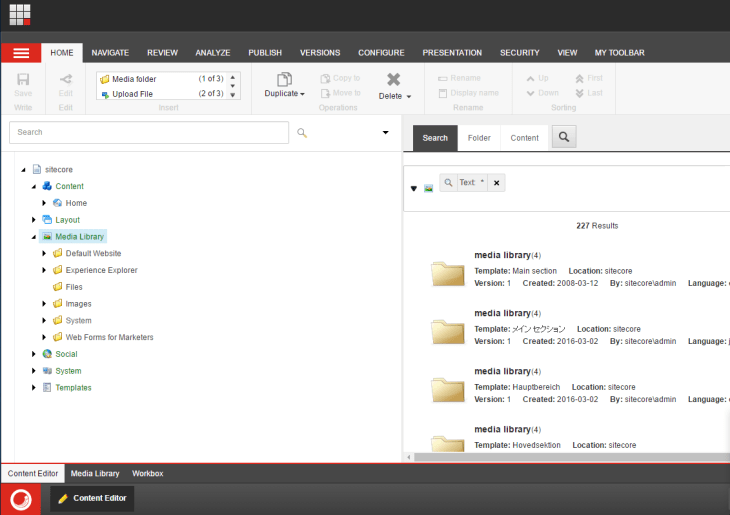
As you can see, there is no Media Library Item in the root of my Media Library (/sitecore/media library) — this is where the UploadWatcher uploads the file to:
I then copied an image from a folder on my Desktop to the /upload directory of my Sitecore instance:

As you can see above, the image is deleted after it is dropped.
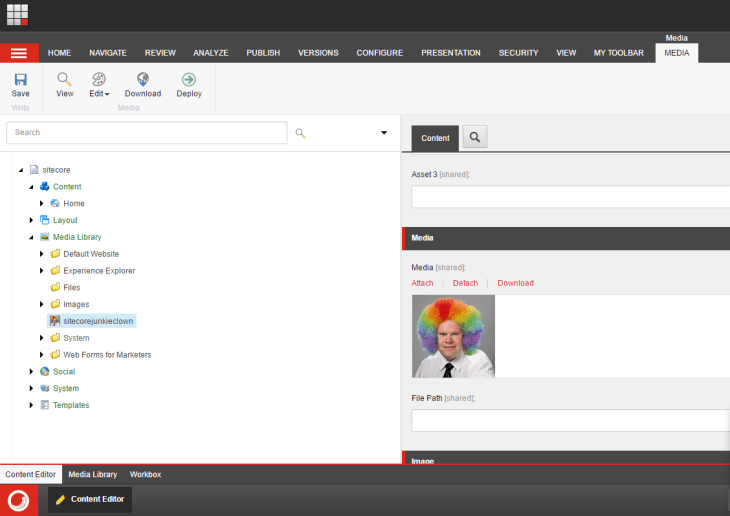
I then went back to my Media Library and refreshed. As you can see here, the file was uploaded:
If you have any thoughts on this or suggestions on making it better, please share in a comment.
 SitecoreJunkie.com