



This week, I’ve been off from work, and have been spending most of my downtime experimenting with Sitecore-ry development things — no, not you Mike — primarily poking around the core database to find things I can override or extend — for a thought provoking article about whether to override or extend things in Sitecore, check out John West’s blog post on this topic — and decided get my hands dirty by creating a custom Sitecore field.
This is something I feel isn’t being done enough by developers out in the wild — myself included — so I decided to take a stab at it, and share how you could go about accomplishing this.
The first field I created was a custom Single-Line Text field with a clear button. Since the jQuery library is available in the Sitecore client, I utilized a jQuery plugin to help me with this. It’s not a very robust plugin — I did have to make a couple of changes due to issues I encountered which I will omit from this article — albeit the purpose of me creating this field was to see how difficult it truly is.
As you can see below, creating a custom Single-Line Text isn’t difficult at all. All one has to do is subclass Sitecore.Shell.Applications.ContentEditor.Text in Sitecore.Kernel.dll, and ultimately override the DoRender() method:
using System;
using System.Collections.Generic;
using System.Linq;
using System.Web.UI;
using System.Web;

namespace Sitecore.Sandbox.Shell.Applications.ContentEditor
{
    public class ClearableSingleLineText : Sitecore.Shell.Applications.ContentEditor.Text
    {
        protected override void DoRender(HtmlTextWriter output)
        {
            SetWidthAndHeightStyle();
            RenderMyHtml(output);
            RenderChildren(output);
            RenderAutoSizeJavascript(output);
        }

        private void RenderMyHtml(HtmlTextWriter output)
        {
            const string htmlFormat = "<input{0}/>";
            output.Write(string.Format(htmlFormat, ControlAttributes));
        }

        private void RenderAutoSizeJavascript(HtmlTextWriter output)
        {
			/* I'm calling the jQuery() function directly since $() is defined for prototype.js in the Sitecore client */
            const string jsFormat = "<script type=\"text/javascript\">jQuery('#{0}').clearable();</script>";
            output.Write(string.Format(jsFormat, ID));
        }
    }
}
I then added a script reference to the jQuery plugin above, and embedded some css in /sitecore/shell/Applications/Content Manager/Default.aspx:
<script type="text/javaScript" language="javascript" src="/sitecore/shell/Controls/Lib/jQuery/jquery.clearable.js"></script>

<style type="text/css">
/* Most of this css was provided by the jquery.clearable plugin author */
a.clearlink
{
	background: url("/img/close-button.png") no-repeat scroll 0 0 transparent;
	background-position: center center;
	cursor: pointer;
	display: -moz-inline-stack;
	display: inline-block;
	zoom:1;
	*display:inline;
	height: 12px;
	width: 12px;
	z-index: 2000;
	border: 0px solid;
	position: relative;
	top: -18px;
	left: -5px;
	float: right;
}

a.clearlink:hover
{
	background: url("/img/close-button.png") no-repeat scroll -12px 0 transparent;
	background-position: center center;
}
</style>
What I did above doesn’t sit well with me. If a future version of Sitecore makes any changes to this .aspx, these changes might be lost (well, hopefully you would keep a copy of this file in a source control system somewhere).
However, I could not think of a better way of adding this javascript and css. If you know of a better way, please leave a comment.
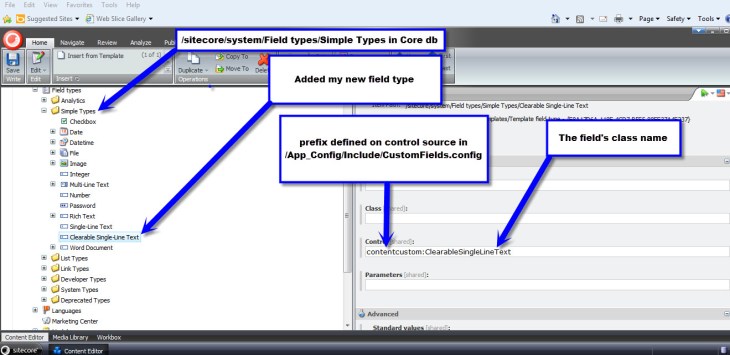
I then defined my library of controls for my custom fields — not much of a library, since I only defined one field so far 🙂 — in a new patch config file /App_Config/Include/CustomFields.config:
<?xml version="1.0" encoding="utf-8"?>
<configuration xmlns:patch="http://www.sitecore.net/xmlconfig/">
	<sitecore>
		<controlSources>
			<source mode="on" namespace="Sitecore.Sandbox.Shell.Applications.ContentEditor" assembly="Sitecore.Sandbox" prefix="contentcustom"/>
		</controlSources>
	  </sitecore>
</configuration>
In the core database, I created a new field type for my custom Single-Line Text:
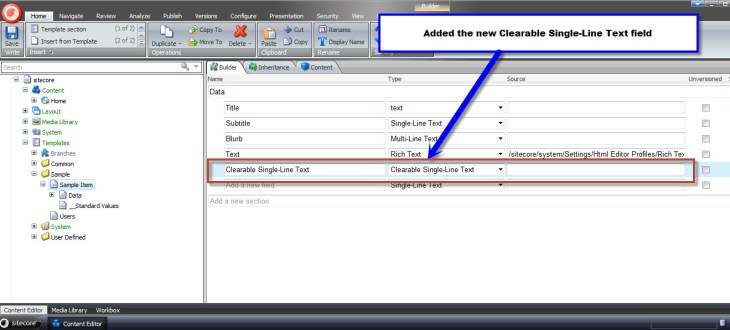
I then added a new field to my template using this new custom field definition in my master database:
Let’s see this new custom field in action.
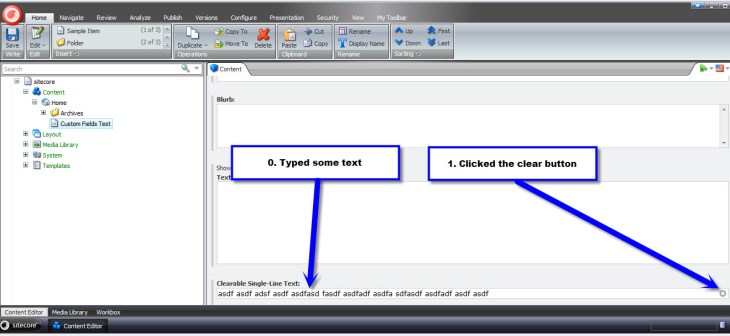
I typed in some text on my item, followed by clicking the clear button:
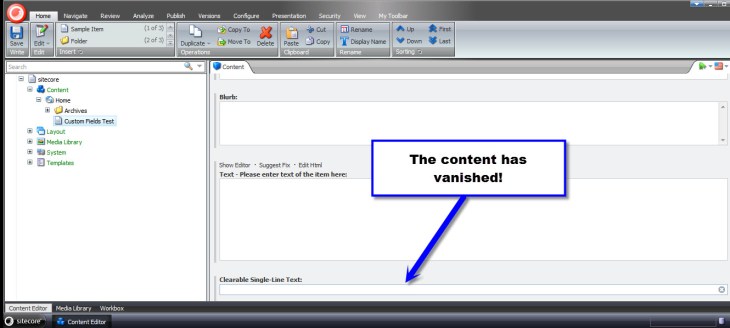
As expected, the text that I had typed was removed from the field:
After having done the above, I wanted to see if I could create a different type of custom field — creating a custom Text field was way too easy, and I wanted something more challenging. I figured creating a custom Multilist field might offer a challenge, so I decided to give it a go.
What I came up with was a custom Multilist field containing Sitecore users, instead of Items as options. I don’t know if there is any practicality in creating such a field, but I decided to go with it just for the purpose of creating a custom Multilist field.
First, I created a class to delegate responsibility for getting selected/unselected users in my field — I creating this class just in case I ever wanted to reuse this in a future custom field that should also contain Sitecore users.
using System;
using System.Collections.Generic;
using System.Linq;
using System.Text;

using Sitecore.Security.Accounts;

namespace Sitecore.Sandbox.Shell.Applications.ContentEditor.Base
{
    public interface IUsersField
    {
        IEnumerable<User> GetSelectedUsers();

        IEnumerable<User> GetUnselectedUsers();

        string GetProviderUserKey(User user);
    }
}
using System;
using System.Collections.Generic;
using System.Linq;
using System.Text;
using System.Web.Security;

using Sitecore.Configuration;
using Sitecore.Diagnostics;
using Sitecore.Security.Accounts;
using Sitecore.Text;

using Sitecore.Sandbox.Shell.Applications.ContentEditor.Base;

namespace Sitecore.Sandbox.Shell.Applications.ContentEditor
{
    public class UsersField : IUsersField
    {
        private static readonly string DomainParameterName = Settings.GetSetting("UsersField.DomainParameterName");

        private ListString _SelectedUsers;
        private ListString SelectedUsers
        {
            get
            {
                if (_SelectedUsers == null)
                {
                    _SelectedUsers = new ListString(Value);
                }

                return _SelectedUsers;
            }
        }

        private IEnumerable<User> _UsersInDomain;
        private IEnumerable<User> UsersInDomain
        {
            get
            {
                if (_UsersInDomain == null)
                {
                    _UsersInDomain = GetUsersInDomain();
                }

                return _UsersInDomain;
            }
        }

        private IEnumerable<User> _Users;
        private IEnumerable<User> Users
        {
            get
            {
                if(_Users == null)
                {
                    _Users = GetUsers();
                }

                return _Users;
            }
        }

        private string _Domain;
        private string Domain
        {
            get
            {
                if (string.IsNullOrEmpty(_Domain))
                {
                    _Domain = FieldSettings[DomainParameterName];
                }

                return _Domain;
            }
        }

        private UrlString _FieldSettings;
        private UrlString FieldSettings
        {
            get
            {
                if (_FieldSettings == null)
                {
                    _FieldSettings = GetFieldSettings();
                }

                return _FieldSettings;
            }
        }

        private string Source { get; set; }
        private string Value { get; set; }

        private UsersField(string source, string value)
        {
            SetSource(source);
            SetValue(value);
        }

        private void SetSource(string source)
        {
            Source = source;
        }

        private void SetValue(string value)
        {
            Value = value;
        }

        private IEnumerable<User> GetUsersInDomain()
        {
            if (!string.IsNullOrEmpty(Domain))
            {
                return Users.Where(user => IsUserInDomain(user, Domain));
            }

            return Users;
        }

        private static IEnumerable<User> GetUsers()
        {
            IEnumerable<User> users = UserManager.GetUsers();

            if (users != null)
            {
                return users;
            }

            return new List<User>();
        }

        private static bool IsUserInDomain(User user, string domain)
        {
            Assert.ArgumentNotNull(user, "user");
            Assert.ArgumentNotNullOrEmpty(domain, "domain");

            string userNameLowerCase = user.Profile.UserName.ToLower();
            string domainLowerCase = domain.ToLower();

            return userNameLowerCase.StartsWith(domainLowerCase);
        }

        private UrlString GetFieldSettings()
        {
            try
            {
                if (!string.IsNullOrEmpty(Source))
                {
                    return new UrlString(Source);
                }
            }
            catch (Exception ex)
            {
                Log.Error(this.ToString(), ex, this);
            }

            return new UrlString();
        }

        public IEnumerable<User> GetSelectedUsers()
        {
            IList<User> selectedUsers = new List<User>();

            foreach (string providerUserKey in SelectedUsers)
            {
                User selectedUser = UsersInDomain.Where(user => GetProviderUserKey(user) == providerUserKey).FirstOrDefault();
                if (selectedUser != null)
                {
                    selectedUsers.Add(selectedUser);
                }
            }

            return selectedUsers;
        }

        public IEnumerable<User> GetUnselectedUsers()
        {
            IList<User> unselectedUsers = new List<User>();

            foreach (User user in UsersInDomain)
            {
                if (!IsUserSelected(user))
                {
                    unselectedUsers.Add(user);
                }
            }

            return unselectedUsers;
        }

        private bool IsUserSelected(User user)
        {
            string providerUserKey = GetProviderUserKey(user);
            return IsUserSelected(providerUserKey);
        }

        private bool IsUserSelected(string providerUserKey)
        {
            return SelectedUsers.IndexOf(providerUserKey) > -1;
        }

        public string GetProviderUserKey(User user)
        {
            Assert.ArgumentNotNull(user, "user");
            MembershipUser membershipUser = Membership.GetUser(user.Profile.UserName);
            return membershipUser.ProviderUserKey.ToString();
        }

        public static IUsersField CreateNewUsersField(string source, string value)
        {
            return new UsersField(source, value);
        }
    }
}
I then modified my patch config file defined above (/App_Config/Include/CustomFields.config) with a new setting — a setting that specifies the parameter name for filtering on users’ Sitecore domain:
<?xml version="1.0" encoding="utf-8"?>
<configuration xmlns:patch="http://www.sitecore.net/xmlconfig/">
	<sitecore>
		<controlSources>
			<source mode="on" namespace="Sitecore.Sandbox.Shell.Applications.ContentEditor" assembly="Sitecore.Sandbox" prefix="contentcustom"/>
		</controlSources>
		<settings>
			<!-- Parameter name for users' Sitecore domain -->
			<setting name="UsersField.DomainParameterName" value="Domain" />
		</settings>
	  </sitecore>
</configuration>
I then created a new subclass of Sitecore.Shell.Applications.ContentEditor.MultilistEx — I ascertained this to be the class used by the Multilist field in Sitecore by looking at /sitecore/system/Field types/List Types/Multilist field type in the core database:
using System;
using System.Collections;
using System.Collections.Generic;
using System.Linq;
using System.Text;
using System.Web.Security;
using System.Web.UI;

using Sitecore.Configuration;
using Sitecore.Diagnostics;
using Sitecore.Globalization;
using Sitecore.Resources;
using Sitecore.Security.Accounts;
using Sitecore.Shell.Applications.ContentEditor;
using Sitecore.Text;

using Sitecore.Sandbox.Shell.Applications.ContentEditor.Base;

namespace Sitecore.Sandbox.Shell.Applications.ContentEditor
{
    public class UsersMultilist : MultilistEx
    {
        private IUsersField _UsersField;
        private IUsersField UsersField
        {
            get
            {
                if (_UsersField == null)
                {
                    _UsersField = CreateNewUsersField();
                }

                return _UsersField;
            }
        }

        public UsersMultilist()
        {
        }

        protected override void DoRender(HtmlTextWriter output)
        {
            Assert.ArgumentNotNull(output, "output");

            SetIDProperty();
            string disabledAttribute = string.Empty;

            if (ReadOnly)
            {
                disabledAttribute = " disabled=\"disabled\"";
            }

            output.Write(string.Format("<input id=\"{0}_Value\" type=\"hidden\" value=\"{1}\" />", ID, StringUtil.EscapeQuote(Value)));
            output.Write(string.Format("<table{0}>", GetControlAttributes()));
            output.Write("<tr>");
            output.Write(string.Format("<td class=\"scContentControlMultilistCaption\" width=\"50%\">{0}</td>", GetAllLabel()));
            output.Write(string.Format("<td width=\"20\">{0}</td>", Images.GetSpacer(20, 1)));
            output.Write(string.Format("<td class=\"scContentControlMultilistCaption\" width=\"50%\">{0}</td>", GetSelectedLabel()));
            output.Write(string.Format("<td width=\"20\">{0}</td>", Images.GetSpacer(20, 1), "</td>"));
            output.Write("</tr>");
            output.Write("<tr>");
            output.Write("<td valign=\"top\" height=\"100%\">");
            output.Write(string.Format("<select id=\"{0}_unselected\" class=\"scContentControlMultilistBox\" multiple=\"multiple\"{1} size=\"10\" ondblclick=\"javascript:scContent.multilistMoveRight('{2}')\" onchange=\"javascript:document.getElementById('{3}_all_help').innerHTML=this.selectedIndex>=0?this.options[this.selectedIndex].innerHTML:''\">", ID, disabledAttribute, ID, ID));

            IEnumerable<User> unselectedUsers = GetUnselectedUsers();
            foreach (User unselectedUser in unselectedUsers)
            {
                output.Write(string.Format("<option value=\"{0}\">{1}</option>", GetProviderUserKey(unselectedUser), unselectedUser.Profile.UserName));
            }

            output.Write("</select>");
            output.Write("</td>");
            output.Write("<td valign=\"top\">");
            RenderButton(output, "Core/16x16/arrow_blue_right.png", string.Format("javascript:scContent.multilistMoveRight('{0}')", ID));
            output.Write("<br />");
            RenderButton(output, "Core/16x16/arrow_blue_left.png", string.Format("javascript:scContent.multilistMoveLeft('{0}')", ID));
            output.Write("</td>");
            output.Write("<td valign=\"top\" height=\"100%\">");
            output.Write(string.Format("<select id=\"{0}_selected\" class=\"scContentControlMultilistBox\" multiple=\"multiple\"{1} size=\"10\" ondblclick=\"javascript:scContent.multilistMoveLeft('{2}')\" onchange=\"javascript:document.getElementById('{3}_selected_help').innerHTML=this.selectedIndex>=0?this.options[this.selectedIndex].innerHTML:''\">", ID, disabledAttribute, ID, ID));

            IEnumerable<User> selectedUsers = GetSelectedUsers();
            foreach (User selectedUser in selectedUsers)
            {
                output.Write(string.Format("<option value=\"{0}\">{1}</option>", GetProviderUserKey(selectedUser), selectedUser.Profile.UserName));
            }

            output.Write("</select>");
            output.Write("</td>");
            output.Write("<td valign=\"top\">");
            RenderButton(output, "Core/16x16/arrow_blue_up.png", string.Format("javascript:scContent.multilistMoveUp('{0}')", ID));
            output.Write("<br />");
            RenderButton(output, "Core/16x16/arrow_blue_down.png", string.Format("javascript:scContent.multilistMoveDown('{0}')", ID));
            output.Write("</td>");
            output.Write("</tr>");
            output.Write("<tr>");
            output.Write("<td valign=\"top\">");
            output.Write(string.Format("<div style=\"border:1px solid #999999;font:8pt tahoma;padding:2px;margin:4px 0px 4px 0px;height:14px\" id=\"{0}_all_help\"></div>", ID));
            output.Write("</td>");
            output.Write("<td></td>");
            output.Write("<td valign=\"top\">");
            output.Write(string.Format("<div style=\"border:1px solid #999999;font:8pt tahoma;padding:2px;margin:4px 0px 4px 0px;height:14px\" id=\"{0}_selected_help\"></div>", ID));
            output.Write("</td>");
            output.Write("<td></td>");
            output.Write("</tr>");
            output.Write("</table>");
        }

        protected void SetIDProperty()
        {
            ServerProperties["ID"] = ID;
        }

        protected static string GetAllLabel()
        {
            return GetLabel("All");
        }

        protected static string GetSelectedLabel()
        {
            return GetLabel("Selected");
        }

        protected static string GetLabel(string key)
        {
            return Translate.Text(key);
        }

        protected IEnumerable<User> GetSelectedUsers()
        {
            return UsersField.GetSelectedUsers();
        }

        protected IEnumerable<User> GetUnselectedUsers()
        {
            return UsersField.GetUnselectedUsers();
        }

        protected string GetProviderUserKey(User user)
        {
            return UsersField.GetProviderUserKey(user);
        }

        // Method "borrowed" from MultilistEx control
        protected void RenderButton(HtmlTextWriter output, string icon, string click)
        {
            Assert.ArgumentNotNull(output, "output");
            Assert.ArgumentNotNull(icon, "icon");
            Assert.ArgumentNotNull(click, "click");
            ImageBuilder builder = new ImageBuilder
            {
                Src = icon,
                Width = 0x10,
                Height = 0x10,
                Margin = "2px"
            };
            if (!ReadOnly)
            {
                builder.OnClick = click;
            }
            output.Write(builder.ToString());
        }

        private IUsersField CreateNewUsersField()
        {
            return ContentEditor.UsersField.CreateNewUsersField(Source, Value);
        }
    }
}
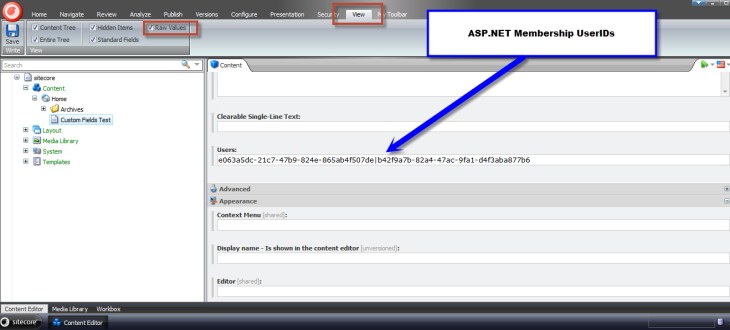
Overriding the DoRender() method paved the way for me to insert my custom Multilist options — options containg Sitecore users. Selected users will be saved as a pipe delimitered list of ASP.NET Membership UserIDs.
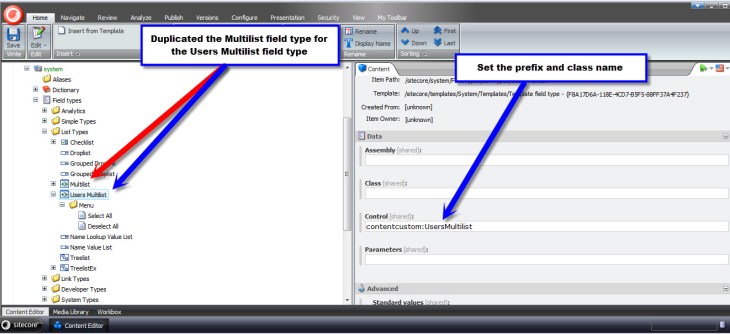
As I had done for my custom Single-Line Text above, I defined my custom Multilist field in the core database:
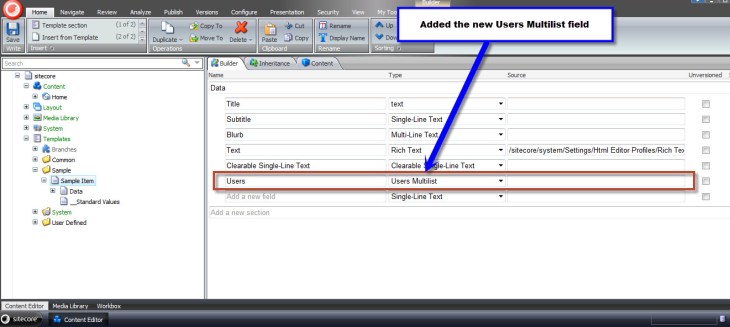
In the master database, I added a new field to my template using this new field type:
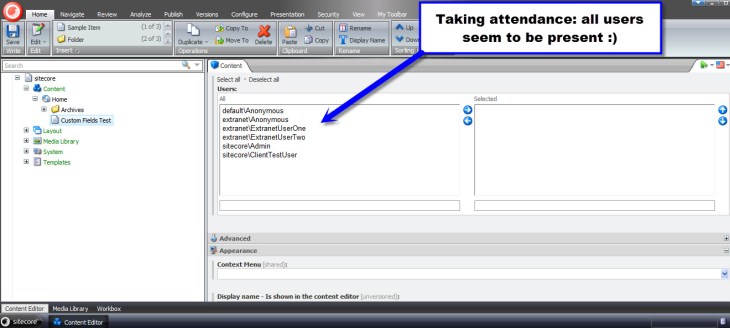
Now, let’s take this custom field for a test drive.
I went back to my item and saw that all Sitecore users were available for selection in my new field:
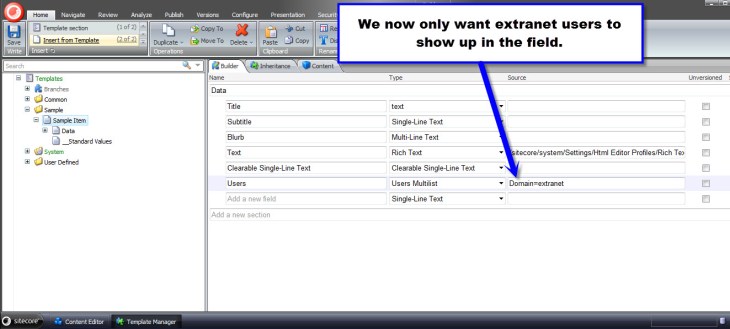
Facetiously imagine that a project manager has just run up to you anxiously lamenting — while breathing rapidly and sweating copiously — we cannot show users in the sitecore domain in our field, only those within the extranet domain — to do so will taint our credibility with our clients as Sitecore experts :). You then put on your superhero cape and proudly proclaim “rest assured, we’ve already baked this domain filtering functionality into our custom Multilist field!”:
I saved my template and navigated back to my item:

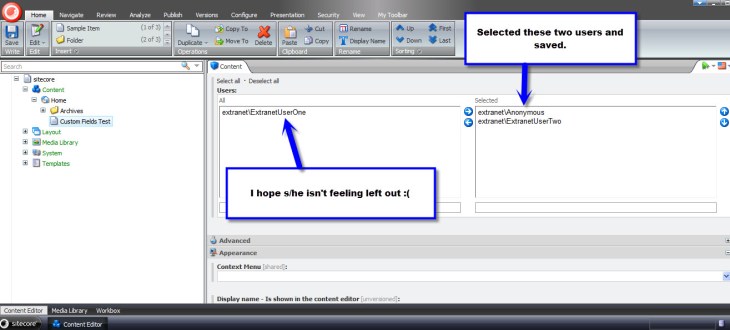
I selected a couple of users and saved:
I see their Membership UserIDs are being saved as designed:
My intent on creating the above custom fields was to showcase that the option to create your own fields exists in Sitecore. Why not have yourself a field day by creating your own? 🙂
 SitecoreJunkie.com
[…] Multilist of Sitecore Users – A blog post by Mike Reynolds showing an example of how to create a custom multilist field. His example shows how to create a multilist field of users that can be filtered by domain (As well as a simple example of customizing the single-line text field). […]