



A couple of weeks ago, I architected a Web Forms for Marketers (WFFM) solution that sends credit card information to a third-party credit card processor — via a custom form verification step — and blanks out sensitive credit card information before saving into the WFFM database.
Out of the box, WFFM will save credit card information in plain text to its database — yes, the data is hidden in the form report, although is saved to the database as plain text. This information being saved as plain text is a security risk.
One could create a solution similar to what I had done in my article discussing data encryption — albeit it might be in your best interest to avoid any headaches and potential security issues around saving and holding onto credit card information.
I can’t share the solution I built a couple of weeks ago — I built it for my current employer. I will, however, share a similar solution where I blank out the value of a field containing a social security number — a unique identifier of a citizen of the United States — of a person posing a question to the Internal Revenue Service (IRS) of the United States (yes, I chose this topic since tax season is upon us here in the US, and I loathe doing taxes :)).
First, I created a custom Web Forms for Marketers field for social security numbers. It is just a composite control containing three textboxes separated by labels containing hyphens:
using System;
using System.Collections.Generic;
using System.ComponentModel;
using System.Linq;
using System.Text;
using System.Web.UI;
using System.Web.UI.WebControls;

using Sitecore.Form.Core.Attributes;
using Sitecore.Form.Core.Controls.Data;
using Sitecore.Form.Core.Visual;
using Sitecore.Form.Web.UI.Controls;

namespace Sitecore.Sandbox.WFFM.Controls
{
    public class SocialSecurityNumber : InputControl
    {
        private const string Hyphen = "-";
        private static readonly string baseCssClassName = "scfSingleLineTextBorder";
        protected TextBox firstPart;
        protected System.Web.UI.WebControls.Label firstMiddleSeparator;
        protected TextBox middlePart;
        protected System.Web.UI.WebControls.Label middleLastSeparator;
        protected TextBox lastPart;

        public SocialSecurityNumber() : this(HtmlTextWriterTag.Div)
        {
            firstPart = new TextBox();
            firstMiddleSeparator = new System.Web.UI.WebControls.Label { Text = Hyphen };
            middlePart = new TextBox();
            middleLastSeparator = new System.Web.UI.WebControls.Label { Text = Hyphen };
            lastPart = new TextBox();
        }

        public SocialSecurityNumber(HtmlTextWriterTag tag)
            : base(tag)
        {
            this.CssClass = baseCssClassName;
        }

        protected override void OnInit(EventArgs e)
        {
            SetCssClasses();
            SetTextBoxeWidths();
            SetMaxLengths();
            SetTextBoxModes();
            AddChildControls();
        }

        private void SetCssClasses()
        {
            help.CssClass = "scfSingleLineTextUsefulInfo";
            title.CssClass = "scfSingleLineTextLabel";
            generalPanel.CssClass = "scfSingleLineGeneralPanel";
        }

        private void SetTextBoxeWidths()
        {
            firstPart.Style.Add("width", "40px");
            middlePart.Style.Add("width", "35px");
            lastPart.Style.Add("width", "50px");
        }

        private void SetMaxLengths()
        {
            firstPart.MaxLength = 3;
            middlePart.MaxLength = 2;
            lastPart.MaxLength = 4;
        }

        private void SetTextBoxModes()
        {
            firstPart.TextMode = TextBoxMode.SingleLine;
            middlePart.TextMode = TextBoxMode.SingleLine;
            lastPart.TextMode = TextBoxMode.SingleLine;
        }

        private void AddChildControls()
        {
            Controls.AddAt(0, generalPanel);
            Controls.AddAt(0, title);

            generalPanel.Controls.Add(firstPart);
            generalPanel.Controls.Add(firstMiddleSeparator);
            generalPanel.Controls.Add(middlePart);
            generalPanel.Controls.Add(middleLastSeparator);
            generalPanel.Controls.Add(lastPart);
            generalPanel.Controls.Add(help);
        }

        public override string ID
        {
            get
            {
                return firstPart.ID;
            }
            set
            {
                title.ID = string.Concat(value, "_text");
                firstPart.ID = value;
                base.ID = string.Concat(value, "_scope");
                title.AssociatedControlID = firstPart.ID;
            }
        }

        public override ControlResult Result
        {
            get
            {
                return GetNewControlResult();
            }
        }

        private ControlResult GetNewControlResult()
        {
            TrimAllTextBoxes();
            return new ControlResult(ControlName, GetValue(), string.Empty);
        }

        private string GetValue()
        {
            bool hasValue = !string.IsNullOrEmpty(firstPart.Text)
                            && !string.IsNullOrEmpty(middlePart.Text)
                            && !string.IsNullOrEmpty(lastPart.Text);

            if (hasValue)
            {
                return string.Concat(firstPart.Text, firstMiddleSeparator.Text, middlePart.Text, middleLastSeparator.Text, lastPart.Text);
            }

            return string.Empty;
        }

        private void TrimAllTextBoxes()
        {
            firstPart.Text = firstPart.Text.Trim();
            middlePart.Text = middlePart.Text.Trim();
            lastPart.Text = lastPart.Text.Trim();
        }
    }
}
I then registered this custom field in Sitecore. I added my custom field item under /sitecore/system/Modules/Web Forms for Marketers/Settings/Field Types/Custom:

Next, I decided to create a generic interface that defines objects that will excise or rip out values from a given object of a certain type, and returns a new object of another type — although both types could be the same:
using System;
using System.Collections.Generic;
using System.Linq;
using System.Text;

namespace Sitecore.Sandbox.Utilities.Excisors.Base
{
    public interface IExcisor<T, U>
    {
        U Excise(T source);
    }
}
My WFFM excisor will take in a collection of WFFM fields and return a new collection where the targeted field values — field values that I don’t want saved into the WFFM database — are set to the empty string.
using System;
using System.Collections.Generic;
using System.Linq;
using System.Text;

using Sitecore.Form.Core.Controls.Data;
using Sitecore.Form.Core.Client.Data.Submit;

namespace Sitecore.Sandbox.Utilities.Excisors.Base
{
    public interface IWFFMFieldValuesExcisor : IExcisor<AdaptedResultList, AdaptedResultList>
    {
    }
}
using System;
using System.Collections.Generic;
using System.Linq;
using System.Text;

using Sitecore.Diagnostics;
using Sitecore.Form.Core.Client.Data.Submit;
using Sitecore.Form.Core.Controls.Data;

using Sitecore.Sandbox.Utilities.Excisors.Base;

namespace Sitecore.Sandbox.Utilities.Excisors
{
    public class WFFMFieldValuesExcisor : IWFFMFieldValuesExcisor
    {
        private IEnumerable<string> FieldNamesForExtraction { get; set; }

        private WFFMFieldValuesExcisor(IEnumerable<string> fieldNamesForExtraction)
        {
            SetFieldNamesForExtraction(fieldNamesForExtraction);
        }

        private void SetFieldNamesForExtraction(IEnumerable<string> fieldNamesForExtraction)
        {
            Assert.ArgumentNotNull(fieldNamesForExtraction, "fieldNamesForExtraction");
            FieldNamesForExtraction = fieldNamesForExtraction;
        }

        public AdaptedResultList Excise(AdaptedResultList fields)
        {
            if(fields == null || fields.Count() < 1)
            {
                return fields;
            }

            List<AdaptedControlResult> adaptedControlResults = new List<AdaptedControlResult>();

            foreach(AdaptedControlResult field in fields)
            {
                adaptedControlResults.Add(GetExtractValueFieldIfApplicable(field));
            }

            return adaptedControlResults;
        }

        private AdaptedControlResult GetExtractValueFieldIfApplicable(AdaptedControlResult field)
        {
            if(ShouldExtractFieldValue(field))
            {
                return GetExtractedValueField(field);
            }

            return field;
        }

        private bool ShouldExtractFieldValue(ControlResult field)
        {
            return FieldNamesForExtraction.Contains(field.FieldName);
        }

        private static AdaptedControlResult GetExtractedValueField(ControlResult field)
        {
            return new AdaptedControlResult(CreateNewControlResultWithEmptyValue(field), true);
        }

        private static ControlResult CreateNewControlResultWithEmptyValue(ControlResult field)
        {
            ControlResult controlResult = new ControlResult(field.FieldName, string.Empty, field.Parameters);
            controlResult.FieldID = field.FieldID;
            return controlResult;
        }

        public static IWFFMFieldValuesExcisor CreateNewWFFMFieldValuesExcisor(IEnumerable<string> fieldNamesForExtraction)
        {
            return new WFFMFieldValuesExcisor(fieldNamesForExtraction);
        }
    }
}
For scalability purposes and to avoid hard-coding field name values, I put my targeted fields — I only have one at the moment — into a config file:
<?xml version="1.0" encoding="utf-8"?>
<configuration xmlns:patch="http://www.sitecore.net/xmlconfig/">
	<sitecore>
		<settings>
			<setting name="ExciseFields.SocialSecurityNumberField" value="Social Security Number" />
		</settings>
	</sitecore>
</configuration>
I then created a custom save to database action where I call my utility class to rip out my specified targeted fields, and pass that through onto the base save to database action class:
using System;
using System.Collections.Generic;
using System.Linq;
using System.Text;

using Sitecore.Configuration;
using Sitecore.Data;
using Sitecore.Form.Core.Client.Data.Submit;
using Sitecore.Form.Submit;

using Sitecore.Sandbox.Utilities.Excisors;
using Sitecore.Sandbox.Utilities.Excisors.Base;

namespace Sitecore.Sandbox.WFFM.Actions
{
    public class ExciseFieldValuesThenSaveToDatabase : SaveToDatabase
    {
        private static readonly IEnumerable<string> FieldsToExcise = new string[] { Settings.GetSetting("ExciseFields.SocialSecurityNumberField") };

        public override void Execute(ID formId, AdaptedResultList fields, object[] data)
        {
            base.Execute(formId, ExciseFields(fields), data);
        }

        private AdaptedResultList ExciseFields(AdaptedResultList fields)
        {
            IWFFMFieldValuesExcisor excisor = WFFMFieldValuesExcisor.CreateNewWFFMFieldValuesExcisor(FieldsToExcise);
            return excisor.Excise(fields);
        }
    }
}
I created a new item to register my custom save to database action under /sitecore/system/Modules/Web Forms for Marketers/Settings/Actions/Save Actions:

I then created my form:
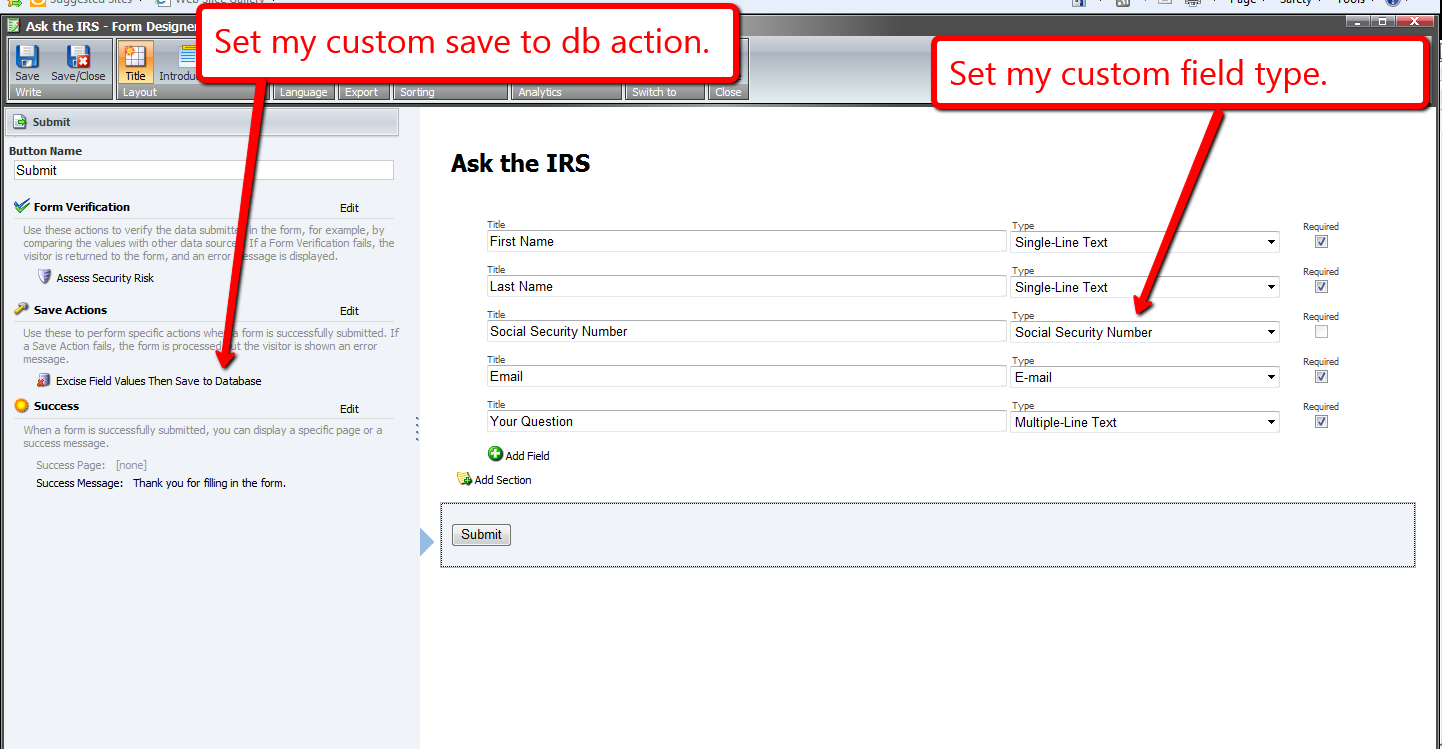
I set this form on a new page item, and published all of my changes above.
Now, it’s time to test this out. I navigated to my form, and filled it in as an irate tax payer might:

Looking at my form’s report, I see that the social security number was blanked out before being saved to the database:

A similar solution could also be used to add new field values into the collection of fields — values of fields that wouldn’t be available on the form, but should be displayed in the form report. An example might include a transaction ID or approval ID returned from a third-party credit card processor. Instead of ripping values, values would be inserted into the collection of fields, and then passed along to the base save to database action class.
 SitecoreJunkie.com
[…] a previous article, I discussed how one could remove Web Forms for Marketers (WFFM) field values before saving form […]
Very interesting post! It seems there isn’t that much WFFM documentation out there. This is good to know in the event that I ever use WFFM to collect payment information. I’ll have to bookmark your site!
On a somewhat related note – do you know if WFFM offers an opt-out option, so that people who have already submitted a form can remove themselves from the related database as well? All ideas welcome.
Hi Jeff,
Would this be in the context of a newsletter signup form?
Mike
Great Post on WFFM.I plan to create a form with countries > states populated, so seeing how custom fields are created really helps me out!
I used this ref. example but I am not able to see the ” Social security field ” in The form .